OWNER'S MANUAL
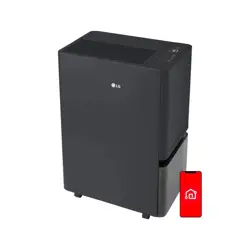
DEHUMIDIFIER
Read this owner's manual thoroughly before operating the
appliance and keep it handy for reference at all times.
ENGLISH
DT50*B*R*,DT35*B*R*, DT25*B*R*
MFL05854901
Rev.00_041326
www.lg.com
Copyright © 2026 LG Electronics. All Rights Reserved
Scan to see the online manual.
TABLE OF CONTENTS
2
3 IMPORTANT SAFETY
INSTRUCTIONS
3 READ AND SAVE THESE INSTRUCTIONS
3 WARNING INSTRUCTIONS
6 CAUTION INSTRUCTIONS
7 Service-Related Safety Messages
12 OPERATION
12 Product Overviews
14 Preparation before Operation
15 Features
18 Operating the Dehumidifer
20 Using the Extra Functions
21 Emptying the Bucket
25 SMART FUNCTIONS
25 LG ThinQ Application
26 Smart Diagnosis
28 MAINTENANCE
28 Maintaining the Product
30 TROUBLESHOOTING
30 Before Calling for Service
33 APPENDIX
33 Specifications
34 Warranty
3IMPORTANT SAFETY INSTRUCTIONS
ENGLISH
IMPORTANT SAFETY INSTRUCTIONS
READ AND SAVE THESE INSTRUCTIONS
The following safety guidelines are intended to prevent unforeseen risks or damage from unsafe or
incorrect operation of the appliance.
The guidelines are separated into ‘WARNING’ and ‘CAUTION’ as described below.
Safety Messages
Your safety and the safety of others are very important.
We have provided many important safety messages in this manual and on your appliance. Always read and
follow all safety messages.
All safety messages will tell you what the potential hazard is, tell you how to reduce the chance of injury,
and tell you what may happen if the instructions are not followed.
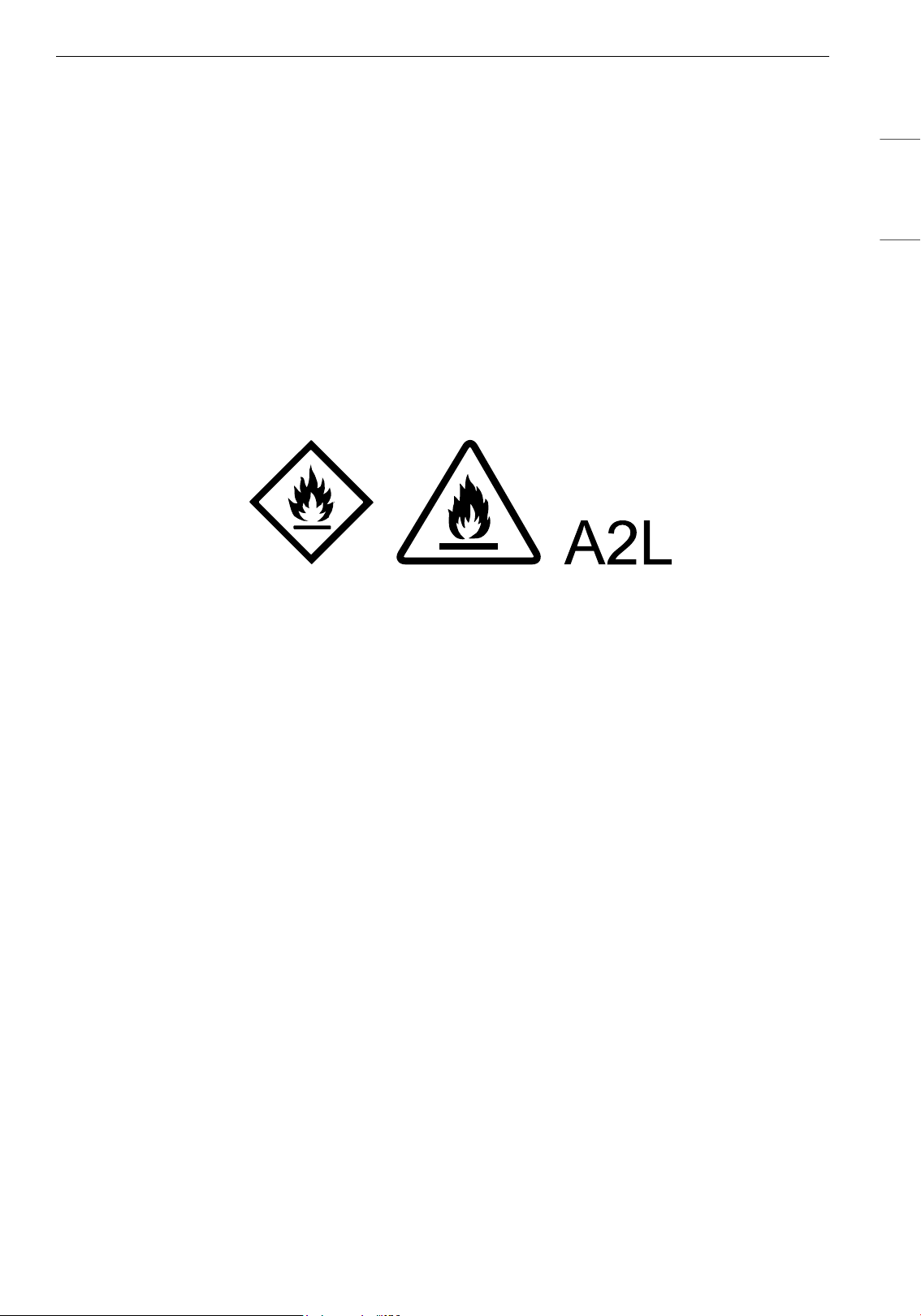
Notes for Flammable Refrigerant
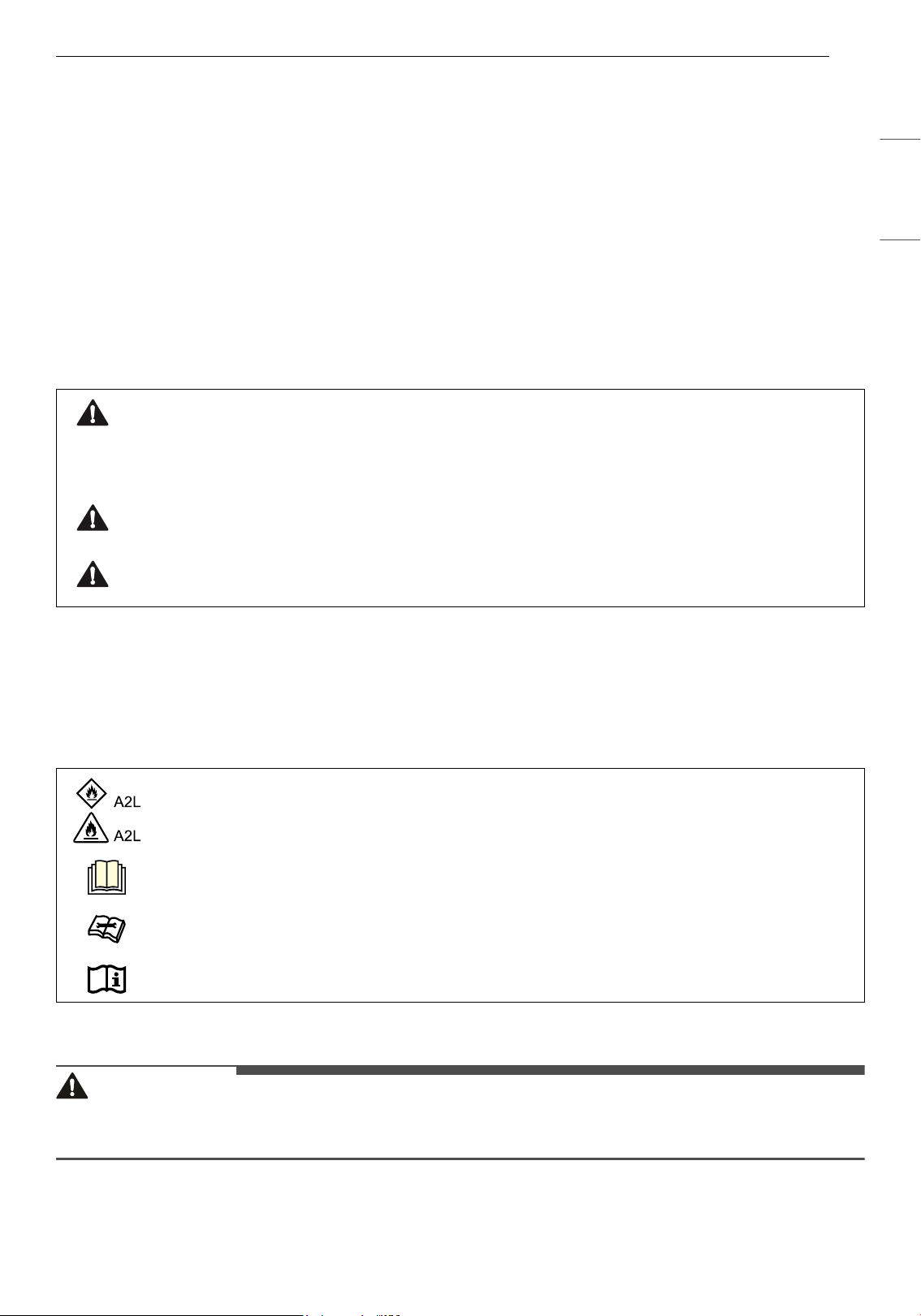
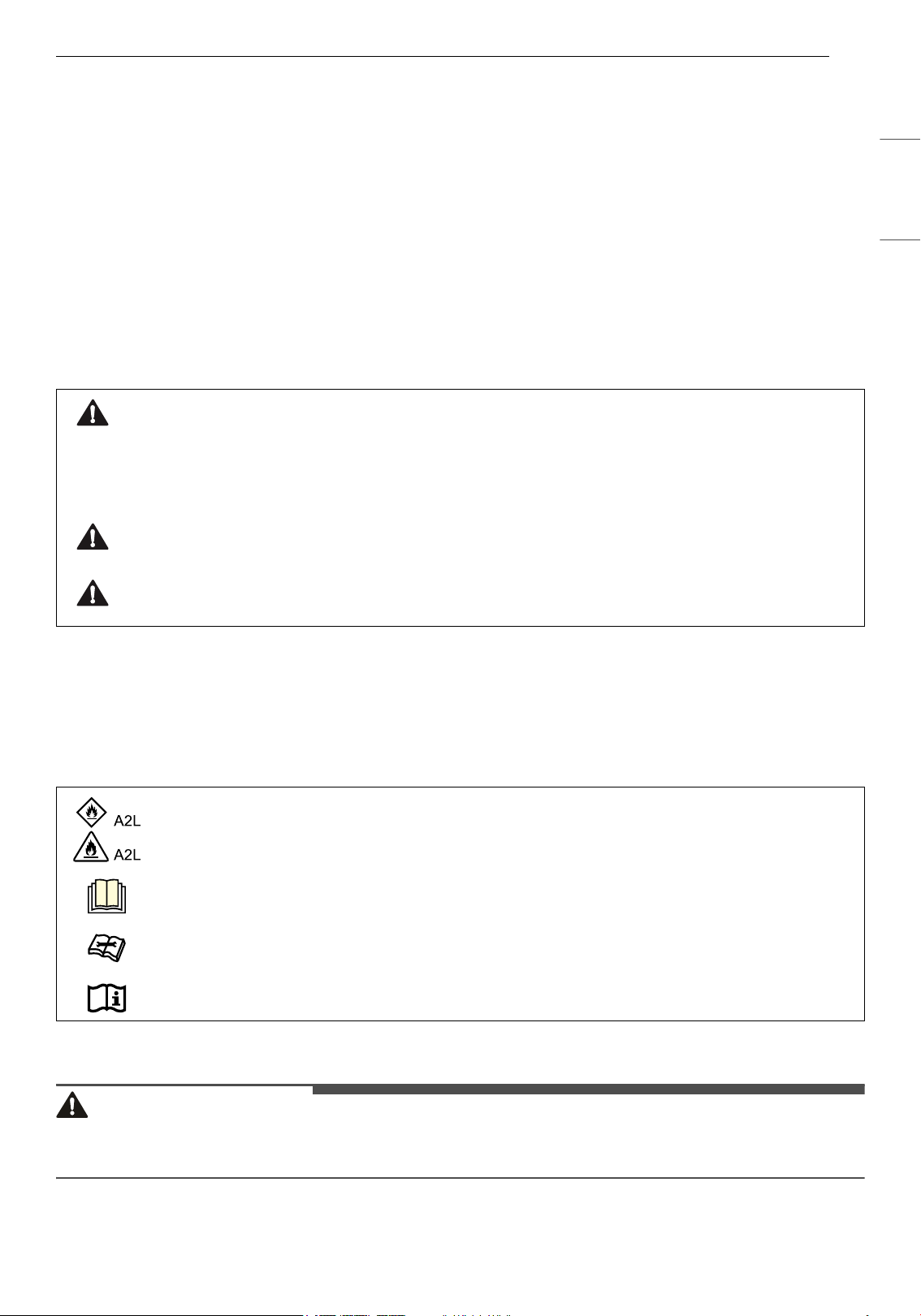
The following symbols are displayed on unit.
WARNING INSTRUCTIONS
WARNING
• To reduce the risk of explosion, fire, death, electric shock, injury or scalding to persons when using this
product, follow basic precautions, including the following:
This is the safety alert symbol.
This symbol alerts you to potential hazards that can kill or injure you and others. All safety messages
will follow the safety alert symbol and either the word WARNING or CAUTION.
These words mean:
WARNING
You may be killed or seriously injured if you do not follow instructions.
CAUTION
You may be injured or cause damage to the product if you do not follow instructions.
This symbol indicates that this appliance uses a flammable refrigerant. If the refrigerant is
leaked and exposure to an external ignition source, there is a risk of fire.
This symbol indicates that the Operation Manual should be read carefully.
This symbol indicates that a service personnel should be handling this equipment with
reference to the Installation Manual.
This symbol indicates that information is available such as the Operating Manual or Installation
Manual.
4 IMPORTANT SAFETY INSTRUCTIONS
Technical Safety
• This appliance is not intended for use by persons (including children) with reduced physical, sensory, or
mental capabilities, or lack of experience and knowledge, unless they are under supervision or have
received instruction regarding its safe use by a person responsible for their safety. Children should be
supervised to ensure that they do not play with the appliance.
• If the supply cord is damaged, it must be replaced by the manufacturer, its service agent or similarly
qualified person in order to avoid a hazard.
• Only an authorized repair person should disassemble, repair, or modify the appliance.
• Do not touch the power plug with wet hands.
• Do not place the power cord under rugs, carpeting or mats.
• Do not install and use broken parts.
• Any In House service related to refrigerant system, are prohibited.
• Any hot work service, including brazing, charging, are prohibited.
Installation
• Do not install the appliance on an uneven or inclined surface.
• Do not install the appliance in an area exposed to direct sunlight or near heat-generating equipment.
• Do not install the product in a place where combustible gas may leak or industrial oil or metallic
particulates are present.
• Do not allow the appliance to push against the power cord or plug.
• Do not bend the power cable excessively or place a heavy object on top of it.
• Do not extend the length of the power cable or alter it.
• Do not use several devices on a multi-socket extension outlet.
• Do not use the product if the power outlet is damaged or loose.
• Make sure that the power cable cannot be pulled out or damaged during operation.
• When unplugging the power cord, always pull it by the plug.
• Unplug the appliance during thunder or lightning storms or when not in use for a long time.
Operation
• If the appliance is immersed in water, stop using it and contact an LG Electronics Customer Information
Center.
• If there is a gas leakage (isobutane, propane, LNG, etc.), do not touch the appliance or power plug and
ventilate the area immediately.
• If you detect any abnormal noise, odor or smoke, unplug the appliance immediately and contact an LG
Electronics Customer Information Center.
• Do not clean the appliance with brushes, cloths or sponges which are abrasive or made of metal.
• Do not use or store fire, combustibles (ether, benzene, alcohol, drugs, propane, butane, combustible
spray, insecticide, air freshener, cosmetics, etc.) or flammable materials (candles, lamps, etc.) near the
product.
• Do not allow animals or pets to chew on the power cord.
• Do not move the appliance when it is in operation.
• Do not hit the appliance.
• Do not insert hands or metal objects into the air inlet or outlet.
• Do not put flammables into the appliance.
• Do not allow children to climb on or play with the appliance.
5IMPORTANT SAFETY INSTRUCTIONS
ENGLISH
• Do not place anything on top of the appliance.
• Do not place combustion appliances directly in the path of the dehumidifier`s airway.
• Do not use the product in places where it could be splashed by water.
• Do not use the product in direct sunlight or rain.
Maintenance
• Dispose of the packing materials (vinyl, styrofoam, etc.) to keep them out of reach of children.
• Take care not to injure or pinch yourself when you detach and reattach parts of the appliance.
• Turn off and unplug the appliance before cleaning it or replacing the filter.
• Do not use water to clean the dehumidifier.
Refrigerant (For R32 Only)
• Do not use means to accelerate the defrosting process or to clean, other than those recommended by
the manufacturer.
• The appliance shall be stored in a room without continuously operating open flames (for example an
operating gas appliance) and ignition sources (for example an operating electric heater).
• Do not pierce or burn.
• Be aware that flammable refrigerants may not contain an odor.
• National gas regulations shall be observed.
• Mechanical connections shall be accessible for maintenance purpose.
• The appliance shall be stored in a well-ventilated area where the room size corresponds to the room
area as specified for operation.
6 IMPORTANT SAFETY INSTRUCTIONS
CAUTION INSTRUCTIONS
CAUTION
• To reduce the risk of minor injury to persons, malfunction, or damage to the product or property when
using this product, follow basic precautions, including the following:
Installation
• Do not tilt the appliance to pull or push it when transporting.
• Do not install the appliance in a vehicle, RV, or marine vessel.
• Do not place the appliance near a TV or stereo equipment.
• Do not place the appliance under bright light.
• Do not place vases or water jars on the dehumidifier.
• The appliance must be installed in accordance with national wiring regulations.
• When moving or storing the product, store the power plug in the power plug storage to prevent
personal injury, damage to the cord or damage to floors.
• Do not place the appliance near curtains.
• Do not use excessive force when pulling the extension hose.
Operation
• Do not use the product for removal of toxic gas such as carbon monoxide.
• Do not use the appliance for a long time in a region with unstable voltage.
• Do not place obstacles around the air inlet or outlet.
• For safe use of the appliance, children or others with reduced mental capabilities need to be closely
monitored by a person who is responsible for their safety.
• Do not use the product for special purposes such as preserving plants, precision instruments, artworks,
etc.
• Do not operate the appliance with wet hands.
• Do not use the appliance while it is not in an upright position.
• Do not use the appliance near objects vulnerable to heat.
• Do not use detergents, cosmetics, chemicals, air fresheners, or disinfectants in the appliance.
• Do not touch any internal parts while the unit is operating or immediately after operation.
• Do not insert any objects into the air outlet.
• Do not use the product in places where chemicals are used.
• Do not operate the dehumidifier without a filter.
• Turn off the dehumidifier and empty the bucket before moving the dehumidifier.
• Pull out the power plug if you will not be using the product for an extended period.
• Do not use the product in a very small space such as a closet.
• Do not keep the power cord tied up when using the product.
• Do not spray foreign substances or water into the sensor hole.
• Do not allow children to climb on the product.
Maintenance
• Do not use strong detergents or solvents to clean the appliance. Use a soft cloth to clean.
7IMPORTANT SAFETY INSTRUCTIONS
ENGLISH
• Do not clean the appliance with an alkaline detergent.
• Do not wipe the appliance surface using sulfuric acid, hydrochloric acid or organic solvents (thinner,
kerosene etc.) or attach a sticker on the appliance.
• Turn off the dehumidifier and pull out the power plug before cleaning.
• Do not allow water inside the appliance.
• Do not touch the heat exchanger.
• Wear gloves when cleaning the product and removing the filter, and be careful not to injure yourself on
sharp parts (such as the heat exchanger).
• Do not clean the heat exchanger yourself. Doing so may result in injury.
Refrigerant (For R32 Only)
• This unit contains flammable refrigerant and has special safety precautions not normally associated with
older dehumidifier. Follow all precautions and advisories.
- Use caution while handling and prevent damage to the product. Do not put any holes into the product
for any reason. This can cause damage to the product and prevent it from cooling.
- Maintenance and cleaning of the product should be performed by trained personnel. Failure to
properly clean the product can result in damage to the refrigeration system and or the electrical
system.
- Service should only be performed by technicians properly trained and certified in the use of flammable
refrigerants. Any service performed by unauthorized servicers/individuals will void all warranties.
- Do not store the product near appliances with open flames, such as gas water heaters or furnaces. Do
not store near electric heaters. Damaged products should be repaired before storing.
- Servicing shall only be performed as recommended by the equipment manufacturer. Maintenance and
repair requiring the assistance of other skilled personnel shall be carried out under the supervision of
the person competent in the use of flammable refrigerants.
- The appliance shall be stored so as to prevent mechanical damage from occurring.
- The refrigerant and insulation blowing gas used in the appliance require special disposal procedures.
Consult a service agent or a similarly qualified person before disposing of them.
Service-Related Safety Messages
Safety Messages for Service Personnel
• This appliance is not intended for use by persons (including children) with reduced physical, sensory or
mental capabilities, or lack of experience and knowledge, unless they have been given supervision or
instruction concerning use of the appliance by a person responsible for their safety.
• Children should be supervised to ensure that they do not play with the appliance.
• If the SUPPLY CORD is damaged, it must be replaced by the manufacturer, its service agent or similarly
qualified persons in order to avoid a hazard.
• The appliance shall be installed in accordance with national wiring regulations.
WARNING
• Do not use means to accelerate the defrosting process or to clean, other than those recommended by
the manufacturer.
• The appliance shall be stored in a room without continuously operating ignition sources (for example:
open flames, an operating gas appliance or an operating electric heater.
• Do not pierce or burn.
• Be aware that refrigerants may not contain an odour.
8 IMPORTANT SAFETY INSTRUCTIONS
• Servicing shall be performed only as recommended by the manufacturer.
• Ampacities of supply cords and attachment plugs shall not be less than the current rating of the
appliance and shall be suitable for the application in accordance with national electrical installation
requirements.
• Qualification of workers
The manual shall contain specific information about the required qualification of the working personnel
for maintenance, service and repair operations. Every working procedure that affects safety means shall
only be carried out by qualified person by manufacturer.
Examples of such work procedures are as follows:
- breaking into the refrigerating circuit;
- opening of sealed components;
- opening of ventilated enclosures.
• Ventilated area
Ensure that the area is in the open or that it is adequately ventilated before breaking into the system or
conducting any hot work.
A degree of ventilation shall continue during the period that the work is carried out.
The ventilation should safely disperse any released refrigerant and preferably expel it externally into the
atmosphere.
• Cabling
Check that cabling will not be subject to wear, corrosion, excessive pressure, vibration, sharp edges or
any other adverse environmental effects. The check shall also take into account the effects of aging or
continual vibration from sources such as compressors or fans.
• Detection of flammable refrigerants
Under no circumstances shall potential sources of ignition be used in the searching for or detection of
refrigerant leaks. A halide torch (or any other detector using a naked flame) shall not be used.
• Leak detection methods
The following leak detection methods are deemed acceptable for all refrigerant systems.
Electronic leak detectors may be used to detect refrigerant leaks but, in the case of FLAMMABLE
REFRIGERANTS, the sensitivity may not be adequate, or may need re-calibration. (Detection equipment
shall be calibrated in a refrigerant-free area.) Ensure that the detector is not a potential source of
ignition and is suitable for the refrigerant used. Leak detection equipment shall be set at a percentage of
the LFL of the refrigerant and shall be calibrated to the refrigerant employed, and the appropriate
percentage of gas (25 % maximum) is confirmed.
Leak detection fluids are also suitable for use with most refrigerants but the use of detergents
containing chlorine shall be avoided as the chlorine may react with the refrigerant and corrode the
copper pipe-work.
Examples of leak detection fluids are:
- bubble method
- fluorescent method agents
If a leak is suspected, all naked flames shall be removed/extinguished.
If a leakage of refrigerant is found which requires brazing, all of the refrigerant shall be recovered from
the system, or isolated (by means of shut off valves) in a part of the system remote from the leak.
Removal of refrigerant shall be according to removal and evacuation procedure.
• Removal and evacuation
When breaking into the refrigerant circuit to make repairs – or for any other purpose – conventional
procedures shall be used. However, for flammable refrigerants it is important that best practice be
followed, since flammability is a consideration. The following procedure shall be adhered to:
- safely remove refrigerant following local and national regulations;
- evacuate;
- purge the circuit with inert gas (optional for A2L);
9IMPORTANT SAFETY INSTRUCTIONS
ENGLISH
- evacuate (optional for A2L);
- continuously flush or purge with inert gas when using flame to open circuit; and
- open the circuit.
The refrigerant charge shall be recovered into the correct recovery cylinders if venting is not allowed by
local and national codes. For appliances containing flammable refrigerants, the system shall be purged
with oxygen-free nitrogen to render the appliance safe for flammable refrigerants. This process might
need to be repeated several times. Compressed air or oxygen shall not be used for purging refrigerant
systems.
For appliances containing flammable refrigerants, refrigerants purging shall be achieved by breaking
the vacuum in the system with oxygen-free nitrogen and continuing to fill until the working pressure is
achieved, then venting to atmosphere, and finally pulling down to a vacuum (optional for A2L). This
process shall be repeated until no refrigerant is within the system (optional for A2L). When the final
oxygen-free nitrogen charge is used, the system shall be vented down to atmospheric pressure to
enable work to take place.
The outlet for the vacuum pump shall not be close to any potential ignition sources, and ventilation shall
be available.
• Charging procedures
In addition to conventional charging procedures, the following requirements shall be followed.
- Ensure that contamination of different refrigerants does not occur when using charging equipment.
Hoses or lines shall be as short as possible to minimise the amount of refrigerant contained in them.
- Cylinders shall be kept in an appropriate position according to the instruction.
- Ensure that the refrigerating system is earthed prior to charging the system with refrigerant.
- Label the system when charging is complete (if not already).
- Extreme care shall be taken not to overfill the refrigerating system.
Prior to recharging the system, it shall be pressure-tested with the appropriate purging gas. The system
shall be leak-tested on completion of charging but prior to commissioning. A follow up leak test shall be
carried out prior to leaving the site.
• Recovery
When removing refrigerant from a system, either for servicing or decommissioning, it is recommended
good practice that all refrigerants are removed safely.
When transferring refrigerant into cylinders, ensure that only appropriate refrigerant recovery cylinders
are employed. Ensure that the correct number of cylinders for holding the total system charge is
available. All cylinders to be used are designated for the recovered refrigerant and labelled for that
refrigerant (i.e. special cylinders for the recovery of refrigerant). Cylinders shall be complete with
pressure-relief valve and associated shut-off valves in good working order. Empty recovery cylinders are
evacuated and, if possible, cooled before recovery occurs.
The recovery equipment shall be in good working order with a set of instructions concerning the
equipment that is at hand and shall be suitable for the recovery of the flammable refrigerant. If in doubt,
the manufacturer should be consulted. In addition, a set of calibrated weighing scales shall be available
and in good working order. Hoses shall be complete with leak-free disconnect couplings and in good
condition.
The recovered refrigerant shall be processed according to local legislation in the correct recovery
cylinder, and the relevant waste transfer note arranged. Do not mix refrigerants in recovery units and
especially not in cylinders.
If compressors or compressor oils are to be removed, ensure that they have been evacuated to an
acceptable level to make certain that flammable refrigerant does not remain within the lubricant. The
compressor body shall not be heated by an open flame or other ignition sources to accelerate this
process. When oil is drained from a system, it shall be carried out safely.
• Checks to the area
Prior to beginning work on systems containing flammable refrigerants, safety checks are necessary to
ensure that the risk of ignition is minimised. For repair to the refrigerating system, the following
precautions shall be complied with prior to conducting work on the system.
10 IMPORTANT SAFETY INSTRUCTIONS
• Work procedure
Work shall be undertaken under a controlled procedure so as to minimise the risk of a flammable gas or
vapour being present while the work is being performed.
• General work area
All maintenance staff and others working in the local area shall be instructed on the nature of work
being carried out. Work in confined spaces shall be avoided.
• Checking for presence of refrigerant
The area shall be checked with an appropriate refrigerant detector prior to and during work, to ensure
the technician is aware of potentially toxic or flammable atmospheres. Ensure that the leak detection
equipment being used is suitable for use with flammable refrigerants, i.e. non-sparking, adequately
sealed or intrinsically safe.
• Presence of fire extinguisher
If any hot work is to be conducted on the refrigerating equipment or any associated parts, appropriate
fire extinguishing equipment shall be available to hand. Have a dry powder or CO
2
fire extinguisher
adjacent to the charging area.
• No ignition sources
No person carrying out work in relation to a refrigerating system which involves exposing any pipe work
shall use any sources of ignition in such a manner that it may lead to the risk of fire or explosion. All
possible ignition sources, including cigarette smoking, should be kept sufficiently far away from the site
of installation, repairing, removing and disposal, during which refrigerant can possibly be released to
the surrounding space. Prior to work taking place, the area around the equipment is to be surveyed to
make sure that there are no flammable hazards or ignition risks. “No Smoking” signs shall be displayed.
• Checks to the refrigerating equipment
Where electrical components are being changed, they shall be fit for the purpose and to the correct
specification. At all times the manufacturer’s maintenance and service guidelines shall be followed. If in
doubt consult the manufacturer’s technical department for assistance.
The following checks shall be applied to installations using flammable refrigerants:
- The actual refrigerant charge is in accordance with the room size within which the refrigerant
containing parts are installed.
- The ventilation machinery and outlets are operating adequately and are not obstructed.
- If an indirect refrigerating circuit is being used, the secondary circuit shall be checked for the presence
of refrigerant.
- Marking to the equipment continues to be visible and legible. Markings and signs that are illegible
shall be corrected.
- Refrigerating pipe or components are installed in a position where they are unlikely to be exposed to
any substance which may corrode refrigerant containing components, unless the components are
constructed of materials which are inherently resistant to being corroded or are suitably protected
against being so corroded.
• Checks to electrical devices
Repair and maintenance to electrical components shall include initial safety checks and component
inspection procedures. If a fault exists that could compromise safety, then no electrical supply shall be
connected to the circuit until it is satisfactorily dealt with. If the fault cannot be corrected immediately
but it is necessary to continue operation, an adequate temporary solution shall be used. This shall be
reported to the owner of the equipment so all parties are advised.
Initial safety checks shall include:
- Capacitors are discharged: this shall be done in a safe manner to avoid possibility of sparking.
- No live electrical components and wiring are exposed while charging, recovering or purging the
system.
- Continuity of earth bonding
• Repairs to sealed components
"Sealed electrical components shall be replaced."
11IMPORTANT SAFETY INSTRUCTIONS
ENGLISH
SAVE THESE INSTRUCTIONS
• Repair to intrinsically safe components
"Intrinsically safe components must be replaced."
• Decommissioning
Before carrying out this procedure, it is essential that the technician is completely familiar with the
equipment and all its detail. It is recommended good practice that all refrigerants are recovered safely.
Prior to the task being carried out, an oil and refrigerant sample shall be taken in case analysis is
required prior to re-use of recovered refrigerant. It is essential that electrical power is available before
the task is commenced.
a) Become familiar with the equipment and its operation.
b) Isolate system electrically.
c) Before attempting the procedure ensure that:
- mechanical handling equipment is available, if required, for handling refrigerant cylinders
- all personal protective equipment is available and being used correctly
- the recovery process is supervised at all times by a competent person
- recovery equipment and cylinders conform to the appropriate standards.
d) Pump down refrigerant system, if possible.
e) If a vacuum is not possible, make a manifold so that refrigerant can be removed from various parts of
the system.
f) Make sure that cylinder is situated on the scales before recovery takes place.
g) Start the recovery machine and operate in accordance with instructions.
h) Do not overfill cylinders. (No more than 80 % volume liquid charge).
i) Do not exceed the maximum working pressure of the cylinder, even temporarily.
j) When the cylinders have been filled correctly and the process completed, make sure that the cylinders
and the equipment are removed from site promptly and all isolation valves on the equipment are closed
off.
k) Recovered refrigerant shall not be charged into another refrigerating system unless it has been
cleaned and checked.
• Labelling
Equipment shall be labelled stating that it has been de-commissioned and emptied of refrigerant.
The label shall be dated and signed.
Ensure that there are labels on the equipment stating the equipment contains flammable refrigerant.
12 OPERATION
OPERATION
• The exterior or components of the product may vary depending on the model.
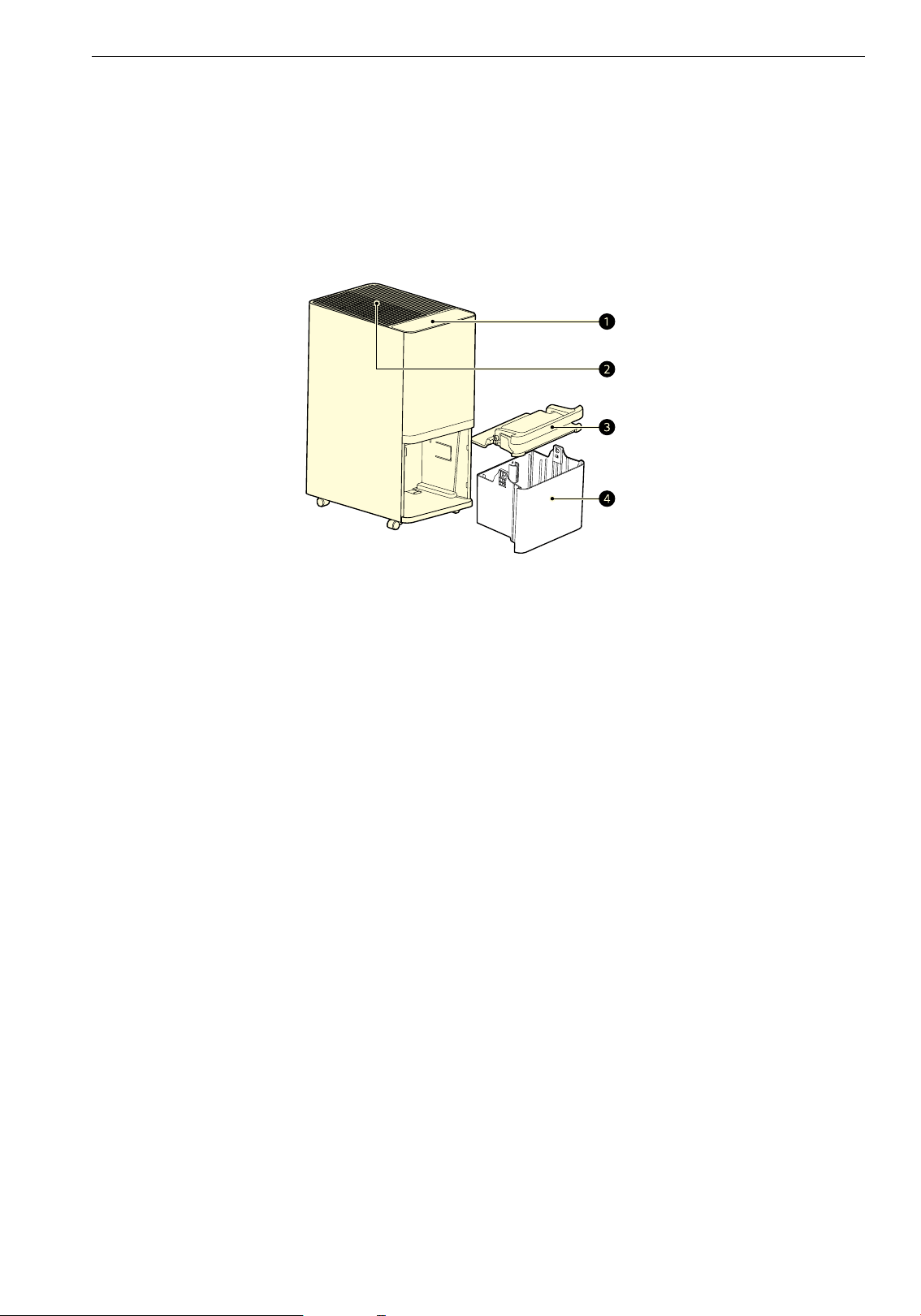
Product Overviews
Front
a Control Panel/Status Panel
• Sets the appliance functions.
• Checks the settings of the appliance.
b Air Outlet
• Emits dehumidified air.
c Bucket Lid
d Bucket
• Stores the dehumidified water.
13OPERATION
ENGLISH
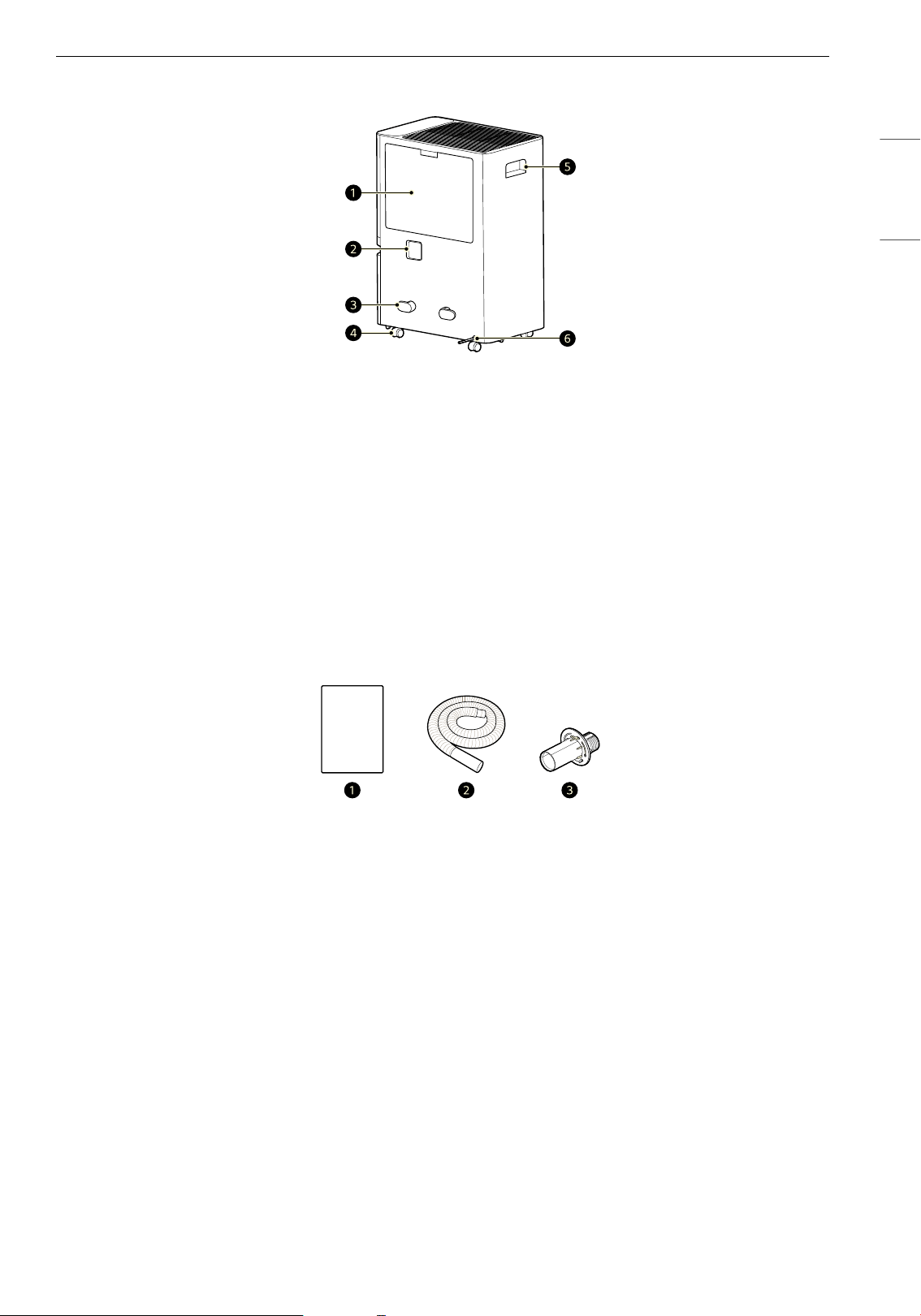
Back
a Pre-Filter/Air Inlet
• Takes in the air and moisture in the room.
b Drain Cap
c Power plug hanging part
d Wheels
e Handle
f Power Plug
Components
a Owner's Manual
b Drain Hose
c Drain Adapter (Screw provided)
14 OPERATION
Preparation before
Operation
Checklist Before Usage
• Dehumidification amount varies depending on
the indoor temperature and humidity.
- If the temperature or humidity is low,
dehumidification amount decreases.
- Dehumidification is performed only when the
desired humidity is lower than the current
humidity.
• The product operates at temperatures from 38
°F to 109 °F (3 °C to 43 °C).
- At 34 °F (1 °C) or less, dehumidified water will
freeze and the dehumidification function may
not work properly.
- If it is over 109 °F (43 °C), the dehumidifier may
automatically stop operating to prevent
overheating.
• When the dehumidifier is operating, the indoor
temperature will rise.
- The dehumidifier does not have a cooling/
heating function.
- Heat is generated during operation, so the
room temperature may be increased by about
2 or 3 degrees depending on the usage
conditions (indoor temperature, size of the
room).
- When using the dehumidification function, the
compressor sound will be heard for about 1 ~
2 seconds.
• The current humidity displayed on the status
display may differ from the actual humidity
depending on the surrounding environment and
the location of the product.
• If the product is stopped and immediately
restarted, it will restart after about 3 minutes to
protect the product.
• After 23 hours of continuous operation, the
product automatically stops for an hour to
protect the product and then restarts.
• When unboxing the product, you may see water
in the bucket.
- The product is tested for normal operation
before shipping. It is normal for some water to
remain in the bucket.
• Even in the same space, the humidity may vary
depending on the air circulation. Additionally,
the humidity may differ from the humidity
measured by other products and hygrometers.
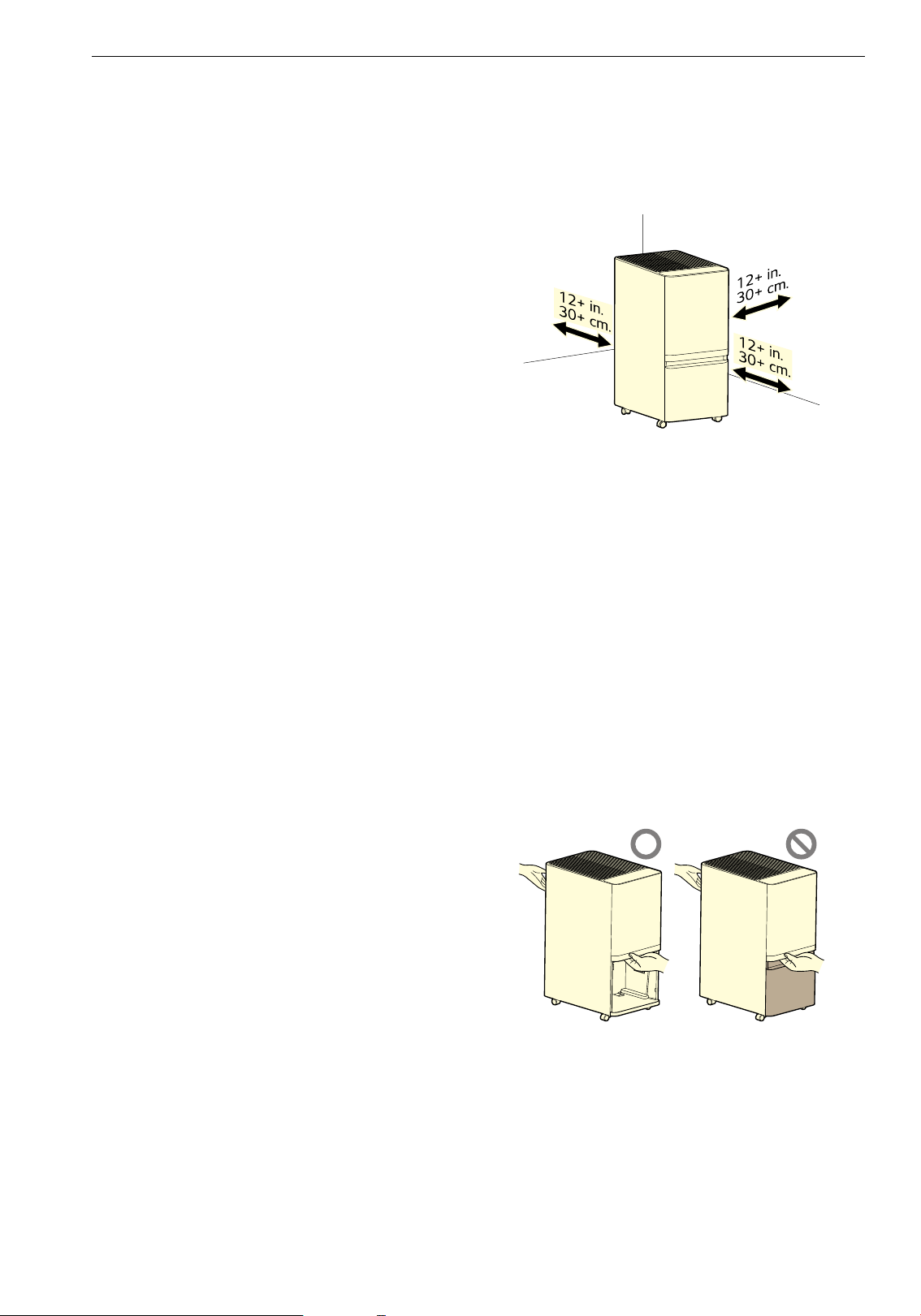
Installation Location Requirements
Install the product at least 12 in. (30 cm) from
walls.
• If there is not enough room for air suction, the
dehumidification performance may be affected.
• Do not install the product near direct sunlight or
bright lighting.
- Doing so may cause discoloration of the
product.
Transportation Requirements
• When moving or storing the product, store the
power plug to keep the power plug from
touching the floor.
- Failure to do so may damage the power plug
or scratch the floor.
• When lifting and moving the product, be sure to
remove the bucket, then move it safely by
holding the handle and the top of the bucket
enclosure.
15OPERATION
ENGLISH
Features
Controlling the Dehumidifier
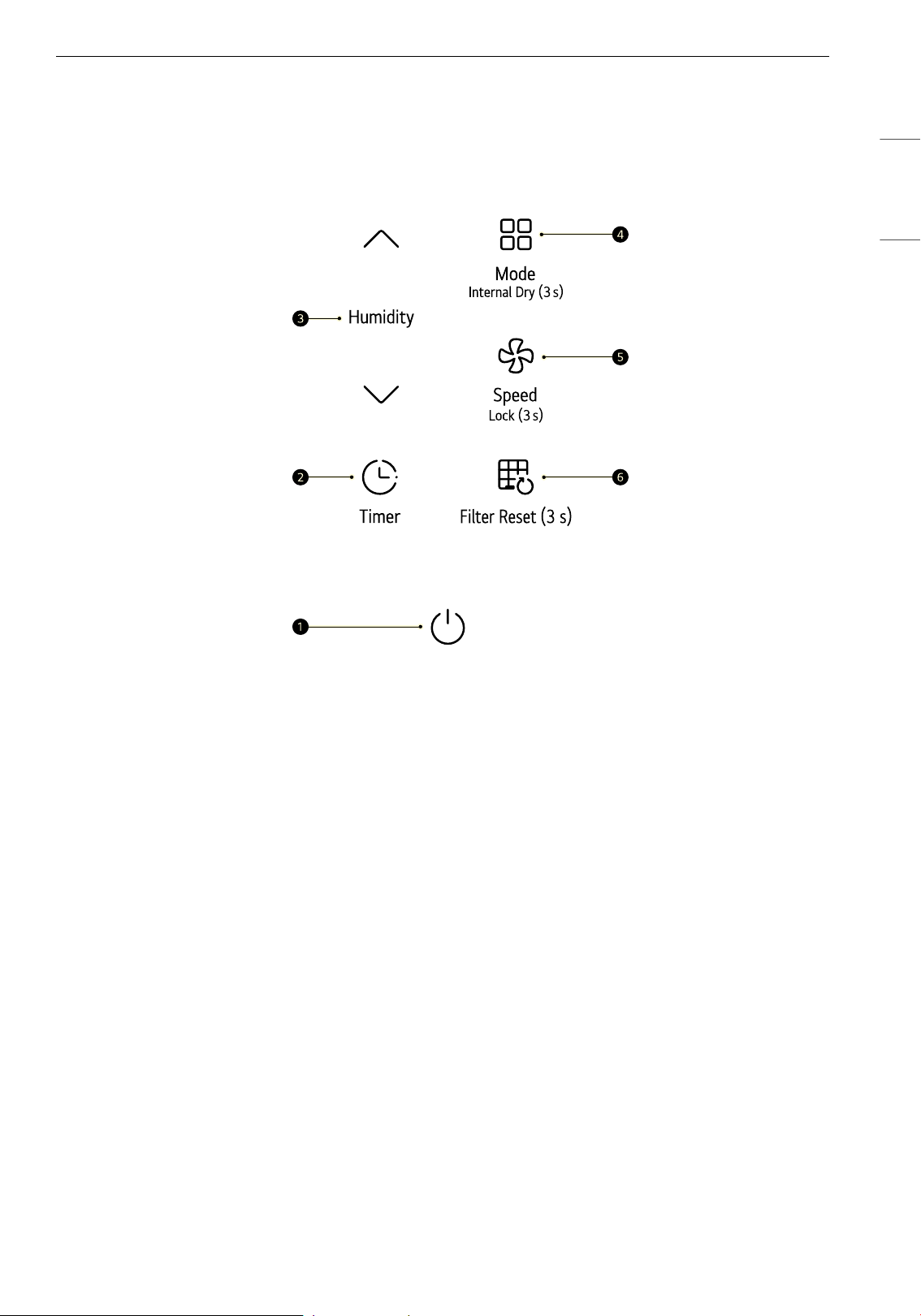
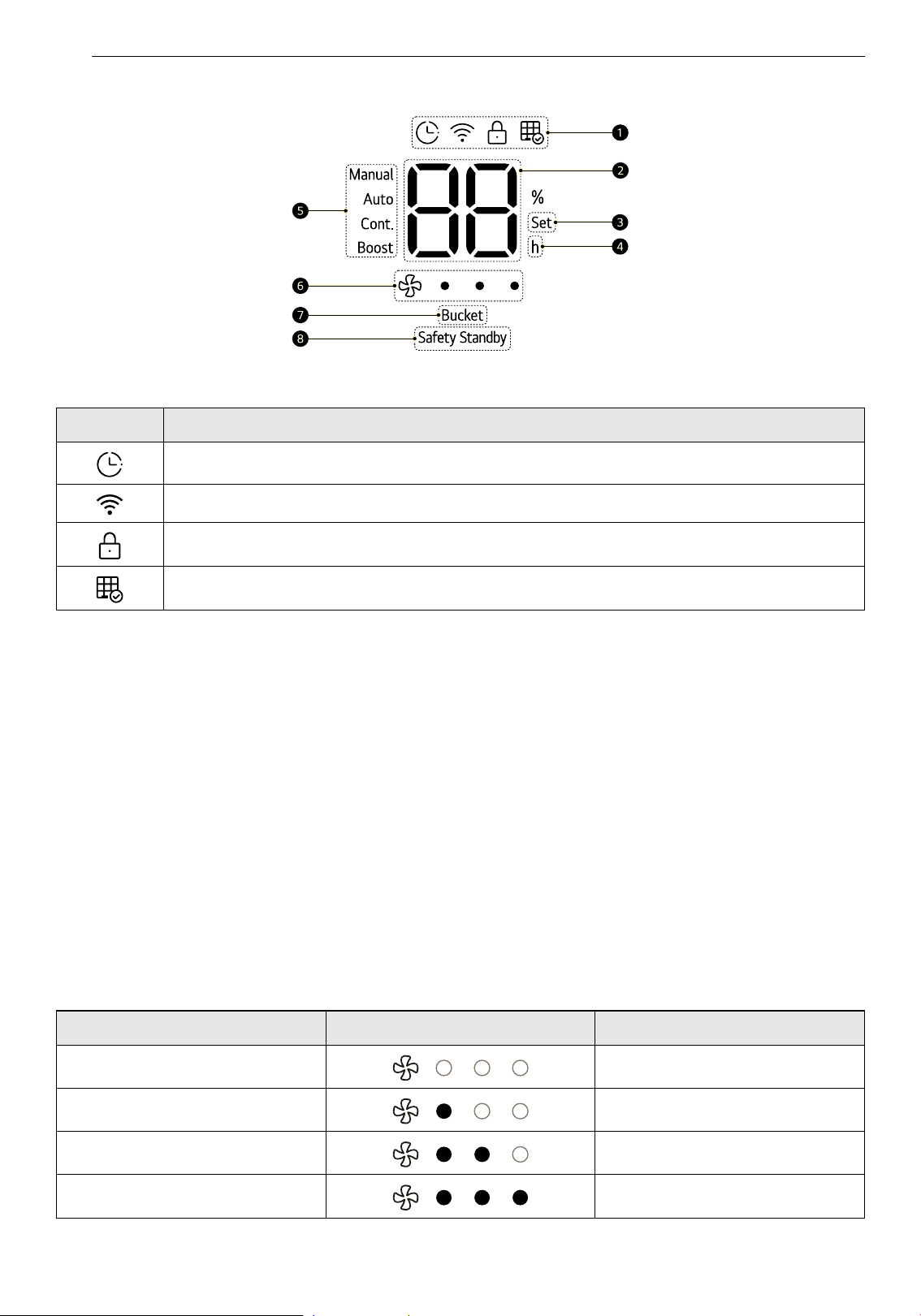
Control Panel
a Start/Stop Button
Turns the product on and off.
• To prepare the product to connect to Wi-Fi through the LG ThinQ application, press and hold the
button for 3 seconds.
b Timer Button
Schedules the time to turn the product off or on.
c Humidity Button
Adjusts the desired humidity.
• Humidity can be adjusted in units of 5% within a range of 30% to 70%.
d Mode Button
Sets the operating mode.
• Each time you press the button, the mode changes in the order of Manual
~ Auto ~ Cont. ~
Boost.
• To set the Internal Dry function, press the button for 3 seconds.
e Speed Button
Controls the fan speed.
• To set the Lock function, press the button for 3 seconds.
f Filter Reset Button
To reset the Check Filter Notification, press and hold the button for 3 seconds.
16 OPERATION
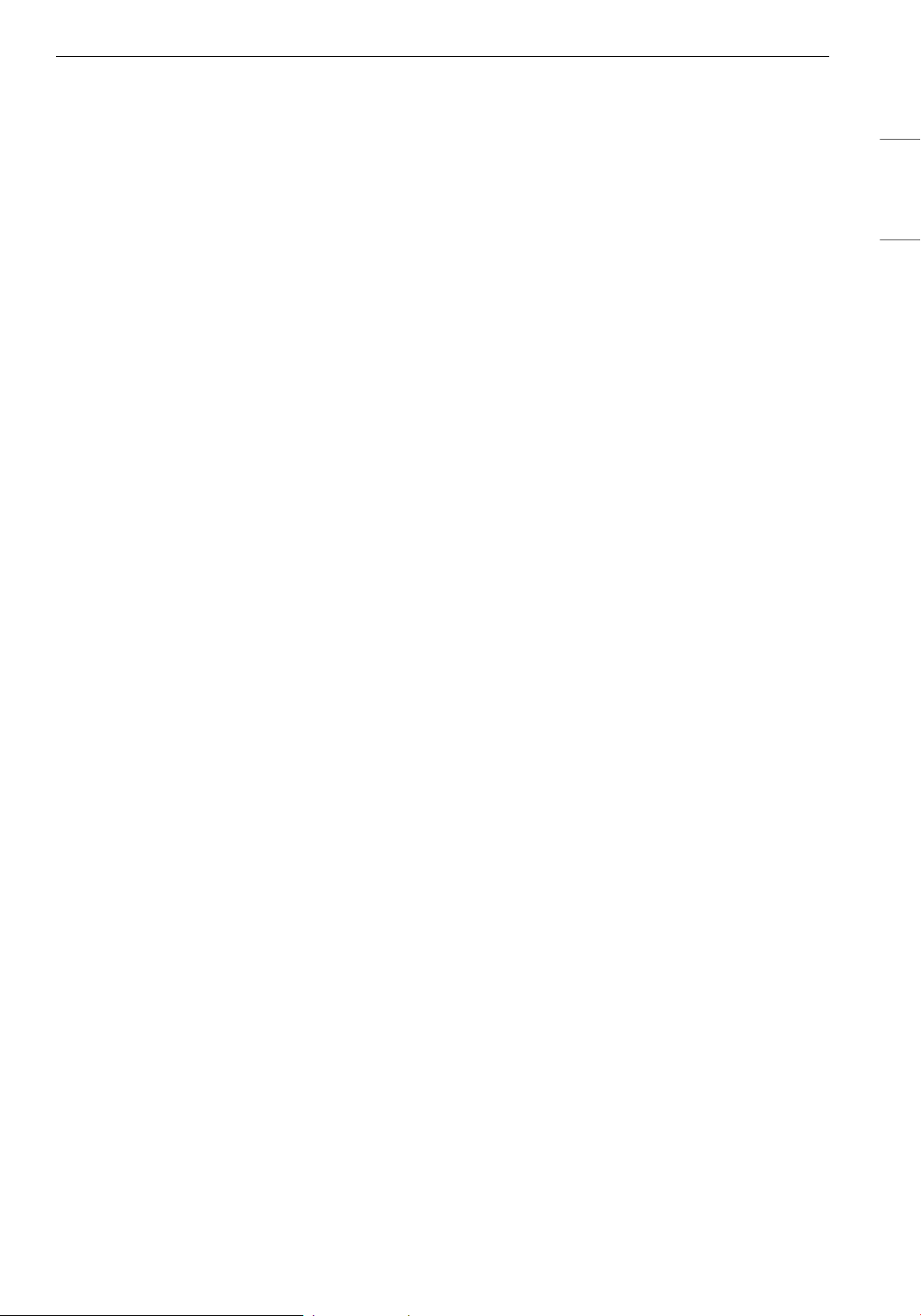
Status Panel
a Icons
b Status Display
• Displays the desired humidity when setting the humidity, and displays the current humidity after
about 5 seconds.
• The current humidity is displayed in 1% units.
• If the indoor humidity is below 30%, it will display as 'Lo', and if it is above 70%, it will display as 'Hi'.
c Set Indicator
• Lights up when setting the desired humidity.
d Time Indicator
• Lights up when setting the on and off timer.
e Operation Mode
• Displays the currently set operating mode.
f Speed Display
Displays the fan speed.
g Bucket Indicator
Icon Description
Lights up when the timer is set.
Lights up when the Wi-Fi function is established.
Lights up when the control panel is locked.
Lights up when it is time to clean the filter.
Speed Display Description
Auto LEDs OFF
Low 1 LED ON
Medium 2 LEDs ON
High 3 LEDs ON
17OPERATION
ENGLISH
• Lights up when the bucket is full or the bucket is out of the product for more than 5 minutes.
h Safety Standby Indicator
• After 23 hours of continuous operation, the red indicator lights up for 1 hour.
18 OPERATION
Operating the Dehumidifer
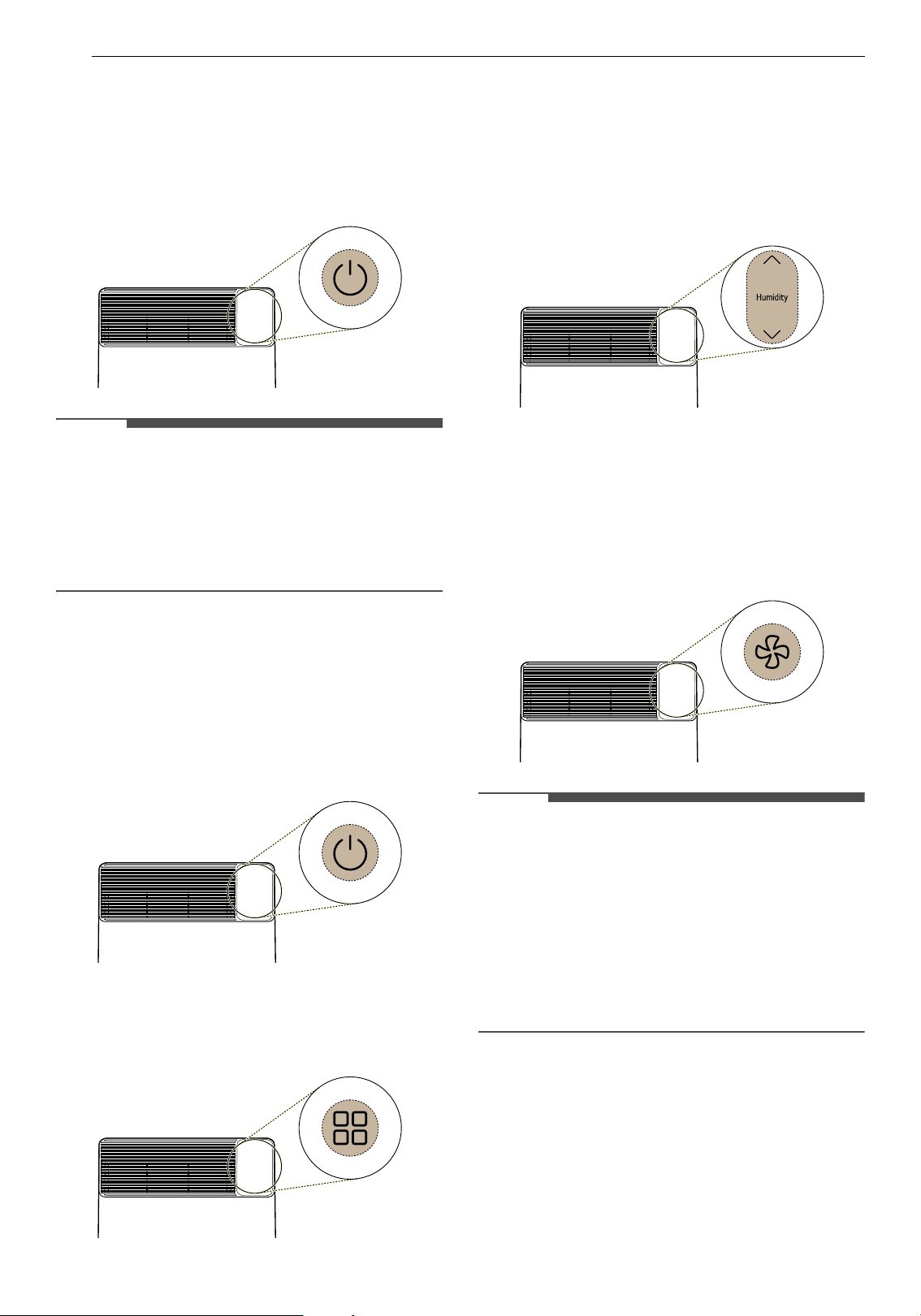
Start/Stop
Press the Start/Stop button to turn the product on
or off.
NOTE
• When the operation is started for the first time,
the product will run in Manual mode and the
speed is set to Medium.
• If the plug is disconnected or a power failure
occurs while the product is operating, it
remembers the most recently used mode.
Manual Mode
This function allows you to set the desired fan
speed and humidity level.
1 Press the Start/Stop button to turn on the
product.
2 Press the Mode button to select the Manual
mode.
3 Press the Humidity J / K buttons to adjust
the humidity.
• If you press the button, the desired
humidity will change in the order of 30
&
35
& 40 & 45 & 50 & 55 & 60 & 65
& 70.
4 Press the Speed button to select the fan
speed.
• Each time you press the button, the fan
speed changes in the order of Auto
~ Low
~ Medium ~ High.
NOTE
• Once the humidity level reaches the desired
humidity, the compressor stops and only the fan
operates. If the relative humidity goes up,
dehumidification will begin again.
• While setting the humidity, the desired humidity
is displayed on the status display. Then the
current humidity is displayed after about 5
seconds.
• The initial humidity setting is 50%.
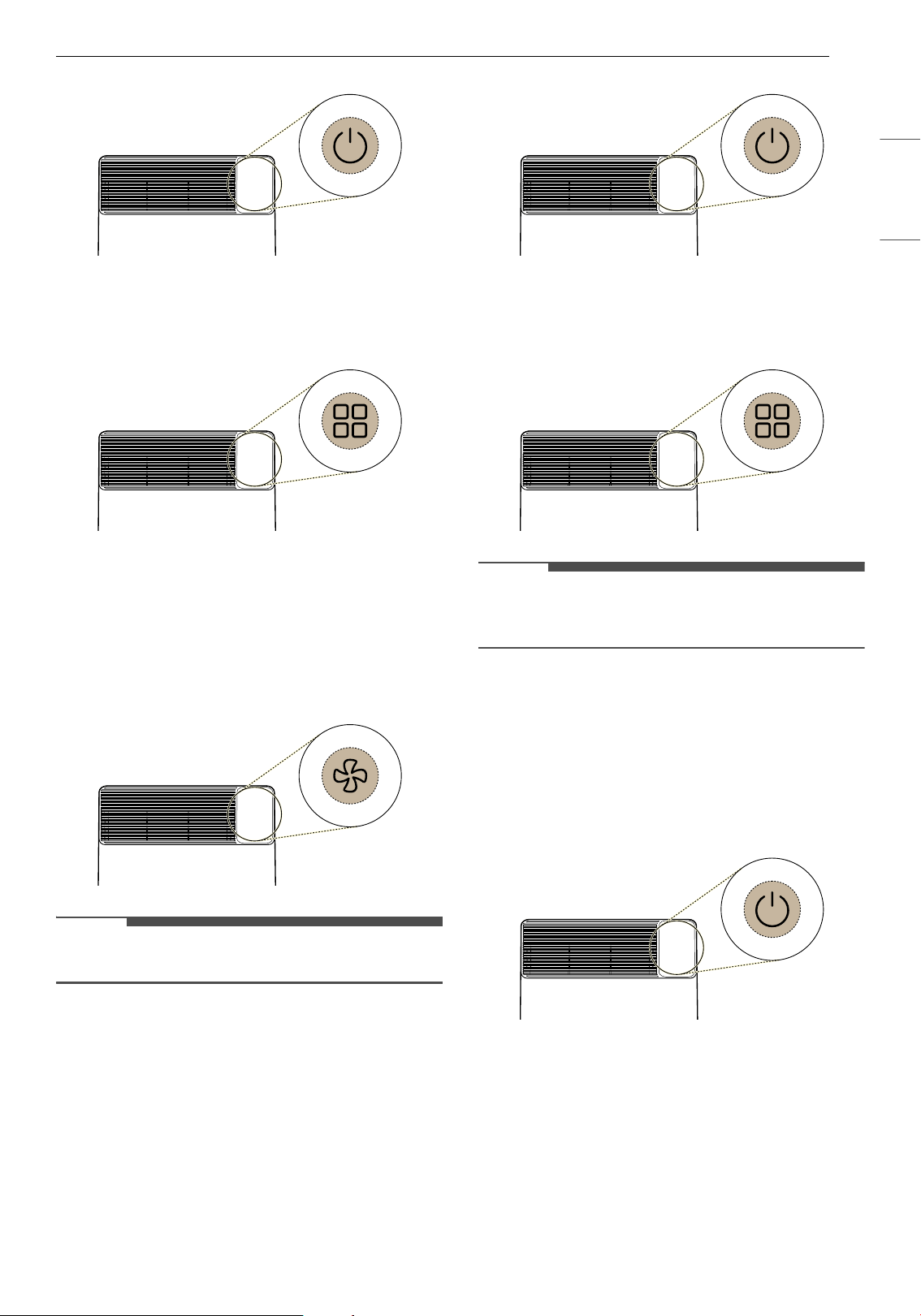
Auto Mode
Use when you want to maintain pleasant indoor
conditions.
1 Press the Start/Stop button to turn on the
product.
19OPERATION
ENGLISH
2 Press the Mode button to select the Auto
mode.
3 Press the Speed button to select the fan
speed.
• Each time you press the button, the fan
speed changes in the order of Auto
~ Low
~ Medium ~ High.
NOTE
• Humidity cannot be adjusted.
Cont. Mode
This mode operates continuously regardless of
indoor humidity.
1 Press the Start/Stop button to turn on the
product.
2 Press the Mode button to select the Cont.
mode.
NOTE
• The fan speed operates only at low, and neither
the fan speed nor the humidity can be adjusted.
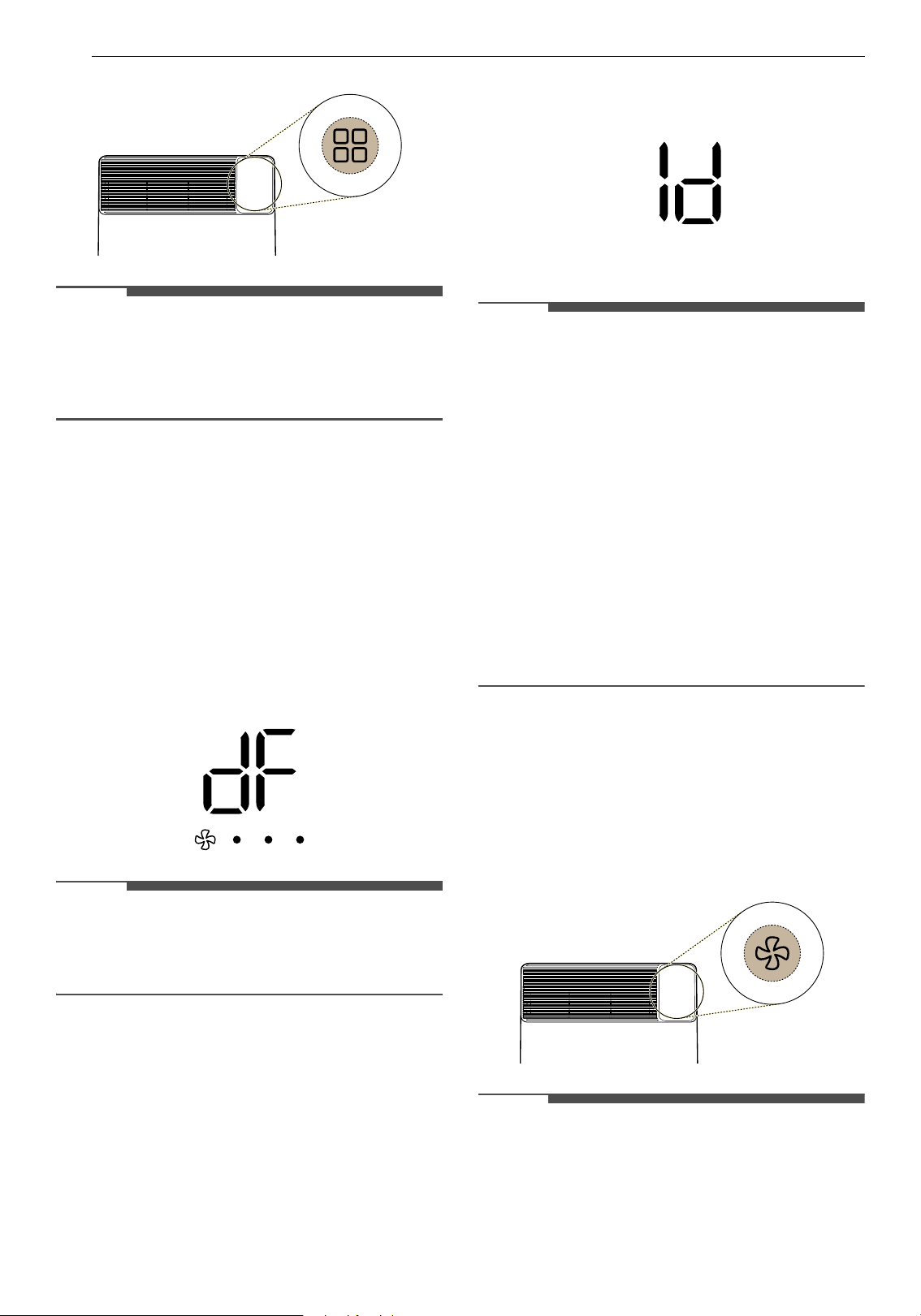
Boost Mode
Use this function to quickly remove moisture from
indoors.
1 Press the Start/Stop button to turn on the
product.
2 Press the Mode button to select the Boost
mode.
20 OPERATION
NOTE
• The fan speed operates only at high, and neither
the fan speed nor the humidity can be adjusted.
• After an hour of operation, it returns to the Auto
mode.
Using the Extra Functions
Defrost Operation
If there is frost in the heat exchanger due to low
indoor temperature, this function automatically
removes the frost.
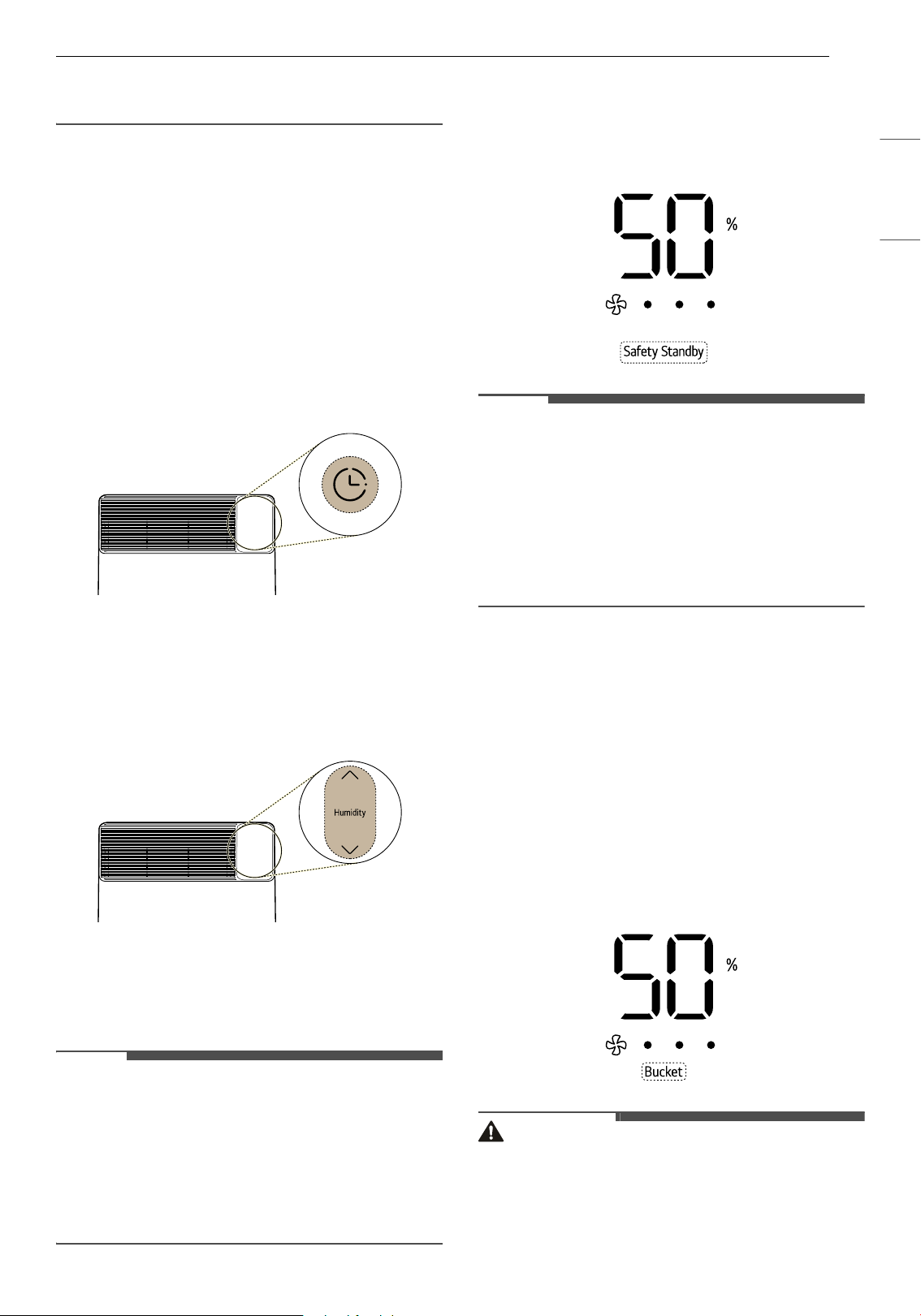
• During the operation, if
dF is displayed on the
status display, this function automatically
removes the frost from the heat exchanger
inside the product.
NOTE
• The compressor is stopped during the automatic
defrost operation.
• The fan speed operates at high.
Internal Dry
This function dries the inside of the dehumidifier.
•Press the Mode button for 3 seconds during
operation to turn on Internal Dry.
• When running Internal Dry, the remaining
operating time is displayed on the status display.
NOTE
• To turn off the Internal Dry function, press the
Mode button for 3 seconds.
• When the Internal Dry function is turned on,
'
1d' and 'ON' appear on the display. When it is
turned off, '
1d' and 'oF' appear.
• After the Internal Dry function finishes, the
status display automatically turns off.
• When the Internal Dry function is turned on,
Internal Dry will start when the product stops
operating.
• When running the Internal Dry, you cannot
adjust the remaining operating time.
•The Internal Dry function runs the fan for a
certain period of time. Using the LG ThinQ
application, you can set the fan operating time.
Lock Function
Lock the buttons on the control panel to prevent
the appliance from operating due to unforeseen
reasons, such as a child manipulating the buttons.
•Press the Speed button for 3 seconds to turn the
Lock function on or off.
NOTE
• After setting the Lock function, the current
operating status will be maintained until the
Lock function is turned off.
• If you press other buttons while the Lock
function is set, a warning sound sounds 3 times.
21OPERATION
ENGLISH
• You can set the function regardless of whether
the product is in operation.
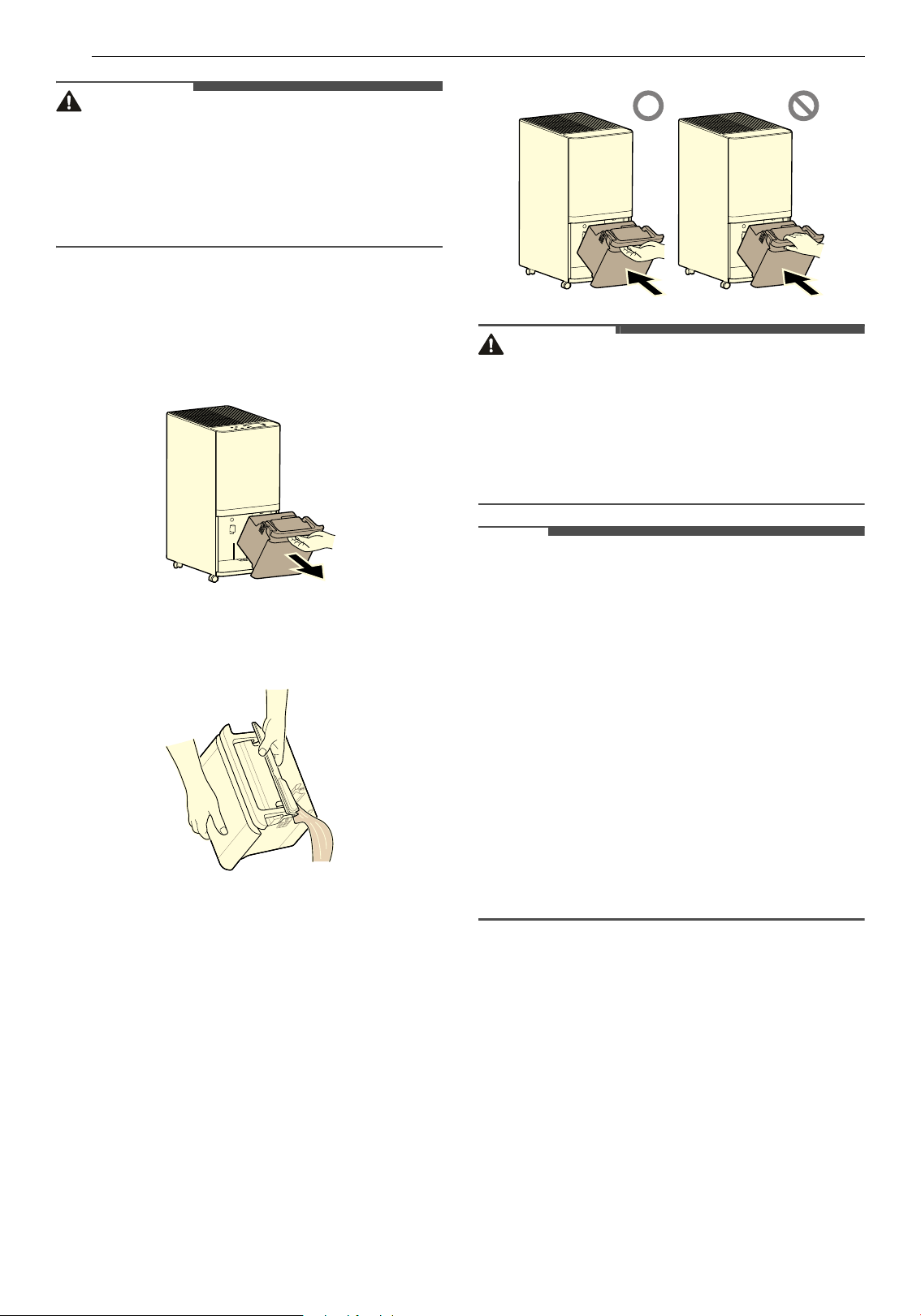
Timer Function
This function schedules when to turn the product
on or off.
1 Press the Timer button to set the timer
function.
• Press this button while the product is off to
activate the on-timer.
• Press the button while the product is on to
activate the off-timer.
2 Press the Humidity J / K buttons to set the
ON/OFF time.
• The ON/OFF time can be set in 1-hour
increments, from 1 hour to 24 hours.
3 After setting the ON/OFF time, the timer
function will be automatically set after about 5
seconds.
NOTE
• To see the remaining time, press the Timer
button after the humidity is displayed on the
status display.
• Empty the bucket before setting the timer. If the
bucket is full while operating the product, the
Bucket indicator lights up and the product stops
operating.
Safety Standby Function
This function is to prevent overheating and fire.
After 23 hours of continuous operation. the red
safety standby light turns on for 1 hour.
NOTE
• After the Safety Standby Light turns on, the fan
operates for 30 minutes at the current fan
speed, in order to lower the temperature of
internal components. Then it stops for the next
30 minutes.
• After an hour with the compressor shut off, the
Safety Standby light turns off and the fan and
compressor automatically restart.
Emptying the Bucket
Bucket Full
When the bucket is full, operation automatically
stops, and the fan operates for 5 minutes to
remove the remaining condensed water in the
heat exchanger. Then, the bucket indicator lights
up and a warning buzzer sounds. (The warning
buzzer will sound one more time after 1 minute.)
• After emptying the bucket, when you insert the
bucket again, the Bucket indicator turns off.
CAUTION
• If you pull the bucket too hard, the water inside
may spill over, so pull it out carefully.
• Turn off the product before removing the
bucket.
22 OPERATION
CAUTION
• If you remove the bucket while the product is
operating, the compressor stops, the fan
operates for another 5 minutes to vaporize the
remaining condensed water in the heat
exchanger, and then the product stops
operating.
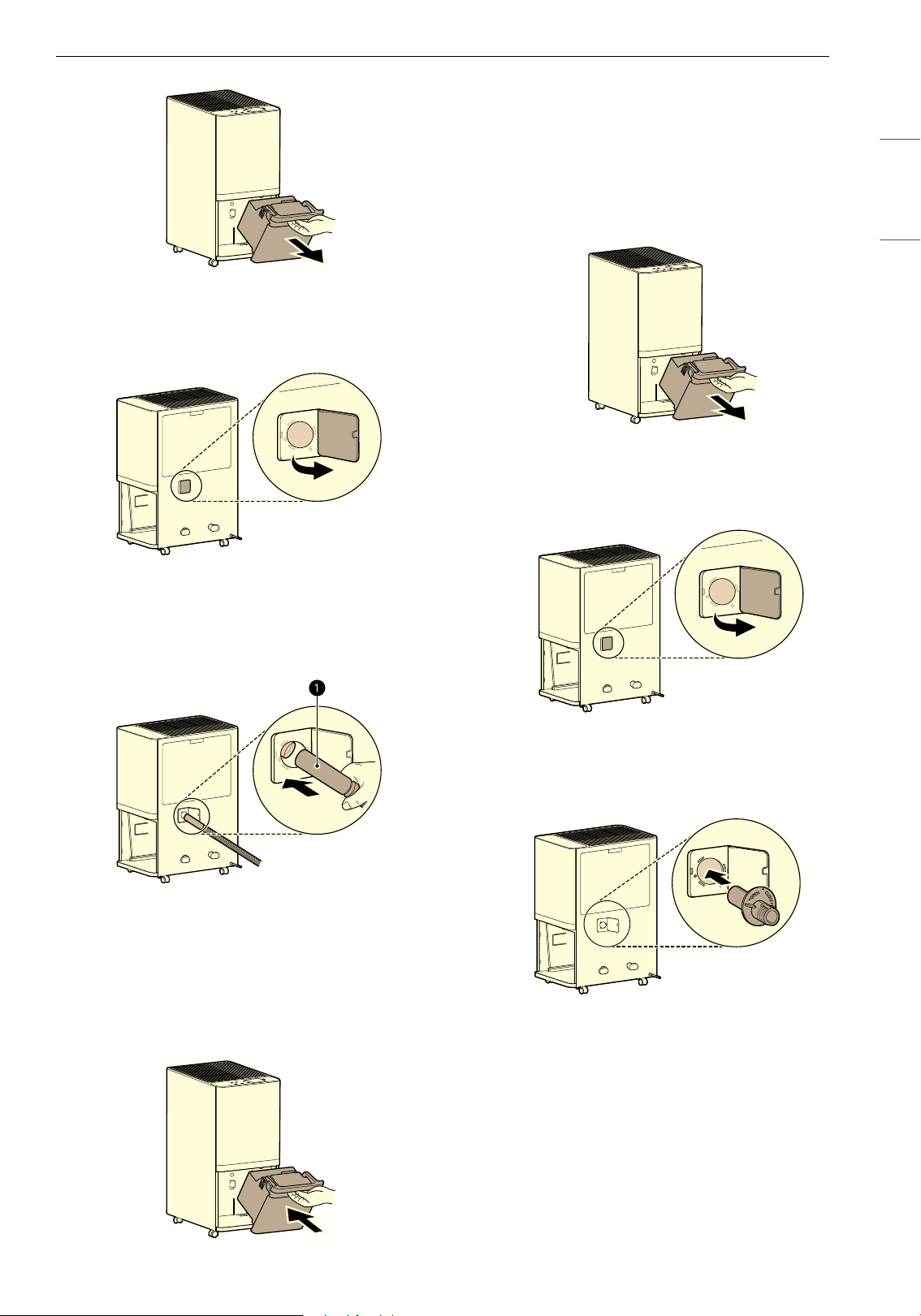
How to Empty the Bucket
1 Turn the product off. Hold the top handle of
the bucket and carefully pull out the bucket.
2 Lift off the cover of the bucket and discard the
water.
3 To reinstall the bucket, insert the bottom in
the enclosure first and then push the rest of
the bucket in.
• When inserting the bucket, do not put your
hand over the bucket handle.
CAUTION
• After taking out the bucket, do not touch inside
the main unit. Doing so will cause failure of the
full water detection device.
• Do not drink or reuse the water in the bucket.
• Turn the product off before removing the
bucket.
NOTE
• If the bucket is taken out right after stopping the
product, there are cases of water remaining in
the heat exchanger dropping into the main unit.
- Wipe up the dropped water with a soft cloth.
• Periodically clean inside the bucket (about once
a week).
• If the product is used at low temperatures, there
is less moisture in the air, so the
dehumidification amount is also decreased.
• Turn the product off before removing the
bucket. If you remove the bucket while the
product is operating, the compressor stops, the
fan operates for another 5 minutes to vaporize
the remaining condensed water in the heat
exchanger, and then the product stops
operating.
How to Set Up Continuous Drainage
Required items: 14.5 mm (inner diameter) hose
(included)
1 Hold the top handle of the bucket and
carefully pull out the bucket.
23OPERATION
ENGLISH
2 Open the drain cap connected to the
continuous drain at the back of the product.
3 Insert the continuous drainage hose (a) into
the continuous drainage hole and connect it
to the drain hole on the product.
4 Reinstall the bucket by inserting the bottom in
the enclosure first and then pushing the rest
of the bucket in.
• If the bucket is not inserted, the
dehumidification does not operate.
How to Set Up Continuous Drainage
Using Drain Adapter
Required item : Standard Garden hose (Not
included), Drain Adapter (Included)
1 Hold the top handle of the bucket and
carefully pull out the bucket.
2 Open the drain cap connected to the
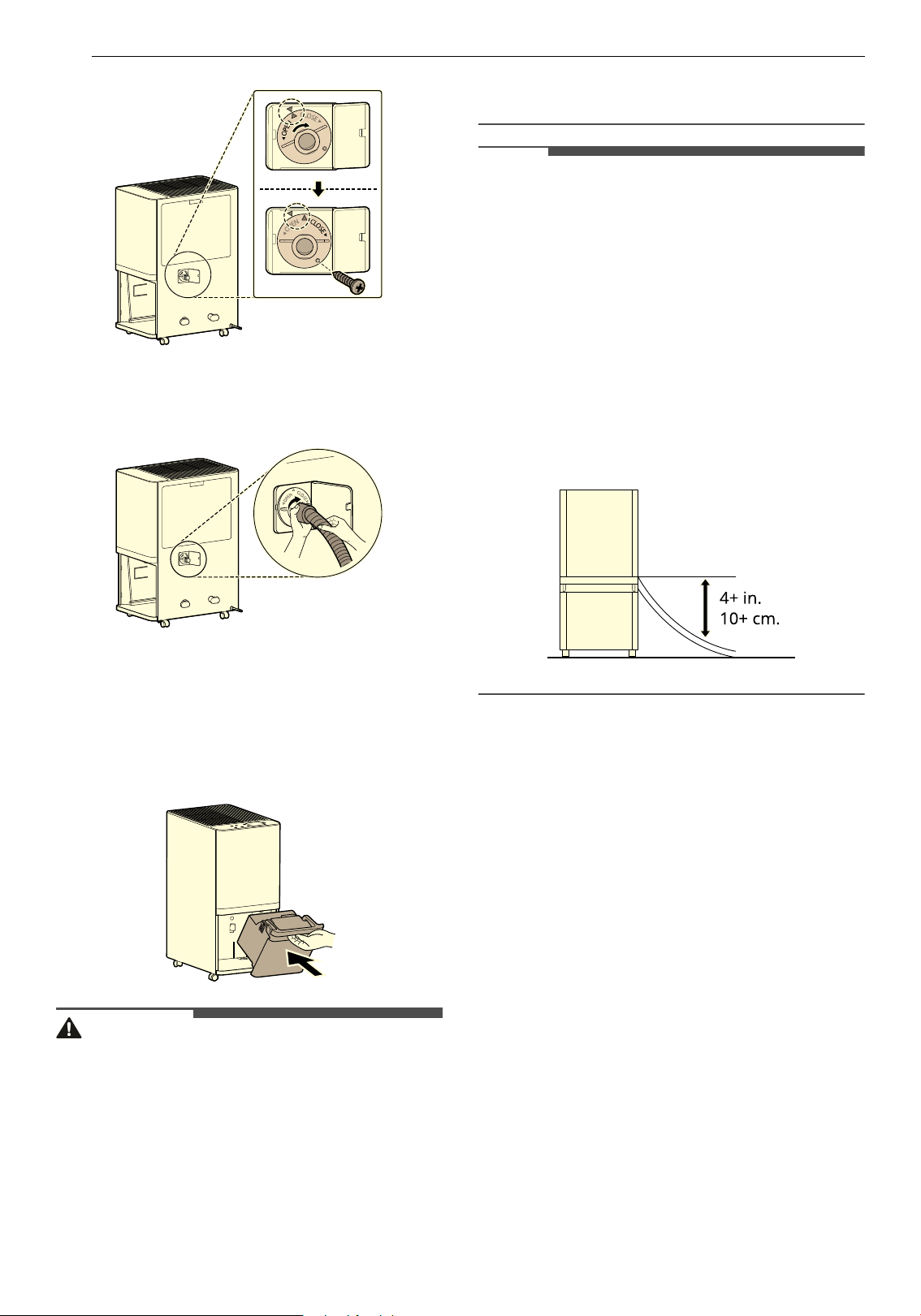
continuous drain at the back of the product.
3 Insert the drain adapter into the opening for
the hose.
4 Turn the drain adapter clockwise to secure it
and insert the provided screws to secure it in
place.
24 OPERATION
5 Turn the end of the garden hose clockwise to
attach it to the drain adapter.
6 Reinstall the bucket by inserting the bottom in
the enclosure first and then pushing the rest
of the bucket in.
• If the bucket is not inserted, the
dehumidification does not operate.
CAUTION
• Be careful of the cut part around the continuous
drainage hole when connecting or separating
the continuous drainage hose. The cut part is
sharp and it may cause injury.
• Take care not to injure your hands while
connecting the drainage hose.
• If the continuous drainage hose is used for a
long time, lint and other debris may accumulate
and cause blockages. In such cases, please
replace the hose.
NOTE
• Make sure the continuous drainage hose is
connected to the drain hole on the product
correctly.
- If the continuous drainage hose is not
connected to the drain hole on the product
correctly, water may leak during
dehumidification.
• How to connect the hose for continuous
drainage
- Do not bend the continuous drainage hose or
submerge it in water.
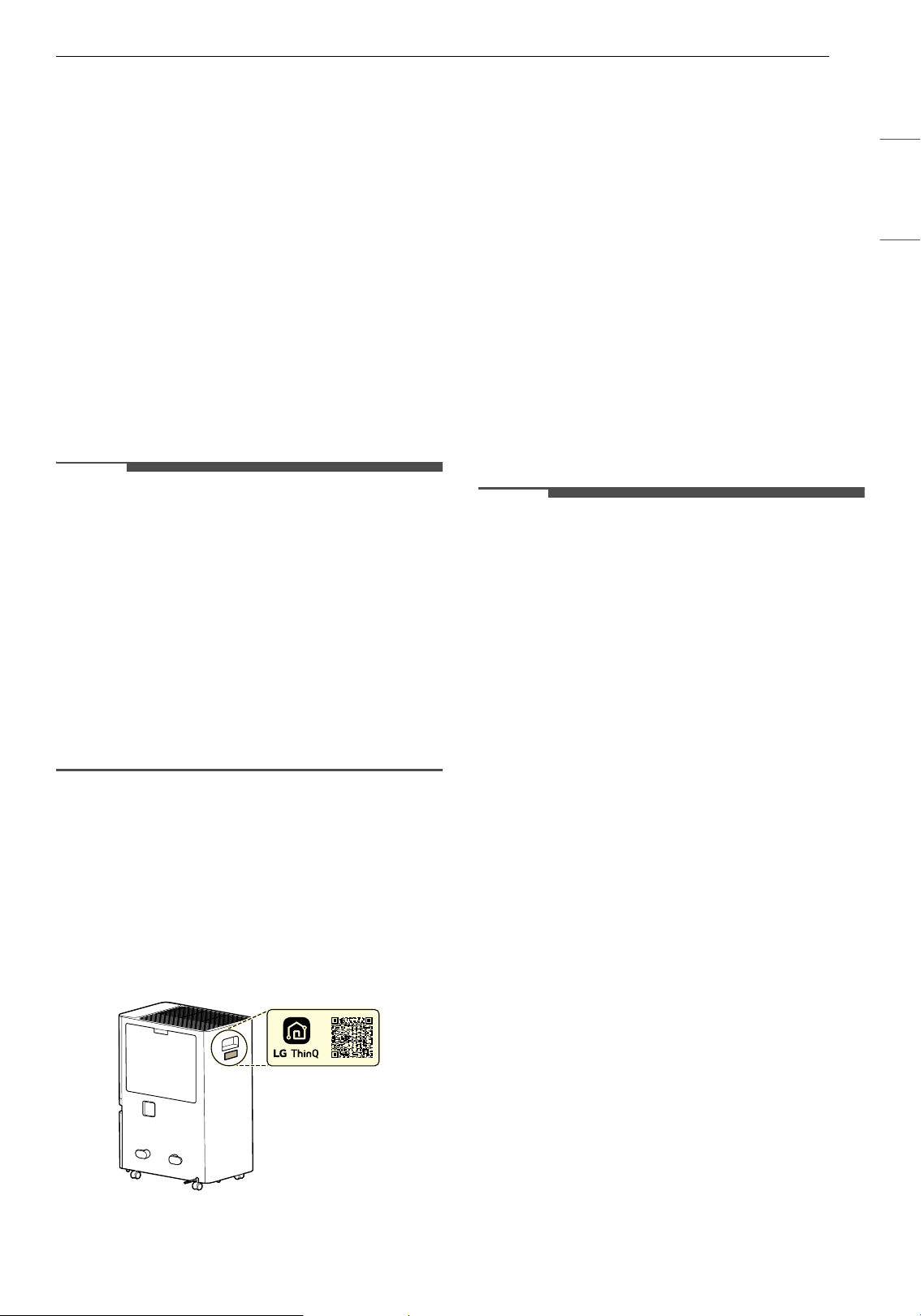
- The hose outlet must be at least 4 in. (10 cm)
lower than the drainage connection.
25SMART FUNCTIONS
ENGLISH
SMART FUNCTIONS
LG ThinQ Application
The LG ThinQ application allows you to
communicate with the appliance using a
smartphone.
LG ThinQ Application Features
Smart Diagnosis
If you experience a problem while using the
appliance, this Smart Diagnosis feature will help
you diagnose the problem.
Settings
Allows you to set various options on the appliance
and in the application.
NOTE
• In the following cases, you must update the
network information for each appliance in the
LG ThinQ application under Device Cards
~
Settings
~ Change Network.
- wireless router is changed
- wireless router password is changed
- Internet service provider is changed
• The application is subject to change for
appliance improvement purposes without notice
to users.
• Functions may vary by model.
Installing LG ThinQ Application and
Connecting an LG Appliance
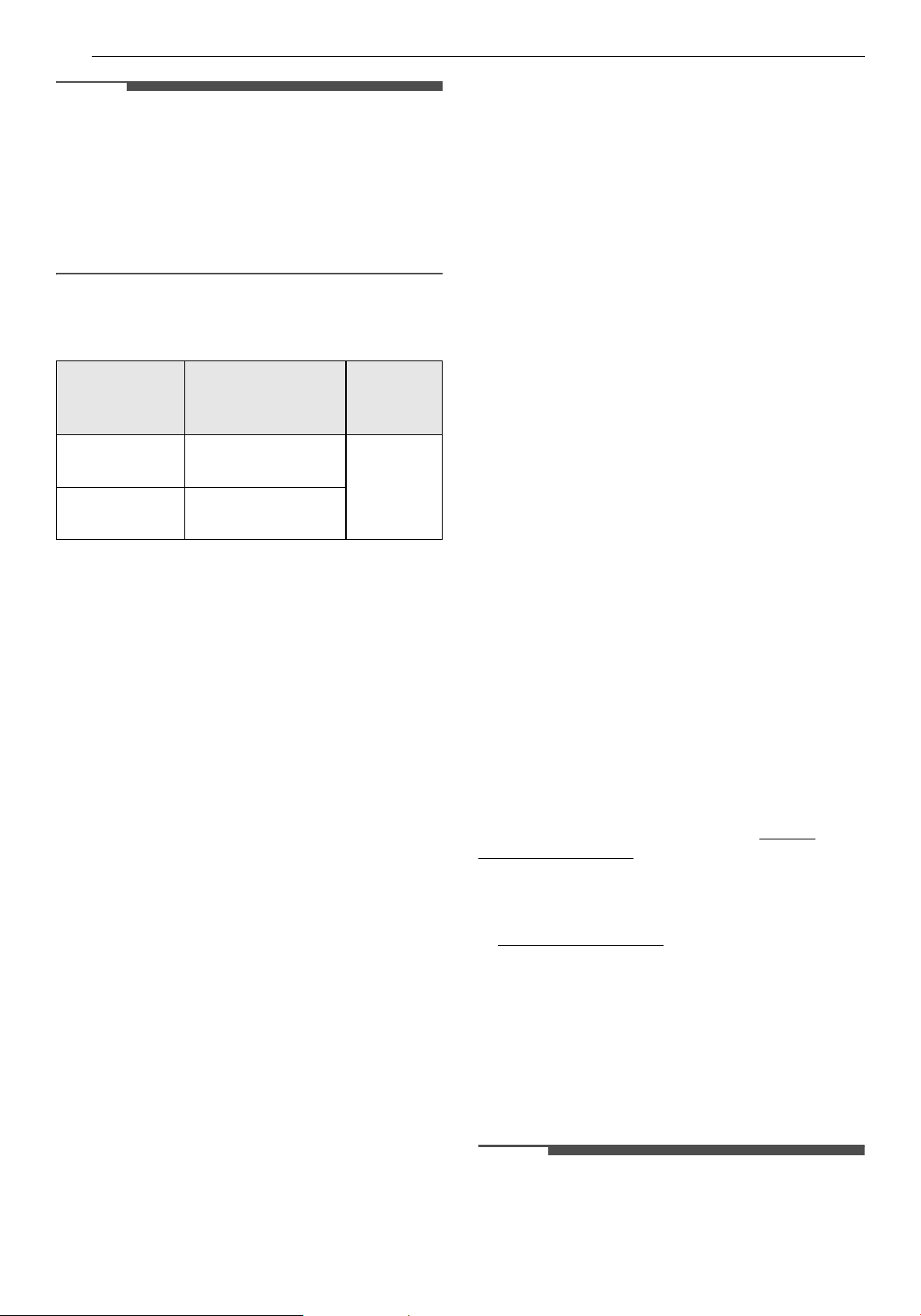
Models with QR Code
Scan the QR code attached to the product using
the camera or a QR code reader application on
your smartphone.
Models without QR Code
1 Search for and install the LG ThinQ
application from the Google Play Store or
Apple App Store on a smartphone.
2 Run the LG ThinQ application and sign in with
your existing account or create an LG account
to sign in.
3 Touch the add (~) button on the LG ThinQ
application to connect your LG appliance.
Follow the instructions in the application to
complete the process.
NOTE
• To verify the Wi-Fi connection, check that the Wi-
Fi indicator on the control panel is lit.
• The appliance supports 2.4 GHz Wi-Fi networks
only. To check your network frequency, contact
your Internet service provider or refer to your
wireless router manual.
• LG ThinQ is not responsible for any network
connection problems or any faults, malfunctions,
or errors caused by network connection.
• The surrounding wireless environment can
make the wireless network service run slowly.
• If the distance between the appliance and the
wireless router is too far, the signal strength
becomes weak. It may take a long time to
connect or installation may fail.
• If the appliance is having trouble connecting to
the Wi-Fi network, it may be too far from the
router. Purchase a Wi-Fi repeater (range
extender) to improve the Wi-Fi signal strength.
• The network connection may not work properly
depending on the Internet service provider.
• The Wi-Fi connection may not connect or may be
interrupted because of the home network
environment.
• The appliance cannot be connected due to
problems with the wireless signal transmission.
Unplug the appliance and wait about a minute
before trying again.
• If the firewall on your wireless router is enabled,
disable the firewall or add an exception to it.
• The wireless network name (SSID) should be a
combination of English letters and numbers. (Do
not use special characters.)
26 SMART FUNCTIONS
NOTE
• Smartphone user interface (UI) may vary
depending on the mobile operating system (OS)
and the manufacturer.
• If the security protocol of the router is set to
WEP, you may fail to set up the network. Please
change it to other security protocols (WPA2 is
recommended) and connect the product again.
Radio Equipment Specifications
† This feature is only available on some models.
FCC Notice
The following notice covers the transmitter
module contained in this product.
This equipment has been tested and found to
comply with the limits for a Class B digital device,
pursuant to Part 15 of the FCC Rules. These limits
are designed to provide reasonable protection
against harmful interference in a residential
installation. This equipment generates, uses, and
can radiate radio frequency energy and, if not
installed and used in accordance with the
instructions, may cause harmful interference to
radio communications. However, there is no
guarantee that interference will not occur in a
particular installation. If this equipment does
cause harmful interference to radio or television
reception, which can be determined by turning the
equipment off and on, the user is encouraged to
try to correct the interference by one or more of
the following measures:
• Reorient or relocate the receiving antenna.
• Increase the separation between the equipment
and the receiver.
• Connect the equipment into an outlet on a
circuit different from that to which the receiver is
connected.
• Consult the dealer or an experienced radio/TV
technician for help.
This device complies with part 15 of the FCC Rules.
Operation is subject to the following two
conditions:
(1) This device may not cause harmful interference
and
(2) This device must accept any interference
received, including interference that may cause
undesired operation.
Any changes or modifications in construction of
this device which are not expressly approved by
the party responsible for compliance could void
the user’s authority to operate the equipment.
FCC RF Radiation Exposure
Statement
This equipment complies with FCC radiation
exposure limits set forth for an uncontrolled
environment. This transmitter must not be co-
located or operating in conjunction with any other
antenna or transmitter.
This equipment should be installed and operated
with a minimum distance of 20 cm (7.8 inches)
between the antenna and your body. Users must
follow the specific operating instructions for
satisfying RF exposure compliance.
Open Source Software Notice
Information
To obtain the source code that is contained in this
product, under GPL, LGPL, MPL, and other open
source licenses that have the obligation to disclose
source code, and to access all referred license
terms, copyright notices, please visit https://
opensource.lge.com.
LG Electronics will also provide open source code
to you for a charge covering the cost of
performing such distribution upon email request
This offer is valid to anyone in receipt of this
information for a period of three years after our
last shipment of this product.
Smart Diagnosis
Use this feature to help you diagnose and solve
problems with your appliance.
NOTE
• For reasons not attributable to LGE’s negligence,
the service may not operate due to external
factors such as, but not limited to, Wi-Fi
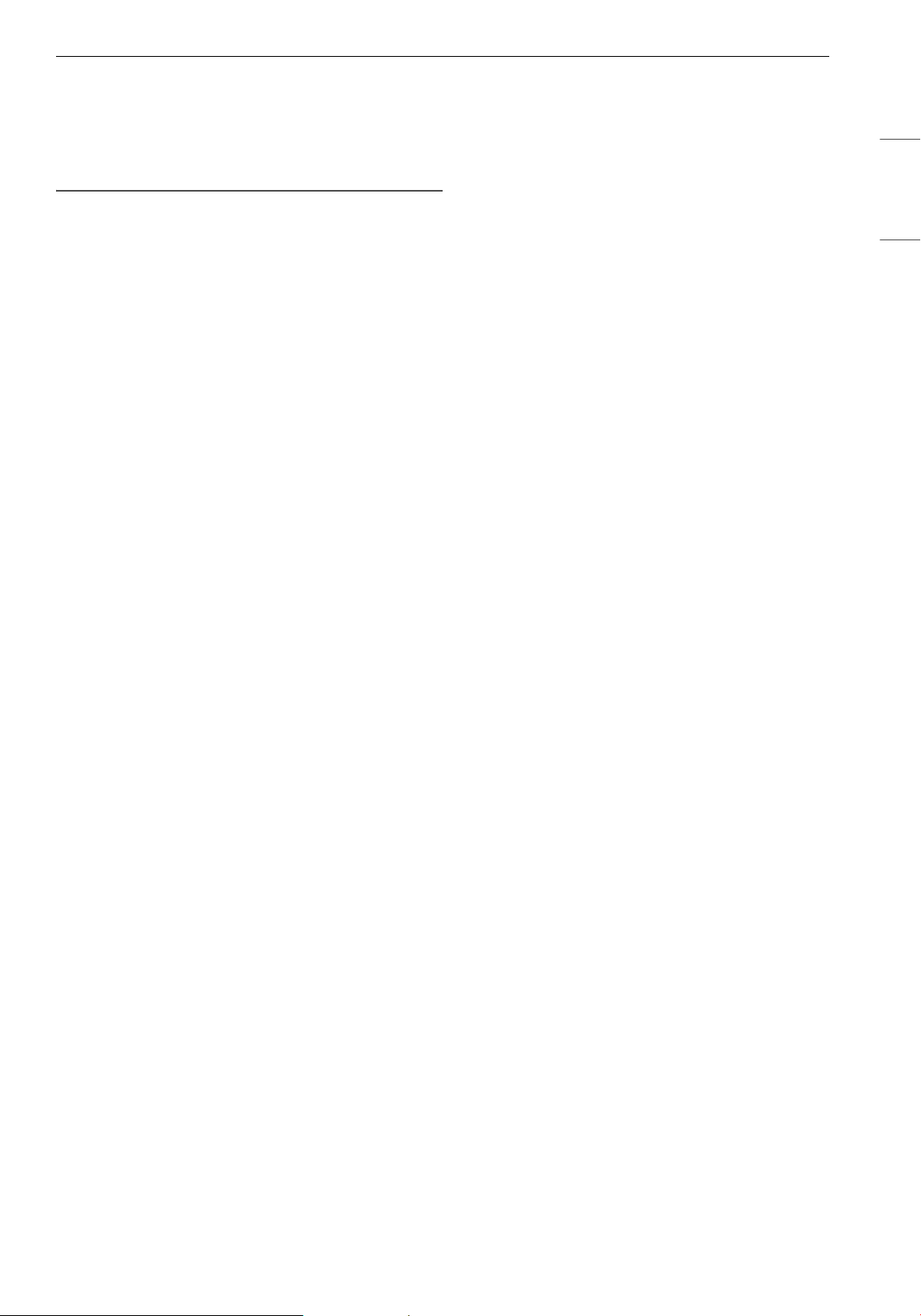
Type
Operating
Frequency Range
Output
Power
(Max.)
Wireless LAN
2400 MHz - 2472
MHz
< 1 W
Bluetooth
†
2400 MHz - 2483.5
MHz
27SMART FUNCTIONS
ENGLISH
unavailability, Wi-Fi disconnection, local app
store policy, or app unavailability.
• The feature may be subject to change without
prior notice and may have a different form
depending on where you are located.
Using LG ThinQ to Diagnose Issues
If you experience a problem with your Wi-Fi
equipped appliance, it can transmit
troubleshooting data to a smartphone using the
LG ThinQ application.
• Launch the LG ThinQ application and select the
Smart Diagnosis feature in the menu. Follow
the instructions provided in the LG ThinQ
application.
28 MAINTENANCE
MAINTENANCE
Maintaining the Product
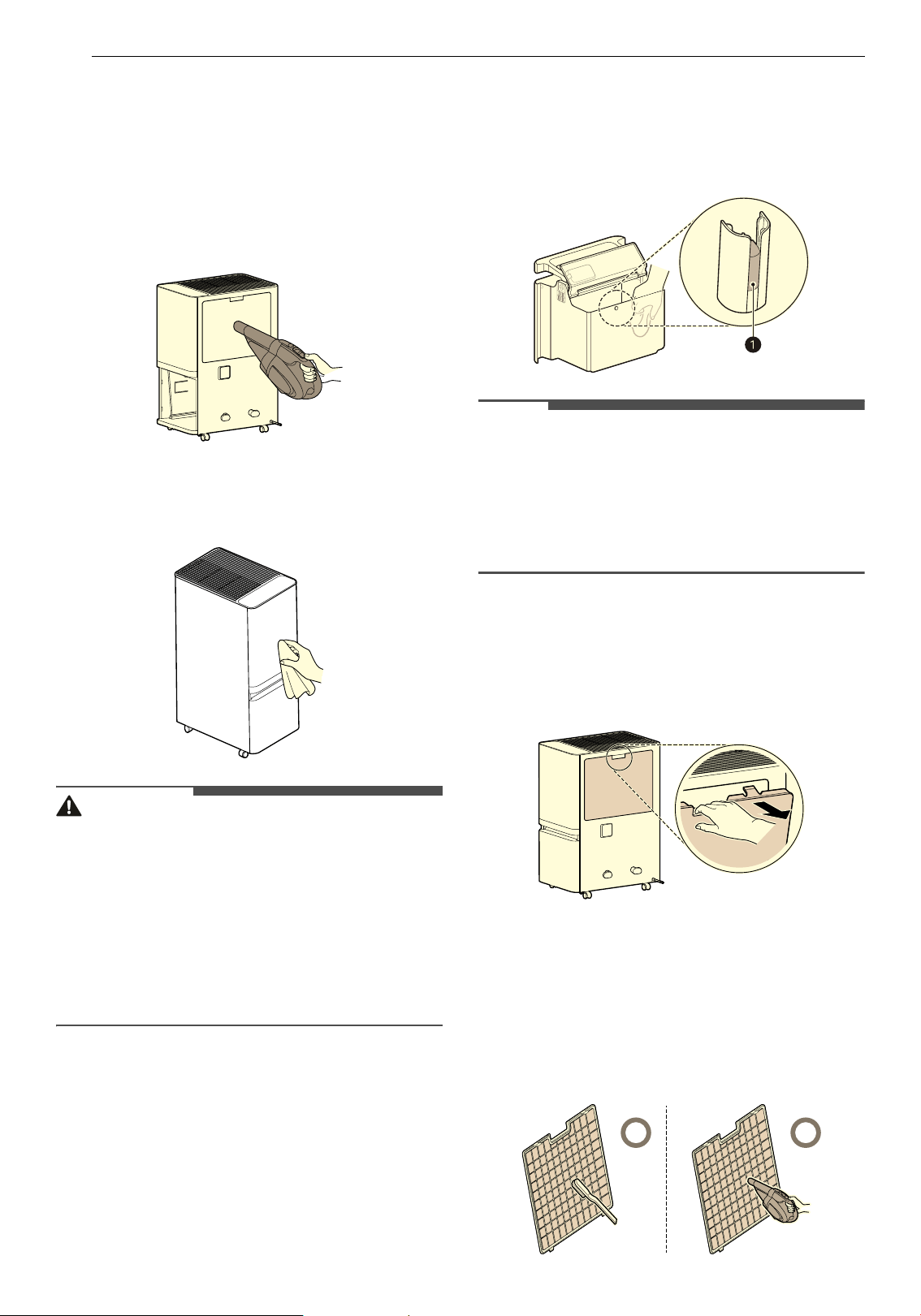
Cleaning the Exterior
1 Remove dust using a vacuum cleaner.
2 Wipe the air inlet and the exterior of the
product with a soft cloth.
CAUTION
• Do not wipe the appliance with an alkaline
detergent.
• Never use sulphuric acid, hydrochloric acid or
organic solvent (e.g., thinner, kerosene or
acetone) to wipe the appliance exterior, or affix
labels on the exterior. Doing so may damage the
product surface.
• Care should be exercised to prevent flowing of
water into the product.
Cleaning the Bucket
Wipe off the water inside the bucket.
• Do not open the lid because there is a float (
a)
to detect when the bucket is full.
NOTE
• If the float falls off or is assembled incorrectly,
there may be water leakage.
• Do not clean using hot water, detergent, air
fresheners, surfactants, antistatic agents, etc.
Doing so may damage the exterior of the
product.
Cleaning the Filters
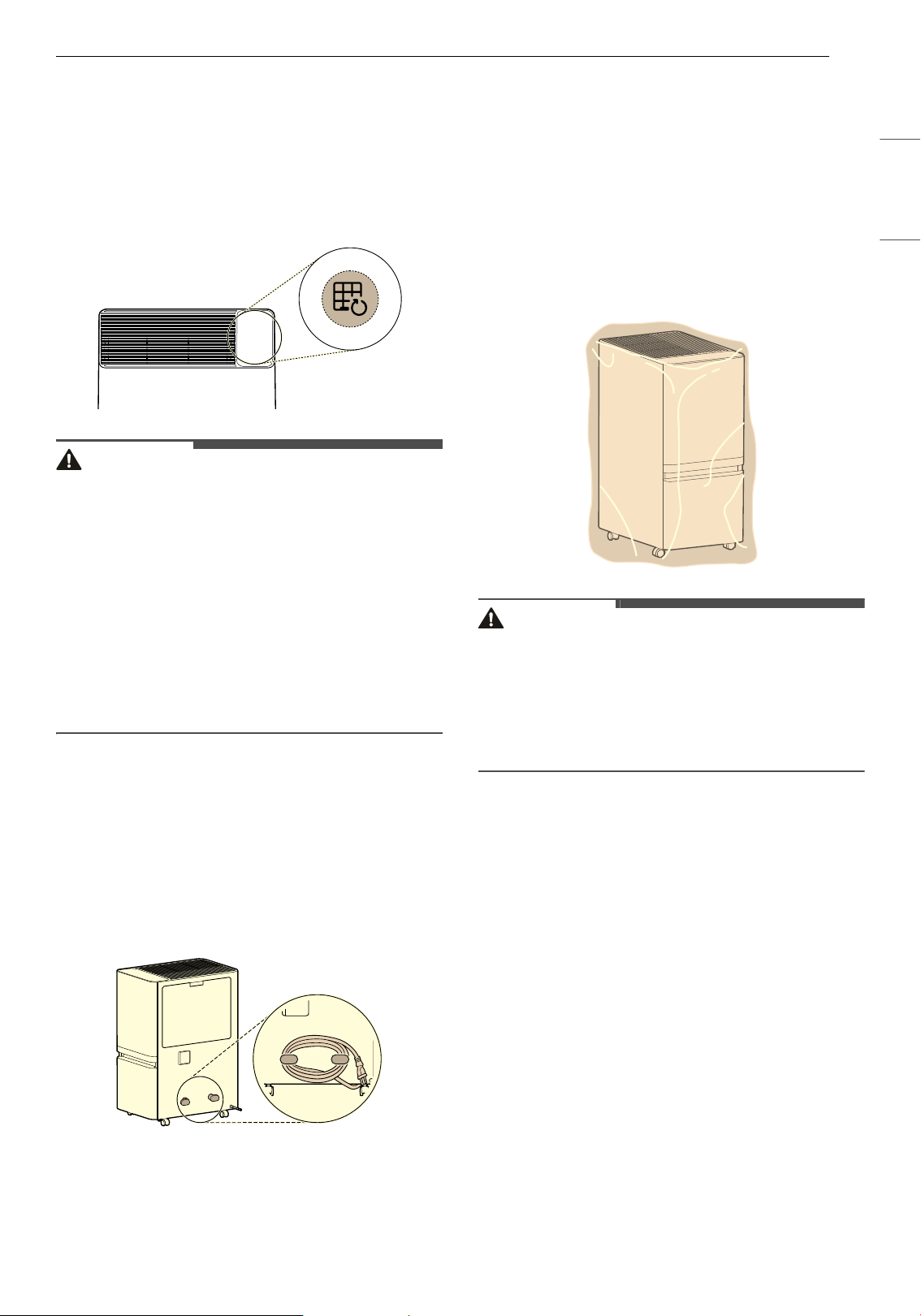
1 Hold the upper handle of the pre-filter and
pull it to remove the pre-filter.
2 Clean the pre-filter with a vacuum cleaner or
soft brush.
• If the filter is very dirty, wash with water
using neutral detergent. (Do not use hot
water of 104 °F (40 °C) or hotter.)
• Clean the pre-filter monthly.
29MAINTENANCE
ENGLISH
3 Completely dry the pre-filter in the shade and
reinstall the pre-filter on the product.
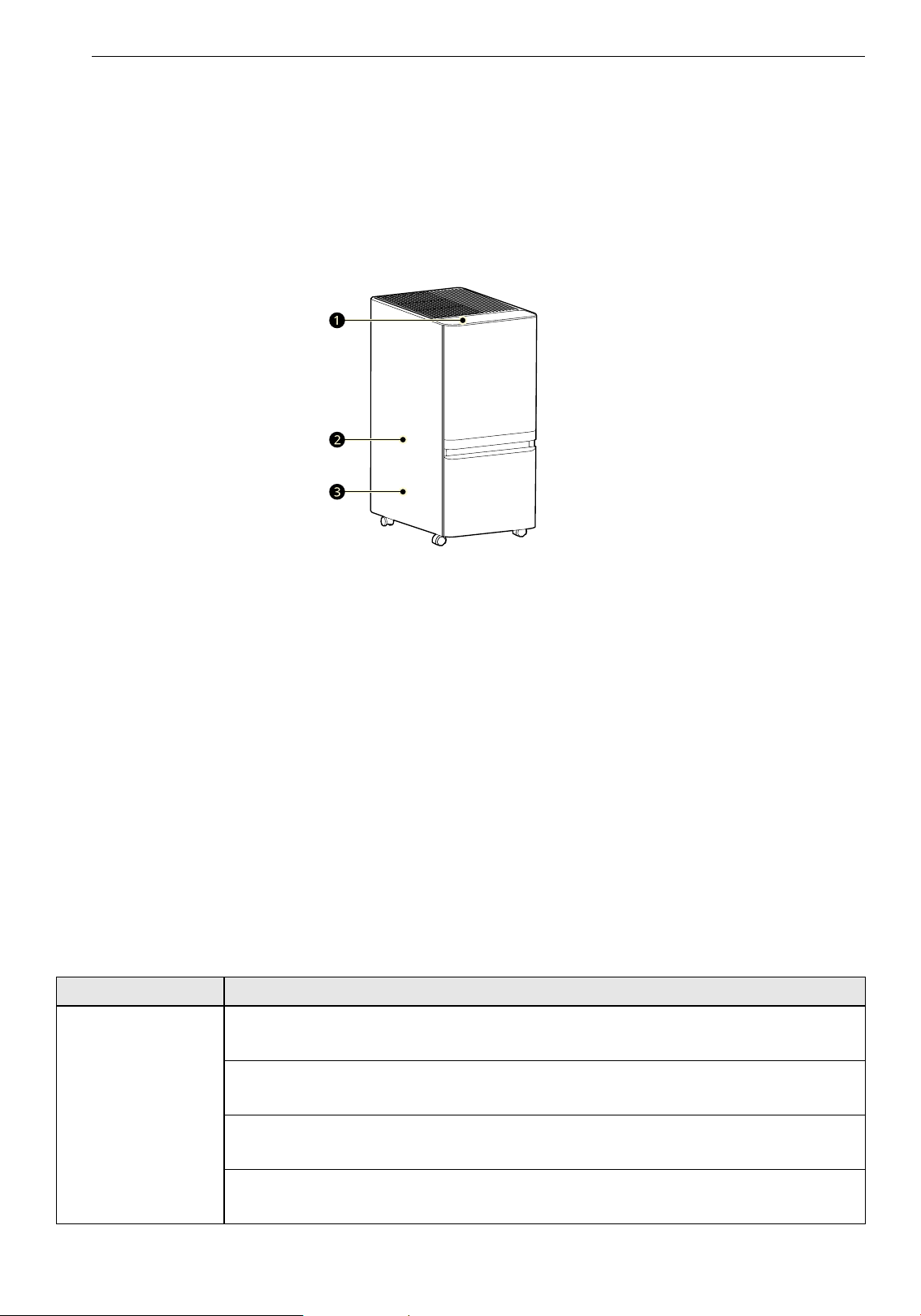
4 After cleaning the pre-filter, press and hold
the Filter Reset button for 3 seconds to reset
the Check Filter Notification.
CAUTION
• For safety, unplug the product before cleaning.
• Be careful not to damage the pre-filter when
using a vacuum cleaner.
• After washing the pre-filter with water,
completely dry it in the shade.
• Wear gloves when cleaning the product and
removing the pre-filter, and be careful not to
injure yourself on sharp parts (such as the heat
exchanger).
• Do not clean the heat exchanger yourself. Doing
so may result in injury.
Storage
If the product will not be used for a long period of
time, store it in a dry and shaded place.
1 Turn off the product and unplug the power
cord from the outlet, and organize it as
follows.
2 Completely drain the water remaining inside
the bucket.
• Remove the bucket lid and wipe off the
water inside the bucket.
3 Clean the filter.
• Do not dry the pre-filter under direct sun, as
it may deform.
• Do not dry the pre-filter near fire or intense
heat sources.
4 Cover the appliance to prevent dust or foreign
substances from entering the appliance. Store
the covered product out of direct sunlight.
CAUTION
• Do not store the appliance in a humid place or in
a place exposed to direct sunlight. Otherwise the
appliance may be deformed, malfunction or
generate odors.
• If the product is stored with water remaining in
the bucket, odor and mold may occur.
30 TROUBLESHOOTING
TROUBLESHOOTING
Before Calling for Service
Please check the following before calling for service. If the problem persists, contact your local service
center.
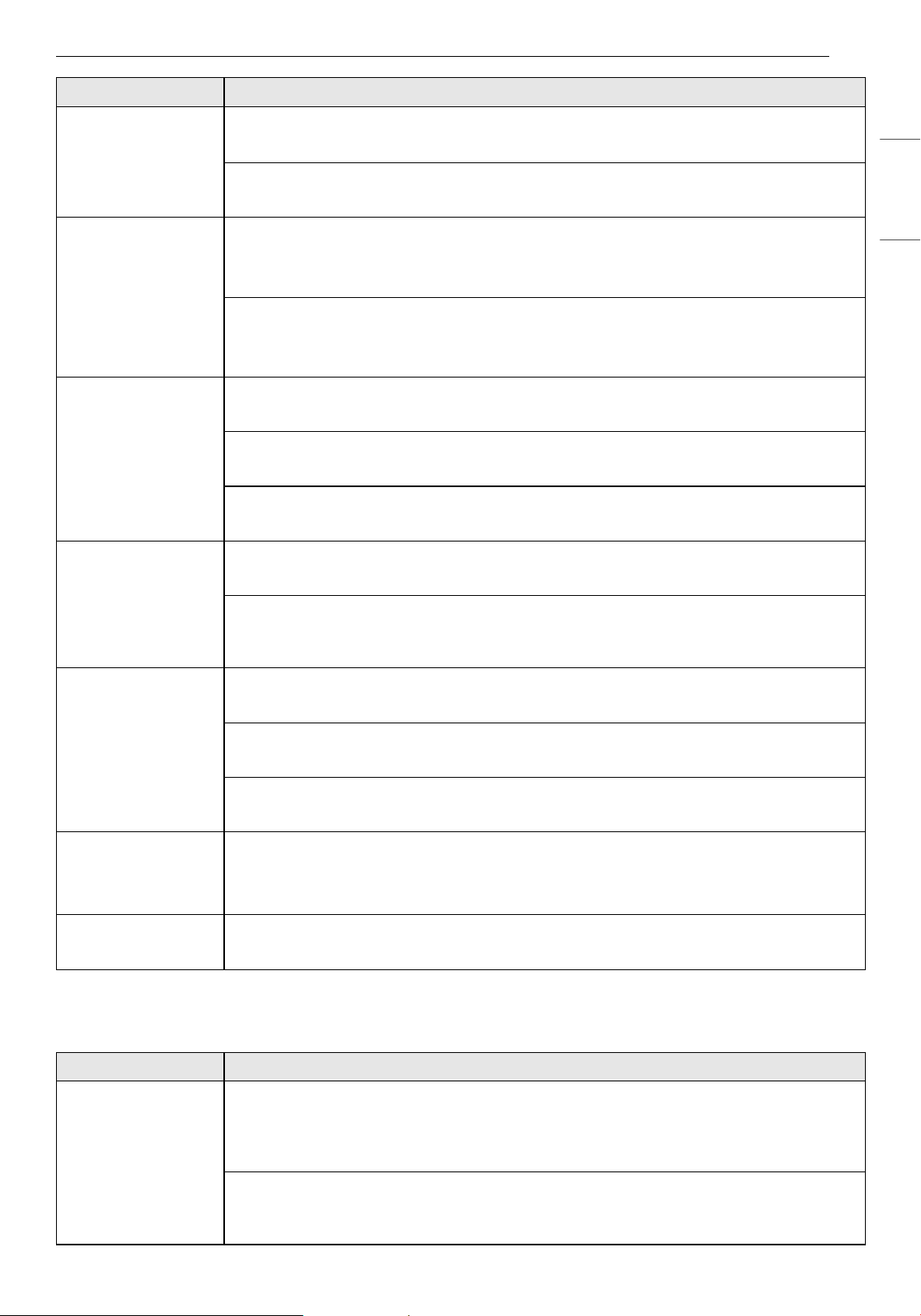
Normal Operating Sounds of the Product
a 'Buzzing' and 'grr-grr' (grinding) sounds
Sound may be heard until the circulation of the refrigerant stabilizes.
b High frequency sound
The sound from the compressor is a normal sound that occurs during operation.
c 'Clack' sounds (part expansion sound)
When operating the dehumidifier, the sound is caused by temperature changes in the components and
disappears after a certain period of time.
Operation
Call for service immediately in the following situations.
• Power cord is too hot or damaged.
• Error code is generated by Smart Diagnosis.
• Dehumidification continued even after the water tank was full.
Problem Possible Cause & Solution
The appliance does
not operate.
Is the power plug disconnected?
• Connect it to an outlet correctly.
Did the electricity get cut off?
• Check the power to other products in the house.
Is the bucket correctly installed?
• Install the bucket correctly.
Is the Bucket indicator lit up?
• Empty the bucket.
31TROUBLESHOOTING
ENGLISH
LG ThinQ
The appliance does
not operate.
Is the status display showing
dF?
• Defrost operation is in progress. Please select a mode once the defrost is complete.
Is the desired humidity set higher than the room humidity?
• Lower the desired humidity to below the room humidity.
There is little
dehumidification.
Is the room temperature or humidity too low?
• Check the target humidity.
• It is normal for less dehumidification to take place in the winter and in dry areas.
Is the air inlet or outlet blocked?
• Remove the obstruction.
• Clean the filter.
Humidity does not
seem to decrease
much even though
the product is
running in
dehumidification
mode.
Is the door/window open?
• Close the door/window.
Is the room too big?
• Use the dehumidifier in an adequately sized room.
Is there an object generating steam nearby?
• Do not use the dehumidifier together with other appliances.
The humidity
reading on the
status display is
incorrect.
Is the dehumidifier clogged in any way?
• Keep the dehumidifier away from walls etc.
Is the dehumidifier far away from the place you are trying to dehumidify?
• The dehumidifier`s display shows the humidity level in its current position, which may be
different from the level in other positions.
It is taking a long
time to dry laundry.
Is the dry air reaching the laundry?
• Move the dehumidifier closer to the laundry.
Are you trying to dry the laundry in a large room?
• Use the dehumidifier in an adequately sized room.
Are you trying to dry too much laundry?
• Reduce the amount of laundry.
I just removed the
bucket and water is
dripping from within
the dehumidifier.
Did you remove the bucket while the dehumidifier was running?
• Remove the bucket when the Bucket indicator lights up.
The extension hose
is not connected.
Is the extension hose adapter connected to the product?
• Make sure the extension hose adapter is connected (on some products).
Problem Possible Cause & Solution
The product and the
smartphone cannot
be connected
through Wi-Fi.
Is the Wi-Fi password used to connect to the smartphone correct?
• Press the Settings button on your smartphone, and then find your Wi-Fi in the network list.
Press and hold the button to select [Clear Network], and then proceed with product
registration again from the beginning.
Is your smartphone using mobile data rather than Wi-Fi?
• In the smartphone's settings, turn off Mobile Data, turn on Wi-Fi, and then register the
product.
Problem Possible Cause & Solution
32 TROUBLESHOOTING
The product and the
smartphone cannot
be connected
through Wi-Fi.
Does the name (ID) of the wireless router contain special characters?
• Set the name (ID) of the wireless router as a combination of numbers and English letters.
Wi-Fi connection may be difficult if you enter special characters.
Is the frequency of the wireless router not 2.4 GHz?
• When connecting the product via Wi-Fi, only a 2.4 GHz network can be used. Set the
wireless router to 2.4 GHz and then connect. To check the frequency of your wireless
router, contact your Internet carrier or router manufacturer.
Are the product and the wireless router too far apart?
• If the distance between the product and the wireless router is too great, the wireless signal
may be weak, and the connection may not be smooth. Move the wireless router closer to
the product.
Problem Possible Cause & Solution
33APPENDIX
ENGLISH
APPENDIX
Specifications
APPLIANCE SPECIFICATIONS
• Appearance and specifications may vary without notice to improve the quality of the appliance.
Name DT50*B*R*
Power AC 120 V ~, 60 Hz
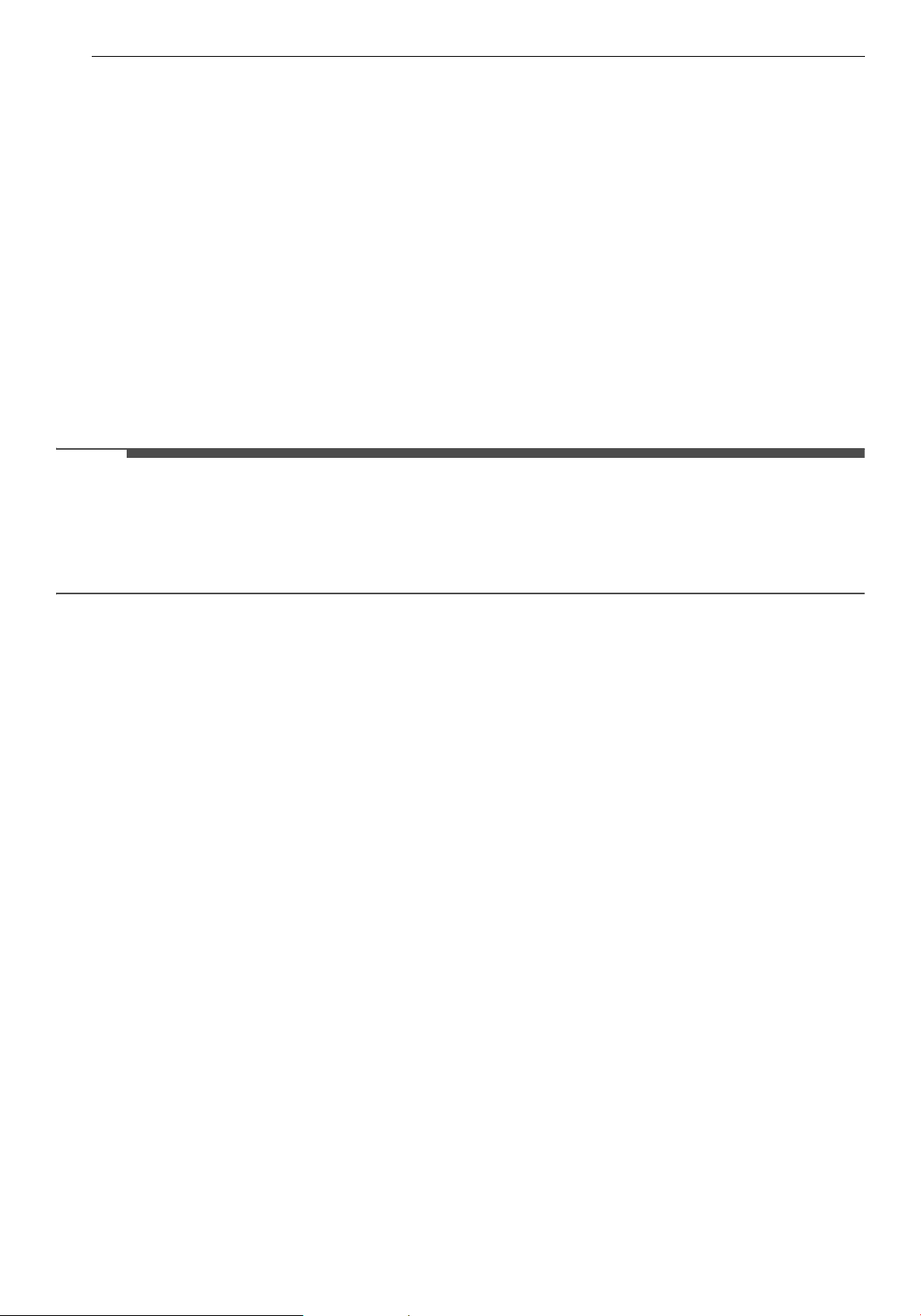
Exterior Dimensions
(
a x b x c)
16.73 in x 11 in x 23.86 in (425 mm x 280 mm x 606 mm)
Name DT35*B*R*, DT25*B*R*
Power AC 120 V ~, 60 Hz
Exterior Dimensions
(
a x b x c)
14.43 in x 8.66 in x 24.02 in (366 mm x 220 mm x 610 mm)
34 APPENDIX
Warranty
ARBITRATION NOTICE:
THIS LIMITED WARRANTY CONTAINS AN ARBITRATION PROVISION THAT REQUIRES YOU AND LG
ELECTRONICS (“LG”) TO RESOLVE DISPUTES BY BINDING ARBITRATION INSTEAD OF IN COURT, UNLESS
YOU CHOOSE TO OPT OUT. IN ARBITRATION, CLASS ACTIONS AND JURY TRIALS ARE NOT PERMITTED.
PLEASE SEE THE SECTION TITLED “PROCEDURE FOR RESOLVING DISPUTES” BELOW.
WHAT THIS WARRANTY COVERS:
LG Electronics (“LG”) warrants your LG Dehumidifier ("Product") against defects in materials or
workmanship under normal household use. During the warranty period set forth below, LG will, at its
option, repair or replace the Product. This limited warranty is valid only to the original retail purchaser of
the Product and applies only when purchased lawfully and used within the United States, including U.S.
Territories. Proof of original retail purchase is required to obtain warranty service under this limited
warranty.
NOTE
• Replacement products and/or repair parts may be new, reburbished, or factory-remanufactured and are
warranted for the remaining portion of the original Product’s warranty period or ninety (90) days,
whichever is longer. Any replaced Product and/or repair parts will be the property of LG. Please retain
dated receipt or delivery ticket as evidence of the Date of Purchase for proof of warranty. (You may be
required to submit a copy to LG or its authorized representative).
INFORMATION
WARRANTY PERIOD:
One (1) year from the date of original retail purchase, or from the date of delivery as per applicable law
(Any internal/ functional Parts only).
HOW SERVICE IS HANDLED: In-Home Service
In-home service will be provided during the warranty period subject to availability within the United States.
In-home service may not be available in all areas. To receive in-home service, the Product must be
unobstructed and accessible to service personnel. If,during in-home service, repair cannot be completed, it
may be necessary to remove, repair and return the Product. If in-home service is unavailable, LG may elect,
at its option, to provide for transportation of its choice to and from its authorized service center.
THIS LIMITED WARRANTY DOES NOT COVER:
• Service trips to deliver, pick up, removal or reinstallation of the Product, or for instruction on Product
use.
• Replacing house fuses or resetting of circuit breakers, correction of house wiring or plumbing, or
correction of Product installation.
• Damage or failure caused by leaky/ broken/ frozen water pipes, restricted drain lines, inadequate or
interrupted water supply or inadequate supply of air.
• Damage or failure caused by accidents, pests and vermin, lightning, wind, fire, floods or acts of nature.
• Damage or failure resulting from misuse, abuse, improper installation/repair/ or maintenance. Improper
repair includes use of parts not approved or specified by LG.
• Damage or failure caused by unauthorized modification or alteration to the Product.
• Damage or failure caused by incorrect electrical current, voltage, or plumbing codes.
35APPENDIX
ENGLISH
• Cosmetic damage, including scratches, dents, chips or other damage to the finish of the Product, unless
such damage results from defects in materials or workmanship and is reported to LG within seven (7)
calendar days from the date of delivery(Call 1-800-243-0000).
• Refurbished Product, or damage or missing items to any display, open box, ordiscounted Product.
• Any Product sold “As Is”, “With all Faults” or similar disclaimer.
• Product where the original factory serial numbers have been removed, defaced or changed in any way.
• Repairs when Product is used in other than normal and usual household use (e.g. rental, commercial
use, offices, or recreational facilities) or contrary to the instructions outlined in the owner’s manual.
• Cosmetic (non-functional) parts, or replacement of any consumable parts.
• Increases in utility cost and additional utility expenses.
• Minor imperfections that do not materially alter or affect functionality.
DISCLAIMER
THIS WARRANTY IS IN LIEU OF ANY OTHER WARRANTY, EXPRESS OR IMPLIED, INCLUDING AND WITHOUT
LIMITATION TO, ANY WARRANTY OF MERCHANTABILITY OR FITNESS FOR A PARTICULAR PURPOSE. TO THE
EXTENT ANY IMPLIED WARRANTY IS REQUIRED BY LAW, THIS WARRANTY IS LIMITED IN DURATION TO THE
TERM PERIOD EXPRESSED ABOVE. REPAIR OR REPLACEMENT AS PROVIDED UNDER THIS WARRANTY IS THE
EXCLUSIVE REMEDY FOR THE CUSTOMER. NEITHER THE MANUFACTURER NOR ITS U.S. DISTRIBUTOR
SHALL BE LIABLE FOR ANY INCIDENTAL, CONSEQUENTIAL, INDIRECT, SPECIAL, OR PUNITIVE DAMAGES OF
ANY NATURE, INCLUDING AND WITHOUT LIMITATION TO, LOST REVENUES OR PROFITS, OR ANY OTHER
DAMAGE, WHETHER BASED IN CONTRACT, TORT, OR OTHERWISE.
SOME STATES DO NOT ALLOW THE EXCLUSION OR LIMITATION OF INCIDENTAL OR CONSEQUENTIAL
DAMAGES OR LIMITATIONS ON HOW LONG AN IMPLIED WARRANTY LASTS, SO THE ABOVE EXCLUSION OR
LIMITATION MAY NOT APPLY TO THE CUSTOMERYOU. THIS WARRANTY GIVES THE CUSTOMER YOU
SPECIFIC LEGAL RIGHTS AND THE CUSTOMER YOU MAY ALSO HAVE OTHER RIGHTS THAT VARY FROM
STATE TO STATE.
The cost of repair or replacement under these excluded circumstances shall be
borne by You.
TO OBTAIN WARRANTY SERVICE AND ADDITIONAL INFORMATION
Call 1-800-243-0000 and select the appropriate option from the menu. Or visit our website at http://
www.lg.com
Or by mail: LG Customer Information Center (ATTN: CIC) 201 James Record Road, Huntsville, AL 35824

36 APPENDIX
PROCEDURE FOR RESOLVING DISPUTES:
ALL DISPUTES BETWEEN YOU AND LG ARISING OUT OF OR RELATING IN ANY WAY TO THIS LIMITED
WARRANTY OR THE PRODUCT SHALL BE RESOLVED EXCLUSIVELY THROUGH BINDING ARBITRATION, AND
NOT IN A COURT OF GENERAL JURISDICTION. BINDING ARBITRATION MEANS THAT YOU AND LG ARE EACH
WAIVING THE RIGHT TO A JURY TRIAL AND TO BRING OR PARTICIPATE IN A CLASS ACTION.
Definitions. For the purposes of this section, references to “LG” mean LG Electronics U.S.A., Inc., its
parents, subsidiaries and affiliates, and each of their officers, directors, employees, agents, beneficiaries,
predecessors in interest, successors, assigns and suppliers; references to “dispute” or “claim” shall include
any dispute, claim or controversy of any kind whatsoever (whether based in contract, tort, statute,
regulation, ordinance, fraud, misrepresentation or any other legal or equitable theory) arising out of or
relating in any way to the sale, condition or performance of the product or this Limited Warranty.
Notice of Dispute. In the event you intend to commence an arbitration proceeding, you must first notify
LG in writing at least 30 days in advance of initiating the arbitration by sending a letter to LG at LG
Electronics, USA, Inc. Attn: Legal Department-Arbitration 111 Sylvan Avenue, Englewood Cliffs, NJ 07632.
You and LG agree to engage in good faith discussions in an attempt to amicably resolve your claim. The
notice must provide your name, address, and telephone number; identify the product that is the subject of
the claim; and describe the nature of the claim and the relief being sought. If you and LG are unable to
resolve the dispute within 30 days, either party may proceed to file a claim for arbitration.
Agreement to Binding Arbitration and Class Action Waiver. Upon failure to resolve the dispute during
the 30 day period after sending written notice to LG, you and LG agree to resolve any claims between us
only by binding arbitration on an individual basis, unless you opt out as provided below. Any dispute
between you and LG shall not be combined or consolidated with a dispute involving any other person’s or
entity’s product or claim. More specifically, without limitation of the foregoing, any dispute between you
and LG shall not under any circumstances proceed as part of a class or representative action. Instead of
arbitration, either party may bring an individual action in small claims court, but that small claims court
action may not be brought on a class or representative basis.
Arbitration Rules and Procedures. To begin arbitration of a claim, either you or LG must make a written
demand for arbitration. The arbitration will be administered by the American Arbitration Association
(“AAA”) and will be conducted before a single arbitrator under the AAA’s Consumer Arbitration Rules that
are in effect at the time the arbitration is initiated (referred to as the “AAA Rules”) and under the
procedures set forth in this section. The AAA Rules are available online at www.adr.org/consumer
. Send a
copy of your written demand for arbitration, as well as a copy of this provision, to the AAA in the manner
described in the AAA Rules. You must also send a copy of your written demand to LG at LG Electronics,
USA, Inc. Attn: Legal Department-Arbitration 111 Sylvan Avenue, Englewood Cliffs, NJ 07632. If there is a
conflict between the AAA Rules and the rules set forth in this section, the rules set forth in this section will
govern. This arbitration provision is governed by the Federal Arbitration Act. Judgment may be entered on
the arbitrator’s award in any court of competent jurisdiction. All issues are for the arbitrator to decide,
except that issues relating to the scope and enforceability of the arbitration provision and to the
arbitrability of the dispute are for the court to decide. The arbitrator is bound by the terms of this
provision.
Governing Law. The law of the state of your residence shall govern this Limited Warranty and any
disputes between us except to the extent that such law is preempted by or inconsistent with applicable
federal law.
Fees/Costs. You do not need to pay any fee to begin an arbitration. Upon receipt of your written demand
for arbitration, LG will promptly pay all arbitration filing fees to the AAA unless you seek more than $25,000
in damages, in which case the payment of these fees will be governed by the AAA Rules. Except as
otherwise provided for herein, LG will pay all AAA filing, administration and arbitrator fees for any
arbitration initiated in accordance with the AAA Rules and this arbitration provision. If you prevail in the
arbitration, LG will pay your attorneys’ fees and expenses as long as they are reasonable, by considering
factors including, but not limited to, the purchase amount and claim amount. Notwithstanding the
foregoing, if applicable law allows for an award of reasonable attorneys’ fees and expenses, an arbitrator
can award them to the same extent that a court would. If the arbitrator finds either the substance of your
claim or the relief sought in the demand is frivolous or brought for an improper purpose (as measured by
the standards set forth in Federal Rule of Civil Procedure 11(b)), then the payment of all arbitration fees will
be governed by the AAA Rules. In such a situation, you agree to reimburse LG for all monies previously
disbursed by it that are otherwise your obligation to pay under the AAA Rules. Except as otherwise
37APPENDIX
ENGLISH
provided for, LG waives any rights it may have to seek attorneys’ fees and expenses from you if LG prevails
in the arbitration.
Hearings and Location. If your claim is for $25,000 or less, you may choose to have the arbitration
conducted solely on the basis of (1) documents submitted to the arbitrator, (2) through a telephonic
hearing, or (3) by an in-person hearing as established by the AAA Rules. If your claim exceeds $25,000, the
right to a hearing will be determined by the AAA Rules. Any in-person arbitration hearings will be held at a
location within the federal judicial district in which you reside unless we both agree to another location or
we agree to a telephonic arbitration.
Opt Out. You may opt out of this dispute resolution procedure. If you opt out, neither you nor LG can
require the other to participate in an arbitration proceeding. To opt out, you must send notice to LG no
later than 30 calendar days from the date of the first consumer purchaser’s purchase of the product by
either: (i) sending an e-mail to [email protected]
, with the subject line: “Arbitration Opt Out” or (ii) calling 1-
800-980-2973. You must include in the opt out e-mail or provide by telephone: (a) your name and address;
(b) the date on which the product was purchased; (c) the product model name or model number; and (d)
the serial number (the serial number can be found (i) on the product; or (ii) online by accessing https://
www.lg.com/us/support and clicking on “How do I find my model number?”).
You may only opt out of the dispute resolution procedure in the manner described above (that is, by e-mail
or telephone); no other form of notice will be effective to opt out of this dispute resolution procedure.
Opting out of this dispute resolution procedure will not affect the coverage of the Limited Warranty in any
way, and you will continue to enjoy the full benefits of the Limited Warranty. If you keep this product and
do not opt out, then you accept all terms and conditions of the arbitration provision described above.

MANUAL DEL PROPIETARIO
DESHUMIDIFICADOR
Lea el manual del propietario detenidamente previo a operar el
electrodoméstico y mantengalo al alcance para futuras
referencias.
ESPAÑOL
DT50*B*R*, DT35*B*R*, DT25*B*R*
www.lg.com
Copyright © 2026 LG Electronics. Todos los derechos reservados
Escanee el código QR para ver el manual.
ÍNDICE
2
3 INSTRUCCIONES IMPORTANTES
DE SEGURIDAD
3 LEA Y GUARDE ESTAS INSTRUCCIONES
3 INSTRUCCIONES DE ADVERTENCIA
6 INSTRUCCIONES DE PRECAUCIÓN
7 Mensajes de Seguridad Relacionados con el
Servicio
13 FUNCIONAMIENTO
13 Descripción general del producto
15 Preparación antes del funcionamiento
16 Características
19 Funcionamiento del deshumidificador
21 Uso de las funciones extra
22 Vaciado del depósito
26 FUNCIONES INTELIGENTES
26 Aplicación LG ThinQ
28 Smart Diagnosis
29 MANTENIMIENTO
29 Mantenimiento del producto
31 SOLUCIÓN DE PROBLEMAS
31 Antes de llamar al servicio técnico
34 APÉNDICE
34 Especificaciones
35 GARANTÍA
3INSTRUCCIONES IMPORTANTES DE SEGURIDAD
ESPAÑOL
INSTRUCCIONES IMPORTANTES DE SEGURIDAD
LEA Y GUARDE ESTAS INSTRUCCIONES
Las siguientes directrices de seguridad tienen por objeto evitar riesgos imprevistos o daños derivados de
un funcionamiento inseguro o incorrecto del aparato.
Los lineamientos están separados en “ADVERTENCIA” Y “PRECAUCIÓN”, como se describe a continuación.
Mensajes de seguridad
Su seguridad y la de los demás son muy importantes.
Tanto en este manual como en el equipo, hemos proporcionado muchos mensajes de seguridad
importantes. Siempre debe leer y respetar todos los mensajes de seguridad.
Todos los mensajes de seguridad le indicarán cuáles son los posibles peligros, cómo reducir la posibilidad
de lesiones y qué podría suceder si no siguen las instrucciones.
Notas sobre el refrigerante inflamable
En las unidades pueden verse los siguientes símbolos.
INSTRUCCIONES DE ADVERTENCIA
ADVERTENCIA
• Para reducir el riesgo de explosión, incendio, muerte, descargas eléctricas, lesiones o quemaduras en las
personas cuando utilizan este producto, siga las precauciones básicas, incluido lo siguiente:
Este es el símbolo de alerta de seguridad.
Este símbolo le advierte de posibles peligros que pueden matarlos o lastimarlos a usted y a otros.
Todos los mensajes de seguridad seguirán el símbolo de alerta de seguridad y la palabra
ADVERTENCIA o PRECAUCIÓN.
Estos términos indican lo siguiente:
ADVERTENCIA
El incumplimiento de las instrucciones podría causarle la muerte o lesiones graves.
PRECAUCIÓN
El incumplimiento de las instrucciones podría causarle lesiones o generar daños en el producto.
Este símbolo indica que este electrodoméstico utiliza un refrigerante inflamable. Existe riesgo
de incendio si el refrigerante tiene fugas y queda expuesto a una fuente de ignición exterior.
Este símbolo indica que el Manual de uso debe leerse atentamente.
Este símbolo indica que el personal de servicio debe manipular este equipo según lo indicado en
el Manual de instalación.
Este símbolo indica que existe información disponible, como la del Manual de uso o el Manual
de instalación.
4 INSTRUCCIONES IMPORTANTES DE SEGURIDAD
Seguridad técnica
• Este aparato no está diseñado para ser utilizado por personas (incluidos los niños) con capacidades
físicas, sensoriales o mentales reducidas, o que no tengan experiencia ni conocimientos en cuanto al uso
del aparato. Para que puedan utilizarlo, una persona responsable de su seguridad debe supervisarlos o
debe haberles dado instrucciones sobre el uso seguro del producto. Se debe supervisar a los niños para
asegurarse de que no jueguen con el aparato.
• Si el cable de alimentación está dañado, debe ser reemplazado por el fabricante, su agente de servicio
técnico o una persona con calificación similar para evitar riesgos.
• Sólo un técnico autorizado debe desmontar, reparar o modificar el aparato.
• No toque el enchufe con las manos mojadas.
• No coloque el cable de alimentación debajo de alfombras, moquetas o felpudos.
• No instale ni utilice piezas rotas.
• Cualquier servicio interno relacionado con el sistema de refrigerante está prohibido.
• Cualquier trabajo en caliente, incluida la soldadura fuerte (brazing) y la recarga, está prohibido.
Instalación
• No instale el aparato sobre una superficie desnivelada o inclinada.
• No instale el aparato en una zona expuesta a la luz solar directa o cerca de equipos que generen calor.
• No instale el producto en un lugar donde pueda haber fugas de gas combustible o donde haya aceite
industrial o partículas metálicas.
• No permita que el aparato presione el cable de alimentación o el enchufe.
• No doble excesivamente el cable de alimentación ni coloque un objeto pesado sobre él.
• No prolongue la longitud del cable de alimentación ni lo modifique.
• No utilice varios aparatos en una toma de extensión de varias clavijas.
• No use el producto si el tomacorriente está dañado o flojo.
• Asegúrese de que el cable de alimentación no pueda salirse o dañarse durante el funcionamiento.
• Cuando desenchufe el cable de alimentación, tire siempre de él por el enchufe.
• Desenchufe el aparato durante tormentas eléctricas o cuando no vaya a utilizarlo durante mucho
tiempo.
Funcionamiento
• Si el aparato se sumerge en agua, deje de utilizarlo y contacte a un Centro de Información al Cliente de
LG Electronics.
• Si hay una fuga de gas (isobutano, propano, GNL, etc.), no toque el aparato ni el enchufe y ventile la zona
inmediatamente.
• Si detecta algún ruido, olor o humo anormal, desenchufe el aparato inmediatamente y contacte a un
Centro de Información al Cliente de LG Electronics.
• No limpie el aparato con cepillos, paños o esponjas abrasivos o metálicos.
• No utilice ni almacene fuego, combustibles (éter, benceno, alcohol, drogas, propano, butano, aerosoles
combustibles, insecticida, ambientador, cosméticos, etc.) o materiales inflamables (velas, lámparas, etc.)
cerca del producto.
• No permita que animales o mascotas muerdan el cable de alimentación.
• No mueva el aparato cuando esté en funcionamiento.
• No golpee el aparato.
• No inserte las manos ni objetos metálicos en la entrada o salida de aire.
• No introduzca objetos inflamables en el aparato.
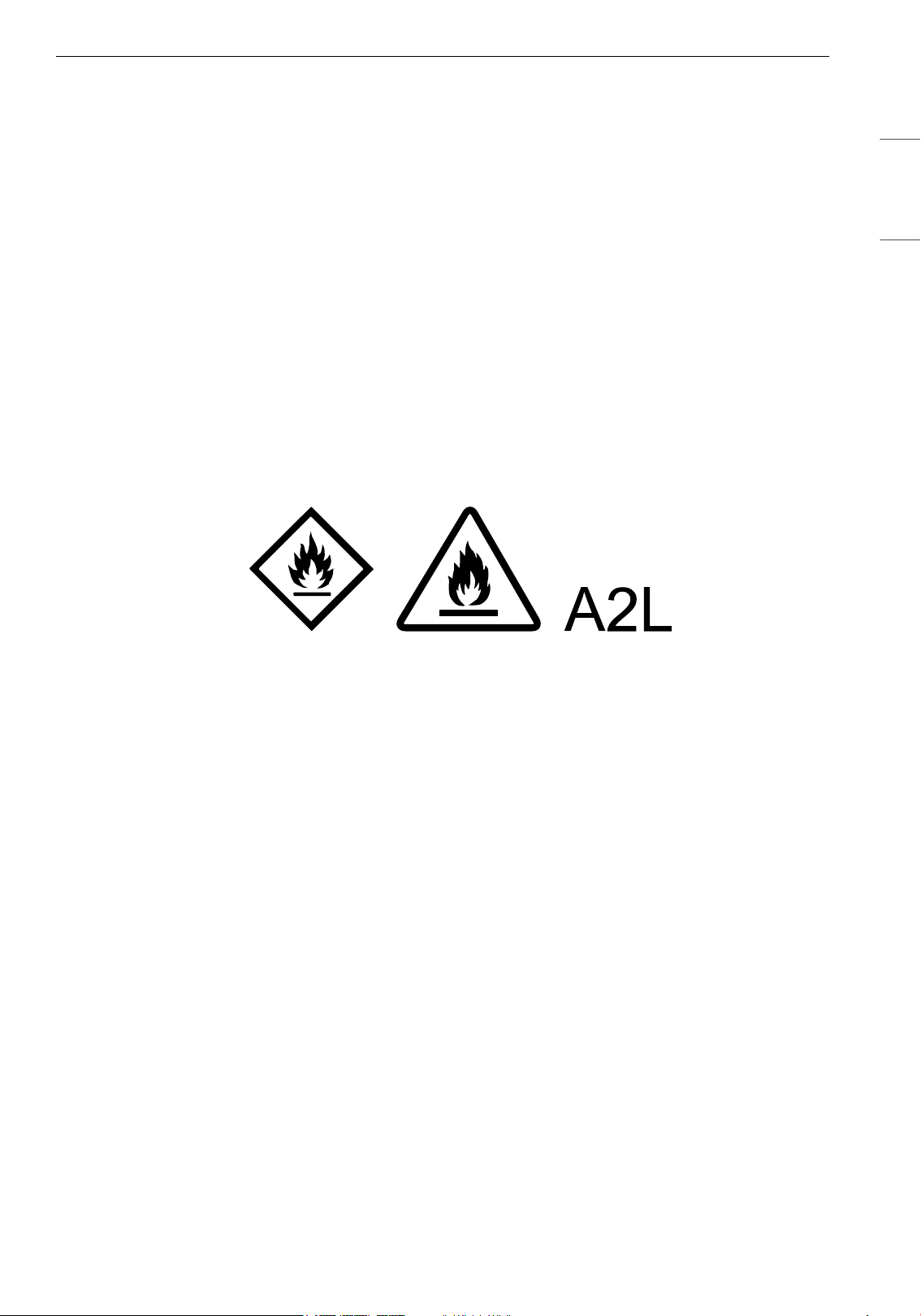
5INSTRUCCIONES IMPORTANTES DE SEGURIDAD
ESPAÑOL
• No permita que los niños se suban al aparato o jueguen con él.
• No coloque nada encima del aparato.
• No coloque aparatos de combustión directamente en la trayectoria del flujo de aire del
deshumidificador.
• No utilice el producto en lugares donde pueda salpicarlo el agua.
• No use el producto en la luz solar directa ni bajo la lluvia.
Mantenimiento
• Deseche los materiales de embalaje (vinilo, espuma de poliestireno, etc.) de forma que no queden al
alcance de los niños.
• Tenga cuidado de no lesionarse ni pellizcarse al desmontar y volver a montar piezas del aparato.
• Apague y desenchufe el aparato antes de limpiarlo o cambiar el filtro.
• No use agua para limpiar el deshumidificador.
Refrigerante (Solo para R32)
• Utilice únicamente los métodos de descongelamiento y limpieza aconsejados por el fabricante. No utilice
ningún otro método.
• El electrodoméstico debe mantenerse en un espacio sin llamas abiertas en continuo funcionamiento
(por ejemplo, una estufa de gas) ni fuentes de ignición (por ejemplo, un calefactor eléctrico en uso).
• Evite quemaduras o perforaciones.
• Tenga cuidado de que los refrigerantes inflamables pueden no oler.
• Deben respetarse las leyes del país en materia de gas.
• Las conexiones mecánicas deben ser accesibles para fines de mantenimiento.
• El electrodoméstico debe mantenerse en un espacio bien ventilado y con un tamaño de sala que se
ajuste a las necesidades de espacio de funcionamiento.
6 INSTRUCCIONES IMPORTANTES DE SEGURIDAD
INSTRUCCIONES DE PRECAUCIÓN
PRECAUCIÓN
• Para reducir el riesgo de lesiones menores en las personas, mal funcionamiento o daños al producto o a
la propiedad cuando se utiliza este producto, siga las precauciones básicas, incluido lo siguiente:
Instalación
• No incline el aparato para tirar de él o empujarlo durante el transporte.
• No instale el aparato en un vehículo, vehículo RV o embarcación.
• No coloque el aparato cerca de un TV o equipo estéreo.
• No coloque el aparato bajo una luz intensa.
• No coloque floreros ni frascos con agua sobre el deshumidificador.
• El aparato debe instalarse de acuerdo con la normativa nacional sobre cableado.
• Al mover o almacenar el producto, coloque el enchufe en su lugar de almacenamiento para evitar
lesiones en las personas y daños en el cable o los pisos.
• No coloque el aparato cerca de cortinas.
• No utilice una fuerza excesiva al tirar de la manguera de extensión.
Funcionamiento
• No utilice el producto para eliminar gases tóxicos como el monóxido de carbono.
• No utilice el aparato durante mucho tiempo en una región con voltaje inestable.
• No coloque obstáculos alrededor de la entrada o salida de aire.
• Para un uso seguro del aparato, los niños u otras personas con capacidades mentales reducidas deben
ser vigilados de cerca por una persona responsable de su seguridad.
• No utilice el producto para fines especiales como la conservación de plantas, instrumentos de precisión,
obras de arte, etc.
• No utilice el aparato con las manos mojadas.
• No utilice el aparato si no está en una posición vertical.
• No utilice el aparato cerca de objetos vulnerables al calor.
• No utilice detergentes, cosméticos, productos químicos, ambientadores ni desinfectantes en el aparato.
• No toque ninguna pieza interna mientras el aparato esté en funcionamiento o inmediatamente luego
del funcionamiento.
• No inserte ningún objeto en la salida de aire.
• No utilice el producto en lugares donde se usen productos químicos.
• No haga funcionar el deshumidificador sin un filtro.
• Apague el deshumidificador y vacíe el depósito antes de mover el aparato.
• Desenchufe el producto si no lo va a utilizar durante un período largo.
• No utilice el producto en espacios muy pequeños, como un clóset.
• No mantenga el cable de alimentación enrollado durante el uso.
• No rocíe sustancias extrañas ni agua en el orificio del sensor.
• No permita que los niños se suban al producto.
7INSTRUCCIONES IMPORTANTES DE SEGURIDAD
ESPAÑOL
Mantenimiento
• No utilice detergentes fuertes ni disolventes para limpiar el aparato. Utilice un paño suave para
limpiarlo.
• No limpie el aparato con detergentes alcalinos.
• No limpie la superficie del aparato con ácido sulfúrico, ácido clorhídrico o disolventes orgánicos
(diluyente, queroseno, etc.) no pegue pegatinas en el aparato.
• Apague el deshumidificador y desenchúfelo antes de limpiar.
• No permita que entre agua en el aparato.
• No toque el intercambiador de calor.
• Use guantes al limpiar el producto y al retirar el filtro. Además, tenga cuidado de no lastimarse con las
partes filosas (como el intercambiador de calor).
• No limpie el intercambiador de calor usted mismo, ya que puede lastimarse.
Refrigerante (Solo para R32)
• Los deshumidificadores antiguos no suelen contar con las medidas de seguridad especiales presentes
en esta unidad, ya que contiene refrigerante inflamable. Tenga presente todas las advertencias y
recomendaciones.
- Evite causar daños al producto manipulándolo con cuidado. Por ningún motivo haga agujeros en el
producto. El producto podría resultar dañado e incapaz de una refrigeración como consecuencia de
ello.
- El mantenimiento y la limpieza del producto deben ser realizados por personal cualificado. Si el
producto no se limpia correctamente, puede dañarse el sistema de refrigeración, el sistema eléctrico o
ambos.
- Sólo los técnicos que hayan recibido la formación y certificación necesarias en el uso de refrigerantes
inflamables deben realizar el mantenimiento. Todas las garantías quedan anuladas por cualquier
trabajo realizado por proveedores de servicios/personas sin licencia.
- Mantenga el artículo alejado de electrodomésticos de llama abierta como calentadores de agua a gas
y hornos. Guárdelo lejos de calefactores eléctricos. Antes de guardarlo, repare los artículos dañados.
- Sólo deben seguirse las recomendaciones del fabricante para el mantenimiento del equipo. La
persona experta en el uso de refrigerantes inflamables debe supervisar cualquier mantenimiento o
reparación que requiera la asistencia de otro personal calificado.
- El electrodoméstico debe almacenarse de forma que se eviten daños mecánicos.
- El refrigerante y el gas aislante utilizados en el electrodoméstico requieren procedimientos especiales
de eliminación. Consulte a un agente de servicio o a una persona con cualificación similar previo a
deshacerse de ellos.
Mensajes de Seguridad Relacionados con el Servicio
Mensajes de Seguridad para el Personal de Servicio
• Este electrodoméstico no ha sido diseñado para ser utilizado por personas con capacidades físicas,
sensoriales o mentales disminuidas (incluidos niños) o que no cuenten con la experiencia o los
conocimientos necesarios para operarlo, salvo que una persona responsable de su seguridad les brinde
la supervisión o la instrucción pertinente en cuanto al uso del electrodoméstico.
• Se debe supervisar a los niños para asegurarse de que no jueguen con el aparato.
• Si el cable de alimentación está dañado, debe ser reemplazado por el fabricante, su agente de servicio
técnico o una persona con calificación similar para evitar riesgos.
• La instalación del electrodoméstico debe seguir la normativa nacional sobre cableado.
8 INSTRUCCIONES IMPORTANTES DE SEGURIDAD
ADVERTENCIA
• Utilice únicamente los métodos de descongelamiento y limpieza aconsejados por el fabricante. No utilice
ningún otro método.
• El electrodoméstico debe mantenerse en un espacio sin fuentes de ignición en funcionamiento continuo
(por ejemplo: llamas desprotegidas, un electrodoméstico de gas en funcionamiento o un calentador
eléctrico en funcionamiento).
• Evite quemaduras o perforaciones.
• Tenga presente que los refrigerantes pueden no oler.
• Las tareas de servicio técnico solo se deben realizar siguiendo las recomendaciones del fabricante.
• La ampacidad de los cables de alimentación y de los enchufes no deberá ser inferior a la corriente
nominal del electrodoméstico y deberá ser adecuada para la aplicación de acuerdo con los requisitos
nacionales de instalación eléctrica.
• Cualificación de los trabajadores
El manual debe incluir información detallada sobre las cualificaciones del personal de trabajo para las
operaciones de mantenimiento, servicio y reparación. Todos los procedimientos de trabajo que afecten
a medidas de seguridad deberán ser realizados por una persona o fabricante cualificados.
Ejemplos de dichos procedimientos de trabajo son:
- la pénétration dans le circuit frigorifique;
- l’orifice de composants scellés;
- l’orifice d’enceintes ventilées.
• Área ventilada
Asegúrese de que el área esté al aire libre o adecuadamente ventilada antes de acceder al sistema o
realizar cualquier trabajo en caliente.
Asegure un nivel adecuado de ventilación durante la realización del trabajo.
La ventilación debe dispersar con seguridad cualquier refrigerante emitido y preferiblemente expulsarlo
a la atmósfera exterior.
• Cableado
Compruebe que el cableado no esté sometido a condiciones que favorezcan el desgaste, la corrosión,
presión excesiva, vibraciones, bordes afilados o cualquier otro efecto adverso que pueda ocasionar el
entorno. La verificación también debe tener en cuenta aquellas condiciones que causen desgaste, así
como la vibración continua de, por ejemplo, compresores o ventiladores.
• Detección de refrigerantes inflamables
Bajo ninguna circunstancia se deben utilizar fuentes potenciales de ignición para la búsqueda o
detección de fugas de refrigerante. Nunca utilice una antorcha de haluro ni cualquier otro detector de
llama desnuda.
• Métodos de detección de fugas
Los siguientes métodos de detección de fugas se consideran aceptables para todos los sistemas de
refrigerantes.
Los detectores electrónicos de fugas pueden utilizarse para detectar fugas de refrigerante; no obstante,
en el caso de REFRIGERANTES INFLAMABLES, la sensibilidad podría no ser la adecuada o podría
requerirse una recalibración. Los equipos de detección deben calibrarse en un área libre de
refrigerantes. Asegúrese de que el detector no constituya una fuente potencial de ignición y que sea
adecuado para el refrigerante utilizado. El equipo de detección de fugas deberá ajustarse a un
porcentaje del LFL (límite inferior de inflamabilidad) del refrigerante y calibrarse según el refrigerante
empleado, verificándose que el porcentaje apropiado de gas (25 % máximo) se confirme.
Los fluidos de detección de fugas también son adecuados para el uso con la mayoría de refrigerantes,
pero debe evitarse el uso de detergentes que contienen cloro, ya que el cloro podría reaccionar con el
refrigerante y corroer las tuberías de cobre.
Algunos ejemplos de fluidos de detección de fugas son:
9INSTRUCCIONES IMPORTANTES DE SEGURIDAD
ESPAÑOL
- método de burbujas
- agentes del método fluorescente
Si se sospecha que existe una fuga, se retirarán/extinguirán todas las llamas desnudas.
Si se detecta una fuga de refrigerante que requiera soldadura, se recuperará todo el refrigerante del
sistema o se aislará (mediante válvulas de cierre) en una parte del sistema alejada de la fuga. La
eliminación del refrigerante se realizará de acuerdo con el procedimiento de eliminación y evacuación.
• Eliminación y evacuación
Al acceder en el circuito de refrigerante para realizar reparaciones, o para cualquier otro propósito, se
deben utilizar los procedimientos convencionales. Sin embargo, en lo que respecta a los refrigerantes
inflamables, es importante que se sigan las mejores prácticas, ya que la inflamabilidad es una
consideración a tener en cuenta. Deberá seguirse el siguiente procedimiento:
- elimine el refrigerante de forma segura siguiendo la normativa local y nacional;
- evacuar;
- purgue el circuito con gas inerte (opcional para A2L);
- evacuar (opcional para A2L);
- lave o purgue continuamente con gas inerte cuando utilice una llama para abrir el circuito; y
- abra el circuito.
La carga de refrigerante deberá recuperarse en los cilindros de recuperación adecuados cuando las
normativas locales o nacionales prohíban su liberación a la atmósfera. En cuanto a los aparatos que
contengan refrigerantes inflamables, el sistema debe purgarse con nitrógeno libre de oxígeno para que
el aparato sea seguro para los refrigerantes inflamables. Es posible que este procedimiento debe
repetirse varias veces. No se deberá usar aire comprimido ni oxígeno para la purga de sistemas de
refrigerante.
En lo que respecta a los aparatos que contienen refrigerantes inflamables, la purga de estos debe
hacerse rompiendo el vacío en el sistema con nitrógeno libre de oxígeno y continuar el llenado hasta
que se alcance la presión de trabajo y, seguidamente, liberar a la atmósfera para, finalmente, conseguir
el vacío (opcional para A2L). Este procedimiento debe repetirse hasta que no haya refrigerante en el
sistema (opcional para A2L). Al aplicar la carga final de nitrógeno sin oxígeno, el sistema debe purgarse
hasta alcanzar la presión atmosférica, de manera de permitir la realización de los trabajos de manera
segura.
La salida de la bomba de vacío no deberá estar cerca de ninguna fuente potencial de ignición y deberá
disponerse de ventilación.
• Procedimientos de carga
Además de los procedimientos de carga convencionales, se seguirán los siguientes requisitos.
- Evite la contaminación cruzada entre diferentes refrigerantes al utilizar el equipo de carga. Las
mangueras y las tuberías deben ser lo más cortas posible para minimizar la cantidad de refrigerante
contenido en ellas.
- Los cilindros se mantendrán en una posición adecuada de conformidad con las instrucciones.
- Asegúrese de que el sistema de refrigeración está conectado a tierra antes de cargar el sistema con
refrigerante.
- Cuando la carga se haya completado, etiquete el sistema (si aún no lo está).
- Tenga mucho cuidado para no llenar en exceso el sistema de refrigeración.
Antes de recargar el sistema, se debe realizar una - prueba de presión con un gas de purga apropiado.
Una vez finalizada la carga y antes de la puesta en marcha, el sistema debe someterse a una prueba de
fugas. Antes de abandonar el sitio, realice una prueba de verificación.
• Recuperación
Al remover el refrigerante de un sistema, ya sea para dar servicio técnico o para desmantelarlo, se
recomienda como buena práctica que todos los refrigerantes sean removidos con seguridad.
Al transferir el refrigerante a los cilindros, asegúrese de que se emplean solo cilindros de recuperación
de refrigerante apropiados. Asegúrese de que esté disponible el número correcto de cilindros para la
retención de la carga total del sistema. Todos los cilindros que deben usarse están designados para el
10 INSTRUCCIONES IMPORTANTES DE SEGURIDAD
refrigerante recuperado y etiquetados para dicho refrigerante (p.ej., cilindros especiales para la
recuperación de refrigerante). Los cilindros deberán estar completos con una válvula de alivio de presión
y válvulas de cierre asociadas en buen estado de funcionamiento. Los cilindros de recuperación vacíos se
evacuan y, si es posible, se enfrían antes de proceder a la recuperación.
El equipo de recuperación deberá estar en buen estado de funcionamiento, con un conjunto de
instrucciones relativas al equipo que se tiene a mano y deberá ser adecuado para la recuperación del
refrigerante inflamable. En caso de duda, se debe consultar al fabricante. Además, debe disponerse de
un conjunto de básculas de pesaje calibradas y en buen estado de funcionamiento. Las mangueras
deberán estar completas con acoplamientos de desconexión sin fugas y en buen estado.
El refrigerante recuperado deberá ser procesado de acuerdo con la normativa local en el cilindro de
recuperación correcto, y se dispondrá la correspondiente nota de transferencia de residuos. No mezcle
refrigerantes en las unidades de recuperación y especialmente en los cilindros.
Si se han de retirar el compresor o los aceites del compresor, asegúrese de que se hayan evacuado hasta
un nivel aceptable para confirmar que el refrigerante inflamable no permanezca con el lubricante. El
cuerpo del compresor no deberá calentarse con una llama desprotegida u otras fuentes de ignición para
acelerar este proceso. Cuando el aceite se drene de un sistema, se deberá llevar a cabo con seguridad.
• Verificaciones del área
Previo a la realización de trabajos en los sistemas que contienen refrigerantes inflamables, serán
necesarias verificaciones de seguridad para asegurar que el riesgo de ignición sea minimizado. Para
reparar el sistema de refrigeración, se deberán seguir las siguientes precauciones antes de llevar a cabo
trabajos en el sistema.
• Procedimiento de trabajo
Los trabajos deberán ser realizados siguiendo un procedimiento controlado con el fin de minimizar el
riesgo de presencia de un gas o vapor inflamable mientras se están realizando los trabajos.
• Área de trabajo general
Todo el personal de mantenimiento y otras personas trabajando en el área local deberá recibir
instrucción sobre la naturaleza de los trabajo a realizar. Se deberán evitar los trabajos en espacios
reducidos.
• Verificación de la presencia de refrigerante
El área debe revisarse con un detector de refrigerante adecuado, antes y durante el trabajo, para
garantizar que el técnico esté al tanto de las atmósferas potencialmente tóxicas o inflamables.
Asegúrese de que se está usando un equipo de detección de fugas que sea adecuado para el uso con
refrigerantes inflamables, p.ej. que no emita chispas, esté adecuadamente sellado o sea
intrínsecamente seguro.
• Presencia de extintor de incendios
Si se va a realizar algún trabajo en caliente en el equipo de refrigeración o en cualquier parte asociada,
se debe tener a mano el equipo de extinción de incendios adecuado. Tenga a mano un extintor de polvo
químico seco o de CO
2
cerca del área de carga.
• Ninguna fuente de ignición
Ninguna persona que esté realizando trabajos relacionados con un sistema de refrigeración que
impliquen dejar al descubierto cualquier tubería utilizará fuentes de ignición de tal manera que pueda
provocar riesgo de incendio o explosión. Cualquier posible fuente de ignición, incluyendo fumar
cigarrillos, deberá mantenerse suficientemente alejada de la ubicación de instalación, reparación,
retirada y eliminación, durante las cuales es posible que se libere refrigerante al espacio circundante.
Previo a la realización del trabajo, se inspeccionará la zona alrededor del equipo para asegurarse de que
no hay peligros inflamables ni riesgos de ignición. Se colocarán señales de “Prohibido fumar”.
• Verificaciones del equipo de refrigeración
Cuando se cambien componentes eléctricos, éstos deberán ser aptos para el propósito y cumplir con la
especificación correcta. En todo momento, se deben seguir las pautas de mantenimiento y servicio del
fabricante. En caso de duda consulte al departamento técnico del fabricante para recibir asistencia.
Las verificaciones siguientes serán de aplicación a instalaciones que usen refrigerantes inflamables:
- La carga de refrigerante real se realiza de acuerdo con el tamaño de la habitación en la que las piezas
que contienen refrigerante se van a instalar.
11INSTRUCCIONES IMPORTANTES DE SEGURIDAD
ESPAÑOL
- La maquinaria de ventilación y las salidas funcionan adecuadamente y no están obstruidas.
- Si está usando un circuito de refrigeración indirecto, el circuito secundario deberá ser verificado ante
la posibilidad de presencia de refrigerante.
- Que las marcas en el equipo continúen siendo visibles y legibles. Las marcas y señales que sean
ilegibles deberán ser corregidas.
- El tubo o componentes del refrigerante se instalan en un posición en la que sea improbable que se
expongan a cualquier sustancia que pudiera corroer componentes que contengan refrigerante, a
menos que los componentes se construyan con materiales que sean inherentemente resistentes a la
corrosión o estén adecuadamente protegidos contra la corrosión.
• Verificaciones de los dispositivos eléctricos
Observe los controles de seguridad y los procedimientos de inspección iniciales de los componentes a la
hora de repararlos o someterlos a tareas de mantenimiento. En caso de algún fallo que pueda
comprometer la seguridad, no conecte ningún suministro eléctrico al circuito hasta que haberlo
solucionado satisfactoriamente. Si la falla no se puede corregir de inmediato y fuera necesario continuar
con la operación, opte por una solución temporal adecuada. Tal decisión se notificará al propietario del
equipo para que todas las partes estén debidamente informadas.
Las verificaciones iniciales de seguridad incluirán:
- Los condensadores están descargados: esto se hará de forma segura para evitar la posibilidad de
chispas.
- No se exponen componentes eléctricos y cableado bajo tensión mientras se carga, recupera o purga el
sistema.
- Continuidad de la conexión a tierra.
• Reparaciones de componentes sellados
"Los componentes eléctricos sellados deberán ser reemplazados."
• Reparación de componentes intrínsecamente seguros
"Los componentes intrínsecamente seguros deberán ser reemplazados."
• Desmantelamiento
Antes de llevar a cabo este procedimiento, es esencial que el técnico esté completamente familiarizado
con el equipo y todos sus detalles. Como buena práctica, se recomienda que todos los refrigerantes sean
recuperados con seguridad. Previo a llevar a cabo la tarea, se deberá tomar una muestra del aceite y el
refrigerante en el caso de que un análisis sea requerido antes de reutilizar el refrigerante recuperado. Es
esencial que haya energía eléctrica disponible con anterioridad a que se dé comienzo a la tarea.
a) Familiarícese con el equipo y su funcionamiento.
b) Aísle el sistema eléctricamente.
c) Antes de iniciar el procedimiento asegúrese de que:
- se dispone de equipo de manipulación mecánica, si es necesario, para manipular los cilindros de
refrigerante
- todo el equipo de protección individual está disponible y se está usando correctamente
- el proceso de recuperación está supervisado en todo momento por una persona competente
- el equipo de recuperación y los cilindros están en conformidad con los estándares adecuados.
d) Bombee el sistema de refrigerante, si es posible.
e) Si no es posible hacer un vacío, haga un colector para poder extraer el refrigerante de las distintas
partes del sistema.
f) Asegúrese de que el cilindro esté situado en la báscula antes de proceder a la recuperación.
g) Inicie la máquina de recuperación y hágala funcionar siguiendo las instrucciones.
h) No llene en exceso los cilindros. (No más de 80 % de volumen de carga líquida).
i) No exceda la presión de trabajo máxima del cilindro, ni siquiera temporalmente.
j) Cuando los cilindros se hayan llenado correctamente y el proceso se haya completado, asegúrese de
que los cilindros y el equipo se hayan removido del sitio a tiempo y todas las válvulas de aislamiento del
equipo se hayan cerrado.
12 INSTRUCCIONES IMPORTANTES DE SEGURIDAD
GUARDE ESTAS INSTRUCCIONES
k) El refrigerante recuperado no deberá ser cargado en otro sistema de refrigeración a menos que se
haya limpiado y verificado.
• Etiquetado
El equipo deberá ser etiquetado indicándose que ha sido desmantelado y vaciado de refrigerante.
La etiqueta deberá estar fechada y firmada.
Asegúrese de que hay etiquetas en el equipo indicando que el equipo contiene refrigerante inflamable.
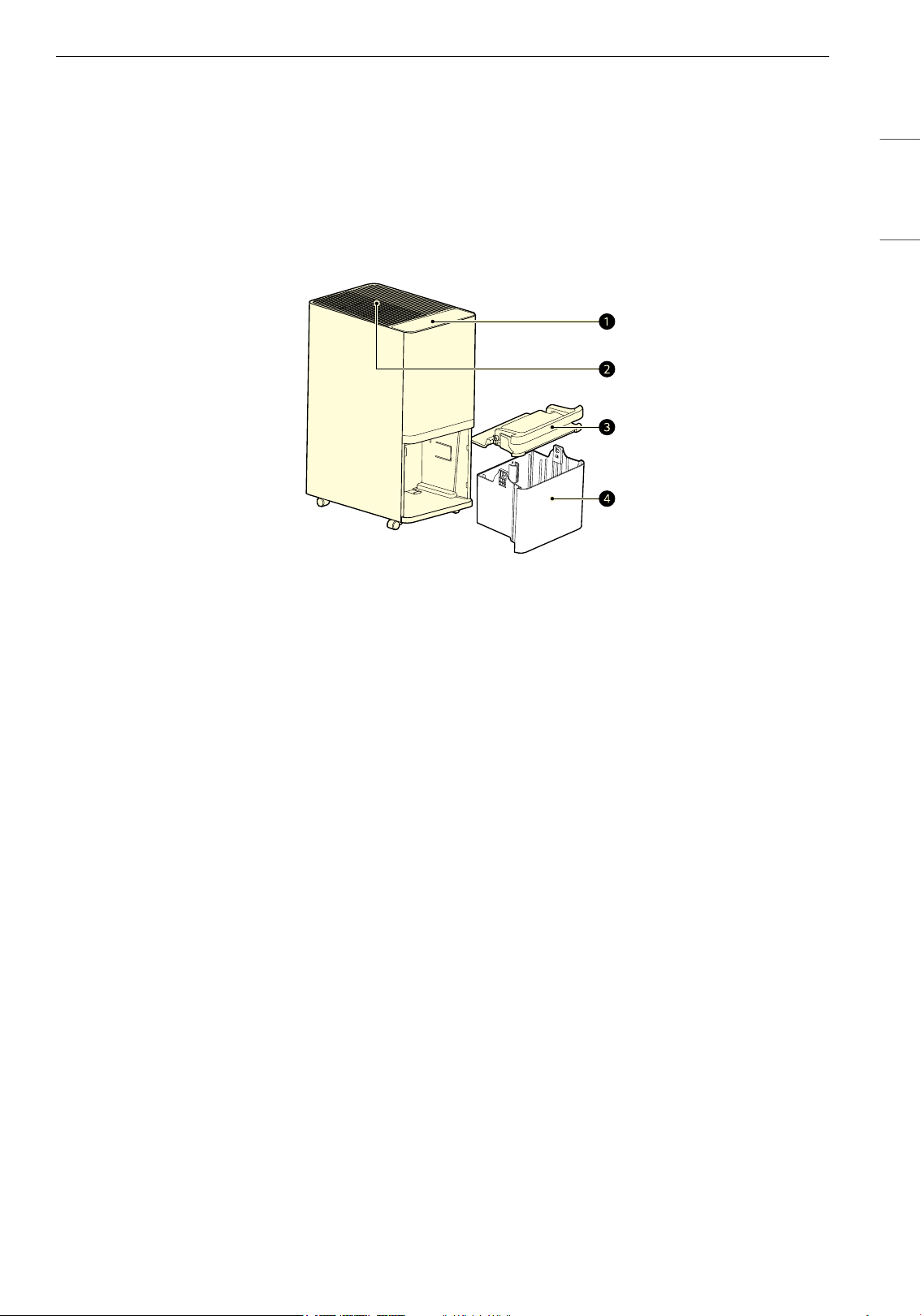
13FUNCIONAMIENTO
ESPAÑOL
FUNCIONAMIENTO
• El exterior o los componentes del producto pueden variar según el modelo.
Descripción general del producto
Parte frontal
a Panel de control/Panel de estado
• Establece las funciones del aparato.
• Verifica los ajustes del aparato.
b Salida de aire
• Emite aire deshumidificado.
c Tapa del depósito
d Depósito
• Almacena el agua deshumidificada.
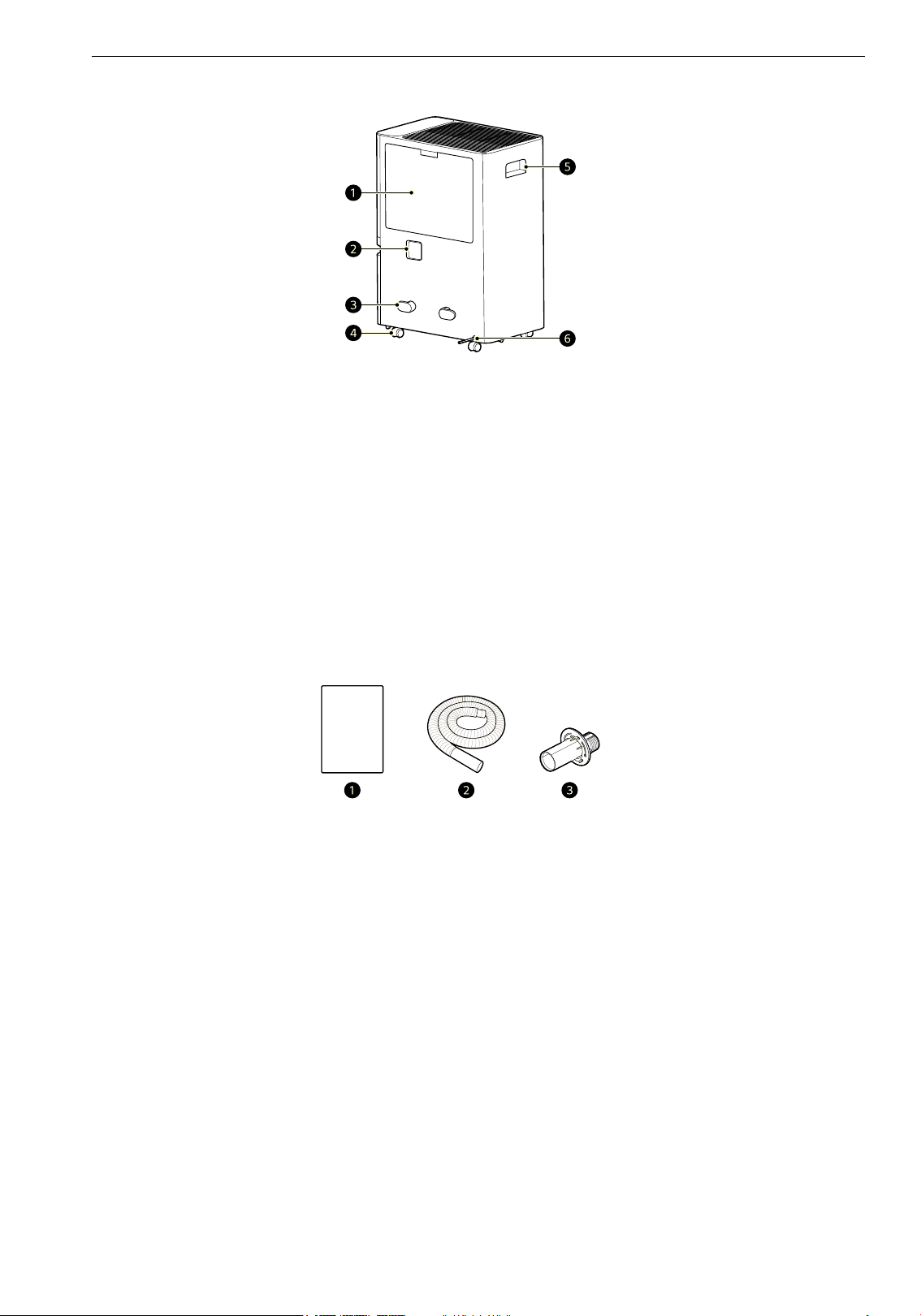
14 FUNCIONAMIENTO
Parte trasera
a Prefiltro/Entrada de aire
• Toma el aire y la humedad del ambiente.
b Tapón de drenaje
c Soporte colgante del enchufe de corriente
d Ruedas
e Manija
f Enchufe de corriente
Componentes
a Manual del propietario
b Manguera de drenaje
c Adaptador de drenaje (tornillo incluido)
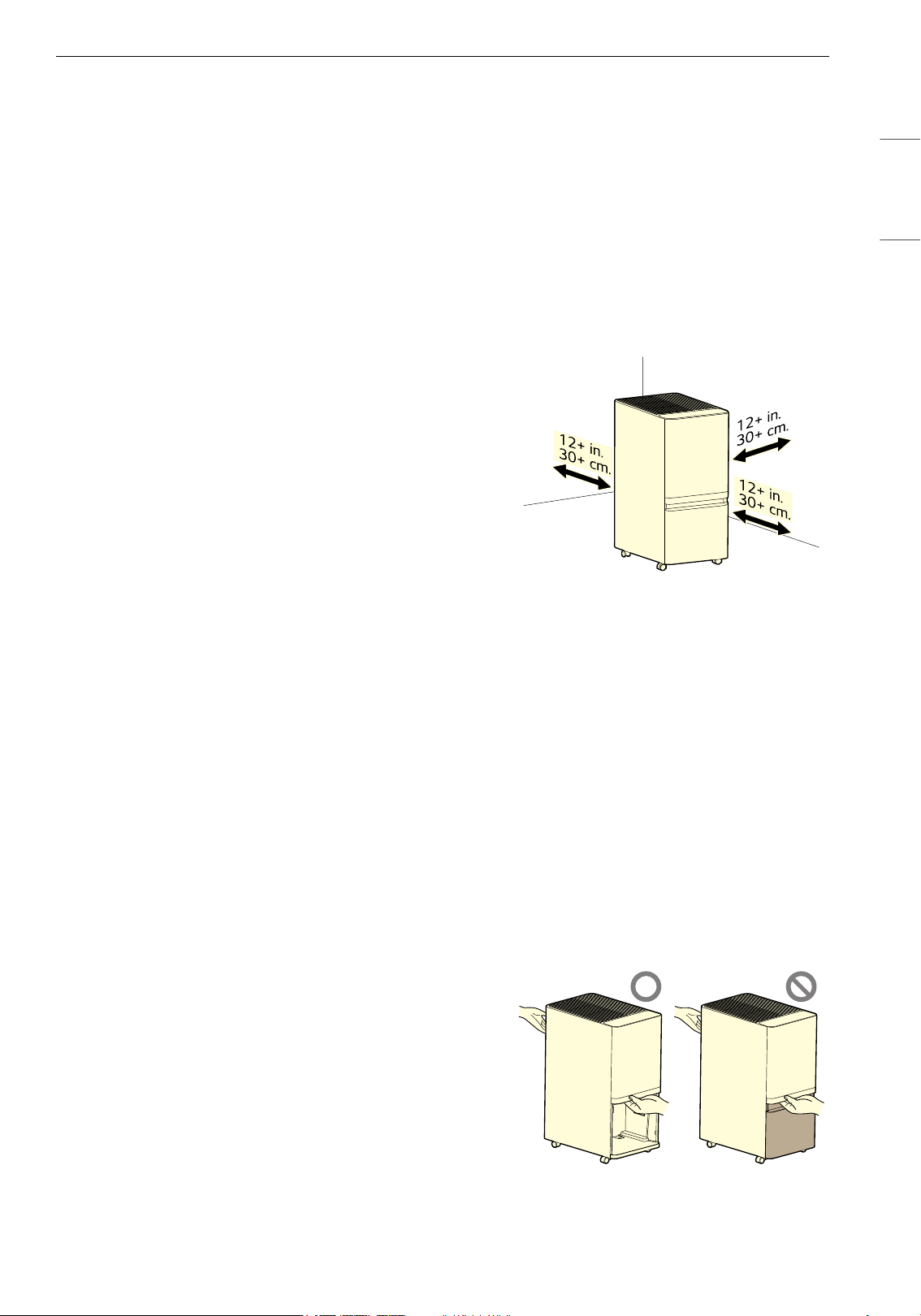
15FUNCIONAMIENTO
ESPAÑOL
Preparación antes del
funcionamiento
Lista de verificación previa al uso
• La cantidad de deshumidificación varía según la
temperatura y la humedad interiores.
- Si la temperatura o la humedad son bajas, la
cantidad de deshumidificación disminuye.
- La deshumidificación solo se lleva a cabo
cuando la humedad deseada es inferior a la
humedad actual.
• El producto funciona a temperaturas de entre
38°F y 109°F (entre 3°C y 43°C).
- A 34°F (1°C) o menos, el agua
deshumidificada se congelará, por lo que la
función de deshumidificación puede no
funcionar correctamente.
- Si supera los 109°F (43°C), el
deshumidificador puede detenerse
automáticamente para evitar el
sobrecalentamiento.
• Cuando el deshumidificador está en
funcionamiento, la temperatura interior
aumenta.
- El deshumidificador no tiene una función de
enfriamiento ni de calefacción.
- Durante el funcionamiento se genera calor,
por lo que la temperatura del ambiente puede
aumentar 2 o 3 grados aproximadamente,
según las condiciones de uso (temperatura
interior y tamaño de la habitación).
- Al utilizar la función de deshumidificación, se
escuchará el sonido del compresor durante 1 a
2 segundos aproximadamente.
• La humedad actual que se muestra en la
pantalla de estado puede diferir de la humedad
real según el entorno y la ubicación del
producto.
• Si el producto se detiene y se reinicia de
inmediato, se reiniciará después de unos 3
minutos para proteger el producto.
• Después de 23 horas de funcionamiento
continuo, el producto se detiene
automáticamente durante una hora para su
protección y, luego, se reinicia.
• Al desempaquetar el producto, es posible que
haya agua en el depósito.
- Antes del envío, el producto se prueba para
verificar que funcione normalmente. Es
normal que quede una pequeña cantidad de
agua en el depósito.
• Incluso en un mismo espacio, la humedad puede
variar según la circulación del aire. Además, la
humedad puede diferir de la humedad medida
por otros productos e higrómetros.
Requisitos de instalación
Instale el producto a una distancia mínima de 12 in
(30cm) de las paredes.
• Si no hay suficiente espacio para la succión de
aire, el rendimiento de deshumidificación puede
verse afectado.
• No instale el producto cerca de la luz solar
directa o de una iluminación brillante.
- De lo contrario, el producto podría
decolorarse.
Requisitos de transporte
• Al transportar o almacenar el producto, guarde
el enchufe de alimentación para evitar que
toque el piso.
- De lo contrario, podría dañar el enchufe de
alimentación o rayar el piso.
• Al levantar y trasladar el producto, asegúrese de
retirar el depósito; luego, trasládelo de forma
segura sosteniéndolo por la manija y la parte
superior del contenedor del depósito.
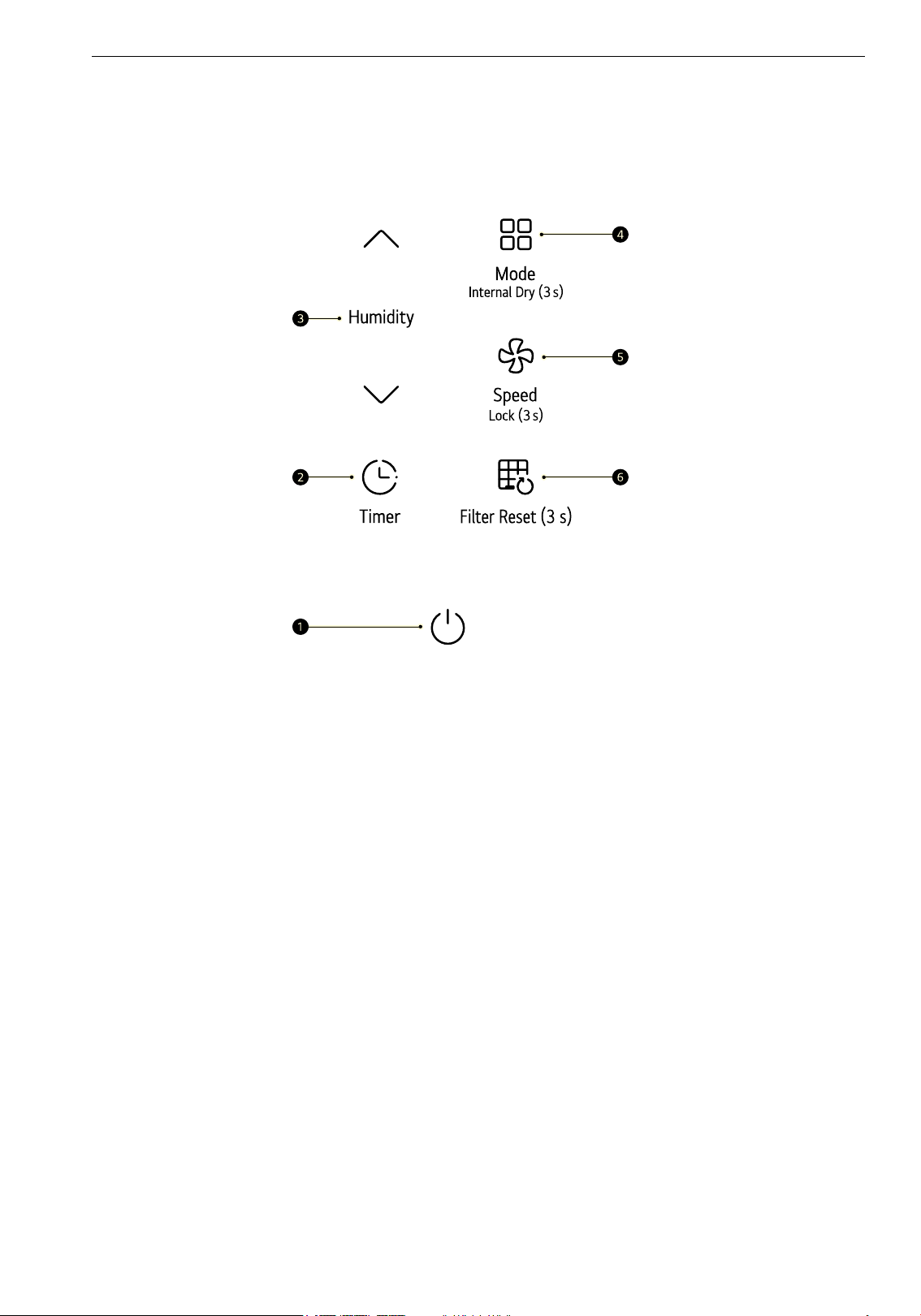
16 FUNCIONAMIENTO
Características
Control del deshumidificador
Panel de control
a Botón Inicio/Apagado
Enciende y apaga el producto.
• Para preparar el producto para conectarlo al Wi-Fi mediante la aplicación LG ThinQ, mantenga
presionado el botón durante 3 segundos.
b Botón Timer
Programa el tiempo para apagar o encender el producto.
c Botón Humidity
Ajusta la humedad deseada.
• La humedad se puede ajustar en unidades de 5% dentro de un rango del 30 al 70%.
d Botón Mode
Establezca el modo de funcionamiento.
• Cada vez que presiona el botón, el modo cambia en este orden: Manual
~ Auto ~ Cont. ~ Boost.
• Para configurar la función Secado interno, presione el botón durante 3 segundos.
e Botón Speed
Controla la velocidad del ventilador.
• Para configurar la función “Lock” (Bloquear), presione el botón durante 3 segundos.
f Botón Filter Reset
Para restablecer la notificación “Check Filter” (Revisar filtro), mantenga presionado el botón durante 3
segundos.
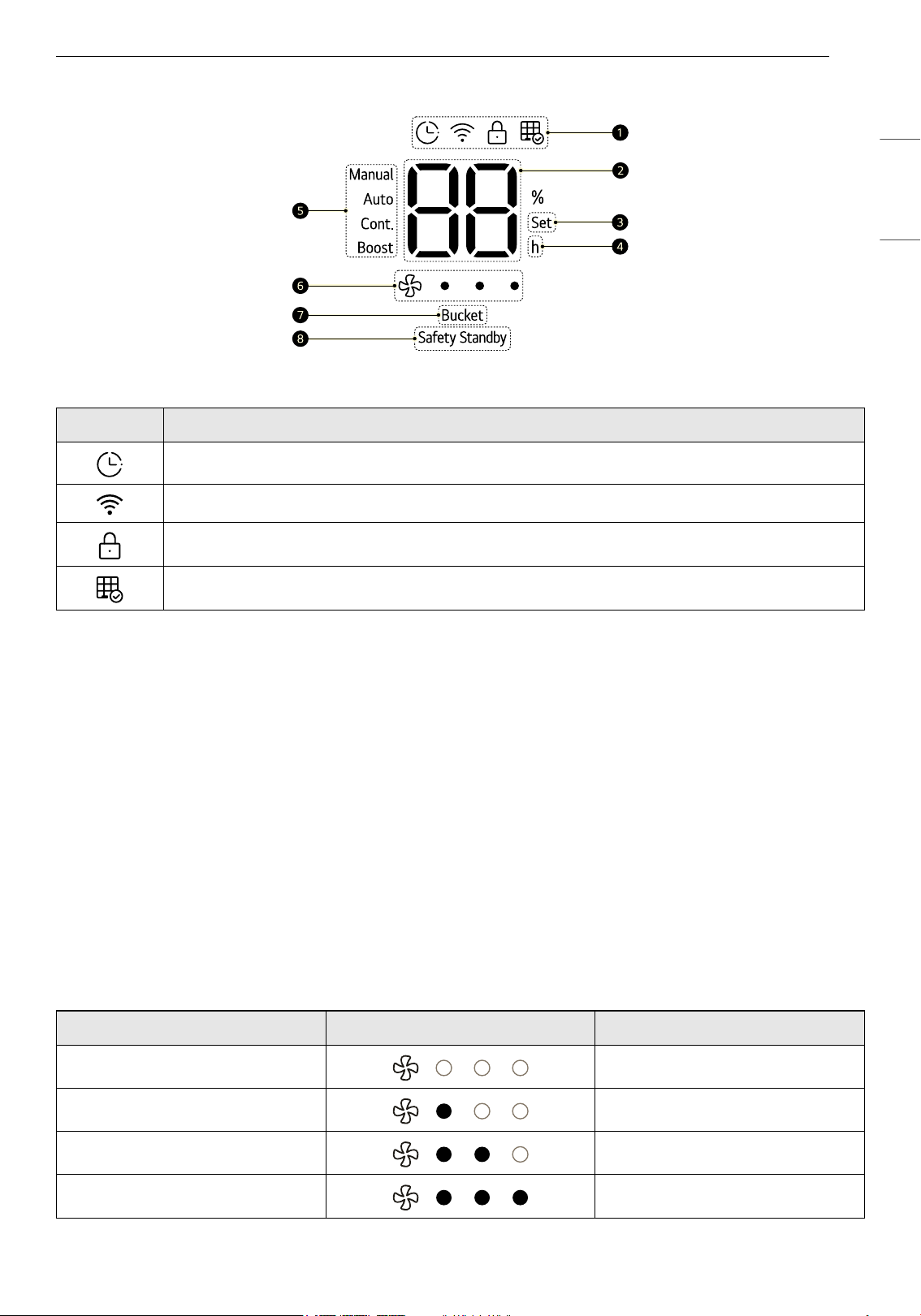
17FUNCIONAMIENTO
ESPAÑOL
Panel de estado
a Íconos
b Pantalla de estado
• Muestra la humedad deseada al configurar la humedad y, después de unos 5 segundos, muestra la
humedad actual.
• La humedad actual se muestra en incrementos del 1%.
• Si la humedad interior es inferior al 30%, se muestra “Lo”, y si es superior al 70%, se muestra “Hi”.
c Indicador de ajuste
• Se enciende al ajustar la humedad deseada.
d Indicador de tiempo
• Se enciende al ajustar el temporizador para el encendido o pagado.
e Modo de funcionamiento
• Muestra el modo de funcionamiento actualmente configurado.
f Pantalla de velocidad
Muestra la velocidad del ventilador.
g Indicador de depósito
Ícono Descripción
Se enciende cuando el temporizador está configurado.
Se enciende cuando se establece la función del Wi-Fi.
Se enciende cuando el panel de control se bloquea.
Se enciende cuando es momento de limpiar el filtro.
Velocidad Pantalla Descripción
Auto LED apagadas
Bajo 1 LED encendida
Media 2 LED encendidas
Alto 3 LED encendidas
18 FUNCIONAMIENTO
• Se enciende cuando el depósito está lleno o cuando transcurren más de 5 minutos sin que el
depósito esté colocado en el producto.
h Indicador de espera de seguridad
• Después de 23 horas de funcionamiento continuo, el indicador rojo se enciende durante 1 hora.
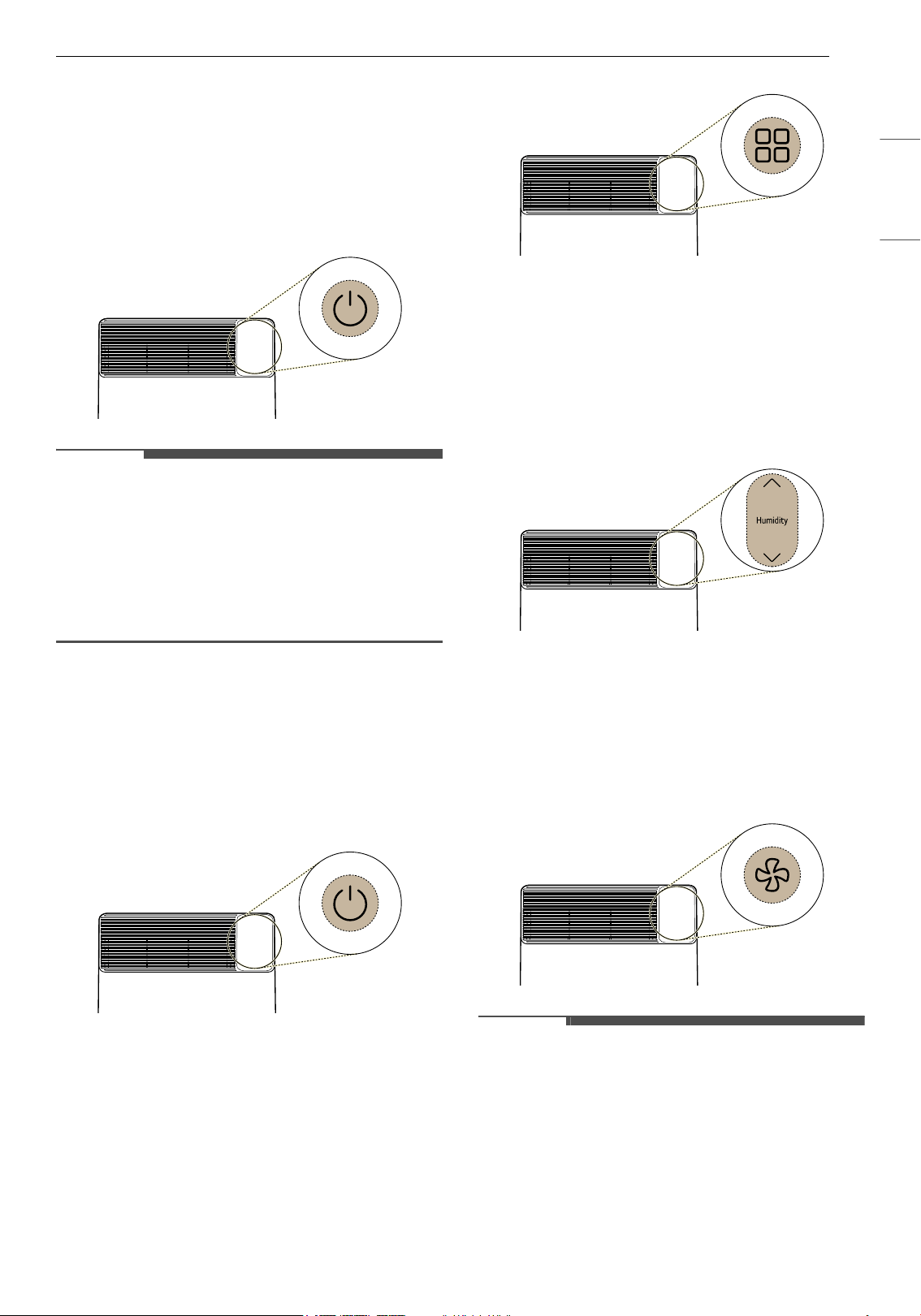
19FUNCIONAMIENTO
ESPAÑOL
Funcionamiento del
deshumidificador
Inicio/Apagado
Presione el botón Inicio/Apagado para encender
o apagar el producto.
NOTA
• Cuando se pone en marcha el producto por
primera vez, este funciona en modo Manual y la
velocidad se establece en “Media”.
• Si se desconecta el enchufe u ocurre un corte de
energía mientras el producto está en
funcionamiento, el equipo recuerda el último
modo utilizado.
Modo manual
Con esta función se puede configurar la velocidad
del ventilador y el nivel de humedad deseados.
1 Presione el botón Inicio/Apagado para
encender el producto.
2 Presione el botón Mode para seleccionar el
modo Manual.
3 Presione los botones Humidity J / K para
ajustar la humedad.
• Al presionar el botón, la humedad deseada
cambiará en el siguiente orden: 30
& 35
& 40 & 45 & 50 & 55 & 60 & 65 &
70.
4 Presione el botón Speed para seleccionar la
velocidad del ventilador.
• Cada vez que presiona el botón, la velocidad
cambia en el siguiente orden: Auto
~ Baja
~ Media ~ Alta.
NOTA
• Una vez que el nivel de humedad alcanza la
humedad deseada, el compresor se detiene y
solo funciona el ventilador. Si la humedad
relativa aumenta, la deshumidificación vuelve a
comenzar.
• Mientras se configura la humedad, se muestra
en la pantalla de estado la humedad deseada.
Después de 5 segundos aproximadamente, se
muestra la humedad actual.
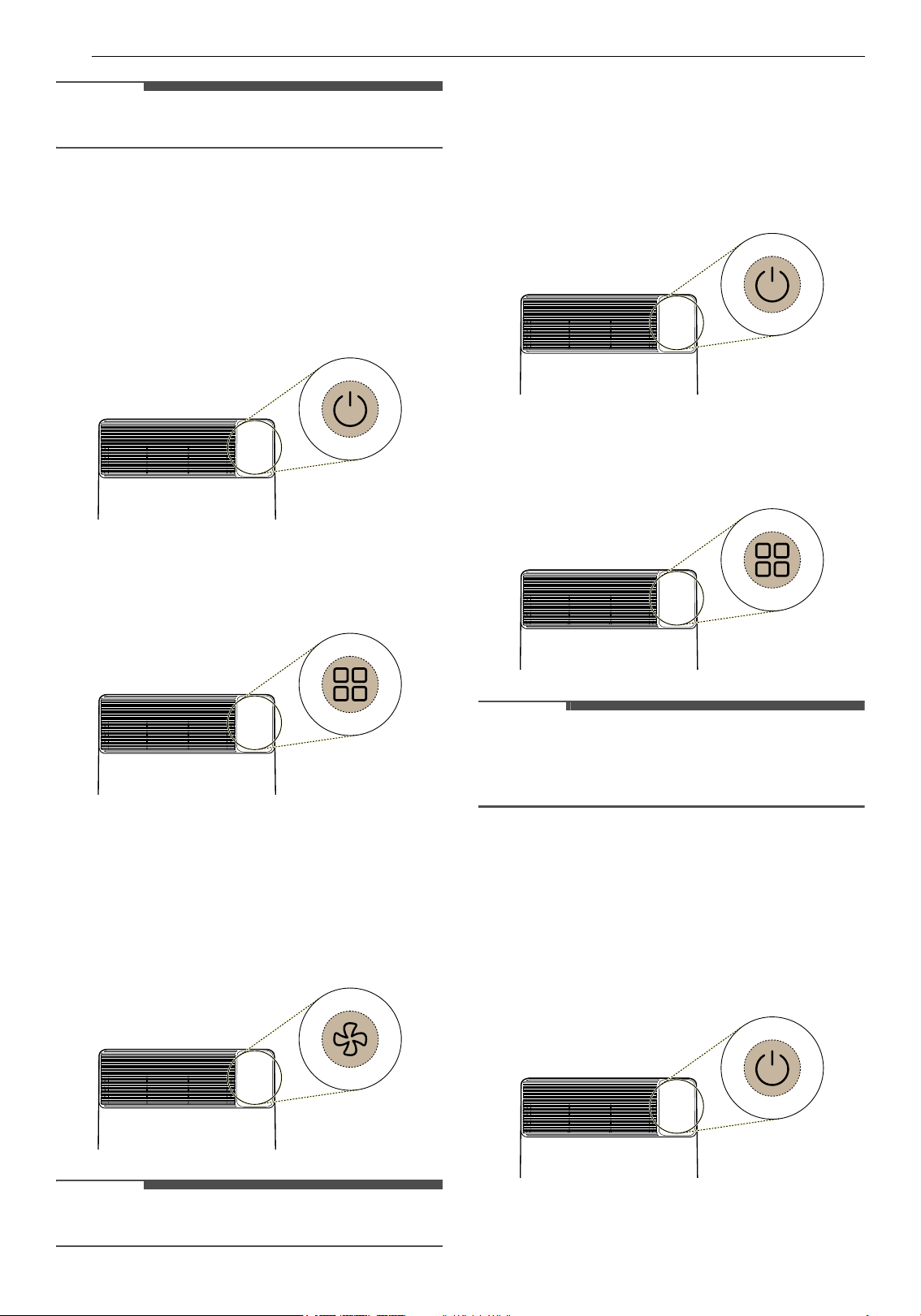
20 FUNCIONAMIENTO
NOTA
• La configuración inicial de humedad es del 50%.
Modo automático
Úselo cuando desee mantener las condiciones
interiores agradables.
1 Presione el botón Inicio/Apagado para
encender el producto.
2 Presione el botón Mode para seleccionar el
modo Auto.
3 Presione el botón Speed para seleccionar la
velocidad del ventilador.
• Cada vez que presiona el botón, la velocidad
cambia en el siguiente orden: Auto
~ Baja
~ Media ~ Alta.
NOTA
• La humedad no se puede ajustar.
Continuo (Cont.) Modo
Este modo funciona de forma continua,
independientemente de la humedad interior.
1 Presione el botón Inicio/Apagado para
encender el producto.
2 Presione el botón Mode para seleccionar el
modo Cont..
NOTA
• La velocidad del ventilador funciona únicamente
en el nivel bajo, y no se pueden ajustar ni la
velocidad del ventilador ni la humedad.
Modo de mayor potencia “Boost”
Use esta función para eliminar rápidamente la
humedad del interior.
1 Presione el botón Inicio/Apagado para
encender el producto.
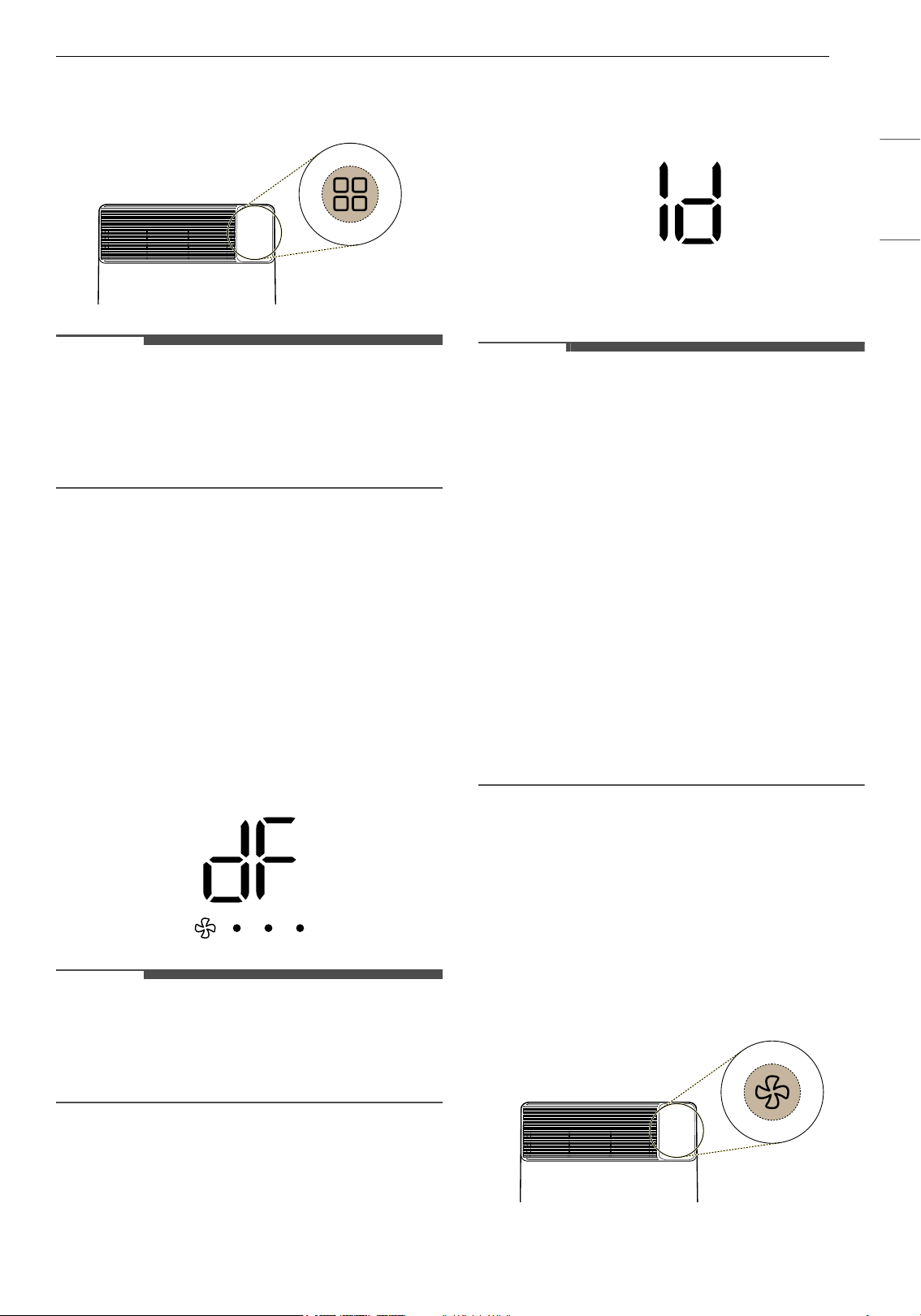
21FUNCIONAMIENTO
ESPAÑOL
2 Presione el botón Mode para seleccionar el
modo Boost.
NOTA
• La velocidad del ventilador funciona únicamente
en el nivel alto, y no se pueden ajustar ni la
velocidad del ventilador ni la humedad.
• Después de una hora de funcionamiento, el
producto vuelve al modo Auto.
Uso de las funciones extra
Función de descongelamiento
Si se forma escarcha en el intercambiador de calor,
debido a una baja temperatura interior, esta
función elimina automáticamente la escarcha.
• Si aparece
dF en la pantalla de estado durante el
funcionamiento, esta función elimina
automáticamente la escarcha del
intercambiador de calor que está dentro del
producto.
NOTA
• Durante el descongelamiento automático, el
compresor se detiene.
• La velocidad del ventilador funciona en un nivel
alto.
Secado interno
Esta función seca el interior del deshumidificador.
• Durante el funcionamiento, mantenga
presionado el botón Mode durante 3 segundos
para activar el Secado interno.
• Cuando se está ejecutando el Secado interno,
se muestra en la pantalla de estado el tiempo de
funcionamiento.
NOTA
• Para apagar la función de Secado interno,
presione el botón Mode durante 3 segundos.
• Cuando la función de Secado interno está
activada, aparecen “1d” y “ON” en la pantalla.
Cuando está desactivada, aparecen “
1d” y “oF”.
• Una vez finalizada la función de Secado interno,
la pantalla de estado se apaga
automáticamente.
• Si la función de Secado interno está activada, el
Secado interno comenzará cuando el producto
deje de funcionar.
• Durante el Secado interno, no se puede ajustar
el tiempo de funcionamiento restante.
• La función de Secado interno hace que el
ventilador ande durante un período
determinado. Con la aplicación LG ThinQ, puede
configurar el tiempo de funcionamiento del
ventilador.
Función de bloqueo
Bloquea los botones del panel de control para
evitar que el aparato funcione por razones
imprevistas, por ejemplo, si un niño manipula los
botones.
• Mantenga presionado el botón Speed durante 3
segundos para activar o desactivar la función de
bloqueo.
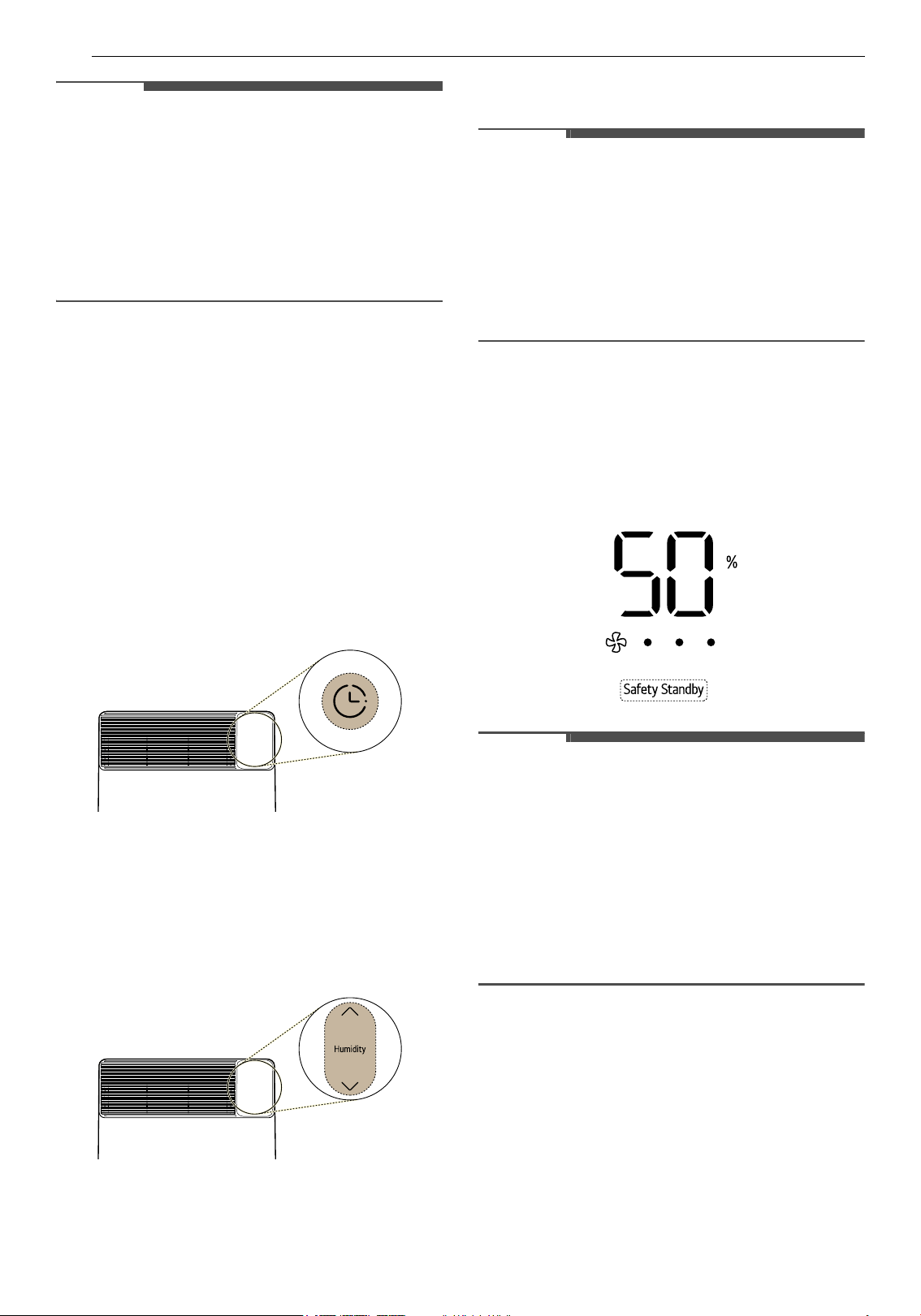
22 FUNCIONAMIENTO
NOTA
• Después de configurar la función de bloqueo, el
estado de funcionamiento actual se mantendrá
hasta que la función se desactive.
• Si presiona otros botones mientras la función de
bloqueo está activada, sonará una advertencia 3
veces.
• Puede configurar la función, aunque el producto
esté en funcionamiento.
Función del temporizador
Con esta función se programa cuándo encender o
apagar el producto.
1 Presione el botón Timer para configurar la
función del temporizador.
• Para activar el temporizador de encendido,
presione este botón mientras el producto
está apagado.
• Para activar el temporizador de apagado,
presione el botón mientras el producto está
encendido.
2 Presione los botones Humidity J / K para
configurar el tiempo de encendido/apagado.
• El tiempo de encendido/apagado se puede
configurar en incrementos de 1 hora, desde
1 hora hasta 24 horas.
3 Una vez configurado el tiempo de encendido/
apagado, la función del temporizador se
activará automáticamente después de 5
segundos aproximadamente.
NOTA
• Para ver el tiempo restante, presione el botón
Timer después de que se muestre la humedad
en la pantalla de estado.
• Vacíe el depósito antes de configurar el
temporizador. Si el depósito está lleno durante
el funcionamiento del producto, el indicador del
depósito se enciende y el producto deja de
funcionar.
Función de espera de seguridad
Esta función evita que el producto se sobrecaliente
y que ocurra un incendio. Después de 23 horas de
funcionamiento continuo, la luz roja de espera de
seguridad se enciende durante 1 hora.
NOTA
• Después de que se encienda la luz de espera de
seguridad, el ventilador funciona durante 30
minutos a la velocidad de ventilación actual, con
el fin de reducir la temperatura de los
componentes internos. Luego, se detiene
durante los siguientes 30 minutos.
• Una vez transcurrida una hora con el compresor
apagado, la luz de espera de seguridad se
apaga, y el ventilador y el compresor se reinician
automáticamente.
Vaciado del depósito
Depósito lleno
Cuando el depósito está lleno, el producto deja de
funcionar automáticamente y el ventilador anda
durante 5 minutos para eliminar el agua
condensada que queda en el intercambiador de
calor. Luego, el indicador del depósito se enciende
y suena una advertencia vibradora. (La advertencia
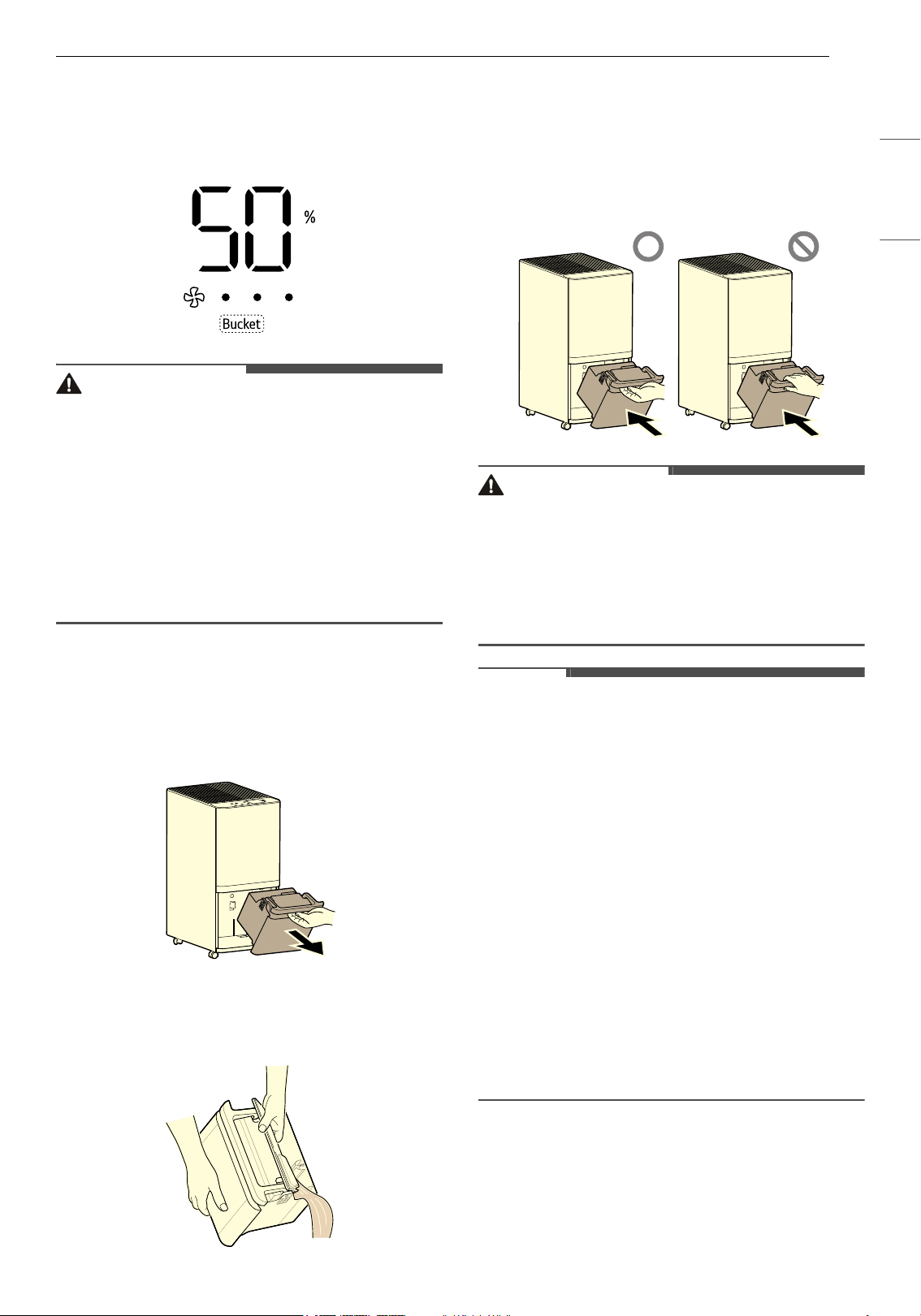
23FUNCIONAMIENTO
ESPAÑOL
vibradora sonará una vez más después de 1
minuto).
• Después de vaciar el depósito y volver a
insertarlo, el indicador del depósito se apagará.
PRECAUCIÓN
• Si tira del depósito con demasiada fuerza, el
agua puede derramarse. Por lo tanto, extráigalo
con cuidado.
• Apague el producto antes de retirar el depósito.
• Si retira el depósito mientras el producto está en
funcionamiento, el compresor se detendrá; el
ventilador funcionará durante otros 5 minutos
para vaporizar el agua condensada que queda
en el intercambiador de calor, y el producto
dejará de funcionar.
Cómo vaciar el depósito
1 Apague el producto. Sujete la manija superior
del depósito y retírelo con cuidado.
2 Quite la cubierta del depósito y deseche el
agua.
3 Para reinstalar el depósito, inserte primero la
parte inferior en el contenedor y, luego,
empuje el resto del depósito hasta colocarlo
en su posición.
• Al insertar el depósito, no coloque la mano
sobre la manija del depósito.
PRECAUCIÓN
• Después de retirar el depósito, no toque el
interior de la unidad principal. De lo contrario,
puede fallar el dispositivo de detección de nivel
de agua lleno.
• No beba ni reutilice el agua del depósito.
• Apague el producto antes de retirar el depósito.
NOTA
• Si se retira el depósito inmediatamente después
de detener el producto, puede quedar agua en
el intercambiador de calor, que puede gotear
adentro de la unidad principal.
- Limpie el agua con un paño suave que cayó.
• Limpie periódicamente el interior del depósito
(alrededor de una vez por semana).
• Si el producto se utiliza a bajas temperaturas,
hay menos humedad en el aire, por lo que la
cantidad de deshumidificación también
disminuye.
• Apague el producto antes de retirar el depósito.
Si retira el depósito mientras el producto está en
funcionamiento, el compresor se detendrá; el
ventilador funcionará durante otros 5 minutos
para vaporizar el agua condensada que queda
en el intercambiador de calor, y el producto
dejará de funcionar.
Cómo configurar el drenaje
continuo
Elementos necesarios: Manguera de 14,5mm de
diámetro interior (incluida)
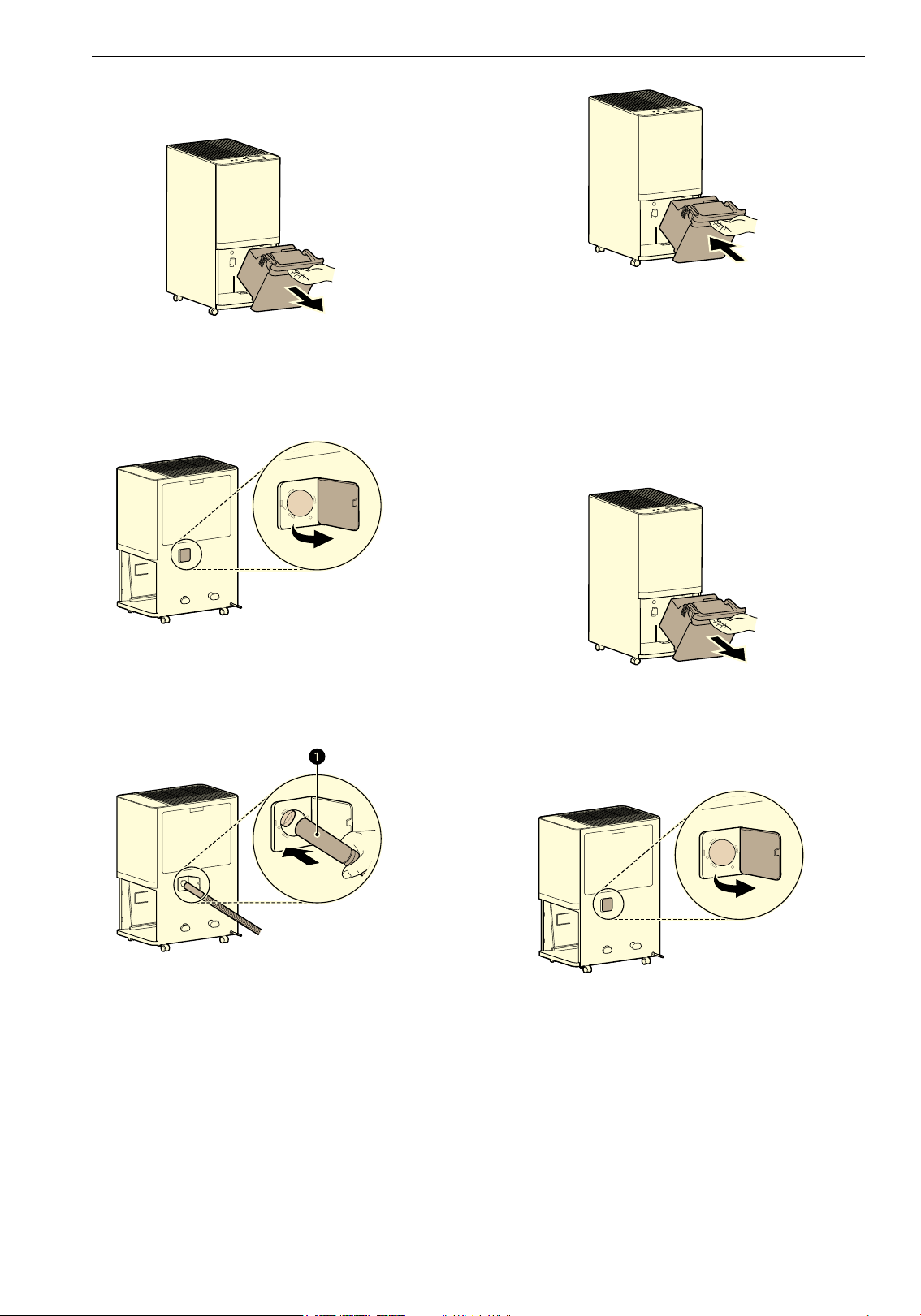
24 FUNCIONAMIENTO
1 Sujete la manija superior del depósito y
retírelo con cuidado.
2 Saque el tapón de drenaje conectado al
drenaje continuo que está en la parte
posterior del producto.
3 Inserte la manguera de drenaje continuo (a)
en el orificio de este drenaje. Luego, conéctela
al orificio de drenaje del producto.
4 Reinstale el depósito insertando primero la
parte inferior en el contenedor. Luego,
empuje el resto del depósito hasta colocarlo
en su posición.
• Si el depósito no está insertado, la
deshumidificación no funcionará.
Cómo configurar el desagüe continuo
usando un adaptador de desagüe
Elementos necesarios: Manguera estándar de
jardín (no incluida) y adaptador de desagüe
(incluido)
1 Sujete la manija superior del depósito y
retírelo con cuidado.
2 Saque el tapón de drenaje conectado al
drenaje continuo que está en la parte
posterior del producto.
3 Coloca el adaptador de drenaje en la abertura
de la manguera.
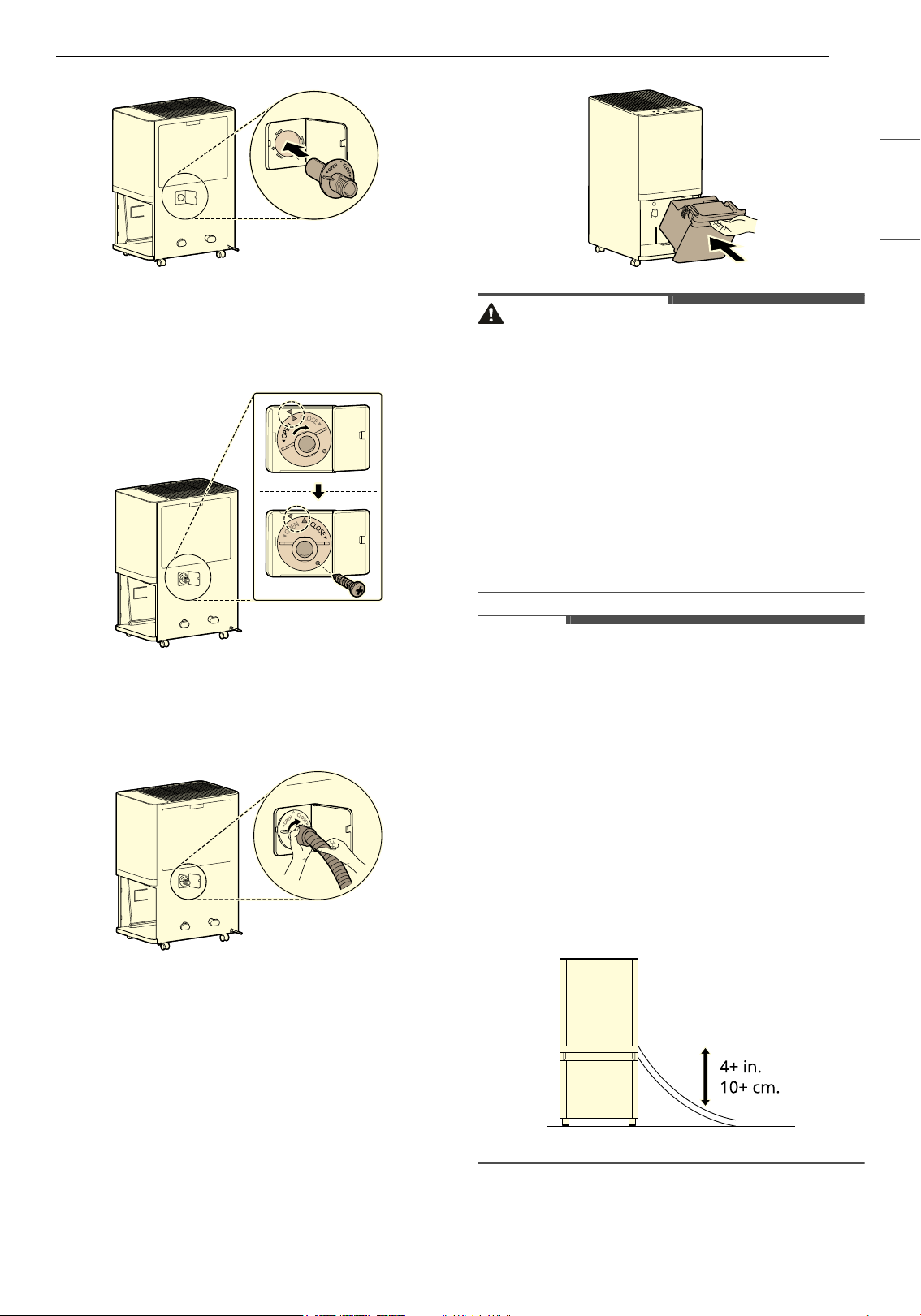
25FUNCIONAMIENTO
ESPAÑOL
4 Gire el adaptador de desagüe en sentido
horario e inserte los tornillos proporcionados
para asegurarlo en posición.
5 Gire el extremo de la manguera en sentido
horario para conectar el adaptador de
drenaje.
6 Reinstale el depósito insertando primero la
parte inferior en el contenedor. Luego,
empuje el resto del depósito hasta colocarlo
en su posición.
• Si el depósito no está insertado, la
deshumidificación no funcionará.
PRECAUCIÓN
• Al conectar o desconectar la manguera de
drenaje continuo, tenga cuidado con el borde
cortado que rodea al orificio de drenaje
continuo. El borde es filoso y puede causar
lesiones.
• Tenga cuidado de no lastimarse las manos al
conectar la manguera de drenaje.
• Si se utiliza durante un período prolongado la
manguera de drenaje continuo, pueden
acumularse pelusa y otros residuos y provocar
obstrucciones. En ese caso, reemplace la
manguera.
NOTA
• Asegúrese de que la manguera de drenaje
continuo esté correctamente conectada al
orificio de drenaje del producto.
- Si la manguera no está correctamente
conectada, puede haber una pérdida de agua
durante la deshumidificación.
• Cómo conectar la manguera para el drenaje
continuo
- No doble la manguera de drenaje continuo ni
la sumerja en agua.
- La salida de la manguera debe estar al menos
4in (10cm) por debajo de la conexión de
drenaje.
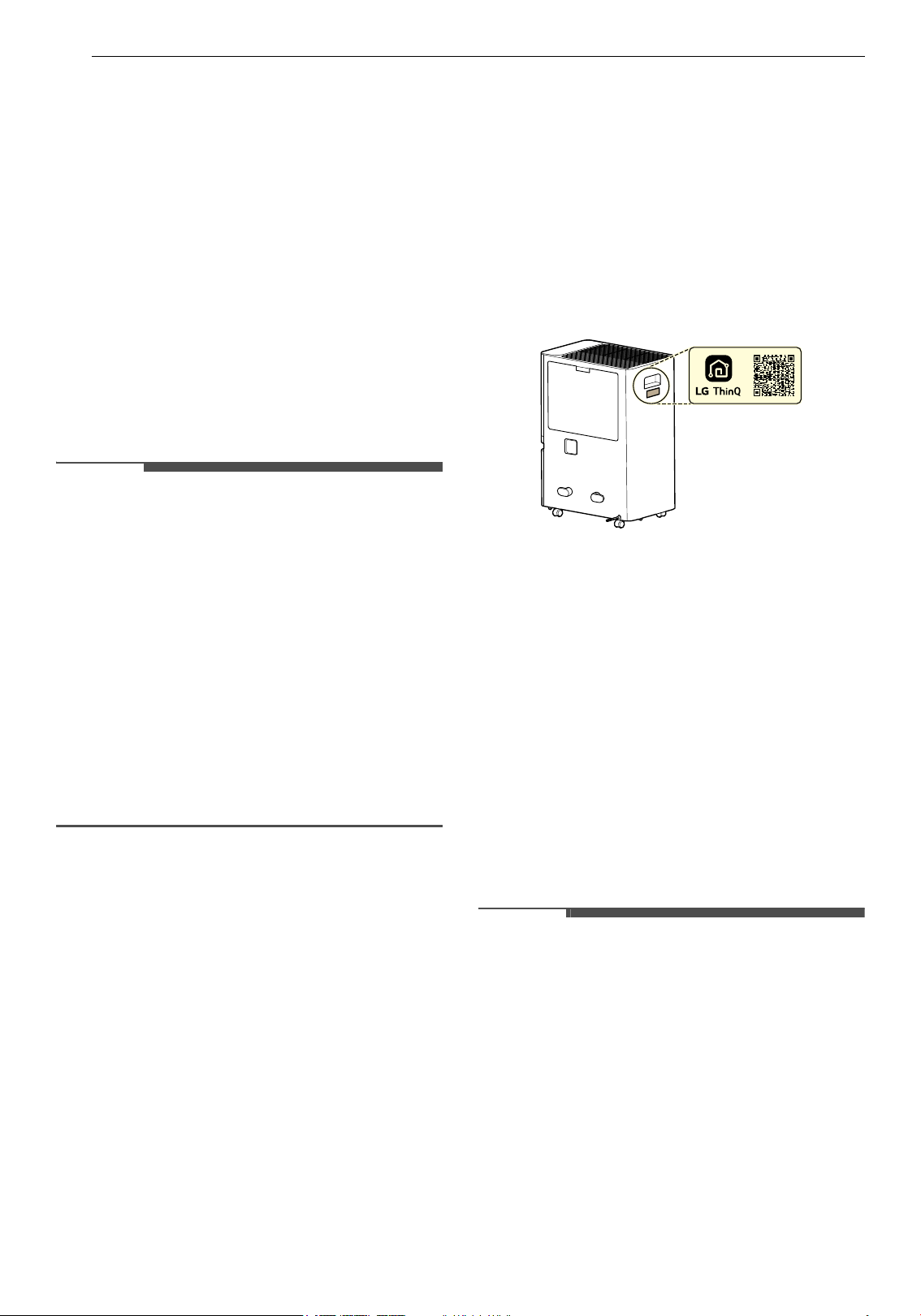
26 FUNCIONES INTELIGENTES
FUNCIONES INTELIGENTES
Aplicación LG ThinQ
La aplicación LG ThinQ le permite comunicarse
con el electrodoméstico mediante un teléfono
inteligente.
Funciones de la Aplicación LG ThinQ
Smart Diagnosis
Si se encuentra con un problema relacionado con
el uso del aparato, esta funcionalidad de Smart
Diagnosis le ayudará a diagnosticar el problema.
Ajustes
Le permite ajustar varias opciones del aparato y en
la aplicación.
NOTA
• En los siguientes casos, debe actualizar la
información de red para cada electrodoméstico
en la aplicación LG ThinQ en tarjeta del
electrodoméstico
~ Ajustes ~ Cambio de
red.
- el router inalámbrico ha cambiado
- la contraseña del router inalámbrico ha
cambiado
- el proveedor de servicio de internet ha
cambiado
• La aplicación está sujeta a cambios con el fin de
mejorar el producto sin previo aviso a los
usuarios.
• Las funciones pueden variar según el modelo.
Instalación de la aplicación LG
ThinQ y conexión de un
electrodoméstico LG
Modelos con código QR
Escanee el código QR adjunto al producto
utilizando la cámara o una aplicación lectora de
códigos QR de su smartphone.
Modelos sin código QR
1 Busque la aplicación LG ThinQ en la tienda
Google Play o App Store e instálela en su
teléfono inteligente.
2 Ejecute la aplicación LG ThinQ e inicie sesión
con su cuenta existente o cree una cuenta LG
para iniciar sesión.
3 Toque el botón para agregar (~) de la
aplicación LG ThinQ para conectar su
electrodoméstico LG. Siga las instrucciones de
la aplicación para completar el proceso.
NOTA
• Para verificar la conexión wifi, verifique que el
indicador wifi en el panel de control está
encendido.
• El electrodoméstico funciona únicamente con
redes Wi-Fi de 2.4 GHz. Contacte a su proveedor
de servicios de internet o verifique el manual del
enrutador inalámbrico para revisar la frecuencia
de su red.
• LG ThinQ no es responsable por ningún
problema de conexión en red, falla, mal
funcionamiento o error causado por la conexión
de red.
• El entorno inalámbrico de alrededor puede
hacer que el servicio de red inalámbrica funcione
lentamente.
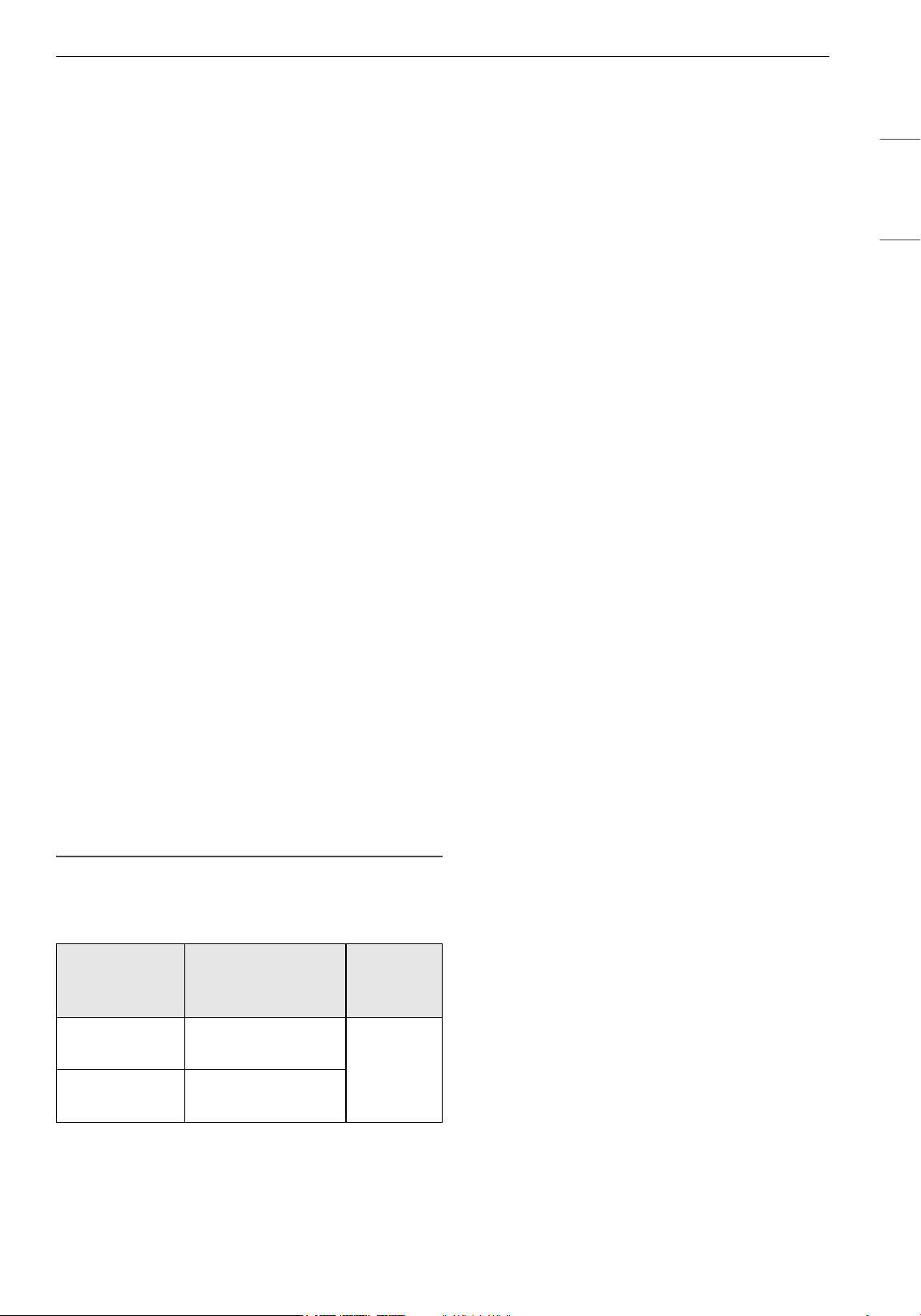
27FUNCIONES INTELIGENTES
ESPAÑOL
• Si hay demasiada distancia entre el
electrodoméstico y el enrutador inalámbrico, la
intensidad de la señal se vuelve débil. Es posible
que tarde mucho tiempo para conectarse o que
la instalación tenga una falla.
• Si el aparato tiene problemas para conectarse a
la red Wi-Fi, es posible que se encuentre
demasiado lejos del enrutador. Adquiera un
repetidor Wi-Fi (extensor de alcance) para
mejorar la intensidad de la señal Wi-Fi.
• Es posible que la conexión de red no funcione
bien por cuestiones relacionadas con su
proveedor de servicios de Internet.
• Es posible que la conexión Wi-Fi no se conecte o
se interrumpa debido al entorno de la red
doméstica.
• El electrodoméstico no se puede conectar
debido a problemas con la transmisión de la
señal inalámbrica. Desenchufe el
electrodoméstico y espere un minuto
aproximadamente antes de volver a intentarlo.
• Si el cortafuegos de su enrutador inalámbrico
está activado, desactívelo o añada una
excepción.
• El nombre de la red inalámbrica (SSID) debe ser
una combinación de letras y números en inglés.
(No utilice caracteres especiales).
• La interfaz de usuario (IU) del teléfono
inteligente puede variar en función del sistema
operativo (OS) del teléfono y del fabricante.
• Es posible que no pueda establecer la
configuración de red si el protocolo de
seguridad del router está en WEP. Por favor
cambie el protocolo de seguridad por otro (se
recomienda el WPA2) y conecte el producto
nuevamente.
Especificaciones del equipo de radio
† Esta función solo está disponible en algunos
modelos.
Aviso de la FCC
El siguiente aviso cubre el módulo transmisor
contenido en este producto.
Este equipo fue probado y se determinó que
cumple con los límites para los dispositivos
digitales de Clase B, en conformidad con la parte
15 de las normas de la FCC. Estos límites están
diseñados para ofrecer una protección razonable
contra interferencias dañinas en una instalación
residencial. Este equipo genera, usa y puede emitir
energía de radiofrecuencia y, si no se instala y
utiliza de acuerdo con las instrucciones, podría
causar interferencias dañinas a las
comunicaciones por radio. Sin embargo, no se
garantiza que dicha interferencia no pueda ocurrir
en instalaciones particulares. Si este equipo causa
interferencia dañina a la recepción de radio o
televisión, que se puede determinar encendiendo
y apagando el equipo, se aconseja al usuario
intentar corregir la interferencia realizando alguna
de las siguientes acciones:
• Reorientar o reubicar la antena receptora.
• Aumentar la separación entre el equipo y el
receptor.
• Conectar el equipo a una toma de corriente en
un circuito diferente del utilizado por el receptor.
• Consultar al vendedor o a un técnico de radio/TV
con experiencia para solicitar ayuda.
Este dispositivo cumple con la parte 15 de las
normas de la FCC. La operación está sujeta a las
dos siguientes condiciones:
(1) Este dispositivo no debe causar interferencia
dañina, y
(2) Este dispositivo debe aceptar cualquier
interferencia recibida, incluso aquellas que
pudieran causar un funcionamiento no deseado
del dispositivo.
Cualquier cambio o modificación en la
construcción de este dispositivo que no cuente con
la aprobación expresa de la parte responsable del
cumplimiento puede anular la autorización del
usuario para operar este equipo.
Declaración sobre exposición a la
radiación de RF de la FCC
Este equipo cumple con los límites de exposición a
la radiación de la FCC establecidos para entornos
no controlados. Este transmisor no se debe ubicar
ni operar junto con ninguna otra antena ni
transmisor.
El equipo se debe instalar y operar con una
distancia mínima de 20 cm (7.8 pulgadas) entre la
antena y su cuerpo. Los usuarios deben seguir las
Tipo
Rango de
frecuencia del
operación
Potencia
de salida
(máx.)
LAN
inalámbrico
2400 MHz - 2472
MHz
< 1 W
Bluetooth
†
2400 MHz - 2483.5
MHz
28 FUNCIONES INTELIGENTES
instrucciones de operación específicas de manera
tal de cumplir con las normas de exposición a la
RF.
Software de código abierto
Para obtener el código fuente incluido en este
producto, bajo las licencias GPL, LGPL, MPL y otras
licencias de código abierto que obligan a divulgar
el código fuente, y para acceder a todos los
términos de licencia mencionados, así como a los
avisos de copyright, visite https://
opensource.lge.com.
LG Electronics también le proporcionará el código
fuente de código abierto por un cargo que cubra el
coste de realizar dicha distribución, previa solicitud
por correo electrónico a [email protected].
Esta oferta es válida para todo aquel que reciba
esta información durante un período de tres años
después de que se envíe el último cargamento de
este producto.
Smart Diagnosis
Utilice esta funcionalidad para ayudarle a
diagnosticar y resolver problemas con su aparato.
NOTA
• Por motivos no atribuibles a la negligencia de
LGE, es posible que el servicio no pueda
funcionar debido a factores externos como, por
ejemplo, la indisponibilidad de wifi, la
desconexión de la red wifi, la política de la tienda
de aplicaciones local o la indisponibilidad de
aplicaciones, entre otros.
• Esta función puede estar sujeta a cambios sin
previo aviso y puede tener una forma diferente
según dónde se encuentre ubicado.
Uso de LG ThinQ para diagnosticar
problemas
Si experimenta un problema con su
electrodoméstico equipado con Wi-Fi, este puede
transmitir datos sobre la resolución de problemas
a un teléfono inteligente con la aplicación LG
ThinQ.
• Lance la aplicación LG ThinQ y seleccione la
funcionalidad Smart Diagnosis en el menú. Siga
las instrucciones proporcionadas en la aplicación
LG ThinQ.
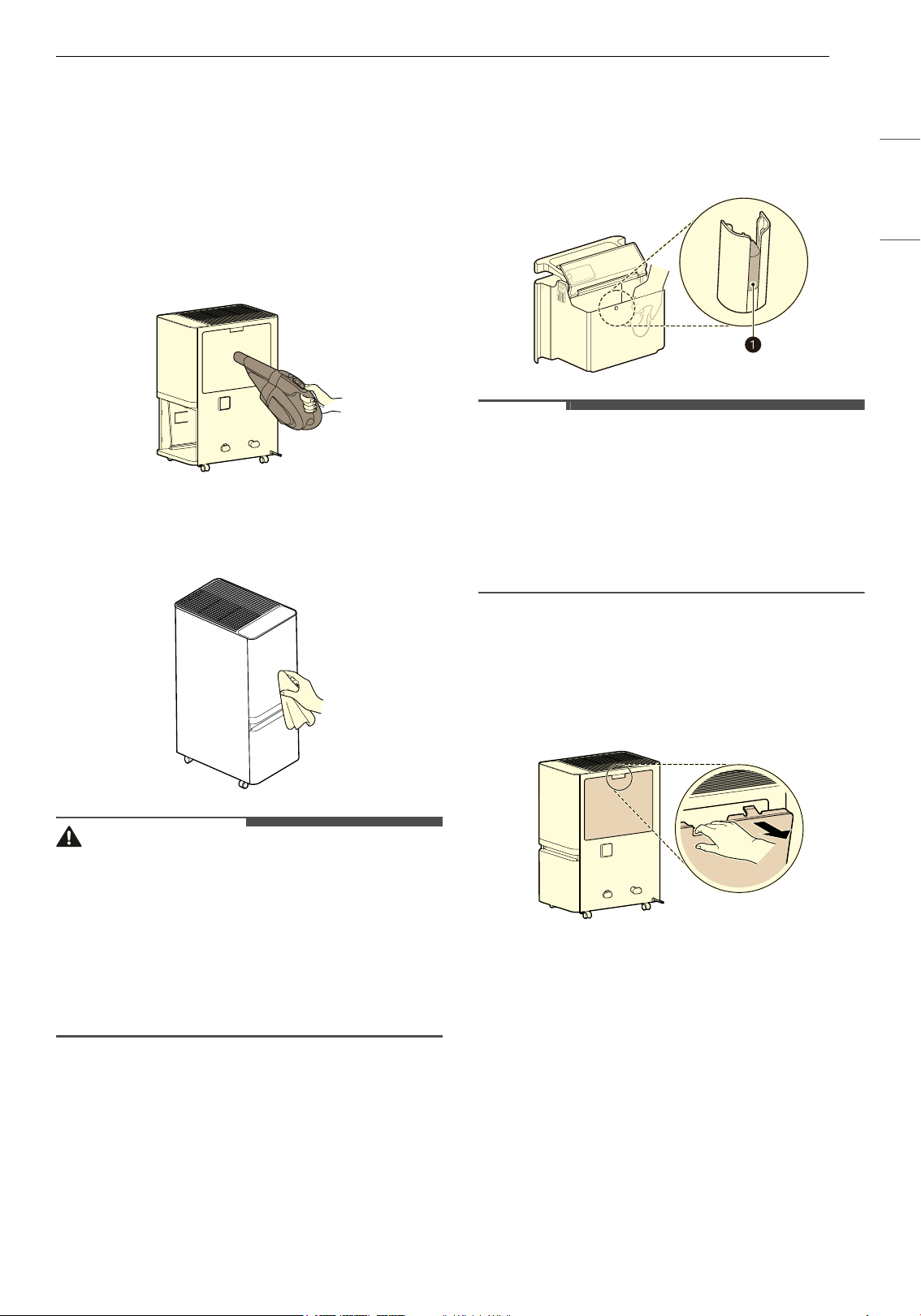
29MANTENIMIENTO
ESPAÑOL
MANTENIMIENTO
Mantenimiento del
producto
Limpieza del exterior
1 Quite el polvo con una aspiradora.
2 Limpie la entrada de aire y el exterior del
producto con un paño suave.
PRECAUCIÓN
• No frote el aparato con un detergente alcalino.
• Nunca utilice ácido sulfúrico, ácido clorhídrico ni
disolventes orgánicos (por ejemplo, diluyente,
queroseno o acetona) para limpiar el exterior del
aparato, ni coloque etiquetas en el exterior. De
lo contrario, podría dañar la superficie del
producto.
• Evite que agua ingrese al producto.
Limpieza del depósito
Limpie con un paño el agua que está adentro del
depósito.
• No abra la tapa porque hay un flotador (a) que
detecta cuándo el depósito está lleno.
NOTA
• Si el flotador se desprende o se instala
incorrectamente, puede haber pérdidas de
agua.
• No limpie con agua caliente, detergentes,
aromatizantes, tensioactivos, agentes
antiestáticos, etc. De lo contrario, puede dañar el
exterior del producto.
Limpieza de los filtros
1 Sujete la manija superior del prefiltro y tire de
ella para retirarlo.
2 Limpie el prefiltro con una aspiradora o un
cepillo suave.
• Si el filtro está muy sucio, lávelo con agua y
detergente neutro. (No utilice agua a 104 °F
(40°C) o más caliente).
• Limpie el prefiltro una vez al mes.
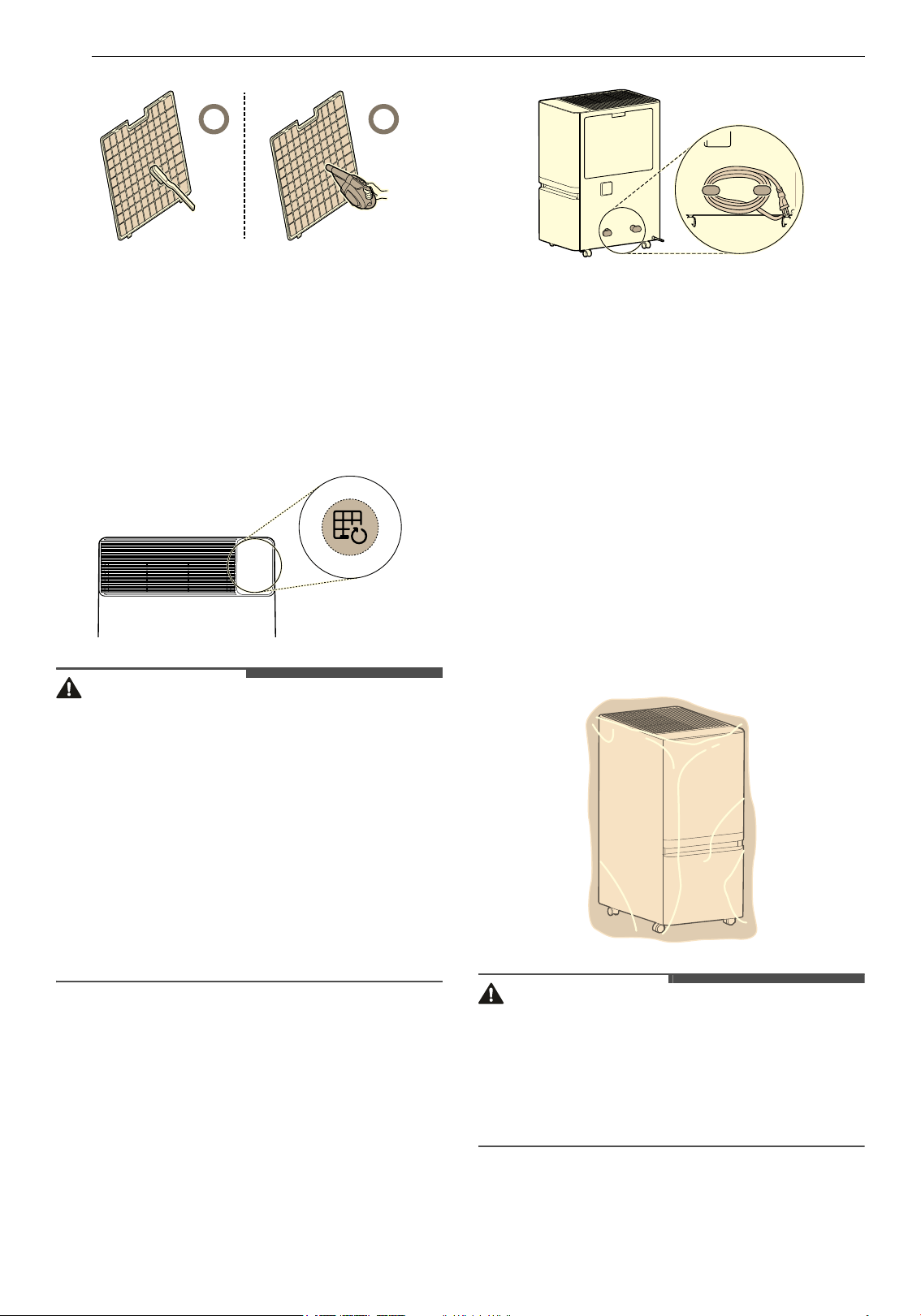
30 MANTENIMIENTO
3 Seque completamente el prefiltro a la sombra
y reinstálelo en el producto.
4 Después de limpiar el prefiltro, mantenga
presionado el botón Filter Reset durante 3
segundos para restablecer la notificación
“Check Filter” (Revisar filtro).
PRECAUCIÓN
• Por seguridad, desenchufe el producto antes de
limpiarlo.
• Tenga cuidado de no dañar el prefiltro al utilizar
una aspiradora.
• Después de lavar el prefiltro con agua, séquelo
completamente a la sombra.
• Use guantes al limpiar el producto y al retirar el
prefiltro. Además, tenga cuidado de no
lastimarse con las partes filosas (como el
intercambiador de calor).
• No limpie el intercambiador de calor usted
mismo, ya que puede lastimarse.
Almacenamiento
Si el producto no se va a utilizar durante un largo
periodo de tiempo, guárdelo en un lugar seco y a
la sombra.
1 Apague el producto y desenchufe el cable de
alimentación de la toma de corriente y,
seguidamente, proceda de la manera
siguiente:
2 Drene por completo el agua que está adentro
del depósito.
• Retire la tapa del depósito y limpie el agua
de adentro.
3 Limpie el filtro.
• No seque el prefiltro bajo la luz solar
directa, ya que puede deformarse.
• No seque el prefiltro cerca del fuego ni de
fuentes de calor intenso.
4 Cubra el aparato para evitar que entre polvo o
sustancias extrañas. Almacene el producto
cubierto y donde no le llegue la luz solar
directa.
PRECAUCIÓN
• No almacene el aparato en un lugar húmedo ni
expuesto a la luz solar directa. De lo contrario, el
aparato podría deformarse, funcionar mal o
generar olores.
• Si se almacena el producto con agua en el
depósito, pueden generarse olores y moho.
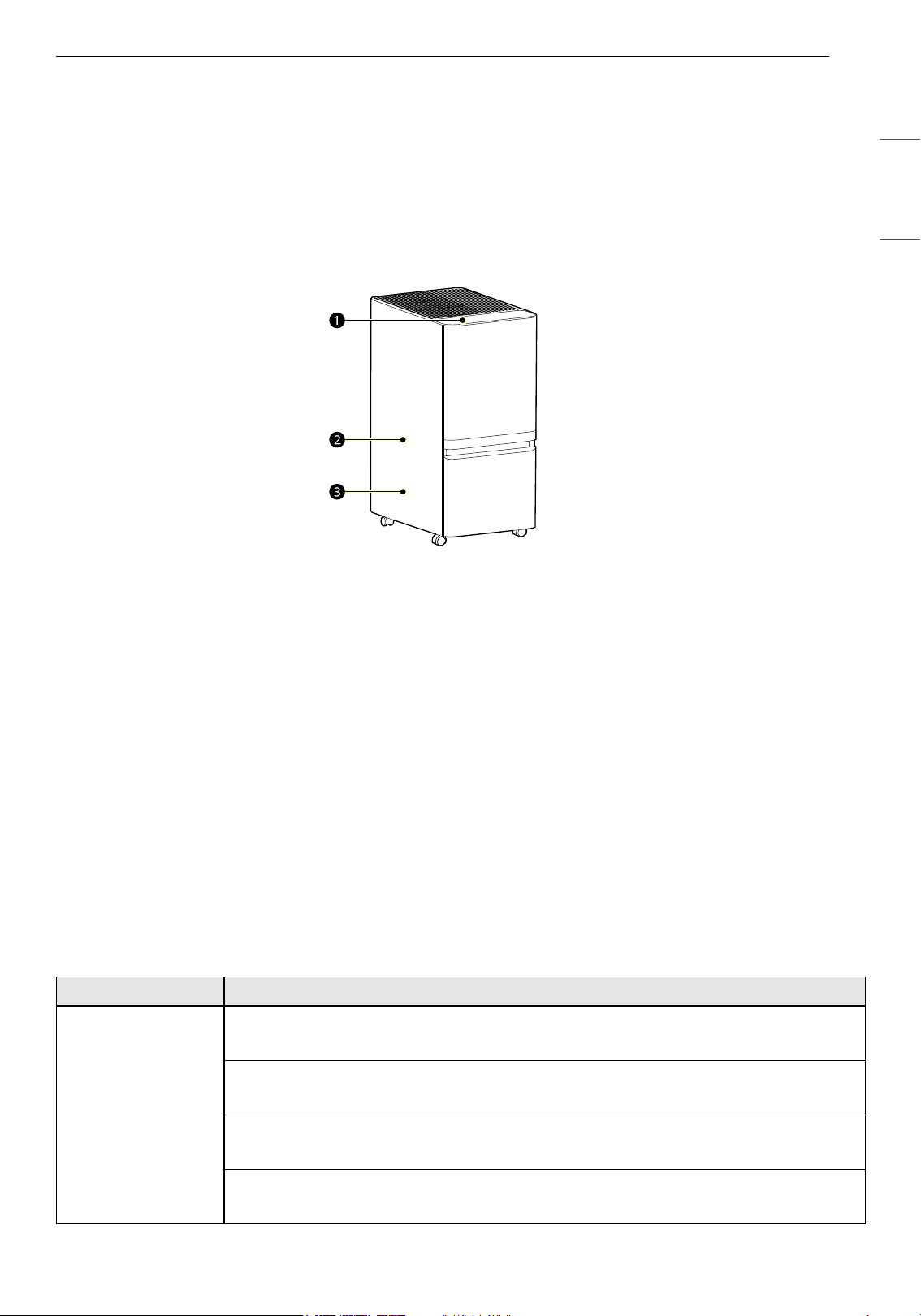
31SOLUCIÓN DE PROBLEMAS
ESPAÑOL
SOLUCIÓN DE PROBLEMAS
Antes de llamar al servicio técnico
Favor de checar lo siguiente previo a llamar al servicio técnico. Si el problema persiste, contacte a su centro
de servicio técnico local.
Sonidos normales de funcionamiento del producto
a Sonidos de zumbido y chirridos
Se pueden escuchar sonidos hasta que se estabilice la circulación del refrigerante.
b Sonido de alto frecuencia
Es normal escuchar el sonido del compresor durante el funcionamiento.
c Sonidos de expansión de piezas (sonido que hace “clac”)
Durante el funcionamiento del deshumidificador, estos sonidos se producen por cambios de
temperatura en los componentes y desaparecen después de un tiempo.
Funcionamiento
Llame de inmediato al servicio técnico en las siguientes situaciones.
• El cable de alimentación está demasiado caliente o dañado.
• Smart Diagnosis genera un código de error.
• La deshumidificación continuó incluso después de que el tanque de agua se llenó.
Problemas Causas posibles y solución
El aparato no
funciona.
¿Está desconectado el enchufe de alimentación?
• Conéctelo correctamente a un tomacorriente.
¿Se ha cortado la electricidad?
• Cheque la alimentación de otros productos de la casa.
¿El depósito está instalado correctamente?
• Instale el depósito de forma correcta.
¿El indicador del depósito está encendido?
• Vacíe el depósito.
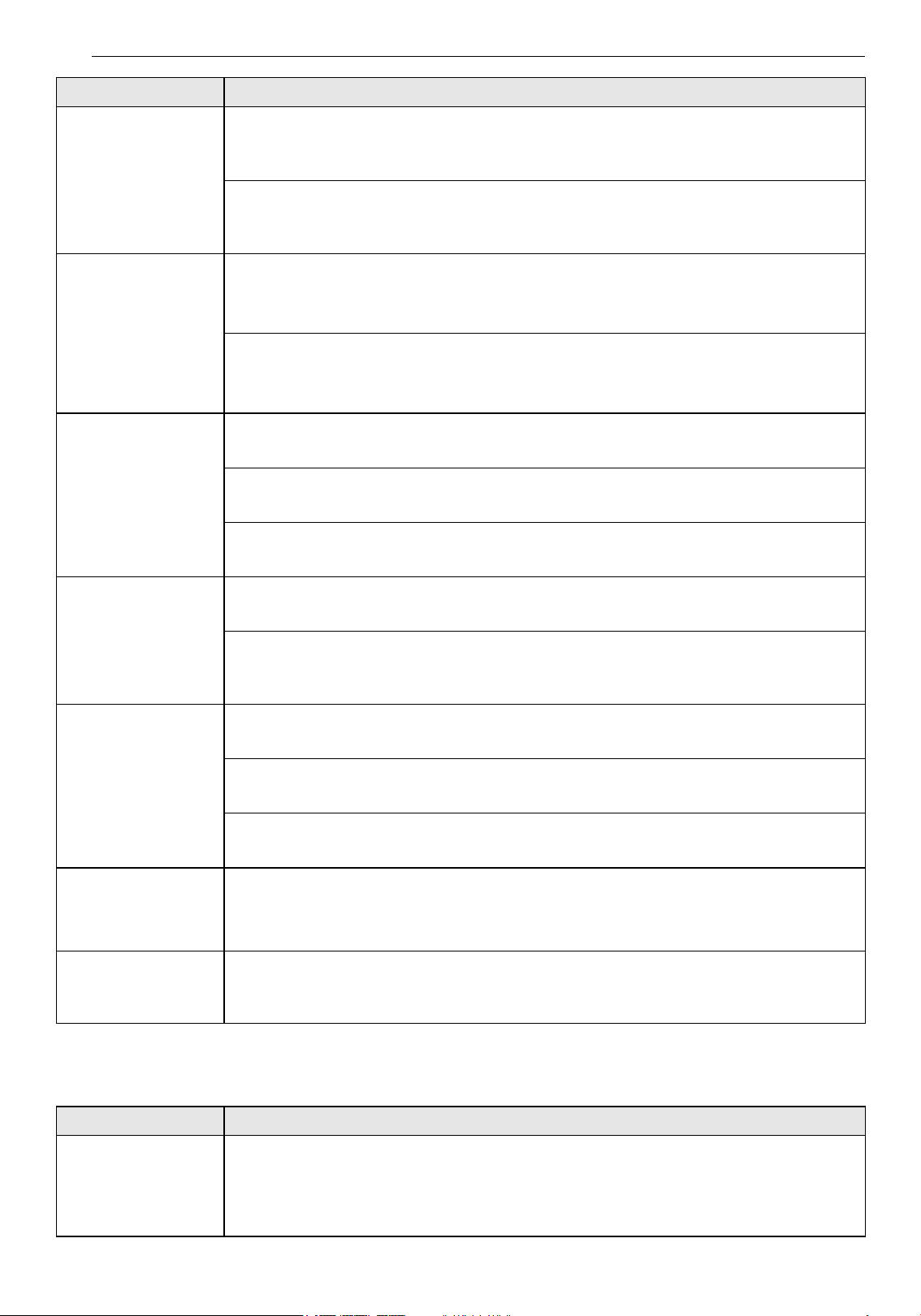
32 SOLUCIÓN DE PROBLEMAS
LG ThinQ
El aparato no
funciona.
¿La pantalla de estado muestra
dF?
• El descongelamiento está en curso. Una vez que finalice el descongelamiento, seleccione
un modo.
¿La humedad deseada está configurada a un nivel más alto que la humedad del
ambiente?
• Reduzca la humedad deseada a un nivel inferior al de la humedad del ambiente.
Hay poca
deshumidificación.
¿La temperatura o la humedad del ambiente están demasiado bajas?
• Revise la humedad objetivo.
• Es normal que la deshumidificación sea menor durante el invierno y en áreas secas.
¿La entrada o salida de aire está obstruida?
• Elimine la obstrucción.
• Limpie el filtro.
La humedad no
parece disminuir
mucho, aunque el
producto esté
funcionando en
modo de
deshumidificación.
¿Está abierta la puerta o ventana?
• Cierre la puerta o ventana.
¿La habitación es demasiado grande?
• Utilice el deshumidificador en una habitación del tamaño adecuado.
¿Hay algún objeto cercano que genere vapor?
• No utilice el deshumidificador junto con otros aparatos.
La lectura de
humedad que se ve
en la pantalla de
estado es incorrecta.
¿El deshumidificador está obstruido de alguna manera?
• Mantenga el deshumidificador alejado de las paredes u otras partes.
¿El deshumidificador está lejos del área que usted desea deshumidificar?
• La pantalla del deshumidificador muestra el nivel de humedad que hay en su ubicación
actual. Este puede diferir del nivel de otras ubicaciones.
La ropa tarda mucho
en secarse.
¿El aire seco llega a la ropa?
• Acerque el deshumidificador a la ropa.
¿Está tratando de secar la ropa en una habitación grande?
• Utilice el deshumidificador en una habitación del tamaño adecuado.
¿La ropa que está tratando de lavar es demasiada?
• Reduzca la cantidad de ropa.
Acabo de retirar el
depósito y el
deshumidificador
gotea agua.
¿Retiró el depósito mientras el deshumidificador estaba en funcionamiento?
• Retire el depósito cuando el indicador del depósito esté encendido.
La manguera de
extensión no está
conectada.
¿El adaptador de la manguera de extensión está conectado al producto?
• Asegúrese de que el adaptador de la manguera de extensión esté conectado (en algunos
productos).
Problemas Causas posibles y solución
El producto y el
teléfono inteligente
no pueden
conectarse a través
de Wi-Fi.
¿Es correcta la contraseña Wi-Fi utilizada para conectarse al teléfono inteligente?
• Pulse el botón Configuración del teléfono inteligente y, a continuación, busque su Wi-Fi en
la lista de redes. Mantenga pulsado el botón para seleccionar [Borrar red] y, a
continuación, vuelva a realizar el registro del producto desde el principio.
Problemas Causas posibles y solución
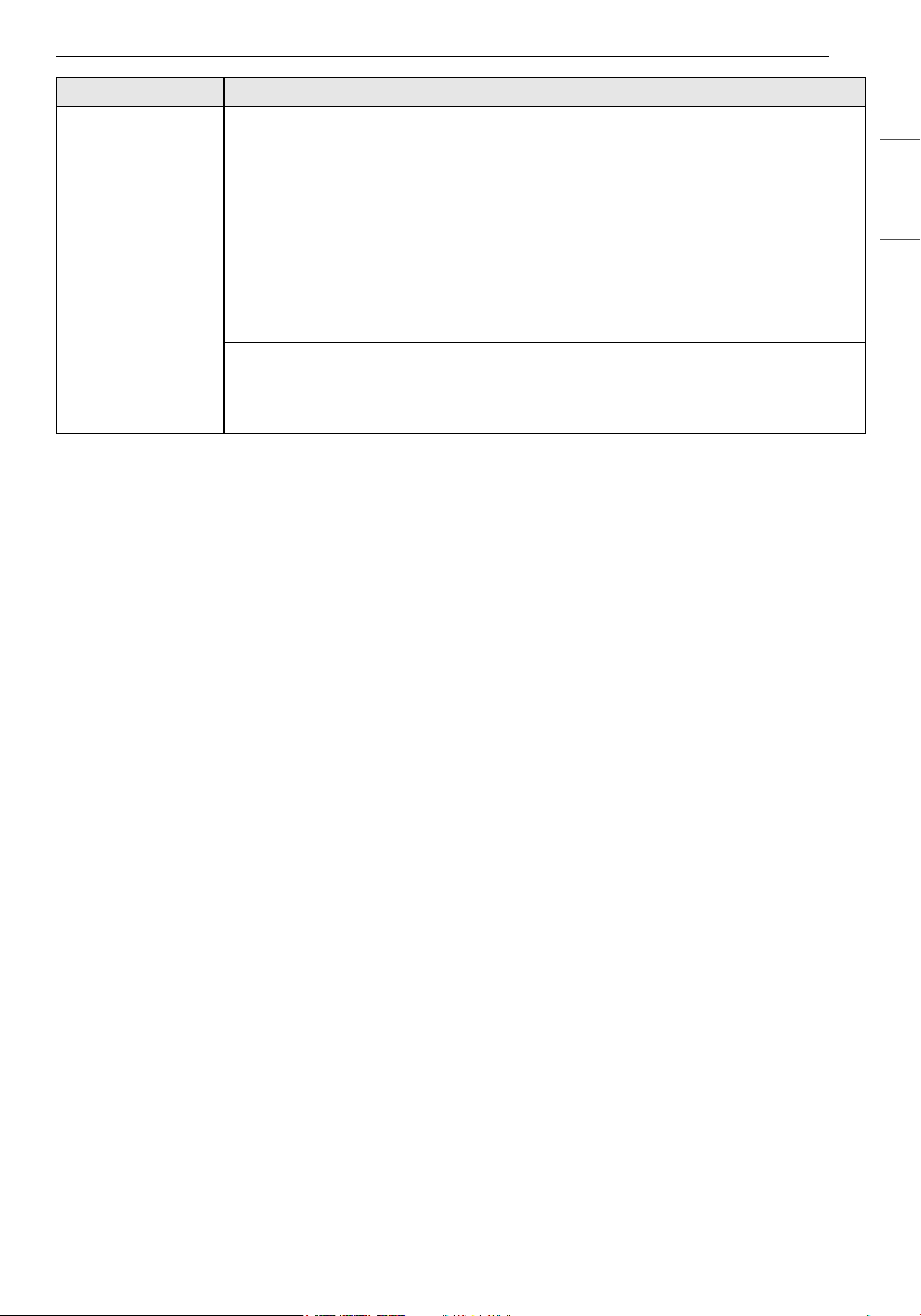
33SOLUCIÓN DE PROBLEMAS
ESPAÑOL
El producto y el
teléfono inteligente
no pueden
conectarse a través
de Wi-Fi.
¿Su teléfono inteligente utiliza datos móviles en lugar de Wi-Fi?
• En los ajustes del teléfono inteligente, desactive los Datos móviles, active la conexión Wi-Fi
y, a continuación, registre el producto.
¿El nombre (ID) del router inalámbrico contiene caracteres especiales?
• Configure el nombre (ID) del router inalámbrico como una combinación de números y
letras inglesas. La conexión Wi-Fi puede resultar difícil si introduce caracteres especiales.
¿La frecuencia del router inalámbrico no es de 2,4 GHz?
• Al conectar el producto mediante Wi-Fi, sólo se puede utilizar una red de 2,4 GHz. Ajuste el
router inalámbrico a 2,4 GHz y, a continuación, conéctese. Para checar la frecuencia de su
router inalámbrico, contacte a su operador de Internet o con el fabricante del router.
¿Están demasiado alejados el producto y el router inalámbrico?
• Si la distancia entre el producto y el router inalámbrico es demasiado grande, es posible
que la señal inalámbrica sea débil y que la conexión no sea fluida. Acerque el router
inalámbrico al producto.
Problemas Causas posibles y solución
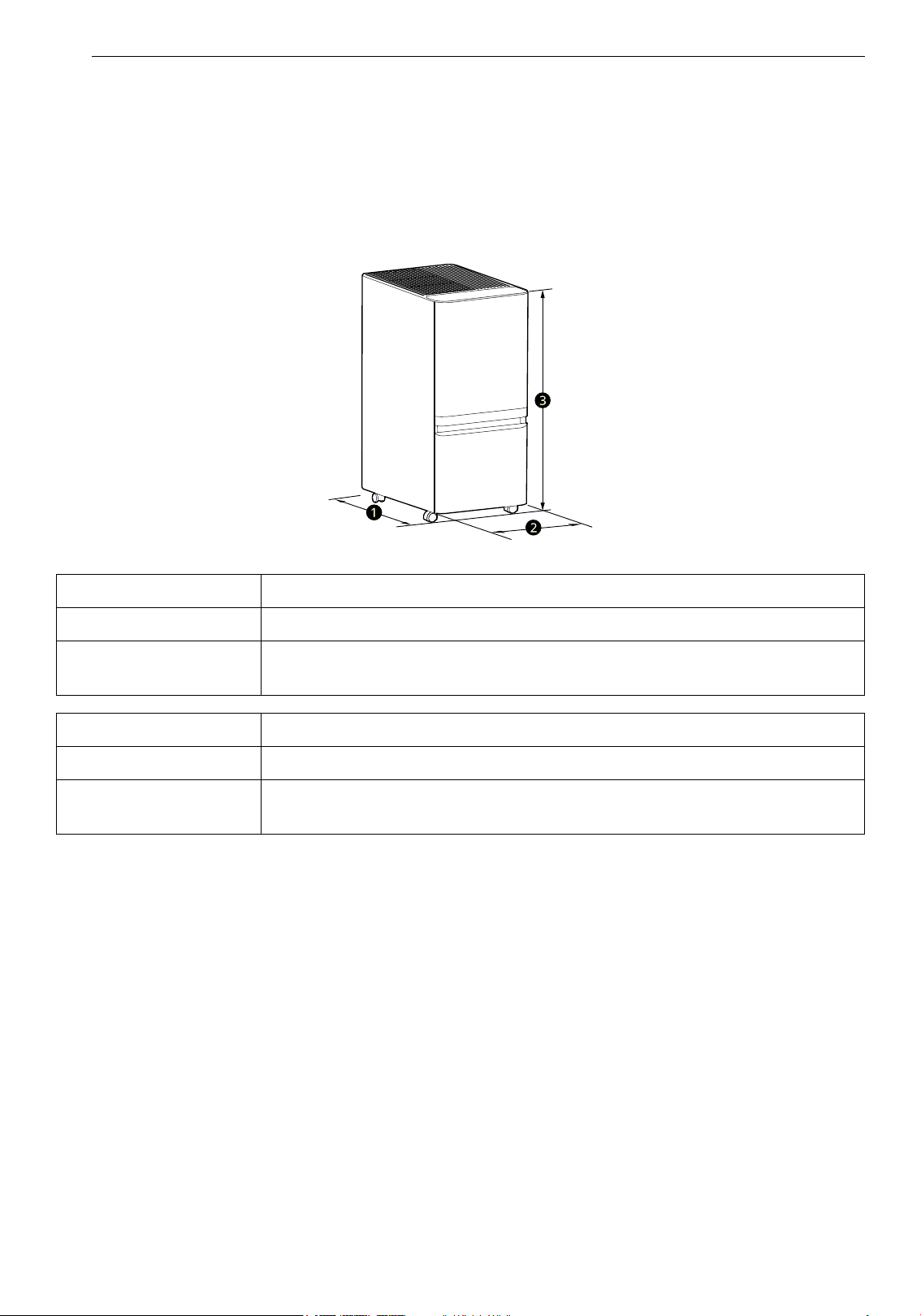
34 APÉNDICE
APÉNDICE
Especificaciones
ESPECIFICACIONES DEL APARATO
• La apariencia y las especificaciones podrían variar sin previo aviso para mejorar la calidad del aparato.
Nombre DT50*B*R*
Potencia AC 120 V~, 60 Hz
Dimensiones exteriores
(
a x b x c)
16.73in x 11in x 23.86in (425mm x 280mm x 606mm)
Nombre DT35*B*R*, DT25*B*R*
Potencia AC 120 V~, 60 Hz
Dimensiones exteriores
(
a x b x c)
14.43in x 8.66in x 24.02in (366mm x 220mm x 610mm)
35APÉNDICE
ESPAÑOL
GARANTÍA
AVISO DE ARBITRAJE:
ESTA GARANTÍA LIMITADA CONTIENE UNA DISPOSICIÓN DE ARBITRAJE QUE EXIGE QUE USTED Y LG
ELECTRONICS ("LG" DE AQUÍ EN ADELANTE) RESUELVAN LOS CONFLICTOS MEDIANTE UN ARBITRAJE
VINCULANTE EN LUGAR DE HACERLO ANTE TRIBUNALES, A MENOS QUE DECIDA NO PARTICIPAR. EN EL
ARBITRAJE, LAS DEMANDAS COLECTIVAS Y LOS JUICIOS POR JURADOS NO ESTÁN PERMITIDOS. CONSULTE
LA SECCIÓN TITULADA "PROCEDIMIENTO PARA RESOLVER CONFLICTOS" A CONTINUACIÓN.
QUÉ CUBRE ESTA GARANTÍA:
LG Electronics (“LG”) le ofrece garantía sobre su deshumidificador LG ("Producto") contra defectos de
materiales o de mano de obra bajo condiciones normales de uso doméstico. Durante el período de
garantía establecido a continuación, LG, a su discreción, reparará o reemplazará el producto. Esta garantía
limitada es válida únicamente para el comprador minorista original del producto y se aplica solo cuando se
lo adquirió de forma legal y se utiliza dentro de los Estados Unidos, incluidos los territorios de EE. UU. Es
necesario presentar el justificante de compra para disfrutar del servicio de esta garantía limitada.
NOTA
• Los productos de reemplazo o las piezas de reparación pueden ser nuevos, reacondicionados o
remanufacturados en fábrica, y cuentan con garantía por la parte restante del período de garantía
original del producto o por noventa (90) días, lo que resulte mayor. Cualquier producto que se
reemplace o pieza de reparación pasará a ser propiedad de LG. Conserve el recibo fechado o el
comprobante de entrega como prueba de la fecha de compra a los efectos de la garantía. (Es posible que
deba presentar una copia a LG o a su representante autorizado).
INFORMACIÓN
PERIODO DE GARANTÍA:
Un (1) año a partir de la fecha de compra minorista original, o a partir de la fecha de entrega conforme a la
ley aplicable (Únicamente piezas internas/funcionales).
CÓMO SE PROPORCIONA EL SERVICIO TÉCNICO: servicio a domicilio
Durante el periodo de garantía, se ofrecerá servicio a domicilio si está disponible en Estados Unidos. Es
posible que no todas las localidades ofrezcan servicio a domicilio. El producto debe estar abierto al
personal de servicio y accesible para el servicio a domicilio. Podría ser necesario desmontar, reparar y
devolver el producto si durante el servicio a domicilio no se puede finalizar la reparación. Si el servicio a
domicilio no está disponible, LG puede optar, a su discreción, por proporcionar el transporte de su
elección para el viaje de ida y vuelta a su centro de servicio autorizado.
ESTA GARANTÍA LIMITADA NO CUBRE:
• Visitas de servicio para la entrega, recogida, retiro o reinstalación del producto, o para brindar
instrucciones sobre el uso del producto.
• Sustituir los fusibles de la casa o reajustar los disyuntores, corregir el cableado o la plomería de la casa o
corregir la instalación del producto son ejemplos de servicios.
• Daños o fallas causados por tuberías de agua con fugas/dañadas/congeladas; líneas de drenaje
obstruidas; suministro de agua inadecuado o interrumpido; o suministro de aire insuficiente.
• Daños o fallas causados por accidentes, plagas o animales dañinos, rayos, viento, incendios,
inundaciones o fenómenos naturales.
• Daños o fallas provocados por el uso indebido, maltrato, instalación, reparación o mantenimiento
inadecuados. La reparación incorrecta incluye el uso de partes no aprobadas o especificadas por LG.
36 APÉNDICE
• Daños o fallas causados por modificaciones o alteraciones no autorizadas al producto.
• Daños o fallas causados por corriente eléctrica, voltaje o códigos de plomería incorrectos.
• Daños cosméticos, incluidos rayones, abolladuras, desconchados u otros daños en el acabado del
producto, a menos que dichos daños resulten de defectos de materiales o de mano de obra y se
informen a LG dentro de los siete (7) días calendario posteriores a la fecha de entrega (Llame al 1-800-
243-0000).
• Producto reacondicionado, o daños o faltantes en cualquier producto de exhibición, caja abierta o con
descuento.
• Cualquier vendido “tal como está”, “con todos sus defectos” o con un descargo de responsabilidad
similar.
• Producto cuyos números de serie originales de fábrica se hayan quitado, alterado o modificado de
cualquier manera.
• Reparaciones cuando el producto se utiliza de manera distinta al uso doméstico normal y habitual (p.ej.,
alquiler, uso comercial, oficinas o instalaciones recreativas) o de manera contraria a las instrucciones del
manual del propietario.
• Piezas cosméticas (no funcionales) o reemplazo de cualquier pieza consumible.
• Aumentos del costo de los servicios públicos y gastos adicionales por servicios públicos.
• Imperfecciones menores que no alteran ni afectan de manera sustancial la funcionalidad.
DESCARGO DE RESPONSABILIDAD
ESTA GARANTÍA SUSTITUYE CUALQUIER OTRA GARANTÍA, EXPRESA O IMPLÍCITA, INCLUIDAS, SIN
LIMITACIÓN, LAS GARANTÍAS IMPLÍCITAS DE COMERCIABILIDAD O IDONEIDAD PARA UN PROPÓSITO
PARTICULAR. EN LA MEDIDA EN QUE LA LEY REQUIERA ALGUNA GARANTÍA IMPLÍCITA, SU DURACIÓN SE
LIMITA AL PERÍODO ESTABLECIDO CON ANTERIORIDAD. LA REPARACIÓN O EL REEMPLAZO PREVISTOS
CONFORME A ESTA GARANTÍA CONSTITUYEN EL ÚNICO RECURSO DEL CLIENTE. NI EL FABRICANTE NI SU
DISTRIBUIDOR EN LOS ESTADOS UNIDOS SERÁN RESPONSABLES POR DAÑOS INCIDENTALES,
CONSECUENCIALES, INDIRECTOS, ESPECIALES O PUNITIVOS DE CUALQUIER NATURALEZA, INCLUIDOS,
ENTRE OTROS, LA PÉRDIDA DE INGRESOS O GANANCIAS, O CUALQUIER OTRO DAÑO, YA SEA BASADO EN
CONTRATO, AGRAVIO O DE OTRO TIPO.
ALGUNOS ESTADOS NO PERMITEN LA EXCLUSIÓN O LIMITACIÓN DE DAÑOS INCIDENTALES O
CONSECUENCIALES, NI LIMITACIONES SOBRE LA DURACIÓN DE UNA GARANTÍA IMPLÍCITA, DE MODO
QUE ES POSIBLE QUE LA EXCLUSIÓN O LIMITACIÓN ANTERIOR NO SE APLIQUE AL CLIENTE. ESTA
GARANTÍA OTORGA AL CLIENTE DERECHOS LEGALES ESPECÍFICOS Y ESTE PODRÍA TENER TAMBIÉN DE
OTROS DERECHOS QUE VARÍAN DE UN ESTADO A OTRO.
Usted se hará cargo de los gastos de reparación o sustitución en estas
circunstancias excluidas.
PARA OBTENER SERVICIO DE GARANTÍA E INFORMACIÓN ADICIONAL
Llame al 1-800-243-0000 y seleccione la opción adecuada del menú. O visite nuestro sitio web en http://
www.lg.com
O por correo postal: LG Customer Information Center (ATTN: CIC) 201 James Record Road, Huntsville, AL
35824
37APÉNDICE
ESPAÑOL
PROCEDIMIENTO PARA RESOLVER CONFLICTOS:
TODOS LOS CONFLICTOS ENTRE USTED Y LG QUE SURJAN EN RELACIÓN CON ESTA GARANTÍA LIMITADA O
CON EL PRODUCTO SE RESOLVERÁN EXCLUSIVAMENTE A TRAVÉS DE UN ARBITRAJE VINCULANTE Y NO
ANTE UN TRIBUNAL DE JURISDICCIÓN GENERAL. "ARBITRAJE VINCULANTE" SIGNIFICA QUE USTED Y LG
RENUNCIAN AL DERECHO DE UN JUICIO CON JURADO Y A REALIZAR O PARTICIPAR EN UNA DEMANDA
COLECTIVA.
Definiciones. Para el propósito de esta sección, las referencias a “LG” significan: LG Electronics U.S.A., Inc.,
sus empresas matrices, subsidiarias y filiales y cada uno de sus directivos, directores, empleados, agentes,
beneficiarios, predecesores en interés, sucesores, cesionarios y proveedores; las referencias a “conflicto” o
“reclamación” incluirán cualquier conflicto, reclamo o controversia de cualquier tipo, sin importar (ya sea
basado en contrato, agravio, estatuto, regulación, ordenanza, fraude, falsa representación o cualquier
teoría legal o equitativa) que surja de o esté relacionada con cualquier forma de venta, condición o
desempeño del producto o de esta Garantía Limitada.
Aviso de disputa. En caso de que usted desee iniciar un procedimiento de arbitraje, primero debe
notificar a LG por escrito al menos 30 días antes de iniciar el arbitraje; este aviso se presentará por carta a
LG y se enviará a LG Electronics, USA, Inc., a la atención de Legal Department- Arbitration 111 Sylvan
Avenue, Englewood Cliffs, NJ 07632. Usted y LG aceptan participar en discusiones de buena fe en un
intento de resolver su reclamo de manera amistosa. En la carta debe indicar su nombre, dirección y
número de teléfono, identificar el producto objeto del reclamo, y describir la naturaleza del reclamo y la
solución que busca. Si usted y LG no pueden resolver el conflicto en un plazo de 30 días, cualquiera de las
partes puede proceder a presentar una demanda de arbitraje.
Acuerdo de arbitraje vinculante y renuncia de demanda colectiva. En caso de no resolver el conflicto
durante el período de 30 días después de enviar una notificación por escrito a LG, usted y LG se
comprometen a resolver cualquier reclamo solamente a través de arbitraje vinculante sobre una base
individual, a menos que usted se excluya, conforme a lo dispuesto a continuación. Cualquier conflicto
entre usted y LG no se combinará ni consolidará con un conflicto relacionado con cualquier otro producto
o reclamo de otra persona o entidad. Específicamente y sin perjuicio de lo anterior, no procederá bajo
ninguna circunstancia cualquier conflicto entre usted y LG como parte de una demanda colectiva o
representativa. En lugar del arbitraje, cualquiera de las partes podrá iniciar una acción individual ante un
tribunal de reclamos menores, pero tales acciones en el tribunal de reclamos menores no podrán tomarse
en una demanda colectiva o representativa.
Normas y procedimientos de arbitraje. Para comenzar con el arbitraje de un reclamo, usted o LG deben
presentar una demanda escrita para arbitraje. El arbitraje será administrado por la Asociación Americana
de Arbitraje (AAA) y se llevará a cabo ante un árbitro único de conformidad con las Normas de Arbitraje del
Consumidor de la AAA, que tienen efecto al momento de inicio del arbitraje (en adelante, las “Normas de la
AAA”) y según los procedimientos establecidos en esta sección. Las Normas de la AAA están disponibles en
línea en www.adr.org/consumer
. Envíe una copia de su solicitud de arbitraje por escrito, así como una
copia de esta disposición, a la AAA de la forma descrita en las Normas de la AAA. También debe enviar una
copia de su solicitud por escrito a LG en LG Electronics, USA, Inc., a la atención de Legal Department-
Arbitration 111 Sylvan Avenue, Englewood Cliffs, NJ 07632. Si hay un conflicto entre las Normas de la AAA y
las reglas establecidas en esta sección, prevalecerán las reglas de esta sección. Esta disposición de
arbitraje se rige por la Ley Federal de Arbitraje. El juicio se puede introducir en el laudo arbitral en
cualquier tribunal de jurisdicción competente. El árbitro tomará su decisión en todas las cuestiones,
excepto aquellos asuntos relativos al alcance y aplicabilidad de la cláusula de arbitraje y de la capacidad de
arbitraje del conflicto para que el tribunal determine. El árbitro se regirá por los términos de esta
disposición.
Legislación vigente. La legislación del estado de su residencia regirá esta Garantía limitada, así como
todos los conflictos entre nosotros, salvo que sea invalidada o incoherente con leyes federales aplicables.
Tarifas / Costos. No debe pagar ninguna tarifa para iniciar un arbitraje. Al recibir su solicitud de arbitraje
por escrito, LG pagará todos los gastos administrativos rápidamente a la AAA, a menos que usted solicite
más de $25.000,00 por daños, en cuyo caso el pago de estos gastos se regirá por las Normas de la AAA.
Salvo disposición contraria prevista en el presente documento, LG pagará a la AAA todos los gastos
documentales, administrativos y de arbitraje para cualquier arbitraje iniciado, de conformidad con las
Normas de la AAA y esta disposición de arbitraje. Si usted prevalece en el arbitraje, LG cubrirá los
honorarios y gastos de sus abogados, siempre y cuando sean razonables, de conformidad con ciertos
factores que incluyen, entre otros, el monto de la compra y el monto del reclamo. No obstante lo indicado,
si la ley aplicable permite una adjudicación de honorarios y gastos razonables de abogados, un árbitro
38 APÉNDICE
puede otorgarlos en la misma medida que lo haría un tribunal. Si el árbitro considera que el fondo de su
reclamo o la reparación solicitada en la demanda es frívola o se utiliza para un propósito inadecuado
(calificado según las normas establecidas en la Norma Federal de Procedimiento Civil 11 (b)), el pago de
todos los honorarios de arbitraje se regirá por las Normas de la AAA. En tal situación, usted se
compromete a reembolsar a LG todos los fondos que haya erogado previamente, cuyo pago es, por otra
parte, su obligación según las Normas de la AAA. Salvo disposición contraria, LG renuncia a cualquier
derecho que pudiera tener para solicitarle los honorarios y gastos de sus abogados, si LG prevalece en el
arbitraje.
Audiencias y ubicación. Si su reclamo es por $25.000 o menos, puede optar por que el arbitraje sea
realizado únicamente sobre la base de lo siguiente: (1) documentos presentados al árbitro; (2) a través de
una audiencia telefónica; o (3) mediante una audiencia presencial, según lo establecido por las Normas de
la AAA. Si su reclamo excede los $25.000, el derecho a una audiencia estará determinado por las Normas
de la AAA. Cualquier audiencia de arbitraje presencial se realizará en un lugar dentro del distrito judicial
federal en el cual resida, a menos que ambas partes acuerden llevarla a cabo en otra ubicación o mediante
un arbitraje telefónico.
Exclusión. Puede excluirse de este procedimiento de resolución del conflicto. Si se excluye, ni usted ni LG
pueden solicitar al otro que participe en un procedimiento de arbitraje. Para excluirse, debe enviar una
notificación a LG en un plazo de hasta 30 días continuos a partir de la fecha de la primera compra del
consumidor del producto, por alguno de estos medios: (i) enviar un mensaje de correo electrónico a
, con el asunto: “Exclusión del arbitraje” o (ii) por teléfono si llama al 1-800-980-2973. Debe
incluir la siguiente información en el correo electrónico de exclusión o suministrarla por teléfono: (a) su
nombre y dirección; (b) la fecha en la cual se compró el producto; (c) el nombre o el número del modelo del
producto; y (d) el número de serie (puede encontrarse (i) en el producto o (ii) en el sitio https://
www.lg.com/us/support al hacer clic en “How do I find my model number?” [¿Cómo puedo encontrar mi
número de modelo?]).
Solo puede excluirse del procedimiento de resolución de conflictos en la forma descrita anteriormente (es
decir, por correo electrónico o por teléfono); ninguna otra forma de notificación será efectiva para hacerlo.
Excluirse de este procedimiento de resolución de conflictos no afectará de ninguna manera la cobertura
de la Garantía limitada, por lo que usted continuará disfrutando de todos sus beneficios. Si conserva este
producto y no se excluye, acepta todos los términos y condiciones de la cláusula de arbitraje descrita
anteriormente.

LG Customer Information Center
Register your product Online!
www.lg.com
For inquiries or comments,
visit www.lg.com or call:
1-800-243-0000
U.S.A.
1-888-542-2623
CANADA
Centro de Información al Cliente LG
¡Registre su producto en línea!
www.lg.com
Para consultas o comentarios, visite
www.lg.com o llame por teléfono:
1-800-243-0000
EE.UU.
1-888-542-2623
CANADÁ
Centre de Service à la Clientèle de LG
Enregistrez votre produit en ligne!
Pour des questions ou des commentaires,
visitez www.lg.com/ca_fr ou appelez :
1-800-243-0000
ÉTATS-UNIS
1-888-542-2623
CANADA
www.lg.com/ca_fr