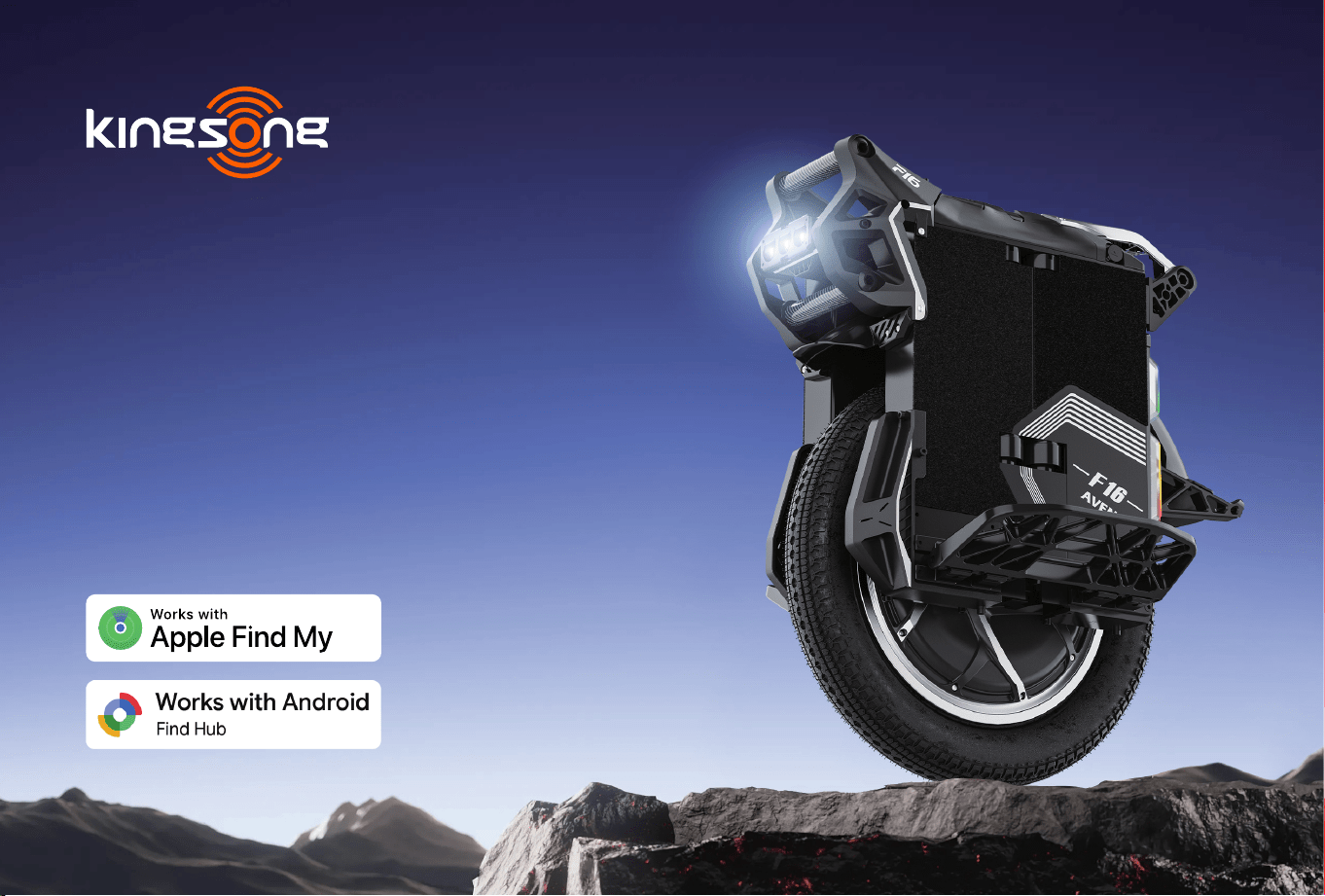
Model: F16
Kingsong Aven
Electric Unicycle
Original User Manual

SMART LIFE, REACHING THE FUTURE

Dear Valued Customer,
On behalf of KingSong Technology Co., Ltd., I would like to sincerely thank you for choosing a KingSong
product. Your trust inspires us to continue pursuing excellence in quality, innovation, and customer seice.
Our goal is to provide products that meet the needs of our customers and deliver a safe, reliable, and
enjoyable riding experience. Your new product has been carefully developed by our team of engineers and
designers, and we hope it will become a trusted pa of your eveday journeys.
Your purchase marks not the end of our seice, but the beginning of our relationship with you. We are
committed to suppoing you throughout your ownership experience and are always ready to assist
whenever needed.
We also welcome you to share your ideas, suggestions, and vision for the future of intelligent mobility. At
KingSong, we truly value the voices of our customers and believe that listening to your needs helps us
create better products and better riding experiences.
Once again, thank you for your trust and for becoming pa of the KingSong community. We hope you
enjoy eve journey with your new ride.
Best regards,
Chief Executive Ocer
KingSong Technology Co., Ltd.

CAUTIONS
Electric unicycles are designed as a personal transpo for the outdoors and for sho
distances.
This user manual is a sho guide for the end user containing safety points & product features.
It is not an exhaustive list of eve risky situation that might arise. We strongly advise you to
read this guide ve carefully and ride with attention.
Riding an electric unicycle, like all outdoor activities, poses risks including inju if you lose
control, fall and/or collide with another object and/or person. Please ride with caution and at
your own risk.
Thanks you for purchasing King Song electric unicycle!
YOUR SAFETY IS NUMBER ONE PRIORITY!
PLEASE RIDE UNDER LOCAL LAW!

IF SMOKE OR FIRE OCCURS
Do not touch or move the unicycle. Evacuate immediately, keep others away, avoid inhaling fumes,
call local emergency seices, and follow the instructions of re authorities.
This electric unicycle contains high-energy lithium-ion batteries. Damage, improper charging, incompatible
components, or misuse may cause overheating, re, explosion, serious inju, or death.
• Use only the charger supplied with this product or a KingSong-approved replacement charger for this
model. Use only approved replacement batteries.
• Never use damaged, modied, incompatible, or counteeit chargers or batteries.
• Never open, repair, modify, puncture, crush, or sho-circuit the batte.
• Do not charge or use the product after severe impact, submersion, signicant water exposure, or
suspected batte damage until professionally inspected.
• Stop using and charging immediately if you notice unusual heat, swelling, leakage, odor, hissing,
popping, sparking, smoke, or other abnormal behavior.
WARNING: LITHIUM-ION BATTERY & FIRE HAZARD
This manual contains impoant safety information but cannot cover eve possible hazard.
Read it carefully and always use, charge, and store your electric unicycle with caution.
IMPORTANT SAFETY WARNING
READ BEFORE USE

If you are unsure whether the product is safe to use, charge, or store, stop using it and contact KingSong
or an authorized seice provider.
• Store the unicycle in a cool, d, well-ventilated location away from heat, direct sunlight, combustible
materials, and escape routes.
• Never place lithium-ion batteries or products containing them in household trash or general recycling.
Follow local regulations for batte recycling or hazardous-waste disposal.
STORAGE & DISPOSAL
• Charge only in a d, well-ventilated area on a stable, noncombustible suace.
• Keep the unicycle and charger away from beds, sofas, carpets, cuains, paper, clothing, heat sources,
direct sunlight, and other combustible materials.
• When charging indoors, do not charge in bedrooms or sleeping areas.
• Never charge near doors, stairs, hallways, windows, or anywhere that could block or restrict an
escape route.
• Remain present and awake while charging. Never charge unattended or while sleeping.
• Do not cover the unicycle or charger while charging.
• Allow a hot batte to cool before charging and follow the specied charging temperature limits.
• Unplug the charger when charging is complete.
CHARGING SAFETY
SAFE CHARGING & STORAGE
Improper charging or storage can increase the risk of batte damage, overheating, or re.

1. Product Details------------------------------------------------------------------01
2. Safety Instructions---------------------------------------------------------------07
3. Kingsong APP-------------------------------------------------------------------09
4. Find My-------------------------------------------------------------------------10
5. Learn to Ride--------------------------------------------------------------------17
6. Warning------------------------------------------------------------------------19
7. Suspension----------------------------------------------------------------------21
8. Maintenance--------------------------------------------------------------------23
9. Warranty------------------------------------------------------------------------25
Contents
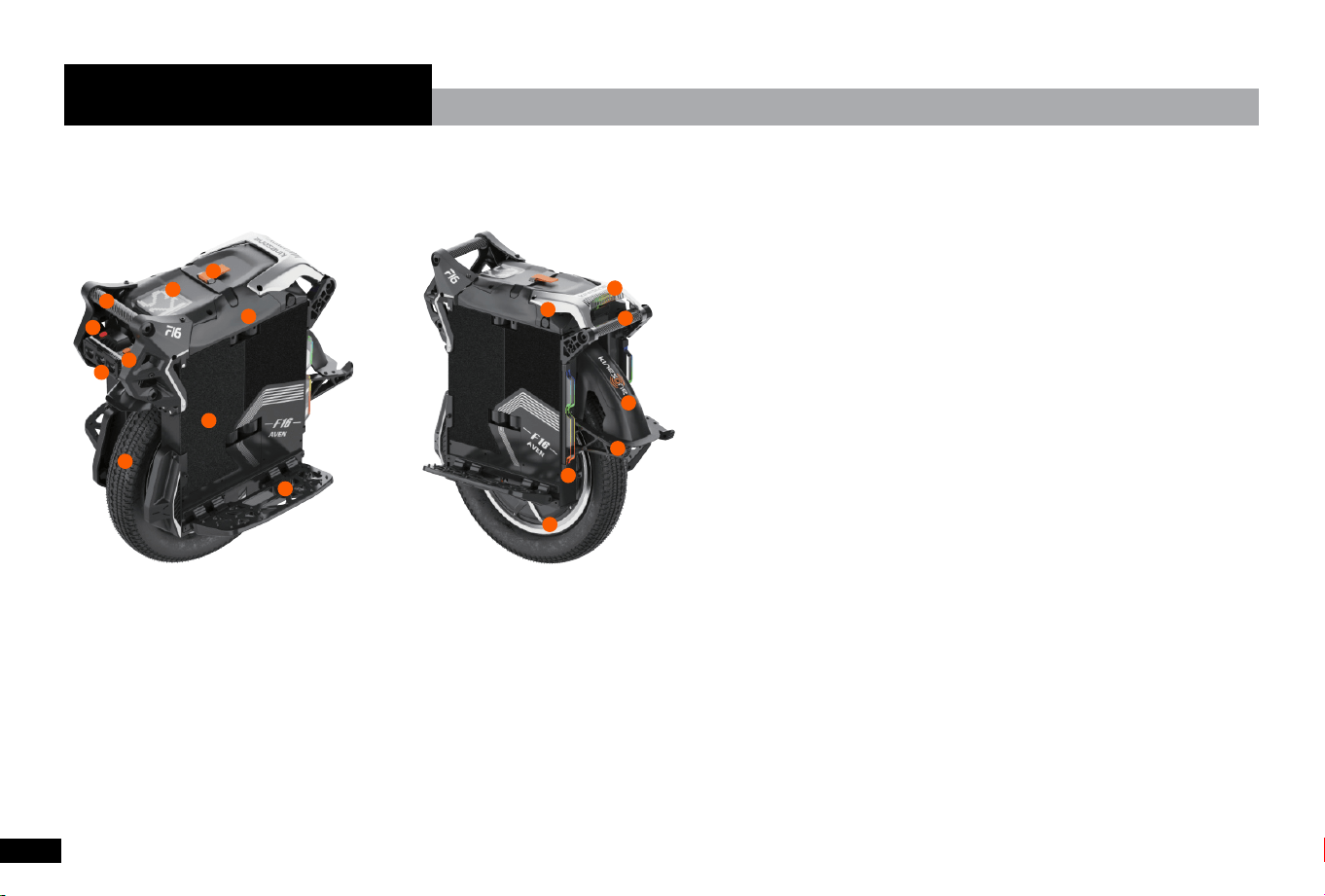
13. Rear Handle
14. Mud Flap
15. Foot Stand
16. RGB Light
17. Motor
7. Tire
8. Suspension
9. Batte
10. Pedal
11. Taillight
12. Charging Po
1. Trolley
2. Display
3. Front Handle
4. Power Button
5. Lighting Mode Button
6. Front Light
01
02
03
04
06
05
07
08
09
10
11
12
13
14
15
16
17
1.1 Product Diagram
1. Product Details
01

BlackColor
-10 °C to 45 °COperating Temperature
Approx. 4–5 hoursCharging Time
Input: 100–240 V AC / Output: 126 V DC, 5 ACharger Specications
120 kg (265 lb)Max Load
Approx. 110 km (68.4 mi)Range
Rated Voltage: 111 V DC
Maximum Charging Voltage: 126 V DC
Rated Capacity: 2,220 Wh
Sma BMS with cell balancing and protection against overcharge, over-discharge, overcurrent,
sho circuit, and overheating. Batte status can be monitored via the KingSong App.
Batte
Approx. 45°Gradeability
Full-speed mode is unlocked after the rst 5 km of riding.
Facto alarm settings: Level 1 at 18 km/h, Level 2 at 19 km/h, and Level 3 at 20 km/h,
with tilt-back at 20 km/h.
Full speed
unlocked
after 5km.
10,000WPeak Power
3,500WRated Power
KS-F16Model No
1.2 Specications
02

The default tilt cuto angle is 45° on either side. If the tilt angle exceeds 45°, motor output will
stop. The cuto angle can be adjusted in the KingSong App. Once the unit is returned to an
upright position, balancing is restored automatically without restaing.
Tilt Protection
Double-press the power button to disable motor balancing before lifting the unit. Balancing is
restored automatically when the unit is returned to an upright position.
Lift-Up Protection
Protective Measures
Dual GX16-6 charging pos; power button; USB-C po; lighting mode buttonPos & Controls
Approx. 37.7 kg (83.1 lb)Product Weight
615 (L) × 330 (W) × 745 (H) mm (24.2 × 13 × 29.3 in)Package Size
560 (L) × 280 (W) × 650 (H) mm (22.0 × 11.0 × 25.6 in)Product Size
16×3.0 inch (3.0-12 inch); Road tire (Clincher with inner tube)Tire type and size
145–245 mm (5.7–9.6 in); 8°-14° adjustablePedal height and angle
277 × 130 mm (10.9 × 5.1 in)Pedal Size
30 W integrated dual-color headlight (white + yellow)Headlight
Frame Suspension Travel 80 mmSuspension Travel
Adjustable rebound and compression damping, with adjustable spring preload.Suspension
Dimension & Weight
03

Brand-new motherboard architecture, the driver board is designed separately on the aluminum
substrate, which has better heat dissipation. 18 brand-new Toll packaged low-resistance MOS
Main Board
Hardware Features
The LED dot matrix screen can display speed, voltage, and current in riding mode, which can
be adjusted through the APP
Speed Indicate
LED dot matrix screen shows batte level when EUC power on at rest.Batte Indicate
Sho press the power button to turn on, long press the power button to turn oPower On/O
Alarm & Features
The parking bracket is designed according to the whole vehicle, making parking
more convenient.
Vehicle Reverse
Parking Device
Independent batte and multiple waterproof designsBatte Waterproof
The motherboard is modularly designed and independently waterproof. At the same time, the
U-shaped groove between the motherboard seat and the upper cover is connected with a
silicone sealing ring to enhance the waterproof peormance and provide a safe waterproof
protection for the motherboard seat.
Motherboard
Waterproof
Protection
80℃ high temperature seesaw for the mainboard, 140℃ high temperature seesaw for the motor,
and 60℃ high temperature seesaw for the batte.
High Temperature
Protection
Low batte protection activated on 30% batte, speed will decreases linearly; when the
batte is lower than 5%, voice alarm for charge, when batte at 0%, the front pa of the
pedal will rise to decelerate until full stop.
Low Batte
Protection
Over speed buzzer alarm or speech broadcast + pedal tilt back.Speed Limit Protection
04

Integrates power, speed, fault code, spectrum display and other information into one 16*16 dot
matrix display(Set the display content in the APP)
Display
The rear features 40 RGB lights seamlessly integrated with the vehicle body. Each side of the
batte pack tail is equipped with 66 RGB lights, paired with an integrated light‑transmitting
panel. Built‑in rich lighting eects such as braking and turn signals create a highly recognizable
and stunning vehicle appearance.
Taillight and
Coloul Lights
Comes with a Type‑C discharge po, max 5V/2A output, to easily power your external devices.Type-C Po
The Google+Apple network uses hundreds of millions of devices worldwide to build a location
system that enables vehicle location tracking.
Location tracking
Dual charging po design, a single charging po suppos 5A high current, the whole vehicle
suppos 10A fast charging
Charging Po
Integrated modular lighting and switch design, more convenient maintenance;
1. Lighting: 30W high-power integrated dual-color (white light + yellow light) lighting,
automatically adjust the brightness according to the speed, automatically turn on and o the
lighting system at night according to the set time, and can adjust the angle separately to
provide all-round lighting at night
2. Switch: Silicone waterproof switch design, integrated power on/o, shutdown switch, lighting
switch design
Lighting, Switch
Adopting 5.1 Bluetooth module, it has stronger compatibility and more stable data transmission.Data Bluetooth
System
provide good power supply for high-power motors. The modular design of the control board
and display board provides good suppo for the whole system.
05
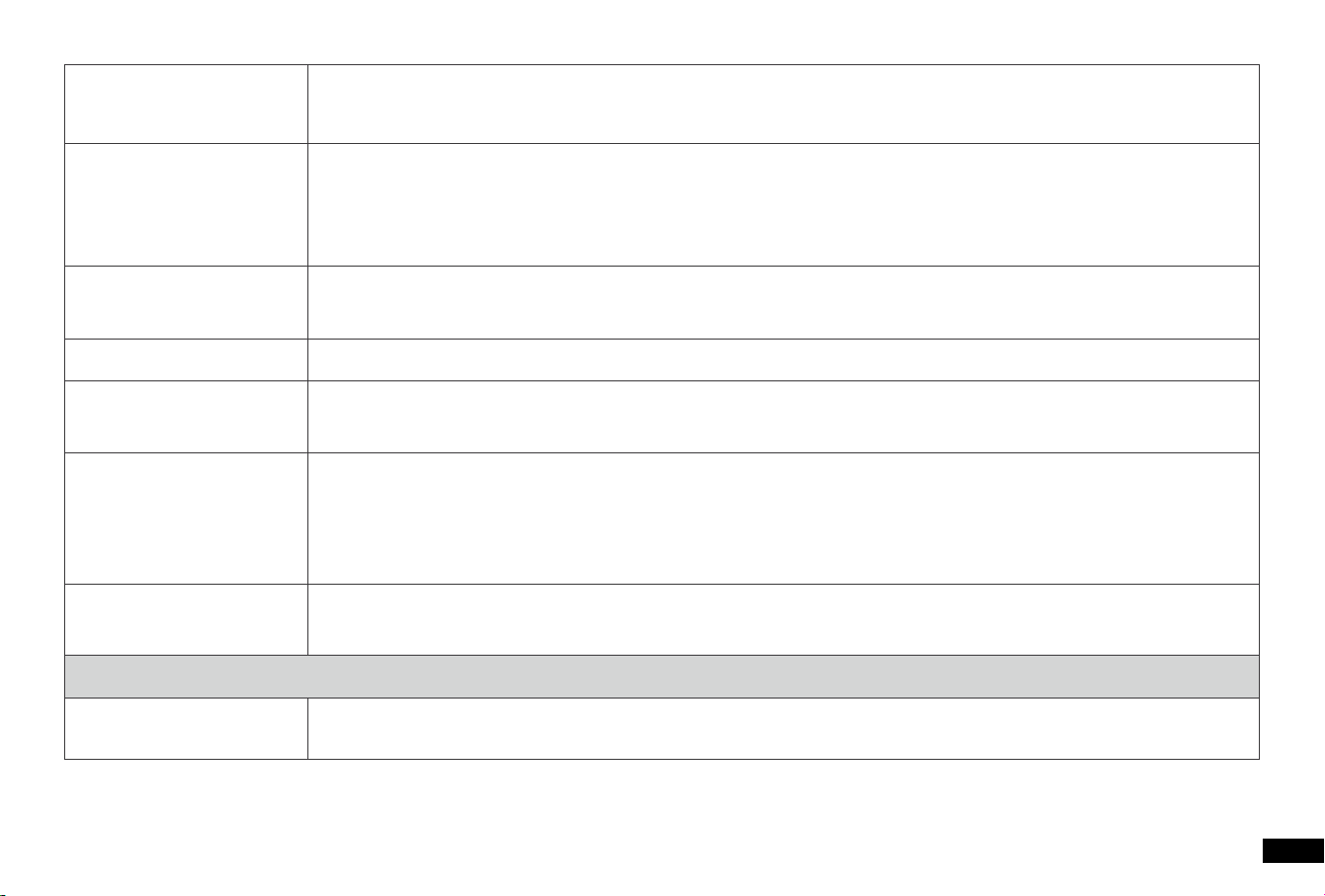
F16*1, Charger*1, Manual*1, Pump*1, QC ceicate*1Standard Accessories
Packing List
Adopt spring + air multifunctional combination suspension, independent damping and spring
preload adjustable knob, creating a new riding experience for users
Suspension system
Adopt Samsung 50S 21700 5000mA batte cell, the whole vehicle is designed with four
independent batteries, the batte protection board adopts the new BMS batte management
system, real-time monitoring of batte safety, magnesium alloy batte box integrated design,
more reasonable design, safer to use
Batte
The newly developed high-power 3500W hollow shaft motor provides a strong acceleration
feeling for riders
Motor
Independent center-mounted three-section U-shaped pull rod design, more poableTrolley
The new integrated design of the front and rear double handles, made of carbon ber, has a
better texture and strength, making it more convenient to car the car, stable and reliable
Handle
The vehicle automatically powers on and unlocks when you approach with your phone, and
powers o and locks as you walk away. It eliminates the need for traditional mechanical buttons
for a more convenient and hassle‑free daily riding experience.
Phone‑sensor Unlock
Function
Real-time monitoring of motherboard, motor and batte temperature, providing good safety
protection for users to ride
Temperature Control
System
06

● F16 is an enteainment product, Which is dierent from motor vehicles driving on the road. Before mastering riding
skills, you need to practice. Kingsong is not responsible for any injuries or damage caused by a rider's inexperience or
failure to follow the instructions in this document.
● Please understand that you can reduce the risk by following all the instructions and warnings in this manual, but you
cannot eliminate all the risks. Remember that whenever you ride the F16 you risk inju or death from loss of control,
collisions, and falls. When entering into public spaces always comply with the local laws and regulations. As with other
vehicles, faster speeds require longer braking distance. Sudden braking on smooth suaces could lead to wheel slip, loss
of balance, or falls. Be cautious and always keep a safe distance between you and other people or vehicles when riding.
Be ale and slow down when entering unfamiliar areas.
● Respect pedestrians by always yielding the right of way. Pass on the left whenever possible. Avoid staling pedestrians.
When approaching from behind, announce yourself and slow down to walking speed when passing.
● In places without laws and regulations governing selalancing electric vehicles, comply with the safety guidelines
outlined in this manual. Kingsong is not responsible for any propey damage, personal inju/death, accidents, or legal
disputes caused by violations of the safety instructions.
● Make sure each new rider wears a helmet and other protective gear.
● Before each ride check for loose fasteners, damaged components, and low tire pressure. If the F16 makes
abnormal sounds or signals an alarm, immediately stop riding. Contact your dealer/distributor for seice.
● Always wear a helmet when riding. Use an approved bicycle or skateboard helmet that ts properly with the chin strap in
place, and provides protection for the back of your head.
2. Safety Instructions
07

● Do not attempt your rst ride in any area where you might encounter children, pedestrians, pets, vehicles, bicycles, or
other obstacles and potential hazards.
● Use caution when riding in new environments.
● To reduce risk of inju, you must read and follow all “WARNING” notices in this document. Do not ride at an unsafe
speed. Under no circumstance should you ride on roads with motor vehicles. Always follow these safety instructions:
A) The following people should not ride F16:
i. Anyone under 16 years old or above 50 years old.
ii. Anyone under the inuence of alcohol or drugs.
iii. Anyone who suers from disease that puts them at risk if they engage in strenuous physical activity.
iv. Anyone who has problems with balance or with motor skills that would inteere with their ability to maintain balance.
B) Comply with local laws and regulations when riding this product. Do not ride where prohibited by local laws.
C) To ride safely, you must be able to clearly see what is in front of you and you must be clearly visible to others.
D) Do not ride in the snow, in the rain, or on roads which are wet, muddy, icy, or that are slippe for any reason. Do not ride
over obstacles (sand, loose gravel, or sticks). Doing so could result in a loss of balance or traction and could cause a fall.
E) Do not accelerate or decelerate suddenly. Do not accelerate when the F16 tilt back or sounds an alarm. Do not
attempt to override the speed limiter.
F) While the Kingsong App is useful, do not allow the App to distract you while you are riding. Always pay attention to your
surroundings.
● Never resta and ride your F16 after it has indicated an empty batte condition or powered o due to low batte.
Your F16 may not have enough power to keep you balanced, especially if you demand a lot of power at once. If you resta
and continue riding, you risk falling. Also, you risk damaging your batteries, resulting in reduced batte life and capacity.
● Do not inse the power cord if the charge po is wet.
08
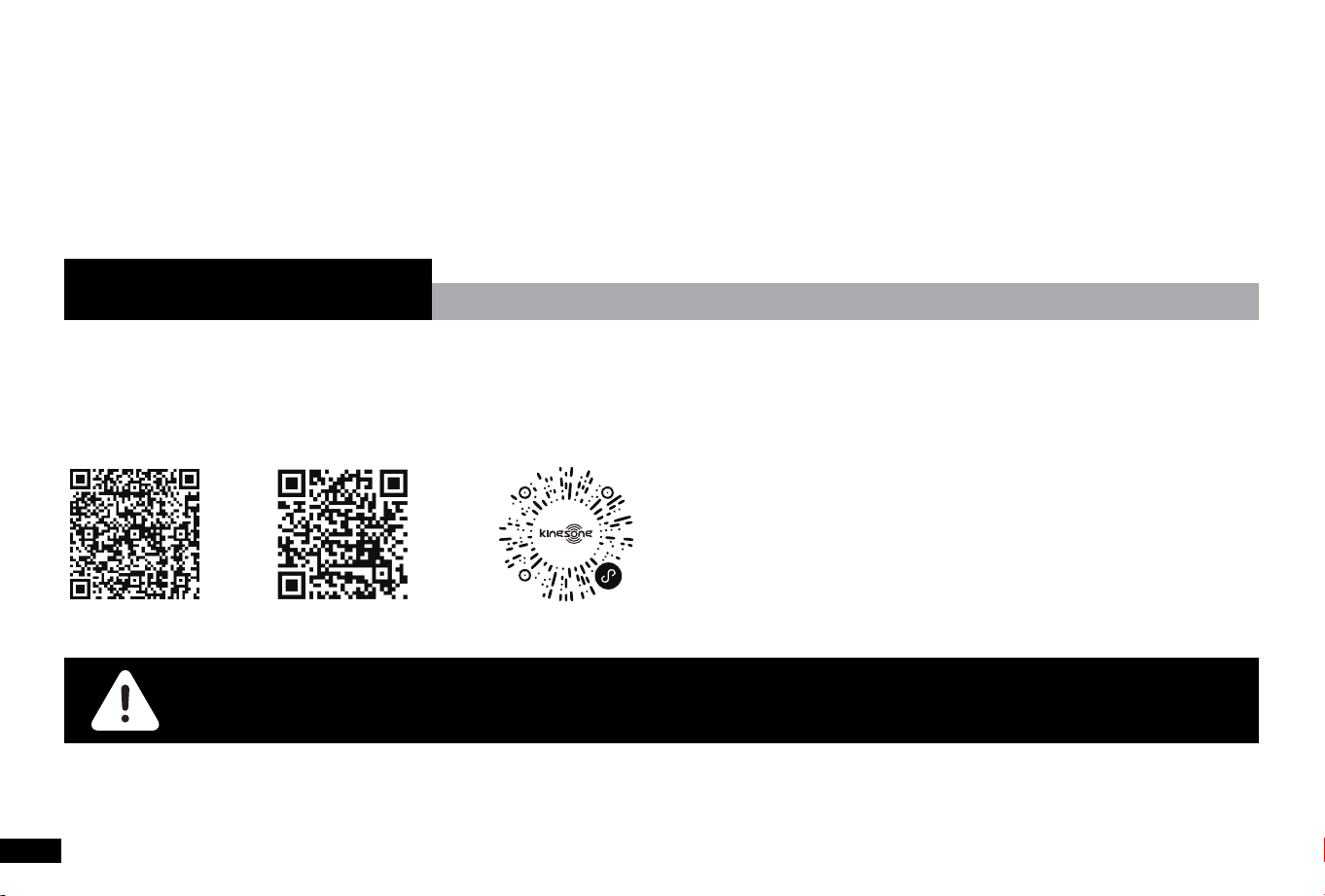
Open Bluetooth/location (or GPS), Click ‘Search’ - -> Click the corresponding model KS-F16 in device
list to connect. The E-unicycle will beep when APP is connected with E-unicycle.
Warning:Please give the corresponding permission to APP, to ensure the APP can run normally in your
mobile device.
Android iOS Wechat Mini Program
● Android APP: Please download from Google play, ‘kingsong’ is the exact one.
● iOS APP: Please download from apple store, ‘kingsong’ is the exact one.
● Mini program: Scan on WeChat and use the mini program.
3. Kingsong APP
● Use a surge protector when charging to help protect your F16 from damage due to power surges and voltage spikes.
Do not use a charger from any other product.
● Always shut down your F16 and unplug the AC Power Cord before peorming any maintenance.
● Do not modify your F16. Modications to your F16 could inteere with the operation of the F16, could result in serious
inju or damage, and could void the Limited Warranty.
09

Apple Find My
Quick instructions
Turn on the device
Click the power button 3 times to turn on the Find My device.
Pair the device
• Open the Find My app. Hold the device close to your iPhone, tap the Items tab, tap + and then Add Other Item.
• Tap Connect.
• Type a name for your device, select an emoji.
• Tap Agree to acknowledge that this item will be linked to your Apple ID.
• Tap Finish.
Enable Lost Mode
• Open the Find My app, tap the Items tab, then tap your item.
• Under Lost Mode, tap Enable.
Read the instructions, tap Continue and enter a phone number or email address. Conrm the information, customize the
lost message, and tap activate to complete the setup.
Remove the device
• Open the Find My app, tap the Items tab, then tap your item. Tap Remove Item and then tap Remove to complete the
operation.
Note: After removing the device in the app, it will not shut down and will be in the pairing mode.
4. Find My
10

Main Functions
Locate your item
If your missing item isn't nearby, the Find My app can still help you track it down using the Find My network - hundreds of
millions of iPhone, iPad, and Mac devices around the world. Nearby devices securely send the location of your missing
device to iCloud, then you can see where it is in the Find My app. It's all anonymous and encpted to protect eveone's
privacy.
Play Sound
• Open the Find My app, tap the Items tab, then tap your item.
• Click Play Sound, and the device will beep, so you can nd the item easily.
Instructions for device power button
Device operation
● Turn on the device: Click the power button 3 times to turn on the Find My device.
● Turn o the device: Click the power button 4 times to turn o the Find My device.
● Learn more: Click the power button 5 times to enter "learn more" mode.
● Reset the device: Click the power button 6 times to reset the Find My device.
The device enters the pairing state again
After removing the device from the app, the device will beep, will not shut down, and will be in pairing mode. If it is not
paired within 10 minutes, the device will leave the pairing state. If you need to pair devices at this point, click the device
button 6 times and the device beeps. At this point, thedevice enters the pairing state and can be paired with the app again.
Locate & Notications
Find item When It's Nearby:
11

• Open Find My app and select the "Items" tab or open the Find ltems app on your Apple Watch.
• Tap on your item from the list.
• Tap "Play Sound" to make your item beep.
• Tap "Stop Sound" to stop the beeps once you nd.
Find item's Location:
• Open Find My app and select the "Items" tab or open the Find ltems app on your Apple Watch.
• Tap on your item from the list.
• Your item's location will appear on the Map with a time stamp of when the iterm was located.
• To navigate to the item's location, tap “Directions" to open Apple Maps.
Enabling "Notify When Left Behind":
• Open Find My app and select the "Items" tab or open the Find ltems app on your Apple Watch.
• Tap on your item from the list.
• Under "Notications" enable the "Notify When Left Behind" toggle.
• You will receive a notication when you leave your item behind and it's no longer in range of your device.
Enabling "Notify When Found":
• Under "Notications", enable the "Notify When Found" toggle.
• When your item is seen by another Find My network device, you will receive a notication of its location.
Note :" Notify When Found" can only be activated when your item is out of range.
Impoant tips: When pairing a device with Findmy app, the phone will link to the Apple seer. Pairing may fail because of
network problems. The following actions are recommended:
1. Change the phone's network, such as switching between WiFi and network;
2. Restore the device to facto Settings,Click the power button 6 times to reset the Find My device.
3. Pair with Findmy app.
12

Legal notice
To use the Apple Find My app to locate this item, the latest version of iOS, iPadOS, or macOS is recommended. The Find
Items app on Apple Watch requires the latest version of watchOS.
Use of the Works with Apple badge means that a product has been designed to work specically with the technology identi
ed in the badge and has been ceied by the product manufacturer to meet Apple Find My network product specica-
tions and requirements. Apple is not responsible for the operation of this device or use of this product or its compliance
with safety and regulato standards.
Apple, Apple Find My, Apple Watch, Find My, iPhone, iPad, iPadOS, Mac, macOS and watchOS are trademarks of Apple Inc.
IOS is a trademark or registered trademark of Cisco in the U.S. and other countries and is used under license.
FAQ:
When can the device be located?
When an item is separated from its owner for a period of time, it can be found by other Apple devices that are pa of the
Find My network, and the owner can sta to get the location of the device.
How is the device designed to discourage unwanted tracking?
If any Find My network accesso separated from its owner is seen moving with you over time, you'll be notied in one of
two ways:
1. If you have an iPhone or iPad, Find My will send notica tions to your Apple device. This feature is available on iOS or
iPadOS 14.5 or later.
2. If you don't have an iOS device or a smaphone, a Find My network accesso that isn't with its owner for a period of
time will emit a sound when it's moved.
These features were created specially to discourage people from ting to track you without your knowledge.
How is my privacy protected?
Only you can see where your item is. Your location data and histo are never stored on the item itself. Devices that relay
13

the location of your item also stay anonymous, and that location data is encpted eve step of the way.
What is the Find My network? And how does it work?
The Apple Find My network provides an easy, secure way to locate compatible personal items on a map using the Find My
app on your iPhone, iPad, Mac, or the Find Items app on Apple Watch. Simply pair your compatible product with the Apple
Find My app to view it right alongside your Apple devices.
If your item ever goes missing, you can put it in Lost Mode to display a message and contact information to anyone who
might nd it. The Find My network is encpted and anonymous, so no one else, not even Apple or the mark of your
personal item, can view its location.
Google’s Find Hub
Before You Sta
This item only suppos the "Find Hub" app. Please make sure to download and install this app on Google Play before use.
The device is compatible only with Android devices running Android" 9 and above.
This item does not suppo Huawei devices.
Once item is paired with a device, it will be locked and cannot be paired with another device.
Button and Sound instructions
● Turn on the device: click the power button 3 times to turn on item.
● Turn o the device: clicklick the power button 4 times to turn o item.
● Learn more: clicklick the power button 5 times to enter "learn more" mode.
● Reset the device: click the power button 6 times to reset item.
14

Reset:
1: Open the "Find Hub" app, select your item, tap the Settings button, then tap"Remove from Find Hub" and conrm.
2: After removing it, click the power button 6 times, the item will be reset.
Note: Please power on the item and remove the device from the "Find Hub" app before resetting.
Instruction
Add ltem
1.Make sure your phone's Bluetooth and network are turned on.
2.Click the power button 3 times to turn on item.
3.Bring item close to your Android device and wait for the pop-up to show item. (Remark: lf no pop-up appears, please
resta your phone and t again).
4.Tap "Connect", read and accept the prompts to complete the pairing.
5.In the"Find Hub" app, select item to customize the device name and Catego.
Find Nearby
In the "Find Hub" app, select your item and tap "Play Sound" to locate your item. Once found, tap Stop Sound to silence the
device.
Find Far Away
In the "Find Hub" app, select your item, tap the device to view its location. To navigate to the location, tap "Get Directions"
to open map navigation.
Enable Lost Mode
In the "Find Hub" app, select your item and tap "Mark as Lost".
Add your contact information and you will get a notied if the Find Hub network locates it.
15

ltem Location Sharing
In the "Find Hub" app, select your item, then tap "Share Device”.
Connect to another phone
After completing the reset process, then connect to another Android phone.
Manual Set Up instructio(lf you miss the pop-up)
1. Open Settings.
2. To "Google".
3. Click on "All Seices".
4. In the "Connected Devices & Sharing" menu, select "Devices”
5. Enable "Scan for Nearby Devices".
6. ltem will appear in the list of available nearby devices.
7. Click on it and follow the on-screen instructions to complete the connection.
Legal Notice
Find Hub helps you and connect to what matters in a single, secure place. Find your lost phone or other impoant
belongings quickly. You can also use Find Hub for seamless location sharing with friends & family for peace of mind.
Find Hub network requires location seices and Bluetooth to be turned on. Requires cell seice or internet connection.
Works on Android 9 and above on select devices [devices or phones] and in ceain countries for age-eligible users.
Google, Android, Google Play and Find Hub are trademarks of Google LLC.
16

5.1 Precautions
• Please nd a suace to practice on.
• Warm up your body and ensure you're wearing safety gearsuch as helmets, knee pads, elbow pads and wrist guards.
• Ensure the wheel's batte level.
• Check the unicycle for impeections such as any looseness, abnormal sound. We also highly suggest pushing the
unicycle by ahnd to see if there's any friction between tire and the case of the wheel.
• Please do not accelerate or decelerate rapidly, please also t to avoid over leaning or leaning too fast to prevent rider
inju.
5.2 Sta Learning to Ride
• Like riding a bicycle or unicycle, it takes a ceain skill level to ride Kingsong F16 For dierent customers, it may take
2-20 hours to ride well.
5. Learn to Ride
17
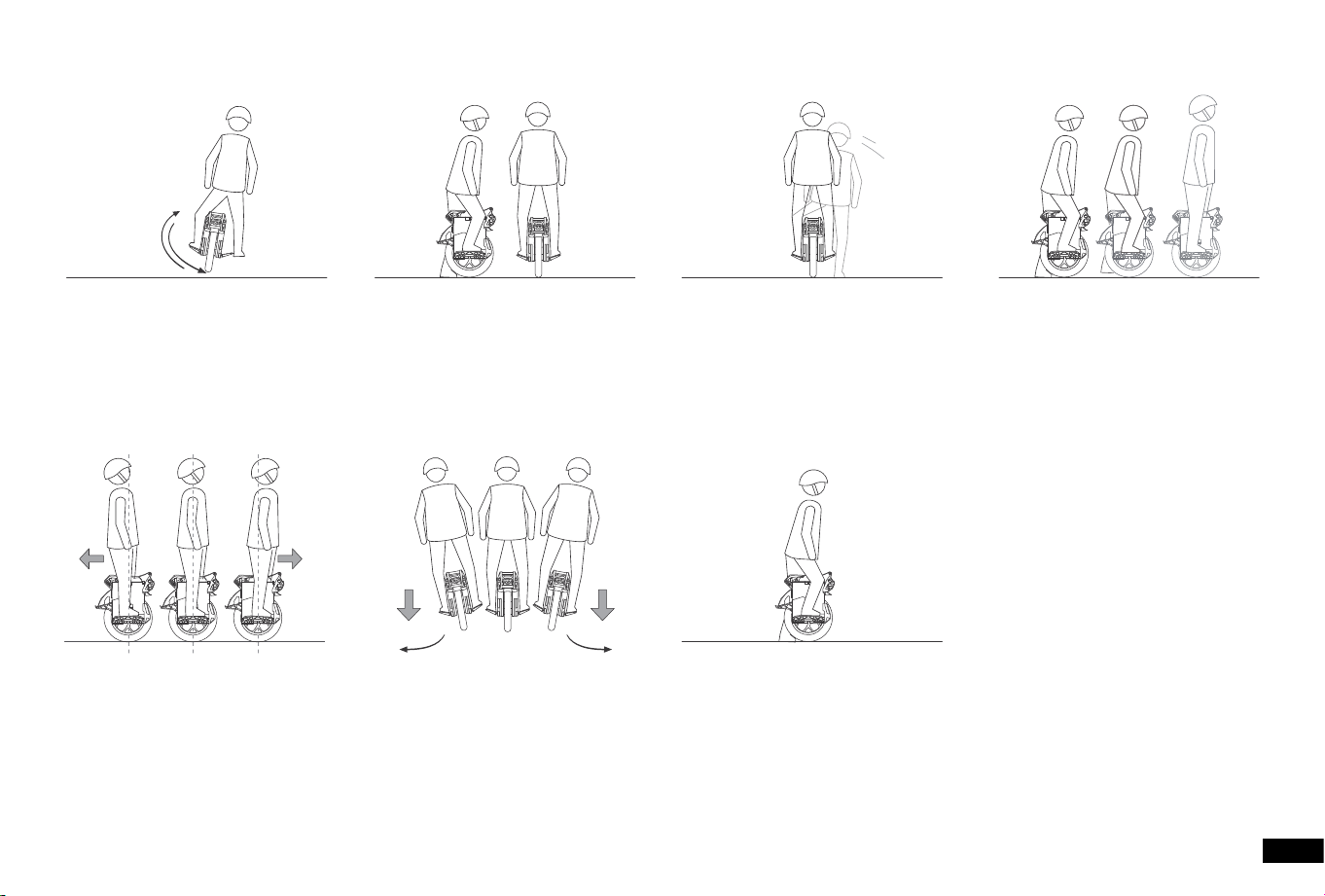
07. To get o: come to a stop by
centering your weight, then step o
F16 with one foot.
06. Turn by pressing harder on one
pedal than the other, and by shifting
your weight slightly.
05. Practice travelling forward and
backward by controlling your body's
center of gravity. The fuher you
lean, the faster you go.
04. After you are able to comfoably
glide for a few seconds, t gliding
for 10-20 ft (3-5 m) with both feet
on the pedals.
03. With one foot on a pedal, slowly
lean forward. Push o with your other
foot and glide for 1-2 seconds.
02. Using a friend, wall, or handrail:
put both feet on Kingsong F16 and
practice riding slowly forward and
backward.
01. Get used to the way Kingsong
F16: step on one pedal, then
swing your leg back and foh to
feel the controls.
18
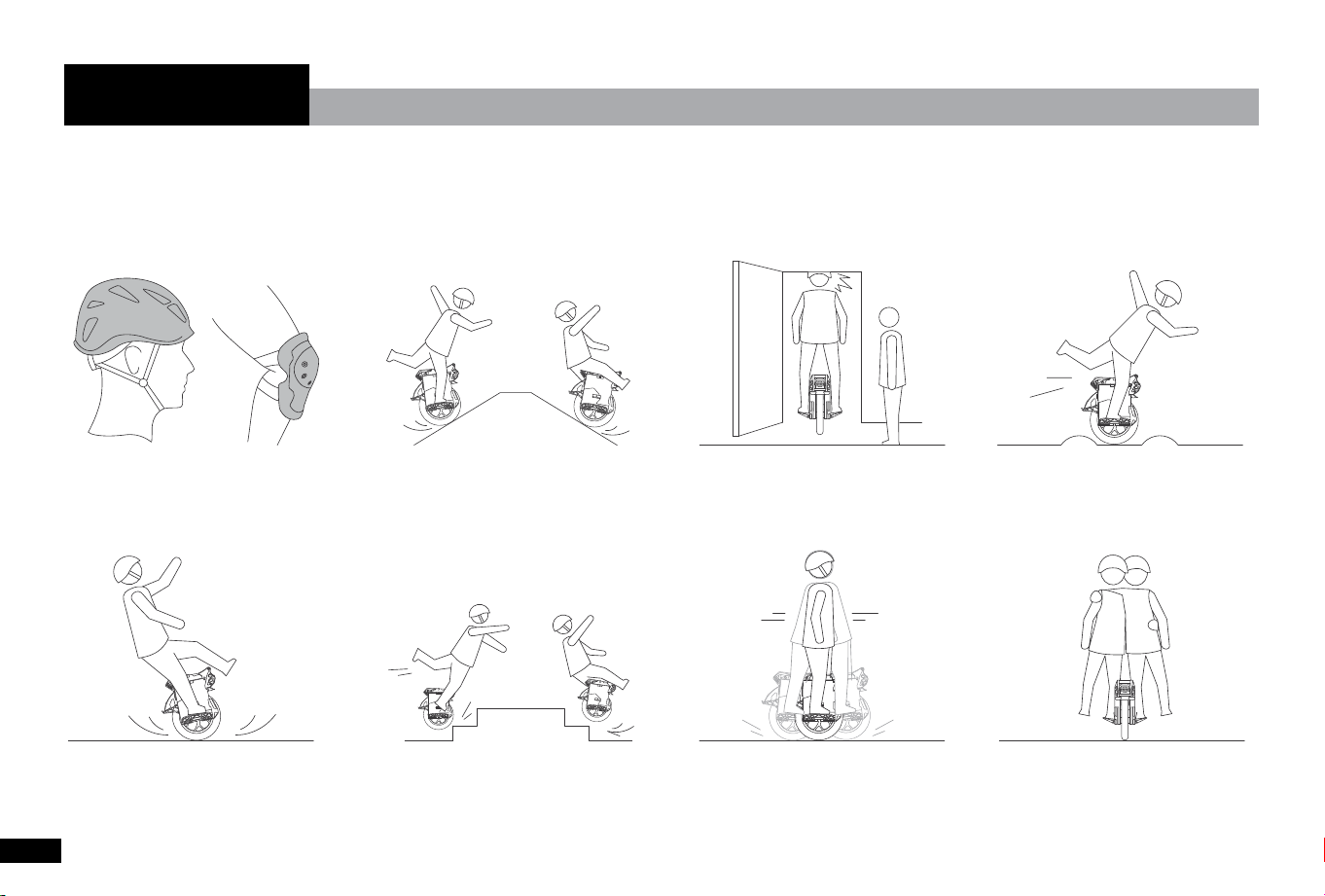
● Do not ride double or car any
passengers.
● Do not rock back and foh or shift
your weight abruptly.
● Do not ride over holes, curbs, steps,
or other obstacles.
● Do not ride on limited traction
suaces.
● Use caution when riding over any
changes in terrain.
● Watch your head when passing
through doorways.
● Use caution when riding on slopes.
Avoid riding on steep slopes.
● Always wear a helmet and,
protective clothing when riding.
You must read and understand the Warning Instructions section of this manual before attempting to
ride the F16.
6. Warning
19
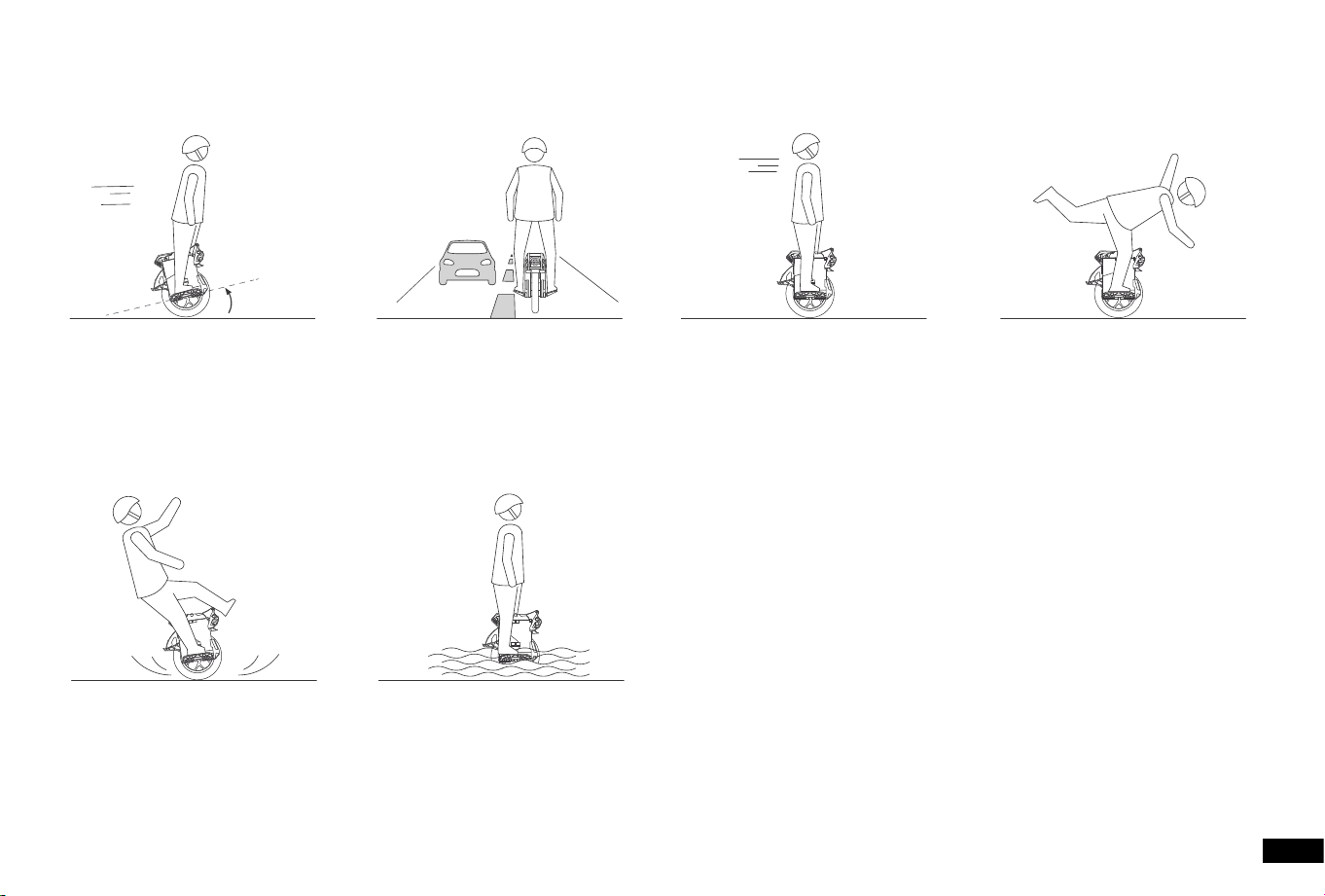
● Do not ride through puddles or
other bodies of water.
● Maintain contact with the ground
at all times. Do not jump or attempt
stunts.
● Do not ride with single leg on the
pedal.
● Do not exceed the max speed limit.● Do not ride on public roads,
motorways, or highways.
● Do not accelerate when the F16
tilts back or sounds an alarm.
20
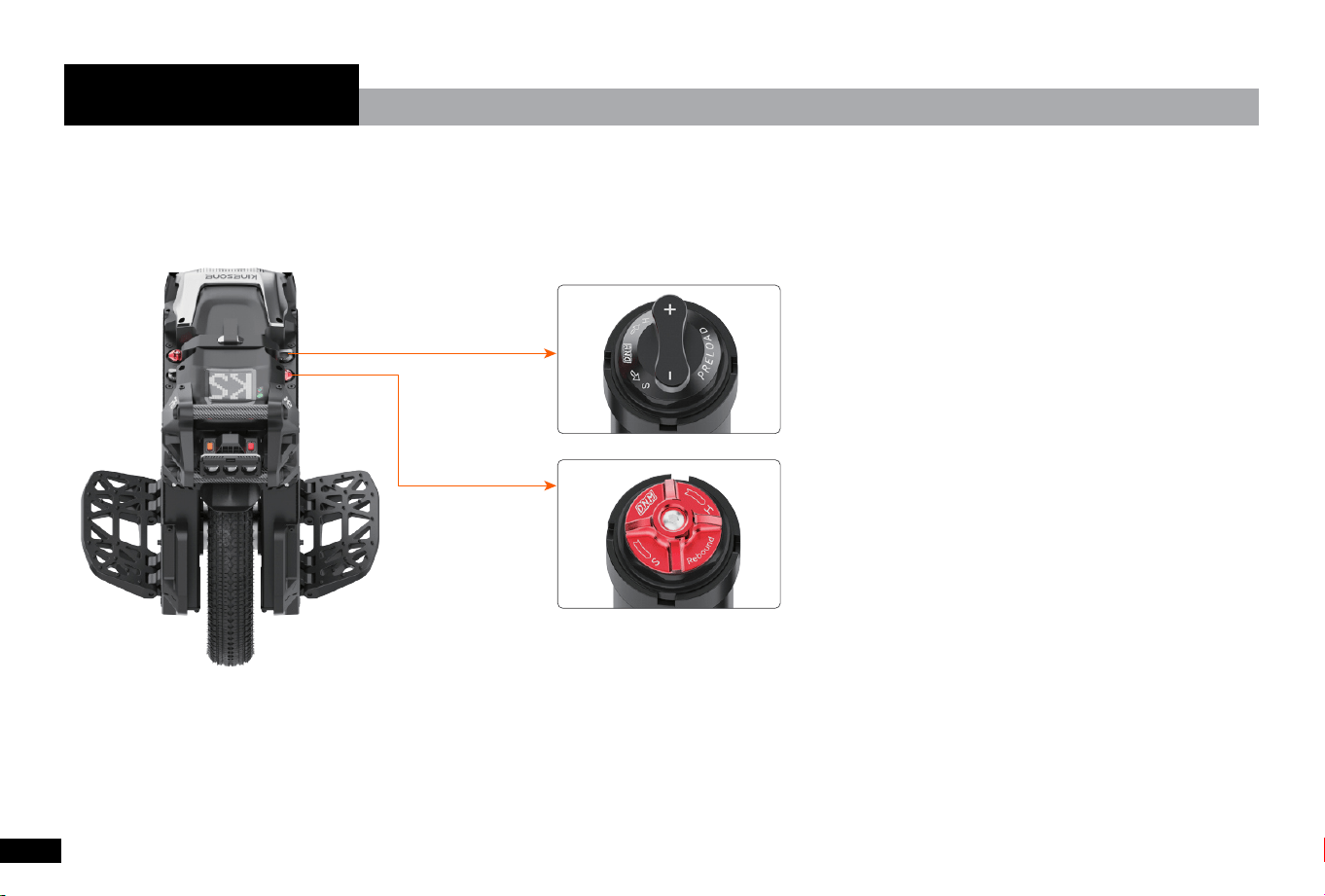
• Suspension preload adjustment;
• Rotate the wrench clockwise to increase the preload;
• The scale marks on the left / right sides shall be consistent.
Rebound
Preload
Multi-function combined suspension , independent compression and rebound adjustable system.
7. Suspension
21
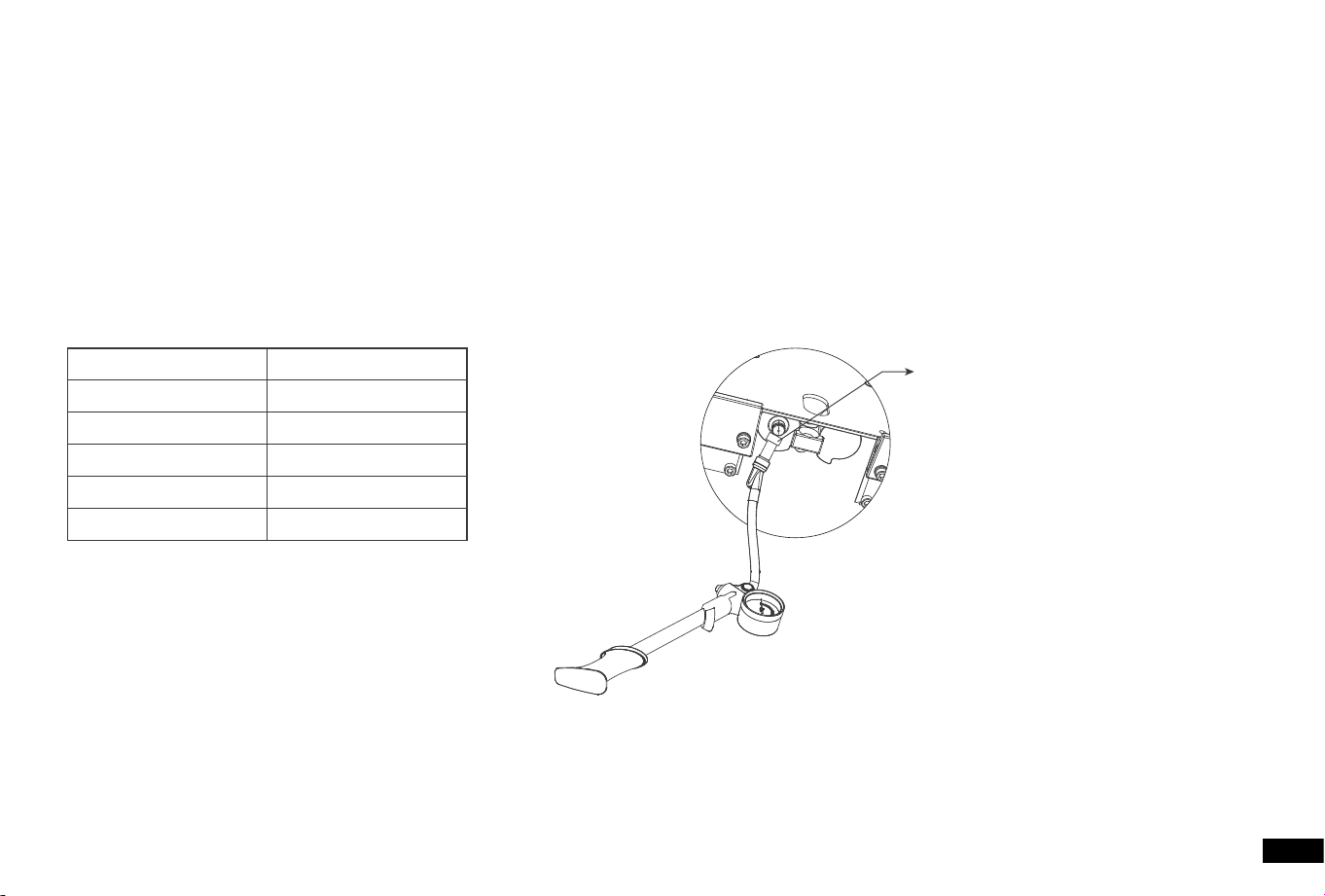
Pumping Po
Weight-barometer
Air Pressure (psi)
50 psi
100 psi
150 psi
200 psi
260 psi
Rider Weight (kg)
< 70 kg
70-80 kg
80-90 kg
90-100 kg
> 100 kg
HOW TO PUMP SUSPENSION SYSTEM:
Check the weight-barometer, and rell the air chamber with the manufacturer-provided inator. The inating position is at
the bottom of the suspension.
1. Remove the valve cap and screw on the pump.
2. Inate the air chamber according to the table;
3. Install the valve cap and tighten the screws.
22

8.1 Cleaning
WARNING
Make sure the F16 is powered OFF, the charge cable is unplugged, and the silicone cap on the charge po is tightly
sealed before cleaning; otherwise you may expose yourself to electric shock or damage the electronic components. Do not
wash your F16 with a power washer or high pressure hose.
Wipe your F16 clean with a soft, wet cloth. For stub born stains, use a toothbrush and toothpaste.
NOTE
Do not wash your F16 with alcohol, gasoline, acetone, or other corrosive/volatile solvents. These substances may
damage the appearance and internal structure of your F16.
Storing
Store the vehicle in a cool, d place. Do not store it outdoors for extended periods of time. exposure to excessive sunlight
or temperature extremes (both hot and cold) may aect the vehicle’s appearance, batte life, and tires.
8. Maintenance
1723
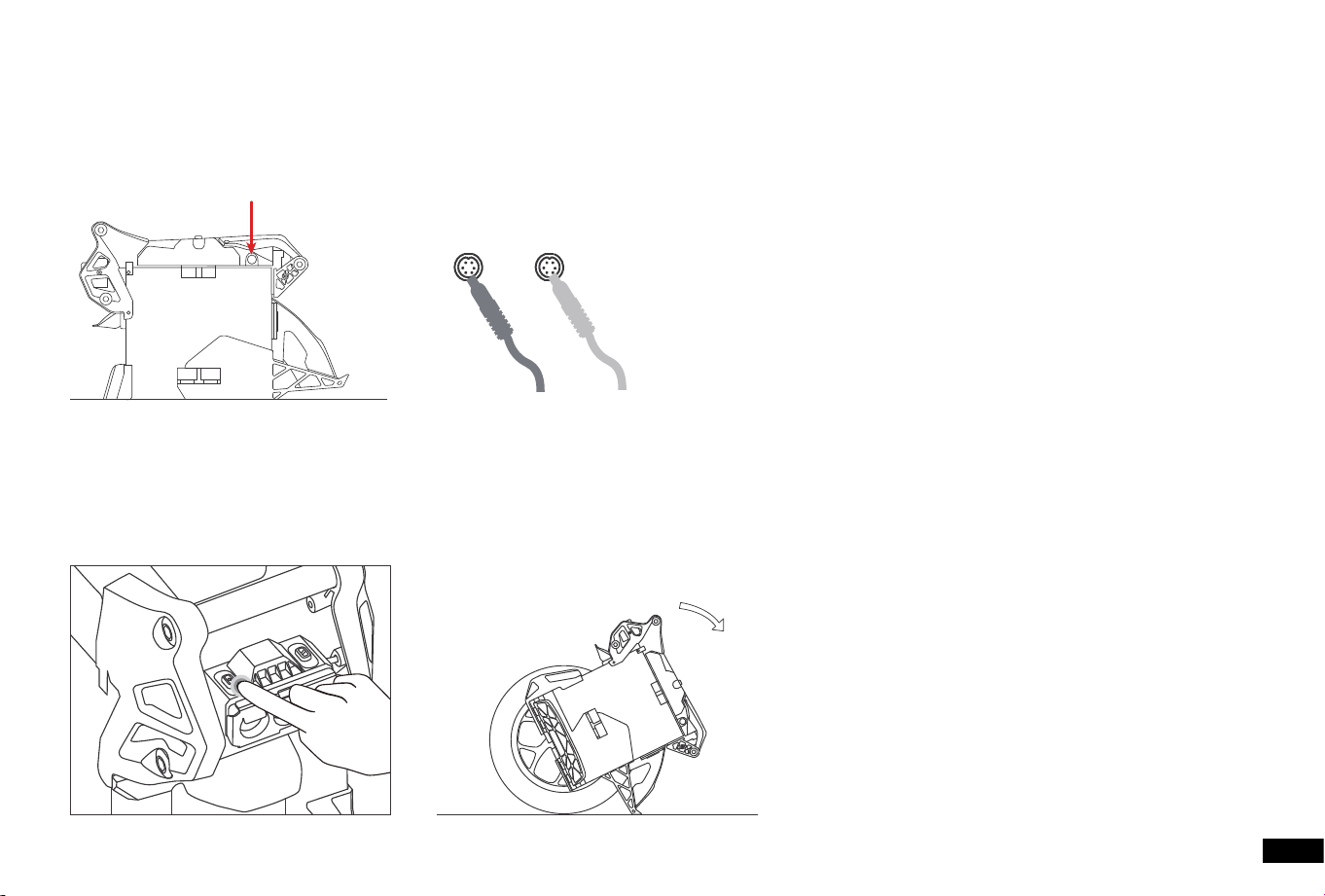
8.3 Foot stand
When the speed of the unicycle drops to zero, click the power button twice to turn on the lift-to-stop function. The unicycle
loses its self-balancing force and slowly parks the unicycle.
Charger 2Charger 1
8.2 Charging
The original charger is DC 126V / 5A. The indicator of the charger is red/green, mean on-charging/charging completed.
With two chargers working together, the charging time will be 50% cut o.
24
For warranty policy, please consult with the point of purchase or email to the manufacturer’s seice team:
info@kingsong.com
Again, we appreciate your purchasing of Kingsong products.
9. Warranty
Temperature(℃)
Range
-20
40%
-10
60%
0
80%
10
90%
20
95%
30
100%
NOTE
A fully-charged F16 can be stored for about 120 to 180 days before requiring charging. Completely draining the batte
may cause permanent damage to the batte. Electronics inside the batte record the charge-discharge condition of the
batte; damage caused by over-discharge or under-discharge will not be covered by the Limited Warranty.
8.4 Batte Maintenance
WARNING
• Do not attempt to disassemble the batte.
• Do not allow the batte to get colder than -20°C or hotter than 50°C, e.g. in a car. Do not expose the batte to re. Do
not discard or destroy the batte. Refer to your local laws and regulations regarding batte recycling and/or disposal.
• To extend the batte's life, charge it frequently and avoid draining the batte completely. At 30°C the batte range and
peormance is at its best; whereas at temperatures below 0°C range and peormance are decreased. Typically, at -20°C
range can be half that of the same batte at room temperature. Batte range will recover when temperature rises.
25

ThisequipmenthasbeentestedandfoundtocomplywiththelimitsforaClassBdigitaldevice,pursuanttopa15 ofthe
FCCRules.Theselimitsaredesignedtoprovide reasonableprotectionagainstharmfulinteerenceinaresidential
installation.Thisequipmentgenerates,usesandcanradiateradiofrequencyenergyand,ifnotinstalledandusedin
accordancewiththeinstructions,maycauseharmfulinteerencetoradiocommunications.However,thereisno
guaranteethatinteerencewillnotoccurinapaicularinstallation.Ifthisequipmentdoescauseharmfulinteerenceto
radioortelevisionreception,whichcanbedeterminedbyturningtheequipmentoandon,theuserisencouragedtot
tocorrecttheinteerencebyoneormoreofthefollowingmeasures:
•Reorientorrelocatethereceivingantenna.
•Increasetheseparationbetweentheequipmentandreceiver.
•Connecttheequipmentintoanoutletonacircuitdierentfromthattowhichthereceiverisconnected.
•Consultthedealeroranexperiencedradio/TVtechnicianforhelp.
Caution:Anychangesormodicationstothisdevicenotexplicitlyapprovedbymanufacturercouldvoidyourauthorityto
operatethisequipment.
Thisdevicecomplieswithpa15oftheFCCRules.Operationissubjecttothefollowingtwoconditions:(1)Thisdevice
maynotcauseharmfulinteerence,and(2)thisdevicemustacceptanyinteerencereceived,includinginteerencethat
maycauseundesiredoperation.
RFExposureInformationThedevicehasbeenevaluatedtomeetgeneralRFexposurerequirement.Thedevicecanbeused
inpoableexposureconditionwithoutrestriction.

KINGSONG TECHNOLOGY CO., LTD.
Add: B5, 303-1, Yijing Industrial City, Tianliao Community, Yutang Street, Guangming District, Shenzhen, China
E-mail: info@kingsong.com