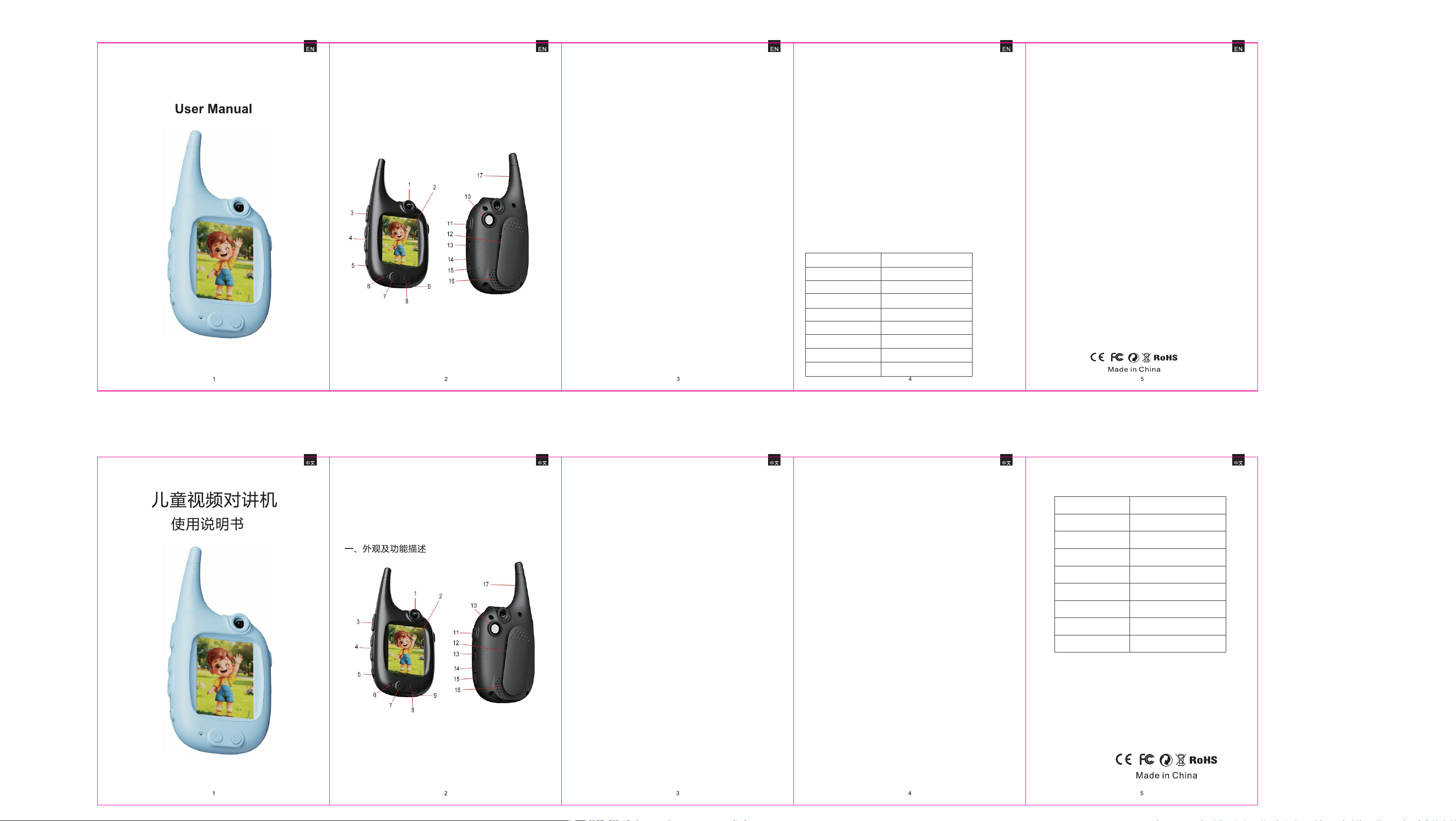
1 可翻转180°摄像头
2 显示屏
3 拨打/接听键
4 音量 + - 键
5 电源开关键
6 收音孔
7 变声键
8 画面切换
9 挂绳孔
10 手电筒
11 灯光键
12 背夹
13 语音/视频切换键
14 充电指示灯
15 Type-C充电口
16 扬声器
17 天线
二 、充电指示
1、取用本机配置充电线,连接充电器,电源指示灯“红色灯“亮,
当充满电后,充电指示灯自动熄灭。
2、充电器适配规格:5V/1A。
三 、功能描述
1、将电源开关拨至“ON”状态,机器自动开机并显示待机页面,
当对方对讲机处于开机状态,任何一方都可以按“拨打键”进行
呼叫,另一方则可以按“接听键”
进行接通。
2、开机默认视频模式,按“语音/视
频键”进行功能切换,可以选择视
频、语音通话。
3、 图像显示切换键”画面”: 本机具
有以下四种屏幕显示模式(注
意:语音通话默认显示待机页
面)如右图
4、音量调节:开机默认音量最大,按-键下声音减弱,按+键下
声音增强。
5、变声功能:单击按"lllll“键语音模式切换变声功能,关机后,
语音变音模式恢复为原来的声音模式。
6、本产品开机后就进入待机状态;可以长按“灯光键”开启/关闭
灯光;再次长按“灯光键”关闭灯光。
四、产品规格7、产品开关机与自动关机功能
1- 本产品开机后就进入待机状态;无任何操作3分钟后进入自
动关机状态,电源拨动开发先拨到“OFF”,再 拨到“ON”
就可以正常启动了。
2- 任一方发起拨打视频/语音,被接收方1分钟无人接听自动挂断。
当产品处于低电状态将自动关机,如停止使用请将拨动开关
至“OFF”状态。如需要重新启动产品,只需要将电源拨动
开发先拨到“OFF”,再 拨到“ON”就可以正常启动了。
8、产品配对与连接方式:
本产品是采用 2.4G WiFi 发射与连接模式;每一个包装内包含
两个对讲机,且已经完成配对,这两个对讲机不能与其他机器
连接使用。若购买了多套产品,则只能以套为单位一对一的连
接,不能同时多个产品相互连接使用。
9、注意事项:
a, 本产品适合户外使用。
b, 本机不防水
c, 产品室内距离以图像不卡顿为准。
显示屏
CMOS像素
电池容量
语 言
USB接口
操作温度
存储温度
电 源
产品尺寸
2.0 Inch IPS
30W
3.7V 1000mAh
中文
Type-C
-20℃~60℃
-30℃~70℃
5V/1.0A
124mm*55mm*225mm
功能简介:
1-带翻转180°的镜头 2-灯光辅助功能
3-语音/视频一键切换 4-WiFi信号发射
5-轻巧便携 6-超长待机
Brief Function:
1-180 degree rotatable CMOS lens
2-With flashlight
3-Audio video mode one-key switching
4-2.4G WiFi auto pairing
5-Small portable
6-Up to 1000m intercom distance
7-Long time battery working time
Part Two-Before use
a. Use charging cable from packaging to charge
product firstly.
Charging indicator light is red solid on when
charging, it is off after full charged.
b. Charging adapter needs 5V/1A(not included)
Part Three-Operation
a.Take out 2 products from package box, switch power
button to “ON” for both, product will enter into
standby mode(see below photo), press”calling”
button from one, the other party press”calling”
to receive video call, press”calling”button again to
hang up calling.
Part Four-Product more information
a.No operation for product after 3 mins on standby
mode, product will power off automatically.
b.When one side press”calling”button, the other
side no answer after 1 minute, calling will automatic
hang-up.
c.Every product box has 2 units inside, and they are
already paired via 2.4G WiFi signal, they cannot pair
with other products.
Part Five-Product reminder
a.These products are not waterproof.
b.They are suitable for indoor outdoor activities.
c.The indoor distance of the product is determined by
the condition where the image does not become blurry.
b.The default mode is video
call when start calling,
switch”audio video switch”
from product right side to
change to audio mode if
you want.
c.Press screen switching
button from screen right
bottom side to change
screen display.
d.Adjust voice volume “+”
”-” from product left side if you want. (default
volume is the biggest level)
1 Rotatable CMOS Lens
2 Display screen
3 Calling
4 Volume “+”“ -”
5 Power on off
6 Microphone
Part One-Product button explanation
Kids Video Walkie Talkie
7 Voice changer
8 Screen switching
9 String
10 Flashlight LED
11 Flashlight on/off
12 Clip
13 Audio video switch
14 Indicator light
15 Type-C charging port
16 Speaker
17 Antenna
e.Voice changer: press “voice changing” button from
screen left bottom side to get different funny voice.
f.Flashlight: long press”flaslight” button to turn on
flashlight, press again to turn off.
Part Six-Product paramete
Display
CMOS Pixel
Battery
Working time
USB Port
Operate temperature
Storage temperature
Input power
Product size
2.0 Inch IPS
30W
3.7V 1000mAh
Up to 5 hours
Type-C
-20℃~60℃
-30℃~70℃
5V/1.0A
124mm*55mm*225mm
FCC Caution:
This device complies with part 15 of the FCC Rules. Operation is
subject to the following two conditions: (1) This device may not
cause harmful interference, and (2) this device must accept any
interference received, including interference that may cause
undesired operation.
Any Changes or modifications not expressly approved by the party
responsible for compliance could void the user's authority to
operate the equipment.
Note: This equipment has been tested and found to comply with
the limits for a Class B digital device, pursuant to part 15 of the
FCC Rules. These limits are designed to provide reasonable
protection against harmful interference in a residential installation.
This equipment generates uses and can radiate radio frequency
energy and, if not installed and used in accordance with the
instructions, may cause harmful interference to radio
communications. However, there is no guarantee that
interference will not occur in a particular installation. If this
equipment does cause harmful interference to radio or television
reception, which can be determined by turning the equipment off
and on, the user is encouraged to try to correct the interference
by one or more of the following measures:
-Reorient or relocate the receiving antenna.
-Increase the separation between the equipment and receiver.
-Connect the equipment into an outlet on a circuit different from
that to which the receiver is connected.
-Consult the dealer or an experienced radio/TV technician for help.
The device has been evaluated to meet general RF exposure
requirement.
The device can be used in portable exposure condition without
restriction
.