非常感谢阁下购买本公司产品!在使用产品前,请认真阅读本说明书内容。
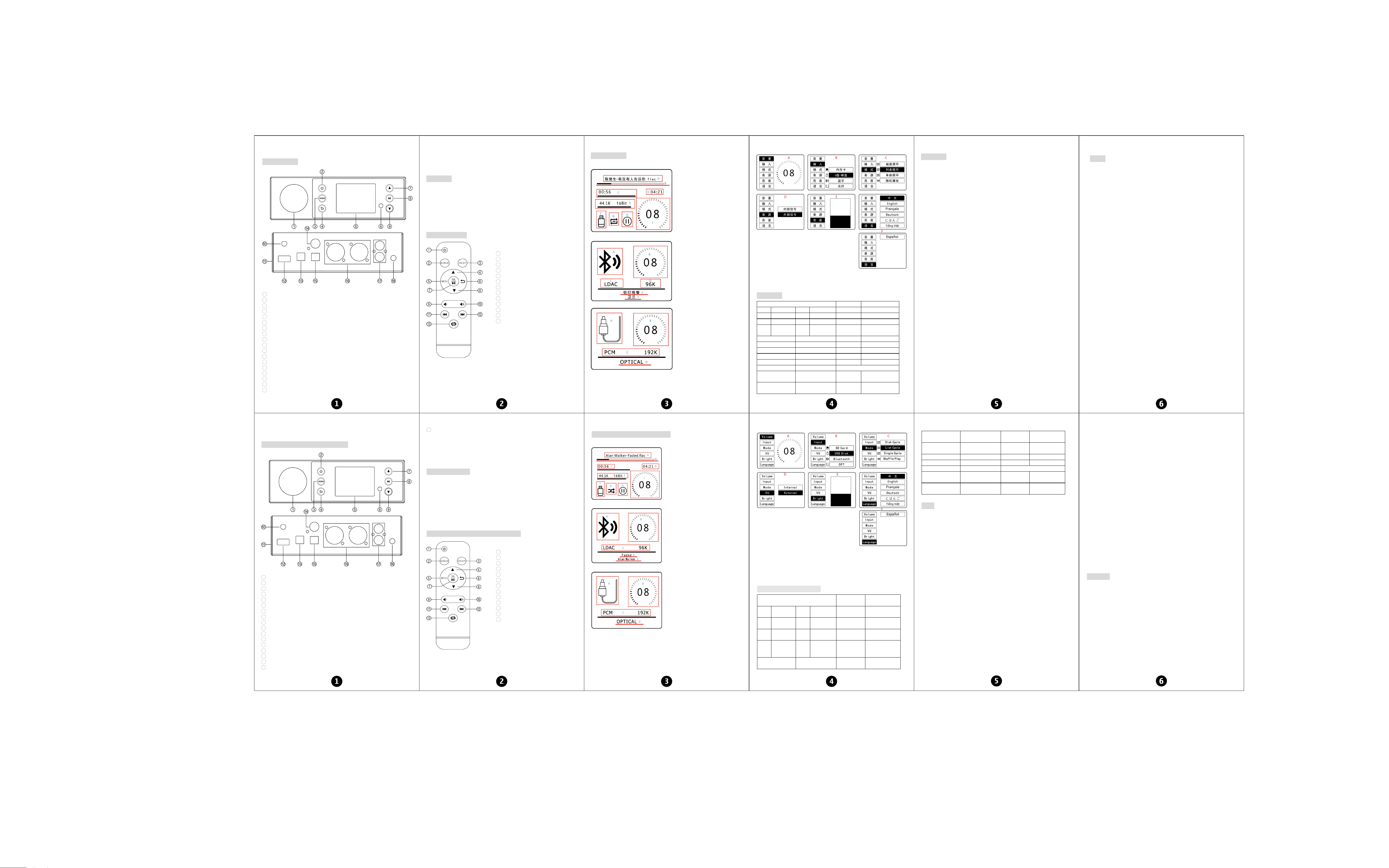
前后面板说明:
1 …………………………… VU 表
2
…………………………… 开/关机
3
…………………………… 菜单键
4 …………………………… 返回键
5
…………………………… 显示屏
6
…………………………… 红外接收窗口
7 …………………………… 上一曲(长按快退)
8 …………………………… 暂停/播放
9
…………………………… 下一曲(长按快进)
10
…………………………… 蓝牙天线座子
11 …………………………… SD 卡输入
12
…………………………… U 盘/硬盘输入
13
…………………………… 光纤输入
14 …………………………… 同轴输出
15 …………………………… 光纤输出
16 …………………………… 平衡输出
17 …………………………… RCA 输出(红/右声道,白/左声道)
18 …………………………… 电源接口(DC 电压 12V,电流≥1.5A)
备注:1.刚开机时,触摸键会有一个初始化时间,在此期间请勿触摸,请等待 3~5 秒后再触摸按键。
2.长时间没有触摸按键,按键将进入睡眠状态,此时触摸可能会无效,请尝试触摸多一次即可,或
者加长触摸时间。
操作步骤:
1. 将要使用的后级设备连接到相应的输出端口。
2. 将 SD 卡、U 盘/硬盘、光纤接至相应的音源输入端口。
3. 连接电源(DC 电压不得高于 12V,电流≥1.5A)。
4. 开机,选择需要使用的音源播放歌曲。
5. 触摸屏幕按键或使用遥控器调节到合适的音量。
6. 短按菜单键,设置到合适的效果。
7. 使用蓝牙时,需要切换到蓝牙输入。
遥控器功能说明:
1 ………… 开/关机
2 ………… 显示屏关/开
3
………… 输入选择
4 ………… 上翻
5
………… 菜单
6
………… 返回
7
………… 确定/播放/暂停
8
………… 下翻
9 ………… 音量减
10 ………… 音量加
11
………… 上一曲
12
………… 下一曲
13
………… 磁盘、列表、单曲循环和随机播放
循环切换
屏幕显示说明:
播放显示页面:
蓝牙输入显示:
光纤输入显示:
A…………歌曲名称和文件格式显示
B…………歌曲播放进度显示
C…………歌曲播放时间显示
D…………歌曲总时间显示
E…………采样率和比特率显示
F…………U 盘/硬盘输入显示
G…………循环模式显示
H…………播放状态显示
I…………音量等级显示
A…………蓝牙图标显示(连接上,图标点亮)
B…………音量等级显示(播放时点亮)
C…………蓝牙传输协议显示
D…………采样率显示
E…………歌曲名称显示/可根据播放软件同
步显示歌词
F…………歌曲名称/歌唱者显示
A…………光纤图标显示(有信号输入时,
图标被点亮)
B…………音量等级显示
C…………采样率显示
D…………光纤英文全名称
菜单功能显示:
A…………音量等级显示 B…………输入源选择 C…………循环模式选择
D…………VU 表指针随内部音频源信号和外部声音信号跳动选择
E…………屏幕和 VU 表亮度调节 F…………多国语言显示选择
规格参数:
支持的音乐文件格式及最高采样率 文件系统 不支持多分区
WAV 768KHz/32Bit MP3 48KHz/16Bit 固件升级 支持 U 盘升级
FLAC 192KHz/24Bit ISO DSD512 硬盘格式 FAT32,exFAT
APE 48KHz/16Bit DSF DSD512 硬盘容量 最大 2TB
DFF DSD512 DTS
输出左前和
右前两个声道
U 盘、SD 卡容量 最大 512G
CUE 播放 支持 WAV,APE,FLAC USB 接口 支持 USB3.0 及以下
光纤输入 最高 192KHz/24Bit 蓝牙版本 5.0
SPDIF 输出 最高 192KHz 24Bit/DOP64 SD 接口 支持 CLASS10 及以上
最大输出幅值 2.2V 包装重量 0.93kg
工作电压 DC 12V/≥1.5A 包装尺寸 长 280*宽 210*高 80mm
输入灵敏度 0dBFS
频率响应
RCA 20Hz-20KHz(±0.3dB)
BAL 20Hz-20KHz(±0.2dB)
失真度 0.0005%
底噪
RCA 输出 -135dBV
BAL 输出 -138dBV
信噪比
RCA ≥118dB
BAL ≥119dB
常见问题:
问:我所有的线都接好了,为什么没有声音?
答:1.检查屏幕是否亮,音源是否接入正确。
2.后级是否连接正确,音量是否处于最小状态。
3.若以上都正常,检查机器是否暂停了、或者音量处于最小状态。
4.数字输出,只支持到 192KHz/32Bit 采样率。
问:为什么声音出现失真?
答:如果机器音量开最大,后级设备的音量也开最大,那就很容易失真,此时只需调低本机器或后级
设备的音量即可。
问:为什么喇叭出现很大的的电流声?
答:如你使用的不是原厂标配的电源,请更换电源后再测试。市面很多电源纹波干扰系数大,则会造成
很大电流声。
问:为什么我插上输入线后不接播放音源,音箱会有很大的嗡嗡声?
答:使用了不带屏蔽的信号线空载时,会有干扰信号进入到功放进行放大,建议你换成带屏蔽的信号
线,或者拔掉信号线。
问:为什么播放 DSD 文件或者 PCM192KHz 以上音源时,光纤和同轴输出没有声音?
答:因为光纤和同轴为原码输出,不支持 DSD 信号以及 PCM192K 以上信号传输,所以没有声音。
问:为什么内部信号与外部信号的 VU 表跳动幅度不一样?
答:内部信号是根据音频输入源的幅度跳动,而外部信号是根据外面声音的幅度跳动。
问:为什么光纤和同轴输出端不能调节音量?
答:光纤和同轴为复合数字信号原码输出,不支持音量调节,建议调节后级设备音量。
问:为什么我的硬盘插入不能检测到?
答:本机只支持 FAT32 和 exFAT 格式,不支持 NTFS 格式,也不支持多分区,请检查硬盘分区格式与
分区数量。
问:为什么有些文件夹或者歌曲文件找不到?
答:请检查文件夹名称或者歌曲名称是否含有一些特殊的符号,如有,请去掉特殊符号后重新拷入尝试。
问:为什么播放时有时会卡顿?
答:本机为高清播放,数据传输速度比较快,假如 U 盘质量较差,可能导致速度跟不上,文件放的太满也
可能导致读取速度变慢,请更换优质 U 盘以及减少文件数量,并保留一定的剩余空间。
警告!
1.请勿私自打开外壳,操作不当可能引起触电危险。
2.请使用正规厂家生产的开关电源,否则会有损坏机器的风险。
3.请勿将机器放在高温或潮湿环境下工作。
Thank you very much for choosing our products!Please read this manual carefully
before using the product.
Front and rear panel description:
1 …………………………… VU level meter
2 …………………………… On/off
3
…………………………… Menu key
4
…………………………… Return
5 …………………………… Display
6
…………………………… Infrared receiving window
7
…………………………… Previous song(Long press: the song moves backward quickly)
8 …………………………… Play/pause
9
…………………………… Next song(Long press: the song moves forward quickly)
10
…………………………… Bluetooth antenna base
11 …………………………… SD card input
12 …………………………… U disk/hard disk input
13
…………………………… Optical input
14
…………………………… Coaxial output
15 …………………………… Optical output
16 …………………………… Balance output
17 …………………………… RCA output (red/right channel, white/left channel)
18
…………………………… Power interface (DC Voltage 12V, current≥1.5A)
Note: 1. When the machine is just started, the touch key will have an initialization time. Don't
touch it during this time. Please wait 3~5 seconds before touching the button.
2.If you do not touch the key for a long time, the key will enter the sleep state. At this time,
the touch may be invalid. Please try to touch it once more, or lengthen the touch time.
Operation steps:
1. Connect the rear stage equipment be used to the corresponding output port.
2. Connect the SD card, USB drive/hard drive, and optical fiber to the corresponding audio input
port.
3. Connect the power supply (DC voltage shall not be higher than 12V, current≥1.5A).
4. Start and select the corresponding input audio source to play the song.
5. Touch the screen keys or use the remote control to adjust to the appropriate volume.
6. Press the menu key briefly to set the appropriate effect.
7. When using Bluetooth, you need to switch to Bluetooth input.
Remote control function description:
1 ………… On/off
2
………… Display screen off/on
3 ………… Input Selection
4
………… Up
5 ………… Menu
6
………… Return
7
………… OK/Play/Pause
8
………… Down
9
………… Volume-
10 ………… Volume+
11 ………… Previous song
12 ………… Next song
13
………… Disk/list/single song cycle and
random play cycle switch key
Description of screen display:
Play Display Page:
Bluetooth input display:
Optical input display:
A…………Song name and file format display
B…………Song playing progress display
C…………Song playing time display
D…………Total song time display
E…………Sampling rate and bit rate display
F…………U disk/Hard disk input display
G…………Cycle mode display
H…………Playback status display
I…………Volume level display
A…………Bluetooth icon display (connected,
icon lit)
B…………Volume level display (lit during
playback)
C…………Bluetooth transmission protocol
/Sample rate display
D…………Song name display/synchronized with
playback software display lyrics
E…………Song name/singer display
A…………Optical icon display (icon
illuminated when signal input)
B…………Volume level display
C…………Sample rate display
D…………Optical Full name
Menu function display:
A…………Volume level display B…………Input Source Selection C…………Cycle mode selection
D…………Pointer of VU meter, selected according to the swing of internal audio source signal
and external sound signal
E…………Screen and VU level meters brightness adjustment
F…………Multiple country language display selection
Specification parameter:
Supported music file formats
and maximum sampling rate
File system
Multi partition
not supported
WAV 768KHz/32Bit MP3 48KHz/16Bit Firmware update
Support USB flash
disk upgrade
FLAC 192KHz/24Bit ISO DSD512
Format of hard
disk
FAT32,exFAT
APE 48KHz/16Bit DSF DSD512
Capacity of hard
disk
Maximum 2TB
DFF DSD512 DTS
Output front
left and front
right channels
Capacity of USB
flash disk and
SD card
Maximum 512G
CUE Play Support WAV,APE,FLAC USB Interface
Support USB3.0
and below
Optical input Maximum 192KHz/24Bit
Bluetooth
version
5.0
SPDIF Output
Maximum 192KHz
24Bit/DOP64
SD Interface
Supports CLASS10
and above
Maximum output level 2.2V Package weight 0.93kg
Working voltage DC 12V/≥1.5A Package size L280*W210*H80mm
Input sensitivity 0dBFS
Frequency response
RCA 20Hz-20KHz(±0.3dB)
BAL 20Hz-20KHz(±0.2dB)
THD 0.0005%
Noise
RCA output -135dBV
BAL output -138dBV
SNR
RCA ≥118dB
BAL ≥119dB
FQA:
Q: All my cables are connected, but there is no sound output?
A: 1.Check whether the screen lights up and the sound source is correctly connected.
2.Check whether the rear stage connection is correct and whether the volume is at the minimum.
3.If all the above are normal, check whether the machine is paused or the volume is at the minimum.
4.Digital output, supporting up to 192KHz/32Bit sampling rate.
Q: Why is the sound distorted?
A: If the volume of the machine is turned on to the maximum and the volume of the subsequent
equipment is also turned on to the maximum, it is easy to be distorted. At this time, just turn
down the volume of the machine or the subsequent equipment.
Q: Why does the horn make a loud current sound?
A: If you use a power supply other than the original standard one, please replace the power supply
before testing. Many power supply ripple interference coefficients on the market are large, which
will cause a lot of current noise.
Q: Why does the speaker make a loud buzzing sound when I plug in the input cable and do not connect
the playback source?
A: When the unshielded signal line is used for no-load, interference signals will enter the power
amplifier for amplification. It is recommended that you replace it with a shielded signal line
or unplug the signal line.
Q: Why is there no sound from optical fiber and coaxial output when playing DSD files or PCM192KHz
above audio sources?
A: Since the coaxial fiber is the original code output, it does not support the transmission of
DSD signals and signals above PCM192K, so there is no sound.
Q: Why is the amplitude of the internal signal swing of the VU meters different from the amplitude
of the external signal swing?
A: The VU table of the internal signal swing according to the amplitude of the audio input source,
while the external signal swing according to the amplitude of the external sound.
Q: Why can't the optical fiber and coaxial output adjust the volume?
A: Coaxial and optical fiber are the original code output of composite digital signals, volume
adjustment is not supported. It is recommended to adjust the volume of the rear stage equipment.
Q: Why can't detect the hard disk I inserted?
A: This machine only supports FAT32 and exFAT formats, does not support NTFS format, and does
not support multiple partitions. Please check the hard disk partition format and number of
partitions.
Q: Why can't some folders or song files be found?
A: Please check if the folder name or song name contains any special symbols. If so, remove the
special symbol and try again.
Q: Why does it sometimes get stuck during playback?
A: This machine is for high-definition playback, and data transmission speed is relatively fast.
If the quality of the USB flash disk is poor, it may cause the speed to fail to keep up, and if
the file is too full, it may also cause the reading speed to slow down. Please replace the
high-quality USB flash disk and reduce the number of files, and reserve a certain amount of
remaining space.
Warning!
1. Please do not open the machine shell. Improper operation may cause electric shock hazard.
2. Please use the switching power supply of the regular manufacturer, otherwise there will be
the risk of damaging the machine.
3. Please do not operate the machine in high temperature or humid environment.
V1