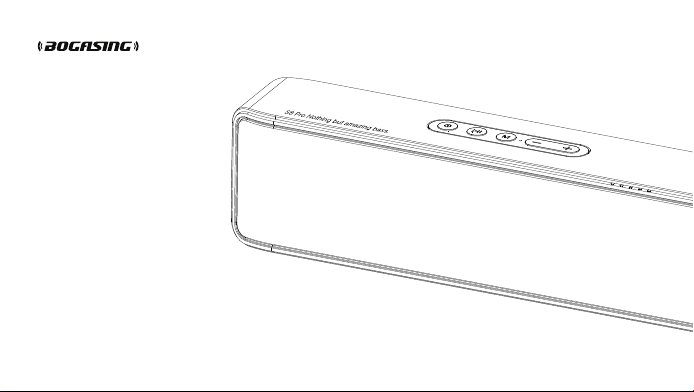
S8 Pro
Wireless bluetooth speaker
User Manual
Made in China

CONTENTS
English
中文
Italiano
Spain
01-06
07-12
13-18
19-24
German
French
Russian
日本语
25-30
31-36
37-42
43-48

Thank you for purchasing the BOGASING S8 Pro Bluetooth speaker. Please read
the User Manual before use and keep it properly for future reference. If you have
any questions or comments, please contact us by email:
English
01
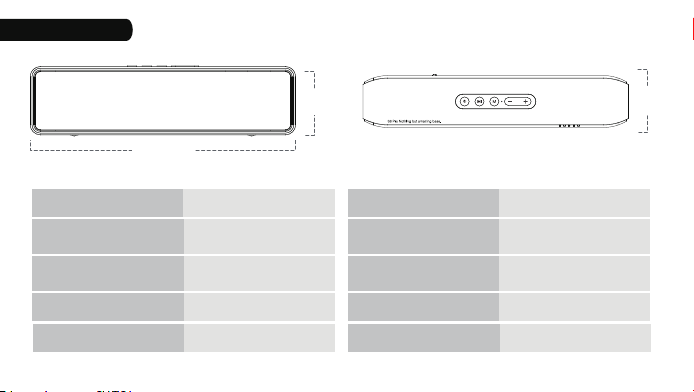
Specifications
10.67 in
2.87 in
2.09 in
Model:
Bluetooth Range:
Output Power:
Battery Capacity:
Up to 18m/60ft
(Unobstructed)
60W
6000 mAh
Frequency Response:
Playtime:
Charging Time:
Dimension:
48Hz-20KHz
≥15 hours
(Varies by volume level)
3 - 4 hours
(5V/2A adapter)
10.67*2.09*2.87 inches
Bluetooth Version: 5.0
Weight: 990g
S8 Pro
Accessories
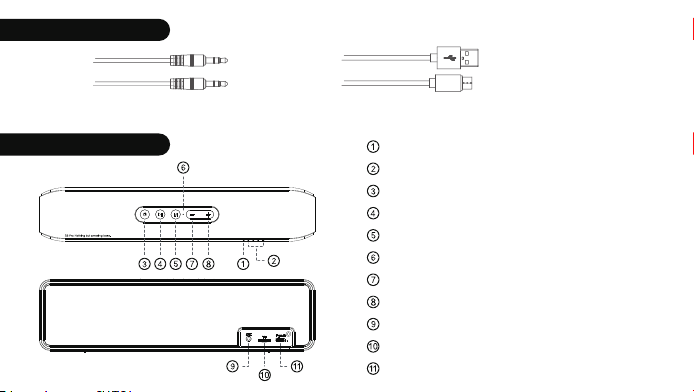
3.5 mm AUX cable
USB-C cable
Button Configuration
Status indicator light
Battery indicator light
Power ON/OFF/Sound effect mode
Play/Pause/Answer/End a call
Mode switch/Reset
Microphone
Volume down/ Previous track
Volume up/Next track
Aux-in port
TF-card slot
USB-C charging port
03
04
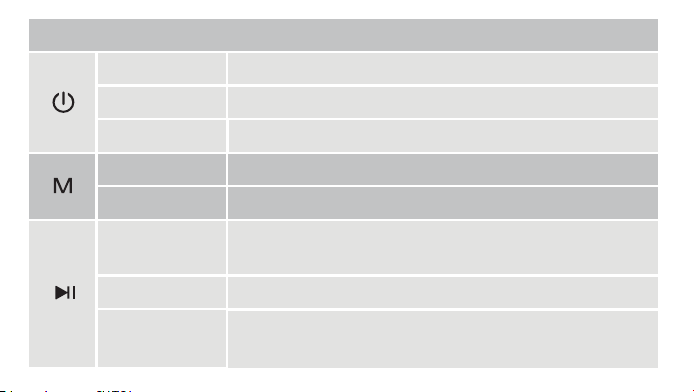
BUTTON OPERATION
Press and hold Turn ON/OFF.
Press twice quickly Enter into True Wireless Stereo (TWS) mode
Press
Press
Press and hold
Switch sound effect modes in turn (3D, Vocal, and Super Bass).
Switch the playing modes (Bluetooth, USB-C, Aux-in or TF-card)
Clear all paired devices or restore to factory settings.
Press
Press and hold
Press twice quickly
1. Play/Pause.
2. Answer the incoming calls.
3. End the current call.
1. Disconnect the bluetooth device.
2. Decline an incoming call.
3. Activate the phone voice assistant
Call back the last call.
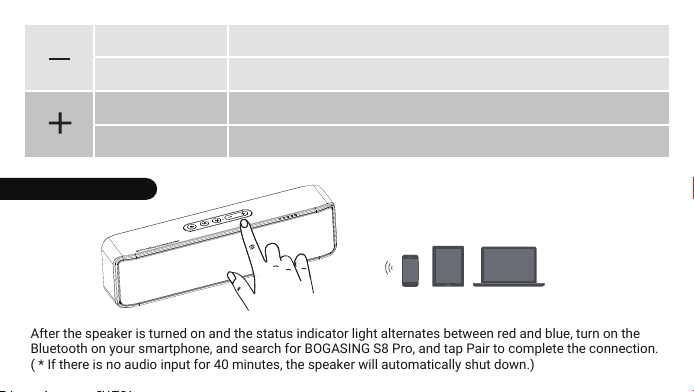
After the speaker is turned on and the status indicator light alternates between red and blue, turn on the
Bluetooth on your smartphone, and search for BOGASING S8 Pro, and tap Pair to complete the connection.
( * If there is no audio input for 40 minutes, the speaker will automatically shut down.)
Bluetooth Connection
05
Press
Press and hold
Press
Press and hold
Volume down,total 16 levels
Previous track
Volume up,total 16 levels
Next track
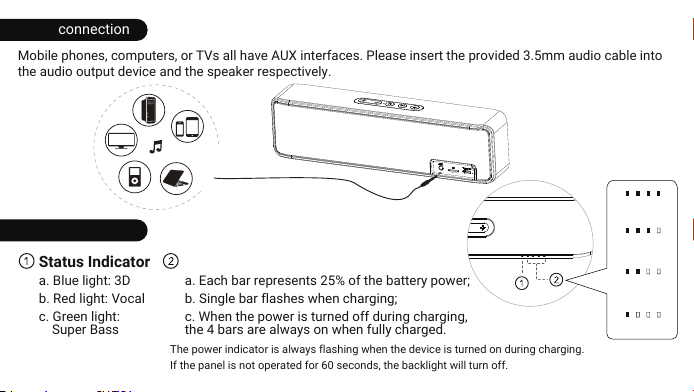
Wired connection
LED Indicator
Mobile phones, computers, or TVs all have AUX interfaces. Please insert the provided 3.5mm audio cable into
the audio output device and the speaker respectively.
Status Indicator
a. Blue light: 3D
b. Red light: Vocal
c. Green light:
Super Bass
Battery Indicator
a. Each bar represents 25% of the battery power;
b. Single bar flashes when charging;
c. When the power is turned off during charging,
the 4 bars are always on when fully charged.
75%-100%
50%-75%
25%-50%
0-25%
The power indicator is always flashing when the device is turned on during charging.
If the panel is not operated for 60 seconds, the backlight will turn off.
*
*
06
Multiple Play Modes
TWS Pairing
1. Make sure both speakers are powered on and they are disconnect with other devices;
2. Press the " " button twice quickly on one of the speakers to enter TWS pairing mode;
3. After two speakers are paired, you will hear a beep. At this time, the indicator light of first speaker is blinking,
the other one is solid;
4. Enable the Bluetooth feature of your cell phone or other devices, find and connect the speaker named of
"BOGASING S8 Pro”;
5. After the two speakers are successfully paired, it will automatically enter the TWS mode next time turning ON,
no need to re-pair;
6. If the speaker ever paired with other speaker, Please press and hold the " " button to reset it. Restart the
speaker after reset, and then refer to steps 1-4 to enter the TWS pairing.
7. In TWS mode, only one speaker can be use for hands-free calling when incoming calls, the other speaker no
sound.
1. This speaker supports up to 64GB TF-card; Supports music format: APE/FLAC/WAV/MP3.
2. Insert the TF card into the slot and automatically play the audio file in order after recognition.
3. When AUX or USB-C cable is plugged, play mode will automatically swich to AUDIO IN or USB-C mode. If the
bluetooth is connected, press " " button to switch the play mode.
07
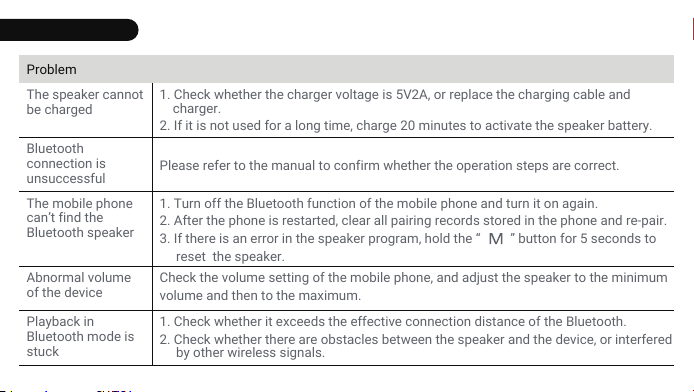
Troubleshooting
SolutionProblem
The speaker cannot
be charged
1. Check whether the charger voltage is 5V2A, or replace the charging cable and
charger.
2. If it is not used for a long time, charge 20 minutes to activate the speaker battery.
Bluetooth
connection is
unsuccessful
Please refer to the manual to confirm whether the operation steps are correct.
The mobile phone
can’t find the
Bluetooth speaker
1. Turn off the Bluetooth function of the mobile phone and turn it on again.
2. After the phone is restarted, clear all pairing records stored in the phone and re-pair.
3. If there is an error in the speaker program, hold the “ ” button for 5 seconds to
reset the speaker.
Abnormal volume
of the device
Check the volume setting of the mobile phone, and adjust the speaker to the minimum
volume and then to the maximum.
Playback in
Bluetooth mode is
stuck
1. Check whether it exceeds the effective connection distance of the Bluetooth.
2. Check whether there are obstacles between the speaker and the device, or interfered
by other wireless signals.
08
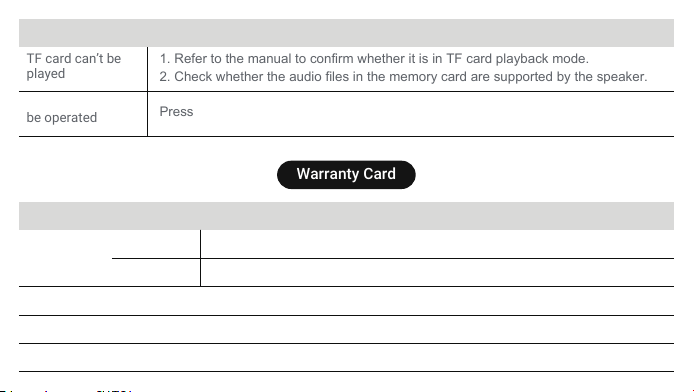
SolutionProblem
TF card can’t be
played
1. Refer to the manual to confirm whether it is in TF card playback mode.
2. Check whether the audio files in the memory card are supported by the speaker.
The speaker can’t
be operated
Press and hold the power button for 10 seconds to force shutdown.
Warranty Card
Malfunctions and causes
Maintenance
records
Product
Model
Date
Purchase date
Your name
Your phone
Your address
09
Made in China
R
219 - 229048
SHENZHEN BOGASING TECHNOLOGY CO.,LTD.
Enterprise Life Artificial Intelligence Yousong Industrial Park,
Yousong Community, Longhua District, Shenzhen, China
Email: [email protected]