2
1. Important Safety Instructions
The Betta NEO Smart can be charged via solar while the device is either powered ON or OFF.
DO NOT SWIM while the Betta NEO is in operation. Remove it from the pool and store it in a cool, shaded area when the pool is in
use.
The Betta NEO Pool Skimmer is not a toy. Keep it out of reach of children.
Be cautious when working near the pool. Watch your steps and maintain balance.
The Betta NEO may not function with wired or hosed underground pool cleaners. Refer to section 4.6 of this manual for a solution for
wired pool cleaner or try adding hose weights to keep them off the surface. During swimming season, keep Betta NEO in the pool
unless the pool is in use, or the unit requires cleaning or maintenance.
Do not leave Betta NEO in a hot, dry area outside of the pool unattended to prevent damage or hazards. Refer to section 4.4 for
Fall/Winter handling exceptions.
Do not clean the Betta NEO using a pressure washer to avoid damaging the unit.
Betta NEO is compatible with the In-Ground, Above-Ground pools. It is NOT compatible with infinity pools.
Regularly check the debris basket through the window in the center of the solar panel and estimate of when it may be full. Betta NEO
does not have an LED indicator to signal when the basket is full.
2. About Betta NEO
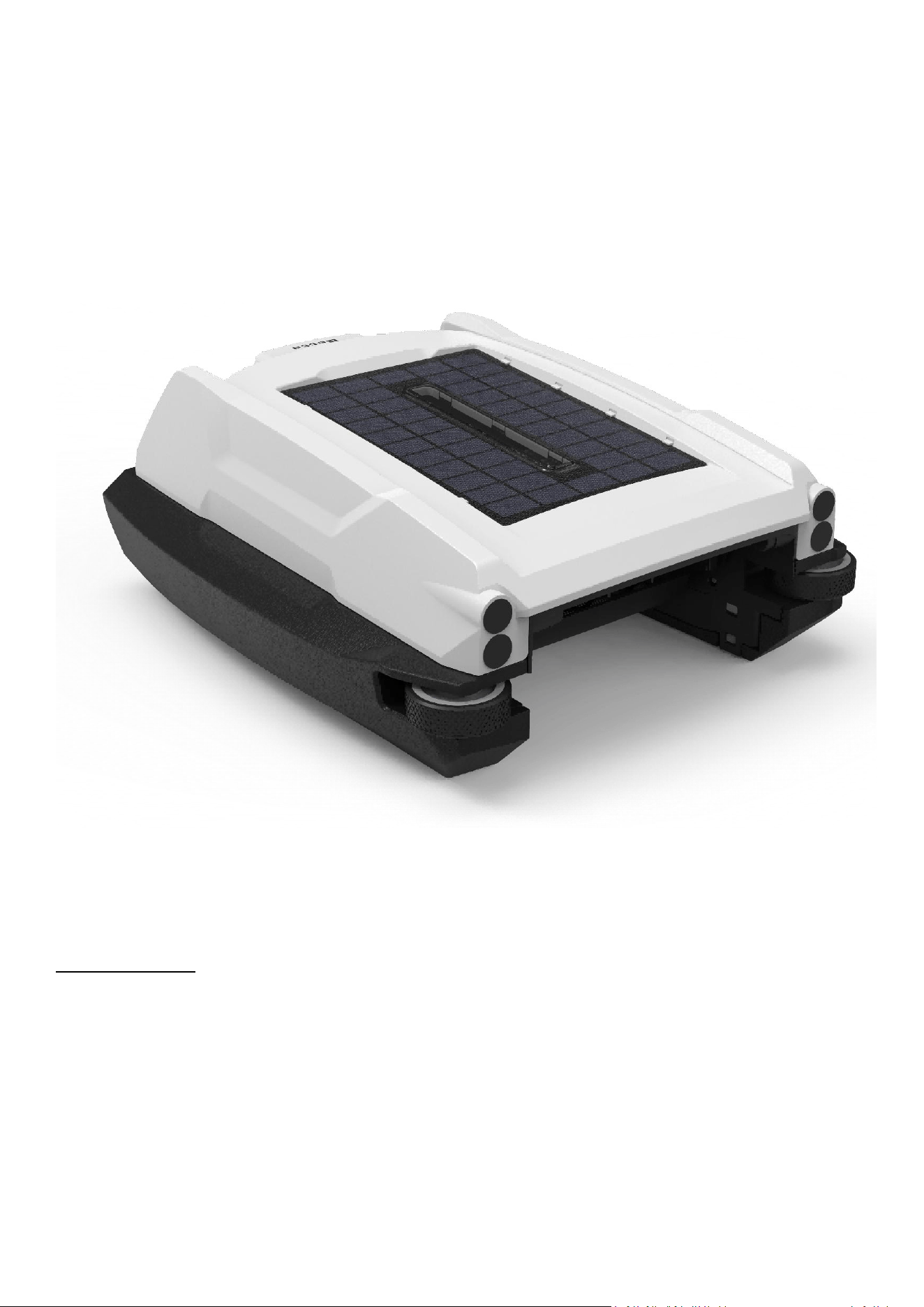
Thank you for choosing the Betta NEO Solar-Powered Robotic Pool Skimmer. With proper care and maintenance, your unit will deliver
years of dependable performance. Please take the time to read through this manual carefully to ensure you understand how to operate and
maintain your skimmer correctly.
The Betta NEO is a cutting-edge robotic pool skimmer with mobile app connectivity. It runs on built-in rechargeable batteries that can be
powered either by its integrated solar panel or with a wall charger, ensuring your pool surface stays clean with ease. The unit can function
autonomously or be directed through the mobile app. Equipped with a smart control board and multiple obstacle-detection
sensors—including a gyroscope—it navigates the pool surface with efficiency and precision.
The BettaBot mobile app offers the following key features:
Remote Control – Drive the unit forward, backward, turn left, turn right, or pause.
Temperature Display – View both water and air temperature.
Smart Scheduling – Automatically adjusts operation based on local weather to maximize runtime.
Manual Scheduling – Set your own preferred operating and pause times.
Battery & Charging Status – Monitor battery level and solar charging efficiency.
Diagnostics – Display malfunctioning components.
Support & Resources – Access the user manual and connect via live chat with the Betta support team, available 7 days a week.
Wireless Firmware Updates – Upgrade the unit’s firmware remotely.
The unit collects floating debris in its path, which is stored in a removable collection basket inside. Typically, you will need to empty the
basket and clean the unit every 3-4 days, though sometimes as frequently as every 1-2 days. To do so, simply remove the unit from the pool,
empty the basket, and clean the unit using a water hose. Once cleaned, place the Betta NEO back in the pool, and it will resume its operation
automatically.
3
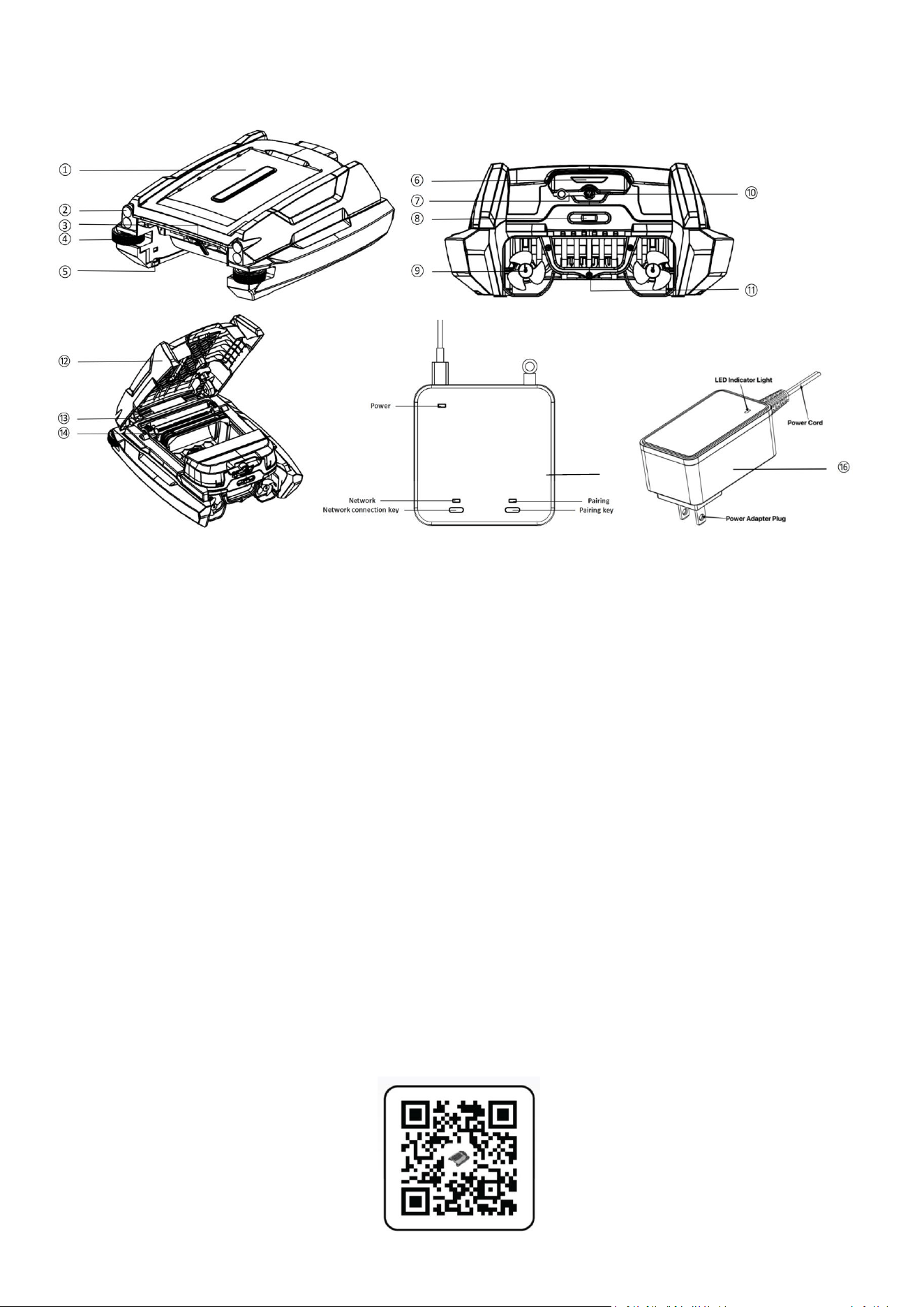
3.Components
Parts List
1. Solar Panel
2. Distance Measure Sensor
3. Anti-Tangle Mechanism
4. Guide Wheel
5. Anti-stranding Bar
6. LED Status Indicator
7. Charging Port Cover
8. Power Switch
9. Propeller
10. Charging Port
11. Handle
12. Cover
13. Debris Intake Impeller
14. Debris Collection Basket
15. Gateway for Smart Phone App Connection
16. Charging Power adapter
4. Using Betta NEO for the first time
4.1 Using the unit for the first time
Attention: Be sure to watch your steps and maintain your balance when working by the pool side.
Step 1: Slide the power switch to the "AUTO/APP” position. It will run on its own without the connection with mobile APP. The LED
status indicators will flash, and the propellers and impeller will begin to run.
Step 2: Place the Betta NEO into your pool, and it will automatically start moving and cleaning the pool's surface.
Step 3: Connect the unit to the included gateway and mobile app. Simply scan the QR code below to download the BettaBot App,
then follow the on-screen instructions to complete setup.
⑮
4
The switch on your Betta NEO has three positions: AUTO/APP, OFF, and APP.
AUTO/APP: The unit will operate automatically without needing to connect to the gateway or mobile app. Once connected to the app,
control can be managed directly through the app.
OFF: Switch to OFF to power down the unit. While in this mode, the Betta NEO can still recharge through solar power when the solar
panel is exposed to direct sunlight.
APP: The unit operates only when paired with the mobile app.
By default, the machine will enter PAUSE status until you start it via the app, or it will follow the schedule/settings configured in the
app.
4.2 LED Light Status Indicator
LED Light Status
Unit Status
Flashing Green
Operating in RUNNING Mode with sufficient battery level.
Flashing Red
Operating in RUNNING Mode with insufficient battery level.
Breathing Green (gradually brightens and dims)
Pausing in PAUSE Mode with sufficient battery level.
Breathing Red (gradually brightens and dims)
Pausing in PAUSE Mode with insufficient battery level.
Flashing Red and Green
In Strand Mode, the unit’s propellers or impeller are not operating correctly, most
likely due to an obstruction. The unit will automatically stop and attempt to
restart every 20 minutes. Please inspect the unit for any blockages and remove
them if needed.
Lights Off
Powered off or the battery is depleted.
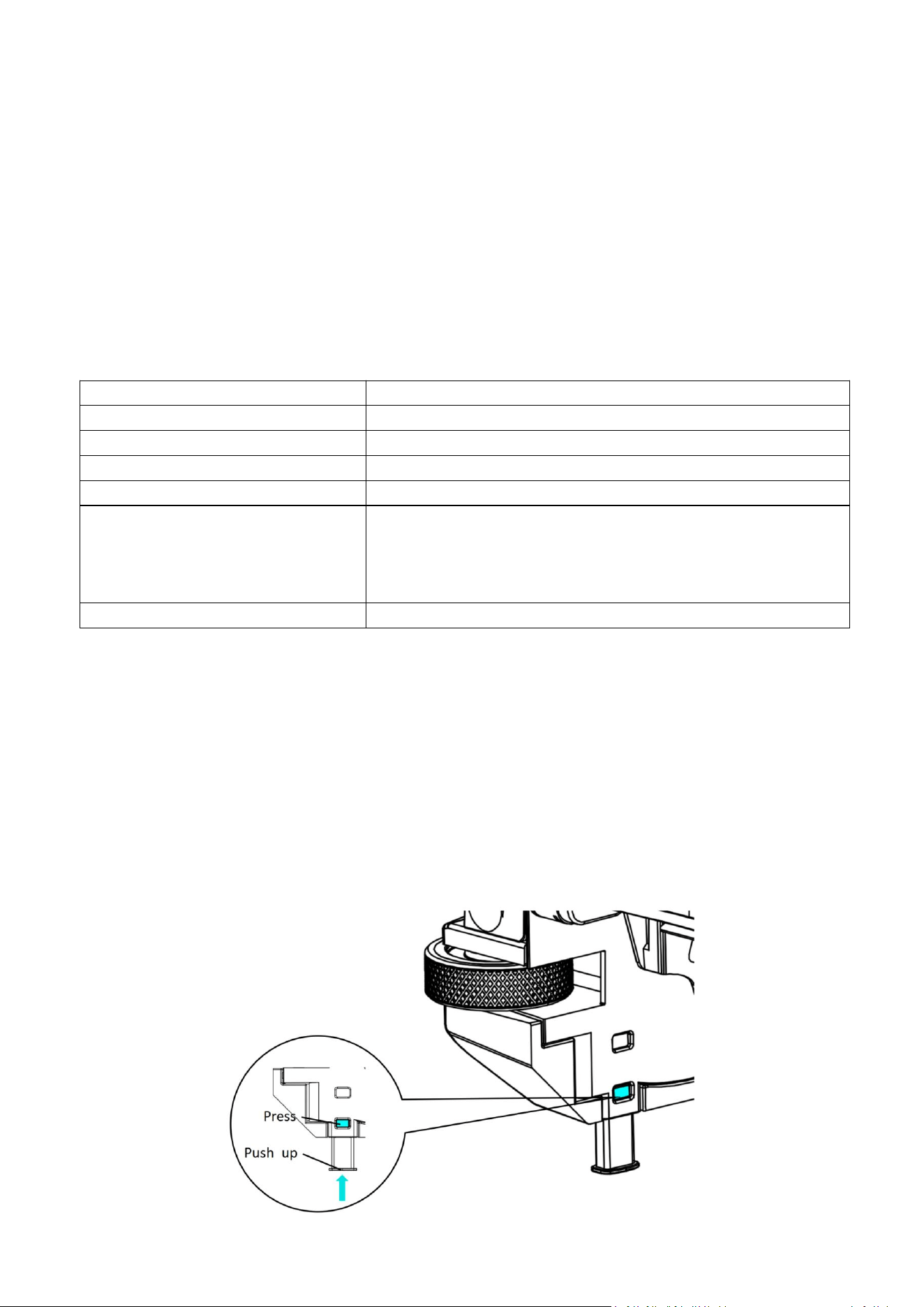
4.3 Use of Anti-Stranding Bumper Bars and Extended Front Bumper Rods
When to use:
If there are shallow stairs or other structures in your pool, Betta NEO may be stuck on it. You can adjust the built-in anti-stranding bars to
solve this problem.
How to use:
Press the upper button on the bar housing and pull down the bars. Each bar can be set in two positions in height. Adjust them in pairs –
both front and/or both rear to keep it balanced.
Retrieving the anti-stranding bars: Press the down button on the bar housing and push the bar up until it’s fully in position. Do it one by
one.
5
4.4
Battery Run Time and Charging during Fall/Winter
During the fall and winter, the sun’s rays hit the Earth at a shallower angle. This causes the rays to spread out more, reducing the amount
of energy that reaches any given spot. Additionally, the longer nights and shorter days prevent the Earth from warming up. As a result, solar
charging efficiency is significantly lower during these seasons, and Betta NEO’s battery may not fully charge even on a sunny day. Therefore,
you can expect Betta NEO to have a shorter runtime compared to the summer.
Solutions:
Solution 1: If the temperature drops below 68°F (20°C), remove the Betta NEO skimmer from the pool. Turn the unit OFF. To charge the
unit outside, position it at a 45-degree angle against a wall, directly facing the sunlight. Leave it to charge for a full day, adjusting the
position as the sun moves.
Solution 2: To conserve energy when full day debris collection is not necessary, set in Smart or manual schedule, or simply turn it to OFF
Mode.
Solution 3: Charge the unit by power adapter. See section 4.5 below.
4.5 Charging by Adapter Instruction
Attention:
The unit must be turned OFF when charging by power adapter.
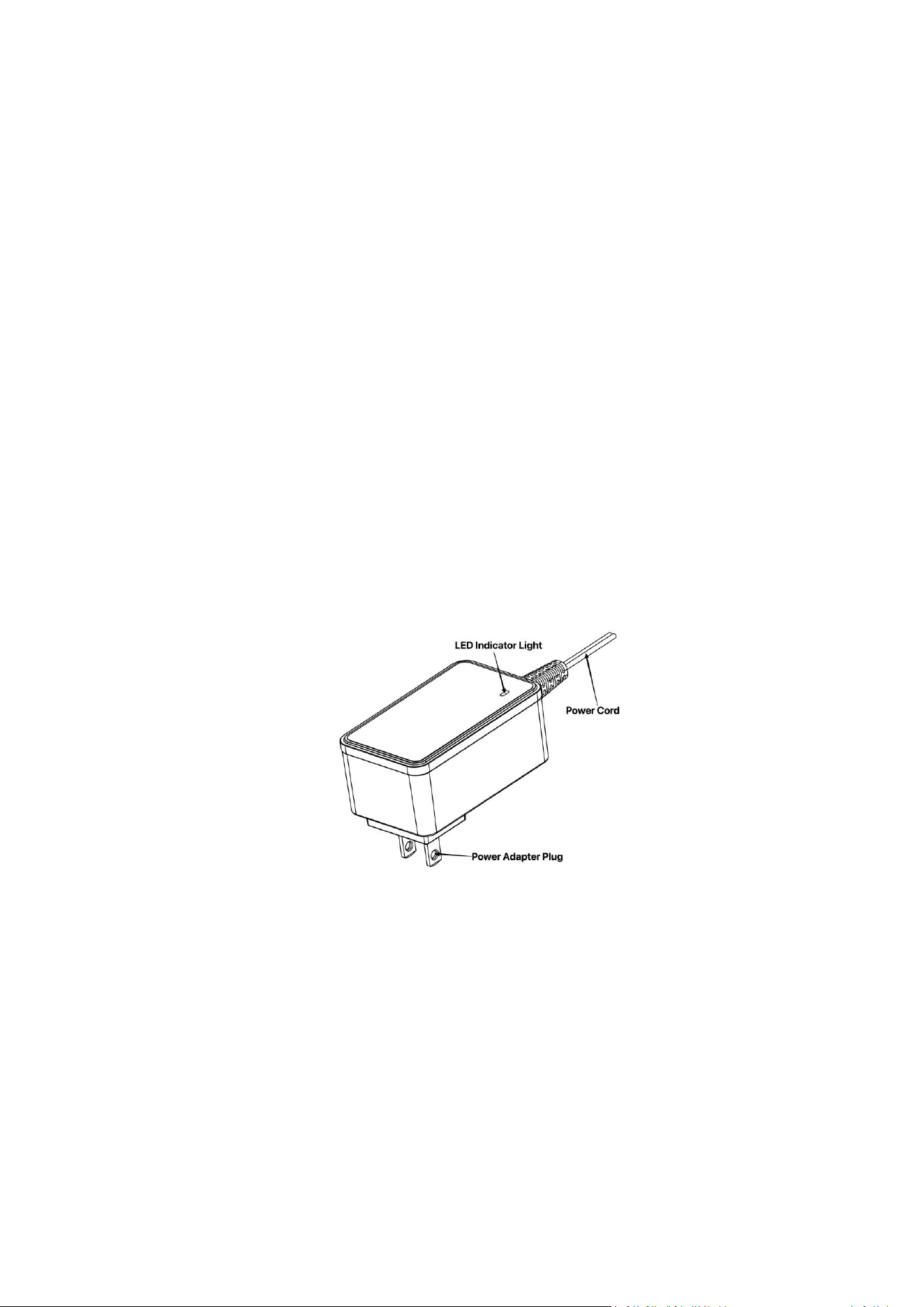
The package includes a charging adapter. When charging, the indicator light on the charger will glow red. Once the battery is fully charged,
the light turns green, indicating the charger can be safely removed.
When to use:
If the machine’s indicator light is flashing red or not lit at all, it means the battery needs to be recharged.
How to use:
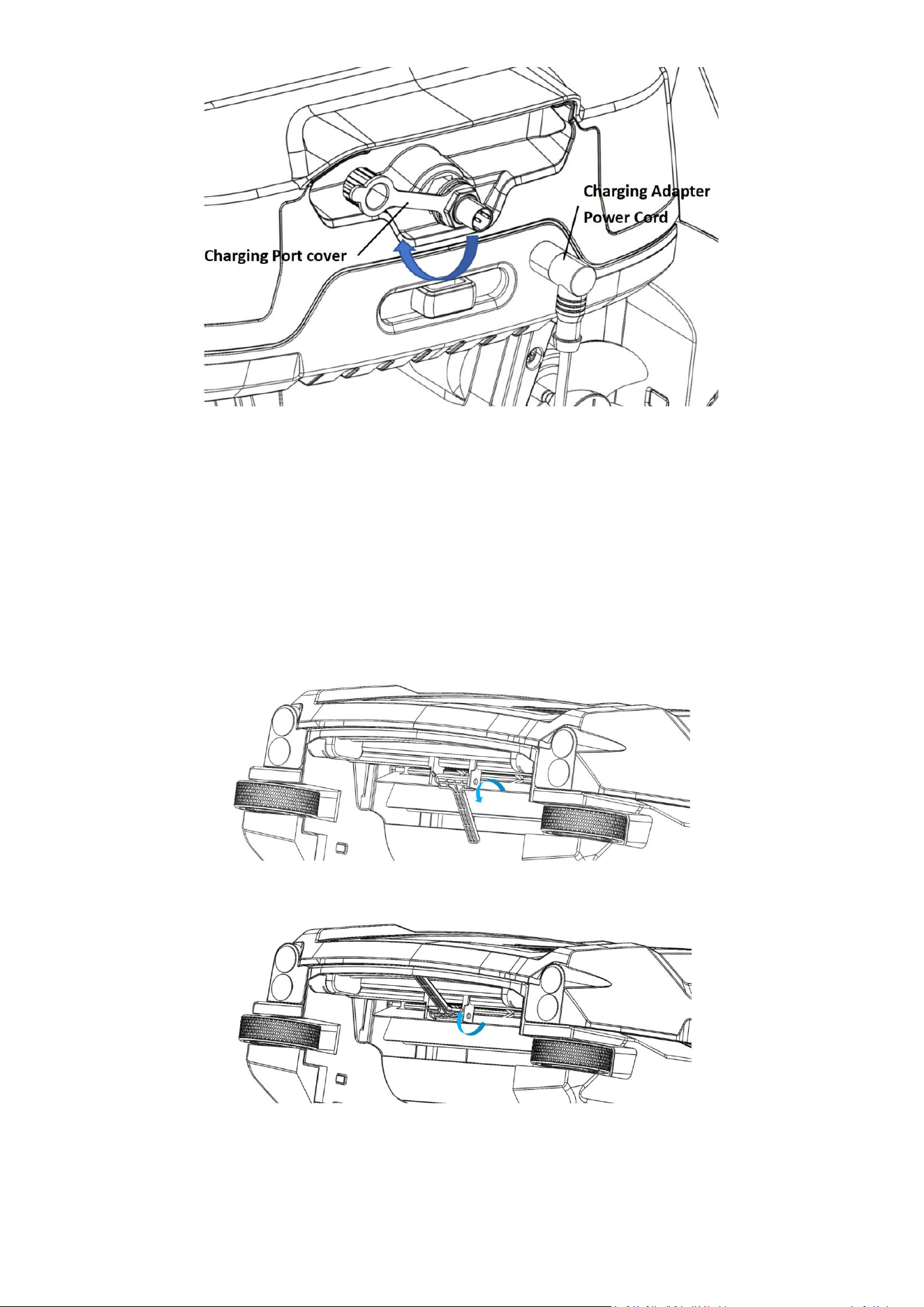
Open the charging port cover as illustrated below.
Remove the charger adapter from the packaging box.
Turn the unit OFF.
Align the charger plug with the charging port as shown in the diagram and insert it.
Plug in the charger; the indicator will turn red, indicating the unit is charging.
Once the indicator turns green, the battery is fully charged, and you can remove the charger.
6
4.6 Anti-Tangle Mechanism
The Betta NEO Anti-Tangle Mechanism prevents the wire of an underwater robotic cleaner from being pulled into the debris basket by the
Betta NEO skimmer’s impeller when both are operating simultaneously in the swimming pool.
When to use:Typically used when a wired underwater robotic cleaner is in operation.
How to use:
When a wired underwater cleaning robot is operating in the pool, rotate the protective bar downward toward the back of the debris
basket.
When there is no wired underwater cleaning robot cleaning in the pool, rotate the protective bar upward.
If the Betta NEO becomes stuck with the underwater cleaner hose (typically a suction or pressure cleaner), we recommend adding hose
weights to keep the hose submerged and prevent interference.
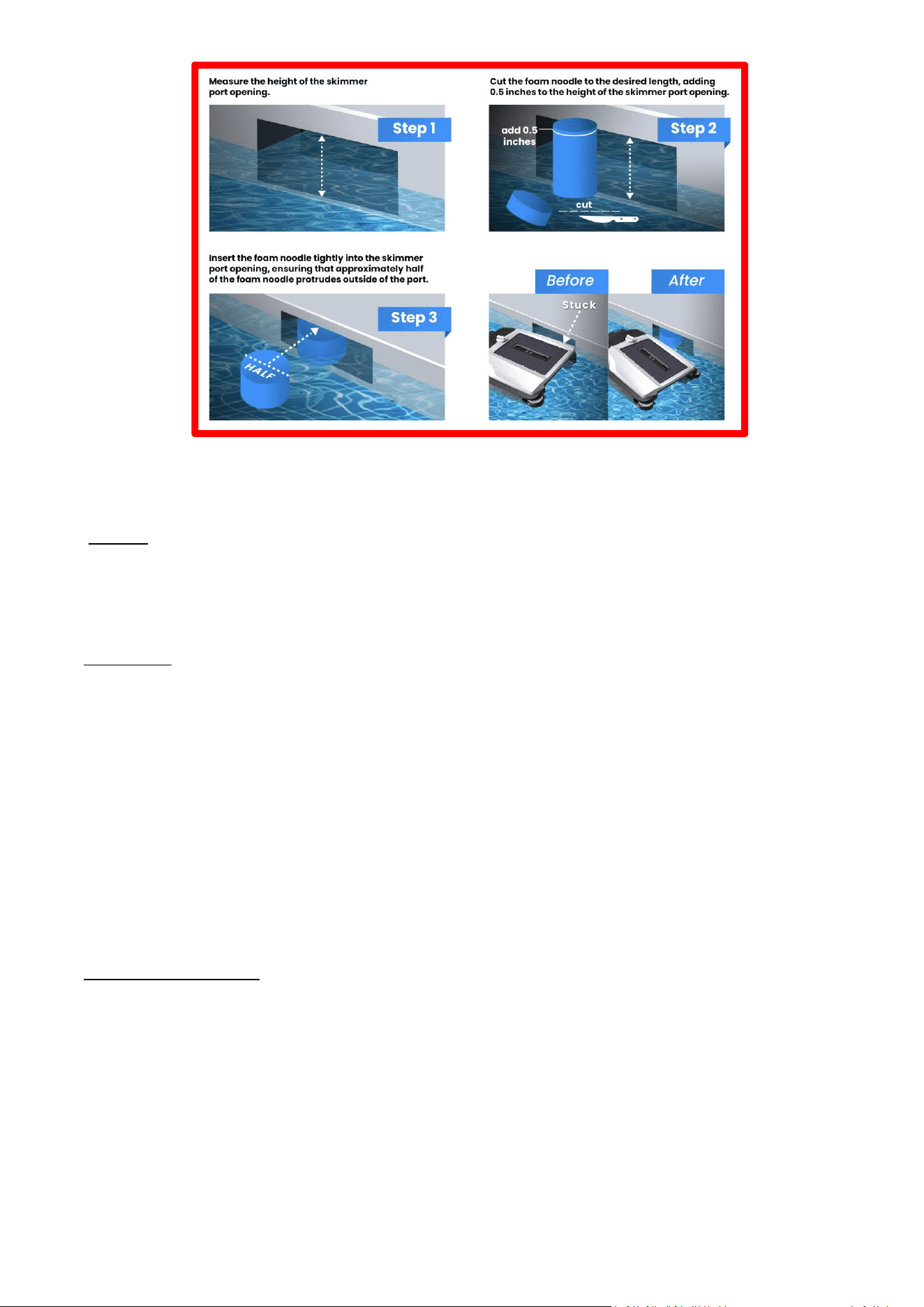
4.7 Using a Pool Foam Noodle to Prevent Betta NEO Getting Stuck at the Skimmer Port
7
5. Cleaning and Storage
Attention:
Empty the debris basket before cleaning
Always be cautious near the pool. Watch your step and maintain your balance while working by the poolside.
Clean the debris collection basket every 2-3 days to keep Betta NEO running at high efficiency.
Cleaning Steps:
Use the mobile app remote control to drive the unit to the pool edge or wait until it reaches the shallow end before retrieving
it safely.
When lifting the Betta NEO, keep the unit level and use both hands—one on the rear handle and the other on the front lift grip.
This will prevent debris from spilling out of the basket. Set the unit down on a flat surface.
Slide the power switch to the OFF position.
Unlock the cover and lift the basket handle to remove the basket from the unit. Empty the debris.
Rinse the basket with a water hose until it is completely clean.
Return the basket to the unit, secure the cover, and turn the power back on.
While cleaning the basket, you may also clean the solar panel. White residue on the panel is likely from pool water chemicals
or minerals. Rinse it off with a water hose and wipe the panel with a soft, dry cloth. Do NOT use a pressure washer or any tools
to scrape or brush the panel to avoid damage.
Winter and Long-Term Storage
If you are closing your pool for the winter, remove Betta NEO from the pool. Turn it OFF. Rinse it with hose water, allow it to dry completely.
Place it in a storage bag (Betta NEO offers one, sold separately), and store it indoors at room temperature in a dry place, away from excessive
heat. Before using it for the next season, inspect all parts of Betta NEO for any signs of damage or issues. When ready, turn the power on and
resume use.
8
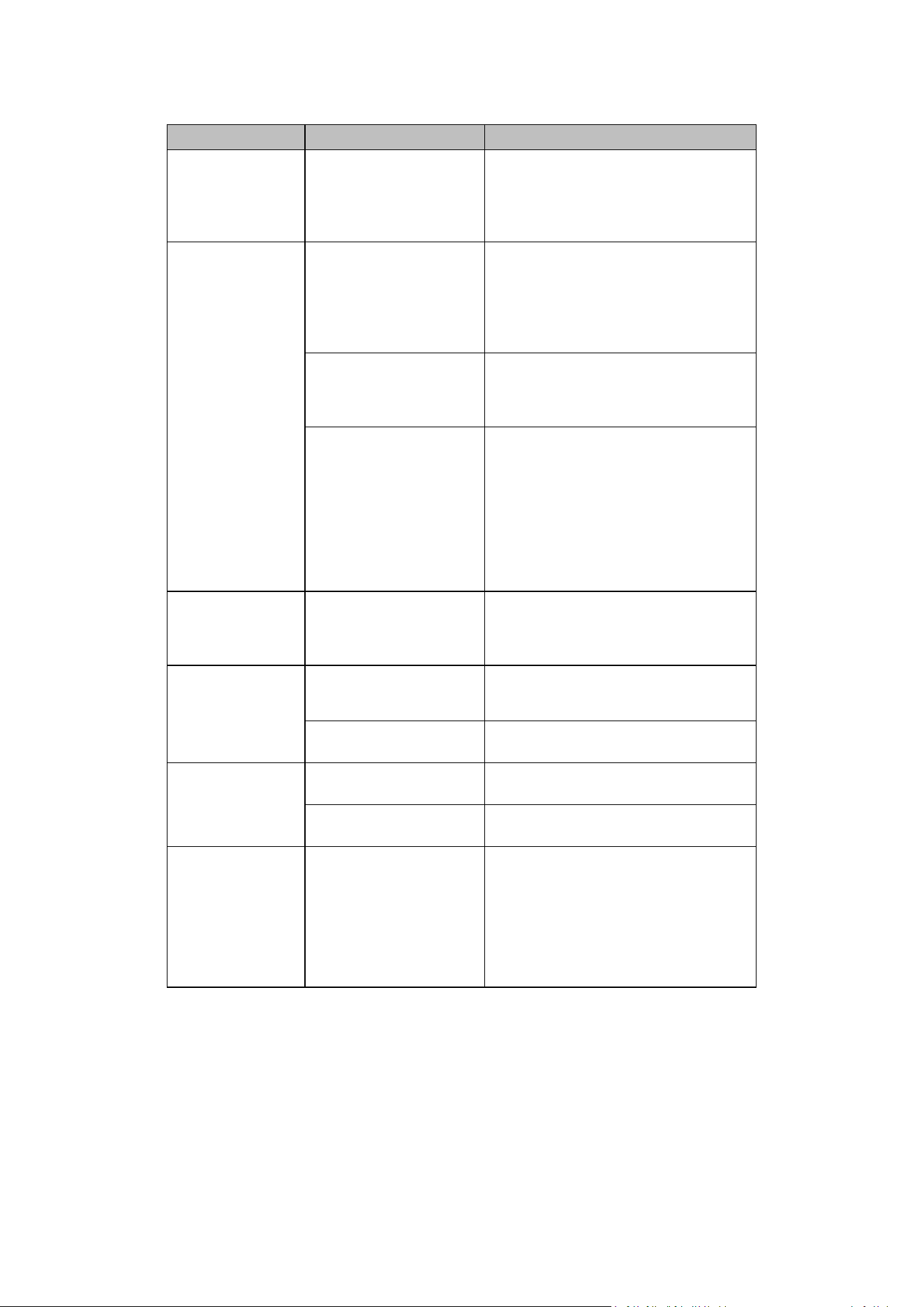
6. Troubleshooting
Problem
Possible Cause
Action Steps
Not running at night
The unit is in Low Battery
Mode. The status lights are
off, indicating the battery
level is very low or
completely discharged.
Leave the unit in the pool. After sunrise, it
will begin running at intervals to find spots
with optimal sunlight for recharging. For
faster charging, you can manually place it in
direct sunlight.
Not running during
the daytime
Scenario 1: The unit is in
Intermittent Mode – the
status lights are flashing in
Red, indicating the battery is
low.
You may leave the unit in the pool, and it
will run at intervals while seeking sunlight to
recharge. Alternatively, you can use the
included charging adapter to charge it
directly.
Scenario 2: The status lights
are off, indicating the
battery level is very low or
completely discharged.
Place the unit in a sunny spot within the
pool and let it charge for a few hours, or use
the included charging adapter to charge it
directly.
Scenario 3: The unit is in
Strand Mode. Status lights
are flashing in Red and
Green indicating Betta is
stuck at some structures,
such as stairs, stools, or
propeller/impeller is
strapped by something.
Please be patient and wait for a few
minutes. The unit will try restarting every 20
minutes when it is in Strand Mode.
Ensure that the basket is in place, and
the Cover Lock is properly secured.
Check propellers and Impeller for dirt,
string, or hair.
Unit only runs a
short time when
sunlight is sufficient
1) The solar panel has
residues.
2) Propeller or Impeller is
strapped.
Clean the solar panels.
Ensure propellers and Impeller are
turning freely.
The unit is moving in
circles
One or both propellers are
trapped which makes the
unit running unbalanced.
Check propellers and Impeller for dirt, string,
and hair.
Malfunctioning propellers
Contact Betta customer service for
assistance (see Section 8 below).
Can't be controlled
by remote
Smart phone is not paired
with the unit.
Connect the unit to the mobile app.
Unit battery level is too low
or depleted
Position the unit in direct sunlight and allow
it to charge for several hours.
No Battery or Short
Running Time in
Fall/Winter
Because the sunlight angle is
shallow, solar charging
efficiency is reduced. In
addition, the daily duration
of sunlight is shorter.
In certain weather conditions, you may
remove the unit from the pool and position
it at an angle facing the sunlight. For
detailed guidance, refer to Section 4.4
(Battery Run Time and Charging during
Fall/Winter).
7. Warranty Information
Betta NEO is designed for use in fresh/chlorine water or salt water with salinity levels up to 5000 P.P.M. The unit comes with a 1-Year
Manufacturer’s Warranty from the date of purchase. Betta NEO is compatible with both chlorine and saltwater pools; however, use in
seawater pools will void the warranty. For any issues or concerns, contact us directly. Betta honors extended warranties ONLY through Betta
Care. Any extended warranty offers from third-party retailers will not be serviced by Betta directly. If you have questions about the Betta
warranty, please contact us at info@BettaBot.com or 888-692-3882.
9
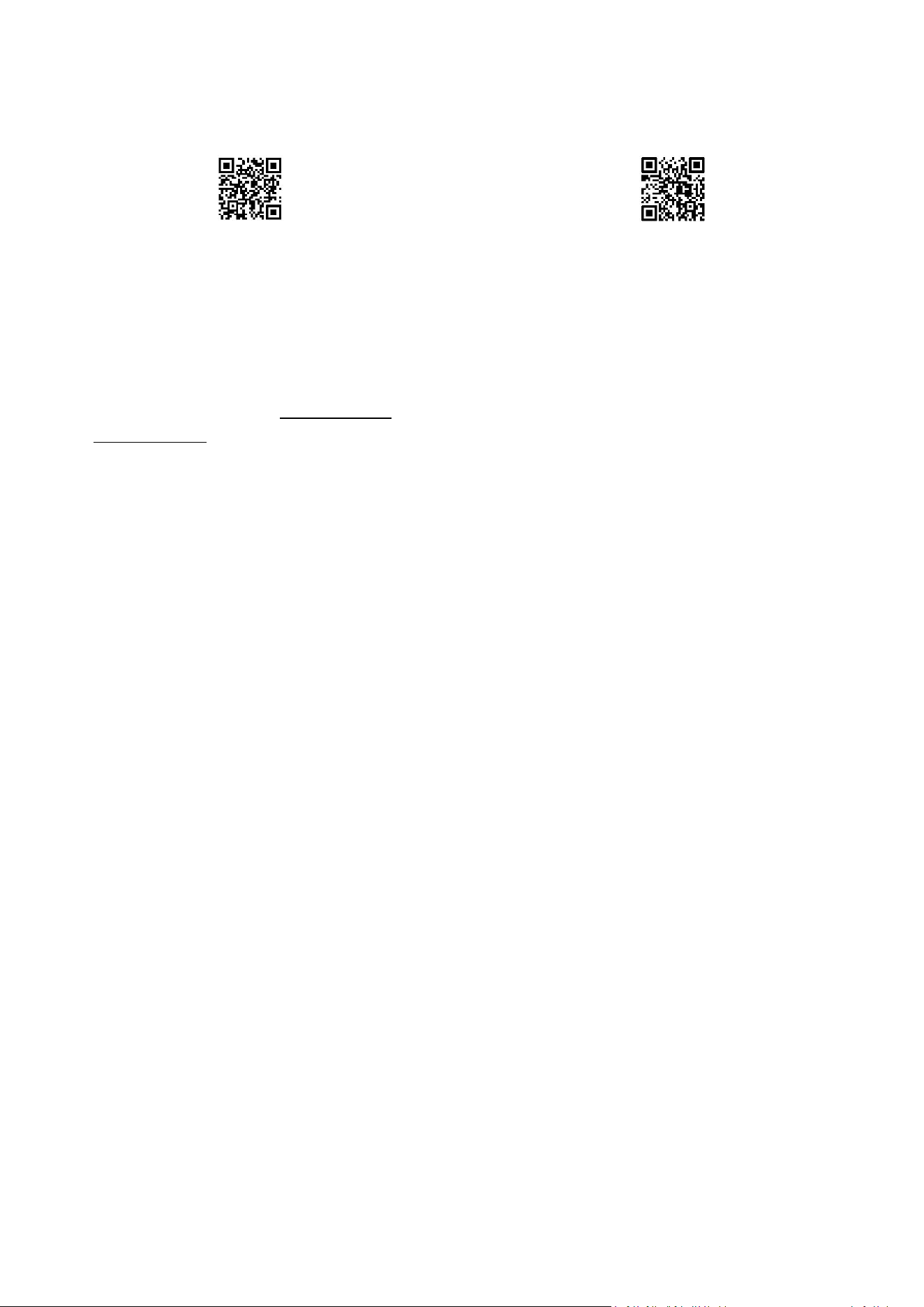
Warranty Registration
scan the QR code below
www.bettabot.com/pages/warranty-registration
Extended Warranty (Betta Care)
scan the QR code below
www.bettabot.com/pages/warranty
8. Customer Service:
Available 7 days a week through email, live chat (on Betta official website or mobile app), and phone support.
Phone: 1-888-692-3882 (1-888-MyBetta) or 562-579-0001 | Fax: 562-579-0008
Live Chat: Available on any webpage at www.BettaBot.com
Email: [email protected]
FCC Statement
Any Changes or modifications not expressly approved by the party responsible for compliance could void the user’s authority to operate the
equipment.
This device complies with part 15 of the FCC Rules. Operation is subject to the following two conditions:
(1) This device may not cause harmful interference, and
(2) This device must accept any interference received, including interference that may cause undesired operation.
FCC Radiation Exposure Statement:
This equipment complies with FCC radiation exposure limits set forth for an uncontrolled environment .This equipment should be installed and
operated with minimum distance 20cm between the radiator& your body.
Note : This equipment has been tested and found to comply with the limits for a Class B digital device, pursuant to part 15 of the FCC Rules. These
limits are designed to provide reasonable protection against harmful interference in a residential installation. This equipment generates,uses and
can radiate radio frequency energy and, if not installed and used in accordance with the instructions, may cause harmful interference to radio
communications. However, there is no guarantee that interference will not occur in a particular installation. If this equipment does cause harmful
interference to radio or television reception, which can be determined by turning the equipment off and on, the user is encouraged to try to correct
the interference by one or more of the following measures: —Reorient or relocate the receiving antenna.
—Increase the separation between the equipment and receiver.
—Connect the equipment into an outlet on a circuit different from that to which the receiver is connected.
—Consult the dealer or an experienced radio/TV technician for help.
This device complies with part 18 of the FCC Rules