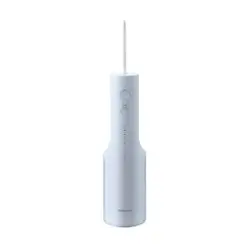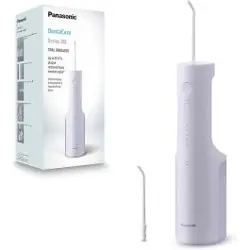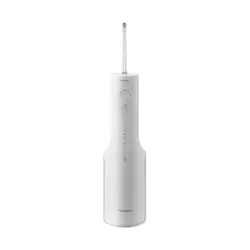
Operating Instructions
(Household use) Rechargeable Oral Irrigator
Model No.
EW‑DJ67
EW‑DJ66
Thank you for purchasing this Panasonic product.
Before operating this unit, please read these instructions completely
and save them for future use.
Contents
Safety precautions... 2
Important information ....5
Parts identication .........7
Charging .......................... 8
How to use ......................9
Points of care ................11
After use ........................13
Frequently asked
questions .......................15
Troubleshooting ...........16
Battery life .....................19
Disposal of the
appliance .......................19
Specications ...............20
Changing the nozzle
(Sold separately)...........20
EW-DJ67_UK.indb 1EW-DJ67_UK.indb 1 2024/02/16 16:38:242024/02/16 16:38:24
2
WARNING
•
Do not immerse the charger in water or wash it with
water.
Doing so may cause electric shock or re due to a short
circuit.
• Always unplug the power plug from a household outlet
when cleaning the charger.
Failure to do so may cause electric shock or injury.
• The supply cord cannot be replaced. If the cord is
damaged, the charger should be scrapped.
Failure to do so may cause an accident or injury.
• Oral irrigators can be used by children aged from 8
years and above and persons with reduced physical,
sensory or mental capabilities or lack of experience
and knowledge under supervision.
•
Oral irrigators shall be used only with cold or warm
water, or specic solutions as dened in the
manufacturer’s instructions.
• Children shall not play with the appliance.
• Do not use anything other than the supplied charger
for any purpose. Also, do not use any other product
with the supplied charger. (See page 7.)
Doing so may cause burns or re due to a short
circuit.
• The following symbol indicates that a specic
detachable power supply unit is required for
connecting the electrical appliance to the supply
mains. The type reference of power supply unit is
marked near the symbol.
Safety precautions
Make sure to follow these instructions.
To prevent accidents, injuries or damage to property,
please follow the instructions below.
■ The following chart indicates the degree of
damage caused by improper operation.
DANGER
Indicates a potential hazard
that will result in serious
injury or death.
WARNING
Indicates a potential hazard
that could result in serious
injury or death.
CAUTION
Indicates a potential hazard
that could result in minor
injury or property damage.
WARNING
► Preventing accidents
• Do not store within the reach of children or infants. Do
not let them use it.
‑ Doing so may cause an accident or injury due to
accidental ingestion of removable parts.
EW-DJ67_UK.indb 2EW-DJ67_UK.indb 2 2024/02/16 16:38:242024/02/16 16:38:24
3
► In case of an abnormality or malfunction
• Immediately stop using and unplug the power plug
when using the charger.
‑
Failure to do so may cause re, electric shock or injury.
<Abnormality or malfunction cases>
‑
The main unit or charger is deformed or abnormally hot.
‑ The main unit or charger smells of burning.
‑ There is abnormal sound during use or charging of
the main unit or charger.
Immediately request inspection or repair to an
authorized service centre.
► This product
• This product has a built‑in rechargeable battery. Do
not throw into re, apply heat, or charge, use, or leave
in a high temperature environment.
‑ Doing so may cause overheating, ignition, or
explosion of the built‑in rechargeable battery.
• Do not modify or repair.
‑ Doing so may cause re, electric shock, or injury.
Contact an authorized service centre for repair
(battery change, etc.).
•
Never disassemble except when disposing of the product.
‑ Doing so may cause re, electric shock, or injury.
► Cleaning
• Regularly clean the power plug to prevent dust from
accumulating (once every half a year).
‑ Failure to do so may cause re due to insulation
failure caused by humidity.
Disconnect the power plug and wipe with a dry cloth.
WARNING
► Power supply
• Do not connect or disconnect the power plug to a
household outlet with a wet hand.
‑ Doing so may cause electric shock or injury.
• Do not place the charger over or near water lled sink
or bathtub.
• Do not use when the power cord or the power plug is
damaged or when the tting into the household outlet
is loose.
• Do not damage, modify, forcefully bend, pull, twist, or
bundle the power cord or the power plug. Also, do not
place anything heavy on or pinch the power cord.
‑ Doing so may cause electric shock or re due to a
short circuit.
• Do not use in a way exceeding the rating of the
household outlet or the wiring.
‑
Exceeding the rating by connecting too many power plugs
to one household outlet may cause re due to overheating.
• Always ensure the appliance is operated on an
electric power source matched to the rated voltage
indicated on the charger.
• Fully insert the power plug.
‑ Failure to do so may cause re or electric shock.
EW-DJ67_UK.indb 3EW-DJ67_UK.indb 3 2024/02/16 16:38:252024/02/16 16:38:25
4
CAUTION
► Preventing damage to teeth and gums
• People who are unable to operate should not use this
appliance.
• People with weak oral senses should not use this
appliance.
‑ Doing so may cause injury or damage to teeth, gums
and tongue.
• People who may have periodontal disease, have teeth
being treated, or concerned about symptoms within
their mouth should consult a dentist before use.
• Observe the following precautions when using the
tongue care nozzle.
• Do not allow children to use it.
• Do not brush forcefully.
•
Do not insert too deep (approx. 3/4 of the visible range).
• If tongue inammation occurs, stop using the device
and consult a doctor if the inammation persists after
3 days.
‑ Failure to do so may cause injury or damage to
teeth, gums and tongue.
► This product
• Never use for a purpose other than oral cleaning.
‑ Doing so may cause an accident or injury when the
stream of water is pointed toward the eyes, nose,
ears, tongue, or throat.
•
Do not ll the water tank with water warmer than 40 °C.
‑ Doing so may cause burns.
• Do not share nozzle with your family or other people.
‑ Doing so may cause infection or inammation.
• Do not place a metallic object such as a coin or a clip
on top of the charger.
‑ Doing so may cause burns due to excessive heat.
► Note the following precautions
• Do not allow metal objects or trash to adhere to the
power plug.
‑ Doing so may cause electric shock or re due to a
short circuit.
• Do not drop or subject to shock.
‑ Doing so may cause injury.
• Do not wrap the power cord around the charger when
storing.
‑ Doing so may cause the wire in the power cord to
break with the load, and may cause re due to a
short circuit.
• Disconnect the power plug from the household outlet
when not charging.
‑
Failure to do so may cause electric shock or re due to
electrical leakage resulting from insulation deterioration.
• Disconnect the power plug by holding onto it instead
of the power cord.
‑ Failure to do so may cause electric shock or re due
to a short circuit.
• After use, clean the main unit and the nozzle and dry
them. (See pages 13 to 15.)
‑ Failure to do so may cause damage to your health
due to propagation of mold and bacteria.
EW-DJ67_UK.indb 4EW-DJ67_UK.indb 4 2024/02/16 16:38:252024/02/16 16:38:25
5
Handling of the removed battery
when disposing
DANGER
•
The rechargeable battery is exclusively for use with this
appliance. Do not use the battery with other products.
• Do not charge the battery after it has been removed
from the product.
• Do not throw into re or apply heat.
•
Do not hit, disassemble, modify, or puncture with a nail.
•
Do not let the positive and negative terminals of the battery
get in contact with each other through metallic objects.
• Do not carry or store the battery together with metallic
jewellery such as necklaces and hairpins.
• Do not use or leave the battery where it will be
exposed to high temperatures, such as under direct
sunlight or near other sources of heat.
• Never peel o the tube.
‑
Doing so may cause overheating, ignition, or explosion.
WARNING
• After removing the rechargeable battery, do not keep
it within reach of children and infants.
‑ The battery will harm the body if accidentally
swallowed.
If this happens, consult a physician immediately.
• If the battery uid leaks out and comes in contact with
the eyes, do not rub the eyes, and thoroughly rinse
with clean water, such as tap water.
‑ Failure to do so may cause eye injury.
Consult a physician immediately.
CAUTION
• If the battery uid leaks out and comes in contact with
the skin or clothes, rinse o with clean water, such as
tap water.
‑ Failure to do so may cause inammation.
Important information
•
When you rst begin using the oral irrigator, you may
experience slight bleeding of the gums even though
your gums may be healthy. This is because your gums
are receiving stimulation by the oral irrigator for the
rst time. The bleeding should stop after one or two
weeks of use. Bleeding that persists for more than two
weeks may be indication of an abnormal condition of
your gums, such as periodontal disease. In this case,
stop using the oral irrigator and consult your dentist.
• Do not put salt, mouthwash or other chemicals into
the water tank. Doing so may cause malfunction.
• Do not dry the appliance with a dryer or a fan heater.
Doing so may cause malfunction or deformation of the
parts.
EW-DJ67_UK.indb 5EW-DJ67_UK.indb 5 2024/02/16 16:38:252024/02/16 16:38:25
6
• Store the appliance in a place with low humidity after
use. Leaving the appliance in a bathroom may cause
malfunction.
• Charge the appliance correctly according to these
Operating Instructions. (See page 8 "Charging".)
• This appliance contains a battery that is only
replaceable by skilled persons. Please contact an
authorized service centre for the details of repair.
EW-DJ67_UK.indb 6EW-DJ67_UK.indb 6 2024/02/16 16:38:252024/02/16 16:38:25
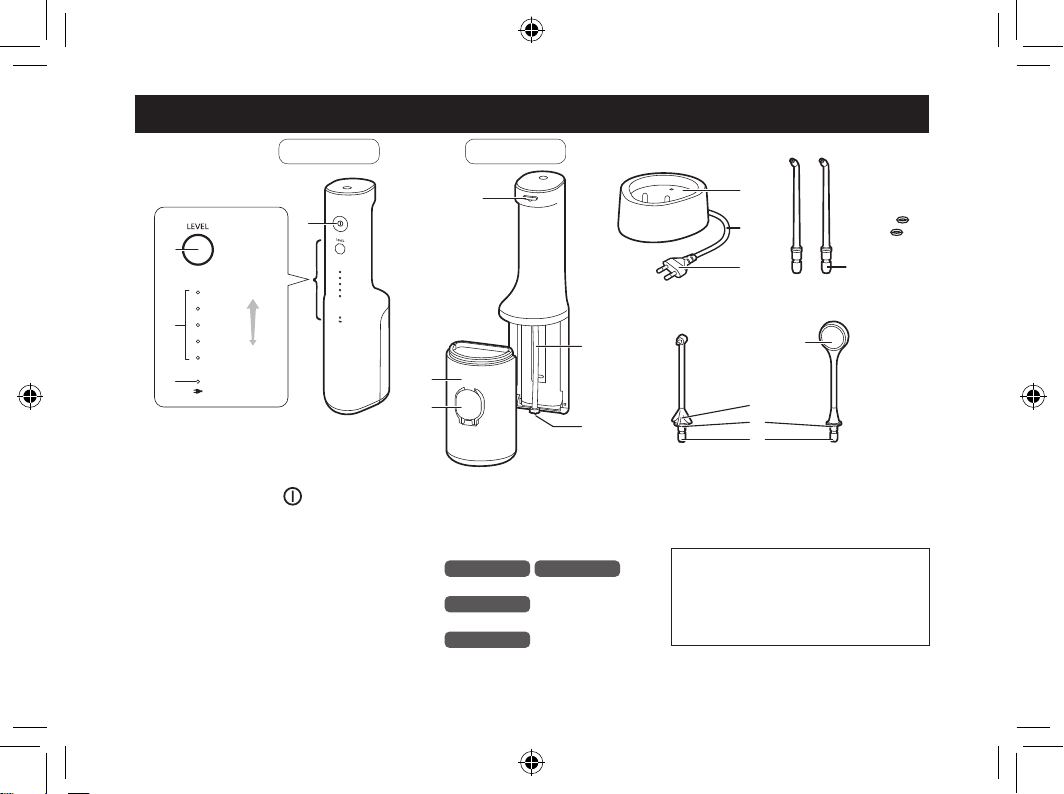
7
Parts identication
6
7
5
:
;
<
8
9
A B C
D E
=
>
@
1
2
3
4
?
=
>
LEVEL5
(Strong)
LEVEL1
(Weak)
Back
Front
A Main unit
1 Power switch (
)
2 Level switch
3 Water pressure level indicator
(blue)
4 Low battery/charge status
indicator (red)
5 Nozzle release button
6 Suction hose
7 Filter
8 Water tank
9 Water tank cap
B Charger (RE8‑59)
: Charging section
; Power cord
< Power plug
C Ultrasonic nozzle (x2)
EW‑DJ67
EW‑DJ66
D Orthodontic nozzle (x1)
EW‑DJ67
E Tongue care nozzle (x1)
EW‑DJ67
= Nozzle insertion port
> Identication ring
? Nozzle handle
@ Cloth
• The nozzle is a consumable.
(See page 20.)
Note
There may be moisture inside the
main unit (water tank and suction
hose) left from the distilled water
used for product testing.
EW-DJ67_UK.indb 7EW-DJ67_UK.indb 7 2024/02/16 16:38:252024/02/16 16:38:25
8
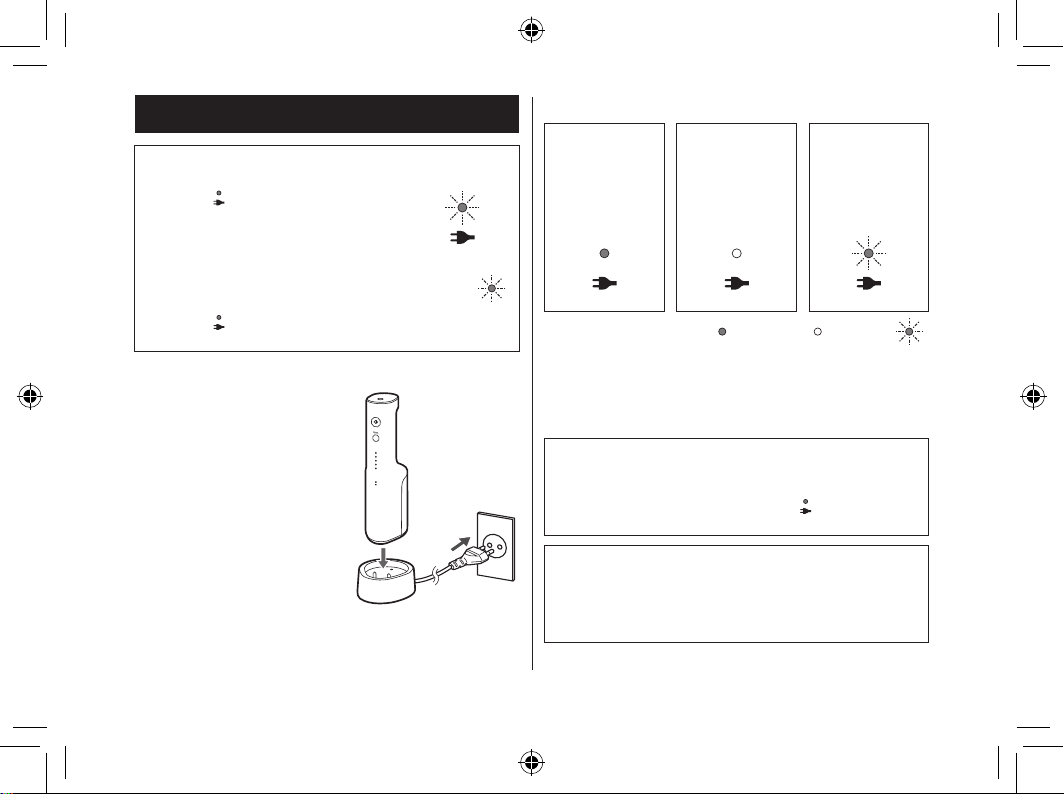
Charging
When the battery capacity is low
The low battery/charge status
indicator (
) ashes once a second
in the following cases.
• When you turn on the power switch
• When you press the level switch
• When you turn o the power switch
(the ashing stops after 5 seconds)
When the low battery/charge status
indicator (
) is ashing, charge the
battery.
(Flashing )
1
Insert the power plug into a household outlet.
2
Insert the main unit
straight into the
charging section with
the front side facing
forward.
• Charging is completed
after approx. 17 hours.
(The charging time may
vary with the remaining
battery capacity.)
1
2
► Display while charging
Charging in
progress
Charging
complete
Charging
abnormal
(Flashing in
red twice a
second)
(Lights on /Lights o /Flashing )
3
For safety and energy saving, disconnect
the power plug.
• Charging the battery for more than 17 hours will
not cause any damage to the main unit.
How to check if charging is completed
After charging is completed, if you connect and then
disconnect the main unit to and from the charger, the
low battery/charge status indicator (
) lights on and
then lights o after 5 seconds.
Operating time after a full charge
Approx. 10 minutes
(When the water pressure level is set to 5)
• It varies with the ambient temperature and usage
condition.
EW-DJ67_UK.indb 8EW-DJ67_UK.indb 8 2024/02/16 16:38:252024/02/16 16:38:25
9
► Notes
• The charging time may dier when the appliance is
used for the rst time, or if it has not been used for
more than 6 months.
In addition, the low battery/charge status indicator
(
) may not light on in the rst several minutes of
charging, but it will light on as the charging proceeds.
• The battery will deteriorate if not used for over 6
months, so make sure to perform a full charge at least
once every 6 months.
• Recommended ambient temperature for charging is
5 °C – 35 °C. The battery may not charge properly or
not at all under extreme low or high temperatures.
• To keep charging the battery will not aect battery
performance.
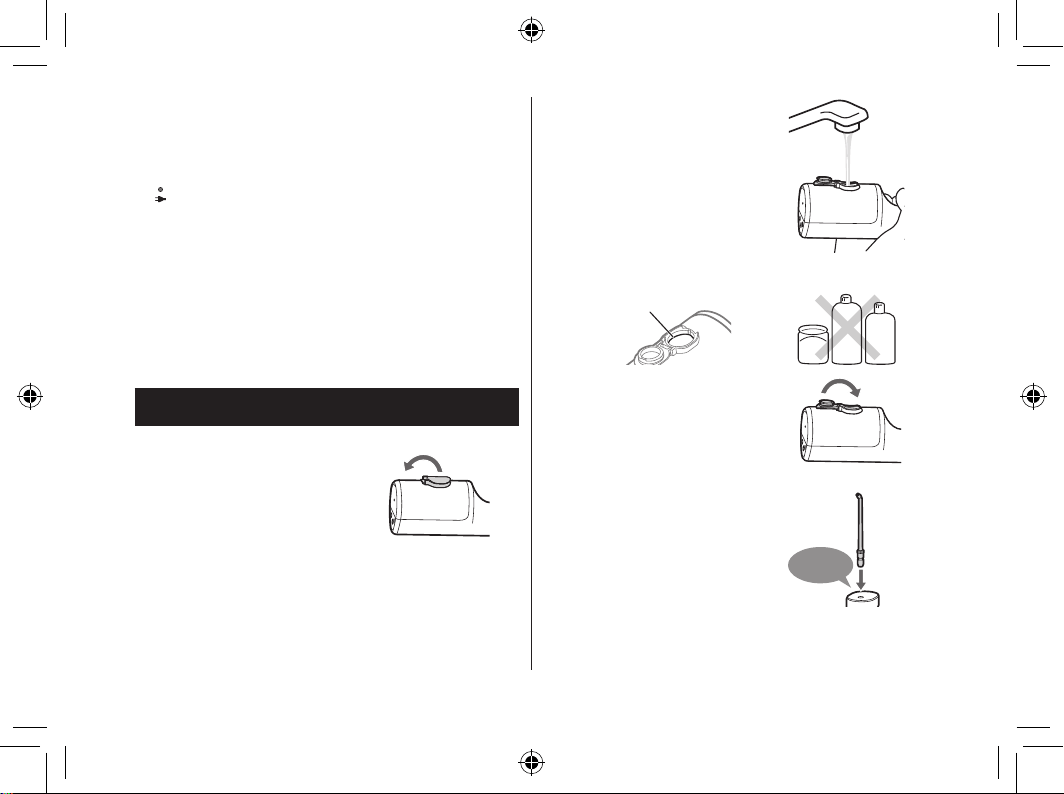
How to use
1
Fill the water tank with water.
1.
Open the water tank cap.
2.
Add water while keeping
the main unit level.
• Always use new tap
water or lukewarm
water.
• If you feel the water is
cold, use lukewarm
water with a
temperature of 40 °C
or less.
Full‑water position
Salt
Mouthwash
Chemical
3. Close the water tank
cap securely.
2
Install the nozzle.
• Press in rmly until a
"click" is heard.
• Choose a nozzle for
your purpose. (See
pages 11 to 13.)
Click
EW-DJ67_UK.indb 9EW-DJ67_UK.indb 9 2024/02/16 16:38:262024/02/16 16:38:26
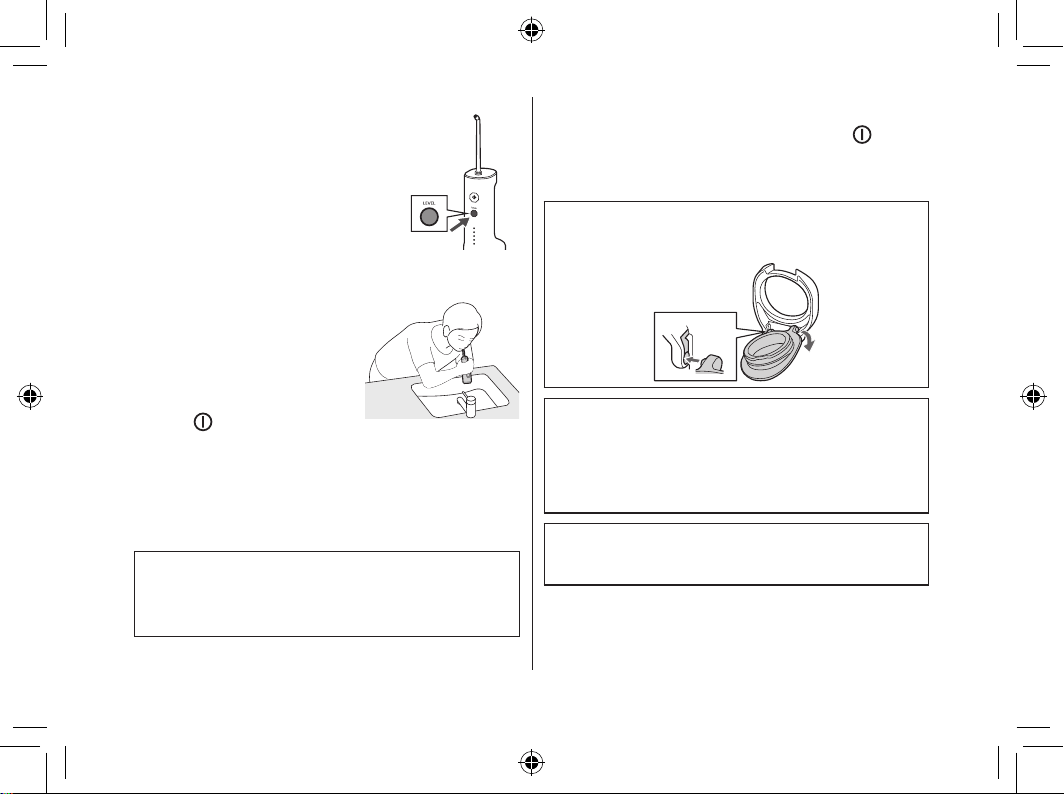
10
3
Press the level switch, and
select the water pressure
level.
• When you press the level switch,
the water pressure level that was
used last time is selected. Then
each time you press the level
switch, the water pressure level
is switched as follows: 1 (weak)
→ 2 → 3 → 4 → 5 (strong) → 1…
4
Clean inside your mouth
with the water jet.
1. Place the nozzle in your
mouth.
2.
Close your mouth gently.
3. Turn on the power switch
(
).
• You can switch the water pressure level by
pressing the level switch, even while using
the appliance.
• If the main unit is tilted too much, the water
will not come out from the nozzle.
• It can also be used in a bath.
Point 1
Keep your face over the basin.
Point 2
Place the main unit upright.
5
To prevent the water from splashing
about, turn o the power switch ( )
while keeping the nozzle in your mouth
after use.
If the water tank cap comes o
You can attach the water tank cap by following the
procedure below when it comes o.
1
2
About the water pressure level memory function
The last selected water pressure level will be
remembered, from which the appliance will start next time.
When the appliance has not been used for a long
time or when the battery is used up, the water
pressure level will return to 1.
Operation time with full water
Approx. 60 seconds.
(When the water pressure level is set to 5)
EW-DJ67_UK.indb 10EW-DJ67_UK.indb 10 2024/02/16 16:38:262024/02/16 16:38:26
11
► Notes
•
When using the appliance for the rst time, please
press the power switch (
) and check the water
pressure level while water is coming out. When you
feel that the irritation is strong, turn o the power switch
and use the appliance from water pressure level 1.
• The appliance may not operate in an ambient
temperature approximately 5 °C or lower.
• Do not push the tip of the ultrasonic nozzle too hard
against the teeth or gums.
•
Do not turn on the power switch ( ) when the water
tank is empty unless you are drying the moisture inside
the main unit. (Doing so may cause malfunction.)
Points of care
•
Adjust the angle and movement of the nozzle according
to the purpose and the area you want to clean.
• For areas where the gums are sensitive, please set
the water pressure level to 1.
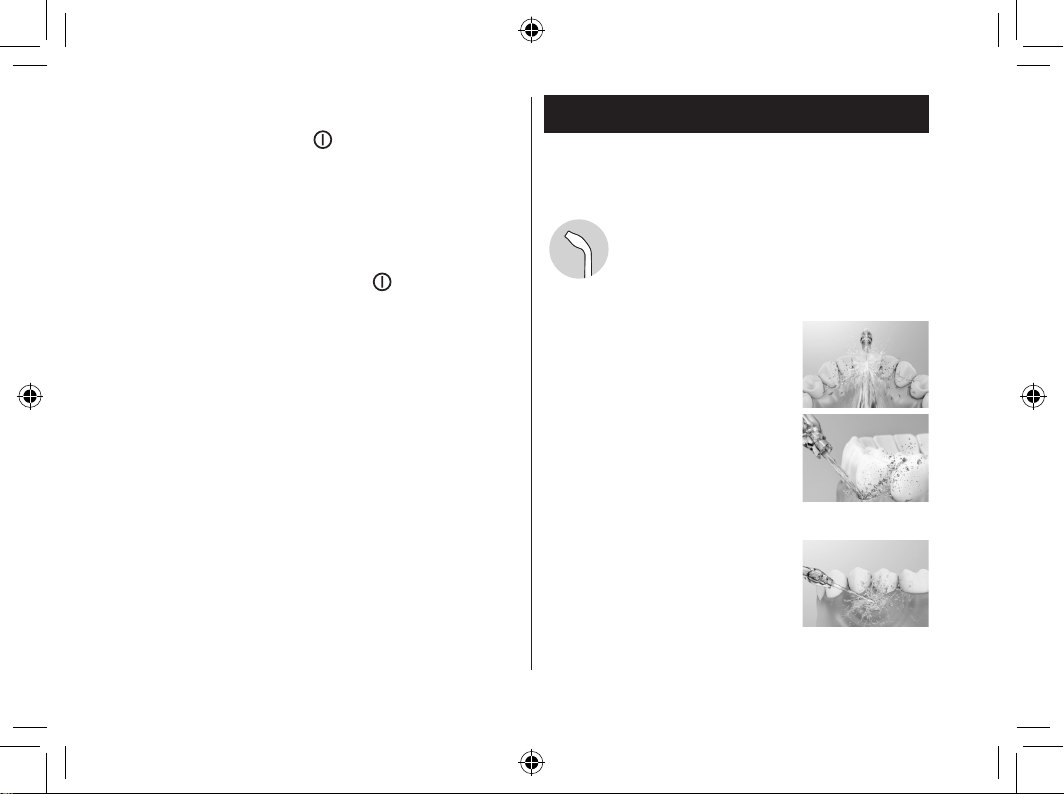
Ultrasonic nozzle
To clean with powerful water jet.
► How to use
Interdental cleaning
• Direct the water jet onto the space
between the teeth.
• Direct from the front and rear sides
of the teeth.
Periodontal pocket cleaning
• Aim the water jet at the space
between teeth and gums.
• Slowly shift the water jet along the
gums.
•
Clean the front and back of the
teeth and behind the molars as well.
Gums care
• Stimulate the gums.
EW-DJ67_UK.indb 11EW-DJ67_UK.indb 11 2024/02/16 16:38:262024/02/16 16:38:26
12
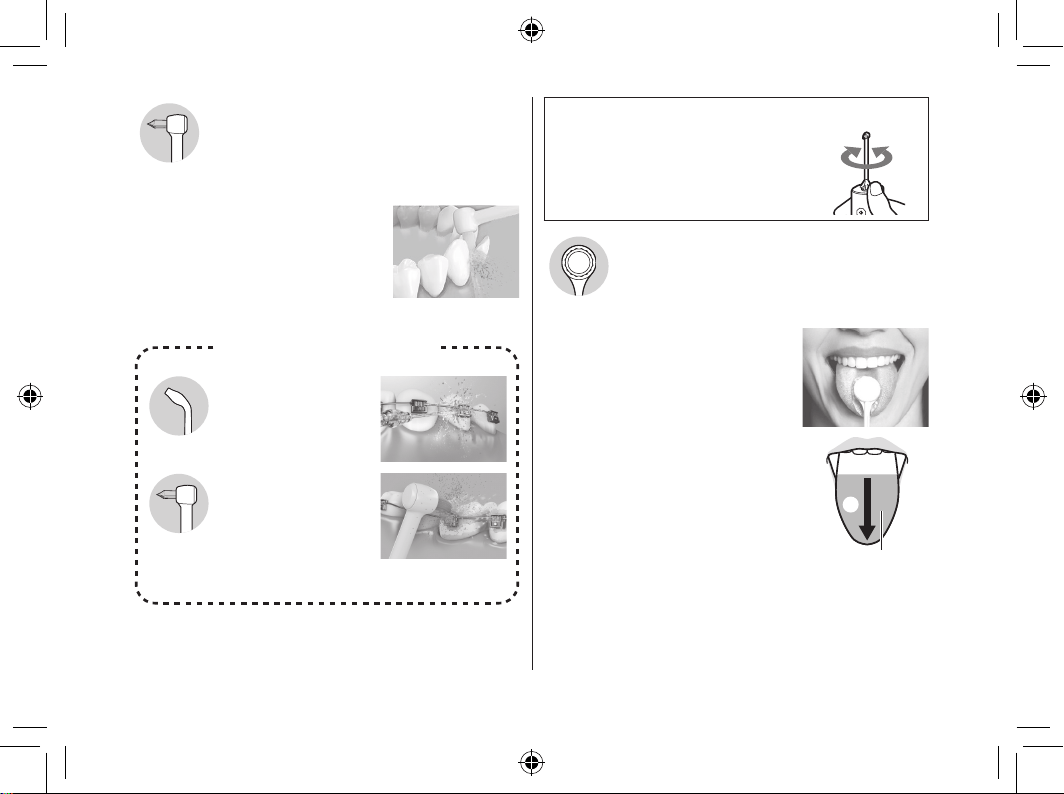
Orthodontic nozzle
To clean with 2‑in‑1 water jet and brush nozzle.
► How to use
Lightly place the brush tip on the
crooked teeth.
•
Place the brush tip on the area that
is dicult for a toothbrush to reach
and tends to remain unpolished.
• Wiggle the brush mainly in
interdental spaces.
Ultrasonic nozzle
•
Direct the water jet
around orthodontic
brackets and bridges.
Orthodontic nozzle
• Insert the brush to
the gap between
the teeth and the
orthodontic bracket.
•
Wiggle the brush tip.
For orthodontic bracket area
To adjust the orientation of the nozzle
You can adjust the direction of water
jet by rotating the nozzle handle.
Tongue care nozzle
To clean the tongue surface with the cloth
and water ow.
► Tongue cleaning
• Set the water pressure level to 5.
(To rinse the tongue clean.)
• While jetting water, apply the
tongue care nozzle lightly to the
tongue and move it slowly from the
back to the front repeatedly.
• Tongue cleaning is allowed at most
once a day.
• Excessive strength may hurt the
surface of the tongue.
• Do not go deep into your tongue.
• When you stick your tongue
forward while cleaning, the gag
reex* will be less likely to occur.
*Refers to the state of nausea.
b
a
a From the back
to the front
b
Cleaning range
(approx. 3/4 of
the visible range)
EW-DJ67_UK.indb 12EW-DJ67_UK.indb 12 2024/02/16 16:38:272024/02/16 16:38:27
13
To clean the tongue surface with the cloth
Occasionally, the cloth may be stuck in the tongue
surface.
Please move the cloth slightly back to remove it.
• After use, water may drip from the nozzle since some
water may remain in the cloth of the nozzle. Please
remove it after drainage. (See this page.)
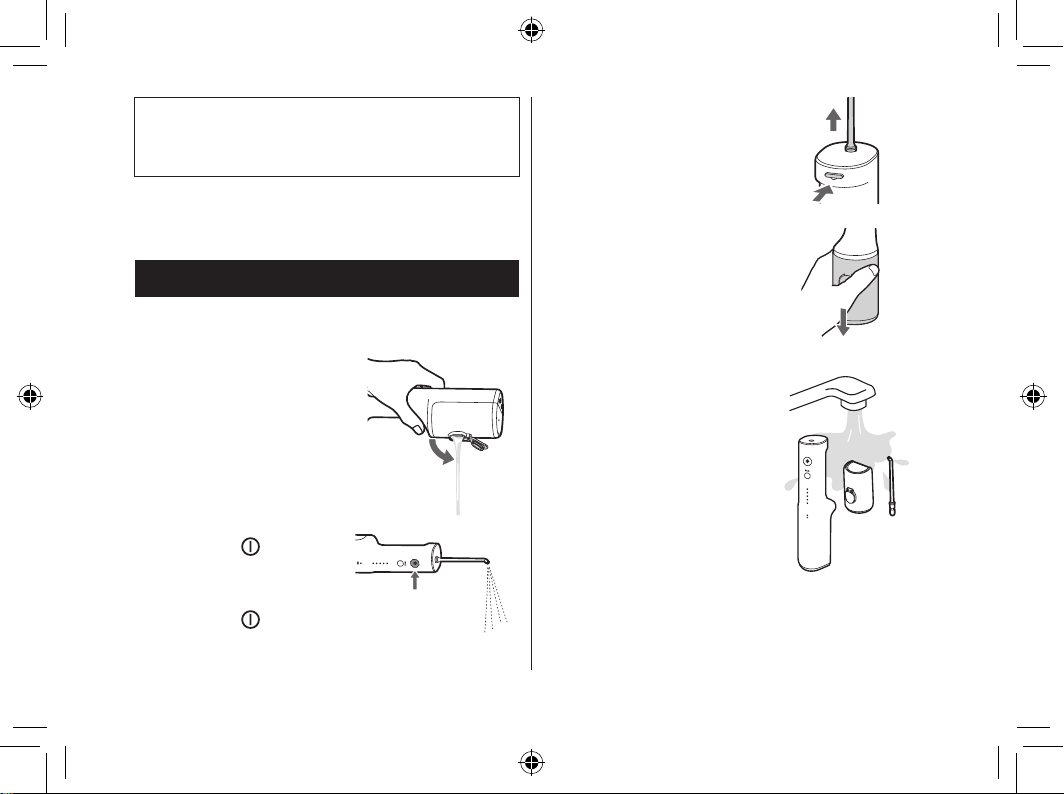
After use
Please clean the appliance after each use.
1
To keep clean, pour out the remaining water.
1. Open the water tank
cap, and pour out the
remaining water.
• Be sure to pour out
the remaining water
after each use.
2. Turn on the power
switch (
) to drain
the remaining water in
the main unit.
3. Turn o the power
switch (
) when no
more water comes out.
4. Pull out the nozzle
while pressing the
nozzle release button.
5. Pull out the water tank
downwards.
2
Clean with water.
• The water tank can be
washed in a dishwasher.
• Do not hit the product on
the washstand when
draining.
EW-DJ67_UK.indb 13EW-DJ67_UK.indb 13 2024/02/16 16:38:272024/02/16 16:38:27
14
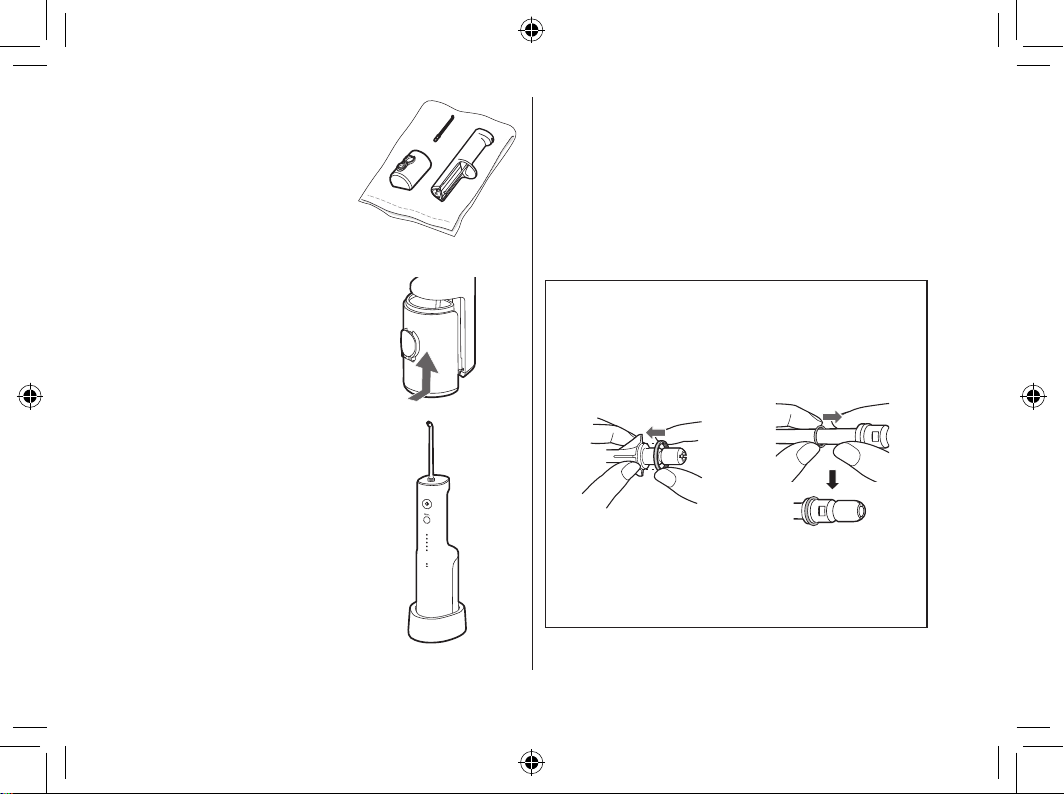
3
Store the appliance
after drying.
1. Wipe any water away
from the nozzle, water
tank and the main unit
with a towel or
something similar, and
dry them in a well‑
ventilated shade.
2.
Attach the water tank.
3. Put the main unit
upright on the charger.
► Notes
• Do not wash with lukewarm water exceeding 50 °C
(except the water tank).
• Use neutral kitchen detergent and rinse well with
water to ensure no detergent remains after cleaning.
• Never use thinners, benzine, or alcohol.
(Doing so may cause malfunction, or cracking or
discolouration of the parts.)
• Do not scrape the cloth of the tongue care nozzle with
a sharp tip, ngernail, or similar.
How to attach the identication ring
This allows you to distinguish between several
nozzles when you are using one oral irrigator as a
family.
Orthodontic nozzle/
Tongue care nozzle
Ultrasonic nozzle
Align the identication
ring (in any direction) with
the nozzle to install it.
Slide the rubber
identication ring on.
• Even if the identication ring is not attached, the
performance of the nozzle is not aected.
EW-DJ67_UK.indb 14EW-DJ67_UK.indb 14 2024/02/16 16:38:272024/02/16 16:38:27
15
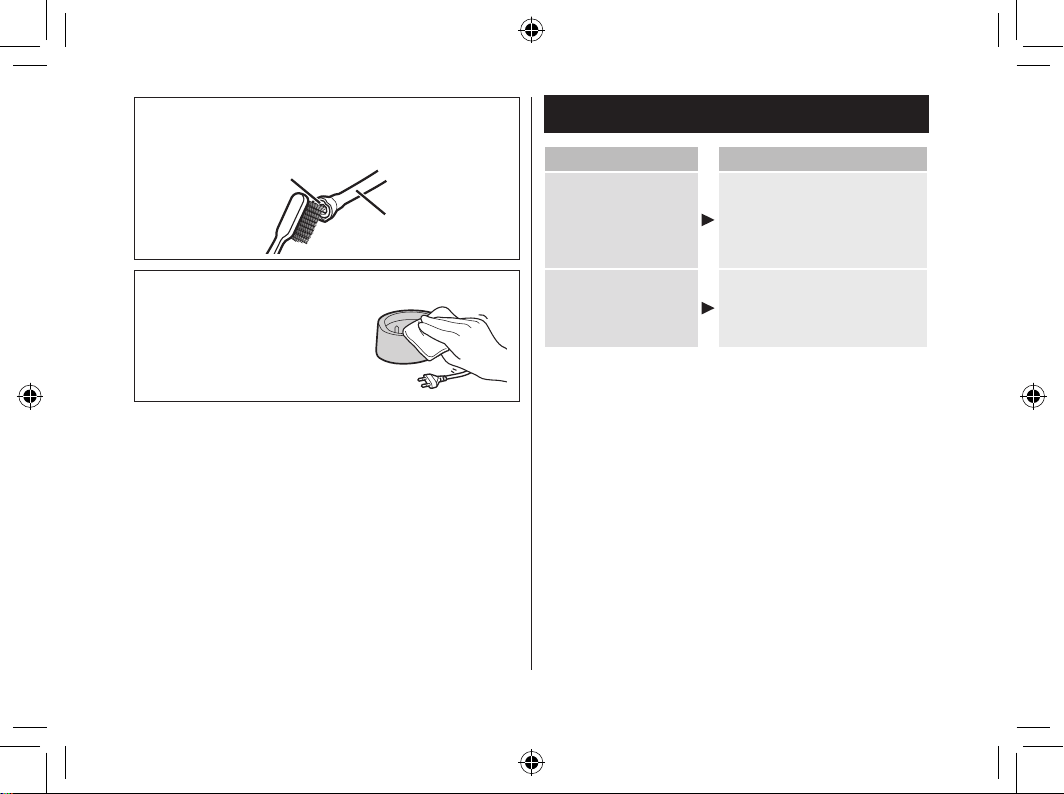
When the water jet is poor
Remove the dirt from the lter (the tip of the suction hose).
Rub the lter gently with a soft brush.
Filter
Suction hose
When dirt is a concern
Wipe the charger with a dry
cloth.
(Do not rinse it with water.)
Frequently asked questions
Question Answer
Will the battery
deteriorate if not
used for an
extended period of
time?
The battery will deteriorate if
not used for over 6 months,
so make sure to perform a full
charge at least once every 6
months.
Can I charge the
appliance after
every use?
The battery used is a
lithium‑ion, so charging after
every use will have no eect
on battery life.
EW-DJ67_UK.indb 15EW-DJ67_UK.indb 15 2024/02/16 16:38:272024/02/16 16:38:27
16
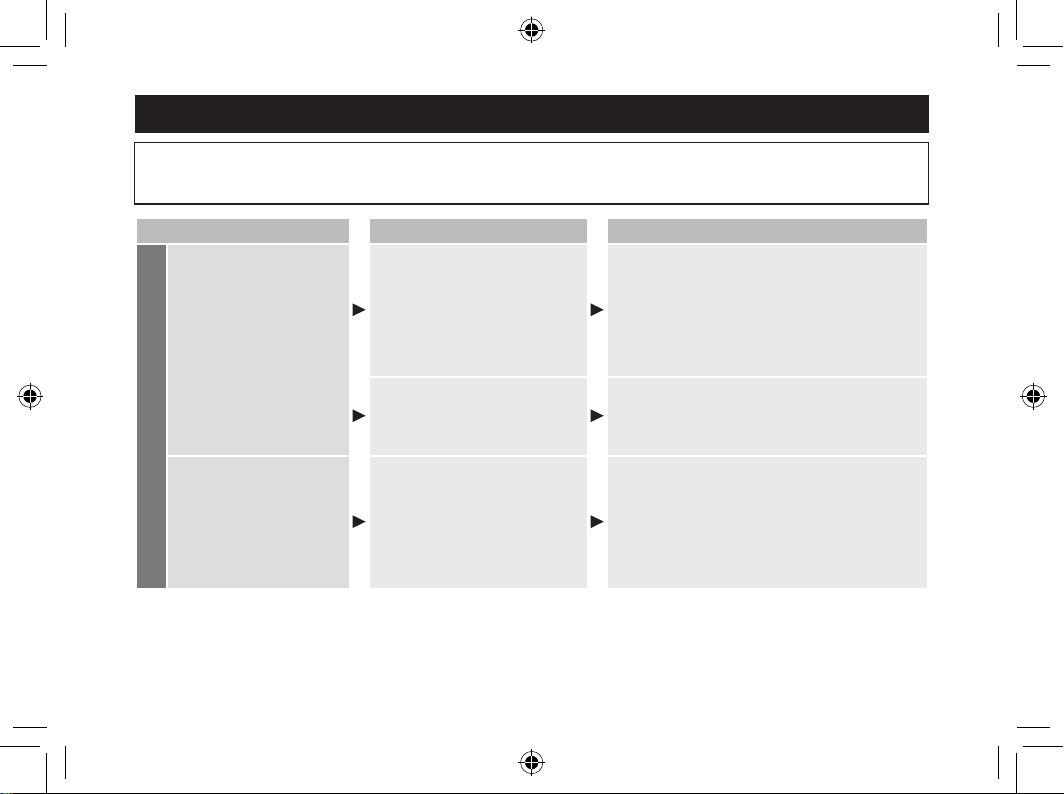
Troubleshooting
Perform the following actions.
If the problems still cannot be solved, contact the store where you purchased the unit or a service centre
authorized by Panasonic for repair.
Problem Possible cause Action
While charging
The low battery/charge
status indicator does not
light on.
The appliance was just
purchased or it has not been
used for a while.
Although the low battery/charge status
indicator may not light on in the rst several
minutes of charging, it will light on as the
charging proceeds. If it does not light on
after a while, please request a repair at the
store where you purchased the unit or
Service Centre.
The main unit is not properly
in contact with the charger.
Check to see that the main unit stands
upright so that its bottom comes in contact on
the charger, and that the low battery/charge
status indicator is on. (See page 8.)
The low battery/charge
status indicator ashes
rapidly (twice a second).
The ambient temperature is too
low or too high during charging.
Please charge within the recommended
temperature range of 5 °C to 35 °C.
If the low battery/charge status indicator
ashes even when you charge it within the
recommended temperature range, contact
the store where you purchased the unit or
Service Centre for repair.
EW-DJ67_UK.indb 16EW-DJ67_UK.indb 16 2024/02/16 16:38:272024/02/16 16:38:27
17
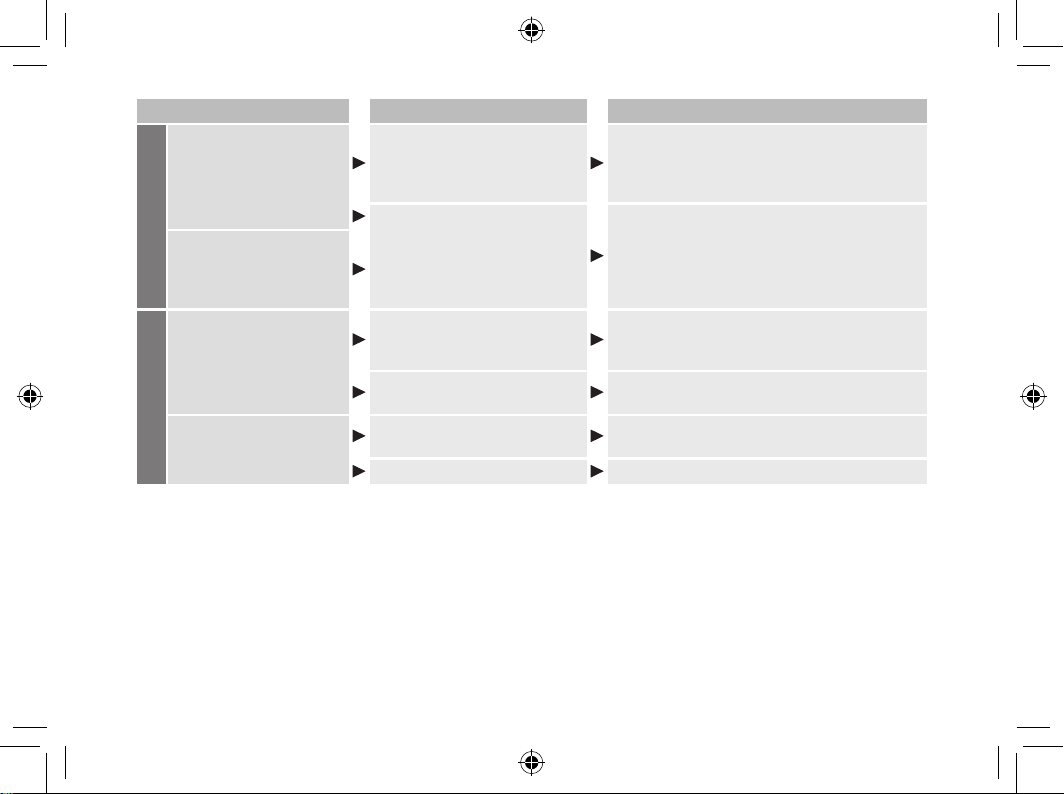
Problem Possible cause Action
While charging
The appliance can be used
for just several minutes
even after a full charge.
The main unit is not properly
in contact with the charger.
Check to see that the main unit stands
upright so that its bottom comes in contact on
the charger, and that the low battery/charge
status indicator is on. (See page 8.)
The battery has reached the
end of its life (approx. 3 years).
Have the battery replaced by the store
where you purchased the unit or an
authorized service centre.
The low battery/charge
status indicator does not
ash, but the appliance
stops working.
While using
The appliance does not
operate.
The battery has reached the
end of its life (approx.3 years).
Have the battery replaced by the store
where you purchased the unit or an
authorized service centre.
The appliance is used at
approximately 5 °C or lower.
Do not use the appliance at approximately
5 °C or lower.
The water jet is poor.
The nozzle is clogged. The
outlet of nozzle is squashed.
Replace the nozzle with a new one.
The lter is clogged.
Remove the dirt from the lter. (See page 15.)
EW-DJ67_UK.indb 17EW-DJ67_UK.indb 17 2024/02/16 16:38:272024/02/16 16:38:27
18
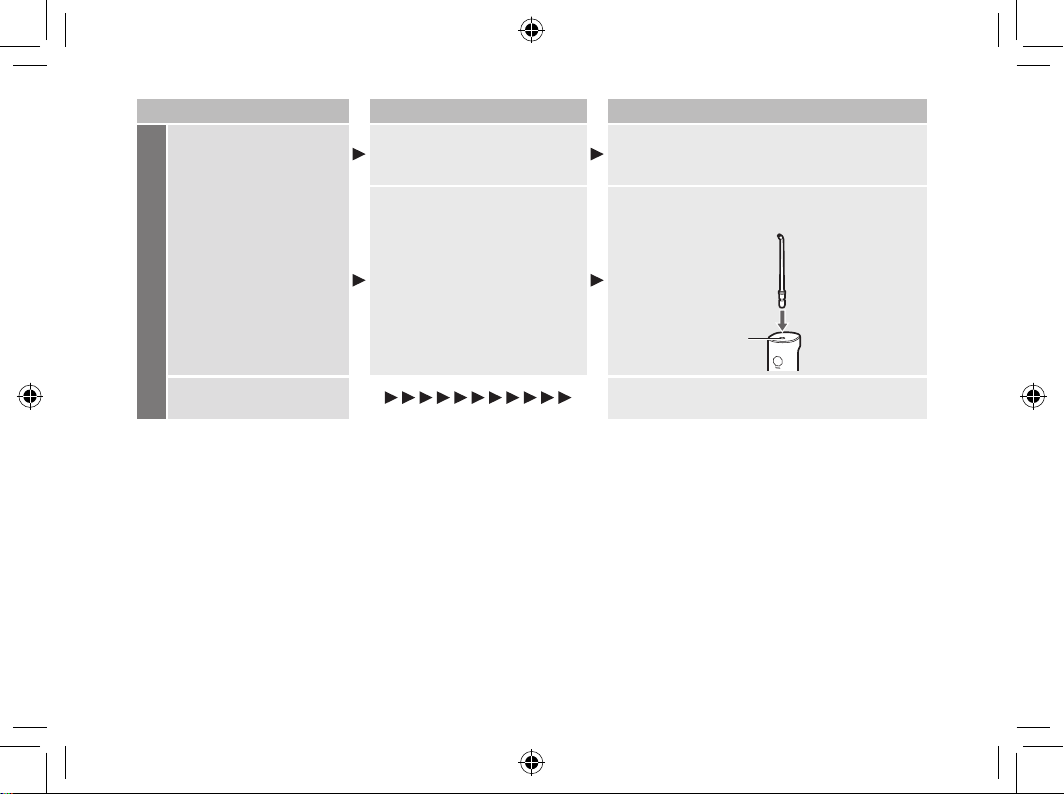
Problem Possible cause Action
While using
No water comes out.
The main unit is tilted too much.
Please use the appliance with the main unit
upright. (See page 10.)
It may take some time to suck up water.
It may take some time to suck
up water.
Put water into the nozzle port c, install the
nozzle, and turn on the power switch.
c
The nozzle is hard to
install.
Apply water to the nozzle insertion port.
EW-DJ67_UK.indb 18EW-DJ67_UK.indb 18 2024/02/16 16:38:272024/02/16 16:38:27
19
Battery life
Approximately 3 years. The battery may have reached
its operating life if the usage frequency decreases
drastically, even after a full charge.
(The operating life of the battery may dier depending
on usage or storage conditions.)
Disposal of the appliance
Remove the built‑in rechargeable battery before
disposing of the appliance.
• The battery is to be disposed of safely.
• Please make sure that the battery is disposed of at an
ocially designated location if there is one.
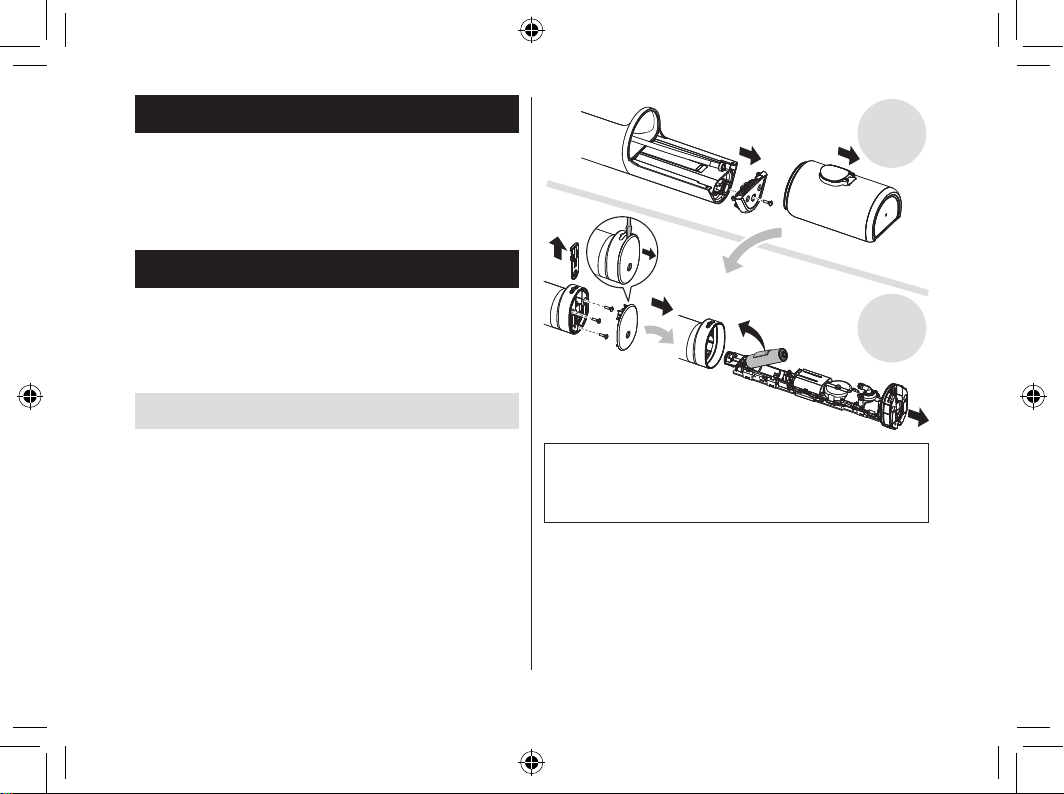
How to remove the battery
This gure must only be used when disposing of
the appliance, and must not be used to repair it. If
you dismantle the appliance yourself, it will no
longer be waterproof, which may cause it to
malfunction.
• Remove the main unit from the charger, press the
power switch to turn on the power and then keep the
power on until the battery is completely discharged.
• Perform steps 1 to 5 to disassemble the main unit
and remove the battery with a screwdriver.
• Insulate the + and ‑ terminals by applying tape to
them. (To prevent short circuit of terminals).
12
3
4
5
Top
Bottom
For environmental protection and recycling of materials
This appliance contains a Lithium‑ion battery.
Please make sure that the battery is disposed of at an
ocially assigned location, if there is one in your country.
EW-DJ67_UK.indb 19EW-DJ67_UK.indb 19 2024/02/16 16:38:292024/02/16 16:38:29
20
Specications
Power source
See the name plate on the product
(Automatic voltage conversion)
Charging time Approx. 17 hours
Operating time
LEVEL 5:
Approx. 10 minutes
(at 20 °C when fully charged)
Tank volume
Approx. 200 mL (For approx. 60
seconds of operation when the
water pressure level is set to 5
when using the ultrasonic nozzle)
Dimensions
Main unit: 219 (H) x 63 (W) x 80
(D) mm (Not including nozzle)
Charger: 37 (H) x 86 (W) x 101
(D) mm
Mass
Main unit: Approx. 275 g
(Including the ultrasonic nozzle)
Charger: Approx. 200 g
Airborne
Acoustical Noise
60 (dB (A) re 1 pW)
This product is intended for household use only.
Changing the nozzle (Sold
separately)
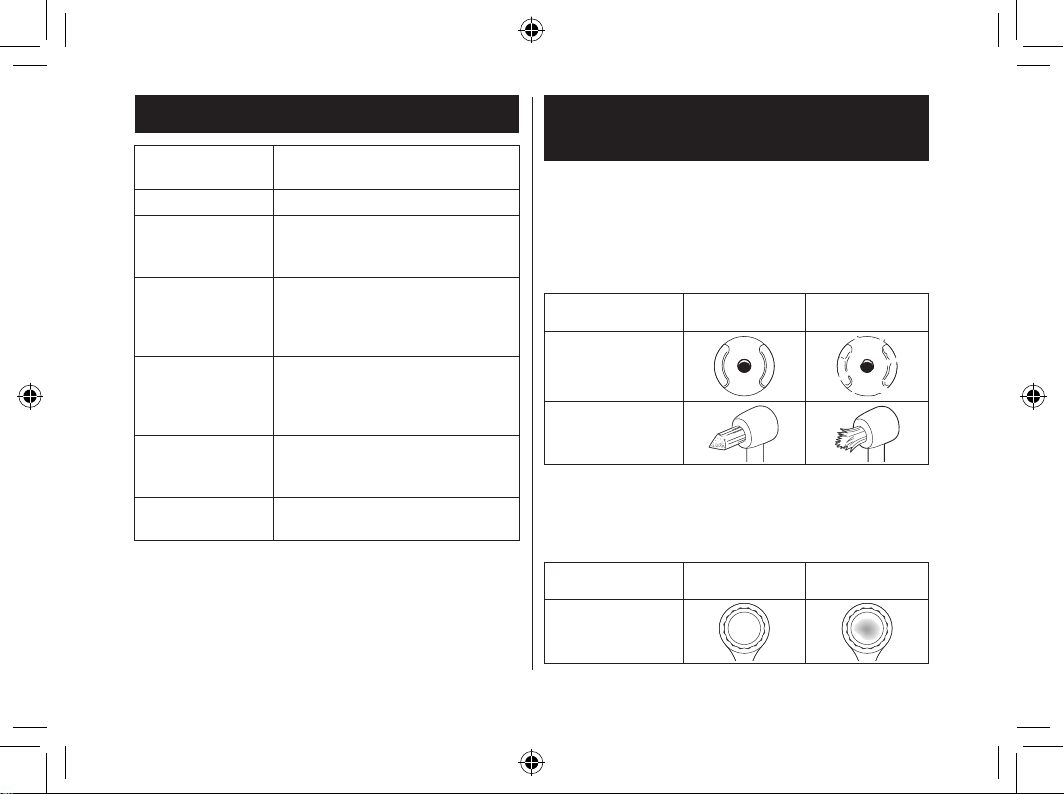
► Ultrasonic nozzle
•
The nozzle should be replaced once every 6 months or
so due to hygiene reasons, even if it is not deformed.
► Orthodontic nozzle
•
Replace the orthodontic nozzle in approx. 3 months. If the
brush bristles are bent out, replace it even within 3 months.
New nozzle (tip)
Deformed (worn)
nozzle (tip)
Ultrasonic nozzle
Orthodontic nozzle
► Tongue care nozzle
• Replace the tongue care nozzle in approx. 6 months.
• If the brush cloth is discoloured, replace it even within
6 months.
New nozzle
Discoloured
nozzle
Tongue care nozzle
EW-DJ67_UK.indb 20EW-DJ67_UK.indb 20 2024/02/16 16:38:292024/02/16 16:38:29
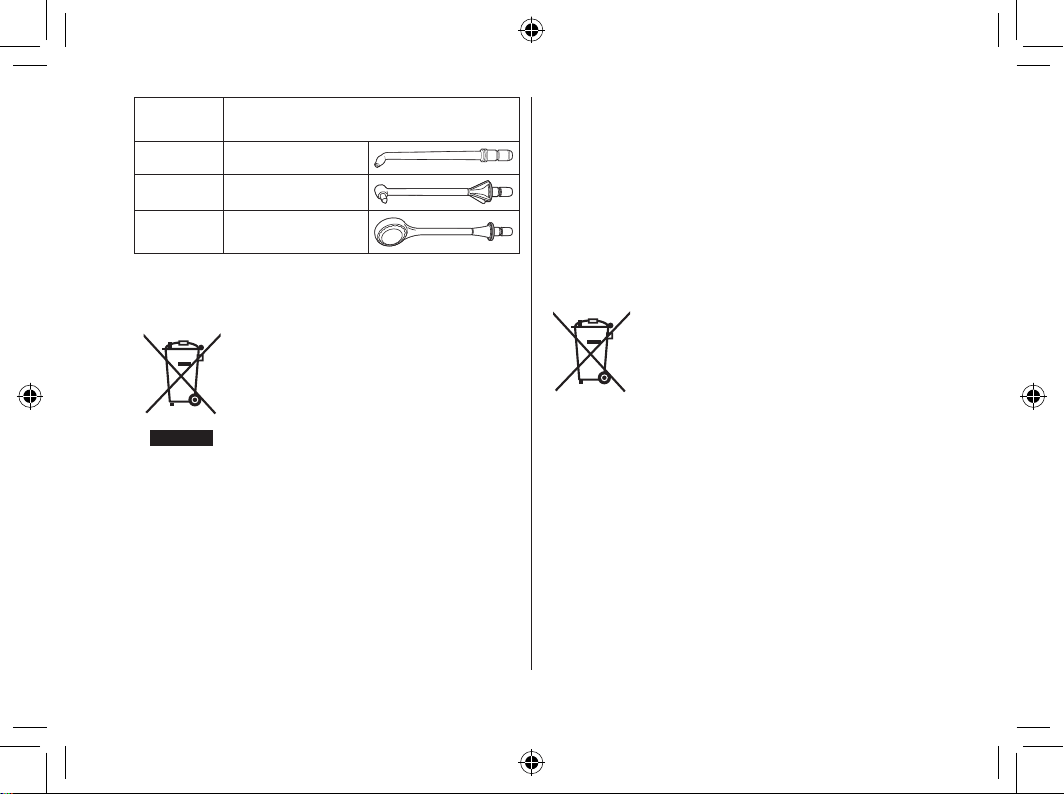
21
Part
number
Replacement Nozzle (×2)
WEW0986 Ultrasonic nozzle
WEW0984 Orthodontic nozzle
WEW0985
Tongue care
nozzle
Disposal of Old Equipment and Batteries
Only for European Union and countries with
recycling systems
These symbols on the products,
packaging, and/or accompanying
documents mean that used electrical
and electronic products and batteries
must not be mixed with general
household waste.
For proper treatment, recovery and
recycling of old products and batteries,
please take them to applicable
collection points in accordance with
your national legislation.
By disposing of them correctly, you will
help to save valuable resources and
prevent any potential negative eects
on human health and the environment.
For more information about collection
and recycling, please contact your
local authority.
Penalties may be applicable for
incorrect disposal of this waste, in
accordance with national legislation.
Note for the battery symbol
(bottom symbol)
This symbol might be used in
combination with a chemical symbol.
In this case it complies with the
requirement set by the Directive for the
chemical involved.
EW-DJ67_UK.indb 21EW-DJ67_UK.indb 21 2024/02/16 16:38:292024/02/16 16:38:29
22
MEMO
EW-DJ67_UK.indb 22EW-DJ67_UK.indb 22 2024/02/16 16:38:292024/02/16 16:38:29
23
MEMO
EW-DJ67_UK.indb 23EW-DJ67_UK.indb 23 2024/02/16 16:38:292024/02/16 16:38:29
SEWDJ6631103 Z0424-0