User
Manual
Please read this user manual carefully before
using the product, and keep it properly for
future reference.
(Content marked in red is important and
requires careful reading.)
AI Fluffy Pals
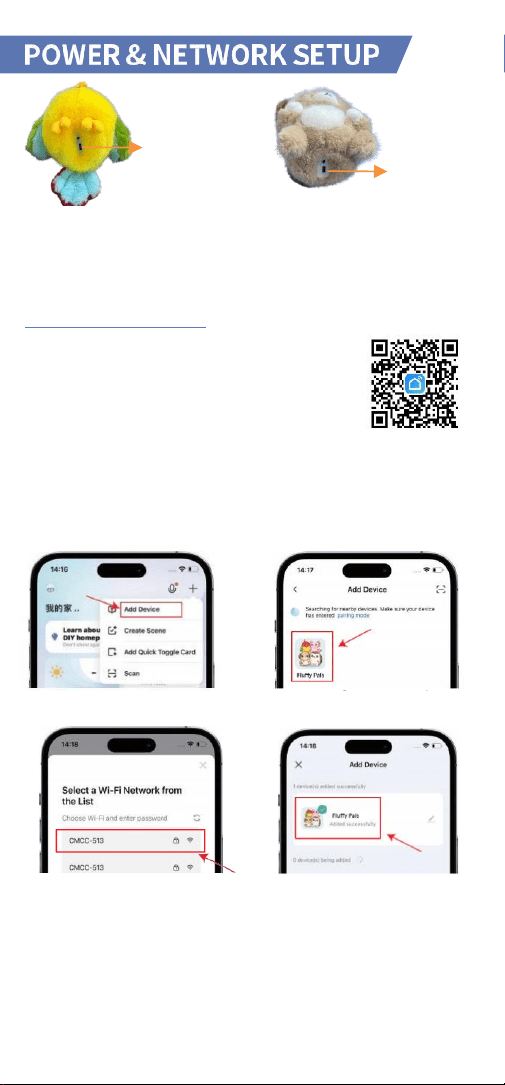
Power/Config. Key
Power on: Long press the back [Power/Config Key] for 3s. The eye lights up.
Power off: Long press the back [Power/Config Key] for 3s. The eye turns off.
Network configuration: Single-click the back [Power/Config Key] 3 times to
re-enter configuration mode.
APP DOWNLOAD & USAGE
1.
Scan the QR code or search "Smart life " in your
APP store to download the app.
2.
Enable WiFi on your phone and connect to a 2.4GHz
WiFi.
3.
Power on the device to start network configuration.
Ensure the Smartlife App is installed, then log in or register an account.
4.
Open the " Smartlife " App and tap
the "+" icon in the top-right corner of
the
homepage.
5.
Select "Add Device" and choose
your
product as prompted.
6.
Choose WiFi network, enter pass-
word to complete the network
configuration of the toy.
7.
Once added successfully, the
network configuration is complete.
The device will prompt: “Network
connection successfully. Let's chatting!”
Power/Config. Key
APP Usage & Device Updates
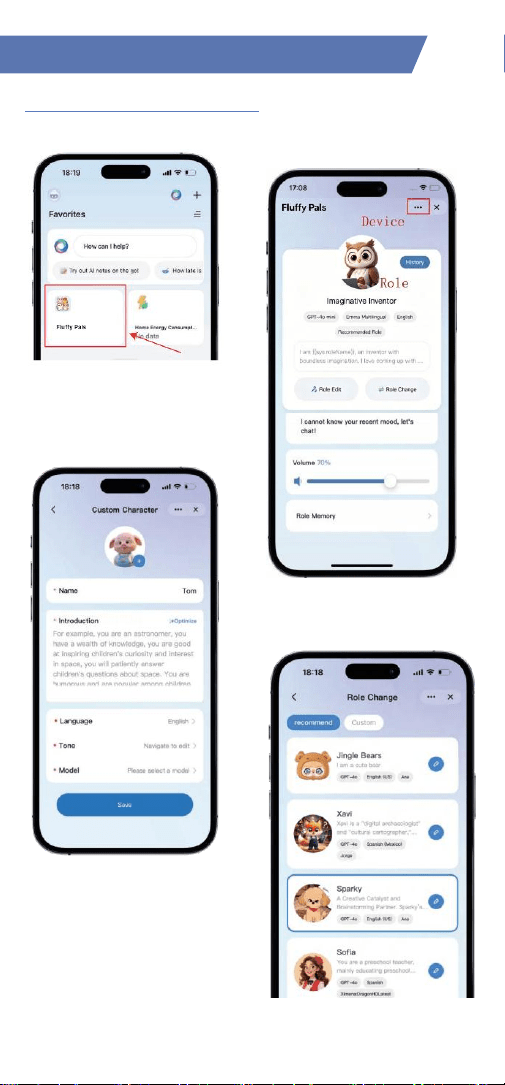
Role Switching & Basic Features
1.
Open the App and tap the online
device to enter edit mode.
2.
On
the edit page, adjust volume, check
battery, view chat history, switch roles,
etc.
3.
Ontheeditpage,tapRod Change.
Create a
custom role, save your changes, and the
device will switch to the new role.
4.
In the Role Change menu, you can
select a pre-set system role to change the
device's role.
Note: (Both default and custom roles
have
memory
and learning
capabilities,
and can create shared
memories with
users.)
Device
Settings
Role
Editing
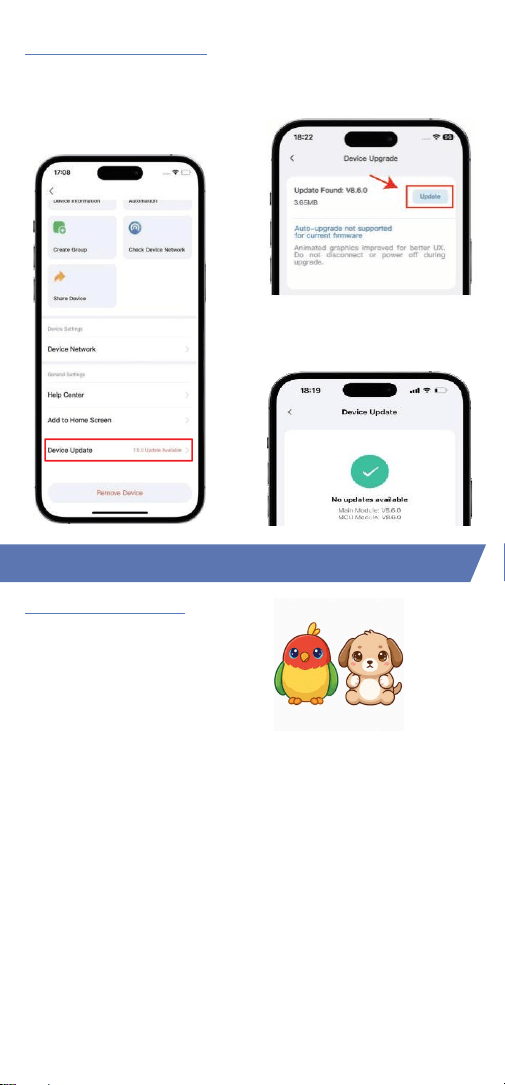
Device Firmware Update
1.
With the device online, go to the
device edit page. Tap the top-right
settings menu, scroll down, and tap
Device Update.
2.If an update is available, confirm
the version and update details, then
tap Update.
3. The update takes 3‒10 minutes.
Once finished, it will show
"You're on the latest version.
Component Functions
Switch Button Control:
Wake-up Conversation Mode
(Default)
Wake words: “Hey Tuya” / “Hi Tuya”
Single-click the right-hand button to
start/pause conversation.
Double-click the button to
enable/disable the petting function. (device prompt: “Enable Touch”/”Disable
touch”. Works in both wake-up and free conversation modes).
Free Conversation Mode
Triple-click the button to enter Free Conversation Mode (device prompt: “Free
to Chat”).
You can interrupt and start a new topic at any time.
In Free Conversation Mode, single-click the button to mute; click again to
unmute.
To return to Wake-up Mode, triple-click again.
Notes
Touch function is disabled during recording.
When exiting, the device stops recording; you need to wake it up or press the
button to resume conversation.
30 seconds
after conversation ends, use a wake word or press the button to
wake.
6 minutes
of inactivity triggers screen off; press any button to wake.
Component & Conversation Modes
Switch
Button
Charging & Storage
Petting Function: Auto-enabled on power-up.
Approach the module within 1 cm to trigger it:
the indicator light turns on, petting function
activates, and random audio plays.
Note: The petting function is disabled during
conversation.
Voice Command Control
In conversation mode, issue the corresponding voice commands to the device to
complete quick adjustments. The adjustment command will take effect with your
next utterance after the device receives it.
Function
Command Examples
Volume Adjustment
"Your voice is too loud / too soft."
"Set the volume to 80%."
Check Battery/Volume
"What's the current volume?"
"What's the current battery level?"
Switch Voice/Role
"Change your voice."
"Switch to the XX role."
Check Battery/Volume
"Can we talk in English?"
Adjust Speech Speed
"Set speech speed to 50."
"Set speech speed to 80."
End Conversation
"Shut up.", "Stop talking."
"I don't want to chat anymore."
Screen Control
"Turn off/on the screen."
"Open/close your eyes."
Play Story/Song
"Tell me a story."
"Play a song."
Pause Playback Music
"Stop music."
Emotion Trigger
"I'm so sad today." "I'm angry."
"I'm very happy."
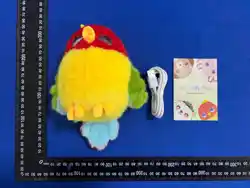
Package Contents
·
1 x Device
·
1 x User Manual
·
1 x Type-C Data Cable
Charging Requirements
1.Connect the charging cable to the device's charging port. Use a certified charger (rated 5V 2A
and CCC certified) to charge the device (charger sold separately).
2.A full charge takes approximately 6 hours (may vary slightly due to various factors).
3.During charging, the indicator light next to the Type-C port turns red to indicate charging in
progress, and green to indicate charging complete.
4.Do not charge continuously for more than 8 hours. Ensure supervision during charging;
disconnect before leaving unattended for extended periods.
Storage Precautions
Do not use, store, or charge the device in direct sunlight, near heat sources,
or in high-
temperatureenvironments.Fordailyuse,keepthedeviceina cool,dryplace.
Petting
location
Safety Precautions
1. Do not charge the device using a charger in wet locations (e.g., near sinks,
bathtubs, or showers).
2. Adult supervision and guidance are required when children use the device. Before
use, inspect the device for intact appearance, proper installation, and normal
operation. If any issues are found, contact customer service.
3. Dispose of packaging properly to prevent suffocation hazards for infants and
toddlers. Do not use the device if it or its accessories are damaged or broken. Do
not clean the device while it is powered on or charging.
4. Inspect the device regularly. If any abnormality is detected in the charging
process or cable, stop using it immediately to avoid risks of electric leakage, short
circuit, or fire.
Cleaning Method
1. This product is not waterproof. Do not wash or submerge it in water.
2. Do not use harsh cleaners containing salt water, hot water, bleach, strong acids,
or strong alkalis.
3. Power off the device before cleaning. Wipe the surface gently with a soft cloth
dampened with tap water and wrung dry. After cleaning, press out excess moisture
with a dry paper towel and let it air dry completely. Do not allow liquids to enter
ports or gaps.
4. For stubborn stains, contact official customer service for additional cleaning
guidelines.
Item
Value
Product Name
AI Fluffy Pals Smart Interactive Animal Toy
Product Model
V100-016-A-01
V100-017-A-01
Product Material
Electronic components,
plastic movement,100% polyester
Battery Capacity
1000mAh
Charging Input
5V-2A
Battery Voltage
3.7V
Maximum Power
3W
Battery Type
Lithium battery
Place of Origin
China
Applicable Standard
Safety & Cleaning
Product Information

Warranty Card
Warranty Information
1. This product is manufactured under strict quality control. Within one year
from the date of purchase and acceptance, free in-warranty repair services
are provided by the after-sales service center for non-human-induced
performance failures, upon verification and confirmation. 2.
Returns/exchanges only at the point of purchase.
3. Please keep this warranty card safe and avoid smudging or altering it.
4. For after-sales terms, contact the seller/point of purchase.
Exclusions from Warranty Coverage
1. Expiry of the warranty period.
2. Damage caused by human factors, such as physical damage or liquid ingress.
3. Unauthorized disassembly or modification (including rooting/flash
operations) by non-authorized personnel.
4. Damage caused by force majeure.
5. Resale of the product.
6. Use of the product in violation of any laws or our user agreement.
7. Malfunctions or damage resulting from issues unrelated to the product's
inherent design, manufacturing, or quality.
8. For additional exclusions, refer to the official after-sales warranty policy.
Special Battery Notice
1. Built-in 3.7‒4.2V battery (non-removable). Contact service if damaged.
2. The charger must be used by an adult or under adult supervision.
3. Regularly inspect the charger's cable, plug, casing, and other components.
Stop use immediately if any damage is found, and do not resume use until
repaired.
4. Power off the device and disconnect it from the charger before cleaning.
5. This product is sold without a power adapter. If using a power adapter,
purchase a CCC/CE-certified adapter that meets standard requirements for
use with this device.
User Information
User Name:
Address:
Email:
Phone Number :
Product Information
S/N (Serial Number):
Place of Purchase:
Date of Purchase:

Disclaimer
Thank you for purchasing this product.
The content herein concerns your safety, legal rights, and responsibilities. This
statement may be updated; please follow the product's official social media
channels for the latest information.
By using this product, you are deemed to have carefully read, understood,
acknowledged, and accepted all terms of this disclaimer and safety guidelines.
You agree to use the product only in appropriate environments and for
legitimate purposes, and assume full responsibility for all consequences of its
use. You consent to comply with these terms, including health and safety
precautions, and all related product policies and guidelines. Failure to do so,
or any misuse that results in property loss or personal injury, will absolve the
product manufacturer of all liability.
When using third-party products, services, or applications ("Third-Party
Content") through this device, you must adhere to the relevant policies, rules,
and agreements of the respective third party. In the event of any conflict
between such third-party terms and this disclaimer, the terms of this
disclaimer shall prevail. Under no circumstances shall this product be deemed
a licensor of Third-Party Content, nor shall it make any representations or
warranties regarding such content, or assume any liability for its features or
functionality.

FCC Warning Statement
Changes or modifications to this unit not expressly approved by the party
responsible for compliance could void the user’s authority to operate the
equipment. This equipment has been tested and found to comply with the limits for
a Class B digital device, pursuant to Part 15 of the FCC Rules. These limits are
designed to provide reasonable protection against harmful interference in a
residential installation. This equipment generates, uses and can radiate radio
frequency energy and, if not installed and used in accordance with the instructions,
may cause harmful interference to radio communications.
However, there is no guarantee that interference will not occur in a particular
installation. If this equipment does cause harmful interference to radio or television
reception, which can be determined by turning the equipment off and on, the user
is encouraged to try to correct the interference by one or more of the following
measures:
- Reorient or relocate the receiving antenna.
- Increase the separation between the equipment and receiver.
- Connect the equipment into an outlet on a circuit different from that to which the
receiver is connected.
- Consult the dealer or an experienced radio/TV technician for help.
This device complies with Part 15 of the FCC Rules. Operation is subject to the
following two conditions: (1) this device may not cause harmful interference, and (2)
this device must accept any interference received, including interference that may
cause undesired operation.
FCC Radiation Exposure Statement
The device has been evaluated to meet general RF exposure requirement.
The device can be used in portable exposure condition without restriction.

ISED Warning
This device contains licence-exempt transmitter(s)/receiver(s) that comply with
Innovation, Science and Economic Development Canada’s licence-exempt RSS(s).
Operation is subject to the following two conditions:
1.This device may not cause interference.
2. This device must accept any interference, including interference that may cause
undesired operation of the device.
Under Innovation, Science and Economic Development Canada regulations, this
radio transmitter may only operate using an antenna of a type and maximum (or
lesser) gain approved for the transmitter by Innovation, Science and Economic
Development Canada. To reduce potential radio interference to other users, the
antenna type and its gain should be so chosen that the equivalent isotropically
radiated power (e.i.r.p.) is not more than that necessary for successful
communication.
This device complies with Canadian ICES-003 and RSS-GEN and RSS-247.
Radiation Exposure: This equipment complies with Canada radiation exposure limits
set forth for an uncontrolled environment.
ISED Radiation Exposure Statement: The device has been evaluated to meet general
RF exposure requirement. The device can be used in portable exposure condition
without restriction.
Avertissement ISED
Cet appareil contient un émetteur/récepteur exempté de licence qui est conforme
au RSS exempté de licence d'Innovation, Sciences et Développement économique
Canada. Les opérations sont soumises aux deux conditions suivantes:
1.Cet appareil ne peut pas causer d’interférences.
2. Cet appareil doit accepter toute interférence, y compris les interférences qui
peuvent causer un fonctionnement indésirable de l
’
appareil.
En vertu des règlements d’innovation, sciences et développement économique
Canada, cet émetteur radio ne peut être exploité qu’à l’aide d’une antenne d’
un type et d
’
un gain maximal (ou inférieur) approuvés pour l
’
émetteur par
Industrie Canada. Pour réduire le brouillage radio potentiel pour d
’
autres
utilisateurs, le type d
’
antenne et son gain devraient être choisis de manière à ce
que la puissance isotrope rayonnée équivalente (p.i.r.e.) ne soit pas supérieure à
celle nécessaire pour une communication réussie.
Cet appareil est conforme aux ICES-003 et RSS-GEN et RSS-247 du Canada.
Exposition au rayonnement: Cet équipement est conforme aux limites d
’
exposition au rayonnement du Canada établies pour un environnement non
contrôlé.
Déclaration d'exposition aux rayonnements ISED: L'appareil a été évalué pour
répondre aux exigences générales d'exposition aux RF. L'appareil peut être utilisé
sans restriction dans des conditions d'exposition portables.
PMN: AI Fluffy Pals Smart Interactive Animal Toy
IC: 36034-V100016
HVIN: V100-016-A-01 HVIN: V100-017-A-01