
Page 1
MeeXH COLLAR MAX
User Manual
1. Product Overview
The MeeXH COLLAR MAX is a state-of-the-art smart GPS/GNSS collar engineered to help enhance
pet safety and provide real-time monitoring for pet owners. Designed to provide a portable,
customizable alternative to traditional wired fences, this collar offers virtual boundaries that adapt to
diverse environments, from urban apartments to rural properties.
Leveraging advanced GPS/GNSS technology, the collar delivers location tracking, timely alerts, and
humane feedback systems (sound, voice prompts, and vibration) to guide pets while supporting training.
Suitable for daily use, outdoor adventures, and behavior training, this collar combines innovation,
convenience, and pet-centric design for modern pet care.
Important: This product is an aid to training and supervision. It is not a physical barrier and does
not guarantee that your pet will remain within a designated area or prevent loss, injury, or property
damage. You must supervise your pet and follow all applicable local laws at all times.
Note: The collar provides feedback using sound, voice prompts, and vibration only. It does not deliver
electric shocks or static corrections.
2. Important Safety Information & Limitations of Use
Read all safety instructions before use. Failure to follow these instructions may result in injury to your
pet, property damage, or reduced product performance.
2.1 Limitations of Use
• This product is intended as an aid for pet training, location tracking, and virtual boundaries.
• It does not guarantee the prevention of pet loss, injury, escape, or accidents.
• GNSS location accuracy can be affected by buildings, trees, terrain, weather, indoor
environments, and limited network coverage. Location information may sometimes be
delayed, unavailable, or inaccurate.
• The collar is not a physical fence, gate, or barrier and may not be suitable for all pets,
properties, or local regulations.
• This product is not recommended for aggressive dogs or pets with a history of repeated
escaping or attacking. Consult a veterinarian or professional trainer if you are unsure.
2.2 Pet Health & Behavior
• Consult your veterinarian before use if your pet has any medical conditions (such as heart
disease, seizures, or skin sensitivities) or if your pet is very young, elderly, pregnant, or
recovering from surgery.
• Always introduce the collar and virtual fences gradually and use positive reinforcement.
• Misuse of any training tool may cause stress or anxiety in pets.
• If your pet shows signs of extreme or ongoing stress (trembling, excessive barking,
avoidance behavior, refusal to move, persistent scratching at the collar), stop using the collar
and consult a veterinarian or professional trainer.
2.3 Fitting and Skin Care

Page 2
• Adjust the collar so it fits comfortably on your pet’s neck, leaving space for 2–3 fingers
between the collar and your pet’s neck to avoid choking or skin irritation. Check the fit
regularly, especially for growing puppies.
• Remove the collar daily to inspect your pet’s neck for redness, irritation, sores, or hair loss.
Clean both the collar and your pet’s neck area regularly to help prevent bacterial growth.
• Discontinue use and consult a veterinarian if skin irritation persists.
2.4 Supervision and General Safety
• Always supervise your pet when using the collar for the first time or in new environments.
• Do not rely solely on the collar to prevent accidents—maintain visual contact with your pet
when off-leash whenever possible.
• The collar is not a substitute for proper pet supervision. In case of an emergency (e.g., your
pet escapes and is in danger), contact local authorities or animal services immediately.
• Follow all local leash laws and pet regulations even when virtual fences are active.
2.5 Water, Weather, and Environment
• The collar is designed with an IP68 waterproof rating for typical outdoor use.
• While the collar is waterproof, do not leave the collar on your pet during extended submersion
(e.g., more than 30 minutes) unless specifically specified in the latest product specifications.
• After saltwater exposure, rinse the collar with fresh water and dry it thoroughly.
• Avoid using the collar in extreme weather (e.g., severe storms, extreme heat or cold), as it
may affect performance or damage the device.
2.6 Children and Misuse
• This product is intended to be installed, configured, and operated by adults.
• Children should not install, operate, or charge the collar without adult supervision.
• The collar and its accessories (e.g., chargers, cables, beacons) are not toys. Keep them out
of reach of children to prevent choking hazards, ingestion, or electric shock.
2.7 Battery, Charging, and Disposal
• Use only the included charging cable or manufacturer-approved accessories.
• Do not attempt to open, disassemble, or replace the internal battery. There are no user-
serviceable parts inside.
• Do not charge the collar near flammable materials or in extreme temperatures (below 0 °C /
32 °F or above 45 °C / 113 °F).
• Do not charge the device if it is wet. Ensure the charging port and contacts are dry before
charging.
• Charge the device on a dry, flat, non-flammable surface, away from bedding, paper, or other
combustible materials.
• Dispose of the collar’s battery in accordance with local regulations. Do not incinerate or
puncture the battery as it may leak or explode.
• If the device overheats, swells, leaks, emits an unusual smell, or behaves abnormally, stop
using it immediately and contact MeeXH customer support.
3. Product Features

Page 3
Virtual Fencing: Create customized virtual e-fences worldwide via the iPetLife mobile app. Fence
information is stored in the collar for seamless offline use in many areas without cellular coverage.
Real-Time Tracking & Alerts: Live GPS tracking provides continuous location updates for pets, and
instant notifications for fence breaches and selected events (subject to network coverage and active
subscription).
Humane Feedback & Training: Customized feedback modes (sounds, voice prompts, and vibrations)
help pets recognize boundaries and support training. No electric shocks or static corrections are used.
Indoor & Outdoor Versatility: Outdoor GPS/GNSS coverage and indoor functionality via Wi-Fi
scanning help reduce GPS interference and false alerts.
Convenience & Durability: IP68 waterproof design, a user-friendly iPetLife app for iOS & Android,
and a long-lasting rechargeable battery with fast charging capabilities.
Note: Performance of virtual fences and tracking functions depends on GNSS reception, device
configuration, network coverage, and the accuracy of map data.
4. Specifications
Name
MeeXH COLLAR MAX
Model
MXH001
Positioning
Advanced GPS/GNSS system supports GPS (US), GLONASS
(Russia), BDS (China), and Galileo (EU)
Collar Sizing
Adjustable, fits most dogs (neck size: 10–26 inches / 25–66 cm)
SIM
Embedded eSIM
Waterproof Rating
IP68
Feedback Types
Sounds, voice prompts, and vibrations
App Compatibility
iOS + Android (App Store / Google Play)
Battery Capacity
1500 mAh
Charging Time
Fully charged in approximately 2 hours
Charging Input
5 V ⎯ 1 A
Specifications are subject to change without notice. For the latest specifications, visit www.meexh.com.
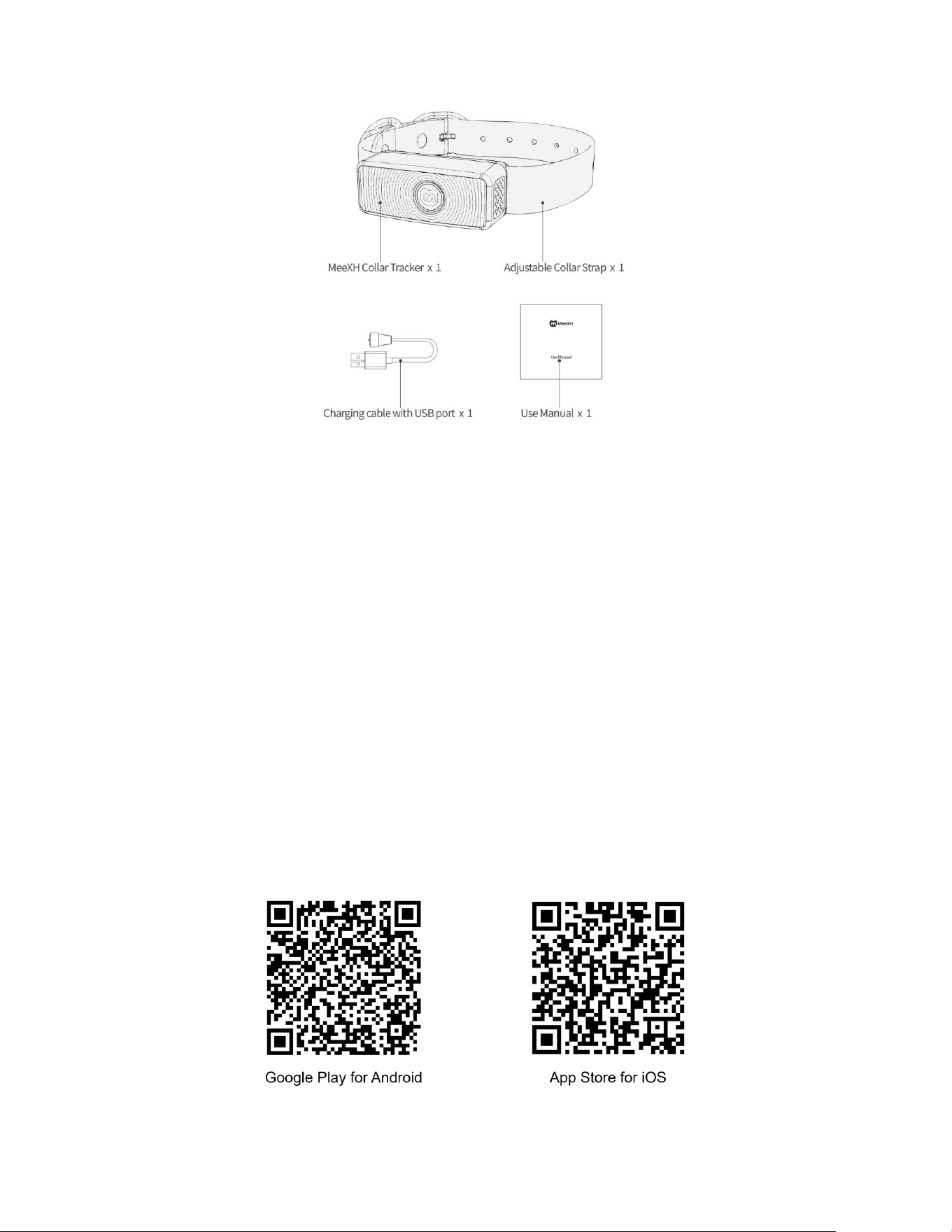
5. Package Contents
• 1 × MeeXH Collar MAX tracker
• 1 × Adjustable collar strap
• 1 × Charging cable with USB port
• 1 × User Manual
Page 4
If any item is missing or damaged, contact MeeXH customer support before use.
6. Using Introduction
6.1 Preparation
Before using the collar, ensure you have:
• A compatible smartphone (iOS / Android) with the latest OS version.
• An active internet connection (Wi-Fi / cellular) for app download and account setup.
• A fully charged collar (see battery and charging instructions).
• Your pet’s basic information (name, breed, weight, neck size, birthday, gender) for profile
creation.
Important: Real-time GPS tracking and cellular connectivity require an active iPetLife subscription
plan and sufficient network coverage.
6.2 Step 1: Download the App
1. Download the “iPetLife” app from the App Store (iOS) or Google Play Store (Android).
2. You may scan the QR code on the packaging or in this manual to go directly to the app
download page.

Page 5
6.3 Step 2: Create an Account
1. Open the app and tap “Sign Up” to create a new account.
2. Enter the required information (name, email address, password).
3. Verify your email address with the verification code sent to your inbox.
4. Subscribe to the required plan to activate full connectivity features.
By creating an account and using the product, you agree to the applicable MeeXH Terms of Service
and Privacy Policy.
6.4 Step 3: Add Pet Profile
1. Navigate to the “My Pet” menu in the app.
2. Tap “Add Pet” and enter your pet’s details (name, breed, birthday, gender, neck size, weight).
3. Upload photos of your pet to complete the profile.
6.5 Step 4: Pair the Collar
1. Ensure the collar is connected to the charging cable and charging.
2. Keep the collar close to your phone.
3. Follow in-app prompts to pair via Bluetooth.
4. The app will guide you through firmware updates if needed. Do not disconnect power or turn
off the device during updates.
6.6 Step 5: Set Up Virtual Fences
1. Navigate to the “My Fence” menu in the app.
2. Search for an address or select a location on the map. The app may auto-generate a fence
based on property lines.
3. Edit the fence (adjust boundaries, rename, choose feedback behavior) and tap “Save.”
4. Fence coordinates are automatically downloaded to the collar.
Tip: Always test virtual fences with your pet on a leash first to verify boundary placement and
ensure your pet understands the feedback.
6.7 Step 6: Turn On the Collar
1. Press and hold the power button for about 3 seconds until the LED indicator lights up solid or
blinks to indicate it is powered on.
2. Wait for the collar to connect to the cellular network (LED will blink blue). The iPetLife app will
display the collar status as “Online” once connected.
6.8 Step 7: Fit the Collar on Your Pet
1. Measure your pet’s neck and adjust the collar strap to ensure a comfortable fit (leave space
for 2–3 fingers between the collar and your pet’s neck).
2. Position the device so it is stable and unobstructed on the neck.
3. Recheck the fit frequently, especially for growing puppies or pets whose weight changes.
6.9 Step 8: Outdoor Use & Daily Care
1. Confirm the collar is fully charged and turned on.
2. Verify that all virtual fences you want to use are enabled in the app.
3. Check the app for real-time network (cellular) and GPS signal strength.

Page 6
4. Let your pet explore while you monitor their location and boundary status in the app.
5. When returning home, clean the collar with a damp cloth to remove dirt, debris, or salt, and
recharge the collar to prepare for your next use.
7. Warranty Terms
7.1 Warranty Coverage
MeeXH provides a 1-Year Limited Warranty for manufacturing defects under normal use.
The warranty covers:
• Defects in materials or workmanship under normal use.
• Free repair or replacement of defective parts/components, at MeeXH’s discretion.
• Warranty service requires valid proof of purchase (receipt/invoice).
7.2 Warranty Claims
1. Contact customer support (support@meexh.com) to initiate your 1-Year Limited Warranty
claim for manufacturing defects.
2. Provide product details (serial number, purchase date, defect description) and photos/videos
of the issue.
3. Follow instructions for returning the product (a prepaid label may be provided for eligible
claims).
4. Repairs/replacements are typically processed within 7–10 business days of receiving the
defective product, subject to parts availability and regional conditions.
7.3 Non-Warranty Items (Exclusions)
The following issues are not covered under warranty:
• Damage caused by improper use, abuse, neglect, or accidents (e.g., dropping, chewing,
exposure to chemicals).
• Normal wear and tear (e.g., strap fading, minor scratches on the device).
• Damage from unauthorized modifications, repairs, or tampering with the collar.
• Battery damage or depletion due to improper charging (e.g., using non-approved chargers,
charging in extreme temperatures).
• Issues caused by failure to follow setup/usage instructions in this manual.
• Products purchased from unauthorized sellers or without valid proof of purchase.
• Activation fees, subscription fees, or data charges.
• Loss of pets, property damage, or any indirect or consequential damages.
Some states do not allow limitations on how long an implied warranty lasts or the exclusion or limitation
of incidental or consequential damages, so these limitations may not apply to you. You may have other
rights which vary from state to state.
8. Subscription & Connectivity
Real-time GPS tracking and cellular connectivity require an active iPetLife subscription plan.
Without an active subscription, the collar operates in an offline mode:
• Virtual fence data already stored in the collar remains active;

Page 7
• Live tracking, live alerts, and other connected features will be unavailable.
Subscription plans are available in the iPetLife app. Pricing and plan details are subject to change; visit
www.meexh.com/plans for the latest information.
Activation fees, subscription fees, and data charges are not covered under the product warranty.
9. Privacy & Data
Your pet’s location data and certain account/device information are collected, processed, and stored
in accordance with MeeXH’s Privacy Policy.
• MeeXH uses this data to provide, maintain, and improve tracking, alerts, and other smart
features.
• MeeXH does not sell your location data to third parties.
• You may view, manage, or delete your data at any time within the iPetLife app, subject to
applicable law.
For full details, visit www.meexh.com/privacy or contact support@meexh.com.
California residents may exercise rights under the California Consumer Privacy Act (CCPA) by visiting
www.meexh.com/privacy and following the instructions provided.
10. Regulatory Information
10.1 FCC Requirement
Any changes or modifications not expressly approved by the party responsible for compliance could
void the user’s authority to operate the equipment.
This device complies with Part 15 of the FCC Rules. Operation is subject to the following two conditions:
1. This device may not cause harmful interference, and
2. This device must accept any interference received, including interference that may cause
undesired operation.
Note: This equipment has been tested and found to comply with the limits for a Class B digital device,
pursuant to Part 15 of the FCC Rules. These limits are designed to provide reasonable protection
against harmful interference in a residential installation. This equipment generates, uses, and can
radiate radio frequency energy, and if not installed and used in accordance with the instructions, may
cause harmful interference to radio communications. However, there is no guarantee that interference
will not occur in a particular installation. If this equipment does cause harmful interference to radio or
television reception, which can be determined by turning the equipment off and on, the user is
encouraged to try to correct the interference by one or more of the following measures:
– Reorient or relocate the receiving antenna.
– Increase the separation between the equipment and receiver.
– Connect the equipment into an outlet on a circuit different from that to which the receiver is connected.
– Consult the dealer or an experienced radio/TV technician for help.
10.2 RF Exposure Information
This device complies with FCC radiation exposure limits set forth for an uncontrolled environment. This
transmitter must not be co-located or operated in conjunction with any other antenna or transmitter. To
maintain compliance with FCC RF exposure guidelines, use this product only as described in this
manual. The collar is designed to be worn by pets only. Do not place the collar in direct contact with

Page 8
the human body for extended periods.
This equipment should be installed and operated with minimum distance 20cm between the radiator
and your body.
11. Contact & Support
Email: support@meexh.com
Website: www.meexh.com