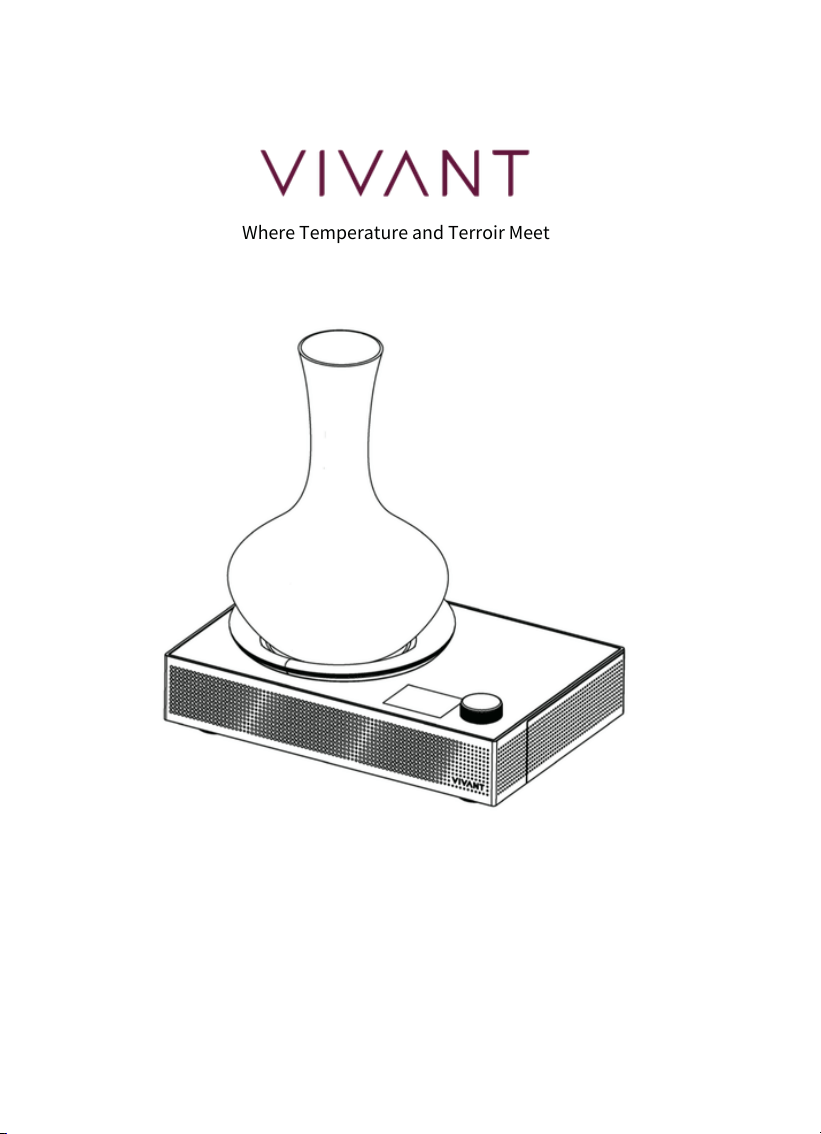
Titan Portable Electronic Decanter Chiller
User Guide
Where Temperature and Terroir Meet

Contents
In the Box
I
Device Overview
II
Battery
III
Charging
IV
Reading the Screen
How to Use · Manual
With VIVANT Wine App -
AI Sommelier
Cleaning & Errors
Important Notes
Specifications & Warranty
FCC Warning
V
VI
VII
VIII
IX
X
XI
03
04
05
06
07
08
10
12
13
14
15
03
In the Box
Titan Main Unit × 1
01
Customised Decanter (750ml) × 1
02
Power Adapter & Charging Cable × 1
03
Rechargeable Lithium-ion Battery × 1
04
Battery Charging Dock × 1
International Warranty Card × 1
User Guide QR Code × 1
05
06
07
04
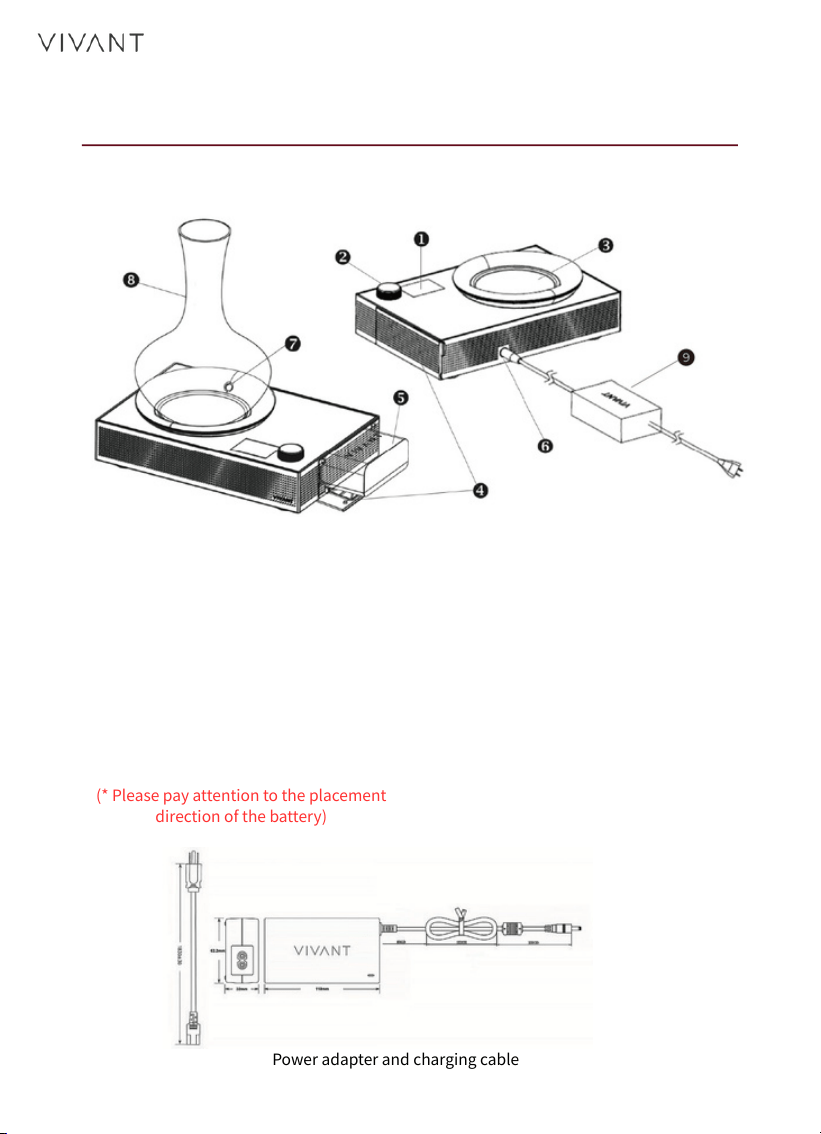
Device Overview
1. LED Display Control Panel
2. Control Knob
3. Cooling Plate
4. Battery Compartment Cover
5. Rechargeable Lithium Battery
6. Charging Socket
7. Infrared Temperature Sensor
8. Customised Decanter
9. Power adapter and charging
cable
(* Please pay attention to the placement
direction of the battery)
Power adapter and charging cable
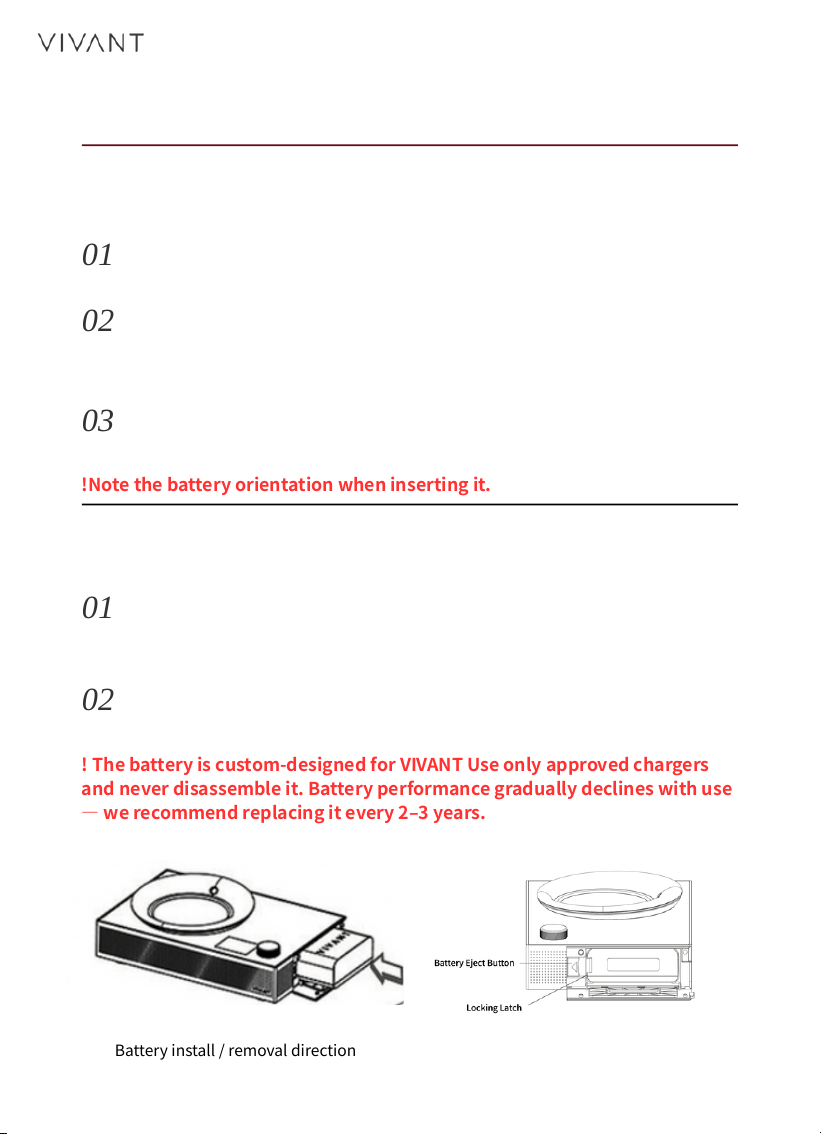
Battery install / removal direction
05
Battery
Install the Battery
Remove the Battery
Open the cover- Open the battery cover on the right side of
the unit.
Press eject- Press the eject tab (marked ◀) on the left side
of the battery compartment, and the battery will pop out for
removal.
Insert the battery- With the VIVANT logo facing up, push it
in clear of the latch until you hear a click — it is now locked
in place.
Replace- Remove the battery and insert a fully charged one,
or connect the power cable, to keep using the device.
Close the cover- Once the battery is seated, close the
battery cover.
01
01
02
02
03
!Note the battery orientation when inserting it.
! The battery is custom-designed for VIVANT Use only approved chargers
and never disassemble it. Battery performance gradually declines with use
— we recommend replacing it every 2–3 years.
06
Charging
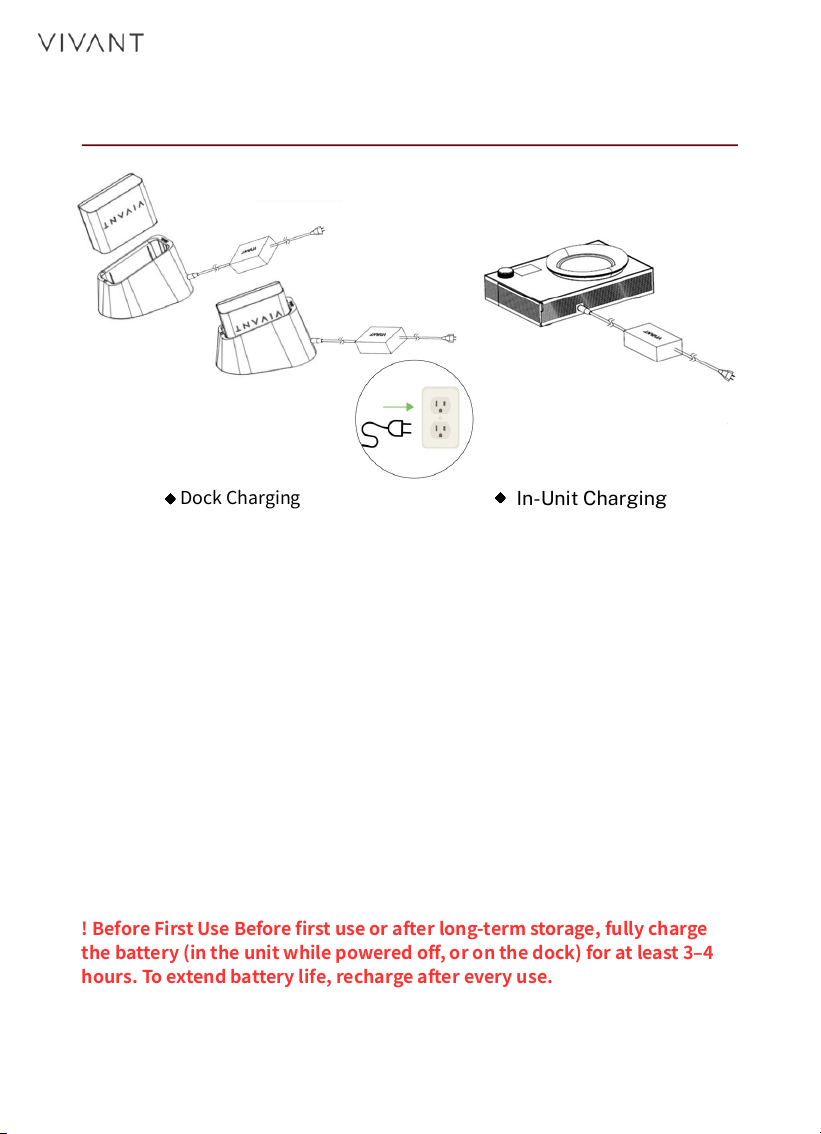
Dock Charging
In-Unit Charging
Dock Charging
In-Unit Charging
Place the lithium-ion battery on the charging dock, connect the
power adapter and cable, then plug into a power outlet to begin
charging. When the indicator turns from red to green, charging is
complete.
Insert the battery into the main unit, then connect the power
adapter to the socket on the unit. The device must stay powered
off while charging — the display shows the charging percentage in
real time.
! Before First Use Before first use or after long-term storage, fully charge
the battery (in the unit while powered off, or on the dock) for at least 3–4
hours. To extend battery life, recharge after every use.
Reading the Screen
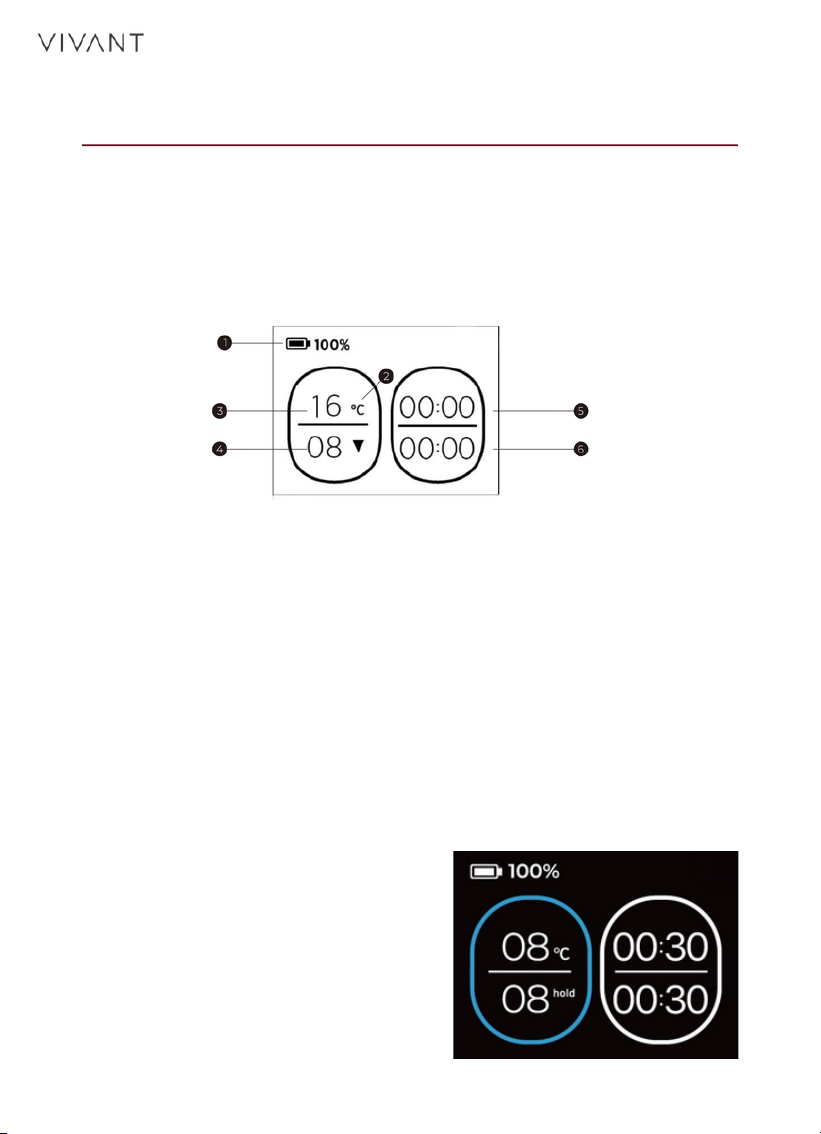
Home Screen
After power-on, the welcome screen appears for about 3 seconds,
then the home screen opens — cooling resumes at your last set
temperature. The screen shows information in two areas: temperature
on the left, decanting timer (hours : minutes) on the right.
Top status bar: battery percentage.
Left area · Temperature: the top shows the live IR-detected
temperature; the bottom (marked ▼) shows your set target
temperature.
Right area · Timer: the top shows elapsed running / decanting
time; the bottom shows your set target decanting time.
1. Battery life
2. Switch °C/°F
3. Current Temperature
4. Target Temperature
5. Operation/Decanting Timer
6. Target Decanting Time
07
Target Reached
When the live temperature reaches
the target: the ring around the
temperature turns from white to
blue, and the ▼ marker changes to
“hold”. If the temperature drifts
due to a change in surroundings,
cooling resumes automatically (the
▼ reappears). When the decanting
timer ends, a chime sounds.

08
How to Use · Manual
How the Device Works
Short press the knob: move to the next item
Rotate the knob: adjust the setting
No action for 5 seconds: automatically saves and returns to
the home screen
Clockwise: raise the temperature
Counter-clockwise: lower the temperature
Range: 8–20°C (46–68°F) *The device remembers the last set
temperature
1 Prepare the Wine
Take the wine from your wine cellar or refrigerator, pour it into the
customised decanter, and place it in the centre of the Titan cooling
plate.
2 Power On
Press and hold the control knob for 2 seconds. The welcome
screen appears for about 3 seconds, then the home screen opens.
3 Set the Temperature
First short press – when the temperature value at the lower left
blinks, rotate the knob to adjust:
Clockwise: °C
Counterclockwise: °F
4 Set the temperature unit
Second short press – when the unit blinks, rotate the knob:
*If you only need to set the temperature, simply leave it after
setting the temperature; there is no need to complete every item.
09
Maintaining the set temperature
Running the decanting timer
When the set temperature is reached, the outer ring turns from
white to blue.
A chime sounds when the timer completes (the audio can be
turned off manually).
5 Set the decanting time
Third short press - when the time at the lower right blinks, rotate
the knob to choose the decanting time:
6 Confirm & Start
Fourth short press — Titan starts:
! Power On & Off Hold the knob for 2 seconds to power on or off; the logo
appears each time. After the screen goes dark, please wait until the device has
fully stopped before removing the battery or unplugging the power cable.
Each increment: 10 minutes (maximum: 8 hours)
10
With VIVANT Wine App - AI Sommelier
Your personal sommelier. Scan a label or ask the AI Sommelier to
instantly get the grape, region, and vintage, along with the
recommended temperature and decanting time — then send it to
TITAN with one tap.
Two ways to get a recommendation
A. Scan the label
Scan the wine label in the app to automatically identify the wine and
display the recommended temperature and decanting time.
B. Ask the AI Sommelier
Ask in chat, and the AI Sommelier provides an introduction to the wine and
serving recommendations.
(Mobile app download required)
How to use
1 Scan & get a recommendation— Download and open the
VIVANT Wine App, then scan the label or ask the AI Sommelier to
get the recommended temperature and decanting time.
2 Pour the wine — Take the wine from your cellar or refrigerator
and pour it into the customised decanter on the cooling plate.
3 Power on — Press and hold the control knob for 2 seconds to
start Titan.
4 Connect via Bluetooth — Connect to the device via Bluetooth in
the VIVANT Wine App.
iOS
Android
How to use
5 Send settings to the device— Tap “Send to Device” to sync
the recommended temperature and decanting time to Titan with
one tap.
6 Let Titan take over — Titan holds a steady temperature
throughout. When the set temperature is reached, the temperature
ring on Titan’s screen turns from white to blue; when the
decanting time is reached, it notifies you with a gentle chime. The
chime can be turned off in the app or on the device.
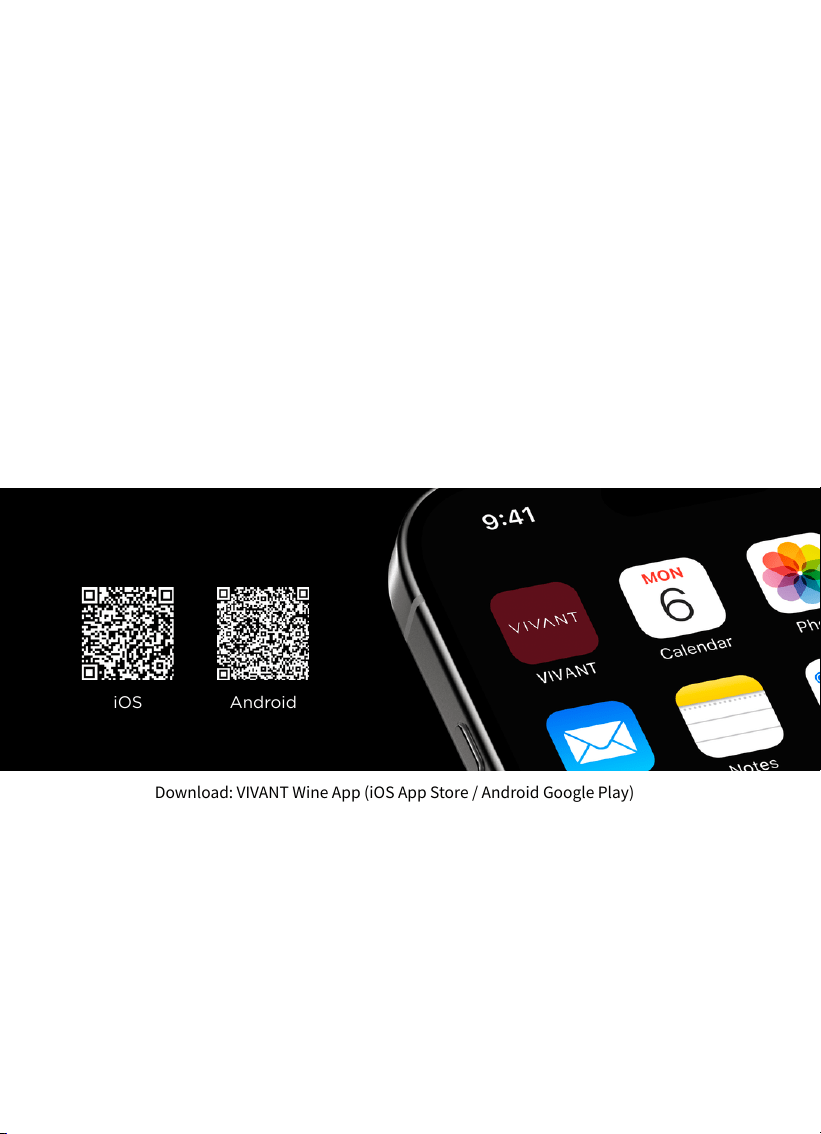
Download: VIVANT Wine App (iOS App Store / Android Google Play)
11
12
Cleaning & Errors
Cleaning & Care
Main unit: Wipe with a slightly damp soft cloth; never immerse it
in water or use harsh cleaners. Condensation may form on the
cooling plate during chilling, so wipe it dry with a soft cloth after
use to keep the surface dry.
Customised decanter:
• Rinse it as soon as possible after each use to keep the glass clear.
• If you cannot wash it right away, rinse it with water first, then fill it
with warm water and let it stand overnight to prevent wine residue
from drying and becoming hard to remove.
• Use a mild, unscented dishwashing liquid with a soft sponge or soft-
bristled brush to gently clean the inside and outside.
• Rinse thoroughly with clean water, making sure no detergent
remains.
• Avoid sudden hot-cold temperature swings in the wash water,
which can crack the decanter.
• Air-dry completely, or wipe with a clean lint-free cloth, to avoid
water marks and odours.
• Never use steel wool, abrasive cleaners, or high-temperature
steam, as these can scratch the glass.
• Hand-washing is recommended. If you use a dishwasher, select a
glassware-specific programme with a low-temperature, short cycle
and no heated-drying mode.
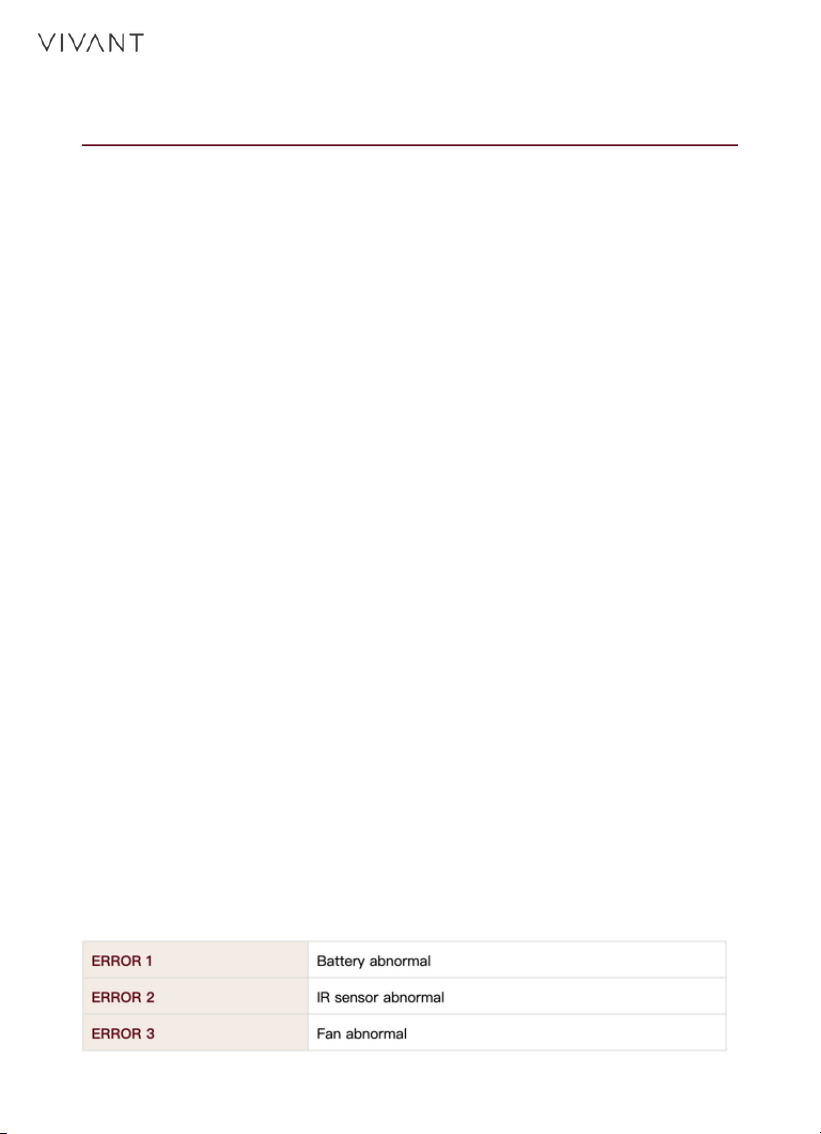
Error Codes
If an error code appears, power the device off and on to reset. If
the error persists, scan the QR code to refer to the troubleshooting
steps or contact VIVANT Support.

13
Important Notes
! First Use & Long-Term Storage Before first use or after a long
period of inactivity, fully charge the battery for 3–4 hours.
! Battery Care Recharge after every use to help extend battery life.
! Heat Dissipation Leave sufficient space around the device during
operation, and do not block the side vents.
! Decanter Placement Use the customised decanter and make
sure its base rests flush against the cooling plate for best cooling.
! Approved Accessories Only The battery is custom-designed for
VIVANT — use only approved chargers and never disassemble it.
! Lithium Battery Safety Avoid dropping, impact, or applying
heavy pressure to the lithium battery. If the battery has been
dropped or shows any signs of deformation, swelling, leakage,
unusual odor, or other abnormalities, stop using it immediately.
! Auto Power-Off For safety, Titan shuts down automatically 8
hours after the last operation.
! Avoid High Heat Do not place the device in high-temperature
environments such as dishwashers, microwaves, or ovens.
! Adult Supervision Intended for those with sufficient knowledge
and experience; keep an eye on children to prevent accidental
operation.
14
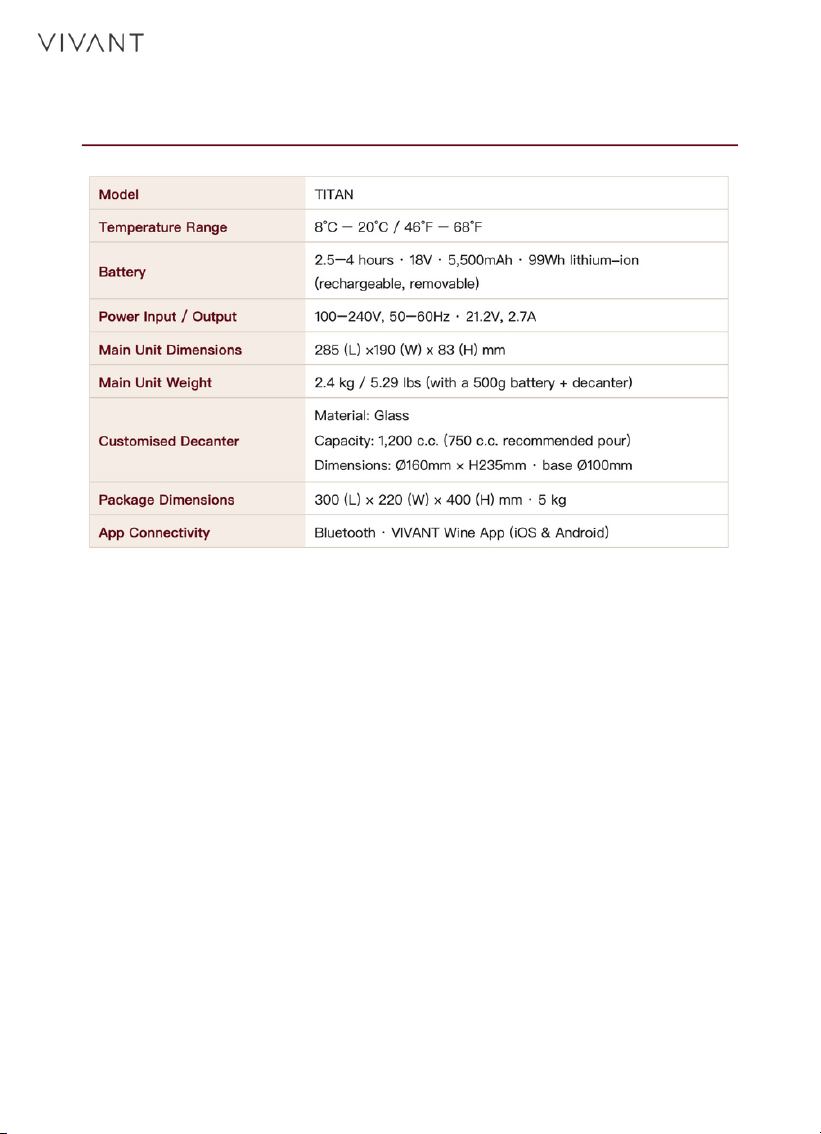
Specifications & Warranty
Warranty
24 months on the main unit, 12 months on the battery — against
defects in materials and workmanship. Register your product
online for a +12-month extended warranty. Accessories (decanter,
cables, manuals) are not covered.

FCC Warning
This device complies with Part 15 of the FCC Rules. Operation is
subject to the following two conditions: (1) this device may not
cause harmful interference, and (2) this device must accept any
interference received, including interference that may cause
undesired operation.
Any changes or modifications not expressly approved by the party
responsible for compliance could void the user’s authority to
operate the equipment.
NOTE: This equipment has been tested and found to comply with
the limits for a Class B digital device, pursuant to Part 15 of the
FCC Rules. These limits are designed to provide reasonable
protection against harmful interference in a residential
installation. This equipment generates, uses and can radiate radio
frequency energy and, if not installed and used in accordance with
the instructions, may cause harmful interference to radio
communications.
However, there is no guarantee that interference will not occur in a
particular installation. If this equipment does cause harmful
interference to radio or television reception, which can be
determined by turning the equipment off and on, the user is
encouraged to try to correct the interference by one or more of the
following measures:
— Reorient or relocate the receiving antenna.
— Increase the separation between the equipment and receiver.
— Connect the equipment into an outlet on a circuit different from
that to which the receiver is connected.
— Consult the dealer or an experienced radio / TV technician for
help.
To maintain compliance with FCC’s RF Exposure guidelines,
this equipment should be installed and operated with a minimum
20 cm distance between the radiator and your body. Use only the
supplied antenna.
15