UserManual
ROFALL
Model:ROFALLA3
Table of Contents
1. Preface
2. Safety Precautions
3. Lithium Polymer / Lithium-ion Battery
Guidelines
4. Technical Specifications
5. Package Contents
6. Device Diagram & Button Functions
7. Bluetooth Connection Instructions
8. TWS Stereo Pairing Mode
9. USB OTG & Multi-Mode Playback
10. Sound Adjustment Settings
11. Light Effect Modes
12. Device Charging Instructions
13. Battery Level Indicator
14. Waste Disposal & Environmental
Information
15. Warranty Terms
1. Preface
Dear Customer,
Thank you for choosing our product.
We are glad to provide you with devices
developed and manufactured in strict
compliance with high standards of
quality, performance and design. Please
read this manual thoroughly before first
use. It contains vital safety information
as well as guidelines for proper operation
and maintenance. Please keep this
manual safely for future reference during
the whole service life of the device.
Device Purpose
This portable speaker is designed for
music playback, and can be used in
locations without mains power sockets
2. Safety Precautions
1. Do not place this device close to heat
sources and heating components.
2. Protect the device from moisture,
rain and direct sunlight.
3. Do not immerse the device in water
or operate it near water sources. If water
enters the unit housing, contact the
authorized service center
immediately.
4. Prevent the device from falling,
impact and violent shaking.
5. Avoid foreign objects entering the
unit housing to prevent equipment
damage and personal injury.
6. Do not disassemble the device by
yourself to avoid electric shock. This
device contains no user-serviceable
parts. All maintenance and repairs
must be completed by qualified
technicians from an authorized
service center only.
7. Do not place the device on unstable
or uneven surfaces.
8. Do not block ventilation holes which
guarantee normal operation. When
placing the device on soft surfaces
(sofa, chair, carpet, etc.), ensure
sufficient air circulation.
9. Only use original matching
accessories.
10. Stop using the device if it has been
dropped or has visible damage, and
contact the service center.
11. If any malfunction occurs during
operation, power off the device right
away and contact the authorized
service center.
12. Do not use benzene-containing
cleaners, aerosols, alcohol, solvents
or similar substances to clean the
unit; these will damage internal
components and painted surfaces.
Only use a soft dry or slightly damp
cloth for cleaning.
13. Listening to music at high volume
levels may permanently damage
your hearing.
14. This device is for household use only,
not for commercial operation.
15. This device is not intended for use by
children or persons with limited
physical, sensory or mental
capabilities unless fully supervised
by a responsible safety guardian. Do
not allow children to play with the
speaker.
3. Recommendations for Li-
pol / Li-ion
Rechargeable Battery
1. Only use the original designated
charger for charging.
2. Observe standard temperature
requirements: Store fully charged
batteries at 15°C–35°C under normal
air humidity. Batteries cannot sustain
long-term operation above +40°C or
below -10°C. Do not expose the
battery pack to direct sunlight.
3. Do not disassemble, burn or use
batteries with visible damage.
4. Technical Specifications
• Model: ROFALL A3
• Brand: ROFALLR
• MS Output Power: 120 W
• Number of Channels: 2
• Tweeter: 58 mm, 8 Ohm × 2 pcs
• Woofer: 165 mm, 3 Ohm
• Frequency Response: 20 Hz — 20 kHz
• Signal-to-Noise Ratio: 127 dB
• THD: ≤ 5%
• Bluetooth Version: 5.3
• Wireless standard: IEEE 802.15.1
• Frequency range: 2402–2480 MHZ
• Transmit power: < 10 dBm
• Bluetooth profiles: A2DP, HFP, AVRCP
• Bluetooth codecs: SBC, AAC
• Operating range: 20 m
• TWS function: Supported
• Input ports: USB-A; 3.5 mm jack; 6.3
mm jack
• OTG USB A interface: Supported
• USB flash drive playback: Supported
• Audio formats: APE, FLAC, MP3,
WMA, WAV
• Max memory card size: 64 GB
• Supported file systems: FAT32, exFAT
• Charging port: Type-C
• Power input: 5 V = 3 A
• Battery parameter: Li-ion; 5000 mAh;
11.1 V
• Playback time (medium volume): 13 h*
• Playback time (max volume): 2 h 50
min*
• Charging time: 4 h
• Device material: MDF wood
• Device dimensions (W × D × H): 293 ×
170 × 185 mm
• Device weight: 4100 g
• Power cord fixing type: Type C
• Electric shock protection class: Class II
• Application scope: Household use
5. Package Contents
1 × Main Speaker Unit
USB Type-C to USB Type-C Cable
3.5 mm Audio Cable
User Manual
6. Device Diagram & Button
Markings
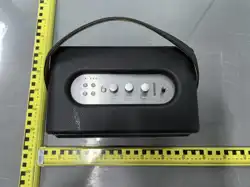
Interface Layout: MIC Jack, USB Port,
AUX Jack, Type-C Charging Port
Control Buttons & Indicators:
1. Power Button
2. Bluetooth Indicator Light
3. AUX Input Indicator Light
4. USB Playback Indicator
5. Mode Button
6. MIC Button
7. BT Bluetooth Button
8. Light Effect Button
9. Volume Adjustment Knob
10. Treble Adjustment Knob
7. Bluetooth Connection
Steps
1. Power on the speaker.
2. Short press the BT button; the
Bluetooth indicator will flash to enter
pairing mode, and voice prompt will
activate.
3. Turn on Bluetooth function on your
mobile device.
4. Search and select ROFALL A3 in the
Bluetooth list; the indicator will stay
solid once connected successfully.
5. To disconnect Bluetooth temporarily,
short press the BT button again.
6. If the connection fails, restart
Bluetooth pairing on your mobile
device and reconnect.
8. TWS Stereo Pairing Mode
Power on two identical R O F A L L A 3
speakers, both enter Bluetooth standby
mode.
1. Activate Bluetooth on your mobile
phone.
2. Long press the designated TWS
button on one unit to initiate stereo
linking.
3. After successful pairing, the two
speakers will work as left and right
stereo channels.
4. To exit TWS mode, long press the
TWS button again; both units will
revert to independent Bluetooth
playback.
9. USB OTG & Multi-Mode
Playback
1. USB OTG Function: Connect your
mobile device via USB-A to Type-C
cable for audio output.
2. Short press the MODE button to
switch playback modes cyclically:
Bluetooth / USB / AUX Input.
10. Sound Adjustment
Settings
l Volume Knob: Adjust overall
playback volume
l Treble Knob: Control high-frequency
treble level
l Microphone Volume: Adjust mic input
loudness for karaoke
l Echo/Reverb Knob: Modify reverb
depth for vocal performance
Supports standard audio playback
modes: Bluetooth playback, wired
AUX playback, USB media playback.
11. Ambient Light Effect
Modes
Adjustable RGB LED lighting modes:
l Static single color light
l Gradient color flow
l Breath dimming light
l Color jump flash
l Music rhythm sync light
l Custom static color lock
Light brightness adjustable; light
effects can be fully turned off.
12. Device Charging
Instructions
Connect the supplied Type-C charging
cable to the power adapter and speaker
charging port. The battery indicator will
flash during charging and stay steady
when fully charged. Do not leave the unit
charging unattended for extended
periods.
13. Battery Level Indicator
LED battery scale display: 10% -100%
full charge indication.
14. Waste & Environmental
Disposal Information
Do not discard this device together with
unsorted household waste. For proper
recycling, deliver the unit to dedicated
electronic waste collection points in
accordance with local environmental
regulations. Improper disposal of lithium
batteries poses fire and environmental
hazards.
15. Warranty Terms
l Standard Warranty Period: 12
months
l Service Life of Product: 24 months
All repairs and after-sales service
must be carried out by authorized
official service centers only. Warranty
will be void if damage is caused by
improper use, unauthorized
disassembly, water damage or
physical impact.

This device complies with part 15 of the FCC Rules. Operation is subject to the
following two conditions: (1) This device may not cause harmful interference, and (2)
this device must accept any interference received, including interference that may cause
undesired operation.
Any Changes or modifications not expressly approved by the party responsible for
compliance could void the user's authority to operate the equipment.
Note: This equipment has been tested and found to comply with the limits for a Class B
digital device, pursuant to part 15 of the FCC Rules. These limits are designed to
provide reasonable protection against harmful interference in a residential installation.
This equipment generates uses and can radiate radio frequency energy and, if not
installed and used in accordance with the instructions, may cause harmful interference
to radio communications. However, there is no guarantee that interference will not
occur in a particular installation. If this equipment does cause harmful interference to
radio or television reception, which can be determined by turning the equipment off and
on, the user is encouraged to try to correct the interference by one or more of the
following measures:
-Reorient or relocate the receiving antenna.
-Increase the separation between the equipment and receiver.
-Connect the equipment into an outlet on a circuit different from that to which the
receiver is connected.
-Consult the dealer or an experienced radio/TV technician for help.
FCC Radiation Exposure statement
The device has been evaluatec to meel general RF exposure requirement. The device
can be used in portable exposure condition without restriction.