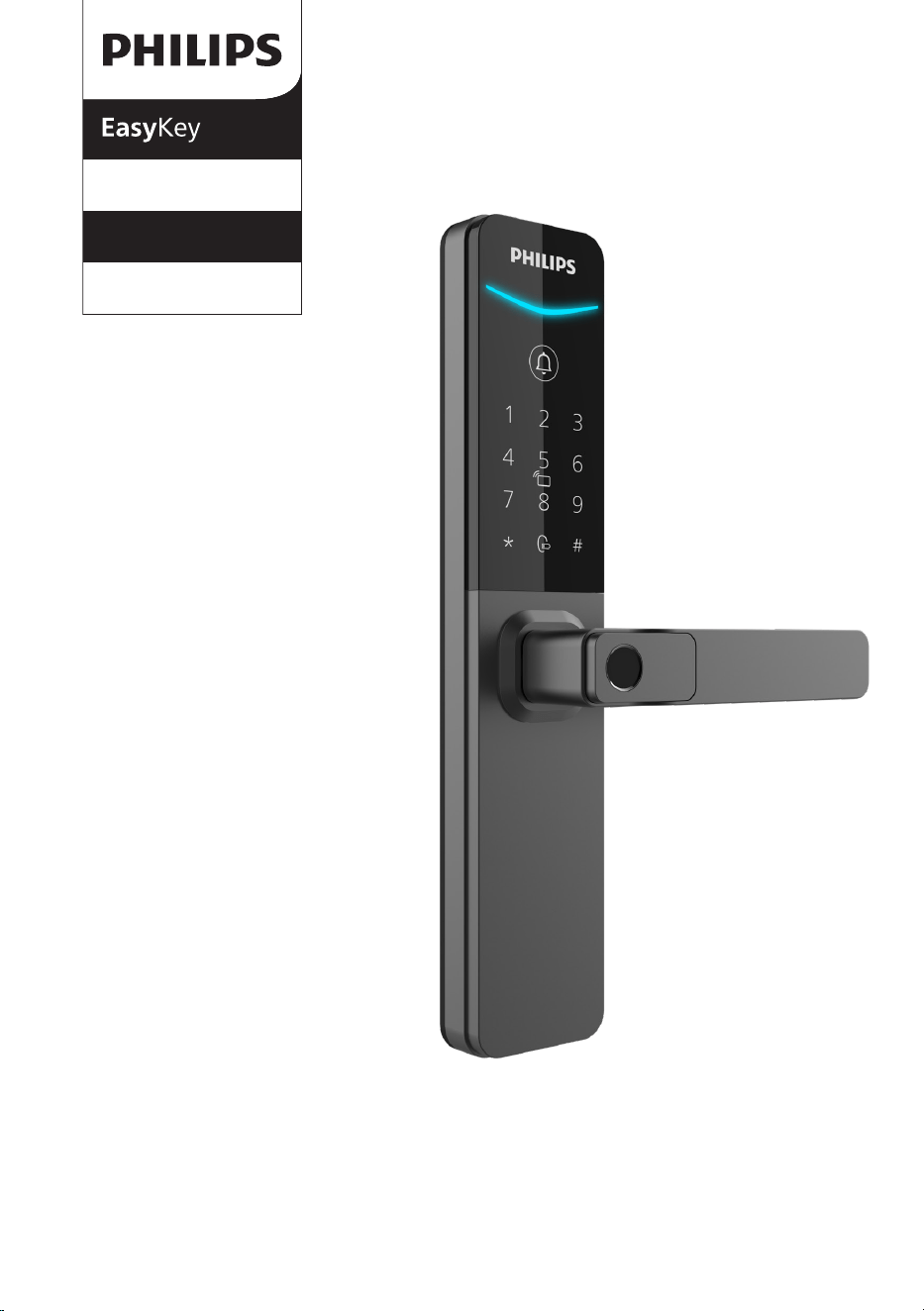
DDL615-5HBS
Smart lever door lock
6000 series
User
manual
Register your product and get
support at www.philips.com/support


1
Contents
1. Important Information 6. Other features02 14
16
Safety
Caution
Disposal of used locks and batteries
Factory reset
Doorbell
2. Assembly
7. Indicators
Included Items
Exploded views
Notice before assembling
Adjustable latch instructions
Assembly steps
Lock status indicator
Low battery indicator
System locking indicator
03
15
Exterior assembly
Interior assembly
3. Get to know your lock 08
4. Settings 09
11
Instructions before setting
Smart lock activation
APP download
Add a door lock
Add a unlock method
8. Troubleshooting
Alert types
How to apply external power source
Battery replacement
5. Start using your lock
Outdoor/ indoor unlock
Outdoor/ indoor lock
Indoor lockout
Mechanical key

2
1. Important information
Safety
◆
Before using this product, please carefully read
through and understand all instructions. Damage
resulting from failure to follow these instructions
is not covered by the warranty.
◆
Please only use the accessories/components
specied by the manufacturer.
◆
Please only use alkaline batteries/lithium
polymer batteries provided with this product, or
batteries of the same specication/type.
◆
Please do not attempt to forcibly disassemble
the product to trigger an alert or cause damage.
◆
Please avoid using sharp objects to scrape
the ngerprint sensor, as this may result in
permanent damage.
◆
Please avoid exposing the product to areas
where water may leak or splash.
◆
To prevent damage to the protective cover, do
not expose the product to corrosive substances.
◆
Please avoid hanging objects on the handle as
it may interfere with the functioning of the lock.
◆
Please use a soft, damp cloth to wipe
ngerprints or dirt from the assembly surface.
◆
Please do not remove the batteries while
setting up or operating the product.
◆
Please select professional personnel for door
lock installation and follow the installation
instructions provided by our company. Do not
disassemble the door lock and ensure that the
relevant sealed stickers are properly kept.
◆
After completing the installation and
troubleshooting, please change the default
master PIN code immediately. Ensure that the
mechanical keys are stored properly and do not
share the PIN codes with others.
◆
After the door lock triggers a low battery alert,
promptly replace all batteries and ensure correct
polarity during installation.
Caution
◆
Do not place the batteries near sources of
ignition to prevent explosions.
◆
Do not use any power source that does not
meet safety requirements to power the product.
◆
Please avoid short-circuiting the battery's
polarity with metal objects to prevent
explosions.
◆
Please ensure that installation or any
component replacement is carried out by
Philips, a Philips authorized service center, or
professional technicians.
◆
Please refrain from using accessories
or components made by unauthorized
manufacturers or not explicitly recommended by
Philips. Using such accessories and components
may void the warranty.
Disposal of used products
and batteries
◆
You can have your products taken back at
authorized Philips service centers. You may
receive appropriate compensation if your
products meet our refund conditions.
◆
Please check local regulations for the proper
disposal and separate collection of used batteries
and products. Proper disposal helps protect the
environment and human health. Please be aware
that batteries should not be discarded with
regular household waste.
3
Warranty
Card
Easy
Key
Quick Start
Guide
EasyKey
2 Assembly
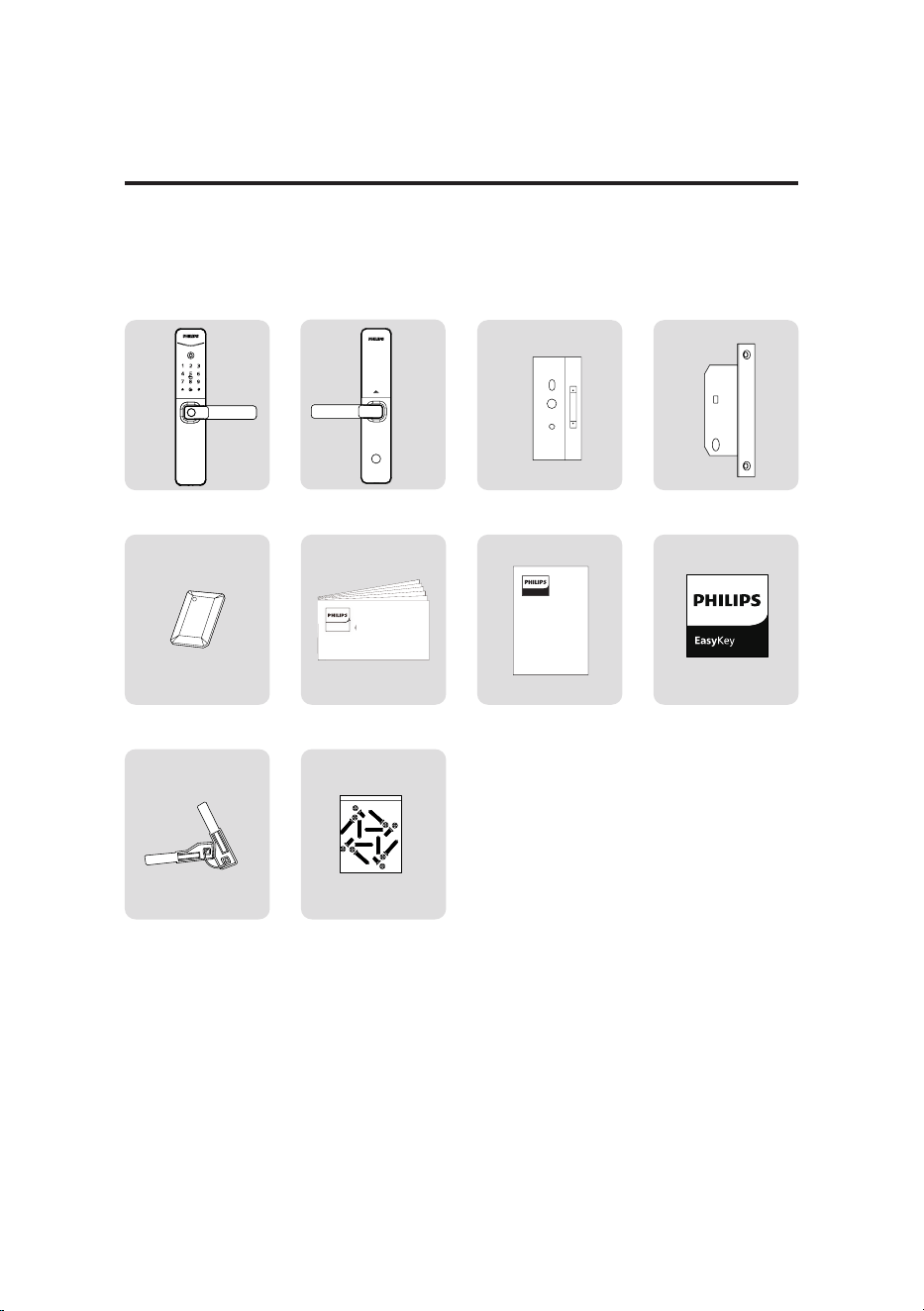
Included items
This included item list is for reference only. Please refer to the actual packing items.
①
Exterior assembly with
silicone pad
②
Interior assembly with
silicone pad
③
Drilling template
④
Mortise
⑤
Key tag
⑥
QSG
⑦
Warranty card
⑧
Quality certicate
⑨
Mechanical key
⑩
Installation kit
4
1
2
4
5
6
3
7
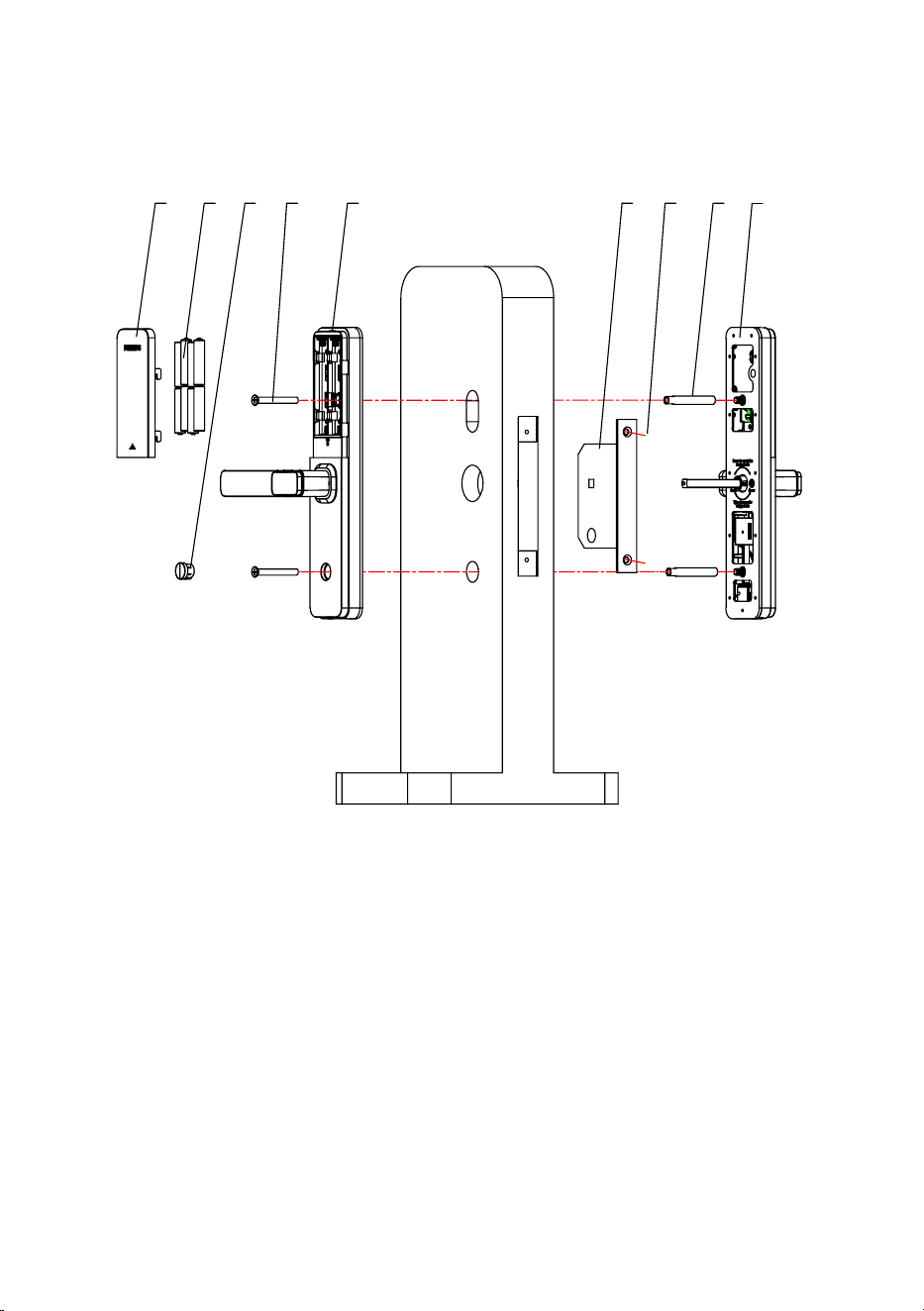
8 9
1. Battery cover ×1
2. Battery ×8
3. Silicone cap ×1
4. M6 anchor screw ×2
5. Interior assembly ×1
6. Mortise ×1
7. Anchor screw ×2
8. M6 screw sleeve ×2
9. Exterior assembly ×1
Exploded views
5
1 32
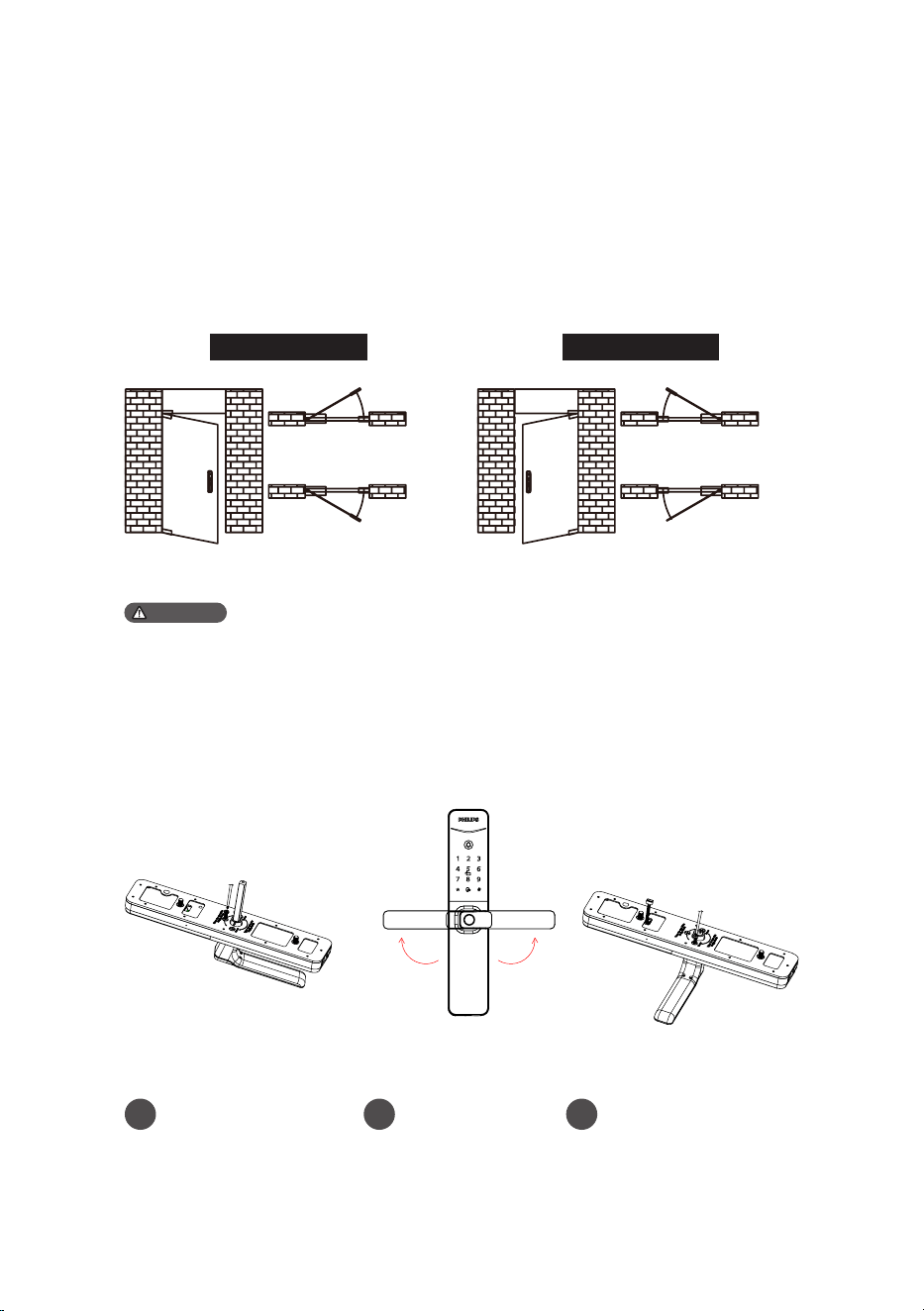
Notice before assembling
This product applies to doors with swing directions as follows: left-hand inswing,
left-hand outswing, right-hand inswing, and right-hand outswing.
Left-hand swing Right-hand swing
Left-hand inswing
Left-hand outswing
Right-hand inswing
Right-hand outswing
Attention
Step 2 | Adjustable latch instructions
Step 1 | Check the door-swing direction
Break the label at the "+"
mark and unscrew the
screw.
Break the left/right "+"
marked area and tighten
the screw.
Rotate the lever
90° to the correct
position.
Please choose the appropriate installation kit according to the thickness of the door.
6
1
3
2
4
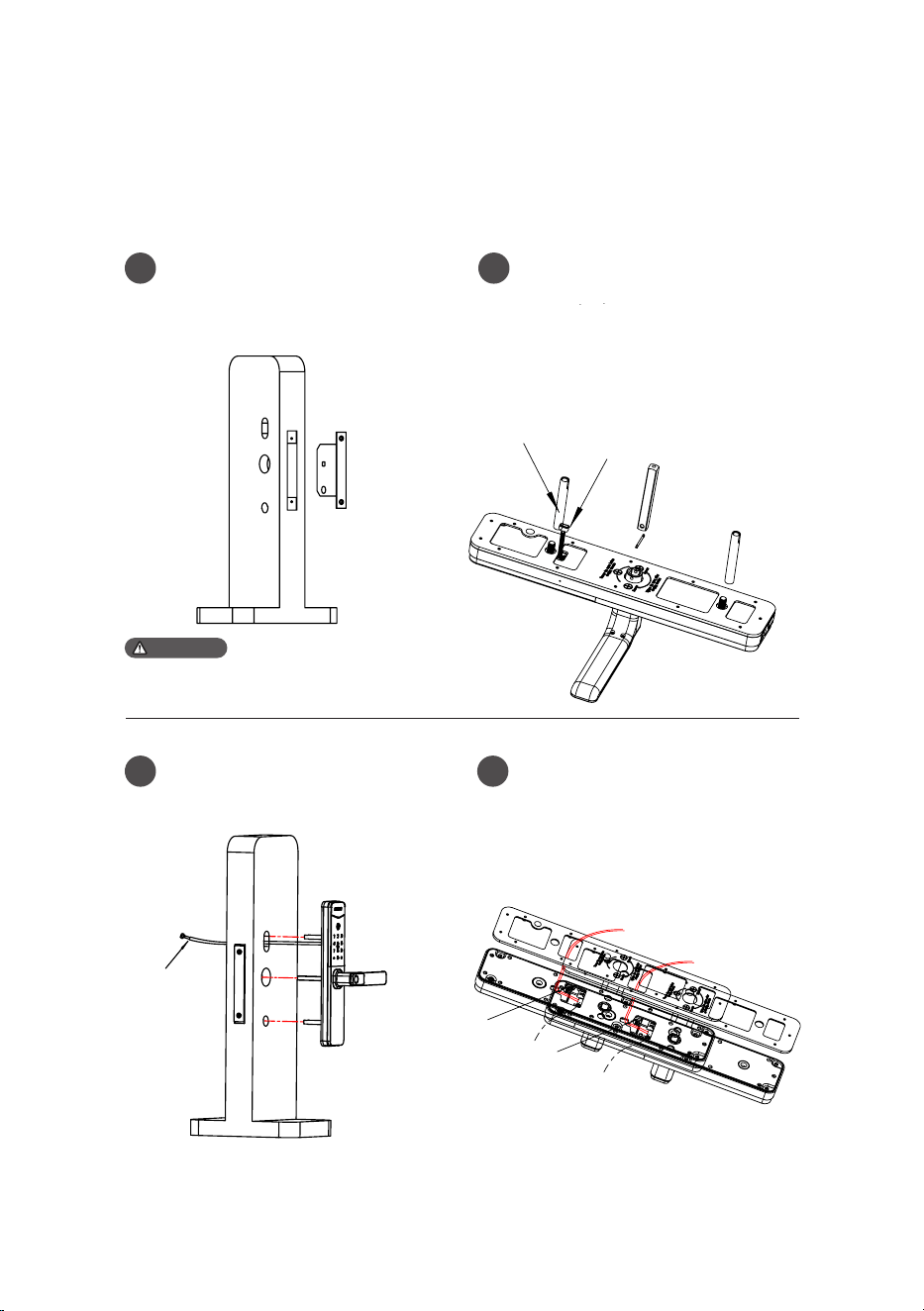
Assembly steps
The following assembly steps apply to the right-hand swing doors. For left-hand
swing doors, please read through the [Notice before assembling] and adjust the
latch direction rst.
Please ensure the latch bolt does not protrude
during installation.
Attention
To drill holes in the door according
to the drilling template, mount the
mortise into the jamb, and secure the
screws.
Pass the assembly cables through the
door hole, align the exterior assembly
to closely t against the door.
Install the M6 screw sleeves onto
the exterior assembly, and insert
the square shaft in the square shaft
housing, then align the small holes on
the square shaft with the holes in the
housing, insert the split pin, and bend
both ends of the pin to secure the
square shaft.
Insert the assembly cables into the
interior assembly and secure them in
the cable slot.
M6 screw sleeve
Assembly cable
Assembly cable
Cable slot
Assembly cable port
Cable slot
Assembly cable port
7
5
6
7
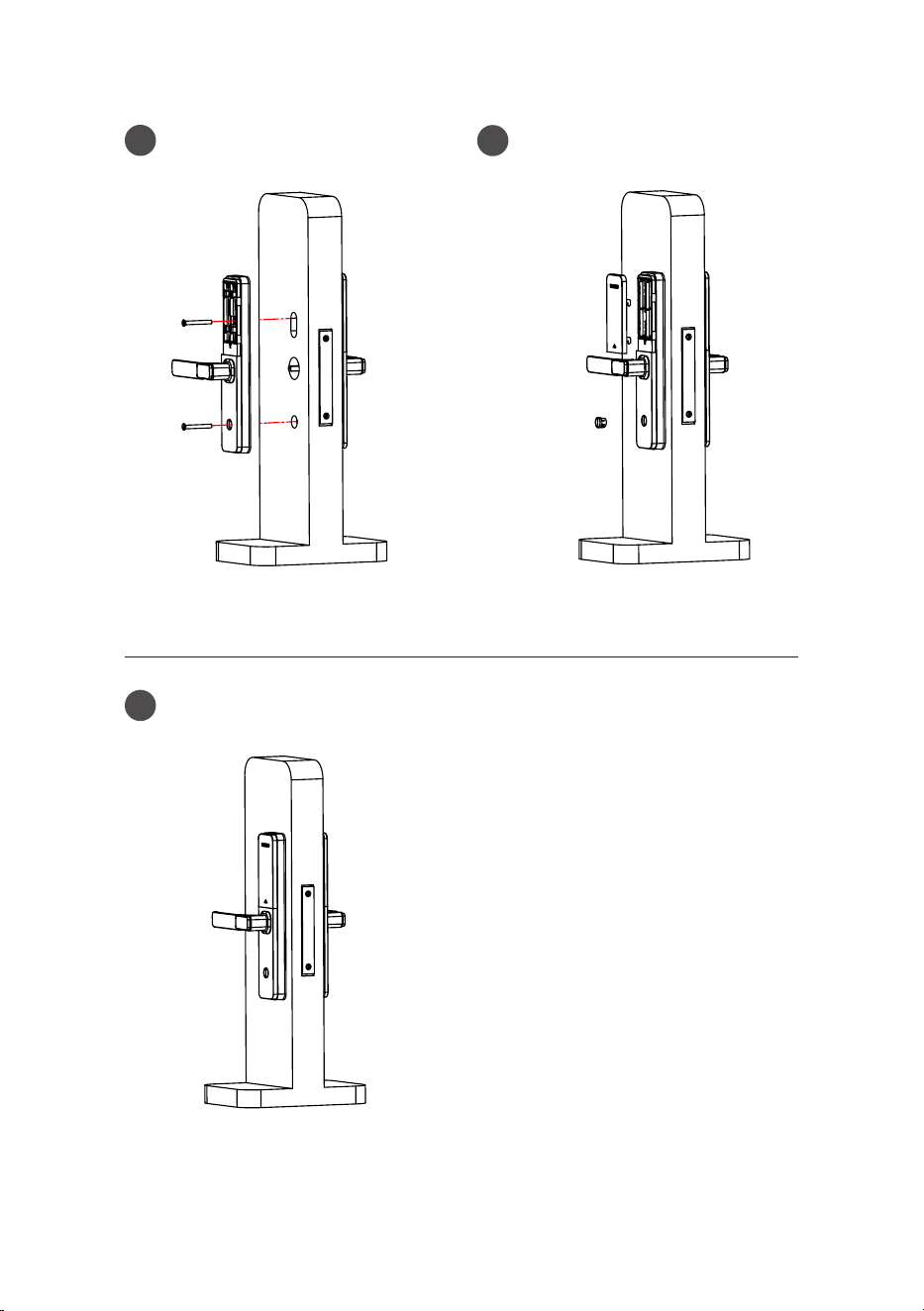
Check all components for proper
connection and functionality.
Attach the interior assembly, and
secure it with M6 anchor screws.
Insert the silicone cap, install the
alkaline batteries, cover with the
battery cover, then the assembly is
done.
8
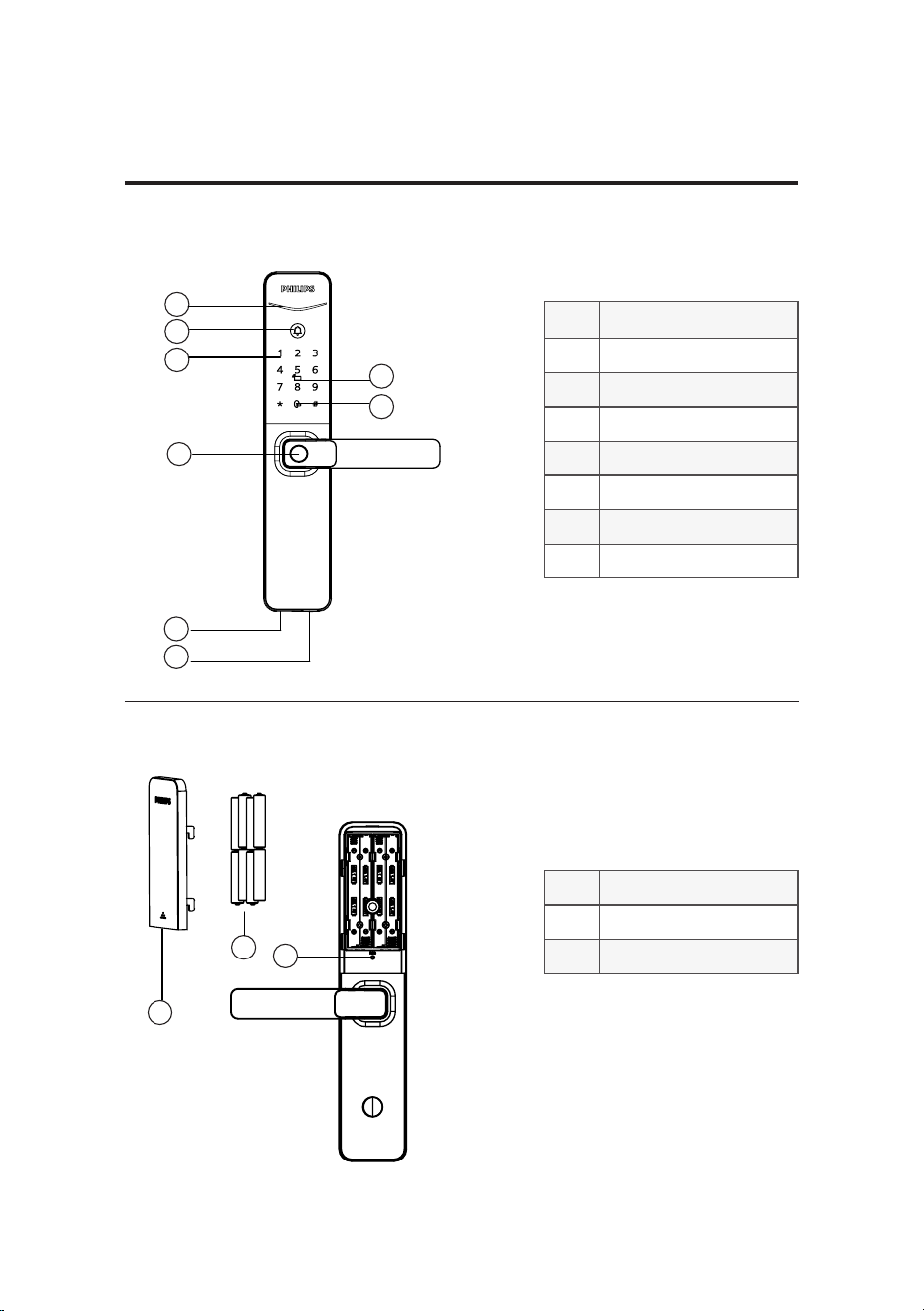
①
Status indicator
②
Doorbell
③
Keypad
④
Key tag reader
⑤
Mute button
⑥
Fingerprint sensor
⑦
Type-C interface
⑧
Keyhole
①
Battery cover
②
Alkaline batteries
③
RESbutton
1
1
2
2
3
3
4
5
8
6
7
3 Get to know your lock
Exterior assembly
Interior assembly
9
4 Settings
Instructions before setting
◆ The system modes include the general mode and dual verication mode.
General mode Door can be opened using any enrolled unlock method.
Door can be opened using any two combinations of
ngerprint, PIN code, or key tag.
Dual verication mode
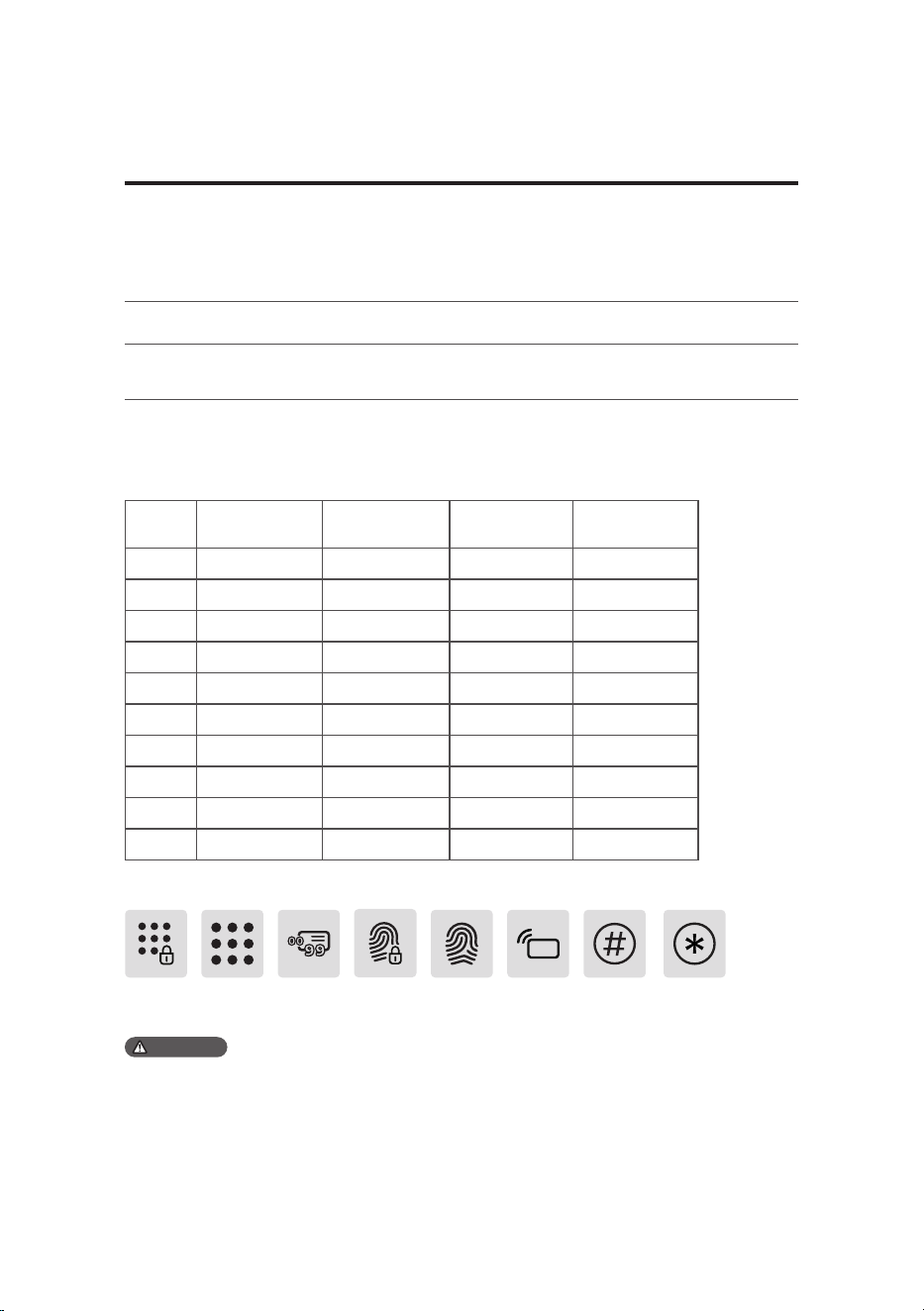
◆ User number
You can delete a user's information by the user number without having to delete everything. You
can record the user information in the following table for easy management and future reference.
◆ Icon annotation
No. Name Fingerprint PIN code Key tag
00
01
02
03
04
05
06
07
08
09
Key tag [#] button [*] buttonMaster PIN User PIN User No.
00-99
FingerpintMaster
ngerprint
1. When navigating the menu, to return to the previous menu, press the [*] key.
2. The default PIN code is 12345678.
3. Capacity: 1 set of master PIN code, 100 sets of ngerprints (including 1 set of master ngerprint), 20 sets
of user PIN codes, and 100 sets of key tags.
Attention
10
APP download
Add a door lock
Add a unlock method
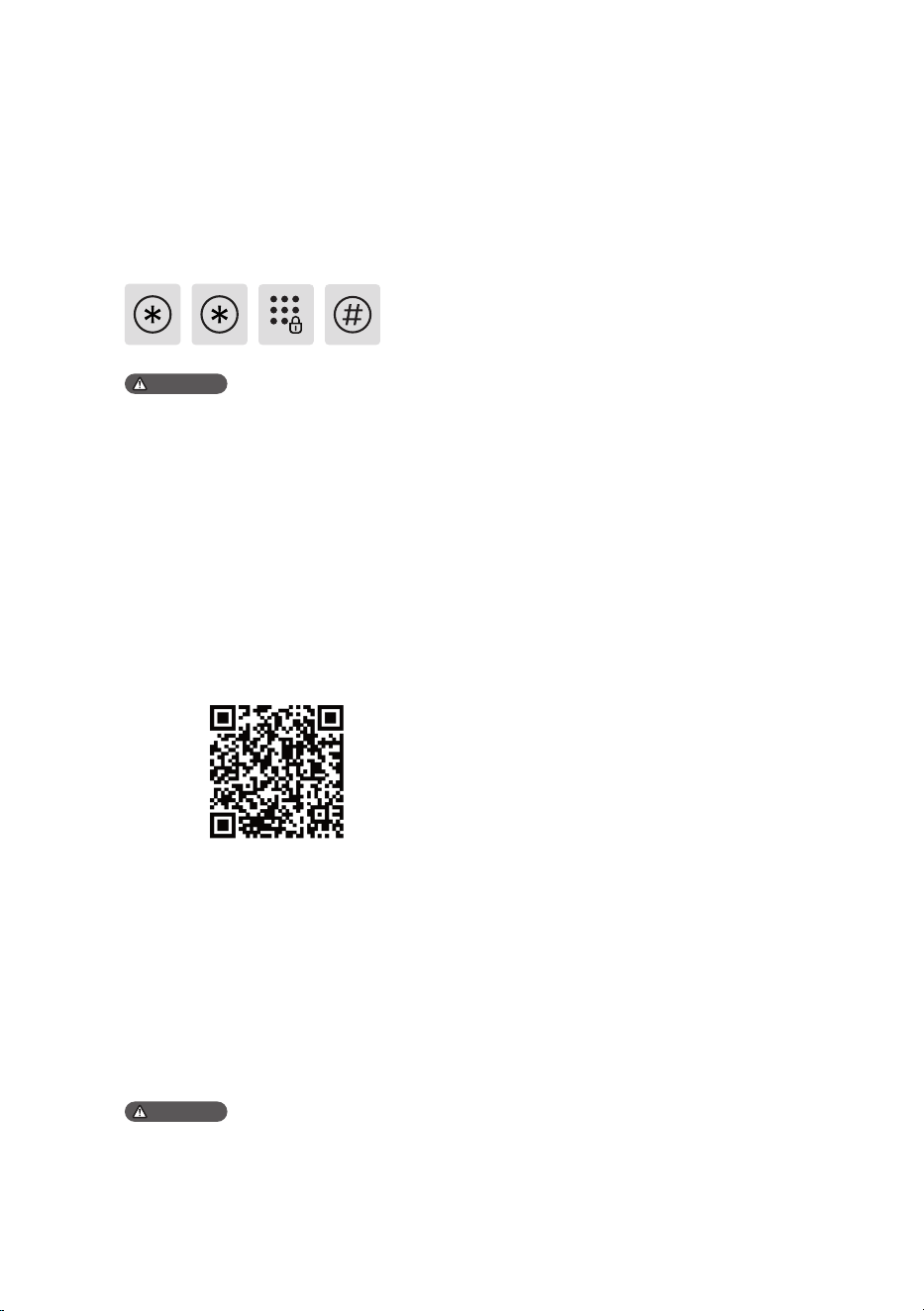
Scan the QR code below or search for "Home
Access" in your app store to download and
install.
1.Insert the batteries;
2.Turn on Bluetooth on your phone,
open the app, tap "Add a device" on the
homepage, and follow the instructions to
pair.
1.Keep the lock and phone within 1 meter;
2.Follow the app prompts to set up an
unlock method.
①Wake up the keypad;
②Tap the [*] key twice, enter the activation
code, and tap [#] to conrm and activate the
lock.
Smart lock activation
Attention
Attention
1.The lock will default to demo mode when
inactive. In demo mode, users can experience the
basic features of the product.
2.For the activation code, please consult your
distributor, retailer, or installation service provider.
1.The default PIN code is 12345678.
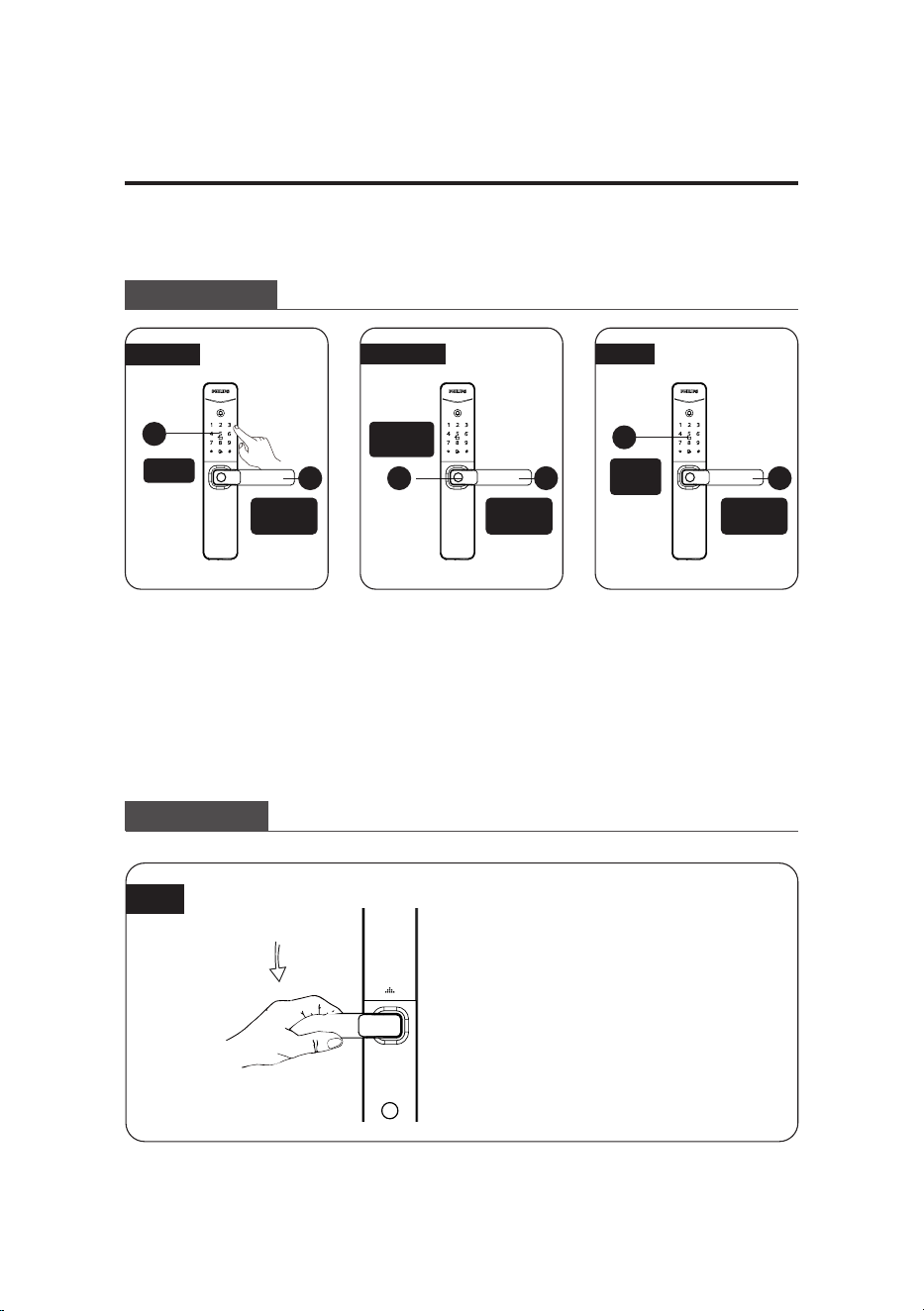
11
密码开门
1
1
1
2 2 2
① Touch to wake up the
keypad, enter the enrolled
PIN code, and press the [#]
key to conrm.
① Place the enrolled nger
correctly on the ngerprint
sensor.
① Place the enrolled key
tag properly on the key tag
reader.
② When you hear the
voice prompt 'Verication
succeeded, please open the
door,' simply press down
the handle to unlock.
② When you hear the
voice prompt 'Verication
succeeded, please open the
door,' simply press down
the handle to unlock.
② When you hear the
voice prompt 'Verication
succeeded, please open the
door,' simply press down
the handle to unlock.
keypad
Key tag
reader
Fingerprint
sensor
Press down
the handle
Press down
the handle
Press down
the handle
Outdoor/ indoor unlock
Outdoor unlock
5 Start using your lock
PIN code
Key tagFingerprint
Indoor unlock
Lever
The lock has an indoor quick-
open feature; just press down
the handle to unlock from the
inside.
12
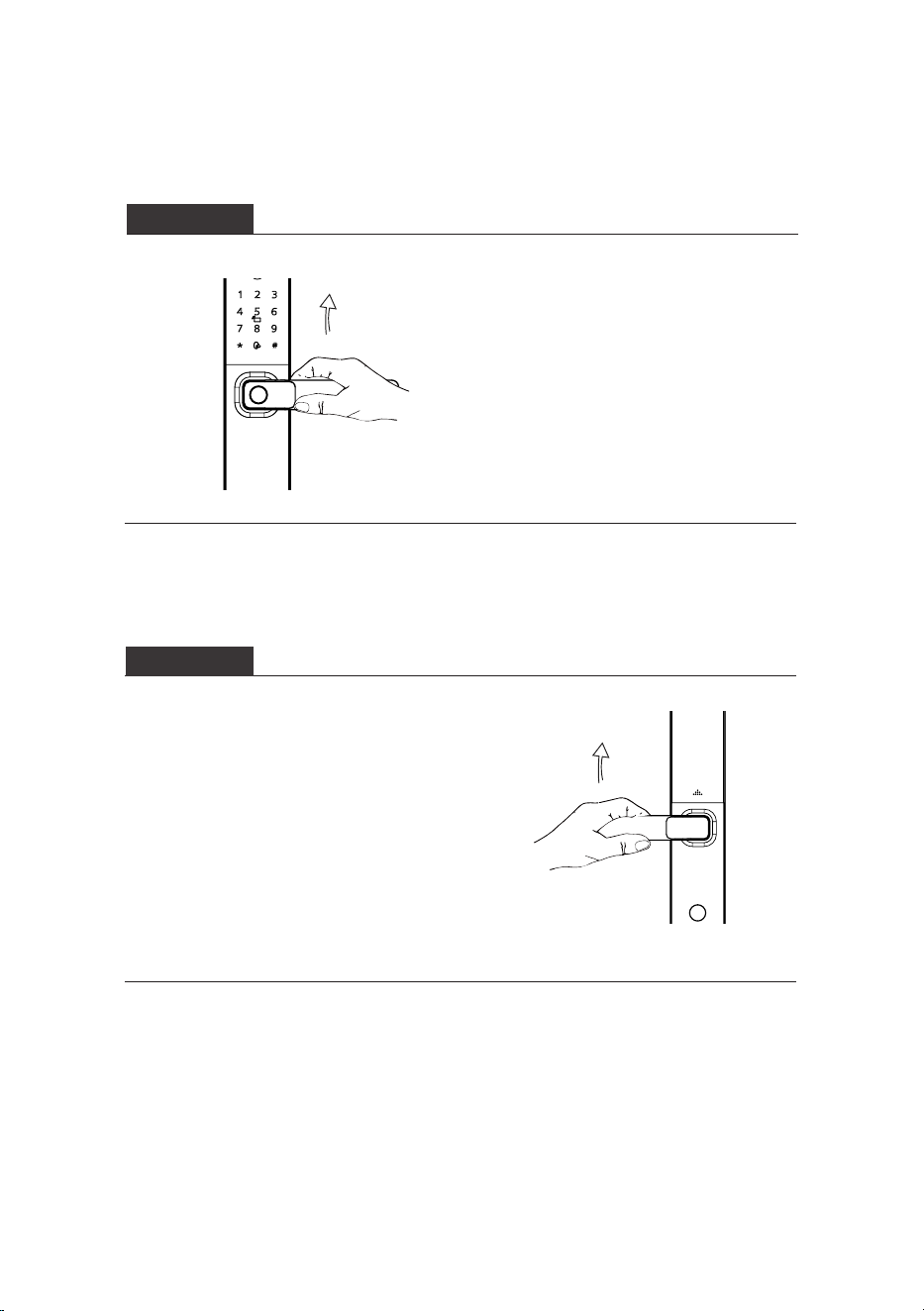
After closing the door, lift the
handle to extend the latch bolt
and lock the door.
After closing the door, lift the
handle to extend the latch bolt
and lock the door.
Outdoor/ indoor lock
Outdoor lock
Indoor lock
13
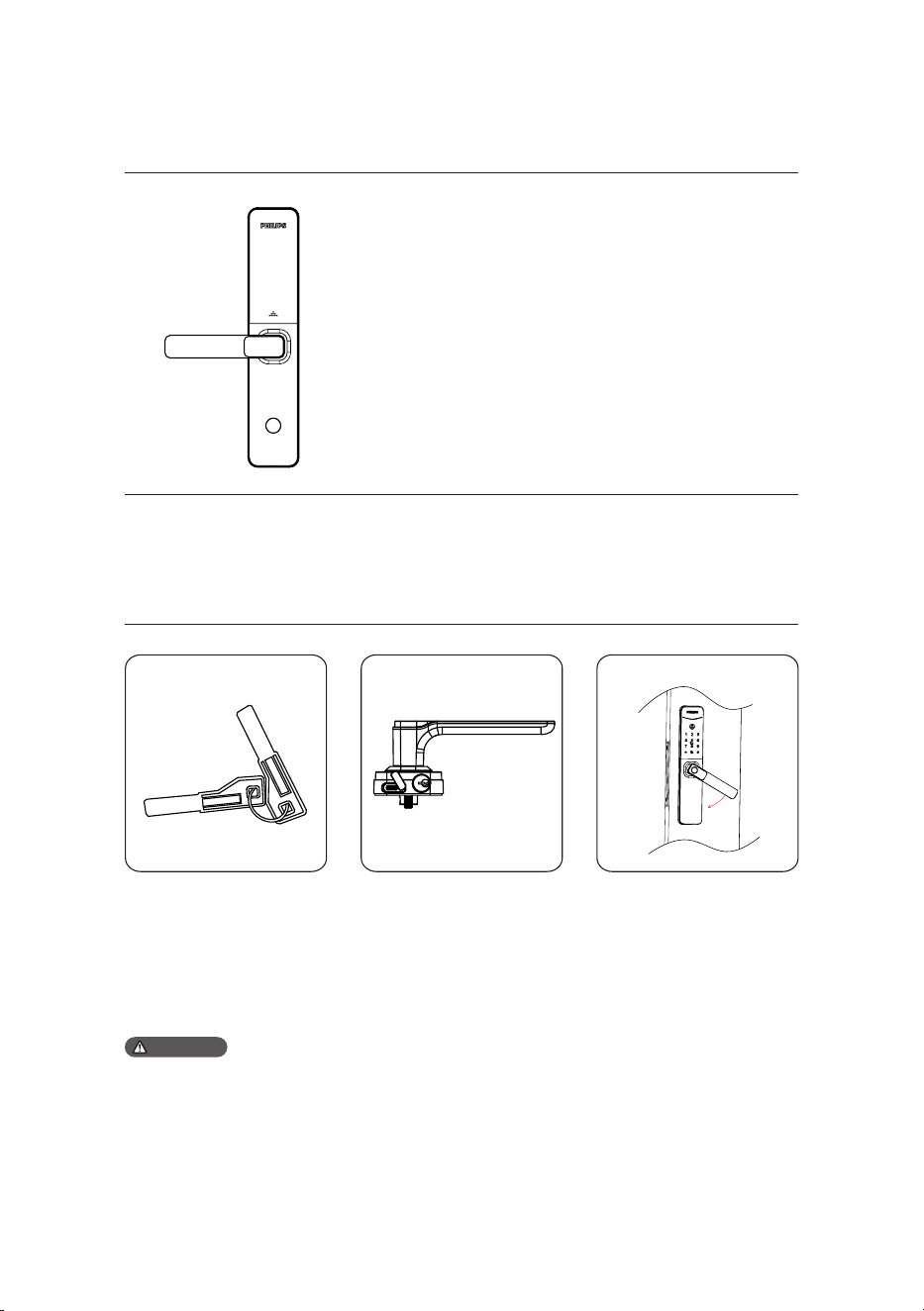
①Get the mechanical key
from the product package.
②Insert the key into the
keyhole at the bottom of
the exterior assembly and
rotate it to unlock.
③Press down the handle to
unlock.
Please enable the indoor lockout mode via the
app.
Lockout mode enabled: Limits outdoor unlock
methods for regular users, allowing access only with
master unlock methods and a mechanical key.
Lockout mode disabled:
1. Disable via the app;
2. Unlocking the door using any of the master unlock
methods master PIN code, master ngerprint, or
master key tag will deactivate the indoor lockout
mode.
Indoor lockout
Mechanical key
1.Avoid using the mechanical key regularly. Only resort to it in emergencies such as drained battery,
forgotten PIN code, or system malfunctions.2.Store the mechanical key outside your home, ideally in the
oce, car, or a secure location, for easy access during emergencies.
Attention
14
Function:
The indoor speaker plays a ding-dong
sound, informing that someone is at
the door.
How to use:
When the doorbell is pressed, the
indoor speaker will emit a ringing
sound.
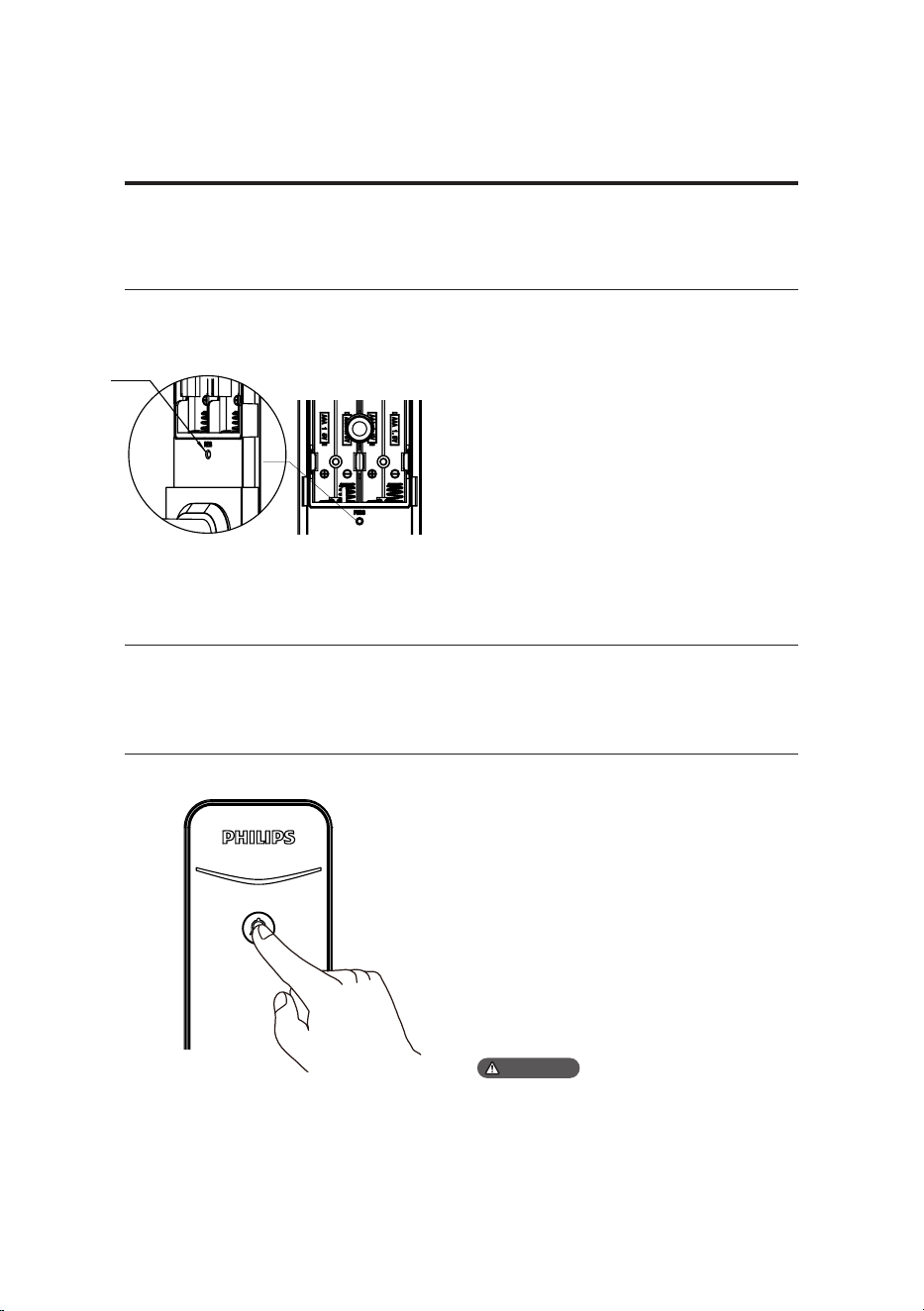
Function:
Empty all user data and restore to
default settings.
How to use:
Double-press the [RES] button with a
sharp object, which will erase all user
information and restore the lock to its
default settings.
RES
Factory reset
Doorbell
6 Other features
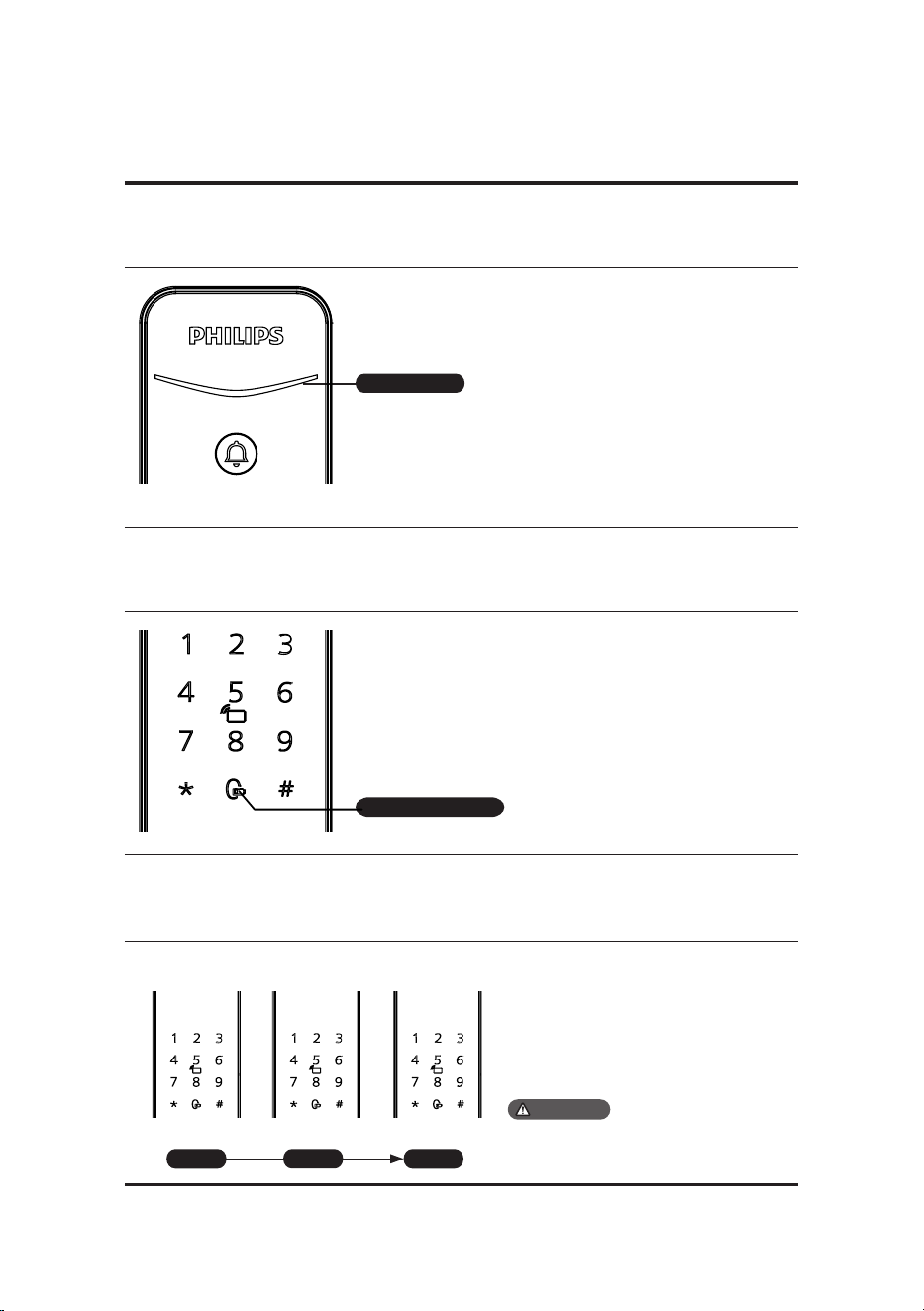
1.Upon pressing the doorbell, the indicator will
light up in blue and ash.
2.The 'Do Not Disturb' mode can be set via the app.
Once set, pressing the doorbell will not emit any
sound indoors.
Attention
15
Blue:when the system wakes up, the
indicator turns blue, indicating that the door
lock is ready for operation.
Green:when the door lock is unlocked, the
indicator turns green, indicating that the
door has opened.
Red:when the door lock is locked, the
indicator turns red, indicating that the door
has closed.
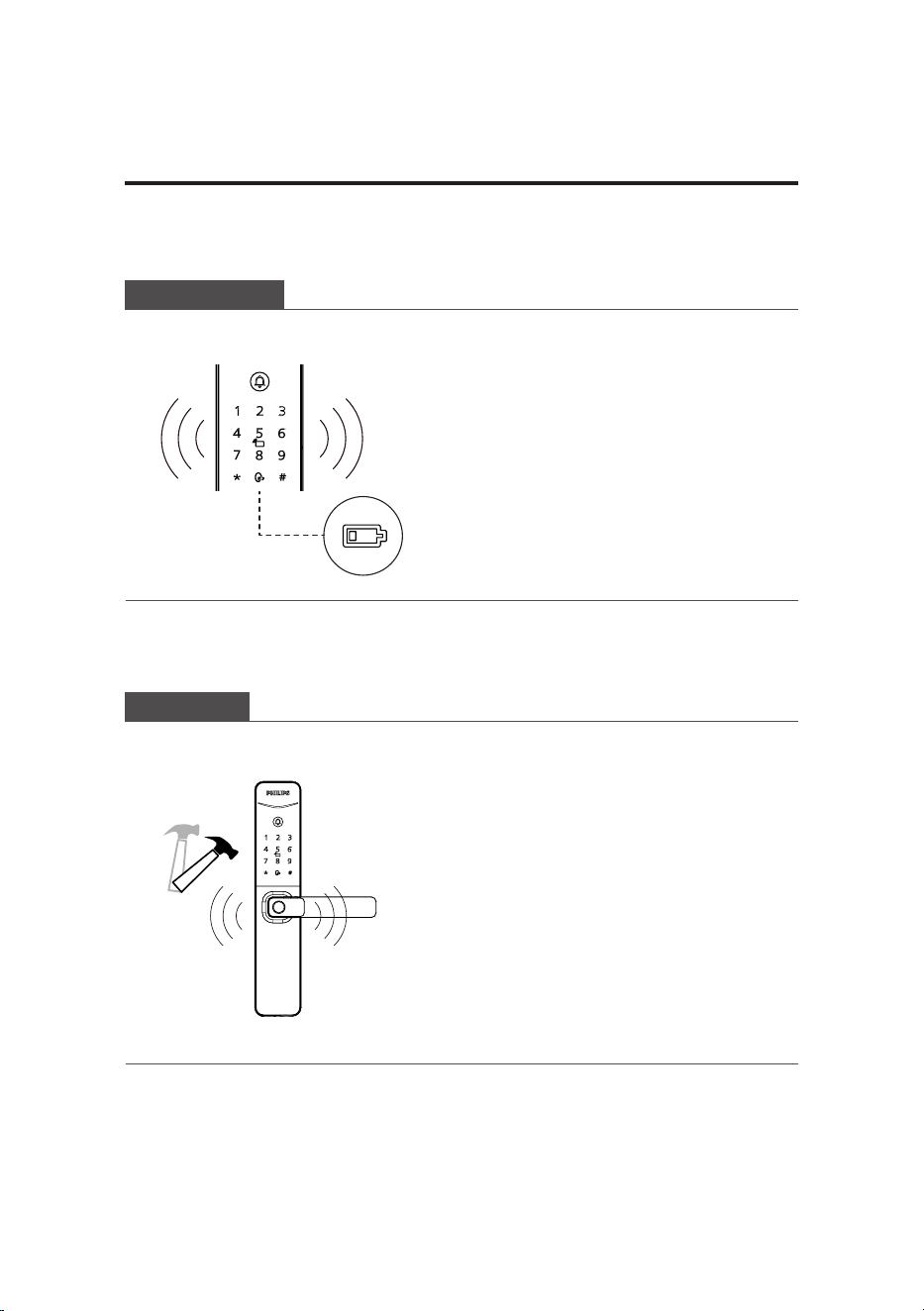
Red:when the door lock is activated, it
automatically checks the battery voltage. If
the voltage is low, the low battery indicator
will light up red and ash.
Low battery indicator
If there are ve consecutive incorrect
attempts within ve minutes using
ngerprint, PIN code, or key tag, the
door lock will be locked for 3 mins.
3ashes 2ashes 1ashes
3mins
2mins
1mins
Prompts will only appear upon touching to
wake up the keypad or when verifying unlock
methods.
Attention
7 Indicators
Status indicator
Low battery indicator
System locking indicator
Status indicator
16
Triggering: when the system awakens,
it will automatically check the battery
voltage. If the voltage is low, an
alert will prompt you to replace the
batteries.
Alert method: the indicator will
turn red.O: the alert will be o
automatically.
O: the alert will be o automatically.
Triggering:the exterior assembly has
been pried open and is not properly
aligned with the door.
Alert method: continuous, repeated
alert sound.
O: the alert will turn o automatically,
upon a successful outdoor unlock or
unlocking from the inside.
8 Troubleshooting
Alert types
Low battery alert
Tamper alert
17
How to apply external power source
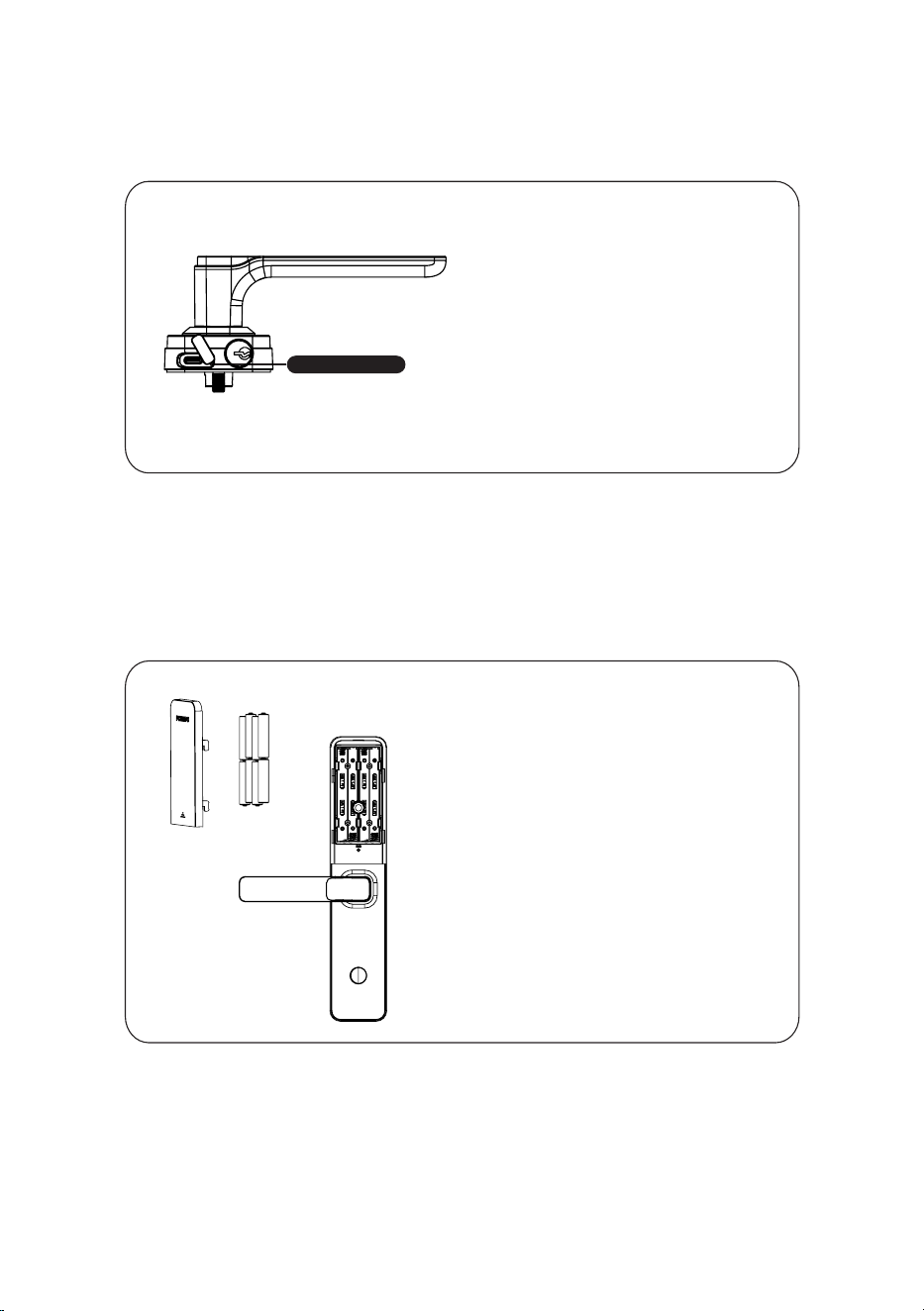
If the battery is low and the door cannot
be unlocked from outside, connect
a 5V power bank to power the lock.
After unlocking, promptly replace the
batteries. If the system malfunctions
and prevents access, connecting a 5V
power bank will also power the lock and
automatically restart the system.
Battery replacement
The door lock is powered by four AAA
alkaline batteries. The compartment
supports up to eight batteries, oering
extended battery life and minimizing
the frequency of replacements.
Type-C interface

Philips and the Philips Shield Emblem are registered trademarks of Koninklijke Philips N.V.
and are used under license. This product has been manufactured by and is sold under the
responsibility of Shenzhen Conex Intelligent Technology Co., Ltd., and Shenzhen Conex
Intelligent Technology Co., Ltd. is the warrantor concerning this product.