OWNER'S MANUAL
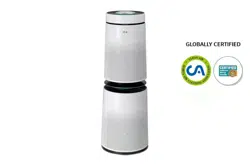
AIR PURIFIER
Read this owner's manual thoroughly before operating the
appliance and keep it handy for reference at all times.
ENGLISH
AS30*G*1*
MFL05866411
Rev.00_073026
www.lg.com
Copyright © 2026 LG Electronics. All Rights Reserved
Scan to see the online manual.
TABLE OF CONTENTS
2
3 IMPORTANT SAFETY
INSTRUCTIONS
3 READ AND SAVE THESE INSTRUCTIONS
3 WARNING INSTRUCTIONS
6 CAUTION INSTRUCTIONS
8 OPERATION
8 Product Overviews
11 Preparation before Operation
16 Features
17 Operating the Air Purifier
18 Overall Air Quality
19 SMART FUNCTIONS
19 LG ThinQ Application
20 Smart Diagnosis
22 MAINTENANCE
22 Maintaining the Product
25 TROUBLESHOOTING
25 Before Calling for Service
27 APPENDIX
27 Information
28 LIMITED WARRANTY
28 USA
3IMPORTANT SAFETY INSTRUCTIONS
ENGLISH
IMPORTANT SAFETY INSTRUCTIONS
READ AND SAVE THESE INSTRUCTIONS
The following safety guidelines are intended to prevent unforeseen risks or damage from unsafe or
incorrect operation of the appliance.
The guidelines are separated into ‘WARNING’ and ‘CAUTION’ as described below.
Safety Messages
Your safety and the safety of others are very important.
We have provided many important safety messages in this manual and on your appliance. Always read and
follow all safety messages.
All safety messages will tell you what the potential hazard is, tell you how to reduce the chance of injury,
and tell you what may happen if the instructions are not followed.
WARNING INSTRUCTIONS
WARNING
• To reduce the risk of explosion, fire, death, electric shock, injury or scalding to persons when using this
product, follow basic precautions, including the following:
Technical Safety
• This appliance is not intended for use by persons (including children) with reduced physical, sensory or
mental capabilities or lack of experience and knowledge, unless they have been given supervision or
instruction concerning use of the appliance by a person responsible for their safety. Children should be
supervised to ensure that they do not play with the appliance.
• The fan is not a toy. It should not be played with or placed where young children can reach it.
• If the supply cord is damaged, it must be replaced by the manufacturer, its service agent or similarly
qualified person in order to avoid a hazard.
• Only an authorized repair person should disassemble, repair, or modify the appliance.
• Do not touch the power plug with wet hands.
• Do not install and use broken parts.
• Do not continue to use the product if it is visibly damaged.
• The appliance is only to be used with the power supply unit provided with the appliance.
- Failure to use the supplied power supply may result in reduced performance or failure of the product,
and may result in safety hazards.
This is the safety alert symbol.
This symbol alerts you to potential hazards that can kill or injure you and others. All safety messages
will follow the safety alert symbol and either the word WARNING or CAUTION.
These words mean:
WARNING
You may be killed or seriously injured if you do not follow instructions.
CAUTION
You may be injured or cause damage to the product if you do not follow instructions.

4 IMPORTANT SAFETY INSTRUCTIONS
• The appliance must only be supplied at safety extra low voltage corresponding to the marking on the
appliance.
• Be careful not to subject the power plug and adapter to shock.
• Do not use the product if it has been dropped on the floor.
• To reduce The Risk Of Fire, Electric Shock Or Injury To Persons, Do Not Use Replacement Parts That Have
Not Been Recommended By The Manufacturer (e.g. Parts Made At Home Using A 3D Printer).
• To Reduce The Risk Of Fire Or Electric Shock, Do Not Use This Fan With Any Solid-State Speed Control
Device.
• RISK OF ELECTRIC SHOCK - These servicing instructions are for use by qualified personnel only. To
reduce the risk of electric shock, do not perform any servicing other than that contained in the operating
instructions unless you are qualified to do so.
• This manual is also available in a PDF format at www.lg.com
and you can obtain a printed copy of the
manual from the PDF format.
Installation
• Do not install the appliance on an uneven or inclined surface.
• Do not install the appliance in an area exposed to direct sunlight or near heat-generating equipment.
• Do not install the product in a place where combustible gas may leak or industrial oil or metallic
particulates are present.
• Do not allow the appliance to push against the power cord or plug.
• Do not bend the power cable excessively or place a heavy object on top of it.
• Do not extend the length of the power cable or alter it.
• Do not use several devices on a multi-socket extension outlet.
• Make the connection securely so that screw-in terminals will not be loosened when the cable is pulled.
• Make sure that the power cable cannot be pulled out or damaged during operation.
• When unplugging the power cord, always pull it by the plug.
• Unplug the appliance during thunder or lightning storms or when not in use for a long time.
• This appliance has a polarized plug (one blade is wider than the other).
- To reduce the risk of electric shock, this plug is intended to fit in a polarized outlet only one way.
- If the plug does not fit fully in the outlet, reverse the plug. If it still does not fit, contact a qualified
electrician.
- Do not attempt to defeat this safety feature.
• Do not run cord under carpeting. Do not cover cord with throw rugs, runners, or similar coverings.
• Do not route cord under furniture or appliances. Arrange cord away from traffic area and where it will
not be tripped over.
Operation
• If the appliance is immersed in water, stop using it and contact an LG Electronics Customer Information
Center.
• Do not operate any fan with a damaged cord or plug. Discard fan or return to an authorized service
facility for examination or repair.
• If there is a gas leakage (isobutane, propane, LNG, etc.), do not touch the appliance or power plug and
ventilate the area immediately.
• If you detect any abnormal noise, odor or smoke, unplug the appliance immediately and contact an LG
Electronics Customer Information Center.

5IMPORTANT SAFETY INSTRUCTIONS
ENGLISH
• Do not use or store fire, combustibles (ether, benzene, alcohol, drugs, propane, butane, combustible
sprays, insecticide, air freshener, cosmetics, etc.) or flammable materials (candles, lamps, etc.) near the
product.
• Do not allow animals or pets to chew on the power cord.
• Do not move the appliance when it is in operation.
• Do not hit the appliance.
• Do not insert hands or metal objects into the air inlet or outlet.
• Do not put flammables into the appliance.
• Do not move or operate the appliance while its cover is open.
• Do not allow children to climb on or play with the appliance.
• Do not place anything on top of the appliance.
• If the electrical appliance is visibly damaged, do not operate it.
• User Servicing Instructions.
- Only an authorized repair person from an LG Electronics service center should disassemble, repair, or
modify the product.
Maintenance
• Dispose of the packing materials (vinyl, styrofoam, etc.) to keep them out of the reach of children.
• Take care not to injure or pinch yourself when you detach and reattach parts of the appliance.
• Turn off and unplug the appliance before cleaning it or replacing the filter.
• Do not clean the appliance with brushes, cloths or sponges which are abrasive or made of metal.
• For inner cleaning, contact an Authorized Service Center or a dealer.
• Do not use harsh detergent that can cause corrosion or damage to the unit.
• Harsh detergent may also cause failure of the product, fire, or electric shock.
6 IMPORTANT SAFETY INSTRUCTIONS
CAUTION INSTRUCTIONS
CAUTION
• To reduce the risk of minor injury to persons, malfunction, or damage to the product or property when
using this product, follow basic precautions, including the following:
Installation
• Do not tilt the appliance to pull or push it when transporting.
• Do not install the appliance in a vehicle, RV, or marine vessel.
• Do not place the appliance near a TV or stereo equipment.
• Do not place the appliance under bright light.
• The appliance must be installed in accordance with national wiring regulations.
• When moving or storing the appliance, wrap the power cord around the base of the appliance to prevent
personal injury, damage to the cord or damage to floors.
• Do not place the appliance near curtains.
• Insert the adapter all the way into the adapter connection terminal, and avoid moving it while
connected.
• When assembling the accessory, securely fasten the screw to prevent it from separating from the
product.
Operation
• Do not use the product for removal of toxic gas such as carbon monoxide.
• Do not use the product for ventilation purposes.
• Do not use the appliance for a long time in a region with unstable voltage.
• Do not place obstacles around the air inlet or outlet.
• For safe use of the appliance, children or others with reduced mental capabilities need to be closely
monitored by a person who is responsible for their safety.
• Do not use the product for special purposes such as preserving plants, precision instruments, artworks,
etc.
• Do not operate the appliance with wet hands.
• Do not let the moisture from a humidifier directly touch the appliance.
• Do not use the appliance while it is not in an upright position.
• Do not use the appliance near objects vulnerable to heat.
• Do not use detergents, cosmetics, chemicals, air fresheners, or disinfectants in the appliance.
• Do not touch any internal parts while the unit is operating or immediately after operation.
• Use the filter only for its intended purpose.
• Do not forcefully separate the filters, as the filters are attached.
• Do not insert any objects into the air outlet.
Maintenance
• Do not use strong detergents or solvents to clean the appliance. Use a soft cloth to clean.
• Do not clean the appliance with an alkaline detergent.

7IMPORTANT SAFETY INSTRUCTIONS
ENGLISH
SAVE THESE INSTRUCTIONS
• Do not wipe the appliance surface using sulfuric acid, hydrochloric acid or organic solvents (thinner,
kerosene etc.) or attach a sticker on the appliance.
• Do not allow water inside the appliance.
• Do not wash the filter with water.
• Be careful not to damage the pre-filter when cleaning it with a vacuum cleaner.
8 OPERATION
OPERATION
The exterior or components of the product may vary depending on the model.
Product Overviews
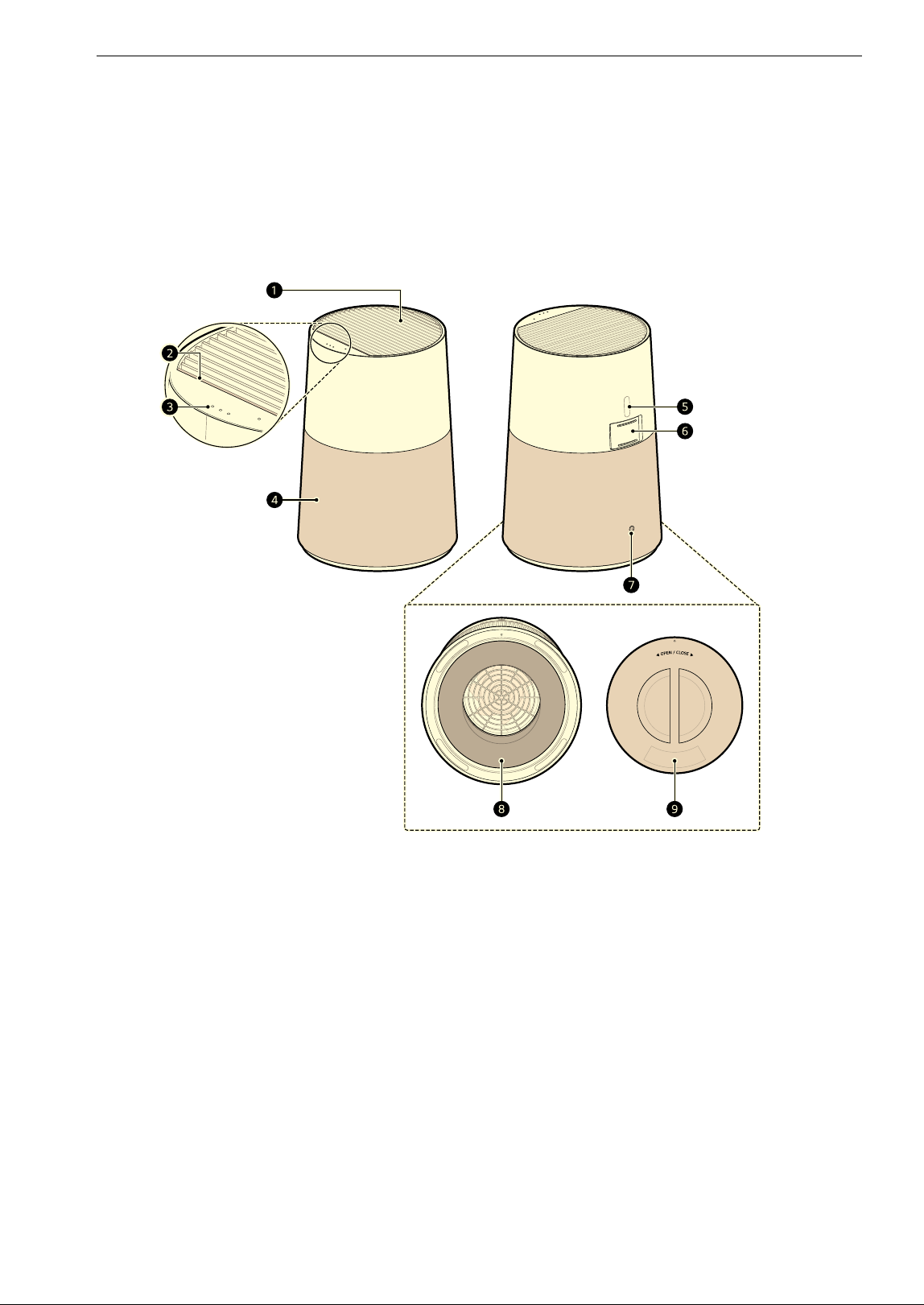
Air Purifier
a Air Outlet
• Emits air purified by the filter.
b Air Quality Light
• Indicates the current air quality by color.
c Control Panel/Status Panel
• Use it to set the appliance functions.
• Use it to check the settings of the appliance.
d Air Inlet
• Air is sucked into the air purifier through the
air inlet.
e Accessory Cap
• Remove the accessory cap before connecting
accessories.
f PM1.0 Sensor
• Detects the concentration of particulate
matter (PM).
g Adapter Connection Terminal
• The adapter can be removed.
h Filter
• Eliminates fine particulates, smog-causing
materials and other odors.
i Cover
• Turn the handle to remove the cover.
9OPERATION
ENGLISH
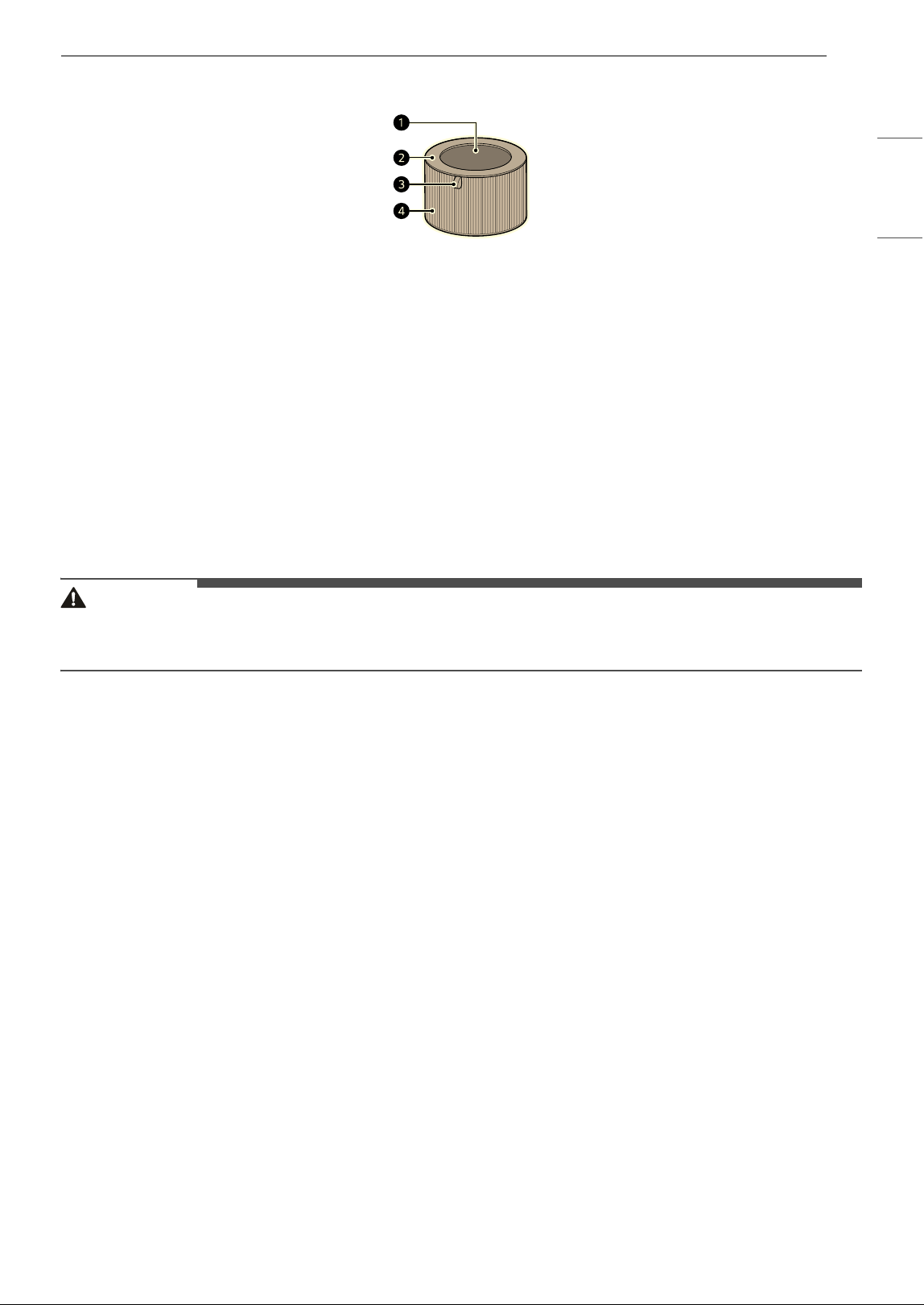
Filter
a Deodorization Filter
• This filter removes smog-causing substances (SO
2
, NO
2
) and household odors (toluene,
formaldehyde).
b Dust Collection Filter
• Minimizes PM1.0 from the air.
c Filter Handle
• Used to remove or install the filter.
• Make sure the side with the handle faces the cover.
d Pre-Filter
• The pre-filter is attached to the exterior of the filter and primarily removes household dust with large
particles from the air.
CAUTION
• Do not forcefully separate the filters, as the filters are attached.
• Do not throw the filters or use them for other purposes.
10 OPERATION
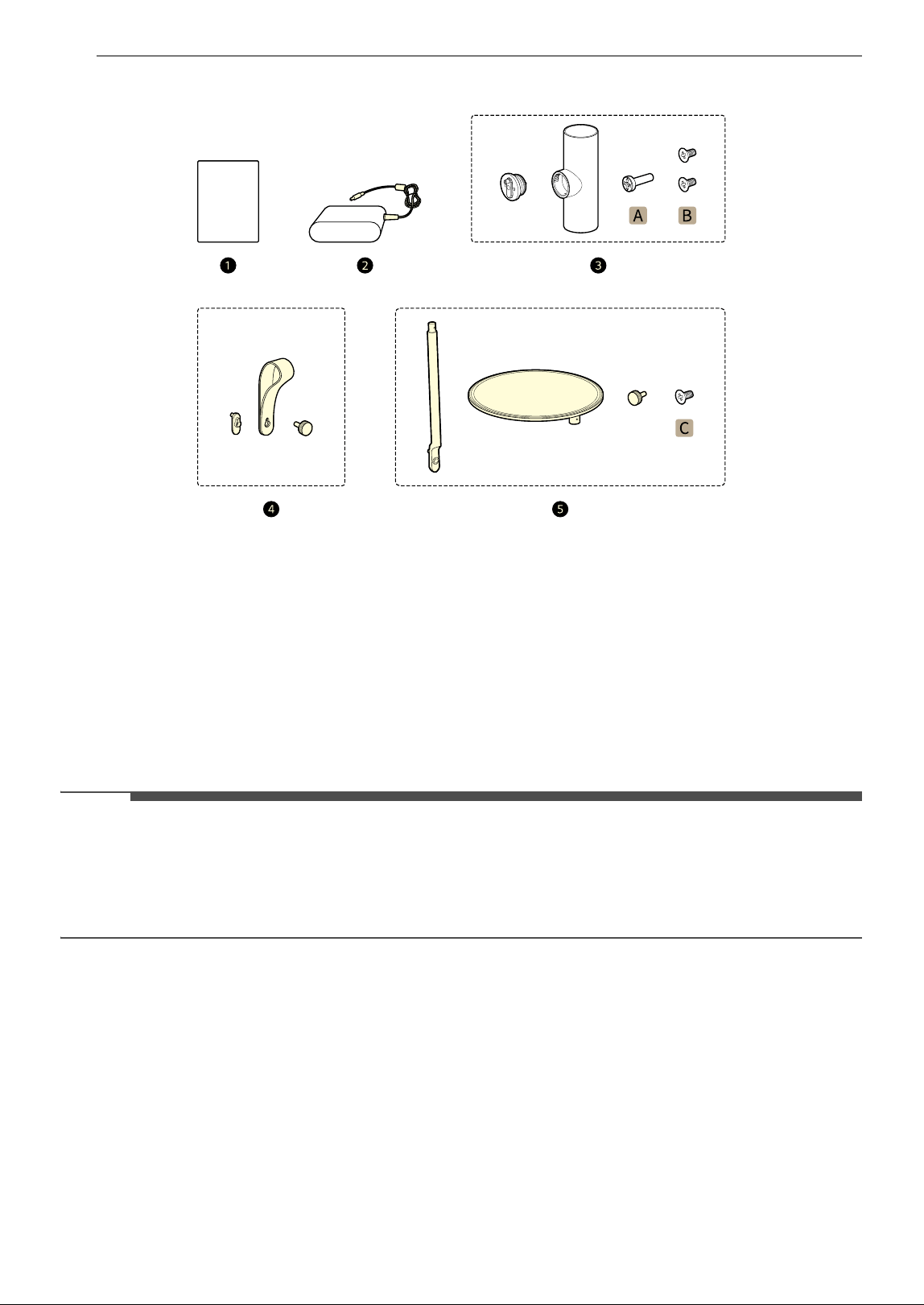
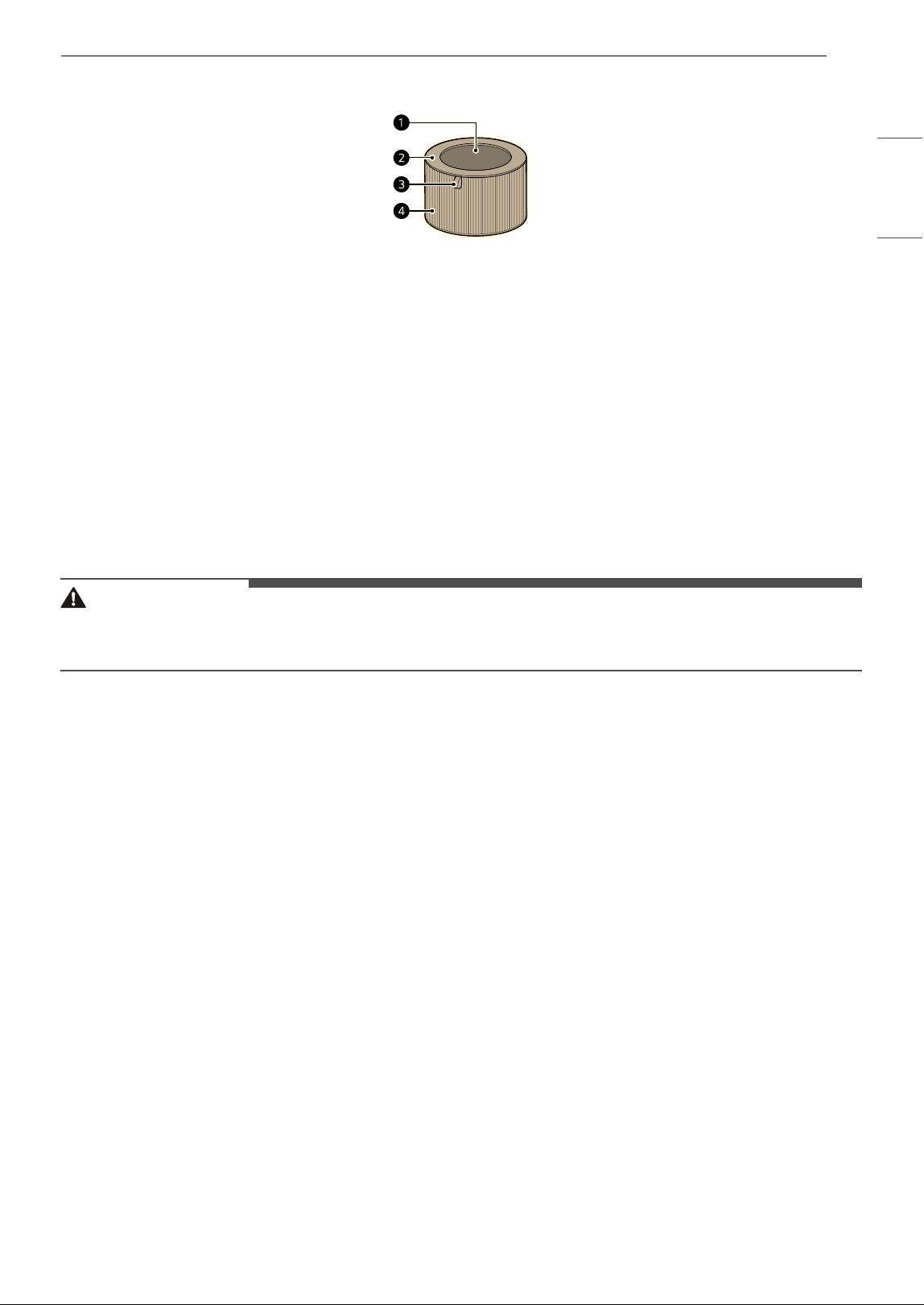
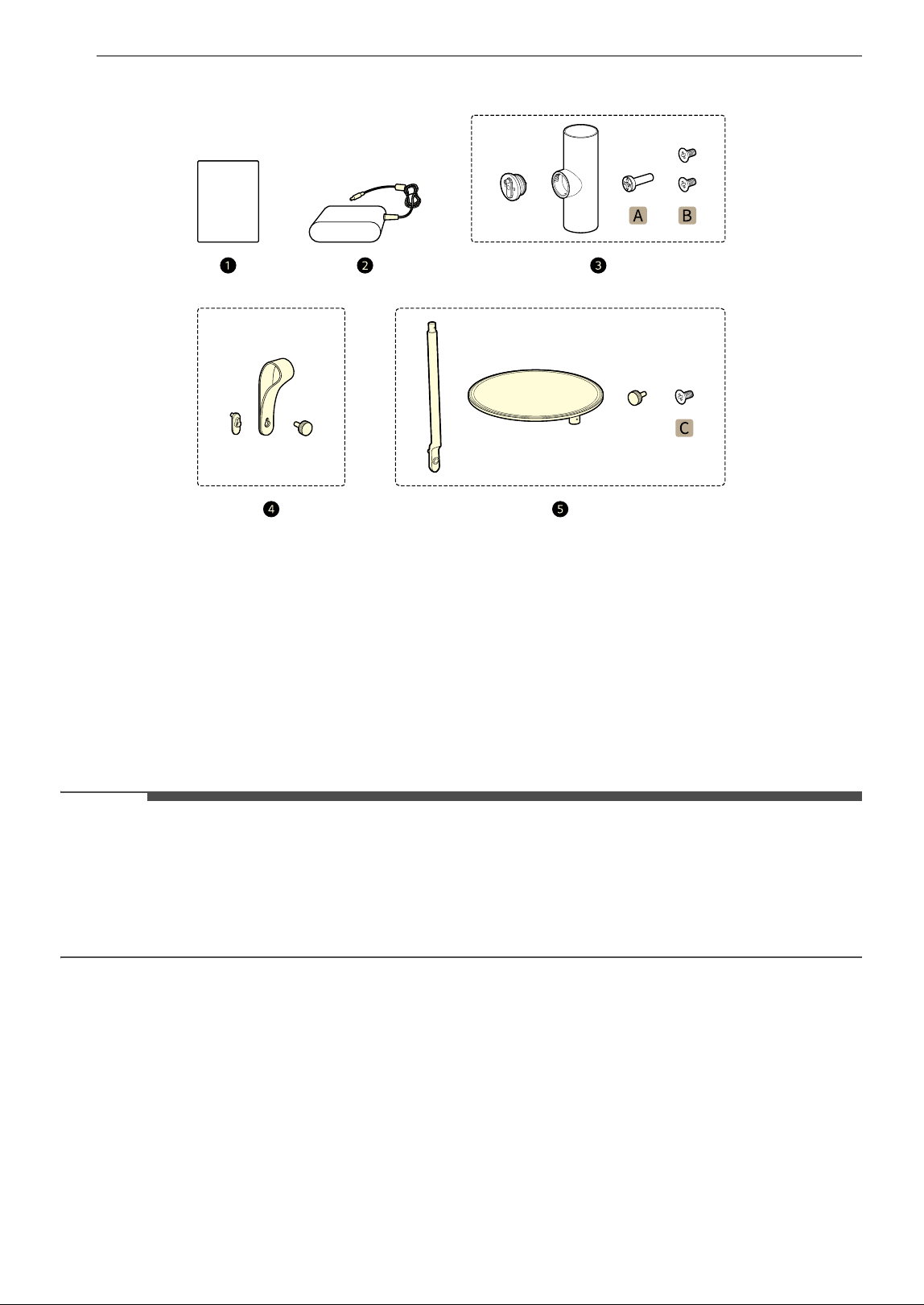
Components
a Owner's Manual
b Adapter
c Holder Accessory
(Holder Connector, Holder, Holder Screw A, Holder Screw B (2 ea))
d Strap Accessory
(Strap Connector, Strap, Strap Fixing Screw)
e Table Accessory
(Table Connector, Table, Table Fixing Screw, Table Screw C)
NOTE
• Accessories are only included with applicable models.
• If your model includes accessories, be careful not to discard them with the packaging materials.
• Two additional holder screws B (silver) and one table screw C (black) are provided in case of loss.
• The strap fixing screw and table fixing screw are the same screw.
11OPERATION
ENGLISH
Preparation before
Operation
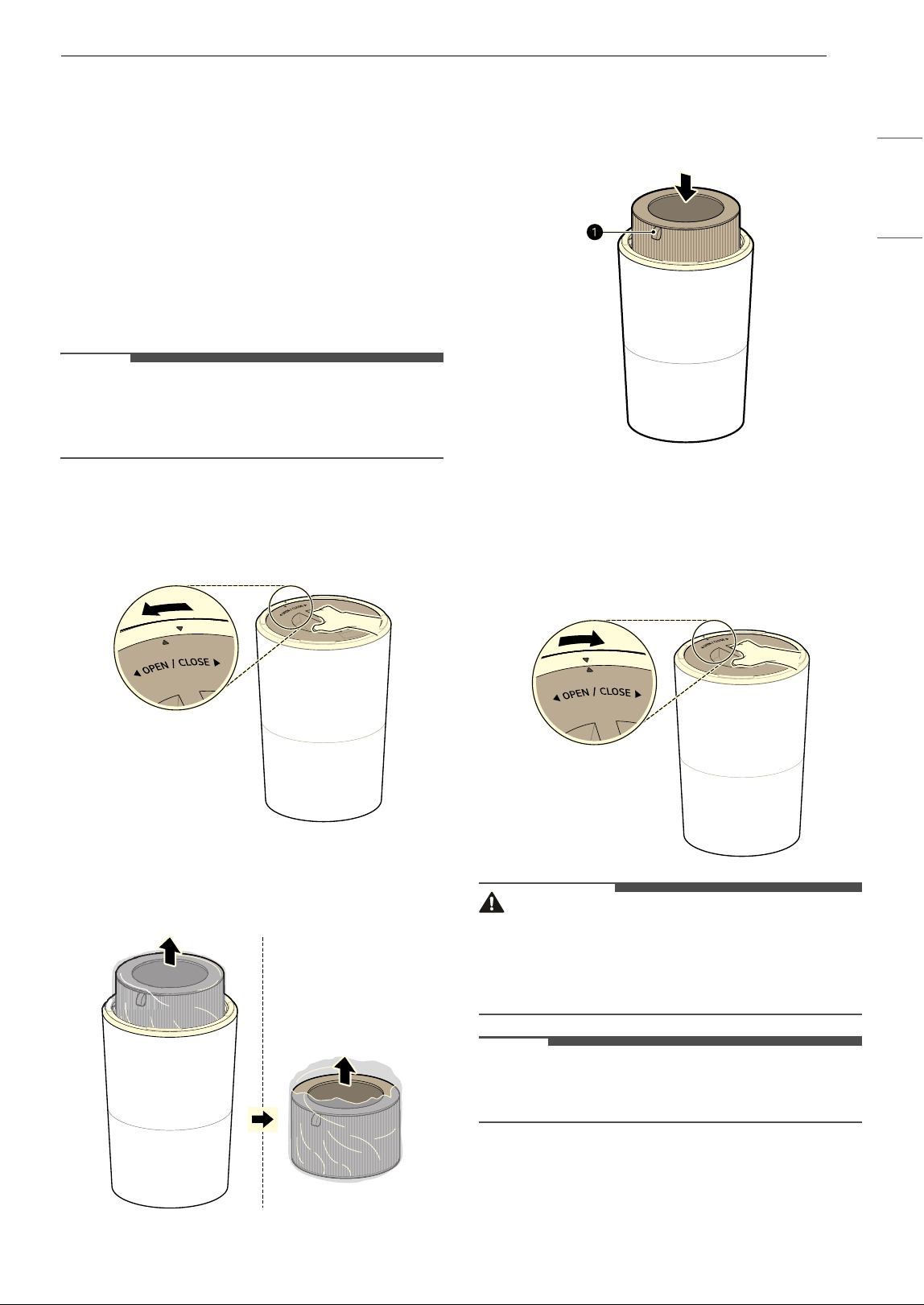
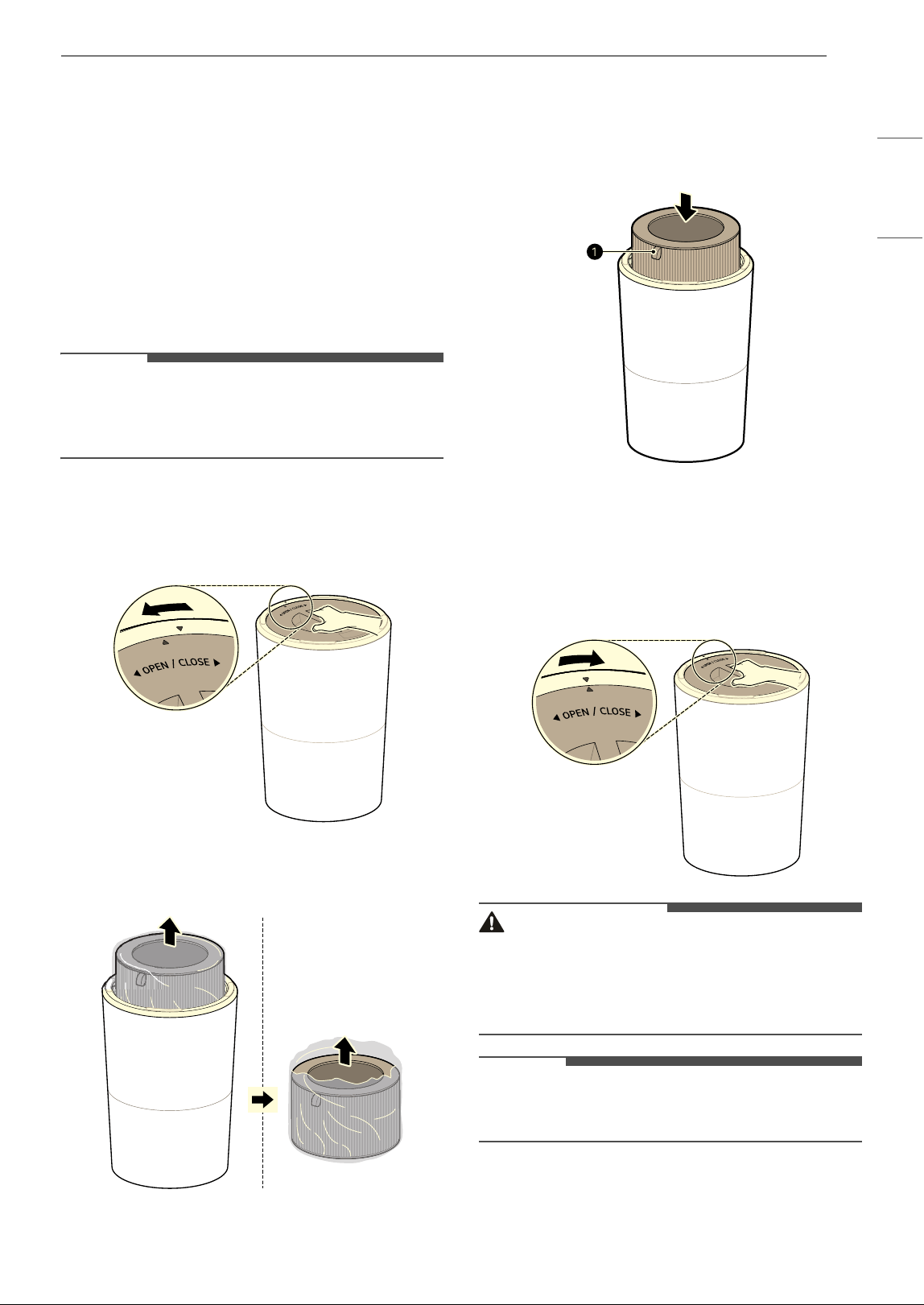
Removing the Protective Vinyl from
the Filter
Unpack the appliance and remove all packing tape
and filter packaging before using the appliance.
1 Take the product out of the box, and remove
the film and packing tape attached to the
product.
NOTE
• If your model includes accessories, be careful
not to discard them with the packaging
materials.
2 Turn the cover handle on the bottom of the
product counterclockwise to remove the
cover.
3 Remove the filter and dispose of the
packaging.
4 Install the filter in the product.
• Install the filter in the product so that the
side with the handle (
a) faces the cover.
5 After aligning the cover with the product, turn
the cover handle clockwise until it matches
the arrow on the product.
• When closing the cover, make sure the filter
handle does not stick out.
CAUTION
• For safety, hold the product when removing or
installing the filter.
• Be sure to remove the protective vinyl from the
filter before using the product.
NOTE
• Filter performance is not affected by the
installation direction.
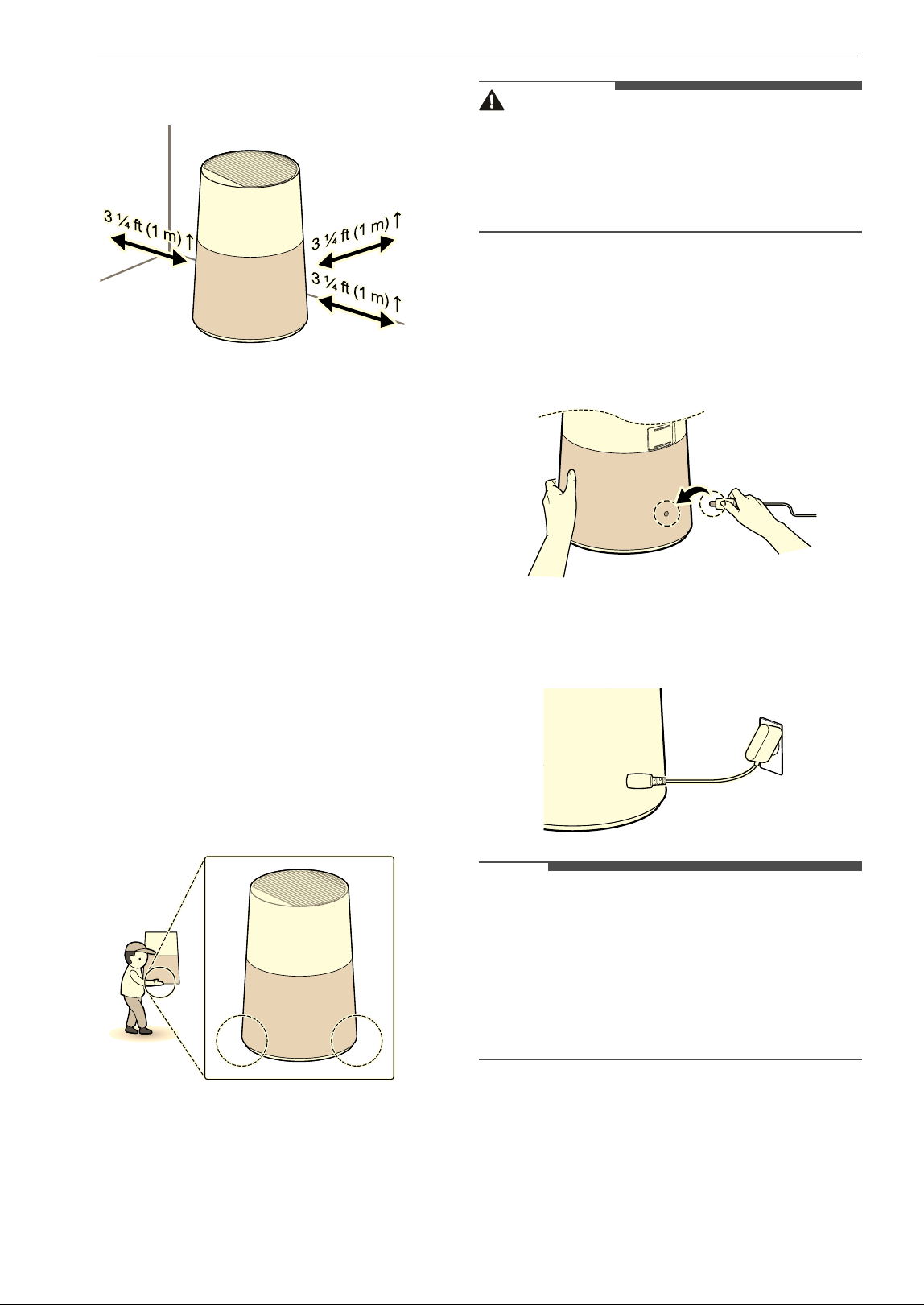
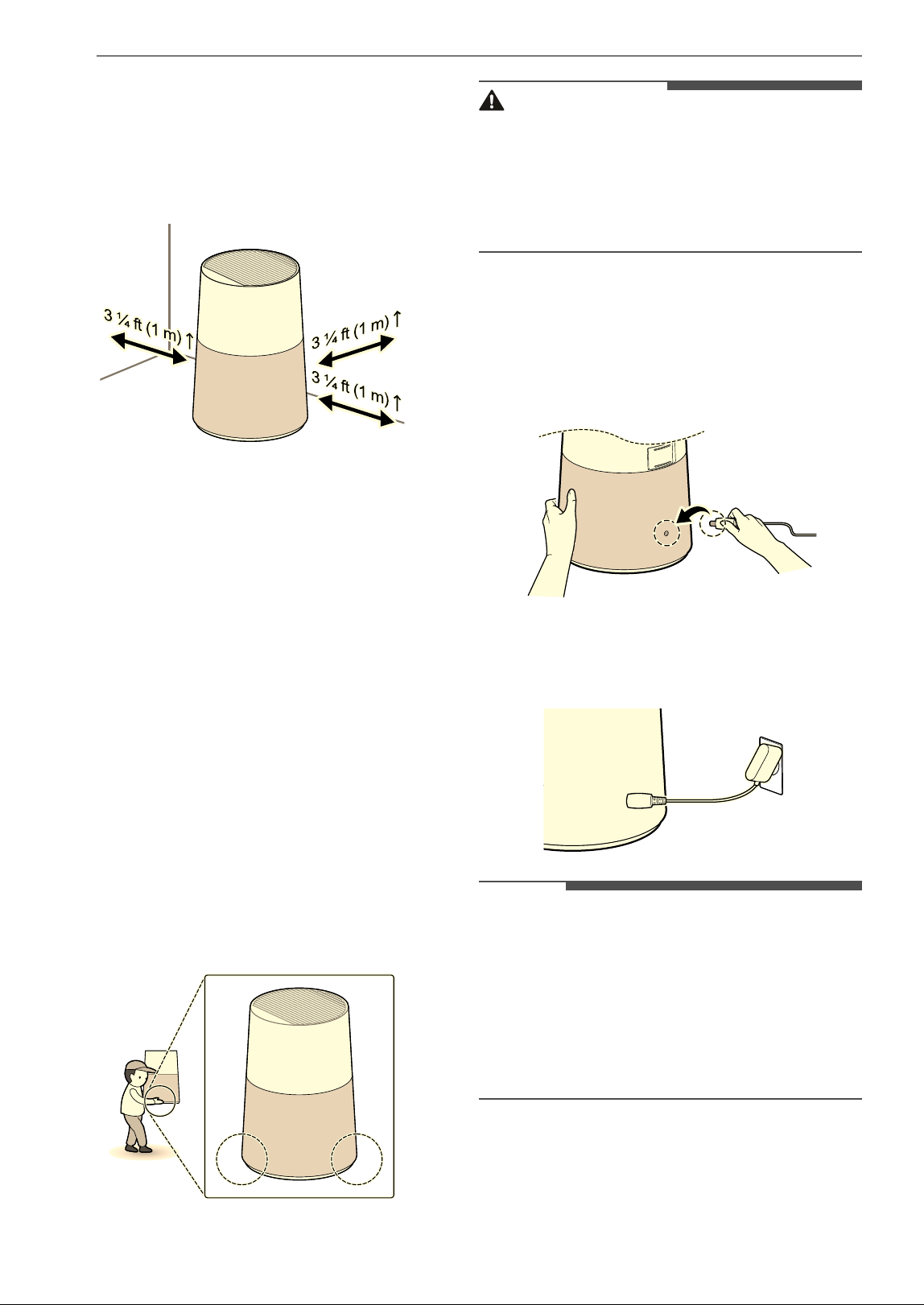
Installation Location Requirements
Install the product at least 3 1/4 ft (1 m) from walls.
12 OPERATION
• If there is not enough room for air suction, the
air purification performance may be affected.
• The performance of the product may differ
depending on the operating environment
(considering factors such as temperature and
humidity).
- The product's guaranteed performance
standards can be achieved at humidity levels
of 40 % to 70 %.
• Do not install the product near direct sunlight or
bright lighting.
- Doing so may cause discoloration of the
product.
Transportation Requirements
• When moving or storing the product, separate
the plug from the outlet and then separate the
adapter so that it will not drag across the floor.
- Failure to do so may damage the adapter or
scratch the floor.
• Hold the bottom of the product securely when
carrying it.
CAUTION
• Do not carry the product by holding the bottom
cover.
- Doing so may allow the cover to open and the
product to drop. Dropping the appliance may
cause personal injury or product malfunction.
Connecting the Power
1 Connect the adapter to the adapter
connection terminal on the back of the
product.
2 Plug the power plug of the adapter into an
outlet.
NOTE
• Hold the product and connect or disconnect the
adapter horizontally.
• Connect the adapter to the end of the adapter
connection terminal, and do not move it after it
is connected. (Doing so may result in damage.)
• Be careful not to apply impact to the adapter.
Doing so may result in damage.
Using Accessories
(Accessories are only included with applicable
models.)
Required items: Driver
13OPERATION
ENGLISH
CAUTION
• When assembling the accessory, securely fasten
the screw to prevent it from separating from the
product.
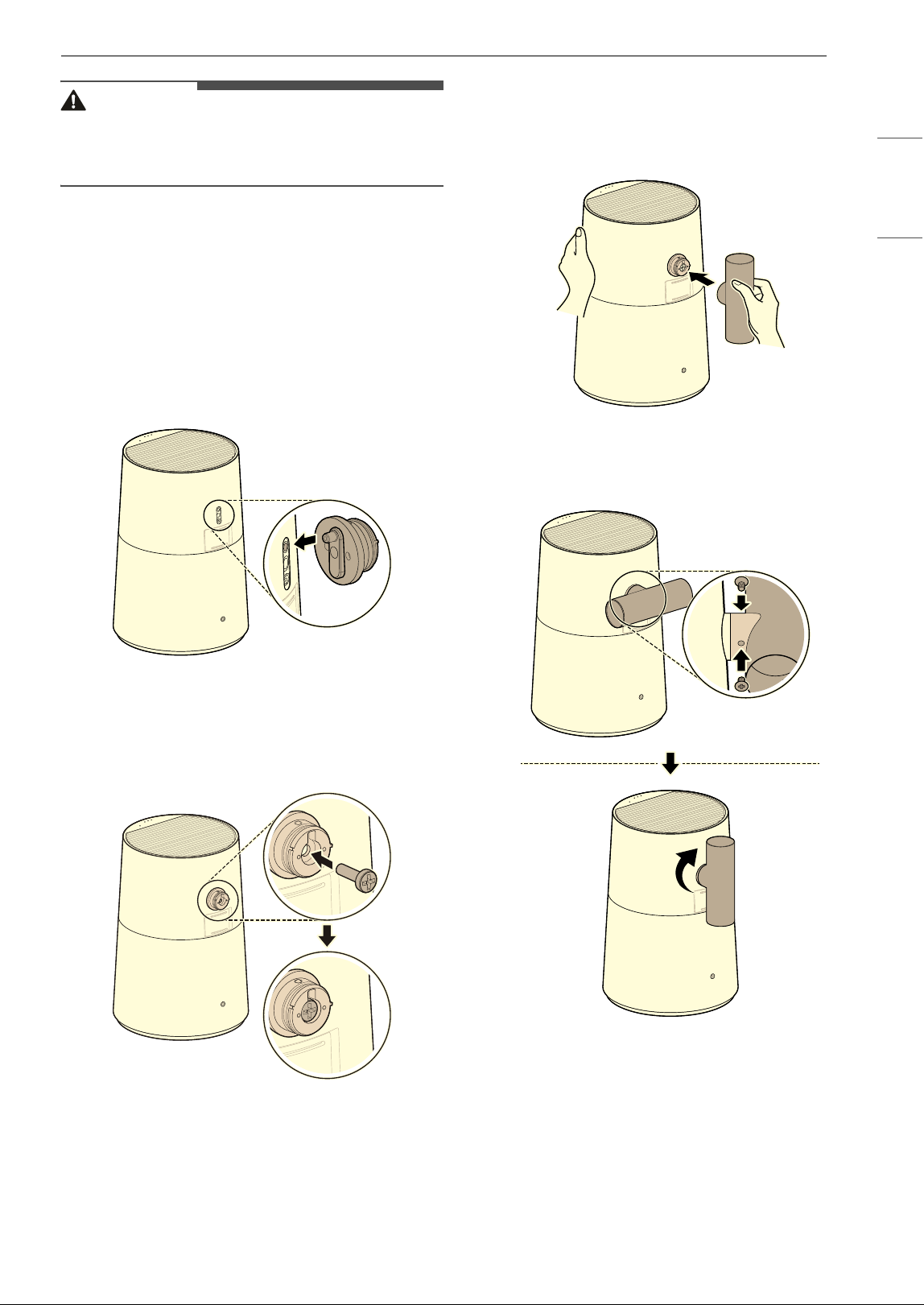
Using the Holder
You can place interior decorations such as dried
flowers or artificial flowers in the holder.
1 Remove the accessory cap.
2 Insert the holder connector into the first hole
on the product.
3 Secure the product and holder connector
firmly with holder screw A.
• The longer screw is screw A.
4 Insert the holder into the holder connector.
• Support the product with your hand to
prevent it from tipping over, then assemble
it.
• Make sure that the side labeled "TOP" is
facing upward.
- If assembled in reverse, rotation is not
possible.
5 Secure the holder and holder connector firmly
with holder screw B.
14 OPERATION
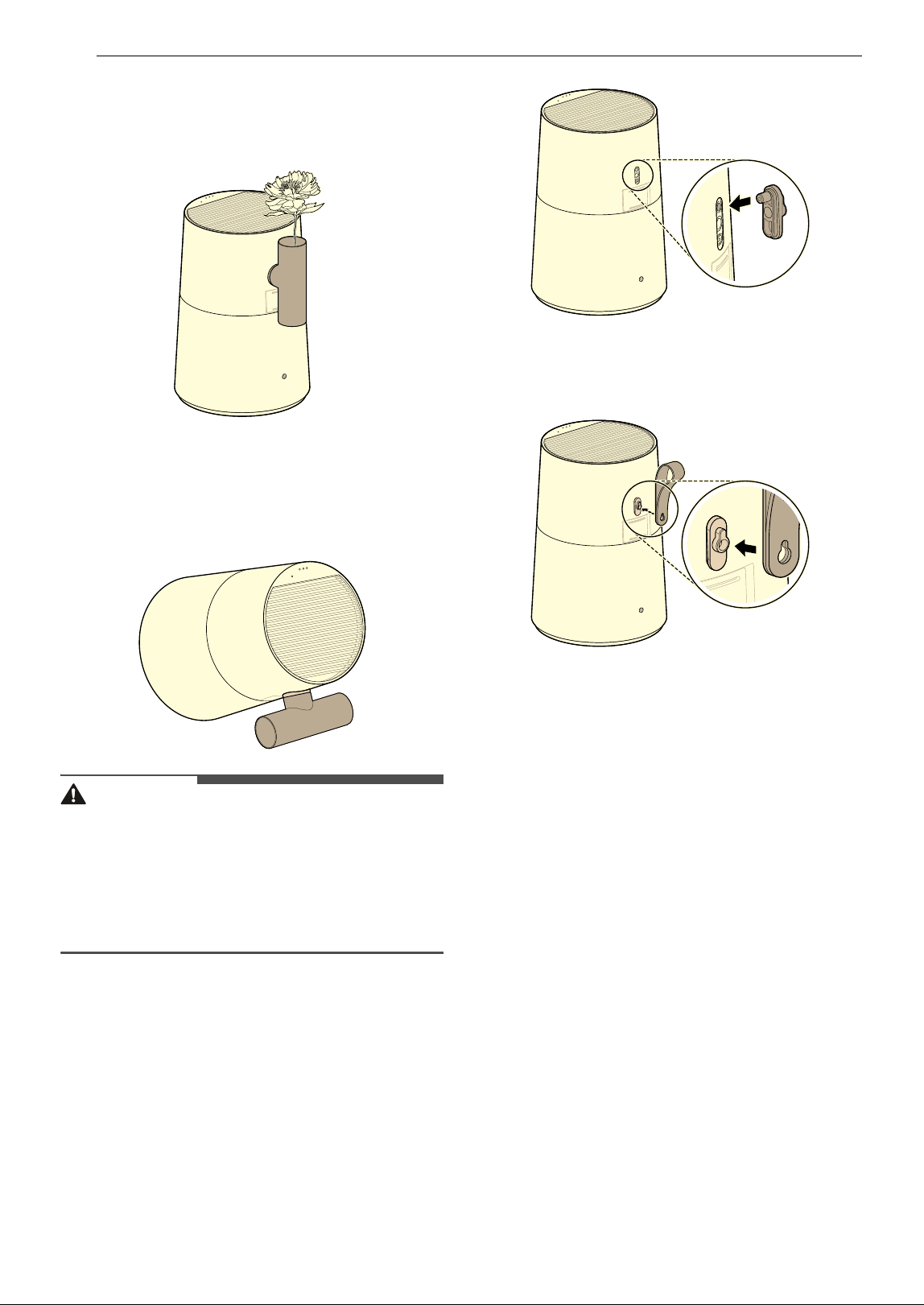
6 Use the accessories in the way you prefer.
• You can place artificial flowers in the holder
and use it as a decoration.
• Turn the holder and use it as a stand to lay
the product down and enjoy the clean
breeze directly.
- The holder rotates 90 degrees left and
right.
CAUTION
• Do not forcefully rotate the holder. The holder
may come off and cause injury.
• Do not put water into the holder. If water gets
inside the product, it may cause a malfunction.
• Do not place heavy objects in the holder. The
product may tip over.
Using the Strap
You can carry the product with one hand by
holding the strap when moving it.
1 Remove the accessory cap.
2 Insert the strap connector into the first hole
on the product.
3 Align the strap hole with the strap connector
and insert it.
4 Secure the product and strap firmly with the
strap fixing screw.
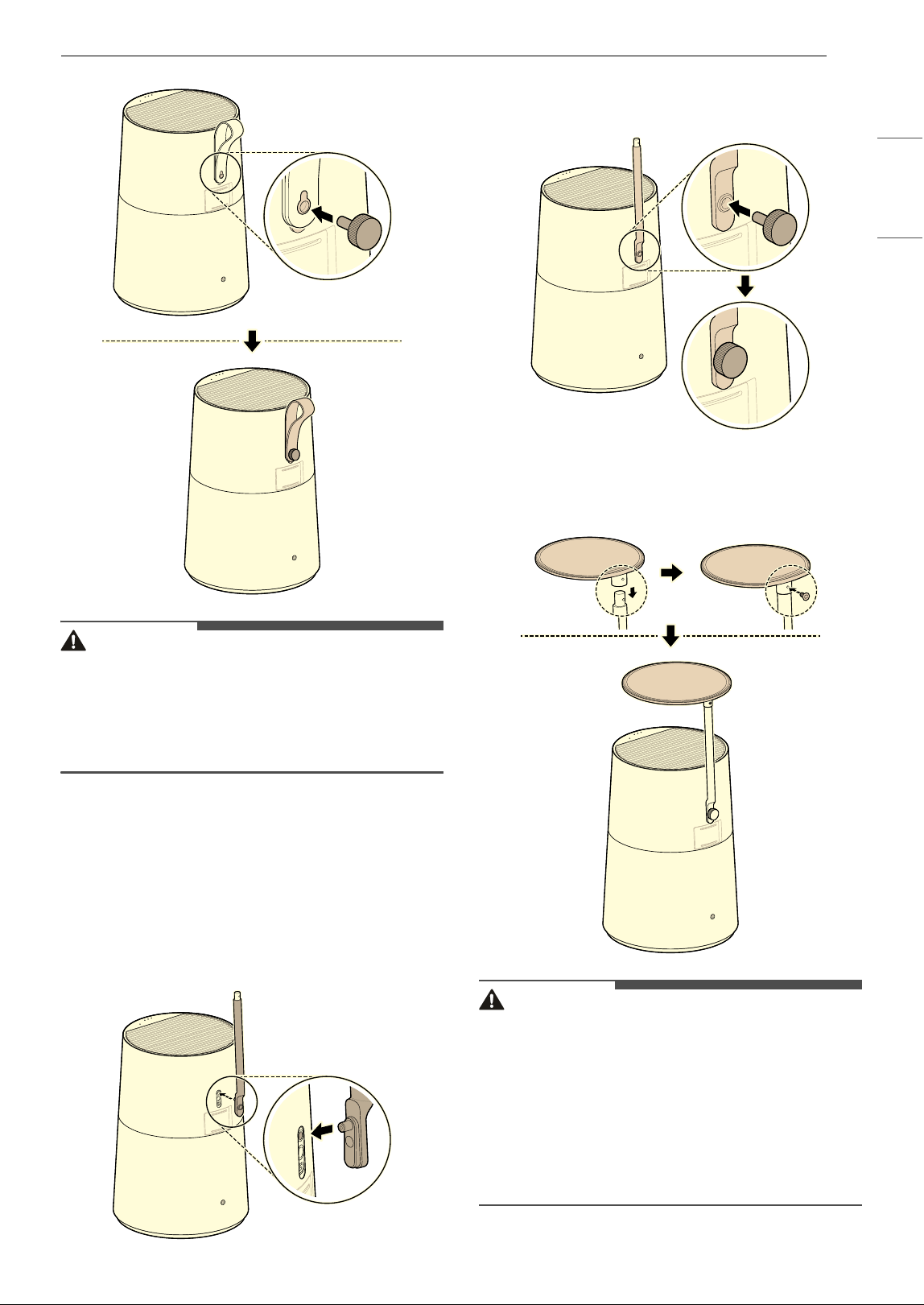
15OPERATION
ENGLISH
CAUTION
• Do not shake the strap forcefully. There is a risk
of injury if the strap becomes detached.
• Do not use the strap for any purpose other than
moving the product. Doing so may cause
damage or malfunction.
Using the Table
You can place items such as phones on the table.
1 Remove the accessory cap.
2 Insert the table connector into the first hole
on the product.
3 Secure the product and table connector firmly
with the table fixing screw.
4 Assemble the table and table connector and
securely fasten them with the table screw C.
CAUTION
• Do not place heavy objects on the table.
(Recommended gross weight: 2 lb / 1 kg or less)
• Make sure small items such as coins or keys do
not fall into the product.
• Do not place any liquids on the table. If liquid
enters the product, it may cause a malfunction.
• Please make sure that infants or pets do not
climb onto the table. There is a risk of injury.
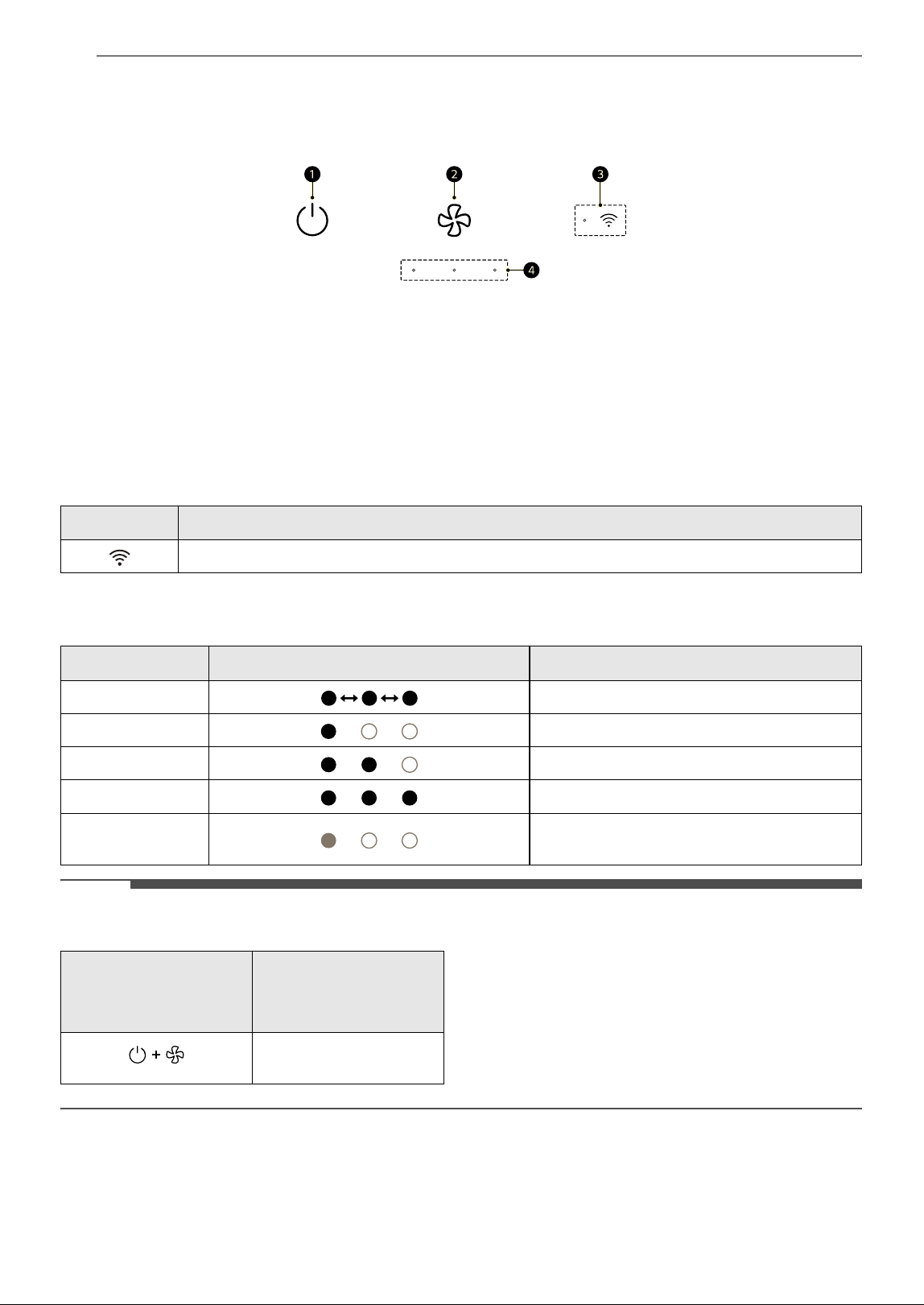
16 OPERATION
Features
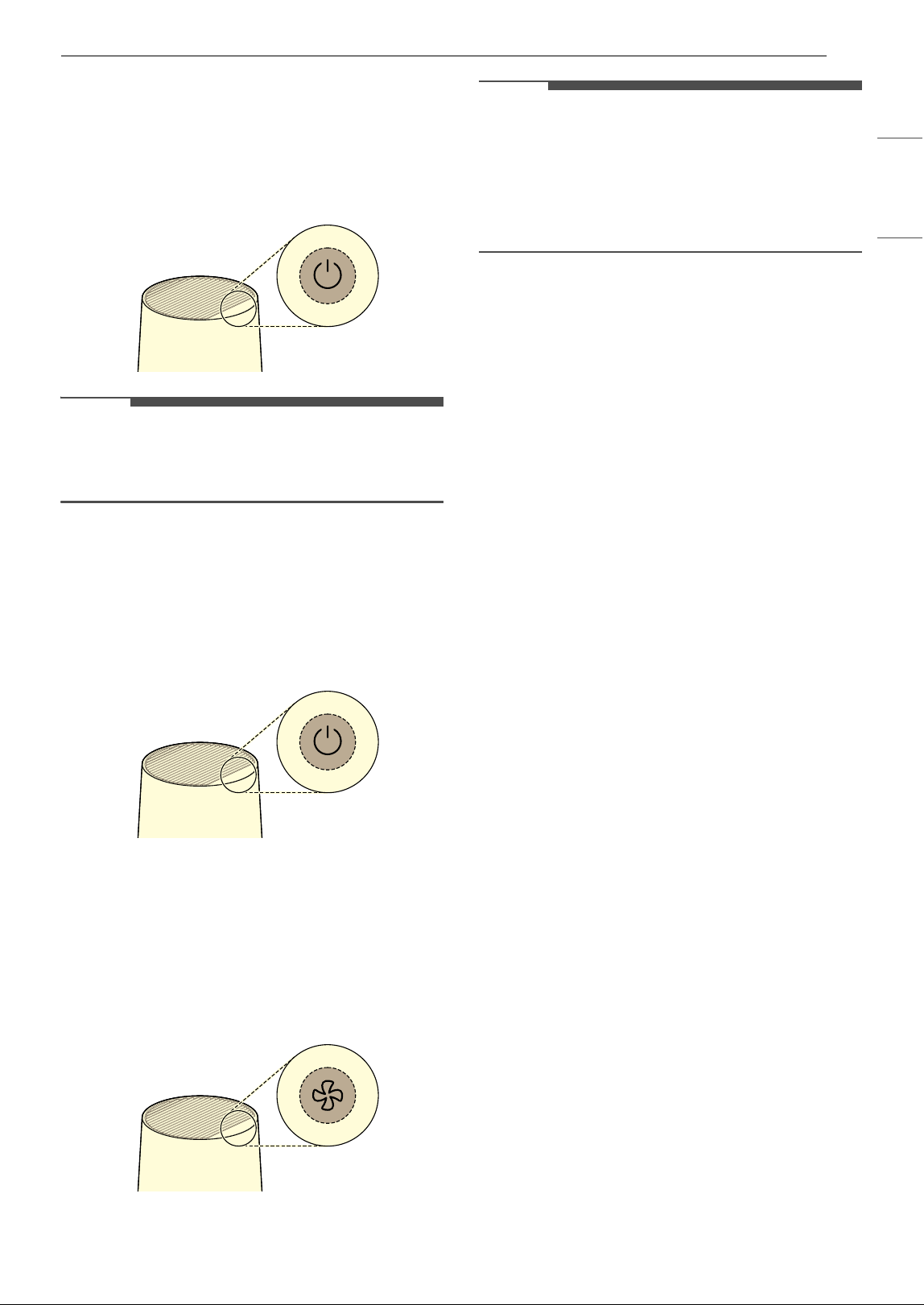
Controlling the Air Purifier
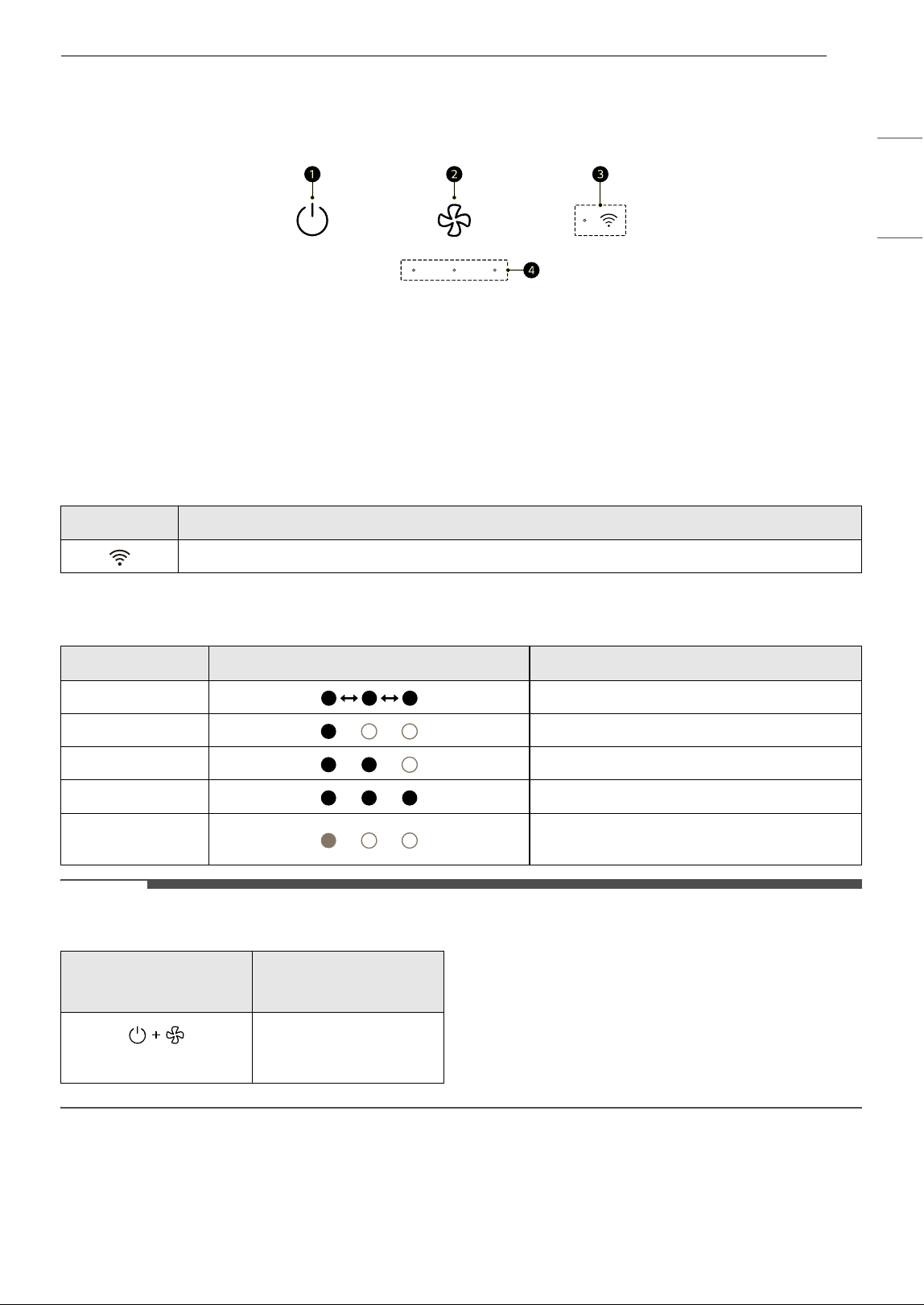
a Start/Stop Button
Turns the product on and off.
• To prepare the product to connect to Wi-Fi through the LG ThinQ application, press and hold the
button for 3 seconds or more.
b Speed Button
Adjusts the fan speed of the air purifier.
c Add-On Display
d Fan Speed Display
Displays the air purifier’s fan speed.
NOTE
• Use additional functions by pressing the buttons on the control panel for 3 seconds.
Icon Description
Lights up when the Wi-Fi function is activated.
Speed Display Description
Auto 3 LEDs circulating
Low 1 LED ON
Medium 2 LEDs ON
High 3 LEDs ON
Sleep
1 LED ON
(50 % brightness of Low)
Long press
(more than 3
seconds)
Extra Functions
Filter Replacement
Notification Reset
17OPERATION
ENGLISH
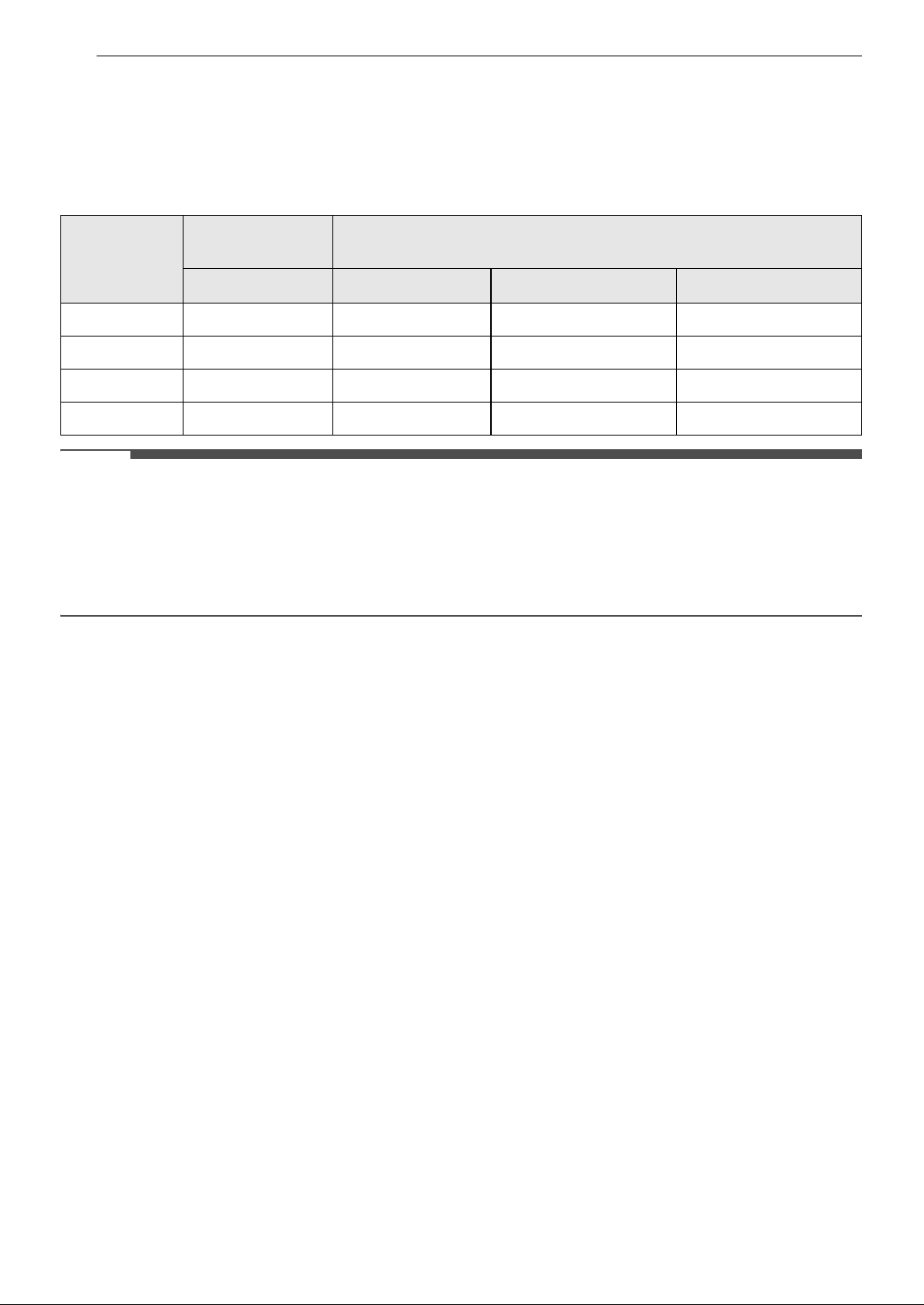
Operating the Air Purifier
Start/Stop
Press the Start/Stop button to turn the air purifier
on or off.
NOTE
• The most recently used mode (speed) is
memorized if the power supply is cut off as a
result of a power failure.
Adjusting the Fan Speed
You can adjust the fan speed from the air purifier.
1 Press the Start/Stop button to turn on the
product.
2 To adjust the fan speed, press the Speed
button.
• When you press the button during product
operation, the fan speed changes in the
order of Auto
~ Low ~ Medium ~ High
~ Sleep.
NOTE
• When the operation is started for the first time, it
will operate with Auto as the fan speed. Auto
adjusts the speed automatically according to the
air quality level of the indoor air.
• When Sleep is set, the air quality light is turned
off.
18 OPERATION
Overall Air Quality
Understanding Overall Air Quality
The overall air quality is calculated based on the concentration of particulates and is categorized in 4 levels
based on the level of pollution in the air. (Green, Yellow, Orange, and Red)
NOTE
• Overall air quality can be seen by the color of the air quality indicator.
• The color of the overall air quality indicator is determined based on the concentration of particulate
matter (PM).
• PM concentration values are based on the data sheet provided by the sensor manufacturer.
• The PM concentration measurement was tested using LG Electronics’ standard test materials.
Color
Overall air
quality
Concentration of PM (μg/m
3
)
State PM10 PM2.5 PM1.0
Red Poor 255 or more 56 or more 56 or more
Orange Unhealthy 155 ~ 254 36 ~ 55 36 ~ 55
Yellow Moderate 55 ~ 154 13 ~ 35 13 ~ 35
Green Good 54 or less 12 or less 12 or less
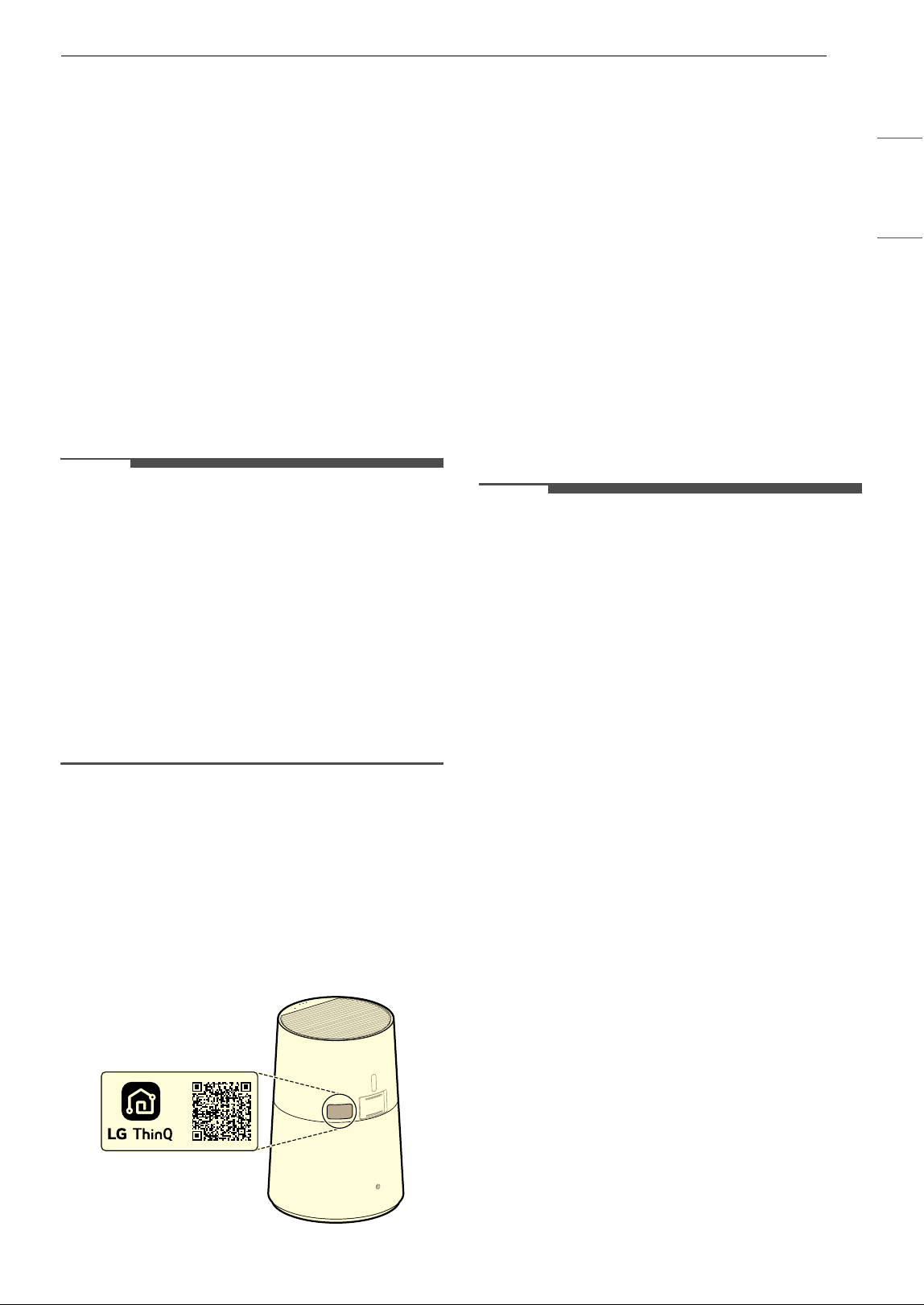
19SMART FUNCTIONS
ENGLISH
SMART FUNCTIONS
LG ThinQ Application
The LG ThinQ application allows you to
communicate with the appliance using a
smartphone.
LG ThinQ Application Features
Smart Diagnosis
If you experience a problem while using the
appliance, this Smart Diagnosis feature will help
you diagnose the problem.
Settings
Allows you to set various options on the appliance
and in the application.
NOTE
• In the following cases, you must update the
network information for each appliance in the
LG ThinQ application under Device Cards
~
Settings
~ Change Network.
- wireless router is changed
- wireless router password is changed
- Internet service provider is changed
• The application is subject to change for
appliance improvement purposes without notice
to users.
• Functions may vary by model.
Installing LG ThinQ Application and
Connecting an LG Appliance
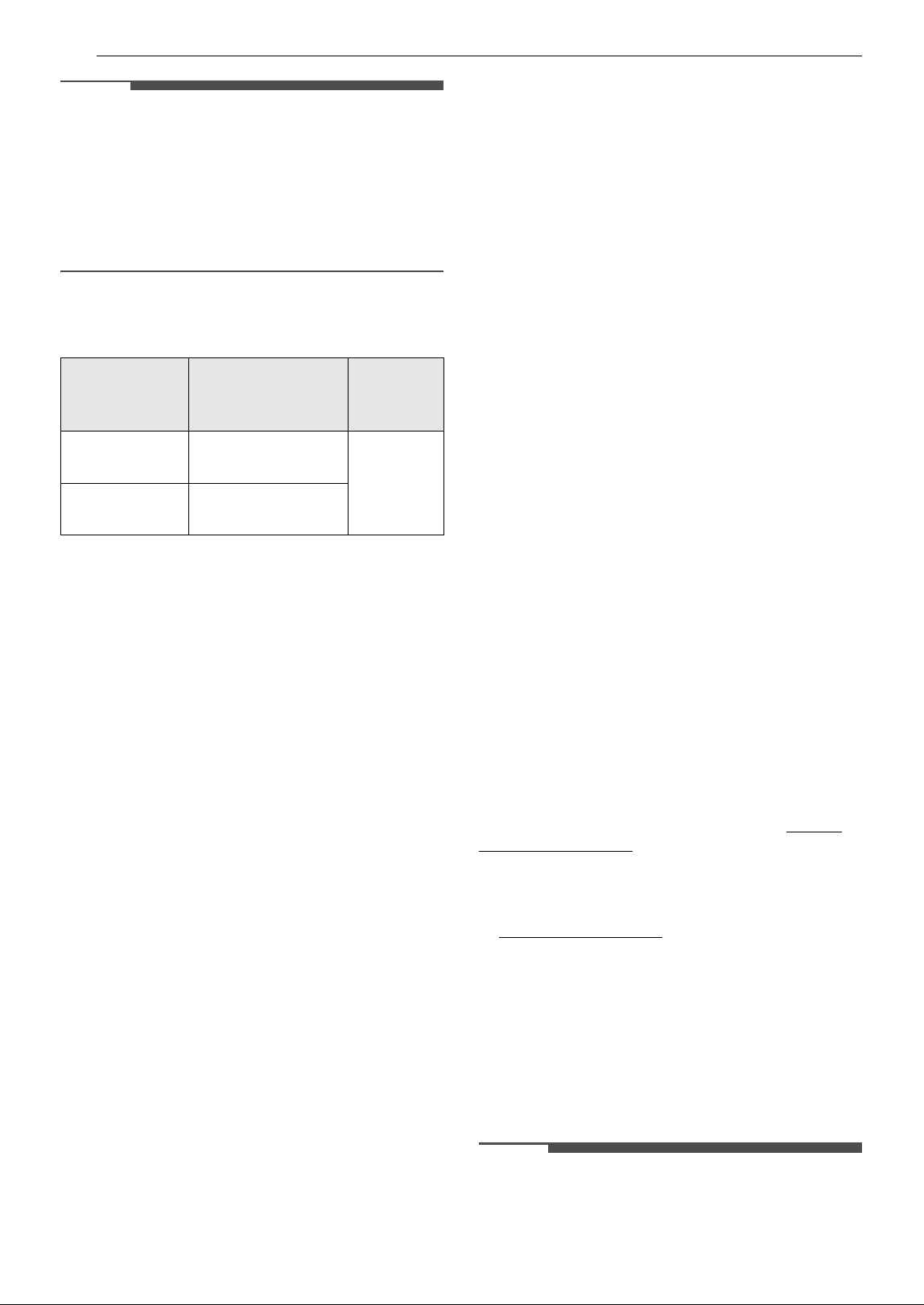
Models with QR Code
Scan the QR code attached to the product using
the camera or a QR code reader application on
your smartphone.
Models without QR Code
1 Search for and install the LG ThinQ
application from the Google Play Store or
Apple App Store on a smartphone.
2 Run the LG ThinQ application and sign in with
your existing account or create an LG account
to sign in.
3 Touch the add (~) button on the LG ThinQ
application to connect your LG appliance.
Follow the instructions in the application to
complete the process.
NOTE
• To verify the Wi-Fi connection, check that the Wi-
Fi indicator on the control panel is lit.
• The appliance supports 2.4 GHz Wi-Fi networks
only. To check your network frequency, contact
your Internet service provider or refer to your
wireless router manual.
• LG ThinQ is not responsible for any network
connection problems or any faults, malfunctions,
or errors caused by network connection.
• The surrounding wireless environment can
make the wireless network service run slowly.
• If the distance between the appliance and the
wireless router is too far, the signal strength
becomes weak. It may take a long time to
connect or installation may fail.
• If the appliance is having trouble connecting to
the Wi-Fi network, it may be too far from the
router. Purchase a Wi-Fi repeater (range
extender) to improve the Wi-Fi signal strength.
• The network connection may not work properly
depending on the Internet service provider.
• The Wi-Fi connection may not connect or may be
interrupted because of the home network
environment.
• If the appliance cannot be connected due to
problems with the wireless signal transmission,
unplug the appliance and wait about a minute
before trying again.
• The wireless network name (SSID) should be a
combination of English letters and numbers. (Do
not use special characters.)
20 SMART FUNCTIONS
NOTE
• Smartphone user interface (UI) may vary
depending on the mobile operating system (OS)
and the manufacturer.
• If the security protocol of the router is set to
WEP, the network setup may fail. Change to
another security protocol (WPA2 is
recommended) and connect the product again.
Radio Equipment Specifications
† This feature is only available on some models.
FCC Notice
The following notice covers the transmitter
module contained in this product.
This equipment has been tested and found to
comply with the limits for a Class B digital device,
pursuant to Part 15 of the FCC Rules. These limits
are designed to provide reasonable protection
against harmful interference in a residential
installation. This equipment generates, uses, and
can radiate radio frequency energy and, if not
installed and used in accordance with the
instructions, may cause harmful interference to
radio communications. However, there is no
guarantee that interference will not occur in a
particular installation. If this equipment does
cause harmful interference to radio or television
reception, which can be determined by turning the
equipment off and on, the user is encouraged to
try to correct the interference by one or more of
the following measures:
• Reorient or relocate the receiving antenna.
• Increase the separation between the equipment
and the receiver.
• Connect the equipment into an outlet on a
circuit different from that to which the receiver is
connected.
• Consult the dealer or an experienced radio/TV
technician for help.
This device complies with part 15 of the FCC Rules.
Operation is subject to the following two
conditions:
(1) This device may not cause harmful interference
and
(2) This device must accept any interference
received, including interference that may cause
undesired operation.
Any changes or modifications in construction of
this device which are not expressly approved by
the party responsible for compliance could void
the user’s authority to operate the equipment.
FCC RF Radiation Exposure
Statement
This equipment complies with FCC radiation
exposure limits set forth for an uncontrolled
environment. This transmitter must not be co-
located or operating in conjunction with any other
antenna or transmitter.
This equipment should be installed and operated
with a minimum distance of 20 cm (7.8 inches)
between the antenna and your body. Users must
follow the specific operating instructions for
satisfying RF exposure compliance.
Open Source Software Notice
Information
To obtain the source code that is contained in this
product, under GPL, LGPL, MPL, and other open
source licenses that have the obligation to disclose
source code, and to access all referred license
terms and copyright notices, please visit https://
opensource.lge.com.
LG Electronics will also provide open source code
to you for a charge covering the cost of
performing such distribution upon email request
This offer is valid to anyone in receipt of this
information for a period of three years after our
last shipment of this product.
Smart Diagnosis
Use this feature to help you diagnose and solve
problems with your appliance.
NOTE
• For reasons not attributable to LGE’s negligence,
the service may not operate due to external
factors such as, but not limited to, Wi-Fi
Type
Operating
Frequency Range
Output
Power
(Max.)
Wireless LAN
2400 MHz - 2472
MHz
< 1 W
Bluetooth
†
2400 MHz - 2483.5
MHz

21SMART FUNCTIONS
ENGLISH
unavailability, Wi-Fi disconnection, local app
store policy, or app unavailability.
• The feature may be subject to change without
prior notice and may have a different form
depending on where you are located.
Using LG ThinQ to Diagnose Issues
If you experience a problem with your Wi-Fi
equipped appliance, it can transmit
troubleshooting data to a smartphone using the
LG ThinQ application.
• Launch the LG ThinQ application and select the
Smart Diagnosis feature in the menu. Follow
the instructions provided in the LG ThinQ
application.
22 MAINTENANCE
MAINTENANCE
Maintaining the Product
Scheduled Maintenance
WARNING
• Stop the appliance operation and unplug the
power cord before cleaning and replacing the
filter.
• Do not spray water directly on the appliance.
NOTE
• The color of the filter may vary depending on the
usage environment and color of dust.
• The cleaning frequency may vary depending on
the operating hours and environment of the
appliance.
• If you do not clean the product according to the
cleaning frequency, you may experience a bad
odor and poor performance.
• The filter must be replaced at the end of its
lifespan, and the cost of replacement filters is
not covered under the warranty. To purchase
new filters, contact an LG Electronics Customer
Information Center or visit the website at
www.lg.com
Cleaning the Exterior
1 Remove dust from the air inlet and outlet
using a vacuum cleaner.
2 Wipe the exterior of the product with a soft
cloth.
CAUTION
• Do not wipe the appliance with an alkaline
detergent.
• Never use sulphuric acid, hydrochloric acid or
organic solvent (for example, thinner, kerosene
and acetone) to wipe the appliance exterior, or
affix labels on the exterior. Doing so may
damage the product surface.
• Care should be exercised to prevent water from
entering the product.
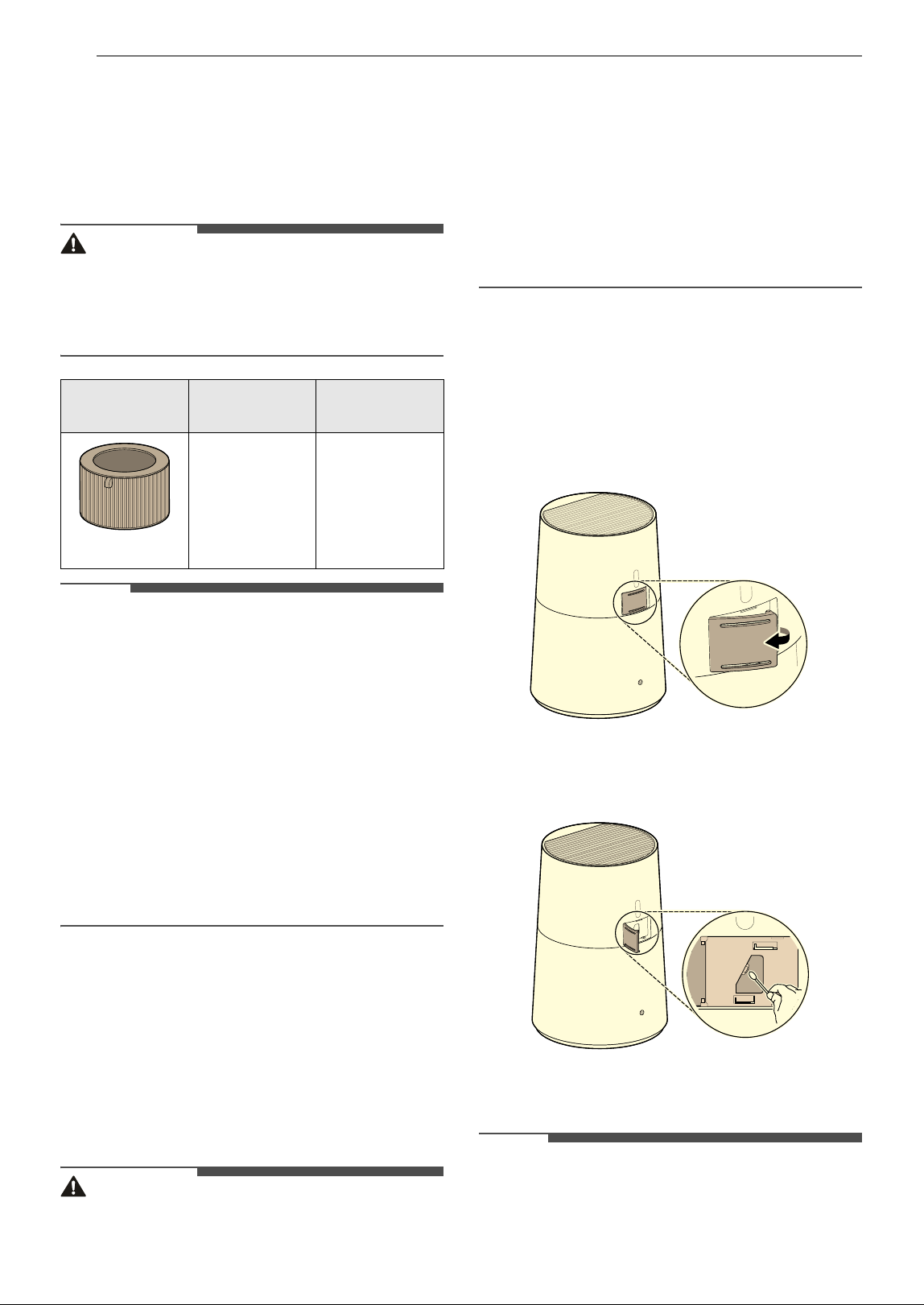
Cleaning the Particle Sensor
The PM1.0 sensor detects fine dust and large dust
contamination levels, so it is beneficial to clean the
lens periodically, at least once every 2 months.
1 Open the sensor cover.
2 Clean the lens with a cotton swab soaked with
water and wipe it dry with a dry cotton swab.
3 Close the sensor cover.
NOTE
• Do not wipe the sensor with any substances
other than water. Doing so may cause the
appliance to malfunction.
Component
Cleaning
frequency
Replacement
frequency
Filter
Pre-Filter
Clean filter as
needed
1 year
23MAINTENANCE
ENGLISH
• It is normal for the sensor cover to make a sound
when opened or closed.
Cleaning the Filters
1 Remove the cover from the bottom of the
product and remove the filter.
2 Using a vacuum cleaner or soft brush, remove
any dust from the pre-filter surrounding the
filter.
CAUTION
• Do not clean the filter with water. The service life
of the filter may be reduced.
• Be careful not to damage the pre-filter when
using a vacuum cleaner.
• Take caution because there is a risk of tearing or
loss when removing or assembling the pre-filter.
• Take care to avoid getting liquid on the filter, as
it may damage the filter.
Alerts on the Status Panel
NOTE
• Filter replacement alerts appear based on the
maximum usage time, taking into account the
operating hours of the appliance. The
replacement frequency is determined by the
operating hours and environment.
Replacing the Filters
1 Remove the cover from the bottom of the
product and replace the filter.
• To avoid spreading dust when replacing the
filter, place a newspaper or paper towels on
the floor before removing the filter.
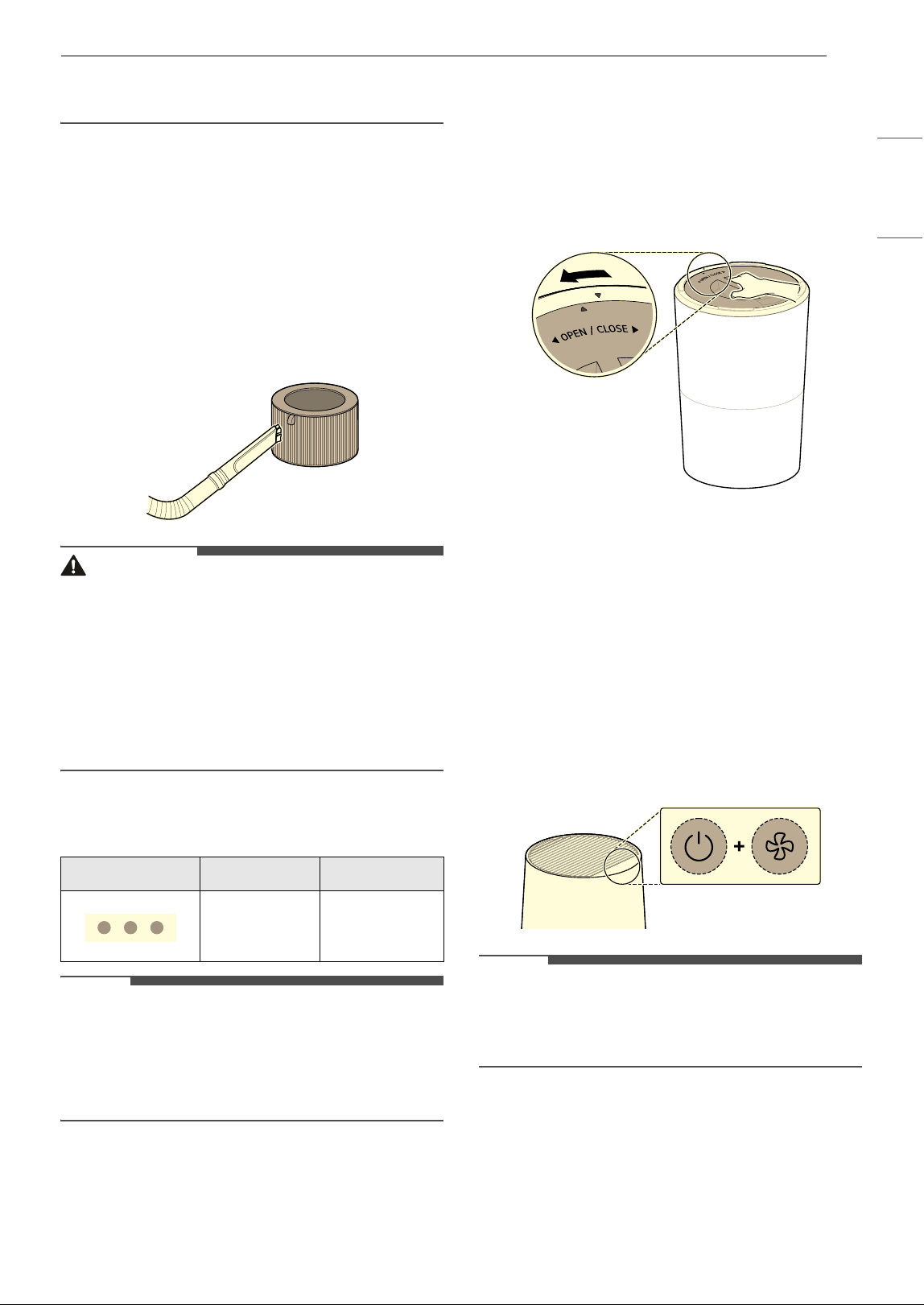
2 When you finish replacing the filter, turn off
the Filter Replacement Notification.
Turning off Filter Replacement
Notification
Press and hold the Start/Stop and Speed buttons
on the control panel for 3 seconds or more.
• Filter Replacement Notification on the status
panel is turned off and the time for Filter
Replacement Notification is reset.
NOTE
• A notification is displayed when the filter needs
to be replaced.
• Use when replacing with a new filter.
Alert Description Measures
3 LEDs
blinking at
the same time
Replace the
filter.
24 MAINTENANCE
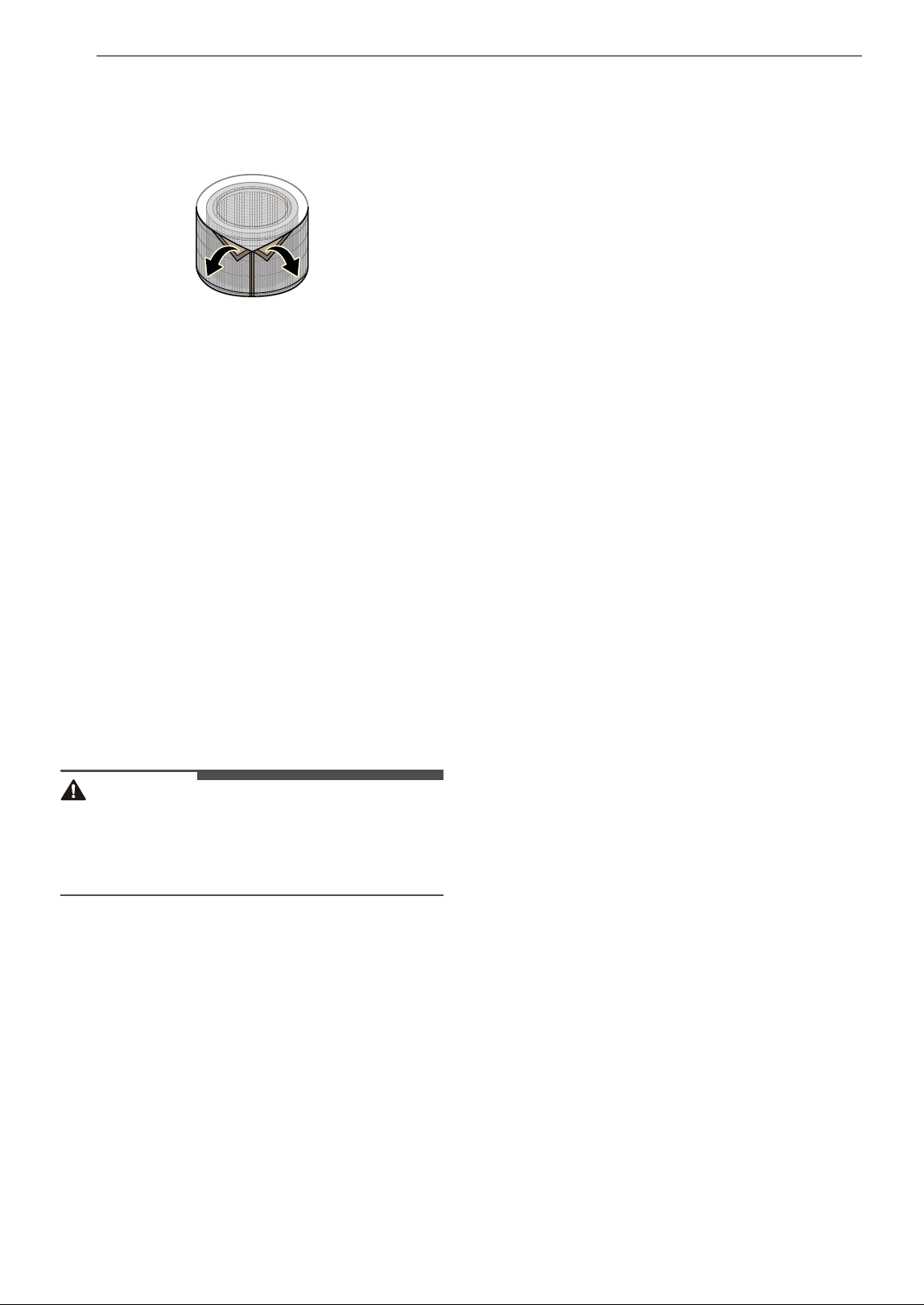
Replacing the Pre-Filter
To replace the pre-filter, locate the Velcro and
separate it slowly and carefully to remove the pre-
filter.
Storage
If the product will not be used for a long period of
time, store it in a dry and shaded place.
1 Operate the product for one hour or more on
a fine day.
• This removes moisture and prevents it from
building up inside the product.
2 Turn off the power and unplug the product
from the electrical outlet.
• Separate the adapter from the product and
store it.
3 Cover the appliance to prevent dust or foreign
substances from entering the appliance. Store
the covered appliance out of direct sunlight.
CAUTION
• Do not store the appliance in a humid location or
in an area exposed to direct sunlight. If you do
so, the appliance may be deformed, malfunction
or generate odor.
25TROUBLESHOOTING
ENGLISH
TROUBLESHOOTING
Before Calling for Service
Please check the following before calling for service. If the problem persists, contact your local service
center.
Operation
Odor
Problem Possible Cause & Solution
The appliance does
not operate.
Is the power plug disconnected?
• Connect it to an outlet correctly.
Did the electricity get cut off?
• Check the power to other products in the house.
A noise occurs and
the fan speed is low.
Has dust accumulated in the pre-filter?
• Clean the pre-filter.
Has dust accumulated in the filter?
• Replace the filter.
Air purification is not
done properly.
Is the indoor pollution severe?
• Ventilate indoors before using the product.
Has dust accumulated in the pre-filter?
• Clean the pre-filter.
Has dust accumulated in the filter?
• Replace the filter.
Are you using it in a place that is too spacious or too open?
• Use a product that suits the size of the room.
• Avoid well-ventilated places such as doors, windows, etc.
Is there an obstacle nearby?
• Remove any nearby obstacles before operating the product.
Is the product installed in a corner?
• Move the product and reinstall it.
The air quality light
stays red.
Move the appliance to a different room and see if the color changes.
• Clean the PM1.0 sensor.
• Remove the power plug from the outlet and reconnect it one minute later.
Did you use a spray near the product?
• Do not use sprays near the product.
Problem Possible Cause & Solution
A strange odor
comes out of the air
outlet as well as the
filter.
Did you purchase the product recently?
• This is the odor of activated charcoal, and is not harmful. This is similar to the odor you
may experience in a brand new car. It will go away within a day following use.
26 TROUBLESHOOTING
LG ThinQ
A strange odor
comes out of the air
outlet as well as the
filter.
Is the product used in a place with a lot of smoke or odors?
• If the air purifier is operated after an air freshener, diffuser, or scented candle has been
used, or interior work or wallpaper replacement have occurred, the filter may absorb and
emit an odor. Ventilate the room first before using the product.
Does the filter have a bad smell?
• The filter replacement cycle may vary depending on the usage environment. If there is an
odor, replace the filter with a new one.
Is it in an environment in which food is prepared?
• If you use the product for a long period of time where you cook or broil fish/meat, the filter
lifespan may be significantly decreased.
• If possible, open a window for ventilation while cooking, and use the product to remove
any odors left following ventilation.
Is it a humid environment?
• The filter may emit an odor if used in a humid environment. Dry the filter in sunlight before
use.
Problem Possible Cause & Solution
The product and the
smartphone cannot
be connected
through Wi-Fi.
Is the Wi-Fi password used to connect to the smartphone correct?
• Press the Settings button on your smartphone, and then find your Wi-Fi in the network list.
Press and hold the button to select [Clear Network], and then proceed with product
registration again from the beginning.
Is your smartphone using mobile data rather than Wi-Fi?
• In the smartphone's settings, turn off Mobile Data, turn on Wi-Fi, and then register the
product.
Does the name (ID) of the wireless router contain special characters?
• Set the name (ID) of the wireless router as a combination of numbers and English letters.
Wi-Fi connection may be difficult if you enter special characters.
Is the frequency of the wireless router not 2.4 GHz?
• When connecting the product via Wi-Fi, only a 2.4 GHz network can be used. Set the
wireless router to 2.4 GHz and then connect. To check the frequency of your wireless
router, contact your Internet carrier or router manufacturer.
Are the product and the wireless router too far apart?
• If the distance between the product and the wireless router is too great, the wireless signal
may be weak, and the connection may not be smooth. Move the wireless router closer to
the product.
Problem Possible Cause & Solution
27APPENDIX
ENGLISH
APPENDIX
Information
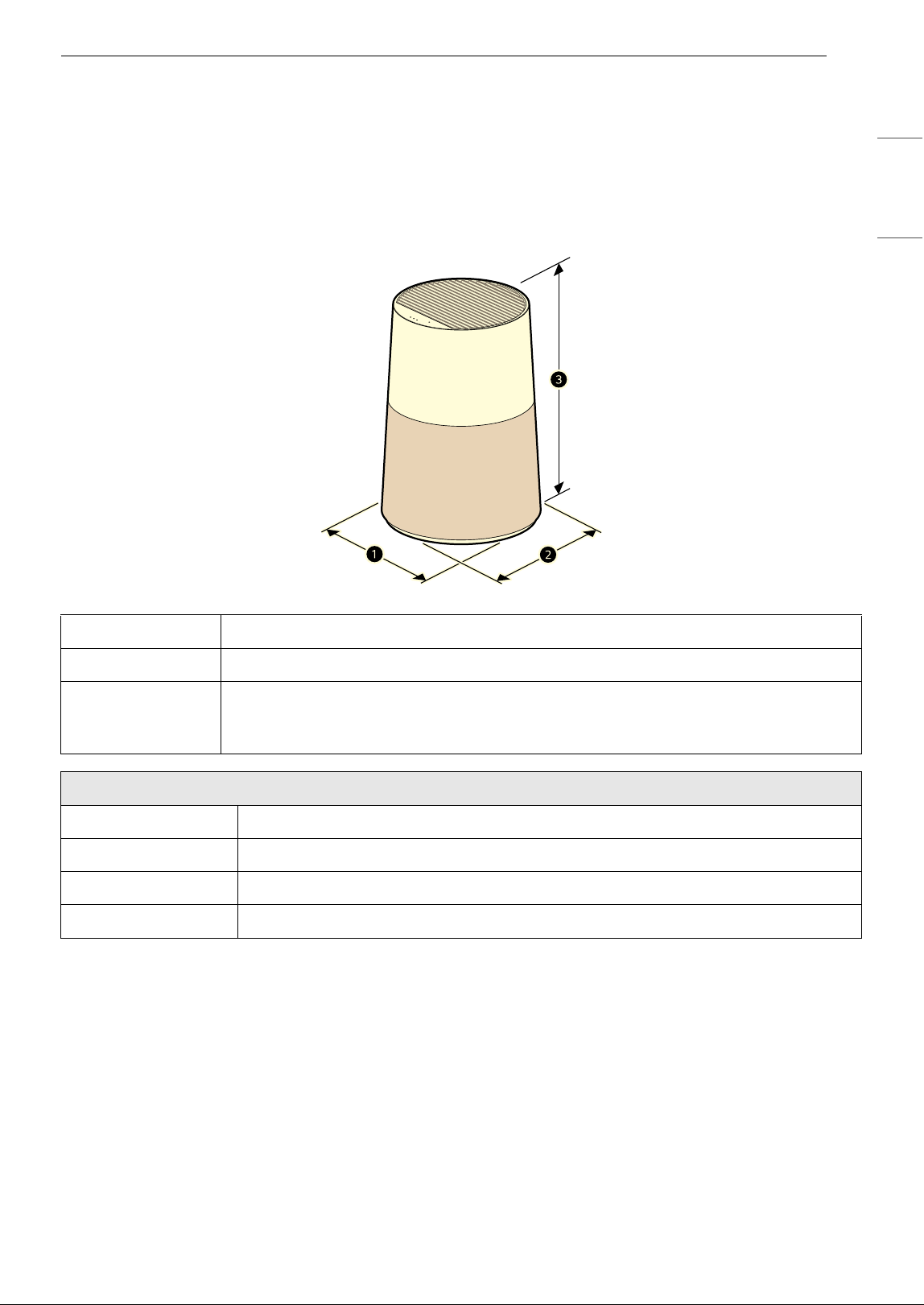
APPLIANCE SPECIFICATIONS
• Appearance and specifications may vary without notice to improve the quality of the appliance.
Name AS30*G*1*
Power DC 24 V
Exterior
Dimensions
(
a x b x c)
9.8" x 9.8" x 14.2" (250 mm x 250 mm x 360 mm)
AC/DC Adapter
Manufacturer Shenzhen KeYu Power Supply Technology co., Ltd.
Model KA3601A-2401200US
Rated Input AC 100 V - 240 V ~, 50/60 Hz
Rated Output DC 24 V, 1.2 A, 28.8 W

28 LIMITED WARRANTY
LIMITED WARRANTY
USA
TERMS AND CONDITIONS
ARBITRATION NOTICE:
THIS LIMITED WARRANTY CONTAINS AN ARBITRATION PROVISION THAT REQUIRES YOU AND LG
ELECTRONICS (“LG”) TO RESOLVE DISPUTES BY BINDING ARBITRATION INSTEAD OF IN COURT, UNLESS
YOU CHOOSE TO OPT OUT. IN ARBITRATION, CLASS ACTIONS AND JURY TRIALS ARE NOT PERMITTED.
PLEASE SEE THE SECTION TITLED “PROCEDURE FOR RESOLVING DISPUTES” BELOW.
WHAT THIS WARRANTY COVERS:
Should your LG Air Purifier ("Product") fail due to a defect in materials or workmanship under normal and
proper use, during the warranty period set forth below, LG will, at its option, repair or replace the Product.
This limited warranty is valid only to the original retail purchaser of the Product ("You") and applies only
when purchased lawfully and used within the United States including U.S. Territories.
NOTE
• Replacement Products and parts are warranted for the remaining portion of the original warranty period
or ninety (90) days, whichever is greater.
• Replacement Products and parts may be new, reconditioned, refurbished, or otherwise factory
remanufactured.
• Replaced Product or part(s) will be the property of LG.
• Proof of original retail purchase specifying the Product model and date of purchase is required to obtain
warranty service under this limited warranty.
INFORMATION
WARRANTY PERIOD:
One (1) year from the date of original retail purchase, or from the date of delivery as per applicable law:
Any internal/ functional Parts and Labor
HOW SERVICE IS HANDLED: In-Home Service
In-home service will be provided during the warranty period subject to availability within the United States.
In-home service may not be available in all areas. To receive in-home service, the product must be
unobstructed and accessible to service personnel. If during in-home service repair cannot be completed, it
may be necessary to remove, repair and return the product. If in-home service is unavailable, LG may elect,
at our option, to provide for transportation of our choice to and from an LG authorized service center.
EXCEPT TO THE EXTENT PROHIBITED BY APPLICABLE LAW, ANY IMPLIED
WARRANTY OF MERCHANTABILITY OR FITNESS FOR A PARTICULAR PURPOSE ON
THE PRODUCT IS LIMITED IN DURATION TO THE DURATION OF THE ABOVE LIMITED
WARRANTY. UNDER NO CIRCUMSTANCES SHALL LG OR ITS U.S. DISTRIBUTORS/
DEALERS BE LIABLE FOR ANY INDIRECT, INCIDENTAL, CONSEQUENTIAL, SPECIAL,
OR PUNITIVE DAMAGES, INCLUDING, WITHOUT LIMITATION, LOST GOODWILL,

29LIMITED WARRANTY
ENGLISH
LOST REVENUES OR PROFITS, WORK STOPPAGE, IMPAIRMENT OF OTHER GOODS,
COST OF REMOVAL AND REINSTALLATION OF THE PRODUCT, LOSS OF USE, OR ANY
OTHER DAMAGES WHETHER BASED IN CONTRACT, TORT, OR OTHERWISE. LG’S
TOTAL LIABILITY, IF ANY, SHALL NOT EXCEED THE PURCHASE PRICE PAID BY YOU
FOR THE PRODUCT.
SOME STATES DO NOT ALLOW THE EXCLUSION OR LIMITATION OF INCIDENTAL OR CONSEQUENTIAL
DAMAGES OR LIMITATIONS ON HOW LONG AN IMPLIED WARRANTY LASTS, SO THE ABOVE EXCLUSIONS
OR LIMITATIONS MAY NOT APPLY TO YOU. THIS LIMITED WARRANTY GIVES YOU SPECIFIC LEGAL RIGHTS
AND YOU MAY ALSO HAVE OTHER RIGHTS THAT VARY FROM STATE TO STATE.
THIS LIMITED WARRANTY DOES NOT COVER:
• Service trips to deliver, pick up, or install, educate how to operate, correct wiring, or correct
unauthorized repairs.
• Damage or failure of the Product to perform during power failures and interrupted or inadequate
electrical service.
• Damage or failure of the Product caused by leaky or broken water pipes, frozen water pipes, restricted
drain lines, inadequate or interrupted water supply or inadequate supply of air.
• Damage or failure of the Product resulting from operating the Product in a corrosive atmosphere or
contrary to the Product owner’s manual.
• Damage or failure of the Product caused by accidents, pests and vermin, lightning, wind, fire, floods, acts
of nature, or any other causes beyond the control of LG.
• Damage or failure of the Product caused by unauthorized modification or alteration, or if the Product is
used for other than the intended purpose, or any water leakage where the Product was not properly
installed.
• Damage or failure of the Product caused by incorrect electrical current, voltage, or plumbing codes.
• Damage or failure of the Product caused by transportation, storage, and/or handling, including
scratches, dents, chips, and/or other damage to the finish of the Product, unless such damage is
reported within one (1) week of delivery.
• Damage or failure of the Product resulting from misuse, abuse, improper installation, repair, or
maintenance. Improper repair includes the use of parts not authorized by LG. Improper installation or
maintenance includes installation or maintenance contrary to the Product owner’s manual.
• Damage or failure of the Product caused by the use of parts, components, accessories, consumable
cleaning products, or any other products or services that were not authorized by LG.
• Damage or missing items to any display or open box Product.
• Refurbished Product or any Product sold “As Is”, “Where Is”, “With all Faults”, or similar disclaimer.
• Products with original serial numbers that have been removed, altered, or cannot be readily determined.
• Increases in utility costs and additional utility expenses.
• Any noises associated with normal operation.
• Products used for other than normal and proper household use (e.g., commercial or industrial use) or
contrary to the Product owner’s manual.
• Costs associated with removal and reinstallation of the Product for repairs, or the removal and
reinstallation of the Product if it is installed in an inaccessible location or not installed in accordance with
the Product Owner's manual.
• Accessories, removable components, or consumable parts (e.g. Shelves, door bins, drawers, water/air
filters, racks, light bulbs, batteries, etc., as applicable), except for internal/functional parts covered under
this limited warranty.
• Replacing house fuses or resetting of circuit breakers, correction of house wiring or plumbing, or
correction of product installation.

30 LIMITED WARRANTY
The cost of repair or replacement under these excluded circumstances shall be
borne by You.
TO OBTAIN WARRANTY SERVICE AND ADDITIONAL INFORMATION
Call 1-800-243-0000 and select the appropriate option from the menu. Or visit our website at http://
www.lg.com
Or by mail: LG Customer Information Center (ATTN: CIC) 201 James Record Road, Huntsville, AL 35824

31LIMITED WARRANTY
ENGLISH
PROCEDURE FOR RESOLVING DISPUTES:
ALL DISPUTES BETWEEN YOU AND LG ARISING OUT OF OR RELATING IN ANY WAY TO THIS LIMITED
WARRANTY OR THE PRODUCT SHALL BE RESOLVED EXCLUSIVELY THROUGH BINDING ARBITRATION, AND
NOT IN A COURT OF GENERAL JURISDICTION. BINDING ARBITRATION MEANS THAT YOU AND LG ARE EACH
WAIVING THE RIGHT TO A JURY TRIAL AND TO BRING OR PARTICIPATE IN A CLASS ACTION.
Definitions. For the purposes of this section, references to “LG” mean LG Electronics U.S.A., Inc., its
parents, subsidiaries and affiliates, and each of their officers, directors, employees, agents, beneficiaries,
predecessors in interest, successors, assigns and suppliers; references to “dispute” or “claim” shall include
any dispute, claim or controversy of any kind whatsoever (whether based in contract, tort, statute,
regulation, ordinance, fraud, misrepresentation or any other legal or equitable theory) arising out of or
relating in any way to the sale, condition or performance of the product or this Limited Warranty.
Notice of Dispute. In the event you intend to commence an arbitration proceeding, you must first notify
LG in writing at least 30 days in advance of initiating the arbitration by sending a letter to LG at LG
Electronics, USA, Inc. Attn: Legal Department-Arbitration 111 Sylvan Avenue, Englewood Cliffs, NJ 07632.
You and LG agree to engage in good faith discussions in an attempt to amicably resolve your claim. The
notice must provide your name, address, and telephone number; identify the product that is the subject of
the claim; and describe the nature of the claim and the relief being sought. If you and LG are unable to
resolve the dispute within 30 days, either party may proceed to file a claim for arbitration.
Agreement to Binding Arbitration and Class Action Waiver. Upon failure to resolve the dispute during
the 30 day period after sending written notice to LG, you and LG agree to resolve any claims between us
only by binding arbitration on an individual basis, unless you opt out as provided below. Any dispute
between you and LG shall not be combined or consolidated with a dispute involving any other person’s or
entity’s product or claim. More specifically, without limitation of the foregoing, any dispute between you
and LG shall not under any circumstances proceed as part of a class or representative action. Instead of
arbitration, either party may bring an individual action in small claims court, but that small claims court
action may not be brought on a class or representative basis.
Arbitration Rules and Procedures. To begin arbitration of a claim, either you or LG must make a written
demand for arbitration. The arbitration will be administered by the American Arbitration Association
(“AAA”) and will be conducted before a single arbitrator under the AAA’s Consumer Arbitration Rules that
are in effect at the time the arbitration is initiated (referred to as the “AAA Rules”) and under the
procedures set forth in this section. The AAA Rules are available online at www.adr.org/consumer
. Send a
copy of your written demand for arbitration, as well as a copy of this provision, to the AAA in the manner
described in the AAA Rules. You must also send a copy of your written demand to LG at LG Electronics,
USA, Inc. Attn: Legal Department-Arbitration 111 Sylvan Avenue, Englewood Cliffs, NJ 07632. If there is a
conflict between the AAA Rules and the rules set forth in this section, the rules set forth in this section will
govern. This arbitration provision is governed by the Federal Arbitration Act. Judgment may be entered on
the arbitrator’s award in any court of competent jurisdiction. All issues are for the arbitrator to decide,
except that issues relating to the scope and enforceability of the arbitration provision and to the
arbitrability of the dispute are for the court to decide. The arbitrator is bound by the terms of this
provision.
Governing Law. The law of the state of your residence shall govern this Limited Warranty and any
disputes between us except to the extent that such law is preempted by or inconsistent with applicable
federal law.
Fees/Costs. You do not need to pay any fee to begin an arbitration. Upon receipt of your written demand
for arbitration, LG will promptly pay all arbitration filing fees to the AAA unless you seek more than $25,000
in damages, in which case the payment of these fees will be governed by the AAA Rules. Except as
otherwise provided for herein, LG will pay all AAA filing, administration and arbitrator fees for any
arbitration initiated in accordance with the AAA Rules and this arbitration provision. If you prevail in the
arbitration, LG will pay your attorneys’ fees and expenses as long as they are reasonable, by considering
factors including, but not limited to, the purchase amount and claim amount. Notwithstanding the
foregoing, if applicable law allows for an award of reasonable attorneys’ fees and expenses, an arbitrator
can award them to the same extent that a court would. If the arbitrator finds either the substance of your
claim or the relief sought in the demand is frivolous or brought for an improper purpose (as measured by
the standards set forth in Federal Rule of Civil Procedure 11(b)), then the payment of all arbitration fees will
be governed by the AAA Rules. In such a situation, you agree to reimburse LG for all monies previously
disbursed by it that are otherwise your obligation to pay under the AAA Rules. Except as otherwise

32 LIMITED WARRANTY
provided for, LG waives any rights it may have to seek attorneys’ fees and expenses from you if LG prevails
in the arbitration.
Hearings and Location. If your claim is for $25,000 or less, you may choose to have the arbitration
conducted solely on the basis of (1) documents submitted to the arbitrator, (2) through a telephonic
hearing, or (3) by an in-person hearing as established by the AAA Rules. If your claim exceeds $25,000, the
right to a hearing will be determined by the AAA Rules. Any in-person arbitration hearings will be held at a
location within the federal judicial district in which you reside unless we both agree to another location or
we agree to a telephonic arbitration.
Opt Out. You may opt out of this dispute resolution procedure. If you opt out, neither you nor LG can
require the other to participate in an arbitration proceeding. To opt out, you must send notice to LG no
later than 30 calendar days from the date of the first consumer purchaser’s purchase of the product by
either: (i) sending an e-mail to [email protected]
, with the subject line: “Arbitration Opt Out” or (ii) calling 1-
800-980-2973. You must include in the opt out e-mail or provide by telephone: (a) your name and address;
(b) the date on which the product was purchased; (c) the product model name or model number; and (d)
the serial number (the serial number can be found (i) on the product; or (ii) online by accessing https://
www.lg.com/us/support and clicking on “How do I find my model number?”).
You may only opt out of the dispute resolution procedure in the manner described above (that is, by e-mail
or telephone); no other form of notice will be effective to opt out of this dispute resolution procedure.
Opting out of this dispute resolution procedure will not affect the coverage of the Limited Warranty in any
way, and you will continue to enjoy the full benefits of the Limited Warranty. If you keep this product and
do not opt out, then you accept all terms and conditions of the arbitration provision described above.
Memo
Memo
Memo
MANUAL DEL PROPIETARIO
PURIFICADOR DE
AIRE
Lea el manual del propietario detenidamente previo a operar el
electrodoméstico y mantengalo al alcance para futuras
referencias.
ESPAÑOL
AS30*G*1*
www.lg.com
Copyright © 2026 LG Electronics. Todos los derechos reservados
Escanee el código QR para ver el manual.
ÍNDICE
2
3 INSTRUCCIONES IMPORTANTES
DE SEGURIDAD
3 LEA Y GUARDE ESTAS INSTRUCCIONES
3 INSTRUCCIONES DE ADVERTENCIA
6 INSTRUCCIONES DE PRECAUCIÓN
8 FUNCIONAMIENTO
8 Descripción general del producto
11 Preparación antes del funcionamiento
17 Características
18 Funcionamiento del purificador de aire
19 Calidad general del aire
20 FUNCIONES INTELIGENTES
20 Aplicación LG ThinQ
22 Smart Diagnosis
23 MANTENIMIENTO
23 Mantenimiento del producto
26 SOLUCIÓN DE PROBLEMAS
26 Antes de llamar al servicio técnico
28 APÉNDICE
28 Información
29 GARANTÍA LIMITADA
29 EE.UU.
3INSTRUCCIONES IMPORTANTES DE SEGURIDAD
ESPAÑOL
INSTRUCCIONES IMPORTANTES DE SEGURIDAD
LEA Y GUARDE ESTAS INSTRUCCIONES
Las siguientes directrices de seguridad tienen por objeto evitar riesgos imprevistos o daños derivados de
un funcionamiento inseguro o incorrecto del aparato.
Los lineamientos están separados en “ADVERTENCIA” Y “PRECAUCIÓN”, como se describe a continuación.
Mensajes de seguridad
Su seguridad y la de los demás son muy importantes.
Tanto en este manual como en el equipo, hemos proporcionado muchos mensajes de seguridad
importantes. Siempre debe leer y respetar todos los mensajes de seguridad.
Todos los mensajes de seguridad le indicarán cuáles son los posibles peligros, cómo reducir la posibilidad
de lesiones y qué podría suceder si no siguen las instrucciones.
INSTRUCCIONES DE ADVERTENCIA
ADVERTENCIA
• Para reducir el riesgo de explosión, incendio, muerte, descargas eléctricas, lesiones o quemaduras en las
personas cuando utilizan este producto, siga las precauciones básicas, incluido lo siguiente:
Seguridad técnica
• Este aparato no está diseñado para ser utilizado por personas (incluidos niños) con capacidades físicas,
sensoriales o mentales reducidas o con falta de experiencia y conocimientos, a menos que hayan
recibido supervisión o instrucciones sobre el uso del aparato por parte de una persona responsable de
su seguridad. Los niños deben ser supervisados para evitar que jueguen con el aparato.
• El ventilador no es un juguete. No juegue con él ni lo coloque al alcance de los niños.
• Si el cable de alimentación está dañado, debe ser reemplazado por el fabricante, su agente de servicio
técnico o una persona con calificación similar para evitar riesgos.
• Sólo un técnico autorizado debe desmontar, reparar o modificar el aparato.
• No toque el enchufe con las manos mojadas.
• No instale ni utilice piezas rotas.
• No siga utilizando el producto si está visiblemente dañado.
• El aparato solo debe usarse con la fuente de alimentación suministrada con el aparato.
- Si no se usa la fuente de alimentación suministrada, se puede reducir el desempeño o fallar el
producto, y pueden surgir riesgos para la seguridad.
Este es el símbolo de alerta de seguridad.
Este símbolo le advierte de posibles peligros que pueden matarlos o lastimarlos a usted y a otros.
Todos los mensajes de seguridad seguirán el símbolo de alerta de seguridad y la palabra
ADVERTENCIA o PRECAUCIÓN.
Estos términos indican lo siguiente:
ADVERTENCIA
El incumplimiento de las instrucciones podría causarle la muerte o lesiones graves.
PRECAUCIÓN
El incumplimiento de las instrucciones podría causarle lesiones o generar daños en el producto.

4 INSTRUCCIONES IMPORTANTES DE SEGURIDAD
• El aparato solo debe suministrarse a una tensión extra baja de seguridad correspondiente a la marca del
aparato.
• Tenga cuidado de no someter el enchufe de alimentación y el adaptador a descargas eléctricas.
• No utilice el producto si se ha caído al suelo.
• Para reducir el riesgo de incendio, choques eléctricos o lesiones personales, no utilice piezas de
reemplazo que no hayan sido recomendadas por el fabricante (p. ej., piezas fabricadas en casa con una
impresora 3D).
• Para reducir el riesgo de incendios o choques eléctricos, no utilice este ventilador con ningún dispositivo
de control de velocidad de estado sólido.
• RIESGO DE DESCARGA ELÉCTRICA - Estas instrucciones de servicio técnico son solamente para el uso de
personal cualificado. Para reducir el riesgo de descargas eléctricas, no realice ningún servicio técnico
que no sea el contenido en las instrucciones de funcionamiento, a menos que esté cualificado para ello.
• Este manual está también disponible en formato PDF en www.lg.com
y puede obtener una copia
impresa del manual a partir del formato PDF.
Instalación
• No instale el aparato sobre una superficie desnivelada o inclinada.
• No instale el aparato en una zona expuesta a la luz solar directa o cerca de equipos que generen calor.
• No instale el producto en un lugar donde pueda haber fugas de gas combustible o donde haya aceite
industrial o partículas metálicas.
• No permita que el aparato presione el cable de alimentación o el enchufe.
• No doble excesivamente el cable de alimentación ni coloque un objeto pesado sobre él.
• No prolongue la longitud del cable de alimentación ni lo modifique.
• No utilice varios aparatos en una toma de extensión de varias clavijas.
• Realice la conexión de forma segura para que los terminales atornillados no se aflojen al tirar del cable.
• Asegúrese de que el cable de alimentación no pueda salirse o dañarse durante el funcionamiento.
• Cuando desenchufe el cable de alimentación, tire siempre de él por el enchufe.
• Desenchufe el aparato durante tormentas eléctricas o cuando no vaya a utilizarlo durante mucho
tiempo.
• Este aparato tiene un enchufe polarizado (una clavija es más ancha que la otra).
- Para reducir el riesgo de choques eléctricos, este enchufe está diseñado para encajar en una toma
polarizada de una sola manera.
- Si el enchufe no encaja completamente en el tomacorriente, inviértalo. Si sigue sin encajar, contacte
un electricista cualificado.
- No intente anular este dispositivo de seguridad.
• No pase el cable por debajo de la moqueta. No cubra el cable con alfombras, correderas o cubiertas
similares.
• No pase el cable por debajo de muebles o aparatos. Coloque el cable lejos de zonas de tránsito y donde
no se pueda tropezar con él.
Funcionamiento
• Si el aparato se sumerge en agua, deje de utilizarlo y contacte a un Centro de Información al Cliente de
LG Electronics.
• No haga funcionar ningún ventilador con un cable o enchufe dañados. Deseche el ventilador o regréselo
a un servicio técnico autorizado para su examen o reparación.
• Si hay una fuga de gas (isobutano, propano, GNL, etc.), no toque el aparato ni el enchufe y ventile la zona
inmediatamente.

5INSTRUCCIONES IMPORTANTES DE SEGURIDAD
ESPAÑOL
• Si detecta algún ruido, olor o humo anormal, desenchufe el aparato inmediatamente y contacte a un
Centro de Información al Cliente de LG Electronics.
• No utilice ni almacene fuego, combustibles (éter, benceno, alcohol, drogas, propano, butano, aerosoles
combustibles, insecticida, ambientador, cosméticos, etc.) o materiales inflamables (velas, lámparas, etc.)
cerca del producto.
• No permita que animales o mascotas muerdan el cable de alimentación.
• No mueva el aparato cuando esté en funcionamiento.
• No golpee el aparato.
• No inserte las manos ni objetos metálicos en la entrada o salida de aire.
• No introduzca objetos inflamables en el aparato.
• No mueva ni utilice el aparato mientras está con la cubierta abierta.
• No permita que los niños se suban al aparato o jueguen con él.
• No coloque nada encima del aparato.
• Si el electrodoméstico tiene daños visibles, no lo haga funcionar.
• Instrucciones servicio técnico al usuario.
- Sólo un técnico autorizado de un centro de servicio técnico de LG Electronics debe desmontar, reparar
o modificar el producto.
Mantenimiento
• Deseche los materiales de embalaje (vinilo, espuma de poliestireno, etc.) para mantenerlos fuera del
alcance de los niños.
• Tenga cuidado de no lesionarse ni pellizcarse al desmontar y volver a montar piezas del aparato.
• Apague y desenchufe el aparato antes de limpiarlo o cambiar el filtro.
• No limpie el aparato con cepillos, paños o esponjas abrasivos o metálicos.
• Para una limpieza interior, contacte al Centro de Servicio Autorizado o a un distribuidor.
• No use detergentes agresivos que puede causar corrosión o daños a la unidad.
• Los detergentes agresivos también podrían causar fallas del producto, incendios o descarga eléctrica.
6 INSTRUCCIONES IMPORTANTES DE SEGURIDAD
INSTRUCCIONES DE PRECAUCIÓN
PRECAUCIÓN
• Para reducir el riesgo de lesiones menores en las personas, mal funcionamiento o daños al producto o a
la propiedad cuando se utiliza este producto, siga las precauciones básicas, incluido lo siguiente:
Instalación
• No incline el aparato para tirar de él o empujarlo durante el transporte.
• No instale el aparato en un vehículo, vehículo RV o embarcación.
• No coloque el aparato cerca de un TV o equipo estéreo.
• No coloque el aparato bajo una luz intensa.
• El aparato debe instalarse de acuerdo con la normativa nacional sobre cableado.
• Cuando traslade o guarde el aparato, enrolle el cable de alimentación alrededor de la base del aparato
para evitar lesiones personales, daños en el cable o daños en el suelo.
• No coloque el aparato cerca de cortinas.
• Inserte el adaptador completamente en el terminal de conexión del adaptador y evite moverlo mientras
esté conectado.
• Al montar el accesorio, apriete firmemente el tornillo para evitar que se separe del producto.
Funcionamiento
• No utilice el producto para eliminar gases tóxicos como el monóxido de carbono.
• No utilice el producto para propósitos de ventilación.
• No utilice el aparato durante mucho tiempo en una región con voltaje inestable.
• No coloque obstáculos alrededor de la entrada o salida de aire.
• Para un uso seguro del aparato, los niños u otras personas con capacidades mentales reducidas deben
ser vigilados de cerca por una persona responsable de su seguridad.
• No utilice el producto para fines especiales como la conservación de plantas, instrumentos de precisión,
obras de arte, etc.
• No utilice el aparato con las manos mojadas.
• No deje que la humedad de un humidificador toque directamente el aparato.
• No utilice el aparato si no está en una posición vertical.
• No utilice el aparato cerca de objetos vulnerables al calor.
• No utilice detergentes, cosméticos, productos químicos, ambientadores ni desinfectantes en el aparato.
• No toque ninguna pieza interna mientras el aparato esté en funcionamiento o inmediatamente luego
del funcionamiento.
• Utilice el filtro sólo para los fines previstos.
• No separe los filtros a la fuerza, ya que los filtros están unidos.
• No inserte ningún objeto en la salida de aire.
Mantenimiento
• No utilice detergentes fuertes ni disolventes para limpiar el aparato. Utilice un paño suave para
limpiarlo.
• No limpie el aparato con detergentes alcalinos.

7INSTRUCCIONES IMPORTANTES DE SEGURIDAD
ESPAÑOL
GUARDE ESTAS INSTRUCCIONES
• No limpie la superficie del aparato con ácido sulfúrico, ácido clorhídrico o disolventes orgánicos
(diluyente, queroseno, etc.) no pegue pegatinas en el aparato.
• No permita que entre agua en el aparato.
• No lave el filtro con agua.
• Tenga cuidado de no dañar el prefiltro cuando lo limpie con una aspiradora.
8 FUNCIONAMIENTO
FUNCIONAMIENTO
El exterior o los componentes del producto pueden variar según el modelo.
Descripción general del
producto
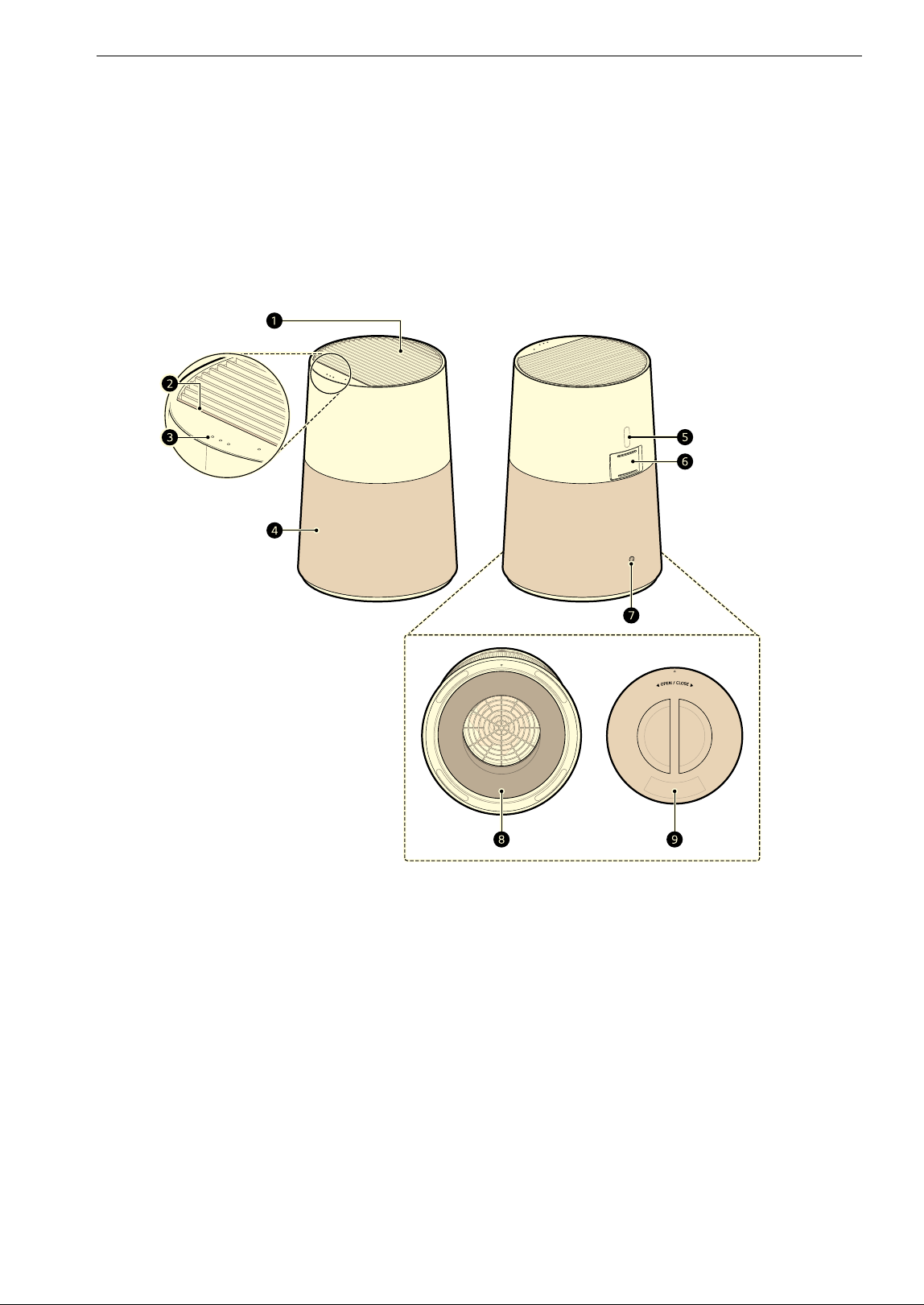
Purificador de aire
a Salida de aire
• Emite aire purificado por el filtro.
b Luz de calidad del aire
• Indica la calidad del aire en un momento
dado mediante colores.
c Panel de control/estado
• Utilícelo para ajustar las funciones del
aparato.
• Se utiliza para verificar los ajustes del
electrodoméstico.
d Entrada de aire
• El aire se aspira en el purificador de aire a
través de la entrada de aire.
e Tapas de los accesorios
• Retire las tapas de los accesorios antes de
conectarlos.
f Sensor PM1.0
• Detecta la concentración de partículas (PM).
g Terminal de conexión del adaptador
• Se puede remover el adaptador.
h Filtro
• Elimina las partículas finas, materiales
causantes de smog y otros olores.
i Cubierta
• Gire el asa para retirar la cubierta.
9FUNCIONAMIENTO
ESPAÑOL
Filtro
a Filtro de desodorización
• Este filtro elimina las sustancias causantes del smog (SO
2
, NO
2
) y los olores domésticos (tolueno,
formaldehído)
b Filtro de polvo
• Minimiza las PM1.0 en el aire.
c Manija del filtro
• Se utiliza para extraer o instalar el filtro.
• Asegúrese de que el lado del asa esté orientado hacia la cubierta.
d Prefiltro
• El prefiltro se sujeta al exterior del filtro y elimina principalmente el polvo doméstico proveniente de
las partículas grandes suspendidas en el aire.
PRECAUCIÓN
• No separe los filtros a la fuerza, ya que los filtros están unidos.
• No tire los filtros ni los utilice para otros propósitos.
10 FUNCIONAMIENTO
Componentes
a Manual del propietario
b Adaptador
c Accesorios del soporte
(Conector del soporte, soporte, tornillo A del soporte y tornillo B del soporte [2 de cada])
d Accesorios de la correa
(Conector de la correa, correa y tornillo de fijación de la correa)
e Accesorios de la mesa
(Conector de la mesa, mesa, tornillo de fijación de la mesa y tornillo C de la mesa)
NOTA
• Los accesorios solo se incluyen en determinados modelos.
• Si su modelo incluye accesorios, tenga cuidado de no eliminarlos con los materiales de embalaje.
• Se proporcionan dos tornillos B de soporte adicionales (plateados) y un tornillo C (negro) de la mesa
adicional en caso de perderlos.
• El tornillo de fijación de la correa y el tornillo de fijación de la mesa son iguales.
11FUNCIONAMIENTO
ESPAÑOL
Preparación antes del
funcionamiento
Remover el vinilo protector del
filtro
Desempaque el aparato y retire toda la cinta de
embalaje y el embalaje del filtro antes de utilizar el
aparato.
1 Saque el producto de la caja y retire la película
y la cinta de empaque adheridas al producto.
NOTA
• Si su modelo incluye accesorios, tenga cuidado
de no eliminarlos con los materiales de
embalaje.
2 Gire el asa de la tapa situada en la parte
inferior del producto en sentido antihorario
para retirar la tapa.
3 Retire el filtro y deseche el embalaje.
4 Instale el filtro en el producto.
• Instale el filtro en el producto de manera
que el lado con el asa (
a) quede orientado
hacia la cubierta.
5 Una vez alineada la cubierta con el producto,
gire el asa de la cubierta en sentido horario
hasta que coincida con la flecha del producto.
• Al cerrar la tapa, asegúrese de que el asa
del filtro no sobresalga.
PRECAUCIÓN
• Por su seguridad, sostenga el producto al retirar
o instalar el filtro.
• Asegúrese de retirar el vinilo protector del filtro
previo a utilizar el producto.
NOTA
• El rendimiento del filtro no se ve afectado por la
dirección de instalación.
12 FUNCIONAMIENTO
Requisitos de instalación
Instale el producto al menos a 3 1/4 ft (1m) de las
paredes.
• Si no hay espacio suficiente para la aspiración de
aire, el desempeño de la purificación de aire
puede verse afectado.
• El desempeño del producto puede variar en
función del entorno de funcionamiento
(teniendo en cuenta factores como la
temperatura y la humedad).
- Los niveles de rendimiento garantizados del
electrodoméstico se consiguen a niveles de
humedad entre el 40% y el 70%.
• No instale el producto cerca de la luz solar
directa o de una iluminación brillante.
- De lo contrario, el producto podría
decolorarse.
Requisitos de transporte
• Al mover o almacenar el producto, desconecte el
enchufe de la toma de corriente y,
seguidamente, desconecte el adaptador para
que no se arrastre por el suelo.
- De lo contrario, el adaptador podría dañarse o
rayar el suelo.
• Sujete firmemente la parte inferior del producto
al trasladarlo.
PRECAUCIÓN
• No transporte el producto sujetándolo por la
cubierta de la parte inferior.
- De lo contrario, podría provocar que la
cubierta se abra y se caiga el producto. Si el
aparato se cae, podría averiarse o provocar
lesiones.
Conexión de la alimentación
1 Conecte el adaptador al terminal de conexión
del adaptador en la parte posterior del
producto.
2 Conecte el enchufe de alimentación del
adaptador en un tomacorriente.
NOTA
• Sostenga el producto y conecte o desconecte el
adaptador horizontalmente.
• Conecte el adaptador al extremo del terminal de
conexión del adaptador y no lo mueva después
de conectarlo. (Si lo hace, podría provocar
daños).
• Tenga cuidado de no aplicar impacto al
adaptador. Si lo hace, podría provocar daños.
Uso de accesorios
(Los accesorios solo se incluyen en determinados
modelos).
Elementos necesarios: destornillador
13FUNCIONAMIENTO
ESPAÑOL
PRECAUCIÓN
• Al montar el accesorio, apriete firmemente el
tornillo para evitar que se separe del producto.
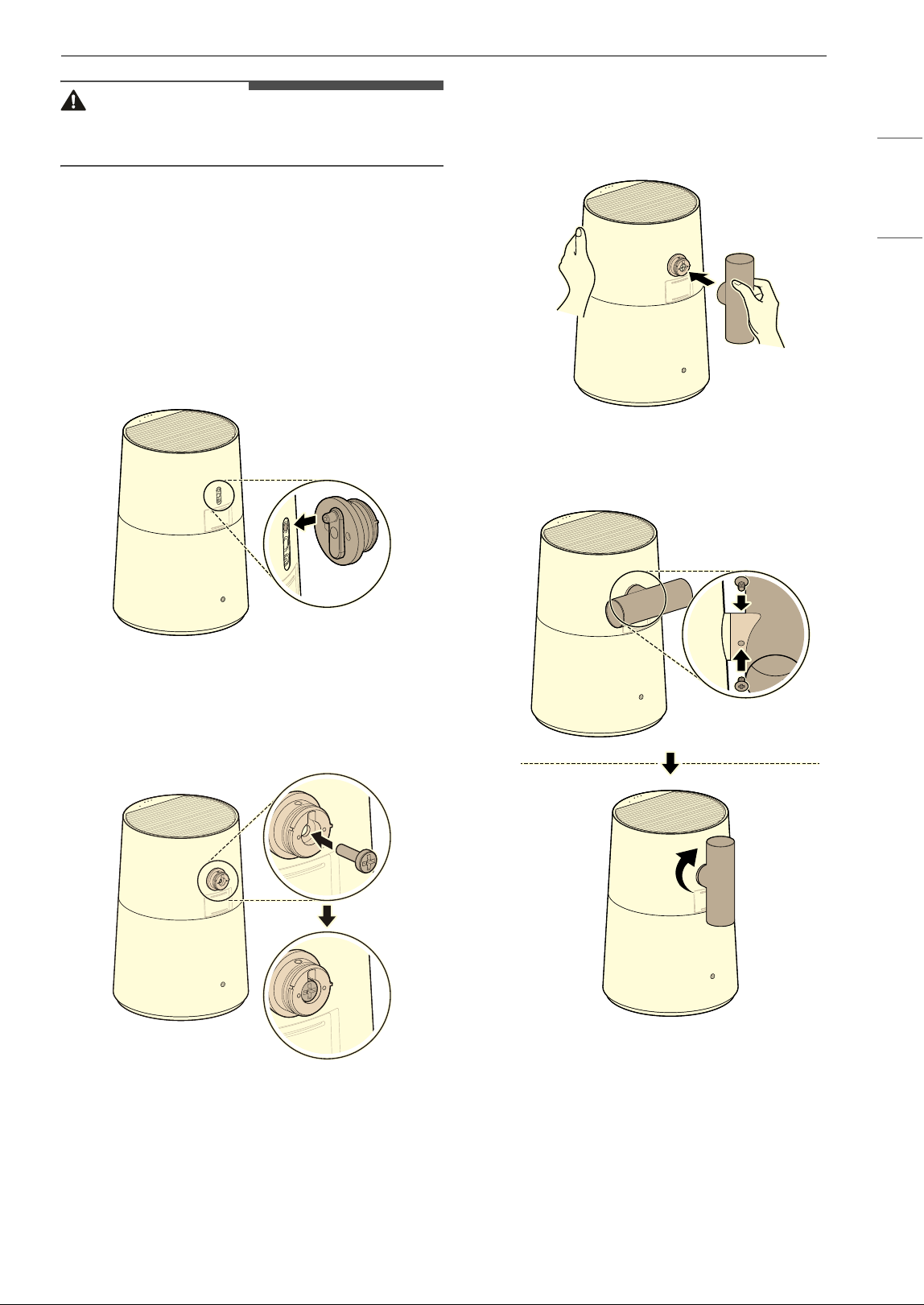
Uso del soporte
Puede colocar adornos como flores secas o flores
artificiales en el soporte.
1 Retire la tapa del accesorio.
2 Inserte el conector del soporte en el primer
orificio del producto.
3 Asegure el producto y el conector del soporte
firmemente con el tornillo A del soporte.
• El tornillo más largo es el A.
4 Inserte el soporte en el conector del soporte.
• Para montar el producto, sujételo con la
mano para evitar que se vuelque.
• Asegúrese de que el lado con la etiqueta
"TOP" quede hacia arriba.
- Si se monta en sentido inverso, no podrá
girar.
5 Asegure el soporte y el conector del soporte
firmemente con el tornillo B del soporte.
14 FUNCIONAMIENTO
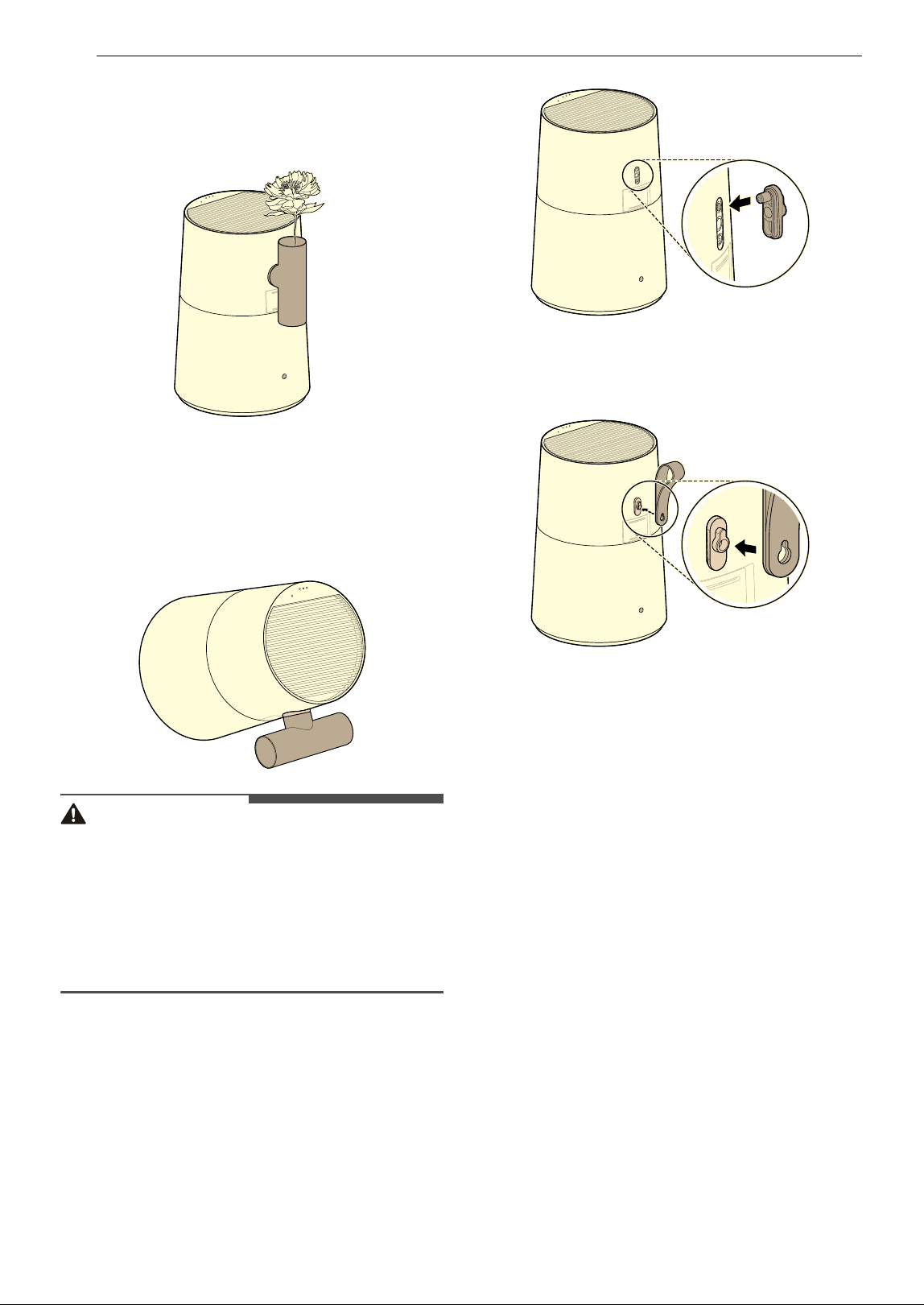
6 Use los accesorios de la manera que prefiera.
• Puede decorar el soporte con flores
artificiales.
• Puede girar el soporte y usarlo como base
para colocar el producto en posición
horizontal y disfrutar directamente de la
brisa fresca.
- El soporte gira 90 grados a la izquierda y a
la derecha.
PRECAUCIÓN
• No gire el soporte a la fuerza. El soporte podría
desprenderse y causar lesiones personales.
• No ponga agua en el soporte. Si el agua penetra
en el producto, podría causar un mal
funcionamiento.
• No coloque objetos pesados en el soporte. De lo
contrario, el producto podría volcarse.
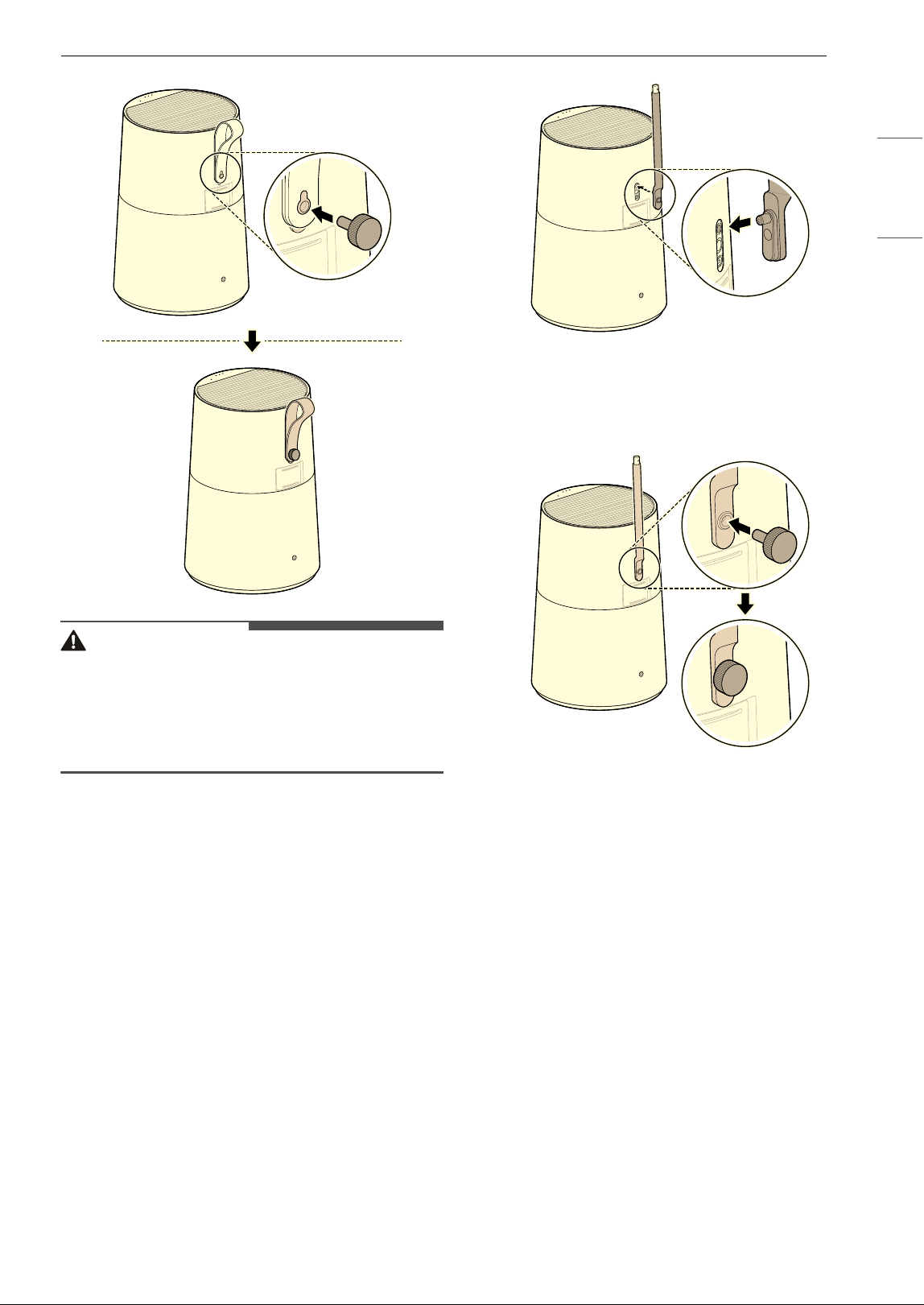
Uso de la correa
Puede transportar el producto con una mano
sujetándolo mediante la correa.
1 Retire la tapa del accesorio.
2 Inserte el conector de la correa en el primer
orificio del producto.
3 Alinee el orificio de la correa con el conector
de la correa e insértelo.
4 Asegure el producto y la correa firmemente
con el tornillo de fijación de la correa.
15FUNCIONAMIENTO
ESPAÑOL
PRECAUCIÓN
• No sacuda la correa con fuerza. Si se desprende,
podría causar lesiones personales.
• No use la correa para ningún propósito que no
sea trasladar el producto. De lo contrario, podría
darse lugar a un mal funcionamiento.
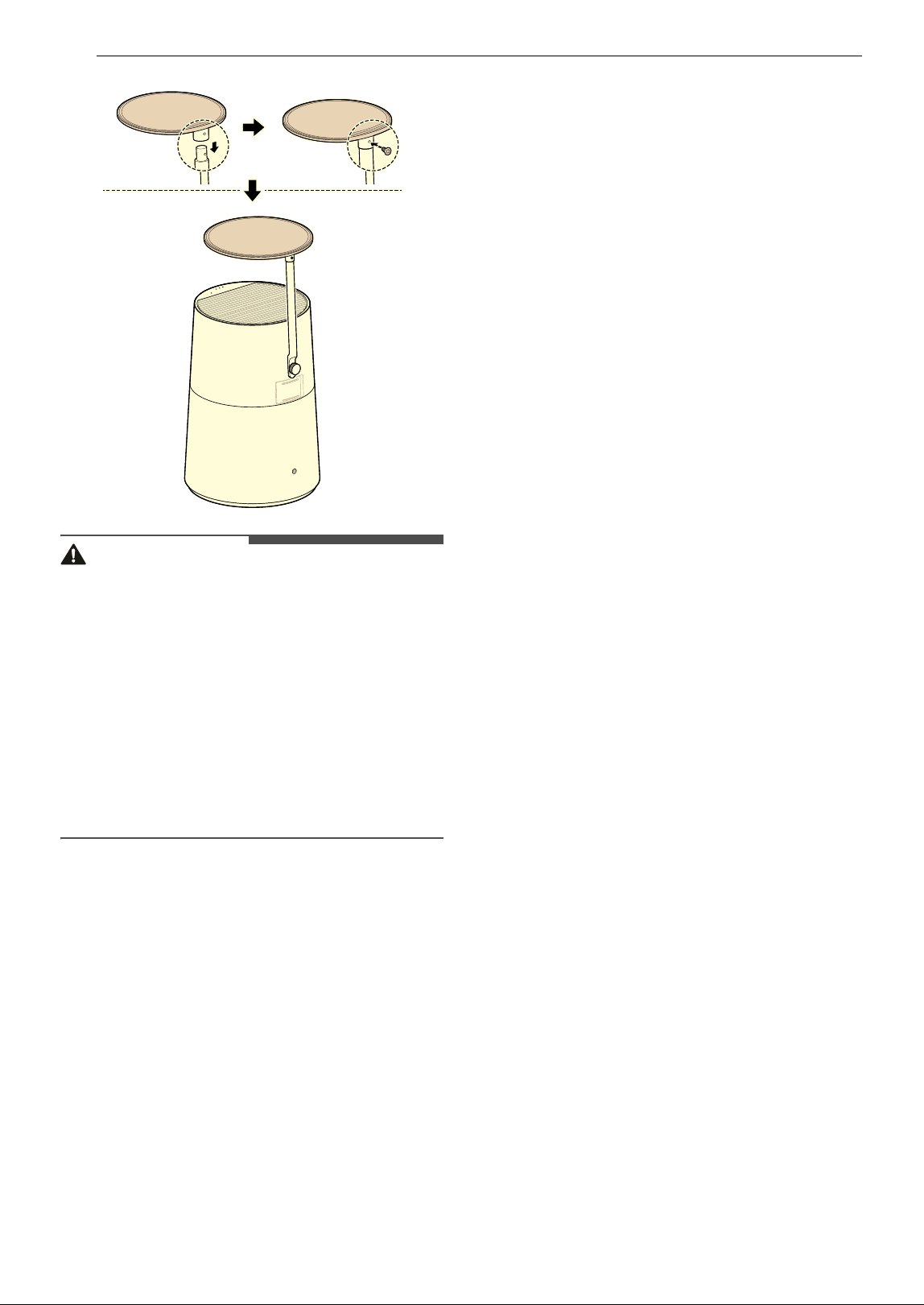
Uso de la mesa
Puede colocar objetos, como teléfonos, sobre la
mesa.
1 Retire la tapa del accesorio.
2 Inserte el conector de la mesa en el primer
orificio del producto.
3 Asegure el producto y el conector de la mesa
firmemente con el tornillo de fijación de la
mesa.
4 Monte la mesa y el conector de la mesa y
luego asegúrelos firmemente con el tornillo C
de la mesa.
16 FUNCIONAMIENTO
PRECAUCIÓN
• No coloque objetos pesados sobre la mesa (la
capacidad de carga recomendada es de 2lb/1kg
como máximo)
• Asegúrese de que los objetos pequeños como
monedas o llaves no caigan dentro del producto.
• No coloque ningún líquido sobre la mesa. Si el
líquido penetra en el producto, podría causar un
mal funcionamiento.
• Tome las precauciones necesarias para que los
niños y las mascotas no se suban a la mesa. De
lo contrario, podrían producirse lesiones
personales.
17FUNCIONAMIENTO
ESPAÑOL
Características
Control del Purificador de aire
a Botón Inicio/Apagado
Enciende y apaga el producto.
• Con miras a preparar el producto para su conexión a una red Wi-Fi mediante la aplicación LG ThinQ,
mantenga pulsado el botón durante 3 segundos o más.
b Botón Velocidad
Permite ajustar la velocidad del ventilador del purificador de aire.
c Pantalla de add-ons
d Pantalla de velocidad del ventilador
Muestra la velocidad del ventilador del purificador de aire.
NOTA
• Use funciones adicionales presionando los botones del panel de control por 3 segundos.
Ícono Descripción
Se enciende cuando la función Wi-Fi se activa.
Velocidad Pantalla Descripción
Auto 3 LEDES en secuencia circular
Bajo 1 LED ENCENDIDO
Media 2 LEDES ENCENDIDOS
Alto 3 LEDES ENCENDIDOS
Sueño
1 LED ENCENDIDO
(50% de la luminosidad en Bajo)
Pulsación larga
(más de 3 segundos)
Funciones extra
Restablecimiento de
notificaciones del
reemplazo de filtro
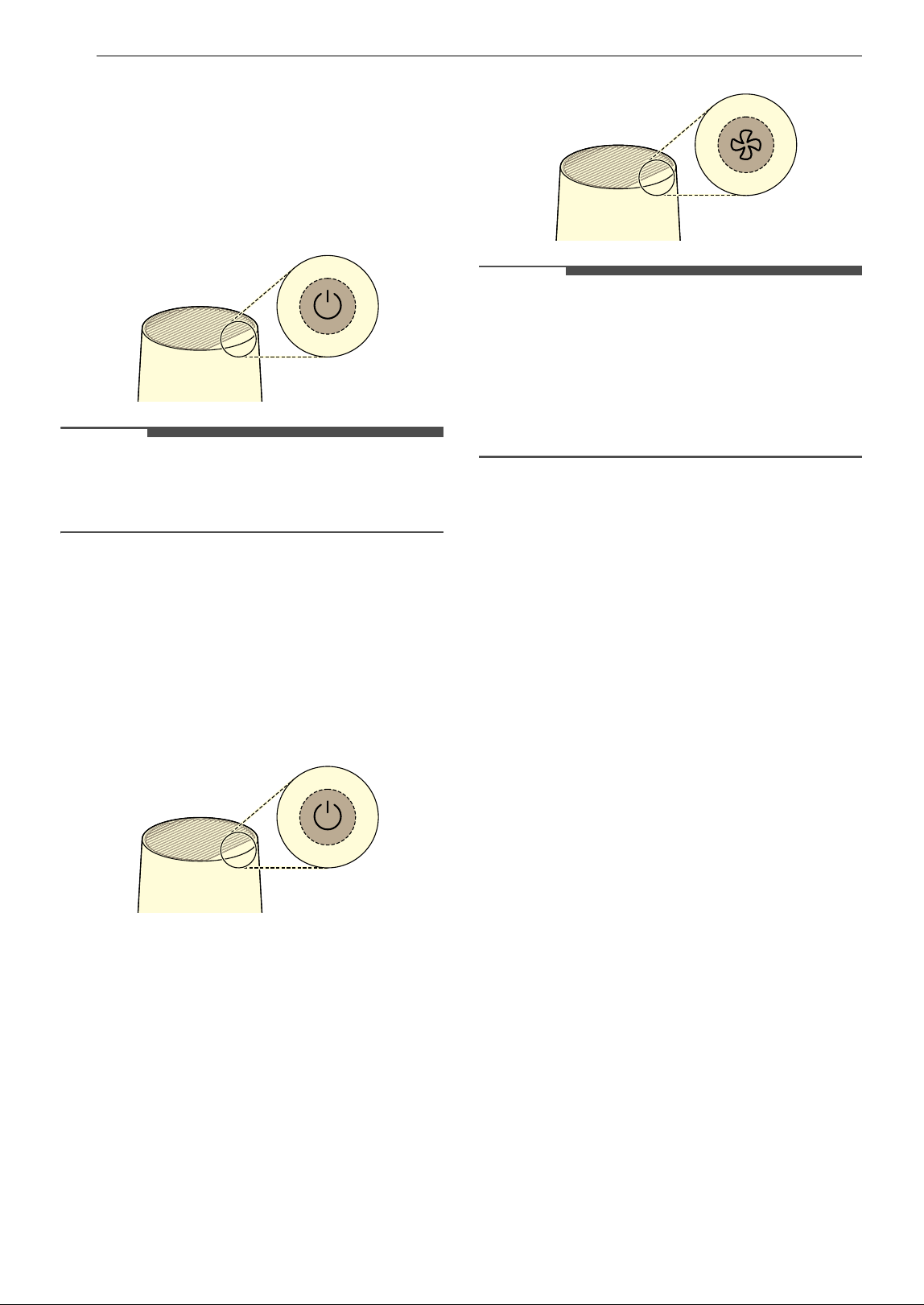
18 FUNCIONAMIENTO
Funcionamiento del
purificador de aire
Inicio/Apagado
Presione el botón Encedido/parada (Start/Stop)
para encender o apagar el purificador de aire.
NOTA
• El modo (velocidad) usado más recientemente se
memoriza si el suministro de energía se corta
como resultado de un corte eléctrico.
Ajuste de la velocidad del
ventilador
Puede ajustar la velocidad del ventilador del
purificador de aire.
1 Presione el botón Inicio/Apagado para
encender el producto.
2 Para ajustar la velocidad del ventilador,
presione el botón Velocidad.
• Cuando presiona el botón durante el
funcionamiento del producto, la velocidad
del ventilador cambia en el orden de Auto
~ Baja ~ Media ~ Alta ~ Sueño .
NOTA
• Al poner en funcionamiento por primera vez, la
velocidad del ventilador está establecida en
Auto. En modo Auto, se ajusta
automáticamente la velocidad en función del
nivel de calidad del aire interior.
• Cuando se activa el modo Sleep, la luz de la
calidad del aire se apaga.
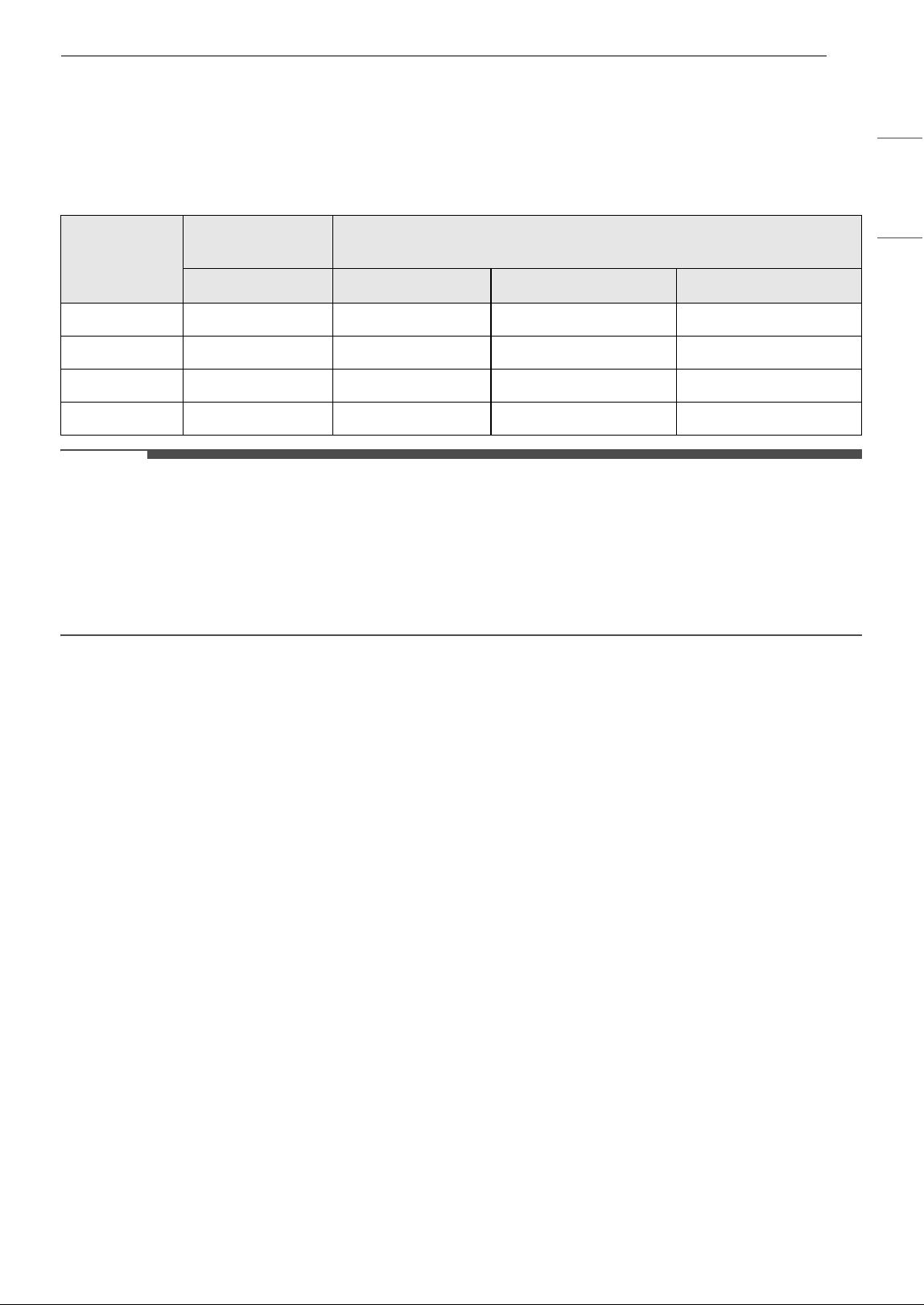
19FUNCIONAMIENTO
ESPAÑOL
Calidad general del aire
Explicación de la calidad general del aire
La calidad general del aire se calcula en base a la concentración de partículas y se categoriza en 4 niveles
en base al nivel de contaminación del aire. (Verde, amarillo, naranja y rojo)
NOTA
• La calidad general del aire puede observarse según el color del indicador de calidad del aire.
• El color del indicador general de calidad del aire se determina en función de la concentración de
partículas (PM).
• Los valores de concentración de PM se basan en la hoja de datos facilitada por el fabricante del sensor.
• La medición de la concentración de PM se ha probado utilizando los materiales de prueba estándar de
LG Electronics.
Color
Calidad general
del aire
Concentración de PM (μg/m
3
)
Estado PM10 PM2.5 PM1.0
Rojo Deficiente 255 o más 56 o más 56 o más
Naranja Insalubre 155 ~ 254 36 ~ 55 36 ~ 55
Amarillo Moderado 55 ~ 154 13 ~ 35 13 ~ 35
Verde Bueno 54 o menos 12 o menos 12 o menos
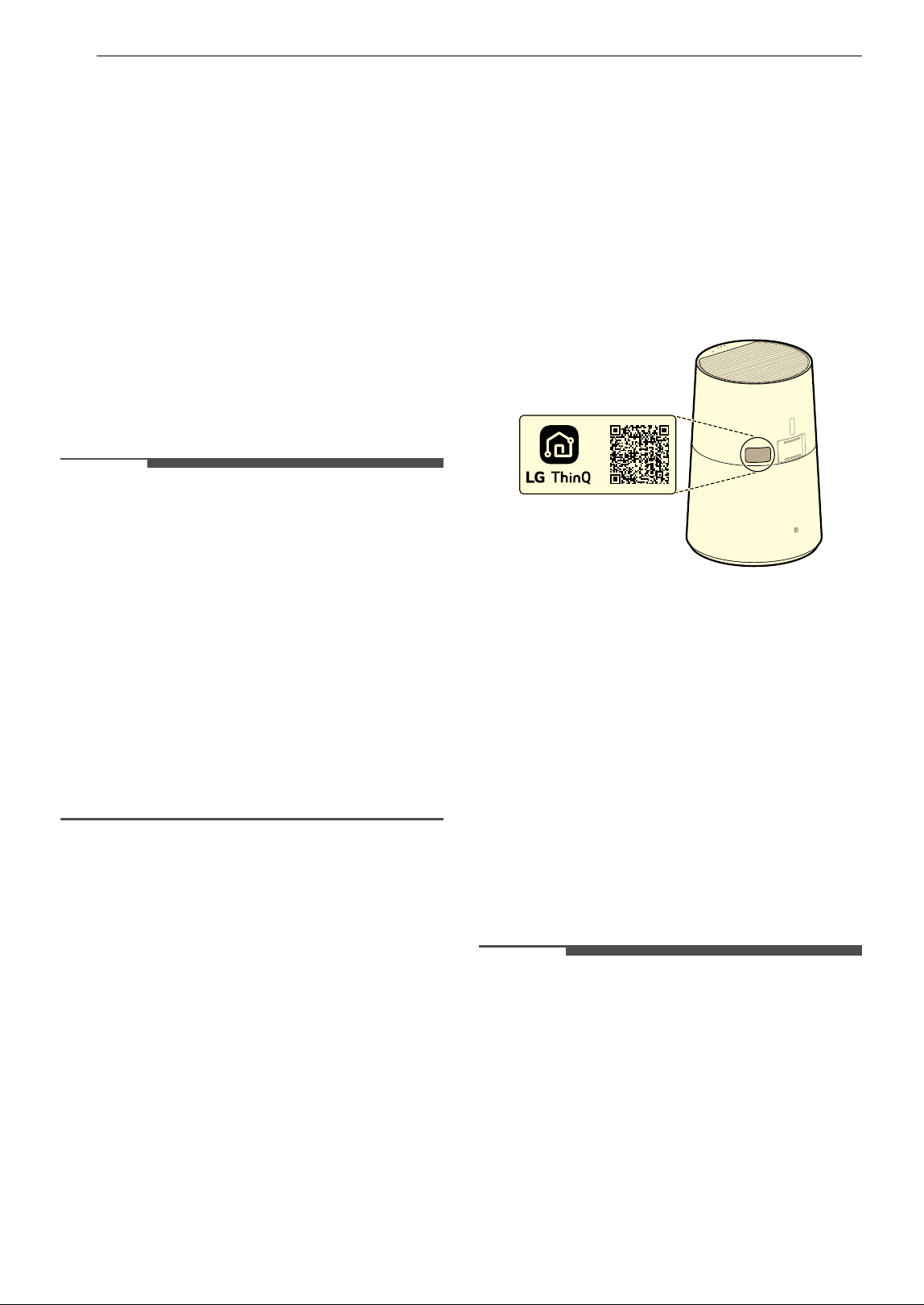
20 FUNCIONES INTELIGENTES
FUNCIONES INTELIGENTES
Aplicación LG ThinQ
La aplicación LG ThinQ le permite comunicarse
con el electrodoméstico mediante un teléfono
inteligente.
Funciones de la Aplicación LG ThinQ
Smart Diagnosis
Si se encuentra con un problema relacionado con
el uso del aparato, esta funcionalidad de Smart
Diagnosis le ayudará a diagnosticar el problema.
Ajustes
Le permite ajustar varias opciones del aparato y en
la aplicación.
NOTA
• En los siguientes casos, debe actualizar la
información de red para cada electrodoméstico
en la aplicación LG ThinQ en tarjeta del
electrodoméstico
~ Ajustes ~ Cambio de
red.
- el router inalámbrico ha cambiado
- la contraseña del router inalámbrico ha
cambiado
- el proveedor de servicio de internet ha
cambiado
• La aplicación está sujeta a cambios con el fin de
mejorar el producto sin previo aviso a los
usuarios.
• Las funciones pueden variar según el modelo.
Instalación de la aplicación LG
ThinQ y conexión del
electrodoméstico LG
Modelos con código QR
Escanee el código QR fijado al producto mediante
una cámara o con una aplicación de lectura de
códigos QR en su teléfono.
Modelos sin código QR
1 Busque la aplicación LG ThinQ en Google Play
Store o Apple App en su teléfono inteligente e
instálela.
2 Ejecute la aplicación LG ThinQ e inicie sesión
con su cuenta o cree una cuenta de LG para
hacerlo.
3 Toque el botón para agregar (~) de la
aplicación LG ThinQ para conectar su
electrodoméstico LG. Siga las instrucciones de
la aplicación para completar el proceso.
NOTA
• Para verificar la conexión con la red Wi-Fi,
confirme que el indicador Wi-Fi en el panel de
control esté iluminado.
• El electrodoméstico funciona únicamente con
redes Wi-Fi de 2.4 GHz. Contacte a su proveedor
de servicios de internet o verifique el manual del
enrutador inalámbrico para revisar la frecuencia
de su red.
• LG ThinQ no es responsable por ningún
problema de conexión en red, falla, mal
funcionamiento o error causado por la conexión
de red.
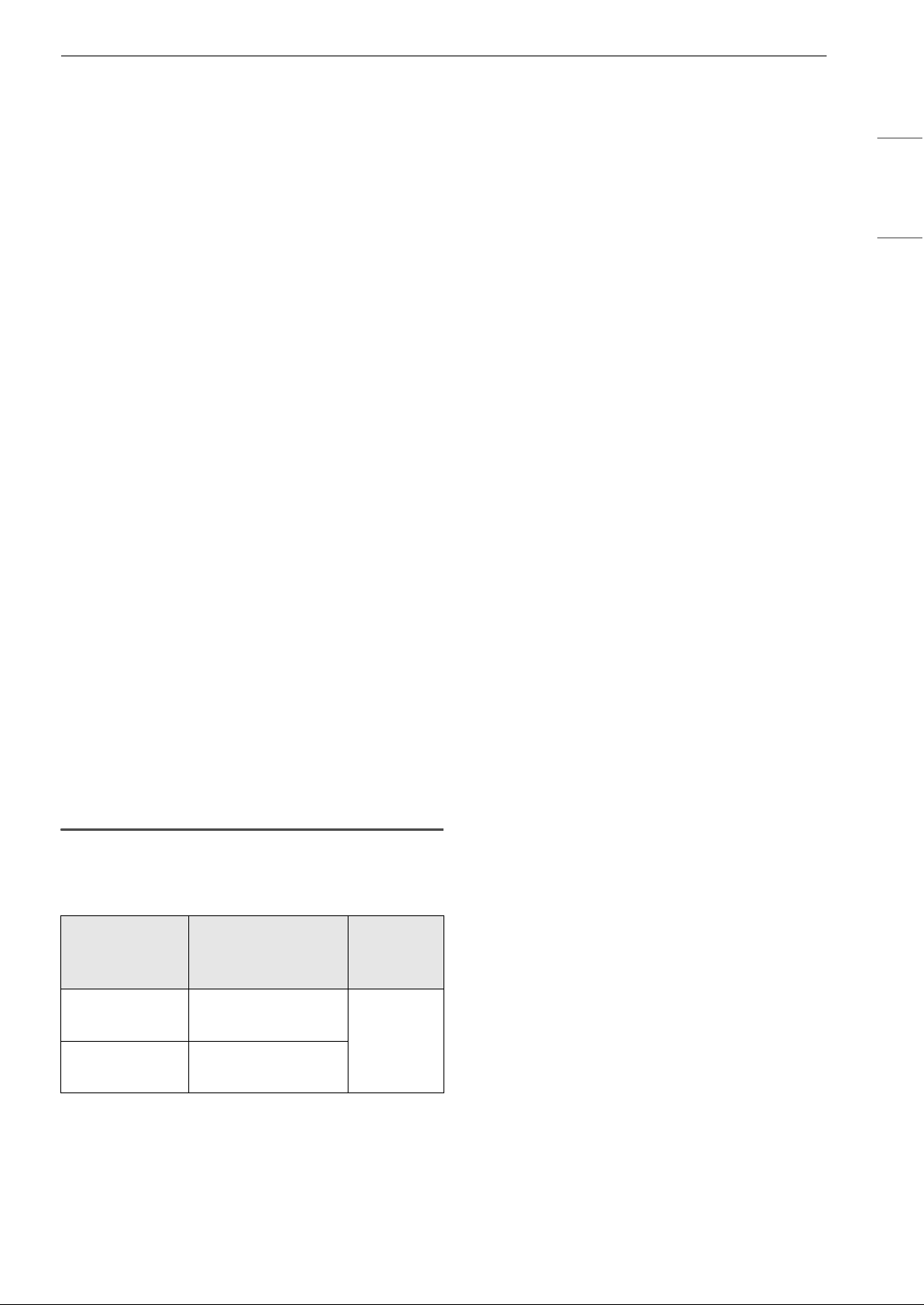
21FUNCIONES INTELIGENTES
ESPAÑOL
• El entorno inalámbrico de alrededor puede
hacer que el servicio de red inalámbrica funcione
lentamente.
• Si hay demasiada distancia entre el
electrodoméstico y el enrutador inalámbrico, la
intensidad de la señal se vuelve débil. Es posible
que tarde mucho tiempo para conectarse o que
la instalación tenga una falla.
• Si el aparato tiene problemas para conectarse a
la red Wi-Fi, es posible que se encuentre
demasiado lejos del enrutador. Adquiera un
repetidor Wi-Fi (extensor de alcance) para
mejorar la intensidad de la señal Wi-Fi.
• Es posible que la conexión de red no funcione
bien por cuestiones relacionadas con su
proveedor de servicios de Internet.
• Es posible que la conexión Wi-Fi no se conecte o
se interrumpa debido al entorno de la red
doméstica.
• Si no es posible conectar el electrodoméstico
debido a problemas con la transmisión de la
señal inalámbrica, desenchúfelo y espere
aproximadamente un minuto antes de volver a
intentarlo.
• El nombre de la red inalámbrica (SSID) debe ser
una combinación de letras y números en inglés.
(No utilice caracteres especiales).
• La interfaz de usuario (IU) del teléfono
inteligente puede variar en función del sistema
operativo (OS) del teléfono y del fabricante.
• Si el protocolo de seguridad del router está
configurado como WEP, la configuración de la
red puede fallar. Cambie el protocolo de
seguridad (se recomienda WPA2) y vuelva a
conectar el producto.
Especificaciones del equipo de radio
† Esta función solo está disponible en algunos
modelos.
Aviso de la FCC
El siguiente aviso cubre el módulo transmisor
contenido en este producto.
Este equipo fue probado y se determinó que
cumple con los límites para los dispositivos
digitales de Clase B, en conformidad con la parte
15 de las normas de la FCC. Estos límites están
diseñados para ofrecer una protección razonable
contra interferencias dañinas en una instalación
residencial. Este equipo genera, usa y puede emitir
energía de radiofrecuencia y, si no se instala y
utiliza de acuerdo con las instrucciones, podría
causar interferencias dañinas a las
comunicaciones por radio. Sin embargo, no se
garantiza que dicha interferencia no pueda ocurrir
en instalaciones particulares. Si este equipo causa
interferencia dañina a la recepción de radio o
televisión, que se puede determinar encendiendo
y apagando el equipo, se aconseja al usuario
intentar corregir la interferencia realizando alguna
de las siguientes acciones:
• Reorientar o reubicar la antena receptora.
• Aumentar la separación entre el equipo y el
receptor.
• Conecte el equipo a una toma de corriente en un
circuito diferente al que está conectado el
receptor.
• Consultar al vendedor o a un técnico de radio/TV
con experiencia para solicitar ayuda.
Este dispositivo cumple con la parte 15 de las
normas de la FCC. La operación está sujeta a las
dos siguientes condiciones:
(1) Este dispositivo no debe causar interferencia
dañina, y
(2) Este dispositivo debe aceptar cualquier
interferencia recibida, incluso aquellas que
pudieran causar un funcionamiento no deseado
del dispositivo.
Cualquier cambio o modificación en la
construcción de este dispositivo, que no cuente
con la aprobación expresa de la parte responsable
del cumplimiento, puede anular la autorización del
usuario para operarlo.
Declaración sobre exposición a la
radiación de RF de la FCC
Este equipo cumple con los límites de exposición a
la radiación de la FCC establecidos para entornos
no controlados. Este transmisor no se debe ubicar
ni operar junto con ninguna otra antena ni
transmisor.
El equipo se debe instalar y operar con una
distancia mínima de 20 cm (7.8 pulgadas) entre la
Tipo
Rango de
frecuencia del
operación
Potencia
de salida
(máx.)
LAN
inalámbrico
2400 MHz - 2472
MHz
< 1 W
Bluetooth
†
2400 MHz - 2483.5
MHz
22 FUNCIONES INTELIGENTES
antena y su cuerpo. Los usuarios deben seguir las
instrucciones de operación específicas de manera
tal de cumplir con las normas de exposición a la
RF.
Software de código abierto
Para obtener el código fuente incluido en este
producto, bajo las licencias GPL, LGPL, MPL y otras
licencias de código abierto que obligan a divulgar
el código fuente, y para acceder a todos los
términos de licencia mencionados, así como a los
avisos de copyright, visite https://
opensource.lge.com.
LG Electronics también le proporcionará el código
fuente de código abierto por un cargo que cubra el
coste de realizar dicha distribución, previa solicitud
por correo electrónico a [email protected].
Esta oferta es válida para todo aquel que reciba
esta información durante un período de tres años
después de que se envíe el último cargamento de
este producto.
Smart Diagnosis
Utilice esta funcionalidad para ayudarle a
diagnosticar y resolver problemas con su aparato.
NOTA
• Por motivos no atribuibles a la negligencia de
LGE, es posible que el servicio no pueda
funcionar debido a factores externos como, por
ejemplo, la indisponibilidad de wifi, la
desconexión de la red wifi, la política de la tienda
de aplicaciones local o la indisponibilidad de
aplicaciones, entre otros.
• La funcionalidad puede estar sujeta a cambios
sin previo aviso y puede tener una forma
diferente dependiendo de dónde se encuentre.
Uso de LG ThinQ para diagnosticar
problemas
Si experimenta un problema con su
electrodoméstico equipado con Wi-Fi, este puede
transmitir datos sobre la resolución de problemas
a un teléfono inteligente con la aplicación LG
ThinQ.
• Lance la aplicación LG ThinQ y seleccione la
funcionalidad Smart Diagnosis en el menú. Siga
las instrucciones proporcionadas en la aplicación
LG ThinQ.
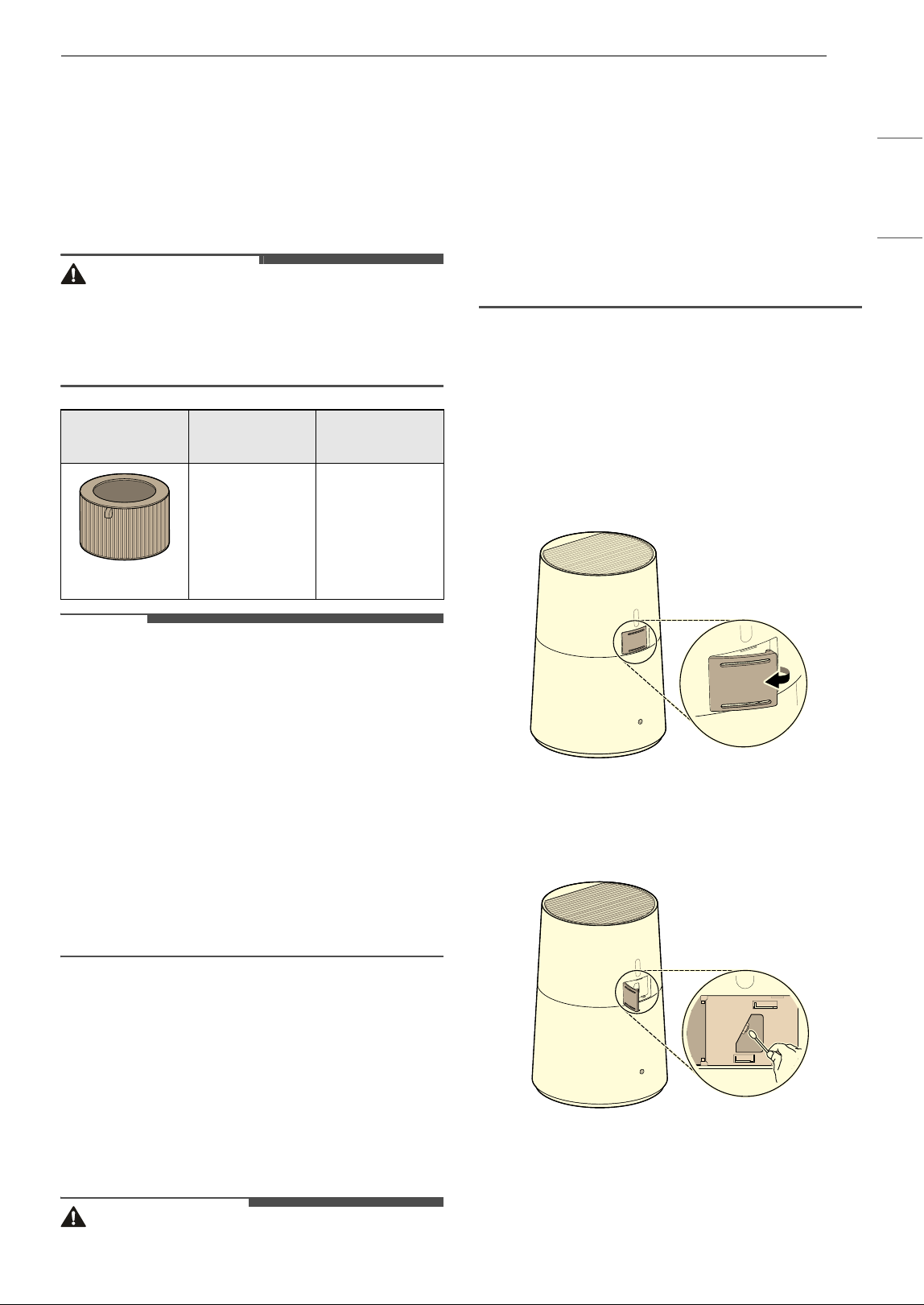
23MANTENIMIENTO
ESPAÑOL
MANTENIMIENTO
Mantenimiento del
producto
Mantenimiento programado
ADVERTENCIA
• Detenga el funcionamiento del aparato y
desenchufe el cable de alimentación previo a
limpiar y reemplazar el filtro.
• No rocíe agua directamente sobre el aparato.
NOTA
• El color del filtro puede variar según en función
del entorno de uso y el color del polvo.
• La frecuencia de limpieza podría variar
dependiendo de las horas de funcionamiento y
del entorno del aparato.
• Si no limpia el producto de acuerdo con la
frecuencia de limpieza, podría notar malos
olores y un desempeño bajo.
• El filtro debe reemplazarse al final de su vida útil.
El costo de los filtros de reemplazo no está
cubierto por la garantía. Para comprar filtros
nuevos, póngase en contacto con un Centro de
Información al Cliente de LG Electronics o visite
el sitio web en www.lg.com
Limpieza del exterior
1 Elimine el polvo de la entrada y salida de aire
usando una aspiradora.
2 Frote el exterior del producto con un paño
suave.
PRECAUCIÓN
• No frote el aparato con un detergente alcalino.
• No use nunca ácido sulfúrico, ácido clorhídrico ni
disolventes orgánicos (por ejemplo, diluyente,
queroseno y acetona) para limpiar el exterior del
aparato, ni pegue etiquetas en el exterior. De lo
contrario, podría dañar la superficie del
producto.
• Se debe tener cuidado para prevenir que el agua
ingrese al producto.
Limpieza el sensor de partículas
El sensor PM1.0 detecta polvo fino y grandes
niveles de contaminación por polvo, por lo que es
beneficioso limpiar la lente periódicamente, al
menos una vez cada 2 meses.
1 Abra la cubierta del sensor.
2 Limpie la lente con un hisopo de algodón
empapado en agua y séquela con un hisopo
de algodón seco.
3 Cierre la cubierta del sensor.
Componente
Frecuencia
de limpieza
Frecuencia
de reemplazo
Filtro
Prefiltro
Limpie el filtro
según sea
necesario
1 año
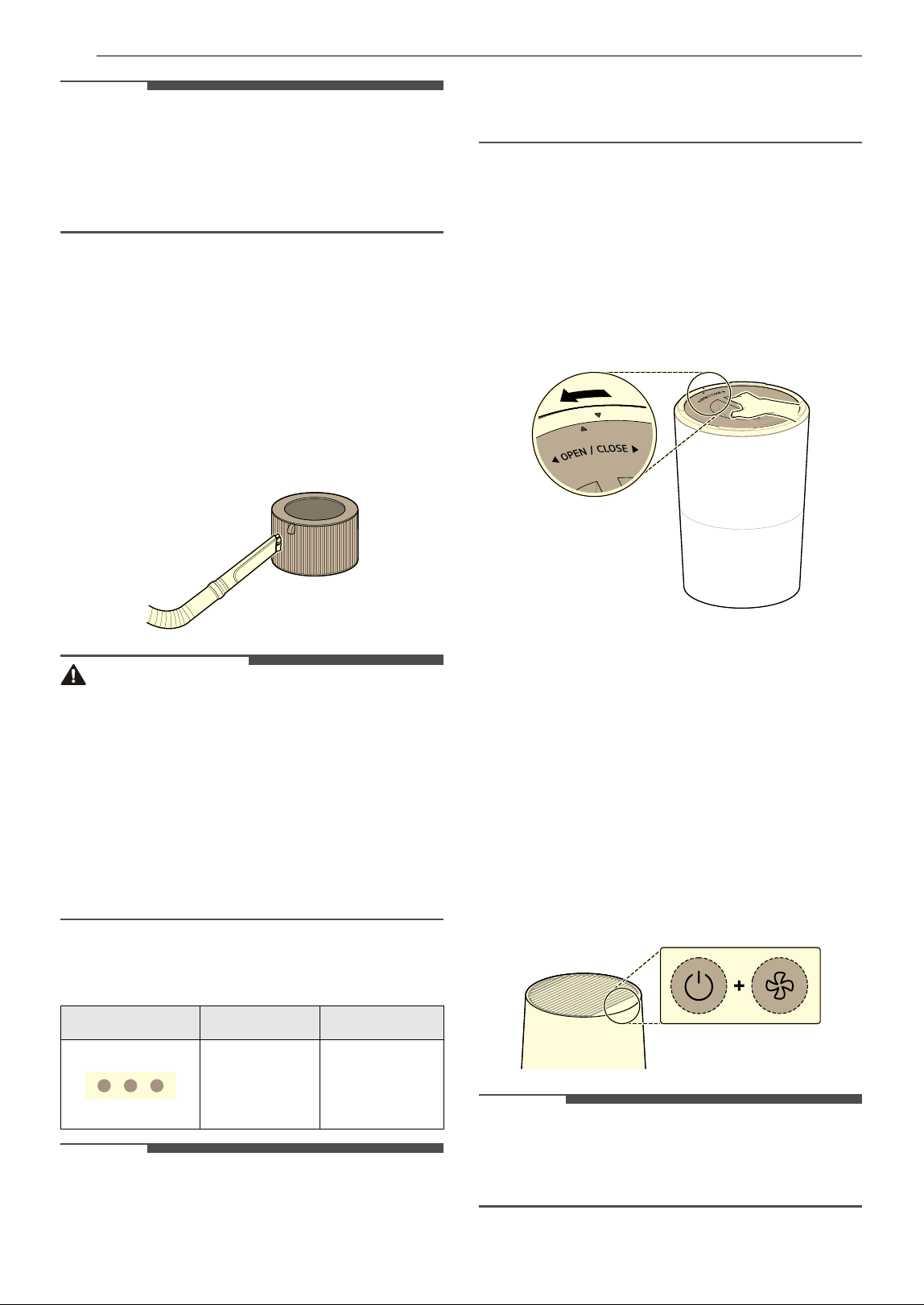
24 MANTENIMIENTO
NOTA
• No limpie el sensor con ninguna otra sustancia
que no sea agua. De lo contrario, el aparato
podría no funcionar correctamente.
• Es normal que la cubierta del sensor haga un
sonido cuando se abra o se cierre.
Limpieza de los filtros
1 Retire la cubierta de la parte inferior del
producto y sustituya el filtro.
2 Use una aspiradora o un cepillo suave para
eliminar cualquier resto de polvo en le
prefiltro que rodea al filtro.
PRECAUCIÓN
• No limpie el filtro con agua. De lo contario, la
vida útil del filtro se vería comprometida.
• Asegúrese de no dañar el prefiltro cuando use
una aspiradora.
• Dado que existe un riesgo de desgarro o
pérdidas al desmontar o montar el prefiltro,
extreme las precauciones.
• Tenga cuidado con el fin de evitar de que ningún
líquido ingrese al filtro, ya que podría dañar el
filtro.
Alertas en el panel de estado
NOTA
• Aparecen alertas de sustitución de los filtros en
función del tiempo máximo de uso, teniendo en
cuenta las horas de funcionamiento del
electrodoméstico. La frecuencia de sustitución
se determina por las horas de funcionamiento y
el entorno.
Reemplazo de filtros
1 Retire la cubierta de la parte inferior del
producto y sustituya el filtro.
• Para evitar esparcir polvo al reemplazar el
filtro, coloque un periódico o toallas de
papel en el piso antes de remover el filtro.
2 Cuando termine de reemplazar el filtro,
apague la notificación de Reemplazo del filtro.
Desactivación de la notificación de
Reemplazo del filtro
Mantenga pulsado el botón Inicio/Apagado y
Velocidad del panel de control por 3 segundos o
más.
• Notificación de Reemplazo del filtro en el panel
de estado se apaga y se restablece la hora de la
notificación de Reemplazo del filtro.
NOTA
• Si el filtro necesita sustitución, aparece una
notificación.
• Debe usarse al sustituir con un filtro nuevo.
Alerta Descripción Medidas
3 ledes
parpadeando
al mismo
tiempo
Reemplace el
filtro.
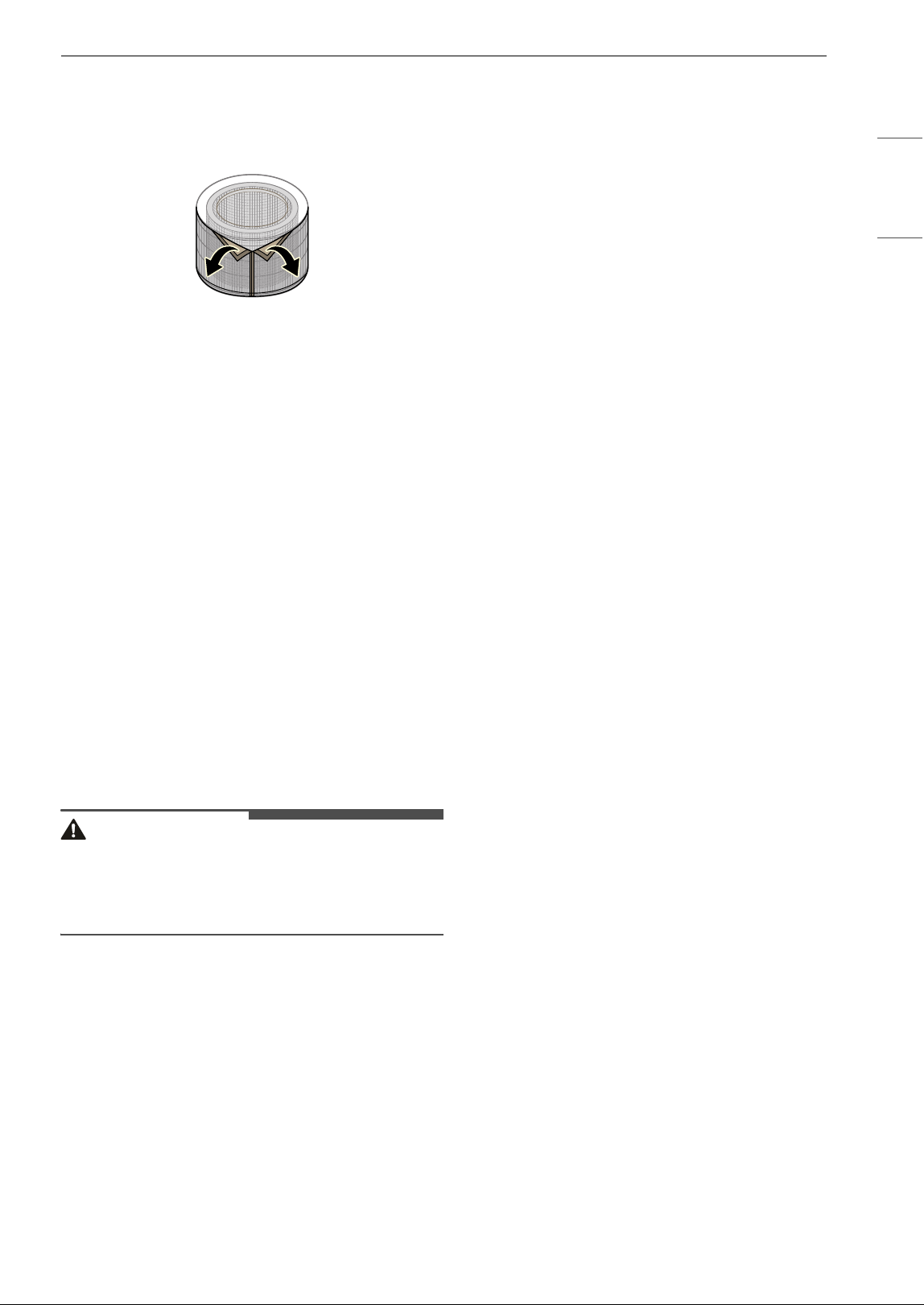
25MANTENIMIENTO
ESPAÑOL
Cambio del prefiltro
Para reemplazar el prefiltro, localice el velcro y
sepárelo lenta y cuidadosamente para extraer el
prefiltro.
Almacenamiento
Si el producto no se va a utilizar durante un largo
periodo de tiempo, guárdelo en un lugar seco y a
la sombra.
1 Haga funcionar el producto durante una hora
o más en un día con buen clima.
• Esto elimina la humedad y evita que se
forme en el interior del producto.
2 Apague el aparato y desenchufe el producto
del tomacorriente.
• Separe el adaptador del producto y
guárdelo.
3 Cubra el electrodoméstico para evitar la
penetración de polvo o sustancias extrañas.
Almacene el aparato cubierto lejos de la luz
solar directa.
PRECAUCIÓN
• No guarde el aparato en un lugar húmedo o
expuesto a la luz solar directa. Si lo hace, el
aparato podría deformarse, funcionar mal o
generar olores.
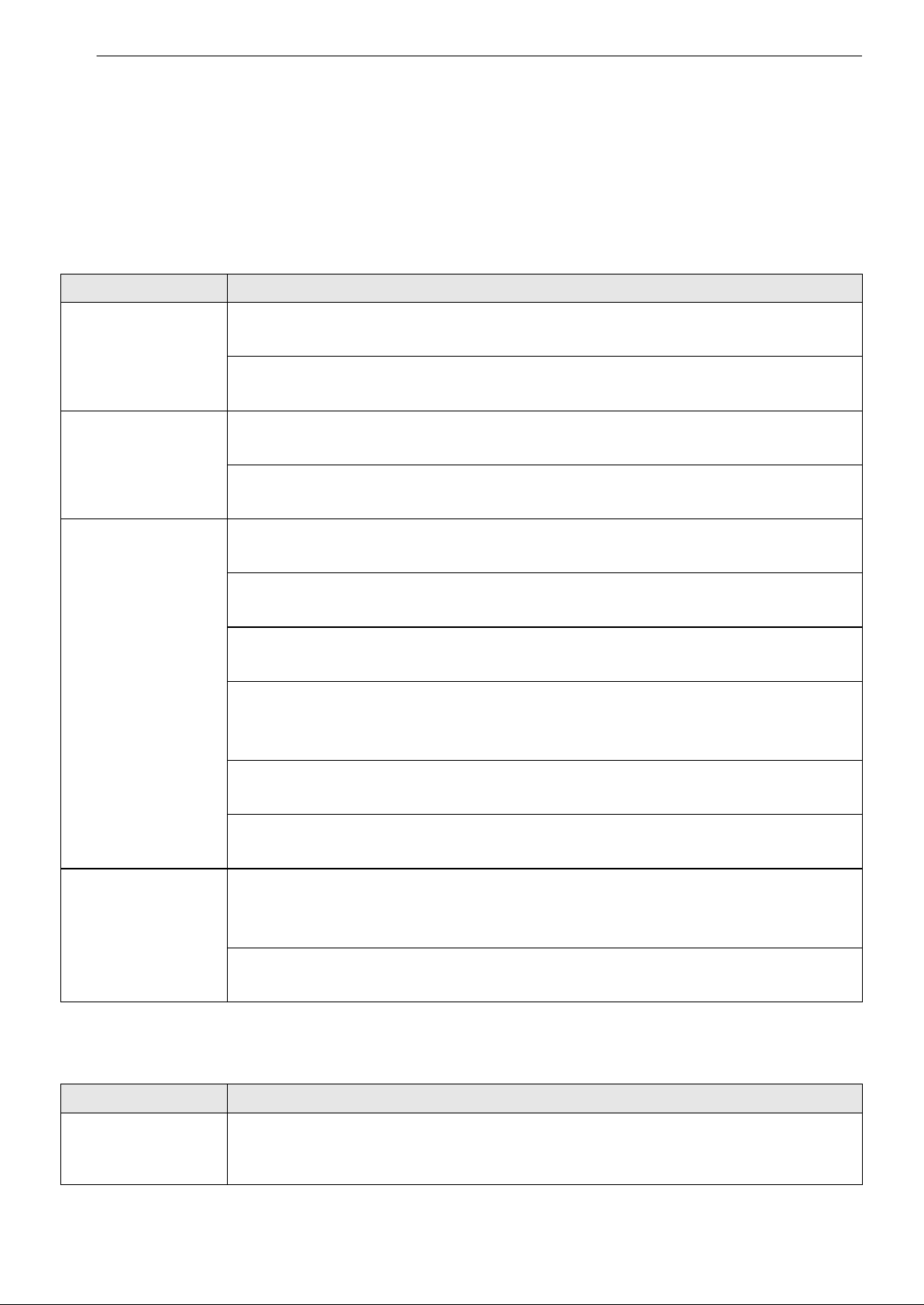
26 SOLUCIÓN DE PROBLEMAS
SOLUCIÓN DE PROBLEMAS
Antes de llamar al servicio técnico
Favor de checar lo siguiente previo a llamar al servicio técnico. Si el problema persiste, contacte a su centro
de servicio técnico local.
Funcionamiento
Olores
Problemas Causas posibles y solución
El aparato no
funciona.
¿Está desconectado el enchufe de alimentación?
• Conéctelo correctamente a un tomacorriente.
¿Se ha cortado la electricidad?
• Cheque la alimentación de otros productos de la casa.
Se produce un ruido
y la velocidad del
ventilador es baja.
¿Se ha acumulado polvo en el prefiltro?
• Limpie el prefiltro.
¿Se ha acumulado polvo en el filtro?
• Reemplace el filtro.
La purificación del
aire no se completó
adecuadamente.
¿La polución interior es abundante?
• Ventile el interior previo a usar el producto.
¿Se ha acumulado polvo en el prefiltro?
• Limpie el prefiltro.
¿Se ha acumulado polvo en el filtro?
• Reemplace el filtro.
¿Lo utiliza en un lugar demasiado espacioso o demasiado abierto?
• Utilice un producto que se adapte al tamaño de la habitación.
• Evite los lugares bien ventilados, como puertas, ventanas, etc.
¿Hay algún obstáculo cerca?
• Retire cualquier obstáculo cercano previo a utilizar el producto.
¿El producto está instalado en una esquina?
• Mueva el producto y vuelva a instalarlo.
La luz de calidad del
aire permanece en
rojo.
Mueva el aparato a otra habitación y observe si el color cambia.
• Limpie el sensor PM1.0.
• Desconecte el enchufe del tomacorriente y vuelva a conectarlo un minuto más tarde.
¿Ha utilizado un pulverizador cerca del producto?
• No utilice pulverizadores cerca del producto.
Problemas Causas posibles y solución
Sale un olor extraño
de la salida de aire,
así como del filtro.
¿Compró el producto recientemente?
• Este es el olor del carbón activado, y no es dañino. Es similar al olor que puede sentir en un
auto nuevo. Desaparecerá al día siguiente de su uso.
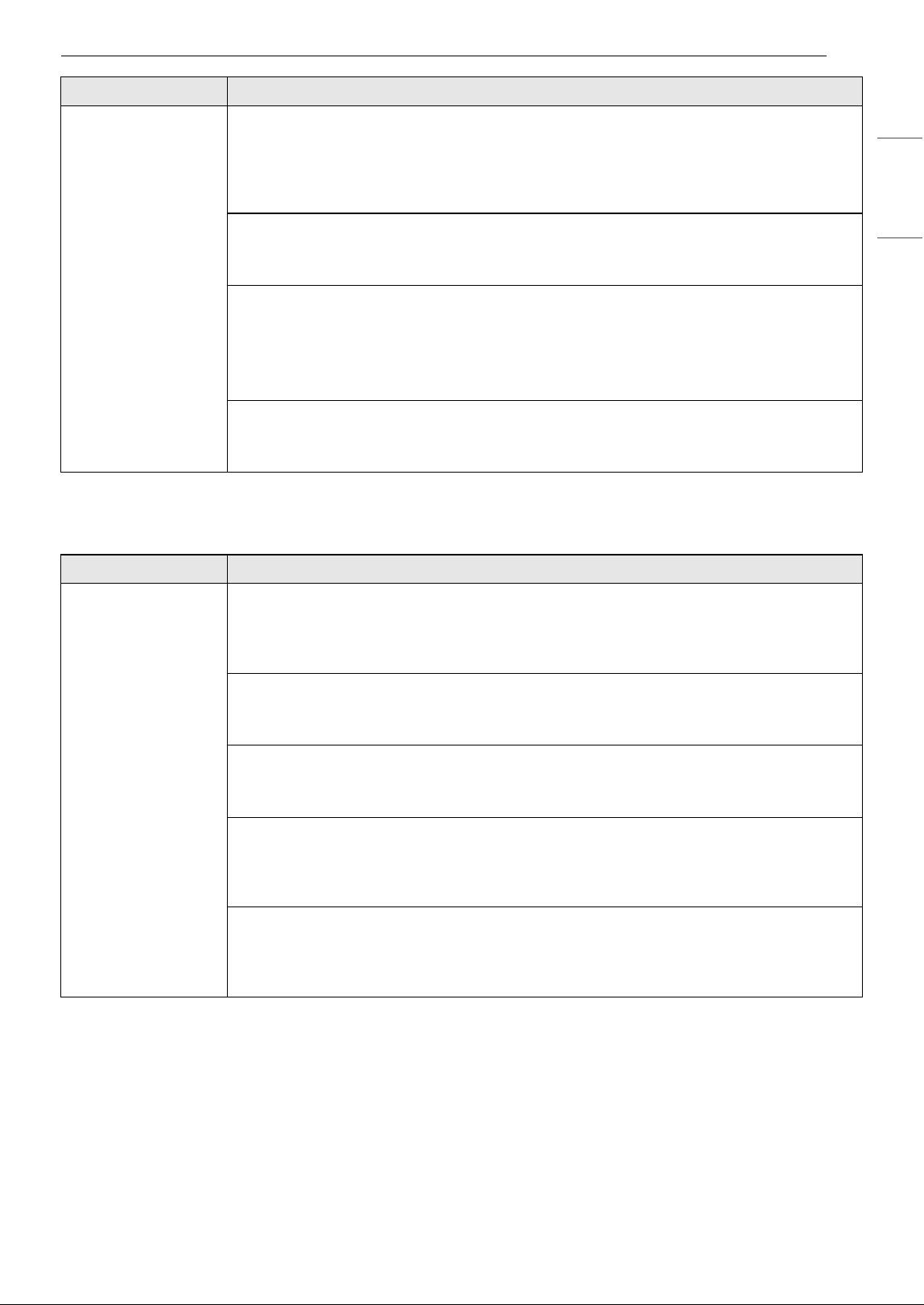
27SOLUCIÓN DE PROBLEMAS
ESPAÑOL
LG ThinQ
Sale un olor extraño
de la salida de aire,
así como del filtro.
¿Se utiliza el producto en un lugar con mucho humo u olores?
• Si el purificador de aire se utiliza luego de haber usado un ambientador, un difusor o una
vela perfumada, o si se han realizado obras en el interior o se ha cambiado el papel
pintado, el filtro puede absorber y emitir un olor. Ventile primero la habitación previo a
utilizar el producto.
¿Tiene el filtro mal olor?
• El ciclo de reemplazo del filtro puede variar en función del entorno de uso. Si hay mal olor,
reemplace el filtro por uno nuevo.
¿Se encuentra en un entorno en el que se preparan alimentos?
• Si utiliza el producto durante un largo período de tiempo en el que cocina o asa pescado/
carne, la vida útil del filtro podría disminuir significativamente.
• Si es posible, abra una ventana para ventilar mientras cocina y utilice el producto para
eliminar los olores que queden tras la ventilación.
¿Es un ambiente húmedo?
• El filtro podría emitir olor si se utiliza en un ambiente húmedo. Seque el filtro a la luz del
sol antes de utilizarlo.
Problemas Causas posibles y solución
El producto y el
teléfono inteligente
no pueden
conectarse a través
de Wi-Fi.
¿Es correcta la contraseña Wi-Fi utilizada para conectarse al teléfono inteligente?
• Pulse el botón Configuración del teléfono inteligente y, a continuación, busque su Wi-Fi en
la lista de redes. Mantenga pulsado el botón para seleccionar [Borrar red] y, a
continuación, vuelva a realizar el registro del producto desde el principio.
¿Su teléfono inteligente utiliza datos móviles en lugar de Wi-Fi?
• En los ajustes del teléfono inteligente, desactive los Datos móviles, active la conexión Wi-Fi
y, a continuación, registre el producto.
¿El nombre (ID) del router inalámbrico contiene caracteres especiales?
• Configure el nombre (ID) del router inalámbrico como una combinación de números y
letras inglesas. La conexión Wi-Fi puede resultar difícil si introduce caracteres especiales.
¿La frecuencia del router inalámbrico no es de 2,4 GHz?
• Al conectar el producto mediante Wi-Fi, sólo se puede utilizar una red de 2,4 GHz. Ajuste el
router inalámbrico a 2,4 GHz y, a continuación, conéctese. Para checar la frecuencia de su
router inalámbrico, contacte a su operador de Internet o con el fabricante del router.
¿Están demasiado alejados el producto y el router inalámbrico?
• Si la distancia entre el producto y el router inalámbrico es demasiado grande, es posible
que la señal inalámbrica sea débil y que la conexión no sea fluida. Acerque el router
inalámbrico al producto.
Problemas Causas posibles y solución
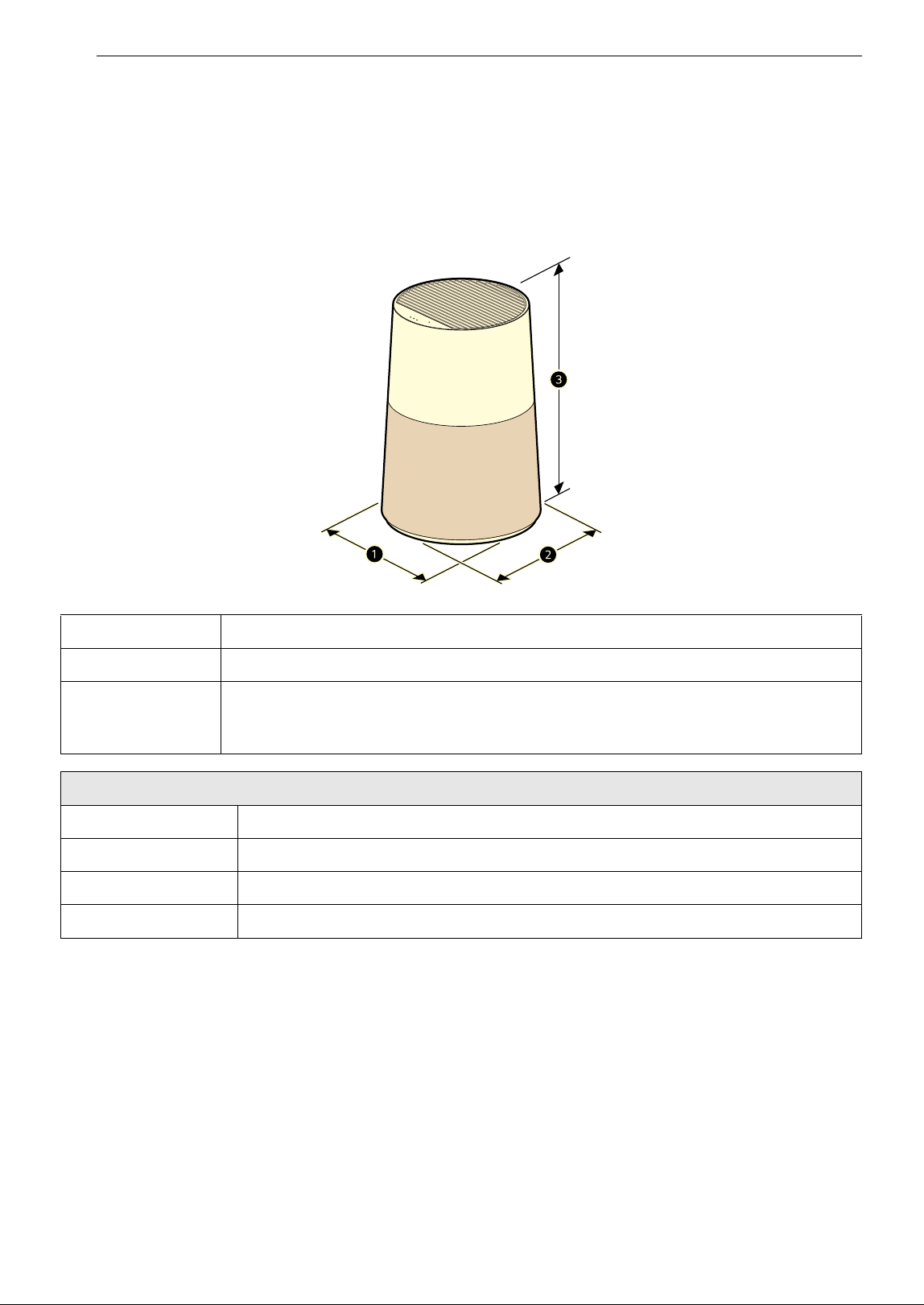
28 APÉNDICE
APÉNDICE
Información
ESPECIFICACIONES DEL APARATO
• La apariencia y las especificaciones podrían variar sin previo aviso para mejorar la calidad del aparato.
Nombre AS30*G*1*
Potencia CC 24 V
Dimensiones
exteriores
(
a x b x c)
9.8" x 9.8" x 14.2" (250 mm x 250 mm x 360 mm)
Adaptador CA/CC
Fabricante Shenzhen KeYu Power Supply Technology co., Ltd.
Modelo KA3601A-2401200US
Entrada nominal CA 100 V - 240 V ~, 50/60 Hz
Salida nominal CC 24 V, 1,2 A, 28.8 W

29GARANTÍA LIMITADA
ESPAÑOL
GARANTÍA LIMITADA
EE.UU.
TÉRMINOS Y CONDICIONES
AVISO DE ARBITRAJE:
ESTA GARANTÍA LIMITADA CONTIENE UNA DISPOSICIÓN DE ARBITRAJE QUE EXIGE QUE USTED Y LG
ELECTRONICS ("LG" DE AQUÍ EN ADELANTE) RESUELVAN LOS CONFLICTOS MEDIANTE UN ARBITRAJE
VINCULANTE EN LUGAR DE HACERLO ANTE TRIBUNALES, A MENOS QUE DECIDA NO PARTICIPAR. EN EL
ARBITRAJE, LAS DEMANDAS COLECTIVAS Y LOS JUICIOS POR JURADOS NO ESTÁN PERMITIDOS. CONSULTE
LA SECCIÓN TITULADA "PROCEDIMIENTO PARA RESOLVER CONFLICTOS" A CONTINUACIÓN.
QUÉ CUBRE ESTA GARANTÍA:
Si su purificador de aire LG ("Producto") no funciona correctamente debido a un defecto de fabricación o
de material en condiciones de uso normal y adecuado, LG, a su discreción, reparará o sustituirá el
Producto durante el período de garantía que se describe a continuación. Esta garantía limitada sólo es
válida para el comprador minorista original del Producto (denominado "Usted") y sólo es válida para
productos utilizados legalmente dentro de los Estados Unidos, incluidos los territorios de los Estados
Unidos.
NOTA
• Durante el resto del periodo de garantía original o noventa (90) días, lo que sea más largo, se garantizan
los Productos y piezas de sustitución.
• Los Productos y piezas de sustitución pueden ser nuevos, reconstruidos, mejorados o remanufacturados
en fábrica.
• El Producto o pieza(s) sustituido(s) será(n) propiedad de LG.
• Para obtener el servicio de garantía bajo esta garantía limitada, se requiere una prueba de compra
original al por menor que especifique el modelo del Producto y la fecha de compra.
INFORMACIÓN
PERIODO DE GARANTÍA:
Un (1) año desde la fecha de compra original al por menor, o desde la fecha de entrega según la ley
aplicable. Cualquier pieza interna/funcional y mano de obra
CÓMO SE PROPORCIONA EL SERVICIO TÉCNICO: servicio a domicilio
Durante el periodo de garantía, se ofrecerá servicio a domicilio si está disponible en Estados Unidos. Es
posible que no todas las localidades ofrezcan servicio a domicilio. El producto debe estar abierto al
personal de servicio y accesible para el servicio a domicilio. Podría ser necesario desmontar, reparar y
devolver el producto si durante el servicio a domicilio no se puede finalizar la reparación. Si así lo
decidimos, LG puede organizar el transporte de ida y vuelta a un centro de servicio autorizado por LG si el
servicio a domicilio no está disponible.
CUALQUIER GARANTÍA IMPLÍCITA DE COMERCIABILIDAD O IDONEIDAD PARA UN
FIN DETERMINADO EN EL PRODUCTO ESTÁ LIMITADA EN DURACIÓN A LA
DURACIÓN DE LA GARANTÍA LIMITADA ANTERIOR, A MENOS QUE LO PROHÍBA LA
LEGISLACIÓN APLICABLE. BAJO NINGUNA CIRCUNSTANCIA LG O SUS
DISTRIBUIDORES/COMERCIANTES EN EE.UU. SERÁN RESPONSABLES DE NINGÚN
DAÑO INDIRECTO, INCIDENTAL, CONSECUENTE, ESPECIAL O PUNITIVO,

30 GARANTÍA LIMITADA
INCLUYENDO, SIN LIMITACIÓN, PÉRDIDA DE FONDO DE COMERCIO, PÉRDIDA DE
INGRESOS O BENEFICIOS, INTERRUPCIÓN DEL TRABAJO, DAÑOS A OTROS BIENES,
COSTE DE RETIRADA Y REINSTALACIÓN DEL PRODUCTO, PÉRDIDA DE USO O
CUALQUIER OTRO DAÑO, YA SEA BASADO EN UN CONTRATO, AGRAVIO U OTRA
TEORÍA LEGAL. EN TODO CASO, LA RESPONSABILIDAD TOTAL DE LG NO SUPERARÁ
EL PRECIO DE COMPRA QUE USTED PAGÓ POR EL PRODUCTO.
ES POSIBLE QUE LAS EXCLUSIONES O LIMITACIONES ANTERIORES NO SE APLIQUEN EN SU CASO, YA QUE
ALGUNOS ESTADOS NO PERMITEN LA EXCLUSIÓN O LIMITACIÓN DE DAÑOS INCIDENTALES O
CONSECUENTES NI LIMITACIONES EN LA DURACIÓN DE UNA GARANTÍA IMPLÍCITA. USTED TAMBIÉN
PUEDE TENER OTROS DERECHOS LEGALES QUE DIFIEREN DE UN ESTADO A OTRO, PERO ESTA GARANTÍA
LIMITADA LE OTORGA CIERTOS DERECHOS LEGALES.
ESTA GARANTÍA LIMITADA NO CUBRE:
• Visitas del servicio técnico para entregar, recoger o instalar, dar instrucciones de uso, arreglar el
cableado o realizar reparaciones sin licencia.
• Cuando hay cortes de electricidad o el servicio eléctrico está interrumpido o es insuficiente, el Producto
puede dañarse o funcionar mal.
• Las fugas o roturas de agua, las tuberías de agua congeladas, las tuberías de desagüe obstruidas, un
suministro de agua insuficiente o interrumpido, o un suministro de aire insuficiente pueden provocar
fallos o daños en el Producto.
• Utilizar el Producto en contra de lo indicado en el manual del propietario del Producto, en un entorno
corrosivo o de cualquier otra forma que provoque daños en el Producto.
• Daños o fallos del Producto causados por accidentes, plagas y parásitos, rayos, viento, incendios,
inundaciones, actos de la naturaleza o cualquier otra causa fuera del control de LG.
• Daños o fallos del Producto causados por modificaciones o alteraciones no autorizadas, o si el Producto
se utiliza para un fin distinto al previsto, o cualquier fuga de agua en caso de que el Producto no se haya
instalado correctamente.
• Daños o fallos del Producto causados por una corriente eléctrica, voltaje o códigos de plomería
incorrectos.
• Daños o fallos del Producto debidos al transporte, almacenamiento y/o manipulación, incluidos
arañazos, abolladuras, desconchones y/u otros daños en el acabado del Producto, a menos que se
notifiquen en el plazo de una (1) semana a partir de la entrega.
• Daños o fallos del Producto causados por uso indebido, abuso, instalación, reparación o mantenimiento
incorrectos. La reparación inadecuada incluye el uso de piezas no aprobadas por LG. La instalación o el
mantenimiento que no se realice de acuerdo con el manual del propietario del Producto se considera
inadecuado.
• Daños o fallos del Producto causados por el uso de piezas, componentes, accesorios, productos de
limpieza consumibles o cualquier otro producto o servicio que no sean autorizados por LG.
• Daños o falta de artículos en cualquier Producto de exposición o en caja abierta.
• Productos reacondicionados o cualquier Producto vendido “tal cual”, “donde está”, “con todos los
defectos” o con un descargo de responsabilidad similar.
• Productos con números de serie originales que hayan sido retirados, alterados o sean ilegibles.
• Aumentos del costo de los servicios públicos y gastos adicionales por servicios públicos.
• Cualquier ruido causado por el funcionamiento normal.
• Productos utilizados para fines distintos del uso doméstico normal y adecuado (p. ej., uso comercial o
industrial) o que infrinjan el Manual del propietario del Producto.
• Costos asociados a la retirada y reinstalación del Producto para reparaciones, o a la retirada y
reinstalación del Producto si se instala en un lugar inaccesible o no se instala de acuerdo con el Manual
del propietario del Producto.

31GARANTÍA LIMITADA
ESPAÑOL
• A excepción de las piezas internas/funcionales cubiertas por esta garantía limitada, los accesorios,
componentes desmontables o piezas consumibles (p. ej., estantes, compartimentos de puertas, cajones,
filtros de agua/aire, rejillas, bombillas, pilas, etc.) no están cubiertos.
• Sustituir los fusibles de la casa o reajustar los disyuntores, corregir el cableado o la plomería de la casa o
corregir la instalación del producto son ejemplos de servicios.
Usted se hará cargo de los gastos de reparación o sustitución en estas
circunstancias excluidas.
PARA OBTENER SERVICIO DE GARANTÍA E INFORMACIÓN ADICIONAL
Llame al 1-800-243-0000 y seleccione la opción adecuada del menú. O visite nuestro sitio web en http://
www.lg.com
O por correo postal: LG Customer Information Center (ATTN: CIC) 201 James Record Road, Huntsville, AL
35824

32 GARANTÍA LIMITADA
PROCEDIMIENTO PARA RESOLVER CONFLICTOS:
TODOS LOS CONFLICTOS ENTRE USTED Y LG QUE SURJAN EN RELACIÓN CON ESTA GARANTÍA LIMITADA O
CON EL PRODUCTO SE RESOLVERÁN EXCLUSIVAMENTE A TRAVÉS DE UN ARBITRAJE VINCULANTE Y NO
ANTE UN TRIBUNAL DE JURISDICCIÓN GENERAL. "ARBITRAJE VINCULANTE" SIGNIFICA QUE USTED Y LG
RENUNCIAN AL DERECHO DE UN JUICIO CON JURADO Y A REALIZAR O PARTICIPAR EN UNA DEMANDA
COLECTIVA.
Definiciones. Para el propósito de esta sección, las referencias a “LG” significan: LG Electronics U.S.A., Inc.,
sus empresas matrices, subsidiarias y filiales y cada uno de sus directivos, directores, empleados, agentes,
beneficiarios, predecesores en interés, sucesores, cesionarios y proveedores; las referencias a “conflicto” o
“reclamación” incluirán cualquier conflicto, reclamo o controversia de cualquier tipo, sin importar (ya sea
basado en contrato, agravio, estatuto, regulación, ordenanza, fraude, falsa representación o cualquier
teoría legal o equitativa) que surja de o esté relacionada con cualquier forma de venta, condición o
desempeño del producto o de esta Garantía Limitada.
Aviso de disputa. En caso de que usted desee iniciar un procedimiento de arbitraje, primero debe
notificar a LG por escrito al menos 30 días antes de iniciar el arbitraje; este aviso se presentará por carta a
LG y se enviará a LG Electronics, USA, Inc., a la atención de Legal Department- Arbitration 111 Sylvan
Avenue, Englewood Cliffs, NJ 07632. Usted y LG aceptan participar en discusiones de buena fe en un
intento de resolver su reclamo de manera amistosa. En la carta debe indicar su nombre, dirección y
número de teléfono, identificar el producto objeto del reclamo, y describir la naturaleza del reclamo y la
solución que busca. Si usted y LG no pueden resolver el conflicto en un plazo de 30 días, cualquiera de las
partes puede proceder a presentar una demanda de arbitraje.
Acuerdo de arbitraje vinculante y renuncia de demanda colectiva. En caso de no resolver el conflicto
durante el período de 30 días después de enviar una notificación por escrito a LG, usted y LG se
comprometen a resolver cualquier reclamo solamente a través de arbitraje vinculante sobre una base
individual, a menos que usted se excluya, conforme a lo dispuesto a continuación. Cualquier conflicto
entre usted y LG no se combinará ni consolidará con un conflicto relacionado con cualquier otro producto
o reclamo de otra persona o entidad. Específicamente y sin perjuicio de lo anterior, no procederá bajo
ninguna circunstancia cualquier conflicto entre usted y LG como parte de una demanda colectiva o
representativa. En lugar del arbitraje, cualquiera de las partes podrá iniciar una acción individual ante un
tribunal de reclamos menores, pero tales acciones en el tribunal de reclamos menores no podrán tomarse
en una demanda colectiva o representativa.
Normas y procedimientos de arbitraje. Para comenzar con el arbitraje de un reclamo, usted o LG deben
presentar una demanda escrita para arbitraje. El arbitraje será administrado por la Asociación Americana
de Arbitraje (AAA) y se llevará a cabo ante un árbitro único de conformidad con las Normas de Arbitraje del
Consumidor de la AAA, que tienen efecto al momento de inicio del arbitraje (en adelante, las “Normas de la
AAA”) y según los procedimientos establecidos en esta sección. Las Normas de la AAA están disponibles en
línea en www.adr.org/consumer
. Envíe una copia de su solicitud de arbitraje por escrito, así como una
copia de esta disposición, a la AAA de la forma descrita en las Normas de la AAA. También debe enviar una
copia de su solicitud por escrito a LG en LG Electronics, USA, Inc., a la atención de Legal Department-
Arbitration 111 Sylvan Avenue, Englewood Cliffs, NJ 07632. Si hay un conflicto entre las Normas de la AAA y
las reglas establecidas en esta sección, prevalecerán las reglas de esta sección. Esta disposición de
arbitraje se rige por la Ley Federal de Arbitraje. El juicio se puede introducir en el laudo arbitral en
cualquier tribunal de jurisdicción competente. El árbitro tomará su decisión en todas las cuestiones,
excepto aquellos asuntos relativos al alcance y aplicabilidad de la cláusula de arbitraje y de la capacidad de
arbitraje del conflicto para que el tribunal determine. El árbitro se regirá por los términos de esta
disposición.
Legislación vigente. La legislación del estado de su residencia regirá esta Garantía limitada, así como
todos los conflictos entre nosotros, salvo que sea invalidada o incoherente con leyes federales aplicables.
Tarifas / Costos. No debe pagar ninguna tarifa para iniciar un arbitraje. Al recibir su solicitud de arbitraje
por escrito, LG pagará todos los gastos administrativos rápidamente a la AAA, a menos que usted solicite
más de $25.000,00 por daños, en cuyo caso el pago de estos gastos se regirá por las Normas de la AAA.
Salvo disposición contraria prevista en el presente documento, LG pagará a la AAA todos los gastos
documentales, administrativos y de arbitraje para cualquier arbitraje iniciado, de conformidad con las
Normas de la AAA y esta disposición de arbitraje. Si usted prevalece en el arbitraje, LG cubrirá los
honorarios y gastos de sus abogados, siempre y cuando sean razonables, de conformidad con ciertos
factores que incluyen, entre otros, el monto de la compra y el monto del reclamo. No obstante lo indicado,
si la ley aplicable permite una adjudicación de honorarios y gastos razonables de abogados, un árbitro

33GARANTÍA LIMITADA
ESPAÑOL
puede otorgarlos en la misma medida que lo haría un tribunal. Si el árbitro considera que el fondo de su
reclamo o la reparación solicitada en la demanda es frívola o se utiliza para un propósito inadecuado
(calificado según las normas establecidas en la Norma Federal de Procedimiento Civil 11 (b)), el pago de
todos los honorarios de arbitraje se regirá por las Normas de la AAA. En tal situación, usted se
compromete a reembolsar a LG todos los fondos que haya erogado previamente, cuyo pago es, por otra
parte, su obligación según las Normas de la AAA. Salvo disposición contraria, LG renuncia a cualquier
derecho que pudiera tener para solicitarle los honorarios y gastos de sus abogados, si LG prevalece en el
arbitraje.
Audiencias y ubicación. Si su reclamo es por $25.000 o menos, puede optar por que el arbitraje sea
realizado únicamente sobre la base de lo siguiente: (1) documentos presentados al árbitro; (2) a través de
una audiencia telefónica; o (3) mediante una audiencia presencial, según lo establecido por las Normas de
la AAA. Si su reclamo excede los $25.000, el derecho a una audiencia estará determinado por las Normas
de la AAA. Cualquier audiencia de arbitraje presencial se realizará en un lugar dentro del distrito judicial
federal en el cual resida, a menos que ambas partes acuerden llevarla a cabo en otra ubicación o mediante
un arbitraje telefónico.
Exclusión. Puede excluirse de este procedimiento de resolución del conflicto. Si se excluye, ni usted ni LG
pueden solicitar al otro que participe en un procedimiento de arbitraje. Para excluirse, debe enviar una
notificación a LG en un plazo de hasta 30 días continuos a partir de la fecha de la primera compra del
consumidor del producto, por alguno de estos medios: (i) enviar un mensaje de correo electrónico a
, con el asunto: “Exclusión del arbitraje” o (ii) por teléfono si llama al 1-800-980-2973. Debe
incluir la siguiente información en el correo electrónico de exclusión o suministrarla por teléfono: (a) su
nombre y dirección; (b) la fecha en la cual se compró el producto; (c) el nombre o el número del modelo del
producto; y (d) el número de serie (puede encontrarse (i) en el producto o (ii) en el sitio https://
www.lg.com/us/support al hacer clic en “How do I find my model number?” [¿Cómo puedo encontrar mi
número de modelo?]).
Solo puede excluirse del procedimiento de resolución de conflictos en la forma descrita anteriormente (es
decir, por correo electrónico o por teléfono); ninguna otra forma de notificación será efectiva para hacerlo.
Excluirse de este procedimiento de resolución de conflictos no afectará de ninguna manera la cobertura
de la Garantía limitada, por lo que usted continuará disfrutando de todos sus beneficios. Si conserva este
producto y no se excluye, acepta todos los términos y condiciones de la cláusula de arbitraje descrita
anteriormente.
Memorándum
Memorándum