
Player Shutter
Use the Touch Screen
Phone Call
Open the App and set up your profile
Go to the [Device], Click [Add a Device]
Choose your device on the scanning list
Finish
Heart Rate Test
The Smart Watch can record your heart
rate all day.
You can also tap on the page to start
measuring heart rate.
Swipe
Up
Swipe
Up
Swipe
Down
Swipe
Down
Swipe
Left
Swipe
Left
Swipe
Right
Swipe
Right
CustomMenu
Control Center
Messages
Water Intake Reminder
Period Reminder
The MAC address on the “Setting”-”About” page
could help you identify your device on the scanning
list.
After connecting your Smart Watch to the
phone, you can use the watch to make
outgoing calls and answer phone calls.
You can also view call history of the
watch.
You need to keep the connection between
the watch and the phone stable when
using the Phone Call function.
Downloading the App
Pairing
Charging and Active
Scan the following QR code to download and install
the App.
Scan QR Code and Download
Blood Pressure
SpO2 Test
Tap on the blood pressure page to start
measuring your blood pressure. On the
blood pressure page, it will show blood
pressure history of previous records.
Tap the SpO2 page to start measuring
your SpO2 levels.On the SpO2 page, It
can show the SpO2 history previous
records.
Getting to Know Your Device
General Info & Specifications
FCC Warning
Sports
Training
After connecting the device, you
can remotely control the music player
on your phone.
Tap the training icon on the menu to start
a new training session recording, There
are 8 sport modes to be chosen.
The last training recording will be shown
on the training page.
Sleep
Remote Shutter Other Features
Messages Reminder
Weather
If you keep wearing your Smart Watch
while sleeping, it can measure the hours
slept and quality of sleep statistics on
both the screen and the App.
After connecting the device, you
can remotely control the camera on
your phone.
The device can sync incoming
notifications from Twitter, Facebook,
Whatsapp, Instagram & other Apps.
Recent 5 messages can be stored.
Other features include Stopwatch,
Alarm, Timer, Word clock,Find phone,
Settings,etc.
The device will vibrate to remind you
to take relaxation after 1 hour of
sitting.
1.Using in Wet Conditions
Your device is water-resistant, which means it is rain-proof
and splash-proof and can withstand the sweatiest workout.
1.Environmental Conditions
Operating temperature: 14°F to 122°F(-10°C to 50°C)
Non-operating temperature: -4°F to 140°F(-20°Cto 60°C)
2.Wrist size
Fits a wrist between 5.5 and 7.7 inches in circumference
3.Disposal and Recycling
Please kindly be aware that it is the consumer's responsibility,
to properly dispose and recycle the Smart Watch and
accompanying components.
Do not dispose the Smart Watch with common household
waste, as it is considered electronic waste and should be
disposed of at your local electronic equipment collection facility.
For more information, please contact your local electronic
equipment waste management authority or the retailer where
you bought the product.
The smart watch will remind you to
drink Water at the planned intervals.
Click on the menstrual period interface
through the management cycle calendar
to predict victory cycles.
On the period reminder page, It can show
the history of previous period reminder
data.
Weather data of current day and tomorrow
can be viewed on the weather page.
Weather data is synced after connecting
with the App, it will not be updated after a
long disconnected.
Note: You can switch on/off the
incoming notifications in the App.
Note: You can switch the feature
on/off in the APP.
Note: You can set the feature in
the APP.
Note: Sleep stats reset to zero at
8:00 PM.
Note: Your movement statistics reset
to zero at midnight.
Movement Reminder
2.Using Quick View
With Quick View you can check the time or message
from your phone on your Smart Watch without tapping.
Just turn your wrist towards you and the time screen will
appear for a few seconds.
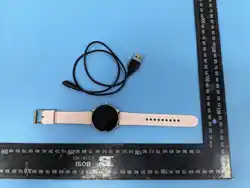
Charge the device fully to activate before first use.
To charge your device, plug the charging cable into the
adapter or USB port on your computer or wall.
Safety warnings
chemicals, including nearly evaporated liquified gases such
as helium.
Important Safety Information: Handle the Smart Watch with
care.
Do not use the Smart Watch if it is damaged.
Batteries: Do not try to replace the battery of the Smart
Watch by yourself.
Charge: Charge the Smart Watch with the charging cable
and a power adapter or a computer that meets relevant
national, international and regional safety standards.
Other adapters may not meet applicable safety standards
and their use to charge the Smart Watch may present the
risk of injury.
Using damaged cables or chargers, or charging the device
if they are wet, may cause fire, electric shock, injury, or
damage to the watch or other belongings.
Avoid prolonged exposure to heat, prolonged skin contact
with the device, power adapter, charging cable and its
connector, or the wireless charger when connected to a
power source, as this may cause discomfort or injury.
Choking hazard: The Smart Watch and its small parts
included may present a choking hazard to small children or
cause other injuries. Please keep away from children.
Important Safety Information: Handle the Smart Watch with
care.
They contain sensitive electronic components, including
batteries, and may malfunction, affect performance, or
cause damage if dropped, burned, punctured, crushed,
disassembled, or exposed to excessive heat, liquid, or
high-pressure environments. concentrations of industrial
including interference that may cause undesired operation.
NOTE 1: This equipment has been tested and found to
comply with the limits for a Class B digital device, pursuant
to part 15 of the FCC Rules. These limits are designed to
provide reasonable protection against harmful interference
in a residential installation. This equipment generates, uses
and can radiate radio frequency energy and, if not installed
and used in accordance with the instructions, may cause
harmful interference to radio communications. However,
there is no guarantee that interference will not occur in a
particular installation. If this equipment does cause harmful
interference to radio or television reception, which can be
determined by turning the equipment off and on, the user is
encouraged to try to correct the interference by one or more
of the following measures:
-Reorient or relocate the receiving antenna.
-Increase the separation between the equipment and
receiver.
-Connect the equipment into an outlet on a circuit different
from that to which the receiver is connected.
-Consult the dealer or an experienced radio/TV technician
for help.
NOTE 2: Any changes or modifications to this unit not
expressly approved by the party responsible for compliance
could void the user's authority to operate the equipment.
The device has been evaluated to meet general RF
exposure requirement.
The device can be used in portable exposure condition
without restriction.
The Smart Watch automatically tracks
Steps taken on the screen.
Note: We do not recommend swimming with your Smart
Watch or showering with it. Although the water won't hurt
the device, wearing it 24/7 does not give your skin a
chance to breathe. Whenever you get your bracelet wet,
dry it thoroughly before putting it back on.
This device complies with Part 15 of the FCC Rules.
Operation is subject to the following two conditions:
(1) This device may not cause harmful interference,
and(2) this device must accept any interference received,