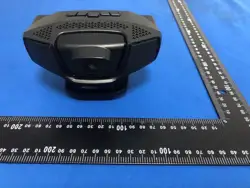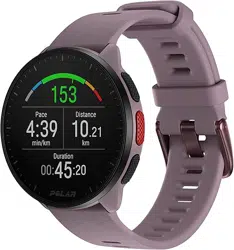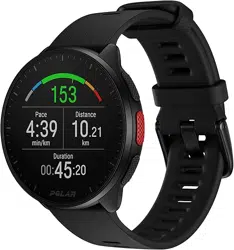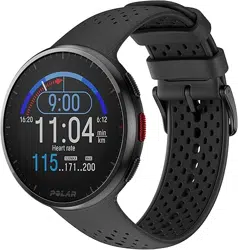
smart watch
User Guide (T6)
1,Touch operation instructions
Touch
Operating
instructions
glide
Quick Options
Right
swipe
Side split screen
Slide
up
message notification
Left
slide
shortcuts
Long
press
Dial switching
click
Select/Confirm
Please enter the APP for detailed product functions
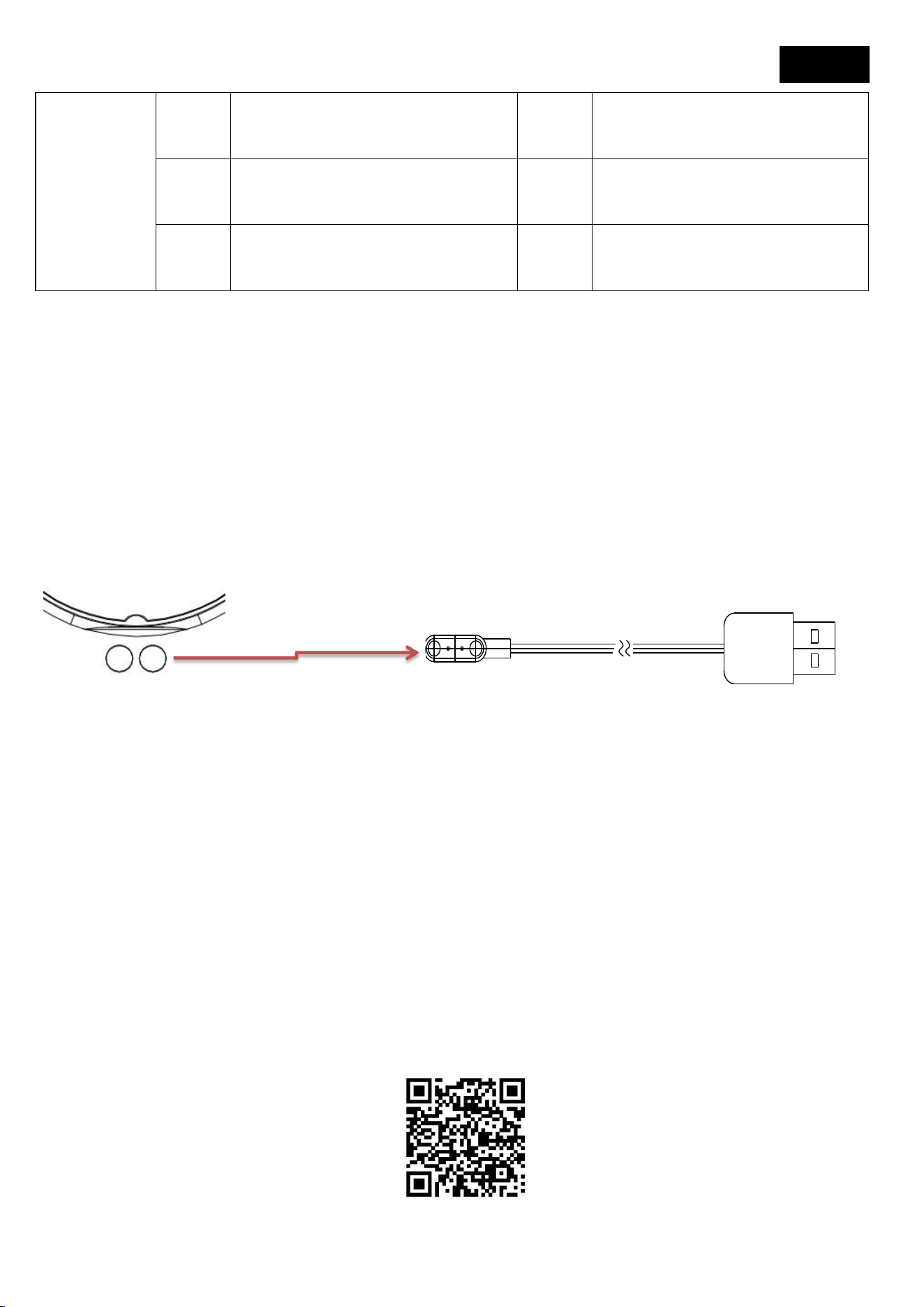
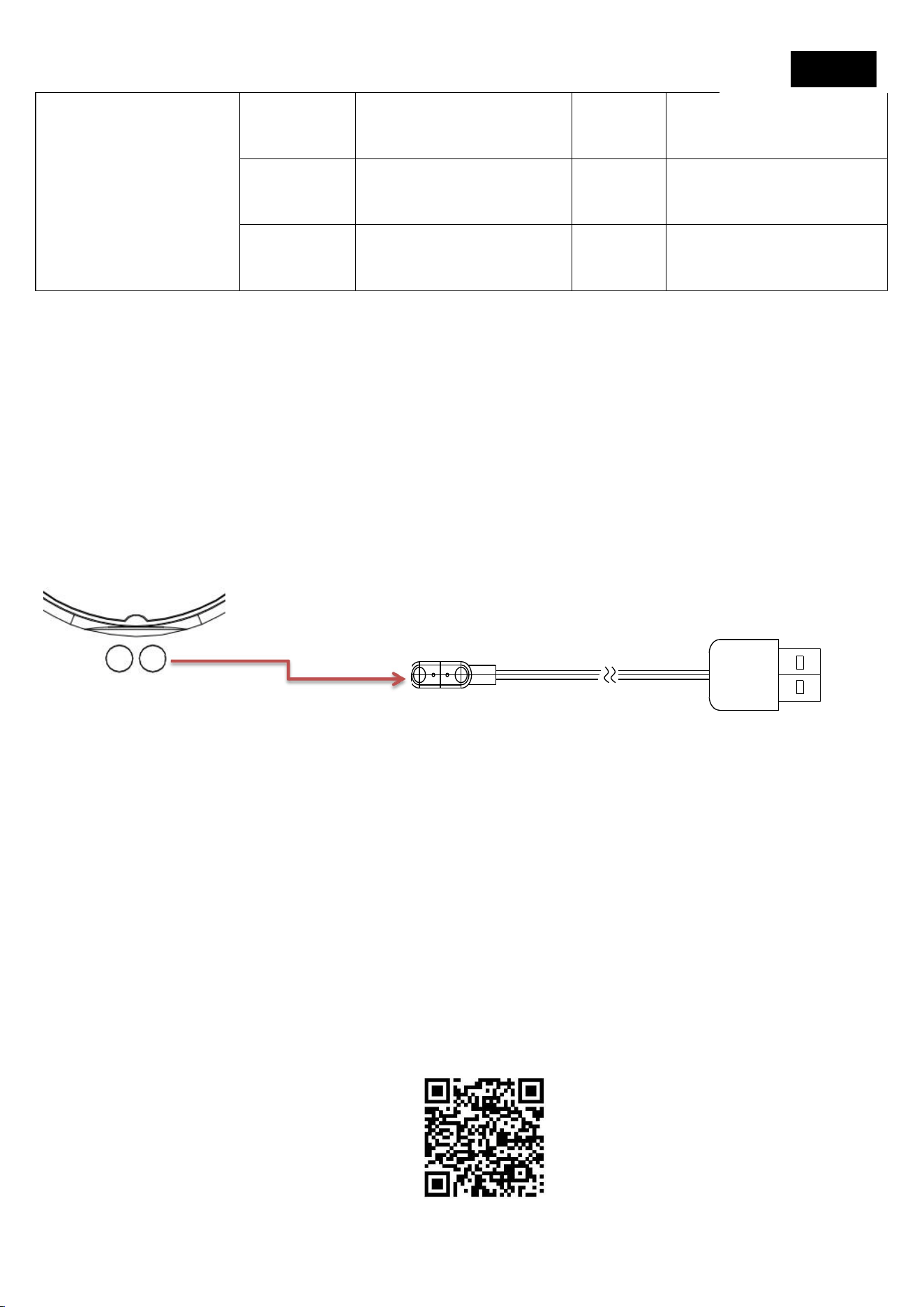
2. Charging the watch
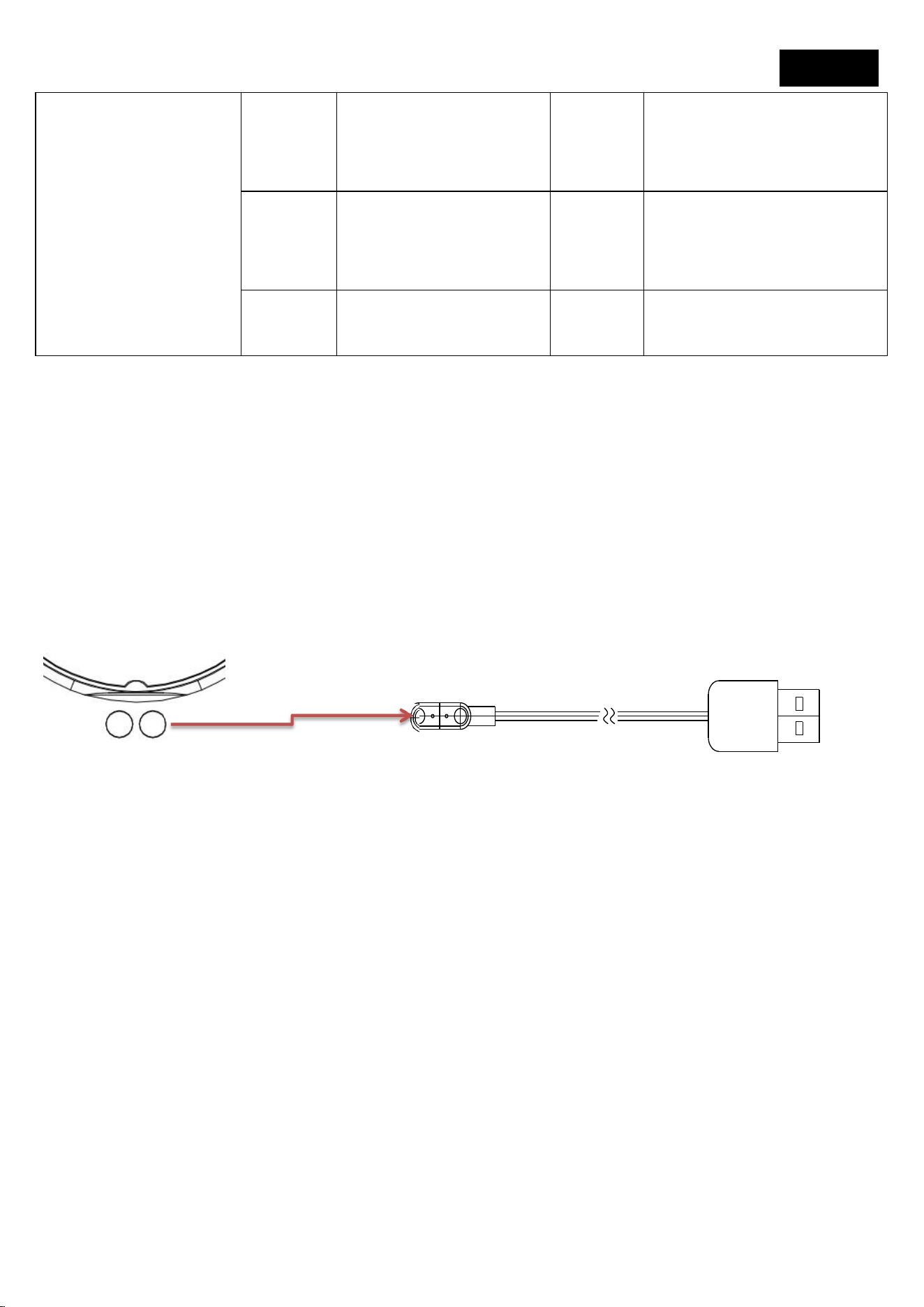
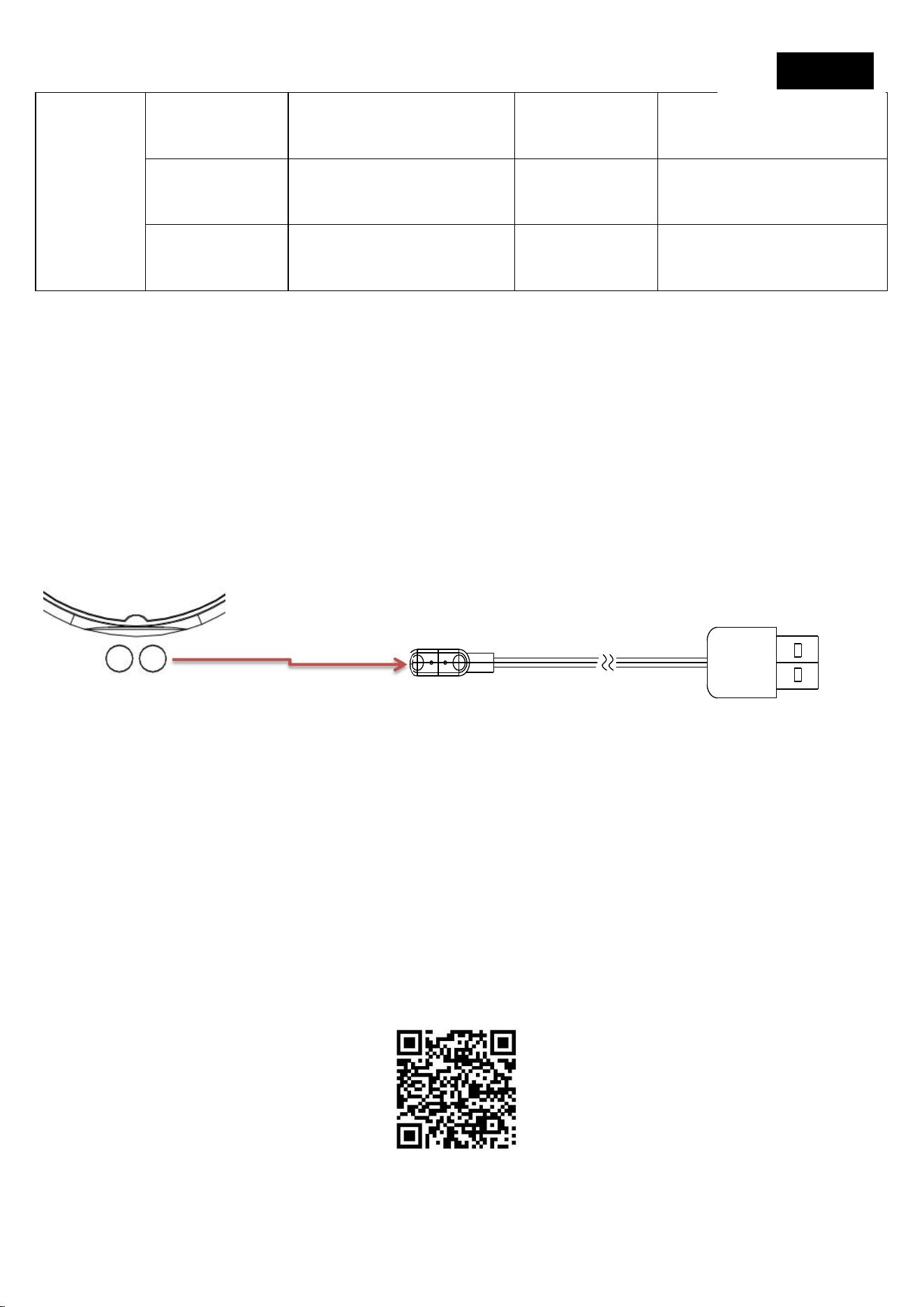
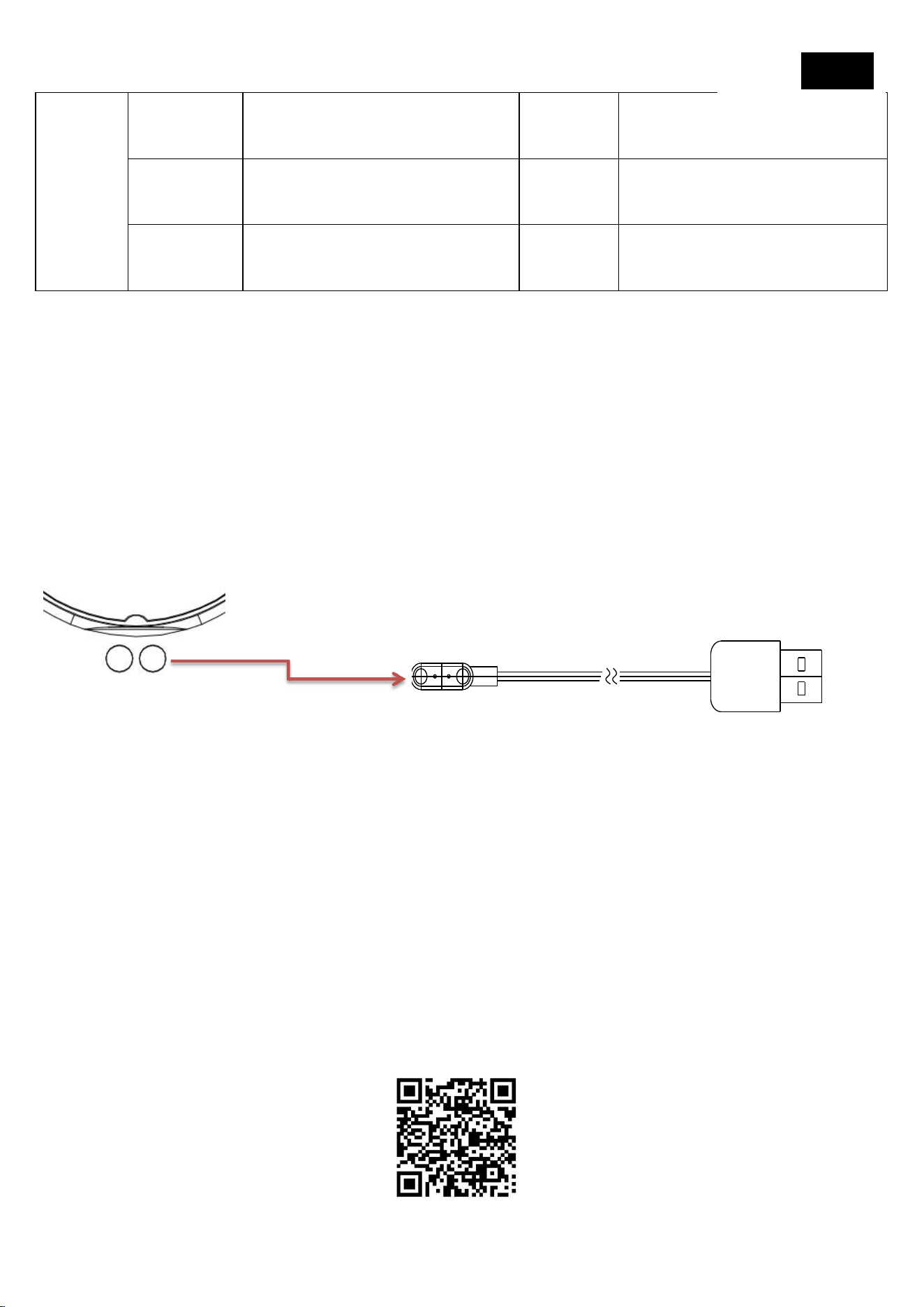
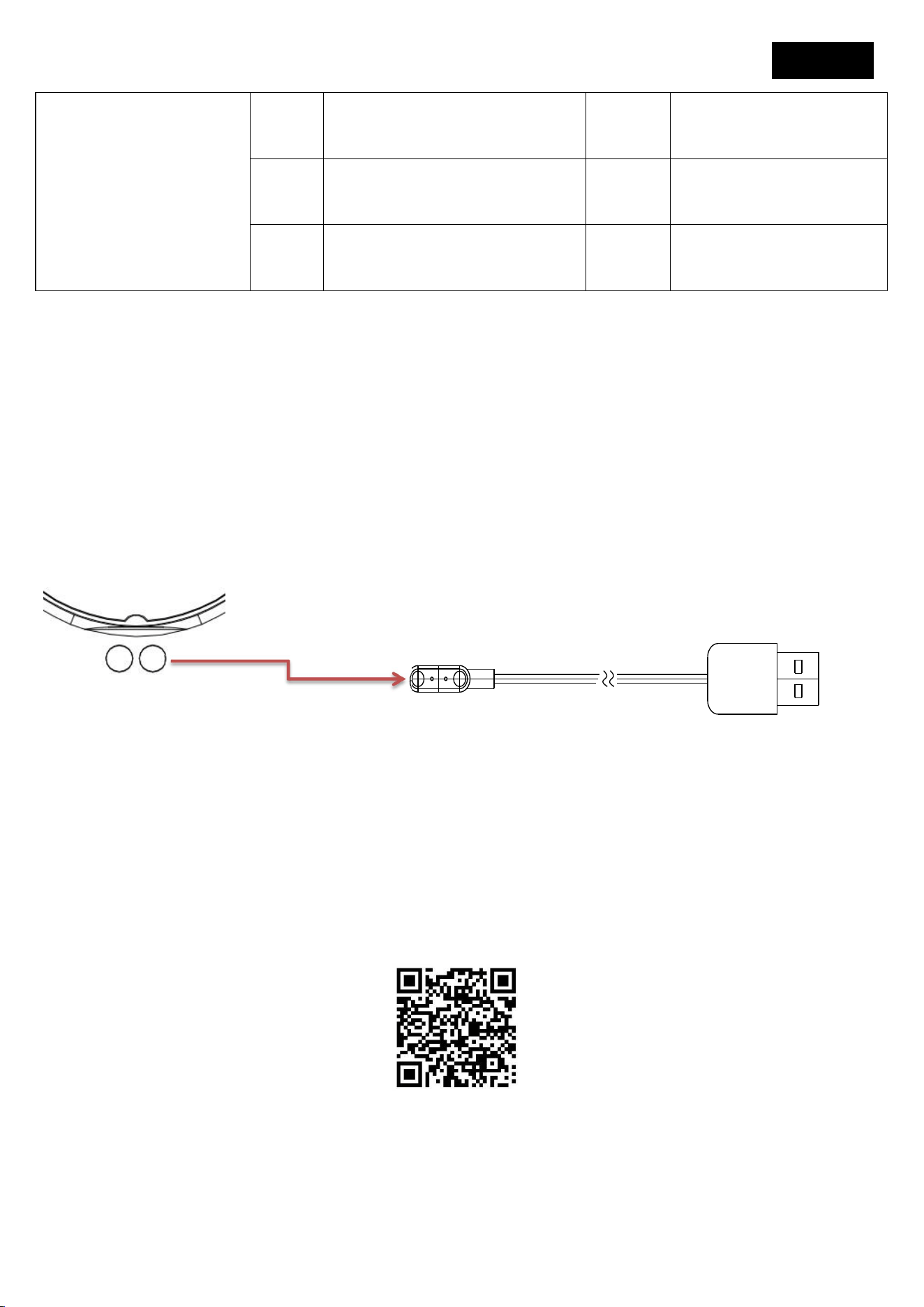
This product is a magnetic charging device, with one end of the charging cable
connected to the charging adapter via USB and the other end attached to the
contact point on the back of the watch. The watch screen will display a charging
indicator, indicating the start of charging
Note: Connect the USB port to a charger or computer USB port with an output
current of 5V500mA or higher for charging
3. Download and install the APP
Scan the QR code below with your phone to download and install the app;
Download Tencent App Store; Android phones can also use Google Play, while
Apple phones can use the Apple Store and search for "GloryFit" to download and
install.
Mobile system requirements:
English

Android 8.0 and above, iOS 11.0 and above
4. Connect the watch
After turning on Bluetooth on your phone, open the "GloryFit" app on your
phone, select "My" and "Devices", click to scan the device, find the
corresponding device, and click to connect, pair, and bind
Before pairing, ensure that the watch's battery level is above 20% to avoid pairing
failure due to insufficient battery
2. During pairing and connection, ensure that the Bluetooth on the phone is
turned on and the media audio on the watch is turned on
3. If the watch is not connected to the mobile app for a long time or the power is
cut off for too long, the time may be inaccurate and the app needs to be
synchronized
4. To view watch product information, scroll down and click on the device
information option to enter the information and view product information
Bluetooth data transmission
When the watch is connected to the mobile app "GloryFit", the watch will
instantly synchronize data with the app via Bluetooth, such as weather,
notification messages, sports and health data, etc. After disconnecting or turning
off Bluetooth, these data will not be synchronized
5. Simple explanation and display of commonly used functions
Dial selection: Long press on the main dial for 3 seconds to enter dial mode, then
swipe left or right to select the dial and click to exit the view;
APP download: Scan the QR code in the manual to download the APP
Bluetooth music/voice assistant usage: To use these two functions, you need to
pair and connect your watch and mobile app "GloryFit", and also connect to

"Audio Bluetooth". To use the above three functions, you need to connect two
Bluetooth devices at the same time;
matters needing attention
1. Do not disassemble, repair, or modify the product without authorization.
2. Do not violently collide with the product to avoid damage.
3. Please avoid using in strong magnetic fields, direct sunlight, or high
temperature environments.
4. This product is not intended for disease diagnosis, treatment, or prevention
purposes.
5. Please avoid wearing the watch strap too tightly and keep the contact area
between the watch and the skin clean.
6. Children should use this product under the guidance of their parents to avoid
harm.
Common problem handling
The watch cannot be turned on
1. Please hold the power button for more than 3 seconds
2. If the battery level is too low, please charge it in a timely manner.
Bluetooth not connected or unable to connect
1. Please try restarting the watch and reconnecting.
2. Please try restarting your phone's Bluetooth and connecting again.
3. Do not connect your phone to other Bluetooth devices at the same time.
4. After the watch is connected, it will enter sleep mode when not in use; When
not automatically connected to the watch after hibernation, you need to open
and refresh the mobile app "GloryFit" to automatically connect.
5.When the Bluetooth of the watch audio is not automatically connected, please
go to "Phone Settings" ->"Bluetooth" ->"Save Device" to connect and pair.

Note: This equipment has been tested and found to comply with the limits for a
Class B digital device, pursuant to part 15 of the FCC Rules. These limits are desi
gned to provide reasonable protection against harmful interference in a residen
tial installation. This equipment generates, uses and can radiate radio frequency
energy and, if not installed and used in accordance with the instructions, may ca
use harmful interference to radio communications. However, there is no guarant
ee that interference will not occur in a particular installation. If this equipment d
oes cause harmful interference to radio or television reception, which can be det
ermined by turning the equipment off and on, the user is encouraged to try to c
orrect the interference by one or more of the following measures:
—Reorient or relocate the receiving antenna.
—Increase the separation between the equipment and receiver.
—
Connect the equipment into an outlet on a circuit different from that to which t
he receiver is connected.
—Consult the dealer or an experienced radio/TV technician for help.
Im
p
o
r
t
a
n
t:
C
h
a
n
g
e o
r m
od
ifi
ca
t
i
o
n
s
n
o
t
e
x
p
r
ess
l
y
a
pp
r
o
v
ed b
y
t
h
e
m
a
n
u
f
ac
t
u
r
e
r r
es
p
o
n
s
i
b
l
e
f
o
r
co
m
p
li
a
n
ce cou
l
d
v
o
i
d
t
h
e use
r
'
s au
t
h
o
ri
t
y
t
o o
p
e
r
a
t
e
t
h
e e
q
u
i
p
m
e
n
t.
Thi
s de
vi
ce co
m
p
li
es
wi
t
h
p
a
r
t
1
5 o
f
t
h
e
F
CC
R
u
l
es
.
O
p
e
r
a
t
i
o
n i
s sub
j
ec
t t
o
t
h
e
f
o
ll
o
win
g
t
w
o co
n
d
i
t
i
o
n
s
:
(
1
)
Thi
s de
vi
ce
m
a
y
n
o
t
cause
h
a
rmf
u
l in
t
e
rf
e
r
e
n
ce
,
a
n
d
(
2
)
t
hi
s de
vi
ce
m
us
t
acce
p
t
a
n
y
in
t
e
rf
e
r
e
n
ce
r
ece
iv
ed
,
in
c
l
ud
in
g
in
t
e
rf
e
r
e
n
ce
t
h
a
t
m
a
y
cause u
n
des
ir
ed o
p
e
r
a
t
i
o
n
.
This app is not a medical device. Data obtained during the use of this app is for
reference only, and should not be used for clinical diagnosis,
medical research, diagnostic, or treatment purposes.
Wireless headphone parameters:
This equipment complies with FCC radiation exposure limits set forth for an uncontrolled
environment. This equipment should be installed and operated with minimum distance 0cm
between the radiator and your body.

Operating Frequency Band: 2402-2480 MHz
Maximum Radio-Frequency Power: 5.90 dBm
For any product-related issues or concerns, please reach out to our
after-sales service team at the following email address:
1,Touch Bedienanleitung
Berühren
Bedienungsanleitung
nach
unten
schieben
Schnelle Optionen
Wischen
nach
rechts
Seitengeteilter Bildschirm
Folie
nach
oben
Meldung
Linker
Schieber
Schnelle Funktionen
Lange
Presse
Wählschaltung
klicken
Auswählen/Bestätigen
Bitte geben Sie die APP für detaillierte Produktfunktionen ein
2. Laden der Uhr
Bei diesem Produkt handelt es sich um ein magnetisches Ladegerät, bei dem ein
Ende des Ladekabels über USB mit dem Ladeadapter und das andere Ende mit
dem Kontaktpunkt auf der Rückseite der Uhr verbunden ist. Auf dem Bildschirm
der Uhr wird eine Ladeanzeige angezeigt, die den Ladebeginn anzeigt
Hinweis: Verbinden Sie den USB-Anschluss mit einem Ladegerät oder Computer
USB-Anschluss mit einem Ausgangsstrom von 5V500mA oder höher zum
Aufladen
3. Herunterladen und installieren Sie die APP
Scannen Sie den QR-Code unten mit Ihrem Telefon, um die App herunterzuladen
und zu installieren; Tencent App Store herunterladen; Android-Handys können
auch Google Play verwenden, während Apple-Handys den Apple Store nutzen
und nach "GloryFit" suchen können, um herunterzuladen und zu installieren.
German
Anforderungen an mobile Systeme:
Android 8.0 und höher, iOS 11.0 und höher
4. Schließen Sie die Uhr an
Nachdem Sie Bluetooth auf Ihrem Telefon aktiviert haben, öffnen Sie die
"GloryFit"-App auf Ihrem Telefon, wählen Sie "Meine" und "Geräte", klicken Sie
auf, um das Gerät zu scannen, suchen Sie das entsprechende Gerät und klicken
Sie auf, um eine Verbindung herzustellen, zu koppeln und zu binden
Stellen Sie vor dem Pairing sicher, dass der Batteriestand der Uhr über 20% liegt,
um einen Pairing-Ausfall aufgrund unzureichender Batterie zu vermeiden
2. Stellen Sie während der Kopplung und Verbindung sicher, dass Bluetooth am
Telefon eingeschaltet ist und das Medienaudio auf der Uhr eingeschaltet ist.
3. Wenn die Uhr längere Zeit nicht mit der mobilen App verbunden ist oder die
Stromversorgung zu lange unterbrochen wird, kann die Zeit ungenau sein und
die App muss synchronisiert werden
4. Um Produktinformationen der Uhr anzuzeigen, scrollen Sie nach unten und
klicken Sie auf die Option Geräteinformationen, um die Informationen
einzugeben und Produktinformationen anzuzeigen
Bluetooth Datenübertragung
Wenn die Uhr mit der mobilen App "GloryFit" verbunden ist, synchronisiert die
Uhr sofort Daten mit der App über Bluetooth, wie Wetter, Benachrichtigungen,
Sport- und Gesundheitsdaten usw. Nach dem Trennen oder Ausschalten von
Bluetooth, werden diese Daten nicht synchronisiert

5. Einfache Erklärung und Anzeige der häufig verwendeten
Funktionen
Wählauswahl: Drücken Sie lange auf das Hauptrad für drei Sekunden, um in den
Wählmodus zu wechseln, wischen Sie dann nach links oder rechts, um das
Zifferblatt auszuwählen und klicken Sie, um die Ansicht zu verlassen;
APP-Download: Scannen Sie den QR-Code im Handbuch, um die APP
herunterzuladen
Verwendung des Bluetooth Musik-/Sprachassistenten: Um diese beiden
Funktionen nutzen zu können, müssen Sie Ihre Uhr und die mobile App
"GloryFit" koppeln und verbinden. Um die oben genannten drei Funktionen zu
nutzen, müssen Sie zwei Bluetooth-Geräte gleichzeitig verbinden;
Angelegenheiten, die Aufmerksamkeit erfordern
1. Zerlegen, reparieren oder ändern Sie das Produkt nicht ohne Genehmigung.
2. Kollidieren Sie nicht gewaltsam mit dem Produkt, um Schäden zu vermeiden.
3. Bitte vermeiden Sie die Verwendung in starken Magnetfeldern, direktem
Sonnenlicht oder Umgebungen der hohen Temperatur.
4. Dieses Produkt ist nicht zur Diagnose, Behandlung oder Prävention von
Krankheiten bestimmt.
5. Bitte vermeiden Sie, das Uhrenarmband zu fest zu tragen und halten Sie den
Kontaktbereich zwischen der Uhr und der Haut sauber.
6. Kinder sollten dieses Produkt unter Anleitung ihrer Eltern verwenden, um
Schaden zu vermeiden.
Häufige Problembehandlung
Die Uhr kann nicht eingeschaltet werden
1. Halten Sie bitte die Power-Taste länger als 3 Sekunden gedrückt
2. Wenn der Batteriestand zu niedrig ist, laden Sie ihn bitte rechtzeitig auf.
Bluetooth ist nicht verbunden oder kann keine Verbindung herstellen
1. Bitte versuchen Sie, die Uhr neu zu starten und die Verbindung wieder
herzustellen.
2. Versuchen Sie bitte, Bluetooth Ihres Telefons neu zu starten und die
Verbindung erneut herzustellen.

3. Verbinden Sie Ihr Telefon nicht gleichzeitig mit anderen Bluetooth-Geräten.
4. Nachdem die Uhr angeschlossen ist, wechselt sie in den Ruhemodus, wenn sie
nicht verwendet wird; Wenn Sie nach dem Ruhezustand nicht automatisch mit
der Uhr verbunden sind, müssen Sie die mobile App "GloryFit" öffnen und
aktualisieren, um automatisch eine Verbindung herzustellen.
5.Wenn das Bluetooth der Uhr Audio nicht automatisch verbunden ist, gehen Sie
bitte zu "Telefoneinstellungen" ->"Bluetooth" ->"Gerät speichern", um eine
Verbindung herzustellen und zu koppeln.
Drahtlose kopfhörer:
Frequenz: 2402-2480 MHz
Maximale reichweite: 5.90 dBm
Sollten probleme mit dem verkauf je nach ihren mitarbeitern
probleme haben, können sie sich bitte an unser team mit
dienstleistungen wenden. Die adresse ist:
1,Istruzioni per l'uso touch
Toccare
Istruzioni
per l'uso
scivolare
verso il
basso
Opzioni rapide
Scorrimento
destro
Schermo diviso laterale
Scorrevole
in alto
Notifica del messaggio
Scorrevole
sinistro
Funzioni rapide
Pressa
lunga
Commutazione del
quadrante
clicca
Seleziona/Conferma
Inserisci l'APP per le funzioni dettagliate del prodotto
2. Ricarica dell'orologio
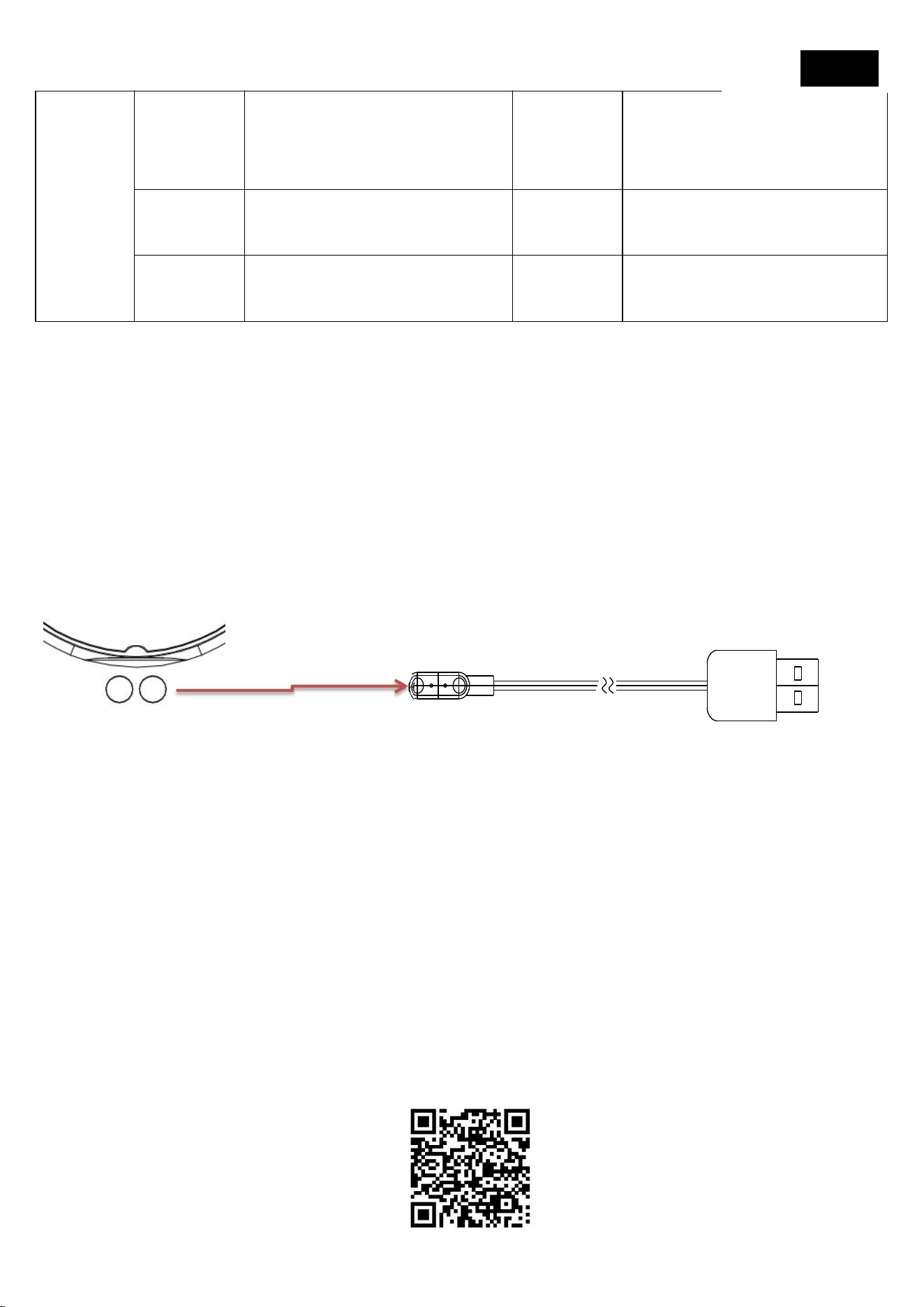
Questo prodotto è un dispositivo di ricarica magnetico, con un'estremità del cavo
di ricarica collegata all'adattatore di ricarica tramite USB e l'altra estremità
collegata al punto di contatto sul retro dell'orologio. Lo schermo dell'orologio
visualizzerà un indicatore di carica, che indica l'inizio della ricarica
Nota: Collegare la porta USB a un caricabatterie o una porta USB del computer
con una corrente di uscita di 5V500mA o superiore per la ricarica
3. Scaricare e installare l'APP
Scansiona il codice QR qui sotto con il tuo telefono per scaricare e installare l'app;
Scarica Tencent App Store; I telefoni Android possono anche utilizzare Google
Play, mentre i telefoni Apple possono utilizzare l'Apple Store e cercare "GloryFit"
per scaricare e installare.
Italian

Requisiti del sistema mobile:
Android 8.0 e versioni successive, iOS 11.0 e versioni successive
4. Collegare l'orologio
Dopo aver attivato il Bluetooth sul telefono, apri l'app "GloryFit" sul telefono,
seleziona "Mio" e "Dispositivi", fai clic per eseguire la scansione del dispositivo,
trova il dispositivo corrispondente e fai clic per collegare, accoppiare e legare
Prima dell'accoppiamento, assicurarsi che il livello della batteria dell'orologio sia
superiore al 20% per evitare errori di accoppiamento dovuti a batteria
insufficiente
2. Durante l'accoppiamento e la connessione, assicurarsi che il Bluetooth sul
telefono sia acceso e che l'audio multimediale sull'orologio sia acceso
3. Se l'orologio non è collegato all'app mobile per un lungo periodo di tempo o
l'alimentazione è interrotta per troppo tempo, il tempo potrebbe essere
impreciso e l'app deve essere sincronizzata
4. Per visualizzare le informazioni sul prodotto dell'orologio, scorrere verso il
basso e fare clic sull'opzione Informazioni sul dispositivo per immettere le
informazioni e visualizzare le informazioni sul prodotto
Trasmissione dati Bluetooth
Quando l'orologio è collegato all'app mobile "GloryFit", l'orologio sincronizzerà
istantaneamente i dati con l'app tramite Bluetooth, come meteo, messaggi di
notifica, dati sportivi e sanitari, ecc. Dopo aver scollegato o disattivato il
Bluetooth, questi dati non verranno sincronizzati
5. Semplice spiegazione e visualizzazione delle funzioni
comunemente usate

Selezione del quadrante: premere a lungo sul quadrante principale per 3 secondi
per entrare in modalità di selezione, quindi scorrere verso sinistra o destra per
selezionare il quadrante e fare clic per uscire dalla vista;
Scarica APP: Scansiona il codice QR nel manuale per scaricare l'APP
Uso dell'assistente musicale/vocale Bluetooth: per utilizzare queste due funzioni,
è necessario associare e collegare l'orologio e l'app mobile "GloryFit", e anche
connettersi a "Audio Bluetooth". Per utilizzare le tre funzioni di cui sopra, è
necessario collegare due dispositivi Bluetooth contemporaneamente;
questioni che richiedono attenzione
1. Non smontare, riparare o modificare il prodotto senza autorizzazione.
2. Non collidere violentemente con il prodotto per evitare danni.
3. Si prega di evitare di utilizzare in forti campi magnetici, luce solare diretta, o
ambienti ad alta temperatura.
4. Questo prodotto non è destinato a scopi di diagnosi, trattamento o
prevenzione delle malattie.
5. Si prega di evitare di indossare il cinturino dell'orologio troppo stretto e
mantenere pulita l'area di contatto tra l'orologio e la pelle.
6. I bambini devono utilizzare questo prodotto sotto la guida dei loro genitori per
evitare danni.
Gestione comune dei problemi
L'orologio non può essere acceso
1. Tenere premuto il pulsante di accensione per più di 3 secondi
2. Se il livello della batteria è troppo basso, si prega di caricarlo in modo
tempestivo.
Bluetooth non connesso o impossibile connettersi
1. Prova a riavviare l'orologio e riconnetterti.

2. Prova a riavviare il Bluetooth del telefono e a connetterti di nuovo.
3. Non collegare il telefono ad altri dispositivi Bluetooth contemporaneamente.
4. Dopo che l'orologio è collegato, entrerà in modalità sleep quando non è in uso;
Quando non è connesso automaticamente all'orologio dopo l'ibernazione, è
necessario aprire e aggiornare l'app mobile "GloryFit" per connettersi
automaticamente.
5.Quando il Bluetooth dell'audio dell'orologio non è collegato automaticamente,
andare su "Impostazioni telefono" ->"Bluetooth" ->"Salva dispositivo" per
connettersi e accoppiare.
Parametri cuffie senza fili:
Banda di frequenza operativa: 2402-2480 MHz
Potenza massima a radiofrequenza: 5.90 dBm
Per qualsiasi questione o preoccupazione relativa al prodotto,
rivolgersi al servizio di assistenza post-vendita al seguente
indirizzo e-mail:
1,Instructions de fonctionnement tactile
Contrôle tactile
Directives
opérationnelles
Baisse
Options rapides
Glisser
à
droite
Écran divisé latéral
Glisser
sur
Notification des messages
Glisser
à
gauche
Fonction rapide
Presse
longue
Commutateur de cadran
Cliquez
sur
Sélection / confirmation
Caractéristiques détaillées du produit Veuillez entrer dans l'app
2, charge de la montre
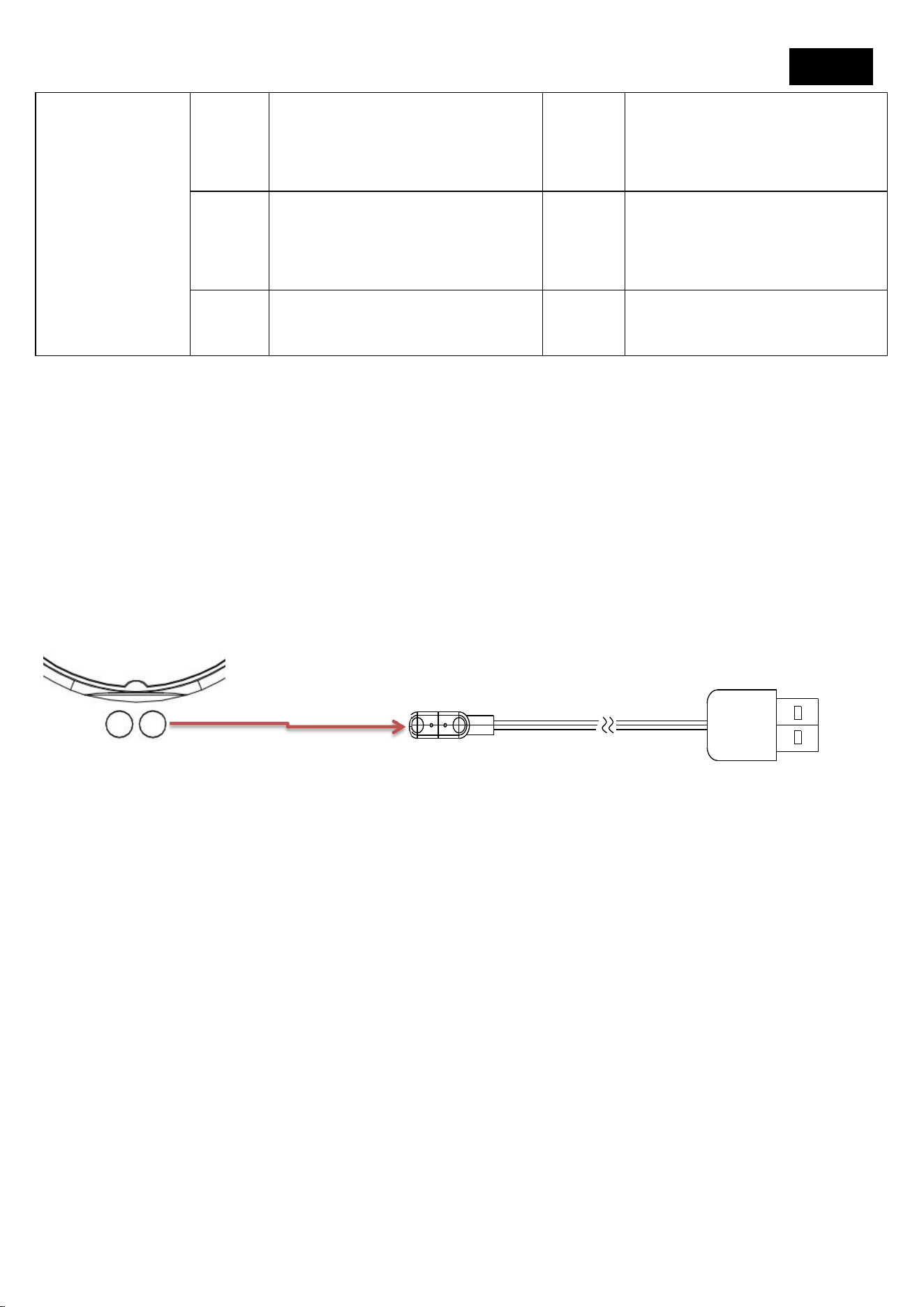
Ce produit est chargé par aspiration magnétique, le câble de charge est connecté
à une extrémité USB sur l'adaptateur de charge et l'autre extrémité est adsorbée
sur le point de contact arrière de la montre. L'écran de la montre affiche une
indication de charge, c'est - à - dire que la charge commence.
Remarque: connectez l'interface USB à un chargeur avec un courant de sortie de
5v500mA ou plus ou à l'interface USB de l'ordinateur pour la charge
3, télécharger installer l'app
Utilisez votre téléphone pour scanner le Code QR ci - dessous, télécharger l'application
d'installation; Télécharger Tencent app trésor; Les téléphones Android peuvent également
utiliser Google Play, les téléphones Apple utilisent l'Apple Store, recherchez "GloryFit" pour
télécharger l'installation.
French
Exigences du système de téléphone portable:
Android 8.0 et supérieur iOS 11.0 et supérieur
4, connecter la montre
Une fois que le téléphone a activé Bluetooth, ouvrez l'application "GloryFit" dans
le téléphone, sélectionnez mon, mon "appareil" barre, appuyez sur scanner
l'appareil, trouver l'appareil correspondant, appuyez sur connecter la liaison
d'appariement
1, avant l'appariement, assurez - vous que la charge de la montre est supérieure à
20%, afin de ne pas provoquer l'échec de l'appariement en raison d'une charge
insuffisante
2, dans la connexion d'appariement, assurez - vous que le Bluetooth du
téléphone est activé, l'audio multimédia de la montre est activé
3, la montre ne se connecte pas à l'app du téléphone pendant une longue
période ou est hors tension pendant une longue période, il y aura un manque de
temps, besoin de synchroniser l'app
4, affichage des informations sur le produit de la montre, cliquez sur l'option
informations sur l'appareil pour accéder aux informations afficher les
informations sur le produit
Transfert de données Bluetooth
Lorsque la montre est connectée à l'application mobile "GloryFit", la montre
synchronise instantanément les données telles que la météo, les messages de
notification, les données de santé sportive, etc. avec l'application mobile via

Bluetooth. Ces données ne seront pas synchronisées après la déconnexion ou la
désactivation du Bluetooth.
5, description facile et affichage des fonctions courantes
Sélection du cadran: une longue pression de 3S sur le cadran principal entre en
mode cadran, puis glisse à gauche ou à droite pour sélectionner le cadran après
avoir cliqué sur Sélectionner pour quitter l'affichage;
Télécharger l'app: scanner le Code QR dans les instructions télécharger l'app
Utilisation de la musique Bluetooth / assistant Vocal: l'utilisation de ces 2
Fonctions nécessite une connexion appairée de la montre et du téléphone
portable app "GloryFit", ainsi que la connexion "audio Bluetooth", la connexion
simultanée de 2 Bluetooth peut utiliser les 3 fonctions ci - dessus;
Précautions
1, Ne démontez pas, ne réparez pas et ne modifiez pas les produits sans
autorisation.
2, s'il vous plaît ne pas entrer en collision avec le produit violemment, afin de ne
pas causer de dommages au produit.
3, s'il vous plaît éviter les champs magnétiques forts, la lumière directe ou
l'utilisation de l'environnement à haute température.
Ce produit n'est pas destiné au diagnostic, au traitement et à la prévention des
maladies.
5, s'il vous plaît éviter de porter le bracelet trop serré, et la position de contact de
la montre avec la peau reste propre.
6. Les enfants s'il vous plaît utiliser ce produit sous la direction des parents afin
de ne pas causer de dommages.
Traitement des questions fréquemment posées

La montre ne démarre pas
1, s'il vous plaît maintenir la clé d'alimentation pendant plus de 3 secondes
2, peut - être que la batterie est trop faible, veuillez la charger à temps.
Bluetooth n'est pas connecté ou ne peut pas être connecté
1, essayez de redémarrer la montre, reconnectez - la.
2, veuillez vous connecter à nouveau après avoir redémarré le Bluetooth de votre
téléphone.
3, le téléphone ne se connecte pas à d'autres appareils Bluetooth en même
temps.
4, après la connexion de la montre, la montre sera mise en veille lorsqu'elle n'est
pas utilisée; Lorsque vous ne vous connectez pas automatiquement à la montre
après l'hibernation, vous devez activer l'application de téléphone "GloryFit" pour
actualiser la connexion automatique.
5, lorsque le Bluetooth Audio de la montre n'est pas connecté automatiquement,
veuillez entrer dans le téléphone - Paramètres du téléphone - Bluetooth -
appuyez pour enregistrer le périphérique "montre" pour se connecter.
Paramètres du casque sans fil:
Bande de fréquence de fonctionnement: 2402-2480 MHz
Puissance radiofréquence maximale: 5.90 dBm
Pour toute question ou préoccupation relative aux produits,
veuillez contacter notre équipe de service après-vente à l’adresse
e-mail suivante:
1,Instrucciones de operación táctil
Toque
Directrices
operativas
Descenso
Opciones de acceso
rápido
Deslizamiento
a la derecha
Pantalla dividida lateral
Deslizamiento
superior
Aviso de mensaje
Deslizamiento
a la izquierda
Función rápida
Presión larga
Cambio de dial
Haga clic
Selección /
confirmación
Por favor, ingrese a la aplicación para conocer las funciones detalladas del producto.
2. carga del reloj
Este producto es una carga de atracción magnética, con un extremo del cable de
carga conectado USB al conector de carga y el otro extremo conectado al punto
de contacto en la parte posterior del reloj. La pantalla del reloj mostrará la
instrucción de carga, es decir, comenzará a cargar.
Nota: conecte la interfaz USB a un cargador o interfaz USB de computadora con
corriente de salida 5v500mA o superior para cargar
3. descargar e instalar la aplicación
Utilice su teléfono móvil para escanear el Código QR inferior y descargar e instalar la aplicación;
Descargar Tencent app treasure; Los teléfonos Android también pueden usar google play, y los
teléfonos de Apple usan Apple Store para buscar "GloryFit" para descargar e instalar.
Requisitos del sistema de telefonía móvil:
Android 8.0 y más Ios 11.0 o más
Spanish

4. conecte el reloj
Después de que el teléfono abra bluetooth, abra la aplicación "GloryFit" en el
teléfono, seleccione la mía, mi barra de "dispositivo", haga clic en escanear el
dispositivo, encuentre el dispositivo correspondiente y haga clic en conectar para
emparejar y vincular.
1. antes de emparejar, asegúrese de que la electricidad del reloj sea superior al
20% para evitar que el emparejamiento falle debido a la falta de electricidad.
2. en la conexión de emparejamiento, asegúrese de que el Bluetooth del teléfono
móvil está encendido y el audio de los medios del reloj está encendido.
3. el reloj no está conectado a la aplicación del teléfono móvil durante mucho
tiempo o se corta la electricidad durante demasiado tiempo, aparecerá el tiempo
no es exacto, se necesita sincronizar la aplicación
4. para ver la información del producto del reloj, haga clic en la opción de
información del dispositivo desde el desplegable y ingrese a la información para
ver la información del producto.
Transmisión de datos Bluetooth
Cuando el reloj está conectado a la aplicación móvil "GloryFit", el reloj sincroniza
instantáneamente los datos con la aplicación móvil a través de bluetooth, como
clima, mensajes de notificación, datos de salud deportiva, etc. estos datos no se
sincronizarán después de desconectar o apagar el Bluetooth
5. descripción simple y exhibición de funciones comunes
Selección de la esfera: presione 3s durante mucho tiempo en la esfera principal
para entrar en el modo de la esfera, y luego deslice a la izquierda o a la derecha
para seleccionar la esfera, haga clic en la selección y salga de la visualización;

Descarga de app: escanee el Código QR en las instrucciones para descargar la
aplicación
Uso del asistente de música / voz bluetooth: el uso de estas dos funciones
requiere una conexión de emparejamiento entre el reloj y la aplicación móvil
"GloryFit", así como una conexión "bluetooth de audio", mientras que la
conexión de dos Bluetooth puede usar las tres funciones anteriores;
Precauciones
1. no desmontar, reparar o transformar productos sin autorización.
2. no choques violentamente con el producto para evitar daños en el producto.
3. evite usar campos magnéticos fuertes, luz directa o ambientes de alta
temperatura.
4. este producto no se utiliza para el diagnóstico, tratamiento y prevención de
enfermedades.
5. evite usar la correa demasiado apretada y mantenga la posición de contacto
del reloj con la piel limpia.
6. los niños deben usar este producto bajo la Guía de sus padres para evitar
daños.
Manejo de problemas comunes
El reloj no se puede encender
1. por favor, instale el botón de encendido durante más de 3 segundos.
2. puede que la batería sea demasiado baja, por favor cargue a tiempo.
Bluetooth no conectado o no se puede conectar
1. intente reiniciar el reloj y reconectarse.
2. intente reiniciar el Bluetooth del teléfono y conectarse de nuevo.
3. el teléfono móvil no debe conectarse a otros dispositivos Bluetooth al mismo
tiempo.

4. después de que el reloj esté conectado, el reloj dormirá cuando no esté en uso;
Cuando no se conecta automáticamente al reloj después de la hibernación, es
necesario abrir y actualizar la aplicación móvil "GloryFit" para conectarse
automáticamente.
5. cuando el Bluetooth de audio del reloj no se conecta automáticamente,
ingrese al teléfono móvil - configuración del teléfono móvil - Bluetooth - haga
clic para guardar el "reloj" del dispositivo para conectarse para emparejarse.
Parámetros de los auriculares inalámbricos:
Banda de frecuencia operativa: 2402-2480 MHz
Potencia máxima de radiofrecuencia: 5.90 dBm
Para cualquier problema o inquietud relacionada con el producto,
póngase en contacto con nuestro equipo de servicio posventa en la
siguiente dirección de correo electrónico:
1. Dotykový návod k obsluze
Dotyk
Návod k
obsluze
sklouznout
dolů
Rychlé možnosti
Přetažení
doprava
Boční rozdělená obrazovka
Snímek
nahoru
Oznámení zprávy
Levý
snímek
Rychlé funkce
Dlouhý
tisk
Přepínání volby
klikněte
Vybrat/potvrdit
Pro podrobné funkce produktu zadejte prosím APP
2. Nabíjení hodinek
Tento produkt je magnetické nabíjecí zařízení, s jedním koncem nabíjecího
kabelu připojeným k nabíjecímu adaptéru přes USB a druhým koncem
připojeným k kontaktnímu bodu na zadní straně hodinek. Na obrazovce hodinek
se zobrazí indikátor nabíjení, který indikuje začátek nabíjení
Poznámka: Připojte USB k nabíječce s výstupním proudem 5V500mA nebo
vyšším nebo USB k počítači pro nabíjení
3 Stáhněte si aplikaci
Naskenujte níže uvedený 2D kód pomocí mobilního telefonu a stáhněte si
aplikaci; Stáhnout aplikaci Tencent; Telefony s Androidem mohou také použít
Google Play, telefony s Apple používají Apple Store a vyhledávají "GloryFit" ke
stažení a instalaci.
Požadavky na mobilní systém:
Czech

Android 8.0 a výše, iOS 11.0 a výše
4. Připojte hodinky
Po zapnutí Bluetooth v telefonu otevřete aplikaci "GloryFit" v telefonu, vyberte
možnosti "Moje" a "Zařízení", klikněte na skenování zařízení, vyhledejte
odpovídající zařízení a klikněte na tlačítko pro připojení, spárování a vazbu
1.Před spárováním se ujistěte, že úroveň baterie hodinek je nad 20% aby se
zabránilo selhání párování kvůli nedostatku baterie
2. Během párování a připojení se ujistěte, že je Bluetooth v telefonu zapnutý a že
je zapnutý mediální zvuk na hodinkách
3. Pokud hodinky nejsou připojeny k mobilní aplikaci po dlouhou dobu nebo je
napájení příliš dlouho vypnuto, může být čas nepřesný a aplikace musí být
synchronizována
4. Chcete-li zobrazit informace o produktu hodinek, posuňte se dolů a klikněte
na možnost Informace o zařízení pro zadání informací a zobrazení informací o
produktu
Přenos dat Bluetooth
Když jsou hodinky připojeny k mobilní aplikaci "GloryFit", hodinky okamžitě
synchronizují data s mobilní aplikací prostřednictvím Bluetooth, jako je počasí,
oznámení, sportovní a zdravotní data atd. Po odpojení nebo vypnutí Bluetooth
nebudou tato data synchronizována
5. Jednoduché vysvětlení a zobrazení běžně používaných
funkcí
Výběr voliče: Dlouhým stisknutím hlavního voliče po dobu tří sekund vstoupíte
do režimu voliče, poté prstem doleva nebo doprava vyberte volič a kliknutím
opustíte zobrazení;

Aplikace ke stažení: Naskenujte QR kód v příručce ke stažení aplikace
Použití hudebního/hlasového asistenta Bluetooth: Chcete-li používat tyto dvě
funkce, musíte spárovat a připojit hodinky a mobilní aplikaci "GloryFit" a také se
připojit k "Audio Bluetooth".
záležitosti vyžadující pozornost
1. Nesdemontujte, opravujte nebo upravujte výrobek bez povolení.
2. Nenásilně srážejte s výrobkem, aby se zabránilo poškození.
3. Prosím, vyhněte se používání ve silných magnetických polích, přímém
slunečním světle nebo prostředích s vysokou teplotou.
4. Tento výrobek není určen k diagnostice, léčbě nebo prevenci onemocnění.
5. Prosím, vyhněte se nošení řemínku hodinek příliš těsně a udržujte kontaktní
oblast mezi hodinkami a kůží čistou.
6. Děti by měly používat tento přípravek pod vedením svých rodičů, aby se
zabránilo poškození.
Běžné řešení problémů
Hodinky nelze zapnout
1. Podržte tlačítko napájení déle než tři sekundy
2. Pokud je úroveň baterie příliš nízká, nabíjejte ji prosím včas.
Bluetooth není připojen nebo nelze se připojit
1. Zkuste prosím restartovat hodinky a znovu se připojit.
2. Zkuste prosím restartovat Bluetooth telefonu a znovu se připojit.
3. Nepřipojujte telefon současně k jiným zařízením Bluetooth.
4. Po připojení hodinek vstoupí do režimu spánku, když se nepoužívají; Pokud se
po spánku k hodinkám nepřipojíte automaticky, musíte otevřít a aktualizovat
mobilní aplikaci "GloryFit", abyste se automaticky připojili.
5.Pokud není Bluetooth zvuku hodinek automaticky připojen, přejděte do
"Nastavení telefonu" ->"Bluetooth" ->"Uložit zařízení" pro připojení a spárování.
Parametry bezdrátových sluchátek:
Provozní frekvenční pásmo: 2402-2480 MHz

Maximální výkon rádiové frekvence: 5.90 dBm
Pro jakékoli problémy nebo obavy týkající se produktu se prosím
obraťte na náš tým poprodejního servisu na následující e-mailovou
adresu:
Na Temu a další nákupy: emisi123@163.com
1. Instruktioner för pekning
beröring
Operationsvägledning
glida
nedåt
Snabbalternativ
Svep åt
höger
Sidodelad skärm
Uppåt
bild
Meddelandemeddelande
Vänster
bild
Snabbfunktioner
Lång
press
Växling av uppringning
klicka
Välj/bekräfta
Ange APP för detaljerade produktfunktioner
2. Laddning av klockan
Denna produkt är en magnetisk laddningsenhet, med ena änden av
laddningskabeln ansluten till laddningsadaptern via USB och den andra änden
ansluten till kontaktpunkten på baksidan av klockan. Klockskärmen visar en
laddningsindikator som indikerar laddningsstart
Obs! Anslut USB-porten till en laddare eller dator USB-port med en
utgångsström på 5V500mA eller högre för laddning
3. Ladda ner och installera appen
Skanna QR-koden nedan med din telefon för att ladda ner och installera appen;
Ladda ner Tencent App Store; Android-telefoner kan också använda Google Play,
medan Apple-telefoner kan använda Apple Store och söka efter "GloryFit" för att
ladda ner och installera.
Krav på mobilt system:
Android 8.0 och senare, iOS 11.0 och senare
4. Anslut klockan
Swedish

När du har aktiverat Bluetooth på telefonen öppnar du appen "GloryFit" på
telefonen, väljer "Min" och "Enheter", klickar för att skanna enheten, hitta
motsvarande enhet och klicka för att ansluta, para ihop och binda
1.Innan du parkopplar, se till att klockans batterinivå är över 20% för att undvika
parkopplingsfel på grund av otillräckligt batteri
2. Kontrollera att Bluetooth på telefonen är påslagen och att medieljudet på
klockan är påslagen under parkoppling och anslutning
3. Om klockan inte är ansluten till mobilappen under en lång tid eller strömmen
är avstängd för länge kan tiden vara felaktig och appen behöver synkroniseras
4. Om du vill visa produktinformation från klockan bläddrar du nedåt och klickar
på alternativet för enhetsinformation för att ange informationen och visa
produktinformation
Dataöverföring via Bluetooth
När klockan är ansluten till mobilappen "GloryFit", synkroniserar klockan
omedelbart data med mobilappen via Bluetooth, såsom väder, meddelanden,
sport- och hälsodata, etc. När Bluetooth har kopplats bort eller stängts av
synkroniseras inte dessa data
5. Enkel förklaring och visning av vanliga funktioner
Val av uppringning: Tryck länge på huvudratten i 3 sekunder för att gå in i
uppringningsläge, svep sedan vänster eller höger för att markera uppringningen
och klicka för att avsluta vyn;
APP nedladdning: Skanna QR-koden i manualen för att ladda ner APP
Bluetooth musik/röstassistent användning: För att använda dessa två funktioner
måste du parkoppla och ansluta din klocka och mobilapp "GloryFit", och även

ansluta till "Audio Bluetooth". För att använda ovanstående tre funktioner måste
du ansluta två Bluetooth-enheter samtidigt;
frågor som behöver uppmärksammas
1. Ta inte isär, reparera eller ändra produkten utan tillstånd.
2.kollidera inte våldsamt med produkten för att undvika skador.
3.Undvik användning i starka magnetfält, direkt solljus eller miljöer med hög
temperatur.
4.Denna produkt är inte avsedd för diagnos, behandling eller förebyggande
ändamål.
5.Undvik att bära armbandet för hårt och håll kontaktområdet mellan klockan
och huden ren.
6.Barn bör använda denna produkt under ledning av sina föräldrar för att
undvika skada.
Vanlig problemhantering
Klockan kan inte slås på
1. Håll strömknappen intryckt i mer än 3 sekunder
2. Om batterinivån är för låg, vänligen ladda den i tid.
Bluetooth är inte ansluten eller går inte att ansluta
1. Försök att starta om klockan och ansluta igen.
2. Försök att starta om telefonens Bluetooth och ansluta igen.
3. Anslut inte telefonen till andra Bluetooth-enheter samtidigt.
4. När klockan är ansluten kommer den att gå in i viloläge när den inte används;
När du inte är ansluten automatiskt till klockan efter viloläge måste du öppna
och uppdatera mobilappen "GloryFit" för att automatiskt ansluta.
5.När klockljudets Bluetooth inte ansluts automatiskt går du till
"Telefoninställningar" -> "Bluetooth" -> "Spara enhet" för att ansluta och para
ihop.

Parametrar för trådlösa hörlurar:
Driftfrekvensband: 2402-2480 MHz
Maximal radiofrekvenseffekt: 5.90 dBm
För produktrelaterade frågor eller funderingar, vänligen kontakta
vårt eftermarknadsserviceteam på följande e-postadress:
För Temu och andra köp: emisi123@163.com
1. Betjeningsvejledning ved berøring
Tryk
Betjeningsvejledn
ing
glide
nedad
Hurtige
indstillinger
Højre
skub
Sidedelt skærm
Gå op
Meddelelse om
meddelelse
Venstre
slide
Hurtige funktioner
Længe
tryk
Skift opkald
klik
Vælg/bekræft
Indtast venligst APP for detaljerede produktfunktioner
2. Opladning af uret
Dette produkt er en magnetisk opladningsenhed, med den ene ende af
opladningskablet tilsluttet opladningsadapteren via USB og den anden ende
tilsluttet kontaktpunktet på bagsiden af uret. Urskærmen viser en
opladningsindikator, der viser starten på opladningen
Bemærk: Tilslut USB-porten til en oplader eller computer USB-port med en
udgangsstrøm på 5V500mA eller højere til opladning
3. Hent og installer appen
Scan QR-koden nedenfor med din telefon for at downloade og installere appen;
Hent Tencent App Store Android-telefoner kan også bruge Google Play, mens
Apple-telefoner kan bruge Apple Store og søge efter "GloryFit" for at downloade
og installere.
Krav til mobilt system:
Danish

Android 8.0 og nyere, iOS 11.0 og nyere
4. Tilslut uret
Når du har slået Bluetooth til på telefonen, skal du åbne appen "GloryFit" på
telefonen, vælge "Min" og "Enheder", klik for at scanne enheden, finde den
tilsvarende enhed, og klik for at oprette forbindelse, parre og binde
1.Før parring skal du sørge for, at urets batteriniveau er over 20% for at undgå
parringsfejl på grund af utilstrækkeligt batteri
2. Under parring og forbindelse skal du sørge for, at Bluetooth på telefonen er
tændt, og medielyden på uret er tændt
3.Hvis uret ikke er tilsluttet mobilappen i lang tid, eller strømmen er slukket for
længe, kan tiden være unøjagtig, og appen skal synkroniseres.
4.Hvis du vil se produktoplysninger om uret, skal du rulle ned og klikke på
indstillingen Enhedsoplysninger for at indtaste oplysningerne og få vist
produktoplysningerne
Bluetooth-dataoverførsel
Når uret er tilsluttet mobilappen "GloryFit", synkroniserer uret øjeblikkeligt data
med mobilappen via Bluetooth, såsom vejr, meddelelser, sport- og sundhedsdata
osv. Når Bluetooth afbrydes eller slukkes, synkroniseres disse data ikke
5. Enkel forklaring og visning af almindeligt anvendte
funktioner
Valg af opkald: Tryk langt på hovedskiven i 3 sekunder for at gå ind i
opkaldstilstand, stryg derefter til venstre eller højre for at vælge opkaldet og klik
for at afslutte visningen;
APP download: Scan QR-koden i manualen for at downloade APP

Brug af Bluetooth musik/stemmeassistent: For at bruge disse to funktioner skal
du parre og tilslutte dit ur og mobilapp "GloryFit", og også oprette forbindelse til
"Audio Bluetooth". For at bruge de ovennævnte tre funktioner skal du tilslutte to
Bluetooth-enheder på samme tid;
spørgsmål, der kræver opmærksomhed
1.Du må ikke demontere, reparere eller ændre produktet uden tilladelse.
2, må ikke voldeligt kollidere med produktet for at undgå skader på produktet.
3.Undgå at bruge i stærke magnetfelter, direkte sollys eller miljøer med høj
temperatur.
4.Dette produkt er ikke beregnet til sygdomsdiagnose, behandling eller
forebyggelse.
5.Undgå at bære uret for stramt, og hold kontaktområdet mellem uret og huden
ren.
6. Børn bør bruge dette produkt under vejledning af deres forældre for at undgå
skade.
Almindelig problemhåndtering
Uret kan ikke tændes
1. Hold sluk-knappen nede i mere end 3 sekunder
2. Hvis batteriniveauet er for lavt, skal du oplade det rettidigt.
Bluetooth ikke tilsluttet eller kan ikke oprette forbindelse
1. Prøv at genstarte uret og oprette forbindelse igen.
2. Prøv at genstarte telefonens Bluetooth og oprette forbindelse igen.
Du må ikke tilslutte telefonen til andre Bluetooth-enheder på samme tid.
4. Når uret er tilsluttet, vil det gå i dvaletilstand, når det ikke er i brug; Når du ikke
automatisk opretter forbindelse til uret efter dvale, skal du åbne og opdatere
mobilappen "GloryFit" for automatisk at oprette forbindelse.
5.Når urets Bluetooth-lyd ikke automatisk tilsluttes, skal du gå til
"Telefonindstillinger" -> "Bluetooth" -> "Gem enhed" for at oprette forbindelse
og parre.

Trådløse hovedtelefonparametre:
Driftsfrekvensbånd: 2402-2480 MHz
Maksimal radiofrekvenseffekt: 5.90 dBm
For eventuelle produktrelaterede problemer eller bekymringer,
kontakt venligst vores eftersalgsserviceteam på følgende
e-mailadresse: