APP
soundcore
Apple and the Apple logo are trademarks of
Apple Inc.
Google Play and the Google Play
logo are
trademarks of Google Inc.
Download the soundcore app to experience adaptive noise cancelling, ambient sound modes, Dolby Audio, HearID
sound, firmware update, and more exciting features.
If your headphones cannot connect with the soundcore app, re-install the app or update it to the latest version in your
mobile app store.
OVERVIEW
NC
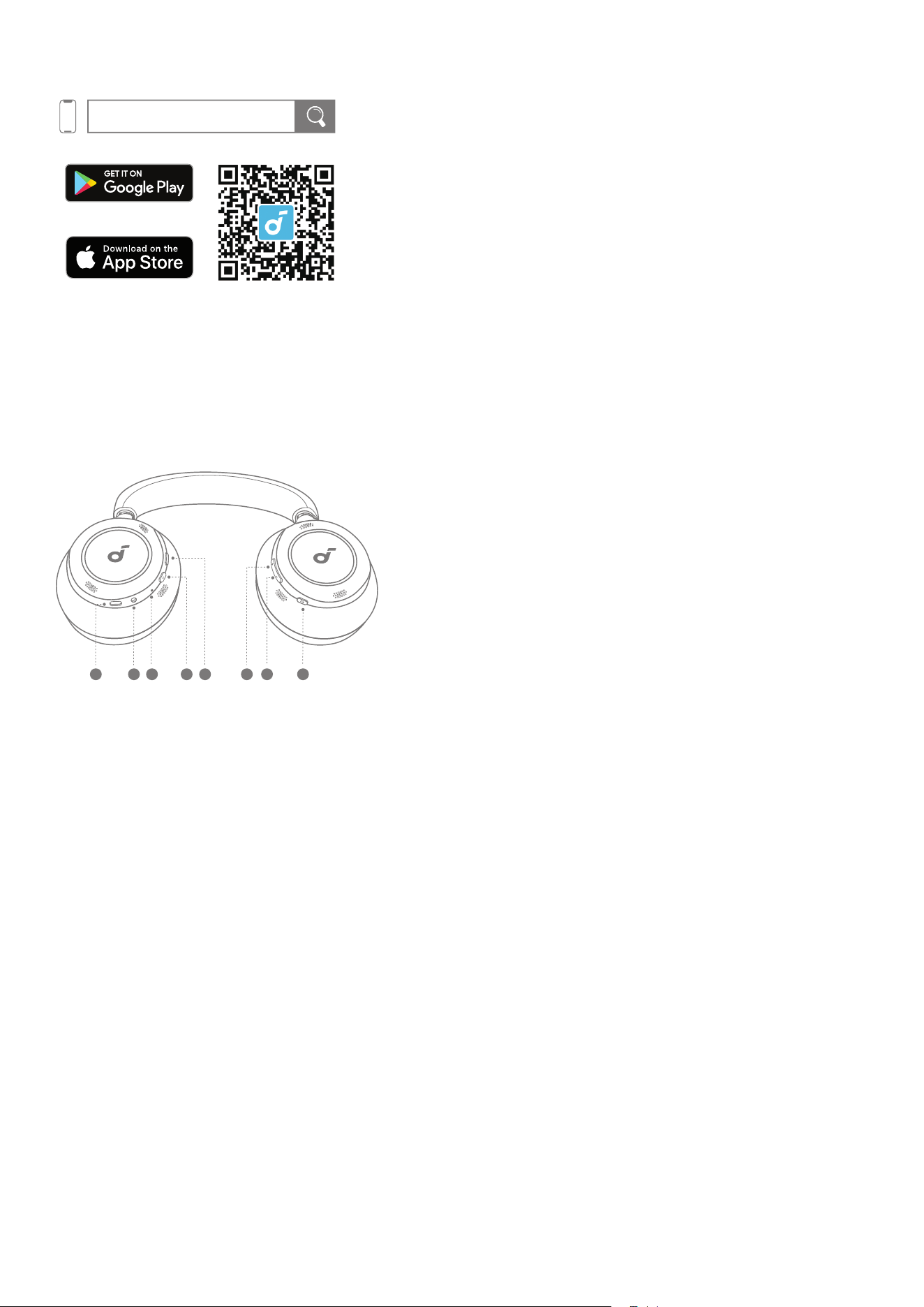
5 6 7 84321
1. USB-C Charging Port
2. 3.5mm Input
3. LED Indicator
4. Power Button
5. NC Button
6. Volume Up Button
7. Volume Down Button
8. Multi-function Button
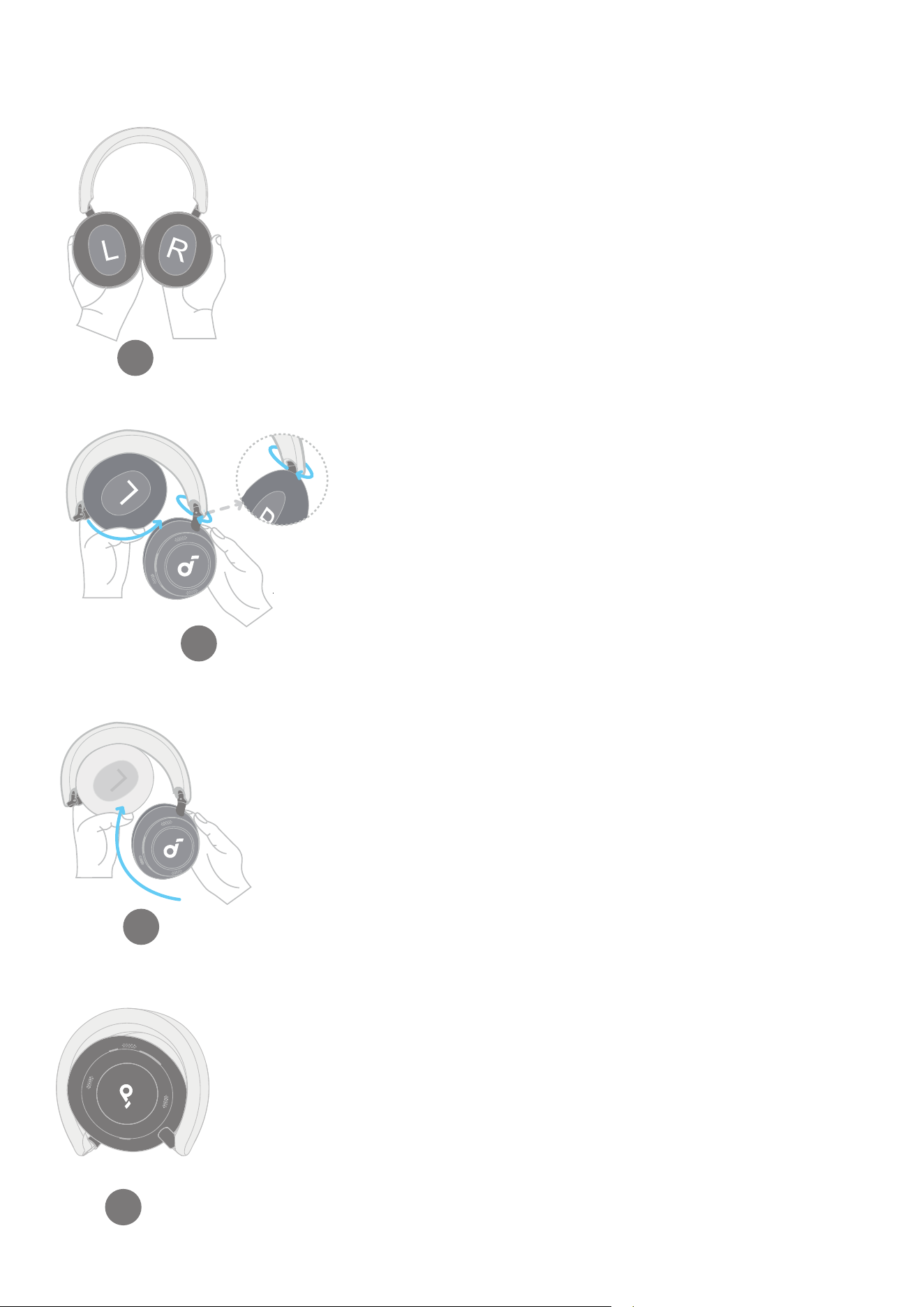
FOLDING YOUR HEADPHONES
1. Turn both panels around until you can see the "L" and "R" marks.
1
2. Fold up the left panel, then rotate the right panel to the position where you can see the soundcore logo.
2
1
2
Rotate
3. Fold up the right panel to align with the left panel.
3
4. Now you've successfully folded your headphones.
4
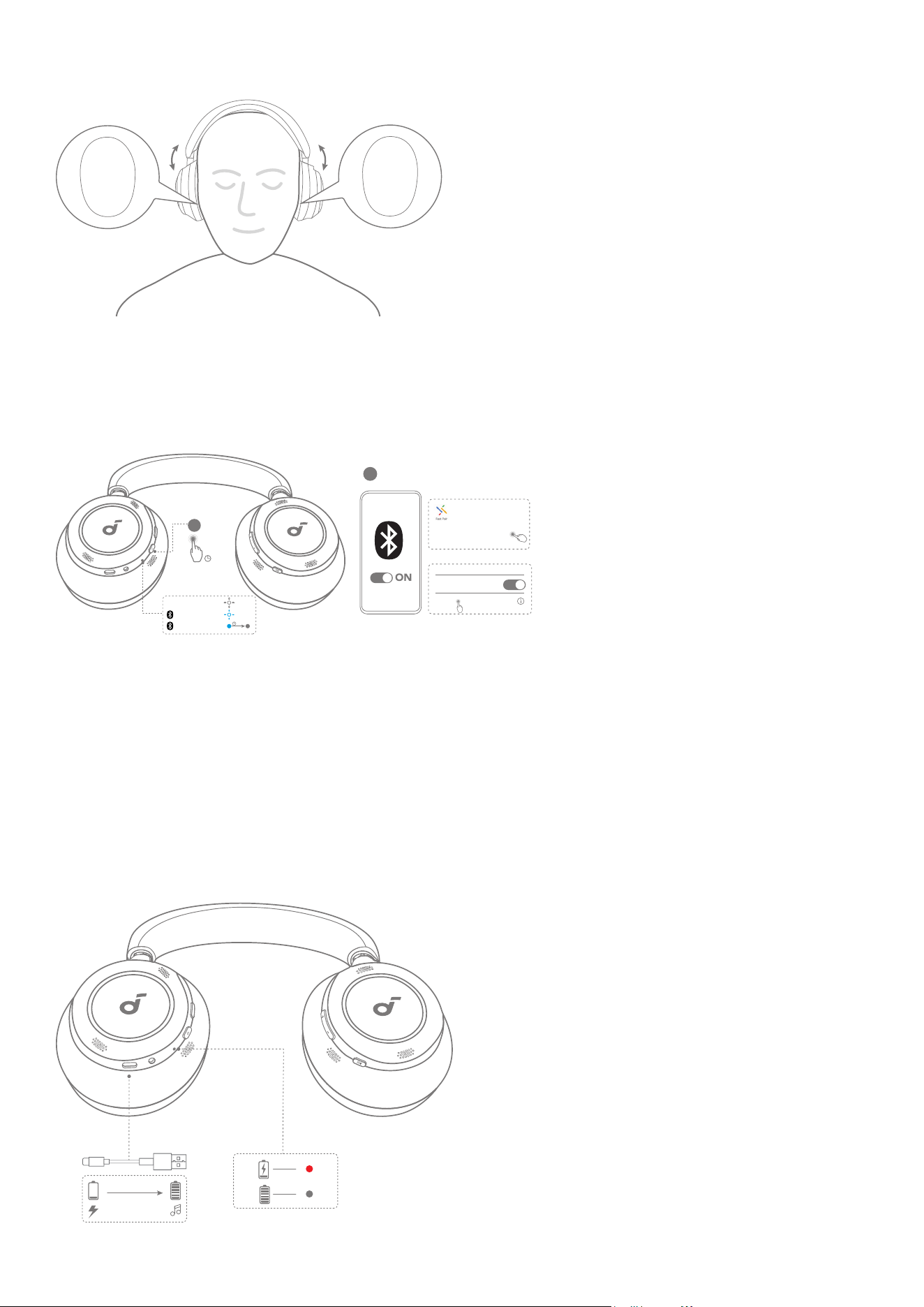
WEARING
4
R
L
Wear the headphones with the "L" logo on your left ear and "R" logo on your right ear. Adjust the length of the
headband for a comfortable fit.
POWERING ON AND PAIRING
1
2
2s
×3
3s
PAIRING
ON
CONNECTED
Tap to pair. Device will be
tied to Your Google Account
Android 6.0+
Fast Pair
iOS & Others
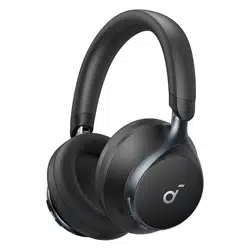
soundcore Space One Pro
Connected
Bluetooth
Bluetooth
<Setting
soundcore Space One Pro
NC
Auto Pairing: Press and hold the power button for 2 seconds to power on. The headphones will automatically enter
Bluetooth pairing mode when connecting for the first time. Select "soundcore Space One Pro" on your device's
Bluetooth list to connect.
• When pairing, the LwED indicator will start flashing blue slowly. After the pairing is successful, the LED indicator will
stay on for 3 seconds and then go off.
Google Fast Pairing: Enjoy instant pairing with your Android smartphone (running Android 6.0 and above) via Fast Pair
enabled by Google.
To manually enter Bluetooth pairing mode, when the headphones are powered off, press and hold the power
button for 5 seconds to pair.
CHARGING
NC
5 mins=8 hrs
2 hrs
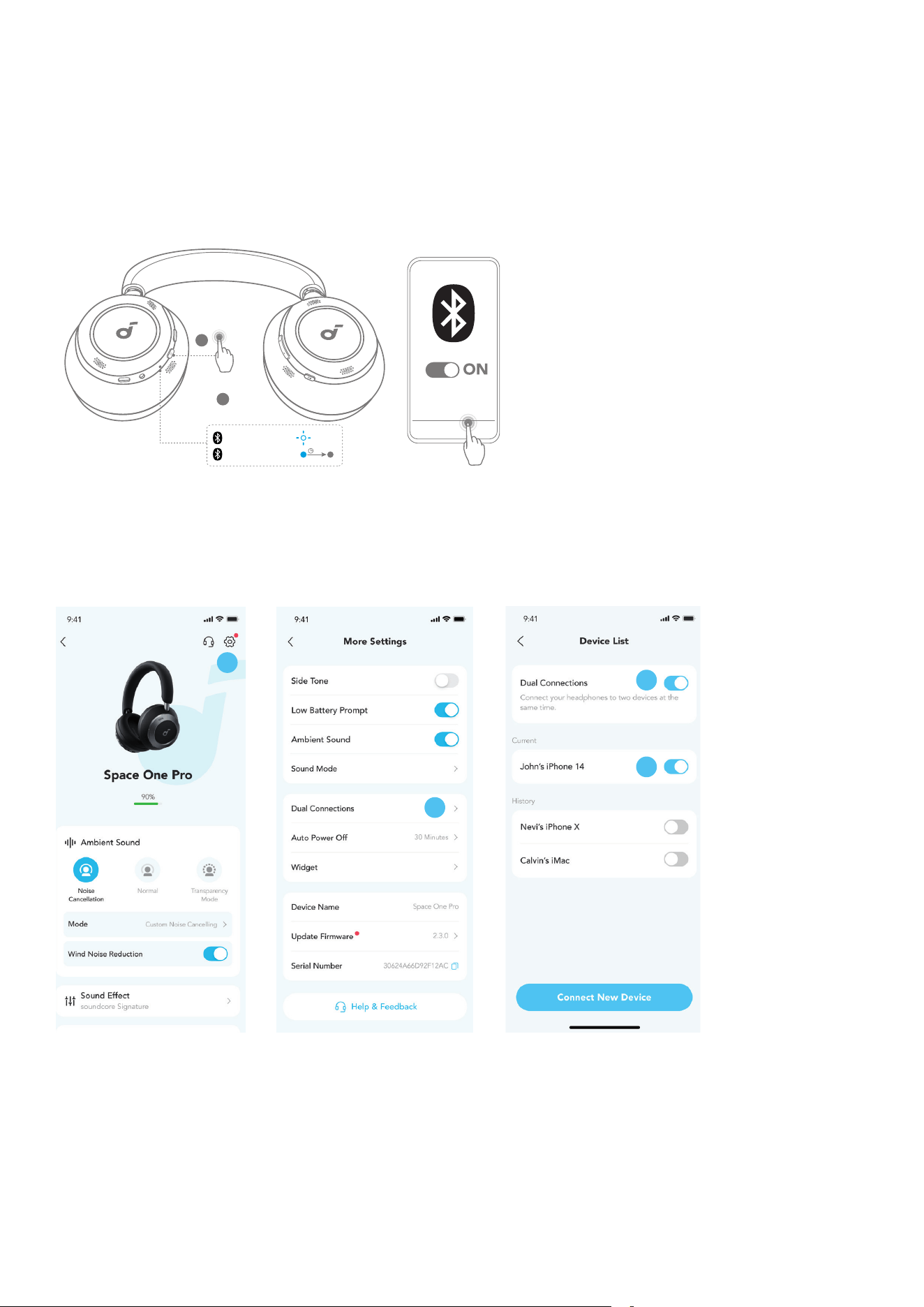
When the battery is running low, you will hear a voice prompt.
Use the provided USB-C charging cable to connect your headphones to a power source.
A full battery recharge takes about 2 hours, and 5 minutes of charging offers 8 hours of wireless playtime.
• Fully dry the USB port before charging.
• Do not turn on your headphones while charging.
DUAL CONNECTIONS
1
2
soundcore Space One Pro
×2
NC
3s
PAIRING
CONNECTED
The headphones can connect with two devices at the same time.
When already connected to one device, press the power button twice to pair with another device.
You can also enable Dual Connections via the soundcore app.
1
2
1
3
4
In the soundcore app, go to settings and select Dual Connections > Enable Dual Connections > Connect New
Device.
*You can clear the history of previously-connected devices in Device List.
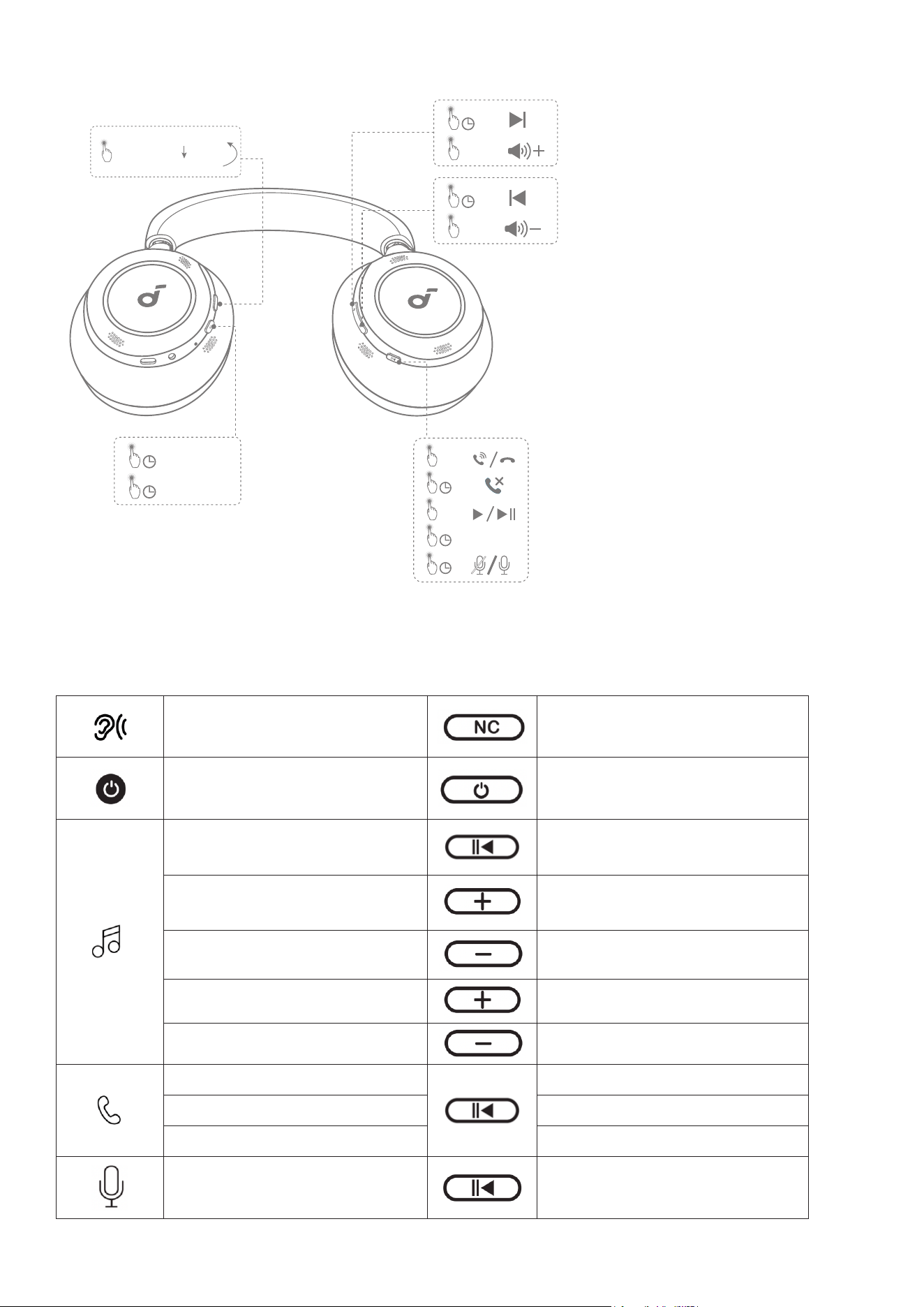
BUTTON CONTROLS
NC
×1
2s
2s
2s
×1
Voice
Assistant
2s
×1
2s ON
OFF
2s
2s
×1
×1
ANC (Default)
Transparency
x1: Press once
x2: Press twice
2s: Press and hold for 2 seconds
* You can enable Normal mode in the soundcore app.
Switch ambient sound modes
(ANC / Transparency)
Press once
Power on / off Press and hold for 2 seconds
Play / Pause Press once
Next track Press and hold for 2 seconds
Previous track Press and hold for 2 seconds
Volume up Press once
Volume down Press once
Answer / End a call Press once
Reject a call Press and hold for 2 seconds
Mute / Restore the microphone Press and hold for 2 seconds
Activate Voice Assistant Press and hold for 2 seconds
NOISE CANCELLATION
1
1
1
2
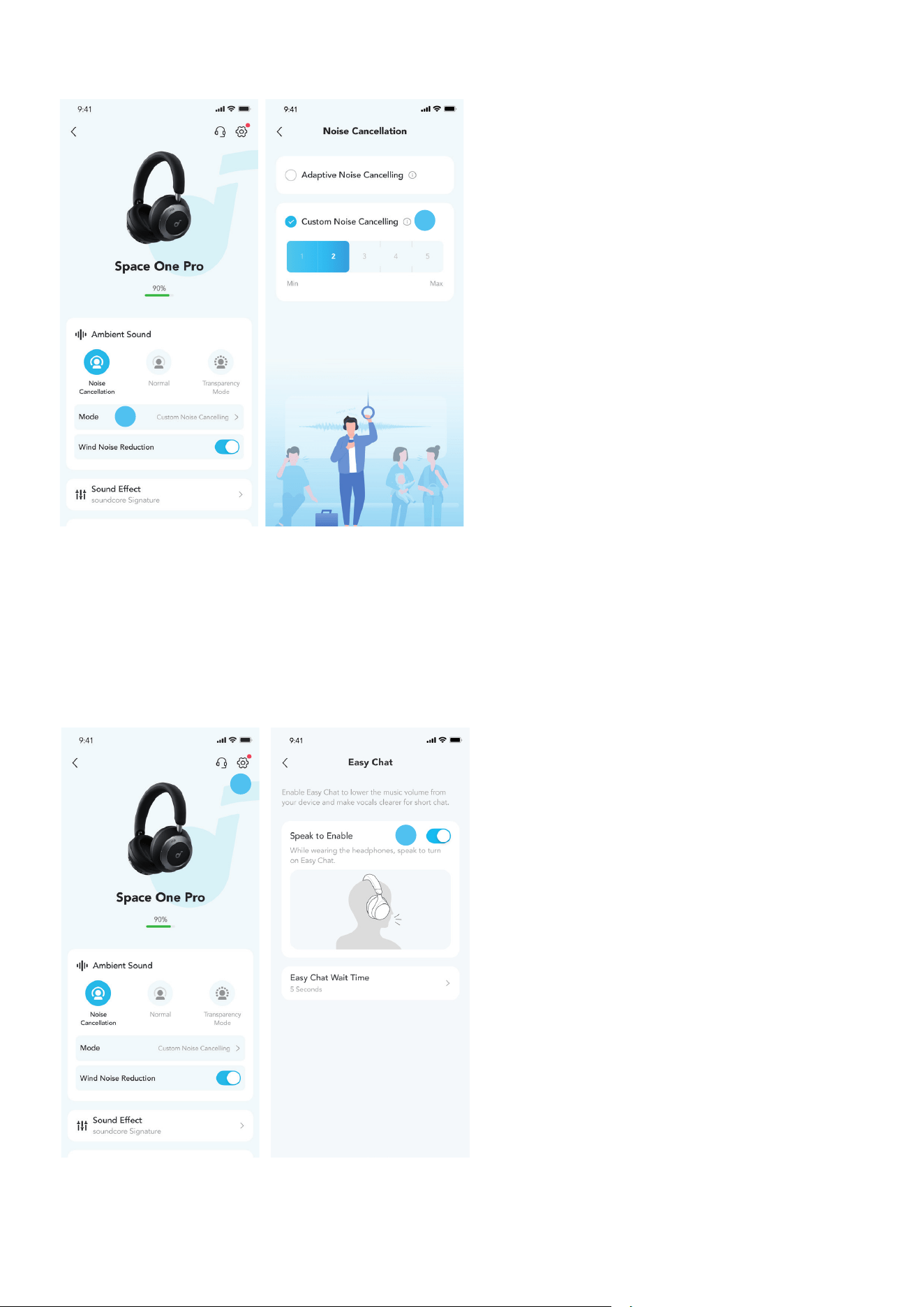
To reduce ambient noise, switch to noise cancellation (default) via the NC button and customize it in the soundcore
app.
• Adaptive Noise Cancelling: Perform real-time calculation based on the external environment and wearing condition to
ensure optimal noise cancellation.
• Custom Noise Cancelling: Set the level of noise cancellation manually.
TRANSPARENCY
1
2
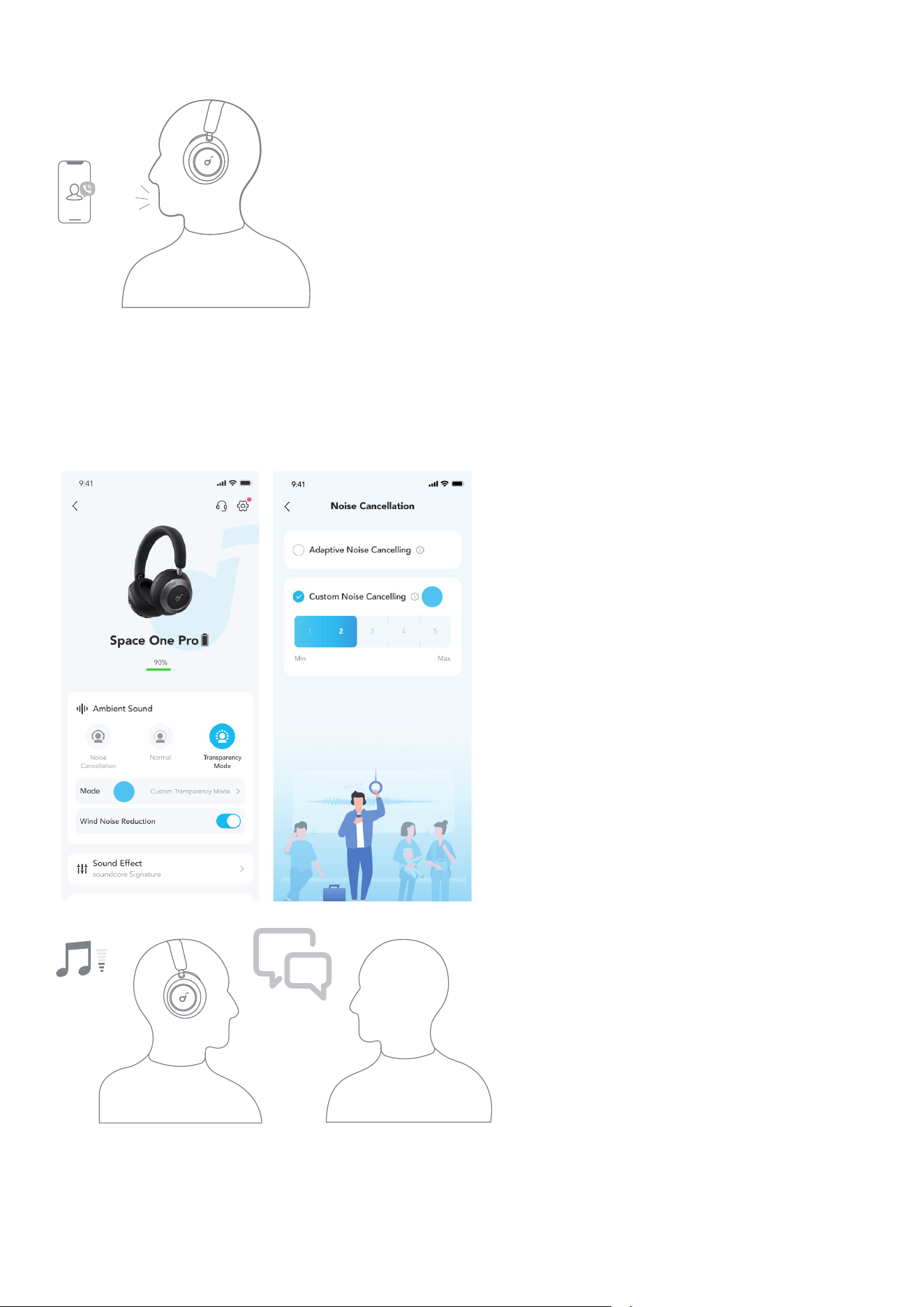
To stay aware of your surroundings while listening to music, switch to transparency mode via the NC button and
customize it in the soundcore app.
• Custom Transparency Mode: Set the level of transparency manually.
SIDETONE
With the Sidetone feature on, you will hear your own voice loud and clear when making or receiving phone calls
using the headphones.
*Sidetone feature is on by default. You can disable this feature via the soundcore app.
EASY CHAT
2
1
Easy Chat mode automatically lowers the volume of music and amplifies the voice of the person you're talking to
so that you can communicate without taking the headphones off. When you have stopped talking for 5 seconds
(the duration can be set in soundcore app), your headphones will automatically exit Easy Chat mode and resume
normal volume.
*You need to enable Easy Chat mode via the soundcore app.
LDAC
1
1
2
3
4
5
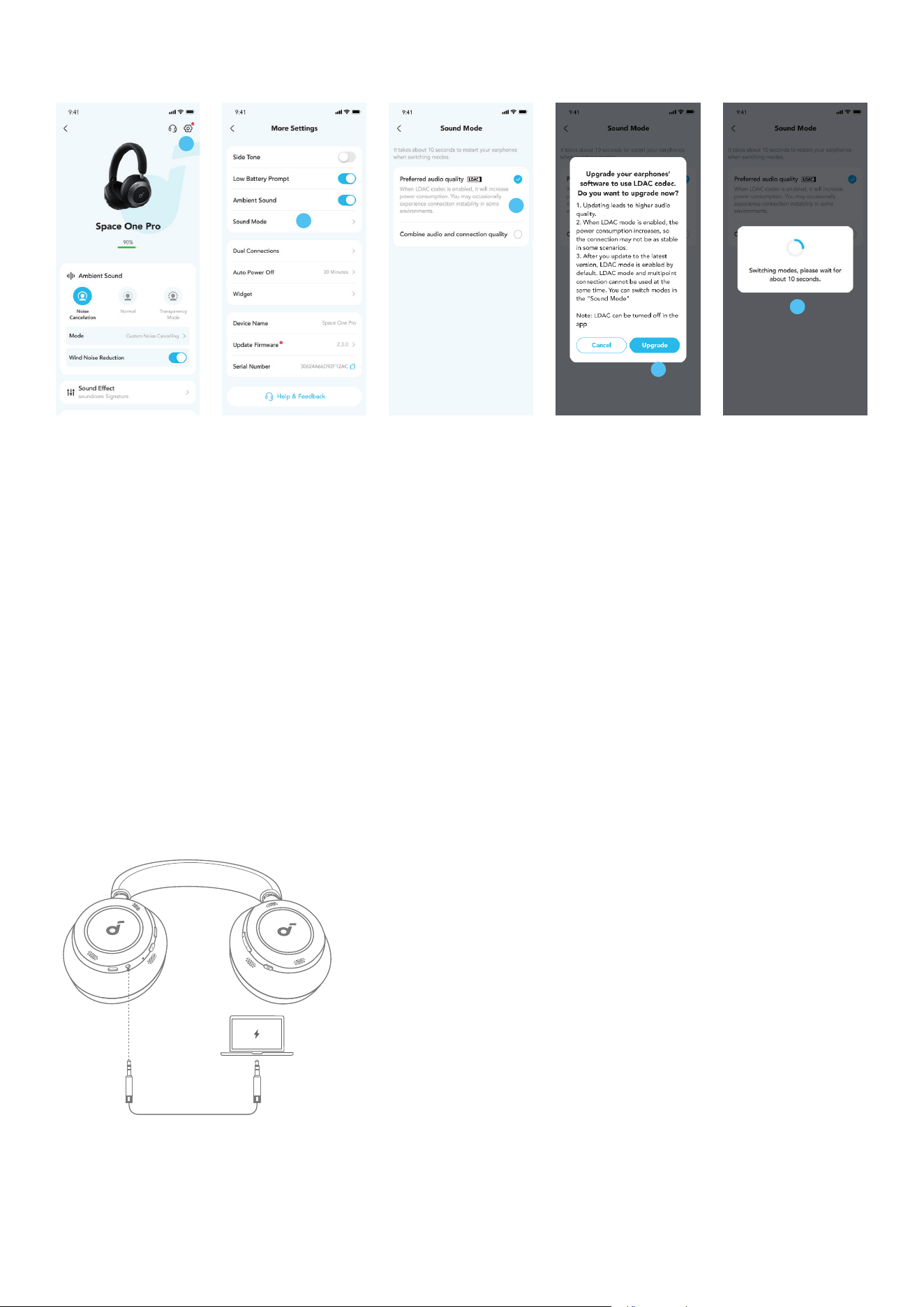
Enable LDAC in the soundcore app for higher-quality audio.
*Only available on devices powered by Android 8.0 or later.
• Use devices powered by Android 8.0 or later to experience LDAC quality sound.
• LDAC provides higher quality sound, increases power consumption, and reduces playtime.
• Enable LDAC in a low-interference environment to ensure a stable Bluetooth connection.
1. Go to settings in the soundcore app.
2. Click on "Sound Mode".
3. Select "Preferred audio quality" to switch to LDAC codec.
4. You will be notified that the headphones do not support LDAC when connected to two devices. Also, please note
that Dolby Audio is not supported when LDAC has been enabled. Select "Turn on" to continue.
5. It takes about 10 seconds to switch audio codecs. You may be requested to update the headphones' firmware if
available.
WIRED LISTENING
NC
3.5mm
Play audio on an external device by plugging in a 3.5mm AUX cable. Wired listening will automatically turn off
Bluetooth mode.
*During wired listening, you can only switch ambient sound modes (ANC / Transparency) via the NC button. And
other buttons will not function.
RESET
NC
5s
×3
You might need to reset your headphones if you experience connectivity or function issues.
Delete the pairing history from your Bluetooth device first. Press and hold the volume up and power button
simultaneously for 5 seconds until the LED flashes red three times.
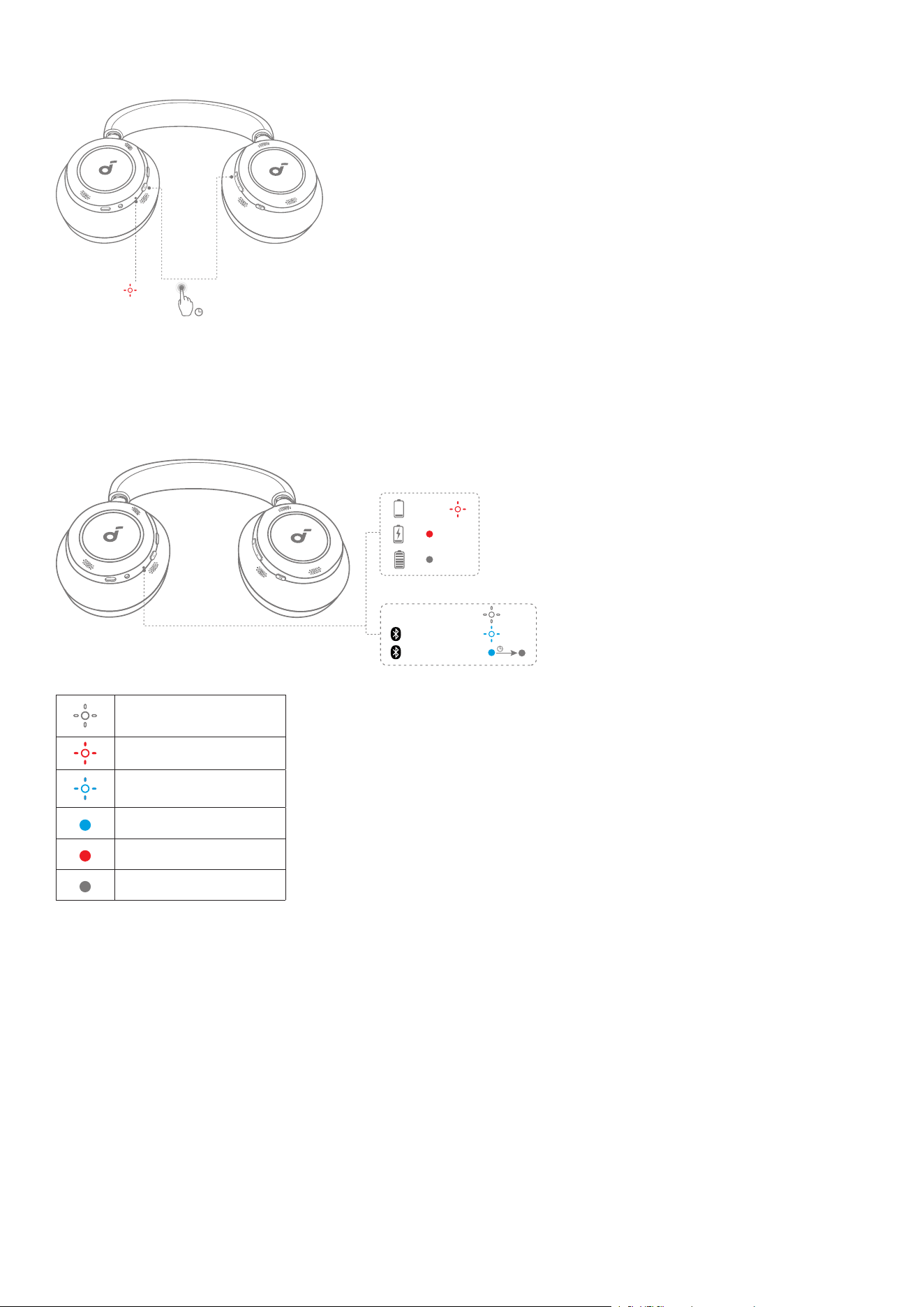
LED LIGHT GUIDE
NC
<10%
3s
PAIRING
ON/OFF
CONNECTED
×3
Flashing white
Flashing red slowly
Flashing blue slowly
Steady blue
Steady red
Light off
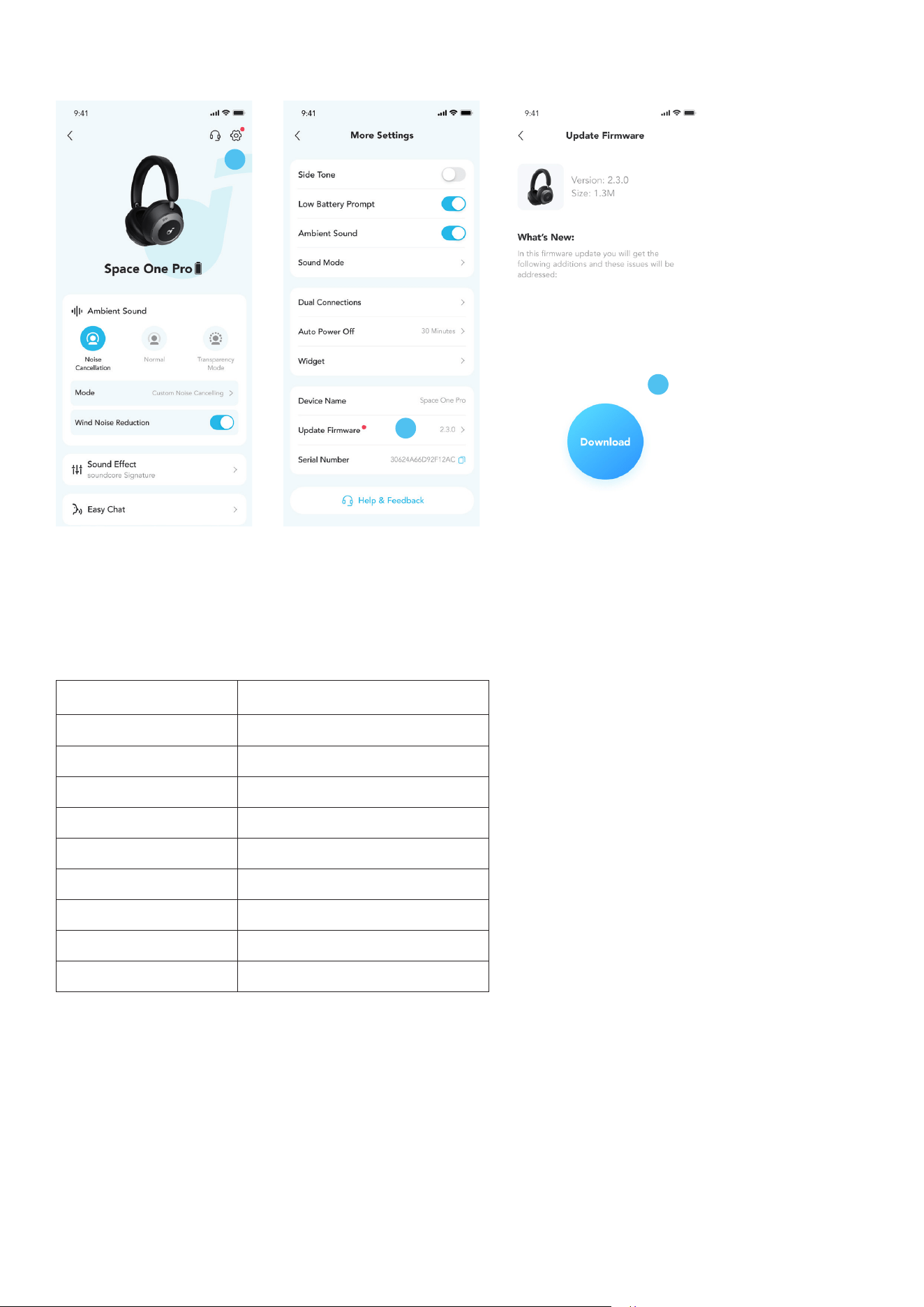
FIRMWARE UPDATE
1
2
3
You will be informed once the new version of firmware is detected when you connect the headphones with the app.
Ensure the headphones are powered on and connected to a device until the firmware update is complete. During the
update, avoid any usage and ensure stable access to the internet.
SPECS
Specifications are subject to change without notice.
Input 5V/1.2A
Battery capacity 350mAh*2
Charging time 2 hours
Playtime (with ANC off) 60H
Playtime (with ANC on) 40H
Driver size 40mm
Frequency response
20Hz-40kHz
Impedance
16Ω
Bluetooth version
5.3
Bluetooth range
15m

Regulations and Compliance Information
Hereby, Anker Innovations Limited declares that this device is in compliance with The Product Security and
Telecommunications Infrastructure (Security Requirements for Relevant Connectable Products) Regulations 2023. For
the Statement of Compliance, visit the website: https://uk.soundcore.com/pages/psti-related.
Note: The 'x' of SN Code: xxxxxxxxxxxxxxxx is a variable, see below table.
Variable 'x' Range of variable Content
Seventh 0-9 or A-F
Denotes the hardware version which is not eected on the safety
compliance.
Eighth 8,9,A,B,C...
Denotes the year, 8 means 2018, 9 means 2019, A means 2020, B means
2021, C means 2022, and so on.
Ninth and tenth
01,02,03..
Denotes weeks, 01 means the rst week in this year, 02 means the
secondary week in this year, and so on.
Eleventh
1-7
Denotes date, 1 means Monday, 2 means Tuesday..., 7 means Sunday
and so on.
The last five 00001-99999
Denotes serial No.