Features
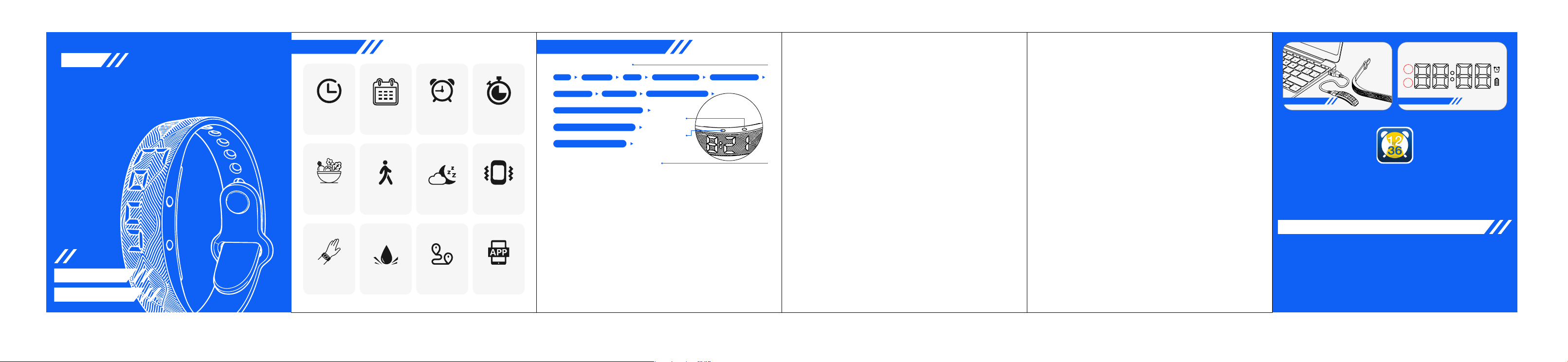
Time Display �� AlarmsDate / Day Stopwatch
Calories Sleep Tracking Step Counter
Vibration
Reminder
Raise-to
wake screen
Distance
Tracking
Waterproof
Design
App Support
setting,press button to adjust time,hold button to confirm settings. It has ��
alarms.
Alarm Behavior:
When a normal alarm rings, press any button to stop it;
For snooze mode:Press any button → pauses for �� seconds, then rings again;
To fully stop it, shake the band up and down �� times.
Weekly Alarm Settings (Customize Alarm Days)
By default, each alarm is set to repeat every day of the week (Monday through
Sunday).
If you want to turn off specific days: Press the right button twice to enter the
date display, after the date appears, the screen will switch to the day-of-week
setting. Press and hold any button until the ON/OF indicator starts flashing.
Adjust settings: Press the left button to cycle through days:Mon, Tue, Wed,
Thu, Fri, Sat, Sun. Press the right button to toggle: ON = alarm will ring on that
day, OF = alarm is disabled for that day.
�.When the screen display "Coun",hold button until numbers are flashing,-
press button to adjust time,hold button to confirm it and start counting up.The
adjustable timer time is �-�� minutes.When display count-up time,hold
button until displaying "STOP",now timer is turned off.
�.Smart Light: Turn the wrist to see time. When display H ON/OF,hold button
until OF/ON flashing,press button to adjust,hold button to confirm. OF is
turned off,ON is turned on.
�.��/�� Hour Time format :When display ��/��-H, press and hold the button to
choose ��H time format or ��H time.
�.Vibration Intensity Setting:When the screen display VH/L/LL,hold any button
until the letters flash,short press button to swift H/L/LL,hold button to confirm
setting.H stands for strongest vibration,L stands for medium level,LL stands
for the weakest vibration.
�,The watch can be connected with phones to synchronize time,set
��/��H time format,timer,alarms and edit reminding massages(only
support editing up to �� English characters on the phone
APP).Meanwhile,user can set social media massage reminding,check
steps of � days and sleep status of � days.
�,After setting the timer,alarms,re-minding massages on APP,need to
click One-Click Sync to synchronize the data to the watch.
App Name: ATR-X
For Android phone download:Google Play
For iphone download: APP Store
Wechat:ATRX
Guide for connecting the watch with mobile phones.
AM
PM
Charging Display �� hour clock time
In the �� hour clock, AM represents morning
and PM represents afternoon
Computers, plugs, power banks and other
USB interfaces can charge the bracelet.
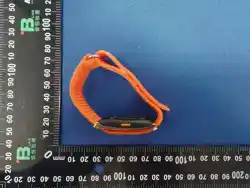
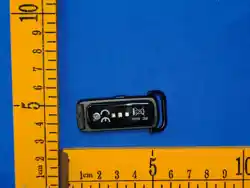
Smart Bracelet
User Manual
W�TB
APP Sync Settings
IP�� Waterproof
The watch basic operation:Press the button swift functions or adjust
numbers,hold the button into setting or confirm the settings.
�.How to view time? The watch display time,then display date。
How to set time? When display time,hold any button until the numbers are
flashing,press button to adjust the correct time and hold button to confirm.The
settings are Hour-Minute-Month-Date-Year.
�.STEP: Press button to check current steps.When display STEP,hold button then
short press button to check the steps of � days.
�.Default sleep tracking time: ��:�� PM ‒ �:�� AM.
Sleep monitor: Press the button � times,when the watch displays SLEP. good
means the sleeping of last night was good. nor is normal sleep. Poor is bad sleep.
�.Alarm: Supports up to �� alarms: including the first � groups of ordinary alarm
clocks A�-A� and the last � groups of snooze alarm clocks AA, Ab, AC, and Ad.
Setting method: Press the button � times to display AL, hold button into A�--, hold
button when”--” flashing, then short press the button to turn on alarm �,when
display ON , it means alarm � is turned on.Hold button into alarm � time
SLEEP(SLEP) COUNTDOWN(Coun)ALARM(AL)
Raise-to-wake screen(HON/OF)
��/�� TIME FORMAT(��/��-H)
Vibration Level(VH/L/LL)
Bracelet Instructions
Bracelet display order:
(Press the button to scroll through:)
Feature introduce and setting
Left button
Right button
Time
Date/Day
DISTANCE(DIST)CALORIE(CALO)STEP
FCC Warning Statement:
Changes or modifications not expressly approved by the party responsible for
compliance could void the user’s authority to operate the equipment. This
equipment has been tested and found to comply with the limits for a Class B digital
device, pursuant to Part �� of the FCC Rules. These limits are designed to provide
reasonable protection against harmful interference in a residential installation.
This equipment generates uses and can radiate radio frequency energy and, if not
installed and used in accordance with the instructions, may cause harmful
interference to radio communications. However, there is no guarantee that
interference will not occur in a particular installation. If this equipment does cause
harmful interference to radio or television reception, which can be determined by
turning the equipment off and on, the user is encouraged to try to correct the
interference by one or more of the following measures:
Reorient or relocate the receiving antenna.
Increase the separation between the equipment and receiver.
Connect the equipment into an outlet on a circuit different from that to which the
receiver is connected.
Consult the dealer or an experienced radio/TV technician for help.
FCC Radiation Exposure Statement
The device has been evaluated to meet general RF exposure requirement. The
device can be used in portable exposure condition without restriction.
This device complies with Part �� of the FCC Rules. Operation is subject to the
following two conditions:
(�)This device may not cause harmful interference
(�)This device must accept any interference received, including interference that
may cause undesired operation.