
EN
MULTIFUNCTIONAL STAND MIXER
Translation of the original manual
STM 8970

STM 8970
A
9
2
3
4
5
7
12
6
8
10
11
1
13
15
16
17
19
14
18
B
9
2
3
4
5
7
6
8
1
10
C
9
2
3
4
5
768
10
1
11
15
13
14
12
16
17
C
1
C
2
C
3
C
4
D
2
3
4
5
7
6
1
8
E
2
3
4
1
5
F
2
8
1
7
9
5
4
3
6
G
5
3
2
6
1
4
H
5
3
2
6
1
4
I
5
4
3
6
1
2
J
K
4
3
2
1
5
L
2
1
3

- 1 -
Revision 10/2023
Copyright © 2023, Fast ČR, a.s.
EN Multifunctional Stand Mixer
Important safety instructions
READ CAREFULLY AND STORE FOR FUTURE USE.
General warnings
• This appliance may be used by persons with physical,
sensory or mental impairments or by persons with
insufficient experience and knowledge, if they are
properly supervised or have been informed about how to
use the appliance in asafe manner and understand the
potential dangers.
• This appliance may not be used by children. Keep the
appliance and its power cord away from children.
• Children must not play with the appliance.
• Cleaning and maintenance performed by the user must
not be performed by unsupervised children.
• In the event that the power cord is damaged, have it
repaired at aprofessional service centre to prevent
causing adangerous situation. It is forbidden to use the
appliance if it has adamaged power cord.
Warning:
Incorrect use may lead to injuries.
• Pay increased attention not to injure yourself on the
sharp parts when handling the grinding blade of the
grinder, grating cones and the blade assembly of the

- 2 -
Revision 10/2023
Copyright © 2023, Fast ČR, a.s.
blending jar, especially when installing and removing
accessories, when filling or emptying the blending jar
and when cleaning.
• The surfaces of the appliance and its accessories that
come into contact with food must always be cleaned
according to the instructions in this user’smanual.
• This user’smanual includes processing times and speed
settings for the individual types of accessories.
• Always turn off the appliance, disconnect it from the
power socket when not using it, when leaving it without
supervision, and before assembling, disassembling,
cleaning or moving it.
• Before replacing the accessories or accessible parts that
move during use, turn the appliance off and disconnect it
from the power supply.
Electrical safety
• Before connecting this appliance to an electrical power socket, make sure that the voltage stated on its rating label corresponds to the voltage
in your power socket.
• Connect the appliance only to aproperly grounded socket. Do not use an extension cord.
• Fully unwind the power cord before use.
• Ensure that the power plug contacts do not come into contact with water or any other liquid.
• Do not disconnect the appliance from the power socket by pulling on the power cord. This could damage the power cord or the power socket.
Disconnect the cord from the power socket by gently pulling the plug of the power cord.
• Do not connect and disconnect the appliance'spower plug to and from the power socket with wet hands.
• Do not place any items on the power cord. Make sure the power cord does not hang over the edge of atable and that it is not touching ahot
surface or sharp objects.
• Keep the power cord dry.
• Do not wind the power cord around the appliance.
• To avoid the danger of injury by electrical shock, do not repair the appliance yourself or make any adjustments to it. Have all repairs or
adjustments of the appliance performed at an authorised service centre. Tampering with the appliance during the warranty period may void the
warranty.
• To prevent the risk of injury by electrical shock, never submerge the appliance nor its power cord in water or any other liquid, or wash these
under running water.
• Always turn off the appliance and disconnect it from the power socket when you have finished using it.
• In the event that the appliance falls into water, under no condition continue using it. Hand it over to an authorised service centre for inspection.
• The appliance is not intended for operation by means of an external timer switch or any other component that switches the appliance on and
off automatically.
Safety during use
• The appliance is designed for household use and is constructed for processing the usual amount of food in ahousehold. Do not use it for
commercial purposes or for purposes other than those for which it is intended.
• This appliance is designed for use in indoor areas only. Never use it in industrial surroundings or outdoors.
• Only use the appliance with the original accessories from the manufacturer.

- 3 -
Revision 10/2023
Copyright © 2023, Fast ČR, a.s.
Warning:
Using non-original accessories may result in adangerous situation arising.
• It is forbidden to modify the surface of the appliance in any way, e.g. with self-adhesive wallpaper, foils, etc.
• Only use the appliance and its accessories in accordance with the instructions contained in this user'smanual.
• Before first use, it is necessary to thoroughly wash the individual parts of the removable accessories using warm water and kitchen detergent,
then rinse them with drinking water and wipe them thoroughly until dry using awiping cloth. When cleaning the blending jar, make sure that
no water enters into the underside of the blending jar that is connected to the multifunctional stand mixer. Never rinse the multifunctional stand
mixer nor its power cord under water or submerge it in water.
• Before attaching the removable accessories to the appliance, make sure that they are dry.
• When tilting down the multi-function head, pay increased attention not to crimp your fingers between the tilting and rigid part of the
multifunctional stand mixer.
• Before every use, check the selected accessory for damage. Never use the appliance with adamaged accessory.
• Do not cover the appliance'svents.
• Do not place the appliance nor its accessories on an electric or gas stove or in its vicinity, on the edge of atable or on an unstable surface. Do
not place the appliance nor its accessories near heaters, open fires or other sources of heat. Only place the appliance on aclean, even, dry and
stable surface.
• Do not use the appliance when it is not functioning correctly or after it has fallen on the floor, been submerged in water or is damaged in any
other way. Hand it over to an authorised service centre for inspection or repair.
• Do not expose the appliance and its accessories to the outdoor environment, extreme temperatures, direct sunlight, excessive humidity or
excessively dusty environments.
• Before putting the appliance into operation, check that it is properly assembled, that the multi-function head is in the horizontal position.
When using an accessory that is intended for beating, kneading or whipping, ensure that it is submerged in the stainless steel bowl with the
ingredients.
• Do not turn on the appliance when it is empty. Incorrect use of the appliance may negatively affect its lifetime.
• When handling the appliance, ensure that your hands are clean and dry.
• To prevent adangerous situation from arising, prevent coming into contact with the rotating parts of the appliance. While using it, never place
hands, forks or any other utensils into the bowl with the ingredients, and keep hair, clothing, etc. at asufficient distance from the rotating parts
of theappliance. If afork or another utensil falls into the container while the appliance is running, immediately turn it off and disconnect it from
the power socket.
• Make sure that no hair, clothing or other items enter the feed tube of the meat grinder or grater while it is running. Do not put anything other
than the ingredients that are to be processed into the feed tube.
• Never use your fingers or other items to push ingredients through the feed tube of the meat grinder or the grater. For this purpose there is
apusher that is included as an accessory to this appliance.
• Never tilt open the multi-function head during operation.
• Before attaching an accessory to the appliance, removing or replacing it, always turn off the appliance and disconnect it from the power socket.
• Never assemble or disassemble an accessory while it is mounted on the appliance.
• Never start the blender without the lid properly seated in position. During operation, the lid must always be properly attached to the blending
jar.
• Hot steam or splattering hot foods or liquids may cause scalding. Always pay increased attention when handling hot liquids and foodstuffs.
• The glass blending jar is resistant against heat up to 55 °C. Never place food or pour any liquids with ahigher temperature into it, otherwise
there is arisk of the glass jar cracking, which may subsequently lead to scalding.
• For reasons of increased safety, allow hot foods and liquids to cool down before putting the appliance into operation.
• When processing warm liquids in the blending jar, do not remove the inner cap of the blending jar during operation.
• The surfaces of the accessories that are used may be hot after use. Do not touch the hot surface. When carrying the blending jar or the
stainless steel bowl, use the handle or holders intended for this purpose.
• No accessories of this appliance are intended for use in amicrowave or electric oven, etc.
• To prevent injury caused by sharp edges, be especially careful when handling the grinding blade of the meat grinder, the grating and slicing
cones and the blade assembly of the blender. Increased attention must also be paid when emptying out the blending jar, when assembling the
meat grinder, when removing the grinding blade from the grinding chamber, when assembling or disassembling the grating cones and when
cleaning.
• In order to prevent adangerous situation from arising, never use the appliance to process hard ingredients such as, for example, walnut shells,
hard stones of apricots, peaches, mangoes, etc.
• The maximum continuous operating time of the appliance is 10 minutes. When using the blender, do not exceed the operating time of
3minutes. Before using it again, allow the appliance to cool down for 30 minutes. Do not exceed the maximum continuous operating time and
adhere to the time necessary for the cooling down of the appliance before further use.
Safety during cleaning and maintenance
• Before cleaning, always turn off the appliance, disconnect it from the power socket and allow it to cool down completely.
• Regularly clean the appliance after each use according to the instructions in chapter Cleaning and maintenance. Do not perform any
maintenance on the appliance except for cleaning as described in this user'smanual.
• Do not wash the multi-function head or the base unit under running water or submerge it in water or another liquid. Neither the appliance nor its
accessories are intended for washing in adishwasher.
• Store the appliance in adry, clean environment. Before storing the appliance, check that the multi-function head is tilted down to the horizontal
position.

- 4 -
Revision 10/2023
Copyright © 2023, Fast ČR, a.s.
EN
Multifunctional Stand Mixer
User'smanual
• Thank you for purchasing aSENCOR brand product and we hope
that you will be happy with it.
• Prior to using this appliance, please read the user’smanual
thoroughly, even in cases, when one has already familiarised
themselves with previous use of similar types of appliances. Only
use the appliance in the manner described in this user’smanual.
Keep this user’smanual in asafe place where it can be
easily retrieved for future use. In the event that you hand this
appliance over to somebody else, make sure to also include this
user’smanual.
• Carefully unpack the appliance and take care not to throw
away any part of the packaging before you find all its parts.
We recommend saving the original cardboard box, packaging
material, purchase receipt and responsibility statement of the
vendor or warranty card for at least the duration of the legal
liability for unsatisfactory performance or quality. In the event of
transportation, we recommend that you pack the appliance in the
original box from the manufacturer.
. . . . . . . . . . . . . . . . . . . . . . . . . . . . . . . . . . . . . . . . . . . . . . . . . . . . . . . . . . . . . . . . .
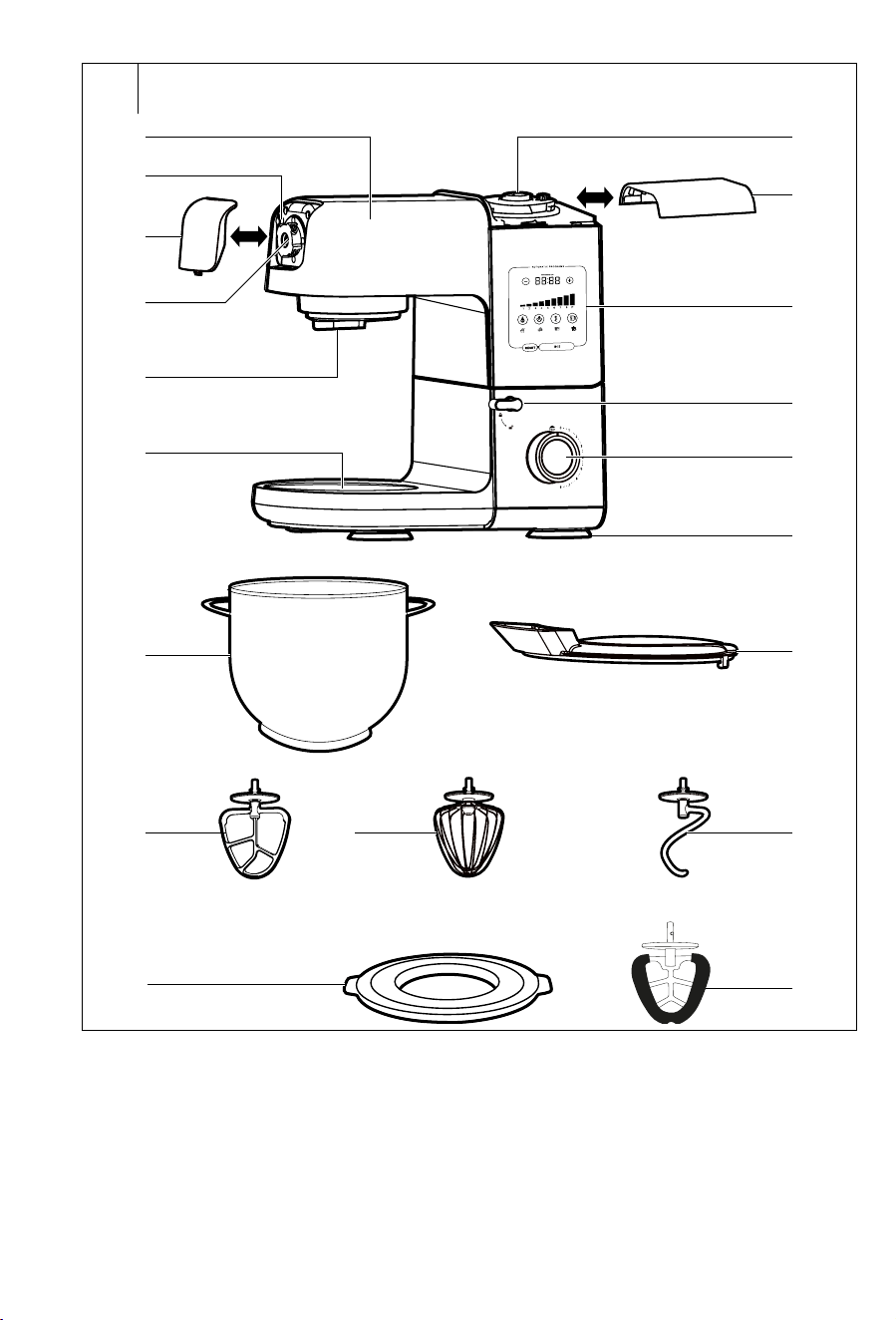
DESCRIPTION OF THE APPLIANCE AND ACCESSORIES
A1 Tilting multi-function head
with illumination of the
stainless steel bowl area
A2 Button for releasing the
meat grinder from the front
attachment hub on the head
A3 Removable cover of the front
attachment hub for the meat
grinder / grating attachment
A4 Front attachment hub for
the meat grinder / grating
attachment
A5 Hole for attaching the whisk,
beater or kneading hook
A6 Base for the stainless steel
bowl
A7 Top blender attachment hub
A8 Removable cover of the top
blender attachment hub
A9 Control panel with display
A10 Multi-function head lock/
release lever
A11 Speed control knob
serves to set the speed level
and to stop operation of the
appliance in the manual
setting mode
0 – stop the appliance
1–8 – speed levels
1–lowest, 8 – highest)
P – PULSE mode for
increasing the speed to
maximum for ashort time.
A12 Anti-slip feet
A13 Stainless steel bowl for
processing food with atotal
capacity of 6.7 l (2 pcs)
The maximum filling
capacity of the stainless
steel bowl is 4.5l.
A14 Transparent lid against the
splashing of ingredients
with ahole for the gradual
addition of ingredients into
the stainless steel bowl
A15 Beater
A16 Balloon whisk
A17 Kneading hook
A18 Stainless steel bowl lid
(2 pcs) serves to cover
the stainless steel bowl
A13 when you wish to
temporarily keep your
processed ingredients in it.
A19 Flexi-beater with spatula
It is used in the same
way as the beater A15.
It is fitted with a spatula,
which gradually wipes the
wall of the stainless steel
bowl, whereby it achieves
better processing of all the
ingredients into the prepared
mixture.
. . . . . . . . . . . . . . . . . . . . . . . . . . . . . . . . . . . . . . . . . . . . . . . . . . . . . . . . . . . . . . . . .
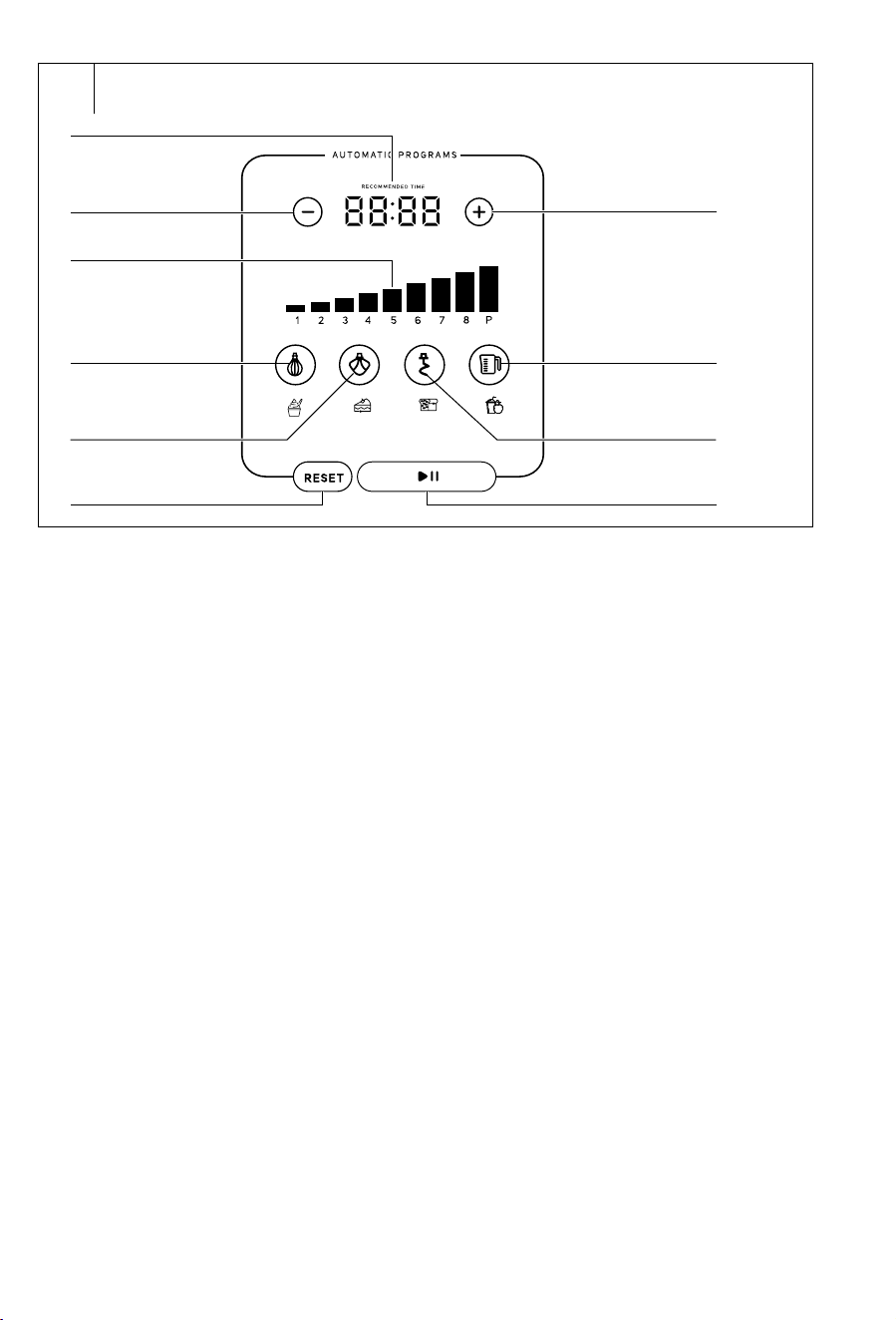
Control panel with display
B1 Operating time indicator
shows the set, elapsed and
remaining operating time
B2 Reduce operating time
button
B3 I
ncrease operating time button
B4 Speed indicator
B5 Touch button for starting/
stopping the preset program
for whipping with the balloon
whisk
B6 Touch button for starting/
stopping the preset program
for beating with the beater
B7 Touch button for starting/
stopping the preset program
for kneading with the
kneading hook
B8 Touch button for starting/
stopping the preset program
for the blender
B9 Touch button RESET
B10 Start/Pause touch button
. . . . . . . . . . . . . . . . . . . . . . . . . . . . . . . . . . . . . . . . . . . . . . . . . . . . . . . . . . . . . . . . .
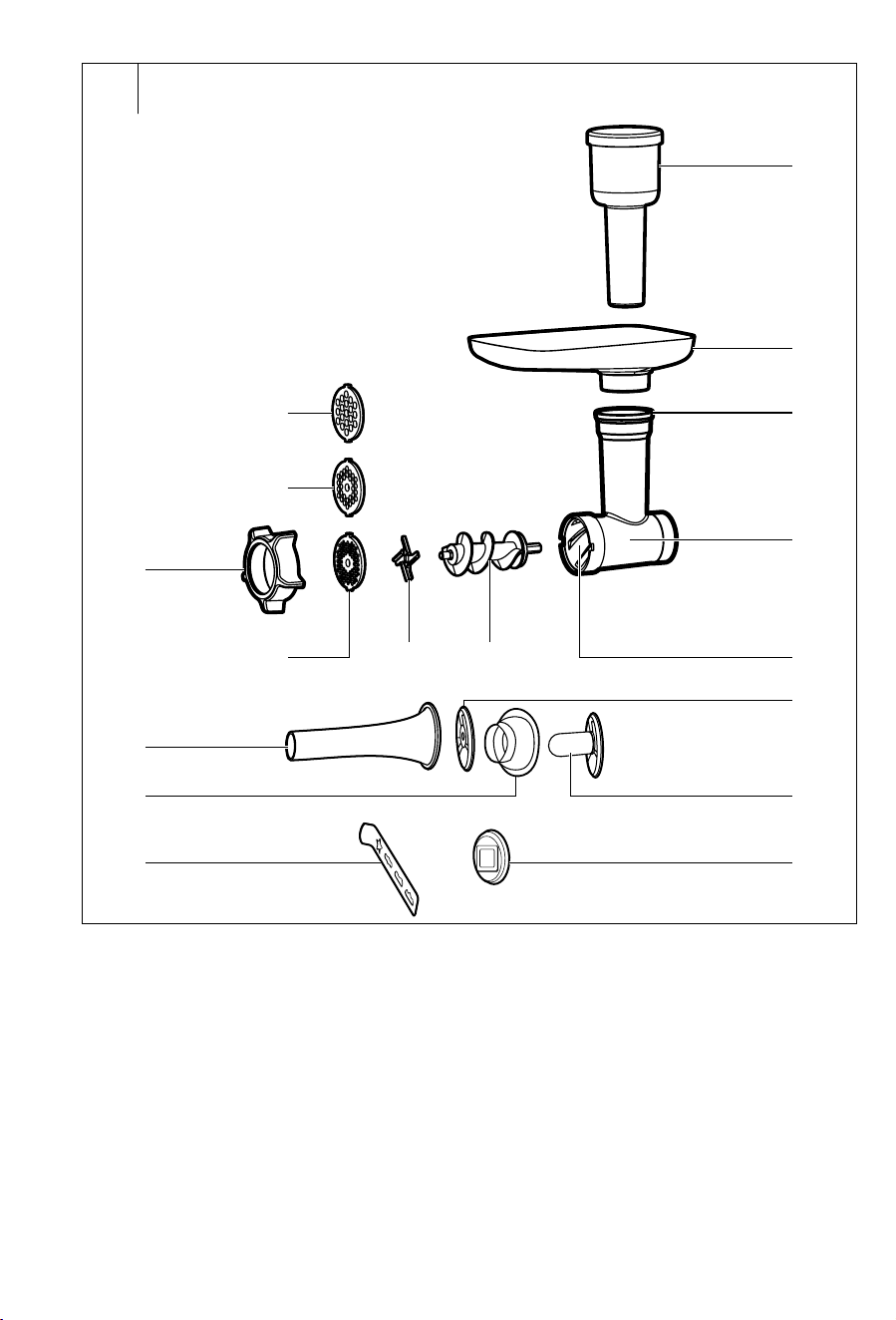
Meat grinder
C1 Grinding chamber
C2 Feed tube
C3 Screw shaft insertion hole
C4 Hopper
C5 Pusher
C6 Screw shaft
C7 Grinding blade
C8 Fine grinding plate
C9 Medium fine grinding plate
C10 Coarse grinding plate
C11 Screw ring
C12 Separator
C13 Kibbeh attachment
C14 Conical attachment
C15 Sausage stuffer attachment
C16 Cookie maker holder
C17 Cookie maker
. . . . . . . . . . . . . . . . . . . . . . . . . . . . . . . . . . . . . . . . . . . . . . . . . . . . . . . . . . . . . . . . .
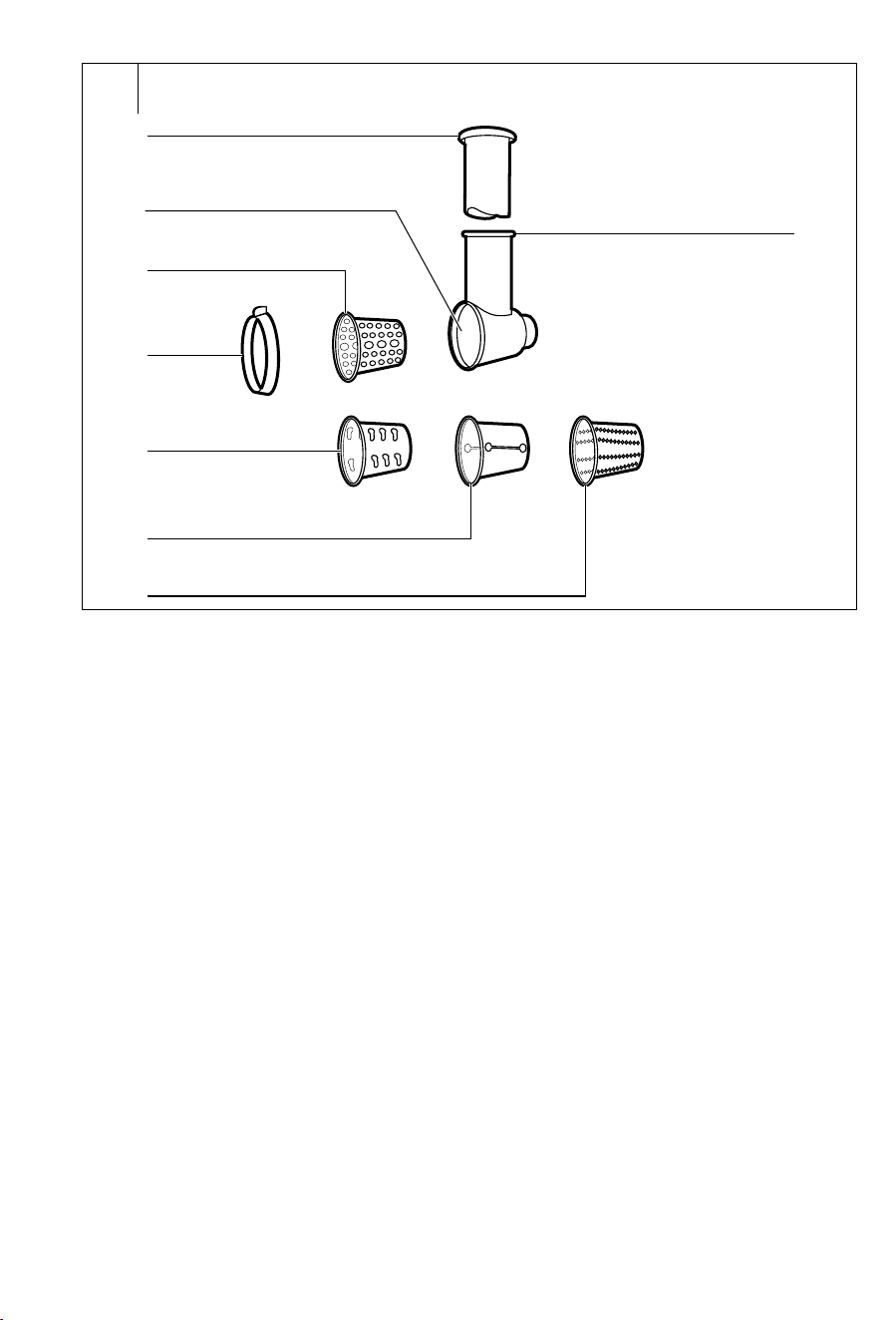
Grating attachment
D1 Pusher
D2 Grater insertion chamber
D3 Very fine grating cone
D4 Screw ring for securing
the grating cone inside the
chamber
D5 Coarse grating cone
D6 Grater for making slices
D7 Fine grating cone
D8 Feed tube
. . . . . . . . . . . . . . . . . . . . . . . . . . . . . . . . . . . . . . . . . . . . . . . . . . . . . . . . . . . . . . . . .
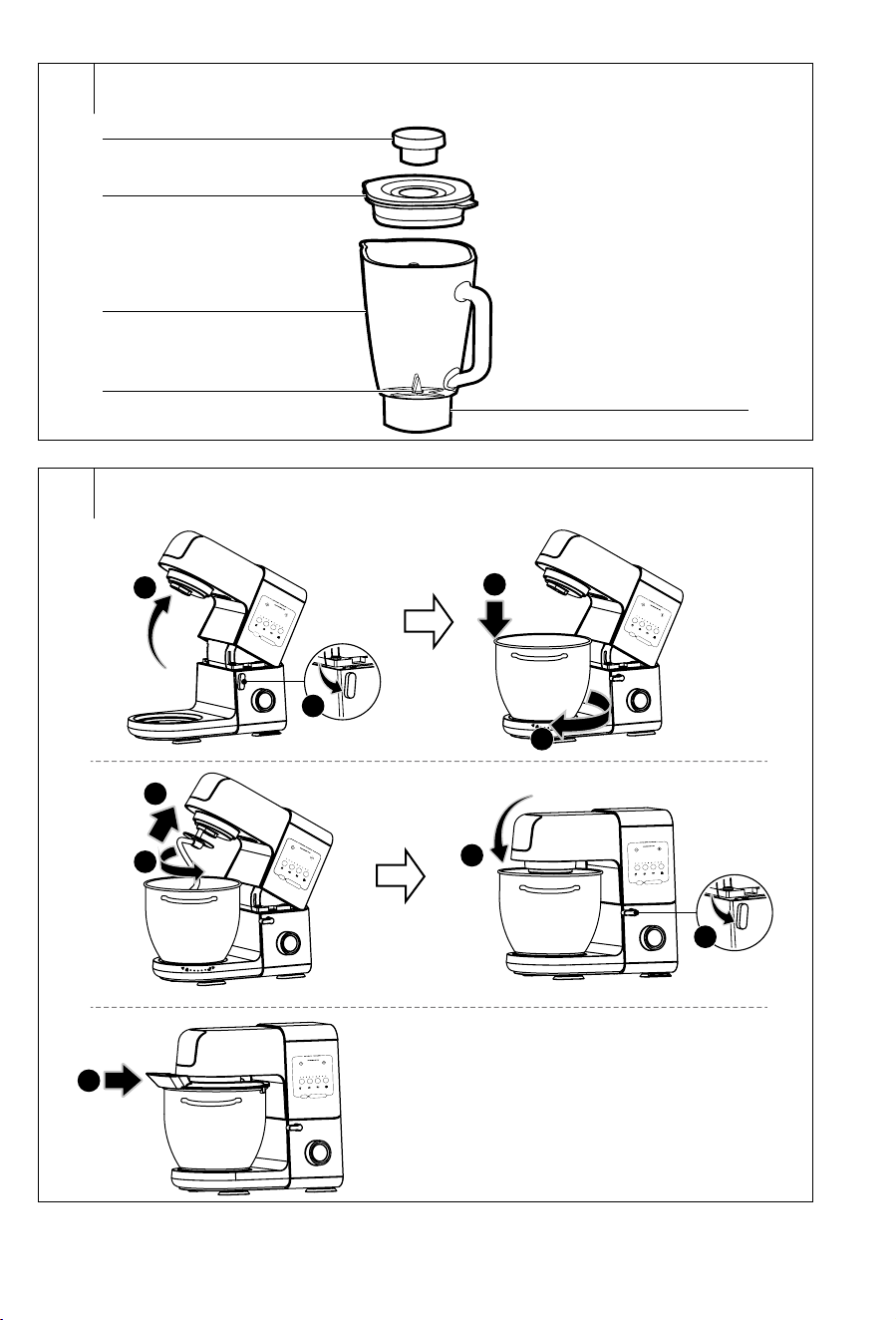
Blender
E1 Inner cap
E2 Outer lid with ahole for
adding ingredients
E3 Blending jar with 1.5 l
capacity
E4 Blade assembly
is an integral part of the
blending jar
E5 Base for mounting/removing
the blender from the top
attachment hub of the head
. . . . . . . . . . . . . . . . . . . . . . . . . . . . . . . . . . . . . . . . . . . . . . . . . . . . . . . . . . . . . . . . .
INTENDED USE OF THE APPLIANCE
• The Multifunctional Stand Mixer is intended for processing
astandard amount of food in the household. It is suitable for
beating, whipping and kneading and blending of ingredients, for
meat grinding, for making kibbeh or sausages, grating food and
making cookies.
. . . . . . . . . . . . . . . . . . . . . . . . . . . . . . . . . . . . . . . . . . . . . . . . . . . . . . . . . . . . . . . . .
BEFORE FIRST USE
• Clean the external surface of the multifunctional stand mixer using
alightly dampened wiping cloth and then take care to prevent any
moisture from entering the speed control knob A11.
• Clean the front attachment hub A4 for mounting the grinder or the
grating attachment and the top attachment hub A7 for mounting
the blender using only adry wiping cloth.
• Only clean the power cord of the multifunctional stand mixer using
adry wiping cloth.
Warning:
Never rinse the multifunctional stand mixer or its
power cord under water or submerge it in water.
- 5 -
Revision 10/2023
Copyright © 2023, Fast ČR, a.s.
• Prior to first use, clean all the parts that are intended for coming into
contact with food in the following manner:
• Thoroughly wash the stainless steel bowl A13, lid A18, transparent
lid A14, attachments A15, A16, A17 and A19, parts of the grinder
C1−C17, the parts for grinding D1−D8 and the blender accessories
E1−E2 in warm water using aneutral kitchen detergent. Then rinse
these parts with clean water and allow them to dry naturally or dry
them out using awiping cloth.
• Thoroughly rinse out the internal area of the blending jar E3 with
warm water using neutral kitchen detergent and then rinse it out
several times with clean water. Rinse the outer surface of the glass
blending jar E3 under warm running water whilst using neutral
kitchen detergent and then wash under clean running water.
Attention: When cleaning, make sure that no water enters into the
underside of the blending jar E5 by which it is connected to the
multifunctional stand mixer. Carefully dry any moisture or always
allow it to dry out completely. Allow the internal area of the blending
jar E3 to dry out completely and dry the outer surface of the glass
blending jar E3 using awiping cloth.
Attention:
NEITHER the multifunctional stand mixer NOR
any parts of its accessories are designed to be
washed in adishwasher!
When cleaning the internal area of the blending
jar E3, inside of which the blade assembly E4 is
located, and when cleaning the grinding plates
C8−C10, grinding blade C7, grinder screw
shaft C6 and graters D3, D5−D7 pay increased
attention so as not to injure yourself on the blades
or sharp edges.
. . . . . . . . . . . . . . . . . . . . . . . . . . . . . . . . . . . . . . . . . . . . . . . . . . . . . . . . . . . . . . . . .
INSTALLATION LOCATION OF THE APPLIANCE
• Place the appliance on an even, dry, clean and especially stable
surface, for example on akitchen countertop.
• Always locate the appliance so that nobody can brush against
it and thereby pull or push it over. Never locate it on the edge of
the countertop or table, the vibrations during use could cause it to
move resulting in asubsequent fall.
. . . . . . . . . . . . . . . . . . . . . . . . . . . . . . . . . . . . . . . . . . . . . . . . . . . . . . . . . . . . . . . . .
TURNING ON AND OFF
• Before connecting the multifunctional stand mixer to apower socket,
always check that it is correctly assembled according to the instructions
in this user’smanual, that the multi-function head A1 is tilted down into
the horizontal position and that the speed control knob A11 is set to the
0 position.
• Connect the power cord to an el. power socket. Asound signal
is made. The indicator B1 andB4, touch buttons B5−B10, speed
control knob A11 and the illumination of the stainless steel bowl
area will be lit for amoment and then turn off. The control button
B10 will subsequently repeatedly turn on and off.
• Touch button B10
to set the multifunctional stand mixer to
stand-by mode. The appliance will beep, the buttons B5−B9, the
speed control knob A11 and the illumination of the stainless steel
bowl area will be lit. Subsequently, buttons B5−B8 will repeatedly
turn on and off. The stainless steel bowl area, the buttons B9−B10
and the speed control knob A11 will remain lit.
Note:
If no settings are made within 10 minutes of putting the
multifunctional stand mixer into the stand-by mode, the
control panel with display A9, the speed control knob A11 and
the illumination of the stainless steel bowl will turn
off
. Only
button B10 will remain active. If this happens, simply
touch button B10 to put the multifunctional stand mixer
back into stand-by mode.
• To put the multifunctional stand mixer into operation from the
stand-by mode, use the control elements described further in
this user’smanual. Read the entire user’smanual before putting
the multifunctional stand mixer into operation. It is necessary to
adhere to the instructions contained in this user’smanual during
operation. The purpose and method of use of the individual types of
accessories are described in the respective chapters.
• To stop operation, use the respective control elements. In the event
that you have selected one of the preset programs, operation will
be stopped automatically at the end of the preset program.
• When you have finished using the multifunctional stand mixer,
ensure that it is turned off and that the control knob A11 is set to the
0 position. Then disconnect the multifunctional stand mixer from
the electrical power socket.
. . . . . . . . . . . . . . . . . . . . . . . . . . . . . . . . . . . . . . . . . . . . . . . . . . . . . . . . . . . . . . . . .
CONTROL ELEMENTS
Control element
Feature
Button B10
After connecting the multifunctional stand mixer
to apower socket, wait afew seconds until this
button becomes active and then touch it to put the
multifunctional stand mixer into stand-by mode.
If the multifunctional stand mixer is in operation,
touching this button will pause its operation. Paused
operation is indicated by the control knob A11 quickly
flashing on and off. Touching this button again, will put
the multifunctional stand mixer back into operation.
The memory function enables the appliance to be put
back into operation up to 10 minutes after operation
has been paused. After 10 minutes, the control panel
with display A9 and the control knob A11 and the
illumination of the stainless steel bowl area will turn
off. Only button B10 will remain active. In the event
that before this the multifunctional stand mixer was in
operation in the manual setting mode, set the control
knob A11 back to the 0 position.
If the multifunctional stand mixer is connected to
apower socket and only button B10 is active on the
control panel, touch it to put the multifunctional stand
mixer into stand-by mode.
Button B9 RESET
If the multifunctional stand mixer is operating in
the preset program mode or in the manual setting
mode, touch this button to stop operation. The
multifunctional stand mixer will switch to the stand-by
mode.
In the case of the manual setting mode, it is necessary
to set the control knob A11 back to the 0 position.
Buttons B2
andB3
First select apreset program or manually set the speed
and then you can use these buttons to adjust or set the
operating time. The maximum operating time in the
manual mode is 10 minutes. The maximum settable
times for the preset programs are as follows: 4 min in
the whipping program, 6 min in the beating program, 8
minutes in the kneading program and 3 minutes in the
blending program.
If the operating time is 5 minutes or less,
each time button B2 is touched, the time is reduced
by 30seconds.
If the operating time is more than 5minutes, each
time button B2 is touched, the time is reduced by
1minute.
If the operating time is 5 minutes or less, each
time button B3 is touched, the time is increased by
30seconds.
If the operating time is more than 5minutes, each
time button B3 is touched, the time is increased by
1minute.
Copyright © 2023, Fast ČR, a.s. - 6 -
Revision 10/2023
Button B5
Touching this button in the stand-by mode will start
the preset program for whipping with the balloon
whisk.
Pressing this button again will end the program.
Button B6
Touching this button in the stand-by mode will start the
preset program for beating with the beater.
Touching this button again will end the program.
Button B7
Touching this button in the stand-by mode will start
the preset program for kneading with the kneading
hook.
Touching this button again will end the program.
Button B8
Touching this button in the stand-by mode will start
the preset program for the blender.
Touching this button again will end the program.
Speed control knob
A11
Serves to set the speed level and to stop operation of
the appliance in the manual setting mode.
0 – stop the operation of the appliance
1–8 – speed levels (1 – lowest, 8 – highest)
P – PULSE mode for increasing the speed to
maximum for ashort time.
It is necessary to hold the control knob A11 in the P
position. After releasing the control knob A11, it will
return to the 0 position. Hold the control knob A11 in
the P position only for short intervals of afew seconds
in duration.
In the event that you connect the multifunctional
stand mixer to apower socket whilst the control knob
A11 is set to adifferent position than 0, it is necessary
to first set the control knob A11 to the 0 position and
only then will it be possible to select the desired
speed level.
Always, after you have finished using the
multifunctional stand mixer, ensure that the control
knob A11 is set to the 0 position.
. . . . . . . . . . . . . . . . . . . . . . . . . . . . . . . . . . . . . . . . . . . . . . . . . . . . . . . . . . . . . . . . .
SOFT START FUNCTION
This food processor has a soft start function that ensures a smooth
ramp up of the motor when it starts, whereby it is gentle of the internal
components of the product and extends its lifetime.
. . . . . . . . . . . . . . . . . . . . . . . . . . . . . . . . . . . . . . . . . . . . . . . . . . . . . . . . . . . . . . . . .
MOTOR PROTECTION
• The motor of the multifunctional stand mixer is equipped with
asafety mechanism that protects it against damage in the
situation where the multifunctional stand mixer is subjected to
an excessively high load or if it remains in operation for too long.
In the event that such asituation occurs, the safety mechanism
will be triggered and the operation of the multifunctional stand
mixer will be stopped. Set the control knob A11 to the 0 position,
disconnect the power cord from the power socket and allow the
multifunctional stand mixer to cool down for at least 30minutes.
• Do not leave the multifunctional stand mixer in operation for too
long under ahigh load. Separate large batches into several smaller
batches.
................................................................
BEATING, WHIPPING AND KNEADING
Warning:
Before installing or removing accessories, the
multifunctional stand mixer must always be
turned off and disconnected from the power
socket.
When installing or removing an attachment
to/from the multi-function head A1, whilst the
multifunctional stand mixer is connected to the
power grid, it could happen that it is accidentally
turned on and cause serious injury.
Planetary mixing system
• The multifunctional stand mixer is equipped with aplanetary
mixing system, which works on the principle of adual rotation of
the attachment. The attachment rotates anticlockwise along the
inner perimeter of the bowl while rotating around its own axis in the
opposite direction. This ensures that ingredients inside the stainless
steel bowl are processed thoroughly and evenly.
Selecting an attachment type
Attachment
type
Operation
Beater A15
or A19
It is used for beating light and medium heavy
yeast-free doughs, for preparing sauces, creams,
cake mixes, fillings, etc. Do not use it for kneading
heavy doughs.
Balloon whisk
A16
It is used for whisking whole eggs or egg whites,
whipped cream, whipping creams, foamy creams,
etc. Do not use it for beating or kneading doughs.
Otherwise, this may damage it.
Kneading hook
A17
It is used for kneading various types of doughs
including heavy and thick doughs such as for
example bread dough, pizza dough, fresh pasta
doughs, etc.
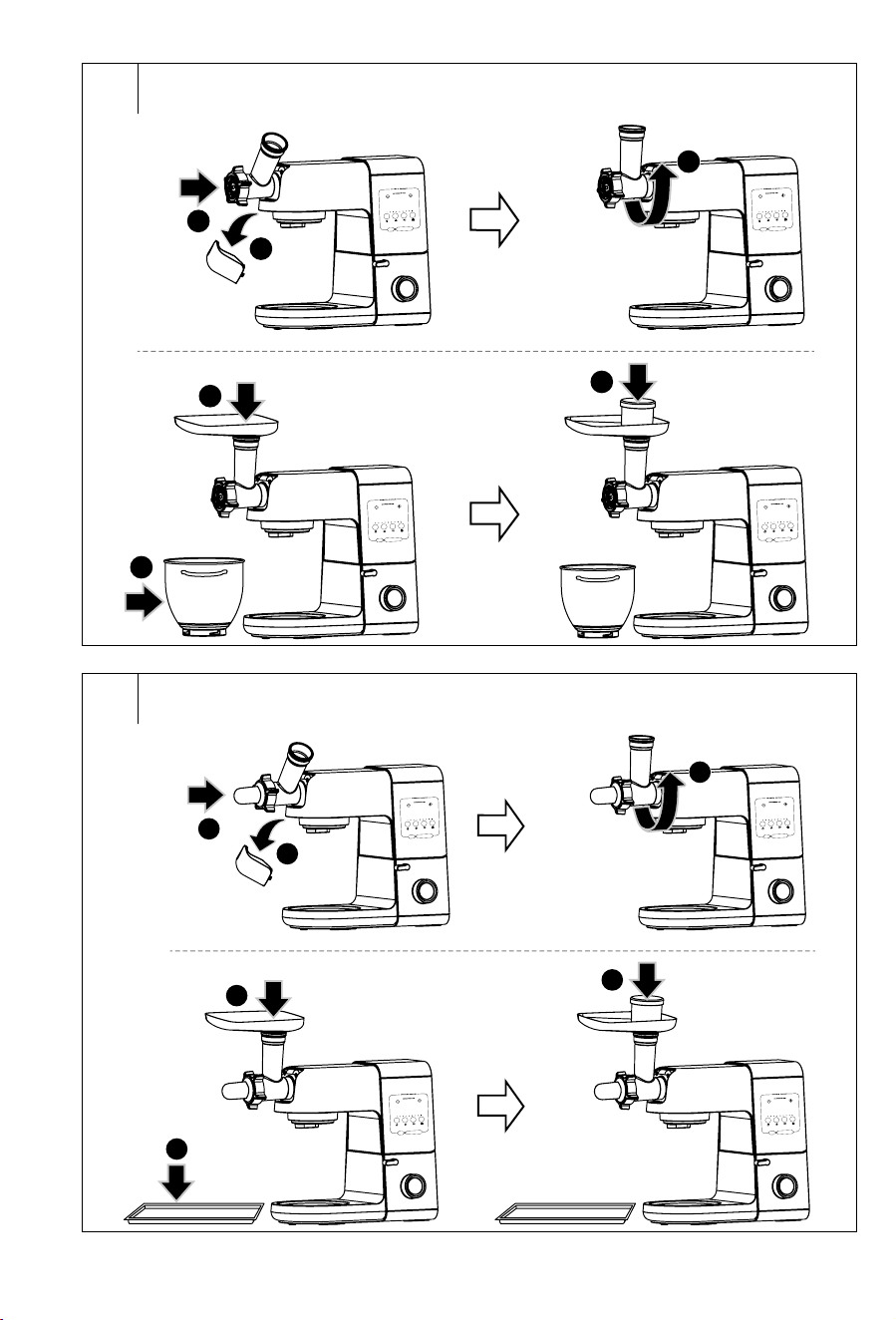
Mounting attachments and attaching the stainless steel bowl (fig. F)
• Make sure that the control knob A11 is set to the 0 position and that
the multifunctional stand mixer is disconnected from the power
socket. Covers A8 andA3 must be attached in their place.
Note:
The multifunctional stand mixer is equipped with asafety
mechanism that prevents it from being started unless the
cover A8 is properly mounted in place.
• Using one hand, push down the lever A10 towards the open
padlock symbol. This will release the multi-function head A1.
With the other hand, hold the multi-function head A1 from above.
Release the lever A10 and tilt the multi-function head A1 all the
way up. Locking of the multi-function head A1 inthe tilted up
position is indicated by the lever A10 returning to the default
position (to the closed padlock symbol), which is accompanied by
an audible click.
• Insert the stainless steel bowl A13 into the base unit A6 and secure
it in place by turning it clockwise When the stainless steel bowl
A13 is properly attached, it cannot be separately lifted out of the
base unit A6.
• Select the attachment A15, A16, A17 or A19 based on its intended
use, insert it into the hole A5 in the multi-function head A1 and turn
it anticlockwise to secure it in place. Lightly pull the attachment
downwards with one hand to check that it is properly attached.
• Fill the stainless steel bowl A13 with the ingredients that you wish
to process. Proceed as described in chapter Adding ingredients
into the bowl.
• Using one hand, push down the lever A10 and the other to slowly
tilt down the multi-function head A1, whilst releasing the lever A10.
After tilting down the multi-function head A1 into the horizontal
position, there will be an audible click and the lever A10 will return
to the horizontal position (to the closed padlock symbol). Thereby
the multi-function head A1 is locked in the work position.
- 7 -
Revision 10/2023
Copyright © 2023, Fast ČR, a.s.
Attention:
When tilting down the multi-function head A1,
take care not to crimp your fingers between the
tilting and rigid part of the multifunctional stand
mixer.
• Put the transparent cover A14 on to the stainless steel bowl A13 so
that the feed tube points towards the front part of the multi-function
head A1.
Adding ingredients into the bowl
• Put the ingredients that you wish to process into the stainless
steel bowl A13. Do not fill the stainless steel bowl A13 above the
maximum mark, i.e. 4.5litres.
• If an insufficient amount of ingredients are put in the bowl A13 then
they may not be optimally processed.
• The minimum and maximum amounts of ingredients that can be
processed in asingle batch are specified in the following table.
Various recipes may include various ratios of powder (loose) and
liquid ingredients, and therefore it is also necessary to take the
overall composition of the given recipe into consideration.
Ingredients/Type of
dough
Minimum amount Maximum amount
Egg whites 4 pcs 12 pcs
Whipping cream 300 g 800 g
Cake dough, cookie
dough, confectionery,
etc.
400 g of flour 1500 g of flour
Bread dough, etc. 400 g of flour 1500 g of flour
Operation of the multifunctional stand mixer with the kneading hook,
beater or whisk
• Before connecting the multifunctional stand mixer to apower
socket, always check that it is correctly assembled according to
the instructions in this user’smanual, that the multi-function head
A1 is tilted down into the horizontal position and that the speed
control knob A11 is set to the 0 position.
• Connect the power cord to an el. power socket. Touch button B10
to set the multifunctional stand mixer to stand-by mode.
Preset programs
• The multifunctional stand mixer is equipped with three preset
programs: beating, whipping and kneading.
Button Attachment Course of program:
Balloon whisk
A16
• Preset speed: 1–8
• Program duration: 4 minutes
At the beginning of the program,
the speed gradually increases in
approx. 3-second intervals until
they reach speed 8.
Beater A15
or A19
• • Preset speed: 1–6 Preset speed: 1–6
• • Program duration: 3 minutesProgram duration: 3 minutes
At the beginning of the program, At the beginning of the program,
the speed gradually increases in the speed gradually increases in
approx. 6-second intervals until approx. 6-second intervals until
they reach speed 6.they reach speed 6.
Kneading
hook A17
• Preset speed: 1–3
• Program duration: 6 minutes
Speed 1 is set for the first minute
of operation, speed 2 is set for the
duration of the subsequent two
minutes, and speed 3 is set for the
final 3 minutes of operation.
• In the stand-by mode, start the work cycle with apreset speed
and duration by touching the button of one of the preset programs.
The following buttons will be lit: B9−B10, the button of the
currently selected program, speed indicator B4 (the current speed
is indicated by flickering speed indicators); and the remaining
countdown time of the preset time will be shown on the display.
Note:
It is not possible to adjust the speed in apreset program.
The time can be adjusted on the control panel using
buttons B2
andB3 . The maximum times that
can be set are as follows: 04:00 in the whipping program,
06:00 in the beating program and08:00 in the kneading
program.
• If you wish to pause aprogram, press button B10
. Pressing
the B10 button again will resume the program. The memory
function enables the program to be started again up to 10minutes
from it being paused. After 10 minutes, the display with the control
panel A9 will turn off. Only button B10 will remain active on
the control panel.
• If you wish to end aprogram prematurely, press button B9 RESET
or the button with which you started the program.
• When the program is finished, the multifunctional stand mixer
will beep and will stop operation, and it will switch to the stand-by
mode.
Warning:
Never insert items such as spoons, kitchen knives,
forks, etc. into the stainless steel bowl A13 during
operation as this could result in serious injury or
damage to the appliance.
Manual setting
• If you do not wish to use the preset programs, you can set the
processing speed and duration yourself.
• You can change the speed setting while the appliance is running.
We recommend to always first start with alower speed setting
and to then gradually increase it as required. We recommend that
runny doughs are processed at alower speed; this will prevent
ingredients from splashing out. As soon as they are mixed together,
increase the speed to the required level. The recommended food
processing times and recommended speed settings are provided in
the table Quick guide to processing ingredients.
Speed setting
• Turning the speed control knob A11 to the required speed level will
start the multifunctional stand mixer. The display A9 will show the
elapsed time of operation.
• The processing time for most ingredients is generally in the order
of several minutes. When using the whisks, we recommend that
you do not exceed the operating time of 4 minutes, when using the
beaters 6minutes and when using the kneading hooks 8minutes.
• To stop the appliance, set the control knob A11 to the 0 position.
This will switch the multifunctional stand mixer to the stand-by
mode. The multifunctional stand mixer will automatically stop after
10 minutes of operation, unless you set the control knob A11 to the
0 position. In the event that automatic shut-off occurred, set the
speed control knob A11 back to the 0 position.
Setting the speed and time of operation
• Turning the speed control knob A11 to the required speed level
will start the multifunctional stand mixer. The display A9 will start
counting down the elapsed time of operation.
• Use buttons B2
and B3 to set the desired time
of operation. The maximum operating time that can be set is
10minutes. The display A9 will show the time remaining until
the set time has elapsed. When the set time has elapsed, the
multifunctional stand mixer will beep, stop automatically and
switch to the stand-by mode.
- 8 -
Revision 10/2023
Copyright © 2023, Fast ČR, a.s.
• Set the speed control knob A11 back to the 0 position.
Attention:
The maximum continuous operating time is
10minutes. Then allow the appliance to cool
down for approximately 30minutes.
Pulse level
• If you wish to increase the speed to maximum for ashort time,
turn the control knob A11 to position P (pulse mode) and hold it
for ashort time in this position. As soon as you release the control
knob A11, it will automatically return to the 0 position. Hold the
control knob A11 in the P position only for short intervals of afew
seconds in duration.
Quick guide to processing ingredients
Attachment
Ingredients
Recommended settings
Balloon whisk
A16
egg whites, whipping
cream, foamy
creams, etc.
• Speed: 6–8
• Time: 2−4 minutes
Beater A15
or A19
soups, creams, cake
mixes, fillings
• Speed: 4–6
• Time: 3−4 minutes
Kneading hook
A17
bread dough, pizza
dough, etc.
• Speed: 1–3
• Time: 4−6 minutes
Higher speed settings
are not recommended for
this type of attachment.
Note:
The speeds and processing times provided above are only
areference. To prevent ingredients from splattering out of
the stainless steel bowl A13, select an initial speed level of
1 or 2. Later set ahigher speed based on requirements. For
easier mixing of dough we recommended soft margarine
or butter.
When whipping egg whites, the stainless steel bowl A13
and the whisk A16 must be perfectly clean and dry. Even
asmall amount of fat may result in that the egg whites will
not be whipped to the desired snowy consistency.
Whipping cream should be cooled to atemperature of
6°C prior to being whipped. Prior to processing them,
allow the ingredients used for making various doughs to
rest at room temperature.
Removing or releasing stuck-on ingredients
• In the event that it is necessary to remove ingredients or if the
ingredients (e.g. dough) are stuck on the sides of the bowl A13
and it is necessary to release them, stop the operation of the
appliance by touching the button RESET B9 (on preset programs)
or by setting the speed control knob A11 to the 0 position (manual
setting).
Attention: Ending the operation of the appliance will cancel all
previous settings.
• Make sure that the control knob A11 is set to the 0 position and
disconnect the multifunctional stand mixer from the power socket.
• In the event that the cover A14 was used, first take it off. Tilt open
the multi-function head A1. Check that it is properly locked in the
top open position and remove the ingredients as necessary. If
ingredients are stuck to the bowl, use astandard kitchen spatula to
wipe them off the edge of the bowl A13.
• Check that there are only ingredients that you wish to process
located inside the stainless steel bowl A13. Tilt the multi-function
head A1 back down into the working position. Put the cover A14
on to the bowl A13. Connect the multifunctional stand mixer to
apower socket and set the settings as required.
Ending operation and disassembling the accessories
• After you have finished using the appliance, set the control knob
A11 to the 0 position and disconnect the power cord from the power
socket.
• If you have used the transparent bowl cover A14, take it off.
• Using one hand, push down the lever A10 towards the open
padlock symbol. This will release the multi-function head A1. At the
same time, with the other hand, hold the multi-function head A1
from above. Release the lever A10 and tilt the multi-function head
A1 all the way up. Locking of the multi-function head A1 inthe tilted
up position is indicated by the lever A10 returning to the default
position (to the closed padlock symbol), which is accompanied by
an audible click.
• Gently push the attachment that you used upwards towards the
multi-function head A1 and simultaneously turn it clockwise. This
will release it and you can take it out of the multi-function head A1.
• Turn the stainless steel bowl A13 anticlockwise and carefully
remove it from the base unit A6.
• Set the multi-function head A1 back to the horizontal position.
• Clean out the used accessories after each use according to the
instructions in chapter CLEANING AND MAINTENANCE.
. . . . . . . . . . . . . . . . . . . . . . . . . . . . . . . . . . . . . . . . . . . . . . . . . . . . . . . . . . . . . . . . .
GRINDING MEAT, MAKING KIBBEH, STUFFING SAUSAGE
CASINGS AND MAKING COOKIES
Warning:
Before installing or removing accessories, the
multifunctional stand mixer must always be
turned off and disconnected from the power
socket.
When installing or removing agrinder to the multi-
function head A1, whilst the multifunctional stand
mixer is connected to the power grid, it could
happen that it is accidentally turned on and cause
serious injury.
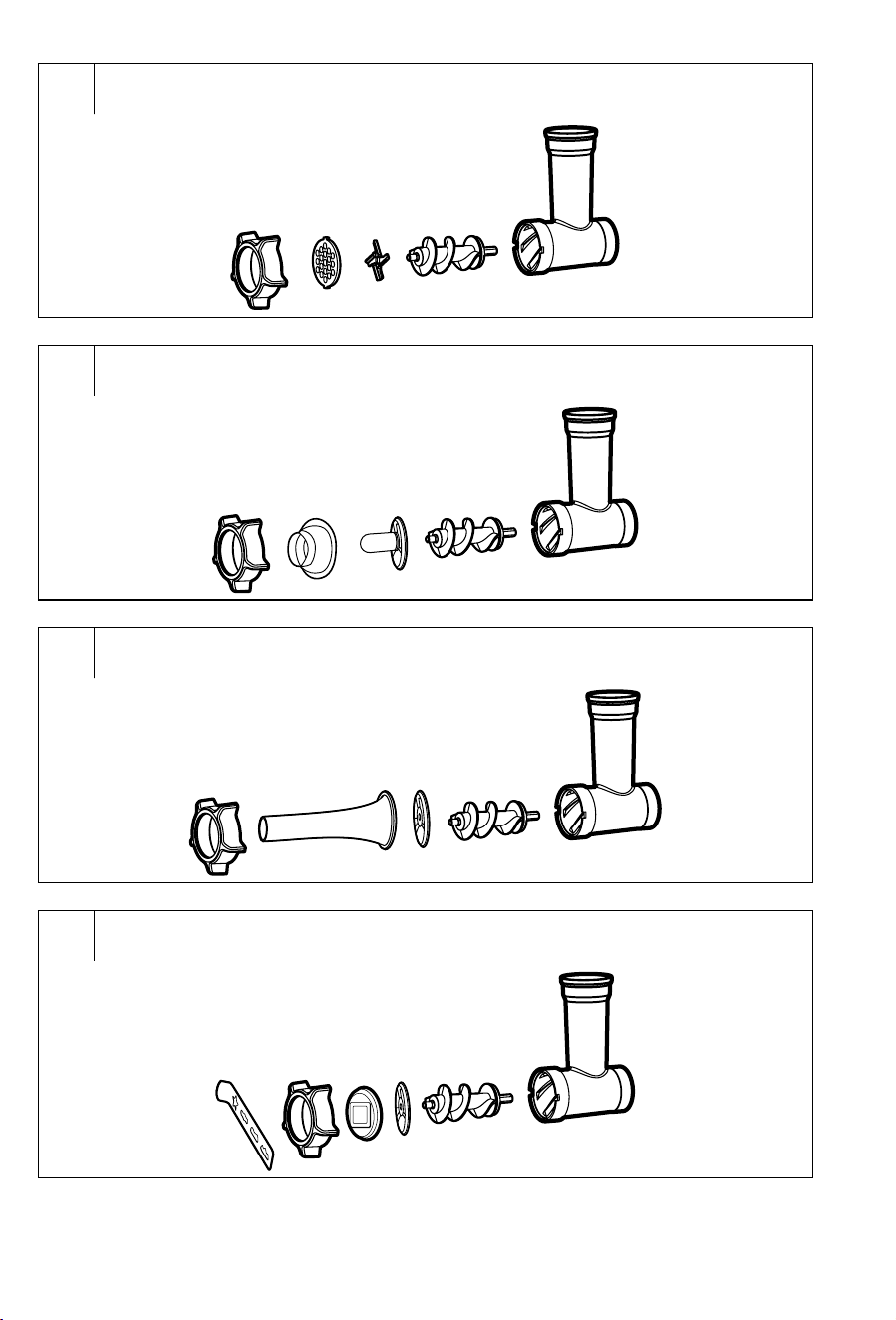
Assembling the grinder for grinding meat (fig. C and C
1
)
• Insert the screw shaft C6 into the grinding chamber C1. At the same
time, make sure that the screw shaft C6 is inserted in the grinding
chamber C1 in the correct direction and that it fits in properly.
• Place the grinding blade C7 on to the shaft C6 with the edge
facing outwards from the chamber C1 and on to it attach agrinding
plate C8, C9 or C10 depending on the preferred consistency the
grind. Make sure that the grinding plate properly slides along the
perimeter into the hole in the grinding chamber C1.
Warning:
When handling the grinding blade C7 and the
grinding plates C8, C9 or C10, pay increased
attention so as not to injure yourself on the sharp
parts.
• Place the screw ring C11 on to the grinding chamber C1 and tighten
it securely by screwing it in.
Assembling the grinder for making kibbeh (fig. C and C
2
)
• Insert the screw shaft C6 into the grinding chamber C1. At the same
time, make sure that the screw shaft C6 is inserted in the grinding
chamber C1 in the correct direction and that it fits in properly.
• Place the kibbeh attachment C13 on to the shaft C6 and make
sure that along the perimeter it properly slides into the hole in the
grinding chamber C1. Put the conical attachment C14 on to the
kibbeh attachment C13.
• Complete the assembly by screwing the screw ring C11 on to the
grinding chamber C1. Pull the screw ring C11 tight with appropriate
force.
- 9 -
Revision 10/2023
Copyright © 2023, Fast ČR, a.s.
Assembling the grinder for stuffing sausage casings (fig. C and C
3
)
• Insert the screw shaft C6 into the grinding chamber C1. At the same
time, make sure that the screw shaft C6 is inserted in the grinding
chamber C1 in the correct direction and that it fits in properly.
• Place the separator C12 on to the shaft C6 and make sure that
along the perimeter it properly slides into the hole in the grinding
chamber C1. Put the sausage stuffer attachment C15 on to the
separator C12.
• Complete the assembly by screwing the screw ring C11 on to the
grinding chamber C1. Pull the screw ring C11 tight with appropriate
force.
Assembling the grinder for making cookies (fig. C and C
4
)
• Insert the screw shaft C6 into the grinding chamber C1. At the same
time, make sure that the screw shaft C6 is inserted in the grinding
chamber C1 in the correct direction and that it fits in properly.
• Place the separator C12 on to the shaft C6 and make sure that
along the perimeter it properly slides into the hole in the grinding
chamber C1. Insert the cookie maker holder C16 into the screw
ring C11.
• Screw the screw ring C11 together with the cookie maker holder
C16 on to the grinding chamber C1. Pull the screw ring C11 tight
with appropriate force.
• Complete the assembly by inserting the cookie maker C17 into the
holder C16.
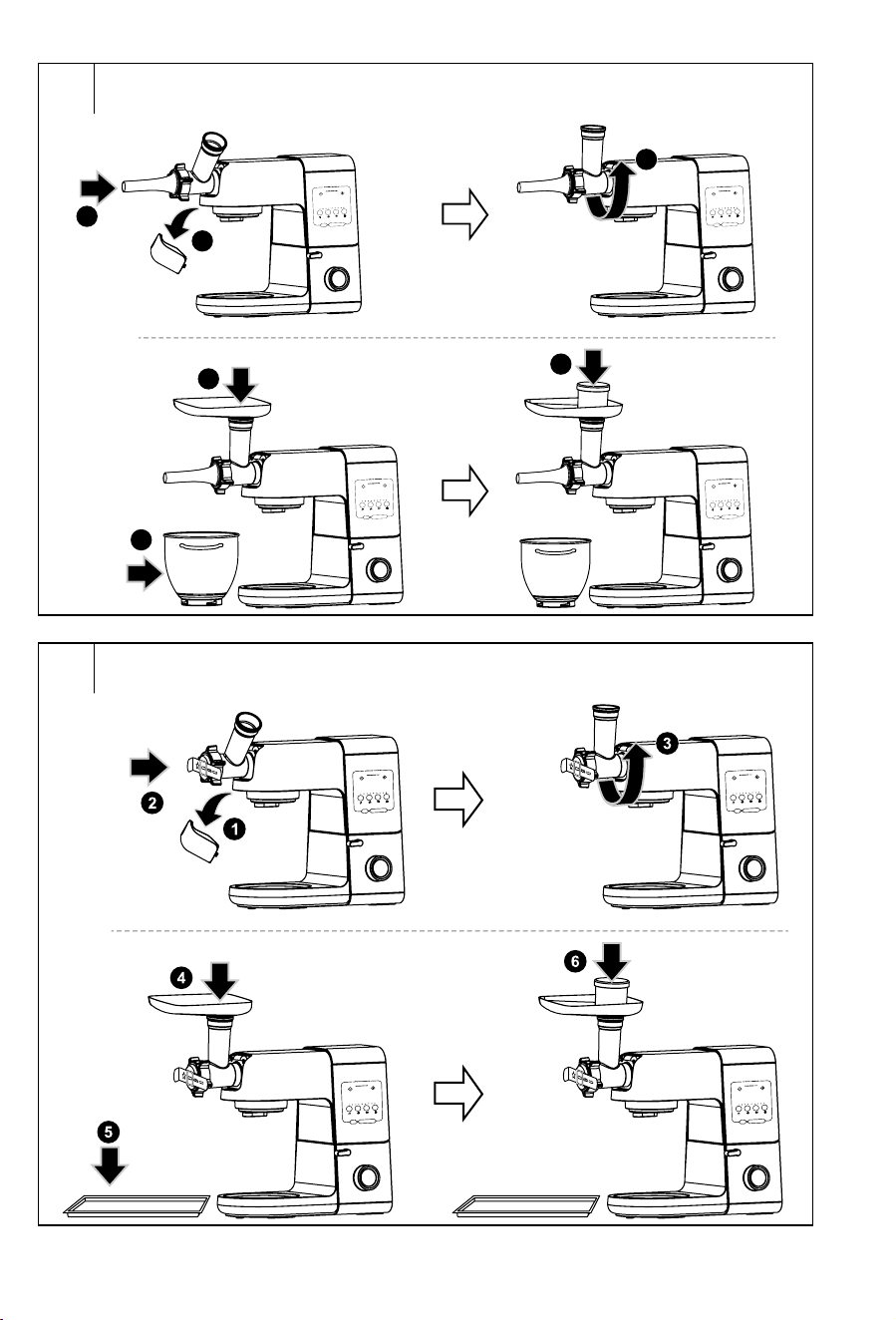
Mounting the assembled grinder on to the multifunctional stand mixer
(fig. G–J)
• Make sure that the control knob A11 is set to the 0 position and
that the multifunctional stand mixer is disconnected from the
power socket. The multi-function head A1 must be tilted down
to the horizontal position and none of the attachments A15, A16,
A17 or A19 may be mounted on it. Cover A8 must be attached in
its place.
Note:
The multifunctional stand mixer is equipped with asafety
mechanism that prevents it from being started unless the
cover A8 is properly mounted in place.
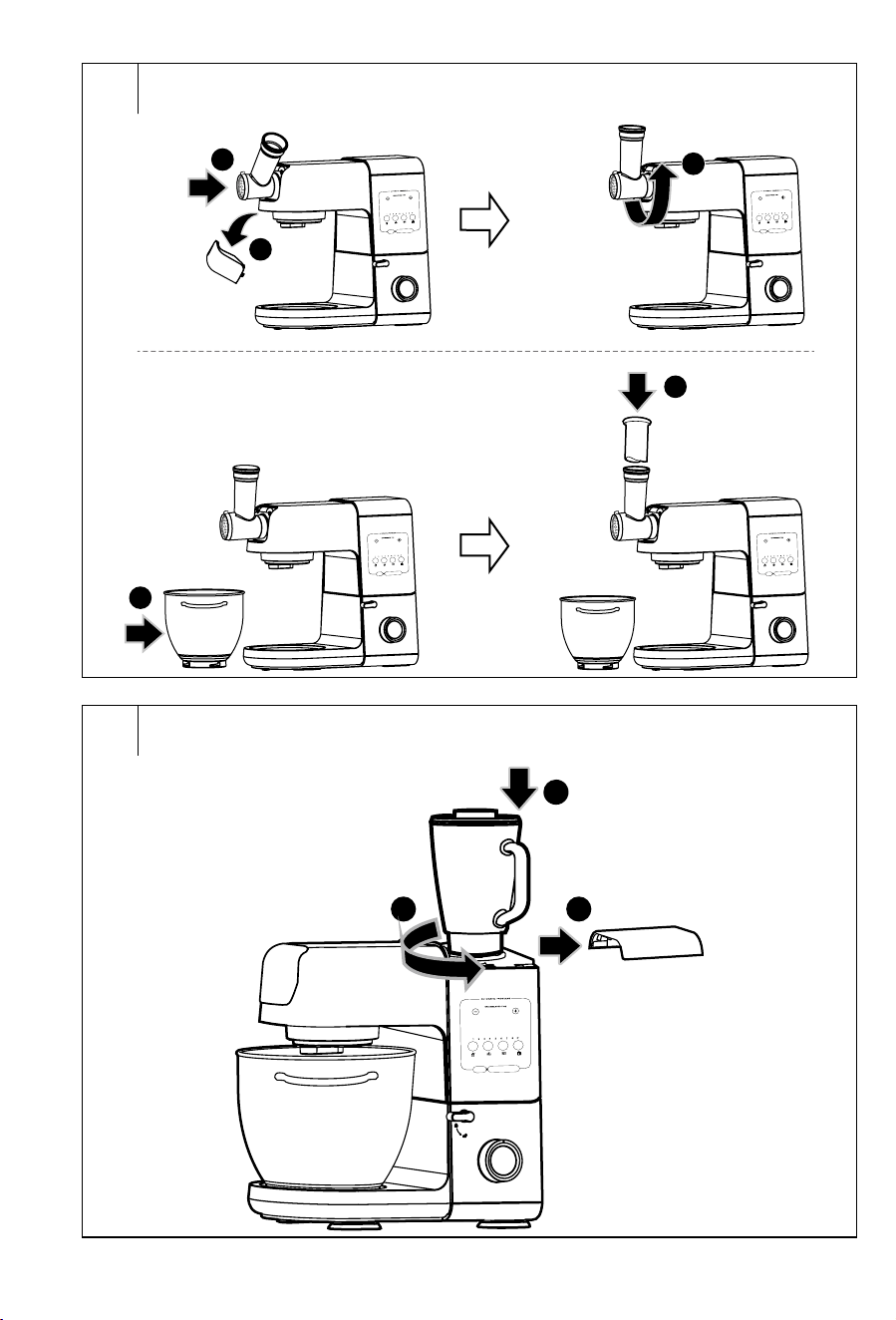
• Remove the front cover A3 from the multi-function head A1. To
remove the front cover A3, it is necessary to push down the bottom
part of the cover A3 with your index finger, which will release it and
then it can be taken off by pulling it upwards.
• Put the assembled grinder on to the front hub A4 at an angle of
approximately 45° and turn it anticlockwise all the way to secure it
in the operating position.
• Put the stainless steel hopper C4 on to the feed tube of the
grinder C2, and place asuitable container for collecting the food
underneath the grinder. You can use the stainless steel bowl A13.
When using the kibbeh maker attachment or the cookie maker
attachment, we recommend using atray.
Mincing meat
• First prepare the meat for grinding in the following way: Remove all
bones, tendons, cartilage and cut the meat into 2×2×6cm size
pieces that will freely pass through the feed tube C2.
Warning:
Do not process frozen meat. Allow it to defrost
before grinding it.
• Before connecting the multifunctional stand mixer to apower
socket, always check that it is correctly assembled according to
the instructions in this user’smanual, that the multi-function head
A1 is tilted down into the horizontal position and that the speed
control knob A11 is set to the 0 position.
• Connect the power cord to an el. power socket. Touch button B10
to set the multifunctional stand mixer to stand-by mode.
• Use the control knob A11 to set the desired speed. For meat
grinding, it is recommended to set speed level 4. Always initially
set the lowest speed and then increase it as required. The display
will show the elapsed operating time.
• Gradually place the meat pieces into the feed tube C2 and push
them in using the pusher C5. Take care not to clog up the feed tube
C2 by alarge amount of meat. Do not process more than 5kg of
meat per batch. The processing time is only several minutes.
Warning:
Never use fingers or other items to push the meat
in. For this, always use the provided pusher C5.
• Ground meat will fall into the container located underneath the
grinder. The meat that remains in the grinding chamber C1 can be
removed by grinding aslice of bread or abread roll.
• To stop the appliance, set the control knob A11 to the 0 position.
• The multifunctional stand mixer will automatically stop after
10minutes of operation, unless you turn it off by setting the control
knob A11 to the 0 position. In the event that automatic shut-off
occurred, set the speed control knob A11 back to the 0 position.
Making kibbeh
• Prepare apre-ground kibbeh meat mixture and place it on to the
hopper C4.
• Before connecting the multifunctional stand mixer to apower
socket, always check that it is correctly assembled according to
the instructions in this user’smanual, that the multi-function head
A1 is tilted down into the horizontal position and that the speed
control knob A11 is set to the 0 position.
• Connect the power cord to an el. power socket. Touch button B10
to set the multifunctional stand mixer to stand-by mode.
• Use the control knob A11 to set the desired speed. For making
kibbeh, it is recommended to set speed level 4. Always initially set
the lowest speed and then increase it as required. The display will
show the elapsed operating time.
• Gradually place the pre-ground meat mixture into the feed tube C2
and push it in using the pusher C5. The result will be ahollow meat
tube that is then cut into smaller pieces. The kibbeh is atraditional
meal from the Middle East made predominantly from ground meat
and whole grain wheat.
Warning:
Never use fingers or other items to push the meat
mixture in. For this, always use the provided
pusher C5.
• To stop the appliance, set the control knob A11 to the 0 position.
• The multifunctional stand mixer will automatically stop after
10minutes of operation, unless you turn it off by setting the control
knob A11 to the 0 position. In the event that automatic shut-off
occurred, set the speed control knob A11 back to the 0 position.
Stuffing sausage casings
• Prepare asausage casing that you will stuff with pre-ground meat
and allow it to soak in lukewarm water for approx. 10 minutes.
Place the ground meat mixture on to the hopper C4. Take the
sausage casing out of the water and skewer or tie up one end and
slide the other end like asock on to the sausage stuffer attachment
C15.
• Before connecting the multifunctional stand mixer to apower
socket, always check that it is correctly assembled according to the
instructions in this user’smanual, that the multi-function head A1 is
tilted down into the horizontal position and that the speed control knob
A11 is set to the 0 position.
• Connect the power cord to an el. power socket. Touch button B10
to set the multifunctional stand mixer to stand-by mode.
• Use the control knob A11 to set the desired speed. For stuffing
sausage casings, it is recommended to set speed level 4. Always
initially set the lowest speed and then increase it as required. The
display will show the elapsed operating time.
- 10 -
Revision 10/2023
Copyright © 2023, Fast ČR, a.s.
• With one hand hold the sausage casing on the attachment C15
and use the other hand to push the ground meat mixture with the
pusher C5 through the feed tube of the grinder C2. If the sausage
casing sticks to the attachment C15, it is necessary to moisten it
with water again.
Warning:
Never use fingers or other items to push the meat
mixture in. For this, always use the provided
pusher C5.
• To stop the appliance, set the control knob A11 to the 0 position.
• The multifunctional stand mixer will automatically stop after 10
minutes of operation, unless you turn it off by setting the control
knob A11 to the 0 position. In the event that automatic shut-off
occurred, set the speed control knob A11 back to the 0 position.
Making cookies
• Place the prepared dough on to the hopper C4.
• Slide the cookie maker C17 to the left or right to set the desired
cookie shape.
• Before connecting the multifunctional stand mixer to apower
socket, always check that it is correctly assembled according to the
instructions in this user’smanual, that the multi-function head A1 is
tilted down into the horizontal position and that the speed control knob
A11 is set to the 0 position.
• Connect the power cord to an el. power socket. Touch button B10
to set the multifunctional stand mixer to stand-by mode.
• Use the control knob A11 to set the desired speed. For making
cookies, it is recommended to set speed level 3−4. Always initially
set the lowest speed and then you can increase it as required. The
display will show the elapsed operating time.
• Use the pusher C5 to push the dough through the feed tube C2.
The result will be adough having the shape that you set using the
cookie maker C17. We recommend that you place atray or your
palm underneath the pushed out dough. Then cut the formed
dough into smaller pieces.
Warning:
Never use fingers or other items to push the dough
in. For this, always use the provided pusher C5.
• To stop the appliance, set the control knob A11 to the 0 position.
• The multifunctional stand mixer will automatically stop after 10
minutes of operation, unless you turn it off by setting the control
knob A11 to the 0 position. In the event that automatic shut-off
occurred, set the speed control knob A11 back to the 0 position.
Ending operation and disassembling the grinder
• After you have finished using the appliance, set the control knob
A11 to the 0 position and disconnect the power cord from the power
socket.
• To remove the meat grinder from the multifunctional stand mixer,
first remove the hopper C4. Then press the button A2, turn the
grinder clockwise and pull it upwards from the multi-function head
A1 to remove it. After removing the grinder, put the front attachment
hub cover A3 back in its place.
• When disassembling the meat grinder into its individual parts,
proceed in the reverse sequence.
• Clean out the used accessories after each use according to the
instructions in chapter CLEANING AND MAINTENANCE.
. . . . . . . . . . . . . . . . . . . . . . . . . . . . . . . . . . . . . . . . . . . . . . . . . . . . . . . . . . . . . . . . .
GRATING
Warning:
Before installing or removing accessories, the
multifunctional stand mixer must always be
turned off and disconnected from the power
socket.
When installing or removing agrating attachment
to the multi-function head A1, whilst the
multifunctional stand mixer is connected to the
power grid, it could happen that it is accidentally
turned on and cause serious injury.
Assembling the grating attachment (fig. D)
• Insert one of the grating cones D3, D5, D6 or D7 into the chamber
D2. Then make sure that the grating cone is inserted into the
chamber D2 in the correct direction and that it properly fits into
the chamber D2. For advice about the choice of grating cone, see
Quick guide to selecting agrating cone
Attention:
When inserting grating cone D3, D5, D6 or D7 into
the chamber D2, pay increased attention so as not
to injure yourself on the sharp edges.
• Secure the grating cone in the chamber D2 by screwing the screw
ring D4 on to the front part of the chamber D2. Pull the screw ring
D4 tight with appropriate force.
Mounting the assembled grating attachment on to the multifunctional
stand mixer (fig. K)
• Make sure that the control knob A11 is set to the 0 position and
that the multifunctional stand mixer is disconnected from the
power socket. The multi-function head A1 must be tilted down
to the horizontal position and none of the attachments A15, A16,
A17 or A19 may be mounted on it. Cover A8 must be attached in
its place.
Note:
The multifunctional stand mixer is equipped with asafety
mechanism that prevents it from being started unless the
cover A8 is properly mounted in place.
• Remove the cover A3 from the multi-function head A1. To remove
the front attachment hub cover A3, first push down the bottom
part of the cover A3 with your index finger, which will release it and
then take it off by pulling it upwards.
• Put the assembled grating attachment on to the front hub A4 at an
angle of approximately 45° and turn it anticlockwise all the way to
secure it in the operating position.
• Place an appropriate food container beneath the grating
attachment. You can use the stainless steel bowl A13.
Using the grater
• The grater is intended for processing various types of fruit,
vegetables and other foods normally used in the household.
• Prepare the ingredients and cut them into pieces that will pass
through the top feed tube D8. Certain types of fruits/vegetables will
require stones, pits, hard peels, shells, etc. to be removed before
being processed.
Attention:
Never attempt to process nut shells or hard fruit
stones.
• Before connecting the multifunctional stand mixer to apower
socket, always check that it is correctly assembled according to
the instructions in this user’smanual, that the multi-function head
A1 is tilted down into the horizontal position and that the speed
control knob A11 is set to the 0 position.
- 11 -
Revision 10/2023
Copyright © 2023, Fast ČR, a.s.
• Connect the power cord to an el. power socket. Touch button B10
to set the multifunctional stand mixer to stand-by mode.
• Use the control knob A11 to set the desired speed. For the grating
attachment, it is recommended to set speed level 6. Always
initially set the lowest speed and then increase it as required. The
display will show the elapsed operating time.
• Place the ingredients one by one into the feed tube D8. Use the
supplied pusher D1 to push ingredients through the feed tube D8.
The processing time is only several minutes.
Warning:
Never use fingers or other items to push the
ingredients in. For this, always use the provided
pusher D1.
• Always insert the individual pieces of ingredients into the feed tube,
and with appropriate force gently push down on the pusher D1.
During operation, ensure that the ingredients are passing through
the attachment by looking into the feed tube D8. Never fill the feed
tube up to its top edge with ingredients. Processing large amounts
of ingredients at once may overload the multifunctional stand
mixer. The grated ingredients will fall into the container located
beneath the grating attachment.
• To stop the appliance, set the control knob A11 to the 0 position.
• The multifunctional stand mixer will automatically stop after 10
minutes of operation, unless you turn it off by setting the control
knob A11 to the 0 position. In the event that automatic shut-off
occurred, set the speed control knob A11 back to the 0 position.
Useful advice for grating
• To achieve the best possible results, process fresh not overly
ripened fruit. The same applies to vegetables.
• Softer types of fruit can be put into the freezer for afew minutes
prior to processing. Do not process frozen food.
• Do not process soft or already grated cheese. Otherwise, the feed
tube may become clogged.
• When using the very fine or fine grating cone D3/D7 or the grating
cone for cutting slices D6, push the the food through the feed tube
D8 gently. When using the coarse grating cone D5 it is necessary
to push the ingredients through with greater force.
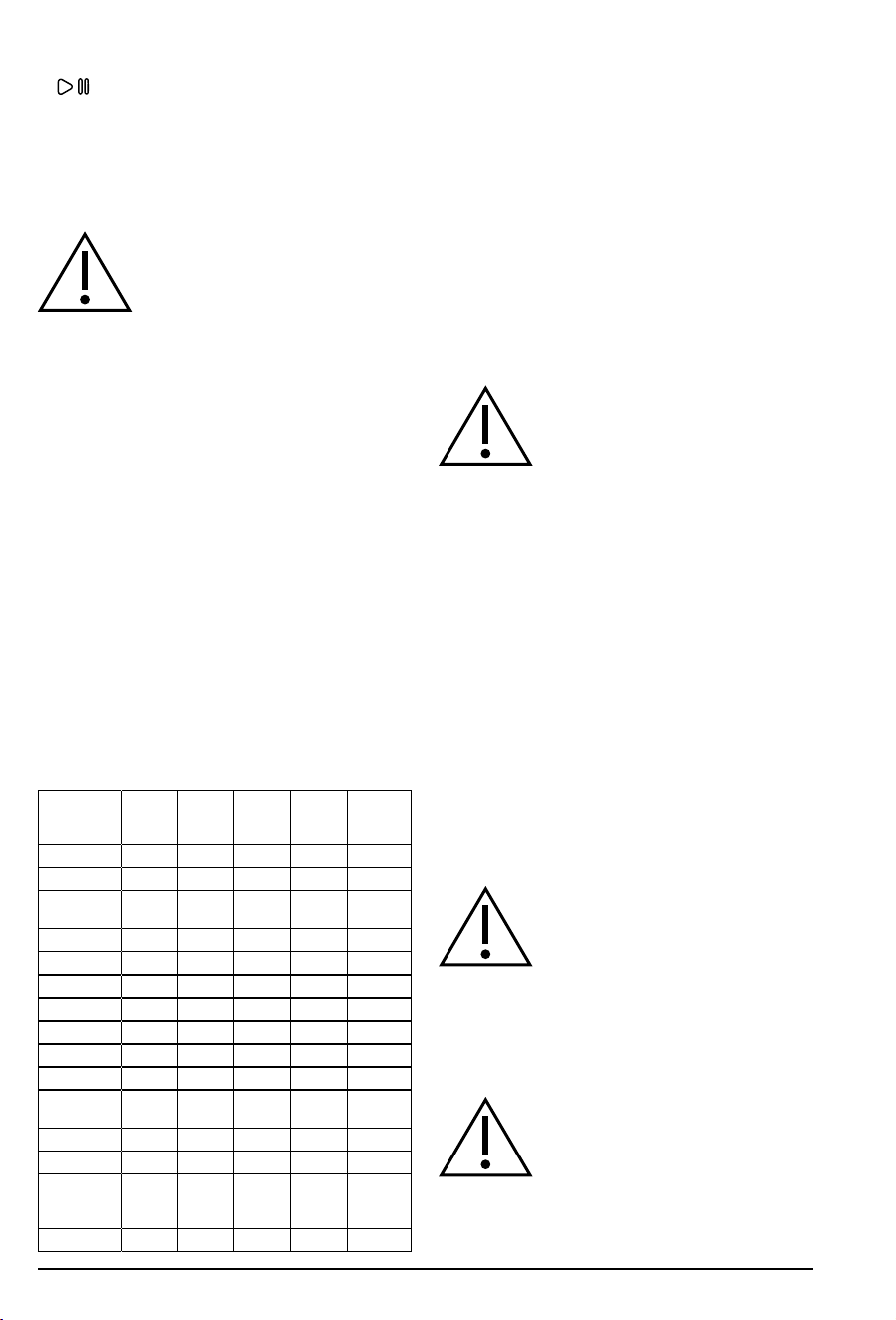
Quick guide to selecting agrating cone
Food Speed
setting
Grating
cone for
slicing D6
Coarse
grating
cone D5
Fine
grating
cone D7
Very fine
grating
cone D3
Fruit
Apples
6
Fresh coconut
pulp
6
Pears
6
Vegetables
Carrot
6
Zucchini
6
Cucumber
6
Celery
6
Onion
6
Potatoes
(smaller size)
6
Radish
6
Other foods
Hard bread
products (for
breadcrumbs)
6
Hard cheese
6
• The table provides an overview of the most frequently used food.
Ending operation and removing the grating attachment
• After you have finished using the appliance, set the control knob
A11 to the 0 position and disconnect the power cord from the power
socket.
• Touch the button A2, turn the grating attachment clockwise and
pull it upwards from the multi-function head A1 to remove it. After
removing the grating attachment, put the front attachment hub
cover A3 back in its place.
• When disassembling the grating attachment into its individual
parts, proceed in the reverse sequence.
• Clean out the used accessories after each use according to the
instructions in chapter CLEANING AND MAINTENANCE.
. . . . . . . . . . . . . . . . . . . . . . . . . . . . . . . . . . . . . . . . . . . . . . . . . . . . . . . . . . . . . . . . .
BLENDING
Warning:
Before installing or removing accessories, the
multifunctional stand mixer must always be
turned off and disconnected from the power
socket.
When installing or removing the blender to the
multi-function head A1, whilst the multifunctional
stand mixer is connected to the power grid, it
could happen that it is accidentally turned on and
cause serious injury.
Purpose of use of the blender and adding ingredients
• The blender is intended for preparing meals and drinks such as
milkshakes, creamy soups, sauces, spreads, fresh baby foods, etc.
It is not intended for juicing fruit and vegetables, preparing potato
purée, yeast dough or for whipping egg whites.
• Cut up the ingredients into equal size pieces measuring
approximately 3cm.
• Frozen ingredients (ice cubes, frozen banana, strawberries, etc.)
should not be larger than 3cm. Ice cubes must be processed
immediately upon being removed from the freezer.
• From fruit and vegetables, always remove hard peels and take
out hard stones from e.g. apricots, peaches, mangos, etc., or hard
seeds. Always remove the central core from pineapples. Otherwise
there is arisk of damaging the blender.
• If you wish to blend coconut, always blend only its pulp.
Filling the blending jar and assembling the blender
• Fill the blending jar E3 with ingredients.
Warning:
Hot steam or splattering hot foods or liquids may
cause scalding. Always pay increased attention
when handling hot liquids and foodstuffs.
The glass blending jar is resistant against heat
up to 55°C. Never place food or pour any liquids
with ahigher temperature into it, otherwise there
is arisks of the glass jar cracking, which may
subsequently lead to scalding.
For reasons of increased safety, always allow hot
foods and liquids to cool down before putting the
appliance into operation.
Attention:
The maximum capacity of the blending jar is
1.5litres. Never fill it past the maximum mark.
When processing heated liquids or liquids that
expand in volume during the blending process, do
not fill the blending jar E3 to more than 2/3 of its
maximum capacity.
• Place the outer lid E2 on to the blending jar E3 so that its edges
copy the neck of the blending jar E3, and push it down thoroughly
- 12 -
Revision 10/2023
Copyright © 2023, Fast ČR, a.s.
along its entire perimeter. Insert the inner cap E1 into the hole in the
lid E2 and ensure that it is properly seated in it.
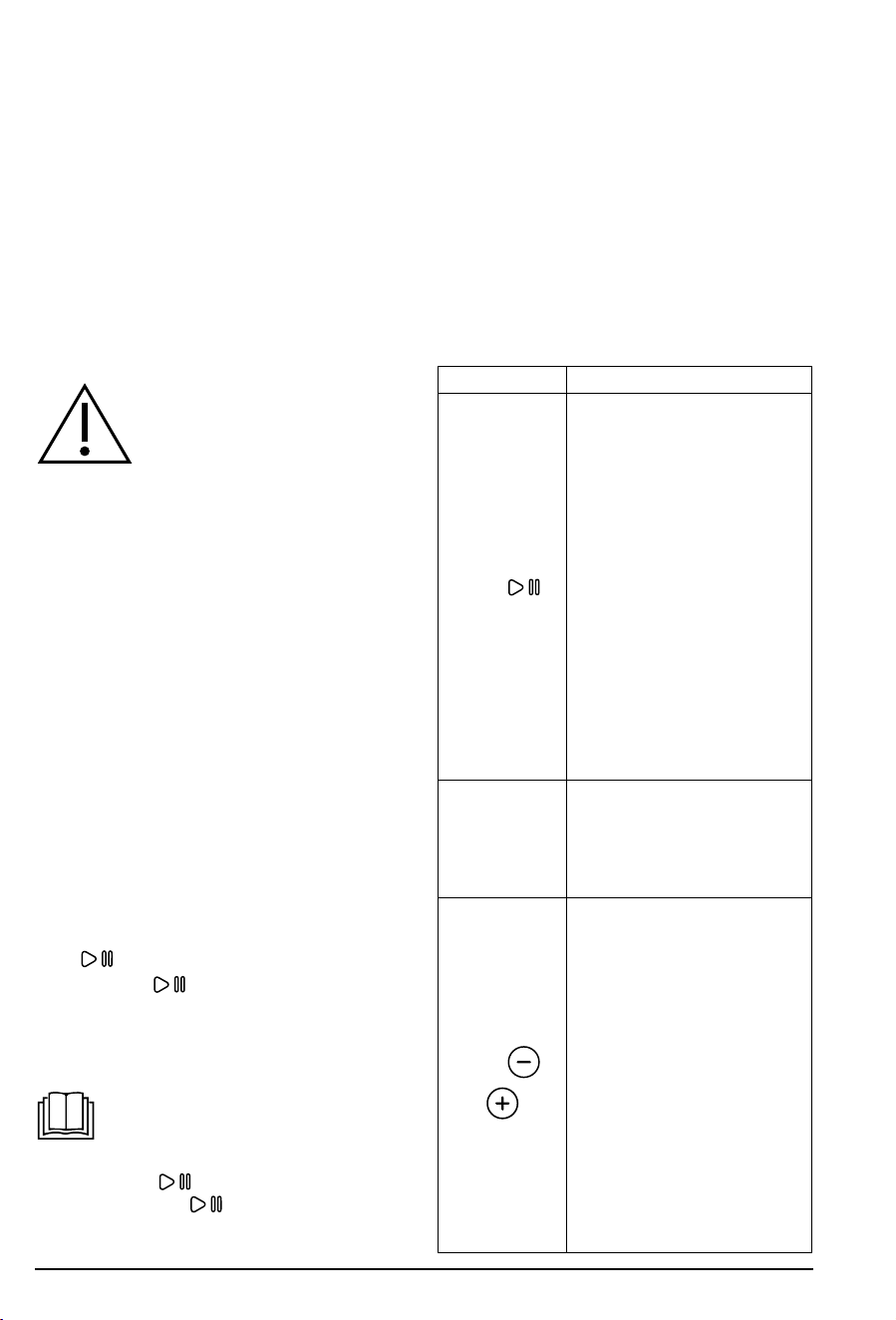
Mounting the blender on the multifunctional stand mixer (fig. L)
• Make sure that the control knob A11 is set to the 0 position and that
the multifunctional stand mixer is disconnected from the power
socket. The multi-function head A1 must be tilted down to the
horizontal position and none of the attachments A15, A16, A17 or
A19 may be mounted on it. The front attachment hub cover A3
must be attached in its place. The stainless steel bowl A13 may be
mounted on the base A6.
• Remove the top cover A8 from the multi-function head A1. Put the
properly assembled blending jar on to the top attachment hub A7
and turn it all the way towards the closed padlock symbol.
Note:
The robot is equipped with asafety mechanism that
prevents the blender from being started unless it is
correctly attached to the top attachment hub A7.
Using the blender
• Before connecting the multifunctional stand mixer to apower
socket, always check that it is correctly assembled according to
the instructions in this user’smanual, that the multi-function head
A1 is tilted down into the horizontal position and that the speed
control knob A11 is set to the 0 position.
• Connect the power cord to an el. power socket. Touch button B10
to set the multifunctional stand mixer to stand-by mode.
Preset program
• The multifunctional stand mixer has one preset program for the
blending mode.
Button Course of program:
• Speed: 1–8
During the course of the program, the rotation
speed increases and decreases and alternates
with short pauses to ensure the proper
processing of the ingredients.
• Time: 1.5 minutes
• In stand-by mode, start the work cycle for the blender with the
preset speed and duration by touching the button B8. The buttons
B9−B10, the button of the selected program B8, the speed
indicator B4 will be lit and time will count down on the display until
the preset time has elapsed.
Note:
It is not possible to adjust the speed in apreset program
while it is running. The time can be adjusted on the
control panel using buttons B2
andB3 .
The maximum time that can be set in the preset blending
program is 3 minutes.
• If you wish to pause aprogram, press button B10
. Pressing
the B10
button again will resume the program. The memory
function enables the program to be started again up 10minutes
from it being paused. After 10 minutes, the display with the control
panel A9 will turn off. Only button B10
will remain active on
the control panel.
• If you wish to end aprogram prematurely, press button B9 RESET
or the button B8 with which you started the program.
• When the program is finished, the multifunctional stand mixer
will beep and will stop operation, and it will switch to the stand-by
mode.
Manual setting
• If you do not wish to use the preset blending program, you can
set the processing speed and duration yourself. You can change
the speed setting while the appliance is running. We recommend
to start at alower speed and to increase it gradually. The
recommended food processing times and recommended speed
settings are provided in the table Quick guide to blending.
Attention:
The maximum continuous operating time in the
blending mode is 3minutes. Do not leave the
appliance in the blending mode for longer than
3minutes. Then allow the appliance to cool down
forapproximately 30minutes.
Speed setting
• Turning the speed control knob A11 to the required speed level
will start the blender. The display A9 will show the elapsed time
of operation. To stop the appliance, set the control knob A11 to the
0 position. This will switch the multifunctional stand mixer to the
stand-by mode.
• Do not leave the multifunctional stand mixer in the blending mode
for longer than 3 minutes.
Setting the speed and time of operation
• Turning the speed control knob A11 to the required speed level
will start the multifunctional stand mixer. The display A9 will start
counting down the elapsed time of operation.
• Use buttons B2
and B3 to set the desired time of
operation. Do not set atime of operation greater than 3 minutes.
The display A9 will show the time remaining until the set time has
elapsed. When the set time has elapsed, the multifunctional stand
mixer will beep, stop automatically and switch to the stand-by
mode.
• Set the speed control knob A11 back to the 0 position.
Pulse level
• If you wish to increase the speed to maximum for ashort time,
turn the control knob A11 to position P (pulse mode) and hold it
for ashort time in this position. As soon as you release the control
knob A11, it will automatically return to the 0 position. Hold the
control knob A11 in the P position only for short intervals of afew
seconds in duration.
Quick guide to blending
Ingredients
Speed
setting
Recommended
blending time
Fruit, vegetables cut into
smaller pieces
7–8 90 s
Baby food 7–8 90 s
Spreads, dressings, marinades 5–6 60 s
Smoothies and cocktails 7–8 90 s
Soups 7–8 90 s
Ice cubes P 60 s
Note:
The above food processing times are only areference. The
actual mixing time depends on the size of the ingredients,
their amount and the required final consistency.
Advice and tips for blending
• Ingredients are getting stuck on the blade assembly E4 or the walls
of the blending jar E3, stop the appliance by either touching button
B8, which was used to start the preset program, or by setting the
control knob A11 to the 0 position (in the manual setting).
Attention: Ending the operation of the appliance will cancel all
previous settings.
• Make sure that the control knob A11 is set to the 0 position and
disconnect the multifunctional stand mixer from the power socket.
- 13 -
Revision 10/2023
Copyright © 2023, Fast ČR, a.s.
• Make sure that the blade assembly E4 has stopped rotating.
Carefully remove the assembled blending jar from the multi-
function head A1 by turning it towards the opened padlock symbol
and then lifting it upwards. Open the lid E2 and use aplastic
spatula to clean the blade assembly E4 and the walls of the
blending jar E3. Make sure that there are only ingredients suitable
for processing located inside the blending jar E3. Put the lid E2
back on and reattach the blender assembly to the multi-function
head A1. Connect the power cord to apower socket and make the
manual settings again or select the preset blending program and
adjust the blending time in the appropriate manner.
• When processing heated liquids, do not remove the inner cap E1
during operation.
• When processing heated liquids or liquids that expand in volume
during the blending process, do not fill the blending jar to more
than 2/3 of its maximum capacity.
• First, blend asmaller amount of ingredients and then gradually add
more ingredients through the hole in the lid while blending. In this
way, you will achieve better results than by adding all ingredients
into the blending jar at once.
• If you need to blend food of asolid consistency together with
liquids, we recommend that you first blend the food of solid
consistency and apart of the liquids. Then gradually add the
remaining liquids through the hole in the lid while blending.
• To blend very thick liquids, we recommend using the pulse level so
that the blade assembly does not jam. Start the blender repeatedly
in short intervals.
• Ice cubes must be processed immediately upon being removed
from the freezer. When the ice starts to melt, the ice cubes will stick
together and it will not be possible to blend them.
• Do not process dried fruit, coffee beans, nuts, grains, etc. for longer
than 1minute.
Ending operation and disassembling the blender
• After you have finished using the appliance, set the control knob
A11 to the 0 position and disconnect the power cord from the power
socket.
• Make sure that the blade assembly E4 has stopped rotating and
carefully remove the blending jar assembly from the multi-function
head A1 by turning it towards the opened padlock symbol and then
lifting it upwards. Properly mount the top attachment hub cover A8
back in its place.
• When disassembling the blending jar into its individual parts,
proceed in the reverse sequence to its assembly. Use asoft plastic
spatula to remove food from the blending jar E3.
• Clean out the used accessories after each use according to the
instructions in chapter CLEANING AND MAINTENANCE.
. . . . . . . . . . . . . . . . . . . . . . . . . . . . . . . . . . . . . . . . . . . . . . . . . . . . . . . . . . . . . . . . .
CLEANING AND MAINTENANCE
Warning:
Before carrying out any cleaning or maintenance,
always set the control knob A11 to the 0 position,
disconnect the appliance from the power grid and
allow it to cool down completely.
Never use chemicals, dishwashing abrasive wool,
steel wool or cleaning products with abrasive
components for cleaning. Otherwise the surface of
the appliance or its accessories may be damaged.
Never rinse the multifunctional stand mixer or its
power cord under water or submerge it in water.
NEITHER the multifunctional stand mixer NOR
any parts of its accessories are designed to be
washed in adishwasher!
• Prior to cleaning them, it is always necessary to remove the
removable accessories from the multi-function head A1 and then to
disassemble them if they comprise of multiple parts.
• Thoroughly wash all removable parts that came into contact
with food in hot water using neutral dishwashing detergent. If you
whisked egg whites, first rinse the stainless steel bowl A13 and the
used whisk A16 under cold water. If you were to use hot water, the
egg white remains would harden and their removal would be more
difficult. When cleaning the blending jar E3, proceed according to
the procedure described below.
• Clean the blending jar E3 by filling it with 0.5litre of clean water
and 1-2 drops of kitchen detergent and then assemble the blender
and run it for 10 to 15 seconds. Then turn off the multifunctional
stand mixer, disconnect it from the power socket, and after the
rotating parts have come to astop, remove the blending jar
assembly. Empty out the contents of the blending jar E3 and
then thoroughly rinse out the blending jar E3 with clean water.
If the outer surface of the glass blending jar E3 is soiled, rinse it
under hot running water whilst using neutral kitchen detergent
and then wash it under clean running water. Attention: When
cleaning, make sure that no water enters into the underside of
the blending jar E5 by which it is connected to the multifunctional
stand mixer. Carefully dry any moisture or always allow it to dry
out completely. Allow the internal area of the blending jar E3 to dry
out completely and dry the outer surface of the glass blending jar
E3 using awiping cloth.
• Rinse the removable parts that you washed with the kitchen
detergent using clean water and allow them to dry naturally or
carefully wipe them dry using afine wiping cloth.
Attention:
When cleaning the inside of the blending jar with
the blade assembly E4, the grinding plates C8−
C10, grinding blade C7, screw shaft C6 and graters
D3, D5−D7, pay increased attention so as not to
injure yourself on the blades or sharp edges.
• Clean the outer surface of the multifunctional stand mixer using
only alightly dampened cloth. While doing this, take care that no
water enters into the control knob A11.
• Only clean the front attachment hub A4 and the top attachment
hub A7 using aclean wiping cloth.
• Only clean the power cord of the multifunctional stand mixer using
adry wiping cloth.
. . . . . . . . . . . . . . . . . . . . . . . . . . . . . . . . . . . . . . . . . . . . . . . . . . . . . . . . . . . . . . . . .
STORAGE
• Always make sure that the control knob A11 is set to the 0 position
and that the multifunctional stand mixer is disconnected from the
power socket. Clean the multifunctional stand mixer and all of its
accessories that were used according to the instructions described
in chapter CLEANING AND MAINTENANCE. Prior to to storage,
the multifunctional stand mixer and its accessories must be clean.
Likewise, make sure that the accessories are completely dry.
• Place and thoroughly mount the stainless steel bowl A13 into the
base A6. Tilt the multi-function head A1 to the horizontal position.
Store the multifunctional stand mixer and all of its accessories in
aclean, dry place out of the reach of children and animals.
Attention:
Keep the multifunctional stand mixer away
from extreme temperatures, direct sunlight
and excessive humidity and do not store it in
an overly dusty environment. Do not place the
multifunctional stand mixer on its side. During
storage, do not leave the removable accessories
(blender, meat grinder, grating attachment)
mounted on the multi-function head A1. Do not
place anything on top of the stored multifunctional
stand mixer.
. . . . . . . . . . . . . . . . . . . . . . . . . . . . . . . . . . . . . . . . . . . . . . . . . . . . . . . . . . . . . . . . .
- 14 -
Revision 10/2023
Copyright © 2023, Fast ČR, a.s.
TECHNICAL SPECIFICATIONS
Rated voltage range ..........................................................................220−240 V
Rated frequency ....................................................................................50/60 Hz
Rated power input .....................................................................................1,800 W
Weight (without accessories) .................................................................. 10.5 kg
Total volume of the stainless steel bowl ....................................................6.7 l
Maximum filling capacity of the stainless steel bowl ............................ 4.5l
The maximum filling capacity of the glass blending jar ........................ 1.5l
Maximum time of continuous operation .......................................10 minutes
Maximum time of continuous operation of the blender ............. 3 minutes
Cooling time between two operation cycles ..............................30 minutes
Noise level .................................................................................................85 dB(A)
The declared noise emission level of the appliance is 85 dB(A), which
represents alevel Aof acoustic power with respect to areference
acoustic power of 1 pW.
Changes to text and technical parameters are reserved.
. . . . . . . . . . . . . . . . . . . . . . . . . . . . . . . . . . . . . . . . . . . . . . . . . . . . . . . . . . . . . . . . .
INSTRUCTIONS AND INFORMATION REGARDING THE DISPOSAL
OF USED PACKAGING MATERIALS
Dispose of used packaging material at asite designated for waste in
your municipality.
DISPOSAL OF USED ELECTRICAL AND ELECTRONIC EQUIPMENT
This symbol on products or original documents means
that used electric or electronic products must not be
added to ordinary municipal waste. For proper disposal,
renewal and recycling, hand over these products at
determined collection points. Alternatively, in some
European Union states or other European countries
you may return your products to the local retailer when
buying an equivalent new product.
Correct disposal of this product helps save valuable natural resources
and prevents potential negative effects on the environment and
human health, which could result from improper waste disposal. Ask
your local authorities or collection facility for more details.
In accordance with national regulations penalties may be imposed for
the incorrect disposal of this type of waste.
For business entities in European Union states
If you want to dispose of electrical or electronic equipment, ask your
retailer or supplier for the necessary information.
Disposal in other countries outside the European Union.
This symbol is valid in the European Union. If you wish to dispose
of this product, request the necessary information about the correct
disposal method from the local council or from your retailer.
This product meets all the basic requirements of EU
directives related to it.

FAST ČR, a.s.
U Sanitasu 1621
CZ-251 01 Říčany
www.sencor.eu