ORGBRO
USER’S GUIDE
Thermal printer
BENUTZERHANDBUCH
Thermodrucker
GUIDE DE L'UTILISATEUR
Imprimante thermique
GUIDA UTENTE
Stampante termica
X3
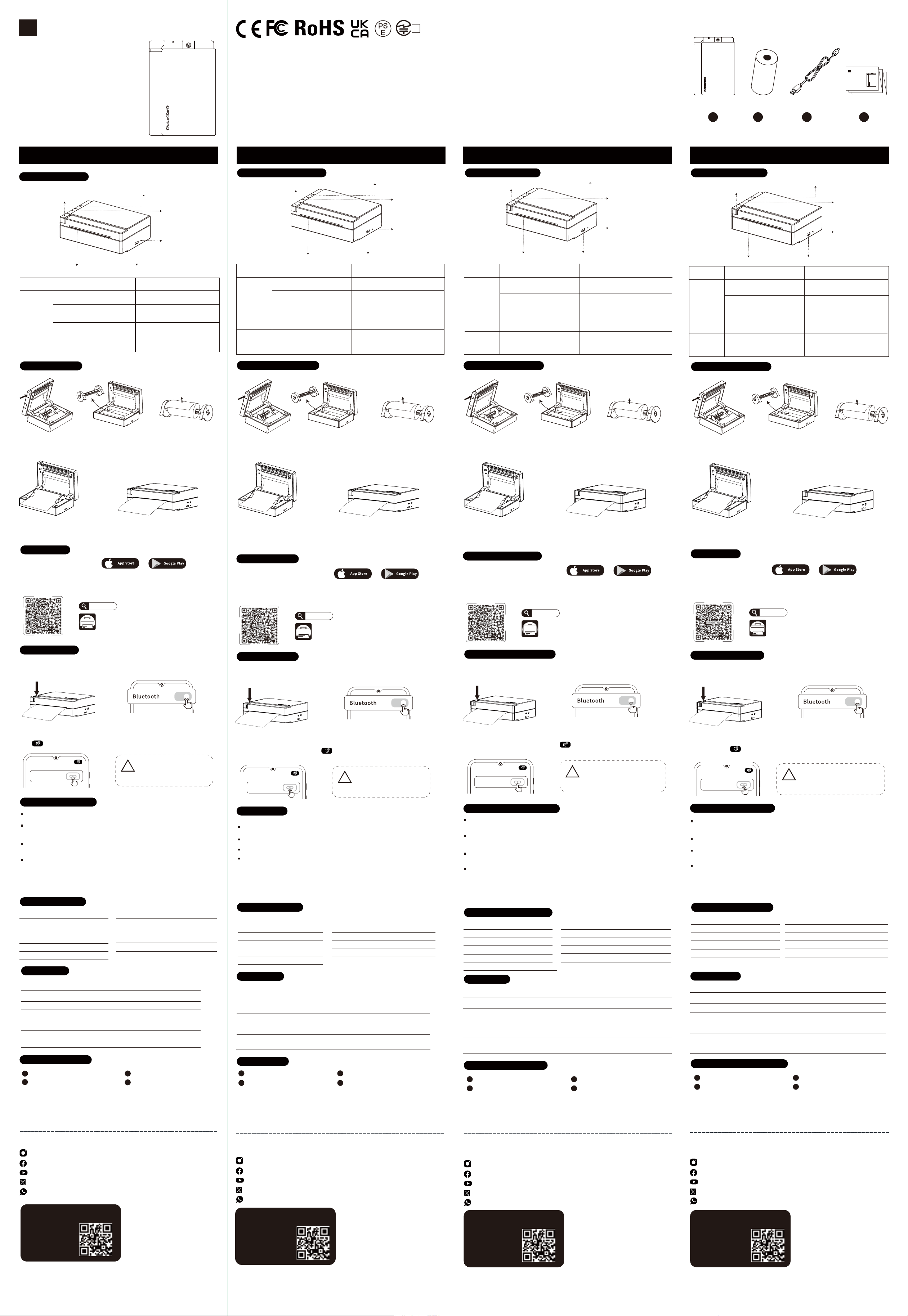
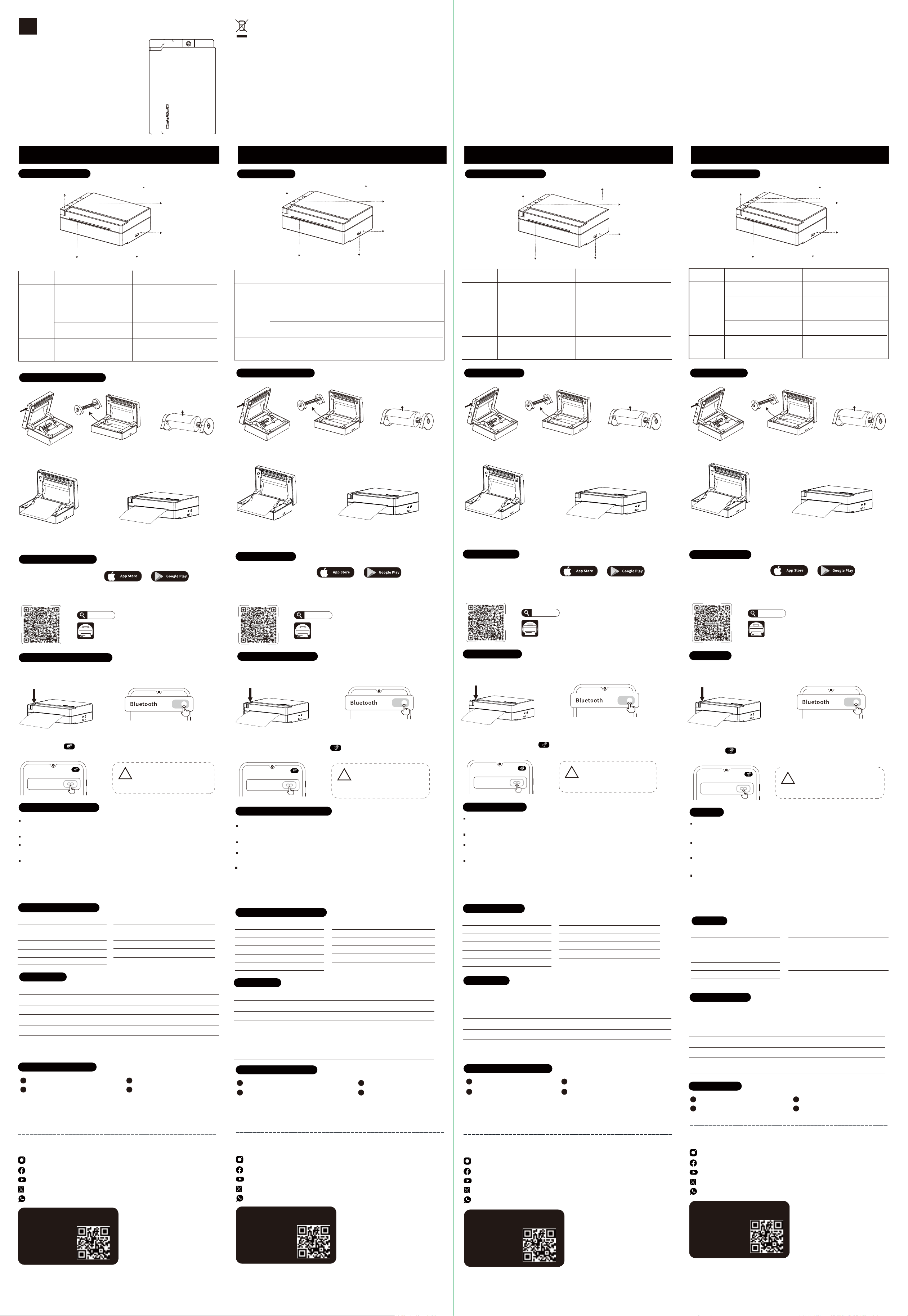
General Description
Thermal printer Thermal labels*1Rolls
Type-C charging cable
User's Guide
Included in Package
App Connection
Label Installation
Download App
Support: iOS/Android
Snap & Tag
Snap & Tag
Scan the QR code or search for "Snap & Tag" in your app store to
install the application.
Snap & Tag
Product Information
Brand ORGBRO Name Thermal printer
Model X3 Connection Bluetooth
Resolution 300 DPI Support Android/iOS
Charging Port Type-C Product Size 120x84x40.26 mm
Battery Capacity 1000 mAh Maximum Label Width 80mm
Label type Continuous tape
If the product has quality problems
or any suggestions, please contact
us promptly through the after-sales
service e-mail, we will give you a
satisfactory answer.
support@orgbro.com
support@orgbro.com
support@orgbro.com
support@orgbro.com
Return and exchange instructions:
Returns and exchanges please ensure that the goods are intact and do not
affect the sale; we will provide you with service as soon as possible after
receiving the request.
Scan code to
register - Free
6 months
warranty!
WARRANTY CARD
Instagram: orgbro_printer
Facebook: ORGBROPrinter
YouTube: @ORGBRO_Printer
X: orgbro_printer
WhatsApp: +86 13246387664
Follow our official social media to unlock exclusive perks!
---------------------------------------------------
Charging Instructions
Input: 5V 1A. We recommend using a USB cell phone charger or similar device.
Recommended charging time: 1.5 hours.
Attention!
This product does not include a power adapter. To charge the device, you will
need to purchase a compatible adapter. Choose an adapter with an output of 5V
1A for optimal performance and safety.
ENGLISH
1 2
4
3
DEUTSCH FRANÇAIS ITALIANO
EVATOST CONSULTING LTD
Office 101 32 Threadneedle Street, London,
United Kingdom, EC2R 8AY
(1) Open the cover.
This side is facing up.
(2) Take out the label
roll holder.
(3) Remove the right guide,
load the paper roll onto
the roll holder, making sure
the paper feeds in the
correct direction.
(4) Put the label roll back
into the X3 printer .
!
NOTE
2. Open the "Snap & Tag" app, tap the icon in the top left corner to select X3. Then,
tap " " in the top right corner. Select your device from the list that appears.
1. Power on the device by pressing and holding the power button, and enable
Bluetooth on your phone.
X3
X3
X
X
Android requires Location
Services to be
enabled to find nearby
Bluetooth devices.
To maintain optimum battery health, we recommend charging your lithium
battery every three months, even if it's not fully drained.
For optimal performance, we recommend fully charging the battery when
you first use the device.
(5) Reload the label paper into the
X3 printer, pull out the label, then
close the cover.
Allgemeine Beschreibung
Thermodrucker Thermoetiketten*1 Rolle
Type-C-Ladekabel Benutzerhandbuch
Lieferumfang
App-Verbindung
Montage-Etikettenband
App herunterladen
Unterstützung: iOS/Android
Snap & Tag
Snap & Tag
Scannen Sie den QR-Code oder suchen Sie im App Store nach
"Snap & Tag".
Snap & Tag
Produktinformation
Marke ORGBRO Name Thermodrucker
Modell X3 Verbindung Bluetooth
Auflösung 300 DPI Unterstützung Android/iOS
Ladeanschluss Type-C Produktgröße 120x84x40,26 mm
Batteriekapazität 1000 mAh Maximale Etikettenbreite 80mm
Etikettenart Endlosband
Ladehinweise
Eingang: 5V 1A. Empfohlen wird ein USB-Handyladegerät oder ähnliches.
Empfohlene Ladezeit: 1,5 Stunden.
Achtung!
Netzteil nicht im Lieferumfang enthalten. Zum Laden muss ein kompatibles
Netzteil gekauft werden. Verwenden Sie ein Netzteil mit 5V 1A Ausgangsleis-
tung für optimale Sicherheit und Leistung.
(1) Öffnen Sie die
Abdeckung.
Diese Seite zeigt
nach oben.
(2) Nehmen Sie den
Etikettenrollenhalter
heraus.
(4) Legen Sie die
Etikettenrolle wieder
in den X3-Drucker ein.
!
NOTE
2. "Snap & Tag"-App öffnen, oben links auf das Symbol tippen und X3
auswählen. Dann oben rechts auf " " tippen. Wählen Sie Ihr Gerät aus der
angezeigten Liste.
1. Gerät durch langes Drücken der Einschalttaste einschalten und Bluetooth am
Smartphone aktivieren.
X3
X3
X
X
Android benötigt aktivierte
Standortdienste, um
Bluetooth-Geräte in der
Nähe zu finden.
Papierausgang
Batteriewartung: Bei Nichtnutzung alle 3 Monate nachladen.
Erstnutzung: Batterie für optimale Leistung vollständig laden.
(5) Legen Sie das Etikettenpapier
wieder in den X3-Drucker ein, ziehen
Sie das Etikett heraus und schließen
Sie die Abdeckung.
Description Générale
Imprimante Thermique Étiquettes thermiques*1 rouleau
Câble de Chargement Type-C Guide de l'Utilisateur
Contenu de l'Emballage
Connexion à l'Application
Étiquettes de Montage
Télécharger l'application
Prise en charge : iOS/Android
Snap & Tag
Snap & Tag
Scannez le code QR ou recherchez "Snap & Tag" dans votre magasin
d'applications pour l'installer.
Snap & Tag
Informations sur le Produit
Marque ORGBRO Nom Imprimante thermique
Modèle X3 Connexion Bluetooth
Résolution 300 PPP (DPI) Soutien Android/iOS
Port de Chargement Type-C Taille du Produit 120 x 84 x 40,26 mm
Capacité Batterie 1000 mAh Largeur Maximale des étiquettes 80 mm
Type d'étiquette Ruban continu
Instructions de Chargement
Entrée : 5V 1A. Nous recommandons d'utiliser un chargeur USB de téléphone ou
un appareil similaire.
Temps de charge recommandé : 1,5 heure.
Attention !
Ce produit ne comprend pas d'adaptateur secteur. Pour charger l'appareil, vous
devrez acheter un adaptateur compatible. Choisissez un adaptateur avec une
sortie de 5V 1A pour des performances et une sécurité optimales.
(1) Ouvrez le capot.
Ce côté est tourné
vers le haut.
(2) Retirez le support
de rouleau d'étiquettes.
(4) Remettez le rouleau
d'étiquettes dans
l'imprimante X3.
!
NOTE
2.Ouvrez l'application "Snap & Tag", appuyez sur l'icône en haut à gauche pour
sélectionner X3. Ensuite, appuyez sur " " en haut à droite. Sélectionnez votre
appareil dans la liste qui apparaît.
1. Allumez l'appareil en maintenant le bouton d'alimentation enfoncé, et activez le
Bluetooth sur votre téléphone.
X3
X3
X
X
Android nécessite l'activation
des Services de localisation
pour trouver les appareils
Bluetooth à proximité.
Sortie papier
Entretien de la Batterie : Rechargez tous les 3 mois si non utilisée pour
préserver sa santé.
Première Utilisation : Chargez complètement la batterie pour des performanc-
es optimales.
(5) Rechargez le papier d'étiquettes
dans l'imprimante X3, retirez
l'étiquette, puis fermez le capot.
Descrizione Generale
Stampante Termica Etichette termiche*1 rotolo
Cavo di Ricarica Type-C Guida Utente
Contenuto della Confezione
Connessione all'App
Installazione Etichette
Scaricare l'App
Supporto: iOS/Android
Snap & Tag
Snap & Tag
Scansionare il codice QR o cercare "Snap & Tag" nel vostro app store
per installare l'applicazione.
Snap & Tag
Informazioni sul Prodotto
Marca ORGBRO Nome Stampante termica
Modello X3 Connessione Bluetooth
Risoluzione 300 PPI (DPI) Supporto Android/iOS
Porta di Ricarica Type-C Dimensioni Prodotto 120×84×40,26 mm
Capacità Batteria 1000 mAh Larghezza Massima Etichette 80 mm
Tipo Etichetta Nastro continuo
Istruzioni per la Ricarica
Ingresso: 5V 1A. Si consiglia di utilizzare un caricatore USB per telefoni o
dispositivo simile.
Tempo di ricarica consigliato: 1,5 ore.
Attenzione!
Questo prodotto non include un adattatore di alimentazione. Per ricaricare il
dispositivo, sarà necessario acquistare un adattatore compatibile. Scegliere un
adattatore con un'uscita di 5V 1A per prestazioni e sicurezza ottimali.
(1) Aprire il coperchio.
Questo lato è rivolto
verso l'alto.
(2) Estrarre il supporto
del rotolo di etichette.
(4) Reinserire il rotolo di
etichette nella stampante X3.
!
NOTE
2. Aprire l'app "Snap & Tag", toccare l'icona in alto a sinistra per selezionare X3.
Quindi toccare " " in alto a destra. Selezionare il dispositivo dall'elenco
visualizzato.
1.Accendere il dispositivo tenendo premuto il pulsante di alimentazione e attivare il
Bluetooth sul telefono.
X3
X3
X
X
Su Android è necessario
attivare i Servizi di localizzazi-
one per rilevare dispositivi
Bluetooth nelle vicinanze.
Uscita carta
Manutenzione batteria: Ricaricare ogni 3 mesi se non utilizzata per
preservarne la salute.
Primo utilizzo: Caricare completamente la batteria per prestazioni ottimali.
(5) Ricaricare la carta per etichette
nella stampante X3, estrarre
l'etichetta, quindi chiudere il
coperchio.
Bei Qualitätsproblemen oder
Anregungen kontaktieren Sie uns
bitte umgehend per
After-Sales-E-Mail. Wir geben Ihnen
zufriedenstellende Antwort.
Rücksendebedingungen:
Ware muss unbeschädigt und in verkaufsfähigem Zustand sein. Wir
bearbeiten Anfragen schnellstmöglich.
GARANTIEKARTE
Code scannen für
Registrierung - 6
Monate kostenlose
Garantie.
Instagram: orgbro_printer
Facebook: ORGBROPrinter
YouTube: @ORGBRO_Printer
X: orgbro_printer
WhatsApp: +86 13246387664
Folgen Sie uns in sozialen Medien für exklusive Angebote!
---------------------------------------------------
Si le produit présente des problèmes
de qualité ou si vous avez des
suggestions, veuillez nous contacter
rapidement via l'e-mail du service
après-vente, nous vous donnerons une
réponse satisfaisante.
Instructions de retour et d'échange :
Les retours et échanges doivent s'effectuer avec les marchandises
intactes et sans affecter la revente ; nous vous fournirons un service
dès que possible après réception de la demande.
Scannez le code
pour vous
inscrire -
Garantie gratuite
de 6 mois
CARTE DE GARANTIE
Instagram: orgbro_printer
Facebook: ORGBROPrinter
YouTube: @ORGBRO_Printer
X: orgbro_printer
WhatsApp: +86 13246387664
Suivez nos réseaux sociaux officiels pour débloquer
des avantages exclusifs !
---------------------------------------------------
Scansiona il codice
per registrarti -
Garanzia gratuita
di 6 mesi
CARTA DI GARANZIA
Instagram: orgbro_printer
Facebook: ORGBROPrinter
YouTube: @ORGBRO_Printer
X: orgbro_printer
WhatsApp: +86 13246387664
---------------------------------------------------
Se il prodotto presenta problemi di
qualità o suggerimenti, contattaci
tempestivamente tramite l'e-mail del
servizio post-vendita, ti daremo una
risposta soddisfacente.
Istruzioni per resi e cambi:
I resi e i cambi si prega di assicurarsi che la merce sia intatta e non
influenzi la vendita; ti forniremo il servizio il prima possibile dopo aver
ricevuto la richiesta.
Seguici sui nostri social media ufficiali per
sbloccare vantaggi esclusivi!
SUCCESS COURIER SL
CALLE RIO TORMES NUM.1, PLANTA 1, DERECHA,
OFICINA 3, Fuenlabrada,Madrid,28947 Spain
SUCCESS COURIER SL
CALLE RIO TORMES NUM.1, PLANTA 1, DERECHA,
OFICINA 3, Fuenlabrada,Madrid,28947 Spain
SUCCESS COURIER SL
CALLE RIO TORMES NUM.1, PLANTA 1, DERECHA,
OFICINA 3, Fuenlabrada,Madrid,28947 Spain
(3) Entfernen Sie die rechte
Führung, legen Sie die Papierrolle
auf den Rollenhalter und achten
Sie darauf, dass das Papier in die
richtige Richtung einzieht.
(3) Retirez le guide droit,
chargez le rouleau de papier
sur le support de rouleau, en
vous assurant que le papier
s'alimente dans le bon sens.
(3) Rimuovere la guida destra,
caricare il rotolo di carta sul
supporto, assicurandosi che
la carta scorra nella direzione
corretta.
1
2
3 4
1
2
3
4
1
2
3 4
1
2
3 4
ORGBRO
USER’S GUIDE
Thermal printer
BENUTZERHANDBUCH
THERMODRUCKER
GUIDE DE L'UTILISATEUR
IMPRIMANTE THERMIQUE
GUIDA UTENTE
STAMPANTE TERMICA
X3
INNOVATION, SCIENCE AND ECONOMIC DEVELOPMENT CANADA NOTICE:
PMN: Thermal printer HVIN: X3
This device complies with Innovation, Science and Economic Development Canada licence-exempt RSS
standard(s).
Operation is subject to the following two conditions:
(1) This device may not cause interference.
(2) This device must accept any interference, including interference that may cause undesired operation
of the device.
ThedevicehasbeenevaluatedtomeetgeneralRFexposurerequirement.
Thedevicecanbeusedinportable exposureconditionwithoutrestriction.
Le présentappareilestconforme aux CNR Innovation,SciencesetDéveloppementéconomiqueCanada
Canadaapplicables aux appareils radio exempts de licence. L'exploitationestautorisée aux deux conditions
suivantes:
(1) l'appareil ne doit pas produire de brouillage,
(2) l'utilisateur de l'appareildoit accepter tout brouillageradioélectriquesubi, mêmesi le brouillageest
susceptible d'encompromettre le fonctionnement.
le dispositif a été évalué à satisfaire l'exigence générale de l'exposition aux rf.
l'appareil peut être utilisé dans des conditions d'exposition portatif sans restriction.
FCC STATEMENT : This device complies with Part 15 of the FCC Rules. Operation is subject to the
following two conditions: This device may not cause harmful interference, and this device must accept any
interference received, including interference that may cause undesired operation.
WARNING: Changes or modifications not expressly approved by the party responsible for compliance could
void the user's authority to operate the equipment.
NOTE: This equipment has been tested and found to comply with the limits for a Class B digital device,
pursuant to Part 15 of the FCC Rules. These limits are designed to provide reasonable protection against
harmful interference in a residential installation. This equipment generates uses and can radiate radio
frequency energy and, if not installed and used in accordance with the instructions, may cause harmful
interference to radio communications. However, there is no guarantee that interference will not occur in a
particular installation. If this equipment does cause harmful interference to radio or television reception,
which can be determined by turning the equipment off and on, the user is encouraged to try to correct the
interference by one or more of the following measures:
Reorient or relocate the receiving antenna.
Increase the separation between the equipment and receiver.
Connect the equipment into an outlet on a circuit different from that to which the receiver is
connected.
Consult the dealer or an experienced radio/TV technician for help.
RF WARNING STATEMENT: The device has been evaluated to meet general RF exposure requirement. The
device can be used in portable exposure condition without restriction.
R
220-J10104
Button
Power
Button
Power on/off. Press and hold for 2s.
Double-press.
Triple-press.
Reset Key
Perform a forced shutdown
if it's behaving abnormally.
Insert a pin into the reset
hole and press once.
Print SN (Serial Number).
Print Bluetooth connection
QR code and self-test page.
Function Operating Instruction
LED Indicator
Power Button
Reset Key
Charging Port
Open-cover Button
Taste
Ein-/Aus-
Taste
Ein-/Ausschalten. 2 Sekunden lang gedrückt halten.
Zweimal drücken.
Dreimal drücken
Reset-Taste
Durchführen einer
erzwungenen Abschaltung
bei abnormalem Verhalten.
Eine Nadel in die Reset-Öffnung
stecken und einmal drücken.
Print SN (Serial Number).
Drucken Sie den Bluetooth-
Verbindungs-QR-Code und
die Selbsttestseite.
Funktion Bedienung sanleitung
Reset-Taste
Ladeans-chluss
LED-Anzeige
Ein-/Aus-Taste
Taste zum Öffnen
der Abdeckung
LED-Anzeige
Langsam grün blinkend Wird im ausgeschalteten Zustand geladen.
Licht aus Vollständig geladen./Gerät aus.
Rot blinkend Batteriestand unter 5%.
Rotes Licht Kein Papier/ Abdeckung offen.
Grünes Licht Funktioniert normal.
Touche de
réinitialisa-
tion
Port de Chargement
Voyant LED
Bouton d'alimentation
Bouton d'ouverture
du couvercle
Bouton
Bouton d'
alimentation
Mise sous/hors tension.
Appuyez et maintenez enfoncé-
pendant 2 secondes.
Appuyez deux fois.
Appuyer trois fois
Touche de
réinitialisa-
tion
Arrêt forcé en cas de
fonctionnement anormal.
Insérez une épingle dans le trou
de réinitialisation et appuyez
une fois.
Imprimer le SN
(numéro de série).
Imprimer le QR Code de
connexion Bluetooth et la
page d'auto-test.
Fonction Mode d'emploi
Lumière verte clignotant lentement En charge/appareil éteint
Lumière éteinte Complètement chargé / Appareil éteint
Lumière rouge clignotante Batterie inférieure à 5%.
Lumière rouge Plus de papier/Couvercle ouvert
Lumière verte Fonctionnement normal
Voyant LED
Tasto di ripristino
Porta di ricarica
Indicatore LED
Pulsante di accensione
Pulsante di apertura
coperchio
Pulsante
Pulsante di
accensione
Accensione/spegnimento.
Tenere premuto per 2 secondi.
Premere due volte.
Premere tre volte.
Tasto di
ripristino
Esegue uno spegnimento
forzato in caso di
funzionamento anomalo.
Inserire uno spillo nel foro di
reset e premere una volta.
Stampare il numero di
serie (NS).
Stampi il QR Code di
connessione Bluetooth e la
pagina di autotest.
Funzione Istruzioni per l'uso
Luce verde che lampeggia lentamente In carica (dispositivo spento)
Luce spenta Batteria carica / Dispositivo spento
Luce rossa lampeggiante Batteria inferiore al 5%
Luce rossa Carta esaurita/Coperchio aperto
Luce verde Funzionamento normale
Indicatore LED
LED Indicator
Green light flashing slowly Charging while device off.
Light is off Fully charged /Device off.
Alternating green and
red flashing lights.
Print head overheated.
Operation will resume after cooling.
Red light flashing Battery below 5%.
Red light Out of paper/Cover is open.
Green light Working properly.
Grüne und rote Lichter
leuchten abwechselnd auf.
Druckkopf überhitzt. Der Betrieb wird nach
dem Abkühlen automatisch fortgesetzt.
Les voyants vert et rouge
clignotent en alternance.
Tête d'impression en surchauffe. Fonctionnement
automatiquement repris après refroidissement.
Le luci verde e rossa si
accendono alternativamente.
Testina di stampa surriscaldata. Il
funzionamento riprenderà automa-
ticamente dopo il raffreddamento.
Paper Outlet
ORGBRO
GUÍA DEL USUARIO
Impresora térmica
GUIA DO UTILIZADOR
Impressora térmica
GEBRUIKERSHANDLEIDING
Thermische printer
ユーザーガイド
サーマルプリンター
X3
Descripción General
Impresora Térmica Etiquetas térmicas*1 rollo
Cable de Carga Tipo-C Guía del Usuario
Incluido en el Paquete
Conexión de la Aplicación
Instalación de Etiquetas
Descargar la Aplicación
Soportado: iOS/Android
Snap & Tag
Snap & Tag
Escanee el código QR o busque "Snap & Tag" en su tienda de
aplicaciones para instalar la aplicación.
Snap & Tag
Información del Producto
Marca ORGBRO Nombre Impresora térmica
Modelo X3 Conexión Bluetooth
Resolución 300 PPP (DPI) Soportado Android/iOS
Puerto de Carga Tipo-C Tamaño del Producto 120×84×40,26 mm
Capacidad Batería 1000 mAh Anchura Máxima Etiqueta 80 mm
Tipo de Etiqueta Cinta continua
---------------------------------------------------
Instrucciones de Carga
Entrada: 5V 1A. Recomendamos usar un cargador USB de teléfono o
dispositivo similar.
Tiempo de carga recomendado: 1,5 horas.
¡Atención!
Este producto no incluye un adaptador de corriente. Para cargar el dispositivo,
deberá comprar un adaptador compatible. Elija un adaptador con una salida de
5V 1A para un rendimiento y seguridad óptimos.
ESPAÑOL
PORTUGUÊS
NEDERLANDS
日本語
(1) Abra la cubierta.
Este lado queda
hacia arriba.
(2) Saque el soporte
del rollo de etiquetas.
(4) Vuelva a colocar el rollo
de etiquetas en la impresora X3.
!
NOTE
2. Abra la app "Snap & Tag", pulse el icono superior izquierdo para seleccionar
X3. Luego pulse " " en la esquina superior derecha. Seleccione su
dispositivo de la lista.
1. Encienda el dispositivo manteniendo pulsado el botón de encendido, y active
Bluetooth en su móvil.
X3
X3
X
X
Android requiere activar
Servicios de Ubicación para
detectar dispositivos
Bluetooth cercanos.
Salida de papel
Mantenimiento de la batería: Recargue cada 3 meses si no se usa para
preservar la salud de la batería.
Primer Uso: Cargue completamente la batería para un rendimiento óptimo.
(5) Vuelva a cargar el papel de
etiquetas en la impresora X3, saque
la etiqueta y cierre la cubierta.
Descrição geral
Impressora térmica Etiquetas térmicas*1 rolo
Cabo de carregamento tipo C Guia do utilizador
Incluído na embalagem
Conexão do aplicativo
Instalação da etiqueta
Baixar o aplicativo
Suporte: iOS/Android
Snap & Tag
Snap & Tag
Digitalize o código QR ou procure por “Snap & Tag” na sua loja de
aplicações para instalar a aplicação.
Snap & Tag
Informações sobre o produto
Marca ORGBRO Nome Impressora térmica
Modelo X3 Ligação Bluetooth
Resolução 300 DPI Suporte Android/iOS
Porta de carregamento Tipo C Dimensões do produto 120 x 84 x 40,26 mm
Capacidade da bateria 1000 mAh Largura máxima da etiqueta 80 mm
Tipo de etiqueta Fita contínua
Instruções de carregamento
Entrada: 5 V 1 A. Recomendamos usar um carregador USB de telefone ou
dispositivo semelhante.
Tempo de carregamento recomendado: 1,5 horas.
Atenção!
Este produto não inclui um adaptador de alimentação. Para carregar o
dispositivo, terá de adquirir um adaptador compatível. Escolha um adaptador
com uma saída de 5V 1A para um desempenho e segurança ideais.
(1) Abra a tampa.
Este lado está virado
para cima.
(2) Retire o suporte do
rolo de etiquetas.
(4) Coloque o rolo de
etiquetas novamente na
impressora X3.
!
NOTE
2. Abra o aplicativo “Snap & Tag”, toque no ícone no canto superior esquerdo para
selecionar X3. Em seguida, toque em “ ” no canto superior direito. Selecione
o seu dispositivo na lista que aparece.
1. Ligue o dispositivo mantendo pressionado o botão liga/desliga e ative o
Bluetooth no seu telemóvel.
X3
X3
X
X
O Android requer que os
Serviços de Localização
estejam ativados para
encontrar dispositivos
Bluetooth próximos.
Saída de papel
Manutenção da bateria: recarregue a cada 3 meses se não for utilizada para
preservar a saúde da bateria.
Primeiro uso: carregue totalmente a bateria para obter o desempenho ideal.
(5) Recarregue o papel de etiquetas
na impressora X3, puxe a etiqueta e
feche a tampa.
Algemene beschrijving
Thermische printer Thermo-etiketten*1 rol
Type-C-oplaadkabel Gebruikershandleiding
Inbegrepen in het pakket
App-verbinding
Label installeren
App downloaden
Ondersteuning: iOS/Android
Snap & Tag
Snap & Tag
Scan de QR-code of zoek naar “Snap & Tag” in uw app store om de
applicatie te installeren.
Snap & Tag
Productinformatie
Merk ORGBRO Naam Thermische printer
Model X3 Verbinding Bluetooth
Resolutie 300 DPI Ondersteuning Android/iOS
Oplaadpoort Type-C Productafmetingen 120x84x40,26 mm
Batterijcapaciteit 1000 mAh Maximale labelbreedte 80 mm
Labeltype Doorlopende tape
Oplaadinstructies
Ingang: 5V 1A. We raden aan een USB-oplader voor telefoons of een soortgelijk
apparaat te gebruiken.
Aanbevolen oplaadtijd: 1,5 uur.
Let op!
Dit product wordt geleverd zonder stroomadapter. Om het apparaat op te laden,
moet u een compatibele adapter aanschaffen. Kies een adapter met een
uitgang van 5V 1A voor optimale prestaties en veiligheid.
(1) Open het deksel.
Deze kant moet naar
boven wijzen.
(2) Haal de label-
rolhouder eruit.
(4) Plaats de labelrol terug
in de X3-printer.
!
NOTE
2. Open de app “Snap & Tag”, tik op het pictogram in de linkerbovenhoek om X3 te
selecteren. Tik vervolgens op “ ” in de rechterbovenhoek. Selecteer uw
apparaat in de lijst die verschijnt.
1. Schakel het apparaat in door de aan/uit-knop ingedrukt te houden en schakel
Bluetooth in op uw telefoon.
X3
X3
X
X
Android vereist dat
Locatieservices zijn
ingeschakeld om
Bluetooth-apparaten in de
buurt te vinden.
Papieruitvoer
Onderhoud van de batterij: Laad de batterij om de 3 maanden op als u het
apparaat niet gebruikt, om de batterij in goede conditie te houden.
Eerste gebruik: laad de batterij volledig op voor optimale prestaties.
(5) Plaats het labelpapier terug in de
X3-printer, trek het label eruit en sluit
het deksel.
一般説明
サーマルプリンター感熱ラベル*1ロール入り
Type-C充電ケーブルユーザーガイド
パッケージ内容
アプリ接続
ラベルの取り付け
アプリダウンロード
対応OS:iOS/Android
Snap & Tag
Snap & Tag
QRコードをスキャンするか、アプリストアで「Snap & Tag」を 検 索 し て ア
プリをインストールしてください。
Snap & Tag
製品情報
ブランド ORGBRO 製品名 サーマルプリンター
モデル X3 接続方式 Bluetooth
解像度 300 DPI 対応OS Android/iOS
充電ポート Type-C 製品サイズ 120x84x40.26 mm
バッテリー容量 1000 mAh 最大ラベル幅 80mm
ラベルタイプ 連続テープ
充電手順
入力:5V1A。スマートフォン用USB充電器または類似のデバイスを使用するこ
とをおすすめします。
推奨充電時間:1.5時間。
注 意!
この製品には電源アダプターは付属していません。デバイスを充電するには、互換
性のあるアダプターを購入する必要があります。最適な性能と安全性を確保するた
め、出力5V1Aのアダプターを選択してください。
(1) カバーを開けます。
この面が上を
向いています。
(2) ラベルロールホル
ダーを取り出します。
(4) ラベルロールをX3プリ
ンターに戻します。
!
NOTE
2.「Snap&Tag」アプリを開き、左上角のアイコンをタップしてX3を選択します。次
に、右上角の「」をタップし、表示されるリストからデバイスを選択します。
1. 電源ボタンを長押ししてデバイスを起動し、スマートフォンのBluetoothを有
効にします。
X3
X3
X
X
Androidでは、近くのBluetoothデ
バイスを検索するために位置情
報サービスが有効になっている
必要があります。
用紙排出口
バッテリーメンテナンス:使用しない場合、3ヶ月ごとに充電してバッテリーの健
康状態を維持してください。
初回使用時:最適な性能のため、バッテリーを完全に充電してください。
(5) ラベル用紙をX3プリンターに再セ
ットし、ラベルを引き出し、カバーを閉
じます。
Se o produto tiver problemas de
qualidade ou se tiver alguma sugestão,
entre em contacto connosco
imediatamente através do e-mail do
serviço pós-venda, nós lhe daremos
uma resposta satisfatória.
Instruções de devolução e troca:
Para devoluções e trocas, certifique-se de que os produtos estejam
intactos e não afetem a venda; forneceremos o serviço o mais rápido
possível após recebermos a solicitação.
CARTÃO DE GARANTIA
Digitalize o código
para registrar -
Garantia gratuita
de 6 meses
Instagram: orgbro_printer
Facebook: ORGBROPrinter
YouTube: @ORGBRO_Printer
X: orgbro_printer
WhatsApp: +86 13246387664
Siga as nossas redes sociais oficiais para desbloquear
vantagens exclusivas!
---------------------------------------------------
Als het product kwaliteitsproblemen
heeft of als u suggesties heeft, neem
dan onmiddellijk contact met ons op
via de e-mail van de klantenservice.
Wij zullen u een bevredigend
antwoord geven.
Instructies voor retourneren en ruilen:
Zorg er bij retourneren en ruilen voor dat de goederen intact zijn en
de verkoop niet beïnvloeden; wij zullen u zo snel mogelijk na
ontvangst van het verzoek van dienst zijn.
Scan de code om
te registreren -
Gratis garantie
van 6 maanden
GARANTIEKAART
Instagram: orgbro_printer
Facebook: ORGBROPrinter
YouTube: @ORGBRO_Printer
X: orgbro_printer
WhatsApp: +86 13246387664
Volg onze officiële sociale media om exclusieve voordelen
te ontgrendelen!
---------------------------------------------------
コードをスキャンし
て登録 - 6ヶ月間の
無料保証
保証カード
Instagram: orgbro_printer
Facebook: ORGBROPrinter
YouTube: @ORGBRO_Printer
X: orgbro_printer
WhatsApp: +86 13246387664
---------------------------------------------------
製品に品質問題やご意見がある場合
は、アフターサービスメールを通じて
速やかにご連絡ください。ご満足いた
だける回答を提供いたします。
返品・交換の手順:
返品・交換の際は、商品が未開封で再販可能な状態であることを
ご確認ください。ご要望を受け次第、速やかにサービスを提供い
たします。
公式ソーシャルメディアをフォローして、限定特典をゲット!
SUCCESS COURIER SL
CALLE RIO TORMES NUM.1, PLANTA 1, DERECHA,
OFICINA 3, Fuenlabrada,Madrid,28947 Spain
SUCCESS COURIER SL
CALLE RIO TORMES NUM.1, PLANTA 1, DERECHA,
OFICINA 3, Fuenlabrada,Madrid,28947 Spain
SUCCESS COURIER SL
CALLE RIO TORMES NUM.1, PLANTA 1, DERECHA,
OFICINA 3, Fuenlabrada,Madrid,28947 Spain
Si el producto tiene problemas de
calidad o alguna sugerencia,
contáctenos oportunamente a
través del correo electrónico de
servicio postventa, le daremos una
respuesta satisfactoria.
support@orgbro.com
support@orgbro.com
support@orgbro.com
support@orgbro.com
Instrucciones de devolución y cambio:
Las devoluciones y cambios, por favor asegúrese de que las
mercancías estén intactas y no afecten la venta; le brindaremos
servicio lo antes posible después de recibir la solicitud.
Escanee el
código para
registrarse - 6
meses de
garantía gratuita
TARJETA DE GARANTÍA
Instagram: orgbro_printer
Facebook: ORGBROPrinter
YouTube: @ORGBRO_Printer
X: orgbro_printer
WhatsApp: +86 13246387664
¡Siga nuestras redes sociales oficiales para desbloquear
beneficios exclusivos!
(3) Retire la guía derecha,
cargue el rollo de papel en el
soporte del rollo, asegurándose
de que el papel se alimenta en
la dirección correcta.
(3) Remova a guia direita,
coloque o rolo de papel no
suporte, certificando-se de
que o papel é alimentado
na direção correta.
(3) Verwijder de rechtergeleider,
plaats de papierrol op de
rolhouder en zorg ervoor dat het
papier in de juiste richting wordt
ingevoerd.
(3) 右側のガイドを外し、ラベ
ルロールをロールホルダーに
セットします。紙が正しい方向
で給紙されるように注意してく
ださい。
1
2
3 4
1
2
3 4
1
2
3 4
1
2
3 4
This marking indicates that this product should not be disposed with other household wastes
throughout the EU. To prevent possible harm to the environment or human health from
uncontrolled waste disposal, recycle it responsibly to promote the sustainable reuse of
material resources. To return your used device, please use the return and collection systems
or contact the retailer where the product was purchased. They can take this product for
environmental safe recycling.
Diese Kennzeichnung weist darauf hin, dass dieses Produkt nicht zusammen mit anderen
Haushaltsabfällen in der EU entsorgt werden darf. Um mögliche Schäden für die Umwelt oder die
menschliche Gesundheit durch unkontrollierte Abfallentsorgung zu vermeiden, recyceln Sie es
verantwortungsbewusst, um die nachhaltige Wiederverwendung von Materialressourcen zu fördern.
Um Ihr gebrauchtes Gerät zurückzugeben, nutzen Sie bitte die Rückgabe- und Sammelsysteme oder
wenden Sie sich an den Händler, bei dem Sie das Produkt gekauft haben. Dieser kann das Produkt
für ein umweltgerechtes Recycling entgegennehmen.
Ce marquage indique que ce produit ne doit pas être jeté avec les autres déchets ménagers dans
l'Union européenne. Afin d'éviter tout risque pour l'environnement ou la santé humaine lié à une
élimination incontrôlée des déchets, recyclez-le de manière responsable afin de favoriser la
réutilisation durable des ressources matérielles. Pour retourner votre appareil usagé, veuillez
utiliser les systèmes de retour et de collecte ou contacter le revendeur auprès duquel vous avez
acheté le produit. Ils peuvent prendre en charge ce produit pour un recyclage respectueux de
l'environnement.
Questo simbolo indica che questo prodotto non deve essere smaltito insieme agli altri rifiuti
domestici in tutta l'UE. Per evitare possibili danni all'ambiente o alla salute umana causati dallo
smaltimento incontrollato dei rifiuti, riciclarlo in modo responsabile per promuovere il riutilizzo
sostenibile delle risorse materiali. Per restituire il dispositivo usato, utilizzare i sistemi di
restituzione e raccolta o contattare il rivenditore presso il quale è stato acquistato il prodotto.
Questi potranno ritirare il prodotto per un riciclaggio sicuro dal punto di vista ambientale.
Esta marca indica que este producto no debe desecharse junto con otros residuos domésticos
en toda la UE. Para evitar posibles daños al medio ambiente o a la salud humana derivados de
una eliminación incontrolada de residuos, recíclelo de forma responsable para promover la
reutilización sostenible de los recursos materiales. Para devolver su dispositivo usado, utilice los
sistemas de devolución y recogida o póngase en contacto con el distribuidor donde compró el
producto. Ellos pueden recoger este producto para su reciclaje seguro y respetuoso con el
medio ambiente.
Esta marcação indica que este produto não deve ser eliminado juntamente com outros resíduos
domésticos em toda a UE. Para evitar possíveis danos ao ambiente ou à saúde humana
decorrentes da eliminação descontrolada de resíduos, recicle-o de forma responsável para
promover a reutilização sustentável dos recursos materiais. Para devolver o seu dispositivo
usado, utilize os sistemas de devolução e recolha ou contacte o revendedor onde o produto foi
adquirido. Eles podem recolher este produto para uma reciclagem segura do ponto de vista
ambiental.
Deze markering geeft aan dat dit product niet samen met ander huishoudelijk afval in de EU
mag worden weggegooid. Om mogelijke schade aan het milieu of de menselijke gezondheid
door ongecontroleerde afvalverwerking te voorkomen, dient u het op verantwoorde wijze te
recyclen om het duurzame hergebruik van materiële hulpbronnen te bevorderen. Om uw
gebruikte apparaat in te leveren, kunt u gebruikmaken van de retour- en inzamelsystemen of
contact opnemen met de winkel waar u het product hebt gekocht. Zij kunnen dit product in
ontvangst nemen voor milieuvriendelijke recycling.
このマークは、この製品がEU全域で他の家庭ごみと一緒に廃棄してはならないことを示しています。
不適切な廃棄による環境や人体への危害を防止するため、責任を持ってリサイクルし、材料資源の
持続可能な再利用を促進してください。使用済みのデバイスを返却する際は、返却・回収システムを
ご利用いただくか、製品を購入した小売店までご連絡ください。彼らはこの製品を環境への影響を
最小限に抑えたリサイクルのために回収します。
Tecla de reinicio
Puerto de carga
Indicador LED
Botón de encendido
Botón para abrir
la cubierta
Botón
Botón de
encendido
Encendido/apagado.
Mantener pulsado durante
2 segundos.
Pulsar dos veces.
Pulsar tres veces.
Tecla de
reinicio
Realizar un apagado forzado
si se comporta de forma
anómala.
Insertar un alfiler en el orificio
de reinicio y pulsar una vez.
Imprimir el SN
(número de serie).
Imprimir el código QR de
conexión Bluetooth y la
página de autodiagnóstico.
Función Instrucciones de funcionamiento
Indicador LED
Luz verde parpadeando lentamente Cargando con el dispositivo apagado
Luz apagada Batería completamente cargada / Dispositivo apagado
Luz roja parpadeando Batería inferior al 5%
Luz roja Sin papel/Tapa abierta
Luz verde Funcionando correctamente
Indicador LED
Luz verde a piscar lentamente A carregar com o dispositivo desligado.
Luz apagada Totalmente carregado/Dispositivo desligado.
Luz vermelha a piscar Bateria abaixo de 5%.
Luz vermelha Sem papel/Tampa aberta.
Luz verde A funcionar corretamente.
Groen lampje knippert langzaam Opladen terwijl het apparaat uitgeschakeld is.
Lampje is uit Volledig opgeladen /Apparaat uitgeschakeld.
Rood lampje knippert Batterij onder 5%.
Rood lampje Geen papier/Klep open.
Groen lampje Werkt correct.
LED-indicator
緑色ゆっくり点滅デバイスオフ時に充電中
ライト消灯充電完了/デバイスオフ
赤色点滅バッテリー残量5%未満
赤色点灯用紙切れ/カバーが開いている。
緑色点灯正常動作中
LEDインジケーター
Tecla de
reinicialização
Porta de carregamento
Indicador LED
Botão liga/desliga
Botão para abrir
a tampa
Botão
Botão liga/
desliga
Ligar/desligar.
Pressione e mantenha pressionado
por 2 segundos.
Pressione duas vezes.
Pressione três vezes.
Tecla de
reinicialização
Executar um desligamento
forçado se estiver a
funcionar de forma anormal.
Insira um alfinete no orifício de
reinicialização e pressione uma vez.
Imprimir o SN
(número de série).
Imprimir o código QR de
conexão Bluetooth e a
página de autoteste.
Função Instruções de operação
Resetknop
Oplaadpoort
LED-indicator
Aan/uit-knop
Knop voor het openen
van de afdekking
Knop
Aan/uit-knop
In- en u itschakelen.
2 seconden ingedrukt houden.
Twee keer indrukken.
Drie keer indrukken.
Resetknop
Een geforceerde uitschakeling
uitvoeren als het apparaat
abnormaal functioneert.
Steek een pin in het resetgat en
druk één keer.
Serienummer (SN) afdrukken.
Bluetooth-verbindings-QR-
code en zelf-testpagina
afdrukken.
Functie Bedieningsinstructie
リセ ット キ ー
充電ポート
LEDインジケーター
電源ボタン
カバー開閉ボタン
ボタン
電源ボタン
電源のオン/オフ。
2秒間長押し
ダブ ルクリック。
トリプ ルクリック
リセ ット キ ー
異常動作の場合、強制シャッ
トダウンを実行する。
リセット穴にピンを挿入し、
1回押す。
シリアルナンバー(SN)を印刷
Bluetooth接続QRコードと
セルフテストページを印刷
機能 操作手順
Las luces verde y roja
parpadean alternadamente.
Cabezal de impresión sobrecalentado.
La operación se reanudará automáticamente
tras el enfriamiento.
As luzes verde e vermelha
piscam alternadamente.
Cabeçote de impressão superaquecido.
A operação será retomada automaticamente
após o resfriamento.
De groene en rode lampjes
knipperen afwisselend.
Printkop oververhit. De werking wordt na
afkoeling automatisch hervat.
緑と赤のライトが交互に
点滅しています。
プリントヘッドが 過 熱しました 。
冷却後に自動的に復旧します。