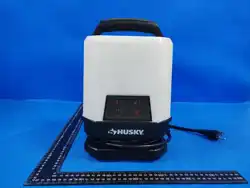
Portable Work Light(DRAFT)
With Bluetooth Speaker , power and USB ports
User Manual
1. Important Safety Instruction
Before using the product for the first time, please read this manual
carefully and store it in a secure place for future reference. To minimize
the chances of fire, electrical hazards, or injuries, it is essential to follow
these safety guidelines:
1.1 Important: This device is suitable for damp locations;
1.2 Incorrect installation of the grounding wire may result in an electric
shock. Do not modify the plug attached to the power cord. Never
remove the grounding pin from the plug;
1.3 Do not connect this device to a separate power strip or extension
cable. Do not connect to more than 6 work light units together. Do
not exceed a total electric load of 5 Ampere;
1.4 Keep ventilation openings clear at all times to prevent overheating
and reduce the risk of fire;
1.5 If the power cord or plug appears damaged, stop using the product

immediately. Have it inspected and repaired by a qualified
professional before resuming use. If the plug does not fit the outlet,
consult a licensed electrician to have the outlet properly installed.;
1.6 Avoid mishandling the power cord. Never use the cord to lift or
drag the product or unplug it from the socket. Keep the power
cord away from hot surfaces, sharp edges, oils, or any moving
parts;
1.7 Never look directly at the LEDs while the device is powered on. High-
intensity LED light may cause eye injury. Use caution during operation;
1.8 Keep the device away from moisture, oils, gasoline, and any harmful
chemicals;
1.9 Always switch off and disconnect the product from the power source
when not in use;
1.10 This device is for lighting use only, do not sit or stand on the fixture;
1.11 This device is not a toy. Keep it out of reach of children at all times;
1.12 If the product sustains damage, it should only be replaced by the
manufacturer or a qualified technician to prevent any potential
risks, in accordance with the warranty;
1.13 Do not immerse the device in water or other liquids.
CAUTION: Risk of electric shock. Do not use the device in wet
conditions, such as outdoors during rain.
CAUTION: Risk of fire. Do not use the external power socket to
charge other devices while the equipment is in storage.
WARNING: Unwrap the power cord ENTIRELY before use.
WARNING: Do NOT connect for more than 5 Ampere.
2. Product Description:
2.1 Product Features
360° Panoramic Lighting.
The unique vertical LED bollard design evenly diffuses light around,
eliminating working shadows and illuminating the entire space. ·
Four-Level Dimming Function: adjust the brightness (25%, 50%, 75%,
100%) as needed, saving energy and perfectly adapting to any scene.
Ultra-bright LED light source: Delivers up to 10,000±10% lumens of
professional-grade brightness.
Professional Light Quality: A high Color Rendering Index (CRI) of 80
ensures true and accurate colors, and a neutral white light of 4000K
reduces eye strain.
Integrated Bluetooth 5.0 speaker: Play your favorite music or podcasts
wirelessly with up to 10W.
Dual USB Charging Ports: 1 Type-A and 1 Type-C ports, both support
5V/3A (15W) fast charging, which can quickly charge smartphones,
tablets, and other devices.
AC Power Outlet: Offers a standard 125V/60Hz/15A outlet to power
your handheld tools, laptops, or other devices. Maximum output current:
5A .
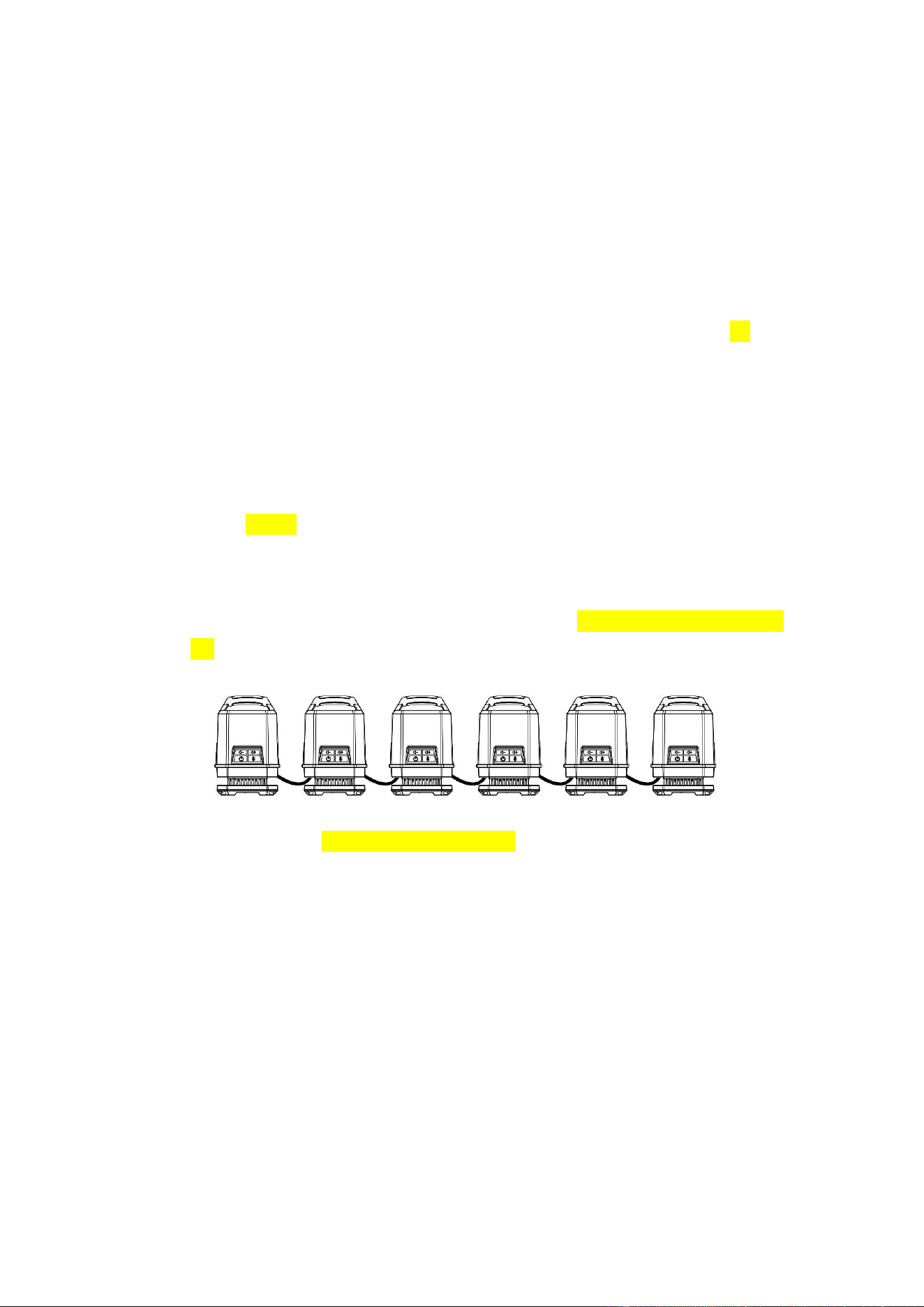
Link up to totally 6 Portable Work Lights. (Applicable only for Portable
Work Light with power, maximum 5 Ampere)
All-in-one Portable Design: Top handle design for easy movement
between different work sites. · Rugged and durable: Sturdy engineering
plastic base and PC cover for workshop environments.
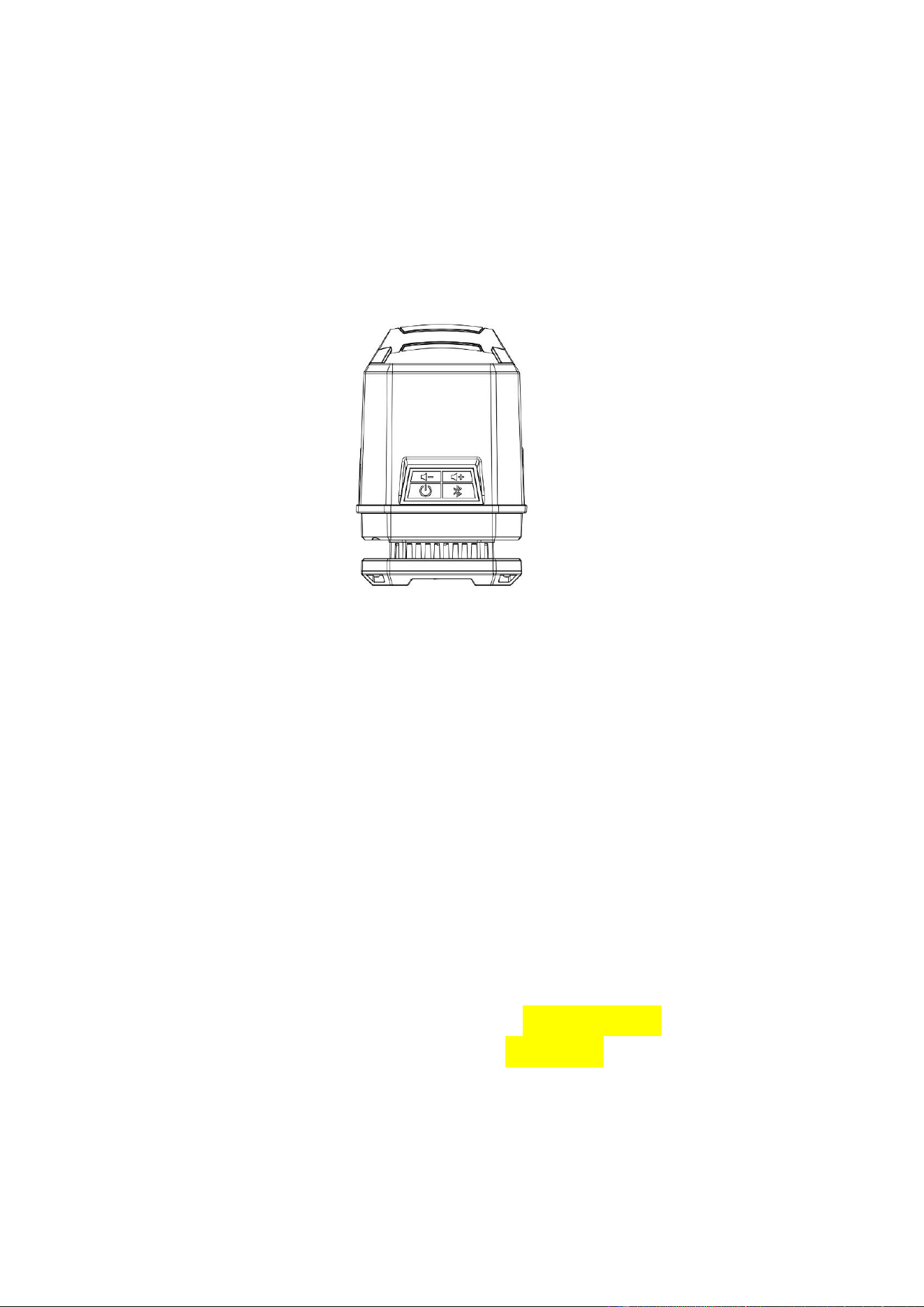
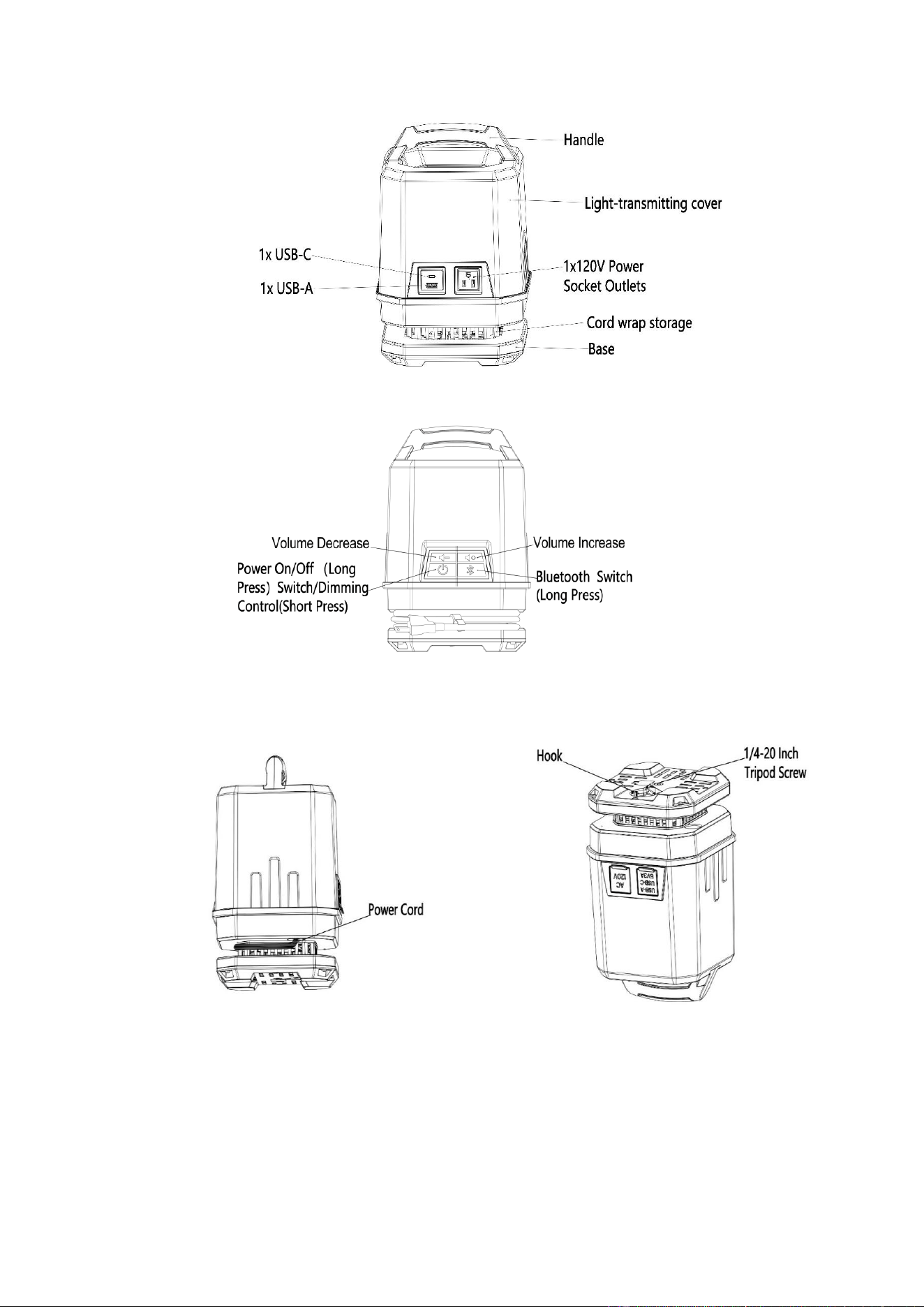
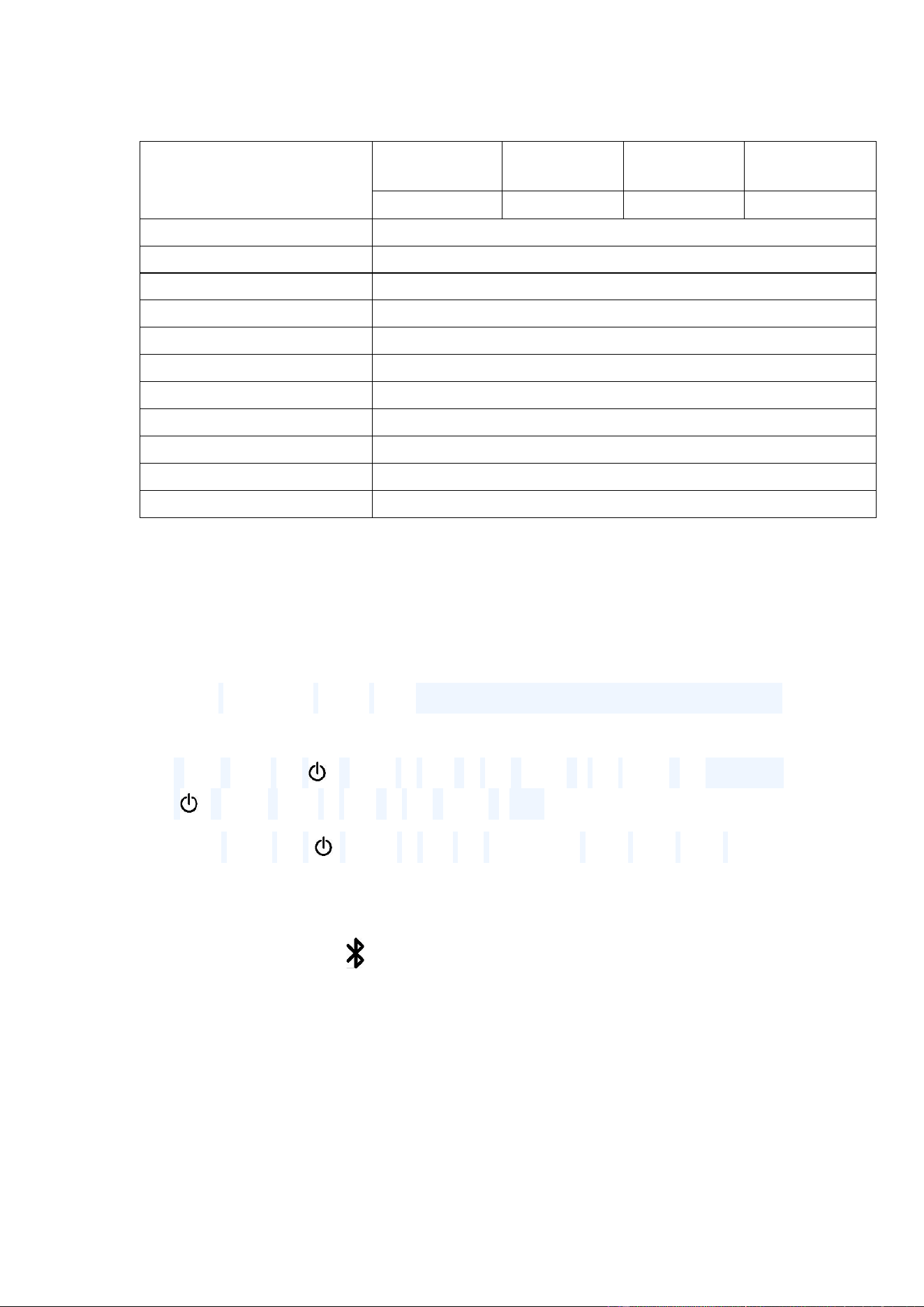
2.2 Product Diagram
2.3 Specification
Light Rated Power
Lamp Rated
Power
Bluetooth
Speaker
MAX USB
Output
Total Rated
Power
85±10% W
10W
30W
125W
Input Voltage
120V /60Hz
USB 0utput
USB-A 5V/3A, USB-C 5V/3A
Light Luminous Flux
10000±10% Lumens
Color Temperature
4000K
Relative Color Rendering Index
≥80
Ambient Temperature
-18℃~30℃
Rated Operation Life
30000 Hours
Input Power Cord
16AWG SJTW, 10Ft Input Cord
Light Emission Angle:
360°
Product Dimension
203mm*206mm*310mm (8.0"*8.1"*12.2")
Output
120V /60Hz Max 5A
3. Product Operation:
3.1 Light operation
First, unwind the power cord, connect the Work Light to power source by
plugging the unwinded power cord into an outlet;
Long press the " " button to turn on the power of the lamp, and press the
" " button again to turn off the power of the lamp;
Short press the " " button to dim the brightness: 25%, 50%, 75%, 100%.
3.2 Bluetooth Speaker operation
3.2.1 Long press the " " button on the light switch panel to turn on
Bluetooth then you hear the prompt tone;
3.2.2 Bluetooth connection: In the "Settings" menu of the phone, turn on
Bluetooth, find the "Husky...." device connected to the Bluetooth of
the lamp, and you can play mobile phone music.
3.2.3 Press the "+" and "-" buttons to adjust the speaker volume, or adjust
on your phone.
3.2.4 When multiple lights are in the same location and their Bluetooth is
turned on, and the phone is connected to one of them, if you double-
tap the Bluetooth switch " " on any one of the lights, it will enable
TWS mode for two lights. A single phone can only control the
Bluetooth of maximum two lights simultaneously in TWS mode.
3.3 Using the socket outlet and USB ports
3.3.1 Ensure that your device is powered off before connecting it to the
USB ports and socket outlets.
3.3.2 Insert the work light plug into the electrical outlet.
3.3.3 Connect your device to the socket or USB port.
3.3.4 After using the device, switch it off and unplug it from the work light.
4. Installation
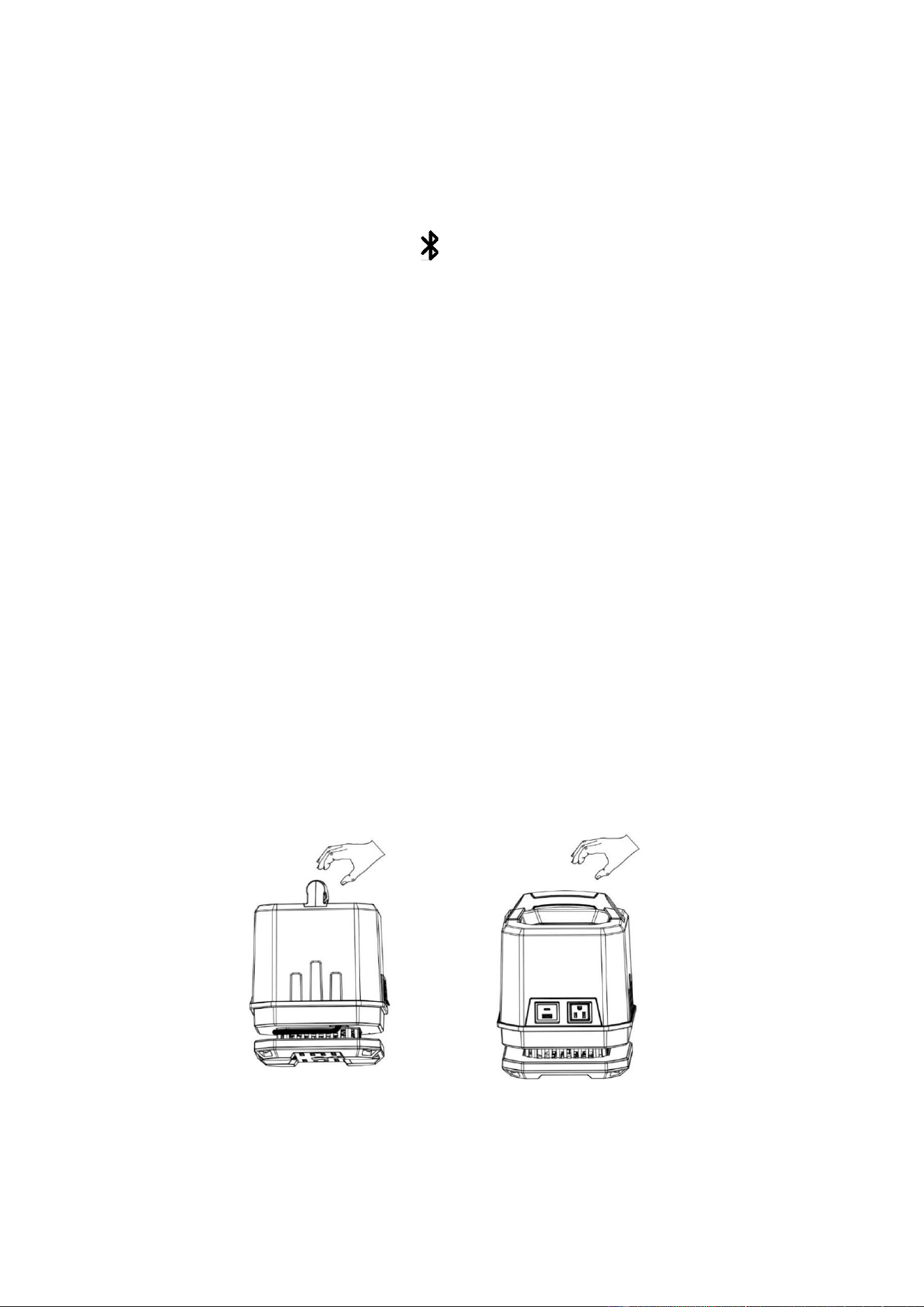
4.1 Standing
4.2 Hook
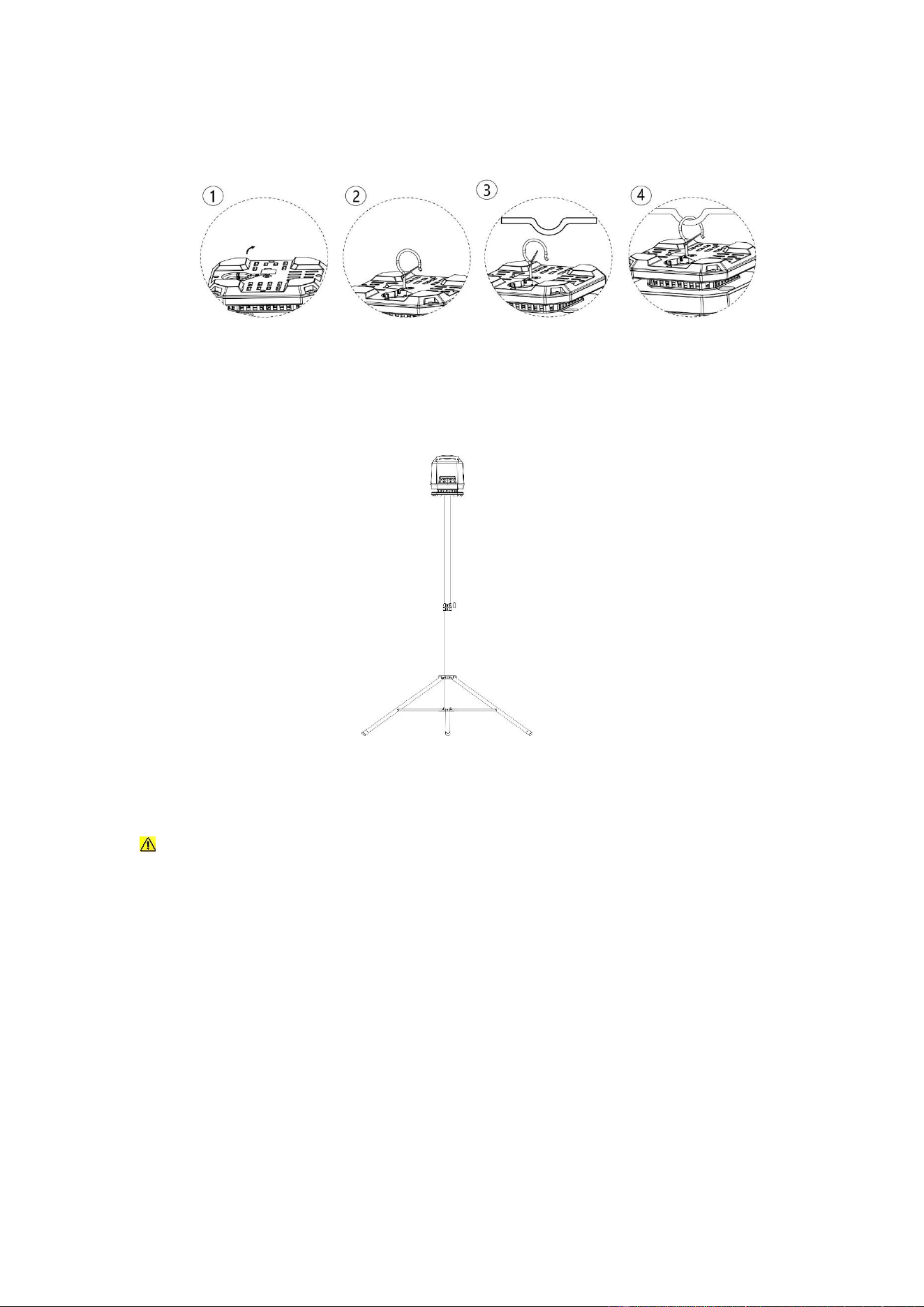
4.3 1/4-20 Inch Tripod Mount (tripod not included, user provide his/her
own tripod)
WARNING: This product can be mounted on a standard 1/4-20 inch tripod.
Ensure the tripod is stable before use. To prevent tipping or falling, consider
adding weight to the tripod base or using a larger, heavier-duty tripod
5. Cleaning and Retraction
5.1 Cleaning:Before cleaning, always disconnect the product from the
power source first and let it cool down to room temperature. Never
remove the covers of the power accessory sockets while cleaning.
Use a feather duster or a softdamp cloth to clean the unit. Ensure the
product is fully dry before reconnecting it to the power supply
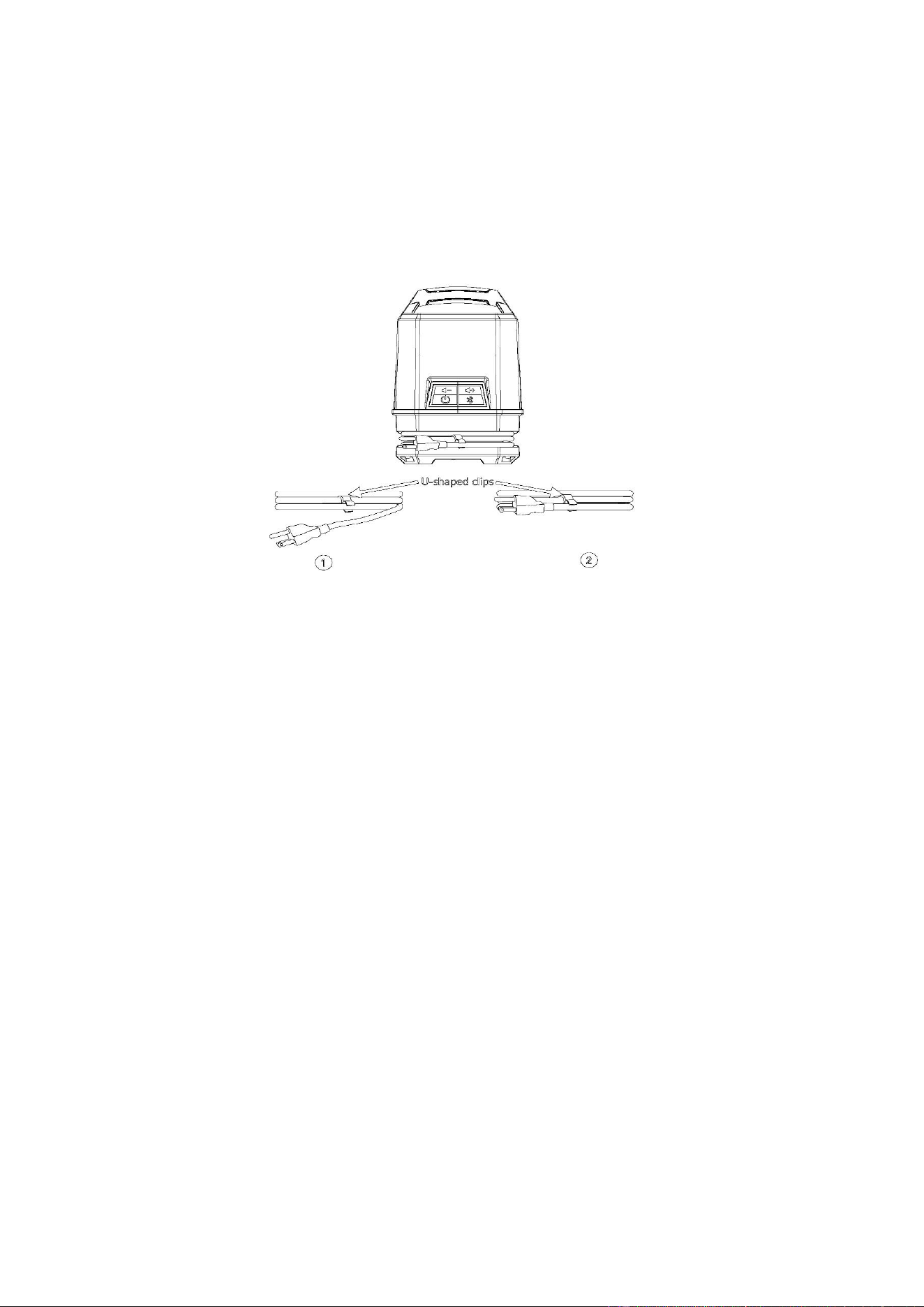
5.2 Power Cord Retraction
5.2.1 Securely coil the cord around the base of the work light.
5.2.2 Fasten the cord in place using the U-shaped clips.
5.2.3 Store in a dry environment.
6. Product Contents
6.1 Work light main unit with Hidden hook x1
6.2 User manual x1
LIMITED WARRANTY This Lighting Science product is backed by a 90days
limited warranty against defects in materials and craftsmanship, subject to the
terms and conditions outlined in the warranty information available at
[email protected]. Except as expressly stated in this
document, no warranties or representations, either express or implied, are
made regarding the Portable Work Light. Lighting Science and/or its affiliates
expressly disclaims, to the fullest extent permitted by law, any statutory
warranties and all implied warranties, including any implied warranty of
merchantability or fitness for a particular purpose.
FCC COMPLIANCE STATEMENT
This device complies with Part 15
the following two conditions: (1) this
of the FCC Rules. Operation is subject to

device may not cause harmful interference, and (2) this device must accept any
interference received, including interference that may cause undesired operation.
This equipment, if not installed and used in accordance with the instructions, may
cause harmful interference to radio communications.
Any changes or modifications not expressly approved by the manufacturer
could void the user’s authority to operate the equipment.
NOTE: This equipment has been tested and found to comply with the
limits for a Class B digital device, pursuant to Part 15 of the FCC Rules. These
limits are designed to provide reasonable protection against harmful
interference in a residential installation. This equipment generates, uses and
can radiate radio frequency energy and, if not installed and used in accordance
with the instructions, may cause harmful interference to radio communications.
However, there is no guarantee that interference will not occur in a particular
installation. If this equipment does cause harmful interference to radio or
television reception, which can be determined by turning the equipment off and
on, the user is encouraged to try to correct the interference by one or more of
the following measures: reorient or relocate the receiving antenna; increase the
separation between the equipment and receiver; connect the equipment into an
outlet on a circuit different from that to which the receiver is connected; consult
the dealer or an experienced radio/TV technician for help.
This equipment complies with FCC radiation exposure limits set forth for an
uncontrolled environment. This equipment should be installed and operated with
minimum distance 20 cm between the radiator & your body.
This manual includes essential safety instructions and warnings, but it
cannot anticipate every possible situation. Users are responsible for
exercising good judgment and caution during operation. Safe use
ultimately depends on the care and attention of the individual.