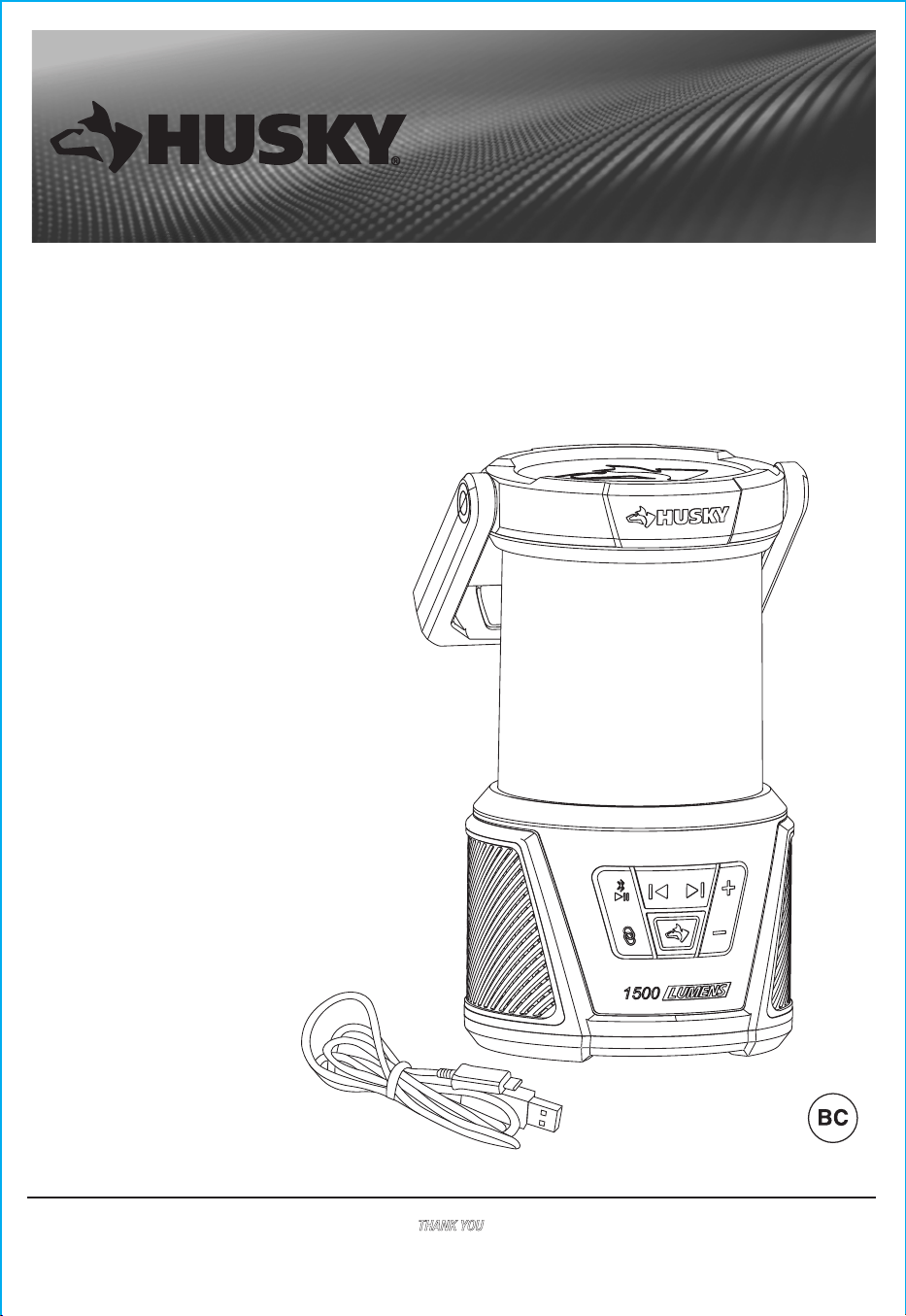
USE AND CARE GUIDE
1500 LUMEN RECHARGEABLE LANTERN WITH
BLUETOOTH SPEAKER
Item # 1015 412 299
Model # 92125
THANK YOU
We appreciate the trust and confidence you have placed in Husky through the purchase of this Bluetooth lantern. We strive to continually create
quality products designed to enhance your home. Visit us online to see our full line of products available for your home improvement needs. Thank
you for choosing Husky!
Questions, problems, missing parts?
Before returning to the store, call
Husky Customer Service
8 a.m. – 7 p.m., EST, Monday-Friday
9 a.m. – 6 p.m., EST, Saturday
1-888-HD-HUSKY
HUSKYTOOLS.COM
DISTRIBUTED BY:
HOME DEPOT 2455 PACES FERRY
ROAD, ATLANTA, GA 30339
Rating: INPUT 5V 2A MAX
Table Of Contents ............................................. 2
Safety Information ............................................ 2
Warranty ............................................................. 3
Pre-Operation .................................................... 3
Specification ..................................................... 3
Operation ....................................................... 4-6
Table of Contents
Safety Information
2
Use caution and good judgment when operating your rechargeable lantern.
Failure to adhere to the safety warnings and guidelines in this manual could result in body injury or property damage.
Read and follow all warnings and instructions in this manual to avoid personal injury or property damage.
Save this manual for future reference.
NOTICE:
Always unplug the USB cable from the power source when not in use.
DO NOT place the lantern in water. Keep all components dry and out of water at all times. Dry location use only.
Only use charging devices that are provided with the LED lantern or its replacements.
DO NOT disassemble or tamper with the battery.
DO NOT attempt to charge or operate this lantern if USB, battery, bulb, or any part of the lantern is damaged or
corroded.
CAUTION:
Never tip the lantern onto its side when the light is on or is still hot from recent use. Doing so could
burn/ignite surfaces such as seats, carpeting, and so forth, and cause major property damage. Always turn
the lantern off when not in use.
DO NOT cover or touch the sides of the lantern when the light is on or if it was recently on. The sides will
be hot and could cause serious burns.
DO NOT use this product for other than its intended use.
DO NOT allow children to handle or operate this lantern.
WARNING:
DO NOT touch the lens of the lantern when light is on or if it was recently on. The lens will be hot and could
cause serious burns.
To prevent damage to eyesight, never look into light when the light is on. Do not shine light into the face of
someone else.
DO NOT charge or operate in close proximity of combustible or flammable materials.
DO NOT charge battery in gastight enclosures.
DO NOT dispose of battery in fire as this may result in explosion.
Operating the Lantern ....................................................... 4
Operating the Bluetooth Speaker ............................... 5
Operating the Interconnect Function ..................... 5-6
Charging the Rechargeable Lantern .......................... 6
Care and Maintenance ...................................... 6
Troubleshooting ................................................ 7
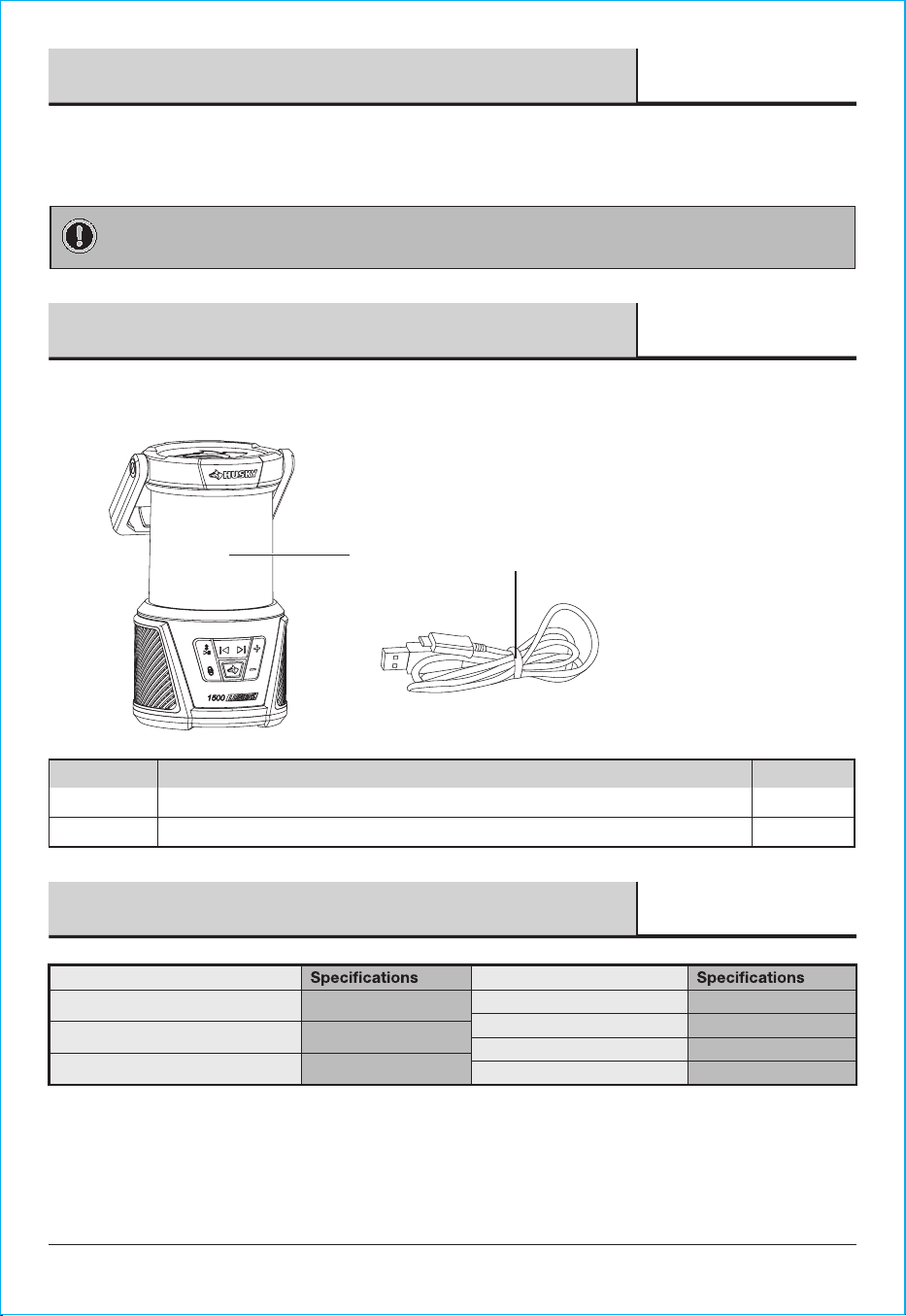
PACKAGE CONTENTS
3
Warranty
This product is guaranteed to be free of defects in materials and workmanship for 3 years from the date of purchase. If
this product is defective, call 1-888-HD-HUSKY or visit www.huskytools.com.
Guarantee does not include normal wear and tear, USB cable, or rechargeable batteries.
Pre-Operation
Specification
A
B
1500 Lumen Compact Rechargeable Bluetooth Lantern
Type-C USB Charging Cable with USB-A Adapter
1
1
Part QuantityDescription
B
HUSKYTOOLS.COM
Please contact 1-888-HD-HUSKY for further assistance.
IMPORTANT: Any changes or modifications to this unit not expressly approved by the party responsible for
compliance could void the user's authority to operate the equipment.
A
Product Information Product Information
Input
Battery
Bluetooth work distance
DC 5 V 2 A MAX
4600mAh, 16.56Wh
10 m
5.4 Version
3.5 Hours
Bluetooth
Charging Time
Run Time at high light
3 Hours
Bluetooth pair name
Husky Lantern Bluetooth
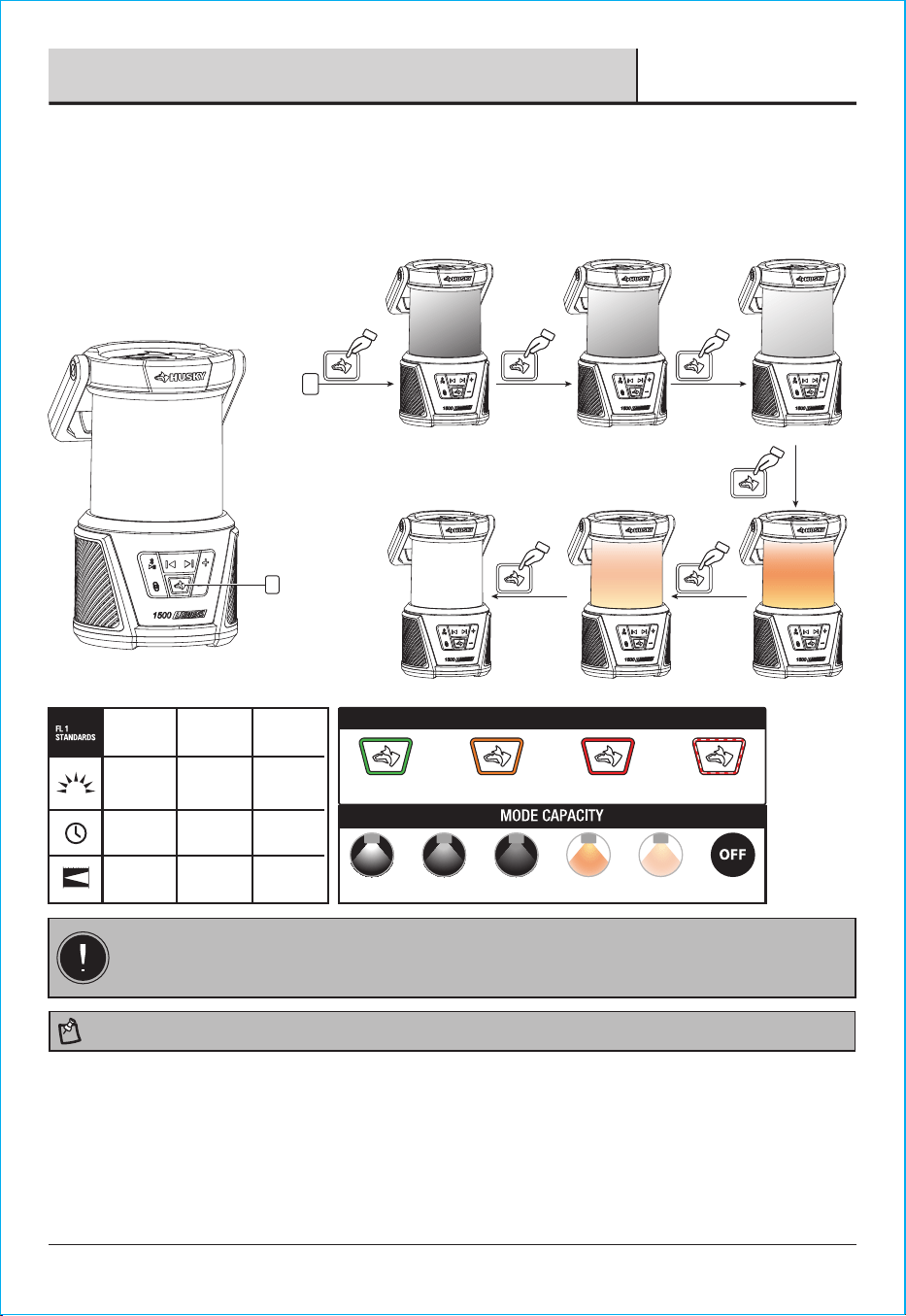
1. Press the power button to activate the light.
2. Continue pressing the power button to cycle through the various settings.
IMPORTANT: Battery is ready to use when purchased. Do not recharge before first use. A fully-charged
battery will provide approximately 3 hours of continuous light at high mode. Do not allow the battery to
completely lose its charge. A dim light indicates a low battery. Turn OFF the lantern and recharge the battery
as soon as possible.
4
Operation
Operating the Lantern
1
HIGH
1500
LUMENS
3 h
20 m 15 m 8 m
5 h 8 h
800
LUMENS
300
LUMENS
MEDIUM LOW
NOTE: The memory function will activate after a mode has been left on for 10 seconds.
BATTERY INDICATOR
100% to 75% 75% to 50% 50% to 25% 25% to 0%
WARM HIGHHIGH MEDIUM LOW WARM LOW OFF
1
X 1
1
Power
button
High (1500 lm)
X 1
Medium (800 lm)
X 1
X 1
X 1
Low (300 lm)
Warm highWarm low
X 1
OFF
5
Operation (continued)
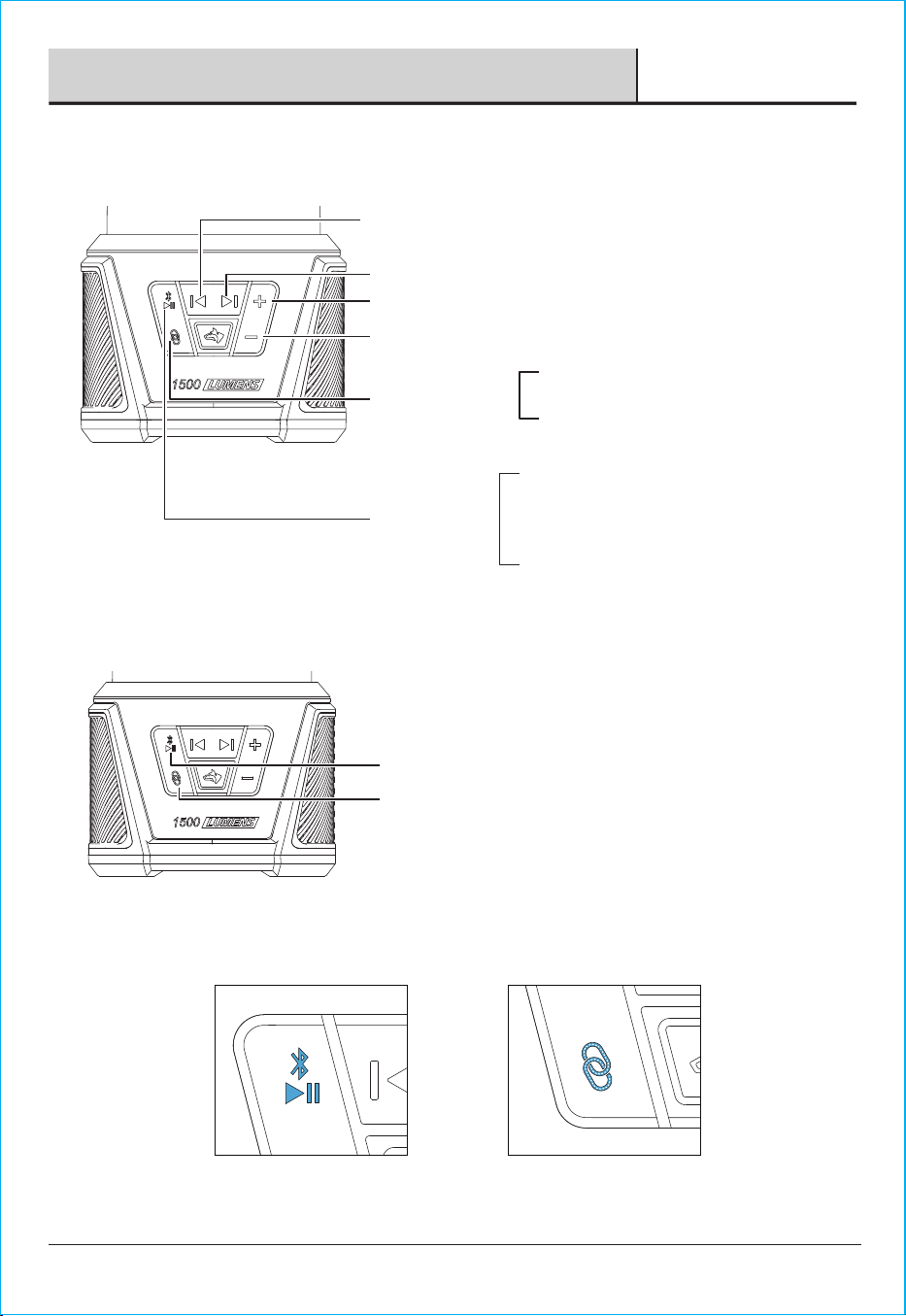
Volume Down-Press to decrease the volume.
Press to turn on/off interconnect function
(Connection between speakers).
Hold for 2s to disconnect the Bluetooth
connection from the current device.
Volume Up-Press to increase the volume.
Skip Back-Press to skip to the previous song.
Hold for 2s to turn on and off, bluetooth will enter
pairing mode automatically. Indicator will flash blue
while pairing and solid blue once paired
successfully.
Press to play or pause music.
Skip Forward-Press to skip to next song.
Operating the Interconnect Function
3
Operating the Bluetooth Speaker
2
Interconnect Button
Bluetooth Button
Bluetooth Button
Interconnect Button
□ Press the Bluetooth button to activate Bluetooth. The lantern acts as the primary speaker. Pair it with your devices; the
LED indicator turns solid blue when paired successfully.
□ Press the interconnect button on the primary speaker, and its LED indicator will flash blue.
6
Care and Maintenance
□ Always keep the battery fully charged when not in use. This will prolong the overall life of the battery.
□ Do not subject the unit to excessive force, shock, dust, or extreme temperature.
□ Do not tamper with the external and internal components of the unit.
□ Clean your unit with a dry cloth. Solvent or detergent should never be used.
□ Avoid leaving your unit in direct sunlight or in hot, humid, or dusty places.
□ Keep your unit away from heating appliances and sources of electrical noise such as fluorescent lamps or motors.
□ Only type-C USB charging cables and USB-A adapters are compatible with this product.
□ In the interconnected state, the primary speaker (solid blue) can control all connected speakers.
□ Bluetooth will automatically turn off when it is not paired within 10 minutes or after 10 minutes of inactivity.
□ To ensure smooth multi-speaker interconnection, please clear all previously paired speakers from your device if
any pairing records exist.
Operation (continued)
Charging the Rechargeable Lantern
4
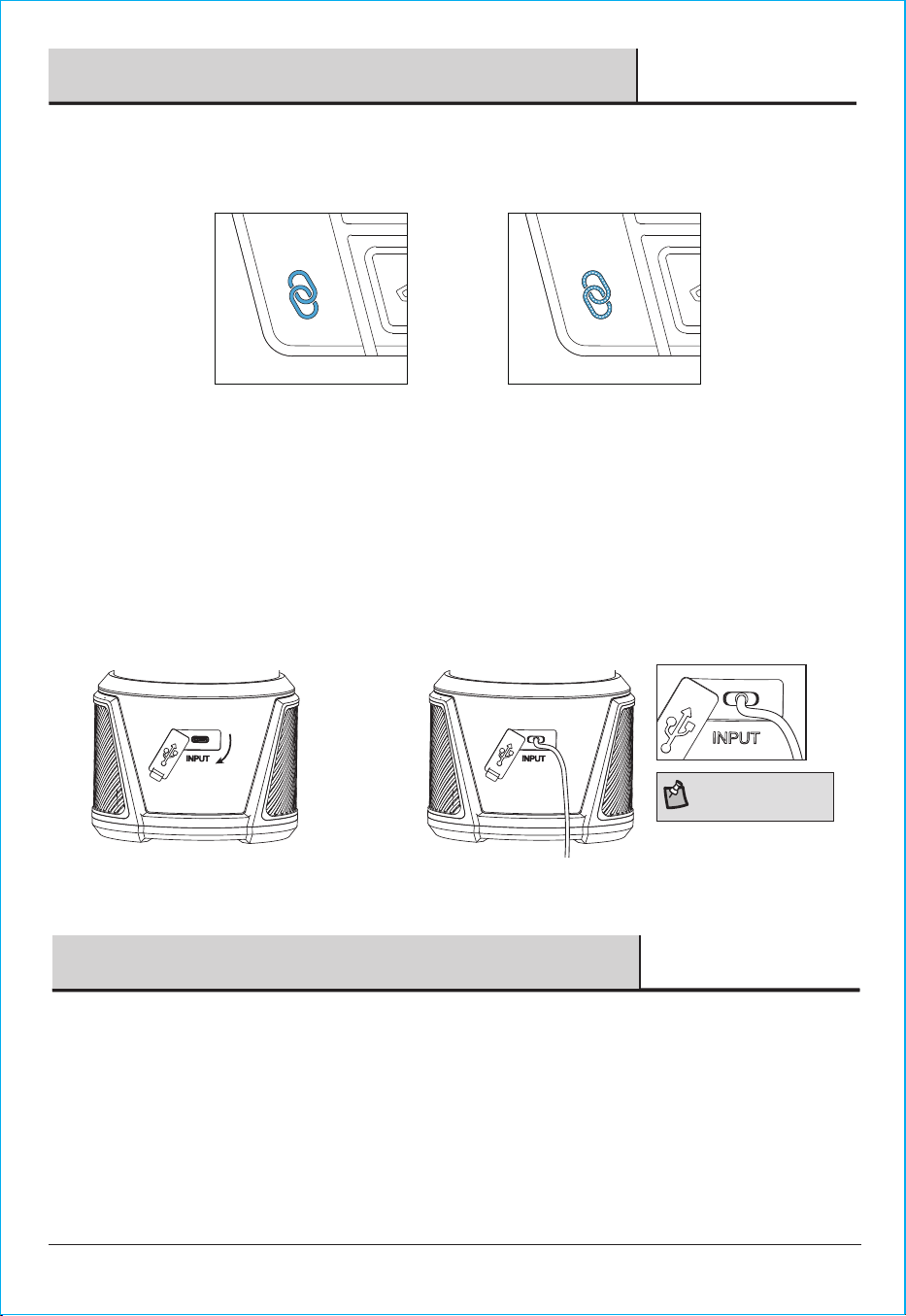
1. Open the charging port by lifting the
flexible cover and swinging it down.
2. Connect the cable by plugging
it into the charging port.
Back
NOTE: The power LED indicator
will flash red while charging and
turn green when fully charged.
Primary Speaker Auxiliary Speaker
4
□ Press the Bluetooth button on other lanterns to activate Bluetooth and act as auxiliary speakers.
□ Press the interconnect button on the auxiliary speaker. Upon successful connection, the primary speaker’s interconnect LED
will turn solid blue, and the auxiliary speaker’s will flash blue.
7
HUSKYTOOLS.COM
Please contact 1-888-HD-HUSKY for further assistance.
Troubleshooting
□ If the light is dim, make sure the mode is not set to low or ECO and that the battery is fully charged when using the
rechargeable battery.
□ If the battery charging indicator does not turn on, make sure the rechargeable battery is installed correctly and the
cable is properly connected.
□ This device complies with Part 15 of the FCC Rules. Operation is subject to the following two conditions: (1) this device
may not cause harmful interference, and (2) this device must accept any interference received, including interference
that may cause undesired operation.
□ This equipment has been tested and found to comply with the limits for a Class B digital device, pursuant to part 15 of
the FCC Rules. These limits are designed to provide reasonable protection against harmful interference in a residential
installation. This equipment generates, uses, and can radiate radio frequency energy and, if not installed and used in
accordance with the instructions, may cause harmful interference to radio communications. However, there is no
guarantee that interference will not occur in a particular installation. If this equipment does cause harmful interference
to radio or television reception, which can be determined by turning the equipment off and on, the user is encouraged
to try to correct the interference by one or more of the following measures:
□
□
□
□
Reorient or relocate the receiving antenna.
Increase the separation between the equipment and receiver.
Connect the equipment into an outlet on a circuit different from that to which the receiver is connected.
Consult the dealer or an experienced radio/TV technician for help.
□
□
□
The device has been evaluated to meet general RF exposure requirement.
The device can be used in portable exposure condition without restriction.
Changes or modifications not expressly approved by the party responsible for compliance could void the user’s authority
to operate the equipment.

Questions, problems, missing parts? Before returning to the store,
call Husky Customer Service
8 a.m. – 7 p.m., EST, Monday-Friday, 9 a.m. – 6 p.m., EST, Saturday
1-888-HD-HUSKY
HUSKYTOOLS.COM
Distributed By:
Home Depot 2455 Paces Ferry
Road, Atlanta, Ga 30339
Retain this manual for future use.
8