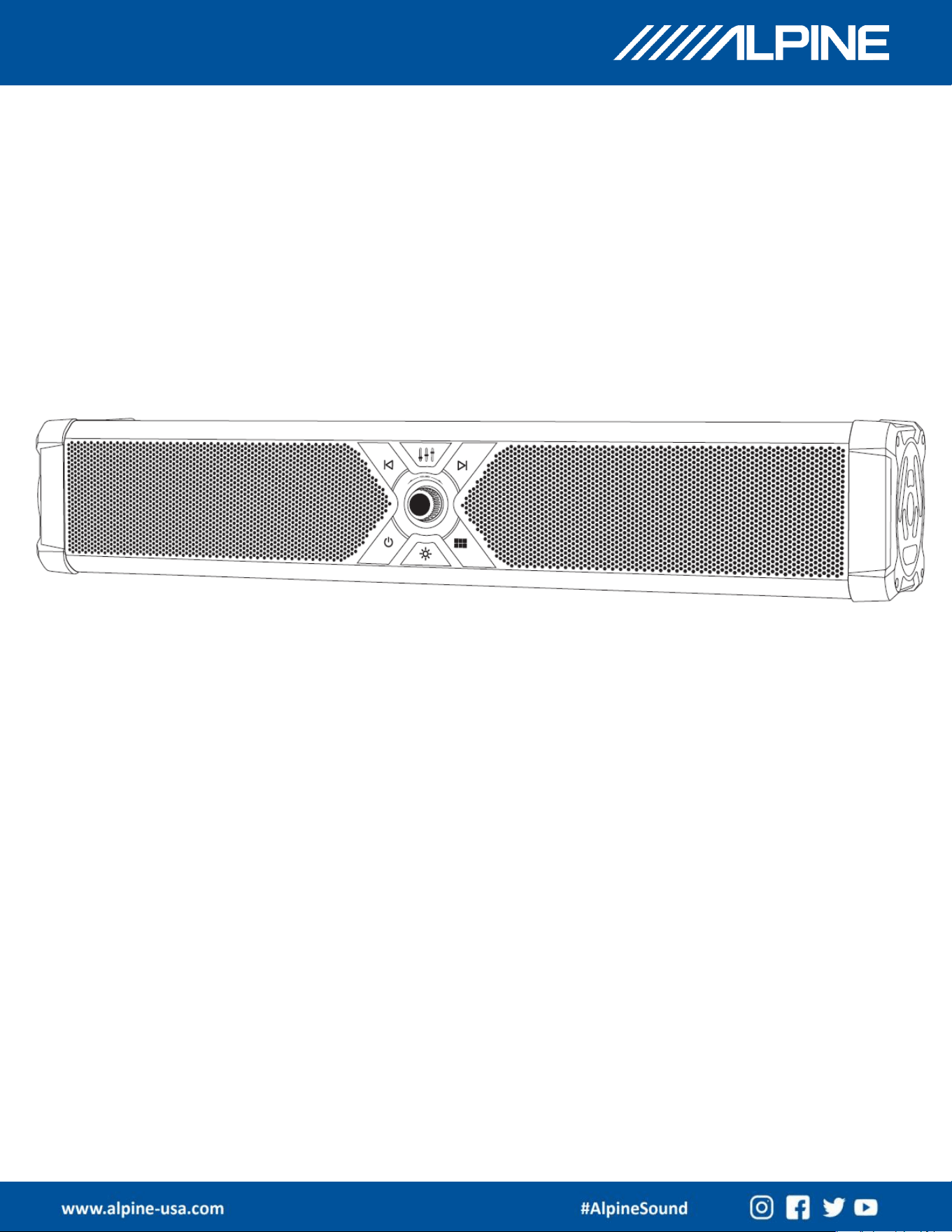
GP-RGB-SBAR
OWNER’S MANUAL
Alpine GloSix
GP-RGB-SBAR
GP-RGB-SBAR
OWNER’S MANUAL
Software Tool Update
PSS-CAM
2
2
GP-RGB-SBAR
OWNER’S MANUAL
3
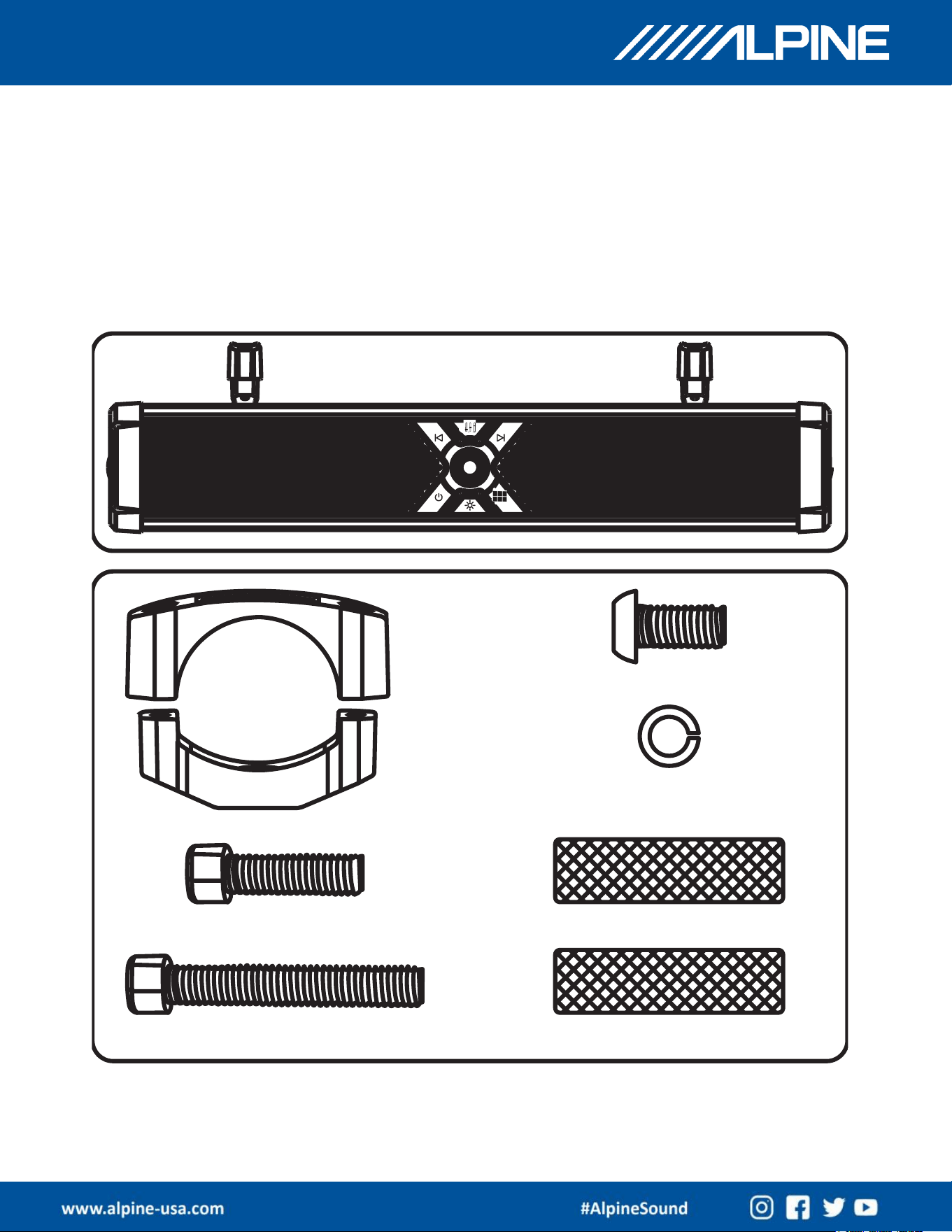
What's in the box
A: Alpine GloSix
B: Tube Mounting Bracket Set
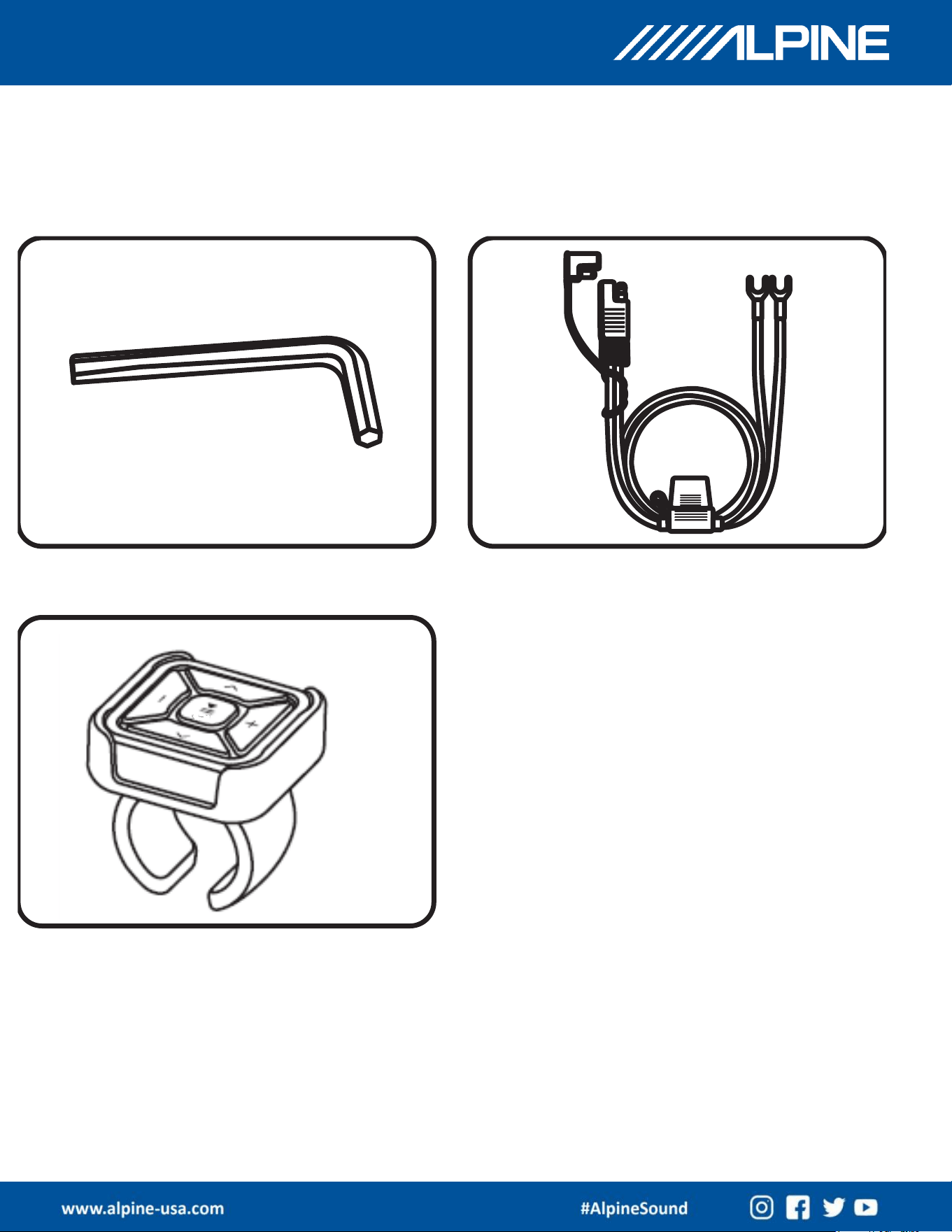
C: L-Shaped Allen Wrench
D: Power Cable
E: Bluetooth Remote Control and USB-C Charging cable
GP-RGB-SBAR
OWNER’S MANUAL
4
What's in the Box
GP-RGB-SBAR
OWNER’S MANUAL
5
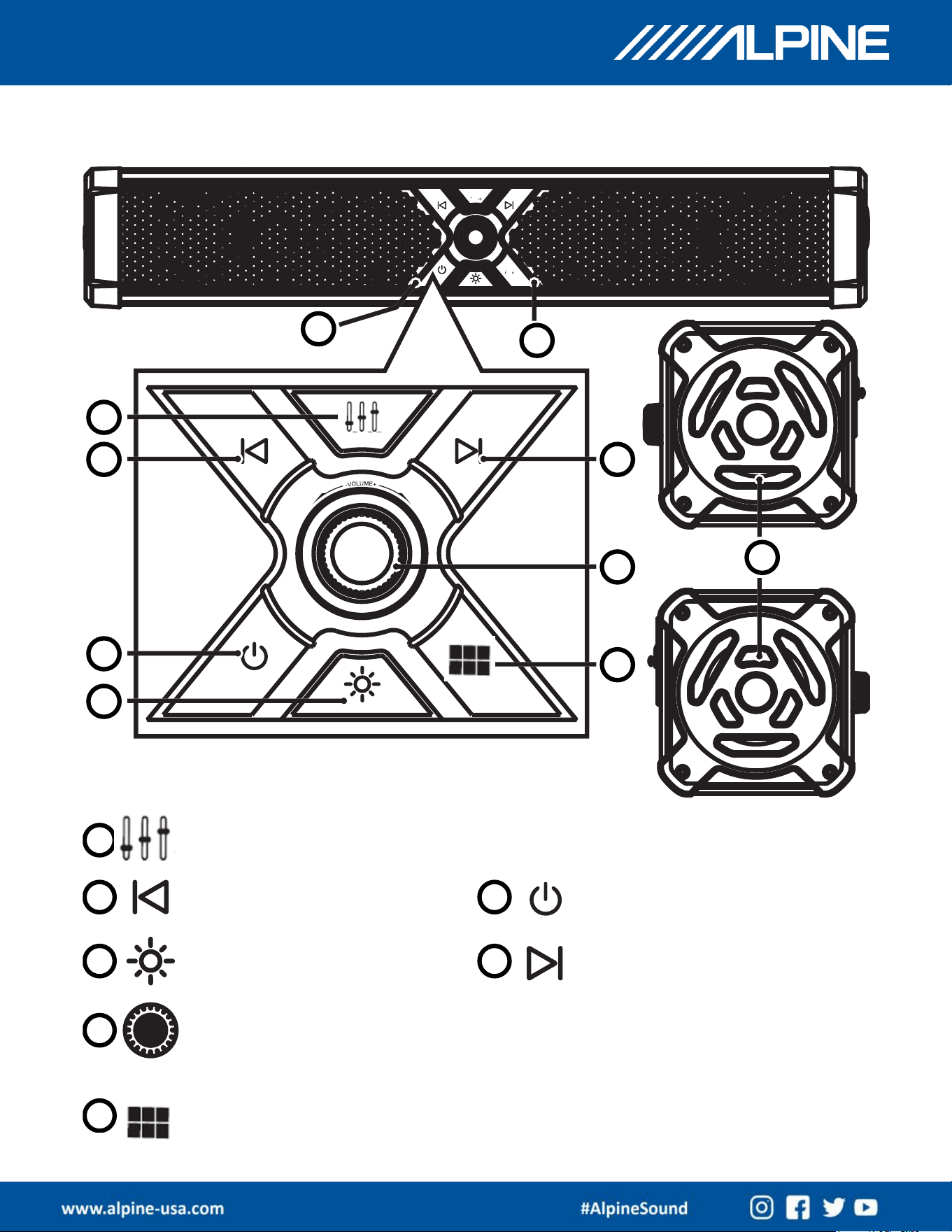
Basic Function
Multifunction Knob
Audio Source Selection Switch
EQ Selection Switch
Previous Track
Lighting Mode
Power On/Off
Next Track
GP-RGB-SBAR
OWNER’S MANUAL
6
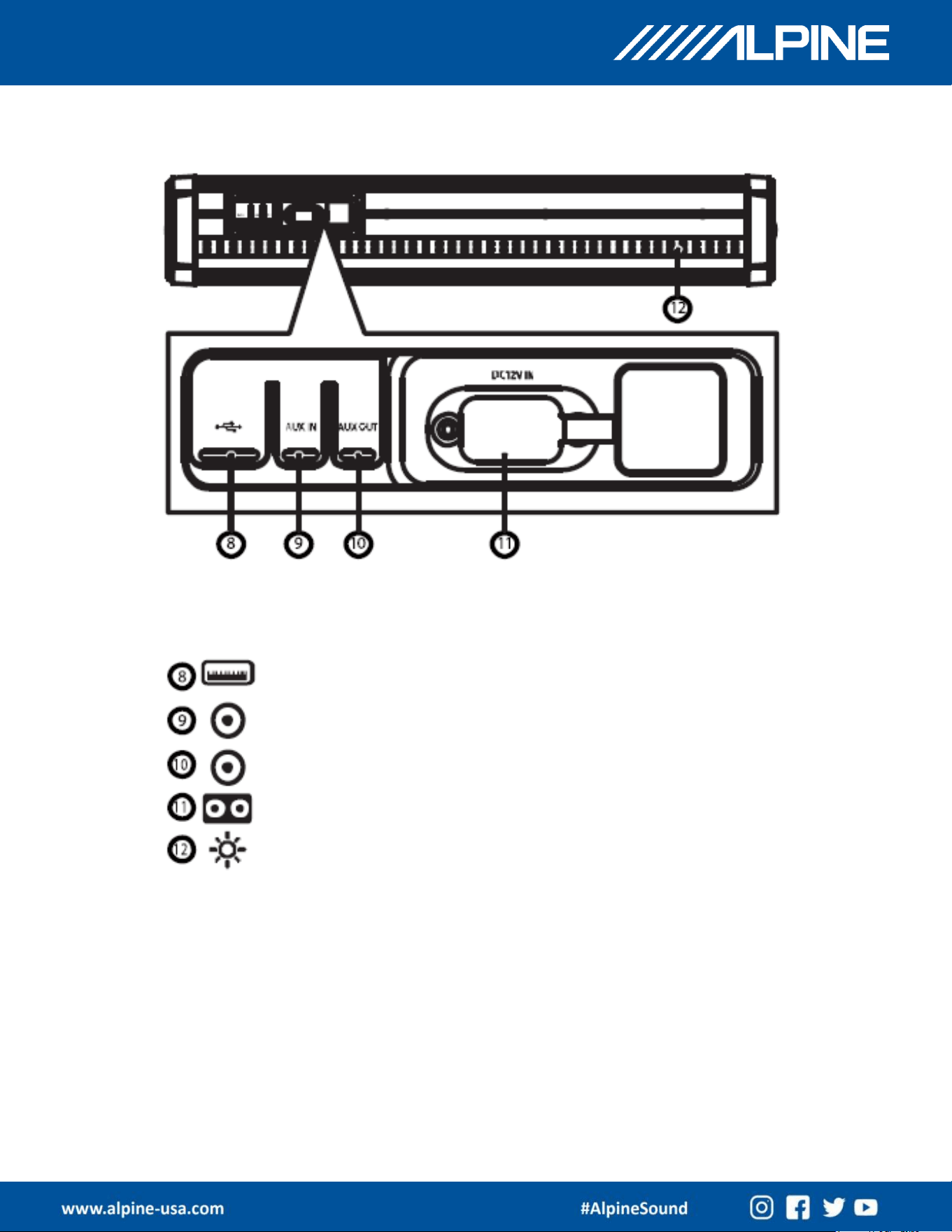
Basic Function
USB Flash Drive Port
AUX In Port
AUX Out Port
Power Cable Connection Port
Front Panel, Left, Right, Rear lighting
GP-RGB-SBAR
OWNER’S MANUAL
7
Operation Guide
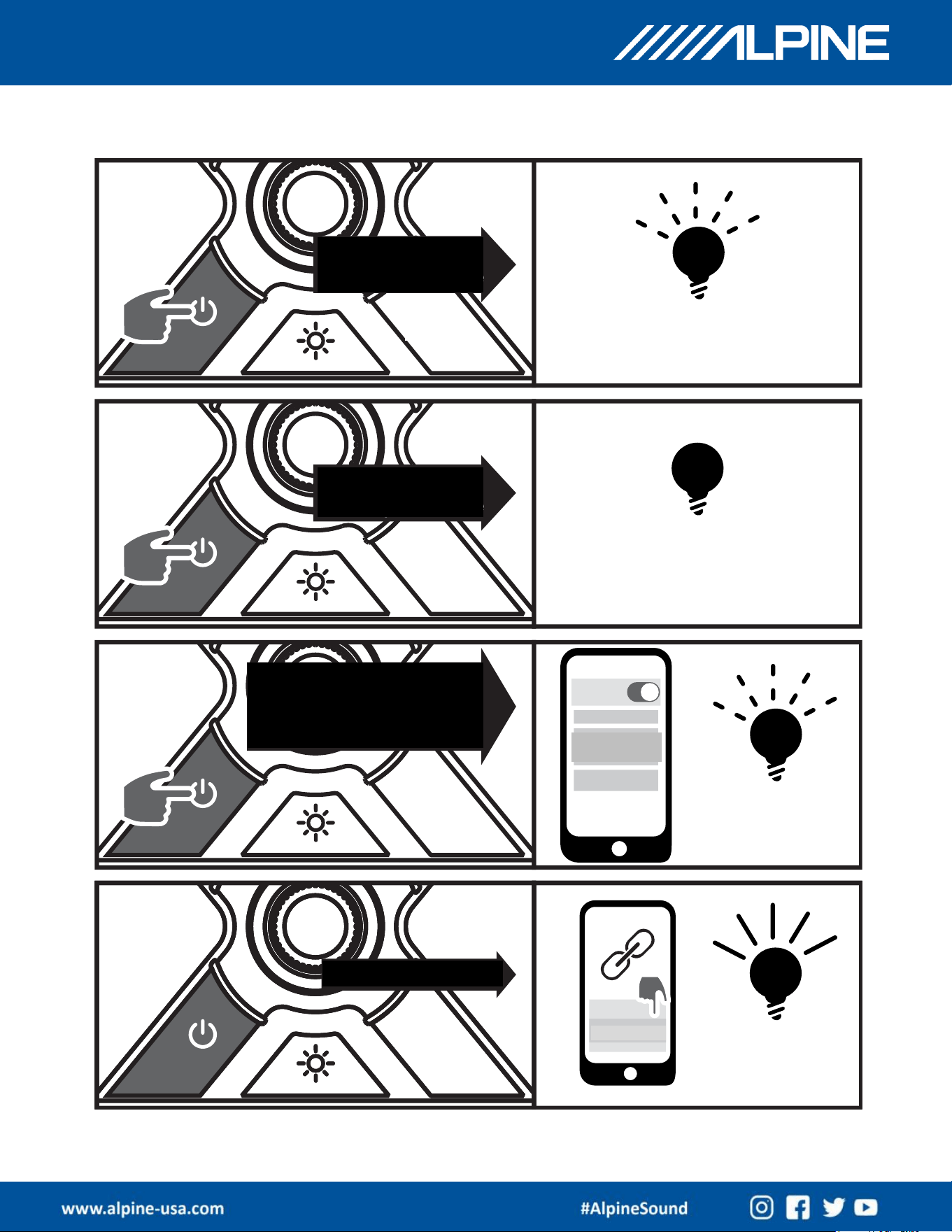
Power ON:
Short Press Once
Power OFF:
Short Press Once
Status Indicator Turns Off
Automatically Enters BT
Pairing Mode When Power
Is ON
Alpine GloSix
Not Connected
Pairing Successful
Alpine GloSix
GP-RGB-SBAR
OWNER’S MANUAL
8
Operation Guide
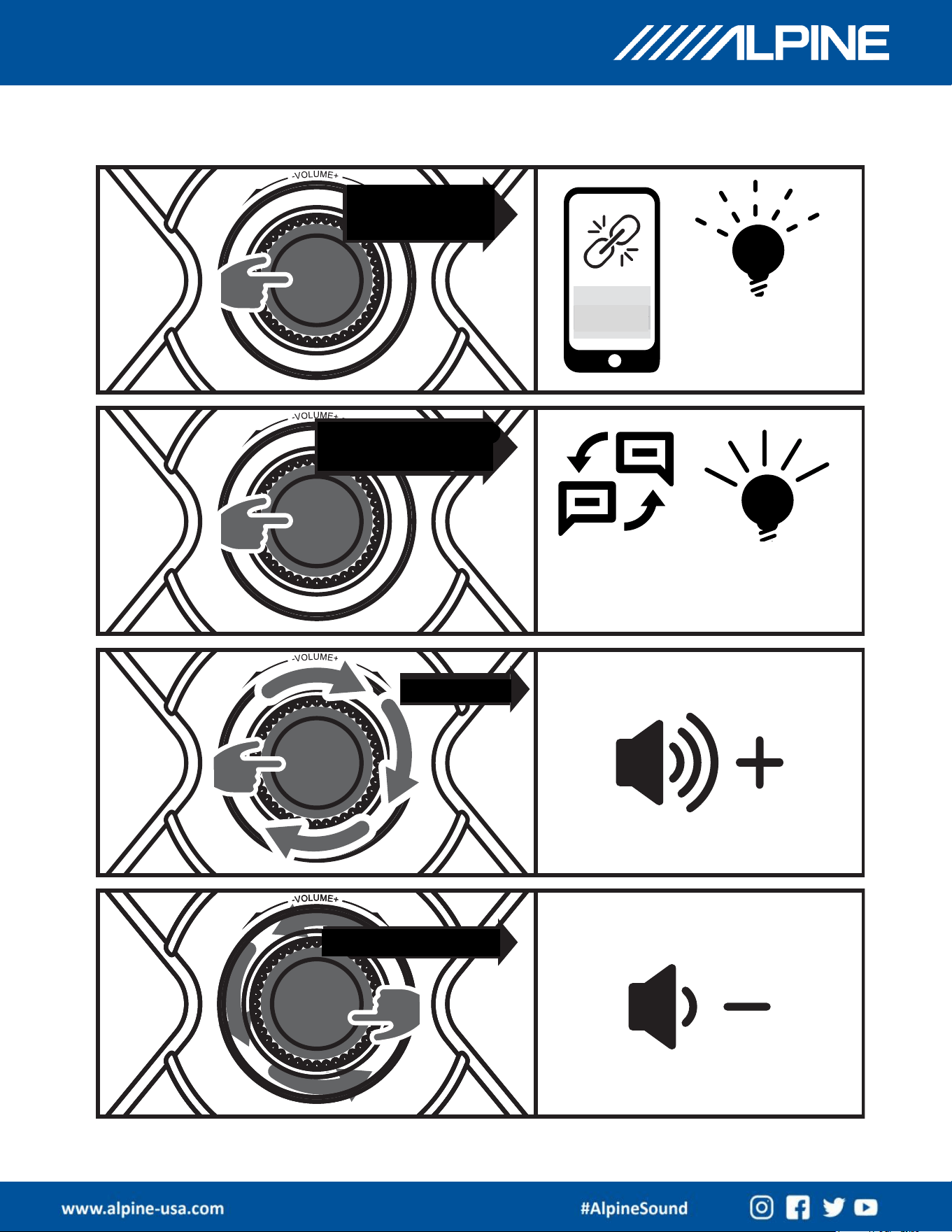
Press and Hold
for 2 Seconds
Disconnect BT Pairing
Blue Light Flashes
Alpine GloSix
Press And Hold for
2 Seconds Again
(Effective in
Phone Pairing
Mode)
BT Pairing
Reconnects, Blue
Light Stays On
Clockwise
Volume Increases
Counterclockwise
Volume Decreases
GP-RGB-SBAR
OWNER’S MANUAL
9
Operation Guide
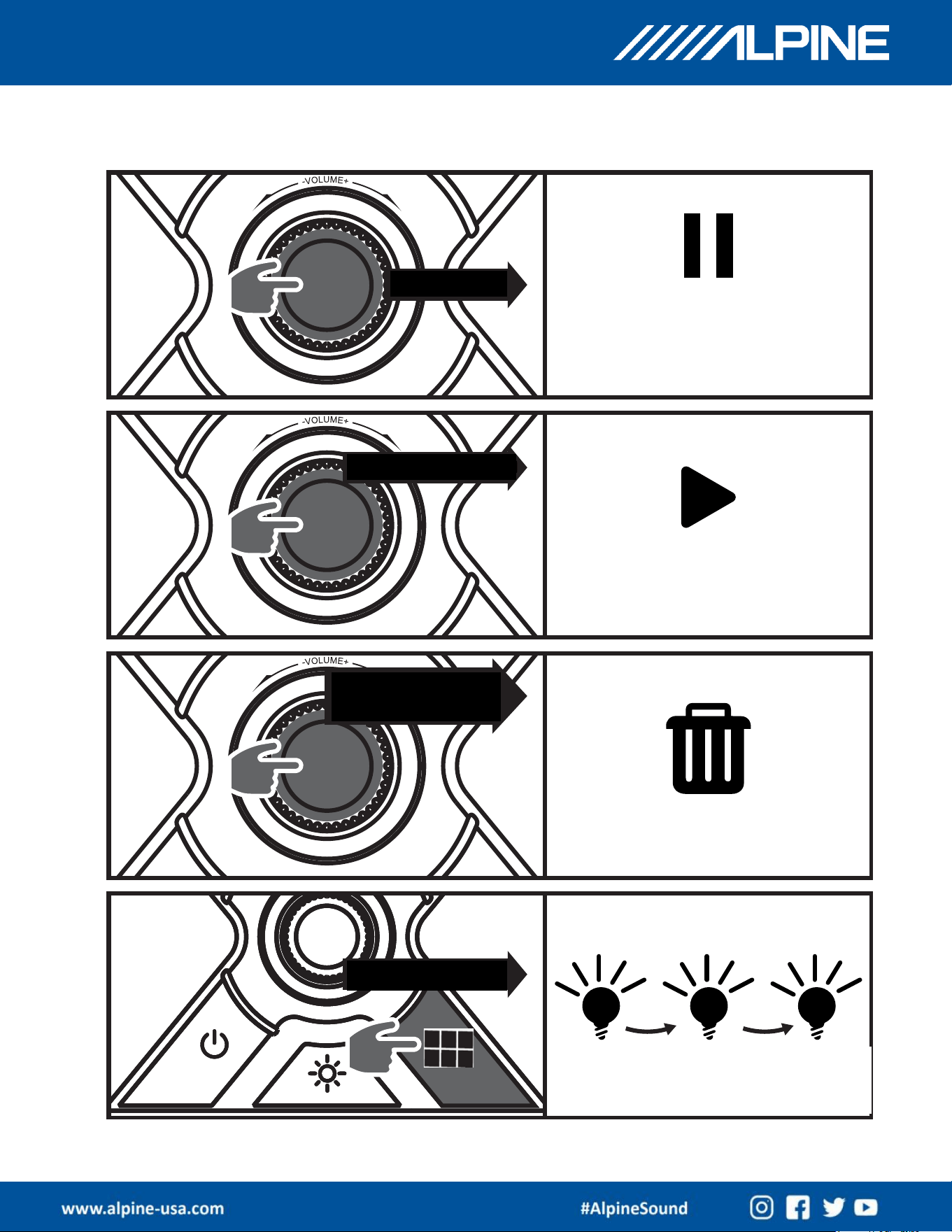
Short Press
BT Mode: Pauses Playback
AUX Mode: Mutes Audio
Short Press Again
BT Mode: Resumes Playback
AUX Mode: Unmutes Audio
Short Press Twice
Continuously
Clears BT Pairing
Short Press Once
Audio Source Selection
Blue =
Bluetooth
Green =
AUX Input
Orange =
USB Input
GP-RGB-SBAR
OWNER’S MANUAL
10
Operation Guide – TWS Mode
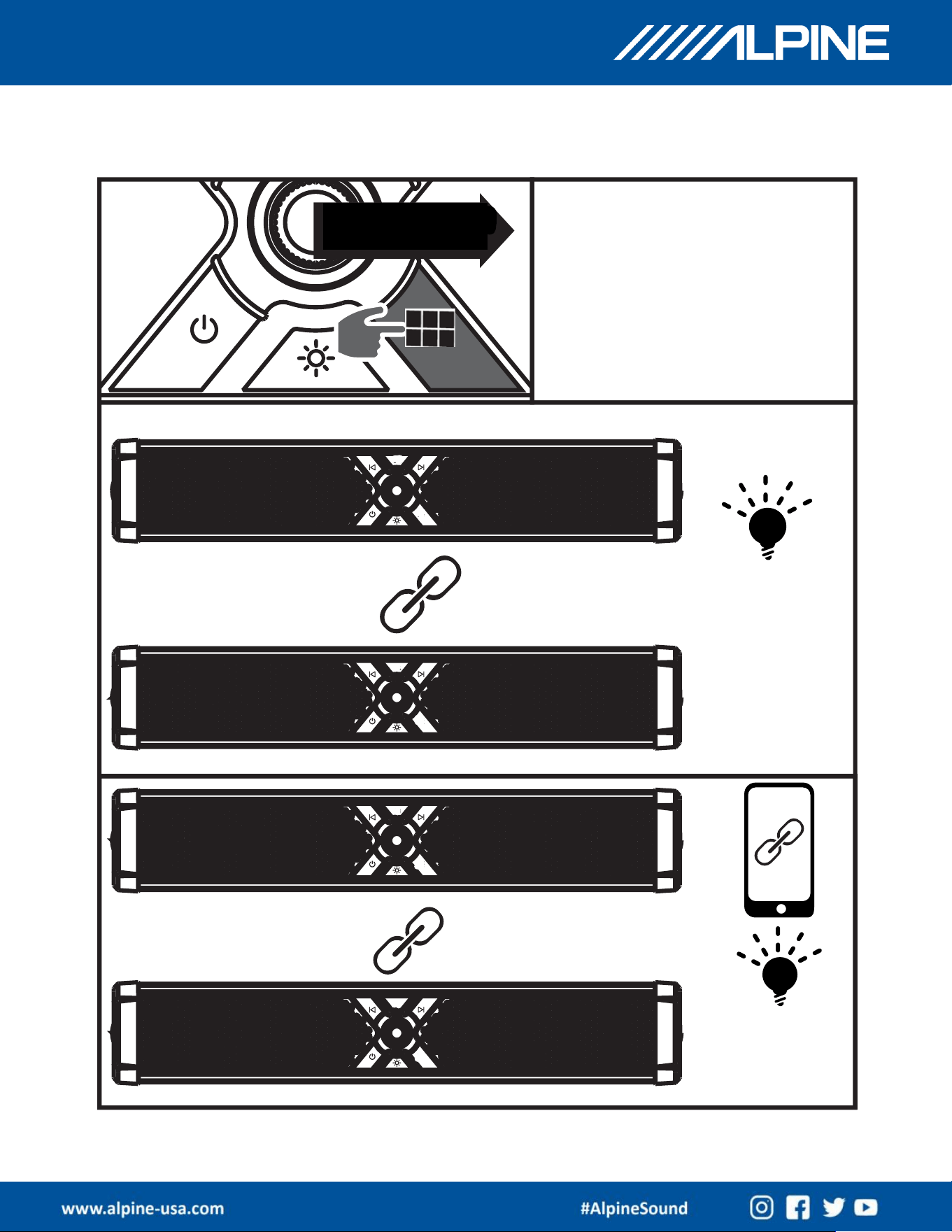
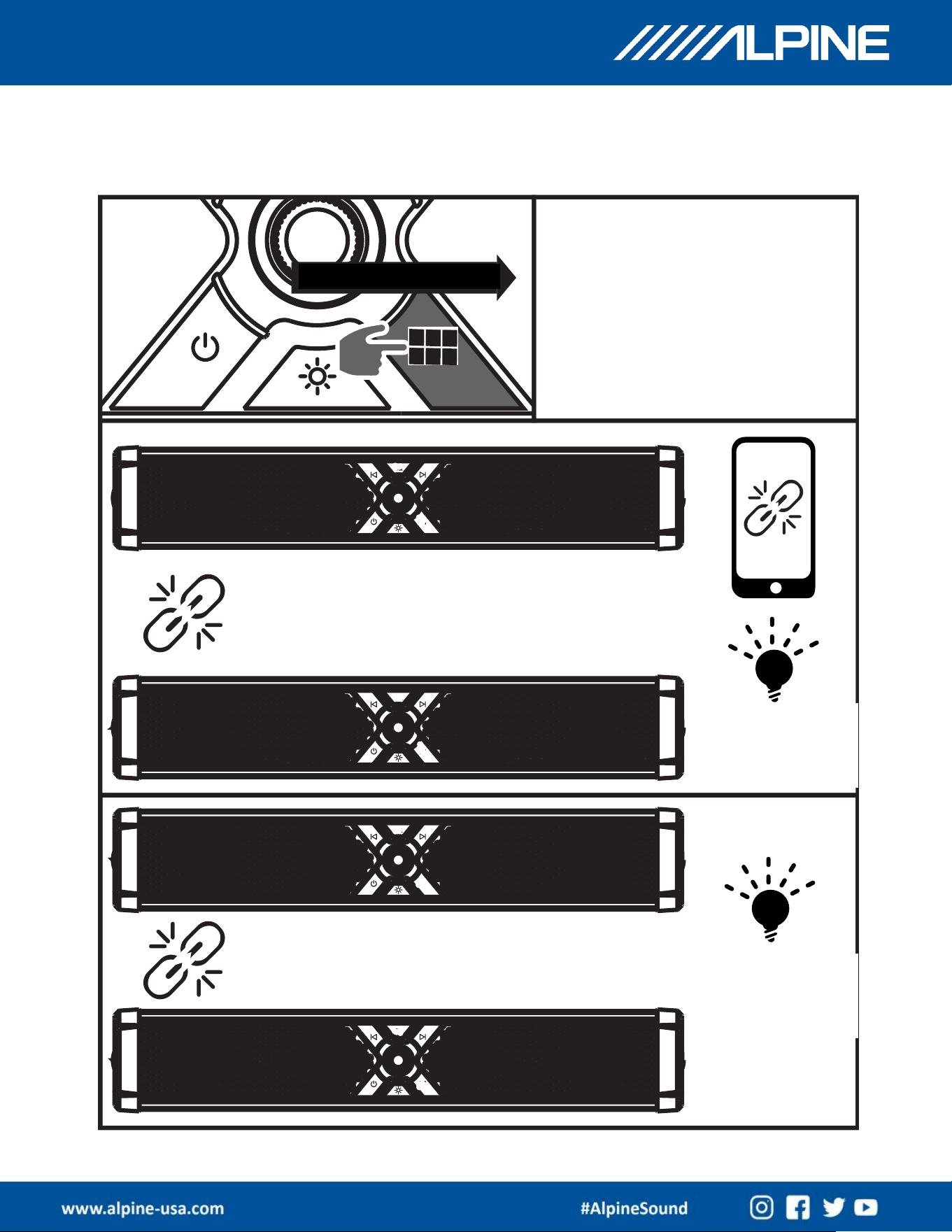
TWS Mode allows the connection of 2
GloSix soundbars to play music from a
single BT equipped smartphone
Press and Hold for
2 Seconds
Press and hold for 2 seconds on
both GloSix soundbars to start
TWS Connection mode
TWS Connection
Successful
Primary
GloSix status
indicator
flashes,
secondary
GloSix status
indicator
lights
continuously
TWS Connected
to phone
Primary GloSix
status indicator
lights
continuously
GP-RGB-SBAR
OWNER’S MANUAL
11
Operation Guide
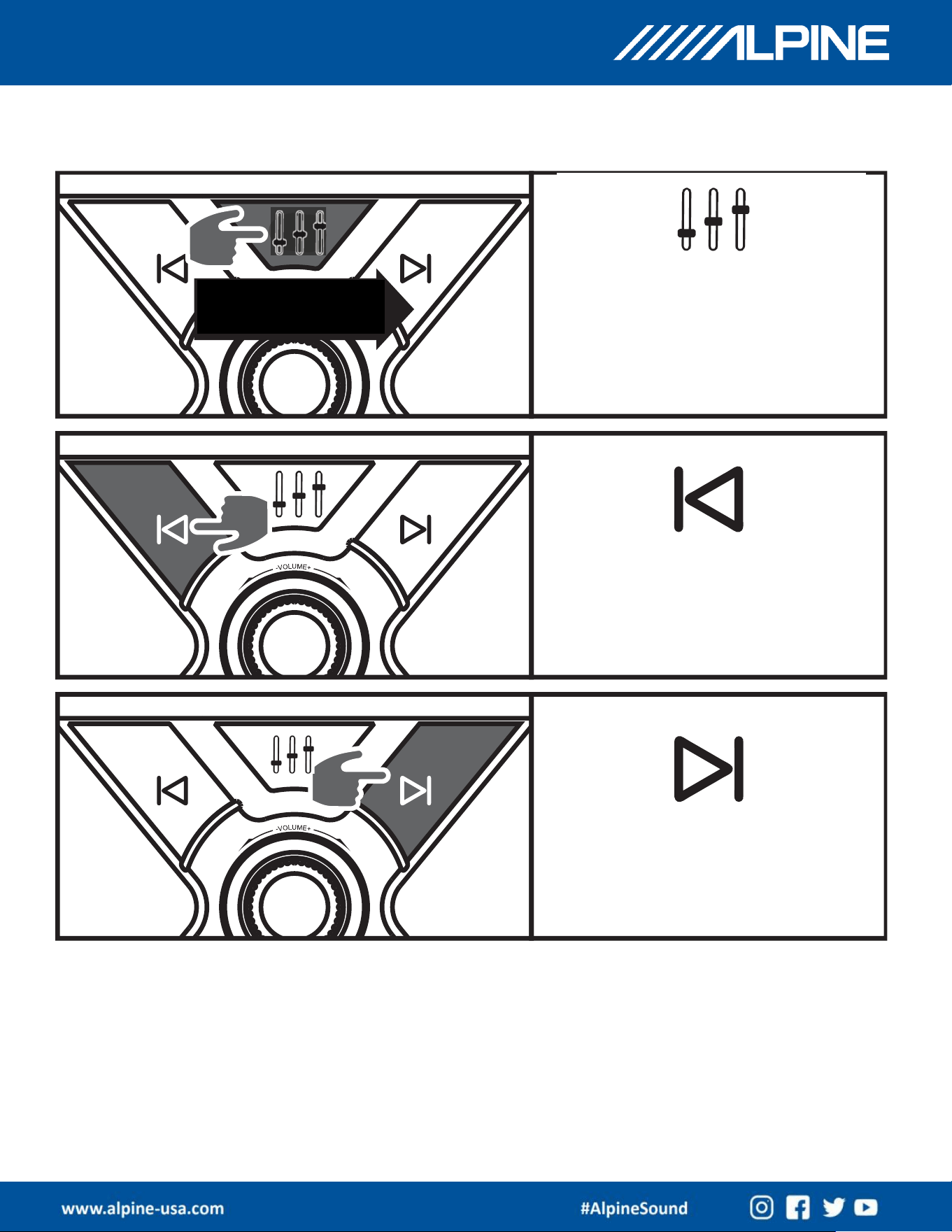
Press and Hold for 2 Seconds
Disconnect TWS
Connection
If the primary GloSix is connected to a phone
playing music, after TWS disconnection the
primary GloSix continues to play music, while
the secondary GloSix enters BT pairing mode
Secondary
GloSix indicator
flashes blue
If the Primary GloSix is not connected to a phone
after TWS disconnection, both primary and
secondary GloSix units enter BT pairing mode
Primary and
secondary GloSix
units show
flashing blue
lights
GP-RGB-SBAR
OWNER’S MANUAL
12
Operation Guide
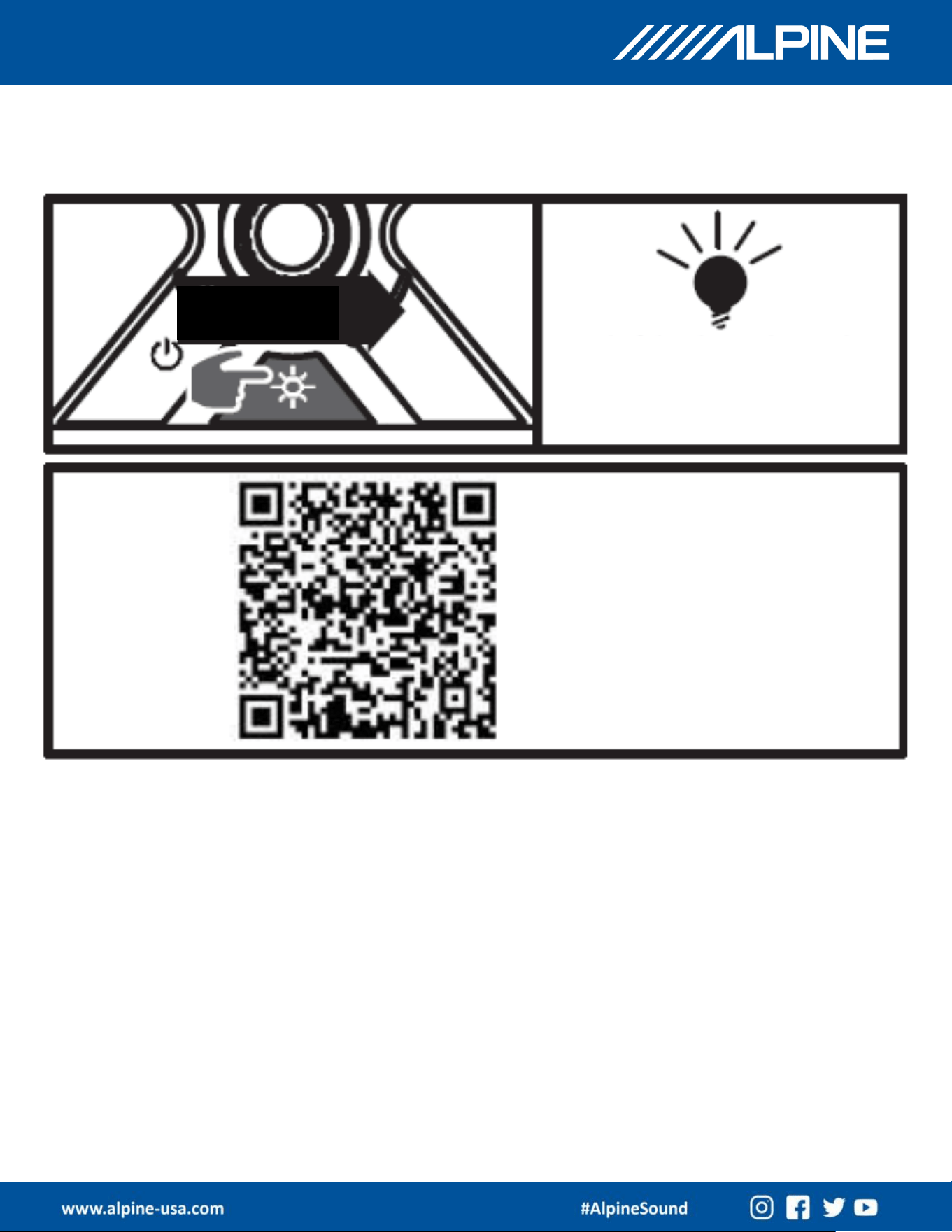
Short press to cycle
between EQ modes
Choose from 3 Equalization Sound Modes:
• Balanced (default mode)
• Alpine
• Classic
Short Press:
BT Mode: Switch to previous track
USB Mode: Press and hold for 2 seconds
to switch to the first track
Short Press:
BT Mode: Switch to next track
USB Mode: Press and hold for 2
seconds to switch to the last track
GP-RGB-SBAR
OWNER’S MANUAL
13
Operation Guide
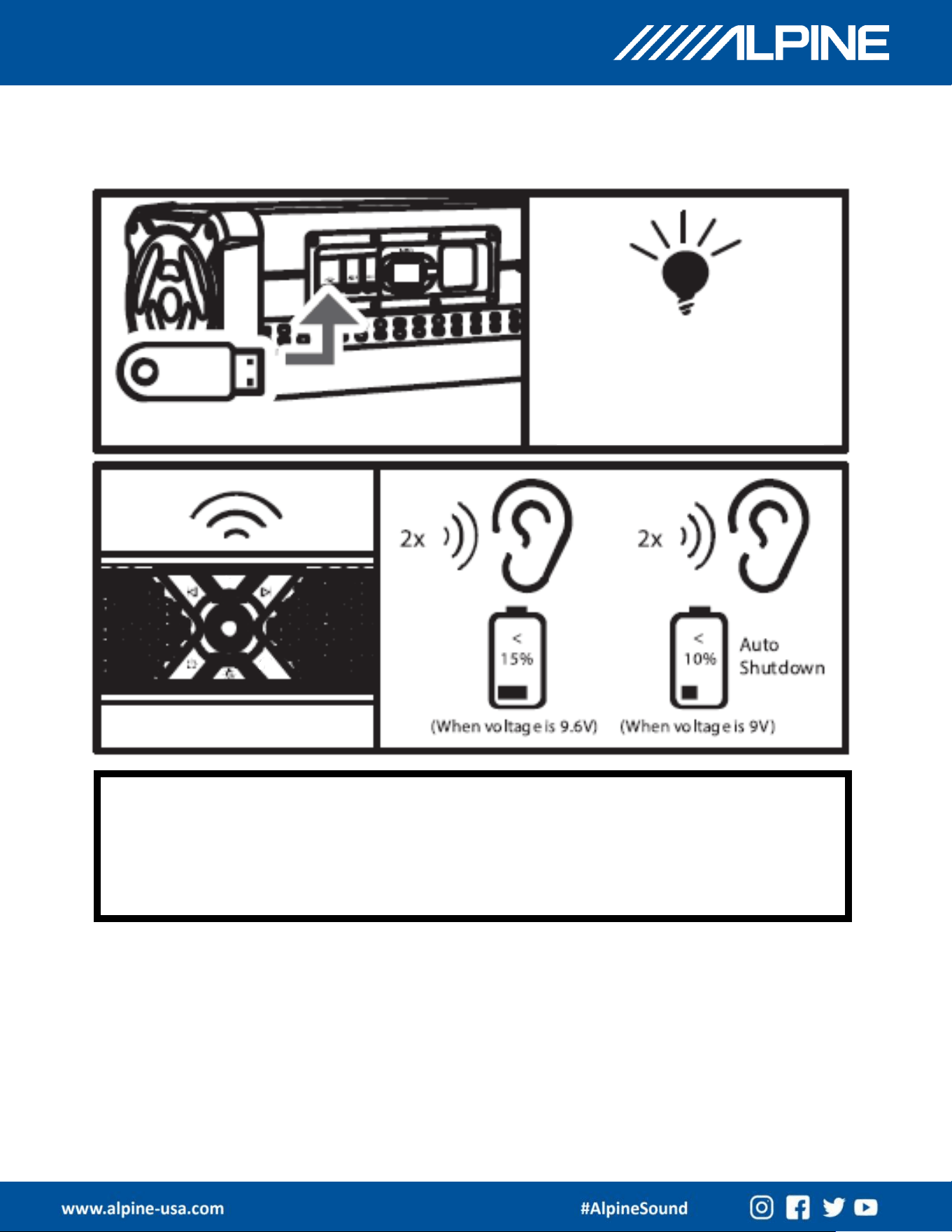
Short Press to
Switch
Switch to cycle between 9 colorful light
modes. Up to 100 modes can be
selected via the smartphone App
Free lighting
controller
smartphone
application
(IOS and
Android
available)
Scan the QR code shown, enter
the app store to download and
install the free lighting controller
app. After installation, turn on
the GloSix and smartphone to
connect to the GloSix and control
up to 100 modes of lighting
effects via the app.
Rear facing white strip lighting control
Press and hold for 2 secs to turn on
Press and hold for 2 secs to turn off
GP-RGB-SBAR
OWNER’S MANUAL
14
Operation Guide
Insert a USB Flash Drive to
automatically switch to play
music via the USB drive. Status
indicator on GloSix will light up
Orange
If the vehicle’s battery voltage falls below 9.6V, the GloSix will emit 2 beeps
through the speakers. This is a warning that the battery’s voltage is in critical
condition. If the vehicle’s battery voltage falls below 9V, the GloSix will emit 2
more beeps, and then will auto shutdown until the battery voltage is restored.
GP-RGB-SBAR
OWNER’S MANUAL
15
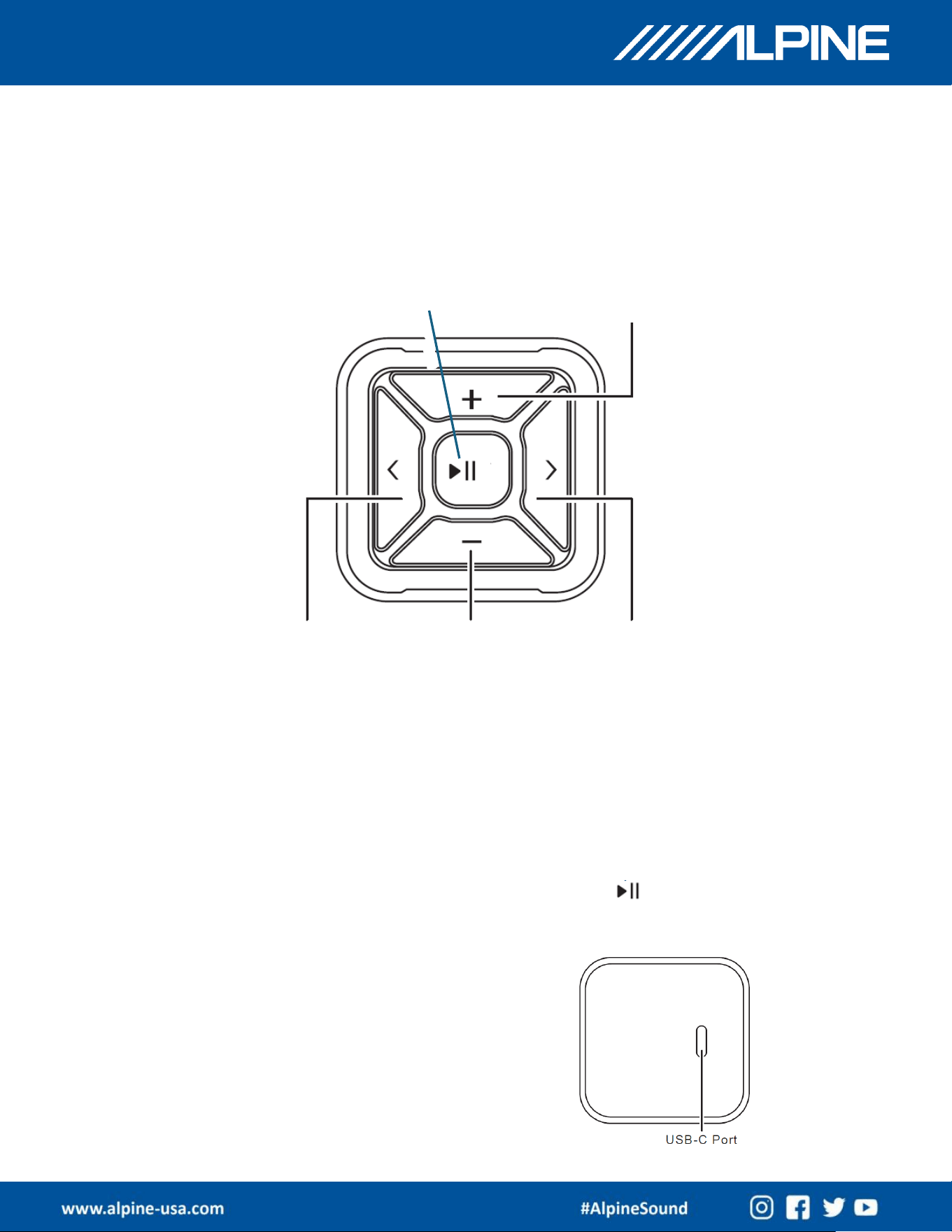
Bluetooth Remote Instructions
The Bluetooth remote puts media control and at your fingertips.
Attach the control to the steering wheel or dashboard to safely and
conveniently control functions even when your smartphone is out of
reach. Play/Pause, Volume and Track Up/Down are available.
1. Plug the supplied USB C cable into the port on the back of the
remote to make sure the remote is fully charged. It may take 3
hours for the remote to charge.
2. Make sure the Bluetooth setting on the smart phone is “ON”.
3. Check for “GP-BT” on the list of connected devices.
4. Select “GP-BT”and wait for the pop-up menu.
5. Select “Pair” on the smartphone menu.
NOTE: If Bluetooth is disconnected, long press the button and a
green LED will start to blink. The remote will then re-connect to the
phone.
Volume Up
Volume Down
Track Forward
Track Back
Play/Pause
GP-RGB-SBAR
OWNER’S MANUAL
16
Installation Instructions
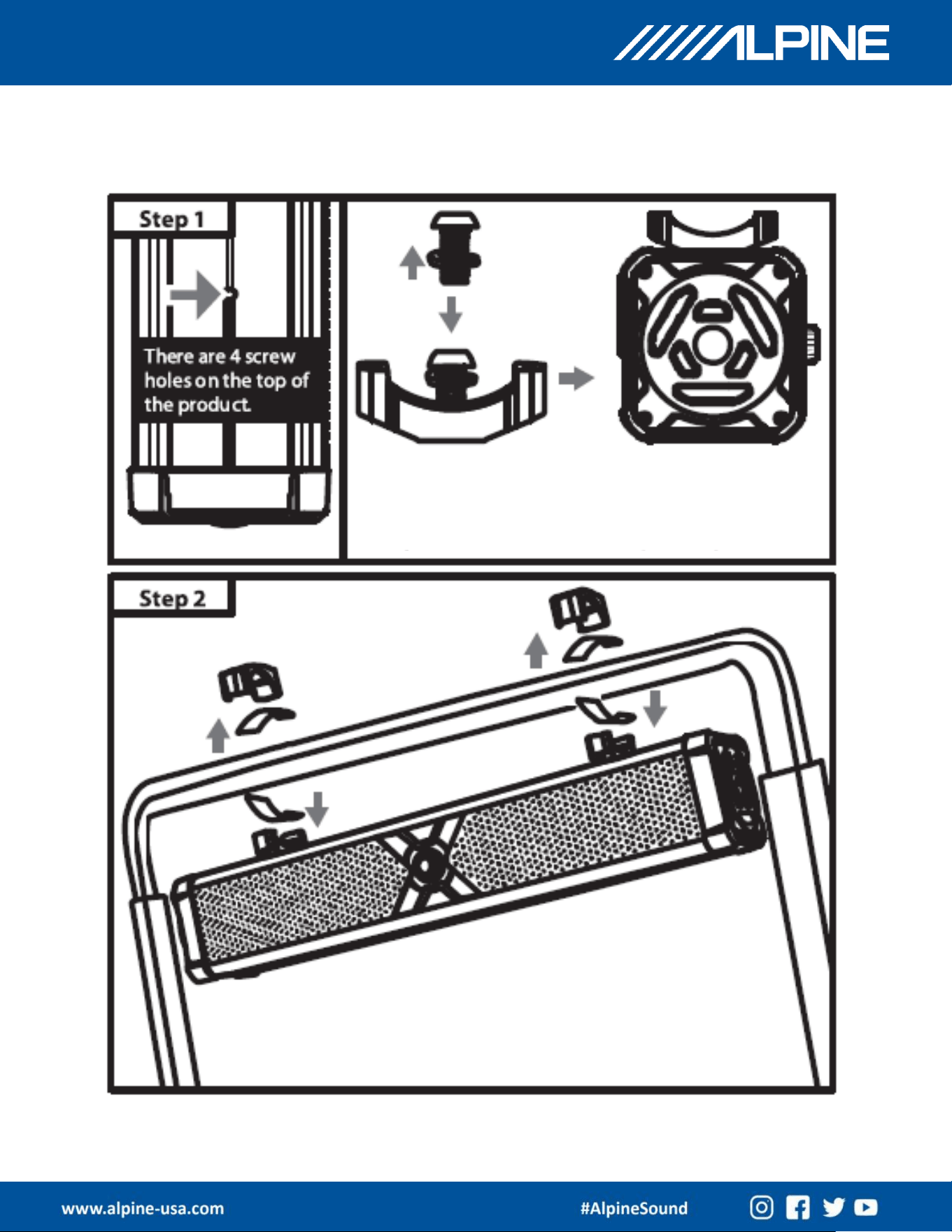
Insert the M8 spring washer onto the M8*14 screw
and install it into the lower cover of the bracket.
Use the L-Shaped Allen wrench to tighten the
screws at any 2 screw holes on the top of the
GloSix.
Silicone foot pads (2mm/4mm supplied) may
be inserted between the brackets and the bar
if needed – depending on the thickness of the
vehicle’s bar.
GP-RGB-SBAR
OWNER’S MANUAL
17
Installation Instructions
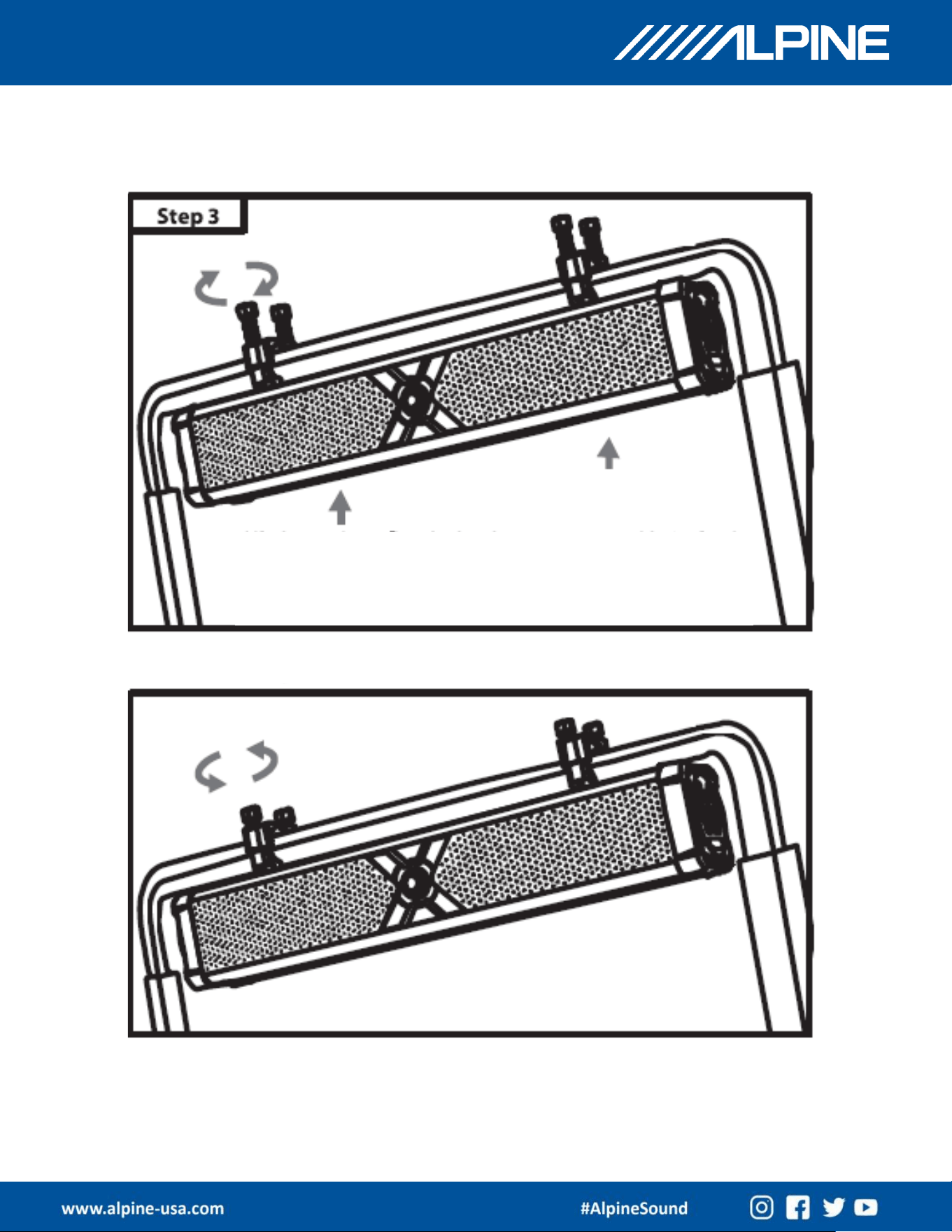
Align the upper bracket with the fixed screw holes on the
GloSix and tighten the M6*30 or M6*45 screws using the
supplied Allen wrench to secure the GloSix to the vehicle’s
bar.
Disassembly is the reverse of assembly
GP-RGB-SBAR
OWNER’S MANUAL
18
Power Wiring Instructions
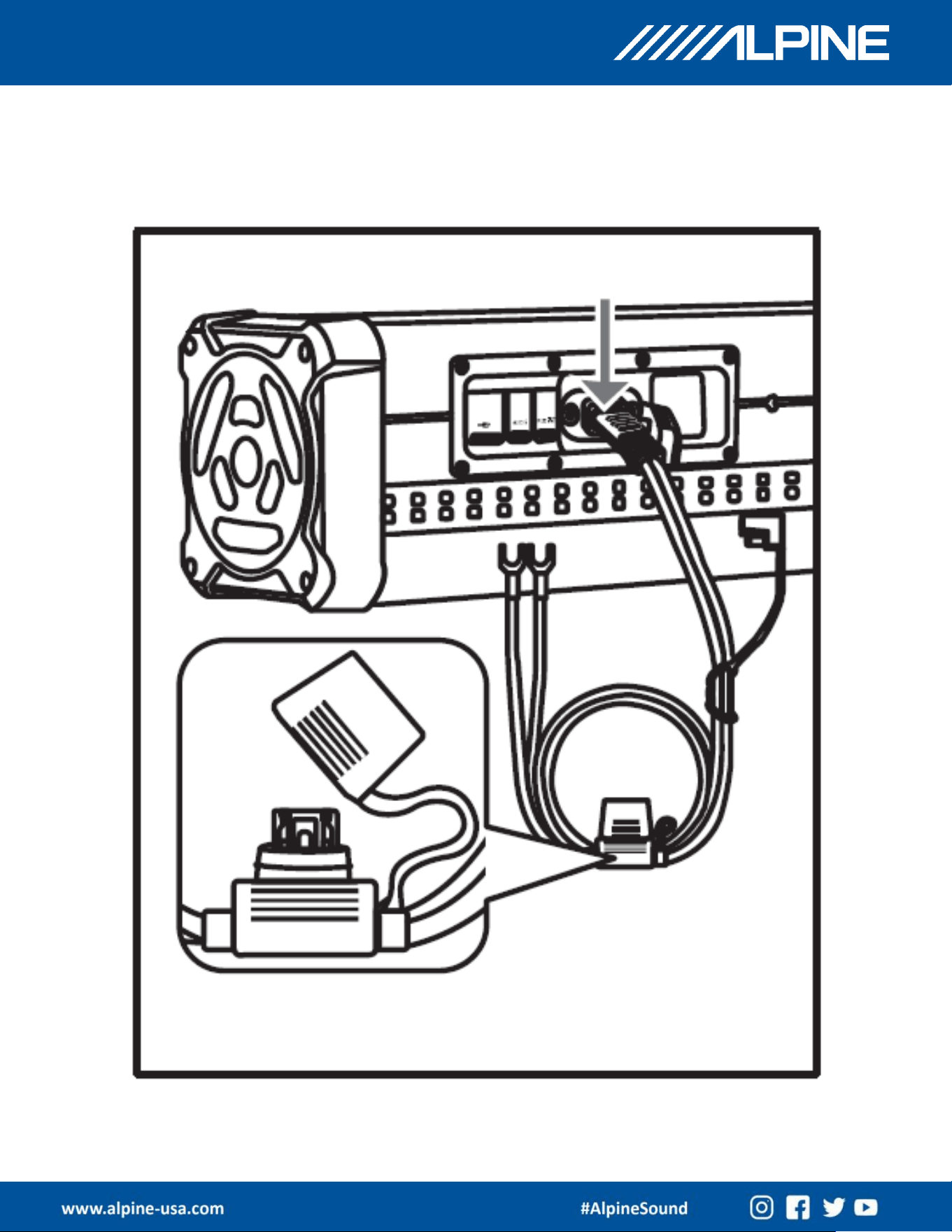
Insert the power wiring socket firmly into place
Weather resistant fuse holder w/25A fuse
Note – DO NOT USE A FUSE RATED LARGER THAN 25A
GP-RGB-SBAR
OWNER’S MANUAL
19
Power Wiring Instructions
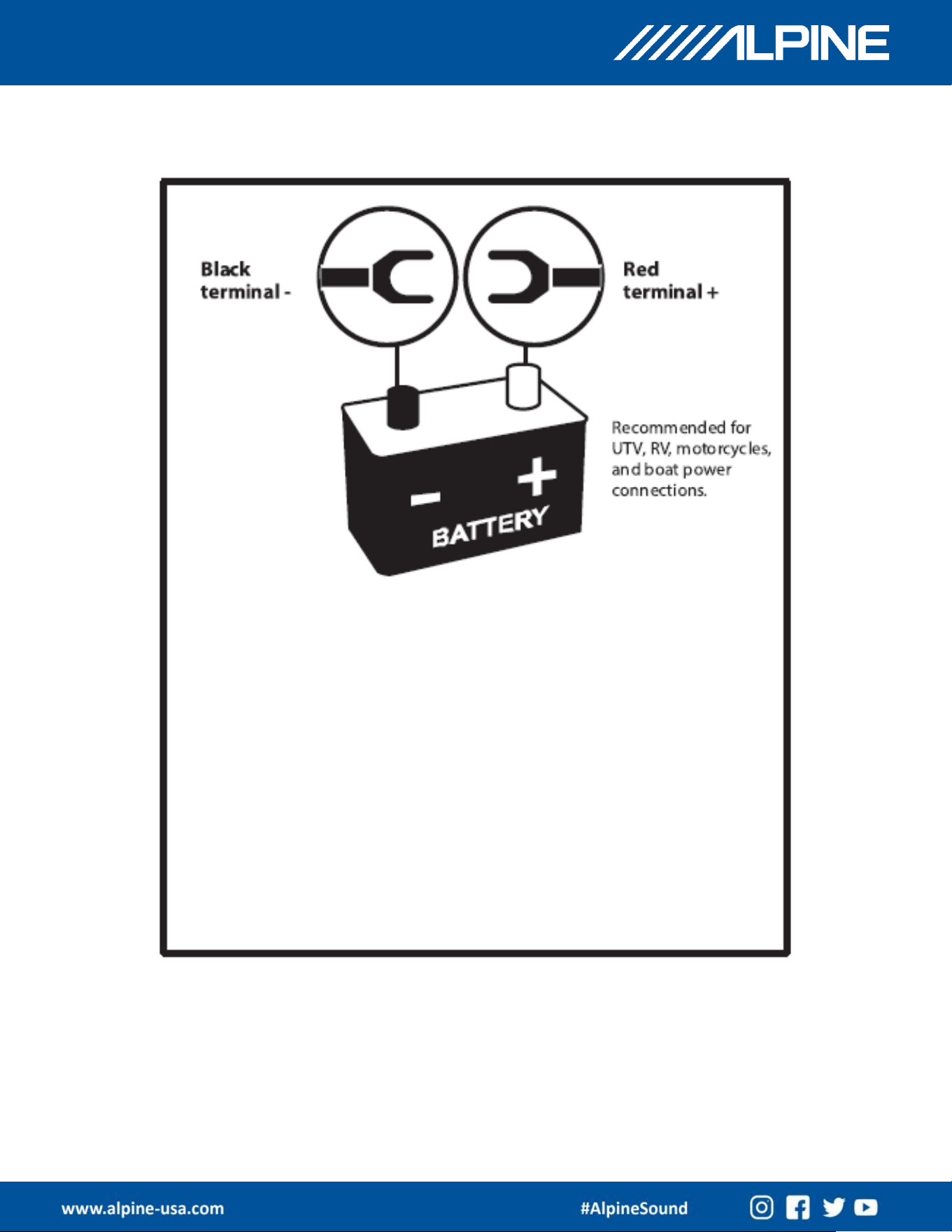
Power Wiring and Signal Connection Instructions
• Red Wire: This is the main power wire and should be connected directly
to the positive terminal of the 12V battery. Connection directly to the
battery will maximize current flow and ensure best performance.
• Black Ground Wire: This is the negative power wire and should be
connected directly to the negative terminal of the 12V battery. If the
installation is in a vehicle with a chassis, an alternative would be to affix
this wire to a clean & paint free place on the chassis. Use a screw or a
bolt with a star washer to ensure the best connection.
• AUX IN Input: This is designed to accept an audio input from a source
unit producing 250mV to 2 volts of audio output.
• AUX OUT Output: This has a max output of 2V and may be used to drive
an external amplifier or an additional GloSix. This is a full range variable
output that is controlled by the GloSix main volume control.
GP-RGB-SBAR
OWNER’S MANUAL
Model
Names
GP
-RGB-SBAR
GP
-BT
RMS Power (Watts)
250W
Peak Power (Watts)
500W
AUX Input Sensitivity
250mV
- 2Volts
AUX Output
2Volts max
Input Voltage
DC12V (9.6V
- 16V allowable
range)
Input Current
25A (10A
- 25A allowable Range)
Frequency Response
45Hz
- 22kHz
Signal/Noise Ratio
>85dB
Total Harmonic Distortion (THD)
< 1%
USB
-A Port Format
MP3, WMA, WAV Files
Bluetooth Frequency
2.4GHz
Bluetooth Protocol
V5.3
Speaker Specifications
Mid/Low: 95mm, 60W 4
Ω
Midrange: 78mm, 40W/4
Ω
Tweeter: 40mm, 25W/8
Ω
Product Dimensions
723.8mm x 128.9mm x 131.8mm
Product Weight
7.23kg
20
Product Parameters

GP-RGB-SBAR
OWNER’S MANUAL
• What battery specifications should I be using to power my GloSix?
• Alpine recommends a 12V battery – either lead acid or lithium that can supply a
minimum of 10A. Note: If the battery capacity falls below9.6V, it will affect the
audio performance of the GloSix.
• Why is the playback intermittent or noisy?
• In an unobstructed environment, the range of Bluetooth is normally around 15m
(about 50 ft). So, if using the BT connection make sure to have the phone no farther than
that distance from the GloSix.
• My GloSix is not connecting to a previously paired phone.
• Try deleting the GloSix from the phone’s Bluetooth device list, then re-pair
manually and re-connect.
• My GloSix is not powering on, or it is frozen.
• Check if the power connection is supplying 12v to the GloSix, both at the battery
of the vehicle and at the point where the power cable inserts into the GloSix. Also
check the fuse & replace if necessary. If everything above is OK, unplug the power
connection from the back of the GloSix, wait 10 seconds and plug it back in. Then
press and hold the power button for more than 5 seconds to reset
• Who can help me if I still have questions?
• Alpine Tech Support is available by phone at 1-800-TECH-101
• Visit the dealer locator at www.alpine-usa.com to find an authorized Alpine dealer
close to you.
21
Frequently Asked Questions

GP-RGB-SBAR
OWNER’S MANUAL
1. Please read this manual carefully before use and refer back to it for future
reference.
2. Before installation, be sure to check the polarity and voltage of the battery
in the vehicle. The GloSix is designed exclusively for 12V batteries with a
negative ground. Use of any other battery or power supply could damage
the GloSix or the vehicle’s electrical system.
3. Do not use the GloSix in extremely hot or cold environments. If used
outside the range of -10◦C/14◦F to 45◦C/113◦F, the performance will be
affected negatively.
4. Listening to music at high volume may cause hearing damage. The sound
pressure level of this product may cause hearing loss in normal humans,
even if only temporarily. Sound can be deceptive, and your perception of
“appropriate” sound levels may change over time. The perceived
“appropriate” sound level may actually be louder than you realize.
Therefore, before adapting to a sound level that could be inappropriate
and damaging to your hearing, set the volume at a safe level and only
change it carefully. Start with the volume at a lower level and increase the
volume until you hear a clear sound image and appropriate bass without
distortion.
5. Do not immerse the GloSix in water. It is water resistant (IPX6) but not
designed for underwater use.
6. Recommended storage environment temperature is -5◦C/23◦F to
35◦C/95◦F. Maximum ambient temperature should not exceed
45◦C/113◦F.
22
Usage Notes and Safe Volume Settings

GP-RGB-SBAR
OWNER’S MANUAL
Federal Communications Commission (FCC) Statement
This device complies with part 15 of the FCC Rules. Operation is subject to the
following two conditions: (1) This device may not cause harmful interference, and (2)
this device must accept any interference received, including interference that may
cause undesired operation. Note: This equipment has been tested and found to comply
with the limits for a Class B digital device, pursuant to part 15 of the FCC Rules. These
limits are designed to provide reasonable protection against harmful interference in a
residential installation. This equipment generates, uses and can radiate radio
frequency energy and, if not installed and used in accordance with the instructions,
may cause harmful interference to radio communications. However, there is no
guarantee that interference will not occur in a particular installation. If this equipment
does cause harmful interference to radio or television reception, which can be
determined by turning the equipment off and on, the user is encouraged to try to
correct the interference by one or more of the following measures:
●Reorient or relocate the receiving antenna.
●Increase the separation between the equipment and receiver.
●Connect the equipment into an outlet on a circuit different from that to which the
receiver is connected.
●Consult the dealer or an experienced radio/TV technician for help. Warning: Changes
or modifications not expressly approved by the party responsible for compliance could
void the user's authority to operate the equipment.
Note: The manufacturer is not responsible for any radio or TV interference caused by
unauthorized modifications to this equipment. Such modifications could void the
user’s authority to operate the equipment.
RF exposure statement:
The transmitter must not be collocated or operated in conjunction with any other
antenna or transmitter. This equipment complies with the FCC RF radiation exposure
limits set forth for an uncontrolled environment. This equipment should be installed
and operated with a Minimum distance of 20cm between the radiator and any part of
your body.
23

GP-RGB-SBAR
OWNER’S MANUAL
ISED Statement
This device contains licence-exempt transmitter(s)/receiver(s) that comply with Innovation,
Science and Economic Development Canada's licence-exempt RSS(s).
Operation is subject to the following two conditions:
1. This device may not cause interference.
2. This device must accept any interference, including interference that may cause undesired
operation of the device.
Déclaration ise
Cet appareil contient des émetteurs/récepteurs exemptés de licence qui sont conformes aux RSS
exemptés de licence d’innovation, sciences et développement économique Canada. Le
fonctionnement est soumis aux deux conditions suivantes:
1. Cet appareil ne peut pas causer d’interférences.
2. Cet appareil doit accepter toute interférence, y compris les interférences qui peuvent causer
un fonctionnement indésirable de l’appareil.
For Receiver:
This device meets the exemption from the routine evaluation limits in section 6.6 of RSS 102 and
compliance with RSS 102 RF exposure, users can obtain Canadian information on RF exposure
and compliance.
Cet appareil satisfait à l’exemption des limites d’évaluation de routine de la section 6.6 du RSS
102 et conformité au RSS 102 exposition aux RF. Les utilisateurs peuvent obtenir de l’information
canadienne sur l’exposition aux RF et la conformité.
This equipment complies with Canada radiation exposure limits set forth for an uncontrolled
environment. The device is installed and operated without restriction.
Cet équipement est conforme Canada limites d'exposition aux radiations dans un environnement
non contrôlé. Die Installation und der Betrieb der Ausrüstung sind uneingeschränkt.
For Transmitter:
This device meets the exemption from the routine evaluation limits in section 6.6 of RSS 102 and
compliance with RSS 102 RF exposure, users can obtain Canadian information on RF exposure
and compliance.The transmitter must not be colocated or operated in conjunction with any other
antenna or transmitter.This equipment should be installed and operated with a Minimum distance
of 20cm between the radiator and any part of your body. Cet appareil satisfait à l’exemption des
limites d’évaluation de routine de la section 6.6 du RSS 102et conformité au RSS 102 exposition
aux RF. Les utilisateurs peuvent obtenir de l’information canadienne sur l’exposition aux RF et la
conformité. L’émetteur ne doit pas être localisé ou utilisé conjointement avec une autre antenne
ou un autre émetteur. Cet équipement doit être installé et utilisé à une distance minimale de
20cm entre le radiateur et n’importe quelle partie de votre corps.
24
GP-RGB-SBAR
OWNER’S MANUAL