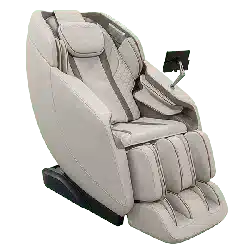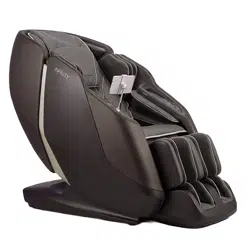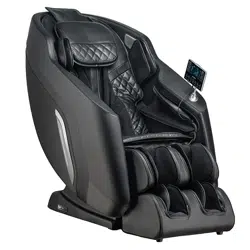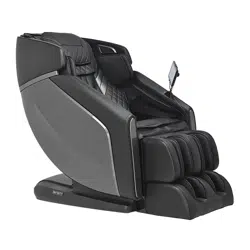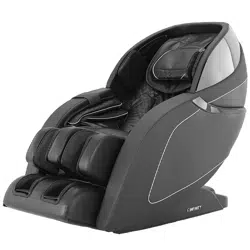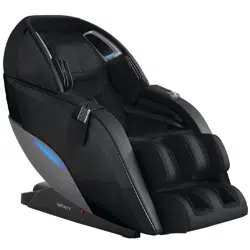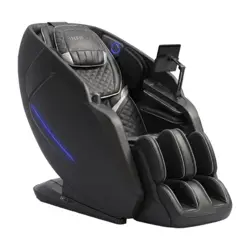

SERENZA
™
FLEX 4D
MASSAGE CHAIR
User Manual
Welcome to
Thank you and congratulations on purchasing an Infinity Massage Chair - you’ve made a
great choice.
With over a decade of experience designing, building and servicing massage chairs,
Infinity takes pride in every chair sold, including yours. We are here for you. The US-
based Customer Care team can be reached at (603) 910-5000 or visit us online at www.
infinitymassagechairs.com and find valuable self service resources under the SUPPORT tab,
including electronic copies of all documents and video tutorials.
Inside this manual, you will find everything you need to setup and safely enjoy your chair.
Please review the entire manual, including all safety information, before assembling or using
your chair. If you are assembling the chair yourself, please see the Assembly Guide next and
reference the online assembly video.
For convenience, we’ve also created a Quick Start Guide. We suggest you keep it near your
chair as a tool to get to know all the features of your new chair.
Get ready to sit back, relax and enjoy the Ultimate Massage Experience.
We know you can’t wait to sit in your new Infinity Massage chair! Take a picture of you enjoying the ultimate
massage experience and make sure to tag us on social media with the hashtag #infinitymassagechairs
Register your product at www.infinitymassagechairs.com/warranty
to ensure it is in our system. This will simplify the warranty process
should you ever need it.
Alternatively, scan the QR code to go directly to the URL above.
Before assembling your chair, watch an assembly video at:
www.infinitymassagechairs.com/assembly-tutorials
Alternatively, scan the QR code to go directly to the URL above.
THE ULTIMATE MASSAGE EXPERIENCE
@infinitymassagechairs@infinitymassagechairs
@infinity_chairs@infinity_chairs
@infinitymassagechairs@infinitymassagechairs
SCAN CODE
SCAN CODE
Warranty Registration
Assembly Video
Table of Contents
Your Chair Settings
Build Your Own
Chair Features
External Structure
4
5
3
Warning! Read important safety information found on page 37 before using or operating chair.
WARNING
Before Getting Started
Chair Setup
Taking Control
Set Your Environment
Clearance Space for the Chair
Floor Protection
Move Methods
Connect to Power
6
6
7
7
Main Power Switch
Adjust Pillow
Manual Intensity Increase
TrueFit
®
Body Scanning
Getting Out of the Chair
Chair Entry and Exit Hazards
8
8
8
8
9
9
Tablet Layout
Tablet Operation
Tablet Button Switch Functions
Smart Dial + Quick Access Panel
Smart Dial Auto Programs
Auto Programs
Auto Program Descriptions
Shoulder Position Adjustment
Auto Program Controls & In-Use Screen
4D Intensity
Calf Kneading & Oscillation
Foot Rollers
Air Intensity
Heat
Chair Position
Manual Mode
Zero Gravity
Airbags
Media Access
Voice Control
MyMemory
®
Foot Rollers
SootheMe
®
Sounds
10
11
12
12
13
14
15
17
17
17
17
17
28
29
29
30
30
30
30
30
31
31
31
31
31
31
32
32
32
33
33
33
34
34
34
34
35
35
18
18
19
20
22
22
24
26
27
27
27
37
39
39
40
40
41
42
Staying Safe
Fixing Issues
Top Navigation
Bottom Navigation
Extra Functions
Voice Listening
Voice List
Chromotherapy Light
Sleep Mode
Voice Demo
Language
Wireless
Chair Connection
Tablet Volume
Speaker Volume
Body Scan
Screen Brightness Level
Firmware Version
Default Timer
Manual Mode
Shoulder Position Adjustment
Massage Techniques
Focus Zone
Massage Width
4D Intensity
Massage Roller Position
Zero Gravity Mode
Air Settings
Safety Information
Power Safety Warnings
Operating Precautions
Troubleshooting
Specifications
Frequently Asked Questions
Warranty
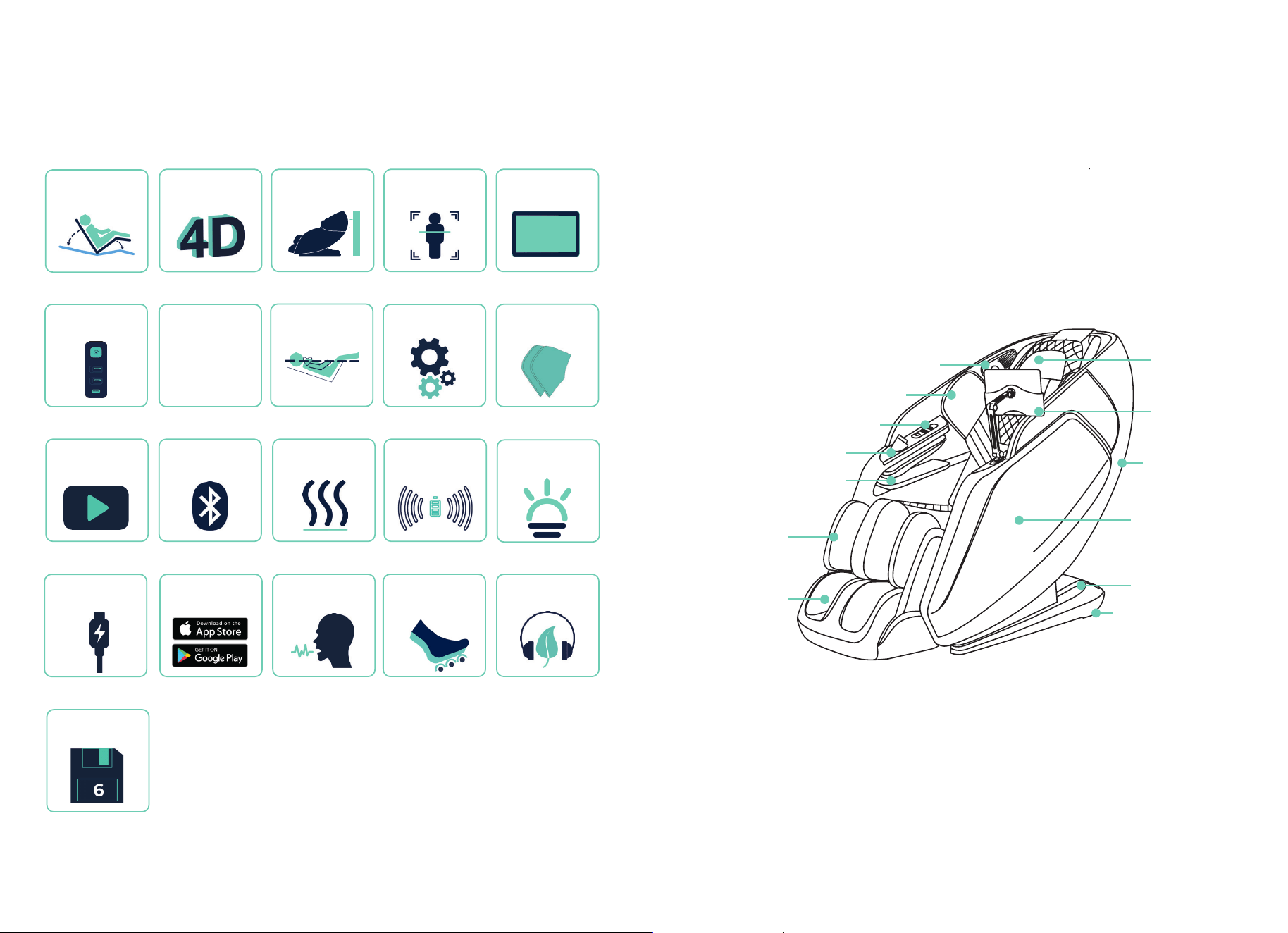
Chair Features
4
Your Chair
5
External Structure
Foot Rest
Calf Rest
Arm Airbag Massage
Smart Dial
Quick Access Panel
Shoulder Airbags
Bluetooth Speakers
Casters
Power Box
Arm Panel
Back Cover
10” Wireless
Tablet
Pillow
Page 6
Zero Wall Fit
®
Space-
Saving Technology
Page 10
Wireless 10”
Android Tablet
4D Back Massage
Mechanism
Flexible
Track
Page 9
TrueFit
®
Body
Scanning
Page 25
Wireless
Charging Pad
Page 20
Manual
Mode
Page 25
Bluetooth
Speakers
Page 25
Soothing Waist &
Foot Heat
Page 25
Chromotherapy
Light
Page 20
Airbag Compression
Therapy
Page 19
Weightless Zero
Gravity Recline
Page 27
SootheMe
®
Sounds
Page 26
Intelligent Voice
Commands
Page 27
6 MyMemory
®
Preset Slots
Page 25
USB-C
Charging Port
Page 14
24 Auto
Programs
24
Page 12
Quick Access
Control Panel
Page 24
Media
Access
Page 25
Android & iOS
Apps
Page 27
Total Sole
Reflexology Foot
Rollers
6 7
Before Getting Started
- Do not use the massage chair in high moisture environment such as near a swimming pool or bathroom to
prevent electric shock accident.
- Please keep the massage chair away from heated surfaces to prevent fire hazard or damage to the product.
WARNING
- Keep the distance between the power socket and power switch within 60” to avoid damage of power cord
while massage chair sliding forward.
- Straighten the power cord while in use to avoid tangle or damage.
CAUTION
- To avoid serious injury or death, before sliding chair forward or backward check to make sure area is clear
of children, pets, or obstacles.
WARNING
Connect to Power
CAUTION
- Do not move the chair when there is user inside.
- Chair is heavy. Use caution and get assistance when lifting to avoid injury. Do NOT lift chair by footrest or
armrests to avoid damage to product.
Plug into a 120V grounded outlet.
WARNING – Improper connection of the equipment-
grounding conductor can result in a risk of electric shock. Check
with a qualified electrician or serviceman if you are in doubt as to
whether the product is properly grounded. Do not modify the plug
provided with the product – if it will not fit the outlet, have a proper
outlet installed by a qualified electrician.
This product is for use on a nominal 120-V circuit and has a
grounding plug that looks like the plug illustrated. Make sure that
the product is connected to an outlet having the same configuration
as the plug. No adapter should be used with this product.
Grounding
This massage chair is a Class 1 electrical appliance. Make sure to
use a grounded outlet to the grounded power supply circuit and a
properly installed earth grounding rod with ground connection, to
avoid electric shock.
Grounding Instructions
To avoid risk of electrical shock, turn power switch off before plugging unit into electrical outlet. Use only
with properly grounded outlet (3 prong). Do not plug into ungrounded outlet.
Grounded
outlet
Grounding pin
WARNING
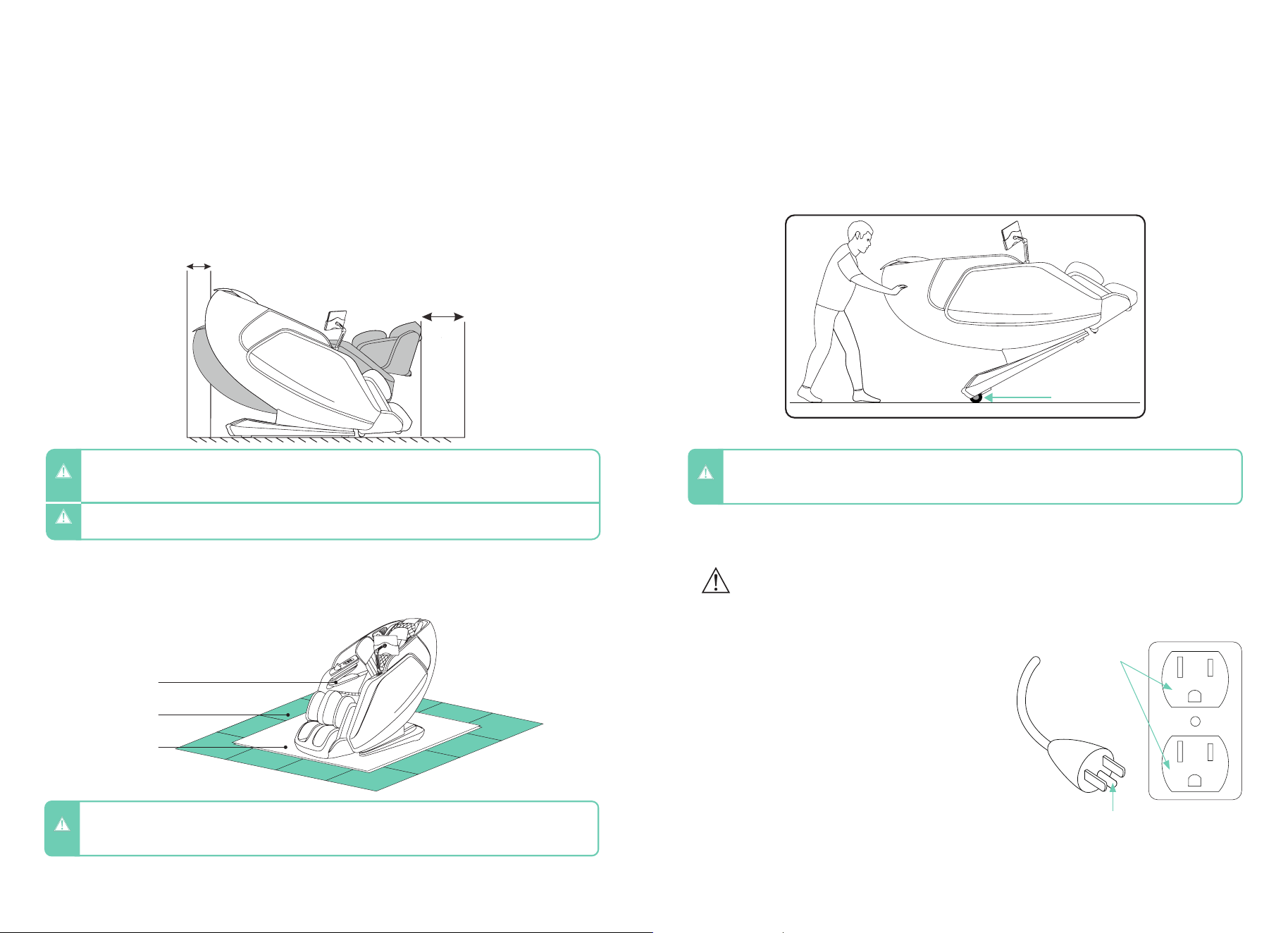
- 3” clearance for the recline of the backrest; 24” clearance for the extension of footrest and
sliding forward of the chair.
- Keep it 3 feet away from the TV, radio or other audio & video appliance to avoid signal
interference.
Clearance Space for the Chair
Installation Site
3”
24”
To protect ANY floor type, hard surface or carpeted, from scratches or other markings,
place the chair on a pad or mat that extends from under the footrest to the rear of the chair.
Floor Protection
Massage Chair
Floor
Pad/Mat
Apply pressure to the back of the massage chair from behind to pivot on the casters.
Have a second person up front to guide the Footrest until in the correct position. Maintain
clearances as mentioned above. Gently lower into place. Do not pull on the side arms.
Move Methods
Casters
8 9
Chair Setup
- When not in use for a long period of time, we recommend that the chair be covered, the power cord be coiled
and that the unit be placed in an environment free of dust and moisture.
- To avoid possible damage to product or injury to unsupervised children, always turn off power switch and
unplug massage chair from electrical outlet immediately after use.
CAUTION
TrueFit
®
Body Scanning
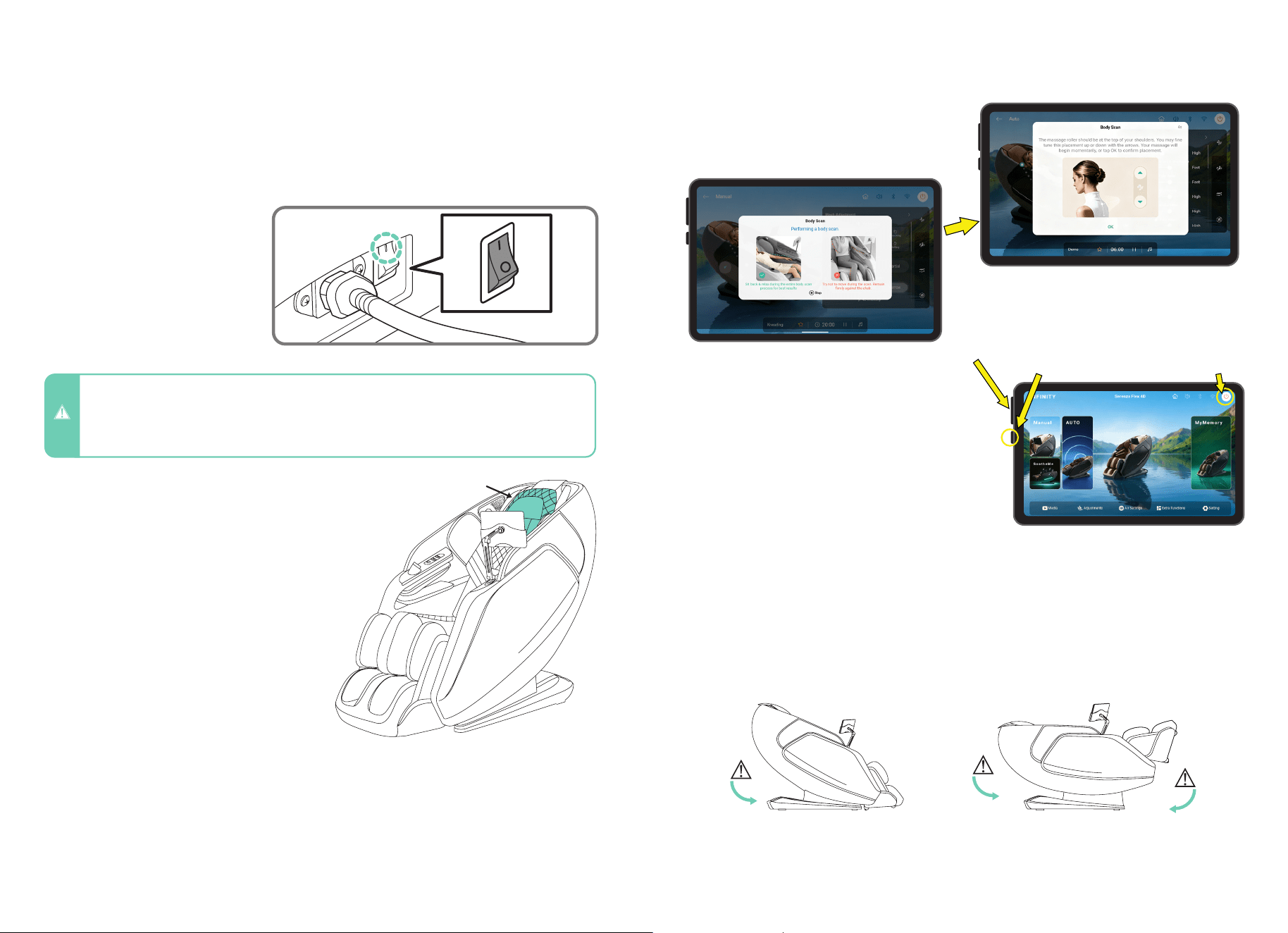
Select any auto program or manual massage. The chair will automatically begin scanning
your body, mapping your back, shoulders, and neck. During this process it is important to
remain seated back into the chair without lifting your head.
The scan can be viewed on the tablet screen. If fine tuning is needed just after your body
scan, wait for the shoulder position adjustment to appear and then use the up and down
button arrows to move the massage rollers up or down for the perfect shoulder kneading
position.
To easily exit the chair at any time, tap the
POWER button on the upper right side of the
tablet screen. You can also press and hold the
power button on the left of the tablet. Lastly, you
can press and hold the smart dial to power the
chair off.
WARNING! Check to make sure children and pets
are clear of chair before tapping power button to
return chair to upright position.
Getting Out of The Chair
Chair Entry and Exit Hazards
WARNING! The areas under the footrest and behind the back rest are potentially dangerous for a child or
pet. The chair back is heavy and reclines with force. A small child or pet located behind the chair could be
crushed as chair is reclined resulting in serious injury or death. When chair is reclined, small children or pets
who have crawled under the leg rest may not be visible to the user and could be crushed when leg rest is
lowered or when chair is returned to upright position. To avoid serious injury or death, check these areas
carefully before reclining, lowering leg rest, or returning chair to upright position.
Make sure to check for children
or pets between the chair back
and the base of the chair before
entering zero gravity recline.
Make sure to check for children or
pets underneath the footwell before
exiting zero gravity recline and
returning to upright position.
Make sure to check for
children or pets between the
footrest and the chair body
before lowering the legrest.
Take a seat in the chair and take note of
where the pillow rests on your neck. Adjust
the pillow so that it rests comfortably in the
arch of your neck. Do this by adjusting the
pillow behind your neck and laying back
completely against the back pad.
Adjust Pillow
To make the massage more intense, remove
the pillow cushioning between you and
the massage mechanism in the seat back.
Remove the pillow by pulling the velcro off
and pushing the zipper across the back.
Manual Intensity Increase
Getting Comfortable
To power up the chair, plug the
power cord into a grounded 120V
outlet, then connect the other end
to the power inlet on the back of
the massage chair. Turn on the
chair by switching the power button
to “( I )” or “ON.”
Main Power Switch
Pillow
TrueFit
®
Body Scanning
When TrueFit
®
Body Scan is running, use the mech’s
up and down arrows to adjust the mechanism to your
preferred shoulder height, then press “OK”.
Power Button Power Button
Volume Button
Power Button
10 11
Taking Control
Tablet Layout
1.
3.
5.
7.
2.
4.
6.
8.
Tablet Operation
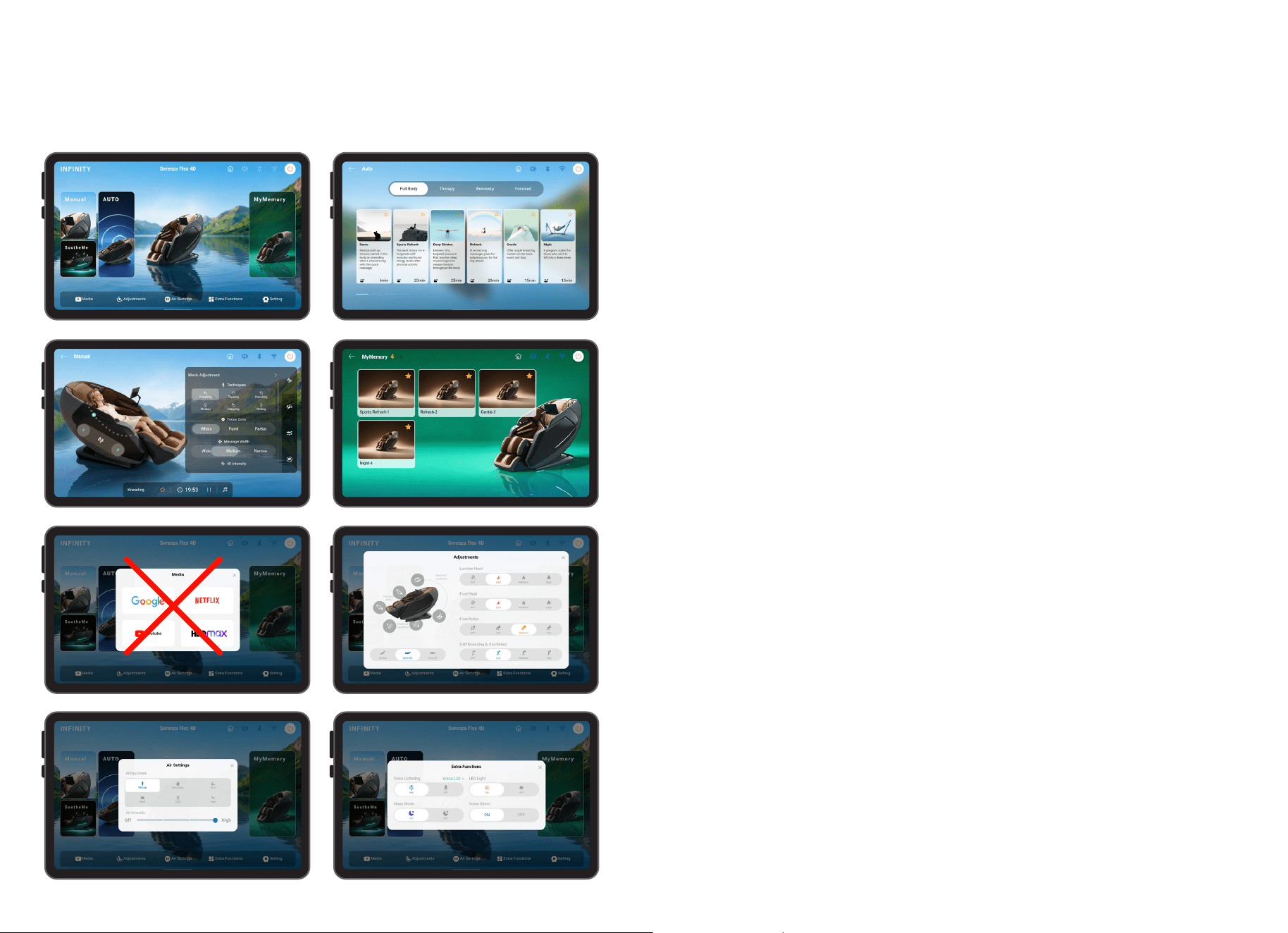
1. Home Screen – Serves as the main control center for your massage chair. From here,
you can access Auto Programs, create a customized massage in Manual Mode, or save and
recall your preferred massage settings using MyMemory
®
preset slots. Use the Quick Access
Menu along the bottom of the screen to stream media, adjust chair positioning, customize
airbag massage settings, access additional features, and configure system settings.
2. Auto Programs – Tap Auto Programs to access 24 pre-programmed massage sessions
designed for relaxation, recovery, stress relief, improved sleep, and more. Select your
desired program, and the chair will automatically adjust massage techniques, intensity
levels, and roller positioning to deliver a customized, hands-free massage experience.
6. Adjustments – Tap Adjustments to customize the chair’s position and comfort settings
during any massage session. Independently adjust the backrest recline, footrest angle, and
footrest extension to achieve your preferred seating position. You can also activate lumbar
and foot heating, adjust foot roller speed, and customize calf kneading intensity. These
controls allow you to fine-tune your comfort for a more personalized massage experience.
4. MyMemory
®
Preset Slots – Tap to save up to six of your favorite massage sessions for
quick and convenient access. Whether you prefer a customized Manual Mode massage
or a specific Auto Program, your settings can be stored and recalled with a single tap,
eliminating the need to reconfigure the chair each time you use it.
5. Media Access – Tap Media to access the chair’s built-in entertainment apps while you
relax. Browse the web using Google, stream movies and TV shows on Netflix and HBO
Max, or enjoy videos, music, and podcasts on YouTube. Media Access allows you to enjoy
your favorite content without leaving the comfort of your massage session. Note: Some
subscriptions may be required at an additional cost.
3. Manual Mode – Tap Manual Mode to create a fully customized massage experience.
Choose from a variety of massage techniques, adjust the massage width, target a specific
area or region of the body, and fine-tune the 4D intensity to your preference. Manual Mode
gives you complete control over your massage, allowing you to focus on the areas that
need the most attention.
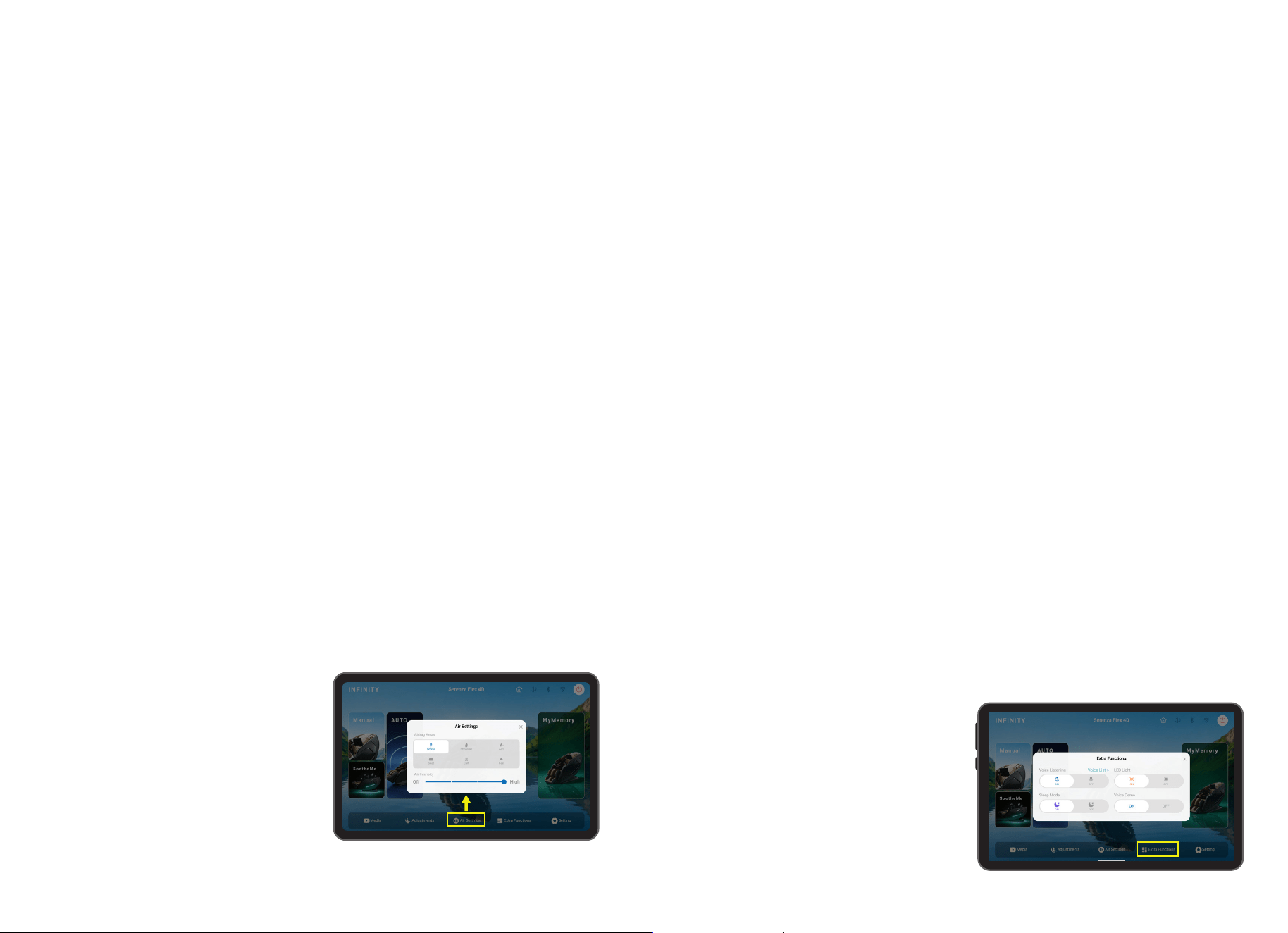
7. Air Settings – Tap Air Settings to customize the chair’s airbag compression massage
system. Adjust the airbag intensity and select specific body zones, including the shoulders,
arms, seat, calves, or feet, to target the areas that need the most attention. The airbag
system uses rhythmic compression and release motions to help reduce muscle tension,
promote relaxation, and enhance overall massage comfort.
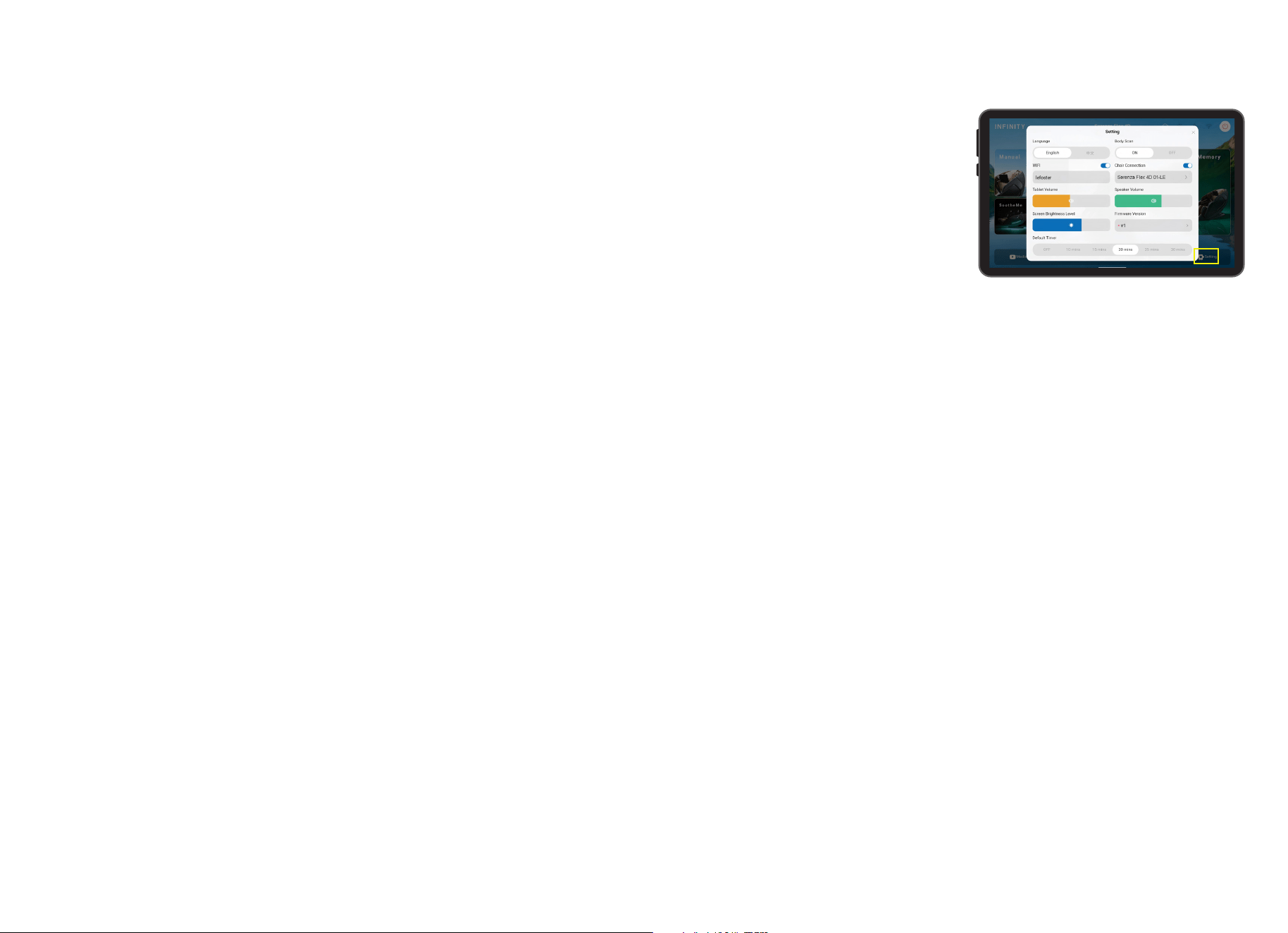
8. Extra Functions – Tap Extra Functions to access additional chair features and
convenience settings. From this menu, you can enable or disable Intelligent Voice Control,
view available voice commands, control the chair’s LED lighting, activate Sleep Mode, and
access other system functions designed to enhance your massage experience.
12 13
Smart Dial + Quick Access Panel
Tablet Switch Functions
The Quick Access Panel and Smart Dial provide quick access to Auto Programs, power
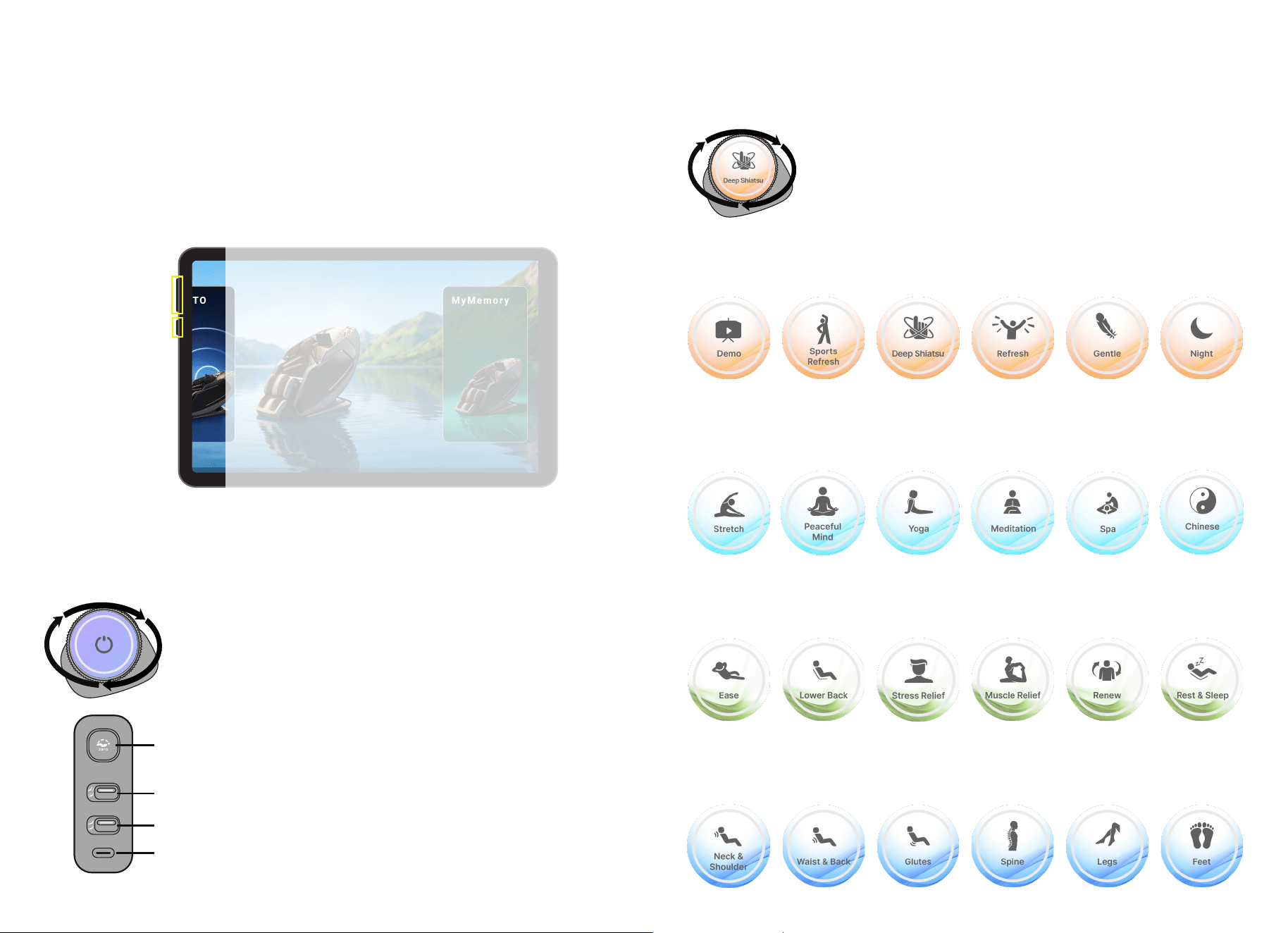
controls, Zero Gravity, chair adjustments, and USB-C charging without using the touch
screen tablet.
Located on the top left of the touch screen tablet are two physical buttons for quick access.
The upper button adjusts speaker volume, while the lower button powers the chair on or off.
Their convenient placement allows easy access during use.
Power Button
Volume Button
Rotate Smart Dial - Interested in an auto program? Simply rotate this
dial clockwise or counter-clockwise to choose an auto program which
appears on this smart dial screen.
Press Smart Dial - Press and hold to turn the massage chair on or off.
Zero Gravity – Elevates your feet above your heart to promote circulation and
reduce pressure on the spine. Press once to recline, again for Zero Gravity 1, and
again for Zero Gravity 2.
Backrest Incline/Recline - Adjust the backrest position by pressing upward to sit
more upright or downward to recline and relax.
Footrest Up/Down - Raise or lower the footrest to adjust leg support and comfort.
USB-C Charging Port - Plug in your favorite device and let the massage chair charge
it up while you relax.
Taking Control
Smart Dial: Auto Programs
Rotate the Smart Dial to browse the 24 Auto Programs. Each program
appears on the display as you turn, making it easy to find and start your
desired massage. See page 15 for program descriptions.
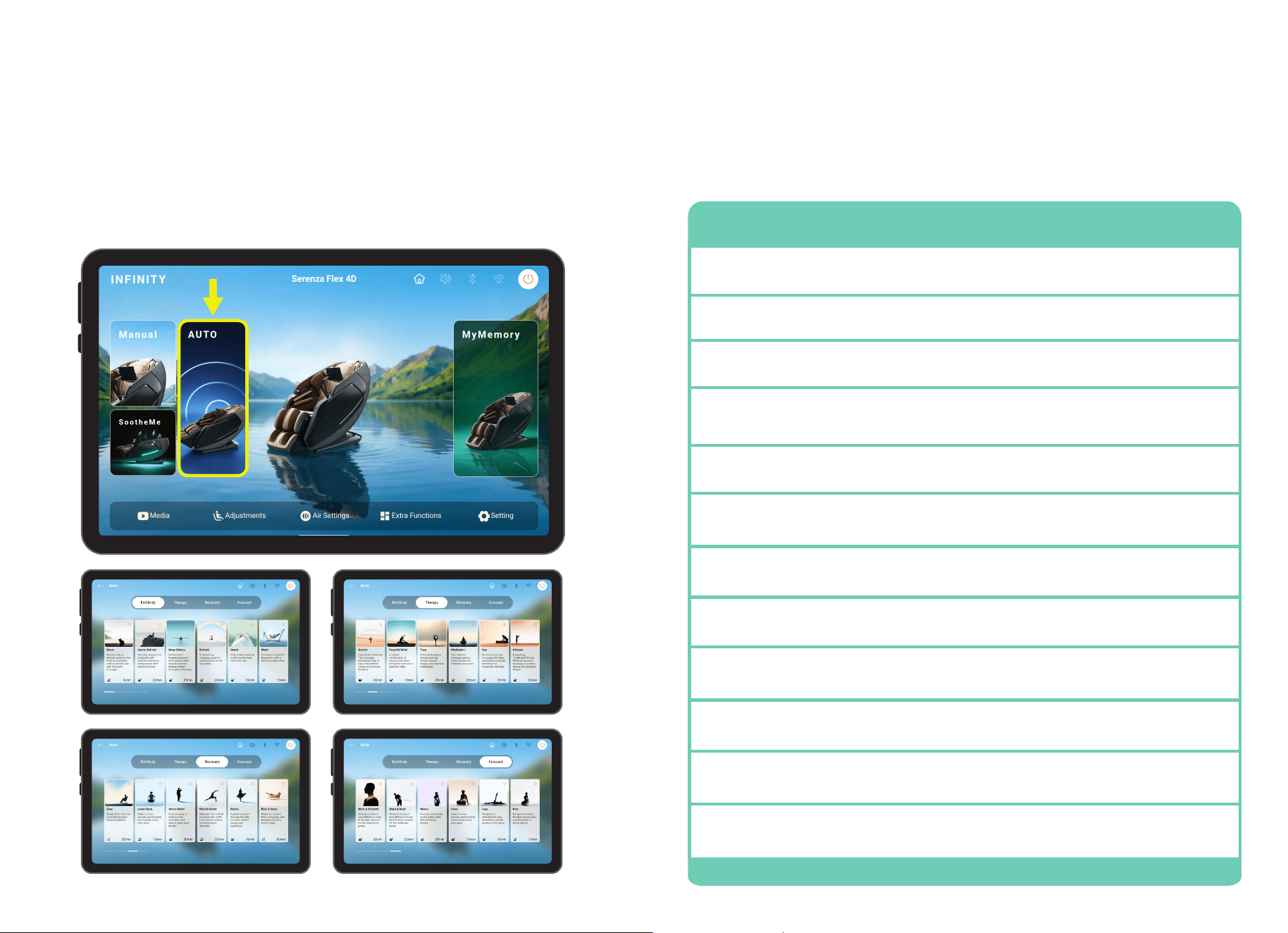
Full Body
Experience complete head to toe relaxation with programs designed to reduce tension,
improve circulation, and leave you feeling refreshed and renewed.
Therapy
Restore balance with wellness-focused programs designed to relieve tension, improve
flexibility, and promote relaxation.
Recovery
Rejuvenate tired muscles with programs designed to reduce stress, relieve soreness, and
support recovery and renewal.
Focused
Target specific areas of the body with programs designed to provide concentrated relief
where you need it most, helping reduce tension and improve comfort.
14 15
Set Your Environment
Auto Programs
From the home screen, tap the AUTO button to enter Auto Program Menu. Choose from 4
categories with 6 auto programs per category, a total of 24 auto programs. To enter the
program you desire tap the screen. Selected program will show on the In-use screen.
Auto Program Descriptions
Program Description
Sports Refresh
The best choice to reinvigorate stiff muscles and boost energy levels after
physical activity.
Refresh
A revitalizing massage, great for preparing you for the day ahead.
Gentle
Offer a light kneading motion on the back, waist and hips.
Demo
Reduce built up tension carried in the body or unwinding after a stressful
day with this quick massage.
Night
Stretch
Peaceful Mind
Yoga
Meditation
Spa
Chinese
A program suited for those who wish to fall into a deep sleep.
Inspired by traditional Thai massage techniques, help re-adjust the skeletal
structure & increase flexibility.
A unique combination of varying intensities brings the mind into a peaceful
state.
Full body kneading relieves built up stress, reduces fatigue, and improves
metabolism.
This rhythmic massage eases tired muscles and refreshes your spirit.
Performs a strong massage with deep, penetrating massage techniques to
recuperate the body.
Integrating Traditional Chinese Medicine acupoint massage, it soothes
stress and alleviates fatigue.
Deep Shiatsu
Delivers firm, targeted pressure that reaches deep muscle layers to release
tension throughout the body.
16 17
Auto Program Descriptions
Program Description
Lower Back
Helps to relax, recover, and revitalize the muscles along your spine.
Muscle Relief
Massage that is ideal for those who suffer from muscle cramps by doing
sports activities.
Renew
A gentle program designed to relax muscles, restore energy, and
rejuvenate.
Ease
Designed to clear the mind and increase blood circulation.
Rest & Sleep
Neck & Shoulder
Waist & Back
Glutes
Spine
Legs
Feet
Helps you unwind from a long day, and prepares you for a restful sleep.
Relieves soreness and stiffness in neck & shoulder muscles for the ‘head-
down group’.
Relieves soreness and stiffness in lower back & waist muscles for the
‘sedentary group’.
Focused specifically on the glutes. Help relieve built up tension.
Helps to relax, recover, and revitalize the muscles along your spine.
Designed to stimulate the legs, revitalizing muscle groups in this region.
Designed to target the feet and provides soothing relief to these regions.
Stress Relief
Improve range of motion in the shoulders, and reduce upper back tension.
When a massage program begins, the In Use screen appears.
This screen displays the active program name, current massage
technique, and a pause button. Use the bottom navigation to access Media (Google,
YouTube, Netflix, and HBO Max), adjust your chair position, customize airbag intensity
settings, check WiFi and Bluetooth in Extra Functions.
In-Use Screen
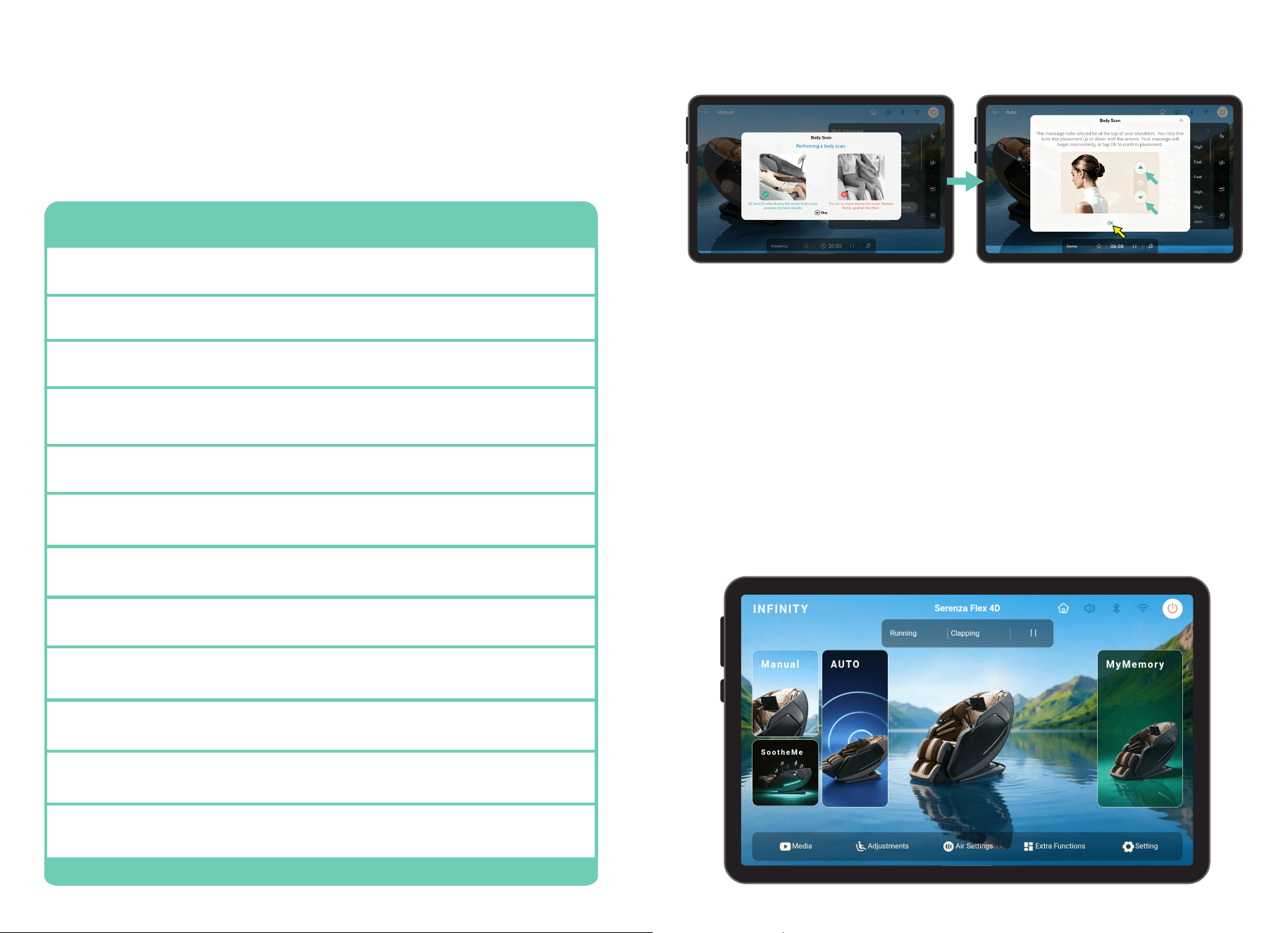
Select any auto program or manual massage. The chair will automatically begin scanning
your body, mapping your back, shoulders, and neck. During this process it is important to
remain seated back into the chair without lifting your head.
If fine tuning is needed just after your body scan, wait for the shoulder position adjustment
to appear and then use the up and down button arrows to move the massage rollers up or
down for the perfect shoulder kneading position.
Shoulder Position Adjustment
Set Your Environment
18 19
Set your Environment
Lumbar Heat
Use the Lumbar Heat control to adjust the warmth provided to the lower back area. Select
Off, Low, Medium, or High to customize the heat level to your preference. Gentle heat helps
soothe tired muscles, promote relaxation, and enhance the overall massage experience.
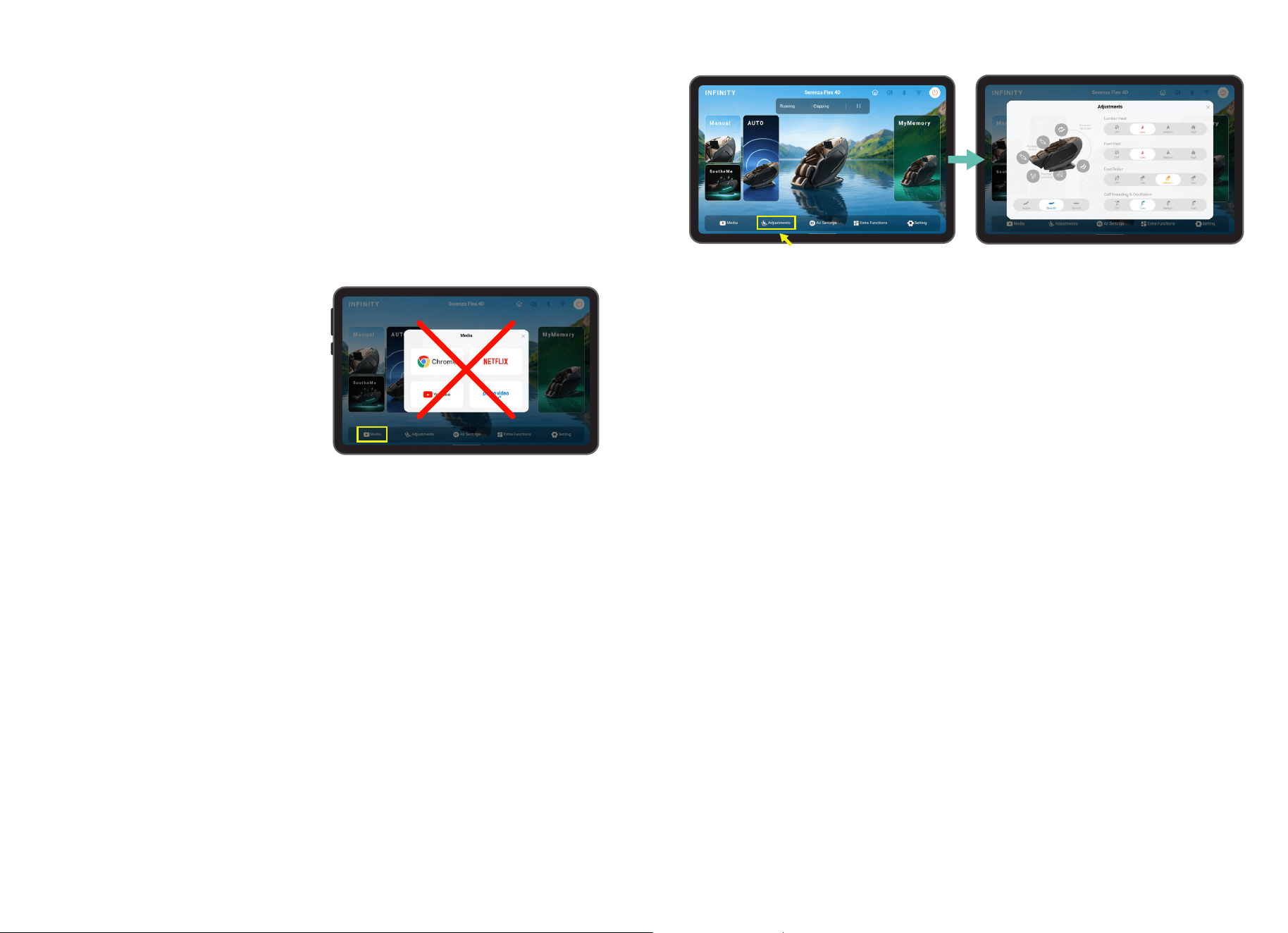
Adjustments
Tap the Adjustments button on the bottom navigation bar to adjust settings to create the
perfect massage session for you.
10” Wireless Android
®
Touch Screen Tablet
Media Access Instructions
Google
Netflix
YouTube
HBO/Max
The wireless Android tablet transforms the Serenza Flex 4D into a complete relaxation
and entertainment center. Browse the web, stream movies, watch videos, or enjoy online
content while relaxing in your massage chair. The tablet also functions independently as
a standalone entertainment device. Note: Netflix and HBO Max require a subscription to
access content.
1. Make certain your WiFi is connected.
2. For Google and YouTube, tap each to open
a browser. To get back to the chair, swipe
up from the bottom, tap the square, swipe to
find the Serenza App and tap it to restore. For
Netflix and HBO/Max, tap to open the browser.
Either Login or Sign-up for service.
3. Follow the online instructions to download
the app onto the tablet. Sign in to the App. Next time you select Netflix or HBO/Max from
the Serenza Chair app, the corresponding App will open automatically. For Picture-in-Picture
(PIP) swipe up from the bottom while in the App. Tap the circle. To return to the chair App,
swipe up from the bottom, tap the square, swipe to find the Serenza app and tap it.
Google Search provides quick access to information across the internet. Users can search
for websites, check current news, find answers to questions, explore topics of interest, and
access online content while enjoying a massage session.
Netflix provides access to a wide variety of movies, TV shows, documentaries, and original
content. Users can sign in to their Netflix account and enjoy their favorite entertainment
while relaxing during a massage session.
YouTube provides access to videos from creators around the world, including music,
podcasts, educational content, news, and entertainment. Users can search for videos,
subscribe to channels, and stream content during their massage session.
HBO Max provides access to blockbuster movies, acclaimed TV series, Max Originals, and
content from HBO, DC, Discovery, and more. Users can sign in to their HBO Max account to
stream their favorite programs and enjoy entertainment while receiving a massage.
Media Access
Backrest Up/Down
Adjusts the angle of the backrest to achieve a more upright or reclined seating position.
Use this control to find the most comfortable posture for relaxation, reading, or massage
therapy.
Footrest Up/Down
Raises or lowers the footrest to provide optimal leg support. Adjusting the footrest height
helps improve comfort and maintain proper body alignment during a massage session.
Footrest In/Out
Extends or retracts the footrest length to accommodate users of different heights. This
adjustment ensures proper support for the calves and feet, improving overall comfort and
massage effectiveness.
Foot Heat
Use the Foot Heat control to adjust the warmth provided to the feet during your massage
session. Select Off, Low, Medium, or High to customize the heat level to your preference.
Soothing heat helps relax tired feet, improve comfort, and enhance the overall massage
experience.
Foot Rollers
Use the Foot Roller control to adjust the speed of the reflexology rollers located beneath
your feet. Select Off, Slow, Medium, or Fast to customize the intensity of the rolling
massage. Higher speeds provide a more invigorating foot massage, while lower speeds
offer a gentler, more relaxing experience.
20 21
Air Settings
Whole
Activates air compression massage across
all available airbag zones simultaneously.
This setting provides a full-body air
massage experience by applying
coordinated pressure to multiple areas of
the body for overall relaxation and comfort.
Seat
Voice Listening
Targets the airbags located in the seat cushion area. This setting applies gentle pressure
around the hips and upper thighs to enhance comfort and improve the overall massage
experience.
You can turn on intelligent voice command
+ control by heading to the Extra Functions
screen and tapping the Voice Listening
button. Tap Voice List to see all current chair
commands.
Calf
Feet
Activates the calf airbags to provide a compression massage to the lower legs. The
alternating pressure helps relax tired muscles, reduce leg fatigue, and promote a soothing
massage sensation.
Targets the foot airbags to gently compress the feet during the massage session. This
setting helps relieve tension, improve comfort, and enhance relaxation after long periods of
standing or walking.
Air Intensity
Use the Air Intensity control to adjust the strength of the chair’s airbag compression
massage. Select Off, Low, Medium, or High to customize the level of compression applied
to the shoulders, arms, seat, calves, and feet. Higher settings provide a firmer compression
massage, while lower settings offer a gentler, more relaxing experience.
Extra Functions
Set your Environment
Calf Kneading & Oscillation
Use this setting to adjust the speed of the calf kneading and oscillation massage. Select Off,
Low, Medium, or Fast to customize the intensity of the rhythmic kneading motion applied to
the calf muscles.
Weightless Zero Gravity Recline
Zero Gravity recline elevates your legs to approximately heart level, helping distribute your
body weight more evenly to reduce pressure on the spine and joints. This position enhances
comfort, encourages deeper relaxation, and allows the massage rollers to maintain more
consistent contact for a more effective massage experience.
Incline
Zero-G1
Zero-G2
Tap Incline to position the chair in a comfortable reclined posture without entering Zero
Gravity mode. This position provides enhanced relaxation while maintaining a more
traditional seating angle.
Tap Zero-G1 to recline the chair into the first Zero Gravity position. This posture elevates the
legs above the heart to help reduce pressure on the spine, improve comfort, and promote a
deeper massage experience.
Tap Zero-G2 to recline the chair into the deepest Zero Gravity position. This advanced
recline further distributes body weight, minimizes spinal compression, and creates a
sensation of weightlessness for maximum relaxation and massage effectiveness.
Shoulder
Targets the shoulder airbags to gently compress and release the shoulder area. This setting
helps relieve tension, reduce stiffness, and promote relaxation in the upper body.
Arm
Activates the airbags surrounding the arms to provide a gentle squeezing massage. The
rhythmic compression helps improve comfort and can help reduce fatigue in the arms and
hands.
22 23
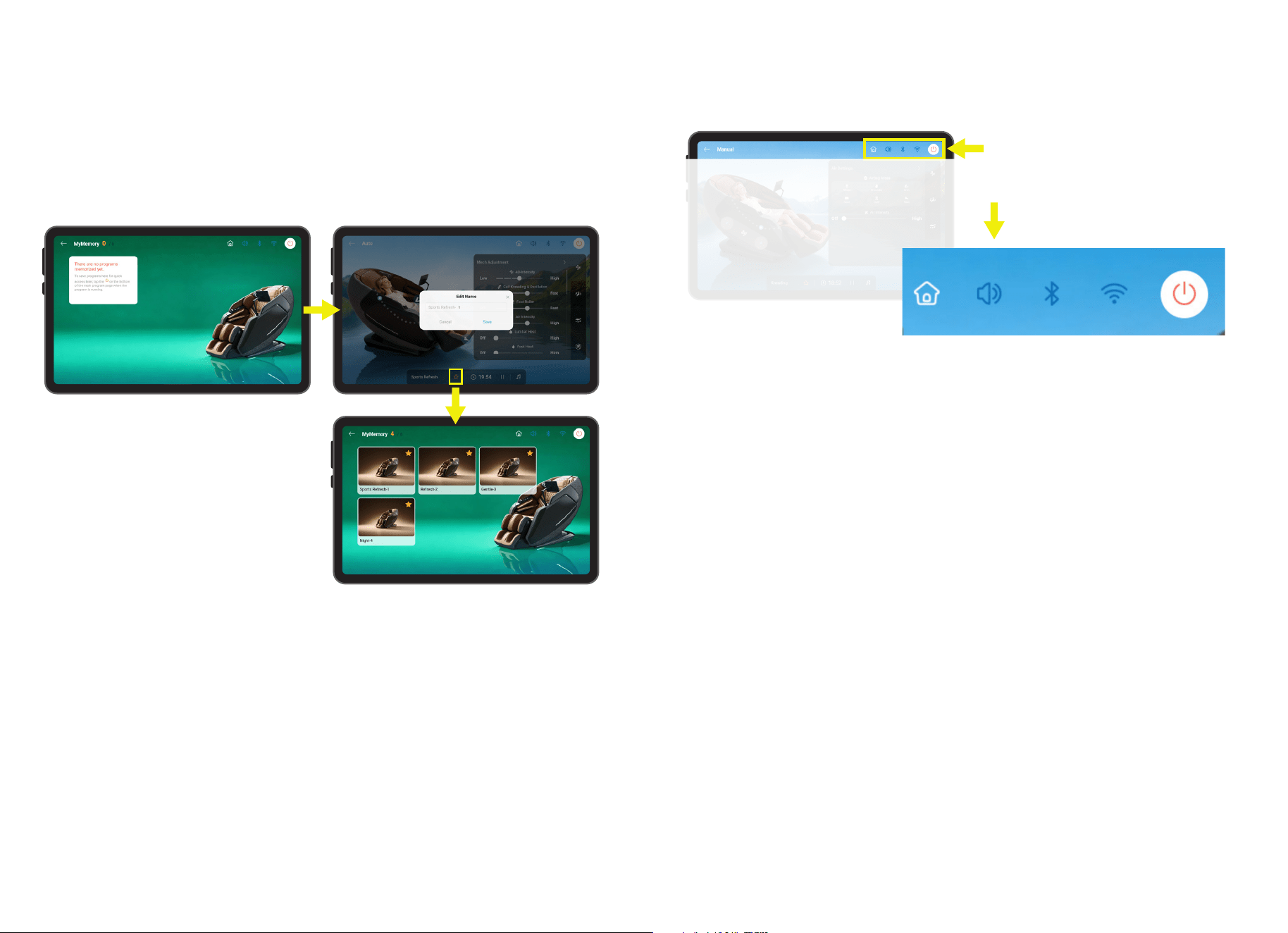
Language
Body Scan
WIFI
Chair Connection
Tablet Volume
Speaker Volume
Screen Brightness Level
Firmware Version
Default Timer
Choose English or Chinese as your preferred
language. You can change this setting at any
time.
When Body Scan is ON, your massage chair will activate TrueFit
®
Body Scanning. When OFF
the massage chair will skip TrueFit
®
Body Scanning and start your massage session right
away.
Tap the slider to turn on WiFi. Tap the selection box to choose your WiFi’s name, enter the
password, and connect. Turn the WiFi OFF if you no longer need to use the internet. Note:
if the WiFi is shut off, you will not be able to connect to any of the media access options
such as Google, Netflix, YouTube, or HBO Max.
Tap the slider to turn on the Bluetooth connection. Tap the selection box to pair your
massage chair to your smart device. Tap the Chair Connection slider once again to turn off
the Bluetooth connection.
Control the amount of volume released from your tablet, tap and slide left to lower and tap
and slide right to turn higher. Slide all the way left to mute the sound.
Control the amount of volume released from your Harman/Kardon
®
Premium Speakers,
tap and slide left to lower and tap and slide right to turn higher. Alternatively, press the top
button or the bottom button on the left side of the tablet to turn your speakers up or down.
Control the amount of light emitted illuminating the tablet. Tap and slide left to turn down
the brightness intensity or tap and slide right to increase the brightness intensity.
Tap the selection box to view which firmware version you are on.
Tap one of the timer numbers and set your massage session length.
Setting
Chromotherapy Light
Sleep Mode
Voice Demo
Tap to turn on Chromotherapy (LED Light) on or off. When on, your chair will illuminate a
specific color on the sides of the arm panels.
Tap to turn ON/OFF Sleep Mode. When ON, your massage session ends and the chair
remains in the reclined position that you set it to, when OFF the chair will reset upright.
When selected, a narrated audio track describes the benefit of massage and actions of the
massage chair. Note: voice demo only works with the demo auto program.
Set your Environment

24 25
Set your Environment

26 27
A convenient USB-C charging port is located on the right-side arm panel, directly beneath
the Quick Access controls. This port allows users to charge compatible smartphones,
tablets, earbuds, and other USB-C devices while enjoying a massage. Its easily accessible
location ensures your devices remain powered and within reach without interrupting your
relaxation experience.
A built-in wireless charging pad is conveniently located on the left-side arm panel near the
tablet holder. Simply place a compatible Qi-enabled smartphone on the charging surface
to begin charging without the need for cables. This convenient feature keeps your device
powered and easily accessible while you relax, stream media, or enjoy a massage session.
The integrated Harman/Kardon
®
Premium Bluetooth Speakers allow users to wirelessly
stream audio directly from a compatible smartphone, tablet, or other Bluetooth-enabled
device. Whether listening to music, podcasts, audiobooks, or guided meditation sessions,
the premium speakers deliver rich, immersive sound without the need for external audio
equipment. Conveniently positioned within the chair, they enhance the overall relaxation
experience while keeping your favorite entertainment close at hand.
The mobile app for Android and iOS devices allows
users to control chair functions directly from a
smartphone or tablet. Users can start massage
programs, adjust chair positions, customize massage
settings, and save favorite configurations with ease.
The integrated chromotherapy light system enhances the massage experience through
the use of soothing colored illumination. The blue light setting creates a calm and relaxing
atmosphere that can help promote a sense of tranquility, reduce stress, and encourage
mental relaxation during a massage session.
The lumbar and foot heat function delivers gentle warmth to the lower back and feet to help
enhance comfort during a massage session. The soothing heat helps relax muscles, ease
tension, and promote a more calming and restorative massage experience.
USB-C Charging Port
Wireless Charging Pad
Harman/Kardon
®
Premium Bluetooth
®
Speakers
Android
®
& iOS Mobile App
Chromotherapy Light
Soothing Lumbar & Foot Heat
Set your Environment
Commands
Your chair comes with built-in intelligent voice
command + control. This feature allows you
to control your chair and massage experience
completely hands-free by using one of the
many voice commands.
Turn On Listening
To turn on the intelligent voice control
function, tap Extra Functions from Home
display, then toggle Voice Listening to On.
Tap screen to select setting.
Turn Off Listening
You can turn off intelligent voice control
listening by using the tablet. Tap Extra
Functions from Home display, then toggle
Voice Listening to Off. Tap screen to select
setting. Intelligent voice control will now no
longer activate until turned back on.
Activating Voice Control
To activate, simply say ‘Hi Infinity’ or ‘Hey
Infinity’. You may now give your chair any of
the commands to the right within 5 seconds.
Make sure to speak clearly and slowly. After
5 seconds the Intelligent Voice Command
function will go to sleep automatically and
must be awakened again.
Voice Command List
In addition to the list to the right, you
can always find the complete list of voice
commands by using your tablet. To access
the voice command list, tap Extra Functions
from Home display, then tap Voice List. There
will be more commands in the voice list than
listed here.
Intelligent Voice Command + Control
Power Off
Start Foot Rollers
Foot Rollers Off
Start Heat
Heat Off
Zero Gravity
Demo Massage
Sports Refresh Massage
Deep Shiatsu Massage
Refresh Massage
Gentle Massage
Night Massage
Stretch Massage
Peaceful Mind Massage
Yoga Massage
Meditation Massage
Spa Massage
Chinese Massage
Ease Massage
Lower Back Massage
... and more!
Say Phrase
‘Hi Infinity’ or ‘Hey Infinity’
Then speak one of the following
Commands
28 29
MyMemory
®
allows you to save and quickly recall your favorite massage experiences.
Whether using an Auto Program or a customized Manual Massage session, your preferred
settings can be stored in one of six available memory slots for future use.
MyMemory
®
Programs
Saving a Massage Program
Recalling a Saved Program
Total Sole Reflexology Foot Rollers
SootheMe
®
Sounds
Tap the gold star icon on the bottom
navigation during an active massage session
to save the current Auto Program or Manual
Massage settings. Enter a custom name for
the program and select Save to store it in
an available memory slot.
Open the MyMemory
®
menu and select any saved program to instantly restore its stored
settings. This allows you to quickly enjoy your favorite massage experience without
manually adjusting settings each time.
Three reflexology rollers beneath each foot work with the foot airbags to stimulate pressure
points, helping reduce tension and foot fatigue for a soothing massage experience. This
function can be adjusted during Auto Programs or Manual Massage sessions with settings
from Off, Gentle, Moderate, or Fast.
SootheMe
®
Sounds provides a collection of ten immersive nature and ambient soundscapes
designed to enhance relaxation during your massage session. Choose from White Noise,
Ocean Surf, Crickets, Rain, Nature, Airplane, Car Ride, Fireplace, Thunderstorm, or Windy
Night to create a calming environment tailored to your mood.
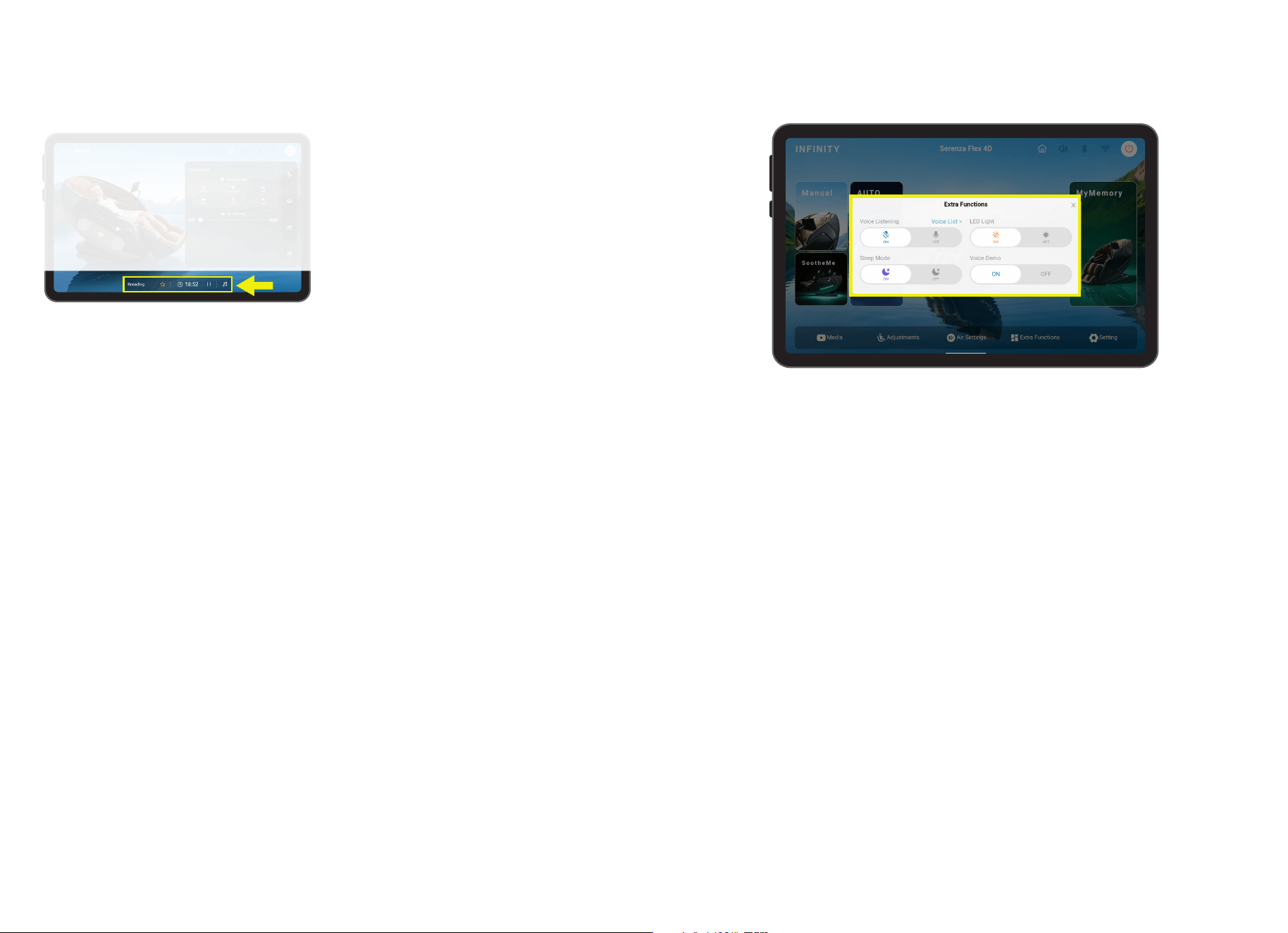
The Top Navigation bar provides quick access to essential tablet and chair functions from
anywhere within the system. Use these controls to return to the Home screen, manage
audio settings, connect Bluetooth devices, view wireless network status, and power the
system on or off. Designed for convenience, these shortcuts ensure important controls are
always within easy reach.
Top Navigation
Set Your Environment
Home Screen
Sound
Bluetooth
®
Wireless
Power Button
Returns the tablet to the Home screen, providing quick access to the chair’s primary
features, including Auto Programs, Manual Massage, SootheMe
®
Sounds, and MyMemory
®
.
Turns the tablet and chair audio on or off. This control allows users to quickly mute or
restore sound from media playback, voice prompts, and other audio features.
Enables or disables Bluetooth connectivity for wireless pairing with compatible
smartphones, tablets, and other Bluetooth-enabled devices. When connected, users can
stream audio through the chair’s integrated speakers.
Indicates the tablet’s wireless network connection status. A wireless connection is required
for internet access, media streaming services, software updates, and other online features.
Turns the tablet and chair system on or off. Use this button when starting or ending a
massage session, or when powering down the system after use.
Notice the top navigation and what it
offers; home screen, sound, Bluetooth,
wireless, and a power button.
30 31
The Extra Functions menu provides convenient access to additional comfort and system
features that enhance your overall massage experience. From this menu, you can enable
voice controls, manage voice guidance, activate chromotherapy lighting, and configure
other convenience settings to personalize the chair to your preferences.
The Bottom Navigation bar provides quick
access to information and controls during
an active massage session. From left to
right, it displays the current massage
program, a MyMemory
®
save button for
storing favorite sessions, the remaining
massage time, pause/resume controls,
and audio settings. These convenient
shortcuts allow you to monitor and adjust
key functions without leaving the massage
screen.
Extra Functions
Bottom Navigation
Running Program
MyMemory
®
Massage Time Remaining
Pause
Music
Displays the name of the currently active Auto Program or Manual Massage session,
allowing you to quickly identify the massage experience in progress.
Tap the star icon to save the current massage settings to one of six MyMemory
®
slots.
Saved programs can be recalled at any time for quick and convenient access.
Displays the remaining time left in the current massage session, allowing you to easily
monitor session duration.
Temporarily pauses the current massage session while maintaining the chair’s position and
settings. Tap again to resume the massage.
Provides quick access to the chair’s built in SootheMe
®
nature sounds. Use this control
to play calming audio through the integrated speakers and enhance your relaxation
experience.
The bottom navigation has plenty of
settings to configure.
Settings
Voice Listening enables the chair’s voice recognition system, allowing supported voice
commands to control chair functions without using the touchscreen tablet. When enabled,
the chair listens for activation phrases and voice commands.
The Voice List displays the available voice commands recognized by the chair. Use this
menu as a reference to learn supported phrases for controlling massage programs, chair
adjustments, and other functions.
Activates the integrated chromotherapy lighting system to create a calming and relaxing
atmosphere during your massage. The soft ambient lighting is designed to enhance comfort
and promote relaxation.
Sleep Mode allows the chair to remain in its reclined position after the massage timer
expires. Designed for enhanced comfort, this feature lets users continue resting or sleeping
without interruption when the massage session ends.
Voice Demo plays examples of the chair’s voice command functionality and voice prompts.
This feature helps users become familiar with available voice controls and system responses
before using voice commands.
Voice Listening
Voice List
Chromotherapy Light
Sleep Mode
Voice Demo
32 33
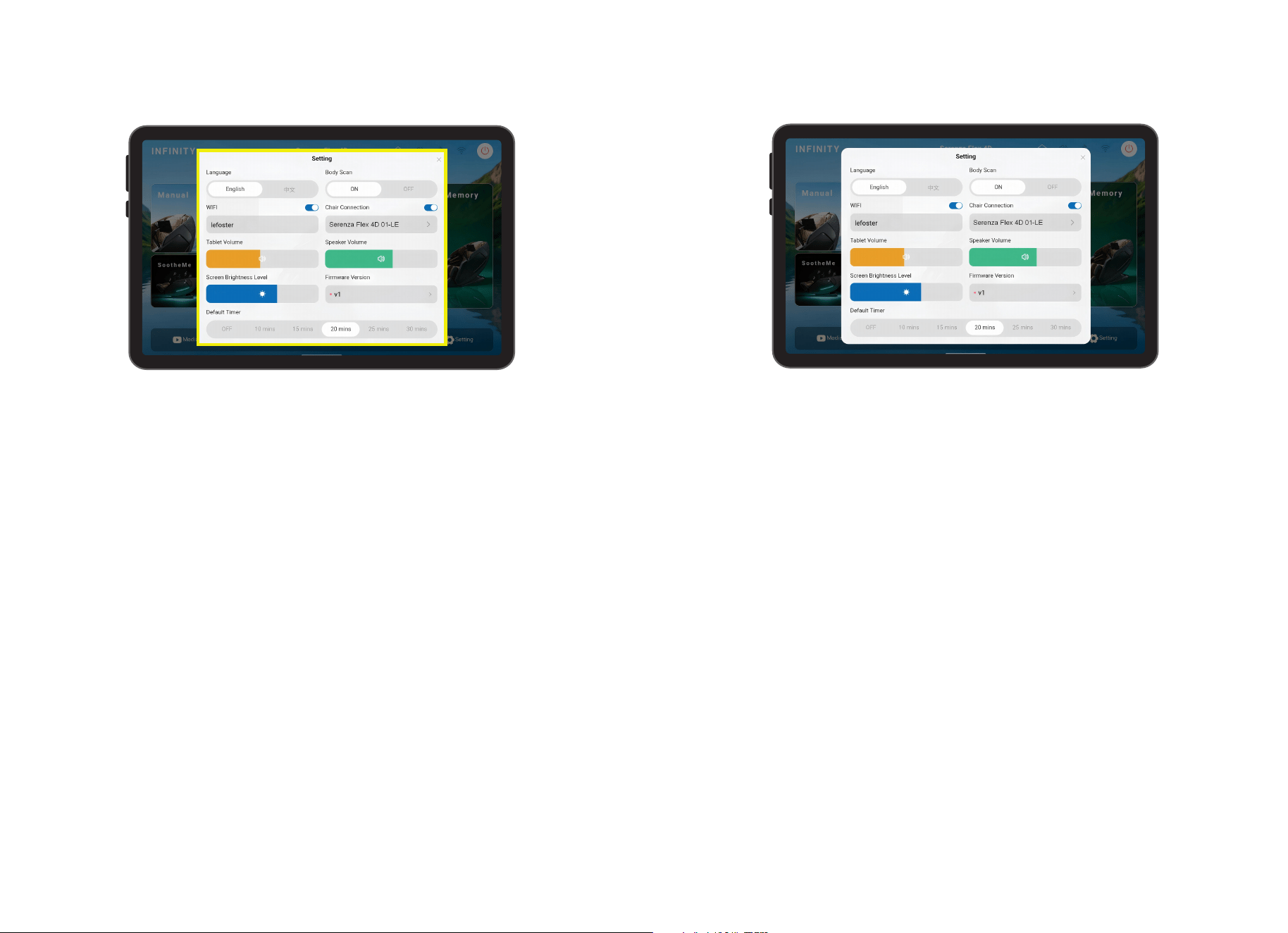
Select the system language used throughout the tablet interface. Available language
options include English and Chinese.
Connects the tablet to a wireless network for internet access, media streaming, software
updates, and other online features.
Displays the chair’s Bluetooth connection status and allows the wireless tablet to pair with
the massage chair. Once connected, users can control chair functions and massage settings
directly from the tablet or Infinity mobile app.
Adjusts the volume level of audio played directly through the tablet, including media, system
sounds, and voice prompts.
Adjusts the volume level of audio played through the chair’s integrated speakers. This
setting affects music, media playback, and other audio features routed through the chair.
Enables or disables the chair’s body scanning technology. When enabled, the chair performs
a body scan before each massage session to detect your shoulder position and body shape
for a more personalized massage experience. When Body Scan is disabled, you will go right
to your massage session.
Language
Wireless
Chair Connection
Tablet Volume
Speaker Volume
Body Scan
Settings
Adjusts the brightness of the tablet display to improve visibility and viewing comfort in
different lighting environments.
Displays the current software version installed on the tablet system. Firmware information
may be referenced when performing updates or troubleshooting.
Sets the default duration for massage sessions. Select from Off, 10, 15, 20, 25, or 30
minutes to determine the length of future massage programs and manual massage sessions.
Screen Brightness Level
Firmware Version
Default Timer
34 35
Build Your Own
Manual Mode
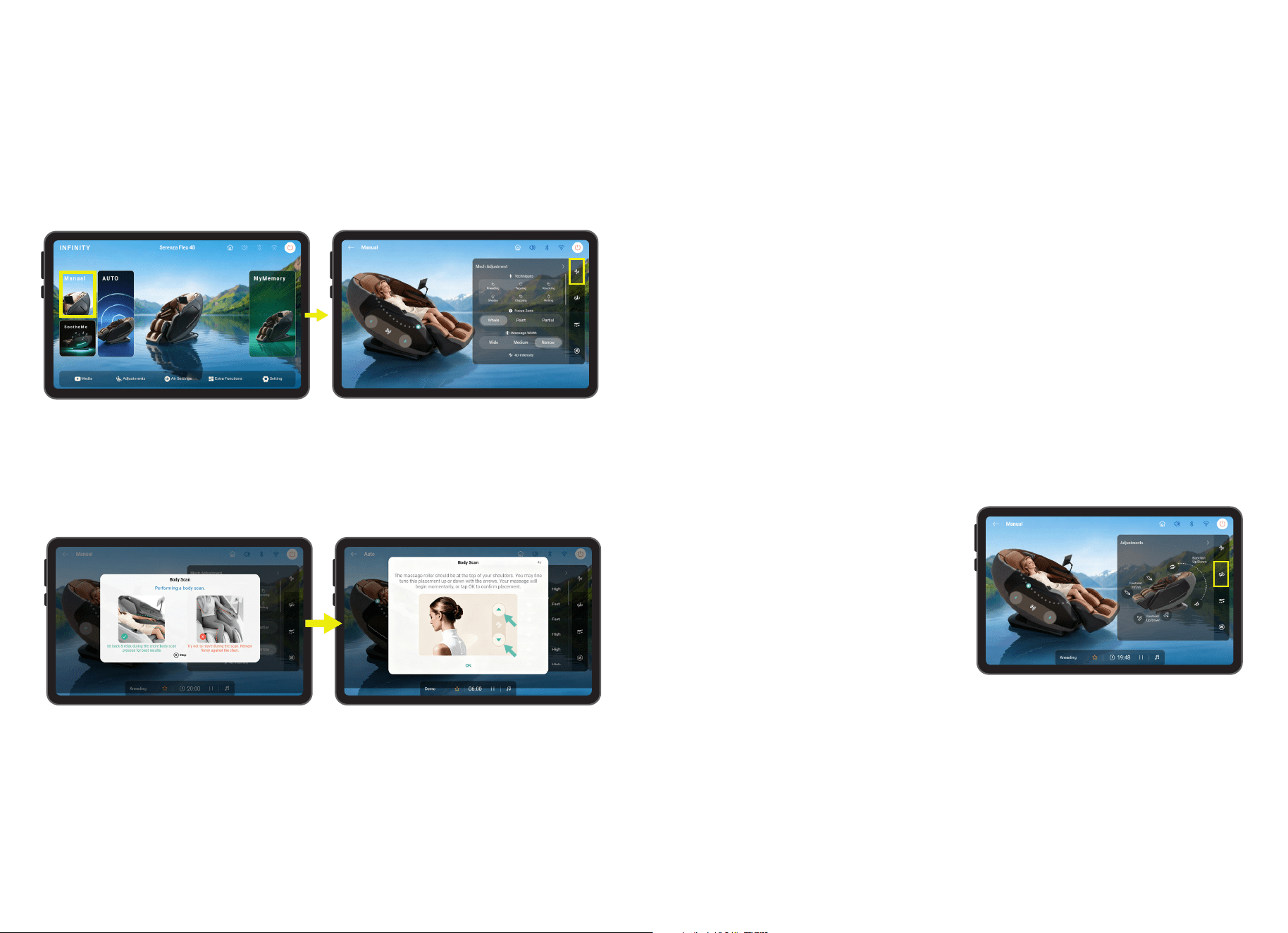
Have a particular spot that needs more work? Take the power of massage into your own
hands with Manual Mode. Tap Manual on the home display to enter the Manual display
screen. Use this screen to fully customize your own massage and find the perfect treatment
for you. For example: Choose the type of technique you would like to start with.
Tap the Manual panel and then head to the next screen to customize your massage session.
Technique
Kneading - Gently lifts and rolls the muscles in smooth, circular motions to melt away tension
and comfort the back. This technique promotes better circulation and delivers a soothing,
hands-on therapeutic feel.
Tapping - Uses light, rapid tapping motions to gently stimulate the muscles. This technique
helps refresh and energize the body while easing surface tension.
Knocking - Applies rhythmic tapping motions along the back to help loosen tight muscles. This
technique stimulates circulation and relieves deep-seated tension for an invigorating massage
experience.
After a technique is selected, you will be taken to the Body Scanning screen. Here you can
use the arrows to adjust the back mechanism up and down to match your specific shoulder
height. After the countdown timer has elapsed, your massage will start.
Shoulder Position Adjustment
4D Intensity
Backrest Up/Down
Footrest Up/Down
Footrest In/Out
Massage Roller Position Up Arrow
Use this control to increase or decrease the maximum intensity of the 4D back mechanism
that works the back and shoulder regions. Low, Medium, and High
Adjusts the angle of the backrest to achieve
a more upright or reclined seating position.
Use this control to find the most comfortable
posture for relaxation, reading, or massage
therapy.
Raises or lowers the footrest to provide
optimal leg support. Adjusting the footrest
height helps improve comfort and maintain
proper body alignment during a massage
session.
Extends or retracts the footrest length to accommodate users of different heights. This
adjustment ensures proper support for the calves and feet, improving overall comfort and
massage effectiveness.
Moves the massage rollers upward along the back track to focus the massage on the upper
back, shoulders, and neck area. This adjustment is useful for targeting tension in higher
regions of the body.
Focus Zone
Massage Width
Controls the range of motion of the back mechanism, Whole travels the entire length of the
track, Partial travels a short distance and reverses direction for focused relief, Point stops
on the track for targeted relief.
Increase or decrease width of back mechanism. Choose from: Narrow, Medium, or Wide.
Shiatsu - Applies deep, finger-like pressure along key points of the back, mimicking the
traditional Japanese massage technique. It helps release tension, improve circulation, and
restore balance for a deeply relaxing and therapeutic experience.
Clapping - Delivers rhythmic, percussive taps to the muscles, stimulating circulation, relieving
tension, and energizing the body for a refreshing, revitalizing massage experience.
Rolling - Glides up and down the back, gently stretching muscles, easing tension, and
promoting relaxation while improving circulation for a soothing, full-back massage experience.
Build Your Own
36 37
Massage Roller Position Down Arrow
Moves the massage rollers downward along the back track to concentrate the massage
on the mid-back, lumbar region, and lower back. Use this setting to target areas requiring
additional relief or support.
Whole
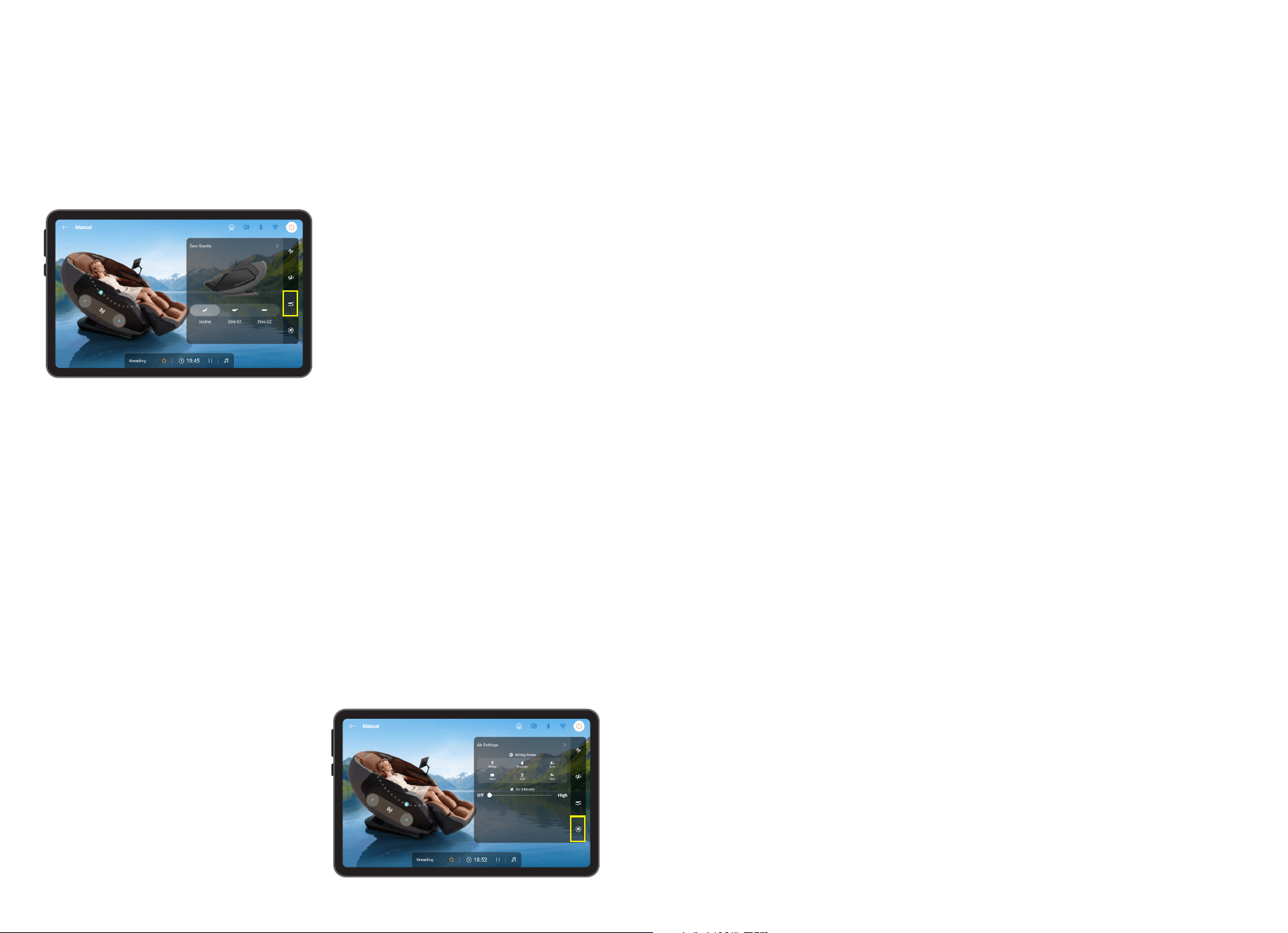
Incline
Zero-G1
Zero-G2
Activates air compression massage across
all available airbag zones simultaneously.
This setting provides a full-body air
massage experience by applying
coordinated pressure to multiple areas of
the body for overall relaxation and comfort.
Places the chair in a comfortable reclined position that elevates the legs while supporting
the back and neck. This position helps reduce pressure on the spine and promotes
relaxation, making it ideal for everyday massage sessions.
Activates the first Zero Gravity position, designed to distribute body weight more evenly
across the chair. By raising the legs closer to heart level, this position helps reduce spinal
compression and enhances the effectiveness of the massage.
Activates the deepest Zero Gravity position available on the chair. This advanced reclined
posture further elevates the legs and minimizes pressure on the joints and spine, creating a
sensation of weightlessness for maximum relaxation and massage intensity.
Air Settings
Zero Gravity Mode
Zero Gravity positions are inspired by the
neutral body posture used by astronauts
during launch. By evenly distributing body
weight and reducing stress on the spine,
these positions can improve comfort,
promote circulation, and allow the massage
rollers and airbags to maintain more
consistent contact with the body.
Build Your Own
38 39
SAFETY INFORMATION
Staying Safe
To ensure safe use of the massage chair and avoid injury or unsafe conditions, please
read and follow all instructions before using product. SAVE THESE INSTRUCTIONS.
Household use only
- The areas under the footrest and behind the back rest are potentially dangerous for
a child or pet. The chair back is heavy and reclines with force. A small child or pet
located behind the chair could be crushed as chair is reclined resulting in serious
injury or death. When chair is reclined, small children or pets who have crawled
under the leg rest may not be visible to the user and could be crushed when leg rest
is lowered or when chair is returned to upright position. To avoid serious injury or
death, check these areas carefully before reclining, lowering leg rest, or returning
chair to upright position.
- Chair should not be used by children under age 14. Small children could be trapped
or injured by airbags, heating mechanism, or moving parts. When chair is not in use,
unplug unit and secure chair so that children cannot accidentally power on and operate
chair.
- Children over age 14, persons with reduced physical, sensory, or mental capabilities,
and elderly or frail persons should exercise caution and use massage chair only when
supervised or assisted by a person over 16 years of age.
- Chair has a heated surface and could cause burns, particularly in persons with reduced
sensitivity to heat. Such persons should use the chair only after consulting with a
physician and should use extreme caution during any physician-approved use.
WARNING
WARNING
To avoid possible death or serious injury to user or others, please read and follow these
instructions:
USE NOT RECOMMENDED FOR CERTAIN PERSONS
WARNING
Use of massage chair may not be safe or suitable for persons with certain medical
conditions and could cause serious injury or death in some circumstances. If you
have any of the following conditions, please consult a physician before using the
massage chair:
- Use of implanted electronic medical
devices (such as a cardiac pacemaker)
- Pregnancy
- Cancer, malignant tumors, or other
growths
- Osteoporosis or spinal fracture
- Other fractures or musculoskeletal injuries
- Loss of or reduced sensitivity to heat
- Implanted medical fixation devices such
as rods, pins, etc.
- Recent surgery or sutures
- Skin diseases or skin injury
- High fever
- Certain pulmonary or breathing
conditions
- Impaired circulation
- Do not stand or stack heavy objects on footrest.
- Do not operate heating features of chair while under a blanket or pillow. Excessive heating
can occur and cause fire, electric shock, or injury to persons.
- To avoid pinching or crushing, please do not place body parts, especially fingers and toes,
between parts of chair and keep clear of moving parts.
- To avoid overheating, injury or discomfort from overuse, do not fall asleep while using
massage chair and do not use for extended periods of time (longer than 20 minutes).
- Avoid use while under the influence of alcohol, medications or other substances that my
cause drowsiness, disorientation, or impairment of judgment or motor skills.
- Do not use the massage chair right after a meal, as it may cause discomfort.
- If you feel any abnormal discomfort during the operation of the massage chair, turn off the
power immediately and discontinue use.
- Do not use this appliance when ambient temperature is over 40 C (104 F).
- Do not use this appliance in humid or dusty environment, or when any part of the body is in
contact with plumbing or any similar ground.
- Never operate the appliance with the air openings blocked. Keep the air openings free of
lint, hair, dust and the like.
- Do not use outdoors.
- Do not operate where aerosol (spray) products are being used or where oxygen is being
administered.
- Place the product on a flat, level floor to reduce risk of tipping or overturning.
- Do not use or store near heat or open flame.
- Intended only for users who weigh below 300 lbs.
- Use this product only for its intended use as described in this manual. Do not use
attachments not recommended by the manufacturer.
- Massage chair intended only for use by one person. Do not use by two or more persons at
the same time to avoid damage to the product.
- Do not allow children to stand, jump, or play on or around massage chair, even when it is
not powered on or in use.
- Remove personal accessories such as jewelry from arms and empty pockets, and remove
loose clothing while using the massage features of the chair.
- Check the upholstery under the cushions and other spots for damage or loose objects that
may cause injury or damage chair while operating. If any damage is present, do not use the
massage chair and refer to a qualified service professional for servicing.
- To avoid damage to chair, walls, or other objects, make sure there are no obstacles behind
the chair and there is enough clearance before adjusting the backrest or leg rest angle.
- Please be seated properly while using the product.
- To avoid damage to chair or floors, do not drag or push the chair or roll its casters on wood
floor or carpet. See instructions on p.7 for safely moving chair.
- If massage chair is not working properly, has been dropped or damaged, or has been
dropped into water or exposed to flooding, return the appliance to a service center for
examination and repair before attempting to use.
- Do not drop or insert any object into any openings in chair.
CAUTION
CAUTION
To avoid the risk of minor injury or discomfort, or damage to the massage chair or
other property, please read and follow these instructions for safe use of massage chair:
40 41
WARNING
Read and follow these instructions concerning safe use of the power cord and
power unit to avoid possible electric shock, fire hazard, use of chair by and injury to
unattended children, or damage to chair or other property.
Do not disassemble, dismantle or attempt to repair massage chair. Such actions, as well
as misuse of product, may cause damage to or failure of massage chair and may void the
manufacturer’s warranty. For repairs, please contact an authorized dealer or repair agent
at 603-910-5000. For additional details concerning terms, conditions and limitations of
warranty, see https://infinitymassagechairs.com/warranty-info.
Staying Safe
-
To avoid risk of electric shock, connect this unit to a properly grounded outlet only. See
Grounding Instructions on pg. 7.
- Always unplug massage chair from the electrical outlet immediately after use and
before cleaning. An appliance should never be left unattended when plugged in. To
disconnect, turn all controls to the off position, then remove plug from outlet.
- Do not use massage chair and unplug from outlet during thunder or lightning storms,
and before putting on or taking off parts.
- To ensure safe operation, power must be supplied only at standard 110 voltage, to the
specifications of the appliance. Confirm that the power voltage stated on the rating
label corresponds to your local electricity supply.
- The massage chair should be used only with the power supply unit provided. Do not
use with any other power source.
- Do not use a wet or damp hand to unplug the cord to avoid electric shock.
- Do not pull on the power cord to unplug. Grip by plastic end nearest outlet to unplug
power cord.
- Do not squeeze, over bend, pull hard, or twist the power cord.
- Keep the power cord away from heated surfaces.
- Do not carry or drag the chair by power cord or use cord as a handle.
- If there is any smoke or unusual smell while using massage chair, stop using
immediately and unplug the power cord.
- Never operate the chair if it has a damaged power cord or plug. If the power cord is
damaged, it must be replaced by the manufacturer or its service agent or a similarly
qualified person to avoid a hazard.
WARNING
Fixing Issues
If problem remains, please contact Infinity for maintenance.
Tip: Do not attempt to repair this product yourself, our company shall not be liable for the injury or damage caused by
any servicing without authorizations. Thank you for you cooperation
Spec
ifi
cat
i
ons
Model
Rated Current
Power Consumption
300
Dimension of Main Body (in)
Necessary Clearance to Wall (in)
Net Weight (lbs)
Shipping Weight (lbs)
Max. User Weight (lbs)
Voltage
Serenza Flex 4D
63” x 30.5” x 48” (LxWxH)
203
5”
247
2A
120V~
200W
No. Symptoms Possible Causes Possible Solution
Noise is heard while in
use
Massage Chair does not
start
No music from the
speaker
Backrest or footrest
cannot incline/recline
Airbag malfunction
Friction between the rollers
and faux leather cover
Power cord not plugged in,
not switched on, the fuse
might be blown
Volume turned to lowest
setting
Excessive load on backrest
and/or footrest
Air hose is blocked
No need to take any
measures
Remove and re-insert the
power cord, turn on the
switch, replace fuse
Adjust the device volume
then make sure Bluetooth
and speaker are both on
Reduce the load and try
again
Straighten the air hose and
clear the blockage
1
2
3
4
5
Troubleshooting
42
Frequently Asked Questions
Q: I find the chair is too intense to be comfortable. What can I do?
Q: My chair is not performing as expected. What should I do?
Q: I can never seem to get in my Infinity Massage chair, someone is
always in it.
A:
Your Infinity massage chair is an amazing combination of programming and robotics.
On occasion the chair just may need to be rebooted. To do this power down the chair and
unplug from the wall for 5 minutes then plug back in and power back up to see if it self-
healed. If you are still having an issue, give Infinity a call at 603-910-5000.
A: We know. It happens. Tell your friends to get their own Infinity Massage Chair.
For more information and access to further questions, and resources, visit our website at
www.infinitymassagechairs.com
Q: I’m not a foot massage person, what should I do?
A: Your body needs to become acclimated to therapeutic massage. To be effective, the
massage techniques must compress the tissue in your body. We recommend the following
steps to help get started. Then over time as your body acclimates you can increase the
intensity by reducing the layers between you and the chair.
1. Use Pillow to reduce upper body intensity.
2. From the in-use screen, tap 4D Intensity and lower it all the way to the bottom.
3. From the home screen tap Air Settings to adjust air massage region.
- If a specific airbag is too intense, turn off full body and turn on only the airbags you want.
4. Adjust the recline on the tablet and quick access panel. More upright will be less intense.
Weightless Zero Gravity Recline will be more intense.
5. If after adjustments and attempt to acclimate, you still experience discomfort, discontinue
use and consult a physician.
A: Turn off Total Sole Reflexology Foot Rollers and Foot Air Settings in Auto Programs or
Manual Mode.
Warranty
43
This Infinity Massage Chairs is protected by Infinity’s 5 Year U.S Residential Limited
Warranty. For more information, scan the QR code below and click on the Infinity Care
Residential Warranty tab.
SCAN CODE

44
72 Stard Road, Seabrook, NH 03874
603-910-5000
www.infinitymassagechairs.com
Version 1.0
72 Stard Road, Seabrook, NH 03874 | (603) 910-5000 | www.infinitymassagechairs.com