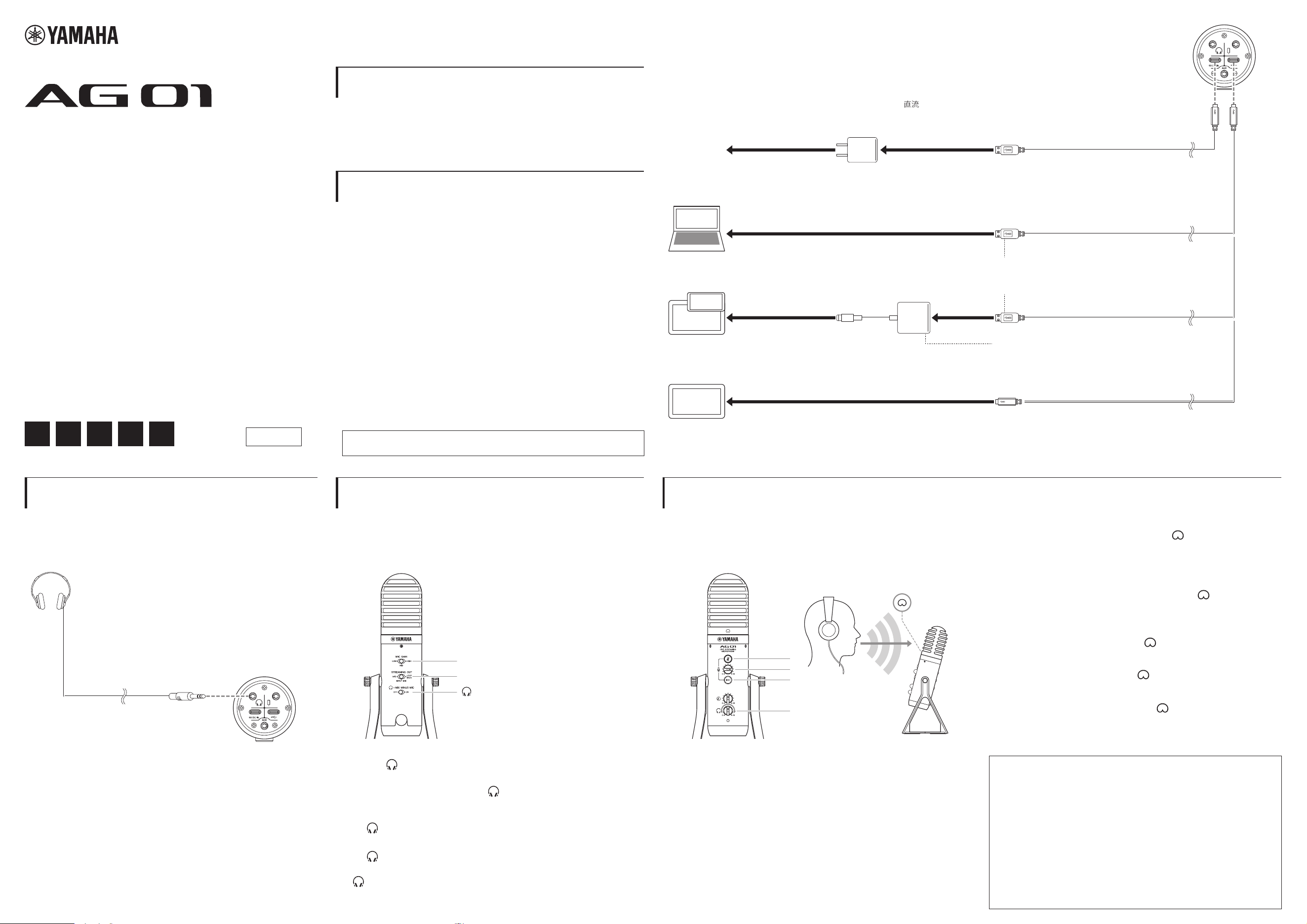
Headphones
Casque
耳机
耳機
ヘ ッド ホ ン
3
1
4
2
1
To a power supply
Vers une source d'alimentation
连接到电源
連至電源
電源へ
USB cable (commercially available)
Câble USB (disponible dans le commerce)
USB线缆(市售)
USB纜線 (市售)
USBケーブル(市販品)
USB power adapter DC 5V, at least 1A (commercially available)
Adaptateur secteur USB CC 5 V, au moins 1 A (disponible dans le commerce)
USB电源适配器DC( )5 V,至少1 A(市售)
DC 5 V、至少1 A的USB電源轉接器 (市售)
USB電源アダプター(DC5V、1A以上)(市販品)
Computer*
1
/ Ordinateur*
1
计算机*
1
/ 電腦*
1
コンピューター *
1
iPad (USB C connector) / iPad (connecteur USB C)
iPad(USB C接口) / iPad (USB C接口)
iPad(USB Cコネクター)
iPhone/iPad (Lightning connector) / iPhone/iPad (connecteur Lightning)
iPhone/iPad(Lightning接口) / iPhone/iPad (Lightning 接口)
iPhone/iPad(Lightningコネクター)
Apple Lightning to USB3 camera adapter
Adaptateur pour appareil photo Apple Lightning vers USB3
Apple Lightning转USB3相机适配器
Apple Lightning對USB3相機轉接器
Apple社製Lightning-USB3カメラアダプタ
USB C to USB C cable (commercially available)
Câble USB C vers USB C (disponible dans le commerce)
USB C转USB C线缆(市售) / USB C對USB C纜線 (市售)
USB C to USB Cケーブル(市販品)
USB cable (supplied) / Câble USB (fourni)
USB线缆(提供) / USB 纜線 (內附)
USBケーブル(付属品)
2
Bottom / Partie inférieure
底部 / 底部 / 底面
MIC GAIN: MID
STREAMING OUT: INPUT MIX
- MIX MINUS MIC: OFF*
2
Manual Development Group
© 2021 Yamaha Corporation
Published 12/2021
2021
年 12 月发行 MWEM-A0
LIVE STREAMING MICROPHONE
1
Connect to a power supply.
Connectez l'appareil à une source d'alimentation.
连接到电源。
連接至電源。
電源をつなぐ
2
Connect an iPhone/iPad or computer.
Connectez un iPhone/iPad ou un ordinateur.
连接 iPhone/iPad 或计算机。
連接iPhone/iPad 或電腦。
iPhone/iPad やコンピューターをつなぐ
*1
•
Bus-powered operation requires a power supply of 5V 1A or higher.
•
For connecting to a Windows
®
PC, use the Yamaha Steinberg USB Driver.
•
Le fonctionnement par bus nécessite une alimentation de 5 V et 1 A ou
supérieure.
•
Pour connecter un ordinateur Windows®, utilisez le pilote Yamaha Steinberg
USB Driver.
•
总线供电操作需要 5V1A 或更高规格的电源。
•
若要连接到 Windows®PC,请使用 YamahaSteinbergUSBDriver。
•
匯流排供電所使用的電源必須高於 5V1A。
•
如要連接至 Windows®電腦,請使用 YamahaSteinbergUSBDriver。
•
バスパワー動作には 5V 1A 以上の電力供給が必要です。
•
Windows
®
PC との入出力には「Yamaha Steinberg USB Driver」が必要です。
Yamaha Steinberg USB Driver ⇒ https://www.yamaha.com/2/ag01/
3
Connect a set of headphones.
Connectez un casque.
连接一副耳机。
連接一副耳機。
ヘッドホンをつなぐ
4
Set the switches on the rear.
Réglez les commutateurs situés à l'arrière.
设置背面的开关。
設定背面開關。
背面のスイッチを設定する
5
Set the buttons and volume on the front.
Réglez les boutons et le volume sur la partie avant.
设置正面的按钮和音量。
設定正面按鈕和音量。
前面のボタンや音量を設定する
*2
•
Set the [
- MIX MINUS MIC] slide switch to OFF. If the switch is set to ON,
voice/sound over the microphone cannot be heard from the headphones.
•
Réglez le commutateur à glissière [
- MIX MINUS MIC] sur OFF. Si le
commutateur est réglé sur ON, la voix/le son au-dessus du microphone ne
sera pas audible dans le casque.
•
将[
-MIXMINUSMIC] 滑动开关设置为 OFF。如果开关设置为 ON,则无法从耳机
听到麦克风上的语音 / 声音。
•
將[
-MIXMINUSMIC] 滑動開關設為 OFF。若將此開關設為 ON,將無法透過耳機
聽到麥克風收到的語音 / 聲音。
•
- MIX MINUS MIC は OFF にします。ON にすると、マイクの音声がヘッドホ
ンから聞こえなくなります。
1 Mic Mute: Off / Assourdissement du micro : Désactivé
麦克风静音 :关 / 麥克風靜音 :關閉 / マイクミュート : 消灯
2
Mic Volume: 3 o'clock position
Volume du micro : Position à 3 heures
麦克风音量 :3 点钟位置
麥克風音量 :3點鐘位置
マイク音量 : 3 時の位置
3
Reverb: Off / Réverbération : Désactivée
混响 :关/ 殘響 :關閉 / リバーブ : 消灯
VFC5190
EN FR
ZH-CN ZH-TW
JA
4 Headphones Volume: / Volume du casque :
耳机音量 : / 耳機音量 : / ヘッドホン音量 :
Set to the minimum [0] position, and then adjust the volume while
speaking into the microphone with the [
] mark facing the
front. (This headphones volume control does not affect the actual
streaming volume.)
Réglez la position minimale [0], puis réglez le volume tout en
parlant dans le microphone avec la marque [
] orientée vers
l'avant. (La commande du volume du casque n'affecte pas le
volume réel de la diffusion en continu.)
设置到最小 [0] 位置,然后在将 [ ] 标记朝向前方对着麦克风
讲话时调节音量。(此耳机音量控制不会影响实际流媒体音量。)
先設定至最低 [0] 位置,然後面向 [ ] 標記,一面對著麥克風講話一面
調整音量( 在此處調整耳機音量不會影響實際的串流音量。)
最小 [0] の位置にしてから、マイクの [ ] マークが正面になるように
してマイクに向かって話しながら、音量を調節します(ヘッドホン音
量の調節は、配信の音量には影響しません)。
For further detailed settings, use the dedicated app AG
Controller (see the reverse page).
Pour plus de détails sur les réglages, utilisez l'application dédiée
« AG Controller » (voir au verso).
如需更详细的设置,请使用专用应用程序 “AGController”(参见
背面)。
如需進行更細部的設定,請使用「AGController」專屬應用程式( 參見背
面說明 )。
その他詳細設定については、専用アプリ「
AG Controller」( 裏面参照)
をお使いください。
1
Startup procedure / Procédure de démarrage
启动程序 / 啟動程序 / 手順
Quick Guide / Guide de référence rapide
速成指南 / 快速入門指南 / クイックガイド
Please read the Safety Guide carefully before proceeding.
Veuillez lire attentivement le guide de sécurité avant de poursuivre.
在继续之前,请仔细阅读安全指南。
在繼續操作之前,請務必詳閱安全指南。
ご使用の前にセーフティ―ガイドを必ずお読みください。
USB MICROPHONE / MICRO USB
MICRÓFONO USB / USB-МИКРОФОН
USB 麦克风 / USB 麥克風 / USB마이크
USB マイクロフォン
Connection / Connexion
连接 / 連接 / 接続例
AG Controller App / Application AG Controller
AGController 应用程序 / AGController應用程式 / AG Controller アプリ
The AG Controller app allows you to control the tone and reverb parameters more precisely.
Download the AG Controller app from the following website or App Store.
L'application AG Controller vous permet de contrôler les paramètres de tonalité et de réverbération avec plus de précision.
Téléchargez l'application AG Controller depuis le site Web suivant ou l'App Store.
AGController 应用程序让您能够更精确地控制音色和混响参数。从以下网站或 AppStore 下载 AGController 应用程序。
AGController 應用程式可讓您更精準地控制音色和殘響參數。請透過以下網站或 AppStore 下載 AGController 應用程式。
AG Controller アプリでは音質やリバーブの調節ができます。下記ウェブサイトまたは App Store からダウンロードしてお使いください。
Windows
®
/Mac iPhone/iPad
https://www.yamaha.com/2/ag01/
Search for the AG Controller app on the App Store and install it.
Recherchez l'application AG Controller dans l'App Store et installez-la.
在 AppStore 中搜索 AGController 应用程序并安装它。
請透過 AppStore 搜尋並安裝 AGController 應用程式。
App Store から AG Controller を検索し、インストールしてください。
AG01 User Guide / AG01 Mode d'emploi
AG01 用户指南 / AG01 使用指南 / AG01 ユーザーガイド
For details on the applications such as live streaming, see the User Guide (HTML version) on the website.
Pour plus de détails sur les applications telles que le streaming en direct, consultez le mode d'emploi (version HTML) sur le site Web.
有关直播等应用程序的详细信息,请参阅网站上的用户指南(HTML 版)。
如需直播串流等應用程式的詳細說明,請參閱網站上的使用指南(HTML版本 )。
ライブストリーミングなどの場面に合わせた詳しい使いかたは、下記ウェブサイトにてユーザーガイド(HTML 版)をご確認ください。
https://manual.yamaha.com/pa/live_streaming/ag01/
Accessories / Accessoires / 配件/ 配件/ 付属品
USB cable (USB C to USB A) 1.5 m x 1, Safety Guide x 1, Quick Guide (this sheet) x 1,
WaveLab Cast Download Information x 1, Cubase AI Download Information x 1
Câble USB (USB C vers USB A) 1,5 m x 1, Guide de sécurité x 1, Guide de référence rapide (cette fiche) x 1,
WAVELAB CAST DOWNLOAD INFORMATION x 1, CUBASE AI DOWNLOAD INFORMATION x 1
USB 线缆(USBC 转 USBA)1.5 米x1,安全指南x1,速成指南(本页)x1,WAVELABCASTDOWNLOADINFORMATIONx1,
CUBASEAIDOWNLOADINFORMATIONx1
USB 纜線(USBC對USBA)1.5mx1、安全指南x1、快速入門指南( 本單張說明 )x1、WAVELABCASTDOWNLOADINFORMATIONx1、
CUBASEAIDOWNLOADINFORMATIONx1
USB ケーブル(USB C to USB A)1.5 m x 1、セーフティーガイド(保証書付) x 1、クイックガイド(本書) x 1、
WAVELAB CAST DOWNLOAD INFORMATION x 1、CUBASE AI DOWNLOAD INFORMATION x 1
ヤマハ株式会社
〒
430-8650 静岡県浜松市中区中沢町 10-1
Yamaha Pro Audio global website
http://www.yamahaproaudio.com/
Yamaha Downloads
https://download.yamaha.com/
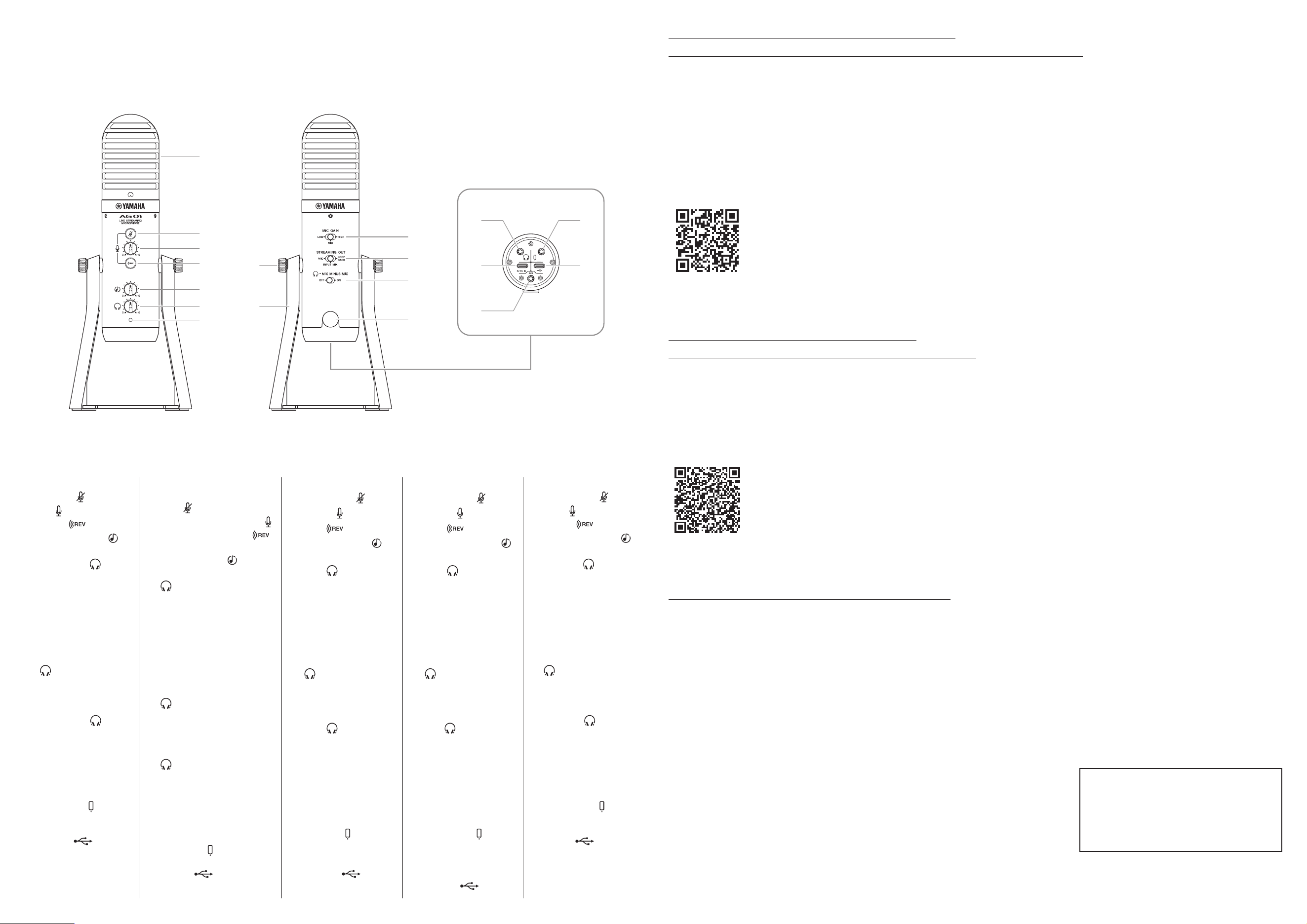
Controls / Commandes / 控件 / 控制項 / 各部の名称
1 Condenser microphone
2 Mic mute [ ] button
3 Mic [ ] volume knob
4 Reverb [ ] button
5 USB/Smartphone [ ]
input volume knob
6 Headphones [ ] volume
knob
7 Power LED
8 Stand mounting screw
9 Stand
) [MIC GAIN] slide switch
! [STREAMING OUT] slide
switch
@ [ - MIX MINUS MIC]
slide switch
# 3/8 screw hole for mic
stand (with protective cap)
$ Headphones [ ] output
jack for 3.5mm stereo mini
plug
% [5V DC IN] USB terminal
for power supply (USB C)
^ [AUX] input jack for 3.5mm
stereo mini plug
& Smartphone [ ] in/out
jack for 4-pole 3.5mm
stereo mini plug
* USB 2.0 [ ] terminal
(USB C)
1 Microphone à condensateur
2 Bouton d'assourdissement du
micro [
]
3 Bouton de volume du micro [ ]
4 Bouton de réverbération [ ]
5 Bouton de volume d'entrée
USB/smartphone [
]
6 Bouton de volume du casque
[
]
7 Voyant d'alimentation
8 Vis de montage du support
9 Support
) Commutateur à glissière
[MIC GAIN]
! Commutateur à glissière
[STREAMING OUT]
@ Commutateur à glissière
[
- MIX MINUS MIC]
# Orice pour vis de 3/8" pour
support de micro (avec
capuchon de protection)
$ Prise de sortie de casque
[
] pour mini-che stéréo de
3,5 mm
% Borne USB [5V DC IN] pour
l'alimentation (USB C)
^ Prise d'entrée [AUX] pour mini-
che stéréo de 3,5 mm
& Prise d'entrée/de sortie de
smartphone [
] pour mini-che
stéréo 4 pôles de 3,5 mm
* USB 2.0 [ ] terminal (USB
C)
1电容式麦克风
2麦克风静音 [
] 按钮
3麦克风 [
] 音量旋钮
4混响 [
] 按钮
5USB/ 智能手机 [
]
输入音量旋钮
6耳机 [
] 音量旋钮
7电源 LED
8支架安装螺丝
9支架
)[MICGAIN] 滑动开关
![STREAMINGOUT] 滑
动开关
@[
-MIXMINUSMIC]
滑动开关
#3/8" 麦克风支架螺丝
孔(带保护盖)
$耳机 [
] 输出插孔,
用于 3.5 毫米立体声
迷你插头
%电源用 [5VDCIN](5V
直流输入)USB 端口
(USBC)
^
[AUX] 输入插孔,用于 3.5
毫米立体声迷你插头
&
智能手机 [ ]输入/输
出插孔,用于 4 极 3.5
毫米立体声迷你插头
*USB2.0[ ] 端口
(USBC)
1電容式麥克風
2麥克風靜音 [
] 按鈕
3麥克風 [
] 音量旋鈕
4殘響 [
] 按鈕
5USB/ 智慧型手機 [
]
輸入音量旋鈕
6耳機 [
] 音量旋鈕
7電源 LED
8支架安裝螺絲
9支架
)[MICGAIN] 滑動開關
![STREAMINGOUT] 滑
動開關
@[
-MIXMINUSMIC]
滑動開關
#3/8”麥克風支架螺絲
孔( 附保護蓋 )
$耳機 [
]輸出插孔( 適
用於 3.5mm 立體聲迷
你插頭 )
%[5VDCIN] 供電用
USB 端子(USBC)
^[AUX] 輸入插孔( 適用
於 3.5mm 立體聲迷你
插頭 )
&智慧型手機 [
] 輸入
/ 輸出插孔( 適用於 4
極 3.5mm 立體聲迷你
插頭 )
*USB2.0[
] 端子
(USBC)
1 コンデンサーマイク
2
マイクミュート [ ] ボタン
3
マイク [ ] 音量ツマミ
4
リバーブ [ ] ボタン
5 USB/ スマートフォン [ ]
入力音量ツマミ
6
ヘッドホン [ ] 音量ツマミ
7
電源 LED
8 スタンド取り付けネジ
9
スタンド
)
[MIC GAIN]
スライドスイッチ
!
[STREAMING OUT]
スライドスイッチ
@
[ - MIX MINUS MIC]
スライドスイッチ
#
マイクスタンド用 3/8 インチ
ネジ穴(保護キャップ付き)
$
ヘッドホン [ ] 出力端子
(
3.5mm ステレオミニプラ
グ対応)
%
[5V DC IN] 給電用 USB 端
子(
USB C)
^
[AUX] 入力端子(3.5mm ス
テレオミニプラグ対応)
&
スマートフォン [ ] 入出力
端子(
4 極 3.5mm ステレオ
ミニプラグ対応)
*
USB 2.0[ ] 端子
(USB C)
$
8
1
2
3
4
5
6
7
9
)
!
@
#
%
^
&
*
Front / Avant
正面
/
正面
/ 前面
Rear / Arrière
背面
/
背面
/ 背面
Bottom / Partie inférieure
底部 / 底部 / 底面
2
Mac, iPad, App Store, and Lightning are trademarks of Apple Inc. registered in the United States and
other countries. The iPhone trademark is used under license from Aiphone Co, Ltd.
Mac, iPad, App Store et Lightning sont des marques commerciales d'Apple Inc., déposées aux États-
Unis et dans d'autres pays. La marque commerciale iPhone est utilisée sous licence d'Aiphone Co, Ltd.
Mac、iPad、AppStore和 Lightning是 AppleInc.在美国和其他国家 /地区注册的商标。
iPhone商标经 AiphoneCo,Ltd.许可使用。
Mac、iPad、AppStore 和 Lightning 是 AppleInc. 在美國和其他國家 / 地區的註冊商標。iPhone 商標已取得
AiphoneCo,Ltd. 的使用授權。
Mac、iPad、App Store、Lightning は、米国および他の国々で登録された Apple Inc. の商標です。
iPhone
は、アイホン株式会社のライセンスに基づき使用されている商標です。