KEPEAK
www.kepeak.com
User Manual
Model: 1476 XHP70 LED Flashlight
Thank you for purchasing our product.
Please read this user manual carefully and
use the product correctly before using it.
If you have any questions about our product,
please contact us through Amazon Buyer-Seller
Messaging, we will reply in time.

KEPEAK
Catalog
PRECAUTIONS FOR STORAGE
PRODUCT ACCESSORIES
PRODUCT STRUCTURE
CHECK THE BATTERY LEVEL
5 LIGHT MODE AND SWITCH-OFF
SPECIFICATION
HOW TO INSERT THE BATTERY
HOW TO ADJUST THE LIGHT
COMMON PROBLEM SOLVING
PRECAUTIONS FOR BATTERY
01
PRECAUTIONS DURING USE
01
02
03
04
04
05
05
07
08
06
KEPEAK
SAFETY PRECAUTIONS
PRECAUTIONS DURING USE
Please read the instruction manual of this product carefully
before use.
This product will be slightly heated during use, it is recom-
mended to use low level lighting, if the heat is serious, you can
use low level or turn o the power and wait for the product to
cool down before continuing to use.
Do not shine directly into the eyes to avoid eye damage.
The torch should not be disassembled and modied for repair
by non-professionals as this may damage the circuit board.
The repair warranty is not included with the modied product.
If the ashlight is abnormally hot, makes strange noises and
smells, or feels abnormal, stop using it immediately.
PRECAUTIONS FOR BATTERY
The product is equipped with a 5000mAh lithium-ion batte,
the working life of a lithium ion batte is greatly inuenced
by the way it is used and the environment in which it is used.
01
PRECAUTIONS FOR STORAGE
Be careful not to charge the batte too often, not to overcharge
and over discharge it.
The batte may become warm during charging or use, but
this is not abnormal.
Do not use too high a voltage, please use a 5 V 1 A charging
adapter to charge the batte.
Please do not reverse positive and negative of the batte,
otherwise the circuit board will be burned.
Do not use batteries of dierent types and voltages at the
same time.
Do not mix old and new batteries.
Keep out of reach of children.
For batteries that are not used for a long period of time,
store them fully charged and then charge and discharge
them once eve three months to avoid chemical corrosion.
Do not use this product underwater for long periods of time.
Do not leave the torch in contact with sunlight, water, chemi-
cals and corrosive gases for long periods of time as this may
damage the torch.
02
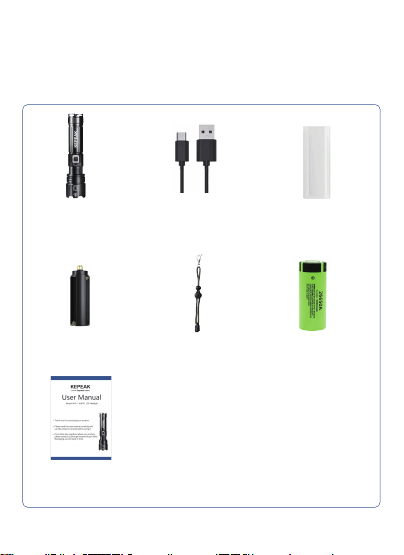
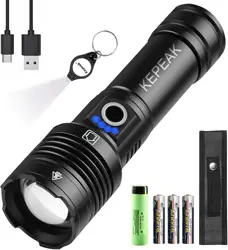
Product accessories
XHP70 Flashlight *1 18650 Battery Tube *1TYPE-C Cable
5000mAh 26650
Rechargeable Lithium Battery
Lanyard*1AAA Battery Holder*1
User Manual
Before using this product, please check that the ashlight and
its full set of accessories are included.
03
How to use
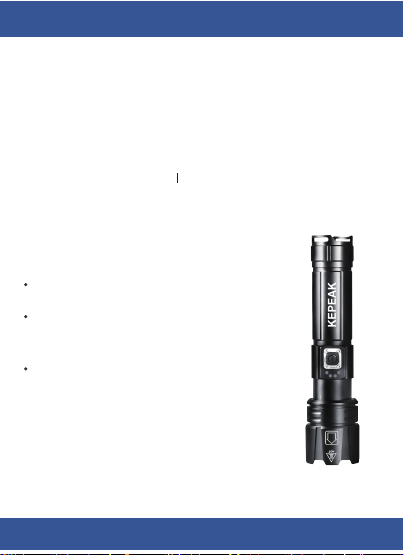
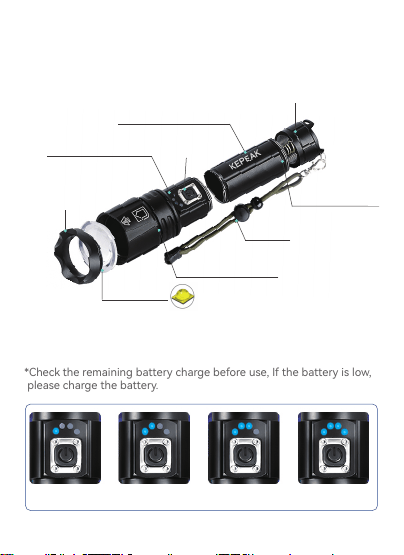
1. PRODUCT STRUCTURE
2. CHECK THE BATTERY LEVEL
XHP70 LED
Attack head
Remaining indicator
Aluminum alloy body
Lanyard
Zoomable Design
Batte cover
Waterproof rub-
ber ring
Switch
*Check the remaining batte charge before use, If the batte is low,
please charge the batte.
25% 50% 75% 100%
04
Brand name
KEPEAK
Led Chip
XHP70 LED
Weight
200g
Compatible
battery
Charging
method
26650/18650/3*AAA
batte
5V1A TYPE-C
Charging
method
Model
Body
Dimensions
Material
Light mode
Waterproof
level
Usage time
6-8h
1476
16.2*4.3*3.2CM
Aluminum alloy
High/Medium/
Low/Strobe/SOS
IPX6
6-10h
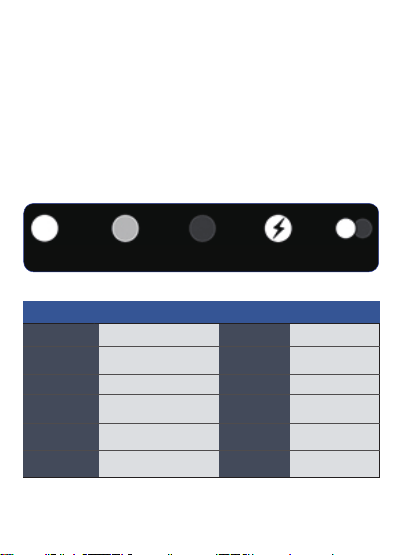
3. 5 LIGHT MODE AND SWITCH-OFF
* Mode switching:
When the ashlight on, just press the power button to switch modes
in the following order.
Switch in the order of →high brightness→medium brightness→low
brightness→ash→SOS→o.
* One-click o:
Keep pressing for more than 3 seconds, the ashlight can be turned
o in any mode.
High Medium Low Strobe
SOS
Specification
05
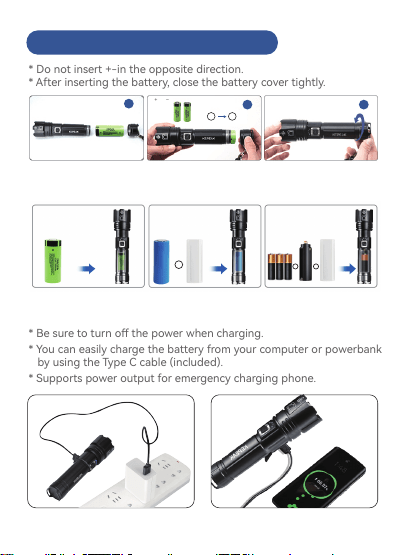
How to insert the battery
outputinput
* Do not inse +-in the opposite direction.
* After inseing the batte, close the batte cover tightly.
* Be sure to turn o the power when charging.
* You can easily charge the batte from your computer or powerbank
by using the Type C cable (included).
* Suppos power output for emergency charging phone.
Charging method(USB rechargeable & built-in 2 ports)
Supports various types of batteries
+
-
2 3
1*26650 battery
(included)
1*18650 battery
(Purchased separately)
3 * AAA batteries
(Purchased separately)
+
+ +
+
-
1
06
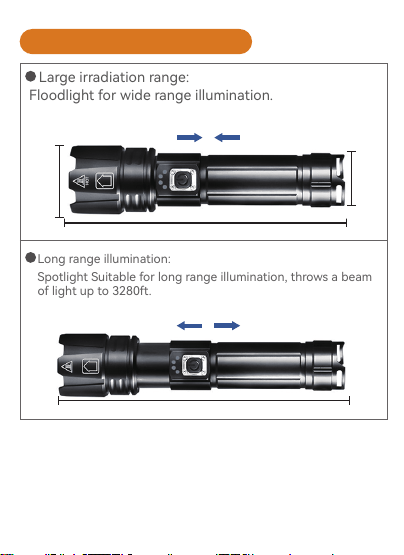
Large irradiation range:
Floodlight for wide range illumination.
Long range illumination:
Spotlight Suitable for long range illumination, throws a beam
of light up to 3280ft.
1
2
16.2cm
Zoom out
4.3cm
3.2cm
18cm
Zoom in
How to adjust the light
07
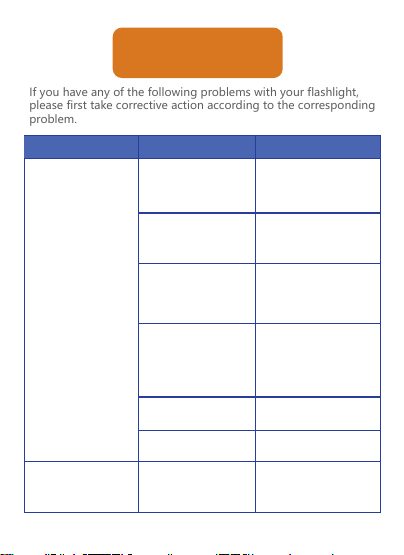
If you have any of the following problems with your flashlight,
please first take corrective action according to the corresponding
problem.
Malfunction Possible causes Solution
Please make sure
that the switch is
pressed correctly
Check the switch
Tighten the end ba-
tte cover
Charge the batte
Check that the bat-
te cap is not loose
Check the remaining
batte power
*When using 26650 lithiu-
m-ion batteries
Check that the batte
is correctly installed.
Check batte conta-
cts for di
Check if batte life
is over
Check if the batte
is dead
Please charge batte
Replace with a
new batte
Clean the suace
with alcohol
Common problem
solving
The light does
not come on
when the switch
is turned on.
Does not light up
in flash/SOS mode
Remove the batte,
check the positive and
negative batte
terminals and inse the
batte correctly.
08

Check if the charger
is defective
1.Replace with a new
charger
2.The batte may be
exhausted, It needs to
be charged for about
20 minutes and then
see if it returns to
normal.
The charging light
does not light up
when charging
09