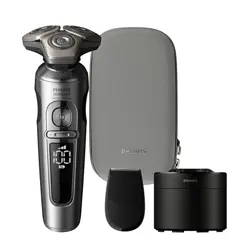
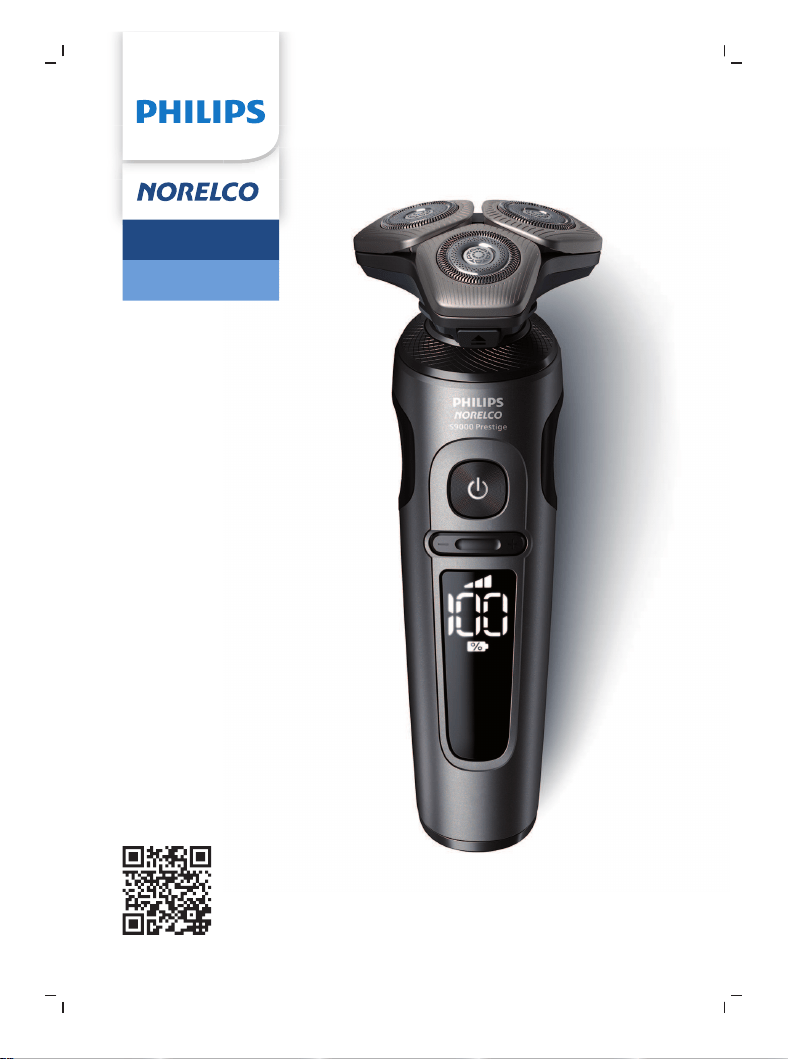
Tripleheader shaver
SP9883
www.philips.com/support/ifu-lux
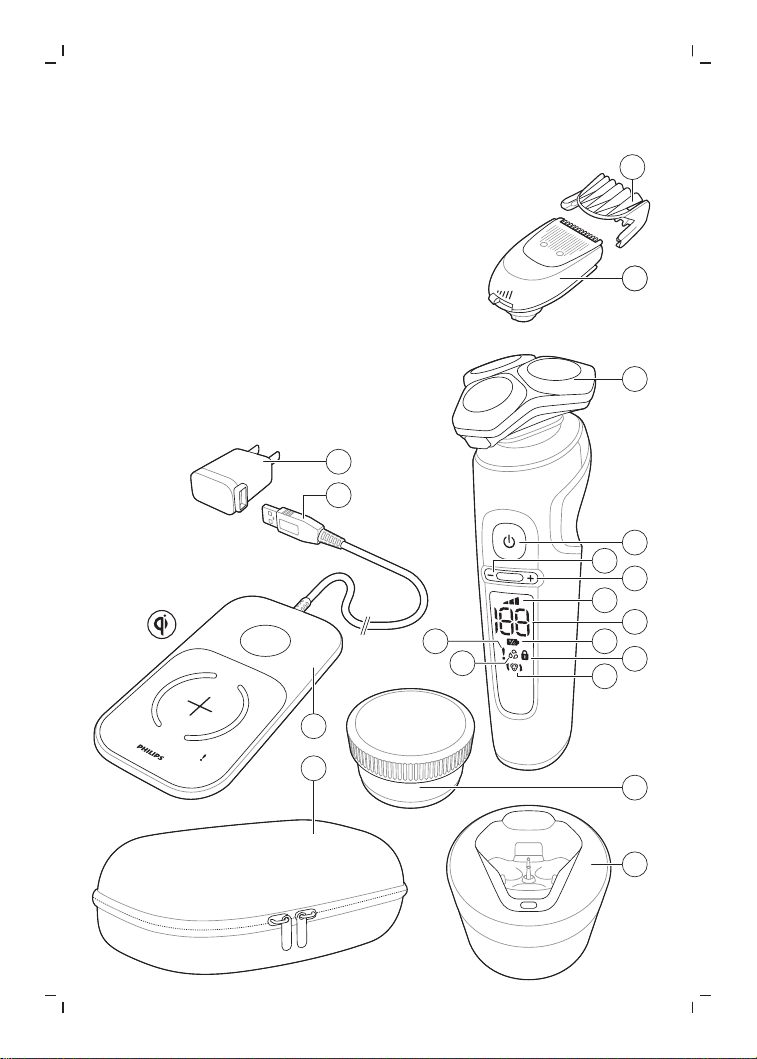
Fig. 1
3
19
18
17
16
6
5
15
14
13
12
11
10
7
9
8
1
2
4

empty page before TOC


English
6
English
Introduction
Congratulations on your purchase and welcome
to Philips Norelco!
To fully benefit from the support that Philips
Norelco offers, register your product at
www.norelco.com/register.
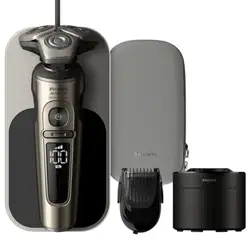
General description (Fig. 1)
1 USB power source
2 USB plug
3 Wireless Qi charging pad
4 Pouch
5 Quick Clean Pod
6 Quick Clean Pod Cartridge
7 Replacement reminder
8 Notification symbol
9 Cleaning reminder
10 Travel lock symbol
11 Battery charge indicator
12 Battery charge percentage
13 Personal comfort settings bar
14 Personal comfort settings increase button
15 Personal comfort settings decrease button
16 On/off button
17 Shaving unit with hair chamber
18 Click-on beard styler attachment
19 Comb for beard styler attachment
IMPORTANT SAFETY
INSTRUCTIONS
When using an electric product, basic precautions should always be
followed, including the following:

7
English
Read all instructions before using this product.
DANGER
To reduce the risk of electric shock:
-
Do not reach for a corded charging pad that has fallen into
water. Unplug immediately from the power outlet.
-
Keep the USB power source and the charging pad dry.
-
Do not place or store the product or charging pad where it can
fall or be pulled into a tub or sink. Do not place or drop the
product or charging pad into water or other liquid.
-
Always unplug the charging pad from the power outlet
immediately after use.
-
Remove USB power source from power outlet before cleaning
the charging pad.
WARNING
To reduce the risk of burns, fire, electric shock, or injury to
persons:
-
This product is not intended for use by persons (including
children) with reduced physical, sensory or mental capabilities, or
lack of experience and knowledge, unless they have been given
supervision or instruction concerning use of the product by a
person responsible for their safety. Children should be
supervised to ensure that they do not play with the product.
-
Use this product only for its intended household use as described
in this manual. Misuse can lead to hazards or serious injuries. Do
not use attachments not recommended by Philips North America
LLC. Accessories supplied may vary for different products.

8
English
-
Never use the product, charging pad or USB power source if it is
damaged, if it is not working properly or after it has been
dropped or damaged. Never use the charging pad or USB power
source after it has been dropped into water. For assistance call
1-800-243-3050.
-
Keep the USB power source and the charging pad away from
heated surfaces
-
Never drop or insert any object into any opening.
-
Do not use the USB power source in or near a power outlet that
contains an electric air freshener to prevent damage to the USB
power source.
-
Do not charge product or plug in charging pad outdoors or
operate where aerosol (spray) products are being used or where
oxygen is being administered.
-
Always check cutters, cutting unit and guards before using the
product. Do not use the product if cutters, cutting unit or guards
are damaged, as injury may occur.
-
Always attach USB power source to charging pad first, then to
power outlet. To disconnect, remove USB power source from
power outlet.
-
Plug USB power source directly into power outlet. Do not use an
extension cord.
-
Unplug USB power source before plugging in or unplugging the
charging pad.
-
The charging pad is not intended for use in a car. It may interfere
with the automotive electronic systems.
-
The batteries used in this product may present a fire or chemical
burn hazard if mistreated. Do not disassemble, heat above
100°C (212°F) or incinerate.
-
Only use original Philips accessories or consumables. Only use
detachable power source HQ87 and charging pad HQ8510.

9
English
-
Charge, use and store the product at a temperature between 41
°F / 5°C and 95 °F / 35°C.
-
Keep product and batteries away from fire and do not expose
them to direct sunlight or high temperatures.
-
If the product becomes abnormally hot or smelly, changes color
or if charging takes longer than usual, stop using and charging
the product and contact Philips.
-
Do not place products and their batteries in microwave ovens or
on induction cookers.
-
Do not open, modify, pierce, damage or dismantle the product
or battery to prevent batteries from heating up or releasing toxic
or hazardous substances. Do not short-circuit, overcharge or
reverse charge batteries.
-
If batteries are damaged or leaking, avoid contact with the skin
or eyes. If this occurs, immediately rinse well with water and seek
medical care.
Philips Norelco Quick Clean Pod Cartridge fluid
-
Do not take internally.
-
Avoid contact with the eyes. In case of eye contact, thoroughly
flush with cold water. If irritation persists, get medical attention.
-
Keep out of reach of children.
SAVE THESE INSTRUCTIONS
The display
Note: Remove any sticker or protective foil from
the display before using the product.
10
English
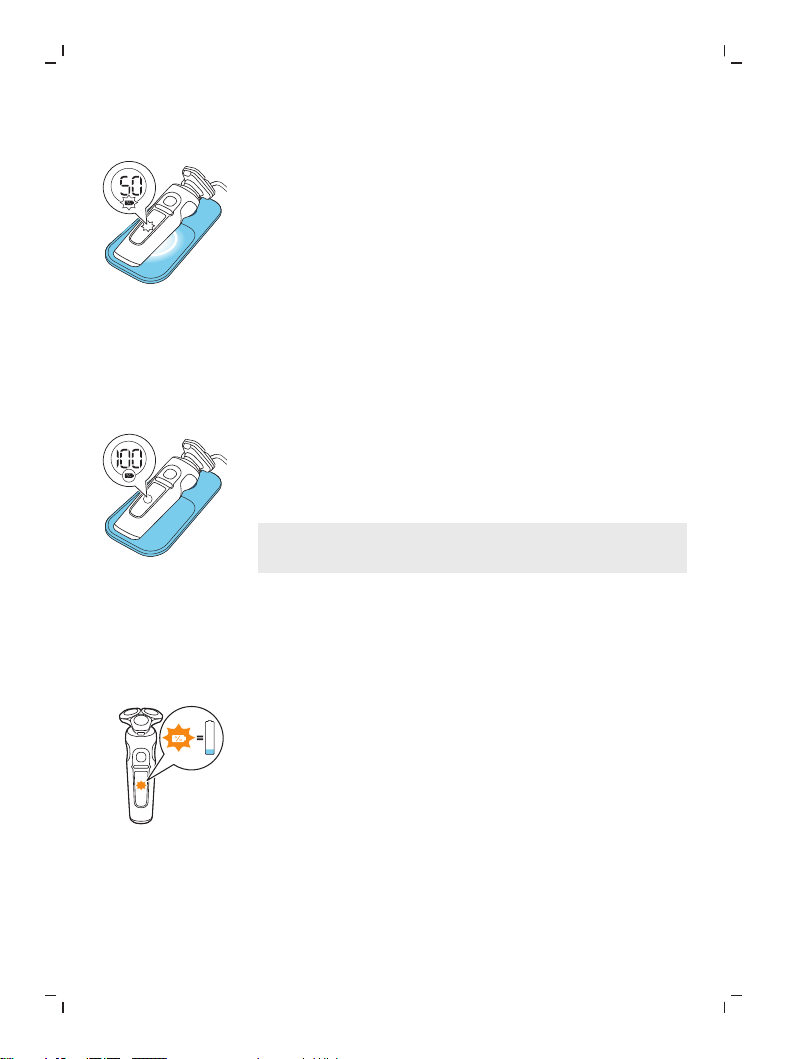
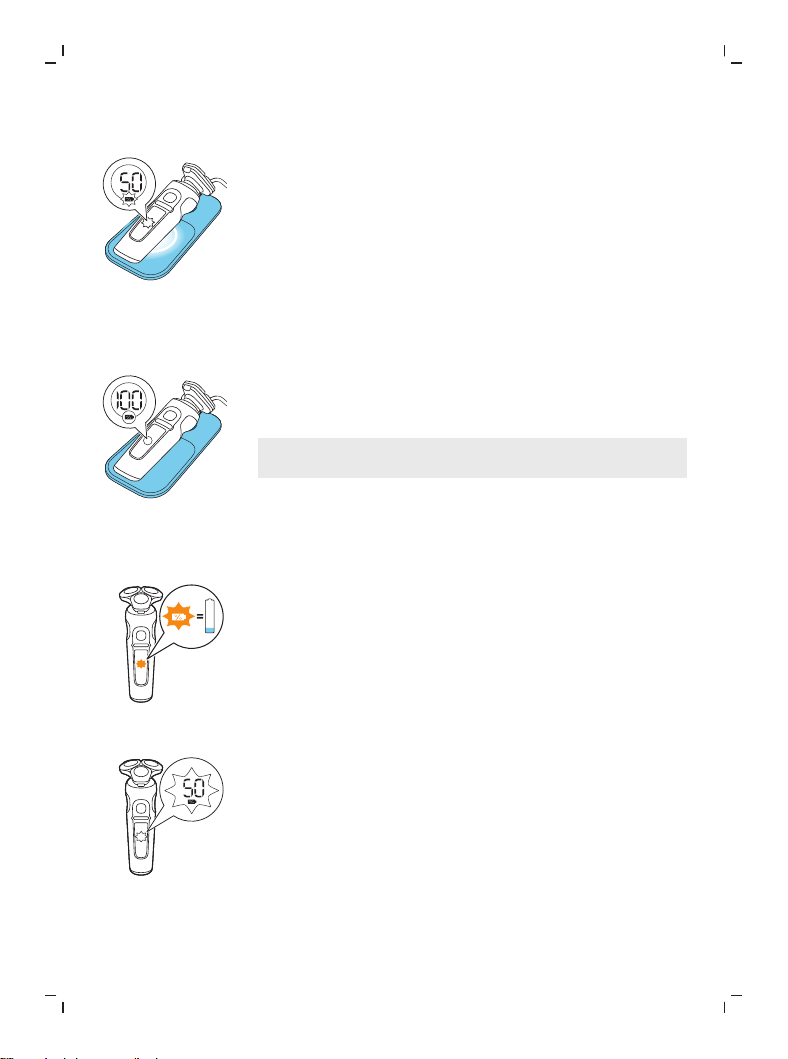
Charging
When the shaver is charging, the ring on the pad
lights up and the battery charge indicator on the
shaver flashes white.
The battery charge is indicated by the battery
charge percentage flashing on the display, which
is shown when the shaver is moved.
Quick charge: After approx. 18 minutes charging,
the appliance contains enough energy for one
shave.
Battery fully charged
When the battery is fully charged, the battery
charge indicator and the ring on the pad light up
white continuously.
Note: Both lights switch off automatically after 15
minutes.
The battery charge percentage lights up white
continuously, which is shown when the shaver is
moved.
Battery low
When the battery is almost empty, the battery
charge indicator flashes orange and the shaver
beeps. At this point there is enough energy left
for one shave.
11
English
Remaining battery charge
The remaining battery charge is indicated by the
battery charge percentage shown on the display.
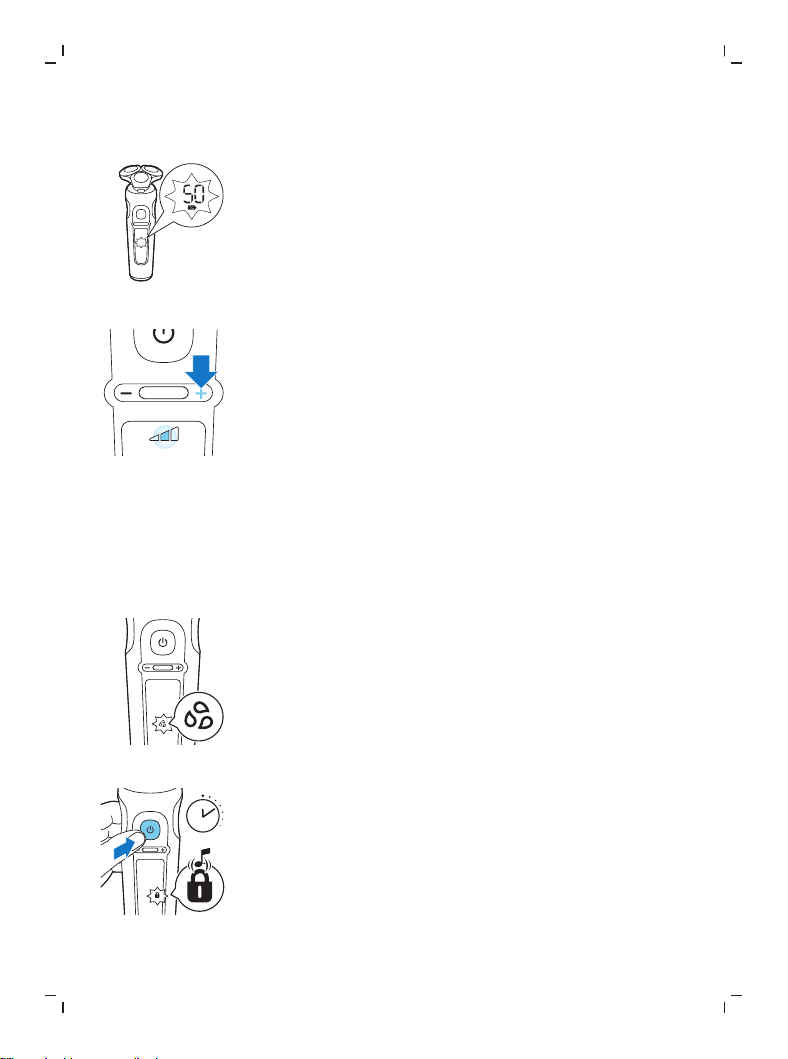
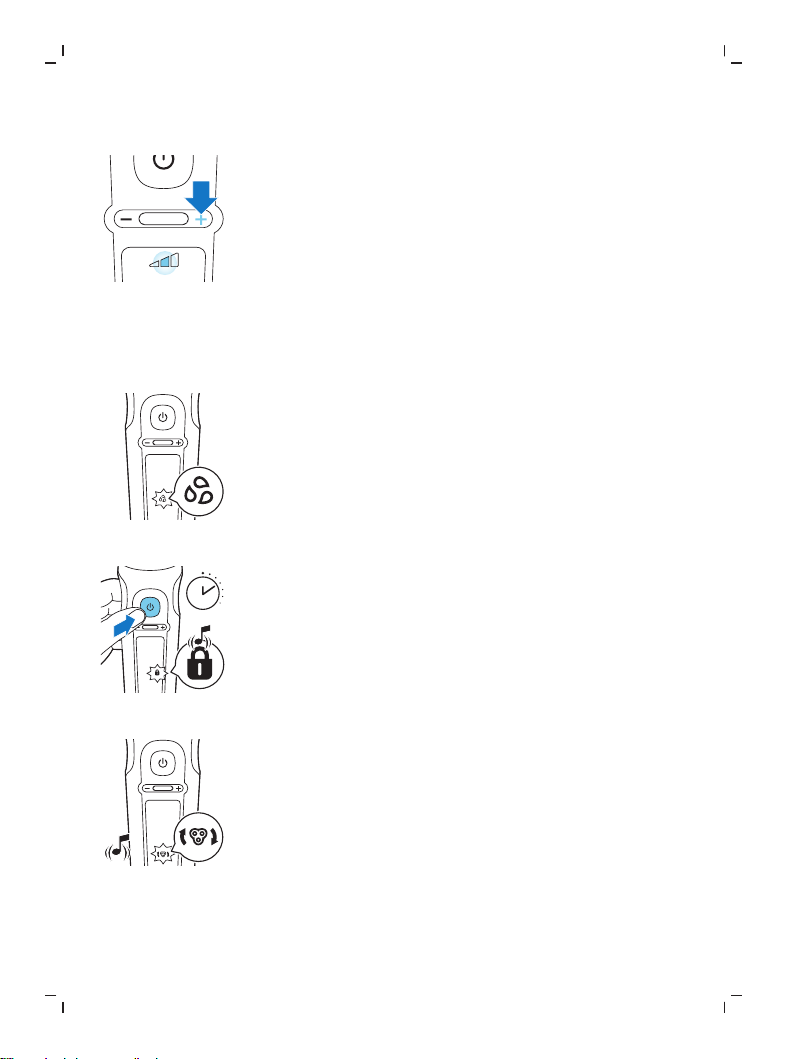
Personal comfort settings
The shaver has a feature that allows you to
personalize your settings. Depending on your
personal shaving needs, choose between three
settings, from low to high: comfort, dynamic or
efficiency. When you press the button on the left
or right of the display, the segment of the
personal comfort settings bar lights up to
indicate the selected setting. To select a lower or
higher setting, press the button on the left or
right of the display.
Cleaning reminder
Clean the shaver after every use for optimal
performance (see 'Cleaning and maintenance').
When you switch off the shaver, the cleaning
reminder flashes to remind you to clean the
shaver.
Travel lock
3 sec.
When you are going to travel, you can lock the
shaver to prevent it from accidentally switching
on (see 'Activating the travel lock').
12
English
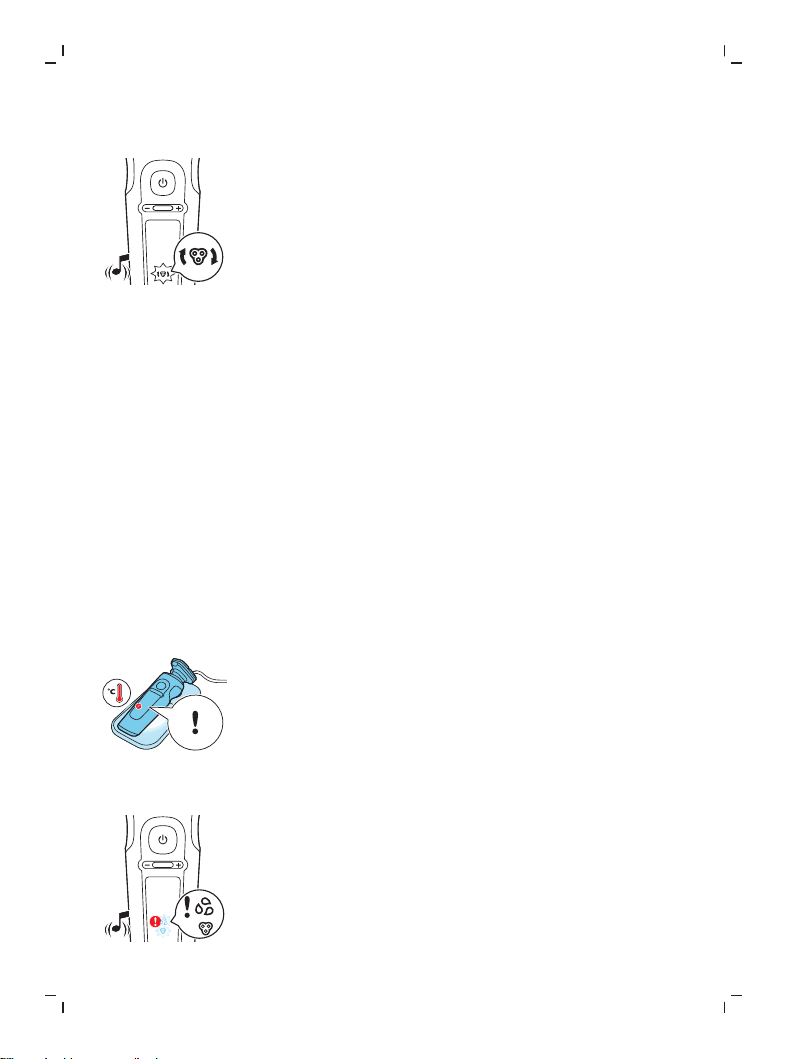
Replacement reminder
For maximum shaving performance, we advise
you to replace the shaving heads once a year.
Replace damaged shaving heads immediately.
Always replace the shaving heads with original
Philips shaving heads.
The shaver is equipped with a replacement
reminder which reminds you to replace the
shaving heads. The shaver beeps, the
replacement reminder lights up and the arrows
flash to indicate that you have to replace the
shaving heads.
Note: After replacing the shaving heads, you can
reset the replacement reminder by pressing the
on/off button for 7 seconds. If you do not reset
the replacement reminder, the shaver resets
automatically after 9 shaves.
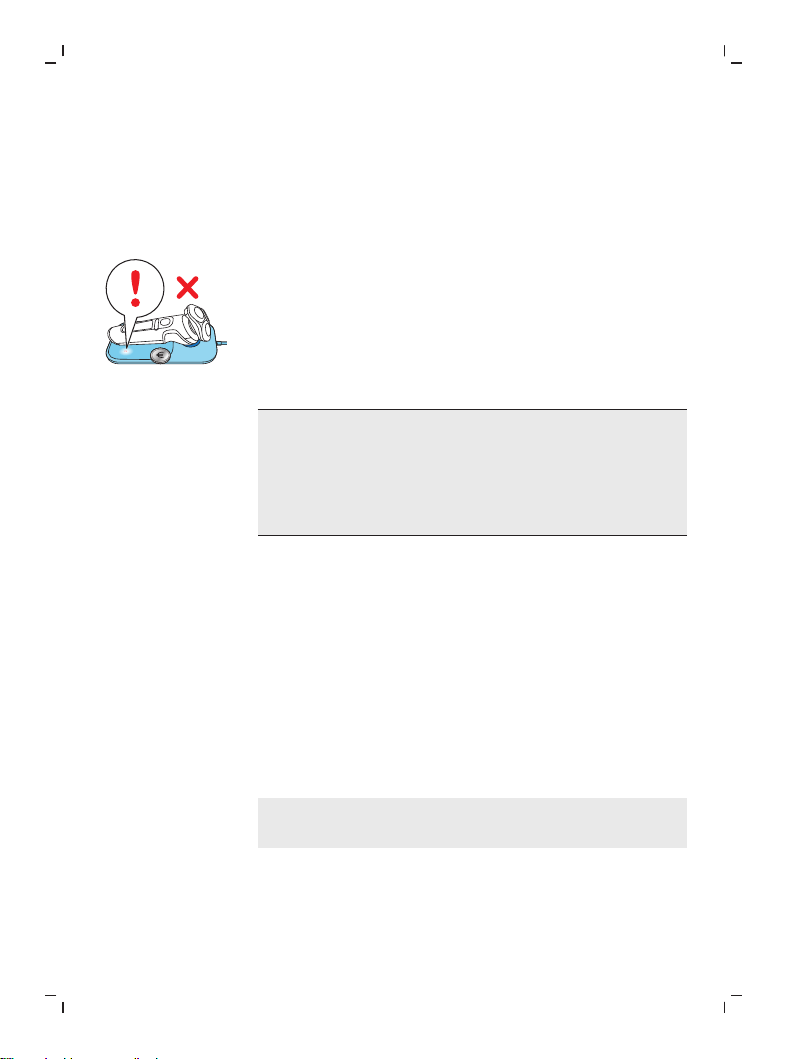
Notification symbol
Overheating
If the shaver overheats during charging, the
notification symbol flashes. When this happens,
the shaver stops charging automatically.
Charging continues once the temperature of the
shaver has decreased to the normal level after
approx. 10 minutes.
Blocked shaving heads
If the shaving heads are blocked, the notification
symbol continuously lights up red. The
replacement reminder and the cleaning reminder
alternately flash white and the shaver beeps. In
this case, the motor cannot run because the
shaving heads are dirty or damaged. If the
13
English
shaving heads are dirty, you have to clean them.
If the shaving heads are damaged, you have to
replace them.
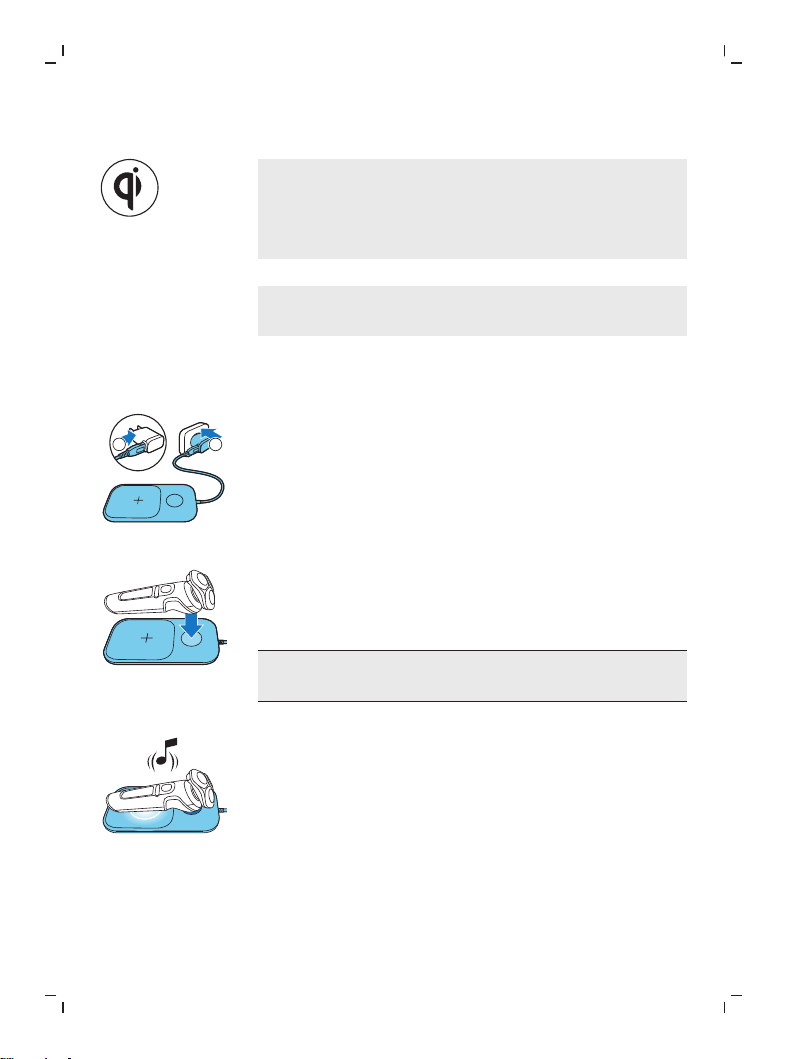
Foreign object on wireless Qi charging pad
If there is a foreign (metal) object on the wireless
Qi charging pad during charging, the notification
symbol on the wireless Qi charging pad lights up.
The wireless Qi charging pad switches off
automatically and restarts 5 minutes after the
foreign object has been removed.
Do not place any foreign (metal) objects on
the wireless Qi charging pad. Only use the
wireless Qi charging pad to charge the shaver
or another device (e.g. smartphone) compliant
with Qi charging.
Charging
Charge the shaver before you use it for the first
time and when the display indicates that the
battery is almost empty.
Charging takes approx. 3 hours. A fully charged
shaver has a shaving timeof up to 60 minutes.
After approx. 18 minutes of charging the shaver
contains enough power for one shave.
Note: You cannot use the shaver while it is
charging.
Quick charge
After approx. 18 minutes of charging the shaver
contains enough power for one shave.
14
English
Charging with the wireless Qi charging pad
Note: The charging pad is Qi compliant. Only
charge the Qi compatible shaver or other Qi
charging compliant appliances on the wireless Qi
charging pad provided.
Note: Carefully shake off excess water before
placing the shaver on the Qi pad.
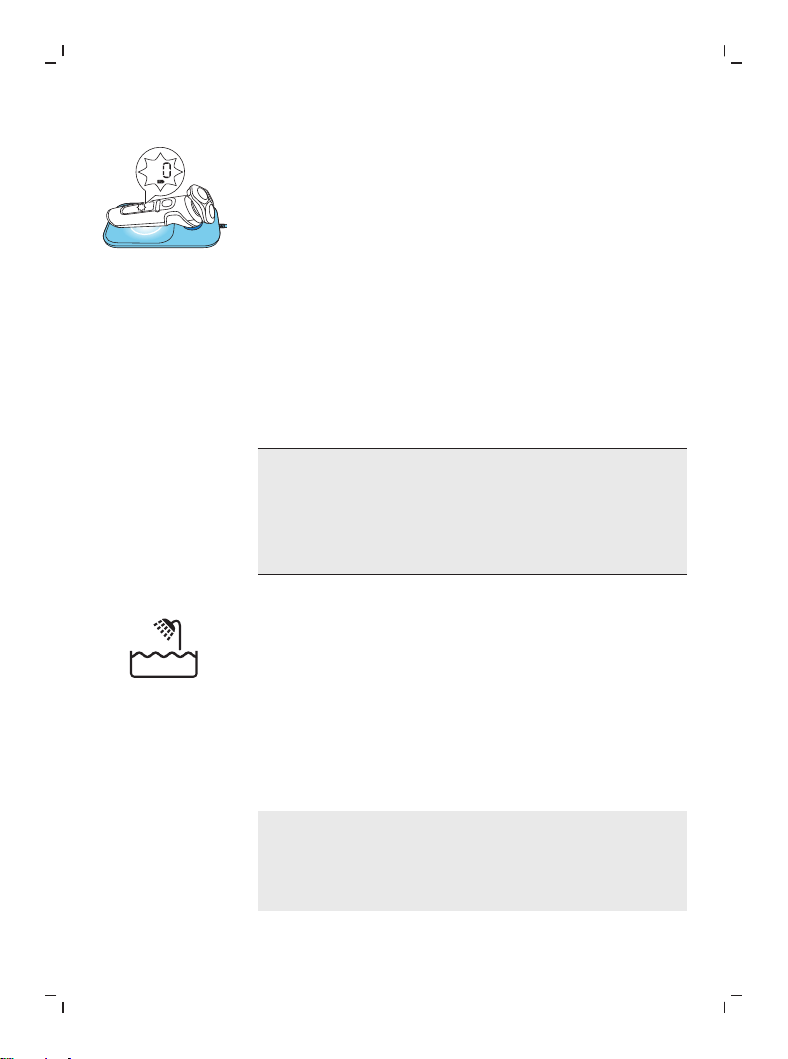
1 Put the USB plug in the USB power source
supplied.
2
1
2 Insert the USB power source into the power
outlet.
Place the shaver on the cross mark of the
wireless Qi charging pad. Make sure the
shaver fits into the cavity of the wireless Qi
charging pad.
Only charge the shaver on the provided
wireless Qi charging pad.
-
The wireless Qi charging pad beeps and the
ring on the pad lights up when the shaver is
correctly placed and connected for charging.
15
English
-
When the shaver is charging, the ring on the
pad lights up and the battery charge indicator
on the shaver flashes white. The battery
charge is indicated by the battery charge
percentage flashing on the display, which is
shown when the shaver is moved.
3 When the battery is fully charged, the battery
charge indicator and the ring on the pad light
up white continuously. Both lights switch off
automatically after 15 minutes.
Using the shaver
Always check the shaver and all accessories
before use. Do not use the shaver or any
accessory if it is damaged, as this may cause
injury. Always replace a damaged part with
one of the original type.
This symbol indicates that the shaver can be used
in the bath or shower.
-
Use this shaver for its intended household use
as described in this manual.
-
For hygienic reasons, the shaver should only
be used by one person.
-
Trimming is easier when the skin and hair are
dry.
Note: This shaver is waterproof. It is suitable for
use in the bath or shower and for cleaning under
the tap. For safety reasons, the shaver can only be
used without cord.
16
English
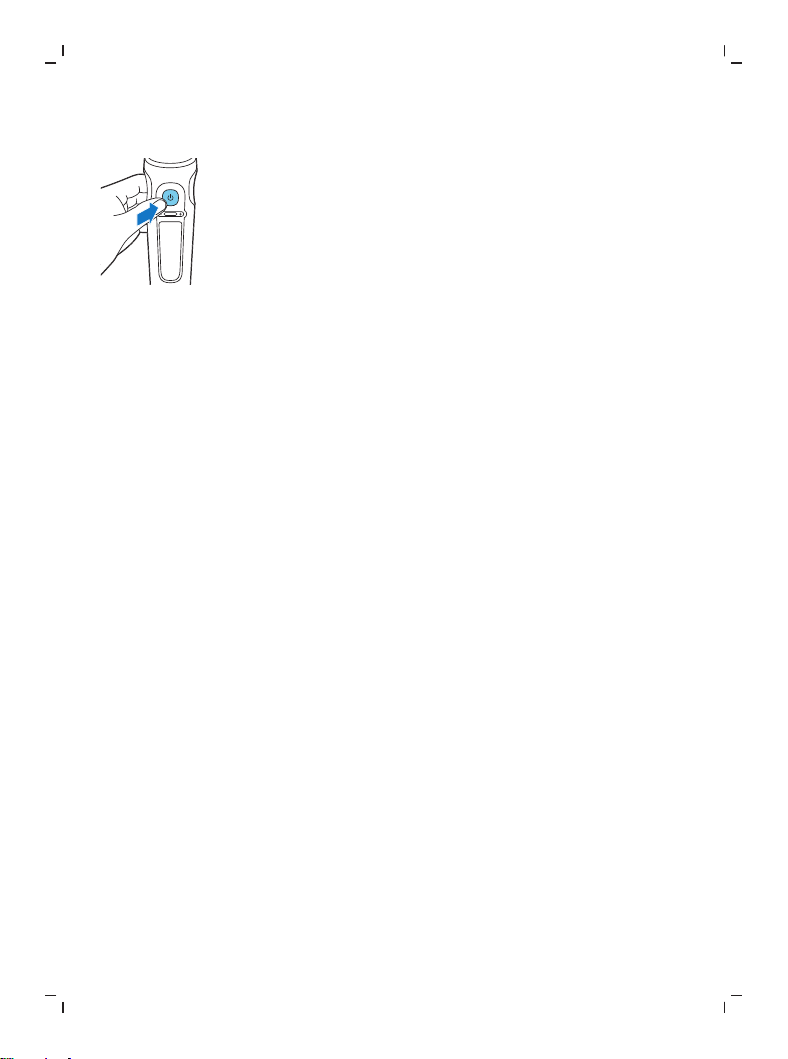
Switching the shaver on and off
1 To switch on the shaver, press the on/off
button once.
The battery charge percentage lights up for a
few seconds.
2 To switch off the shaver, press the on/off
button once.
The battery charge percentage lights up for a
few seconds and shows the remaining battery
charge.
Shaving
Skin adaptation period
Your first shaves may not bring you the result you
expect and your skin may even become slightly
irritated. This is normal. Your skin and beard need
time to adapt to any new shaving system. To
allow your skin to adapt to this new appliance,
we advise you to shave regularly (at least 3 times
a week) and exclusively with this appliance for a
period of 3 weeks.
Shaving tips
-
For the best results on skin comfort, pre-trim
your beard if you have not shaved for 3 days
or longer.
-
Select your personal comfort setting (see
'Personal comfort settings').
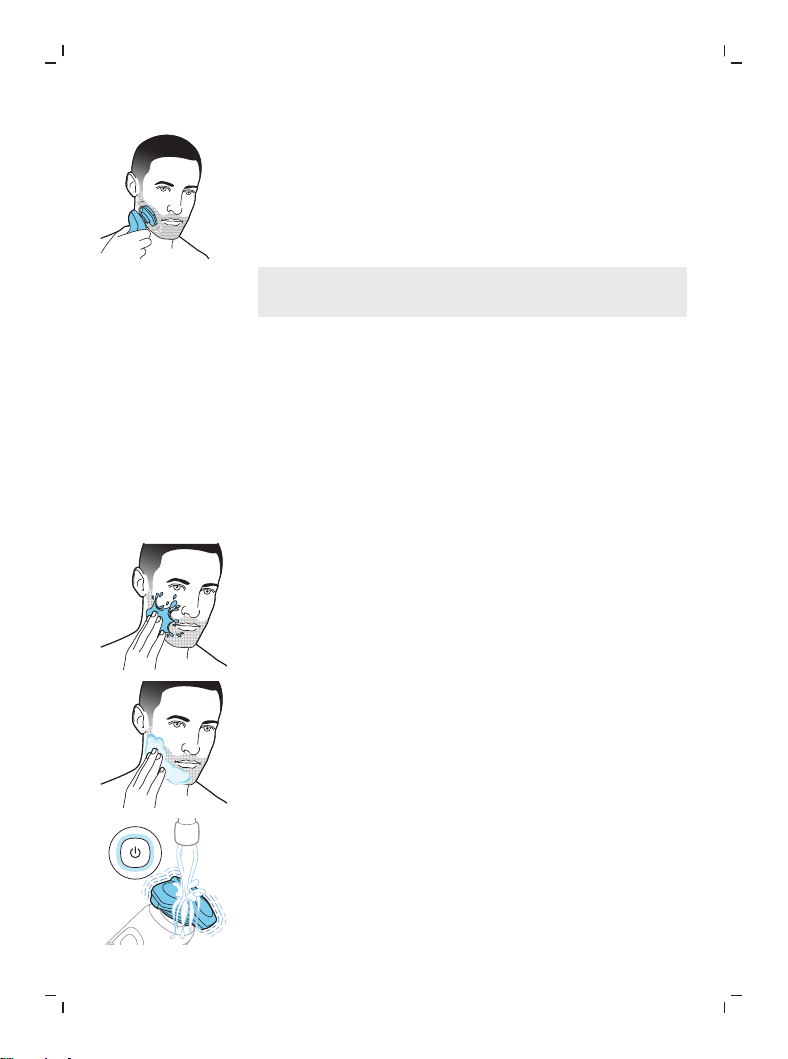
Dry shaving
1 Switch on the shaver.
17
English
2 Move the shaving heads over your skin in
circular movements to catch all hairs growing
in different directions. Make sure each shaving
head is fully in contact with the skin. Exert
gentle pressure for a close, comfortable shave.
Note: Do not press too hard, as this can cause
skin irritation.
3 Switch off and clean the shaver after each use
(see 'Cleaning and maintenance').
The display lights up for a few seconds to
show the remaining battery charge.
Wet shaving
For a more comfortable shave, you can also use
this appliance on a wet face with shaving foam or
shaving gel.
1 Apply some water to your skin.
2 Apply shaving foam or shaving gel to your
skin.
3 Rinse the shaving unit under the tap to ensure
that the shaving unit glides smoothly over
your skin.
4 Switch on the shaver.
18
English
5 Move the shaving heads over your skin in
circular movements to catch all hairs growing
in different directions. Make sure each shaving
head is fully in contact with the skin. Exert
gentle pressure for a close, comfortable shave.
Note: Do not press too hard, as this can cause
skin irritation.
Note: Rinse the shaving unit regularly to
ensure that it continues to glide smoothly over
your skin.
6 Dry your face.
7 Switch off the shaver and clean it after each
use.
Note: Make sure that you rinse all foam or
shaving gel off the shaver.
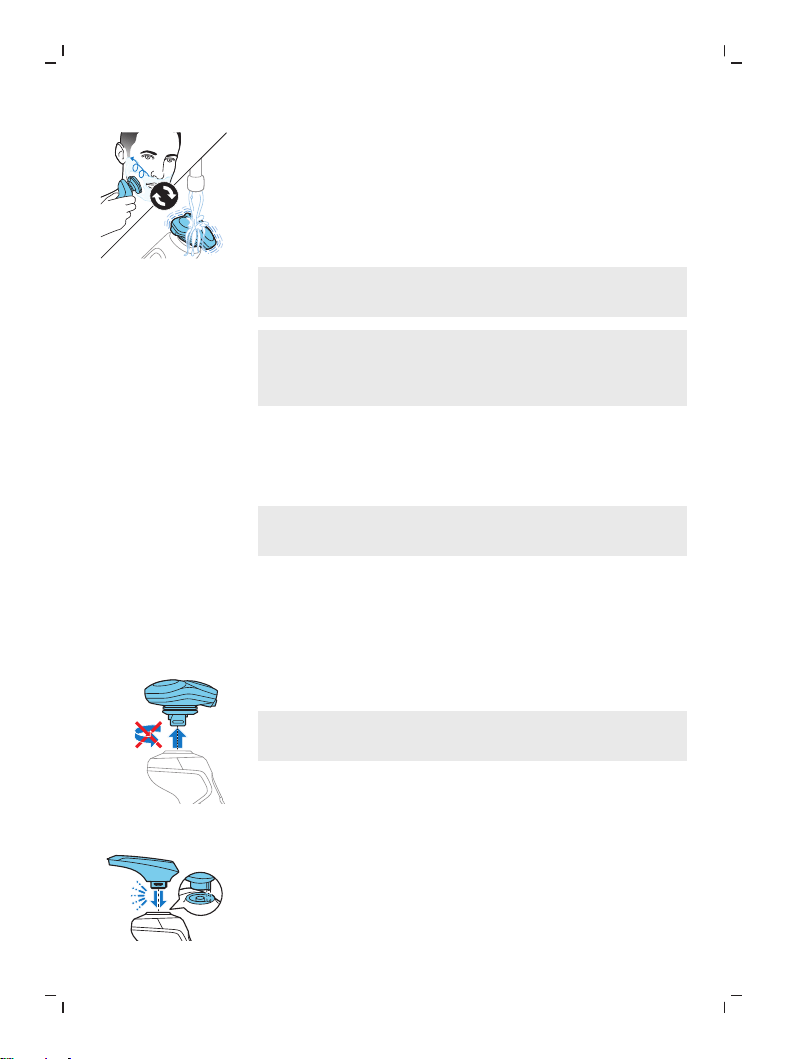
Using click-on attachments
Removing or attaching click-on attachments
1 Make sure the shaver is switched off.
2 Pull the attachment straight off the shaver.
Note: Do not twist the attachment while you
pull it off the shaver.
3 Insert the lug of the attachment into the slot
in the top of the shaver. Then press down the
attachment to attach it to the shaver (‘click’).
19
English
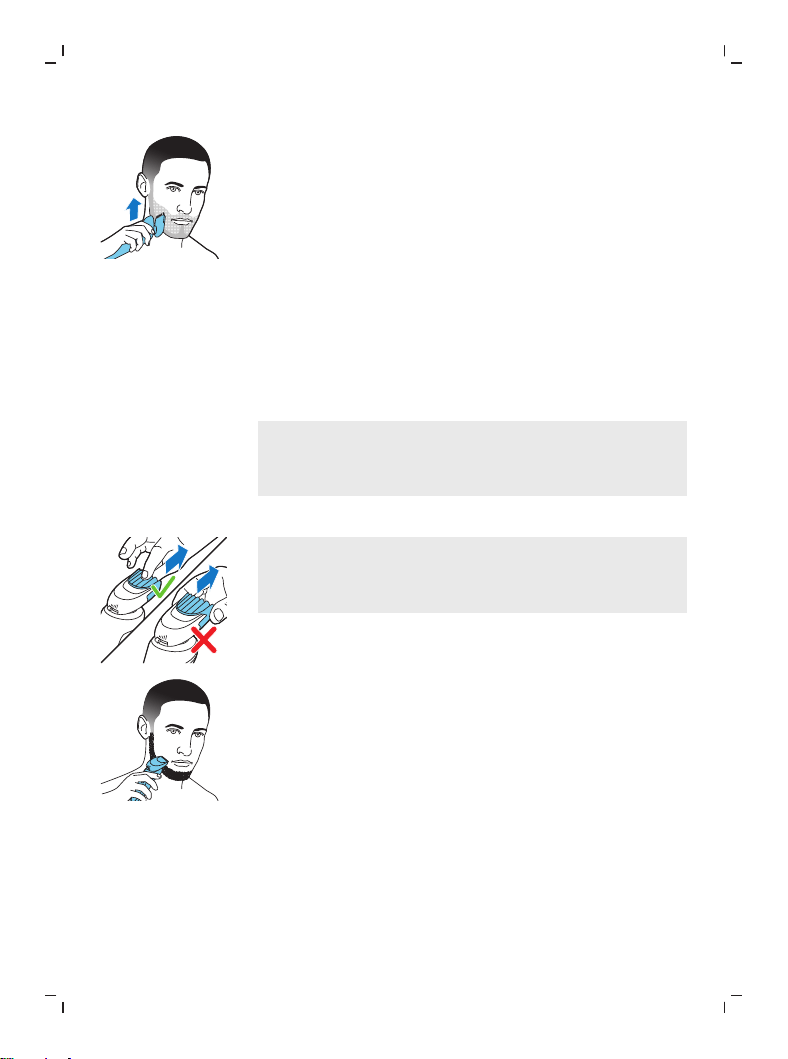
Using the beard styler attachment with comb
You can use the beard styler with the comb
attached to style your beard at one fixed setting,
but also at different length settings. You can also
use it to pre-trim any long hairs before shaving
for a more comfortable shave.
Note: The beard styler is only intended for
trimming facial hair. Do not use on areas below
the neck.
The length settings on the beard styler
attachment correspond to the remaining hair
length after cutting and range from 1 to 5mm
(3/64 - 3/16in).
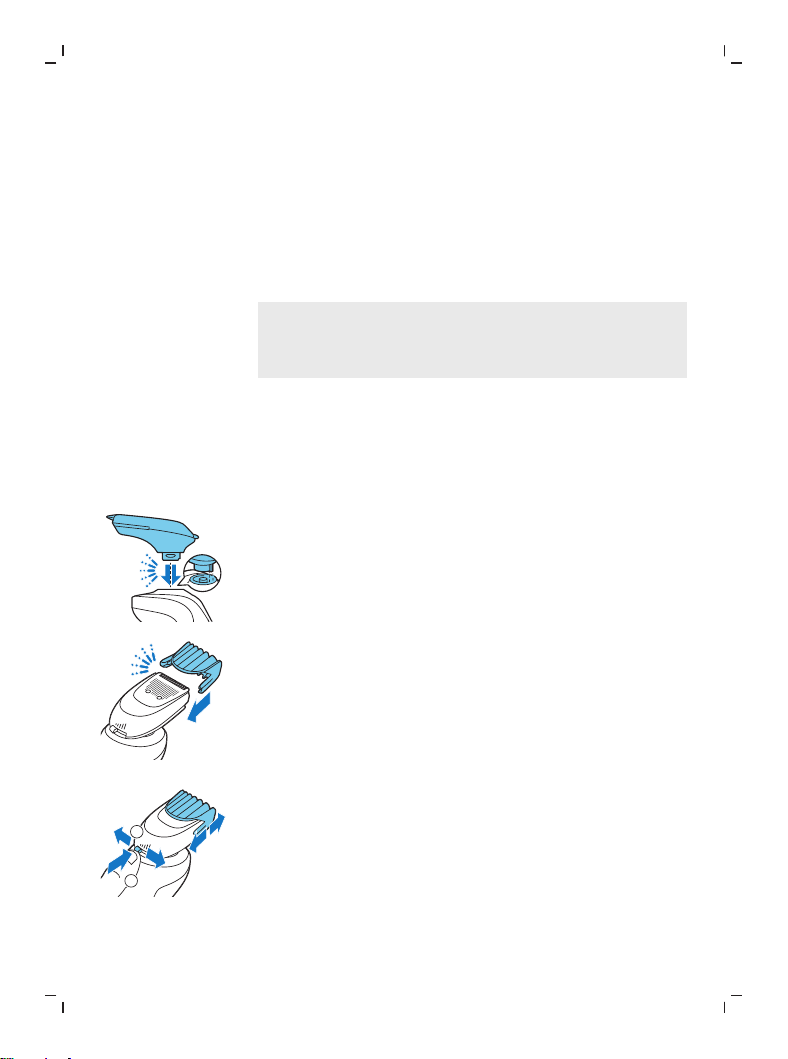
1 Attach the beard styler attachment to the
shaver ('click').
2 Slide the comb straight into the guiding
grooves on both sides of the beard styler
attachment (‘click’).
1
2
3 Press the length selector and then push it to
the left or right to select the desired hair
length setting.
4 Switch on the shaver.
20
English
5 Move the shaver upwards while you exert
gentle pressure. Make sure the front of the
comb is in full contact with the skin.
6 Clean the attachment after use.
Using the beard styler attachment without comb
You can use the beard styler attachment without
the comb to contour your beard, moustache,
sideburns or neckline at a length of 0.5mm
(1/32in).
Note: The beard styler is only intended for
trimming facial hair. Do not use it on areas below
the neck.
1 Pull the comb off the beard styler attachment.
Note: Grab the comb in the center to pull it off
the beard styler attachment. Do not pull at the
sides of the comb.
2 Switch on the appliance.
3 Hold the beard styler attachment
perpendicular to the skin and move the
appliance downwards while you exert gentle
pressure.
4 Clean the attachment after use.
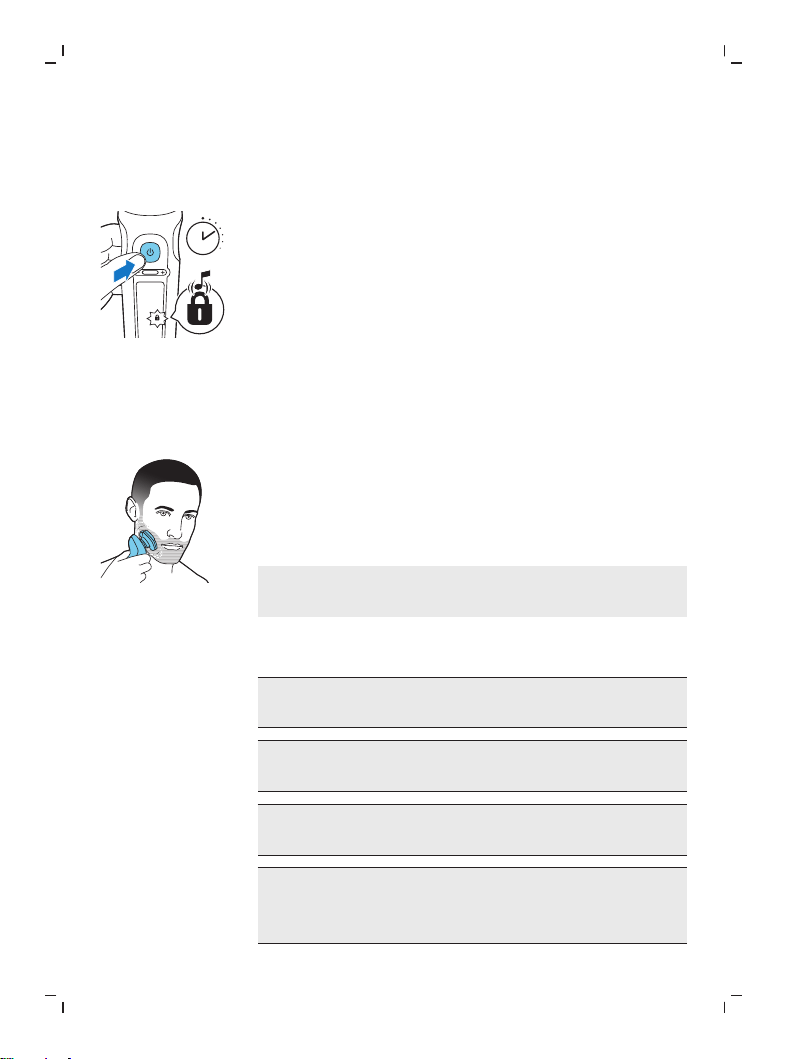
Travel lock
You can lock the shaver when you are going to
travel to prevent it from switching on
accidentally.
21
English
Activating the travel lock
1 Press the on/off button for 3 seconds to use
the travel lock mode.
3 sec.
While you activate the travel lock, the travel
lock symbol lights up briefly and the shaver
produces a short sound.When the travel lock is
activated, the travel lock symbol flashes.
If you try to switch on the shaver while the
travel lock is active, the travel lock symbol
flashes.
Deactivating the travel lock
1 Press the on/off button for 3 seconds.
While you deactivate the travel lock, the travel
lock symbol lights up briefly and the shaver
produces a short sound.The shaver switches
on and is now ready for use again.
Note: The shaver unlocks automatically when
it is placed on the wireless Qi charging pad.
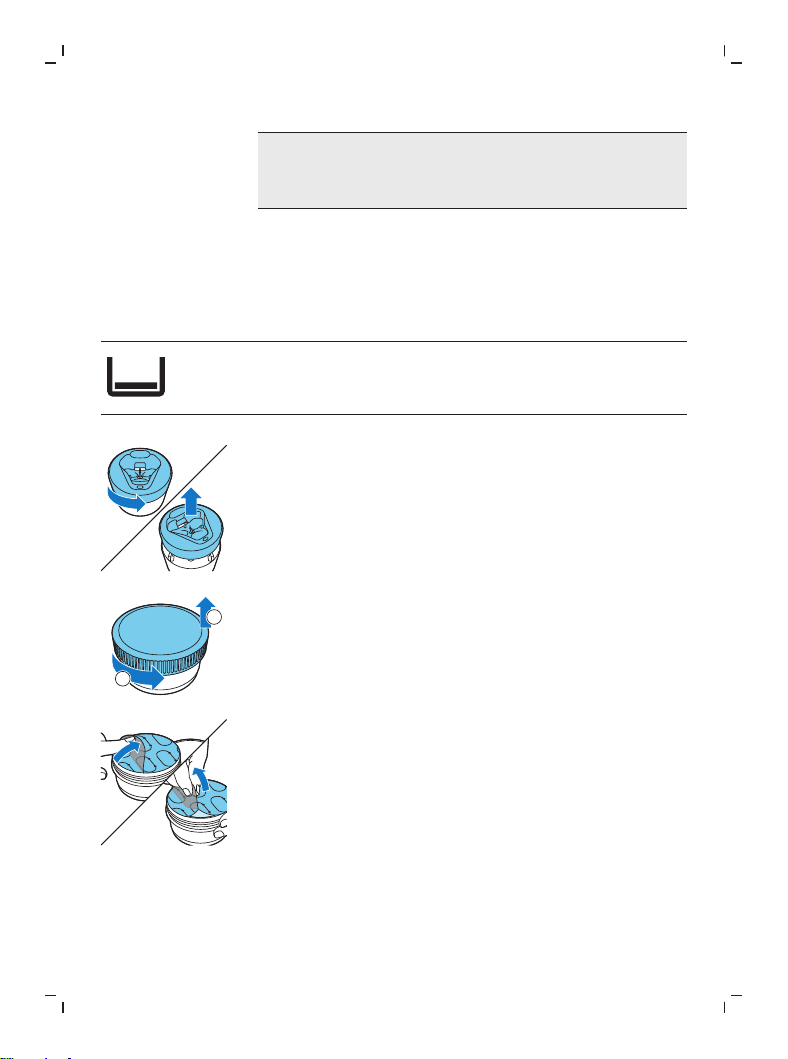
Cleaning and maintenance
Regular cleaning guarantees better shaving
results.
Never clean, remove or replace the shaving
unit while the shaver is switched on.
Do not apply pressure to shaving head
guards.
Do not touch shaving heads with hard
objects as this may dent or damage the
precision-made slotted guards.
22
English
Do not use compressed air, abrasives,
scourers or aggressive liquids such as petrol
or acetone to clean the shaver.
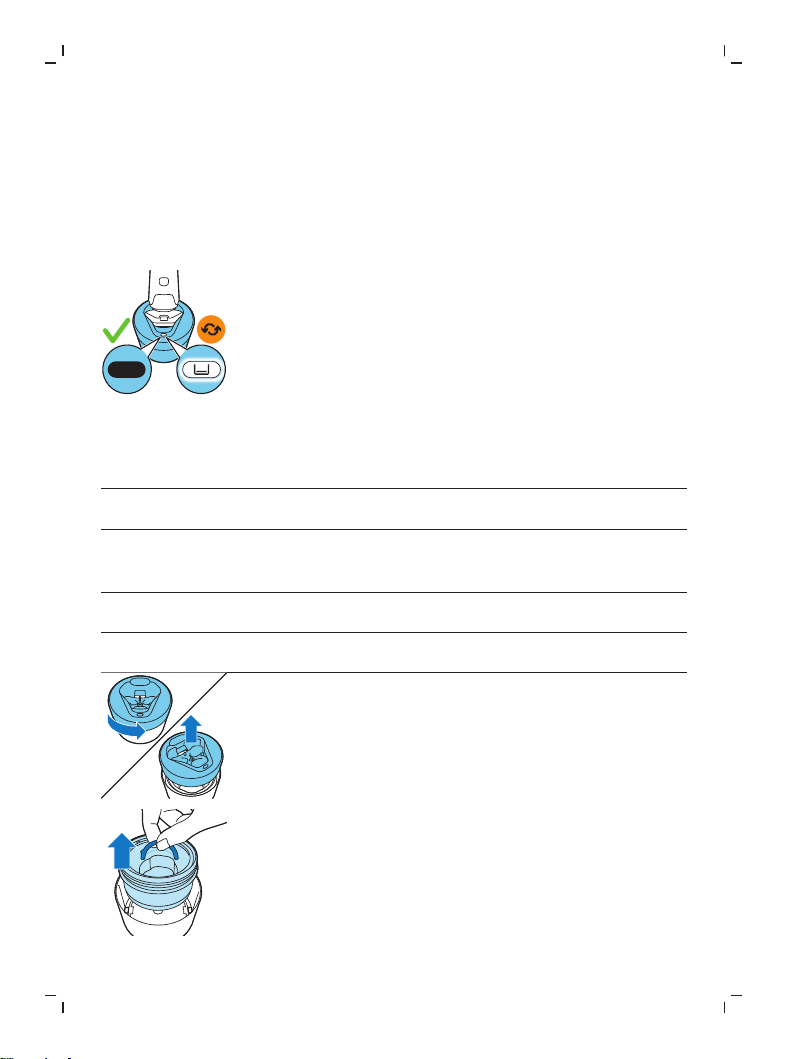
How do I use the Quick Clean Pod?
What does the icon on my Quick Clean Pod
mean?
Icon Behavior Meaning
Becomes visible on the
Quick Clean Pod
The Quick Clean Pod Cartridge
needs to be replaced.
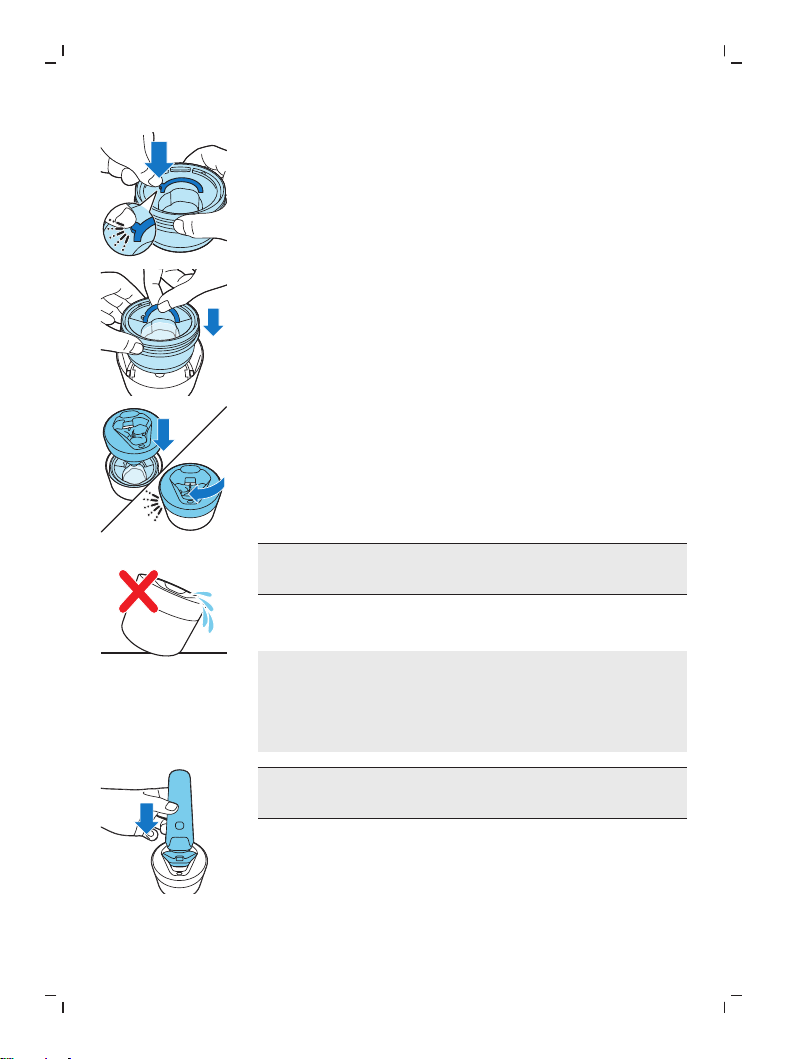
Preparing the Quick Clean Pod for use
1 Twist and remove the top of the Quick Clean
Pod.
2
1
2 Twist the lid off of the Quick Clean Pod
Cartridge.
3 Lift the tab on the seal and pull it by the corner
to remove the seal from the Quick Clean Pod
Cartridge.
23
English
4 Press the small circular piece on the handle of
the Quick Clean Pod Cartridge to break the
snap hook on the handle.
5 Place the Quick Clean Pod Cartridge into the
Quick Clean Pod.
6 Put the top of the Quick Clean Pod back onto
the base and turn it clockwise until you hear a
click.
Do not tilt the Quick Clean Pod to prevent
leakage.
Using the Quick Clean Pod
Note: If you use the shaver with shaving foam,
shaving gel or pre-shave products, thoroughly
rinse the shaving heads before you use the Quick
Clean Pod.
Always shake excess water off the shaver
before you place it in the Quick Clean Pod.
1 Place the shaver upside down into the Quick
Clean Pod. The shaver automatically detects
that it is in the Quick Clean Pod.
2 Switch on the shaver to start the cleaning
program.
24
English
Each cleaning program takes approximately one
minute.
1 Let the shaver air-dry completely in the Quick
Clean Pod before storing it.
Replacing the Quick Clean Pod Cartridge
Replace the Quick Clean Pod Cartridge
immediately when the cartridge replacement
icon on the Quick Clean Pod becomes visible or
follow the table below.
Frequency of use Cycles When to replace
the Quick Clean
Pod Cartridge
Every day About 30 Every month
A few times per
week
About 20 Every 2 months
Every week About 13 Every 3 months
Every month About 3 Every 3 months
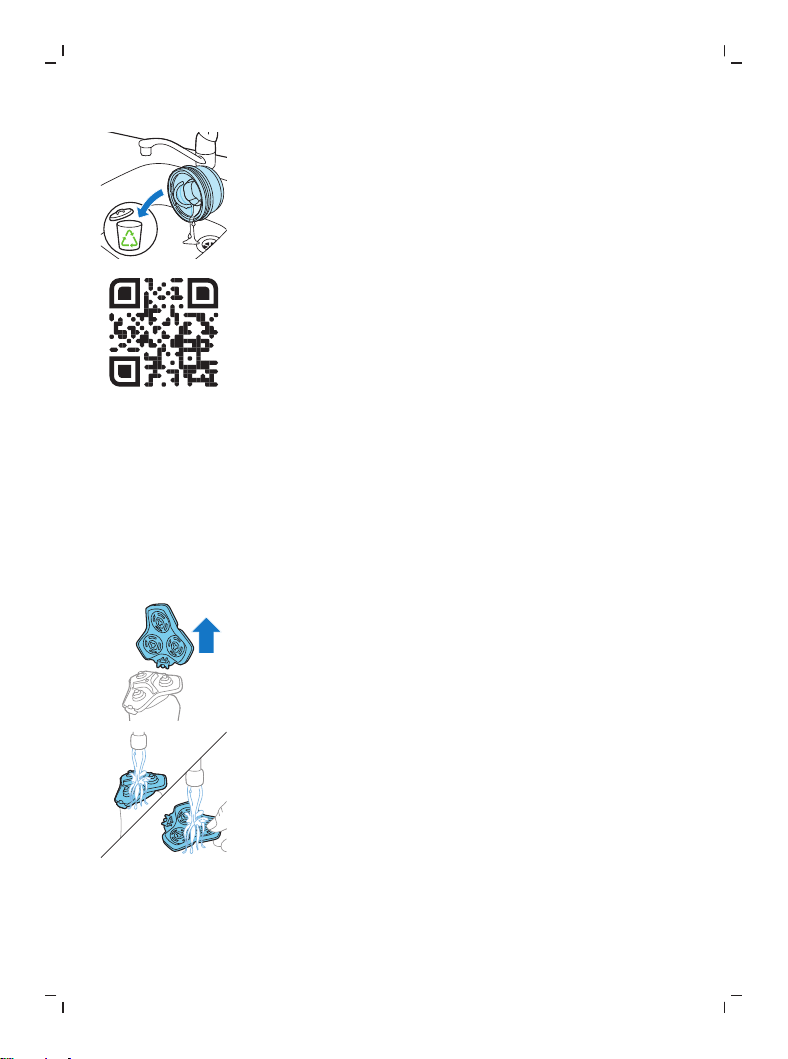
1 Twist and remove the top of the Quick Clean
Pod.
2 Lift the Quick Clean Pod Cartridge out of the
Quick Clean Pod by the handle.
25
English
3 Pour any remaining fluid down a drain and
recycle the empty cartridge in accordance with
local waste regulations.
4 Place a new Quick Clean Pod Cartridge into
the Quick Clean Pod (see 'Preparing the Quick
Clean Pod for use').
Scan the QR code to the left or visit
www.philips.com/cleaning-cartridge to
order replacement Quick Clean Pod
Cartridges.
Thorough cleaning
We advise you to clean the shaving heads
thoroughly once a month or when the shaver
does not shave as well as it used to.
1 Switch off the shaver.
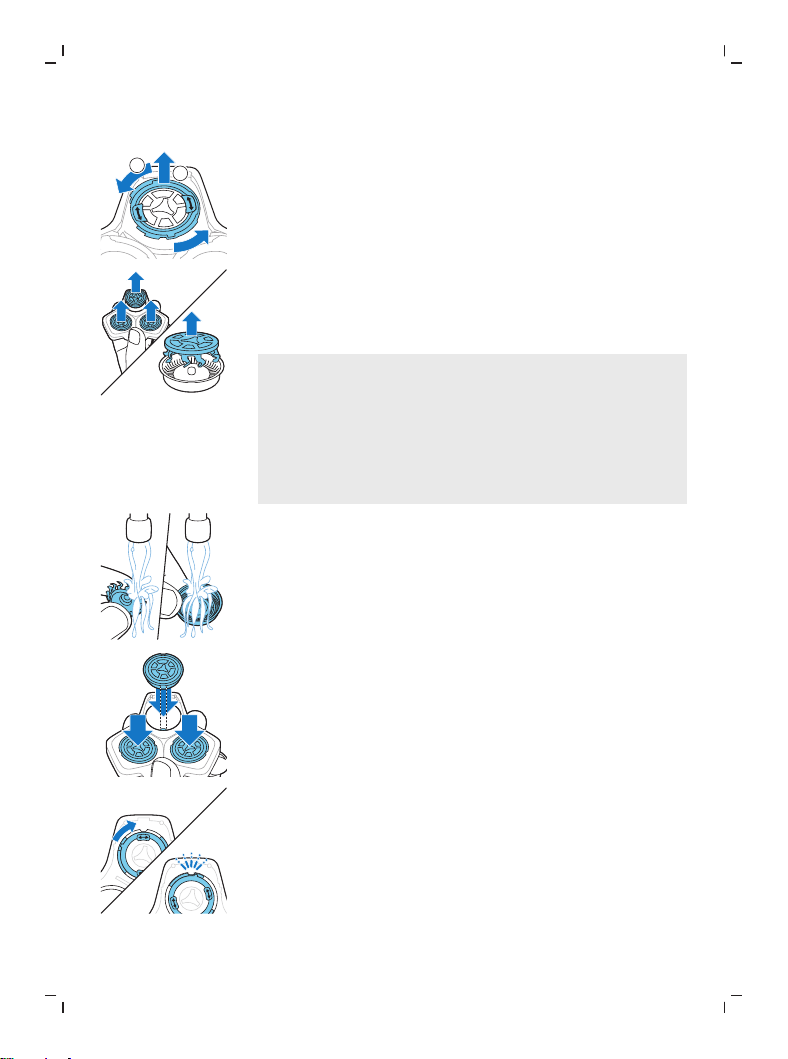
2 Pull the shaving head holder off the bottom
part of the shaving unit.
3 Rinse the hair chamber and shaving head
holder under the tap.
26
English
2
1
4 Turn the retaining ring anticlockwise and lift it
off the shaving head.
Repeat this process for the other retaining
rings. Place them aside in a safe place.
5 Remove the shaving heads from the shaving
head holder. Each shaving head consists of a
cutter and guard.
Note: Do not clean more than one cutter and
guard at a time, since they are all matching
sets. If you accidentally put a cutter in the
wrong shaving guard, it may take several
weeks before optimal shaving performance is
restored.
6 Clean the cutter and guard under the tap.
7 Shake off excess water.
8 Put the cutter back into the guard.
9 Place the shaving heads in the shaving head
holder.
10Place the retaining ring on the shaving head.
11Align the arrows on the retaining ring with the
projections in the shaving head holder. Turn
the ring clockwise until it clicks to indicate that
the ring is fixed.
27
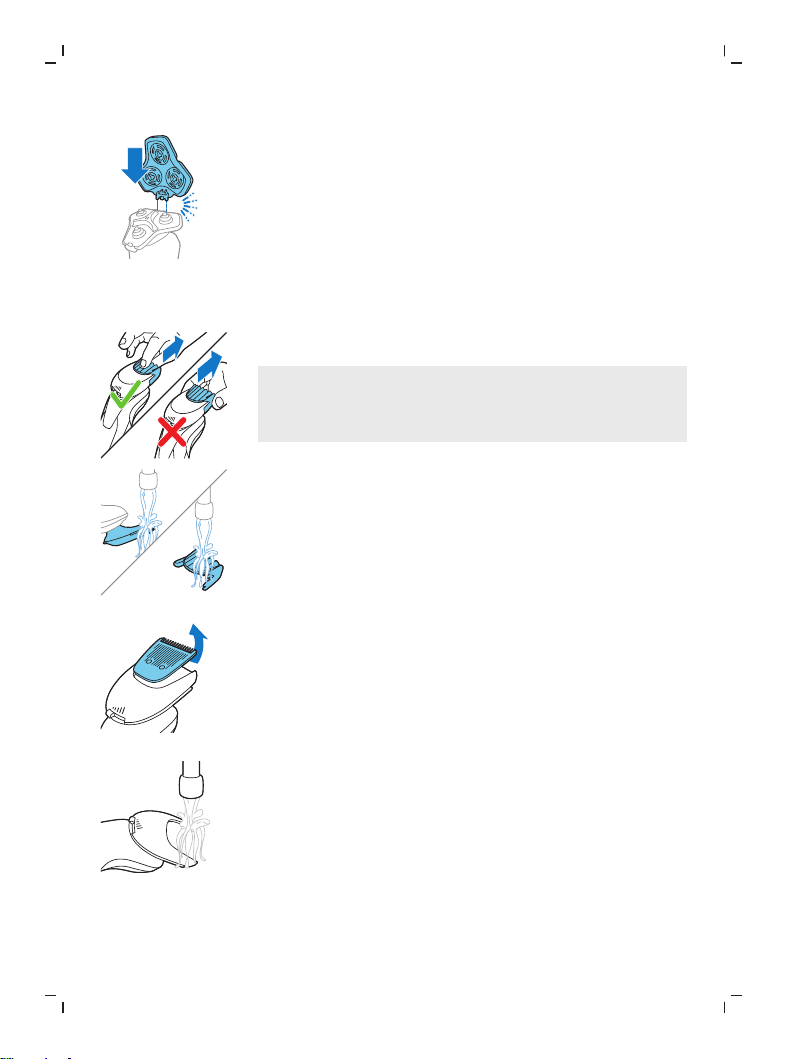
English
12Attach the shaving head holder to the bottom
part of the shaving unit (‘click’).
Cleaning the beard styler attachment
Clean the beard styler attachment after each use.
1 Pull the comb off the beard styler attachment.
Note: Grab the comb in the center to pull it off
the beard styler attachment. Do not pull at the
sides of the comb.
2 Rinse cut hairs off the cutting unit with
lukewarm water.
3 Rinse cut hairs off the comb.
4 Remove the cutting unit from the beard styler
attachment. By pushing the cutting unit off
the beard styler attachment, you can remove
any hairs that have accumulated inside the
beard styler attachment. You can also rinse
the bottom of the cutting unit.
5 Rinse cut hairs out of the beard styler
attachment.
6 Carefully shake off excess water and leave the
comb, cutting unit and beard styler
attachment to air-dry before you use them
again.
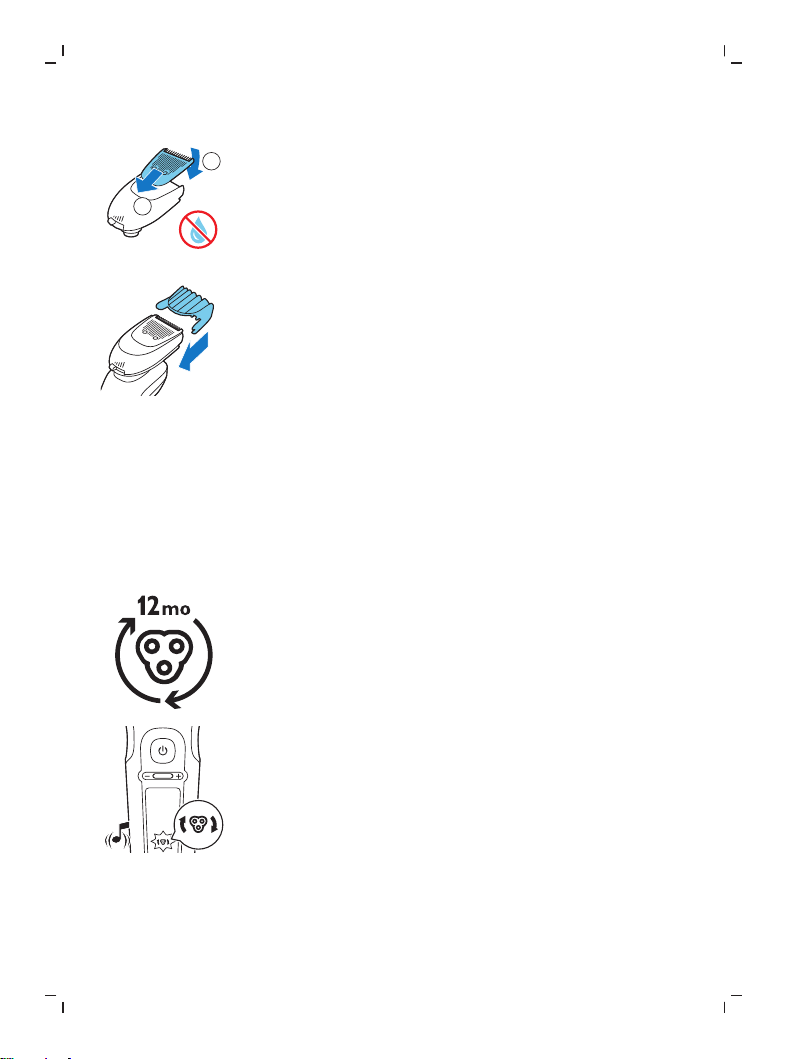
28
English
1
2
7 When the cutting unit is dry, attach it to the
beard styler attachment.
8 When the comb is dry, attach it to the beard
styler attachment.
9 For optimal performance, lubricate the teeth
of the attachment with a drop of sewing
machine oil regularly.
Replacement
Replacing the shaving heads
For maximum shaving performance, we advise
you to replace the shaving heads every twelve
months. Replace damaged shaving heads
immediately.
Always replace the shaving heads with original
Philips shaving heads (see 'Ordering accessories').
Replacement reminder
The replacement reminder indicates that the
shaving heads need to be replaced. The shaving
unit symbol lights up continuously, the arrows
flash white and you hear a beep when you switch
the shaver on or off.
1 Switch off the shaver.
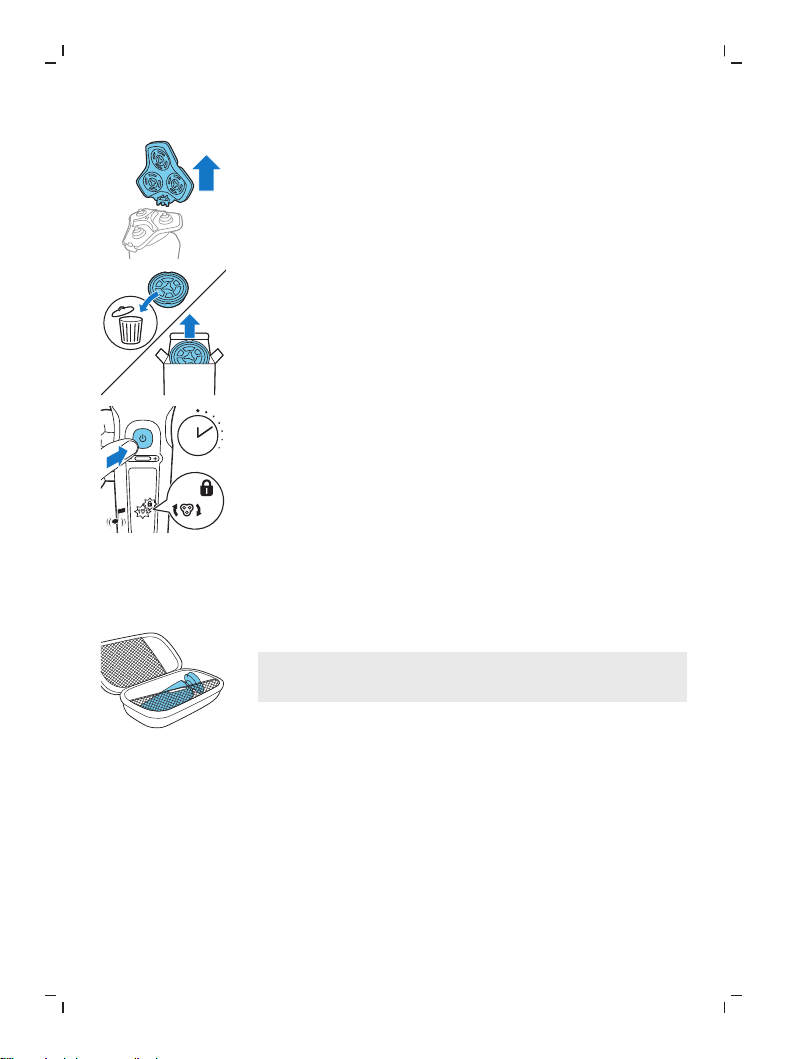
29
English
2 Press the release button on the shaving unit
and pull the shaving head holder off the
shaving unit.
SH91
3 Remove the shaving heads from the shaving
head holder. Discard the used shaving heads
immediately to avoid mixing them with the
new shaving heads.
7 sec.
4 After replacing the shaving heads, you can
reset the replacement reminder by pressing
the on/off button for 7 seconds. Wait until
your hear 3 beeps.
If you do not reset the replacement reminder,
the shaver resets automatically after 9 shaves.
Storage
Store the shaver in the pouch.
Note: Always let the shaver dry completely before
you store it in the pouch.
Ordering accessories
To buy accessories or spare parts, visit
www.philips.com/parts-and-accessories or go
to your Philips dealer. You can also contact the
Philips Consumer Care Center in your country
(see the international warranty leaflet for contact
details).

30
English
The following accessories and spare parts are
available:
-
SH91 Philips Norelco replacement shaving
heads
-
CC12 Philips Norelco Quick Clean Pod
Cartridge 2-pack
Assistance
For assistance, visit our website:
www.philips.com/support or call toll free
1-800-243-3050.
Online information is available 24 hours a day, 7
days a week.
Disposal
-
This product contains a rechargeable lithium-
ion battery which must be disposed of
properly.
-
Contact your local town or city officials for
battery disposal information. You can also call
1-800-822-8837 or visit
www.call2recycle.org for battery drop-off
locations.
-
For assistance, visit our website
www.philips.com/support or call
1-800-243-3050 toll free.
-
Your product is designed and manufactured
with high quality materials and components,
which can be recycled and reused. For
recycling information, please contact your
local waste management facilities or visit
www.recycle.philips.com.

31
English
Full Two-Year Warranty
Philips North America LLC warrants this new
product (except cutters and combs) against
defects in materials or workmanship for a period
of two years from the date of purchase, and
agrees to repair or replace any defective product
without charge.
IMPORTANT: This warranty does not cover
damage resulting from accident, misuse or abuse,
lack of reasonable care, the affixing of any
attachment not provided with the product or loss
of parts or subjecting the product to any but the
specified voltage or batteries.*
NO RESPONSIBILITY IS ASSUMED FOR ANY
SPECIAL, INCIDENTAL OR CONSEQUENTIAL
DAMAGES.
In order to obtain warranty service, simply go to
www.philips.com/support for assistance. It is
suggested that for your protection you return
shipments of product by insured mail, insurance
prepaid. Damage occurring during shipment is
not covered by this warranty.
NOTE: No other warranty, written or oral, is
authorized by Philips Personal Health, a division
of Philips North America LLC.
This warranty gives you specific legal rights, and
you may also have other rights which vary from
state to state. Some states do not allow the
exclusion or limitation of incidental or
consequential damages, so the above exclusion
and limitations may not apply to you.

32
English
*Read enclosed instructions carefully.
45-DAY MONEY-BACK GUARANTEE
To enjoy the closest and most comfortable shave
from your new Philips Norelco Men’s Shaver, the
shaver should be used exclusively for 3 weeks.
This allows your hair and skin enough time to
adapt to the Philips Norelco Shaving System. If,
after that period of time, you are not fully
satisfied with your Philips Norelco Men’s Shaver,
send the product back along with dated sales
receipt and we’ll refund you the full purchase
price.
The product must be shipped prepaid by
insured mail, insurance prepaid, have the
original sales receipt, indicating purchase
price and date of purchase, and the money-
back guarantee return authorization form
enclosed.
We cannot be responsible for lost mail.
The product must be postmarked no later than
45 days after the date of purchase. Philips
reserves the right to verify the purchase price of
the product and limit refunds not to exceed
suggested retail price.
To obtain money-back guarantee service,
please go to www.PhilipsMoneyBack.com.
Delivery of refund check will occur 6–8 weeks
after receipt of returned product.

Español
33
Español
Introducción
¡Felicitaciones por su compra y bienvenido a
PhilipsNorelco!
Para beneficiarse completamente del soporte que ofrece
PhilipsNorelco, registre el producto en
www.norelco.com/register.
Descripción general (Fig. 1)
1 Fuente de alimentación USB
2 Clavija USB
3 Almohadilla de carga inalámbrica Qi
4 Funda
5 Quick Clean Pod
6 Cartucho del Quick Clean Pod
7 Recordatorio de reemplazo
8 Símbolo de notificación
9 Recordatorio de limpieza
10 Sistema de bloqueo de viaje
11 Indicador de carga de la batería
12 Porcentaje de carga de la batería
13 Barra de ajustes de comfort personal
14 Botón de aumento para los ajustes de confort
personalizados
15 Botón de disminución para los ajustes de confort
personalizados
16 Botón de encendido/apagado
17 Unidad de afeitado con cámara de acumulación de
vello
18 Accesorio de recortadora de barba de clic
19 Peine para el accesorio de recortadora de barba
INSTRUCCIONES IMPORTANTES DE SEGURIDAD
Cuando utilice un producto eléctrico, siempre debe seguir las precauciones
básicas, incluidas las siguientes:
Lea todas las instrucciones antes de usar este producto.
PELIGRO
Para reducir el riesgo de descarga eléctrica:
- No intente recoger una almohadilla de carga enchufada que haya caído al
agua. Desconéctelo inmediatamente del enchufe de la pared.
- Mantenga la fuente de alimentación USB y la almohadilla de carga secos.

34
Español
- No coloque ni guarde el producto o la almohadilla de carga en un lugar
desde donde pueda caerse a una bañera o un lavamanos. No coloque el
producto o la almohadilla de carga sobre agua ni deje que caiga en el agua
o cualquier otro líquido.
- Desconecte siempre la almohadilla de carga del tomacorriente
inmediatamente después de usarla.
- Desconecte la fuente de alimentación USB del tomacorriente antes de
limpiar la almohadilla de carga.
ADVERTENCIA
Para reducir el riesgo de quemaduras, incendio, descarga eléctrica o
lesiones:
- Este producto no está destinado a personas (adultos o niños) con
capacidades física, sensorial o mental disminuidas, o que no tengan los
conocimientos o la experiencia necesarios, a menos que una persona
responsable de su seguridad los supervise o los instruya sobre el uso del
producto. Evite que los niños jueguen con este producto.
- Use este producto solo para el uso doméstico previsto como se describe en
este manual. El uso inadecuado puede causar posibles riesgos o lesiones
graves. No use accesorios que no estén recomendados por la corporación
Philips North America LLC. Los accesorios incluidos pueden variar según el
producto.
- Nunca use el producto, la almohadilla de carga o la fuente de alimentación
USB, si no están funcionando correctamente o después de que hayan caído
o en agua o se encuentren dañados. Nunca use la almohadilla de carga o la
fuente de alimentación USB después de que se cayó en el agua. Para
solicitar asistencia 1-800-243-3050.
- Mantenga la fuente de alimentación USB y la almohadilla de carga lejos de
superficies calientes.
- No deje caer ni introduzca ningún objeto en ninguna abertura.
- No utilice la fuente de alimentación USB dentro o cerca de un
tomacorriente que contenga un aromatizador eléctrico para prevenir daño
a la fuente de alimentación USB.
- No cargue ni enchufe el producto o la almohadilla de carga al aire libre ni
lo use en lugares donde se utilicen aerosoles (sprays) o se administre
oxígeno.
- Siempre controle las cuchillas, la unidad de corte y los peines antes de usar
el producto. No use el producto si las cuchillas, la unidad de corte o los
peines están dañados, ya que puede producirse una lesión.
- Siempre conecte primero la fuente de alimentación USB a la almohadilla de
carga y después al tomacorriente. Para desconectar, retire la fuente de
alimentación USB del tomacorriente.

35
Español
- Enchufe la fuente de alimentación USB directamente al tomacorriente. No
use un cable de extensión.
- Desconecte la fuente de alimentación USB antes de conectar o desconectar
la almohadilla de carga.
- La almohadilla de carga no está diseñada para usarse en un auto. Puede
interferir con los sistemas electrónicos automotrices.
- Las baterías que se emplean en este producto pueden representar un
riesgo de incendio o de quemadura química si no se manipulan
correctamente. No desarme, incinere ni permita que la temperatura de las
baterías supere los 100°C (212°F).
- Use únicamente accesorios o productos consumibles originales de Philips.
Solo use la fuente de alimentación desmontable HQ87 y la almohadilla de
carga HQ8510.
- Cargue, utilice y guarde el producto a una temperatura entre 41 °F / 5°C y
95 °F / 35°C.
- Mantenga el producto y las baterías lejos del fuego y no los exponga a la
luz solar directa ni a altas temperaturas.
- Si el producto se pone anormalmente caliente, despide un olor extraño,
cambia de color o tarda más tiempo de lo normal en cargarse, deje de
usarlo y de cargarlo, y comuníquese con Philips.
- No coloque los productos y sus baterías en hornos microondas ni en ollas
de inducción.
- No abra, modifique, perfore, dañe ni desarme el producto o la batería, para
evitar que las baterías se calienten o liberen sustancias tóxicas o peligrosas.
No provoque un cortocircuito, sobrecargue ni invierta la posición de las
baterías.
- Si las baterías se dañan o tienen fugas, evite el contacto con la piel o los
ojos. Si esto sucede, enjuague bien inmediatamente con agua y busque
atención médica.
Líquido para cartucho del Quick Clean Pod de Philips Norelco
- No ingerir.
- Evita el contacto con los ojos. En caso de que entre en contacto con los
ojos, enjuaga bien con agua fría. Si la irritación persiste, consulta a un
médico.
- Manténgase fuera del alcance de los niños.
CONSERVE ESTAS INSTRUCCIONES
La pantalla
Nota: Quite cualquier adhesivo o lámina protectora de la
pantalla antes de usar el producto.
36
Español
Carga
Cuando la afeitadora se está cargando, el anillo sobre la
almohadilla se enciende y el indicador de carga de
batería destella en color blanco.
El porcentaje de carga destellante en la pantalla indica la
carga de la batería, este se muestra cuando se mueve la
afeitadora.
Carga rápida: Luego de aproximadamente 18 minutos de
carga, el dispositivo tiene suficiente energía para una
afeitada.
Batería completamente cargada
Cuando la batería está totalmente cargada, todas las
luces del indicador de carga de la batería y el anillo sobre
la almohadilla se iluminan en blanco constantemente.
Nota: Ambas luces se apagan automáticamente después
de 15minutos.
El porcentaje de carga de batería se ilumina en blanco
continuamente, el cual se muestra cuando se mueve la
afeitadora.
Batería baja
Cuando la batería está casi agotada, la luz inferior del
indicador de carga de la batería destella en color naranja
y la afeitadora emite un sonido. A este punto hay
suficiente energía restante para una afeitada..
Carga de batería disponible
El porcentaje de carga de la batería que se muestra en la
pantalla indica la capacidad de carga disponible en la
batería.
37
Español
Ajustes de comfort personalizados
La afeitadora tiene una característica que le permite
personalizar sus ajustes. Según sus necesidades de
afeitado personales, elija de entre tres ajustes, de bajo a
alto: comfort, dinámico o eficaz. Cuando presiona el
botón que se encuentra a la derecha o a la izquierda de la
pantalla, el segmento de la barra de ajustes de confort
personalizados se enciende para indicar el ajuste
seleccionado. Para seleccionar un ajuste más bajo o más
alto, presione el botón a la izquierda o derecha de la
pantalla.
Recordatorio de limpieza
Limpie la afeitadora después de cada uso para un óptimo
rendimiento (ver 'Limpieza y mantenimiento'). Cuando
apaga la afeitadora, el recordatorio de limpieza destella
para recordarle limpiarla.
Bloqueo para viajes
3 sec.
Cuando vaya a viajar, puede bloquear la afeitadora para
evitar que se encienda accidentalmente (ver 'Activación
del sistema de bloqueo').
Recordatorio de reemplazo
Para un rendimiento de afeitado óptimo, le aconsejamos
que reemplace los cabezales de afeitado una vez al año.
Reemplace los cabezales de afeitado dañados
inmediatamente. Siempre reemplace los cabezales de
afeitado con cabezales originales de Philips.
La afeitadora está equipada con un recordatorio de
reemplazo que le recuerda reemplazar los cabezales de
afeitado. La afeitadora emite un sonido, el recordatorio
de reemplazo se ilumina y las flechas destellan para
indicar que tiene que reemplazar los cabezales de la
afeitadora.
38
Español
Nota: Después de reemplazar los cabezales de afeitado,
necesita restablecer el recordatorio de reemplazo
presionando el botón encendido/apagado durante 7
segundos.
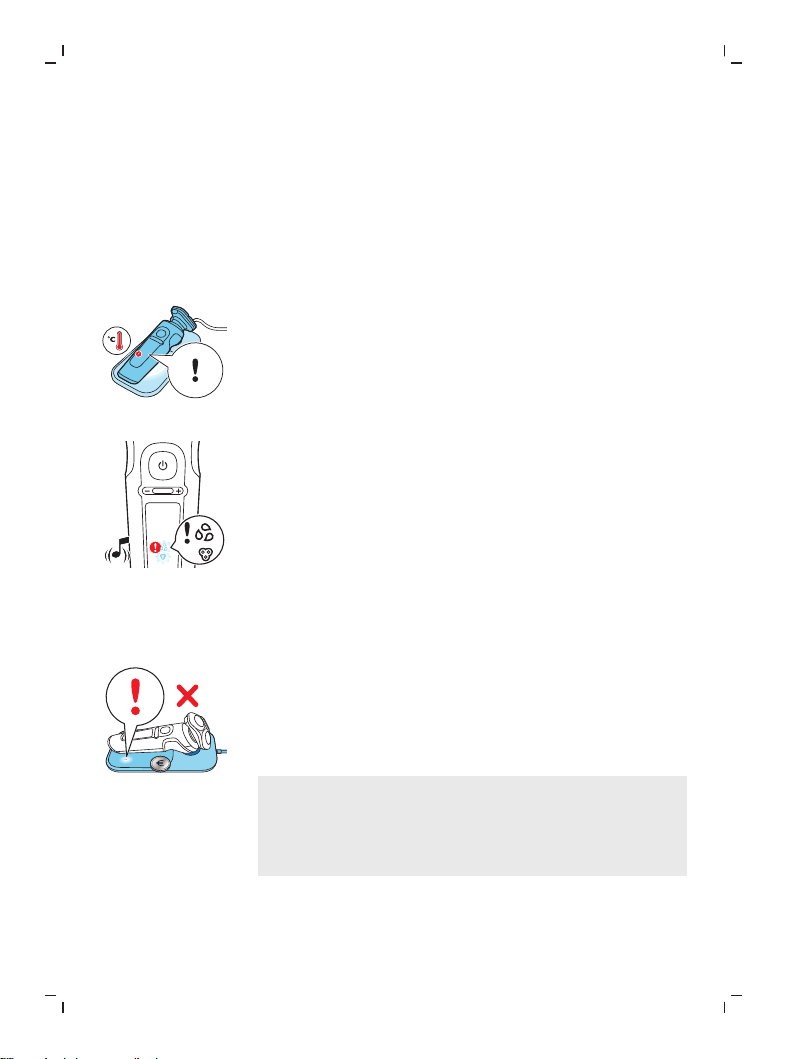
Símbolo de notificación
Sobrecalentamiento
Si la afeitadora se sobrecalienta durante la carga, el signo
de notificación destella. Cuando esto sucede, la carga de
la afeitadora se detiene automáticamente. La carga
continúa una vez que la temperatura de la afeitadora
baja al nivel normal después de aproximadamente
10minutos.
Cabezales de afeitado bloqueados
Si los cabezales de afeitado están bloqueados, el signo de
notificación se enciende en rojo continuamente. El
recordatorio de reemplazo y el de limpieza destellan en
blanco de manera alterna y la afeitadora emite un
sonido. En este caso, el motor no puede funcionar
porque los cabezales de afeitado están sucios o dañados.
Si los cabezales de la afeitadora están sucios, tiene que
limpiarlos. Si los cabezales de la afeitadora están
dañados, tiene que reemplazarlos.
Objeto ajeno a la Almohadilla de carga inalámbrica Qi
Si hay un objeto ajeno (metal) en la almohadilla de carga
Qi durante la carga, el símbolo de notificación de la
almohadilla se ilumina. La almohadilla de carga
inalámbrica Qi se apaga automáticamente y se vuelve a
encender 5 minutos después de que el objeto se ha
retirado.
No coloque ningún objeto (metal) ajeno a la
Almohadilla de carga inalámbrica Qi. Solo use la
almohadilla de carga inalámbrica Qi para cargar la
afeitadora u otro dispositivo (por ejemplo, un
smartphone) en cumplimiento con la carga con Qi.
39
Español
Carga
Cargue la afeitadora antes de usarla por primera vez y
cuando la pantalla indique que la batería está casi
agotada.
La carga toma aproximadamente 3 horas. Una afeitadora
completamente cargada otorga un tiempo de afeitado
dehasta 60 minutos.
Luego de aproximadamente 18 minutos de carga, la
afeitadora tiene suficiente energía para una afeitada.
Nota: No puede usar la afeitadora mientras se carga.
Carga rápida
Luego de aproximadamente 18 minutos de carga, la
afeitadora tiene suficiente energía para una afeitada.
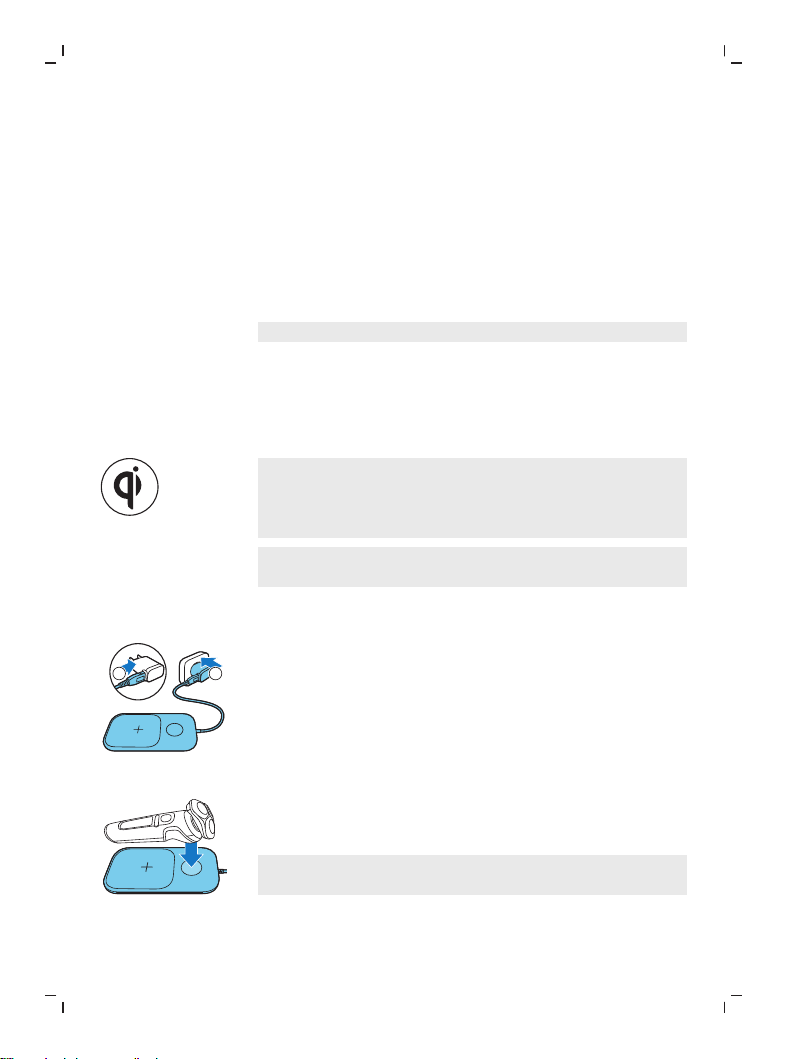
Carga con la Almohadilla de carga inalámbrica Qi
Nota: La almohadilla de carga cumple con Qi. Solo cargue
la afeitadora Qi compatible u otros dispositivos de carga
calificados Qi en la almohadilla de carga inalámbrica Qi
provista.
Nota: Elimine cuidadosamente el exceso de agua antes
de colocar la afeitadora en la almohadilla Qi.
1
Conecte el enchufe USB en la fuente de alimentación
USB provista.
2
1
2
Inserte la fuente de alimentación USB en el
tomacorriente.
Coloque la afeitadora en la marca de cruz en la
almohadilla de carga inalámbrica Qi. Asegúrese de
que la afeitadora cabe en la cavidad de la almohadilla
de carga inalámbrica Qi.
Solo cargue la afeitadora en la almohadilla de
carga inalámbrica Qi provista.
40
Español
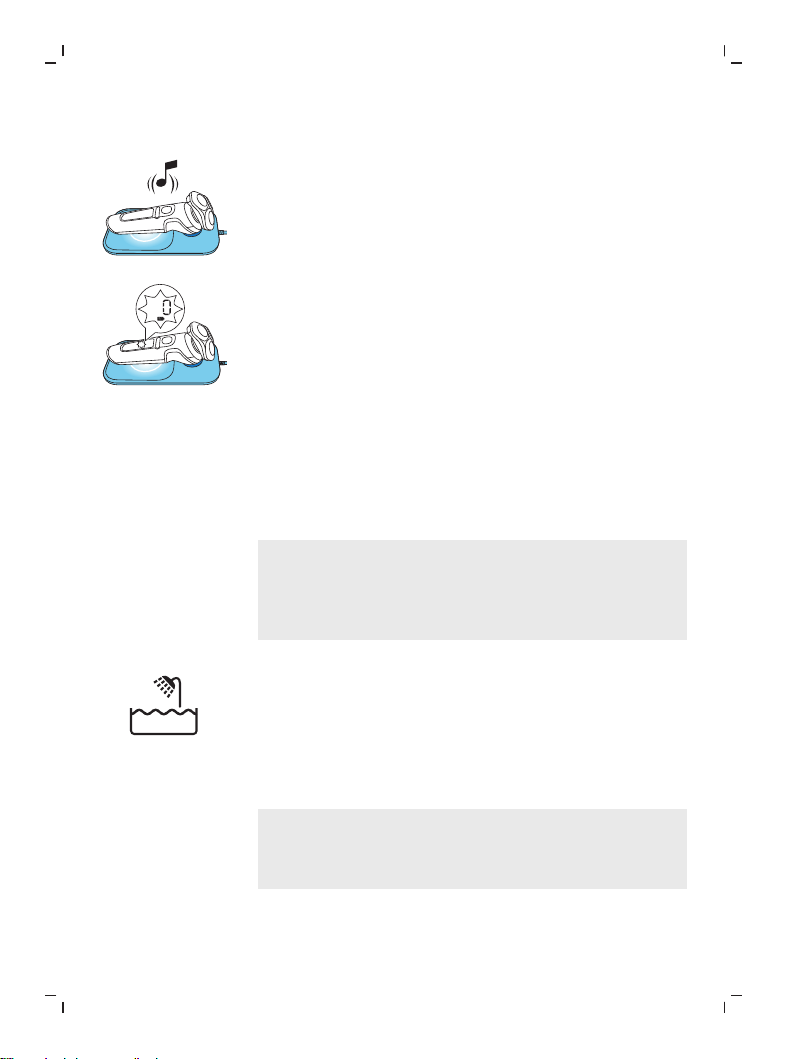
- La almohadilla inalámbrica Qi emite un sonido y el
anillo en la almohadilla se enciende cuando la
afeitadora está colocada correctamente y conectada
para cargarse.
- Cuando la afeitadora se está cargando, el anillo sobre
la almohadilla se enciende y el indicador de carga de
batería destella en color blanco. El porcentaje de
carga destellante en la pantalla indica la carga de la
batería, este se muestra cuando se mueve la
afeitadora.
3
Cuando la batería está totalmente cargada, todas las
luces del indicador de carga de la batería y el anillo
sobre la almohadilla se iluminan en blanco
constantemente. Ambas luces se apagan
automáticamente después de 15minutos.
Uso de la afeitadora
Siempre revise la afeitadora y todos los accesorios
antes de usarla. No use la afeitadora ni ningún
accesorio si está dañado, ya que esto puede causar
alguna lesión. Siempre reemplace una pieza dañada
con una del tipo original.
Este símbolo indica que la afeitadora puede utilizarse en
el baño o en la ducha.
- Utilice esta afeitadora para el uso doméstico que se
describe en este manual.
- Por motivos de higiene, la afeitadora debe emplearse
únicamente por una persona.
- El recorte es más fácil cuando la piel y el vello están
secos.
Nota: Esta afeitadora es resistente al agua. Es apropiado
para su uso en el baño o la ducha y puede lavarse en la
llave. Por motivos de seguridad, la afeitadora solo se
debe emplear sin cable.
41
Español
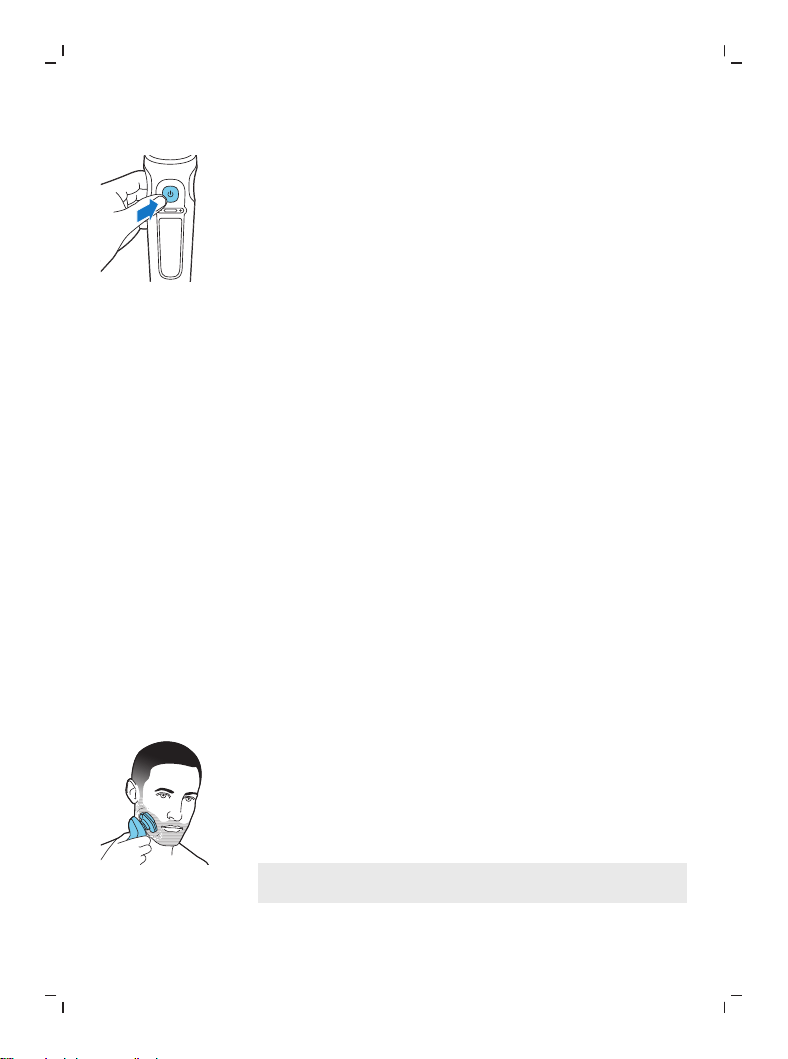
Encendido y apagado de la afeitadora
1
Para encender la afeitadora, pulse el botón de
encendido/apagado una vez.
El porcentaje de carga de la batería se enciende por
unos segundos.
2
Para apagar la afeitadora, pulse el botón de
encendido/apagado una vez.
El porcentaje de carga de la batería se ilumina
durante algunos segundos y muestra la carga
disponible en la batería.
Afeitado
Periodo de adaptación de la piel
Es posible que con las primeras afeitadas no obtenga los
resultados que espera y que su pie se irrite levemente.
Esto es normal. Su piel y la barba tardan algún tiempo en
adaptarse al nuevo sistema de afeitado. Para que la piel
se adapte a este nuevo dispositivo, le recomendamos
afeitarse regularmente (por lo menos 3 veces a la
semana) y exclusivamente con este dispositivo por un
período de tres semanas.
Consejos de afeitado
Para obtener los mejores resultados de confort sobre la
piel, recorte su barba si no se ha afeitado durante 3 días o
más.
- Selecciona tu ajuste de confort personal (ver 'Ajustes
de comfort personalizados').
Afeitado seco
1
Encienda la afeitadora.
2
Mueva los cabezales de afeitado sobre la piel con
movimientos circulares para llegar a todos los vellos
en las diferentes direcciones de crecimiento.
Asegúrese de que cada unidad de afeitado esté
siempre en contacto total con la piel. Ejerza una suave
presión para una afeitada al ras y cómoda.
Nota: No presione demasiado fuerte ya que esto
puede producir irritación en la piel.
3
Apague y limpie la afeitadora después de cada uso
(ver 'Limpieza y mantenimiento').
42
Español
La pantalla se ilumina durante algunos segundos para
mostrar el estado de la carga de la batería disponible.
Afeitado húmedo
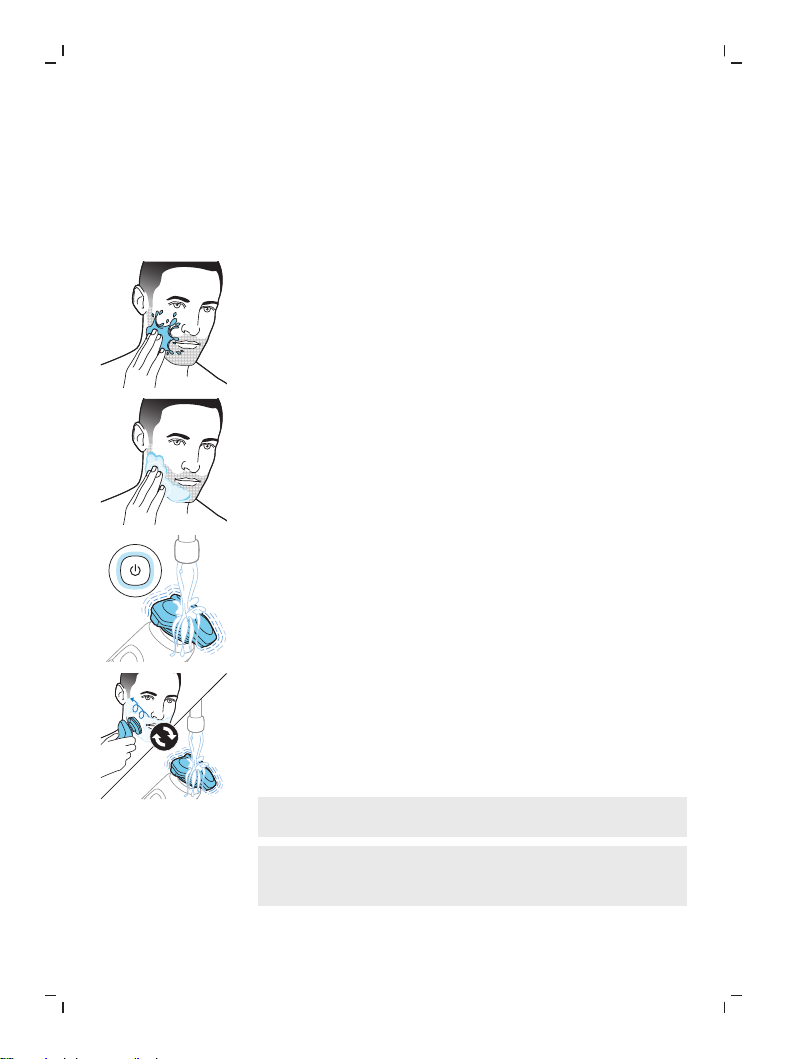
Para una afeitada más confortable, también puede
utilizar este dispositivo sobre el rostro húmedo con
espuma o gel de afeitar.
1
Humedezca la piel.
2
Aplique espuma o gel de afeitar sobre la piel.
3
Enjuague la unidad de afeitado con el agua de la llave
para garantizar que se deslice suavemente sobre su
piel.
4
Encienda la afeitadora.
5
Mueva los cabezales de afeitado sobre la piel con
movimientos circulares para llegar a todos los vellos
en las diferentes direcciones de crecimiento.
Asegúrese de que cada unidad de afeitado esté
siempre en contacto total con la piel. Ejerza una suave
presión para una afeitada al ras y cómoda.
Nota: No presione demasiado fuerte ya que esto
puede producir irritación en la piel.
Nota: Enjuague la unidad de afeitado con regularidad
para garantizar que se siga deslizando suavemente
sobre la piel.
6
Seque su cara.
43
Español
7
Desconecte y limpie la afeitadora después de cada
uso.
Nota: Asegúrese de enjuagar toda la espuma o gel de
afeitar de la afeitadora.
Uso de los accesorios de ajuste de clic
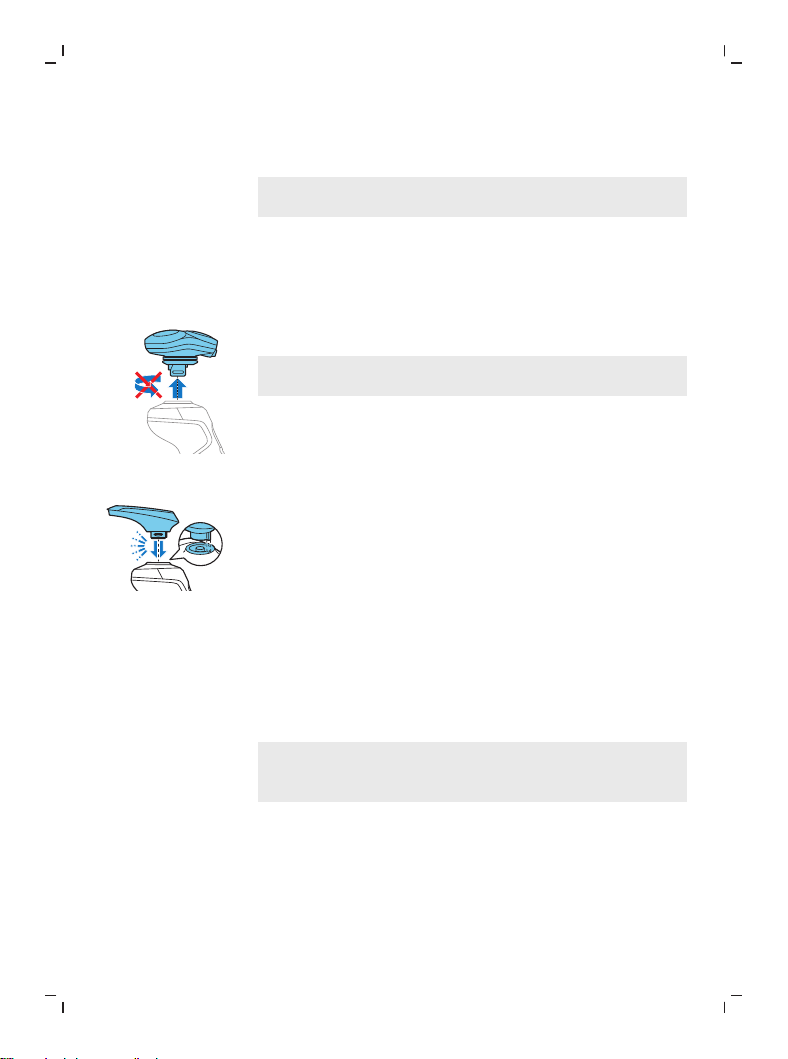
Quitar y poner los accesorios de ajuste de clic
1
Asegúrese de que la afeitadora esté apagada.
2
Extraiga el accesorio directo de la afeitadora.
Nota: No gire el accesorio mientras lo extrae de la
afeitadora.
3
Inserte la lengüeta del accesorio en la ranura en la
parte superior de la afeitadora. Luego presione el
accesorio hacia abajo para ajustarlo a la afeitadora
("clic").
Uso del accesorio recortadora de barba con el peine
Puede usar el accesorio de la recortadora de barba y el
peine incluido para arreglar su barba en cualquier ajuste
fijo o a diferentes ajustes de duración. También puede
usarla para cortar cualquier vello largo antes de afeitarse
para una afeitada más agradable.
Nota: La recortadora de barba solo debe usarse para
recortar el pelo facial. No se debe usar en áreas por
debajo del cuello.
Los ajustes de longitud de la recortadora de barba
corresponden al largo del vello restante después de
cortar y varían de 1 a 5mm (3/64 pulg. – 3/16pulg.).
44
Español
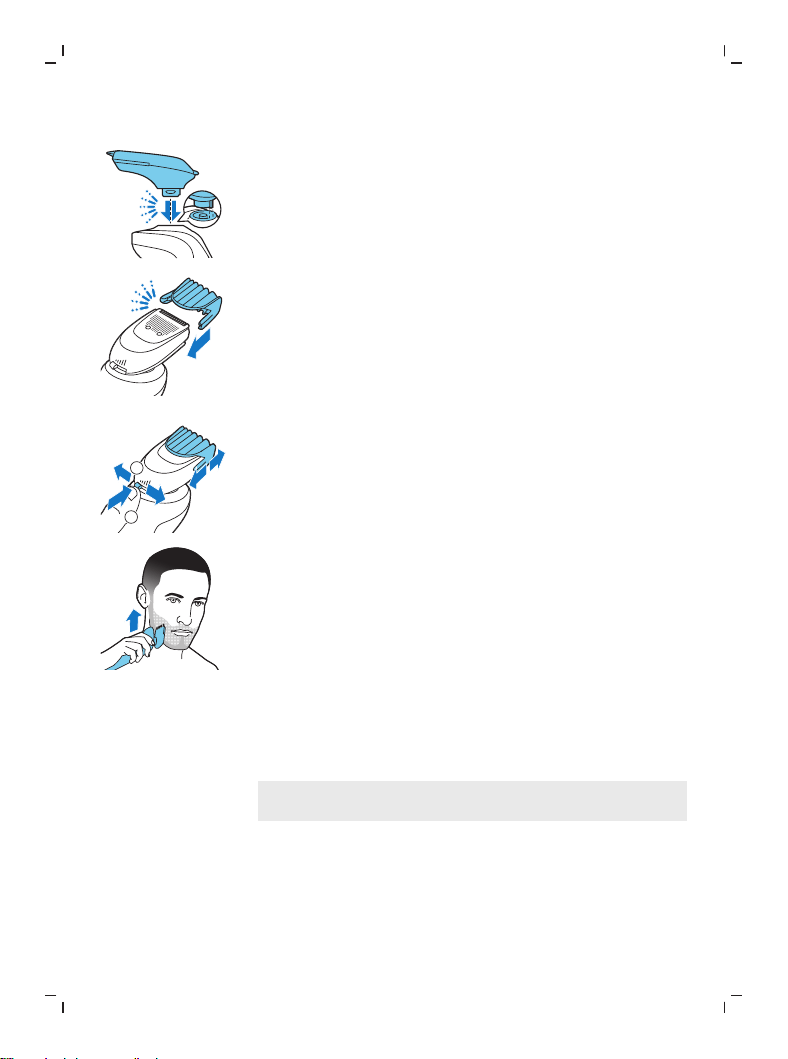
1
Ajuste el accesorio en la afeitadora ("clic").
2
Deslice el peine directo dentro de las ranuras guía en
ambos lados del accesorio de la recortadora de barba
("clic").
1
2
3
Presione el selector de longitud y luego empújelo
hacia la izquierda o derecha para seleccionar el largo
del vello deseado.
4
Encienda la afeitadora.
5
Mueva la afeitadora hacia arriba mientras ejerce una
presión suave. Asegúrese de que la parte frontal del
peine esté siempre en contacto total con la piel.
6
Limpie el accesorio después de su uso.
Uso del accesorio recortadora de barba sin el peine
Puede usar el accesorio de recortadora de barba sin el
peine para contornear la barba, el bigote, las patillas o la
línea del cuello a una longitud de 1/32pulg (0.5mm).
Nota: La recortadora de barba solo está diseñada para
cortar vello facial. No la use en áreas debajo del cuello:
1
Saque el peine de la recortadora de barba.
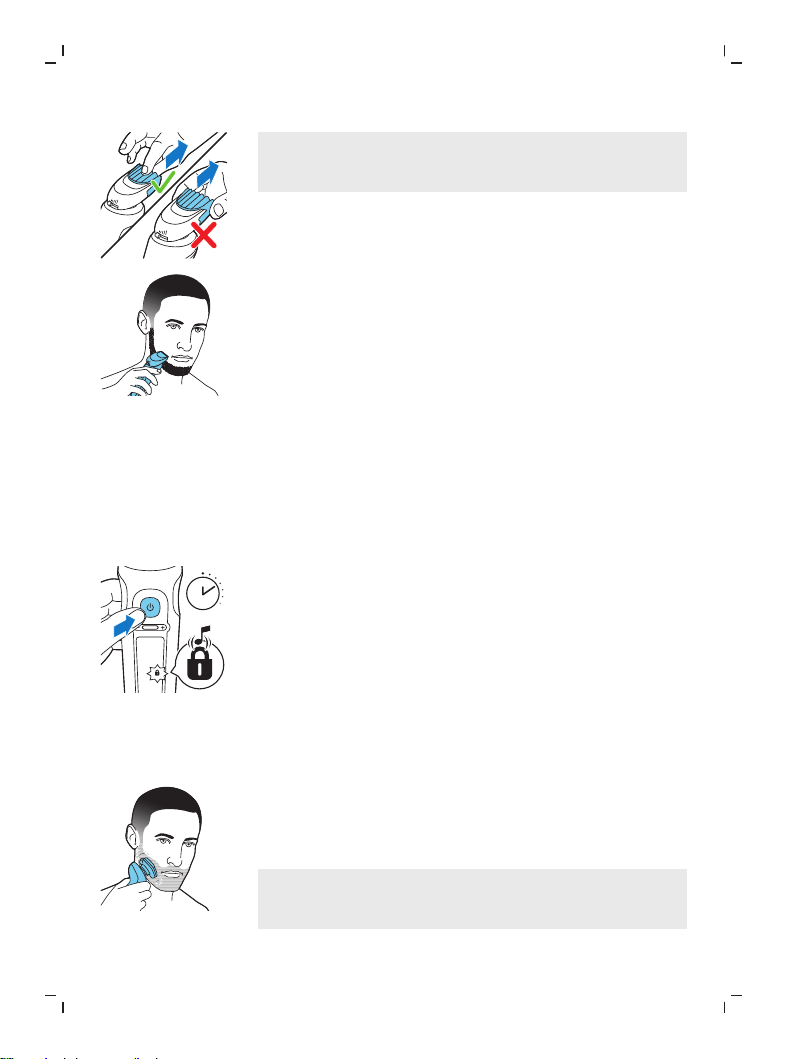
45
Español
Nota: Tome el peine por el centro para sacarlo del
accesorio de recortadora de barba. No jale de los
lados del peine.
2
Encienda el aparato.
3
Sostén el accesorio de recortadora de barba
perpendicular a la piel y mueve el dispositivo hacia
abajo mientras aplicas una presión suave.
4
Limpie el accesorio después de su uso.
Bloqueo para viajes
Puede bloquear la afeitadora cuando viaja para evitar
que se encienda accidentalmente.
Activación del sistema de bloqueo
1
Pulse el botón de encendido/apagado durante 3
segundos para usar el modo de bloqueo de viaje.
3 sec.
Cuando se activa el bloqueo de viaje, la afeitadora
emite un sonido y el símbolo de bloqueo de viaje
destella.Cuando se activa el bloqueo de viaje, el
símbolo de bloqueo de viaje destella.
Si trata de encender la afeitadora cuando se activa el
bloqueo de viaje, la afeitadora emite un sonido y el
símbolo de bloqueo de viaje destella.
Desactivación del bloqueo de viaje
1
Pulse el botón de encendido/apagado durante 3
segundos.
Cuando desactiva el bloqueo de viaje, la afeitadora
emite un sonido y el símbolo de bloqueo de viaje se
ilumina.La afeitadora se enciende y ya está lista para
usarse de nuevo.
Nota: La afeitadora se desbloquea automáticamente
cuando está colocada sobre la almohadilla
inalámbrica de carga Qi.
46
Español
Limpieza y mantenimiento
Una limpieza frecuente garantiza los mejores
resultados de afeitado.
Nunca limpie, retire ni reemplace la unidad de
afeitado cuando la afeitadora esté encendida.
No aplique presión a las protecciones del cabezal
de afeitado.
No toque los cabezales de afeitado con objetos
duros, debido a que podría deformar o dañar las
protecciones que cuentan con ranuras de precisión.
No use aire comprimido, agentes abrasivos ni
líquidos agresivos, como la gasolina o la acetona,
para limpiar la afeitadora.
¿Cómo uso el Quick Clean Pod?
¿Qué significa el ícono que está en mi Quick Clean
Pod?
Ícono Comportamiento Significado
Se vuelve visible en el Quick
Clean Pod.
Se tiene que reemplazar el
cartucho del Quick Clean Pod.
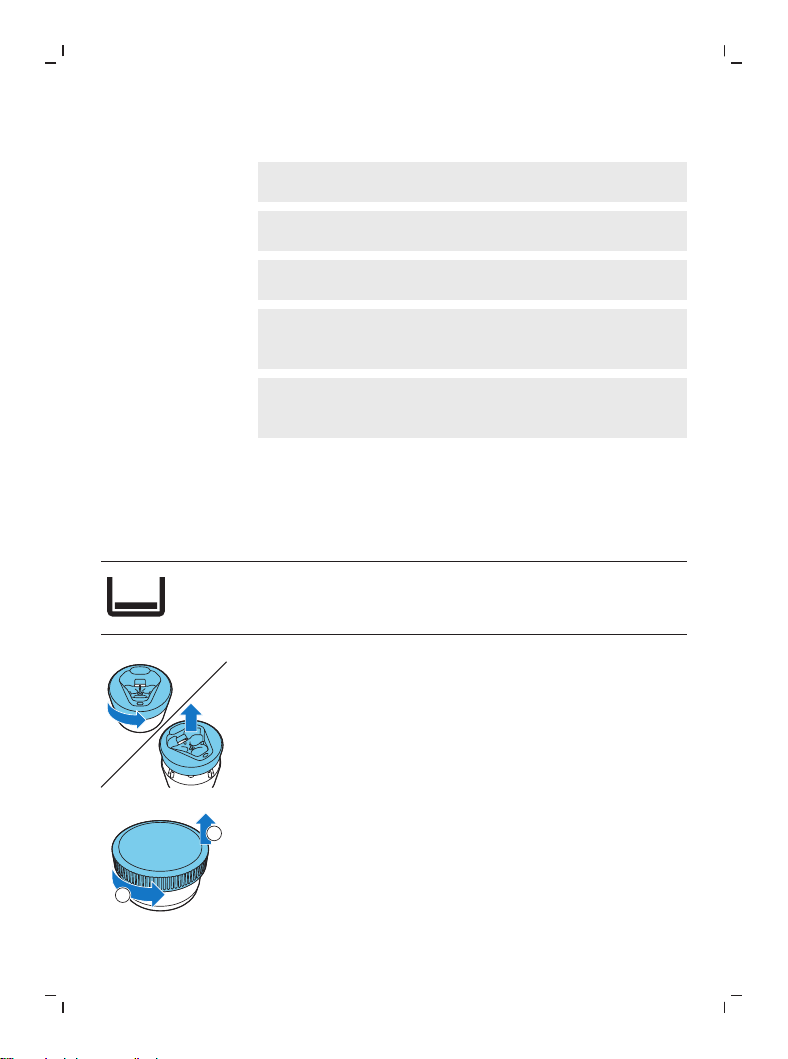
Preparación del Quick Clean Pod para el uso
1
Gire y retire la parte superior del Quick Clean Pod.
2
1
2
Gire la tapa del cartucho del Quick Clean Pod para
quitarla.
47
Español
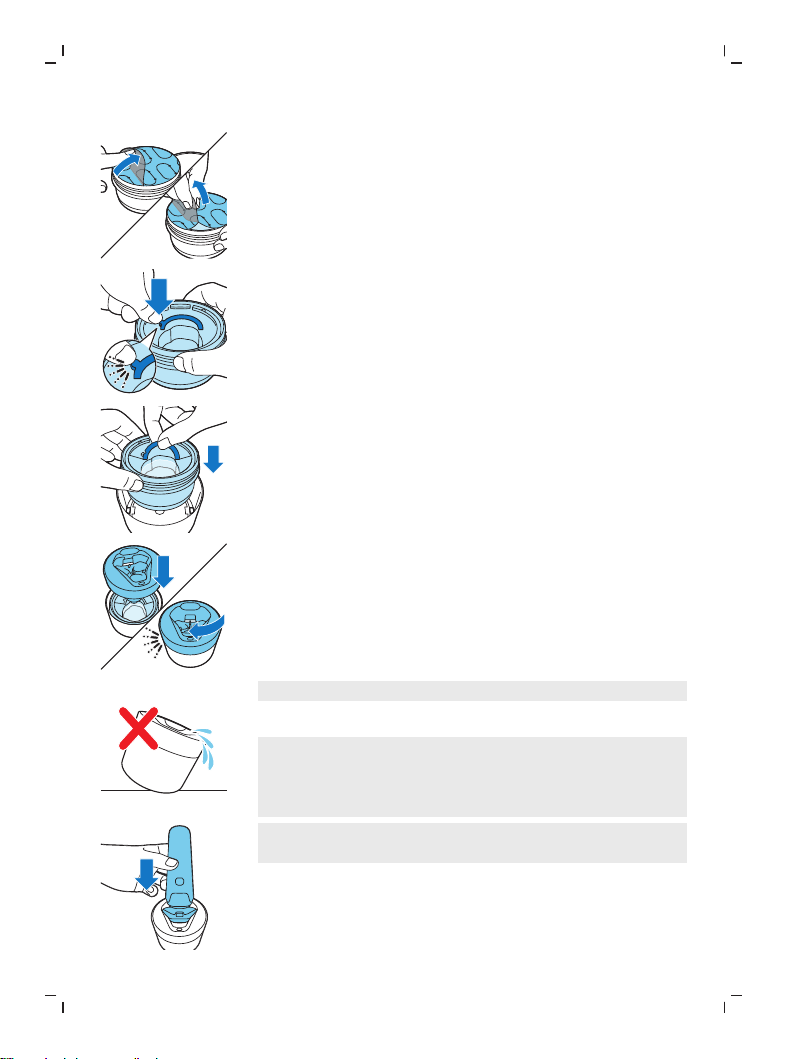
3
Levante la lengüeta del sello y jálela de la esquina
para retirar el sello del cartucho del Quick Clean Pod.
4
Presione la pequeña pieza circular en el mango del
cartucho del Quick Clean Pod para romper el broche
de presión del mango.
5
Coloque el cartucho del Quick Clean Pod en el Quick
Clean Pod.
6
Vuelva a colocar la parte superior del Quick Clean Pod
en la base y gírela en el sentido de las manecillas del
reloj hasta que escuche un clic.
No incline el Quick Clean Pod para evitar derrames.
Uso del Quick Clean Pod
Nota: Si utiliza la afeitadora con espuma de afeitar, gel de
afeitar o productos para antes de afeitar, enjuague bien
los cabezales de afeitado antes de usar el Quick Clean
Pod.
Siempre sacuda la afeitadora para eliminar el exceso
de agua antes de colocarla en el Quick Clean Pod.
1
Coloque la afeitadora de cabeza en el Quick Clean
Pod. La afeitadora detecta automáticamente que está
en el Quick Clean Pod.
2
Encienda la afeitadora para iniciar el programa de
limpieza.
48
Español
Cada programa de limpieza toma aproximadamente un
minuto.
1
Deje que la afeitadora se seque completamente al
aire en el Quick Clean Pod antes de guardarla.
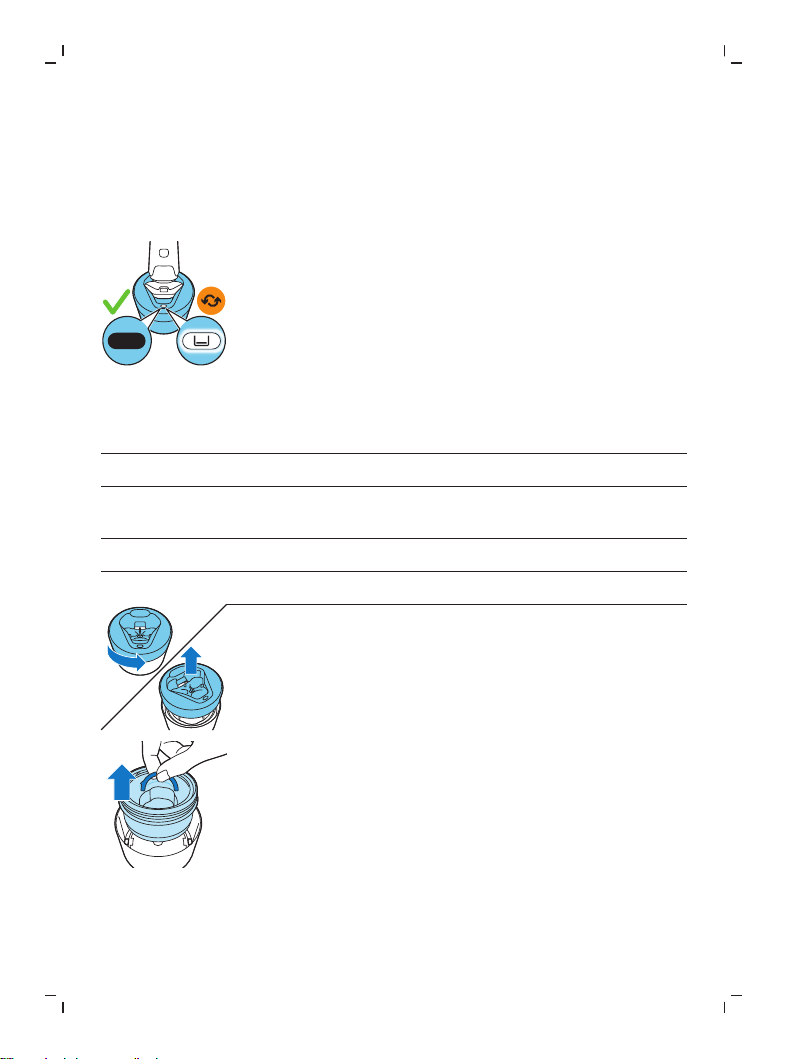
Reemplazo del cartucho del Quick Clean Pod
Reemplace el cartucho del Quick Clean Pod
inmediatamente cuando el ícono de reemplazo del
cartucho del Quick Clean Pod se vuelva visible, o bien,
siga las indicaciones que se muestran en la siguiente
tabla.
Frecuencia de uso Ciclos Cuándo reemplazar
el cartucho del Quick
Clean Pod
Todos los días Aproximadamente 30 Cada mes
Unas cuantas veces por
semana
Aproximadamente 20 Cada 2 meses
Cada semana Aproximadamente 13 Cada 3 meses
Cada mes Aproximadamente 3 Cada 3 meses
1
Gire y retire la parte superior del Quick Clean Pod.
2
Levante el cartucho del Quick Clean Pod por el mango
para sacarlo del Quick Clean Pod.
49
Español
3
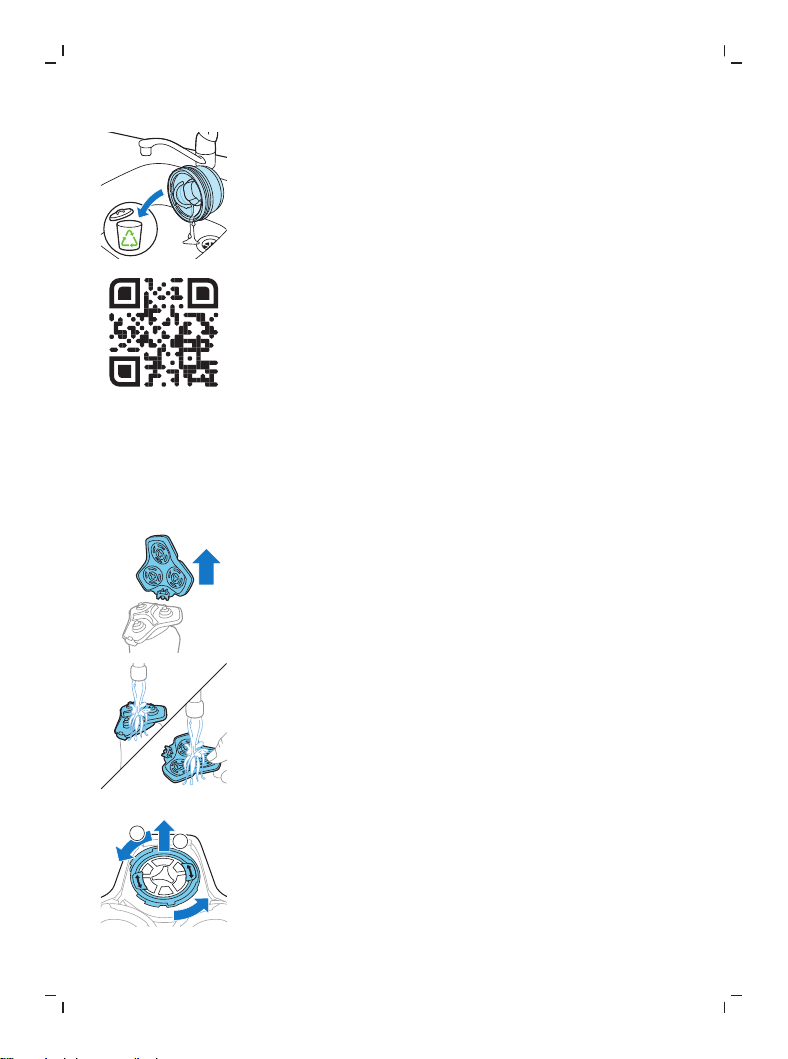
Vierta el líquido restante por el desagüe y recicle el
cartucho vacío conforme a la reglamentación local en
materia de residuos.
4
Coloque un nuevo cartucho del Quick Clean Pod en el
Quick Clean Pod (ver 'Preparación del Quick Clean Pod
para el uso').
Escanea el códigoQR que se encuentra a la izquierda
o visita www.philips.com/cleaning-cartridge para
pedir cartuchos de repuesto del Quick Clean Pod.
Limpieza a fondo
Le aconsejamos que limpie los cabezales de afeitado a
fondo una vez al mes o cuando la afeitadora ya no afeite
tan bien como antes.
1
Apague la afeitadora.
2
Saque el soporte del cabezal de afeitado desde la
parte inferior de la unidad de afeitado.
3
Enjuague la unidad de afeitado y el sostén del cabezal
de afeitado en el grifo.
2
1
4
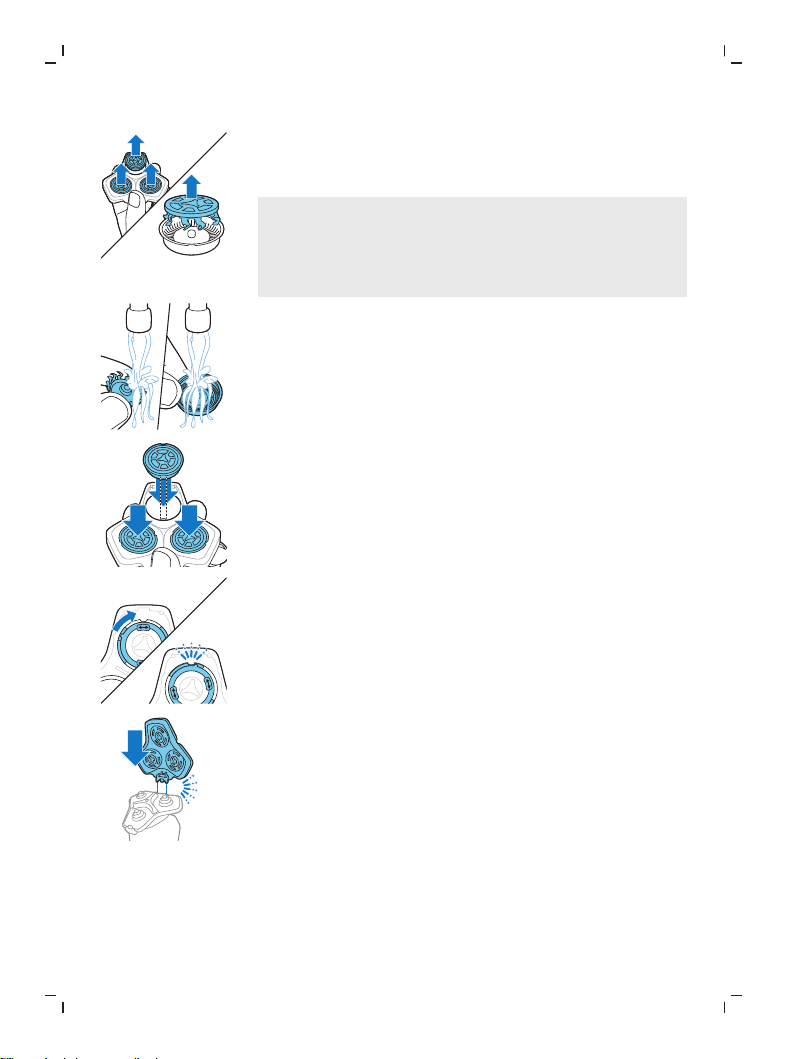
Gire el anillo de retención en sentido contrario a las
agujas del reloj y retírelo del cabezal de la afeitadora.
Repita este proceso con los otros anillos de retención.
Colóquelos aparte en un lugar seguro.
50
Español
5
Quite los cabezales de afeitado del soporte del
cabezal de afeitado. Cada cabezal de afeitado
consiste de un cortador y un protector.
Nota: No limpie más de un cortador y protector a la
vez, ya que todos son pares. Si accidentalmente
coloca una cuchilla en el protector de afeitado
equivocado, tardará varias semanas en volver a lograr
un desempeño óptimo del afeitado.
6
Limpie el cortador y el protector en el grifo.
7
Sacuda el exceso de agua.
8
Vuelva a poner el cortador en el protector.
9
Coloque los cabezales de afeitado nuevos en el
soporte del cabezal de afeitado.
10
Coloque el anillo de retención en el cabezal de
afeitado.
11
Alinee las flechas del anillo de retención con los
salientes en el soporte para cabezales de afeitado.
Gire el anillo a la derecha hasta que haga clic para
indicar que el anillo está fijo.
12
Coloque el soporte del cabezal de afeitado en la parte
inferior de la unidad de afeitado ("clic").
Limpieza del accesorio recortadora de barba
Limpie el accesorio de recortadora de barba después de
cada uso.
51
Español
1
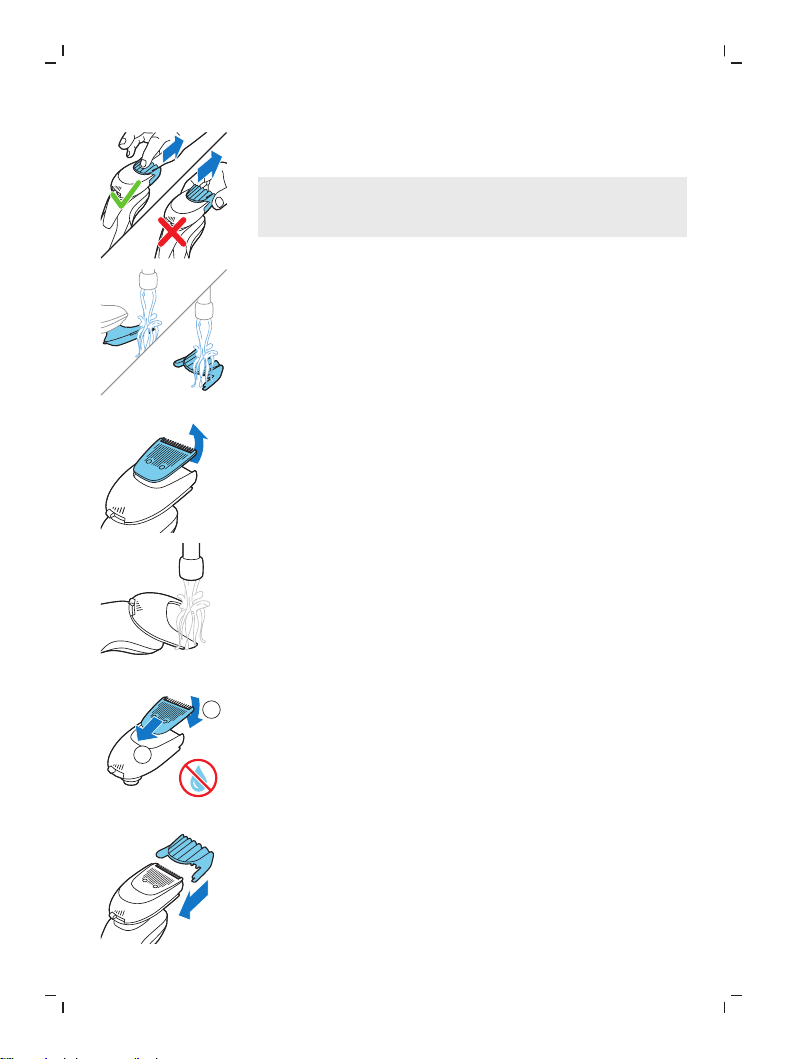
Tire del peine-guía para extraerlo del accesorio
recortadora de barba.
Nota: Tome el peine por el centro para sacarlo del
accesorio de recortadora de barba. No jale de los
lados del peine.
2
Enjuague el vello cortado de la unidad con agua tibia.
3
Enjuague el vello cortado del peine.
4
Quite la unidad de cortado del accesorio de
recortadora de barba. Al sacar la unidad de corte del
accesorio de recortadora de barba al empujarla puede
quitar cualquier vello acumulado dentro del mismo.
También puede enjuagar la parte inferior de la unidad
de corte.
5
Enjuague los vellos cortados del accesorio de
recortadora de barba.
6
Elimine cuidadosamente el exceso de agua y deje que
el peine, la unidad de corte y el accesorio de
recortadora de barba se sequen al aire antes de volver
a usarlos.
1
2
7
Cuando la unidad de corte esté seca póngala en el
accesorio de recortadora de barba.
8
Cuando el peine esté seco póngalo en el accesorio de
recortadora de barba.
9
Para un desempeño óptimo, lubrique los dientes del
accesorio con una gota de aceite para máquina de
coser cada seis meses (no se incluye el aceite).
52
Español
Sustitución
Reemplazo de los cabezales de afeitado
Para un desempeño de afeitado óptimo, le aconsejamos
que reemplace los cabezales de afeitado cada 12meses.
Reemplace los cabezales de afeitado dañados
inmediatamente.
Siempre reemplace los cabezales de afeitado con
cabezales originales de Philips (ver 'Pedido de
accesorios').
Recordatorio de reemplazo
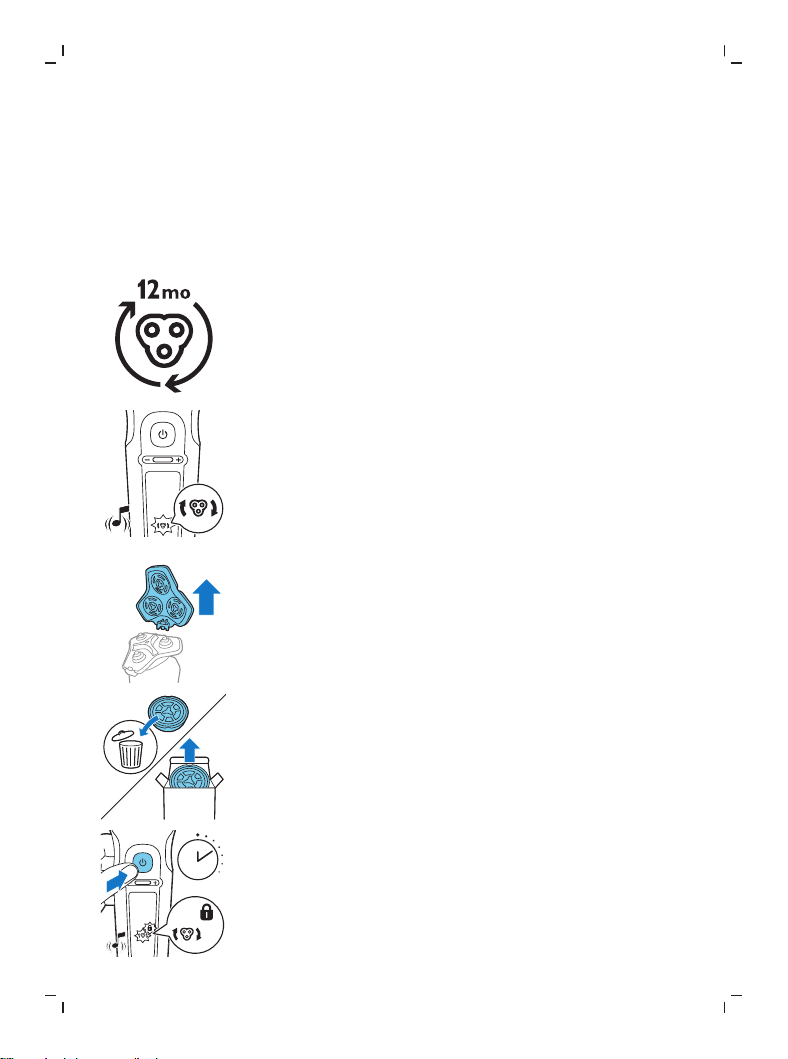
El recordatorio de reemplazo indica que los cabezales de
afeitado necesitan ser reemplazados. El símbolo de la
unidad de afeitado se ilumina continuamente, las flechas
destellan en blanco y se escucha un sonido cuando apaga
la afeitadora.
1
Apague la afeitadora.
2
Presiona los botones de liberación de la unidad de
afeitado y tira del soporte de cabezales de afeitado
para quitarlo de la unidad de afeitado.
SH91
3
Quite los cabezales de afeitado del soporte del
cabezal de afeitado. Deseche inmediatamente los
cabezales de afeitado usados para evitar mezclarlos
con los nuevos cabezales de afeitado.
7 sec.
4
Después de reemplazar los cabezales de afeitado,
puede restablecer el recordatorio de reemplazo
presionando el botón encendido/apagado durante 7
segundos. Espere hasta que escuche tres sonidos.
Si restablece el recordatorio de reemplazo, la
afeitadora se restablece automáticamente después de
9 afeitadas.
53
Español
Almacenamiento
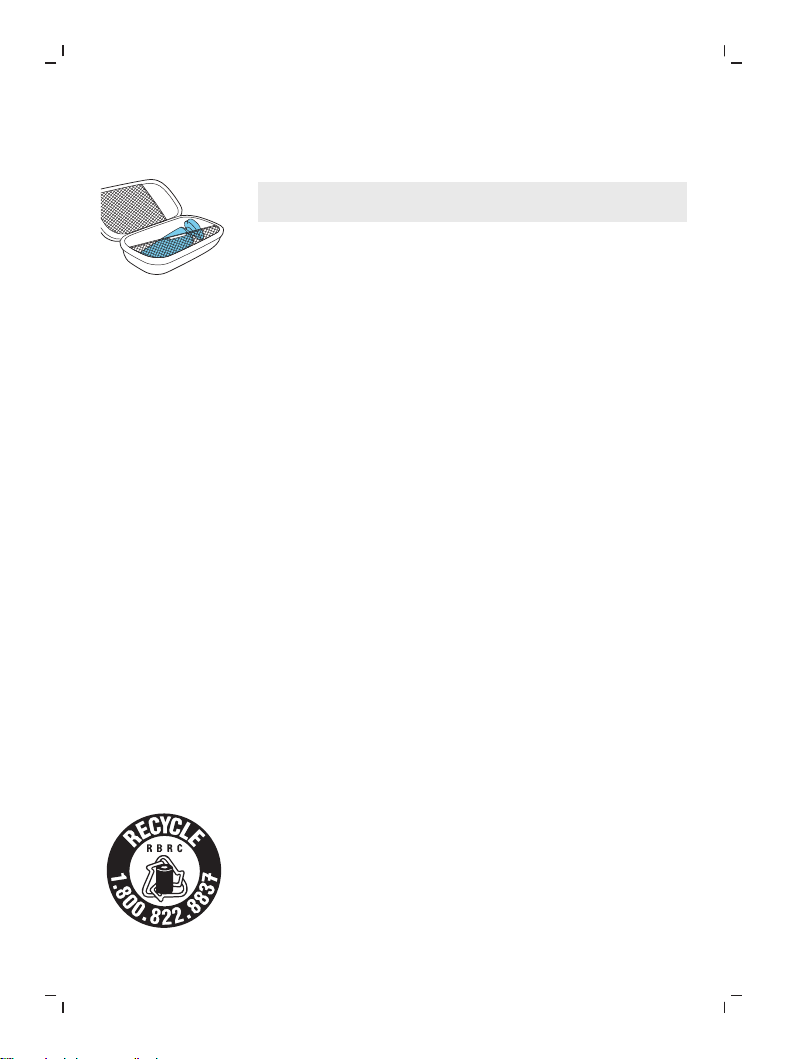
Guarde la afeitadora en la funda.
Nota: Siempre deje secar la afeitadora completamente
antes de guardarla en la funda.
Pedido de accesorios
Para comprar accesorios o piezas de repuesto, visite
www.philips.com/parts-and-accessories o acuda a su
distribuidor de Philips. También puede ponerse en
contacto con el centro de atención al cliente Philips en su
país (consulte el folleto de garantía internacional para
encontrar los datos de contacto).
Están disponibles los siguientes accesorios y piezas
sueltas:
- Cabezales de afeitado de repuesto Philips Norelco
SH91.
- Paquete de 2 cartuchos del Quick Clean Pod de Philips
Norelco CC12
Asistencia
Para asistencia, visite nuestro sitio web:
www.philips.com/support o llame al número
gratuito1-800-243-3050.
La información en línea está disponible las 24horas, los
siete días de la semana.
Desecho
- Este producto posee una batería recargable de litio-
ión que debe desecharse apropiadamente.
- Contacte a sus funcionarios locales o de la ciudad
para mayor información acerca del manejo final de la
batería. También puede llamar al 1-800-822-8837 o
visitar www.call2recycle.org para las ubicaciones
donde se pueden desechar las baterías.
- Para recibir asistencia, visite nuestro sitio Web
www.philips.com/support o comuníquese
gratuitamente al 1-800-243-3050.

54
Español
- Su producto está diseñado y fabricado con materiales
y componentes de alta calidad, que pueden ser
reciclados y reusados. Para obtener información sobre
reciclado, comuníquese con las oficinas locales de
manejo de desechos o visite
www.recycle.philips.com.
Garantía Total de Dos Años
PhilipsNorthAmericaLLC garantiza este producto nuevo
(excepto cuchillas y peines) contra defectos en los
materiales o en la mano de obra por un período de dos
años desde la fecha de compra y acepta reparar o
reemplazar cualquier producto defectuoso sin cargo.
IMPORTANTE: Esta garantía no cubre ningún daño que
surja como resultado de un accidente, de un uso
indebido o abuso, de la falta de cuidado razonable, del
uso de cualquier accesorio no provisto con el producto ni
la pérdida de piezas, así como tampoco ningún daño
derivado del uso del producto con una tensión o con
baterías que no sean las establecidas.*
NINGUNA RESPONSABILIDAD ES ASUMIDA POR
CUALQUIER DAÑO, INCIDENTAL O RESULTANTE.
Para obtener el servicio de garantía, simplemente vaya a
www.philips.com/support para asistencia. Para su
protección, se sugiere que el envío de las devoluciones
del producto se realice por correo certificado con seguro
pagado. Cualquier daño que ocurra durante el envío no
será cubierto por esta garantía.
NOTA: Philips Personal Health, una división de Philips
North America LLC no extienden ninguna otra garantía,
escrita ni oral.
Esta garantía le proporciona derechos legales específicos;
asimismo, es posible que goce de otros derechos que
pueden variar de estado a estado. En algunos estados no
se permite la exclusión o la limitación de los daños
fortuitos o resultantes, de modo que es posible que las
limitaciones o exclusiones arriba mencionadas no
apliquen a su caso.
*Lea las instrucciones adjuntas atentamente.

55
Español
GARANTÍA DE DEVOLUCIÓN DE SU DINERO POR
45DÍAS
Para disfrutar de una afeitada cómoda y al ras con su
nueva afeitadora para hombres Philips Norelco, la
afeitadora se debe usar únicamente por 3 semanas. Esto
permite que su cabello y su piel tengan tiempo suficiente
para adaptarse al Sistema de afeitado Philips Norelco. Si,
después de ese periodo de tiempo, no está satisfecho con
los resultados de su afeitadora para hombre Philips
Norelco, puede devolver el producto con su recibo de
compra fechado y le reembolsaremos el importe que
pagó.
El producto debe enviarse por correo certificado
pago, con seguro prepago, junto con el recibo
original de compra, donde se indique el precio y la
fecha de compra, así como el formulario de
autorización para la garantía de devolución de
dinero.
No asumimos ninguna responsabilidad por los
paquetes perdidos.
El paquete del producto debe contar con matasellos que
no supere los 45días a partir de la fecha de compra.
Philips se reserva el derecho a verificar el precio de
compra del producto y limita los reembolsos al precio de
venta minorista sugerido.
Para obtener el servicio de garantía de devolución de
dinero, visite www.PhilipsMoneyBack.com.
La entrega del cheque de reembolso ocurrirá de 6 a8
semanas después de la recepción del producto
devuelto.


Empty page before back cover
Manufactured for/fabricado por:
Philips Personal Health
a division of/una división de Philips North America LLC
P.O. Box 10313, Stamford, CT 06904
USA
This symbol on the product’s nameplate means it is listed by
Underwriters’ Laboratories, Inc.
Este símbolo en la placa del nombre del producto indica que
está registrado en Underwriters' Laboratories, Inc.
Norelco and Tripleheader are registered trademarks of Philips North
America LLC/Norelco y Tripleheader son marcas comerciales
registradas de Philips North America LLC.
PHILIPS and Philips shield are registered trademarks of Koninklijke
Philips N.V./PHILIPS es una marca registrada de Koninklijke Philips
N.V.
©2022 Philips North America LLC. All rights reserved/Todos los
derechos reservados.
3000.095.5110.1 (07/28/2022)