ITEM #0149289
MODEL #TM-108
OPERATING INSTRUCTIONS
CARE AND MAINTENANCE
DIGITAL TIMER
4. MODE Setting
Press “MODE” button to choose the desired mode.
ON→OFF→RDM Timer→AUTO Timer→
AUTO CDS→AUTO CDS + TIMER as following
listed.
The below icons will appear
on the right of display.
SPECIFICATIONS:
14/3 AWG SJTW vinyl cord
RATINGS:
125 V, 60 Hz, 15 A general purpose
125 V, 60 Hz, 15 A resistive
1,000 W tungsten
500 VA electronic ballast
120 V, 60 Hz, 8.3 A standard ballast
1/3 HP
HELPFUL TIPS
SAFETY INFORMATION
• Do not attach a device that exceeds the unit ratings
as described in the Safety Information section of this
manual.
Please read and understand this entire manual before
attempting to assemble, operate or install the product.
• Store indoors in dry location.
• Always unplug when not in use.
• Do not unplug by pulling on cord.
Call customer service at 1-866-994-4148,
8 a.m. - 6 p.m., EST, Monday - Thursday,
8 a.m. - 5 p.m., EST, Friday.
SUITABLE FOR USE WITH OUTDOOR
APPLIANCES – RAINTIGHT WHEN MOUNTED
VERTICALLY WITH THE RECEPTACLE FACING
DOWNWARD. NOT FOR WATER IMMERSION.
This equipment has been tested and found to comply
with the limits for Class B digital device, pursuant to
part 15 of the FCC Rules. These limits are designed to
provide reasonable protection against harmful
interference in a residential installation. This equipment
generates, uses and can radiate radio frequency
energy and, if not installed and used in accordance
with the instructions, may cause harmful interference to
radio or television reception, which can be determined
by turning the equipment off and on, the user is
encouraged to try to correct the interference by one or
more of the following measures:
• Reorient or relocate the receiving antenna.
• Increase the separation between the equipment and
the receiver.
• Connect the equipment into an outlet on a circuit
different from that to which the receiver is connected.
• Consult the dealer or an experienced radio/TV
technician for help.
This device complies with Part 15 of the FCC Rules.
Operation is subject to the following two conditions: (1)
This device may not cause harmful interference, and
(2) this device must accept any interference received,
including interference that may cause undesired
operation of the device.
FCC Caution: Any changes or modifications not
expressly approved by the party responsible for
compliance could void the user's authority to operate
this equipment.
WARRANTY
TROUBLESHOOTING
• For information on product warranty please call
customer service at 1-866-994-4148, 8 a.m. - 6 p.m.,
EST, Monday - Thursday, 8 a.m. - 5 p.m., EST,
Friday.
• This product is guaranteed to be free of defects for
a limited period of one year from the date of
purchase.
• If the product suddenly malfunctions and is not
damaged by external factors or personal reasons
within the one year warranty limit from the day of
purchase, the product maybe considered for repair.
If the product is damaged due to natural disaster like
fire, lightning, flood, hurricane, etc., the product will
not be considered for repair.
PROBLEM POSSIBLE
CAUSE
CORRECTIVE
ACTION
Lights do
not turn on
at dusk.
Timer is not in a
good area for
light meter to
function as there
is too much
ambient light to
detect darkness.
Move the timer to
another location
where there is no
ambient light.
Lights do
not turn on,
even when
timer is in
“ON”
position.
Lights are not in
“ON” position,
lights are not
functioning, or
timer is not
receiving power.
Be sure that lights
are functional by
plugging them
directly into the
outlet. Be sure that
lights are in “ON”
position if they have
their own switch. Be
sure that timer is
receiving power -
the LED should light
up when plugged
into an outlet and
put in the “ON”
position.
Lights are
flashing
(turning on
and off).
The timer is in
Dusk to Dawn
mode, and the
light from the
plugged-in lights
is affecting the
light sensor.
Move the lights
away from the timer,
or reposition the
timer so that it does
not face the lights.
3. Set Current Time
a. Press and hold "TIME"
button for 2 seconds to
enter the current time
settings. Press "+" or "-"
button to set the correct
day.
b. Press the "SET" button
to enter the hour setting. Press "+" or "-" buttons
to set the current hour. Be sure that AM or PM
appears correctly.
c. Press the "SET" button to enter the minute
setting. Press the "+" or "-" buttons to set the
current minute.
d. Press the "SET" button to finish setting the
current time and return to normal display.
e. While setting those processes above, press and
hold “SET” button can clear the setting and back
to the original timer settings. While setting those
processes above, press “TIME” button or wait for
15 seconds to back the standby display.
WARNING
2. Reset
There is a reset hole under
the dashboard. Insert a pin
or paperclip into the hole to
reset the timer. This will
clear all programmed
settings.
5. Program Setting
Make sure the current
mode is at AUTO mode,
then press and hold
"PROG" button for two
seconds to begin program
setting, using the "+" and "-"
buttons to adjust the setting.
1. Press the "+" or "-" button to set the correct day.
MO, TU, WE, TH, FR, SA, SU, MO TU WE TH
FR, SA SU, MO TU WE TH FR SA SU (cycle).
2. Press the "SET" button to enter the hour setting.
Press "+" or "-" buttons to set the desired hours
for your timer to turn on. Be sure that AM or PM
appears correctly.
3. Press the "SET" button to enter the minute
setting. Press the "+" or "-" buttons to set the
desired minutes for your timer to turn on.
4. Press “SET” button to enter the program OFF
setting, the “1 OFF” will appear on the display.
Repeat steps 1 to 3 to set your desired OFF time,
up to 8 on/off programs settings.
5. While setting the programs, press and hold the
“SET” button to clear the set program time.
6. Once you complete the programs settings, press
the “TIME” button or wait for 15 seconds to
restore your programs to back the standby
display.
6. Photocell Setting
Press the “MODE” button to
select the photocell function.
This setting will
automatically turn the
power on at dusk and turn
the power off at dawn.
7. Program and Photocell Setting
1. Press “MODE” to select
“AUTO Program and
photocell setting”, then
press and hold the
“PROG” button for two
seconds to set the off
time.
2. Press the “+” or “-”
button to set the desired OFF day of the week
program. You can select each day individually,
Monday to Friday, Saturday/Sunday, or an entire
week to have your timer turn on at dusk and off at
the set time.
3. Press the “SET” button to enter the OFF time
hour setting. Press the "+" or "-" buttons to set
time. Be sure to cycle through until AM or PM
appears correctly.
4. Press the “SET” button to enter the OFF time
minutes setting. Press the "+" or "-" buttons to set
time.
5. You can press the “SET” button to enter additional
programs, up to 8 off program settings. While
setting the programs, press and hold the “SET”
button to clear the set program time. Press the
“TIME” button or wait for 15 seconds to store the
program, and return back to the standby display.
Before initial use, plug the timer in for at least 30
minutes to charge the internal battery. After the screen
displays, the unit is ready for programming.
The device must be mounted in a vertical position with
the receptacle facing downward and with the
receptacle at least 1.4 m above ground level.
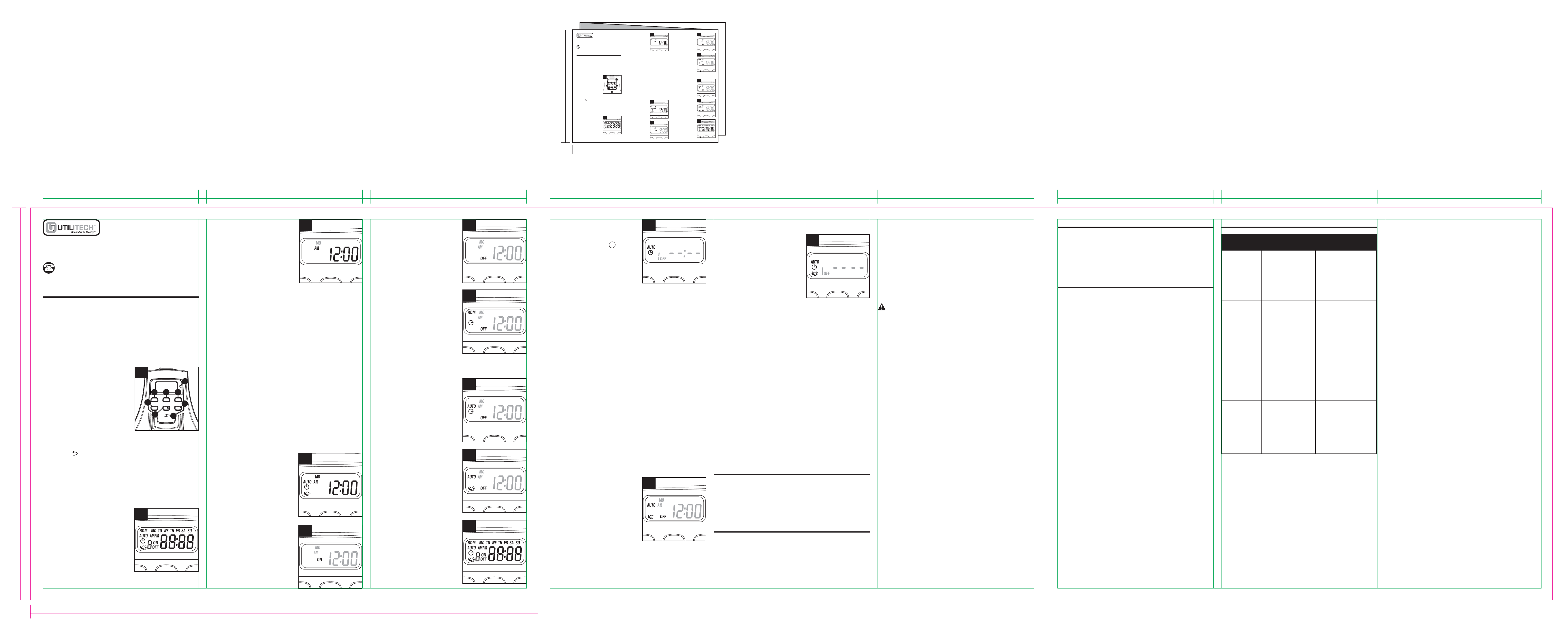
1. Button Layout
1. MODE - Manual override
and scroll between the
timer status options.
2. TIME - Press and hold for
two seconds to set
current time.
3. PROG - Press and hold
for two seconds to begin setting function.
4. < + > - To increase time and day setting.
5. SET/ - Setting confirm and clear setting.
6. < - > - To reduce time and day setting.
7. RESET - Reset all the functions.
8. PHOTO SENSOR - The sensor will sense for
light and dark, and direct the timer to act
accordingly.
3
4
2
7-1
6
5
4-2
4-3
4-1
1. ON - Always on
The outputs remain
always on.
2. OFF - Always off
The outputs remain
always off.
3. RDM - Security feature.
On at a random time,
and remains ON for
15 minutes.
Up to 5 on/off events
every day. The on/off
events are built into
this product, turn ON
at a random time and the ON time is different
each day, creating a more “lived-in” look.
4-4
4. AUTO - ON/OFF
program at AUTO mode.
ON/OFF at your exact
programmed time.
4-5
5. AUTO - Photocell
ON at dusk, OFF at
dawn.
4-6
6. AUTO - Program and
Photocell
On at dusk, OFF at your
exact programmed time.
MODE TIME PROG
+
-
SET/
1 2 3
4
6
8
8
5
1
AB14391 Printed in China
3.3833” 3.3833” 3.3833” 3.3833” 3.3833” 3.3833” 3.3833” 3.3833” 3.3833”
Item: 149289(TM-108)
Page size: 11”(W)x8.5”(H)
Dieline: ______
Layout area: ______
Version Submitted by KAB: R1-2
Submission date: 2014/05/13
11”
8.5”
Page 1 Page 2 Page 3
11”
8.5”
ITEM #0149289
MODEL #TM-074
OPERATING INSTRUCTIONS
TIMER
4. MODE Setting
Press “MODE” button to choose the desired mode.
ON→OFF→RDM Timer→AUTO Timer→
AUTO CDS→AUTO CDS + TIMER as following
listed.
The below icons will appear
on the right of display.
Call customer service at 1-866-994-4148,
8 a.m. - 6 p.m., EST, Monday - Thursday,
8 a.m. - 5 p.m., EST, Friday.
3. Set Current Time
a. Press and hold "TIME"
button for 2 seconds to
enter the current time
settings, press "+" or "-"
button to set the correct
day.
b. Press the "SET" button
to enter the hour setting. Press "+" or "-" buttons
to set the current hour. Be sure that AM or PM
appears correctly.
c. Press the "SET" button to enter the minute
setting, Press the "+" or "-" buttons to set the
current minute.
d. Press the "SET" button to finish setting the
current time and return to normal display.
E. While setting those processes above, press and
hold “SET” button can clear the setting and back
to the original timer settings. While setting those
processes above, press “TIME” button or wait for
15 seconds to back the standby display.
2. Reset
There has a reset hole
under the dashboard. Insert
a pin or paperclip end into
the hole to reset the timer.
This will clear all
programmed settings.
1 2 3
4
7
6
8
5
1
Before initial use, plug the timer in for at least 30
minutes to charge the internal battery. After the screen
displays, the unit is ready for programming.
The device must be mounted in a vertical position with
the receptacle facing downward and with the
receptacle at least 1.4 m above ground level.
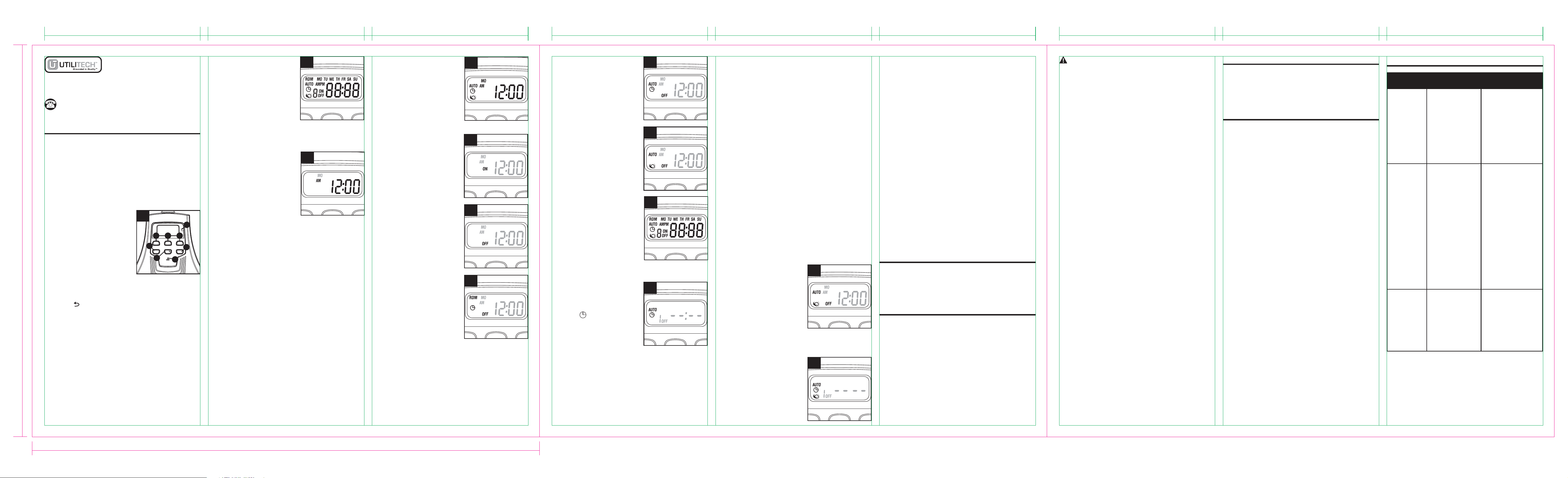
1. Button Layout
1. MODE - Manual override
and scroll between the
timer status options.
2. TIME - Press and hold for
two seconds to set
current time.
3. PROG - Press and hold
for two seconds to begin setting function.
4. < + > - To increase time and day setting.
5. SET/ - Setting confirm and clear setting.
6. < - > - To reduce time and day setting.
7. RESET - Reset all the functions.
8. PHOTO SENSOR - The sensor will sense for
light and dark, and direct the timer to act
accordingly.
3
4
2
4-2
4-3
4-1
1. ON - Always on
The outputs remain
always on.
2. OFF - Always off
The outputs remain
always off.
3. RDM - Security feature.
On at a random time,
and will remains ON for
15 minutes.
Up to 5 on/off events
every day. The on/off
events are built-into
this product, turn ON
at a random time and the ON time is different
each day, creating a more “lived-in” look.
4-4
4. AUTO - ON/OFF
program at AUTO mode.
ON/OFF at your exact
programmed time.
Remark:
Program Setting
4-5
5. AUTO - Photocell
ON at dusk, OFF at
dawn.
Remark:
Photocell Setting
4-6
6. AUTO - Program and
Photocell
On at dusk, OFF at your
exact programmed time.
Remark:
Program and Photocell
Setting
AB13568
3. Configuración de la hora
actual
a. Mantenga presionado el
botón “TIME” durante 2
segundos para ingresar
la configuración de la
hora actual. Presione el
botón "+" o "-" para
configurar el día correcto.
b. Presione el botón “SET” para ingresar la
configuración de la hora. Presione los botones "+"
o "-" para configurar la hora actual. Asegúrese de
que aparezca AM o PM correctamente.
c. Presione el botón “SET” para ingresar la
configuración de minutos. Presione los botones
"+" o "-" para configurar los minutos actuales.
d. Presione el botón “SET” para completar la
configuración de la hora actual y volver a la
pantalla normal.
e. Mientras configura los procedimientos anteriores,
mantener presionado en botón “SET” puede
borrar la configuración y regresar a la
configuración original del temporizador. Mientras
configura los procedimientos anteriores, presione
el botón “TIME” o espere 15 segundos para
regresar a la pantalla de espera.
ARTÍCULO #0149289
MODELO #TM-108
INSTRUCCIONES DE FUNCIONAMIENTO
CONSEJOS PRÁCTICOS
INFORMACIÓN DE SEGURIDAD
CUIDADO Y MANTENIMIENTO
TEMPORIZADOR DIGITAL
• No incorporar un dispositivo que supere los valores
nominales que describido en la sección " información
de seguridad" de este manual.
Antes de utilizarlo por primera vez, enchufe el
temporizador durante al menos 30 minutos para
cargar la batería interna. Después de que aparezca la
pantalla, la unidad estará lista para programarse.
EI dispositivo debe montar en posición vertical con el
receptáculo apuntando hacia abajo y el receptáculo al
menos 1.4M sobre el nivel del terreno.
Lea y comprenda completamente este manual antes
de intentar ensamblar, usar o instalar el producto.
ESPECIFICACIONES:
Cable de vinilo AWG 14/3 SJTW
CLASIFICACIONES:
125 V, 60 Hz, 15 A uso general
125 V, 60 Hz, 15 A resistivo
1,000 W tungsteno
500 VA balastro electrónico
120 V, 60 Hz, 8,3 A balastro estándar
1/3 HP
• Almacene en el interior en un lugar seco.
• Desenchufe cuando no esté en uso.
• No jale del cable para desenchufarlo.
Llame al Departamento de Servicio al Cliente al
1-866-994-4148, de lunes a jueves de 8 a.m. a 6 p.m.,
y los viernes de 8 a.m. a 5 p.m., hora estándar del Este.
ADECUADO PARA ELECTRODOMÉSTICO DE
USO EN EXTERIORES. IMPERMEABLE A LA
LLUVIA CUANDO MONTE VERTICAL POSICIÓN
CON EL RECEPTÁCULO APUNTANDO HACIA
ABAJO. NO APTO PARA SUMERGIR EN EL
AGUA.
Este dispositivo cumple con la sección 15 de las reglas
de la FCC. El funcionamiento está sujeto a las
siguientes dos condiciones: (1) este dispositivo no
debería causar interferencia perjudicial y (2) debe
aceptar cualquier interferencia recibida, incluida la
interferencia que pudiese causar un funcionamiento no
deseado.
NOTA: Este equipo ha sido probado y se ha verificado
que cumple los límites para un dispositivo digital clase
B, conforme a la sección 15 de las reglas de la FCC.
Estos límites han sido diseñados para proporcionar
una protección razonable contra la interferencia
perjudicial en una instalación residencial. Este equipo
genera, utiliza y puede irradiar energía de
radiofrecuencia y, si no se instala y usa de acuerdo
con las instrucciones, puede causar interferencia
perjudicial a las comunicaciones de radio. Sin
embargo, no se garantiza que no se producirán
interferencias en una instalación en especial. Si este
equipo genera interferencia perjudicial a la recepción
de radio o televisión, lo que se puede determinar
apagando y encendiendo el equipo, se recomienda al
usuario que intente corregir la interferencia con una o
más de las siguientes medidas:
--Reoriente o reubique la antena de recepción.
--Aumente la separación entre el equipo y el receptor.
--Conecte el equipo a un tomacorriente de un circuito
distinto al que usa el receptor.
--Solicite ayuda al distribuidor o a un técnico con
experiencia en radio/TV.
Los cambios o modificaciones a esta unidad que no
estén expresamente aprobados por la parte
responsable del cumplimiento podrían anular la
autorización del usuario para utilizar el equipo.
GARANTÍA
SOLUCIÓN DE PROBLEMAS
• Si desea más información sobre la garantía del
producto, llame a nuestro Departamento de Servicio
al Cliente al 1-866-994-4148 de lunes a jueves de
8 a.m. a 6 p.m., y los viernes de 8 a.m. a 5 p.m., hora
estándar del Este.
• Este producto está garantizado contra defectos por
un período de un año a partir de la fecha de compra.
• Si el producto intempestivamente empieza a fallar y
no presenta daños debido a factores externos ni por
razones personales dentro del año de la garantía
desde la fecha de compra, es posible que el producto
califique para la reparación. Si el producto sufre
daños debido a desastres naturales como incendios,
rayos, inundaciones, huracanes, etc., este no
calificará para la reparación.
PROBLEMA CAUSA
POSIBLE
ACCIÓN
CORRECTIVA
Las luces
no se
encienden al
anochecer.
El temporizador
no está ubicado
en un área
adecuada en
donde el medidor
de luz pueda
funcionar, ya que
hay mucha luz en
el ambiente y no
puede detectar el
anochecer.
Mueva el
temporizador a otra
ubicación en donde
no haya luz en el
ambiente.
Las luces
no se
encienden,
aun cuando
el
temporizador
está en la
posición de
encendido.
Las luces no
están en la
posición de
encendido, las
luces no
funcionan o el
temporizador no
recibe
alimentación.
Asegúrese de que
las luces funcionan
enchufándolas
directamente al
tomacorriente.
Asegúrese de que
las luces están en
la posición de
encendido si tienen
su propio interruptor.
Asegúrese de que
el temporizador
recibe alimentación:
El LED debe
encenderse cuando
se conecta en un
tomacorriente y se
coloca en la posición
de encendido.
Las luces
destellan
(se
encienden y
se apagan).
El temporizador
está en el modo
anochecer-
amanecer y la luz
proveniente de
las luces
enchufadas está
afectando el
sensor de luz.
Aleje las luces del
temporizador o
reposicione el
temporizador para
que no reciba las
luces.
ADVERTENCIA
4. Configuración del MODO
Presione el botón “MODE” para elegir el modo
deseado.
ON→OFF→RDM Timer→AUTO Timer→
AUTO CDS→AUTO CDS + TIMER como se indica.
2. Restablecimiento
Hay una orificio de reinicio
debajo del tablero.Inserte
un pasador o un gancho
para papel en el orificio para
reiniciar el temporizador.
Esto eliminará todas las
configuraciones
programadas.
2. Presione el botón “SET” para ingresar la
configuración de la hora.
Presione los botones "+" o "-" para configurar las
horas deseadas en que se encenderá el
temporizador. Asegúrese de que aparezca AM o
PM correctamente.
3. Presione el botón “SET” para ingresar la
configuración de los minutos. Presione los
botones "+" o "-" para configurar los minutos
deseados en que se encenderá el temporizador.
4. Presione el botón “SET” para ingresar la
configuración de apagado del programa;
aparecerá “1 OFF” en la pantalla. Repita los
pasos 1 al 3 para configurar la hora de apagado
que desea, hasta 8 configuraciones de programas
de encendido y apagado.
5. Mientras configura los programas, mantenga
presionado el botón “SET” para borrar la hora del
programa configurado.
6. Cuando complete la configuración de los
programas, presione el botón "TIME" o espere 15
segundos para restaurar sus programas a la
pantalla de espera.
6. Configuración de la fotocélula
Presione el botón “MODE”
para seleccionar la función
de fotocélula.
Esta configuración hará
que se encienda
automáticamente al
anochecer y que se
apague al amanecer.
2. Presione el botón “+” o “-” para configurar el día
de apagado deseado del programa semanal.
Puede seleccionar individualmente cada uno de
los días: lunes a viernes, sábado/domingo o la
semana completa para que el temporizador se
encienda al anochecer y se apague en una hora
establecida.
3. Presione el botón "SET" para ingresar la
configuración de la hora de apagado. Presione
los botones "+" o "-" para configurar la hora.
Asegúrese de que AM o PM aparezcan
correctamente.
4. Presione el botón "SET" para ingresar la
configuración de minutos de la hora de apagado.
Presione los botones "+" o "-" para configurar la
hora.
5. Puede presionar el botón “SET” para ingresar
más programas, hasta 8 configuraciones de
apagado. Mientras configura los programas,
mantenga presionado el botón “SET” para borrar
la hora del programa configurado. Presione el
botón “TIME” o espere 15 segundos para guardar
el programa y regrese a la pantalla de espera.
1. Disposición de los botones
1. MODE - Anulación
manual y desplazamiento
entre las opciones de
estado del temporizador.
2. TIME - Press and hold for
two seconds to set
current time.
3. PROG - Press and hold
for two seconds to begin setting function.
4. < + > - To increase time and day setting.
5. SET/ - Confirmación de la configuración y
borrar configuración.
6. < - > - Para reducir la configuración de hora y día.
7. RESET(Restablecer): Restablezca todas las
funciones.
8. FOTOSENSOR - El sensor detectará la luz y la
oscuridad y controlará el temporizador para que
funcione según corresponda.
3
Los iconos que se
muestran a continuación
aparecerán a la derecha de
la pantalla.
4
2
6
5. Configuración del programa
Asegúrese de que el modo
actual esté en modo
“AUTO ”, luego
mantenga presionado el
botón “PROG” por dos
segundos para comenzar
la configuración del
programa, mediante los botones "+" y "-" para
ajustar la configuración.
1. Presione el botón "+" o "-" para configurar el día
correcto. MO, TU, WE, TH, FR, SA, SU, MO TU
WE TH FR, SA SU, MO TU WE TH FR SA SU
(ciclo).
5
4-2
4-3
4-1
1. ON: Siempre encendido
Las salidas permanecen
encendidas.
2. OFF: Siempre apagado
Las salidas permanecen
apagadas.
3. RDM: Característica de
seguridad.
Permanece encendido
en momentos aleatorios
y permanece así durante
15 minutos.
Hasta 5 ciclos de
encendido y apagado
cada día. Los ciclos de encendido y apagado
están integrados en este producto, se enciende a
un momento aleatorio y dicho momento es
diferente cada día, lo que da una sensación más
realista.
4-4
4. AUTO: Programa de
encendido y apagado en
modo AUTO.
Se enciende y se apaga
según la hora
programada.
4-5
5. AUTO: Fotocélula
Se enciende al
anochecer y se apaga al
amanecer.
4-6
6. AUTO: Programa y
fotocélula
Se enciende al
anochecer y se apaga
según la hora
programada exacta.
7. Configuración de programas y fotocélula
1. Presione “MODE” para
seleccionar la
configuración de
programas y fotocélulas
automático, luego
mantenga presionado el
botón “PROG” dos
segundos para configurar
la hora de apagado.
7-1
MODE TIME PROG
+
-
SET/
1 2 3
4
6
8
8
5
1
Impreso en China
3.3833” 3.3833” 3.3833” 3.3833” 3.3833” 3.3833” 3.3833” 3.3833” 3.3833”
11”
8.5”
Page 4 Page 5 Page 6