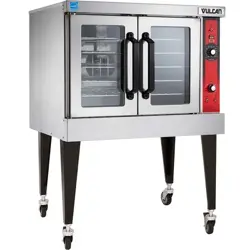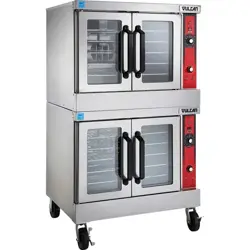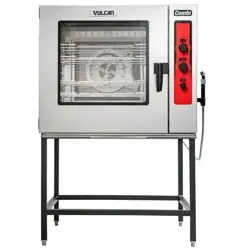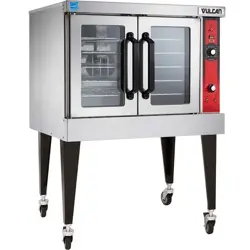

VC4E & VC6E Series Full Size
Electric Convection Ovens
VC4ES ML-126743
VC4ED ML-126744
VC4EC ML-126745
VC6ES ML-126746
VC6ED ML-126747
VC6EC ML-126748
- NOTICE -
This Manual is prepared for the use of trained Hobart Service Technicians and should not
be used by those not properly qualified.
This manual is not intended to be all encompassing. If you have not attended a Hobart Service
School for this product, you should read, in its entirety, the repair procedure you wish to
perform to determine if you have the necessary tools, instruments and skills required to
perform the procedure. Procedures for which you do not have the necessary tools,
instruments and skills should be performed by a trained Hobart Service Technician.
The reproduction, transfer, sale or other use of this manual, without the express written
consent of Hobart, is prohibited.
This manual has been provided to you by ITW Food Equipment Group LLC ("ITW FEG")
without charge and remains the property of ITW FEG, and by accepting this manual you agree
that you will return it to ITW FEG promptly upon its request for such return at any time in the
future.
SERVICE MANUAL
A product of Vulcan-Hart 3600 North Point Blvd Baltimore, MD 21222
F25105 Rev. E (0325)

TABLE OF CONTENTS
SERVICE UPDATES ....................................................................................... 4
SERVICE UPDATES - VC4E / VC6E .................................................................... 4
TIS DOCUMENT LIST - VC4E AND VC6E .............................................................. 4
GENERAL .................................................................................................. 6
INTRODUCTION ....................................................................................... 6
INSTALLATION, OPERATION AND CLEANING ......................................................... 6
OPERATION ........................................................................................... 6
CLEANING ............................................................................................. 6
LUBRICATION ......................................................................................... 6
TOOLS ................................................................................................. 6
SPECIFICATIONS ...................................................................................... 6
REMOVAL AND REPLACEMENT OF PARTS ............................................................... 8
COVERS AND PANELS ................................................................................ 8
CONTROL PANEL COMPONENTS ..................................................................... 9
COMPONENT PANEL COMPONENTS ................................................................. 9
TEMPERATURE PROBE (SOLID STATE CONTROL) .................................................. 10
HEATING ELEMENTS ENDING AT SERIAL NUMBER 481916863 ..................................... 11
HEATING ELEMENTS ................................................................................ 12
BLOWER AND MOTOR ENDING AT SERIAL NUMBER 481916863 .................................... 14
BLOWER AND MOTOR ............................................................................... 15
DOOR SWITCH ....................................................................................... 16
DOOR WINDOW ...................................................................................... 17
OVEN DOORS AND BEARINGS (INDEPENDENT DOORS) ENDING AT SERIAL
NUMBER 481916782
.............................................................................. 17
OVEN DOORS (INDEPENDENT DOORS) STARTING AT SERIAL NUMBER 481916783 ............... 18
OVEN DOORS (SIMULTANEOUS DOORS) ENDING AT SERIAL NUMBER 481916783 ................ 19
OVEN DOORS (SIMULTANEOUS DOORS) ........................................................... 20
ROLLER LATCH ASSEMBLY (INDEPENDENT DOORS) ............................................... 21
DOOR CATCH ROLLER ASSEMBLY (INDEPENDENT DOORS) ....................................... 21
MECHANICAL (KX) THERMOSTAT ................................................................... 21
HIGH LIMIT THERMOSTAT ........................................................................... 22
INTERIOR LIGHTS (REAR MOUNTED, ROUND) ...................................................... 22
INTERIOR LIGHTS (SIDE MOUNTED, SQUARE) ...................................................... 23
COOLING FAN ........................................................................................ 25
SERVICE PROCEDURES AND ADJUSTMENTS ........................................................... 26
SOLID STATE TEMPERATURE CONTROL CALIBRATION ............................................ 26
MECHANICAL (KX) THERMOSTAT CALIBRATION .................................................... 27
SOLID STATE TEMPERATURE CONTROL TEST ..................................................... 28
TEMPERATURE PROBE TEST (SOLID STATE CONTROL) ........................................... 29
HEATING ELEMENT TEST ............................................................................ 30
BLOWER ADJUSTMENT .............................................................................. 31
DOOR ADJUSTMENT ................................................................................. 31
DOOR STRIKE ADJUSTMENT (INDEPENDENT DOORS) ............................................. 32
DOOR CATCH ROLLER ADJUSTMENT (INDEPENDENT DOORS) .................................... 33
DOOR SWITCH ADJUSTMENT ....................................................................... 34
DOOR CHAIN ADJUSTMENT (SIMULATANEOUS DOORS) ........................................... 34
COMPUTER CONTROL ............................................................................... 35
COMPUTER CONTROL TEMPERATURE CALIBRATION .............................................. 36
COMPUTER CONTROL OPERATIONAL TEST ........................................................ 37
SERVICE PROGRAMMING AND TESTING FOR 3700 COMPUTER CONTROL ........................ 39
ELECTRICAL OPERATION ................................................................................ 43
COMPONENT LAYOUT AND FUNCTION WC4ED ..................................................... 43
CONTROL PANEL LAYOUT AND FUNCTION WC4ED (BEFORE APRIL 2024) ......................... 45
VC4E & VC6E Series Full Size Electric Convection Ovens
F25105 Rev. E (0325) Page 2 of 83

TIMER COMPONENT LAYOUT AND FUNCTION (STARTING SN 482075494) ......................... 47
SEQUENCE OF OPERATIONS ............................................................................ 49
SEQUENCE OF OPERATION - VC4ES, VC6ES WITH MECHANICAL KX THERMOSTAT
.............. 49
SEQUENCE OF OPERATION - WITH SOLID STATE TEMPERATURE CONTROL ..................... 49
SEQUENCE OF OPERATION - VC4EC, VC6EC (COMPUTER CONTROL) ............................. 50
DIAGRAMS ............................................................................................... 52
VC4ES & VC6ES WITH MECHANICAL (KX) CONTROLS SCHEMATICS AND
WIRING DIAGRAMS .............................................................................. 53
VC4ED & VC6ED W / SOLID STATE TEMPERATURE CONTROL, SCHEMATICS
AND WIRING DIAGRAMS ......................................................................... 59
VC4EC & VC6EC COMPUTER CONTROL SCHEMATICS AND WIRING DIAGRAMS ................... 69
TROUBLESHOOTING ..................................................................................... 80
TROUBLESHOOTING ................................................................................. 80
COMPUTER CONTROL MODELS ONLY .............................................................. 81
VC4E & VC6E Series Full Size Electric Convection Ovens
© VULCAN 2025
Page 3 of 83 F25105 Rev. E (0325)
SERVICE UPDATES
SERVICE UPDATES - VC4E / VC6E
March 2025
•
Added
TIMER COMPONENT LAYOUT AND
FUNCTION (STARTING SN 482075494).
• Updated VC4ES & VC6ES WITH MECHANICAL
(KX) CONTROLS SCHEMATICS AND WIRING
DIAGRAMS.
•
Updated
VC4ED & VC6ED W / SOLID STATE
TEMPERATURE CONTROL, SCHEMATICS
AND WIRING DIAGRAMS.
•
Updated
VC4EC & VC6EC COMPUTER
CONTROL SCHEMATICS AND WIRING
DIAGRAMS.
•
Updated
VC4ED & VC6ED W / SOLID STATE
TEMPERATURE CONTROL, SCHEMATICS
AND WIRING DIAGRAMS.
June 2019
•
Added
SERVICE PROGRAMMING AND
TESTING FOR 3700 COMPUTER CONTROL.
October 2018
• HEATING ELEMENTS
• BLOWER AND MOTOR
• INTERIOR LIGHTS (Rear Mounted, Round)
• INTERIOR LIGHTS (Side Mounted, Square)
• DOOR ADJUSTMENT
• OVEN DOORS (INDEPENDENT DOORS)
Starting at Serial Number 481916783
• OVEN DOORS (SIMULTANEOUS DOORS)
• COMPONENT LAYOUT AND FUNCTION
WC4ED
• VC4ES & VC6ES WITH MECHANICAL (KX)
CONTROLS SCHEMATICS AND WIRING
DIAGRAMS
TIS DOCUMENT LIST - VC4E AND VC6E
SERVICE TAB
Document Title Document Type
VC4E and VC6E Service Manual Service Manual
NCC Temp Control with Harness Service Kit Instructions (SKI)
SERVICE TAB (Multimedia)
Document Title Document Type
Did You Know - VC4ED Misc.
3700 Oven Quick Start Guide Operator
Repair Flood-Damaged Equipment Service Bulletin
VC3, VC4ED, and VC6ED & VC6EC Series Electric Convection Ovens I&O
Manual
VC3, VC4, and VC6 Series Electric Convection Oven Operator Operator
Fundamentals of Gas Service Instructions
TSB 1037A Hobart to Vulcan "Common" Model Cross Reference List Technical Service Bulletin (TSB)
Convection Oven Computer Control Guide Operator
Rating Plate Locationson Current Vulcan-Hart/Wolf Range Equipment Technical Service Bulletin (TSB)
Convection Ovens Gas and Electric Service Instructions
VC4E & VC6E Series Full Size Electric Convection Ovens - SERVICE UPDATES
F25105 Rev. E (0325) Page 4 of 83
SERVICE TAB (Multimedia)
SB770R Door Latch Change on Full Size Convection Ovens (VC4, VC6,
SG, WKG, & WKE)
Technical Service Bulletin (TSB)
SB880 Independent Door Handle Assembly for Convection Ovens Technical Service Bulletin (TSB)
SB930 Convection Oven Door Switch Replacement for Wolf Challenger XL
and the Vulcan Endurance Gas Ranges
Technical Service Bulletin (TSB)
TSB 0368 Fast Thermostatic Controlled Convection Ovens Technical Service Bulletin (TSB)
TSB 0652C Digital Countdown Timer Change - Convection Ovens Technical Service Bulletin (TSB)
TSB 0872 Full Size Convection Oven-Door chain Adjustment Not Holding Technical Service Bulletin (TSB)
TSB 0874 Full Size Convection Ovens - Lighting & Cooling Fan Technical Service Bulletin (TSB)
TSB 0934 Gas Convection Ovens, Blower Motor & Wheel Change Technical Service Bulletin (TSB)
TSB 0934 Programmable Controls - 355452-2 (Rev. 4.0) Technical Service Bulletin (TSB)
All Half Size & Full Size Unites w/Independent Opening Doors -Enhanced
Door Catch Info.
Technical Service Bulletin (TSB)
Watlow 734C Computer Control Technical Service Instructions (TSI)
Vulcan & Wolf Gas Convection Ovens with White Rodgers Gas Valve Technical Service Instructions (TSI)
PARTS TAB
Document Title Document Type
Part Catalog for VC4E and VC6E Parts Catalog
DIAGRAMS TAB
Document Title Document Type
HGC5, DGC5, VC4G, WKGD Series Wiring Diagram
VC4E & VC6E Series Full Size Electric Convection Ovens - SERVICE UPDATES
Page 5 of 83 F25105 Rev. E (0325)
GENERAL
INTRODUCTION
Procedures in this manual will apply to all models unless specified. Pictures and illustrations can be of any model
unless the picture or illustration needs to be model specific.
FEATURES
MODEL CAVITY DEPTH
TEMPERATURE
CONTROL
DOORS (50/50) COOK TIMER
WCED 26.5" Solid State Simultaneus 1-Hour Dial
INSTALLATION, OPERATION AND
CLEANING
Refer to the installation instructions on single or
stacked ovens.
OPERATION
Refer to the instructions manual for specific operating
instructions.
CLEANING
Refer to the instrucions manual for specific cleaning
instructions.
LUBRICATION
• Cavity blower motor has sealed bearings and
requires no additional lubrication.
•
Huskey’s TF1000 grease or equivalent high
temperature non-stick grease.
TOOLS
Standard
•
Standard set of hand tools
• VOM with A.C. current tester (Any quality VOM
with a sensitivity of at least 20,000 ohms per volt
can be used)
• Gear Puller to remove blower
• Temperature tester (thermocouple type)
Special
• Manometer
• Clamp on amp meter
• Spring force gauge, pull type with a minimum 30
pound full scale range (purchase locally)
• RTV sealant, 736 DOW silicone high temp (P/N
542133) or equivalent
SPECIFICATIONS
AMPERAGE - 3 PHASE/ 60HZ
MODEL
TOTAL
POWER
(KW)
PER LINE
1
RECOMMENDED CIRCUIT
PROTECTION
2
208V 240V 208V 240V
WC4ED 26.5 35 33 45 40
NOTES:
1
Amperage values in the table are nominal. Tolerance is +5/-10%.
2
Complied in accordance with National Electric Code, ANSI/NFPA 70, latest edition
VC4E & VC6E Series Full Size Electric Convection Ovens - GENERAL
F25105 Rev. E (0325) Page 6 of 83
AMPERAGE - 1 PHASE/ 60HZ
MODEL
TOTAL
POWER
(KW)
PER LINE
1
RECOMMENDED CIRCUIT
PROTECTION
2
WC4ED 12.5 60 52 80 70
NOTES:
1
Amperage values in the table are nominal. Tolerance is +5/-10%.
2
Complied in accordance with National Electric Code, ANSI/NFPA 70, latest edition.
VC4E & VC6E Series Full Size Electric Convection Ovens - GENERAL
Page 7 of 83 F25105 Rev. E (0325)
REMOVAL AND REPLACEMENT OF PARTS
COVERS AND PANELS
Disconnect the electrical power to
the machine and follow lockout /
tagout procedures. There may be
multiple circuits. Be sure all circuits
are disconnected.
Top Front Cover
1.
The top front cover is secured with four (4)
screws, two on each side of cover. Remove these
screws then remove the cover from the oven.
Fig. 1
2.
Reverse the procedure to install.
Bottom Front Cover
1. The bottom front cover is secured with four (4)
screws, two on each side of cover. Remove these
screws then remove the cover from the oven.
Fig. 2
2.
Reverse the procedure to install.
Control Panel
1. Remove three (3) screws on the right side which
secure the control panel then pull the panel away
from the oven.
Fig. 3
2. Disconnect
the temperature probe leads from the
solid state temperature control.
3. Unplug the wire harness connector to the control
panel components.
4. Reverse the procedure to install.
Right Side Panel
1. Remove the two screws near front of oven, which
secure the bottom front cover and control panel.
2. Remove the remaining seven screws securing
the right side panel.
Fig. 4
3. Pull the right side panel out at the bottom then
down to remove.
4. Reverse the procedure to install.
Left Side Panel
1. Remove the screws which secure the left side of
the top front cover, bottom front cover and control
panel.
VC4E & VC6E Series Full Size Electric Convection Ovens - REMOVAL AND REPLACEMENT OF PARTS
F25105 Rev. E (0325) Page 8 of 83
2. Remove the seven screws securing the left side
panel.
Fig. 5
3. Pull the left side panel out at the bottom then
down to remove.
4. Reverse the procedure to install.
CONTROL PANEL COMPONENTS
Disconnect the electrical power to
the machine and follow lockout /
tagout procedures. There may be
multiple circuits. Be sure all circuits
are disconnected.
Removable Components
1. Remove the control panel as outlined under
COVERS AND PANELS.
2. Remove the component being replaced.
3. Reverse the procedure to install the replacement
component, then check oven for proper
operation
Fig. 6
COMPONENT PANEL
COMPONENTS
Disconnect the electrical power to
the machine and follow lockout /
tagout procedures. There may be
multiple circuits. Be sure all circuits
are disconnected.
Removable Components
1.
Remove the right side panel as outlined under
COVERS AND PANELS.
NOTE: If right side panel is not accessible, this
component can be serviced by removing the control
panel as outlined under COVERS AND PANELS.
2.
Disconnect the wire leads to the component
being replaced.
3. Remove the component.
4. Reverse the procedure to install the replacement
component and check oven for proper operation.
VC4E & VC6E Series Full Size Electric Convection Ovens - REMOVAL AND REPLACEMENT OF PARTS
Page 9 of 83 F25105 Rev. E (0325)
Fig. 7
TEMPERATURE PROBE (SOLID
STATE CONTROL)
Disconnect the electrical power to
the machine and follow lockout /
tagout procedures. There may be
multiple circuits. Be sure all circuits
are disconnected.
1.
Remove the right side panel as outlined under
COVERS AND PANELS.
NOTE: If right side panel is not accessible, this
component can be serviced by removing the control
panel as outlined under COVER AND PANELS.
2.
Disconnect the probe leads from the solid state
temperature control.
3. Remove the racks and right rack support.
4. Remove the probe guard or mounting clips.
Fig. 8
5. Remove probe by pushing it through the oven
wall and into the control panel area.
Fig. 9
NOTE: The
hole in the oven cavity wall does not line
up straight with the oven cavity outer shell, therefore
the probe must be removed at an angle.
6. Reverse the procedure to install the replacement
probe.
The tip of the probe should be located near the center
of
the large cutout, as shown in (fig link). The end with
the wire attached should be protected by the guard. It
is possible to damage the probe/wire with force from
a tray if probe is not protected properly.
Fig. 10
7. Adjust
the temperature control as outlined under
SOLID STATE TEMPERATURE CONTROL
CALIBRATION in SERVICE PROCEDURES
AND ADJUSTMENTS.
VC4E & VC6E Series Full Size Electric Convection Ovens - REMOVAL AND REPLACEMENT OF PARTS
F25105 Rev. E (0325) Page 10 of 83
HEATING ELEMENTS Ending at
Serial Number 481916863
Disconnect the electrical power to
the machine and follow lockout /
tagout procedures. There may be
multiple circuits. Be sure all circuits
are disconnected.
NOTE:
Starting with production in October, 2001, the
top cavity panel will have 3/4" square holes for easier
element removal. Ovens manufactured prior to this
date have 1/2" round holes that sometimes make it
difficult to remove elements thru the cavity. A serial
number cut off will not be available. Follow the
procedures for element removal as outlined below.
Front Access
1. Remove the oven racks and rack supports.
2. Remove the "top" door seal from the oven.
3. Determine if the heating element to replace is on
the left or right side in the oven cavity. The
element locations from front to back are: Right
side - R1, R2 & R3; Left side - R4, R5 & R6.
A. Measure the current draw of the heating
elements as outlined under
HEATING
ELEMENT TEST in SERVICE
PROCEDURES AND ADJUSTMENTS.
4.
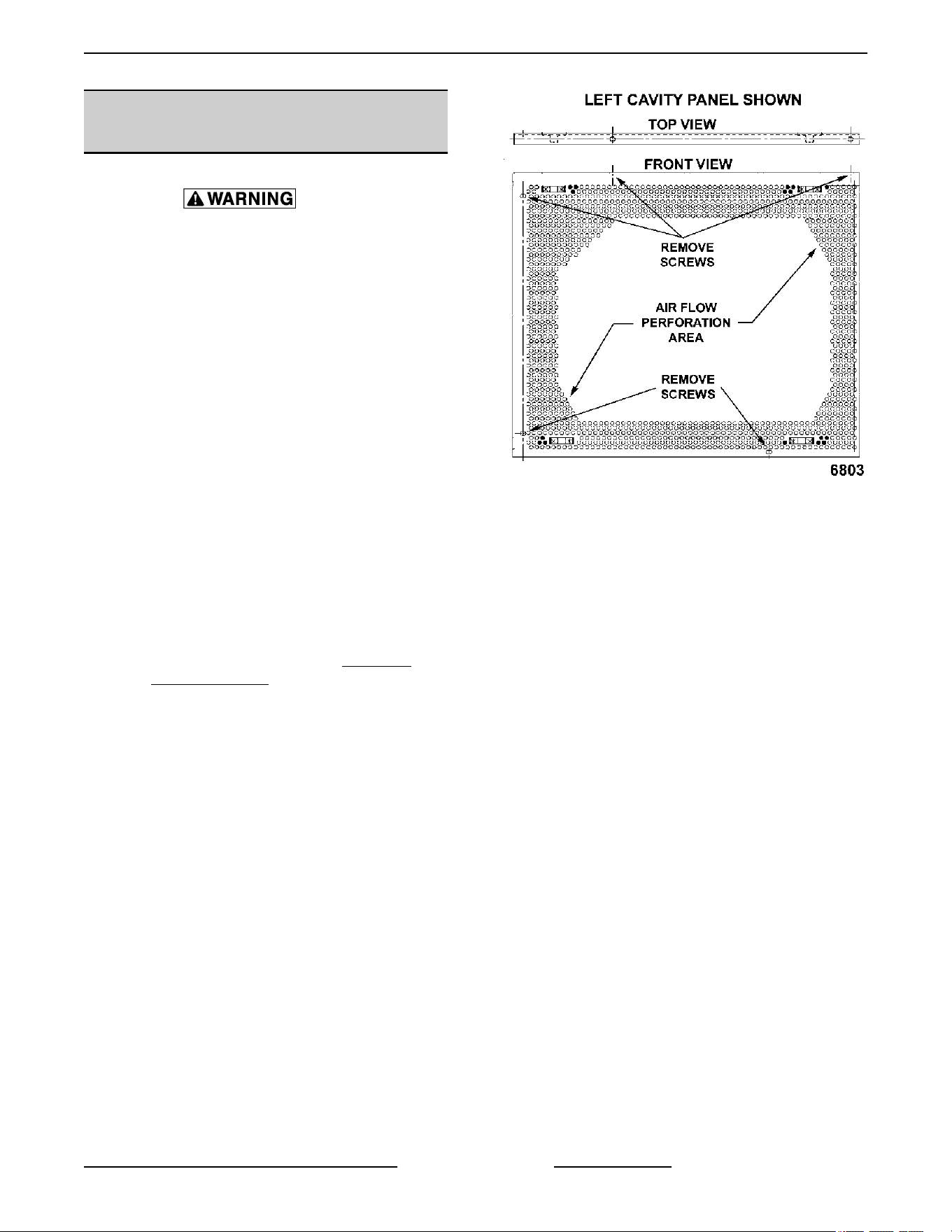
From inside the oven cavity, remove the
perforated panel from the same side of the
element being replaced.
Fig. 11
A. If removing the right side panel, also remove
the probe guard or mounting clips.
B. Run the probe wire thru the panel opening
before lifting panel out.
5. From the element being replaced, remove the
hold down clamps, the mounting bracket screws
at the top, then remove the element.
Fig. 12
NOTE: The mounting bracket is sealed with RTV
which may still hold the element after the screws are
removed. Also, in some cases, the ring terminal
VC4E & VC6E Series Full Size Electric Convection Ovens - REMOVAL AND REPLACEMENT OF PARTS
Page 11 of 83 F25105 Rev. E (0325)
connected to the element may interfere with easy
removal.
If access to the left side panel and/or the top
panel is available, see
ALTERNATE ACCESS.
6.
Disconnect the lead wires from the element.
7. Clean RTV residue from the mating surface
inside the oven, apply new high temperature RTV
to the heating element mounting bracket and
reverse procedure to install.
8. Check for proper operation.
Alternate Access
NOTE: If the heating element is not easy to remove
from inside the oven cavity, and access to the left side
panel and/or the top panel is available, this alternate
removal method may be used.
NOTE: On stacked ovens, if the bottom oven is being
serviced and the heating element to replace is on the
right side, the ovens must be unstacked to access the
heating element terminals through the top. Once
unstacked, follow the removal procedure below.
1. Perform steps 1 thru 4 under
FRONT ACCESS.
2.
If the element is on the left side:
A. the insulation at the top to expose the
element terminals.
B. Remove the lead wires from the element
being replaced. Proceed to step 4.
3. If the element is on the right side:
A. Remove the top panel and pull back the
insulation to expose the element terminals.
B. Remove the lead wires from the element
being replaced.
4. clamps holding the element vertical, the screw's
securing mounting bracket at the top, and then
remove the element.
NOTE: The mounting bracket is sealed with RTV
which may still hold the element after the screws are
removed.
5. Clean RTV residue from the mating surface
inside the oven, apply new high temperature RTV
to the heating element mounting bracket and
reverse procedure to install.
6. Check for proper operation.
HEATING ELEMENTS
Disconnect the electrical power to
the machine and follow lockout /
tagout procedures.
1.
Remove racks.
2. Remove
RIGHT SIDE PANEL(S).
3.
Remove nuts (1,
Fig. 13) from element wiring
connections.
Use second wrench on nut (2, Fig. 13) behind terminal
when removing or installing to prevent element stud
from twisting and getting damaging.
Fig. 13
4. Remove top baffle.
Fig. 14
5.
Remove side baffle.
VC4E & VC6E Series Full Size Electric Convection Ovens - REMOVAL AND REPLACEMENT OF PARTS
F25105 Rev. E (0325) Page 12 of 83

Fig. 15
6. Remove element support brackets.
Fig. 16
7.
Loosen all element mounting plate hex head
screws.
Fig. 17
8. Slide element mounting plate (1, Fig. 18) over to
release from cavity wall and remove elements
from oven.
Fig. 18
9.
Reverse procedure to install.
10. Verify operation.
VC4E & VC6E Series Full Size Electric Convection Ovens - REMOVAL AND REPLACEMENT OF PARTS
Page 13 of 83 F25105 Rev. E (0325)
BLOWER AND MOTOR Ending at
Serial Number 481916863
Disconnect the electrical power to
the machine and follow lockout /
tagout procedures. There may be
multiple circuits. Be sure all circuits
are disconnected.
1.
Take out the racks and rack supports.
2. Remove screws securing baffle panel and
remove the panel.
Fig. 19
3. If replacing:
A. Blower Only - Loosen set screws on blower
hub and using a bearing puller, remove
blower from motor shaft.
1) Reverse procedure to install and adjust
blower position as outlined under
BLOWER ADJUSTMENT in SERVICE
PROCEDURES AND
ADJUSTMENTS.
B. Motor - perform step 3A and continue
procedure.
4. Remove the nuts that secure the motor mounting
plate to the rear wall.
Fig. 20
5. Place a piece of cardboard on the bottom of the
oven cavity to protect its surface from any
damage during motor assembly removal.
6. Pull the motor assembly into the oven cavity and
place it on the cardboard.
7. Remove the junction box cover from the motor,
disconnect lead wires and remove the conduit.
8. Remove motor mounting bolts and flat washers
then lift the motor from the mounting plate.
9. Position the replacement motor on the motor
mounting plate and install mounting bolts and
washers. Hand tighten mounting bolts only.
Fig. 21
10.
Reconnect lead wires at the motor, replace
conduit and junction box cover.
NOTE: Check data plate on motor for wiring
schematic. The motor must rotate clockwise when
viewed from the shaft end.
VC4E & VC6E Series Full Size Electric Convection Ovens - REMOVAL AND REPLACEMENT OF PARTS
F25105 Rev. E (0325) Page 14 of 83
Fig. 22
11. Slide blower onto motor shaft until hub is flush
with end of shaft then tighten set screws.
12. Adjust motor position until blower is parallel to
motor mounting plate as outlined under
BLOWER ADJUSTMENT in SERVICE
PROCEDURES AND ADJUSTMENTS.
13. Position motor mounting plate on the rear wall
and secure with nuts and washers.
14. Replace the baffle panel.
15. Remove cardboard from the bottom of the oven
cavity.
16. Check oven for proper operation then replace
rack guides and racks
BLOWER AND MOTOR
Disconnect the electrical power to
the machine and follow lockout /
tagout procedures.
1. Remove HEATING ELEMENTS.
2. Disconnect motor harness (1, Fig. 23).
Fig. 23
3. Pinch cord grip together to remove from rear
panel.
Fig. 24
4.
Push motor wiring harness/cord out hole in rear
panel.
5. Remove blower baffle screws (2,
Fig. 25) if
applicable.
VC4E & VC6E Series Full Size Electric Convection Ovens - REMOVAL AND REPLACEMENT OF PARTS
Page 15 of 83 F25105 Rev. E (0325)
Fig. 25
6. Remove motor mounting plate nuts (1, Fig. 25).
7. Place a piece of cardboard on bottom of oven
cavity to protect its surface from any damage
during motor assembly removal.
8. Pull motor assembly into oven cavity and place
on cardboard.
9. Remove motor mounting bolts and washers and
lift motor off mounting plate.
Fig. 26
NOTE: Motor graphics are shown with motor
installed.
10.
Remove drip pan from motor and install onto
replacement motor.
Fig. 27
11. Reverse procedure to install.
12. Verify operation.
DOOR SWITCH
Disconnect the electrical power to
the machine and follow lockout /
tagout procedures. There may be
multiple circuits. Be sure all circuits
are disconnected.
1. Remove the top front cover as outlined under
COVERS AND PANELS.
2. Disconnect the lead wires to the door switch.
3. Remove the switch.
Fig. 28
4.
Reverse procedure to install the replacement
switch and check for proper adjustment as
outlined under
DOOR SWITCH ADJUSTMENT
in SERVICE PROCEDURES AND
ADJUSTMENTS.
VC4E & VC6E Series Full Size Electric Convection Ovens - REMOVAL AND REPLACEMENT OF PARTS
F25105 Rev. E (0325) Page 16 of 83
DOOR WINDOW
Disconnect the electrical power to
the machine and follow lockout /
tagout procedures. There may be
multiple circuits. Be sure all circuits
are disconnected.
1.
Remove the screws at the top and bottom of
door.
Fig. 29
2. Simultaneous doors:
A. If replacing window on the left door, remove
the handle from the front of the door then
remove door seal from the inside edge of the
door.
1) Lift out the inner door panel and
window assembly.
2) If replacing window on the right door,
remove the screws along the inside
edge (if applicable) of the door then
remove the inner door panel and
window assembly.
3. Remove the screws securing the window "tabs"
to the door bracket and lift the window assembly
out from the door frame.
Fig. 30
4. Reverse procedure to install the replacement
window.
OVEN DOORS AND BEARINGS
(INDEPENDENT DOORS) Ending at
Serial Number 481916782
Disconnect the electrical power to
the machine and follow lockout /
tagout procedures. There may be
multiple circuits. Be sure all circuits
are disconnected.
1.
Remove the top front cover and bottom front
cover as outlined under
COVERS AND
PANELS.
2.
Remove the door switch lever.
VC4E & VC6E Series Full Size Electric Convection Ovens - REMOVAL AND REPLACEMENT OF PARTS
Page 17 of 83 F25105 Rev. E (0325)
Fig. 31
3. Remove the lower door seal strip to expose the
mounting screws of the door assembly.
4. Remove the two (2) lower sill bolts by the lower
door shaft and the four (4) counter-sunk screws
from the lower sill.
Fig. 32
NOTE: The door assembly is heavy and will drop
down
once the last screw is removed. If removing door
assembly with-out assistance, use caution.
5. Tilt the top of the door slightly forward and lift the
door up until the bottom of the door shaft clears
the opening in the sill.
6. Lay the door flat to prevent damage.
7. The top and bottom bearings are now accessible
for inspection and/or replacement if needed.
A. If bearings are ok, proceed to step 8.
B. If replacing the top bearing, remove the top
bearing retainer and top bearing.
Fig. 33
C.
If replacing the bottom bearing, remove it
from the door shaft or the lower sill opening.
8. Reverse procedure to install door assembly and
check for proper adjustment as outlined under
DOOR ADJUSTMENT and DOOR SWITCH
ADJUSTMENT in SERVICE PROCEDURES
AND ADJUSTMENTS.
OVEN DOORS (INDEPENDENT
DOORS) Starting at Serial Number
481916783
Disconnect the electrical power to
the machine and follow lockout /
tagout procedures.
1.
Remove
TOP FRONT COVER.
2.
If servicing right side door, remove door switch
lever (1,
Fig. 34).
Fig. 34
3. While supporting door, remove hex bolts holding
upper bearing retainer (1, Fig. 35 ) and upper
shaft bracket (2, Fig. 35).
Fig. 35
4.
Lift door off lower shaft bracket.
VC4E & VC6E Series Full Size Electric Convection Ovens - REMOVAL AND REPLACEMENT OF PARTS
F25105 Rev. E (0325) Page 18 of 83
Lay door on flat protective surface to service.
5.
Reverse procedure to install.
6. Perform
DOOR ADJUSTMENT if servicing right
side door.
OVEN DOORS (SIMULTANEOUS
DOORS) Ending at Serial Number
481916783
Disconnect the electrical power to
the machine and follow lockout /
tagout procedures. There may be
multiple circuits. Be sure all circuits
are disconnected.
Assembly Removal
1.
Remove the top front cover and bottom front
cover as outlined under
COVERS AND
PANELS.
2.
Remove the door switch lever.
Fig. 36
3. Remove the top bearing retainers and top
bearings.
Fig. 37
4.
Remove the lower door seal strip to expose the
mounting screws of the door assembly.
A. Remove the two (2) lower sill bolts by the
lower door shaft and the four (4) counter-
sunk screws from the lower sill.
Fig. 38
NOTE: The door assembly is heavy and will drop
down once the last screw is removed. If removing door
assembly with-out assistance, use caution.
5. Lift up on the door assembly and swing the right
side out then move the assembly to the left to
clear the slots in the upper door sill.
6. Lay the door assembly on a flat cushioned
surface for disassembly.
7. Reverse procedure to install door assembly and
check for proper adjustment as outlined under
DOOR ADJUSTMENT, DOOR CHAIN
ADJUSTMENT (SIMULTANEOUS DOORS) and
DOOR SWITCH ADJUSTMENT in SERVICE
PROCEDURES AND ADJUSTMENTS.
Disassembly
1. Remove the door assembly as outlined in OVEN
DOORS (SIMULTANEOUS) under ASSEMBLY
REMOVAL.
2. Remove the door chain by loosening one of the
turnbuckles.
3. Loosen the set screw on the sprocket of door
being replaced.
4. Drive out the spirol pin from the sprocket of door
being replaced.
5. Remove the door from lower sill bearings and
sprocket.
VC4E & VC6E Series Full Size Electric Convection Ovens - REMOVAL AND REPLACEMENT OF PARTS
Page 19 of 83 F25105 Rev. E (0325)
Fig. 39
A. Door assembly parts are now accessible for
inspection and/or replacement if necessary.
6. Reverse procedure to re-assemble the door
assembly parts and check for proper adjustment
as outlined under DOOR CHAIN ADJUSTMENT
(SIMULTANEOUS DOORS) in SERVICE
PROCEDURES AND ADJUSTMENTS.
OVEN DOORS (SIMULTANEOUS
DOORS)
1. Remove TOP FRONT COVER and BOTTOM
FRONT COVER.
2. Remove door switch lever.
Fig. 40
3.
Remove door chain by loosening one of the
turnbuckles (
Fig. 41).
Fig. 41
4. Loosen the set screw on the sprocket of door
being replaced (Fig. 41).
5. Drive out the spiral pin from the sprocket of door
being replaced (Fig. 41).
6. While supporting door, remove hex head bolts
holding upper bearing retainer (1, Fig. 42) and
upper shaft bracket (2, Fig. 42).
Fig. 42
7.
Remove door(s) from lower sill bearings and
sprocket
Fig. 41.
Lay door on flat protective surface to service.
8.
Reverse procedure to install.
Verify spacers are reassembled as found when
removed.
VC4E & VC6E Series Full Size Electric Convection Ovens - REMOVAL AND REPLACEMENT OF PARTS
F25105 Rev. E (0325) Page 20 of 83
9. Perform door adjustments.
A. DOOR ADJUSTMENT .
B. DOOR CHAIN ADJUSTMENT
(SIMULATANEOUS DOORS) .
C. DOOR SWITCH ADJUSTMENT .
ROLLER LATCH ASSEMBLY
(INDEPENDENT DOORS)
NOTE: For units with serial number starting with 48
made
after 8/12/07 and serial number starting with 54
made after 8/26/07.
Disconnect the electrical power to
the machine and follow lockout /
tagout procedures. There may be
multiple circuits. Be sure all circuits
are disconnected.
1.
Remove the screws that attach roller latch
assembly to door.
Fig. 43
2.
Reverse procedure to install.
DOOR CATCH ROLLER ASSEMBLY
(INDEPENDENT DOORS)
NOTE: For units with serial number starting with 48
made before 8/13/07 and serial number starting with
54 made before 8/27/07.
Disconnect the electrical power to
the machine and follow lockout /
tagout procedures. There may be
multiple circuits. Be sure all circuits
are disconnected.
1.
Remove the top front cover as outlined under
COVERS AND PANELS.
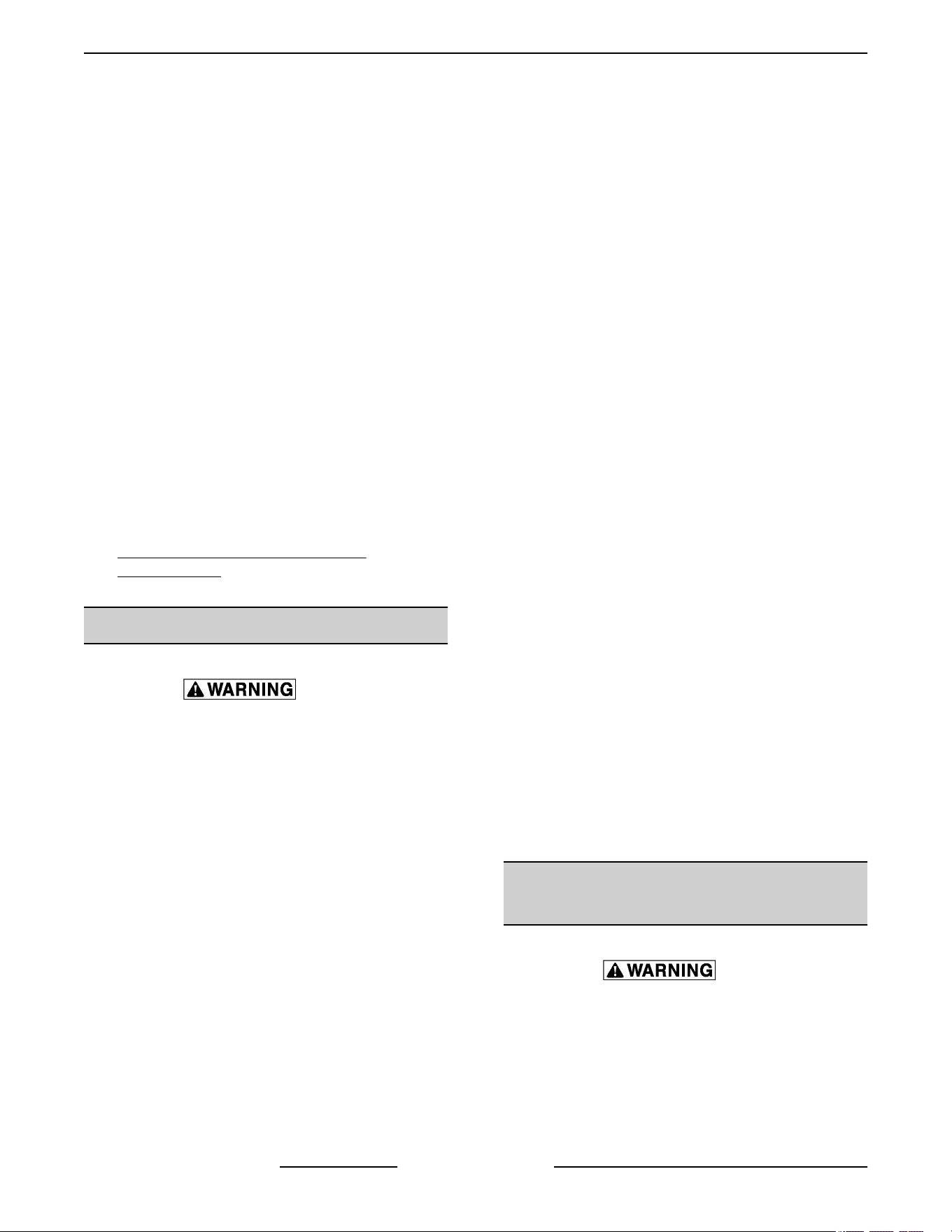
2.
Remove the catch roller assembly.
Fig. 44
3. Reverse procedure to install.
4. Adjust the catch roller as outlined under DOOR
CATCH (ROLLER) ADJUSTMENT
(INDEPENDENT DOORS) in SERVICE
PROCEDURES AND ADJUSTMENTS.
MECHANICAL (KX) THERMOSTAT
Disconnect the electrical power to
the machine and follow lockout /
tagout procedures. There may be
multiple circuits. Be sure all circuits
are disconnected.
1.
Remove the racks and right rack support.
2. Remove the thermostat knob and mounting
screws from the control panel and then remove
the control panel.
VC4E & VC6E Series Full Size Electric Convection Ovens - REMOVAL AND REPLACEMENT OF PARTS
Page 21 of 83 F25105 Rev. E (0325)
3. Remove the probe guard from the oven cavity
wall.
Fig. 45
NOTE: When installing probe guard, the probe should
not extend beyond the guard.
4. Remove the thermostat bulb from the oven cavity
by pushing it through the oven wall and into the
control panel area.
NOTE: The hole in the oven cavity wall does not line
up straight with the oven cavity outer shell, therefore
the probe must be removed at an angle.
5. Reverse the procedure to install.
6. Adjust the thermostat as outlined under
MECHANICAL (KX) THERMOSTAT
CALIBRATION in SERVICE PROCEDURES
AND ADJUSTMENTS.
HIGH LIMIT THERMOSTAT
Disconnect the electrical power to
the machine and follow lockout /
tagout procedures. There may be
multiple circuits. Be sure all circuits
are disconnected.
1. Take out racks from the oven.
2. Remove the high limit thermostat cover/mounting
plate from inside the oven cavity at the top.
Fig. 46
3. Disconnect lead wires from high limit thermostat
then remove high limit thermostat from cover/
mounting plate.
Fig. 47
NOTE: Remove the old RTV sealer from the cover
and
mating surfaces inside the oven cavity and apply
new high temperature RTV sealer before installing.
4. Reverse procedure to install.
INTERIOR LIGHTS (Rear Mounted,
Round)
Disconnect the electrical power to
the machine and follow lockout /
tagout procedures.
Lamp
1.
Remove racks.
2. Unscrew glass lens for the light being replaced
then unscrew bulb.
VC4E & VC6E Series Full Size Electric Convection Ovens - REMOVAL AND REPLACEMENT OF PARTS
F25105 Rev. E (0325) Page 22 of 83
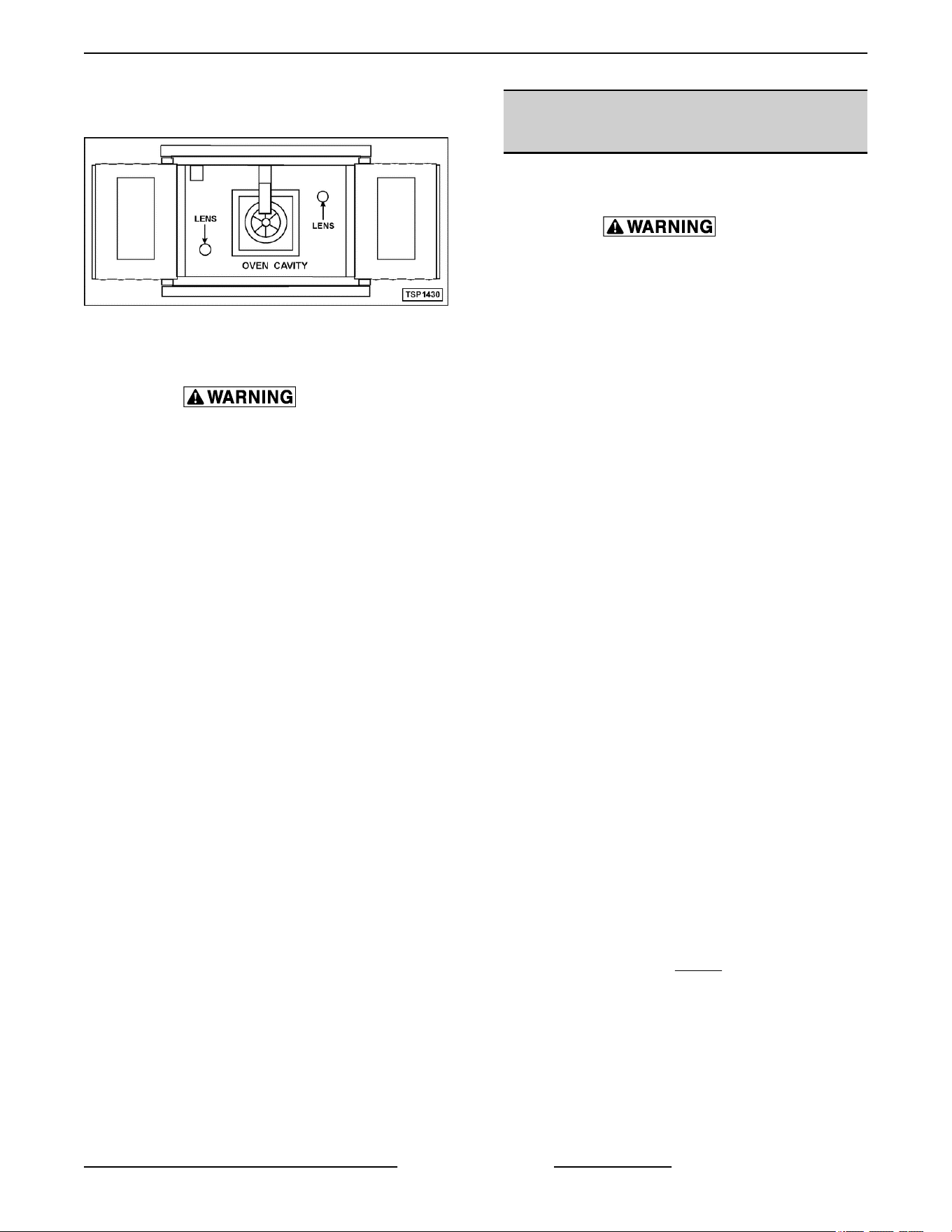
NOTE:
Use a cloth when handling bulb so you do not
leave fingerprints on bulb.
Fig. 48
3. Replace bulb then reverse procedure to install.
Disconnect the electrical power to
the machine and follow lockout /
tagout procedures.
Lamp Assembly
1. Remove lens and bulb.
2. Remove springs from retaining tabs (2 places) on
the socket.
Fig. 49
3.
Depress retaining tabs and pull socket out from
the oven, far enough to disconnect lead wires.
4. Remove socket from the oven.
5. Attach lead wires to the replacement socket.
6. Insert socket into the hole in oven and push until
socket is held in place by retaining tabs.
7. Install light bulb and lens.
8. Check for proper operation.
INTERIOR LIGHTS (Side Mounted,
Square)
Bulb Replacement
Disconnect the electrical power to
the machine and follow lockout /
tagout procedures.
1.
Remove racks and right-side hand rack guide.
2. Pull lamp cover off.
3. Grasp lamp using a clean cloth and remove from
lamp assembly.
Fig. 50
4.
Reverse procedure to install new bulb.
NOTE: Verify gasket (1,
Fig. 51)
is flat on lamp cover
and not damaged.
VC4E & VC6E Series Full Size Electric Convection Ovens - REMOVAL AND REPLACEMENT OF PARTS
Page 23 of 83 F25105 Rev. E (0325)
Fig. 51
Lamp Assembly Replacement
Disconnect the electrical power to
the machine and follow lockout /
tagout procedures.
1. Remove racks.
2. Remove BULB if reusing.
3. Lift right side rack guide off oven cavity.
4. Pull lamp cover off from the top or bottom.
5. Insert narrow blade screwdriver into tab and
bend out to release. Repeat with second tab.
Fig. 52
6. Pull lamp housing out of oven cavity.
7. Disconnect wires.
Fig. 53
8.
Reverse procedure to install.
VC4E & VC6E Series Full Size Electric Convection Ovens - REMOVAL AND REPLACEMENT OF PARTS
F25105 Rev. E (0325) Page 24 of 83
NOTE: Verify
gasket (1,
Fig. 54)
is flat on lamp cover
and not damaged.
Fig. 54
COOLING FAN
Disconnect the electrical power to
the machine and follow lockout /
tagout procedures. There may be
multiple circuits. Be sure all circuits
are disconnected.
1. Remove the right side panel as outlined under
COVERS AND PANELS.
NOTE: If right side panel is not accessible, this
component can be serviced by removing the control
panel as outlined under COVERS AND PANELS.
2.
removing wire nuts.
3. Remove the screws securing the air deflector to
the fan then loosen the tab screw holding the fan
to the component panel. Rotate the tab so that
the fan will clear and remove the fan.
Fig. 55
4. Reverse the procedure to install the replacement
fan and check for proper operation.
NOTE: The fan must be installed so air is pulled from
outside the rear of the oven and blown into the control
area. The arrow on the fan body indicates "air flow"
direction and should be pointing toward the controls.
NOTE: Ensure fan is seated "squarely" against the
air tube and the oven bottom.
NOTE: The air deflector should be angled upwards
at approximately 30 degrees to properly direct the air
flow.
VC4E & VC6E Series Full Size Electric Convection Ovens - REMOVAL AND REPLACEMENT OF PARTS
Page 25 of 83 F25105 Rev. E (0325)
SERVICE PROCEDURES AND ADJUSTMENTS
Certain procedures in this section require electrical test or measurements while power is
applied
to the machine. Exercise extreme caution at all times and follow Arc Flash procedures.
If test points are not easily accessible, disconnect power and follow Lockout/Tagout
procedures, attach test equipment and reapply power to test.
SOLID STATE TEMPERATURE
CONTROL CALIBRATION
1. Place a thermocouple in geometric center of
oven cavity.
2.
Set ON-OFF-COOL DOWN switch to ON.
3. Set temperature control dial to 350°F.
4. Allow oven temperature to stabilize (normally 3
cycles).
5. Record temperature at which Heat lamp goes
OFF and comes ON for at least two complete
heating cycles.
6. Calculate differential by subtracting temperature
indicated when lamp goes out from temperature
indicated when lamp comes on.
Differential = Heat lamp OFF - Heat lamp ON
Example: 360° (lamp off) - 340° (lamp on) =
20°
A. Calculated differential should be less than
20°F.
1) If differential is less than 20°F,
temperature control circuit is
functioning properly.
a. Proceed to
Step 7.
2)
If differential is more than 20°F:
a. Check temperature probe as
outlined under
TEMPERATURE
PROBE TEST (SOLID STATE
CONTROL).
b.
If probe is functioning properly
then temperature control is
malfunctioning.
a) Install a replacement
temperature control and
check calibration.
7. Calculate average temperature by adding
temperature indicated when lamp goes out to
temperature indicated when lamp comes on and
dividing this answer by 2.
[Temp. (lamp off) + Temp. (lamp on)] ÷ 2 =
Average Temp. Example: (360° + 340°) ÷ 2 =
350°
A. If average temperature is less than 10°F
from dial setting, thermostat is properly
calibrated.
B. If average temperature is more than 10°F
from dial setting, thermostat calibration
must be adjusted.
1) Loosen temperature control knob set
screw and remove knob from stem.
2) Access adjustment potentiometer
located at 3 o'clock position (
Fig. 56).
NOTE: If no access hole exists in overlay, you may
carefully create one.
Fig. 56
a.
Turn clockwise to increase,
counterclockwise to decrease
temperature
VC4E & VC6E Series Full Size Electric Convection Ovens - SERVICE PROCEDURES AND ADJUSTMENTS
F25105 Rev. E (0325) Page 26 of 83

b. Repeat average temperature
calculation in Step 7.
NOTE:
Allow oven to cycle at least two times between
adjustments before performing calculation.
a) If average temperature still
differs more than 10°F from
dial setting, adjust
thermostat calibration until
average temperature is
within tolerance.
C. If above adjustment cannot be obtained,
replace temperature control and check
calibration.
MECHANICAL (KX) THERMOSTAT
CALIBRATION
1. Place a thermocouple in the geometric center of
the oven cavity.
2.
Set the power switch to ON.
3. Set the thermostat dial to 350°F.
4. Allow the oven temperature to stabilize (normally
3 cycles).
5. Record the temperature when the thermostat
cycles OFF and ON for at least three complete
cycles.
6. Calculate the differential by subtracting the
temperature indicated when heat lamp goes out
from temperature indicated when heat lamp
comes on.
Differential - Heat lamp OFF - Heat lamp ON.
Example: 360° (lamp off) - 340° (lamp on) = 20°
A. The differential calculated should be less
than 30°F.
1) If the differential is 30°F or less, the
thermostat is functioning properly. a.
Proceed to step 7.
a. Proceed to step 7.
2) If the differential is more than 30°F, the
thermostat is malfunctioning.
a. Install a replacement thermostat
and check calibration.
7. Calculate the average temperature by adding the
temperature indicated when the heat lamp goes
out to the temperature indicated when the heat
lamp comes on and dividing this answer by 2.
[Temp. (lamp off) +Temp. (lamp on)] + 2 =
Average Temp. Example: 360° + 340° +2 = 350°
A. If the average temperature is 15°F or less
from the dial setting, the thermostat is
properly calibrated.
B. If the average temperature is more than
15°F of the dial setting, the thermostat
calibration must be adjusted.
1) Remove the thermostat knob.
2) Hold the thermostat shaft and turn the
inner set screw clockwise to decrease
temperature or counterclockwise to
increase temperature (¼ turn = 35°F).
Fig. 57
8. Replace the knob and verify the setting is still at
350°F.
9. Repeat step 7 until the average temperature is
within tolerance.
NOTE: Allow the oven to cycle at least two times
between adjustments before performing the
calculation.
A. After the final adjustment is made and the
average temperature is within tolerance,
remove the knob and apply a nonpermanent
type sealer around the head of the set screw
10. If the above adjustment cannot be obtained:
VC4E & VC6E Series Full Size Electric Convection Ovens - SERVICE PROCEDURES AND ADJUSTMENTS
Page 27 of 83 F25105 Rev. E (0325)
A. Turn the power switch OFF.
Disconnect the electrical power to
the machine and follow lockout /
tagout procedures. There may be
multiple circuits. Be sure all circuits
are disconnected.
B.
Install a replacement thermostat and check
calibration.
SOLID STATE TEMPERATURE
CONTROL TEST
Certain procedures in this section
require electrical test or
measurements while power is
applied to the machine. Exercise
extreme caution at all times and
follow Arc Flash procedures. If test
points are not easily accessible,
disconnect power and follow
Lockout/Tagout procedures, attach
test
equipment and reapply power to
test.
1. Remove the
RIGHT SIDE PANEL.
NOTE: If right side panel is not accessible, this
component can be serviced by removing CONTROL
PANEL.
2.
Place a thermocouple in the geometric center of
the oven cavity.
NOTE: Oven temperature must be below 450°F.
NOTE: If oven is equipped with "Cook and Hold"
option, set to Cook (normal cooking) before
continuing.
3. Set the temperature control to the maximum
setting.
4. Check machine data plate for correct voltage to
oven. Refer to diagram below for proper terminal
locations and voltages before checking the
control. Use the correct terminals for the
corresponding voltage.
5. Turn the power switch to ON.
Fig. 58
6.
Check for proper voltage across terminals COM
AC to 120VAC or COM AC to 208-240VAC for
power to the control.
A. If correct, proceed to step 7.
B. If incorrect, problem is not with the
temperature control. See
TROUBLESHOOTING.
7.
Check relay voltages on the board:
A. For 120VAC controls - check across
OUTPUT RELAY terminal (left side) to 120
VAC terminal for input to the internal relay.
Check across OUTPUT RELAY terminal
(right side) to 120 VAC for output from the
internal relay.
B. For 208-240VAC controls - check across
OUTPUT RELAY terminal (left side) to
208-240 VAC terminal for input to the
internal relay. Check across OUTPUT
RELAY terminal (right side) to 208-240 VAC
for output from the internal relay.
1) If input voltage to the internal relay is
correct, proceed to step 8. If input
voltage to the internal relay is not
present, problem is not with the
temperature control. See
TROUBLESHOOTING.
2) If
output voltage from the internal relay
is correct proceed to step 8. If output
voltage from the internal relay is not
correct, check temperature probe as
outlined under
TEMPERATURE
PROBE TEST (SOLID STATE
CONTROL).
VC4E & VC6E Series Full Size Electric Convection Ovens - SERVICE PROCEDURES AND ADJUSTMENTS
F25105 Rev. E (0325) Page 28 of 83
8. Set the temperature control to the minimum
setting.
NOTE: Oven temperature must be above 300°F.
9.
Check for zero (0) volts AC across terminals
OUTPUT RELAY terminal (right side) to 120 VAC
or OUTPUT RELAY terminal (right side) to
208-240 VAC for no output from the internal
relay.
A. If correct, temperature control is functioning
properly.
B. If incorrect, check temperature probe as
outlined under
TEMPERTURE PROBE
TEST (SOLID STATE CONTROL).
1)
If temperature probe is OK:
a. Turn the power switch OFF.
Disconnect the electrical power to
the machine and follow lockout /
tagout procedures.
b.
Replace the temperature control
and check calibration as outlined
under
SOLID STATE
TEMPERATURE CONTROL
CALIBRATION.
TEMPERATURE PROBE TEST
(SOLID STATE CONTROL)
Disconnect the electrical power to
the machine and follow lockout /
tagout procedures. There may be
multiple circuits. Be sure all circuits
are disconnected.
NOTE: The temperature probe used in conjunction
with the Solid State Temperature control is an RTD
(resistance temperature detector) of the Thermistor
type. As temperature increases the resistance value
decreases.
1.
Remove the right side panel as outlined under
COVERS AND PANELS in REMOVAL AND
REPLACEMENT OF PARTS.
NOTE: If right side panel is not accessible, this
component can be serviced by removing the control
panel as outlined underCOVERS AND PANELS.
2.
Place a shielded thermocouple in the geometric
center of the oven cavity and determine the
temperature in the oven cavity.
3. Remove the probe lead wires from the solid state
temperature control.
4. Test the probe with an ohmmeter.
A. If the measured resistance values are inside
the given tolerance then the probe is
functioning properly.
B. If the measured resistance values are
outside the given tolerance then replace the
probe and retest.
1) Check oven for proper operation.
5. Reverse procedure to install.
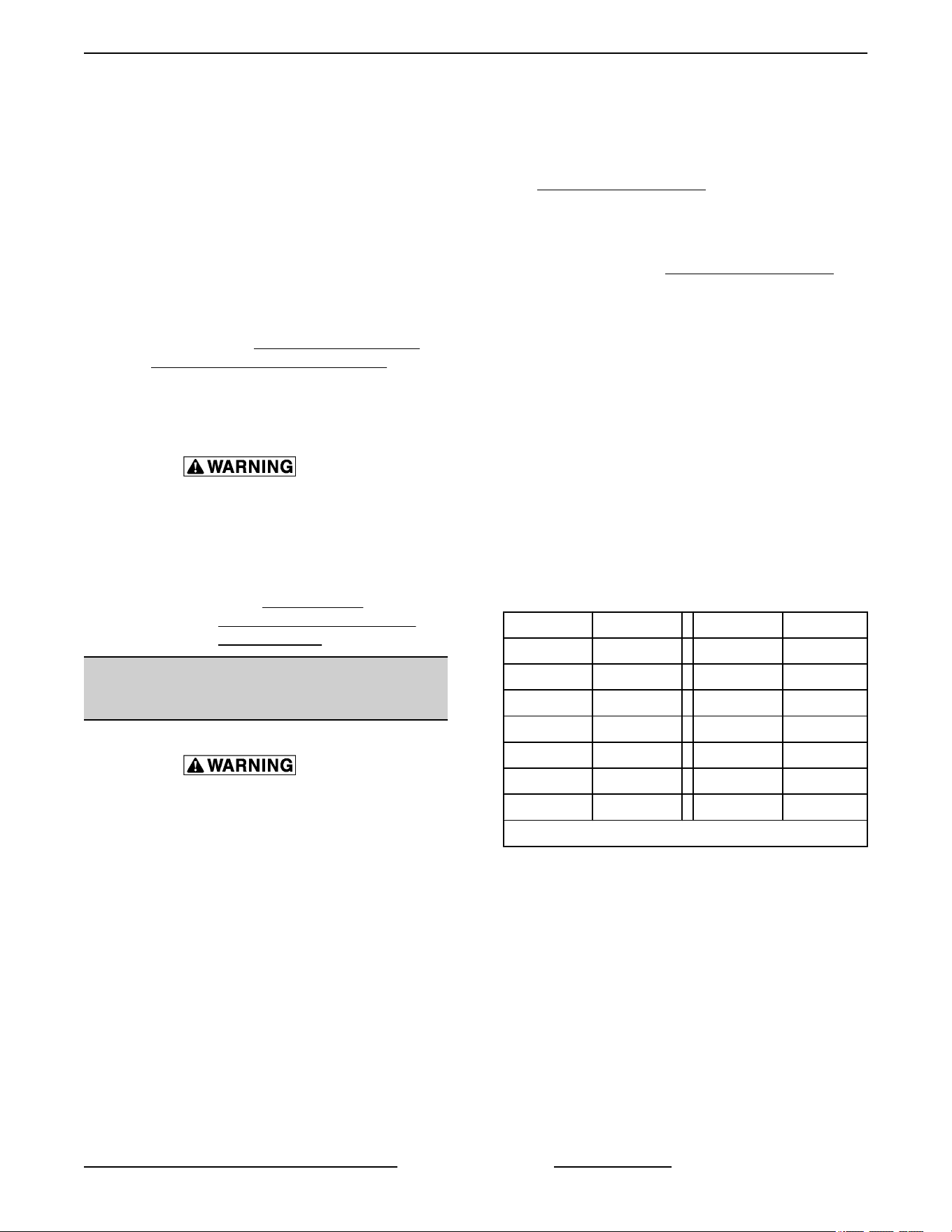
TEMP (°F)
OHMS * TEMP (°F) OHMS *
77 90,000 360 822
240 4,077 380 656
260 3,016 400 529
280 2,266 425 424
300 1,726 450 334
320 1,332 475 266
340 1,041
* Resistance in ohms ± 10%
VC4E & VC6E Series Full Size Electric Convection Ovens - SERVICE PROCEDURES AND ADJUSTMENTS
Page 29 of 83 F25105 Rev. E (0325)
HEATING ELEMENT TEST
Disconnect the electrical power to the machine and follow lockout / tagout procedures. There
may be multiple circuits. Be sure all circuits are disconnected.
1.
Turn the power switch ON and set the oven temperature control to the highest setting.
2. Measure the voltage at the heating element terminals and verify it against the data plate voltage.
A. If voltage is incorrect, find the source of the problem.
B. If voltage is correct, check current draw (amps) through the heating element lead wires.
NOTE: This method is preferred over a resistance check when a clamp on type amp meter is available.
1) If current draw is correct then heating element is functioning properly.
2) If current draw is not correct, turn the power switch OFF and disconnect the electrical supply to the
oven.
a. Replace
HEATING ELEMENTS Ending at Serial Number 481916863.
C. If unable to check current draw, a resistance check may indicate a malfunctioning element.
1) Turn the power switch OFF and disconnect the electrical supply to the oven.
2) Remove the lead wires from the heating element and check resistance (ohms).
3. Check for proper operation.
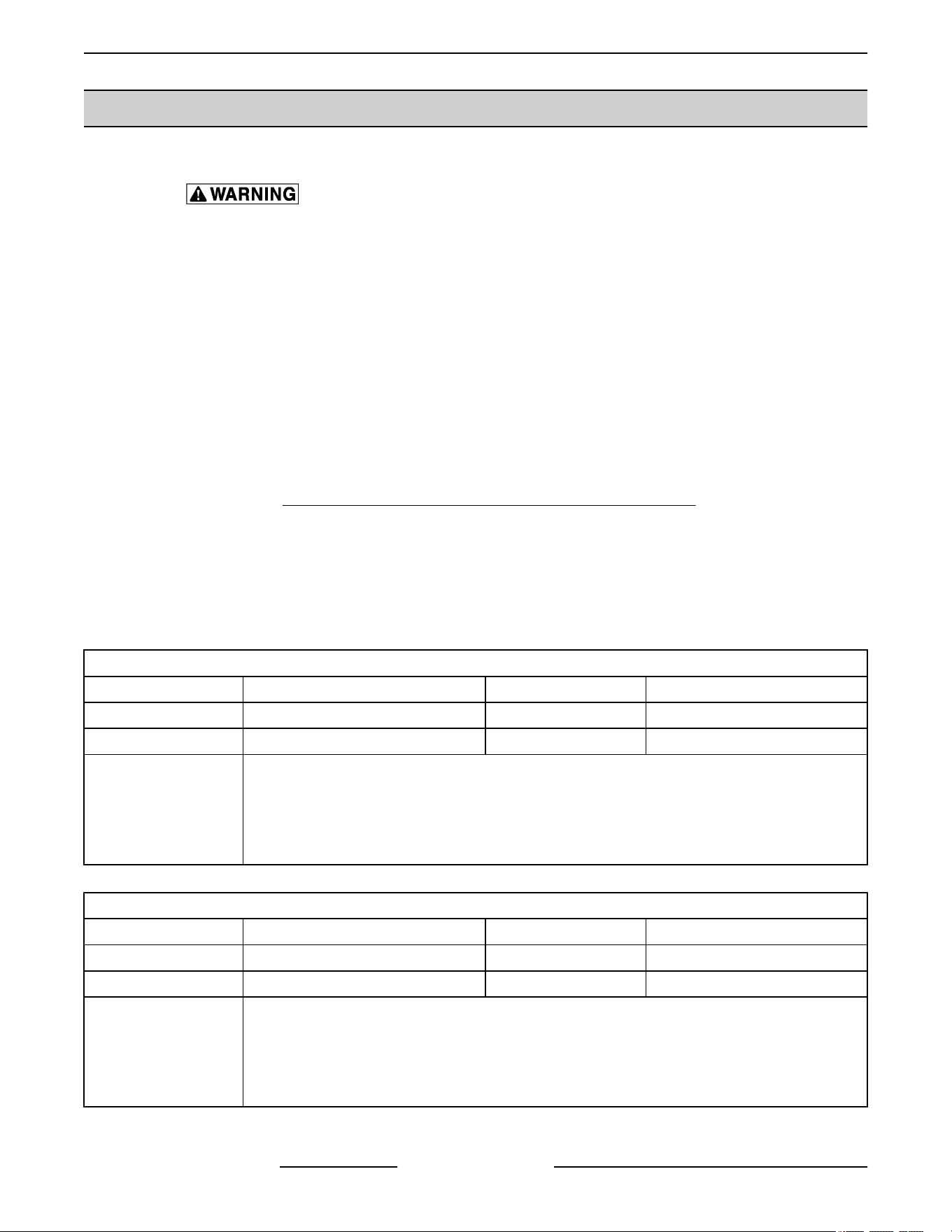
SIDE MOUNTED ELEMENTS
VOLTAGE AMPS PER ELEMENT KW PER ELEMENT OHMS PER ELEMENT
208 (red) 9.6 2 21.6
240 (blue) 8.3 2 28.8
NOTES:
1. Values in the table are nominal. Tolerance is +5/-10%.
2. Voltage values are @ 60HZ
3. Resistance values (ohms) are @ room temperature.
4. Color coding located on the one corner of mounting bracket.
REAR MOUNTED ELEMENTS
VOLTAGE AMPS PER ELEMENT KW PER ELEMENT OHMS PER ELEMENT
208 19.2 4 10.8
240 16.6 4 14.4
NOTES:
1. Values in the table are nominal. Tolerance is +5/-10%.
2. Voltage values are @ 60HZ
3. Resistance values (ohms) are @ room temperature.
4. Replaced as a set, check individually.
VC4E & VC6E Series Full Size Electric Convection Ovens - SERVICE PROCEDURES AND ADJUSTMENTS
F25105 Rev. E (0325) Page 30 of 83
BLOWER ADJUSTMENT
Disconnect the electrical power to
the machine and follow lockout /
tagout procedures. There may be
multiple circuits. Be sure all circuits
are disconnected.
1.
Remove the blower motor and mounting
assembly by following steps 1 through 7 as
outlined under
BLOWER AND MOTOR in
REMOVAL AND REPLACEMENT OF PARTS.
2.
Loosen the motor mounting bolts.
3. Adjust the motor position until the blower is
parallel to and 1/4 inch away from the motor
mounting plate. Check for squareness of the
blower to the motor mounting plate at the top,
bottom, left and right of the blower.
A. If the blower is square then tighten motor
mounting bolts and proceed to step 4.
B. If the blower is not square continue
adjusting until proper spacing is achieved
then tighten motor mounting bolts
NOTE: If necessary, place shims between motor and
frame.
Fig. 59
4. Reverse the procedure to install.
DOOR ADJUSTMENT
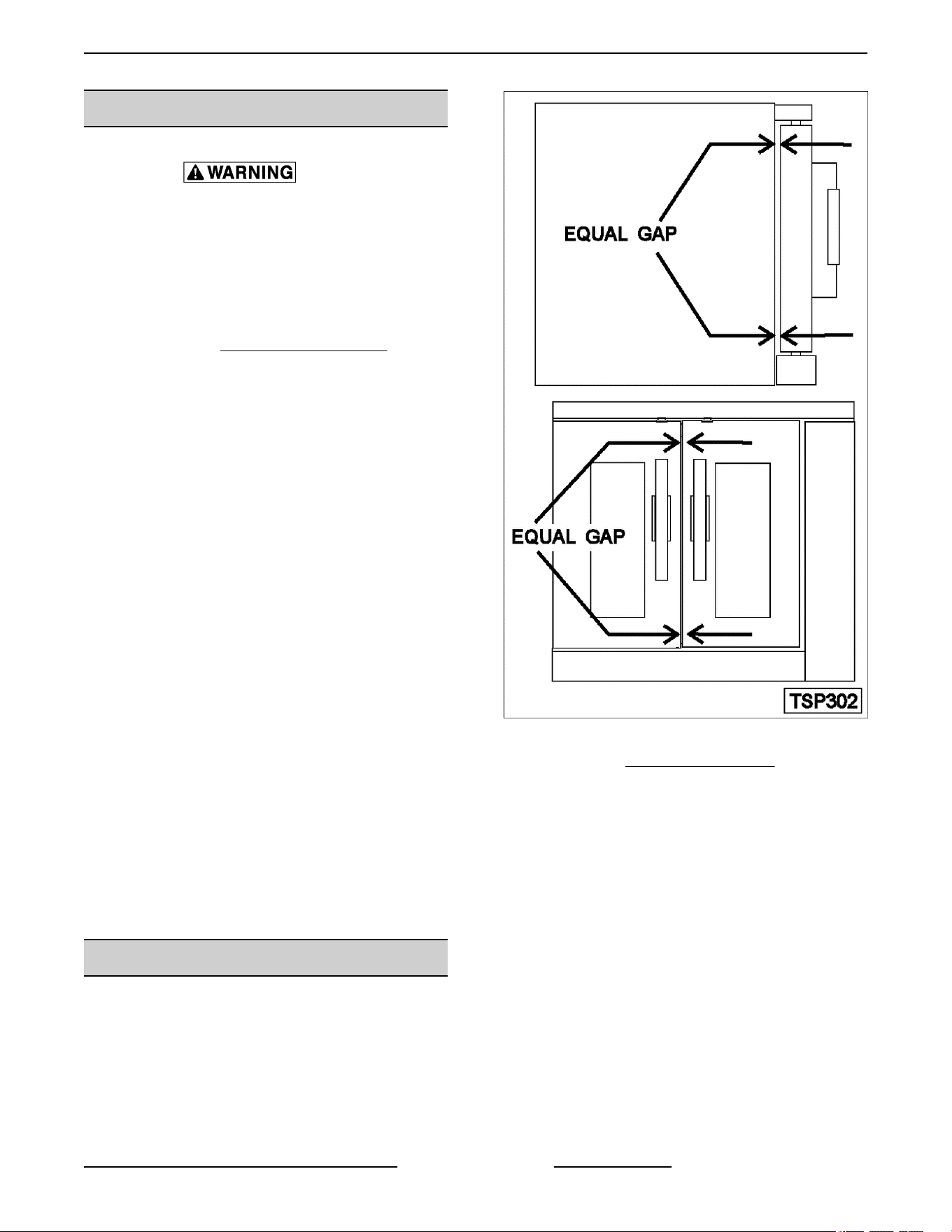
1. Check the doors to make sure they have a .125
(1/8") gap between them and that the vertical
edge of the door is parallel to the vertical door
seal. If the doors are not positioned in this
manner, adjust the doors as described.
Fig. 60
2. Remove the TOP FRONT COVER.
3. Loosen the screws/bolts that secure the upper
door brackets just enough to allow door
movement.
Figure Shown below (Left Side) is ending at
Serial Number 481916782.
VC4E & VC6E Series Full Size Electric Convection Ovens - SERVICE PROCEDURES AND ADJUSTMENTS
Page 31 of 83 F25105 Rev. E (0325)
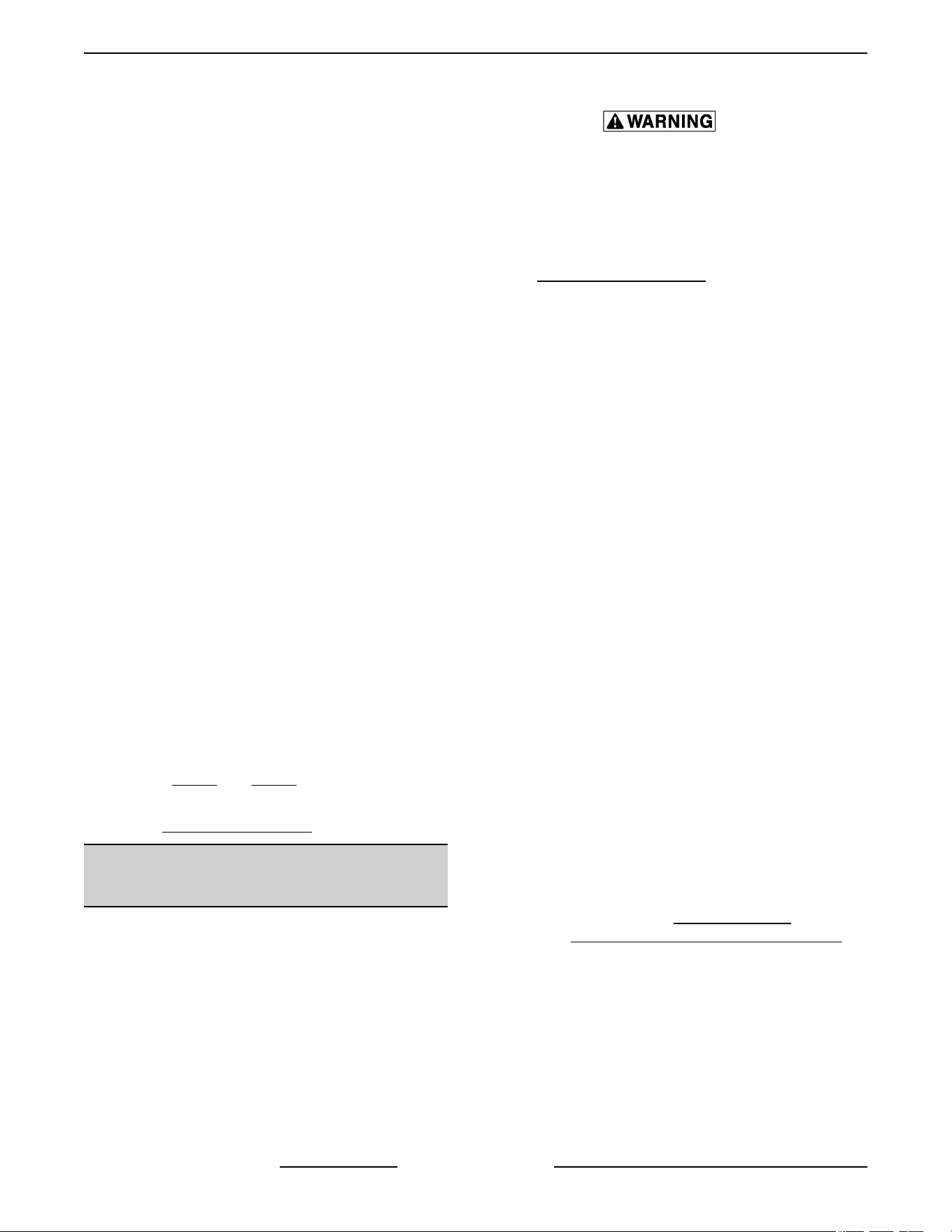
Fig. 61
Figure shown below (Left Side) is starting at
Serial Number 481916783.
Fig. 62
4. Move
the door until proper alignment is achieved
then tighten the screws/bolts on the upper door
bearing hardware.
5. Repeat
Step 3 and Step 4 on the opposite door,
if necessary.
6.
Install
TOP FRONT COVER.
DOOR STRIKE ADJUSTMENT
(INDEPENDENT DOORS)
NOTE: For units with serial number starting with 48
made
after 8/12/07 and serial number starting with 54
made after 8/26/07.
Disconnect the electrical power to
the machine and follow lockout /
tagout procedures. There may be
multiple circuits. Be sure all circuits
are disconnected.
1.
Remove top front cover as outline under
COVERS AND PANELS in REMOVAL AND
REPLACEMENT OF PARTS.
2. Open
the doors and inspect door strike for proper
shape.
A. Replace if bent. Do not bend strike plate.
B. If adjustment is necessary, loosen
fasteners, close doors and insure contact
between door inner surface and upper
horizontal seal. Slide door strike plate until
contact with roller latch is made. Tighten
strike plate fasteners
Fig. 63
3.
Open and close the doors several times while
observing the roller latch and strike plate
operation.
A. Replace roller latch if malfunctioning as
outlined under
ROLLER LATCH
ASSEMBLY (INDEPENDENT DOORS)
and adjust as outlined in this procedure.
4.
Each oven door should open with a force of 8 to
25 pounds when pulled at the handle. The
adjustments must allow the doors to remain
closed during normal operation and allow
opening without exertion by the user.
VC4E & VC6E Series Full Size Electric Convection Ovens - SERVICE PROCEDURES AND ADJUSTMENTS
F25105 Rev. E (0325) Page 32 of 83
DOOR CATCH ROLLER
ADJUSTMENT (INDEPENDENT
DOORS)
NOTE: For units with serial number starting with 48
made before 8/13/07 and serial number starting with
54 made before 8/27/07.
Disconnect the electrical power to
the machine and follow lockout /
tagout procedures. There may be
multiple circuits. Be sure all circuits
are disconnected.
1.
Remove the top front cover as outline under
COVERS AND PANELS in REMOVAL AND
REPLACEMENT OF PARTS.
2.
Open the doors and inspect the door strike for
proper shape.
Fig. 64
A. Replace
if bent and adjust as outlined in this
procedure.
3. Open and close the doors several times while
observing the catch roller operation.
A. Replace if malfunctioning and adjust as
outlined in this procedure.
NOTE: Shims may be required under the door strike
to raise it, before the proper door tension adjustment
can be set.
4.
Apply lubricant around the spring. See
LUBRICATION under GENERAL.
5.
Close the doors and check them for proper
alignment.
A. Doors should be centered and parallel at the
top and bottom, in the oven cavity opening.
See
DOOR ADJUSTMENT.
6. With
the doors closed, observe the position of the
catch roller "ball" in relation to the door strike.
A. Ensure the catch roller "ball" is centered (left
to right) to the door strike.
1) Adjust alignment, if necessary.
B. Open the right side door and view the left
side door catch roller and strike. Ensure the
door catch roller "ball" is resting upon the
angular surface of the door strike. Repeat
on the opposite door.
1) If adjustment is necessary, loosen the
mounting screws then slide the door
strike from "front to back" until the roller
rests upon the angular surface of the
door strike. Tighten screws and check
operation.
2) If proper adjustment cannot be
achieved, add shims beneath the door
strike. Repeat step 6 thru this step.
NOTE: DO NOT BEND THE DOOR STRIKE.
7. Each oven door should open with a force of 8 to
25 pounds when pulled at the handle. See
TOOLS under GENERAL.
A.
Adjust catch roller tension as follows:
1) Turn the set screw inside the catch
assembly housing clockwise to
increase tension on the catch roller and
counterclockwise to decrease tension
on the catch roller.
NOTE: The amount of tension on the catch roller
determines the opening force of the door.
2) Continue adjustment until proper door
operation is achieved.
VC4E & VC6E Series Full Size Electric Convection Ovens - SERVICE PROCEDURES AND ADJUSTMENTS
Page 33 of 83 F25105 Rev. E (0325)
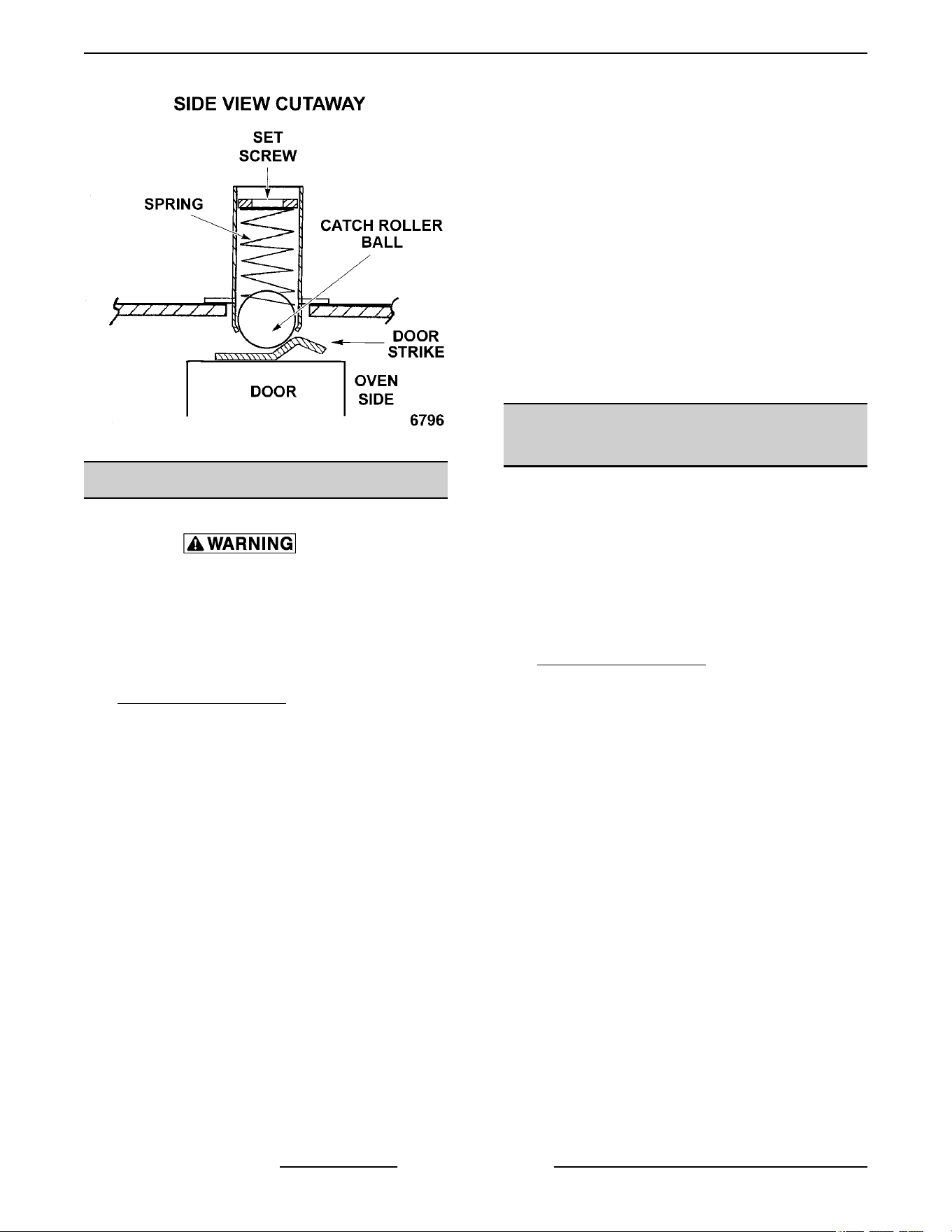
Fig. 65
DOOR SWITCH ADJUSTMENT
Disconnect the electrical power to
the machine and follow lockout /
tagout procedures. There may be
multiple circuits. Be sure all circuits
are disconnected.
1. Remove the top front cover as outlined under
COVERS AND PANELS in REMOVAL AND
REPLACEMENT OF PARTS.
2. Door operation:
A. Independent doors - The switch actuator
should be operated by the switch lever when
the right door is between 1" and 1 1/2" from
being closed.
B. Simultaneous doors - The switch actuator
should be operated by the switch lever when
the right door is 1/2" from being closed.
3. If adjustment is necessary, bend the switch
actuator to obtain the proper setting.
Fig. 66
4. Install the top front cover.
5. Apply power to the oven and check for proper
operation.
DOOR CHAIN ADJUSTMENT
(SIMULATANEOUS DOORS)
Introduction
When the oven doors are in proper adjustment,
as the doors come together, the right door will
lead the left door in closing by about 1/4 inch. The
doors will feel like they are self closing the last
1/2 inch of travel.
Procedure
1. Remove the lower sill cover as outline under
COVERS AND PANELS in REMOVAL AND
REPLACEMENT OF PARTS.
2. Close doors and check door chain for factory
setting.
A. Turnbuckles should be 5 to 5 1/2 inches
apart.
B. Short eye bolt should be connected to the
end of the chain that goes to the front of the
sprocket.
C. 2 links of the chain should not be engaged
at the rear of the sprocket.
D. Chain must be tight enough that the doors
move simultaneously when opened or
closed.
E. When the doors are opened, the
turnbuckles will move away from each other.
F. The stop cable must be positioned where it
moves freely and does not get pinched.
3. Position door chain assembly to factory setting if
the conditions in step 2 are not met.
VC4E & VC6E Series Full Size Electric Convection Ovens - SERVICE PROCEDURES AND ADJUSTMENTS
F25105 Rev. E (0325) Page 34 of 83
Fig. 67
4. If right door does not lead the left door in closing:
A. Loosen locknuts on both turnbuckles.
B. Loosen left turnbuckle.
C. Tighten right turnbuckle.
D. Tighten locknuts on both turnbuckles.
5. If the right door leads the left door by more than
3/8 inch:
A. Loosen locknuts on both turnbuckles.
B. Loosen right turnbuckle.
C. Tighten left turnbuckle.
D. Tighten locknuts on both turnbuckles.
6. Check door for proper operation.
NOTE: The locknuts must be tight during testing or
the adjustment will not hold.
A. If doors do not close properly, repeat step 4,
5 and 6.
B. If doors operate properly, continue to step 7.
7. Install the lower front cover.
COMPUTER CONTROL
Operation
Refer to the Instructions Manual F31159 for
specific operating instructions.
Setup Mode
NOTE: Use the setup mode to verify that the control
is
configured to the factory settings which result in the
proper operation of the oven. If the CAL1 parameter
is other than zero, determine if it is still needed before
resetting to zero. See
COMPUTER CONTROL
TEMPERATURE CALIBRATION.
Changing the C_F, InP1, rL1 & rH1 parameters will
default all menus to the factory settings.
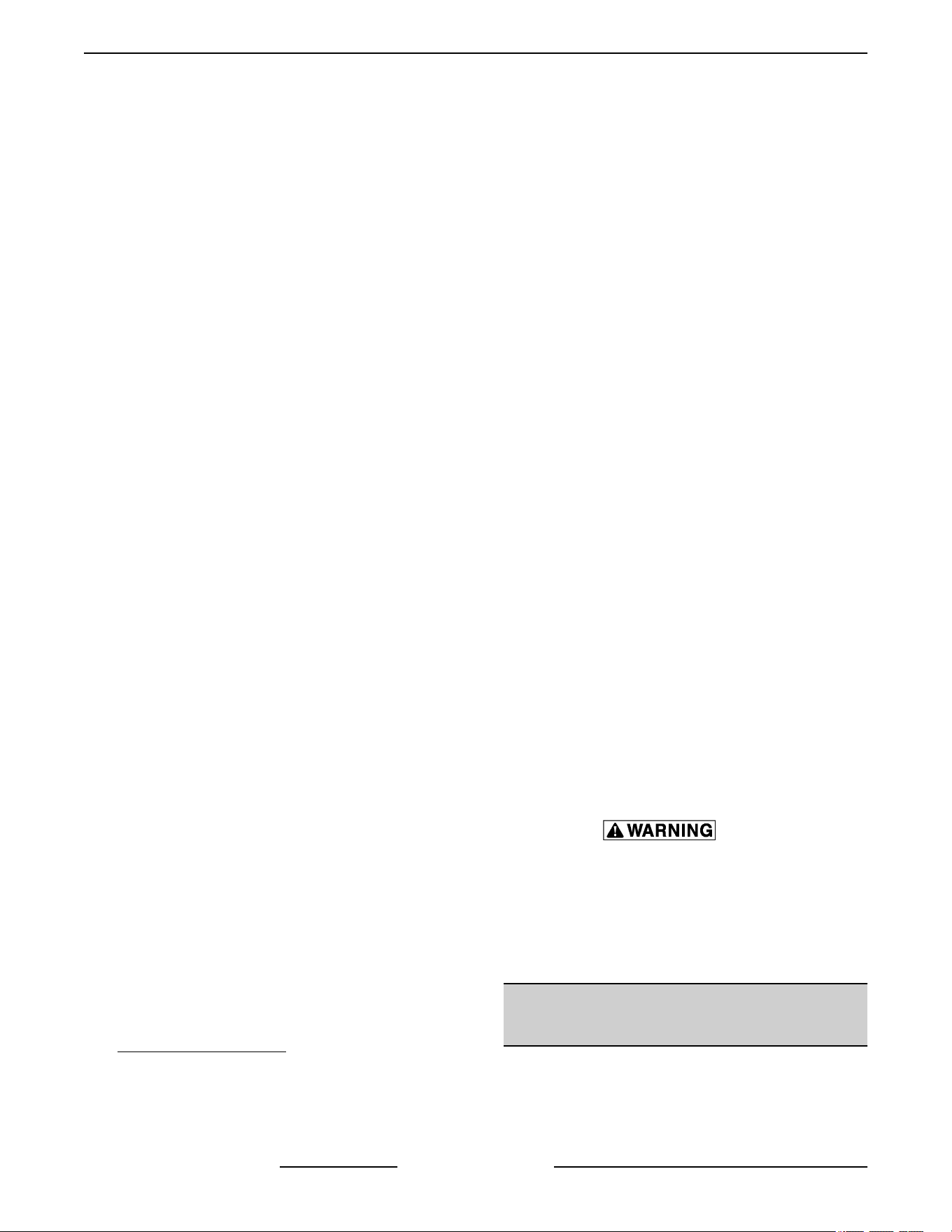
1. Use
this key sequence to access the setup mode.
Up arrow; Rack 1; Temperature; Temperature;
Down arrow; Rack 1
Fig. 68
2. Once in the setup mode the display will alternate
between the parameter and programmed data.
• To change data to the factory setting, use
the arrow keys.
• To select the next parameter, press the
Rack 1 key.
• After the last Parameter and Data is viewed,
press the Rack 1 key a final time to exit the
setup mode and return to operations mode.
The current set point temperature will be
displayed.
• After 1 minute of no key activations, the
control will return to operation mode.
3. Listed are the parameters and data you should
find.
MENU
ALTERNATING
ON DISPLAY
PARAMETER DATA
Celsius_Fahrenheit C_F F
Guard Band gb 4000
Temperature
Compensation
tcnP OFF
Input Type 1 InP1 J
Range Low 1 rL1 75
Range Hight 1 rH1 500
Hysteresis HYS1 3
Calibration Offset CAL1 0
Exit Setup Mode and
returen to Operation
Mode.
Set point temperature is
displayed or if call for heat,
dashers(---) displayed.
Probe Test
VC4E & VC6E Series Full Size Electric Convection Ovens - SERVICE PROCEDURES AND ADJUSTMENTS
Page 35 of 83 F25105 Rev. E (0325)
If the oven is not heating or displaying the proper
temperature, the temperature probe may be
malfunctioning.
Determine if the probe is good or
causing the operational problem. Temporarily,
disconnect the existing probe lead wires from the
computer control and connect the lead wires from
a known good "J" type thermocouple. Secure the
sensing end of the thermocouple near the probe.
Turn the power switch ON and set the dial to
350°F.
If the oven reaches the set temperature and
cycles with the temporary thermocouple, then the
existing probe is malfunctioning. Replace
temperature probe with the correct part and
check for proper operation.
Solid State Relay Test
The solid state relays "SSR1 or SSR2" supply
power to the blower motor "high" or "low" fan
speed terminals when the SSR is energized by
the output voltage from the computer.
To test solid state relay "SSR1" (high fan speed),
the computer control should be in the "Normal
Cooking Mode". To test solid state relay "SSR2"
(low fan speed), the computer control should be
in the "Roast & Hold Mode".
Fig. 69
1. Remove the right side panel as outlined under
COVERS AND PANELS.
2. Turn the power switch ON.
A. If the blower motor comes on, the SSR is
functioning properly.
B. If the blower motor does not come on,
proceed to step 3.
3.
Check for +5 VDC on the input side of SSR
(terminals 3 & 4).
A. If +5 VDC is present, continue to step 4.
B. If no voltage is present, computer control is
not functioning properly.
4. Check for proper input voltage on the load side
of SSR terminal 1 and the power connection on
the other side of the supply.
A. On 208 & 240 volt ovens, the supply
connection is on the terminal block (L2 for
single phase, L3 for three phase). The
measured voltage should be identical to the
supply.
B. On 480 volt ovens, the supply connection is
on the secondary side of the 480V
transformer, terminal X4 (wire # 79).
The measured voltage should be 240 volts.
5. If input voltage is correct on the load side of SSR
terminal 1, proceed to step 6.
A. If input voltage is not correct, find the source
of the problem.
6. Check output voltage on the load side of SSR
terminal 2.
A. If voltage is correct, SSR is functioning
properly.
B. If no voltage is present on the load side of
SSR terminal 2, the SSR is not functioning
properly.
7. Turn the power switch OFF.
Disconnect the electrical power to
the machine and follow lockout /
tagout procedures. There may be
multiple circuits. Be sure all circuits
are disconnected.
8. Replace
the SSR and check for proper operation.
COMPUTER CONTROL
TEMPERATURE CALIBRATION
1. Place a thermocouple in the geometric center of
the oven cavity.
2.
Turn the power switch ON.
VC4E & VC6E Series Full Size Electric Convection Ovens - SERVICE PROCEDURES AND ADJUSTMENTS
F25105 Rev. E (0325) Page 36 of 83
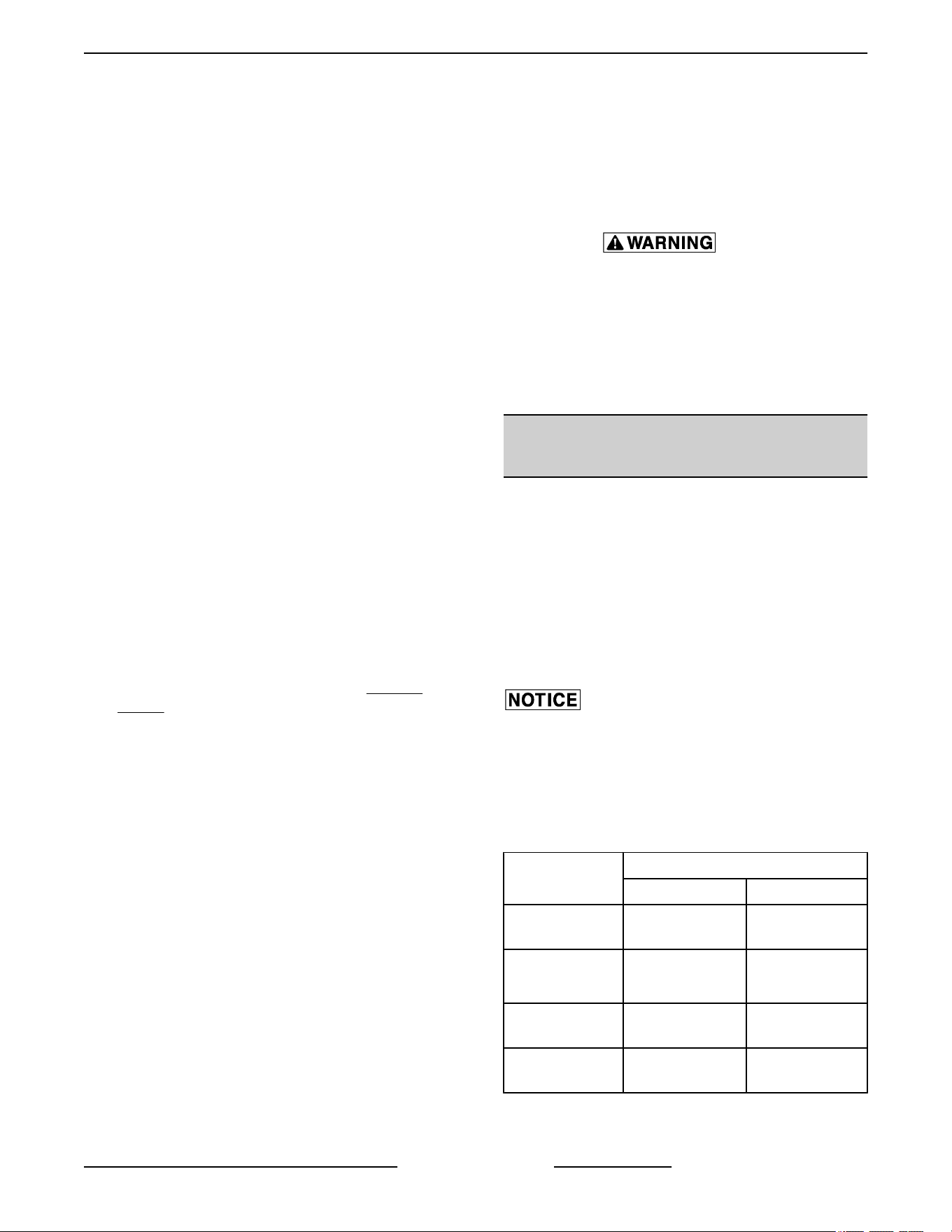
A. If the set point temperature is 350°F,
proceed to step 4.
B.
If the set point temperature is other than
350°F, proceed to step 3 to change the
temperature.
3. Press the set key then temperature key to enter
the temperature set mode.
A. The display will alternate between the term
"StPt" (set point) and the current oven
temperature setting.
B. Press the up or down arrow keys to make
the proper selection.
C. Press the set key again to save the change
and exit the temperature set mode.
4. Allow the oven temperature to stabilize (normally
3 cycles).
5. Compare the controls set point temperature to
the thermocouple meter reading when the heat
light goes out.
A. A temperature variance more than 5°F
indicates an adjustment is needed.
1) To make the adjustment, proceed to
step 6.
2) If temperature variance is less than
5°F, computer control is functioning
properly.
6. Enter the setup mode as outlined in
SETUP
MODE under COMPUTER CONTROL.
A.
Advance through the menu until CAL1
(Calibration Offset) appears.
1) If the thermocouple reading is higher
than set point temperature, press the
down arrow key and enter a negative
offset value that is equal to the number
of degrees above the 5°F tolerance.
2) If the thermocouple reading is lower
than set point temperature, press the
up arrow key and enter a positive
offset value that is equal to the number
of degrees below the 5°F tolerance.
3) Exit the setup mode.
7. Allow the oven to cycle at least two times
between adjustments.
A. If the temperature variance still differs more
than 5°F from the set point, verify the correct
calibration offset value was entered and
retained.
1) ) Adjust the calibration offset value as
outlined in step 6, until the cycling
temperature is within tolerance.
B. If the above adjustment cannot be obtained:
C. Turn the power switch OFF.
Disconnect the electrical power to
the machine and follow lockout /
tagout procedures. There may be
multiple circuits. Be sure all circuits
are disconnected.
D. Replace
the computer control and check for
proper operation.
COMPUTER CONTROL
OPERATIONAL TEST
The computer controls "Calibration Mode" is used to
manually test:
•
Outputs of the control
• Keypad functionality
• Verify display and LEDs functionality
Additionally, if a problem is encountered during the
output test, a "Restore Factory Settings" option is
available.
The calibration mode contains several adjustable
parameters
that must not be changed. For the "CALY"
(Calibration) Parameter, the default data option
selected must be "no".
Listed below are the parameters and data you should
find in the calibration Mode.
MENU
ALTERNATING ON DISPLAY
PARAMETER DATA
Calibrate (must
display no)
CALY no
Logic Output
Test
(see step 3)
LgOt*
*g
displays as a 9
0
Logic Inputs "LI"
(Factory Only)
LI 21
Keyboard (see
step 4)
HEY 0
VC4E & VC6E Series Full Size Electric Convection Ovens - SERVICE PROCEDURES AND ADJUSTMENTS
Page 37 of 83 F25105 Rev. E (0325)
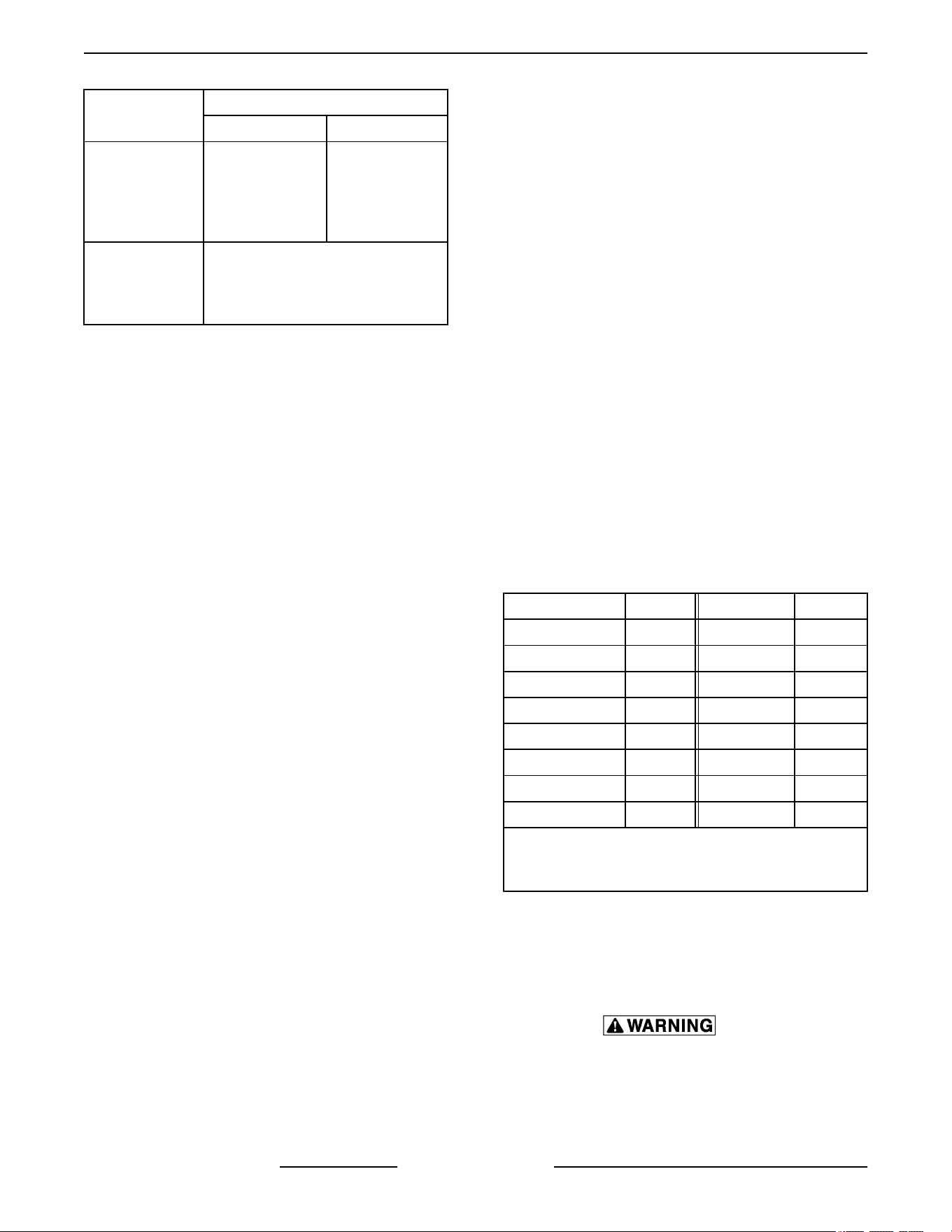
MENU
ALTERNATING ON DISPLAY
PARAMETER DATA
Display Test (Al
segments of
display and the
LED's are
tested)
—
sequence of
characters in
display window
Exit Calibration
Mode
and return
to Operation
Mode
Set point temperature is displayed
or if call for heat, dashers (---)
displayed.
NOTE: While in the calibration mode, on all
parameters except the Logic Output Test (LgOt), the
control outputs will be OFF.
•
To change the programmed data, use the arrow
keys.
• To select the next parameter, press the Rack 1
key.
• At the end of the test, the control automatically
exits the Calibration Mode and returns to the
Operation Mode.
• After 1 minute of no key activations, the control
will return to operation mode.
1. Use this key sequence to access the calibration
mode. Up arrow; Down arrow; Rack 1; Down
arrow; Temperature; Rack 1.
Fig. 70
2. Once in the calibration mode the display will
alternate between the parameter and
programmed data. The computer control outputs
are turned OFF.
A. Convection fan stops.
B. Heating stops.
NOTE: If the control was calling for heat when the
calibration mode was entered, heating will resume
after exiting the test mode.
3. Press the Rack 1 key to accept the default "no"
under the "CALY" (calibrate) parameter and
advance the display menu to the "LgOt" (logic
output) test. In this mode, the control and logic
outputs can be turned ON for testing only.
A. Use the arrow keys to change the display to
the appropriate number for testing. Each
test starts automatically, several seconds
after number is selected.
1) #0 - All control outputs are OFF (fan &
heat OFF).
#1 - Heat comes ON (2CON is
energized).
#5 - Convection fan comes ON (High
or Low speed SSR is energized).
#8 - Electronic beeper (external)
sounds.
B.
If the output tests are completed
successfully, proceed to step 4.
C. If the output tests are not completed
successfully, find the source of the problem.
If the problem cannot be repaired, replace
the component and check for proper
operation.
4. Press the Rack 1 key twice to advance past the
"LI" (Logic Inputs test) and reach the "HEY"
(keyboard) test.
A. Press the desired key to display the
corresponding hexadecimal code. This
code is used internally by the control to
identify the key being pressed. See table
below.
KEY
CODE KEY CODE
Up Arrow 40 Start/Stop 4
Down Arrow 80 Temp 20
½ menu 800 Rack 1 10 *
3/4 menu 4000 Rack 2 400
5/6 menu 2 Rack 3 2000
Set 200 Rack 4 1
Time 1000 Rack 5 8
Roast & Hold 8000
* Displays 10 momentarily then alternates
between
Hey and 0. If pressed again, advances to
the next test.
B. If the code displayed is not correct for the
key pressed, then the keyboard is
malfunctioning.
1)
Turn the power switch OFF.
Disconnect the electrical power to
the machine and follow lockout /
tagout procedures. There may be
multiple circuits. Be sure all circuits
are disconnected.
VC4E & VC6E Series Full Size Electric Convection Ovens - SERVICE PROCEDURES AND ADJUSTMENTS
F25105 Rev. E (0325) Page 38 of 83

C. Replace
the computer control and check for
proper operation.
5. Press the Rack 1 key to advance the display
menu to the "dISP" (display) test. A test
sequence automatically runs on the display and
control LEDs for a visual verification that all
segments in the LED display and the internal
LEDs are functioning.
6. At the end of the test, the control exits the
calibration mode and returns to the Operation
Mode.
Restore Factory Settings
NOTE: If the computer control does not appear
to be functioning properly, do not restore factory
settings until verifying the control is configured
properly as outlined in
SETUP MODE under
COMPUTER CONTROL and performing the
COMPUTER CONTROL OPERATIONAL TEST
as outlined in the above section.
1.
Enter the "Calibration Mode" by using the key
sequence stated in
step 1 under COMPUTER
CONTROL OPERATIONAL TEST.
A.
The computer control outputs are turned
OFF.
B. The display will alternate between "CALY"
and "no".
2. Press the up or down arrow key until the "rESt"
parameter displays.
3. Press the Rack 1 key and "no" displays.
4. Press the up or down arrow key to change the
display to "YES".
5. Press the Rack 1 key to select this data option
and then advance the menu to the "LgOt" (logic
output test).
NOTE: The "g" in LgOt displays as a "9".
6. Press the Rack 1 key twice to advance past the
"LI" (Logic Inputs test) and the "HEY" (keyboard)
test.
7. The "dISP" (display) test sequence automatically
runs.
8. At the end of the test, the control exits the
calibration mode and returns to the Operation
Mode.
9. Enter the
"SETUP MODE" as outlined under
COMPUTER CONTROL and perform the
procedure.
SERVICE PROGRAMMING AND
TESTING FOR 3700 COMPUTER
CONTROL
NOTE: Press X to go back to previous screen. User
interface system menu program instructions for
MENU PRG and USB are located in COMPUTER
CONTROLS GUIDE.
SYSTEM DIAGNOSTIC
1.
Press Program.
Fig. 71
2. Press number 3 for SYS DIAG.
• System Diagnostic menu will appear.
VC4E & VC6E Series Full Size Electric Convection Ovens - SERVICE PROCEDURES AND ADJUSTMENTS
Page 39 of 83 F25105 Rev. E (0325)

Fig. 72
• 1. OUTPUTS
Fig. 73
• Press corresponding number for
testing function selection.
Example: Press 1 to test Fan
function.
• 2. INPUTS
VC4E & VC6E Series Full Size Electric Convection Ovens - SERVICE PROCEDURES AND ADJUSTMENTS
F25105 Rev. E (0325) Page 40 of 83

Fig. 74
• Check status of a function.
Example: Door is open or close.
• 3. BUTTONS
Fig. 75
• Button test verifies each button is
programed and working.
Example: Push a button on the
keypad to verify it is connected
and working. Each buttons
function shows on display.
SYSTEM SETTINGS
1. Press Program.
VC4E & VC6E Series Full Size Electric Convection Ovens - SERVICE PROCEDURES AND ADJUSTMENTS
Page 41 of 83 F25105 Rev. E (0325)

Fig. 76
2. Press 4 for SETTINGS.
• System Settings menu will appear.
Fig. 77
• Press corresponding number to change
settings. Example: Press 4 to change HEAT
to Electric.
SETTING TEMPERATURE OFFSET
• Check center of oven temperature with
temperature tester.
• Press number 6.
• Use arrow keys to offset DISPLAY
temperature setting to match center of
oven temperature.
VC4E & VC6E Series Full Size Electric Convection Ovens - SERVICE PROCEDURES AND ADJUSTMENTS
F25105 Rev. E (0325) Page 42 of 83
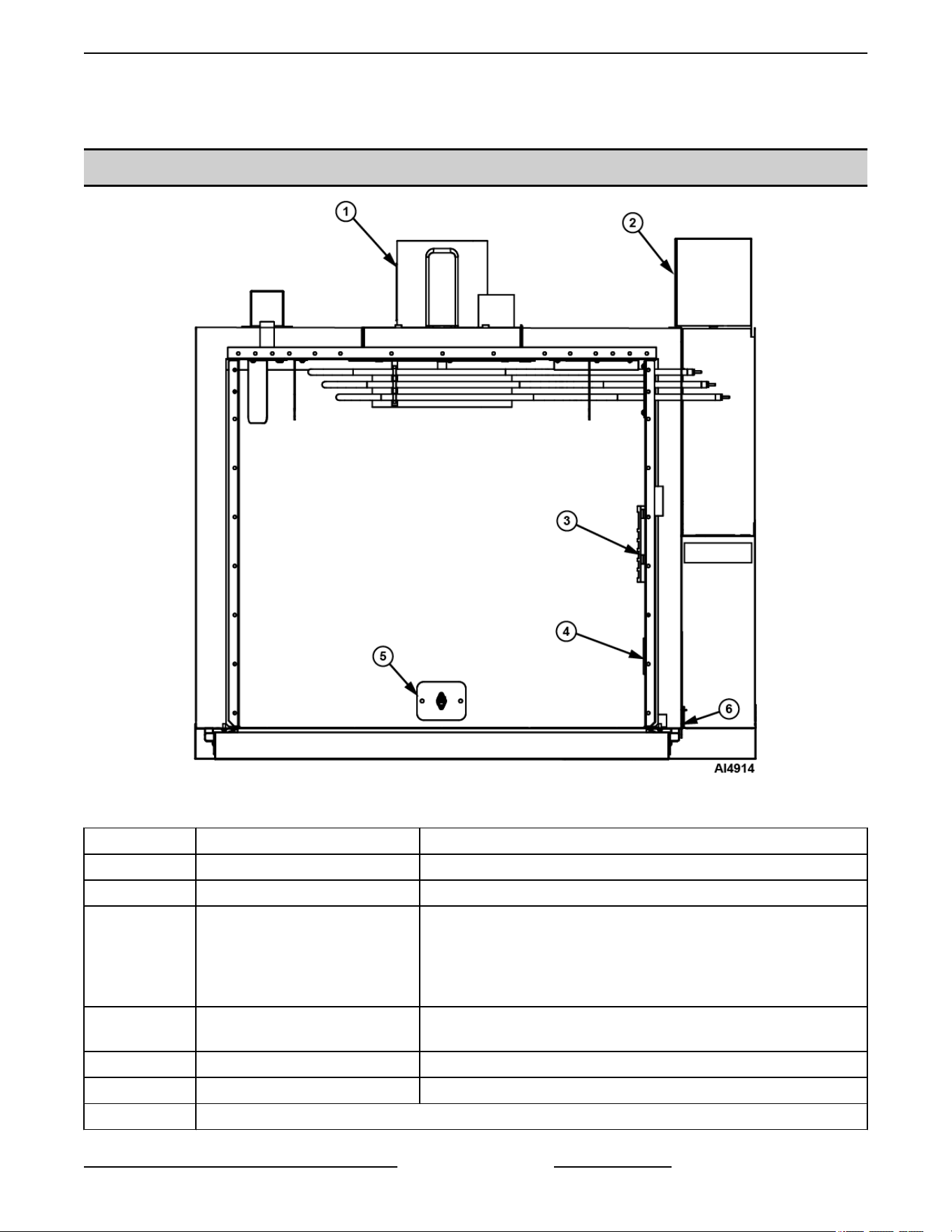
ELECTRICAL OPERATION
COMPONENT LAYOUT AND FUNCTION WC4ED
Fig. 78
Item Description Function
1 Blower Motor Operates the oven cavity blower (convection fan).
2 Transformer
3 Temperature Probe
Senses the oven temperature and converts the temperature into
a
resistance valve which is monitored by the temperature control
board. The probe is an RTD (resistance temperature detector) of
the Thermistor type. As temperature increases the resistance
value decreases.
4 High Limit Thermostat
Protects the oven from temperatures above 550°F by removing
power from the heating circuit. Auto resets at 500°F.
5 Heat Light Lit whenever temperature control is calling for heat.
6 Control Panel Contains all interactive controls for oven.
NOT DISPLAYED
VC4E & VC6E Series Full Size Electric Convection Ovens - ELECTRICAL OPERATION
Page 43 of 83 F25105 Rev. E (0325)
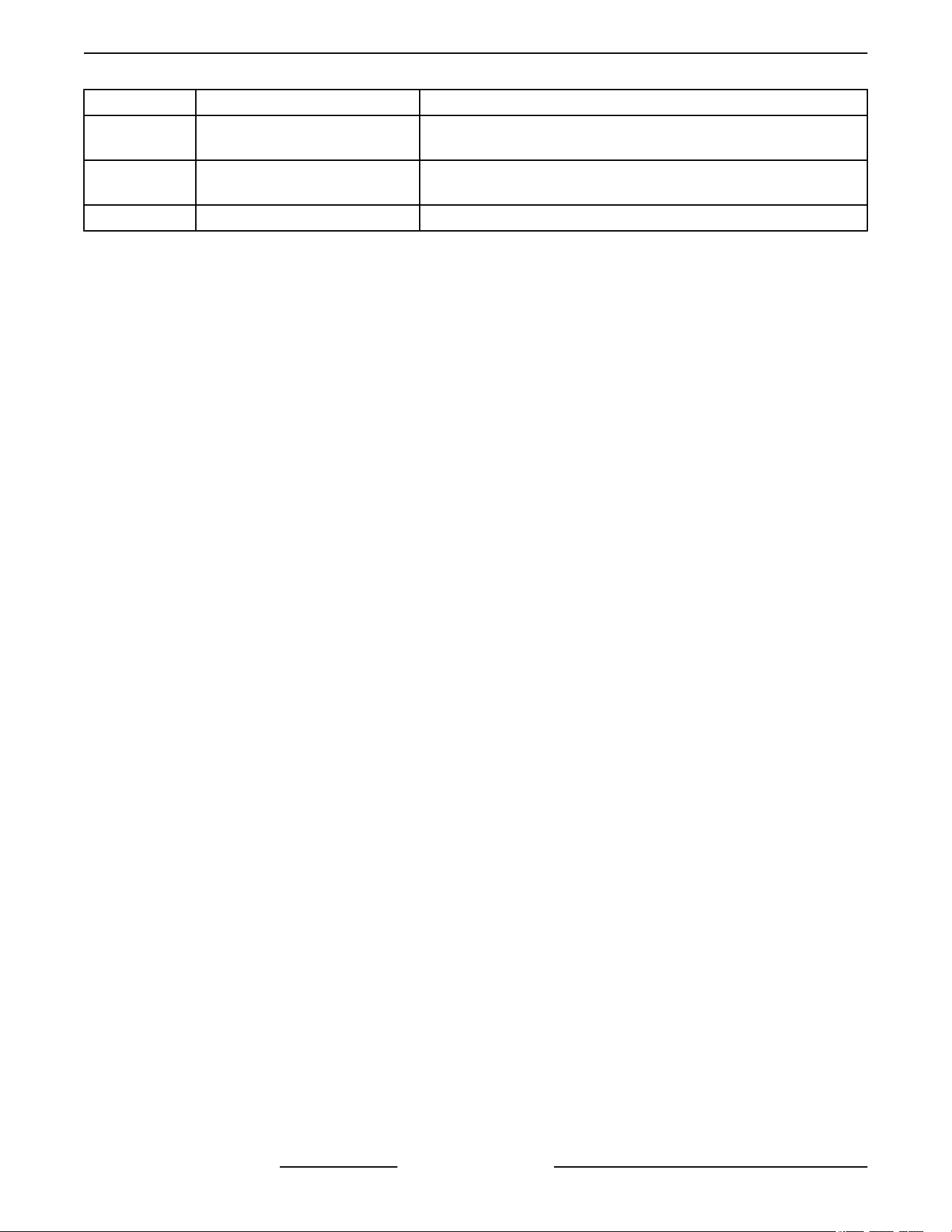
Item Description Function
Door Switch
Allows the oven to operate when the doors are closed but stops
the oven from operating when the doors are opened.
Cooling Fan
Circulates cooler air from outside the oven to cool components in
the control area.
Fuses Protect control circuit.
VC4E & VC6E Series Full Size Electric Convection Ovens - ELECTRICAL OPERATION
F25105 Rev. E (0325) Page 44 of 83
CONTROL PANEL LAYOUT AND FUNCTION WC4ED (BEFORE APRIL 2024)
Fig. 79
Item Description Function
1 Alarm/Buzzer Signals the end of a "Cook" cycle when cooking time expires.
2 Power Switch (S1) Determines the mode of operation; ON, OFF, or COOL DOWN.
VC4E & VC6E Series Full Size Electric Convection Ovens - ELECTRICAL OPERATION
Page 45 of 83 F25105 Rev. E (0325)
Item Description Function
3 Power ON Light
Lit whenever the power switch (S1) is turned to ON or Cool Down
mode.
4 Heat ON Light Lit whenever temperature control is calling for heat.
5 Solid State temperature Control
Monitors temperature sensor and regulates the oven cavity
temperature by controlling 2CON to energize the heating
elements when the control calls for heat.
6 Cook Timer
Counts the "Cook" time of the product and signals the buzzer at
the end of the cycle.
7 Oven Light Switch (S2) Controls the oven cavity lights.
8 Fan Speed Switch (S3) Controls blower motor speed between High and Low settings.
9 2CON
Provides power to heating elements when both are energized.
2CON
is energized by the temperature control when a call for heat
is made.
10 1CON
Provides power to heating elements when both are energized.
1CON is energized when power switch is turned ON.
VC4E & VC6E Series Full Size Electric Convection Ovens - ELECTRICAL OPERATION
F25105 Rev. E (0325) Page 46 of 83
TIMER COMPONENT LAYOUT AND FUNCTION (STARTING SN 482075494)
Fig. 80
Item Name / Electrical Callout Function
1 Power Toggle Switch (S1) Determines the mode of operation; ON, OFF, or COOL DOWN.
2 Indicator "ON" Light (C) Indicates when oven is powered on.
3 Indicator "HEAT" Light (C1) Indicates when oven is heating.
4 Temperature Control (Y) Analog temperature controler.
5 Timer (F) Allows user to set cooking timer.
6 Alarm / Buzzer (G) Signals the end of a "Cook" cycle when cooking time expires.
7 Oven Light Switch (S2) Controls the oven cavity lights.
8 Fan Speed Switch (S3) Controls blower motor speed between High and Low settings.
VC4E & VC6E Series Full Size Electric Convection Ovens - ELECTRICAL OPERATION
Page 47 of 83 F25105 Rev. E (0325)
Fig. 81
Item Name / Electrical Callout Function
1 Power Toggle Switch (S1) Determines the mode of operation; ON, OFF, or COOL DOWN.
2 Indicator "ON" Light (C) Indicates when oven is powered on.
3 Indicator "HEAT" Light (C1) Indicates when oven is heating.
4 Temperature Control (Y) Analog temperature controler.
5 Timer (F) Allows user to set cooking timer.
6 Alarm / Buzzer (G) Signals the end of a "Cook" cycle when cooking time expires.
7 Oven Light Switch (S2) Controls the oven cavity lights.
8 Fan Speed Switch (S3) Controls blower motor speed between High and Low settings.
VC4E & VC6E Series Full Size Electric Convection Ovens - ELECTRICAL OPERATION
F25105 Rev. E (0325) Page 48 of 83

SEQUENCE OF OPERATIONS
SEQUENCE OF OPERATION -
VC4ES, VC6ES with Mechanical KX
Thermostat
Refer to diagram Fig. 82 for electrical sequence of
operation.
Cook Cycle
1.
Conditions.
A. Oven connected to correct voltage and is
properly grounded.
B. Power switch (S1) OFF.
C. Temperature dial set to lowest temperature
(fully CCW).
D. High limit thermostat CLOSED.
E. Oven doors closed (door switch contacts
CLOSED).
F. Oven cavity temperature below 140°F.
2. Power switch (S1) turned ON.
A. Power ON light (Amber) comes ON.
B. 1CON coil energized.
C. Blower motor energized. NOTE: Motor
speed (Hi/Low) depends on position of fan
speed switch (S3).
D. Component cooling fan energized.
E. Power to oven cavity light switch (S3) wire
#1. Turns cavity lights ON/OFF and does
not affect "Cook" cycle.
3. Set thermostat to desired "Cook" temperature
and thermostat CLOSES.
A. Heating light (Clear) comes ON.
B. 2CON coil energized.
1) Heating elements powered and
heating starts.
4. Oven reaches set temperature and thermostat
OPENS.
A. Heat light goes out.
B. 2CON coil de-energized.
1) Power removed from heating elements
and heating stops.
5. The oven will continue to cycle on the thermostat
until the doors are opened or the power switch
(S1) is turned to the OFF or COOL DOWN
position.
SEQUENCE OF OPERATION - with
Solid State Temperature Control
Cook Cycle
1.
Conditions.
A. Oven connected to correct voltage and is
properly grounded.
B. Power switch (S1) OFF.
C. Temperature dial set to lowest temperature
(fully CCW).
D. High limit thermostat CLOSED.
E. Oven doors closed (door switch contacts
CLOSED).
F. Oven cavity temperature below 140°F.
2. Power switch (S1) turned ON.
A. Power ON light (Amber) comes ON.
B. 1CON coil energized.
C. Solid state temperature control energized.
1) Heating light (Clear) comes ON.
2) 2CON coil energized.
a. Heating elements powered and
heating starts.
D. Blower motor energized.
NOTE: Motor speed (Hi/Low) depends on position of
fan speed switch (S3).
E. Component cooling fan energized.
F. Power to oven cavity light switch (S3) wire
#1. Turns cavity lights ON/OFF; does not
affect "Cook" cycle.
3. Set temperature dial to desired "Cook"
temperature.
4. Oven reaches set temperature.
A. Temperature control de-energizes internal
relay and the normally open (N.O.) contacts
OPEN.
1) Heat light goes out.
VC4E & VC6E Series Full Size Electric Convection Ovens - SEQUENCE OF OPERATIONS
Page 49 of 83 F25105 Rev. E (0325)

2) 2CON coil de-energized.
a.
Power removed from heating
elements and heating stops.
5. The oven will continue to cycle on the
temperature control until the doors are opened or
power switch (S1) is turned to the OFF or COOL
DOWN position.
SEQUENCE OF OPERATION -
VC4EC, VC6EC (Computer Control)
Refer to diagram Fig. 98for electrical sequence of
operation.
Cook Cycle
1.
Conditions.
A. Oven connected to correct voltage and is
properly grounded.
B. Power switch (S1) OFF.
C. Computer control is setup properly and
ready to use. NOTE: The set point
temperature of the computer control will be
the last temperature that was set.
D. High limit thermostat CLOSED.
E. Oven doors closed (door switch contacts
CLOSED).
F. Oven cavity temperature below 140°F.
2. Power switch (S1) turned ON.
A. 1CON coil energized.
B. 24VAC transformer (T1) is energized.
1) Computer control is energized and
performs a power ON self test before
energizing outputs. If the control
passes self test, then the outputs are
energized and operation sequence
continues. If control does not pass self
test then the corresponding error code
is displayed.
C. Component cooling fan energized.
D. Power is connected to:
1) Terminal 1 on solid state relay 1 (SSR1
- load side) and solid state relay 2
(SSR2 - load side).
2) Pin 3 (C3-3) on computer control (input
"IN-2").
3) Oven cavity light switch (S2). Turns
cavity lights ON/OFF; does not affect
"Cook" cycle.
3. Computer control senses oven cavity
temperature through probe input. With the oven
cavity temperature below set point, the output
from pin C3-2 is activated.
A. Oven "Heat Light" on the control comes ON.
B. 2CON coil energized.
1) Heating elements powered and
heating starts.
C. The controls 5VDC output from pins C2-2 (-)
and C2-8 (+) is activated and SSR1 relay is
energized.
1) Convection fan motor is energized
(High speed).
4. Oven reaches set point temperature.
A. Computer control de-activates the output
from pin C3-2.
1) 2CON coil de-energized.
a. Power removed from heating
elements and heating stops.
B. Oven "Heat Light" on the control goes out.
C. Oven "Ready Light" on the control comes
ON.
D. Electronic beeper sounds momentarily.
5. The oven will continue to cycle on the computer
control until the doors are opened or power
switch (S1) is turned to the OFF or COOL DOWN
position.
Temperature and Time Cycle (Cooking)
NOTE: The computers internal "Cook" timer operates
independently of the heating cycle. Additional time
can be set or the timer can be stopped and re-started
throughout the cooking cycle. Refer to the Instructions
Manual for specific operating instructions of the oven
Computer Control.
Roast and Hold Cycle
NOTE: For a detailed explanation of the "Roast &
Hold" mode, refer to the
Instructions Manual F31159
as
outlined under SETTING THE OVEN FOR ROAST
& HOLD and ROAST & HOLD OPERATION. In "Roast
& Hold" mode, the operation of the computer control
is identical to the normal Cook Cycle with these
exceptions:
1. Oven "Roast & Hold" light on the control comes
ON.
VC4E & VC6E Series Full Size Electric Convection Ovens - SEQUENCE OF OPERATIONS
F25105 Rev. E (0325) Page 50 of 83

2. Convection fan will operate at Low speed,
throughout the "Roast & Hold" cycle.
A.
The computer control 5VDC output from
pins C2-2 (-) and C2-8 (+) is de-activated
and SSR1 relay is de-energized.
1) Power is removed from convection fan
motor high speed terminal.
B. The computer control 5VDC output from
pins C2-1 (-) and C2-8 (+) is activated and
SSR2 relay is energized.
1) Power is applied to the convection fan
motor low speed terminal.
3. Beeper sounds momentarily to indicate the end
of first stage cooking (oven operates normally at
the temperature and time selected until time
expires).
4. The display flashes HOLD as the oven enters
HOLD mode. This is also considered second
stage cooking (oven heating stops but product
continues to cook on residual heat).
A. Convection fan motor is de-energized.
5. After the oven temperature drops below 150°F,
the heat comes back ON and cycles as needed,
to maintain the "Hold" temperature of 150°F.
A. Convection fan motor energized (Low
speed).
6. The oven continues to cycle in this manner until
one of the following occurs:
A. The "Roast & Hold" mode is turned OFF.
B. Power switch (S1) is turned to the OFF or
COOL DOWN position.
Cool Down Cycle
1. Conditions.
A. Oven is ON.
B. Oven cavity temperature needs to be
lowered.
C. Doors are open (door switch contacts
OPEN).
D. Power switch (S1) set to either ON or OFF.
2. Power Switch (S1) turned to COOL DOWN.
A. Power is connected through power switch
(S1) to the convection fan motor high speed
terminal.
1) Convection fan motor energized (High
speed).
3. The oven will continue to operate in COOL
DOWN mode until the power switch (S1) is
turned to the OFF or ON position.
VC4E & VC6E Series Full Size Electric Convection Ovens - SEQUENCE OF OPERATIONS
Page 51 of 83 F25105 Rev. E (0325)

DIAGRAMS
VC4E & VC6E Series Full Size Electric Convection Ovens - DIAGRAMS
F25105 Rev. E (0325) Page 52 of 83

VC4ES & VC6ES WITH MECHANICAL (KX) CONTROLS SCHEMATICS AND
WIRING DIAGRAMS
VC4ES, VC6ES with Mechanical (KX) Controls, 208-240V
VC4E & VC6E Series Full Size Electric Convection Ovens - DIAGRAMS
Page 53 of 83 F25105 Rev. E (0325)

VC4ES, VC6ES with Mechanical (KX) Control, 208-240V
VC4E & VC6E Series Full Size Electric Convection Ovens - DIAGRAMS
F25105 Rev. E (0325) Page 54 of 83

Fig. 84
VC4E & VC6E Series Full Size Electric Convection Ovens - DIAGRAMS
Page 55 of 83 F25105 Rev. E (0325)

VC4ES, VC6ES with Mechanical (KX) Controls, 480V
VC4E & VC6E Series Full Size Electric Convection Ovens - DIAGRAMS
F25105 Rev. E (0325) Page 56 of 83

VC4ES, VC6ES with Mechanical (KX) Control, 480V
VC4E & VC6E Series Full Size Electric Convection Ovens - DIAGRAMS
Page 57 of 83 F25105 Rev. E (0325)

Fig. 87
VC4E & VC6E Series Full Size Electric Convection Ovens - DIAGRAMS
F25105 Rev. E (0325) Page 58 of 83

VC4ED & VC6ED W / SOLID STATE TEMPERATURE CONTROL, SCHEMATICS
AND WIRING DIAGRAMS
VC4ED, VC6ED with Solid State Temperature Control, 208-240V Schematic
VC4E & VC6E Series Full Size Electric Convection Ovens - DIAGRAMS
Page 59 of 83 F25105 Rev. E (0325)

HEC5 & X-VC4ED & 6-WKED & X - 208-240V - 00-426667J - AI5737 - Starting SN 482075494
• HEC5 & X-VC4ED & 6-WKED & X - 208-240V - 00-426667J - AI5737
Fig. 89
VC4E & VC6E Series Full Size Electric Convection Ovens - DIAGRAMS
F25105 Rev. E (0325) Page 60 of 83

HEC5 & X, VC4ED & 6, WKED & X - 208-240V - 1PH - 00-426666S - AI5736 - Starting 482075494
• HEC5 & x-VC4ED & 6- WKED & X - 208-240V - 1PH - 00-426666S - AI5736
Fig. 90
VC4ED, VC6ED with Solid State Temperature Control, 208-240V - STARTING SERIAL NUMBER 481916864
• WKED & X, VC4ED & 6, HEC5 & X - 208-240V - 426667-1G - AI4899
VC4E & VC6E Series Full Size Electric Convection Ovens - DIAGRAMS
Page 61 of 83 F25105 Rev. E (0325)

Fig. 91
HEC5 & X, VC4ED & 6, WKED & X with Solid State Temperature Control - 208-240V - 1PH - 00-426666 - AI4892
- STARTING AT SERIAL NUMBER 481916864
• HEC5 & X, VC4ED & 6, WKED & X - 208-240V - 426666 - AI4892
VC4E & VC6E Series Full Size Electric Convection Ovens - DIAGRAMS
F25105 Rev. E (0325) Page 62 of 83

Fig. 92
VC4E & VC6E Series Full Size Electric Convection Ovens - DIAGRAMS
Page 63 of 83 F25105 Rev. E (0325)

VC4ED, VC6ED with Solid State Temperature Control, 208-240V
VC4E & VC6E Series Full Size Electric Convection Ovens - DIAGRAMS
F25105 Rev. E (0325) Page 64 of 83

Fig. 94
VC4E & VC6E Series Full Size Electric Convection Ovens - DIAGRAMS
Page 65 of 83 F25105 Rev. E (0325)

VC4ED, VC6ED with Solid State Temperature Control, 480V
VC4E & VC6E Series Full Size Electric Convection Ovens - DIAGRAMS
F25105 Rev. E (0325) Page 66 of 83

VC4ED, VC6ED with Solid State Temperature Control, 480V
VC4E & VC6E Series Full Size Electric Convection Ovens - DIAGRAMS
Page 67 of 83 F25105 Rev. E (0325)

Fig. 97
VC4E & VC6E Series Full Size Electric Convection Ovens - DIAGRAMS
F25105 Rev. E (0325) Page 68 of 83

VC4EC & VC6EC COMPUTER CONTROL SCHEMATICS AND WIRING
DIAGRAMS
VC4EC, VC6EC Computer Control, 208-240V (Roast & Hold Standard)
VC4E & VC6E Series Full Size Electric Convection Ovens - DIAGRAMS
Page 69 of 83 F25105 Rev. E (0325)

VC4EC, VC6EC Computer Control, 208-240V (Roast & Hold Standard)
VC4E & VC6E Series Full Size Electric Convection Ovens - DIAGRAMS
F25105 Rev. E (0325) Page 70 of 83

Fig. 100
VC4E & VC6E Series Full Size Electric Convection Ovens - DIAGRAMS
Page 71 of 83 F25105 Rev. E (0325)

VC4EC, VC6EC Computer Control, 480V (Roast & Hold Standard)
VC4E & VC6E Series Full Size Electric Convection Ovens - DIAGRAMS
F25105 Rev. E (0325) Page 72 of 83

VC4EC, VC6EC Computer Control, 480V (Roast & Hold Standard)
VC4E & VC6E Series Full Size Electric Convection Ovens - DIAGRAMS
Page 73 of 83 F25105 Rev. E (0325)

Fig. 103
VC4ED & 6, HEC5, WKED - 480V - 00-962507E - AI5716
VC4E & VC6E Series Full Size Electric Convection Ovens - DIAGRAMS
F25105 Rev. E (0325) Page 74 of 83

Fig. 104
HEC5 & X-VC4ED & 6- WKED & X - 480V - 00-426668Q - AI5738 PDF Link
• HEC5 & X-VC4ED & 6- WKED & X - 480V - 00-426668Q - AI5738
VC4E & VC6E Series Full Size Electric Convection Ovens - DIAGRAMS
Page 75 of 83 F25105 Rev. E (0325)

Fig. 105
WKED & X, VC4ED & 6, HEC5 & X - 480C - 42669-1J - AI5718 PDF Link
• WKED & X, VC4ED & 6, HEC5 & X - 480C - 42669-1J - AI5718
VC4E & VC6E Series Full Size Electric Convection Ovens - DIAGRAMS
F25105 Rev. E (0325) Page 76 of 83

Fig. 106
VC4E & VC6E Series Full Size Electric Convection Ovens - DIAGRAMS
Page 77 of 83 F25105 Rev. E (0325)

VC5ED X - 480V - 962502-1E - AI5717 PDF Link
• VC5ED X - 480V - 962502-1E - AI5717
VC4E & VC6E Series Full Size Electric Convection Ovens - DIAGRAMS
F25105 Rev. E (0325) Page 78 of 83

Fig. 107
VC4E & VC6E Series Full Size Electric Convection Ovens - DIAGRAMS
Page 79 of 83 F25105 Rev. E (0325)
TROUBLESHOOTING
TROUBLESHOOTING
Certain procedures in this section require electrical test or measurements while power is applied to the
machine. Exercise extreme caution at all times. If test points are not easily accessible, disconnect power
and follow lockout / tagout procedures, attach test equipment and reapply power to the test.
SYMPTOMS POSSIBLE CAUSES
Blower motor doesn’t run with power switch in "ON"
"COOL DOWN" or position.
1. Line voltage incorrect.
2.
Power switch (S1) malfunction.
3. Fan speed switch (S3) malfunction.
4. Interconnecting wiring malfunction.
5. Motor inoperative.
Blower motor doesn’t run with power switch "ON", but
oven heats.
1. Door switch malfunction.
2.
Interconnecting wiring malfunction.
3. Motor inoperative.
Blower motor doesn’t run in "Cool Down", but runs ok in
"ON" position.
1. Power switch (S1) malfunction.
2.
Fan speed switch (S3) malfunction.
3. Interconnecting wiring malfunction.
Excessive or low heat in oven.
1. Line voltage incorrect.
2.
Heating element malfunction.
3. Contactor malfunction.
4. Convection Fan motor malfunction.
5. Temperature probe malfunction or mechanical
thermostat malfunction.
6. Temperature control not calibrated.
7. Temperature control malfunction.
Mechanical Timer inoperative or not functioning properly.
1. Interconnecting wiring malfunction.
2.
Line voltage incorrect.
3. Timer malfunction.
Component cooling Fan does not run.
1. Motor inoperable.
2.
Interconnecting wiring malfunction.
VC4E & VC6E Series Full Size Electric Convection Ovens - TROUBLESHOOTING
F25105 Rev. E (0325) Page 80 of 83
SYMPTOMS POSSIBLE CAUSES
Uneven Cooking.
1. Convection Fan motor speed/direction.
2.
Air flow Baffles missing or damaged.
3. Line voltage incorrect.
4. Heating element(s) malfunction.
5. Contactor malfunction.
Intermittent operation problems.
1. High ambient temperatures.
2.
Wiring connections loose.
3. Cooling fan malfunction.
No power to oven controls.
1. Main circuit breaker OPEN.
2.
Control circuit fuses OPEN.
3. Power switch (S1) inoperative.
No heat, convection fan motor runs.
1. High limit thermostat OPEN.
2.
Heating element malfunction.
3. Contactor malfunction.
4. Temperature control malfunction.
No power to temperature control.
1. Power switch (S1) in "Cool Down".
2.
Door or door switch open.
Door does not seal or shut properly
1. Doors out of adjustment.
2.
Door chain out of adjustment or broken
(simultaneous doors).
3. Door catch roller out of adjustment or broken
(independent doors).
4. Door seals damaged.
COMPUTER CONTROL MODELS ONLY
SYMPTOM POSSIBLE CAUSES
Oven does not heat.
1. High limit switch open.
2.
Temperature probe malfunction.
3. Computer control malfunction.
High limit thermostat shutting OFF heat.
1. Temperature probe malfunction.
2.
Computer control malfunction.
Oven not hot enough.
1. Temperature probe malfunction.
2.
Computer control range high (rH1) setting to low.
See
SETUP MODE under COMPUTER CONTROL.
3.
Computer control malfunction.
VC4E & VC6E Series Full Size Electric Convection Ovens - TROUBLESHOOTING
Page 81 of 83 F25105 Rev. E (0325)
SYMPTOM POSSIBLE CAUSES
Blower motor doesn’t run with power switch in "ON" or
"COOL DOWN" position.
1. Line voltage incorrect.
2.
Power switch (S1) malfunction.
3. Fan speed switch (S3) malfunction.
4. Solid sate relay (SSR) malfunction. See
SOLID
STATE RELAY TEST under COMPUTER
CONTROL.
5.
Interconnecting wiring malfunction.
6. Motor inoperative.
7. Computer control malfunction. See
COMPUTER
CONTROL OPERATIONAL TEST.
Error Codes
In the display window, the error code will
alternate between the code and the oven cavity
temperature or dashes if the oven is calling for
heat (heat light on). The exact error code
displayed will depend on the priority assigned to
the
problem in the EPROM'S software. The lower
the error code number, the higher the priority. If
more than one problem occurs at the same time,
the error code assigned to the higher priority
problem will be displayed. Refer to the error code
table below to solve the problem. If the lower
priority problem still exists, the next error code
will be displayed. When the condition causing the
error is resolved, normal oven operation can
resume.
NOTE: To check a "Setup Parameter" and its
corresponding "Data Value", see
SETUP MODE
under COMPUTER CONTROL.
NOTE:
If the cause of the error is not apparent, check
for these conditions as they may also cause errors to
occur: Electrical noise or a noise event, excess
environmental moisture or temperature, or vibration.
CODE & PROBLEM
PROBABLE CAUSE SOLUTION
Er01 - ROM checksum error Internal ROM malfunction Cycle power
Er02 - RAM checksum error Internal RAM malfunction Cycle power
Er03 - Ambient sensor error Ambient temperature is below 32°F
Check ambient temperature at the
control.
Er04 - Configuration error Microprocessor malfunction Cycle power
Er05 - EPROM error
1
Power loss while storing data Cycle power
Er06 - Zone 1 A/D underflow error
• Incorrect sensor type
•
Measuring temperature outside
the sensor range
• Check the InP1 setup
parameter. Verify it matches
your sensor.
•
Check sensor and connections
for a reversed or open sensor. If
the condition causing the error is
resolved, the error will clear.
VC4E & VC6E Series Full Size Electric Convection Ovens - TROUBLESHOOTING
F25105 Rev. E (0325) Page 82 of 83
CODE & PROBLEM PROBABLE CAUSE SOLUTION
Er07 - Zone 1 A/D overflow error Open sensor
• Check the InP1 setup
parameter. Verify it matches
your sensor.
•
Check sensor and connections
for a reversed or open sensor. If
the condition causing the error is
resolved, the error will clear.
Er10 - Stack overflow error Microprocessor malfunction
• Cycle power
•
Check sensor and connections
for a reversed or open sensor
Er11 - Open sensor error Open sensor
• Check the InP1 setup
parameter. Verify it matches
your sensor.
•
Check sensor and connections
for a reversed or open sensor
Er12 - Shorted sensor
• Incorrect sensor type
•
Measuring temperature outside
the sensor range
• Check the InP1 setup
parameter. Verify it matches
your sensor.
•
Check sensor and connections
for a reversed or open sensor
1
Should only see when a new EPROM is installed and powered for the first time.
VC4E & VC6E Series Full Size Electric Convection Ovens - TROUBLESHOOTING
Page 83 of 83 F25105 Rev. E (0325)
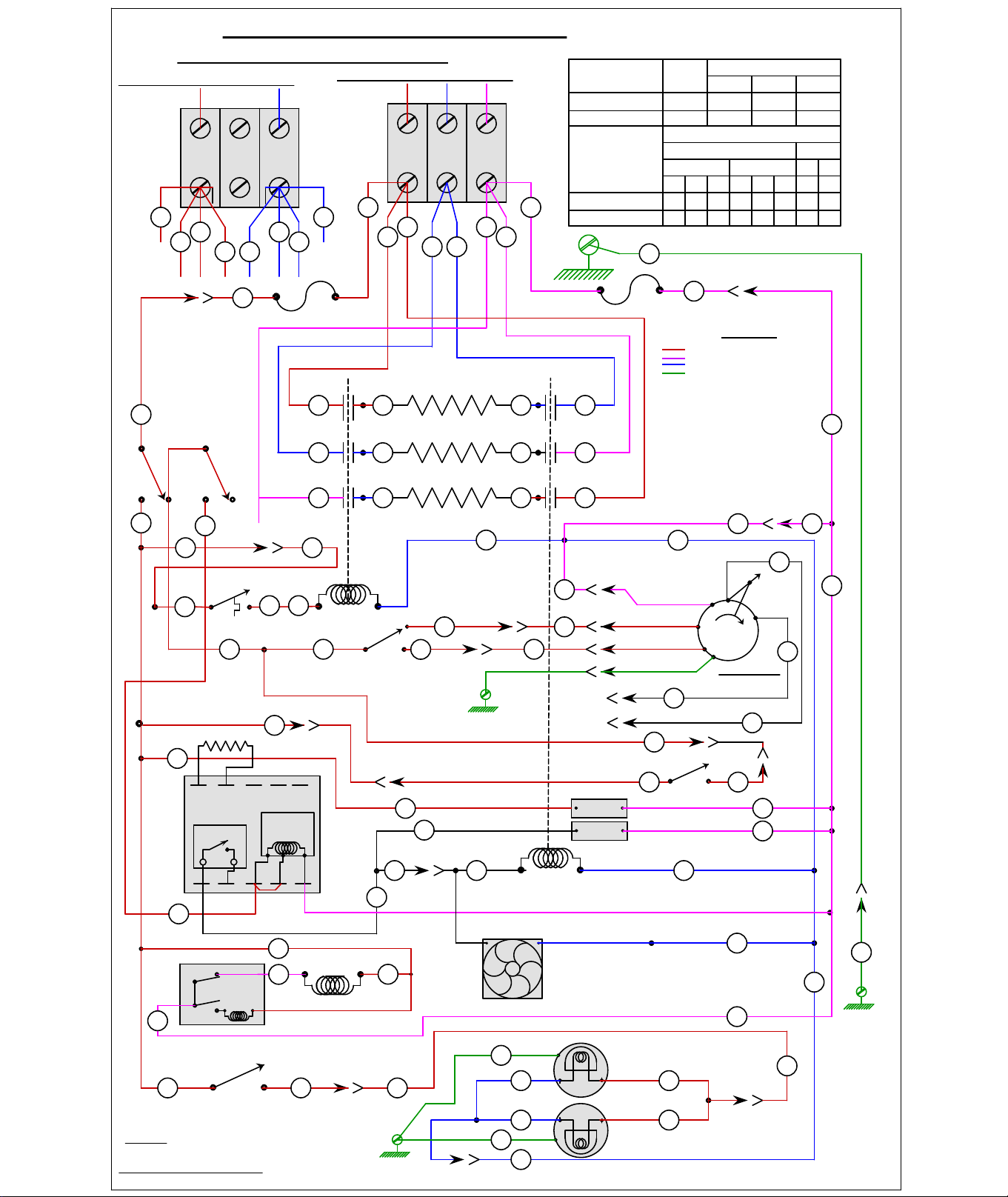
HEATING
POWER ON
SPEED
MOTOR
2 SPD
MOTOR
LO
HI
COM
LIMIT
2
1
21
3
5
J1-5
5
7
C1-7
7
36
11
12
12
11
13
J1-2
J1-1
41
42
40
J1-9
9
43
TEMP. CNTL.
53
6
C1-6
6
44
91
92
90
93
1010J1
C1-10
OVEN LAMPS
40W.
40W.
C
C
S
S
WKED & X,VC4ED & 6,HEC5 & X 208-240V.
REV.
J
56
SEE WIRING DIAGRAM 426666
FRONT VIEW
426667-1
54
61
73 63
72
7162
L1 L2 L3
208 OR 240 VOLT 3 PHASE SUPPLY
208 OR 240 VOLT 1 PHASE SUPPLY
72
63 71
1
62
61
L2L1
73
2
5150
52
15A
1A
15A
2A
ON
OFF
COOL
ON
OFF
COOL
35
46
FAN, COOLONG
28
35
38
PROBE
USE FIELD WIRE SUITABLE FOR 90°C.
DOOR
OPEN
3
4
8
C2-2
C1-4
SWITCH
3
C1-3
C2-1
55
C4-3
10
C4-1
40
C3-1
C3-5
C3-6
C1-12
C1-11
C3-3
C3-4
98
98
97
97
NOT
UTILIZED
ROTATION
BLOWER
BLUE
RED
BLACK
WHITE
GRAY
C3-2
GREEN
GN
GN
44
44
64 74 7161
6562 7275
6663 7376
R-3
R-2
R-1
WHT
WHT. LEAD
83
84
82
a
b
b0
a1
N
L
81
BUZZ
81
AI5737
GND.
GND.
ZYX
ZYX
DECAL, SCHEMATIC ELEC. CONVECTION OVEN
66
8.0
4.0
X-Y
33
3 PHASE
NOMINAL AMPS PER LINE
3PHASE LOAD KW/PHASE
TOTAL
208V
STACKED
SINGLE
7070 66
Y
3335
X
35
Z
UNIT
STACKED
SINGLE
25
12.5
CONN.
KW
208 240
240V
120
60
XZ
58 66
29
X Y
33
Z
104
52
XZ
9.0
4.5
X-Z
1-PH
8.0
4.0
Y-Z
O
V
Y
CCW.
CW.
CENT.
PROBE
COM.
120
240
PROBE
RELAY
TRANSFORMER
6 7 8 9 10
12345
GND.
GND.
LEGEND
L1 LINE VOLTAGE
L2 LINE VOLTAGE
L3 LINE VOLTAGE
GND
Starting SN 482075494
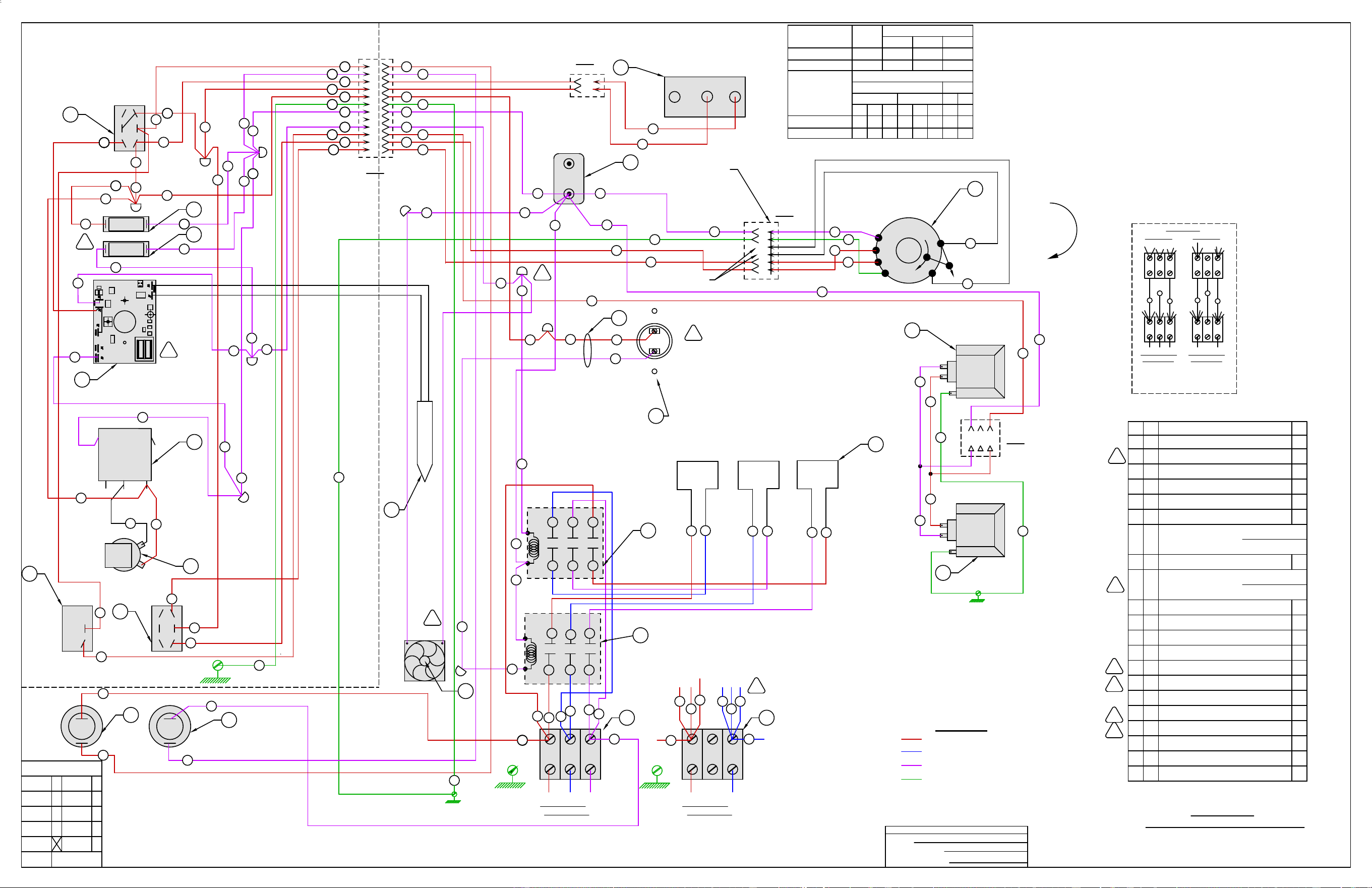
-CONTACTOR 40A 3 POLET2
-TERMINAL BLOCK 3 POLES1
-MOTOR 1/2 HP. 2 SPEED FIR 240 VV1
-SWITCH, TOGGLE S.P.S.TA1
-SWITCH, TOGGLE D.P.D.TB1
-LIGHT, "ON" 250 V.C1
-SWITCH, LIMIT (DOOR)H1
-BLOCK,PORCELIAN ASSEMBLYJ1
-LIMIT CONTROL 550FK1
-BUZZER 230 VOLTG1
2 R FUSE & HOLDER 15A
HOLDER
FUSE
-SWITCH, TOGGLE D.P.D.T. (CO)X1
1
6
GND.
50
5
9
7
44
13
J
COM
2 SPEED
MOTOR
54
11
12
LO
HI
L
I
T
M
I
V
SINGLE
STACKED
SINGLE
STACKED
1
2
R
R
-LAMP ASSEMBLY 240V. 40W.Y2
ZYX
CONNECT TOP SECTION TO BOTTOM SECTION
AS SHOWN. SEE LOAD BLOCK FOR
TOP SECTION
L2
ZYX
BOTTOM SECTION
3 PHASE CONN.
AMP DRAW PER LEG.
L1
X
ZYX
ZYX
1 PHASE CONN.
BOTTOM SECTION
L3 L1 L2
Y
Z
Y
X
Z
TOP SECTION
STACKED OVENS
UNIT
3PHASE LOAD KW/PHASE
Y-Z
NOMINAL AMPS PER LINE
4.0
240V
3 PHASE
3535
X
33
Y
208V
33
Z X
29
Y
12.5
CONN.
TOTAL
KW
X-Y
4.0
240
1-PH
XZ
52
XZ
33
Z
60
208
X-Z
4.5
8.025 8.0 9.0
12066 10458666670 70
HEC5 & X,VC4ED & 6,WKED & X 208-240 VOLT
WIRING DIAGRAM
-
CODES
J
E
W
MAN
NC
X
V
A
PMI
VC
ACAD
REQ. IT.
DESCRIPTION
FIN.
WIRING INFORMATION
FOR UNITS LISTED
BOTTOM LAMP
GND.
TOP LAMP
10
12
11
-WIRE NUT BLUEAB10
6
38
F
BUZZ
G
GND.
7
A
3
HEATING
43
40
POWER ON
10
3
LIGHTS
1
B
11
5
C1
SPEED
12
41
42
2
9
X
/COOL DOWNON/OFF
4
3
1
5
12
10
11
7
8
9
6
3
4
2
B
E
O
R
P
P
D
46
-FAN, COOLING 230 V.D1
-PROBE,THERMISTORP1
GND.
C-1
DOOR SWITCH
C-2
1
2
H
NC
NO
3
C
1
N/A
N/A
426666-G2 - OBSOLETE
SUPERSEDED BY
FOR SERVICE USE
STATUS
DRAWING STATUS
C
28
L
E
-LIGHT, "HEAT" 250 V.C11
J
J
J
39
TEMP. CONTROL
-TEMP. CONTROL - NCCE1
55
AC
-WIRE SET, LIMIT SWITCHAC1
K
208-240V
L
K
1 2 3
10
Y
Y
8
PART OF MOTOR
1
2
3
4
5
6
13
GN
GN
GND
GN
44
44
ASSEMBLY "V"
97
98
BLACK
GREEN
BLUE
RED
GRAY
WHITE
NOT UTILIZED
C-4
C-3
BLOWER
ROTATION
FRONT
VIEW
13
2
1
ZYX
CONTACTOR
S
T
73
61
62
63
L1 L2 L3
208 OR 240 VOLT
3 PHASE SUPPLY
73
72
71
63
62
61
S
GND.
1 PHASE SUPPLY
208 OR 240 VOLT
ZYX
L1
1
L2
2
51
CONTACTOR
52
72
71
65
64
66
71 72 73
53
R2
R1
R3
64
65
66
76
75
74
L
T
K
50
1 L ELEMENT, 12.0 KW
208 VOLT
240 VOLT
M
M
N
PART OF KIT
PART OF KIT
VCE-STACKWIRES
VCE-STACKWIRES
R
TIMER
a
b
b0
N
a1
82
84
83
81
82
-TIMER, 230 VOLT 1-HR 60HZF1
S1
DERIVED FROM: 00-426666 REV S1
AI5736
51
54
55
5
11
7
9
10
12
6
1A
2A
1A
2A
93
90
3838
43
42
4040
4141
56
3535
3636
55
99
1010
1212
1111
66
77
11
44
22
33
56
3535
39
46
28
91
92
??
??
62
63
767574
61
X
Y
Z
Y Z X
L1 LINE VOLTAGE
L2 LINE VOLTAGE
L3 LINE VOLTAGE
GND
LEGEND

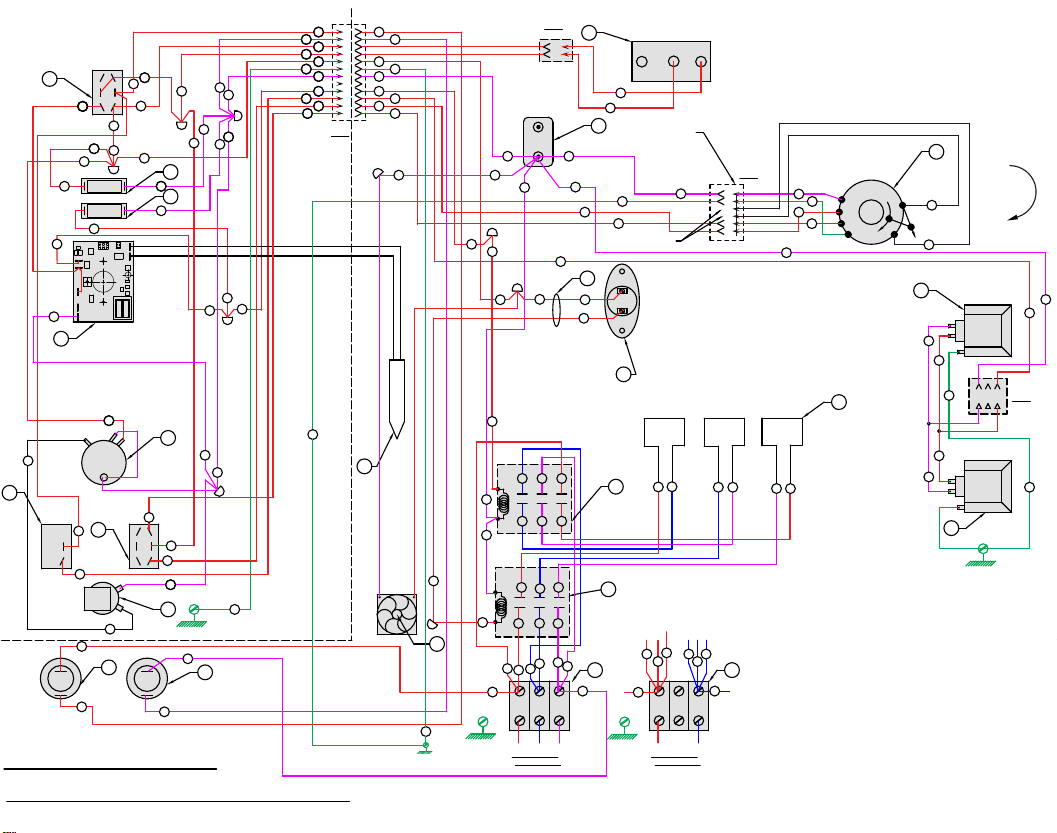
GND
AI4892
DERIVED FROM 426666
HEC5 & X, VC4ED & 6, WKED & X 208-240V
208/240
VAC
J4
J9
J2
J3
J5
COM AC
OUTPUT
J7
J6
PROBE
SEE SCHEMATIC DECAL426667-1
GND
COM
HI
LO
MOTOR
2 SPEED
6
L
I
M
I
T
J
V
R
R
BOTTOM LAMP
TOP LAMP
TIMER
4
3
1
F
BUZZ
G
A
HEATING
POWER ON
LIGHTS
1
B
C1
SPEED
X
/COOL DOWNON/OFF
1
5
12
10
11
7
8
9
6
3
4
2
B
E
O
R
P
P
D
C-1
DOOR SWITCH
C-2
1
2
H
NC
NO
C
1
C
E
TEMP. CONTROL
AC
208-240V
K
1 2 3
Y
Y
PART OF MOTOR
1
2
3
4
5
6
GN
GND
ASSEMBLY "V"
BLACK
GREEN
BLUE
RED
GRAY
WHITE
NOT UTILIZED
C-4
C-3
BLOWER
ROTATION
FRONT
VIEW
S
T
L1 L2 L3
208 OR 240 VOLT
3 PHASE SUPPLY
S
1 PHASE SUPPLY
208 OR 240 VOLT
L1
1
L2
R2
R1
R3
L
T
GN
GN
X
Y
Z
Y Z X
12
10
9
5
1A
11
2A
6
7
51
55
54
1A
2A
93
90
66
6464
6565
3838
43
42
4040
4141
56
3535
3636
55
99
1010
1212
1111
66
77
11
44
22
33
66
56
3535
39
46
28
91
92
62
63
767574
61
1
GND.
GND.
ZYX
GND.
ZYX
2
64
65
66
76
75
74
50
66
71 72 73
53
CONTACTOR
52
72
71
65
64
51
61
64
62
65
63
60
73
61
62
63
13
2
CONTACTOR
97
98
GN
44
44
GN
13
8
46
3
28
39
55
10
11
12
7 13
44
5
9
54
50
1
2
10
12
11
6
38
7
3
43
40
64
10
3
11
5
12
41
42
2
9
4
3
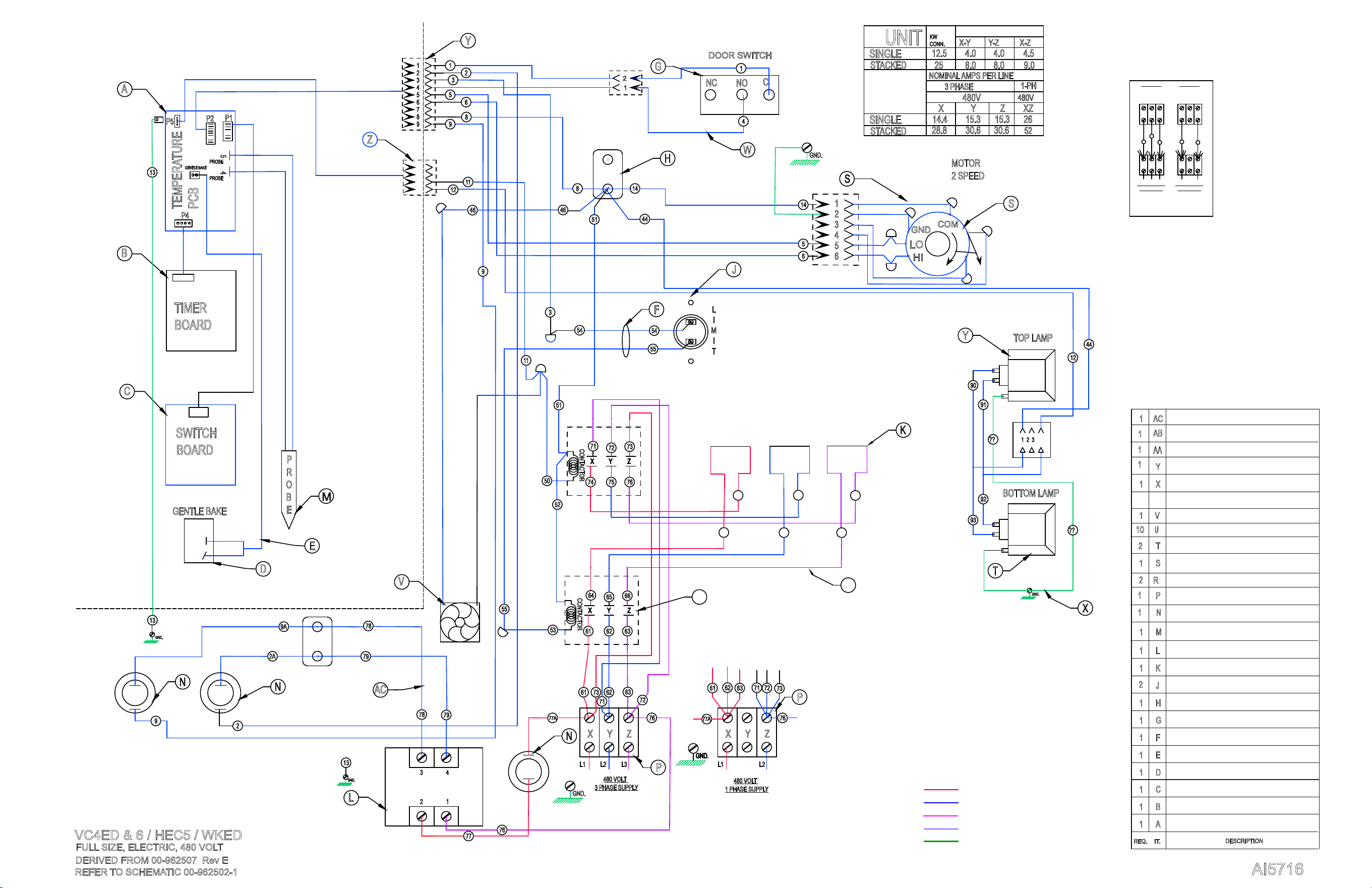
AI5716
DERIVED FROM 00-962507 Rev E
VC4ED & 6 / HEC5 / WKED
T2
S1
V1
A1
B1
C1
H1
J
K1
G1
P
X1
Y
REQ. IT.
DESCRIPTION
AB
D1
M1
E1
AC1
1 L
F1
2
REFER TO SCHEMATIC 00-962502-1
ZYX
13
GND.
L1 L2 L3
76
CONTACTOR
6261
53
63
64
65
63
61
66
11
8
44
14
H
P
ZYX
77A
GND.
L1 L2
76
COM
2 SPEED
MOTOR
54
LO
HI
L
I
T
M
I
J
S
9A
N
N
R2
R1
R3
62
6
5
S
GND.
73
71
72
R
DOOR SWITCH
G
NC
4
NO
1
C
55
F
46
64
65
66
76
75
74
61
63
71
72
73
62
5
12
8
1
2
3
4
5
6
7
8
9
B
E
P
O
R
M
PROBE
PROBE
45
P2
P1
P4
P5
TEMPERATURE
PCB
GENTLE BAKE
TIMER
BOARD
SWITCH
BOARD
13
A
B
C
11
D
V
W
Y
Z
E
2
1
P
K
3
1
2
3
4
5
6
GND.
GND
CONTACTOR
74 75 76
73
71
72
50
51
52
BOTTOM LAMP
GND.
TOP LAMP
12
1 2 3
Y
T
44
GENTLE BAKE
77
76
78
79
480 VOLT
3 PHASE SUPPLY
1 PHASE SUPPLY
480 VOLT
SINGLE
STACKED
SINGLE
STACKED
UNIT
3PHASE LOAD KW/PHASE
Y-Z
NOMINAL AMPS PER LINE
4.0
480V
3 PHASE
15.314.4
X
15.3
Y
12.5
CONN.
TOTAL
KW
X-Y
4.0
1-PH
XZZ
26
480V
X-Z
4.5
8.025 8.0 9.0
5230.628.8 30.6
L
X
AB
AC
GND.
13
2A
78
79
1
2
3 4
77A
N
X
Y Z
X
Y Z
51
54
55
9
6
1
2
9
2
14
46
3
9
93
90
91
92
??
??
FULL SIZE, ELECTRIC, 480 VOLT
CONTACTOR 40A 3 POLE
TERMINAL BLOCK 3 POLE
BLOCK,PORCELIAN ASSEMBLY
LIMIT CONTROL 550F
FUSE & HOLDER 15A
WIRE NUT BLUE
WIRE SET, LIMIT SWITCH
PROBE,THERMISTOR
ZYX
CONNECT TOP SECTION TO BOTTOM SECTION
AS SHOWN. SEE LOAD BLOCK FOR
TOP SECTION
L2
ZYX
BOTTOM SECTION
3 PHASE CONN.
AMP DRAW PER LEG.
L1
X
ZYX
ZYX
1 PHASE CONN.
BOTTOM SECTION
L3 L1 L2
Z
Y
X
Z
TOP SECTION
USE 959970-G1 WIRE SET OR
10AWG 90 DEGREE C WIRE
ASSY,TEMP, CONTROL BOARD - TEMP
ASSY, TIMER BOARD
ASSY, SWITCH BOARD
SWITCH, TOGGLE S.P.S.T
LCOE GENTLE BAKE WIRE HARNESS
FAN, COOLING
LIGHT GRND WIRE
VC5E ACTUATOR HARNESS ASSY
VC5E WIRE SET
MOTOR 1/2 HP. 2 SPEED FIR 240 V
LCOE ELEMENT ASSY, 12KW
LAMP ASSEMBLY 240V. 40W.
VC4E ELEMENT WIRE SET
TRANSFORMER, 480V TO 240V
VC4E 480V WIRE SET
NOTE: ITEM AA 962413-G1 CONTAINS
2A, 9A, 46, 50, 51, 52, 53
DOOR SWITCH
1 W
DOOR SW HARNESS
N
R
1
1
2
U
AA
1
1
1
10
Wire Color Legend
AC Line 1
AC Line 2
AC Line 3
240 VAC
Chasis Ground
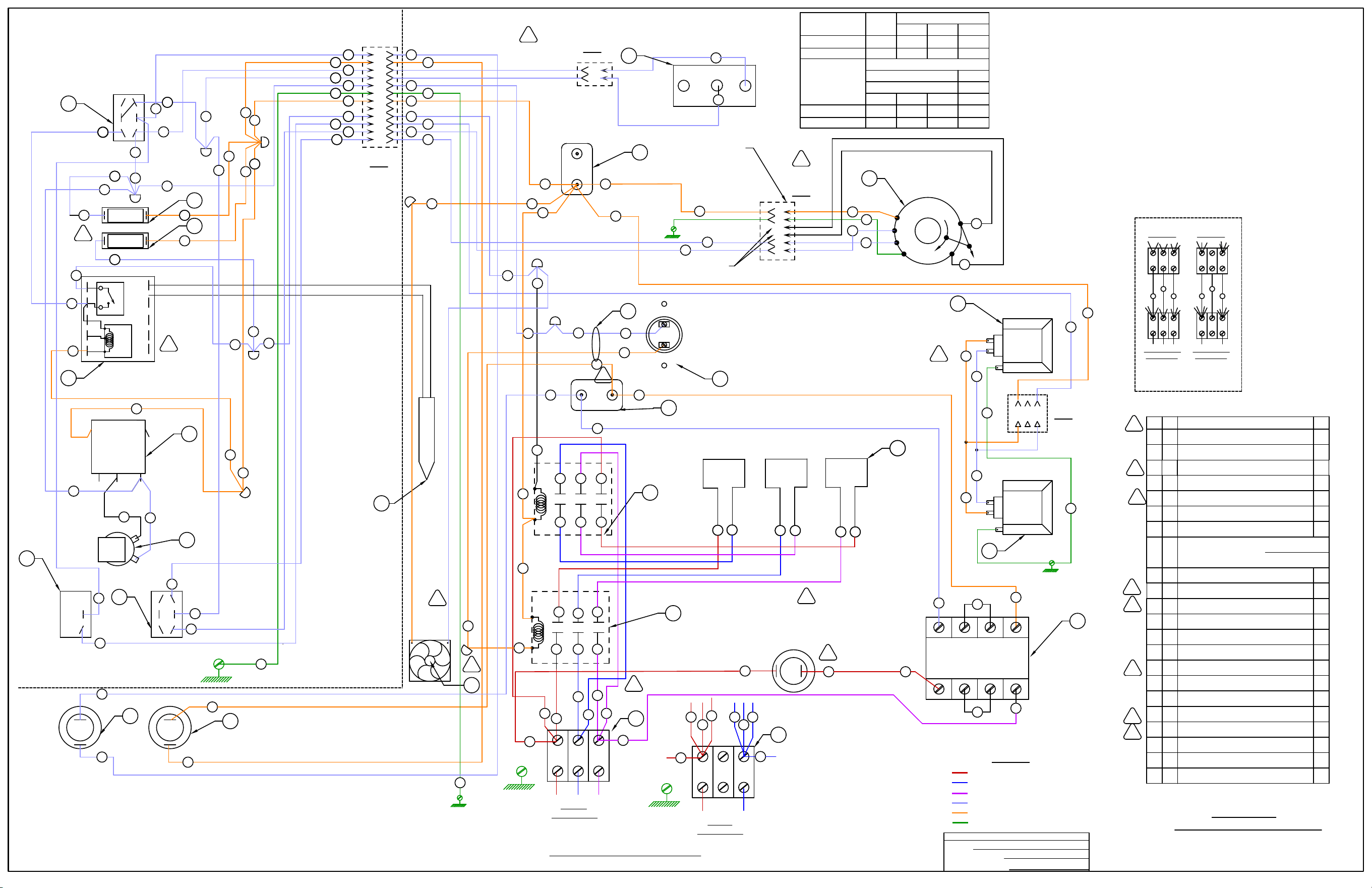
SEE SCHEMATIC DECAL426669-1
-CONTACTOR 40A 3 POLET2
-TERMINAL BLOCK 3 POLES1
-SWITCH, TOGGLE S.P.S.TA1
-SWITCH, TOGGLE D.P.D.TB1
-SWITCH, LIMIT (DOOR)H1
-BLOCK,PORCELIAN ASSEMBLYJ2
-BUZZER 230 VOLTG1
2 R FUSE & HOLDER 15A
HOLDER
FUSE
-SWITCH, TOGGLE D.P.D.T. (CO)X1
S
ZYX
3 PHASE SUPPLY
480 VOLT
77
6
GND.
L1 L2 L3
76
71
CONTACTOR
6261
53
73
64
65
63
72
66
T
72
51
71 73
50
T
5
9
7
44
13
J
S
ZYX
1 PHASE SUPPLY
480VOLT
77
GND.
L1 L2
76
54
L
I
T
M
I
K
1
2
R
R
ZYX
CONNECT TOP SECTION TO BOTTOM SECTION
AS SHOWN. SEE LOAD BLOCK FOR
TOP SECTION
L2
ZYX
BOTTOM SECTION
3 PHASE CONN.
AMP DRAW PER LEG.
L1
X
ZYX
ZYX
1 PHASE CONN.
BOTTOM SECTION
L3 L1 L2
Y
Z
Y
X
Z
TOP SECTION
STACKED OVENS
CONTACTOR
52
HEC5 & X,VC4ED & 6,WKED & X 480 VOLT
WIRING DIAGRAM
REQ. IT.
DESCRIPTION
FIN.
WIRING INFORMATION
FOR UNITS LISTED
61 73
63
62
72
71
-PROBE, THERMISTORP1
76
79
H1 H3 H2 H4
X4 X2 X3 X1
78
77
J
2
1
-TRANSFORMER 1KVA 480-240 V.Z1
Z
30.6
8.0
4.0
X-Y
15.3
3 PHASE
NOMINAL AMPS PER LINE
3PHASE LOAD KW/PHASE
TOTAL
480 VOLT
STACKED
SINGLE
28.8
14.4
X Y
UNIT
STACKED
SINGLE
25
12.5
CONN.
KW
480
XZ
30.6
Z
15.3
52
26
9.0
4.5
X-Z
1-PH
8.0
4.0
Y-Z
-WIRE NUT BLUEAB9
6
38
GND.
7
A
3
43
82
10
3
LIGHTS
1
B
11
5
SPEED
12
41
42
2
9
X
/COOL DOWNON/OFF
4
3
1
5
12
10
11
7
8
9
6
3
4
2
B
E
O
R
P
P
D
46
-FAN, COOLING 230 V.D1
FAN
COOLING
GND.
DOOR SWITCH
C-2
D
1
2
H
NC
8
NO
3
C
C-1
1
N/A
N/A
426668-G2 - OBSOLETE
SUPERSEDED BY
FOR SERVICE USE
STATUS
DRAWING STATUS
-LIGHT, "ON" 250 V.C1
-LIGHT, "HEAT" 250 V.C11
J
J
HEATING
40
POWER ON
C1
C
28
J
J
E
TEMP. CONTROL
O
V
Y
CCW.
CW.
CENT.
PROBE
COM.
120
240
PROBE
RELAY
TRANSFORMER
6 7 8 9 10
12345
35
39
-TEMP. CONTROL - NCCE1
-LIMIT CONTROL 550FK1
55
AC
-WIRE SET, LIMIT SWITCHAC1
K
K
K
K
COM
HI
LO
MOTOR
2 SPEED
11
12
V
PART OF MOTOR
1
2
3
4
5
6
13
GND
GN
ASSEMBLY "V"
98
BLACK
GREEN
BLUE
RED
GRAY
WHITE
C-3
97
GND.
12
11
NOT UTILIZED
13
L
L
L
L
L
-LAMP ASSEMBLY 240V. 40W.Y2
-MOTOR 1/2 HP. 2 SPEED FIR 240 VV1
-ELEMENT SET, 12.0 KW. 480V.L1
??
??
BOTTOM LAMP
GND.
TOP LAMP
10
1 2 3
Y
Y
C-4
44
L
R2
R1
R3
64
65
66
76
75
74
L
R2
R1
R3
64
65
66
76
75
74
L
PART OF KIT
VCE-STACKING WIRES
N
P1
94
94
P1
F
BUZZ
G
TIMER
a
b
b0
N
a1
82
84
83
81
-TIMER, 230 VOLT 1-HR 60HZF1
Q
DERIVED FROML 00-426668 REV. Q
AI5738
61
62
63
7574
50
76
51
54
55
5
11
7
9
10
12
6
1A
2A
1A
2A
J2
J2
79
78
3838
4040
56
3535
3636
55
99
1010
1212
1111
66
77
11
44
22
33
56
3535
39
46
43
42
4141
43
28
93
90
91
92
X
Y
Z
ZY X
LEGEND
L1 LINE VOLTAGE
L2 LINE VOLTAGE
L3 LINE VOLTAGE
240VAC (X1)
240VA (X4)
GND
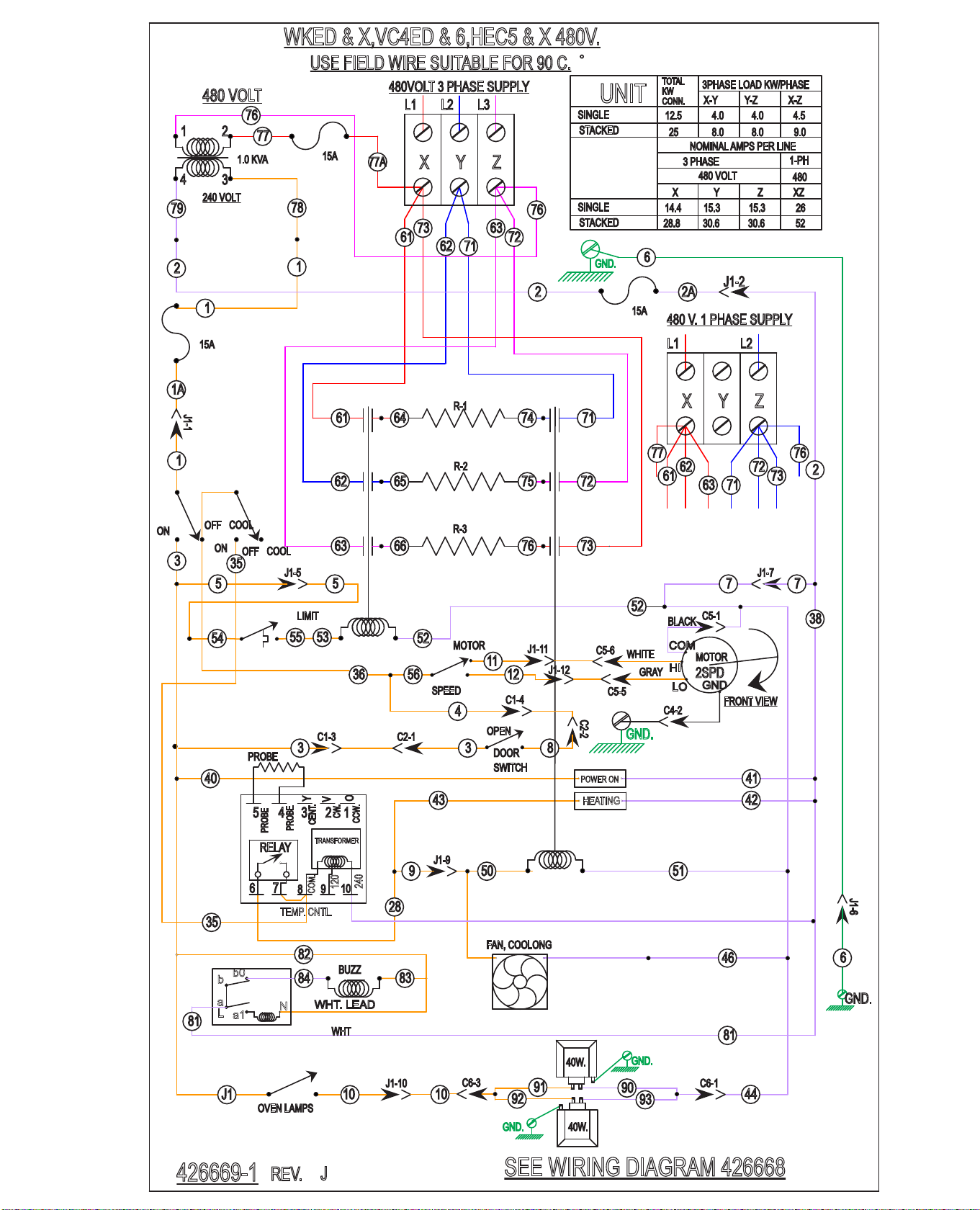
AI5718
HEATING
POWER ON
SPEED
MOTOR
2
1
3
5
J1-5
5 7
J1-7
7
36
11
12
J1-2
41
42
40
J1-9
9
43
TEMP. CNTL.
6
J1-6
6
10
J1
OVEN LAMPS
WKED & X,VC4ED & 6,HEC5 & X 480V.
REV.
J
56
SEE WIRING DIAGRAM 426668
426669-1
54
61
73 63
72
7162
L1 L2 L3
480VOLT 3 PHASE SUPPLY
52
5150
52
15A
2A
ON
OFF
COOL
ON
OFF
COOL
35
46
FAN, COOLONG
28
35
38
PROBE
2
79
1
1
78
76
240 VOLT
4
3
1 2
480 VOLT
1.0 KVA
77
1A
J1-1
15A L1
61
480 V. 1 PHASE SUPPLY
77
7163
62
73
72
L2
76
76
2
USE FIELD WIRE SUITABLE FOR 90 C.
DOOR
OPEN
3
4
C2-2
8
C1-4
SWITCH
3
C1-3 C2-1
LIMIT
5355
64 74 7161
6562 7275
6663 7376
R-3
R-2
R-1
10
J1-10
44
90
93
91
92
40W.
40W.
C6-1
C6-3
FRONT VIEW
J1-11
J1-12
2SPD
MOTOR
LO
HI
COM
WHITE
GRAY
C5-5
BLACK
C5-1
C5-6
GND
WHT
WHT. LEAD
83
84
82
a
b
b0
a1
N
L
81
BUZZ
81
15A
77A
GND.
GND.
ZYX
O
V
Y
CCW.
CW.
CENT.
PROBE
COM.
120
240
PROBE
RELAY
TRANSFORMER
6
7
8
9
10
12345
ZYX
SINGLE
STACKED
SINGLE
STACKED
UNIT
3PHASE LOAD KW/PHASE
NOMINAL AMPS PER LINE
Y
3 PHASE
15.3
30.6
X
14.4
28.8
480 VOLT
Z
15.3
30.6
X-Y
4.0
8.0
KW
12.5
CONN.
25
TOTAL
Y-Z
4.0
8.0
XZ
26
52
1-PH
480
X-Z
4.5
9.0
GND.
GND.
C4-2
GND.
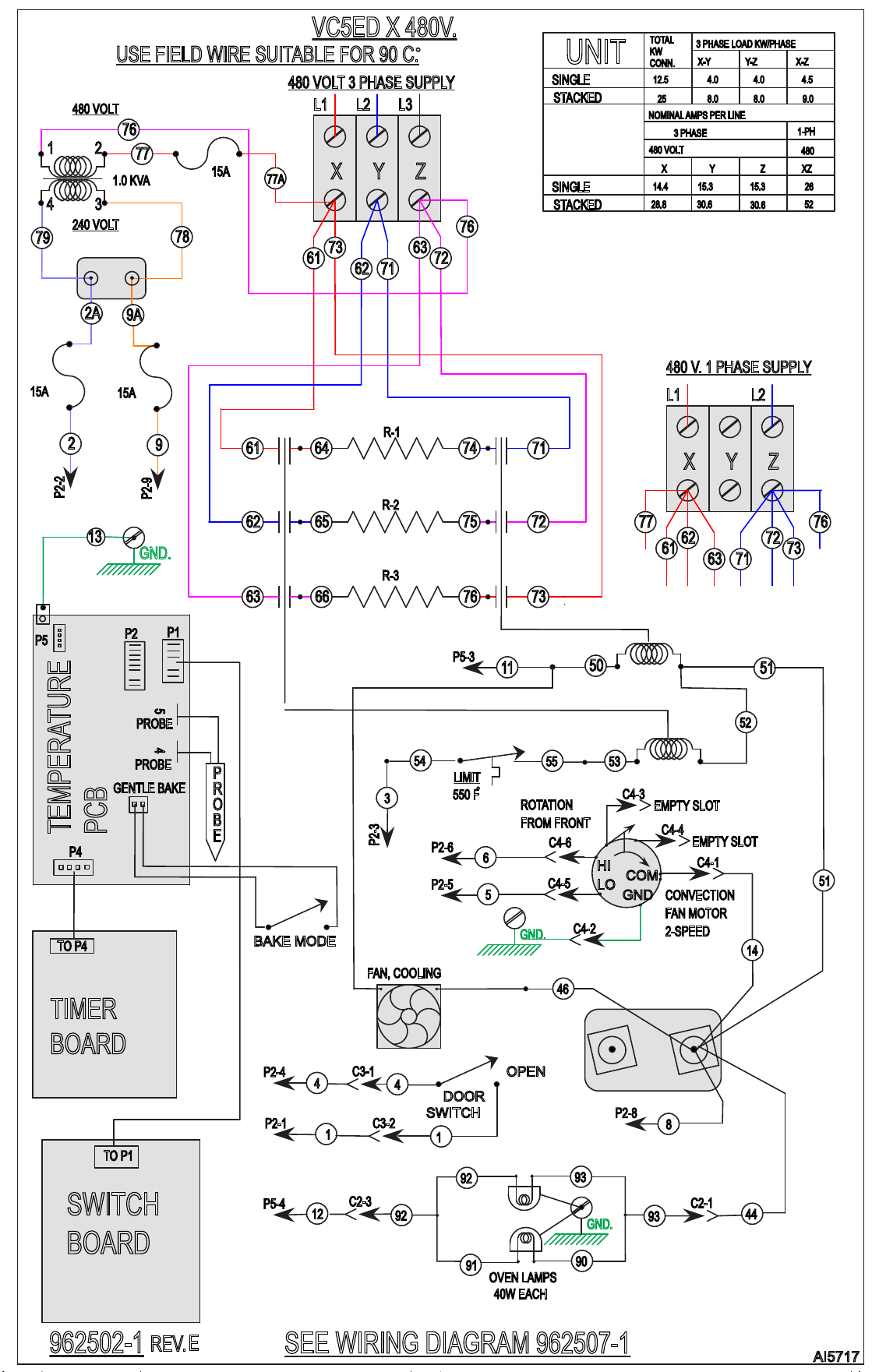
AI5717
76
53
VC5ED X 480V.
REV.
E
SEE WIRING DIAGRAM 962507-1
962502-1
61
73 63
72
7162
L1 L2 L3
15A
46
FAN, COOLING
USE FIELD WIRE SUITABLE FOR 90 C.
55
13
TO P4
TO P1
LIMIT
550 F
OPEN
DOOR
SWITCH
44
4
1
4
1
14
8
BAKE MODE
3
6
5
COM.
HI
LO
CONVECTION
FAN MOTOR
2-SPEED
ROTATION
FROM FRONT
C4-1
C4-3
C4-4
GND
EMPTY SLOT
EMPTY SLOT
12
40W EACH
OVEN LAMPS
93
90
93
92
91
92
C2-1
64 74 7161
6562 7275
6663 7376
R-3
R-2
R-1
50
51
51
11
54
52
480 VOLT 3 PHASE SUPPLY
L1
61
480 V. 1 PHASE SUPPLY
77
7163
62
73
72
L2
76
2
15A
9
2A
9A
79
78
76
240 VOLT
4
3
1 2
480 VOLT
1.0 KVA
77
15A
77A
ZYX
B
E
P
O
R
PROBE
PROBE
45
P2
P1
P4
P5
TEMPERATURE
PCB
GENTLE BAKE
TIMER
BOARD
SWITCH
BOARD
C3-1
C3-2
P2-1
P2-4
P2-3
P2-8
P2-2
GND.
C4-6
C4-5
GND.
C4-2
P2-6
P2-5
P5-4
GND.
C2-3
P5-3
SINGLE
STACKED
SINGLE
STACKED
UNIT
3 PHASE LOAD KW/PHASE
NOMINAL AMPS PER LINE
Y
3 PHASE
15.3
30.6
X
14.4
28.8
480 VOLT
Z
15.3
30.6
X-Y
4.0
8.0
KW
12.5
CONN.
25
TOTAL
Y-Z
4.0
8.0
XZ
26
52
1-PH
480
X-Z
4.5
9.0
ZYX
P2-9