PLEASE READ
AND SAVE THESE
INSTRUCTIONS
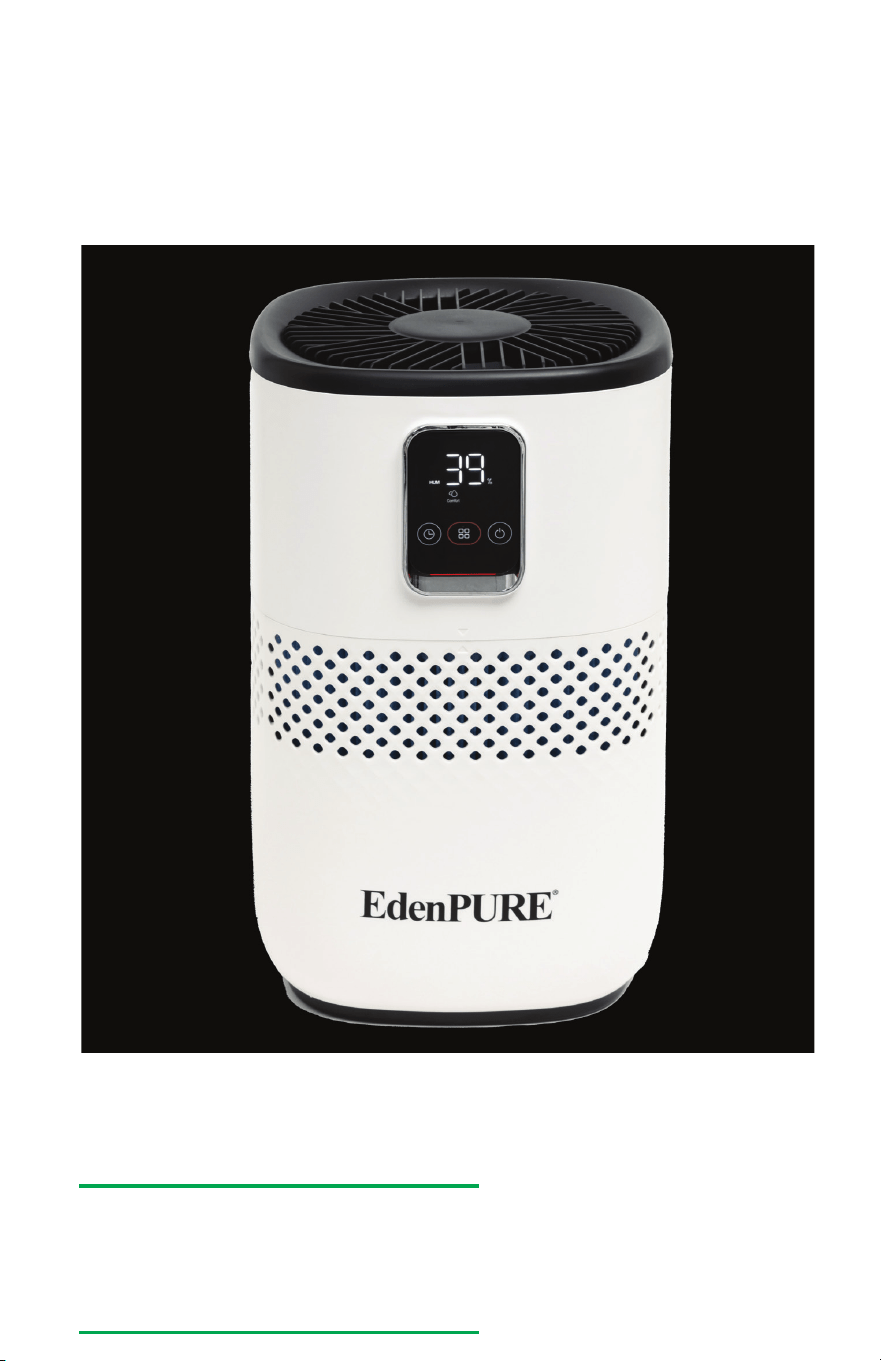
Model No. A6073
Owner’s Manual
WARRANTY: e EdenPURE Mist Free Humidier comes with a
ONE-YEAR LIMITED COMPONENT WARRANTY. If your unit
does not appear to be working properly, please contact our service
center by calling 1-800-225-6595. Prior to your call, we encourage
you to visit our service related website: www.edenpuresupport.com
for troubleshooting tips and service instructions if needed:
To place an order call 1-800-360-1070
EdenPURE
®
7584 Whipple Avenue NW
N. Canton, OH 44720
z
Troubleshooting
EdenPURE
®
Mist Free Humidifier
The unit
doesn’t
work
Water tank
leaks
The filter has
turned
yellow
There is a
bad smell
coming from
the unit
The unit
turns on
but no mist
comes out
There is an
odd noise
coming from
the unit
The cord isn’t plugged in
The unit is out of water
The fuselage assembly and
water tank are not locked
together
The tank is too full
The yellow substance
is a natural reaction of
the material used in the
humidification filter
There is a bad smell
The humidifier adopts
evaporative humidification
technology and the humid
air is output from the outlet
of the humidifier
The machine is unstable or
sitting in a tilted manner
There is a foreign body
inside the product
Plug the adaptor
Add water to tank
Fuselage assembly and
water tank installed in
place
Do not exceed the highest
water level
Clean the humidifier filter
every 3-4 days to remove
these stains, and replace
the humidifier filter every
3 months
Replace the water with
clean water or clean the
tank
Clean the filter
The unit does not output
visible mist
Place on a solid level
surface for use
Remove the foreign body
after unplugging the unit.
PROBLEM POSSIBLE CAUSE SOLUTION
©2026 EdenPURE® I-5946 BR12426R-1
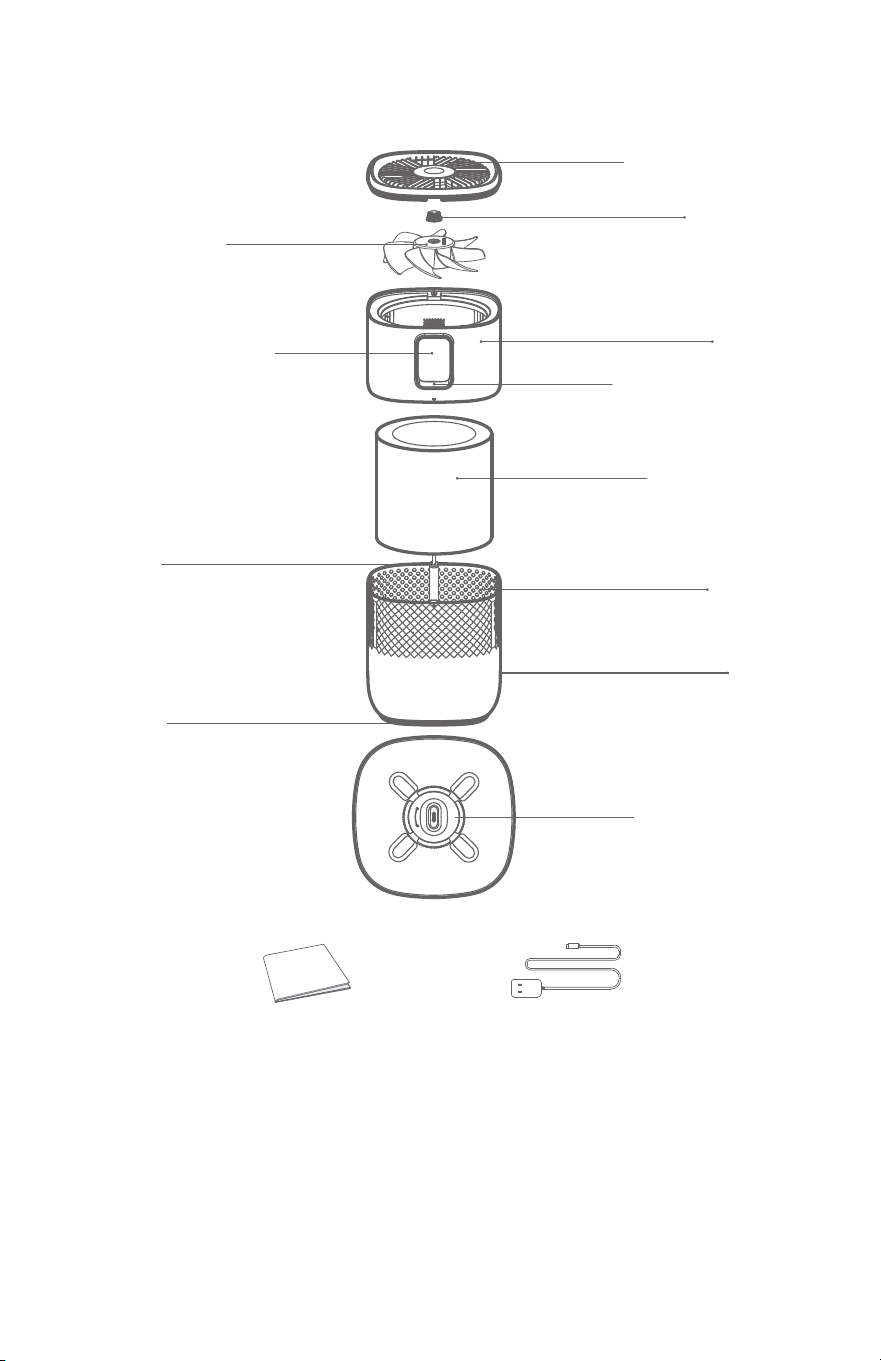
10
1
Top Cover
Fan Blade
Humidity
Control Panel
Indicator
Filter
Inlet
Tank
Base
Float
Assembly
Float
Accessory List
Manual
Body
Knob
Power Adaptor
z
Parts Description
z
Maintenance and Cleaning
Fuselage Cleaning/Descaling
1. e exterior of the
machine can be cleaned
directly with a clean so
wet cloth.
2. e main component is
clean and can be wiped
directly with a clean so
wet cloth. Aer the main
component is removed
from the tank, keep it
upright. Do not place it
tilted or upside down.
3. To clean and descale the
water tank, remove the
humidication lter. en
clean with a descaling
agent or water. Rinse aer
cleaning.
4. Empty any water that is
remaining in the tank.
NOTE:
Always unplug the adapter before maintenance/descaling.
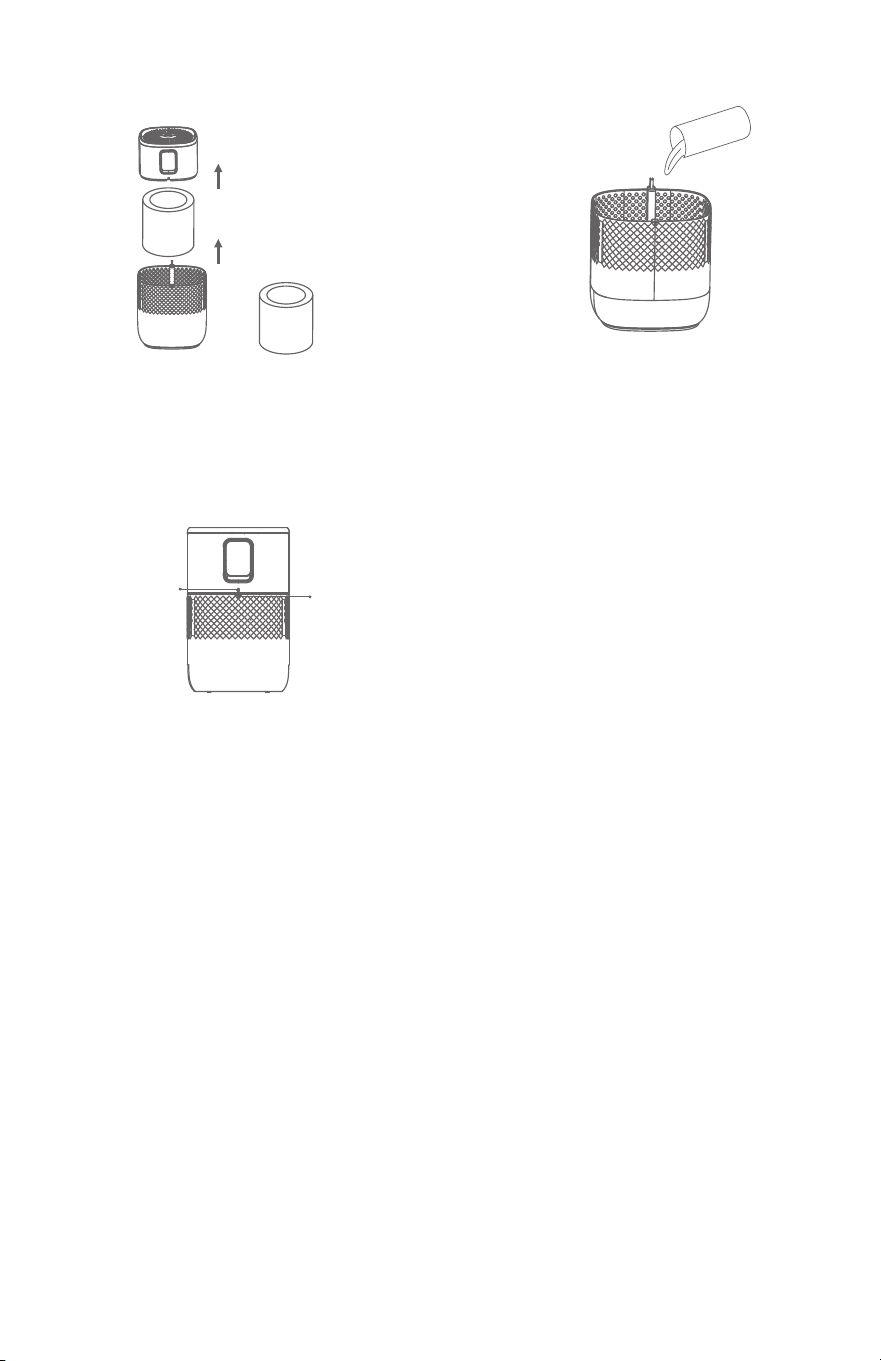
2
9
z
How to Add Water
1. Take the body apart as
shown and remove the
lter. Also remove the bag
that covers the lter.
2. Add water to the tank
as shown above.
3. Aer adding water, put
the body back together,
making sure the grooves
snap back into place.
BODY
GROOVE
TIPS:
1. Do not add disinfectants, essential oils, lemon juice or
fungicides in the tank.
2. Wait 1 minute to turn the unit on aer adding water.
3. Unplug power cord before adding water and cleaning.
4. e humidier must be cleaned to remove scale and debris
in the tank regularly. It is recommended you clean it once a
week.
WATER
z
Maintenance and Cleaning
Cleaning the Float and the Float Assembly
1. Rotate the oat assembly
counterclockwise.
2. Remove the oat
holder and bottle.
3. Wash the oat bottle and
oat holder under the
water tap.
4. Put the oating bottle
support on the oating
bottle and place it at the
bottom of the tank. Turn
the oating bottle support
clockwise and hear the
click sound to ensure
that the oating bottle is
installed in place.

8
3
z
Set-Up
Timer
Mode
Power
Smart
SLEEP Comfort
Turbo
HUM
Time
Water
1. To turn the power on to the unit, press the Power button. e
lights will come on. Press the power button again to turn the
unit o and the lights will go out.
2. Aer pressing the power button, the smart light will come
on and the unit will automatically be in comfort mode. Press
the mode button to switch the mode between sleep, comfort,
turbo and smart modes. Press the timer button to set the
timer.
3. If the unit is low on water it will beep 3 times and the
SMART icon will ash red.
4. If the “SMART” icon is red, the humidity is less than 40% it
indicates the room is dry.
5. If the “SMART” icon is green, the humidity is between 40%
and 60% it indicates the room is in the comfortable range.
6. If the “SMART” icon is blue, the humidity is over 60% and it
indicates the humidity in the room is high.
z
Maintenance and Cleaning
Cleaning the Outlet and Fan
1. Remove the screws at the back of the air outlet net with a
screwdriver. Pull the air outlet net up and remove it.
2. Rotate the knob counterclockwise and you will be able to
remove the fan.
3. e fan can be removed along the direction of the motor
sha.
4. Clean the outlet air net, knob and fan in the sink.
5. Clean and dry the accessories, install them in accordance
with the order of the fan knob and the air outlet net, and
screw the screws.
REMINDER:
1. Be sure to unplug the adapter before cleaning.
2. When cleaning, do not squeeze or rub the humidifying lter,
which may damage the humidifying lter, and then aect the
humidifying eect.
3. It is recommended to clean the humidication lter every 3-4
days to keep it hygienic.
4. For your more comfortable experience, it is recommended to
replace the humidication lter once every 3 months.
4
7
z
Button Functions
z
Cleaning
Cleaning the Filter
Power
Mode
Timer
Water
Light
To turn the power on to the unit, press the Power
button. e lights will come on. Press the power
button again to turn the unit o and the lights
will go out. Aer pressing the power button, the
humidity light will come on and the unit will
automatically be in comfort mode.
Press the mode button to cycle between:
comfort→turbo→smart→sleep modes.
In smart mode, set the humidity level from 40%
to 80% in 5% increments by pressing the mode
button when the display is ashing. Aer it’s done
ashing the display will show the actual humidity
in the room.
Turbo Mode: Motor speed 1350 RPM;
Humidication: 460mL/h; LED Light is ON
Comfort Mode: Motor speed 850 RPM;
Humidication: 380mL/h; LED Light is ON
Sleep Mode: Motor speed 650 RPM;
Humidication: 200mL/h; LED Light is OFF; only
a dim sleep light is on
Smart Mode: If the humidity is lower than the
set level then the unit will run on Turbo until the
level is met. Once the desired level is reached it
will lower to Comfort Mode to maintain.
Set the timer from 0-24 hours in 1 hour
increments by pressing the Timer button.
If the tank is low on water it will beep 3 times and
the humidity icon will ash red.
1. Turn the unit o
and unplug it. Take
the body apart and
remove the lter.
2. Soak the lter in tap
water for 1 hour.
3. Clean the lter with
slow running water
from the faucet. Drain
the excess water from
the lter and return it
to the tank.

z
Caution
To ensure safety, the product complies with all applicable
standards and regulations (low voltage, electromagnetic
compatibility, environmental directives, etc.).
1. e machine is not suitable for use by children. Do not allow
children to play with this product.
2. Keep this product out of the reach of children.
3. e weight of the product is aected by the amount of water in it
so it may be heavy.
Before using this product, please read this manual carefully and
keep it for future reference.
1. Do not plug and unplug the adapter with wet hands to avoid
electric shock.
2. Do not start the unit when there is no water in it.
3. Do not add disinfectants, essential oils, lemon juice or fungicides
in the water tank.
4. Do not put or place any items or pets in the tank.
5. Do not add water to the air outlet.
6. Do not immerse the unit in water when it is turned on.
7. Do not block the air outlet and keep the upper part of the air
outlet unobstructed.
8. Do not alter the power cord without authorization, or connect
the power cord halfway or use it in parallel with other electrical
appliances.
9. Do not climb or sit on this unit.
10. Do not turn the humidier o by unplugging it. Always turn it
o using the Power Button.
11. Do not use harsh abrasives to clean the unit or they may damage
the surface.
12. Keep the humidier at least 3 . away from the wall and other
objects.
FCC Information
is equipment complies with FCC RF radiation exposure limits set
forth for an uncontrolled environment. is equipment should be
installed and operated with a minimum distance of 9 inches between
the radiator and your body.
6
5
z
Important Reminders
1. It is recommended to use puried water for humidication.
2. Do not use damaged or aged adapters. Do not replace the power
cable without authorization. If the power cable is damaged,
it must be replaced by the manufacturer, other maintenance
departments or professionals in similar departments to avoid
danger.
3. Disconnect the power supply during thunderstorms.
4. If there is anything abnormal (such as burning smell)turn the
unit o and unplug it. Contact customer service.
5. When the unit will not be in use for a long time, unplug the
adapter, drain the water and clean the tank.
6. In order to avoid bacterial growth, please change the water in
the tank frequently.
7. When moving the machine, please unplug the adapter rst to
keep the water tank stable to prevent the water in the water tank
from overowing.
8. If the unit it tipped over be sure to unplug the adapter
immediately and contact customer service.
UV Light Technology
is unit features an internal UV light designed to help reduce
microorganisms within the water tank during operation. e UV
bulb is securely housed inside the product and is not replaceable
by the user. It is engineered for a long operational lifespan of
approximately 10,000 hours under normal use conditions. Because
the UV component is integrated into the internal structure of the
unit, no maintenance or servicing by the user is required.
Silver Ion Antimicrobial Protection
is product incorporates Silver Ion microbial technology directly
into key plastic components. During manufacturing, Silver Ion
materials are blended into the plastic resin prior to injection
molding, ensuring the antimicrobial properties are evenly
distributed throughout the material. is built-in protection helps
inhibit the growth of bacteria and viruses on treated surfaces and
remains eective for the life of the product without wearing o or
requiring reapplication.

z
Caution
To ensure safety, the product complies with all applicable
standards and regulations (low voltage, electromagnetic
compatibility, environmental directives, etc.).
1. e machine is not suitable for use by children. Do not allow
children to play with this product.
2. Keep this product out of the reach of children.
3. e weight of the product is aected by the amount of water in it
so it may be heavy.
Before using this product, please read this manual carefully and
keep it for future reference.
1. Do not plug and unplug the adapter with wet hands to avoid
electric shock.
2. Do not start the unit when there is no water in it.
3. Do not add disinfectants, essential oils, lemon juice or fungicides
in the water tank.
4. Do not put or place any items or pets in the tank.
5. Do not add water to the air outlet.
6. Do not immerse the unit in water when it is turned on.
7. Do not block the air outlet and keep the upper part of the air
outlet unobstructed.
8. Do not alter the power cord without authorization, or connect
the power cord halfway or use it in parallel with other electrical
appliances.
9. Do not climb or sit on this unit.
10. Do not turn the humidier o by unplugging it. Always turn it
o using the Power Button.
11. Do not use harsh abrasives to clean the unit or they may damage
the surface.
12. Keep the humidier at least 3 . away from the wall and other
objects.
FCC Information
is equipment complies with FCC RF radiation exposure limits set
forth for an uncontrolled environment. is equipment should be
installed and operated with a minimum distance of 9 inches between
the radiator and your body.
6
5
z
Important Reminders
1. It is recommended to use puried water for humidication.
2. Do not use damaged or aged adapters. Do not replace the power
cable without authorization. If the power cable is damaged,
it must be replaced by the manufacturer, other maintenance
departments or professionals in similar departments to avoid
danger.
3. Disconnect the power supply during thunderstorms.
4. If there is anything abnormal (such as burning smell)turn the
unit o and unplug it. Contact customer service.
5. When the unit will not be in use for a long time, unplug the
adapter, drain the water and clean the tank.
6. In order to avoid bacterial growth, please change the water in
the tank frequently.
7. When moving the machine, please unplug the adapter rst to
keep the water tank stable to prevent the water in the water tank
from overowing.
8. If the unit it tipped over be sure to unplug the adapter
immediately and contact customer service.
UV Light Technology
is unit features an internal UV light designed to help reduce
microorganisms within the water tank during operation. e UV
bulb is securely housed inside the product and is not replaceable
by the user. It is engineered for a long operational lifespan of
approximately 10,000 hours under normal use conditions. Because
the UV component is integrated into the internal structure of the
unit, no maintenance or servicing by the user is required.
Silver Ion Antimicrobial Protection
is product incorporates Silver Ion microbial technology directly
into key plastic components. During manufacturing, Silver Ion
materials are blended into the plastic resin prior to injection
molding, ensuring the antimicrobial properties are evenly
distributed throughout the material. is built-in protection helps
inhibit the growth of bacteria and viruses on treated surfaces and
remains eective for the life of the product without wearing o or
requiring reapplication.
4
7
z
Button Functions
z
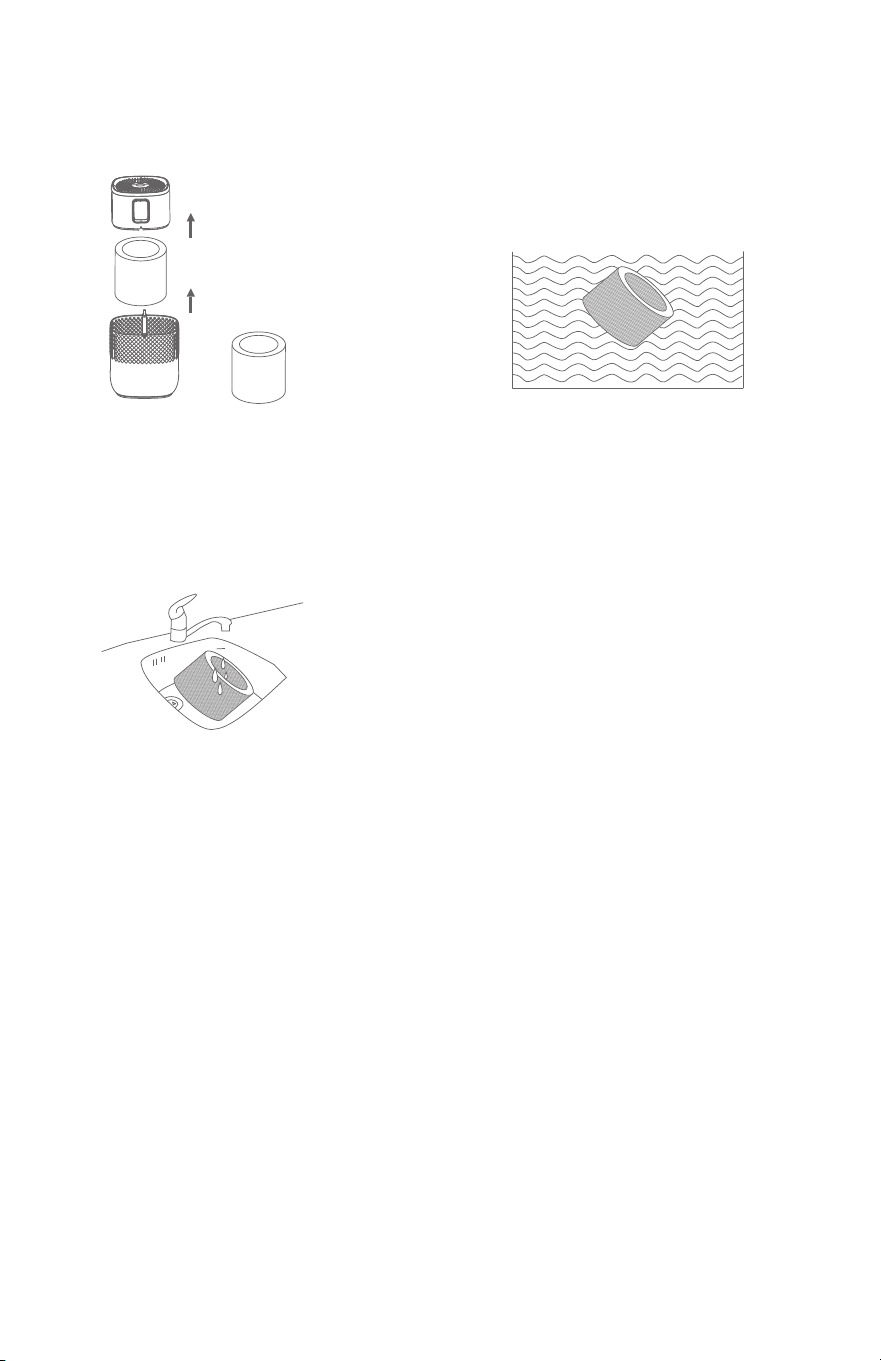
Cleaning
Cleaning the Filter
Power
Mode
Timer
Water
Light
To turn the power on to the unit, press the Power
button. e lights will come on. Press the power
button again to turn the unit o and the lights
will go out. Aer pressing the power button, the
humidity light will come on and the unit will
automatically be in comfort mode.
Press the mode button to cycle between:
comfort→turbo→smart→sleep modes.
In smart mode, set the humidity level from 40%
to 80% in 5% increments by pressing the mode
button when the display is ashing. Aer it’s done
ashing the display will show the actual humidity
in the room.
Turbo Mode: Motor speed 1350 RPM;
Humidication: 460mL/h; LED Light is ON
Comfort Mode: Motor speed 850 RPM;
Humidication: 380mL/h; LED Light is ON
Sleep Mode: Motor speed 650 RPM;
Humidication: 200mL/h; LED Light is OFF; only
a dim sleep light is on
Smart Mode: If the humidity is lower than the
set level then the unit will run on Turbo until the
level is met. Once the desired level is reached it
will lower to Comfort Mode to maintain.
Set the timer from 0-24 hours in 1 hour
increments by pressing the Timer button.
If the tank is low on water it will beep 3 times and
the humidity icon will ash red.
1. Turn the unit o
and unplug it. Take
the body apart and
remove the lter.
2. Soak the lter in tap
water for 1 hour.
3. Clean the lter with
slow running water
from the faucet. Drain
the excess water from
the lter and return it
to the tank.
8
3
z
Set-Up
Timer
Mode
Power
Smart
SLEEP Comfort
Turbo
HUM
Time
Water
1. To turn the power on to the unit, press the Power button. e
lights will come on. Press the power button again to turn the
unit o and the lights will go out.
2. Aer pressing the power button, the smart light will come
on and the unit will automatically be in comfort mode. Press
the mode button to switch the mode between sleep, comfort,
turbo and smart modes. Press the timer button to set the
timer.
3. If the unit is low on water it will beep 3 times and the
SMART icon will ash red.
4. If the “SMART” icon is red, the humidity is less than 40% it
indicates the room is dry.
5. If the “SMART” icon is green, the humidity is between 40%
and 60% it indicates the room is in the comfortable range.
6. If the “SMART” icon is blue, the humidity is over 60% and it
indicates the humidity in the room is high.
z
Maintenance and Cleaning
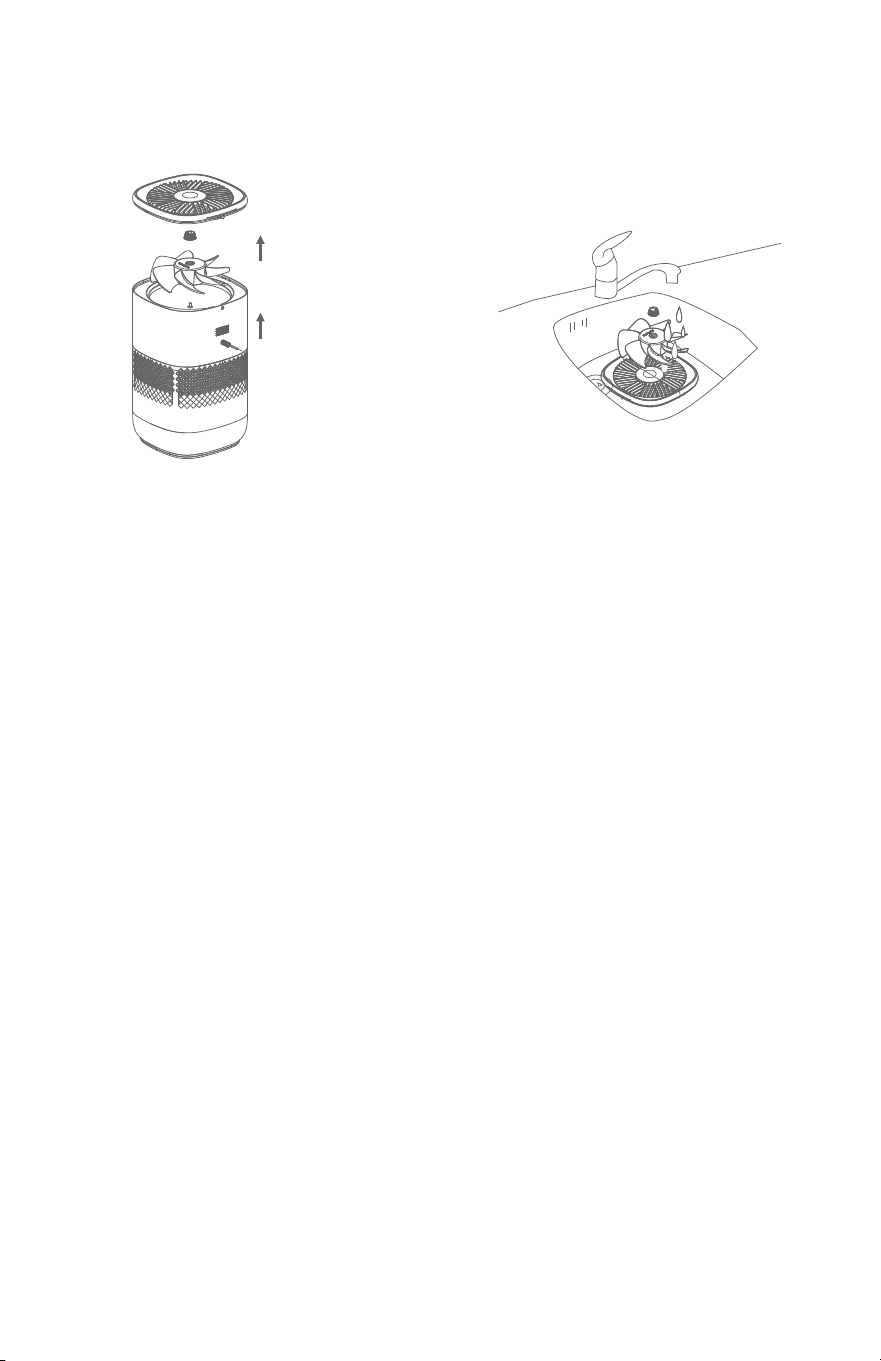
Cleaning the Outlet and Fan
1. Remove the screws at the back of the air outlet net with a
screwdriver. Pull the air outlet net up and remove it.
2. Rotate the knob counterclockwise and you will be able to
remove the fan.
3. e fan can be removed along the direction of the motor
sha.
4. Clean the outlet air net, knob and fan in the sink.
5. Clean and dry the accessories, install them in accordance
with the order of the fan knob and the air outlet net, and
screw the screws.
REMINDER:
1. Be sure to unplug the adapter before cleaning.
2. When cleaning, do not squeeze or rub the humidifying lter,
which may damage the humidifying lter, and then aect the
humidifying eect.
3. It is recommended to clean the humidication lter every 3-4
days to keep it hygienic.
4. For your more comfortable experience, it is recommended to
replace the humidication lter once every 3 months.
2
9
z
How to Add Water
1. Take the body apart as
shown and remove the
lter. Also remove the bag
that covers the lter.
2. Add water to the tank
as shown above.
3. Aer adding water, put
the body back together,
making sure the grooves
snap back into place.
BODY
GROOVE
TIPS:
1. Do not add disinfectants, essential oils, lemon juice or
fungicides in the tank.
2. Wait 1 minute to turn the unit on aer adding water.
3. Unplug power cord before adding water and cleaning.
4. e humidier must be cleaned to remove scale and debris
in the tank regularly. It is recommended you clean it once a
week.
WATER
z
Maintenance and Cleaning
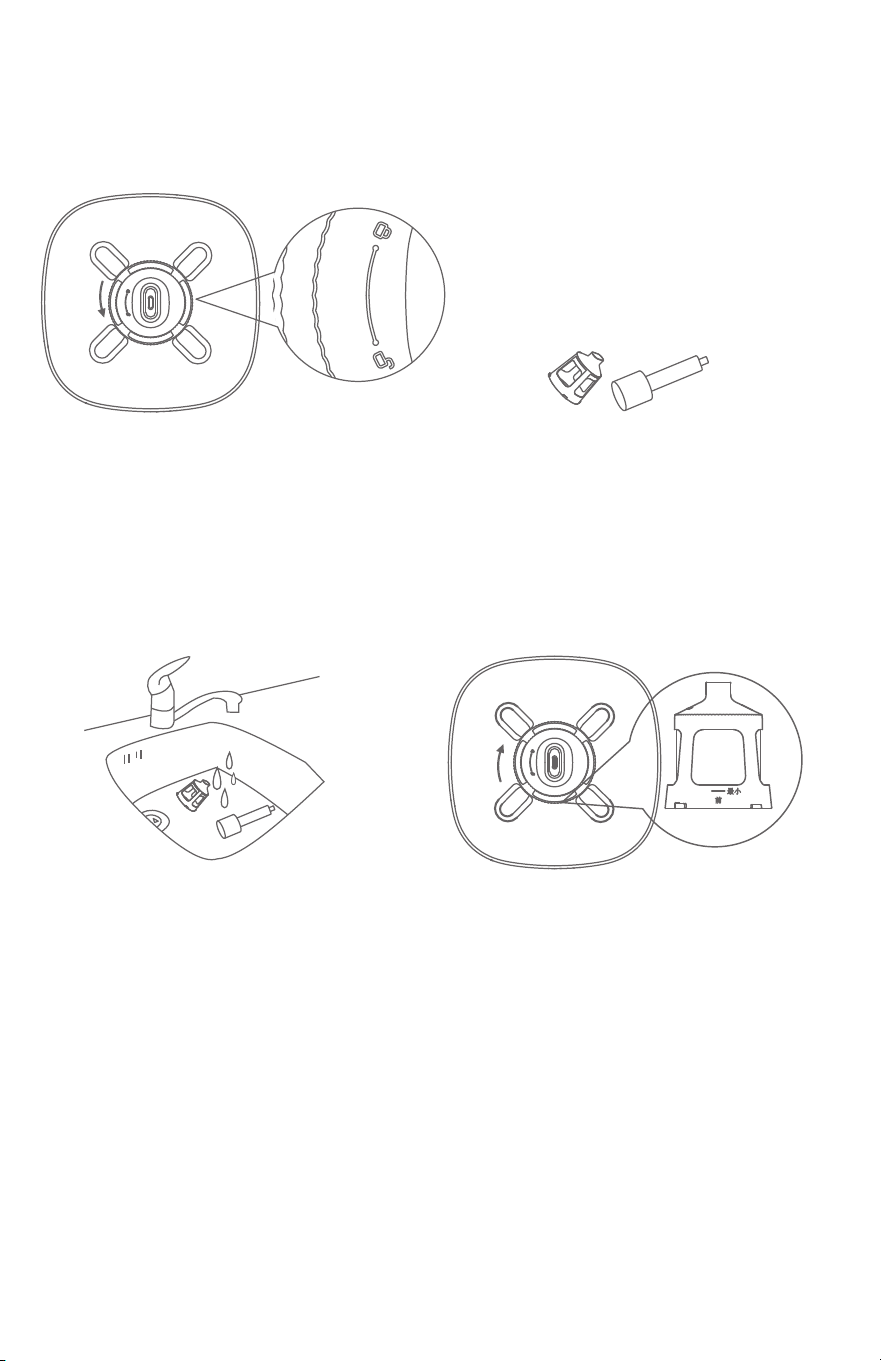
Cleaning the Float and the Float Assembly
1. Rotate the oat assembly
counterclockwise.
2. Remove the oat
holder and bottle.
3. Wash the oat bottle and
oat holder under the
water tap.
4. Put the oating bottle
support on the oating
bottle and place it at the
bottom of the tank. Turn
the oating bottle support
clockwise and hear the
click sound to ensure
that the oating bottle is
installed in place.
10
1
Top Cover
Fan Blade
Humidity
Control Panel
Indicator
Filter
Inlet
Tank
Base
Float
Assembly
Float
Accessory List
Manual
Body
Knob
Power Adaptor
z
Parts Description
z
Maintenance and Cleaning
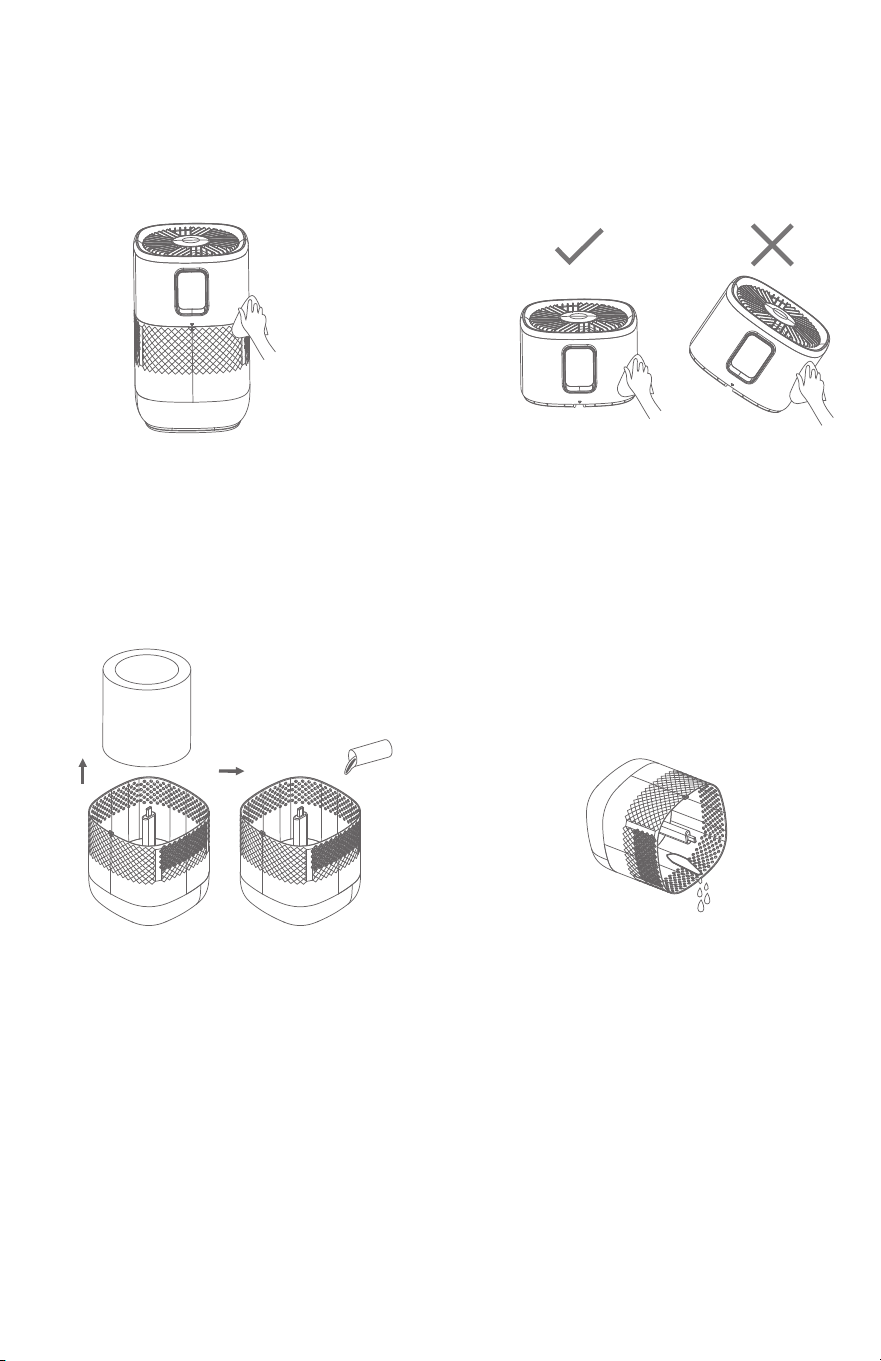
Fuselage Cleaning/Descaling
1. e exterior of the
machine can be cleaned
directly with a clean so
wet cloth.
2. e main component is
clean and can be wiped
directly with a clean so
wet cloth. Aer the main
component is removed
from the tank, keep it
upright. Do not place it
tilted or upside down.
3. To clean and descale the
water tank, remove the
humidication lter. en
clean with a descaling
agent or water. Rinse aer
cleaning.
4. Empty any water that is
remaining in the tank.
NOTE:
Always unplug the adapter before maintenance/descaling.
PLEASE READ
AND SAVE THESE
INSTRUCTIONS
Model No. A6073
Owner’s Manual
WARRANTY: e EdenPURE Mist Free Humidier comes with a
ONE-YEAR LIMITED COMPONENT WARRANTY. If your unit
does not appear to be working properly, please contact our service
center by calling 1-800-225-6595. Prior to your call, we encourage
you to visit our service related website: www.edenpuresupport.com
for troubleshooting tips and service instructions if needed:
To place an order call 1-800-360-1070
EdenPURE
®
7584 Whipple Avenue NW
N. Canton, OH 44720
z
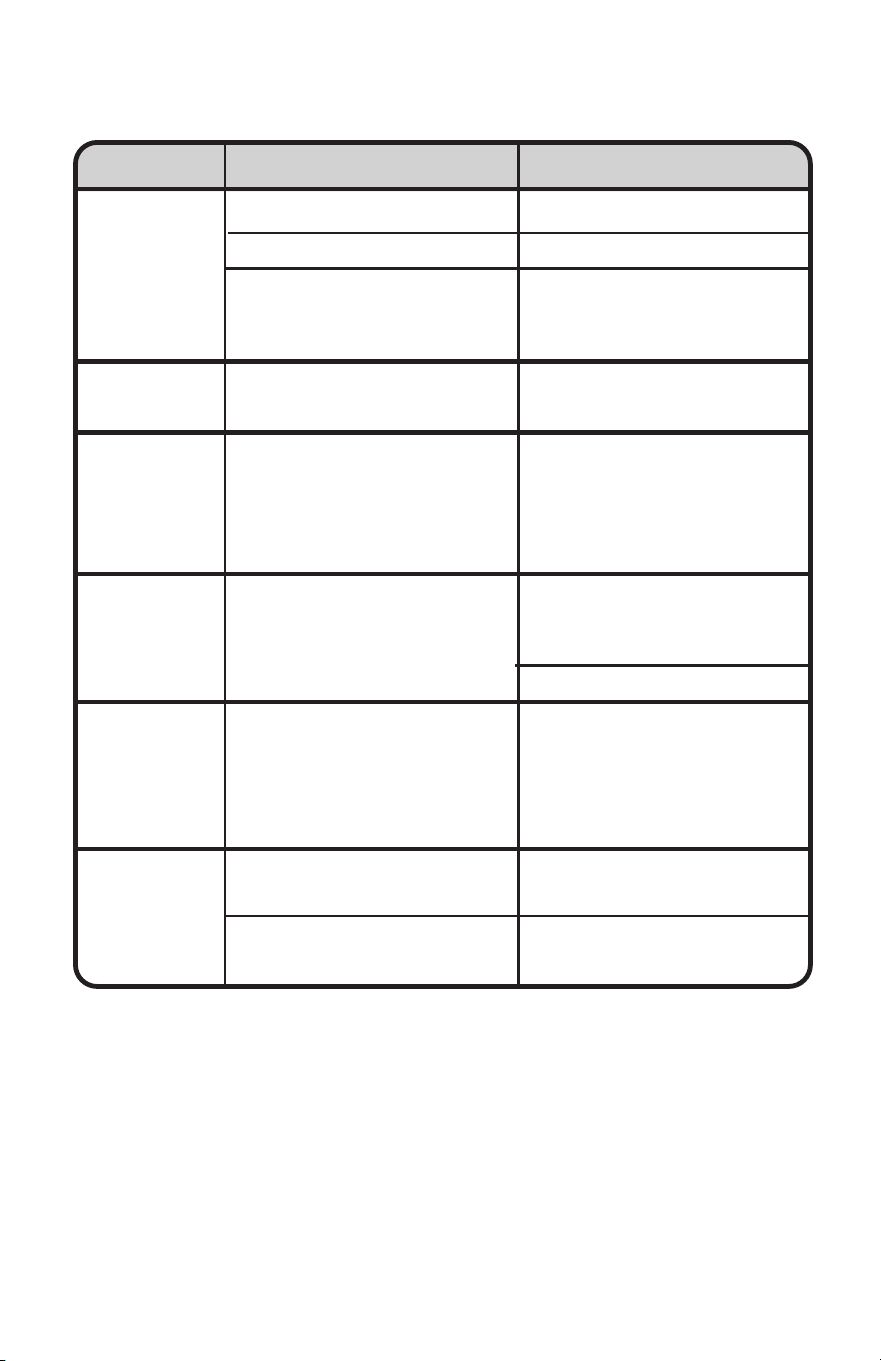
Troubleshooting
EdenPURE
®
Mist Free Humidifier
The unit
doesn’t
work
Water tank
leaks
The filter has
turned
yellow
There is a
bad smell
coming from
the unit
The unit
turns on
but no mist
comes out
There is an
odd noise
coming from
the unit
The cord isn’t plugged in
The unit is out of water
The fuselage assembly and
water tank are not locked
together
The tank is too full
The yellow substance
is a natural reaction of
the material used in the
humidification filter
There is a bad smell
The humidifier adopts
evaporative humidification
technology and the humid
air is output from the outlet
of the humidifier
The machine is unstable or
sitting in a tilted manner
There is a foreign body
inside the product
Plug the adaptor
Add water to tank
Fuselage assembly and
water tank installed in
place
Do not exceed the highest
water level
Clean the humidifier filter
every 3-4 days to remove
these stains, and replace
the humidifier filter every
3 months
Replace the water with
clean water or clean the
tank
Clean the filter
The unit does not output
visible mist
Place on a solid level
surface for use
Remove the foreign body
after unplugging the unit.
PROBLEM POSSIBLE CAUSE SOLUTION
©2026 EdenPURE® I-5946 BR12426R-1