Drucken auf einem Computer
PCで印刷する
Computer Printer
8
English
Deutsch
Straightly and smoothly insert label, printer will automatically grab it. Hold Feeder
until the blue light flashes 2 times for label calibration.
Legen Sie das Etikett gerade und glatt ein. Der Drucker ergreift es automatisch. Halten
Sie die Vorschubtaste, bis das blaue Licht 2 Mal blinkt, um das Etikett zu kalibrieren.
Japanese
ラベル用紙をまっすぐなめらかに挿入すると、プリンターが自動的に受け取ります。青色の指示
ランプが二回点滅するまで、給紙ボタンを押し続けると、ラベル校正を開始します。
Open the link.
Öffnen Sie den Link.
https://pm241.labelife.cc
English
Deutsch
Japanese
リンクを開きます。
Download the corresponding driver for your computer system.
Laden Sie den entsprechenden Treiber für Ihr Computersystem herunter.
English
Deutsch
Japanese
お使いのPCシステムに対応するドライバをダウンロードします。
Please run the driver complete installation.
English
Führen Sie die vollständige Installation des Treibers aus.
Deutsch
Japanese
ド ラ イ バ を 起 動 し て 、イ ン ス ト ー ル し ま す 。
Appendix / Anhang / 付録
1. Chrome Extension Installation
Installation der Chrome-Erweiterung
Chrome拡張機能のインストール
2. Application Introduction
Einführung in die Anwendung
アプリ紹介
Deutsch
English
Japanese
Chrome Web Storeで「Labelife」のプラグインを追加してください。ChromeOSのPCや
MacOS用Chromeブラウザにも対応すしています。Windows用Chromeブラウザには対応し
ていません。
Please add the "Labelife" extension in the Chrome Web Store. Compatible
with ChromeOS system computers, MacOS Chrome browser. NOT compatible
with Windows Chrome browser.
Bitte fügen Sie die Erweiterung „Labelife “ im Chrome Web Store hinzu. Die
Erweiterung ist kompatibel mit ChromeOS-Computer, und dem Chrome-Browser
von MacOS, aber NICHT mit dem Chrome-Browser von Windows.
Anwendungen
Lableife
Labelife
Labelife Extension
アプリ デバイス 接続
Geräte
Windows / iMac,
MacBook Air, MacBook Pro
USB / Bluetooth
ChromeOS / iMac,
MacBook Air, MacBook Pro
USB / Bluetooth
Android / iPhone, iPad Bluetooth
Verbindung
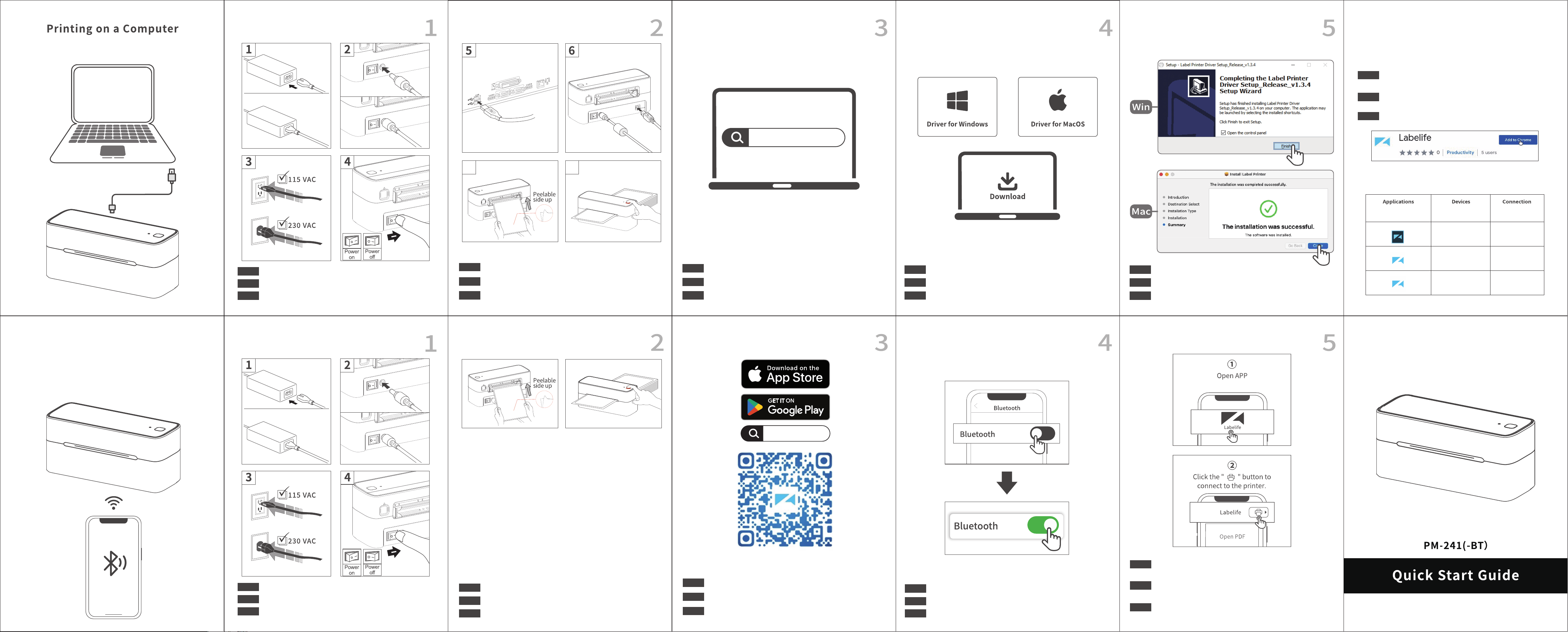
Please follow the sequence of the above picture to operate.
Deutsch
English
Bitte befolgen Sie die Reihenfolge der obigen Abbildung zur Bedienung.
Japanese
上図の順番で操作してください。
7
スマ ートフォンで 印 刷する
Drucken auf einem mobilen Gerät
Printing on a Mobile Device
English
Deutsch
Straightly and smoothly insert label, printer will automatically grab it. Hold Feeder
until the blue light flashes 2 times for label calibration.
Legen Sie das Etikett gerade und glatt ein. Der Drucker ergreift es automatisch. Halten
Sie die Vorschubtaste, bis das blaue Licht 2 Mal blinkt, um das Etikett zu kalibrieren.
Japanese
ラベル用紙をまっすぐなめらかに挿入すると、プリンターが自動的に受け取ります。青色の指示
ランプが二回点滅するまで、給紙ボタンを押し続けると、ラベル校正を開始します。
English
Deutsch
Connect the printer via Bluetooth in the Labelife App.
* Due to the mobile phone system requirements, App needs access to location, so you
need to enable GPS and confirm authorization (Android only).
Verbinden Sie den Drucker über Bluetooth in der Labelife App.
* Aufgrund der Systemanforderungen des Mobiltelefons benötigt die App Zugriff auf
den Standort, daher müssen Sie GPS aktivieren und die Autorisierung bestätigen (nur
Android).
Japanese
Labelifeアプリから、プリンターをBluetoothで接続します。
* デバイスのシステム要件により、位置情報を取得する必要があるため、GPS機能をオンにして
取得を承認する必要があります(Androidデバイスのみ)。
Turn on Bluetooth from phone settings.
Aktivieren Sie Bluetooth in den Telefoneinstellungen.
English
Deutsch
Japanese
デバイスの設定でBluetooth機能をオンにします。
Please follow the sequence of the above picture to operate.
Deutsch
English
Bitte befolgen Sie die Reihenfolge der obigen Abbildung zur Bedienung.
Japanese
上図の順番で操作してください。
English
Deutsch
Search Labelife on App Store or Google Play to get the App. Or please scan the QR
Code to download the App.
Suchen Sie nach Labelife im App Store oder bei Google Play, um die App zu erhalten.
Oder scannen Sie bitte den QR-Code, um die App herunterzuladen.
Japanese
App StoreまたはGoogle Playで「Labelife」を検索するか、QRコードをスキャンして、アプリを
ダウンロ ードしてくだ さい 。
Labelife