
NuPrime
IDA-8


NuPrime
1
FCC Notice - Declaration of Conformity Information
This equipment has been tested and found to comply with the limits for a Class B digital device,
pursuant to part 15 of the FCC Rules. These limits are designed to provide reasonable protection
against harmful interference in a residential installation. This equipment uses and can radiate
radio frequency energy and, if not installed and used in accordance with the instructions, may
cause harmful interference to radio communications.
However, there is no guarantee that interference will not occur in a particular installation. If this
equipment does cause harmful interference to radio or television reception, which can be
determined by turning the equipment off and on, the user is encouraged to try to correct the
interference by one or more of the following measures:
• Reorient or relocate the receiving antenna.
• Increase the separation between the equipment and receiver.
• Connect the equipment into an outlet on a circuit different from that to which the
receiver is connected.
• Consult the dealer or an experienced radio/TV technician for help.
WARNING: Only peripherals complying with the FCC class B limits may be attached to this
equipment.
Changes or modifications made to this equipment, not expressly approved by us or parties
authorized by us could void the user’s authority to operate the equipment. This device complies
with part 15 of the FCC Rules. Operation is subject to the following two conditions: (1) This
device may not cause harmful interference, and (2) this device must accept any interference
received, including interference that may cause undesired operation.
Notice for customers: The following information is only applicable to equipment sold in countries
applying EU Directives.
EU Declaration of Conformity
Hereby, NuPrime Audio, Inc. declares that this device is in compliance with the
essential requirements and other relevant provisions of Directive 2004/108/EC.
The manufacturer of this product is NuPrime Audio, Inc., 1712 Pioneer Ave. Ste 1817, Cheyenne,
Wyoming 82001, USA
The Authorized Representative for EMC and product safety is NuPrime Audio, Inc., 1712 Pioneer
Ave. Ste 1817, Cheyenne, Wyoming 82001, USA.
For any service or guarantee matters please refer to the addresses given in separate service or
guarantee documents.
For customers in Europe
Disposal of Old Electrical & Electronic Equipment (Applicable in the European Union
and other European countries with separate collection systems)
This symbol on the product or on its packaging indicates that this product shall not be
treated as household waste. Instead it shall be handed over to the applicable
collection point for the recycling of electrical and electronic equipment. By ensuring
this product is disposed of correctly, you will help prevent potential negative
consequences for the environment and human health, which could otherwise be
caused by inappropriate waste handling of this product. The recycling of materials will
help to conserve natural resources. For more detailed information about recycling of
this product, please contact your local Civic Office, your household waste disposal
service or the shop where you purchased the product.

NuPrime
2
SAFETY INSTRUCTIONS
There are two categories of Safety Instructions included in this manual:
• Product Warnings, (i.e., what must never be done to assure avoiding those hazards that
could cause bodily injury or property damage); and
• User Directions (i.e., what must always be done to assure the safe use of your device).
The Safety Instructions contained in this manual have been categorized in accordance with the
seriousness of the potential hazards through the use of Signal Words. Those Signal Words, and
their intended meanings, are as follows:
DANGER: Indicates that a failure to observe the Safety Instructions could result in death or
catastrophic bodily injury.
WARNING: Indicates that a failure to observe the Safety Instructions could result in serious
bodily injury.
CAUTION: Indicates that a failure to observe the Safety Instructions could result in minor bodily
injury or property damage.
NOTE: Designates important information that relates to activities and/or conditions that might
result in loss of data and/or damage to your device.
Safe Use and Operation of Your Device
This equipment emits stray RF energy and will interfere with the reception of signals by airborne
electronic navigational devices or medical devices. Do not operate this equipment near any
sensitive medical devices.
WARNING: Use only grounded AC power cords.
Always immediately disconnect the power to the equipment in the event the device emits an
unusual odor or sound or generates smoke.
WARNING: Never attempt to disassemble, repair or make any modification to your device.
Disassembly, modification or any attempt at repair could cause bodily injury or property damage,
as well as damage to the device itself.
WARNING: Your device is not a toy. Never allow children to play with your device. Misuse, rough
or improper handling of your device by children could result in serious bodily injury for any of
the enumerated safety warnings in this manual. In addition, always keep all accessories and
components out of the reach of small children as small parts might present a choking hazard.
Seek immediate medical attention if choking occurs or if any small part has been swallowed.
CAUTION: Never raise the sound volume level too high when using your device with earphones.
An excessive sound volume level could cause damage to your hearing.
WARNING: To reduce the risk of fire or electric shock, do not expose the unit to moisture or
water.
Do not allow foreign objects to get into the enclosure. If the unit is exposed to moisture, or a
foreign object gets into the enclosure, immediately disconnect the power cord from the wall.
Take the unit to a qualified service person for inspection and necessary repairs.
Read all the instructions before connecting or operating the component.
Keep this manual so you can refer to these safety instructions.

NuPrime
3
Heed all warnings and safety information in these instructions and on the product itself. Follow
all operating instructions.
Do not use this unit near water.
You must allow a minimum 10 cm or 4 inches of unobstructed clearance around the unit. Do not
place the unit on a bed, sofa, rug, or similar surface that could block the ventilation openings. If
the unit is placed in a bookcase or cabinet, there must be ventilation of the cabinet to allow
proper cooling. Keep the component away from radiators, heat registers, stoves, or any other
appliance that produces heat.
The unit must be connected to a power supply only of the type and voltage specified on the rear
panel. Connect the component to the power outlet only with the supplied power supply cable or
an exact equivalent. Do not modify the supplied cable.
Do not route the power cord where it will be crushed, pinched, bent, exposed to heat, or
damaged in any way. Pay particular attention to the power cord at the plug and where the cord
exits the back of the unit.
The power cord should be unplugged from the wall outlet during a lightning storm or if the unit
is to be left unused for a long period of time.
Immediately stop using the component and have it inspected and/or serviced by a qualified
service agency if:
• The power supply cord or plug has been damaged.
• Objects have fallen or liquid has been spilled into the unit.
• The unit has been exposed to rain.
• The unit shows signs of improper operation.
• The unit has been dropped or damaged in any way.
NuPrime
4
Ultra Low Noise Integrated Amplifier with DAC and Wireless Port
Introduction
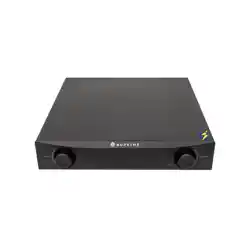
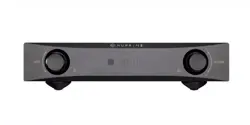
The NuPrime IDA-8 consists of an ultra-low-noise integrated amplifier and digital-to-analog converter that
decodes USB PCM 384 and DSD 256 with the convenience of wireless audio in a small, handsomely designed
home stereo component. NuPrime's new Class A+D hybrid amplification technologies deliver the substance
and warmth of Class A amplification and the efficiency and speed of Class D technology in a milieu of un-
measurable noise. The IDA-8's spacious, transparent, dynamic and luxuriously textured soundstage has to be
heard to be believed.
With all stages in one chassis, the IDA-8 avails itself of the shortest possible signal paths in order to facilitate
vanishingly low levels of noise and distortion for a black-velvet background to music. The listener’s initial
reaction might very well be “I can’t believe my ears!”
The IDA-8’s low noise floor is further complimented by an innovative volume control based on a thin-film
resistor design that positions a single resistor in the signal path for each volume setting. Volume changes
occur in 99 precise 0.5dB increments for each input’s individually adjustable volume level. Precise level
matching is a breeze, as is the user’s ability to make comparisons of music sources.
NuPrime
5
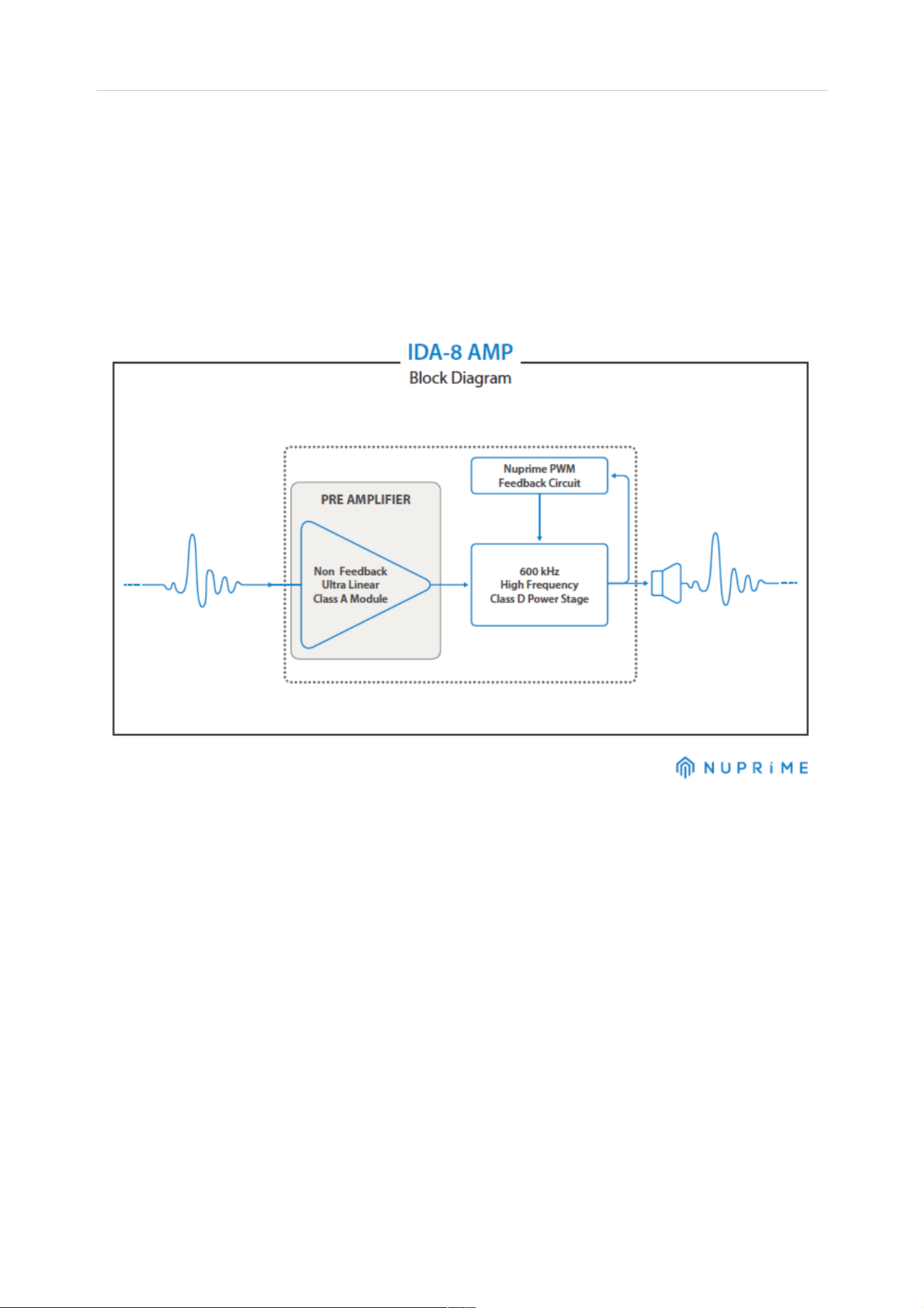
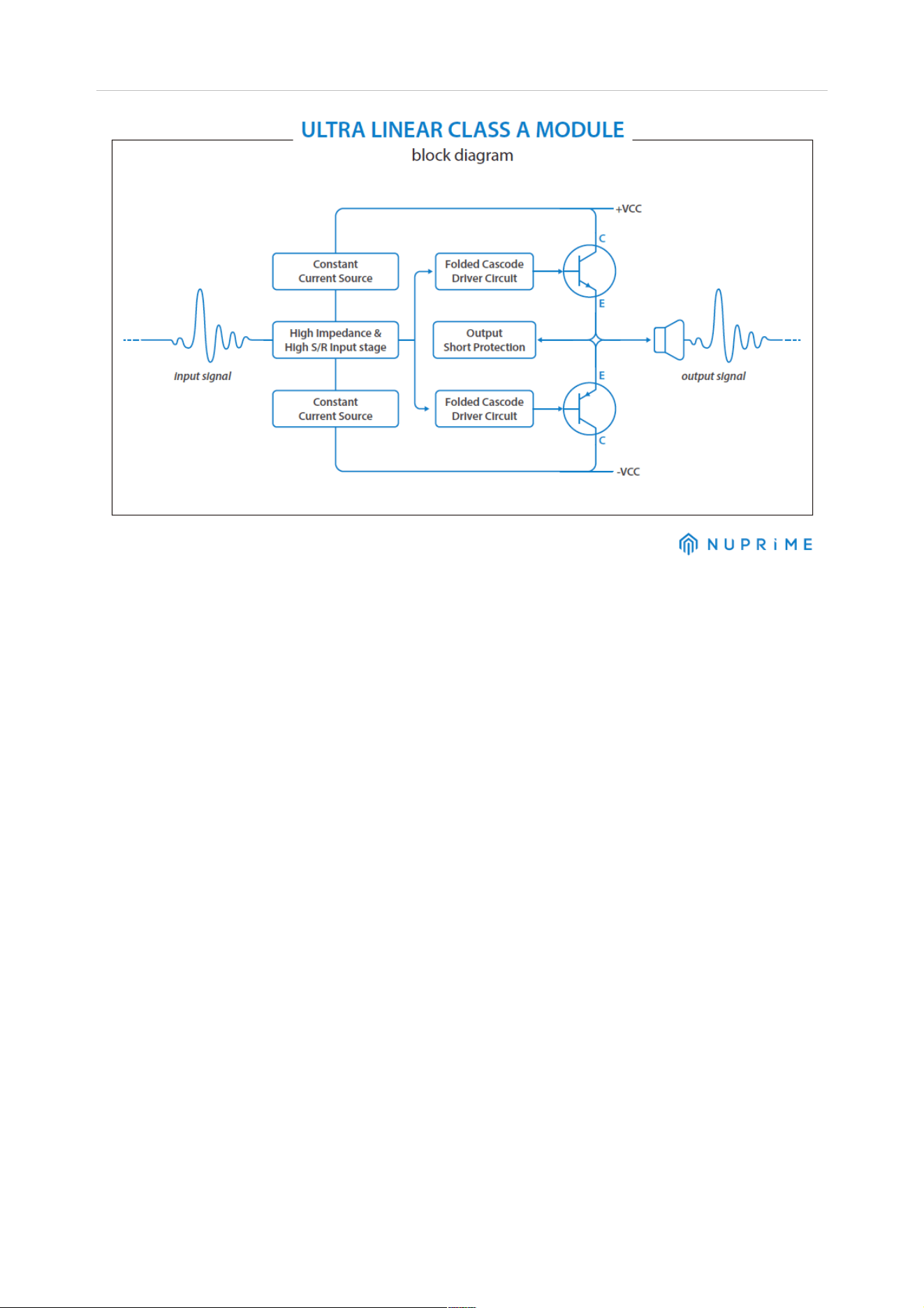
By utilizing discrete components in NuPrime’s ULCAM circuit, the signal can be fine tuned to reduce noise
and provide maximum power.
The NuPrime amp circuit improves on traditional class-D design by using a self-oscillating circuit to generate
pulse-width modulation. The amplifier switches at a frequency of 600kHz, well beyond the compact disc’s
44.1kHz sampling rate. Most class-D amps switch at 300kHz or lower. In addition, NuPrime’s SRC IC chip
provides FPGA processing for ultra-low jitter and distortion rates. Completing the ensemble is NuPrime's
new linear power supply with its high-efficiency toroidal transformer for reduced high-frequency noise and
strengthened low-frequency performance. The damping effect of the NuPrime isolation feet (patent pending)
absorbs and cancels vibrations that degrade audio performance. The overall result is unprecedented
transient speed and an almost shocking level of dynamic impact.
The IDA-8 achieves Total Harmonic Distortion + Noise (THD+N) levels of less than 0.005% while achieving a
system efficiency of up to 93%. The IDA-8's frequency response to 50 kHz elevates vocals into emotional
experiences; similarly, instrumental upper registers mimic a live performance’s shimmering heights.
The IDA-8's features and specifications have few equals. Just one audition will convince you that the IDA-8’s
performance and sophisticated styling are rarely duplicated at any price point.

NuPrime
6
Features:
• Ultra-Linear Class A Module (ULCAM) achieves audiophile-quality sound with Class-D’s dynamics,
speed and efficiency. Extraordinary result of THD+N lower than 0.0015% and S/N ratio of -130dB
from ULCAM preamp stage.
• NuPrime SRC IC chip provides FPGA processing with ultra-low jitter and distortion
• NuPrime vibration-free isolation feet (patent pending*)
• State-of-the-art DAC supporting USB PCM 384 and DSD256, that is also capable of decoding DoP
formats via coaxial and optical inputs
• Analog line-out (Can be used as Sub Out)
• Extension port for Bluetooth dongle and WiFi audio streaming (optional)
• Full microprocessor control with memory retention
• Four digital inputs and one stereo input for complete system flexibility
• Supports DSD native playback by ASIO2.1 and DoP method
• Ultra-low-noise JFETs in the input stage for the lowest possible noise floor
• Volume adjustment in 99 precise 0.5dB increments
• Advanced, thin-film switched-resistor ladder network for controlling volume, with a single resistor in
the signal path at any volume setting
• Individually adjustable volume on each input for precise level matching of sources
• Exclusive driver software for Windows
• Standard driver software for Mac
• Asynchronous transfer mode
• Very low power consumption on Standby Mode
• Available in black or silver anodized aluminum finish
•
Includes remote control
Inputs:
1 x USB PCM / DSD Digital (PCM up to 384kHz & DSD up to DSD256 )
1 x Coaxial Digital S/PDIF (PCM up to 192K supporting DoP format DSD64)
1 x Optical Digital S/PDIF (PCM up to 192K supporting DoP format DSD64)
1 x Bluetooth or WiFi receiver module (optional).
1 x Analog Stereo RCA
Outputs:
1 x pair of stereo RCA (2V), variable (volume controlled) output, full range
1 x pair of stereo speaker (binding posts) output
Specifications:
• USB Sampling Rates: 44.1KHz, 48KHz, 88.2KHz, 96KHz, 176.4KHz, 192KHz, 352.8KHz, 384KHz and
DSD 2.8MHz, 5.6MHz, 11.2MHz
• S/PDIF Sampling Rates: 44.1KHz, 48KHz, 88.2KHz, 96, 176.4KHz, 192KHz, 352.8KHZ, 384KHz
(Coaxial)
• Maximum Sampling Rate: 32-bits
• Bit Resolution: 16-32-bits
• Power output: 100W x 2 (8-Ohm)
• THD+N: 0.005%
• SNR = 95dB
• Peak Output Power: 280w
• Frequency Response: 10Hz to 50kHz
• Dimensions: 235 mm W x
281 mm D x 55 mm H (including feet)
• Weight: 4.3Kg

NuPrime
7
• Worldwide AC voltage: (90VAC~130VAC // 210VAC~ 250VAC) With Voltage Select Switch
• AC Fuse: Slow-blow, 3A, 250VA
NuPrime
8
Quick Start Guide
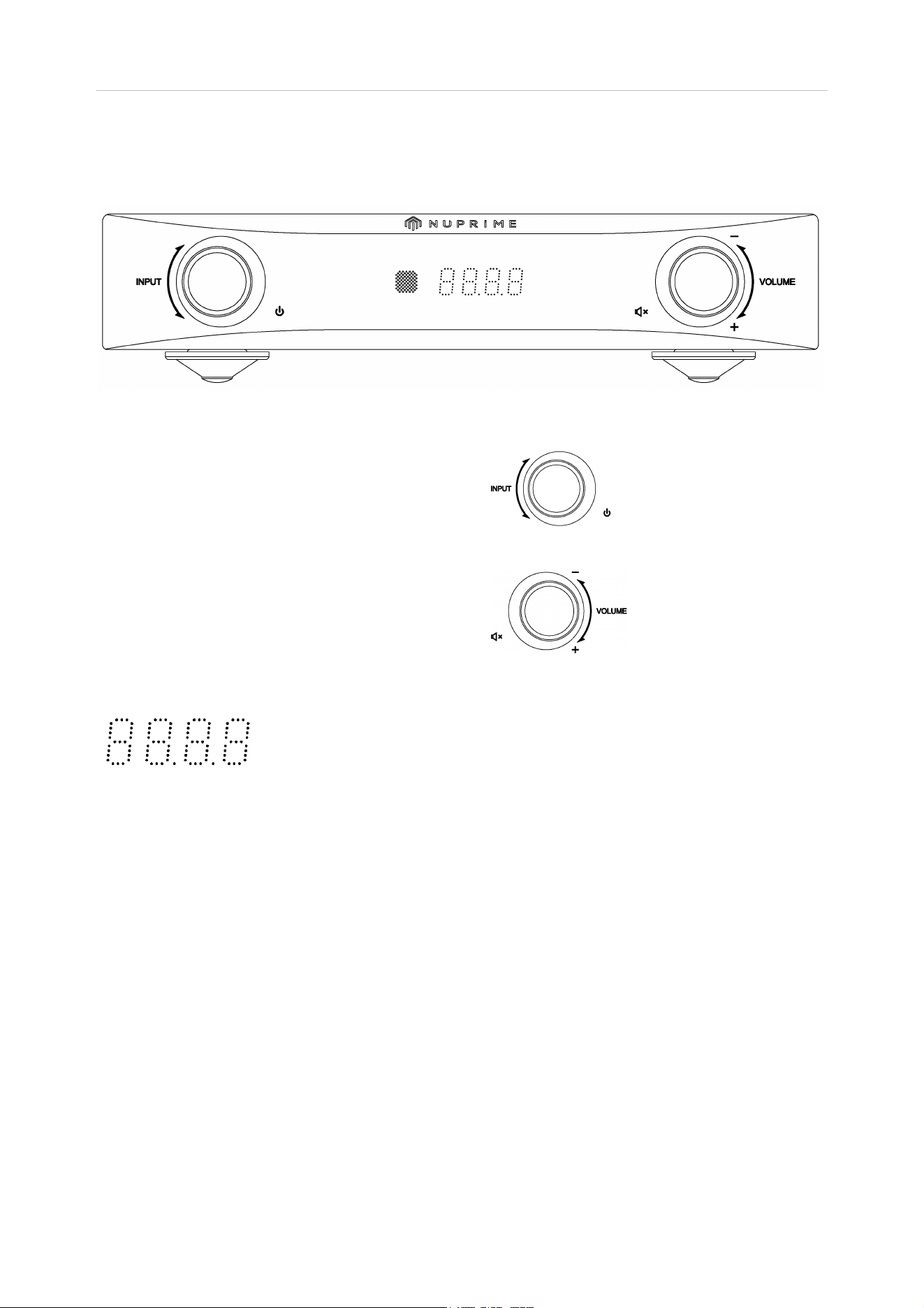
Front Panel View:
Power and Input Selector:
Left knob:
Briefly press for 3 sec to On/Off standby mode
Turn the knob to switch between inputs
Volumes:
Right Knob:
Brief press to Mute/Unmute
Turn the knob to adjust volume
Display:
PCM :
88.2
192
DSD:
d11.2
44.1
96
352.8
d2.8
48
176.4
384
d5.6
VOL:
00 ~ 99
Inputs:
C1: Coaxial input
O2: Optical input
U3: USB input
E4: Extension port
input
A5: Stereo analog input
NuPrime
9
Back Panel View:
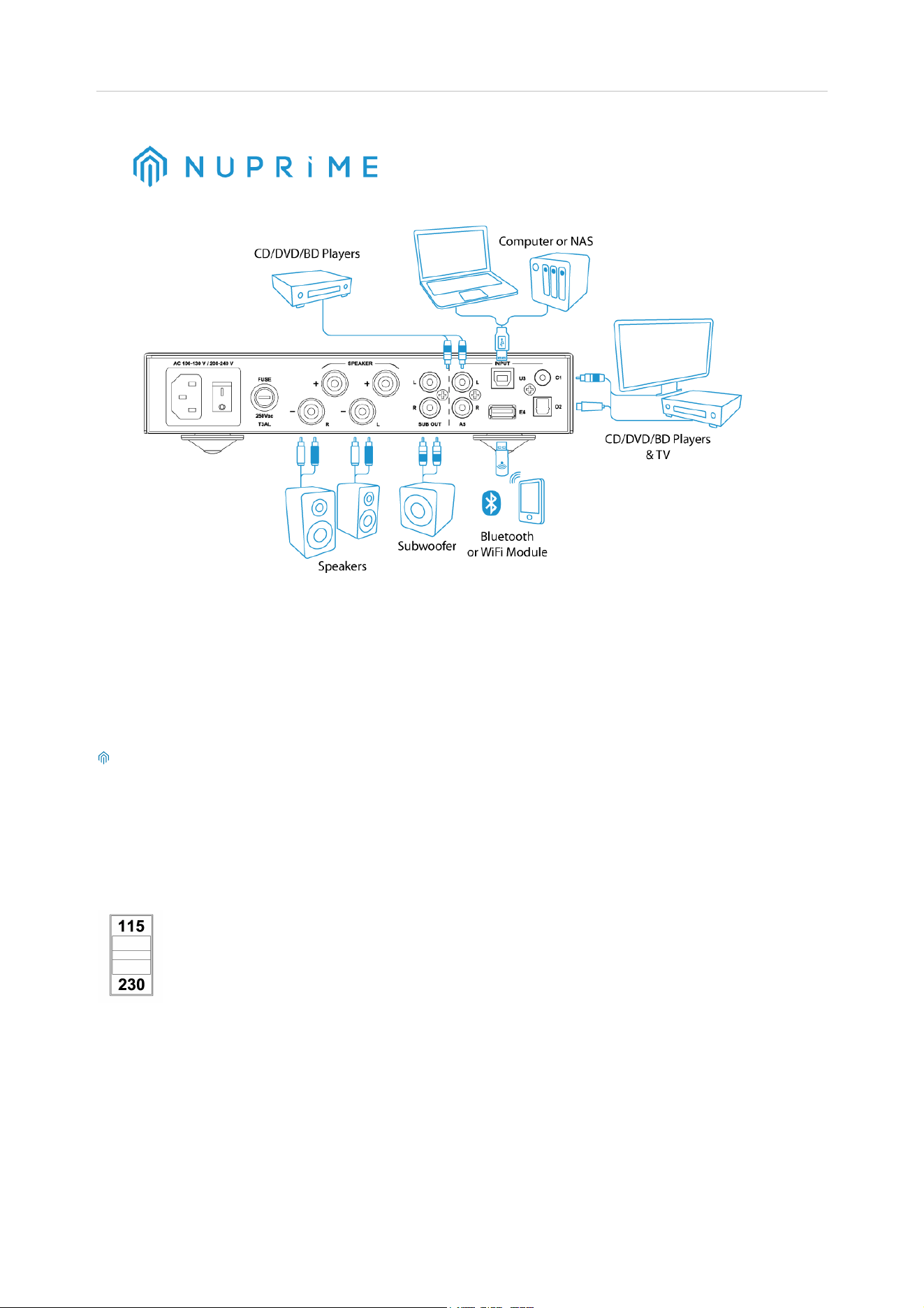
Inputs:
C1: Coaxial input for CD/DVD/BD players,
TV and
any
device with a coaxial source.
O2: Optical input
for CD/DVD/BD players,
TV and
any device with an optical
source.
U3: USB input for computer (PC/MAC) and for NAS
devices.
E4: Extension port for Bluetooth and WiFi module.
(Optional)
A5: Stereo analog for CD/DVD/BD players,
TV and
any
analog source
device.
IDA-8 does not guarantee that all NAS will operate
and be compatible due to wide
variety of brands and custom specs.
Outputs:
Line out for connecting to a
subwoofer or another amp.
Speaker outputs
(Binding Posts)
for
connecting to a pair of stereo speakers
AC Inlet Voltage Selector:
Make sure that the AC voltage selector switch at the bottom
of the unit is switched to the appropriate
voltage for your country.
All IDA-8s
are shipped with the switch set to 230V AC in order to prevent accidental
damage.
Turn ON the AC power switch at the rear of the unit. The IDA-8
will now be in standby mode. Red
LED
indicator lights up on the front panel.
NuPrime
10
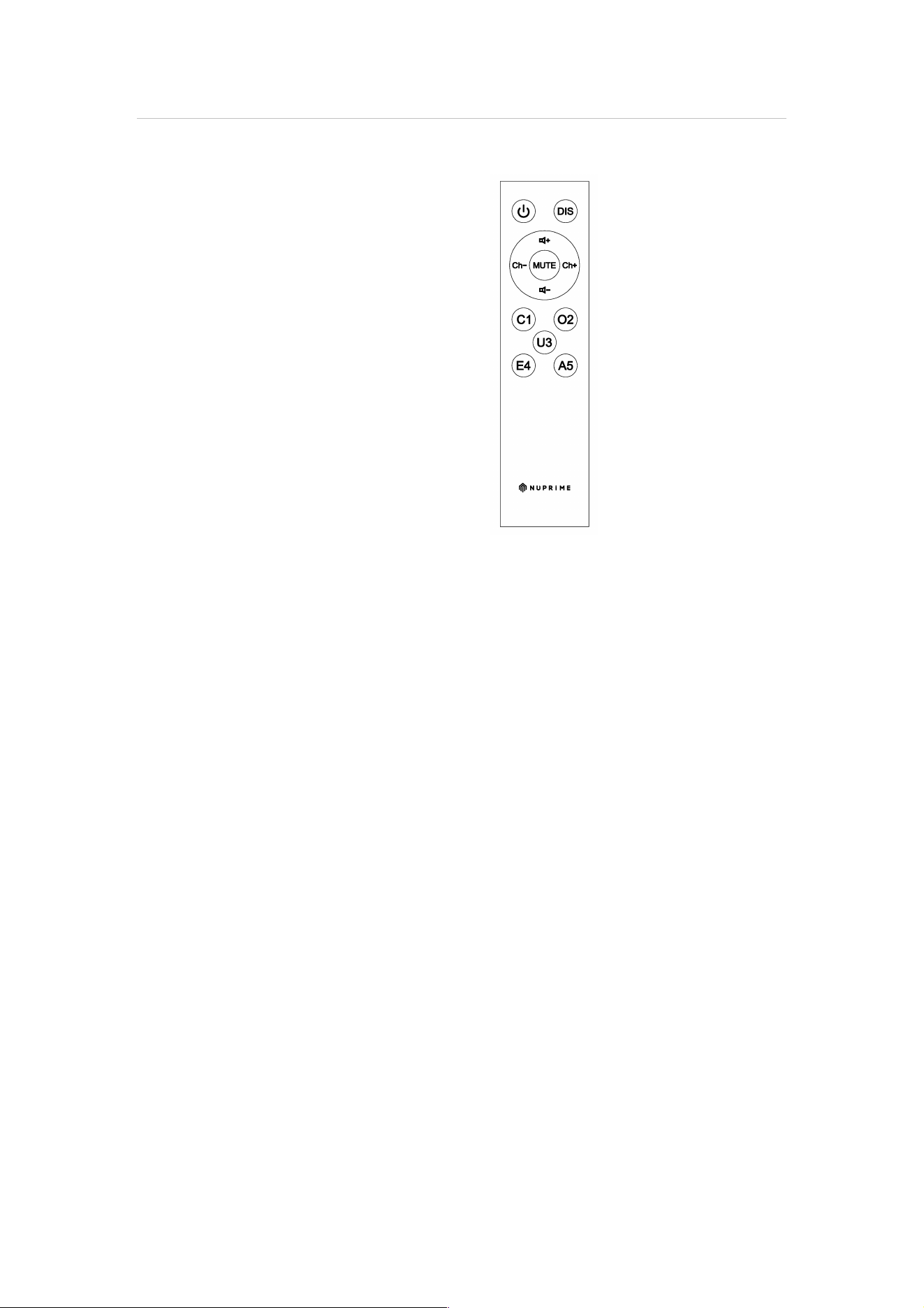
Using the Remote Control:
Power: Power On/Off
DIS: Display On/Off
Ch+: Input selection next channel
CH-: Input selection previous channel
Vol +: Volume up
Vol –: Volume down
Mute: Mute/Unmute audio
C1: Coaxial input selection
O2: Optical input selection
U3: USB input selection
E4: Extension port selection
A5: Analog input selection
To run the NuPrime IDA-8 on Mac– PCM:
1. Power on NuPrime IDA-8, select USB input. The device will enumerate as a USB Audio device
on your Mac.
2. In Audio Midi Setup, select the “NuPrime IDA-8” device as your default Input and Output
device.
3. The sample rate of the device can be selected using the drop down menu.
4. The audio is also output over SPDIF.
To run the NuPrime IDA-8 on Mac– DSD:
1. Install playback software on MAC.
Ex: Audirvana 15 days free http://audirvana.com/site/?page_id=112
2. In Preferences Setup, Audio System selects the “NuPrime IDA-8” as your Default Device.
3. The Native DSD Capability select the “DSD Over PCM standard 1.0”
4. SPDIF output is not working on DSD playback.

NuPrime
11
To run the NuPrime IDA-8 on Windows – PCM:
1. Please visit www.nuprimeaudio.com and
download the latest driver.
2. Connect computer to USB DAC and power on NuPrime IDA-8, select USB DAC input. The
device will enumerate as a USB Audio device on your PC.
3. Install the latest driver just download via NuPrime website.
4. In Control Panel->Sound, select “NuPrime IDA-8” as your Default Device.
To run the NuPrime IDA-8 on Windows – DSD
Install playback software on Windows
1. Install the Foobar media player
http://www.foobar2000.org/download
2. Download the ‘SACD’ plugin
http://sourceforge.net/projects/sacddecoder/files/latest/download
a. To install, in Foobar goto File->Preferences and select Components
b. Click the Install… button
c. Select the zip file
d. Click Apply (foobar will restart)
3. Download the ASIO plugin from
http://www.foobar2000.org/components/view/foo_out_asio
a. Install the plugin
b. Click Apply (foobar will restart)
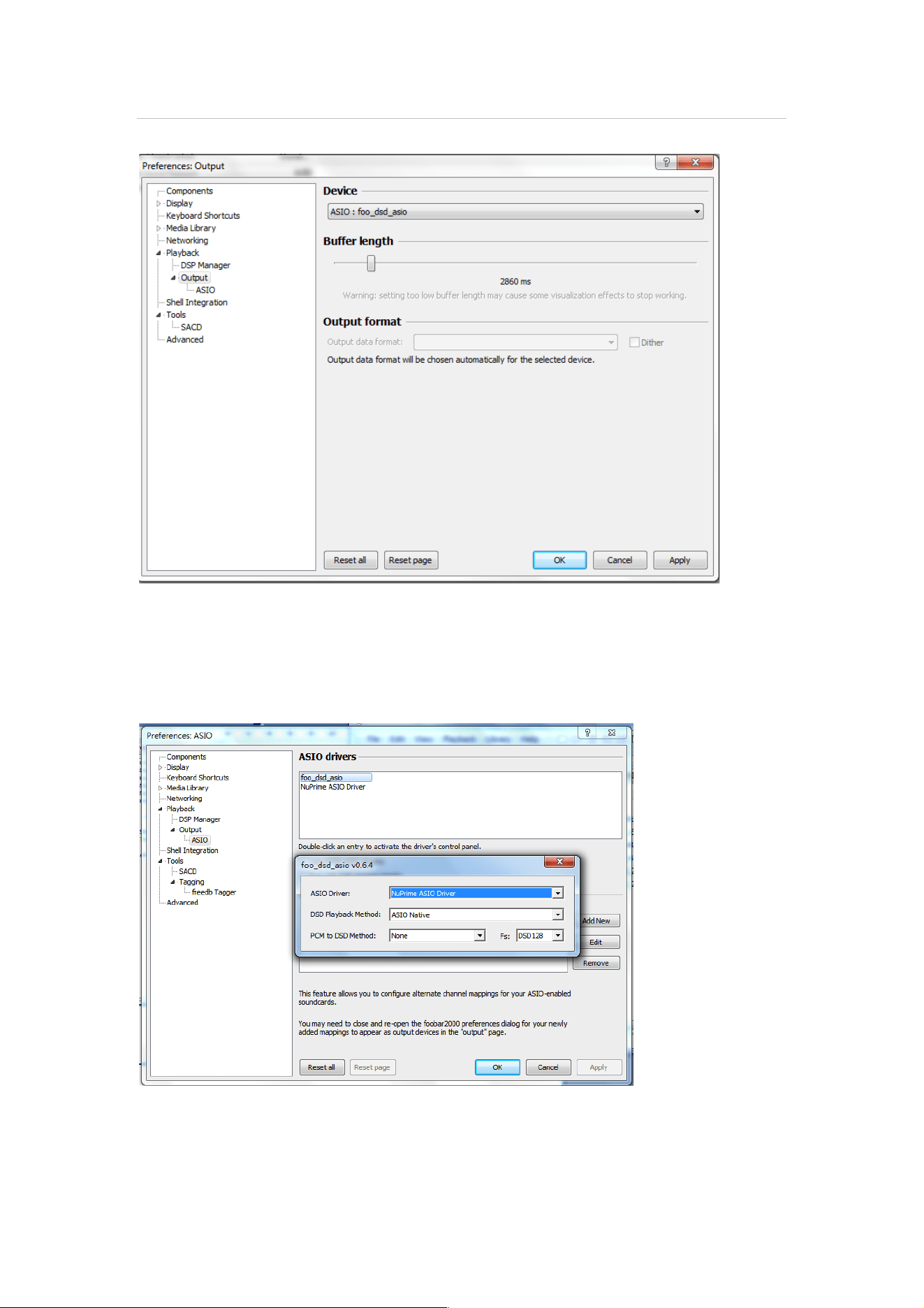
4. Configure the Output Device
a. Go to Playback->Output
b. Select the Device: ASIO foo_dsd_asio
NuPrime
12
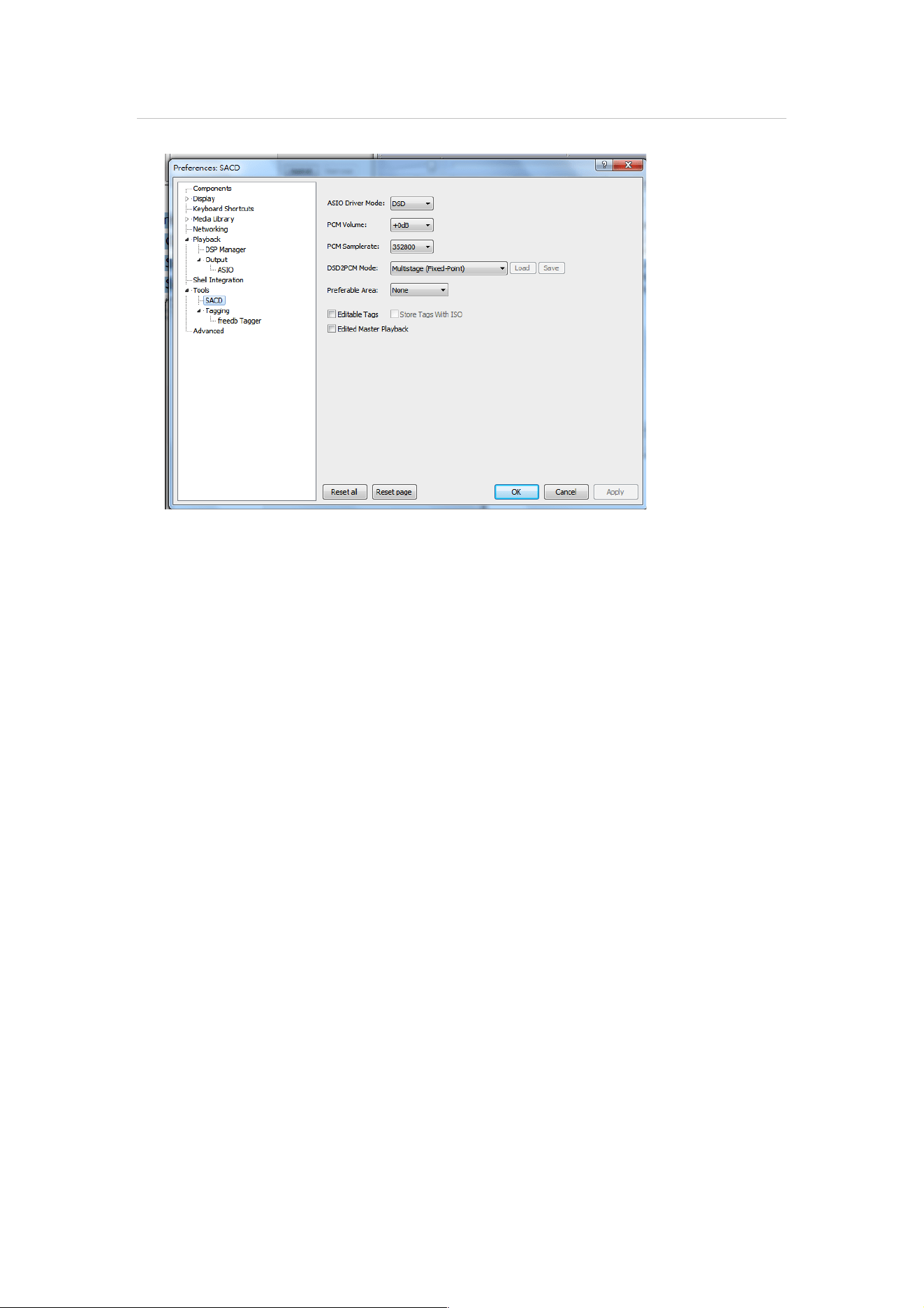
5. Configure the ASIO output
a. Go to Playback->Output->ASIO, double-click on foo_dsd_asio
b. Select the NuPrime ASIO Driver
c. Select ASIO Native
d. Select PCM to DSD Method: None
e. Select Fs: DSD128
6. Configure the SACD plugin to play DSD (and not convert from DSD to PCM)
a. Go to Tools->SACD
b. Set ASIO Driver Mode to DSD
c. Set PCM Sample Rate to 352800
NuPrime
13

NuPrime
14
NuPrime’s Limited Warranty and Limitation of Liabilities
ADDITIONAL RIGHTS
FOR CONSUMERS, WHO ARE COVERED BY CONSUMER PROTECTION LAWS OR REGULATIONS IN THEIR COUNTRY OF
PURCHASE OR, IF DIFFERENT, THEIR COUNTRY OF RESIDENCE, THE BENEFITS CONFERRED BY THIS WARRANTY ARE IN
ADDITION TO ALL RIGHTS AND REMEDIES CONVEYED BY SUCH CONSUMER PROTECTION LAWS AND REGULATIONS.
THIS WARRANTY DOES NOT EXCLUDE, LIMIT OR SUSPEND ANY RIGHTS OF CONSUMERS ARISING OUT OF
NONCONFORMITY WITH A SALES CONTRACT. SOME COUNTRIES, STATES AND PROVINCES DO NOT ALLOW THE
EXCLUSION OR LIMITATION OF INCIDENTAL OR CONSEQUENTIAL DAMAGES OR ALLOW LIMITATIONS ON HOW LONG
AN IMPLIED WARRANTY OR CONDITION MAY LAST, SO THE LIMITATIONS OR EXCLUSIONS DESCRIBED BELOW MAY
NOT APPLY TO YOU. THIS WARRANTY GIVES YOU SPECIFIC LEGAL RIGHTS, AND YOU MAY ALSO HAVE OTHER RIGHTS
THAT VARY BY COUNTRY, STATE OR PROVINCE. THIS LIMITED WARRANTY IS GOVERNED BY AND CONSTRUED UNDER
THE LAWS OF THE COUNTRY IN WHICH THE PRODUCT PURCHASE TOOK PLACE.
LIMITED WARRANTY
For a period of ONE (1) YEAR from the date of retail purchase by the original end-user purchaser (“Warranty Period”),
NuPrime warrants (in) this product against defects in materials and workmanship, and (ii) that each Product, unmodified
and under normal use and conditions, will substantially comply with NuPrime’ applicable written technical
documentation for the Product. NuPrime reserves the right to make substitutions and modifications from time to time in
the specifications of Products sold by NuPrime, provided that such substitutions or modifications do not materially affect
overall Product performance.
If a hardware defect exists and a valid claim is received within the Warranty Period, at its option and to the extent
permitted by law, NuPrime will (1) repair the hardware defect at no charge, using new or refurbished replacement parts,
(2) exchange the product with a product that is new or which has been manufactured from new or serviceable used parts
and is at least functionally equivalent to the original product, or (3) refund the purchase price of the product. NuPrime
may request that you replace defective parts with user-installable new or refurbished parts that NuPrime provides in
fulfillment of its warranty obligation. A replacement product/part assumes the remaining warranty of the original product
or ninety (90) days from the date of replacement or repair, whichever provides longer coverage for you. When a product
or part is exchanged, any replacement item becomes your property and the replaced item becomes NuPrime's property.
When a refund is given, your product becomes NuPrime's property.
OBTAINING WARRANTY SERVICE
If you purchased the product in the U.S., deliver the product, at your expense, to any NuPrime Service Center located in
the U.S. If you purchased the product outside of the U.S., deliver the product to any NuPrime Authorized Importer in the
country where you purchased the product. Be aware, however, that not all countries have NuPrime Authorized Service
Providers (‘NASP’) and not all Authorized Service Providers outside the country of purchase have all parts or replacement
units for the product. If the product cannot be repaired or replaced in the country it is in, it may need to be sent to a
different country or returned to the country of purchase at your expense for repair or replacement. If you seek service in
a country that is not the country of original purchase, you will comply with all applicable import and export laws and
regulations and be responsible for all custom duties, V.A.T. and other associated taxes and charges. Where international
service is available, NuPrime may repair or exchange defective products and parts with comparable products and parts
that comply with local standards.
You can always deliver the product to NuPrime’s U.S. main service center for obtaining warranty service, however, you
may have to pay for return shipping cost.
NuPrime may send you user-installable new or refurbished replacement product or parts to enable you to service or
exchange your own product (“DIY Service”). Upon receipt of the replacement product or part, the original product or part
becomes the property of NuPrime and you agree to follow instructions, including, if required, arranging the return of
original product or part to NuPrime in a timely manner.
When providing DIY Service requiring the return of the original product or part, NuPrime may require a credit card
authorization as security for the retail price of the replacement product or part and applicable shipping costs. If you
follow instructions, NuPrime will cancel the credit card authorization, so you will not be charged for the product or part
and shipping costs. If you fail to return the replaced product or part as instructed or the replaced product or part is not
eligible for warranty service, NuPrime will charge the credit card for the authorized amount.
EXCLUSIONS AND LIMITATIONS
This Limited Warranty applies only to hardware products manufactured by or for NuPrime that can be identified by the
"NuPrime" trademark, trade name, or logo affixed to them. The Limited Warranty does not apply to any non-NuPrime
hardware products or any accessories, even if packaged or sold with NuPrime hardware. Non-NuPrime manufacturers,
suppliers, may provide their own warranties. Other accessories distributed by NuPrime under the NuPrime brand name
are not covered under this Limited Warranty. This warranty does not apply: (a) to damage caused by accident, abuse,
misuse, misapplication, liquid contact, fire, earthquake, non-NuPrime products, or other external causes; (b) to damage
caused by service performed by anyone who is not a NASP; (c) to a product or a part that has been modified without the

NuPrime
15
written permission of NuPrime; (d) to consumable parts, such as batteries, or protective coatings designed to diminish
over time unless failure has occurred due to a defect in materials or workmanship; (e) to cosmetic damage, including but
not limited to scratches, dents, and broken plastic on ports; (f) to defects caused by normal wear and tear or otherwise
due to the normal aging of the product; or (g) if any NuPrime serial number has been removed or defaced.
Important: Do not open the hardware product. Opening the hardware product may cause damage that is not covered by
this warranty. Only NuPrime or a NASP should perform service on this hardware product.
THIS WARRANTY AND REMEDIES SET FORTH ABOVE ARE EXCLUSIVE AND IN LIEU OF ALL OTHER WARRANTIES,
REMEDIES AND CONDITIONS, WHETHER ORAL OR WRITTEN, EXPRESS OR IMPLIED. NUPRIME SPECIFICALLY DISCLAIMS
ANY AND ALL IMPLIED WARRANTIES, INCLUDING, WITHOUT LIMITATION, WARRANTIES OF MERCHANTABILITY AND
FITNESS FOR A PARTICULAR PURPOSE. IF NUPRIME CANNOT LAWFULLY DISCLAIM IMPLIED WARRANTIES UNDER THIS
LIMITED WARRANTY, ALL SUCH WARRANTIES, INCLUDING WARRANTIES OF MERCHANTABILITY AND FITNESS FOR A
PARTICULAR PURPOSE ARE LIMITED IN DURATION TO THE DURATION OF THIS WARRANTY. No NuPrime reseller, agent,
or employee is authorized to make any modification, extension, or addition to this warranty.
NUPRIME IS NOT RESPONSIBLE FOR DIRECT, SPECIAL, INCIDENTAL OR CONSEQUENTIAL DAMAGES RESULTING FROM
ANY BREACH OF WARRANTY OR CONDITION, OR UNDER ANY OTHER LEGAL THEORY, INCLUDING BUT NOT LIMITED TO
LOST PROFITS, DOWNTIME, GOODWILL, DAMAGE TO OR REPLACEMENT OF EQUIPMENT AND PROPERTY, ANY COSTS
OF RECOVERING, REPROGRAMMING, OR REPRODUCING ANY PROGRAM OR DATA STORED IN OR USED WITH NUPRIME
PRODUCTS, AND ANY FAILURE TO MAINTAIN THE CONFIDENTIALITY OF DATA STORED ON THE PRODUCT. NUPRIME
SPECIFICALLY DOES NOT REPRESENT THAT IT WILL BE ABLE TO REPAIR ANY PRODUCT UNDER THIS WARRANTY OR
MAKE A PRODUCT EXCHANGE WITHOUT RISK TO OR LOSS OF PROGRAMS OR DATA.
Some states and provinces do not allow the exclusion or limitation of incidental or consequential damages or exclusions
or limitations on the duration of implied warranties or conditions, so the above limitations or exclusions may not apply
to you. This warranty gives you specific legal rights, and you may also have other rights that vary by state or province.
Proof of purchase in the form of a bill of sale or receipted invoice which is evidence that the unit is within the Warranty
period must be presented to obtain warranty service.
REPLACEMENT AS PROVIDED UNDER THIS WARRANTY IS THE EXCLUSIVE REMEDY OF THE CONSUMER.
NUPRIME SHALL NOT BE LIABLE FOR ANY INCIDENTAL OR CONSEQUENTIAL DAMAGES FOR BREACH OF ANY EXPRESS
OR IMPLIED WARRANTY ON THIS PRODUCT. EXCEPT TO THE EXTENT PROHIBITED BY APPLICABLE LAW, ANY IMPLIED
WARRANTY OF MERCHANTABILITY OR FITNESS FOR A PARTICULAR PURPOSE ON THIS PRODUCT IS LIMITED IN
DURATION TO THE DURATION OF THIS WARRANTY.