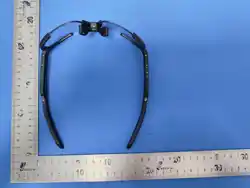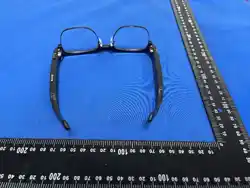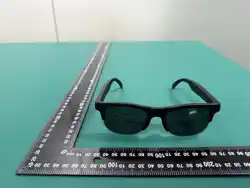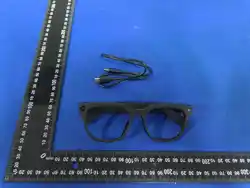

User Manual
Smart Glasses | AI-G3

Quick Start
Register an account
Please download and install the app via the QR code, then
register and log in to your account within the app
Power on
Press and hold the button on the right temple
for 3 seconds to power on the device
Bluetooth-paired
products will automatically enter pairing mode upon first
power-on. Please follow the instructions in the app to pair
the product
1
2
3
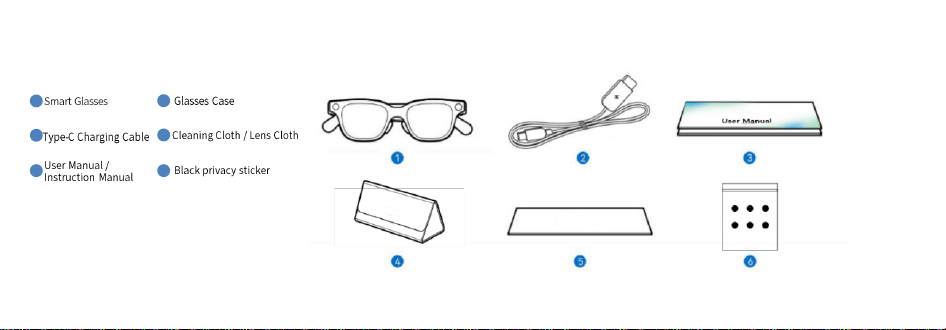
Package contents list
1
5
2
3 6
4
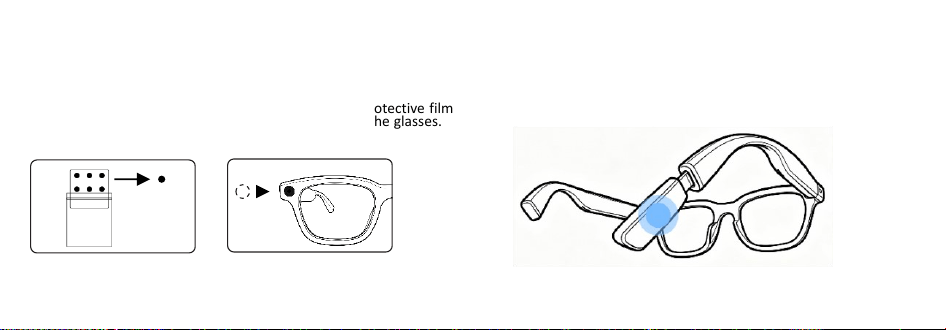
How to use the webcam cover:
1.
Remove the camera
protective film from the
glasses.
2. Apply the camera protective film
to the camera lens of the glasses.
External power supply version available for purchase
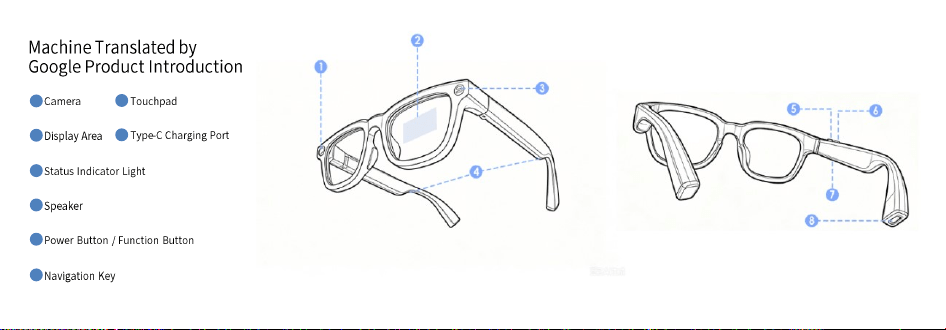
1
5
2
3
6
4
7
8
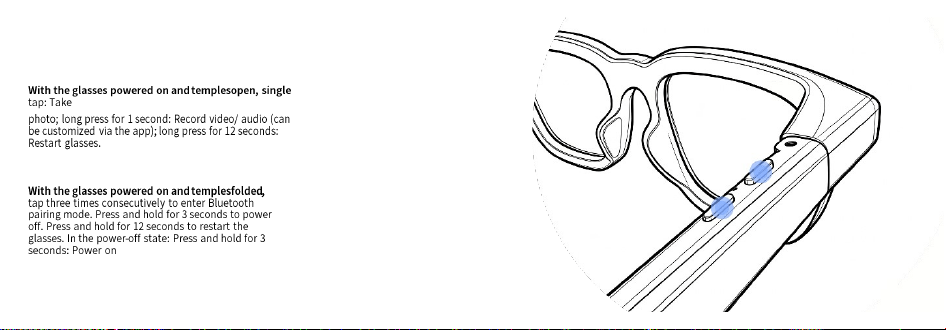
function keys
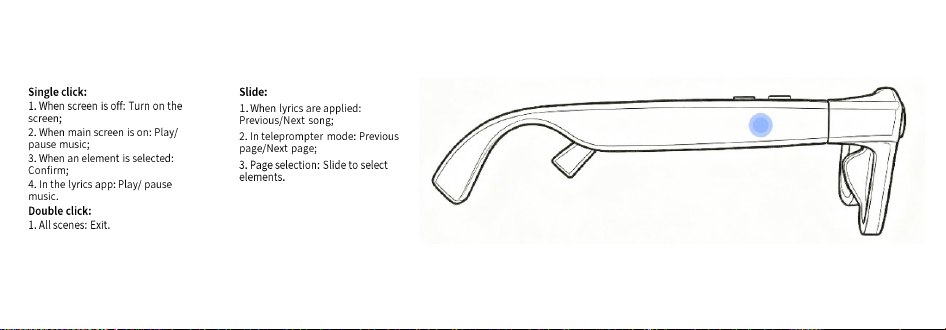
Touch panel
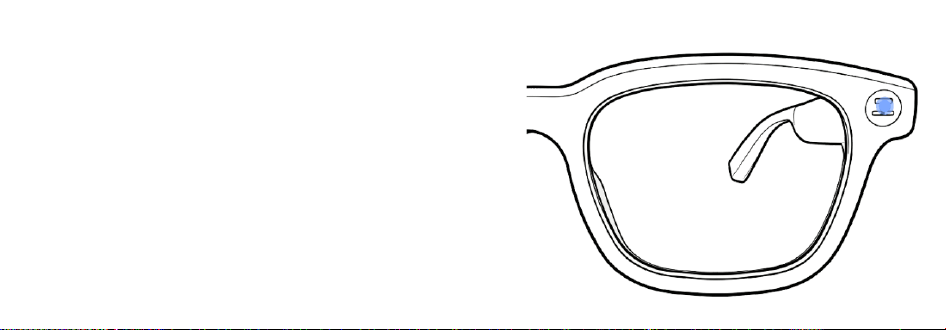
Status indicator lights
When using the camera function, the status indicator light
will remain constantly lit in white. *Note: Do not cover or
damage the status indicator light, as this will cause the
camera to malfunction. The indicator light will cycle green
while charging; when fully charged, the indicator light will
remain solid green.
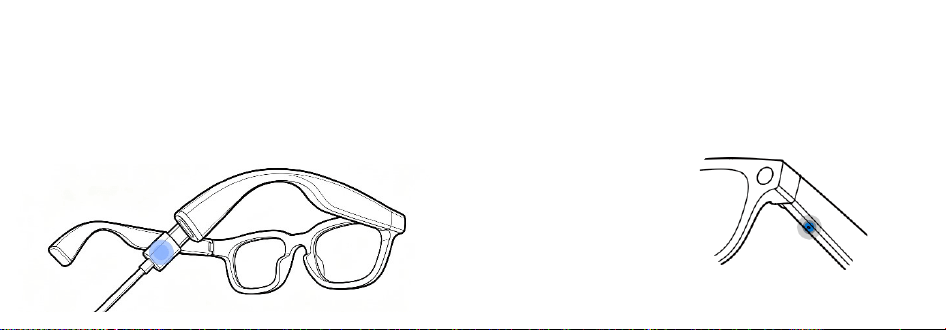
Charging method
Use one end of the Type-C cable to connect to the Type-C port at the end of the
right temple of the glasses. The other end must be connected to a safe USB
charging device, such as a charger or power bank.
Introduction to AI Voice Assistant
After connecting to the app, you can wake up the AI voice assistant by saying "Glasses". You
can try saying things like "Take a photo", "Record a video", "Record audio", or "See what's in
front of me". , What brand is this car?
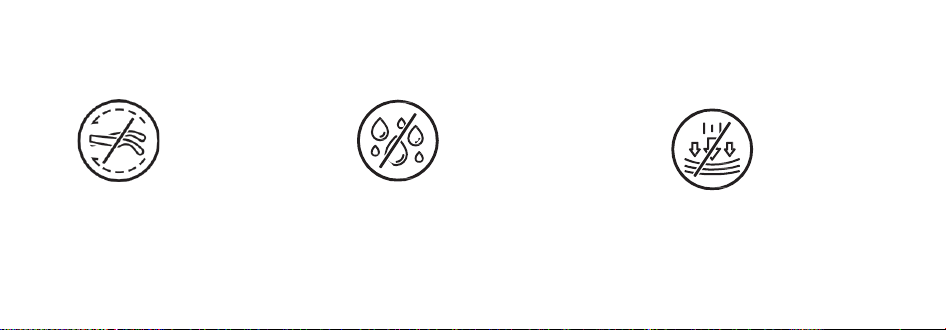
Do not twist the temples excessively,
as this may deform and damage the
waveguide lens.
The glasses are not waterproof ;
contact with liquid may cause
damage.
Eyeglasses are precision
electronic devices; please
store them properly and
avoid heavy pressure.

Security Information
Smart Glasses|AI-G3 is only compatible with plano-concave lenses.
The display lenses are fragile; do not subject the product to external impacts that could cause breakage.
Use this product with caution while driving, cycling, operating machinery, or during any activity requiring
concentration to avoid danger.
- This device should not be used for direct sunlight, artificial light source protection, or as eye protection
against mechanical impacts.
- Do not rely solely on this product for navigation or guidance in potentially hazardous situations.
Do not store this product with sharp or rough objects to avoid scratching the surface.
- Using harsh cleaning tools or incorrect cleaning products may damage the product. Please use the included
special eyeglass cloth or a clean, soft cloth to wipe the product. Please use a neutral cleaning solution. Do not
use abrasive cleaners, sprays, highly concentrated cleaning solutions, chemical cleaning solutions, alcohol, or
acetone, as these may damage, deform, or discolor the frames, accessories, and lenses.
- Due to individual differences, if you experience skin discomfort while wearing the product, please
discontinue use and consult a doctor.
- This product is not intended for medical use; do not use it to diagnose, treat, or prevent any disease.
- To avoid radio wave interference, please maintain a distance of at least 15 cm from implantable medical
devices or personal medical devices (such as pacemakers, cochlear implants, hearing aids, etc.) when using
the product, and consult the manufacturer regarding the device's limitations.
- Please consider the privacy of others when using smart glasses. Avoid taking photos, videos, and recording
audio without consent, as this may infringe on the privacy rights of others.
Please use this device within a temperature range of 0°C to 35°C, and store the device and its
accessories within a temperature range of -10°C to 45°C. Excessively high or low ambient
temperatures may cause device malfunction.
- If the device requires charging, please use the original charging cable and ensure the charging port is
dry and free of dirt before charging.
- Do not expose the device to high temperatures or near heat-generating devices such as strong
sunlight, heaters, microwave ovens, ovens, or water heaters. Overheating may cause the battery to
explode.
- This product does not support rinsing; do not rinse directly or perform ultrasonic cleaning.
- Do not disassemble or modify the device, insert foreign objects, or immerse it in water or other
liquids, as this may cause short circuits, battery leakage, overheating, and potentially fire or explosion.
- Do not heat or bend the product, as this may cause malfunction or fire. Do not throw the product
into fire, as this may cause a fire or explosion.
- Please dispose of the device according to local regulations; do not treat it as household waste.
Improper disposal may lead to an explosion. Please comply with local laws regarding the disposal of
this device and its accessories and support recycling programs.
- Do not allow children or pets to chew on the device, as this may cause injury or explosion.
- Do not drop, squeeze, or puncture the device to avoid subjecting it to excessive external pressure,
which could lead to damage, malfunction, short circuit, fire, or explosion.
- Using unapproved or incompatible adapters, power supplies, or batteries may cause fire, explosion,
or other hazards.
- This device and its accessories may contain small parts; please keep them out of reach of children.

Children may unintentionally damage the device and its accessories, or swallow small parts, leading to
choking or other hazards.
This device has a non-removable built-in battery; do not replace the battery yourself to avoid
damaging the battery and the device.
- Do not use at high volume for extended periods to avoid hearing damage.
- Upgrading the device's firmware, system, or downloading applications through unofficial channels
may render the device unusable or leak your personal information. We recommend using authorized
channels for upgrades.
- If you need to export, re-export, or import the products described in this manual (including but not
limited to the device, its software, and technical data) , you must comply with relevant import and
export control laws and regulations.
Legal Notice
*Copyright © 2005–2026 YJL Technology. All rights reserved.
This document is for reference purposes only and does not constitute any form of guarantee or
commitment.
The actual product (including but not limited to color, weight, size, screen display, etc.) shall prevail.
Special Notice
*This product is not a toy. Keep out of reach of children. Exercise extreme caution when operating the
product in the presence of children.
*This product is a smart glasses product. Provided the user experience of a smart wearable device, it will
be available when the power supply is normal and all components are undamaged. E-Genius Technology
reserves the right to update this disclaimer. The latest disclaimer is available on the product's official
website or in your email.
*This product is not sold with a power adapter. If you use a power adapter, you should purchase a
compatible power adapter that is CCC certified and meets the required standards.
*Please carefully read this product manual before using the product to understand your legal rights,
responsibilities, and safety instructions. Failure to do so may result in property damage, accidents, and
personal safety hazards. By using this product, you acknowledge, accept, and agree to all the terms and
conditions of this statement. You agree to be responsible for your actions and all consequences arising
therefrom. You agree to use this product only for legitimate purposes and agree to these terms and any
related policies or guidelines that E-Genius Technology may establish.
*E-Genius Technology shall not be liable for any direct or indirect personal injury or property damage
caused by failure to use this product in accordance with this product manual.
*To the extent permitted by law, E Genius Technology shall not be liable for any indirect, consequential,
punitive, incidental or consequential damages (including loss of expected profits).
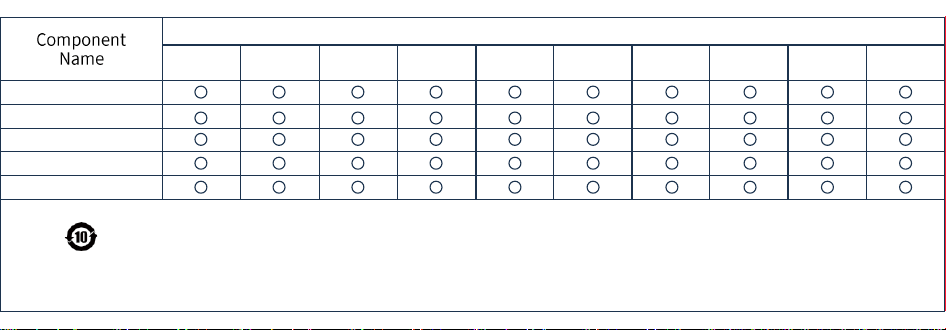
harmful substances
Printed Circuit Board Assembly (PCBA)
Charging Cable
Housing and Accessories
Glass Lens
Transistor
Lead (Pb) and
its
compounds
Cadmium (Cd)
and its
compounds
Hexavalent
Chromium (Cr(VI))
and its compounds
Mercury (Hg)
and its
compounds
Polybrominat
ed Biphenyls
(PBB)
Bis(2-ethylhexyl)
Phthalate (DEHP)
Polybrominat
ed Diphenyl
Ethers (PBDE)
Butyl Benzyl
Phthalate
(BBP)
Dibutyl
Phthalate
(DBP)
Diisobutyl
Phthalate
(DIBP)
This table is prepared in accordance with the provisions of SJ/T 11364-2024.
O: This indicates that the content of the hazardous substance in all
homogeneous materials of this component is below the limit specified in GB/T
26572-2011.
X: Indicates that the content of the hazardous substance in at least one
homogeneous material of this component exceeds the limit specified in GB/T
26572-2011.
Components marked with "X" in the table cannot be replaced with hazardous
substances due to limitations in global technological development.
Printed circuit board assembly*: Includes printed circuit boards and their
components, electronic components, etc. Depending on the product model, the
product you purchase may not contain all of the above components.
iPhone 16e, iPhone 16 Pro Max, iPhone 16 Pro, iPhone 16 Plus, iPhone 16, iPhone 15 Pro Max, iPhone 15 Pro, iPhone 15 Plus, iP hone 15, iPhone 14 Pro Max, iPhone 14
Pro,
iPhone 14 Plus, iPhone 14, iPhone SE (3rd generation), iPhone 13 Pro Max, iPhone 13 Pro, iPhone 13, iPhone 13 mini, iPhone 12 Pro Max, iPhone 12 Pro, iPhone 12,
iPhone 12 mini, iPhone SE (2nd generation), iPhone 11 Pro Max, iPhone 11 Pro, iPhone 11, iPhone XS Max, iPhone XS, iPhone XR, iPhone X
Apple, Apple TV, Apple Watch, iPad, iPad Air, iPad Pro, iPhone, Lightning, and tvOS are trademarks of Apple Inc., registered in the U.S. and other countries and
regions. Apple, Apple TV, Apple Watch, iPad, iPad Air, iPad Pro, iPhone, Lightning, and tvOS are trademarks of Apple Inc., registered in the U.S. and other
countries and regions. The trademark “iPhone” is used in Japan with a license from Aiphone K.K.
Use of the Made for Apple badge means that an accessory has been designed to connect specifically to the Apple product(s) identified in the badge and has
been certified by the developer to meet Apple performance standards. Apple is not responsible for the operation of this device or its compliance with safety
and regulatory standards.
*If consumers use a power adapter, they should purchase a power adapter that is CCC certified and meets
the standard requirements.
Model Name: AI-G3

After-sales service and warranty terms
I. We will provide a one-year warranty for the entire device to end consumers who purchase
Smart Glasses products, upon presentation of the purchase invoice. For products with quality
issues, we will provide a 15-day replacement service from the date of purchase upon
presentation of the purchase invoice.
II. Please note that the following situations are not covered by the warranty:
Expired warranty period;
2. Damage caused by failure to use, maintain, or store the product according to the
instructions; 3. Damage caused by unauthorized disassembly by an unauthorized repairman;
4. Lack of a valid warranty certificate and invoice (except for those proving the product is
within the warranty period);
5. Unauthorized alteration of the warranty certificate;
6. The product model or serial number on the warranty certificate does not match the actual
product;
7. Damage caused by virus infection during use;
8. Damage caused by force majeure;
9. Use of accessories that are not from YJL official or not officially certified by YJL.
Disclaimer
This user manual is published by YJL Technology (Shenzhen) Co., Ltd. It may be subject to necessary
improvements and changes at any time to correct typographical errors, inaccuracies, or outdated
information, or to improve procedures and/or equipment, without prior notice.

FCC FCC WARNING
This device complies with part 15 of the FCC Rules.
Operation is subject to the following two conditions:
(1) This device may not cause harmful interference;
(2) This device must accept any interference received,including
interference that may cause undesired operation.
This equipment has been tested and found to comply with the limits for a Class B
digital device,pursuant to part 15 of the FCC Rules.These limits are designed to
provide reasonable protection against harmful interference in a residential
installation.This equipment generates,uses and can radiate radio frequency energy
and,if not installed and used in accordance with the instructions,may cause
harmful interference to radio communications. However,there is no guarantee
that interference will not occur in a particlar installation.If this equipment does
cause harmful interference to radio or television reception,which can be
determined by turning the equipment off and on,the user is encouraged to try to
correct the interference by one or more of the following measures:
-Reorient or relocate the receiving antenna.
-Increase the separation between the equipment and receiver.
-Connect the equipment into an outlet on a circuit different from that to which
the receiver is connected.
Changes or modifications not expressly approved by the party
responsible for compliance could void the user's authority to
operate the equipment.
-Consult the dealer or an experienced radio/TV technician for help.