Pulse
Oximeter SPA11
Date of Issue: 2024.03, Version: V3.0
FCC Statement
This device complies with Part 15 of the FCC Rules. Operation is subject to the
following two conditions: (1) this device may not cause harmful interference, and (2)
this device must accept any interference received, including interference that may
cause undesired operation.
changes or modifications not expressly approved by the party responsible for
compliance could void the user’s authority to operate the equipment.
This equipment has been tested and found to comply with the limits for a Class B digital
device, pursuant to Part 15 of the FCC Rules. These limits are designed to provide
reasonable protection against harmful interference in a residential installation.
This equipment generates, uses and can radiate radio frequency energy and, if not
installed and used in accordance with the instructions, may cause harmful
interference to radio communications. However, there is no guarantee that
interference will not occur in a particular installation.
If this equipment does cause harmful interference to radio or television reception,
which can be determined by turning the equipment off and on, the user is encouraged
to try to correct the interference by one or more of the following measures:
-- Reorient or relocate the receiving antenna.
-- Increase the separation between the equipment and receiver.
-- Connect the equipment into an outlet on a circuit different from that to which the
receiver is connected.
-- Consult the dealer or an experienced radio/TV technician for help.
RF warning statement:
The device has been evaluated to meet general RF exposure requirement. The device can
be used in portable exposure condition without restriction.
FCC ID:2ADYL-SPA11
Precautions
Do not attempt to maintain the Oximeter unless you are professional engineers. Only
professionals with maintenance qualification are allowed to perform interior
maintenance as necessary.
Periodically change the contact position between the Oximeter probe and the finger for a
measurement. Adjust the position of the probe before the measurement, and check the
integrity of skin, blood circulation condition of the finger as well as the position of the
finger.
This product is not applicable to the examination of newborn babies.
Seek for medical care in time if the measured value goes beyond the normal range while
you are sure that the instrument does not malfunction.
Do not directly expose your eyes to light-emitting components of the Oximeter, as that
could cause harm to your eyes.
Do not expose the device to lint, dust, light(including sunlight), pets, pests, or children,
etc.
This pulse oximeter is not intended to diagnose or treat any medical condition or disease.
People who need SpO2 and pulse rate measurements because of a medical condition
should not use the oximeter and should consult with their physician.
◆
Do not self diagnose and treat based on measurement results, please always consult a
doctor.
For details about clinical limitations and contraindications, please carefully consult
relevant medical literatures.
It needs more than half an hour to warm or cool from the minimum /maximum storage
temperature between uses until it is ready for intended use.
Please note the effects of degraded sensors that can degrade performance or cause other
problems.
The patient is an intended operator.
The lay operator or lay responsible organization should contact the manufacturer or
manufacturer's representative on the following issues:
◆Assistance in setting up, using, or maintaining the equipment or system when needed.
◆
To report unexpected operation or events.
The following factors may cause disturbance to or affect the accuracy of examination:
◆This product is used in an environment involving high-frequency devices, such as
high-frequency electric knives and CT apparatuses.
◆
The probe of the Oximeter is placed on the same body part or limb as with blood
pressure cuff arterial duct or intravenous injection.
◆
The user suffers from hypotension, severe vascular atrophy, severe anemia, or low
oxygen.
◆The user is in sudden cardiac arrest or shock state.
◆
The finger with nail polish or a fake fingernail may cause wrong readings of pulse
oxygen saturation.
◆Please note the effects of degraded sensors that can degrade performance or cause other
problems.
Do not combine old and new batteries, different brands batteries for using.
Uncomfortable or painful feeling may appear if using the device ceaselessly,especially
for the microcirculation barrier patient. It is recommended that the sensor should not be
applied to the same finger for over 2 hours.
The person who is allergic to silicon rubber can not use this device.
Note:The device has no side-effects if administered correctly and residual risk is
acceptable.
Warnings
Warning: Do not use the Oximeter in an environment with any inflammable gases,
inflammable anesthetic, or other inflammable substances.
Warning: Do not attempt to charge any common dry battery, as that could cause leakage,
fire disaster, or even explosion. Dispose of exhausted batteries in accordance with
environment protection regulations.
Warning: Do not use the Oximeter in an MRI or CT environment.
Warning: Do not operate the Oximeter when it is damp with overflow or water
vapor condensation. Avoid moving the Oximeter from an excessively-cold environment
to a high-temperature moist environment.
Warning: No modification of this equipment is allowed for safety.
Warning: Do not use accessories and detachable parts not specified or authorized by
manufacturer. Otherwise, it may cause damage to the unit or danger to the user or patients.
Warning: Keep unit and lanyard away from children as the included lanyard may present
an entanglement or choking hazard to small children. Adult supervision required; never
leave children unattended with unit or lanyard.
Warning: Do not throw the batteries into fire, as that could cause an explosion.
Warning: Close the battery cover when the instrument is in use.
Symbol Conventions
Symbol
Description
Type BF applied part
Caution: Please see this manual.
%SpO2
Symbol of oxygen saturation
bpmPR
Symbol of pulse rate
No SPO2 alarms.
Consult the instructions for use.
Temperature limitation
IP22
The degree of protection against harmful ingress of water and
particulate matter
When end users abandon this product, they must send the product
to the collection place for recycling.
Date of Manufacture
Information of manufacturer
This product complies with the MDR 2017/745 requirements.
Authorized European Representative
Medical device
Humidity
Atmospheric Pressure
Information of Importer
Overview
Oxygen saturation is the percentage of oxyhemoglobin (HbO2) that is combined with
oxygen against all combinable hemoglobin (Hb). It is an important physiological
parameter involved in respiration and circulation. The oxygen saturation of arterial blood
in a normal human body is 98%. Oxygen saturation is an important indicator of the oxygen
condition in the human body. In general, the normal values of oxygen saturation shall not
be lower than 94%. If the measured value of oxygen saturation is lower than 94%, an
insufficient supply of oxygen is considered.The pulse rate is the number of pulse beats per
minute. Normally, the pulse rate is consistent with the heart rate. In general, the pulse rate
of every people is 60 to 90 beats per minute. The Perfusion Index (PI) usually reflects the
limb perfusion status of an examined patient, and shows the detection precision of the
instrument as well; that is, examination can still be performed even in the low or weak
perfusion condition.The PI of a normal human body is 3% or greater.
Intended Use
The Fingertip Pulse Oximeter is non-invasive device intended for spot-checking of
functional oxygen saturation of arterial hemoglobin (Spo2) and pulse rate. The portable
fingertip device is indicated for adult and pediatric patients in home and hospital
environments.Intended user: Professional or lay person.
Scope of Application
It is applicable to a wide range of fields, such as families, hospitals, oxygen bars, social
medical care institutions, and sports & health. Use this instrument for measurement before
or after sports. You are not advised to use this instrument during sports activities. Do not
use it for continuous care for patients.
Working Principles
The pulse oximeter works by applying a sensor to a pulsating arteriolar vascular bed. The
sensor contains a dual light source and photo detector. The one wavelength of light source
is 660nm, which is red light; the other is 905nm, which is infrared-red light. Skin, bone,
tissue and venous vessels normally absorb a constant amount of light over time. The photo
detector in finger sensor collects and converts the light into electronic signal which is
proportional to the light intensity. The arteriolar bed normally pulsates and absorbs
variable amounts of light during systole land diastole, as blood volume increases and
decreases.
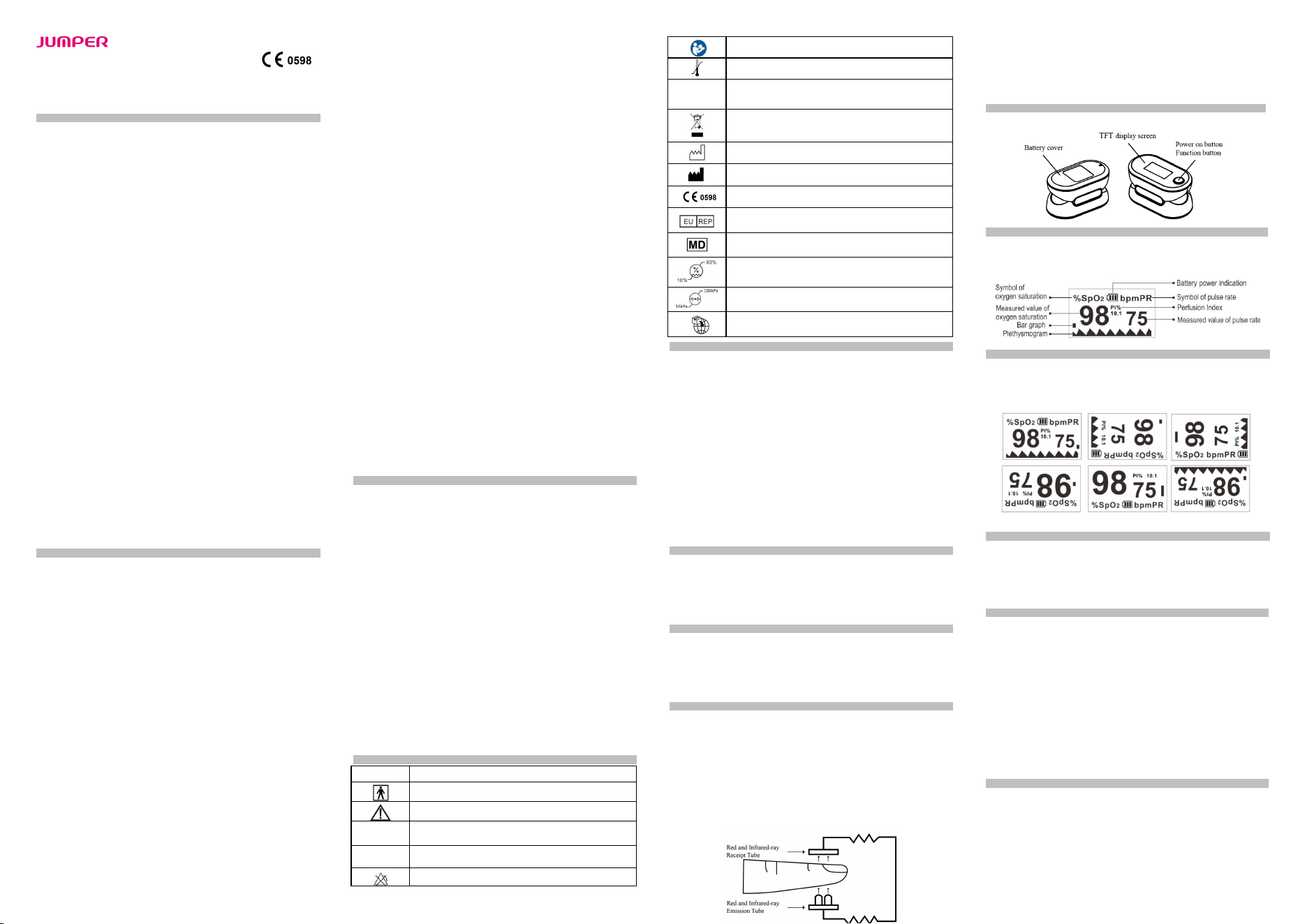
Appearance of Structure
Screen Display
The following figure shows the information display on the TFT screen of the Oximeter in
normal detection state:
About the Display
Continuously press the functional button in the monitoring process. The monitored data
and the display mode will be cyclically displayed on the TFT screen in two different ways
(large fonts and plethysmogram) and four directions, as shown in the following figure.
Power-On Button/Functional Button Operations
Press the button to turn on. Then press and hold the button for one second, the Oximeter
shows a parameter setting interface. Press or hold the button to perform corresponding
operations. Hold it to set an item, or press it to switch an option or switch the display mode.
Press means no more than 0.5 seconds, while Hold means more than 0.5 seconds.
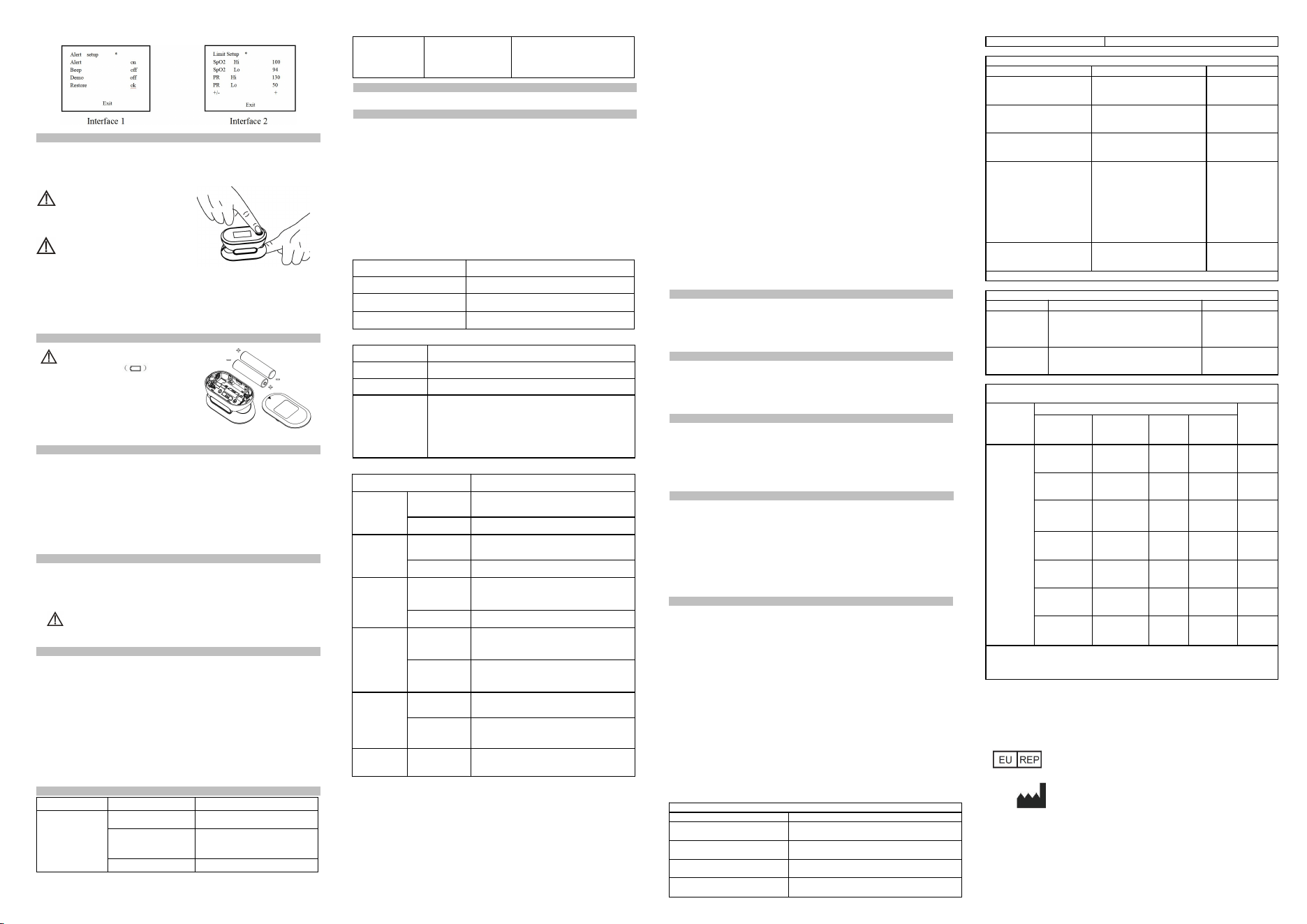
Alert Setting
Hold the functional button while the Oximeter is in powered-on state. Parameter setting
interface 1 is displayed, as shown in the following figure. Move "*" to the corresponding
option, and hold the functional button to set Alert to on and set Beep to off. When Alert is
set to on and the measured values of the blood oxygen saturation and pulse rate go beyond
the upper limit or lower limit, the Oximeter gives off an alert sound. When Alert is set to
off and the measured values go beyond the limit, the Oximeter will not give any alert
sound. When Beep is set to on, a tick will be heard along with pulse beats during pulse rate
measurement. When Beep is set to off, no sound will be output along with pulse beats
during pulse rate measurement. While the "*" symbol stays on the Restore option, hold the
functional button to restore factory settings.
Alert Range Setting
On parameter interface 2, press the functional button to switch between options. On this
interface, you can set the upper limit and lower limit of SpO2 Alert and PR Alert. While
the "*" symbol stays on the +/- option, hold the functional button to set the option to + or -.
In + mode, select the corresponding option and hold the functional button to increment the
upper or lower limit; in - mode, hold the functional button to decrement the upper or lower
limit. Move "*" to the Exit option, and hold the functional button to return to the
monitoring interface.
Operation Guide
Stick one finger completely into the finger chamber of the oximeter. The fingernail should
be facing upward. Release the clip and press the power-on button to power on the
oximeter.
If you do not yet completely insert
your finger into the chamber,
the measurement result may be inaccurate.
Do not vibrate your finger
during measurement,ensure that
your body does not move. After the readings become stable, read the measured values of
oxygen saturation and the pulse rate on the screen.
NOTE:The Oximeter will automatically shut down 10 seconds later after your finger
leaves away.
Replace Battery
Replace the batteries in low power
when the icon flickers on
screen.
Open the battery cover with your fingers, you
can replace the batteries according to the correct
battery polarity.
Cleaning
Power off the instrument and remove the batteries before cleaning. Ensure that the
appearance of the instrument is neat, dust-free, and dirt-free. Clean the outer surface of the
instrument (including the TFT screen) using 75% medical alcohol and a piece of dry soft
cloth before changing patients.
Caution: Avoid liquid flowing into the instrument during cleaning.
Caution: Do not immerse any part of the instrument into any liquid.
Disinfection
Before measurement with the instrument, wipe the silicon rubber finger pad using a piece
of dry soft cloth dipped with 75% medical alcohol. Clean the finger to be measured using
the medical alcohol for disinfection purposes before and after use.
Do not disinfect the instrument by means of high-temperature/high- pressure
or gas disinfection.
Maintenance
Remove the batteries from the battery slot and properly store them if you do not plan to
use the Oximeter for a long period of time.
Avoid using the Oximeter in an environment with inflammable gases or using it in an
environment where the temperature or humidity is excessively high or low.
Check the accuracy of the oxygen saturation and pulse rate readings by using an
appropriate calibration apparatus.
Keep the transmitting and receiving windows free of obstructions before and after use.
No service /maintenance while the equipment is in use.
Troubleshooting
Problem
Possible Cause
Solution
The unit fails to
power on.
Low battery
Change the batteries.
Polarities of the
batteries are reversed.
Make sure the batteries are
installed correctly.
The unit is damaged.
Contact the manufacturer.
The unit doesn’t
display any
information.
The emitting light
doesn’t power on.
Contact the manufacturer.
Product Accessories
One hanging rope; Storage bag; Two AAA batteries;One user manual;Quick guide.
Technical Specifications
1. Dimensions: 62 mm (Width) × 33 mm (Depth) × 32 mm (Height)
Weight: Approx. 27 g (without batteries)
2. Peak wavelength range of the light emitted from the probe: red light 660 nm ± 3;
infrared light 905 nm ± 5.
3. Maximum optical output power of the probe: 1.2 mW for infrared light (905 nm).
4. Bluetooth module: 5.0
5. Manufacturing date: see the label
Expected service life of the device including parts and accessories: 5 years.
6. Normal working condition
Working Temperature
5C to 40C (41F to 104F)
Relative Humidity
15% to 80%, non-condensing
Atmospheric Pressure
70 kPa to 106 kPa
Rated Voltage
DC 3.0 V
7. Default values and conditions of alert
Parameter
Value
Oxygen saturation
Upper limit: 100 Lower limit: 94
Pulse rate
Upper limit: 130 Lower limit: 50
Alert condition
When the alert switch is on and the actual measured value
goes beyond the preset alert parameter range, the Oximeter
gives an alert sound along with flicker (threshold value for
prompting can be set up) .
8. Technical parameters (Software version: V2.12)
Parameter
Value
Display
range
Oxygen
saturation
35% to 100%
Pulse rate
25 bpm to 250 bpm
Resolution
Oxygen
saturation
1%
Pulse rate
1 bpm
Measureme
nt precision
Oxygen
saturation
±2% (70% to 100%)
No requirement (≤ 69%)
Pulse rate
±2 bpm
Alert range
Oxygen
saturation
Upper limit: 50% to 100%
Lower limit: 50% to 100%
Pulse rate
Upper limit: 25 bpm to 250 bpm
Lower limit: 25 bpm to 250 bpm
Alert error
Oxygen
saturation
± 1% of the preset value
Pulse rate
The greater of ±10% of the preset value and ±5
bpm
Battery
times
High-performance dry battery can be used for
about 685 times at normal temperature
9. Technical statement
The device has no alarm system for SpO2 or pulse rate physiological alarm condition.
When the signal detected by the pulse oximeter is inadequary or weak, the SpO2 and
Pulse rate readings on display are: "--" and "---".
FUNTIONAL TESTER can not be used to assess the accuracy of a pulse oximeter probe
or a pulse oximeter monitor.
The pulse oximeter has a specific calibration curve which is accurate for the combination
of the pulse oximeter and pulse oximeter probe. If the functional tester can measure the
error comes from the main part of the pulse oximeter, the accuracy of the pulse oximeter
that replicates this calibration curve can be verified.
MANUFACTURER will make available on request circuit diagrams, component part
lists, descriptions, calibration instructions, or other information that will assist service
personnel designated by the manufacturer in parts repair.
The pulse rate waveform is normalized. When the pulse rate waveform tends to be
smooth and stable, the measurement value is optimal. Data update period: less than 30s,
data averaging: every 8 data.
Note 1
:
The Pulse oximeter measurements are statistically distributed,only about
two-thirds of pulse oximeter equipment measurements can be expected to fall within
±Arms of the value measured by a co-oximeter.
Note 2
:
The statistic conclusion of an controlled desaturation study which guided by“ISO
80601-2-61, Annex EE, guideline for evaluating and documenting SpO2 accuracy in
human subjects”. The statistic result displayed the accuracy distribution between the range
of 70%-100%.
Safety Type
Anti-electric-shock type: internal power supply device
Anti-electric-shock degree: Type BF applied part
Running mode: Continuous working Waterproof grade: IP22
Storage and Transportation
Packaged products should be stored in well-ventilated rooms without corrosive gas and
with an ambient temperature of –10C to +50C, a relative humidity 10%- 93% (without
condensation), and an atmospheric pressure of 50–106 kPa.
Statement
Lay responsible organization must contact its local authorities to determine the proper
method of disposal of potentially bio hazardous parts and accessories as appliable.
Any serious incident that has occurred in relation to the device should be reported to the
manufacturer and the competent authorities of your Member State.
After-sale Service
After-sale service unit: Shenzhen Jumper Medical Equipment Co., Ltd.
Address: D Building, No. 71, Xintian Road, Fuyong Street, Baoan,
Shenzhen,Guangdong,China, 518103
Tel: +86-755-26696279
E-mail
:
info@jumper-medical.com
Website: www.jumpermmed.com/www.jumper-medical.com
EMC Information-Guidance and Manufacture’s Declaration
1* WARNING: Use of this equipment adjacent to or stacked with other equipment should
be avoided because it could result in improper operation. If such use is necessary, this
equipment and the other equipment should be observed to verify that they are operating
normally.
2* WARNING: Use of accessories, transducers and cables other than those specified or
provided by the manufacturer of this equipment could result in increased electromagnetic
emissions or decreased electromagnetic immunity of this equipment and result in improper
operation.
3* WARNING: Portable RF communications equipment (including peripherals such as
antenna cables and external antennas) should be used no closer than 30 cm (12 inches) to
any part of the ME equipment, including cables specified by the manufacturer. Otherwise,
degradation of the performance of this equipment could result.
Table 1
declaration - electromagnetic emission
Emissions test
Compliance
RF emissions
CISPR 11
Group 1
RF emissions
CISPR 11
Class B
Harmonic emissions
IEC 61000-3-2
Not applicable
Voltage fluctuations/
flicker emissions
Not applicable
IEC 61000-3-3
Table 2
declaration - electromagnetic immunity
Immunity test
IEC 60601 test level
Compliance level
Electrostatic discharge
(ESD)
IEC 61000-4-2
±8 kV contact
±2 kV, ±4 kV, ±8 kV, ±15 kV
air
±8 kV contact
±2 kV, ±4 kV, ±8
kV, ±15 kV air
Electrical fast transient/burst
IEC 61000-4-4
± 2 kV for power supply lines
± 1 kV for input/output lines
Not applicable
Surge
IEC 61000-4-5
± 0.5kV, ± 1 kV line(s) to lines
± 0.5kV, ± 1 kV, ± 2 kV line(s)
to earth
Not applicable
Voltage dips, short
interruptions and voltage
variations on power supply
input lines
IEC 61000-4-11
0 % UT; 0.5 cycle At 0°, 45°,
90°, 135°, 180°, 225°, 270°and
315°
0 % UT; 1 cycle and
70 % UT; 25/30 cycles
Single phase: at 0°
0 % UT; 250/300 cycles
Not applicable
Power frequency
(50/60 Hz) magnetic field
IEC 61000-4-8
30 A/m
30 A/m
NOTE: UT is the a.c. mains voltage prior to application of the test level.
Table 3
declaration - electromagnetic immunity
Immunity test
IEC 60601 test level
Compliance level
Conducted RF
IEC
61000-4-6
3 V
0.15 MHz to 80 MHz
6 V in ISM bands between 0.15 MHz and
80 MHz
Not applicable
Radiated RF
IEC
61000-4-3
10V/m
80 MHz to 2.7 GHz
10V/m
Table 4
declaration - IMMUNITY to proximity fields from RF wireless communications
equipment
Immunity
test
IEC60601 test level
Compli
ance
level
Test
frequency
Modulation
Maxim
um
power
Immunity
level
Radiated
RF
IEC
61000-4-
3
385 MHz
**Pulse
Modulation:
18Hz
1.8W
27 V/m
27 V/m
450 MHz
*FM+ 5Hz
deviation:
1kHz sine
2 W
28 V/m
28 V/m
710 MHz
745 MHz
780 MHz
**Pulse
Modulation:
217Hz
0.2 W
9 V/m
9 V/m
810 MHz
870 MHz
930 MHz
**Pulse
Modulation:
18Hz
2 W
28 V/m
28 V/m
1720 MHz
1845 MHz
1970 MHz
**Pulse
Modulation:
217Hz
2 W
28 V/m
28 V/m
2450 MHz
**Pulse
Modulation:
217Hz
2 W
28 V/m
28 V/m
5240 MHz
5500 MHz
5785 MHz
**Pulse
Modulation:
217Hz
0.2 W
9 V/m
9 V/m
Note* - As an alternative to FM modulation, 50 % pulse modulation at 18 Hz may be
used because while it does not represent actual modulation, it would be worst case.
Note** - The carrier shall be modulated using a 50 % duty cycle square wave signal.
MedPath GmbH
Mies-van-der-Rohe-Strasse 8, 80807 Munich, Germany
Shenzhen Jumper Medical Equipment Co., Ltd
D Building, No. 71, Xintian Road, Fuyong Street,
Baoan,Shenzhen,Guangdong,China,518103.
Tel: +86-755-26696279
E-mail: info@jumper-medical.com
Web: www.jumpermmed.com/www.jumper-medical.com