Item No.: 3621AUS
Instruction Manual
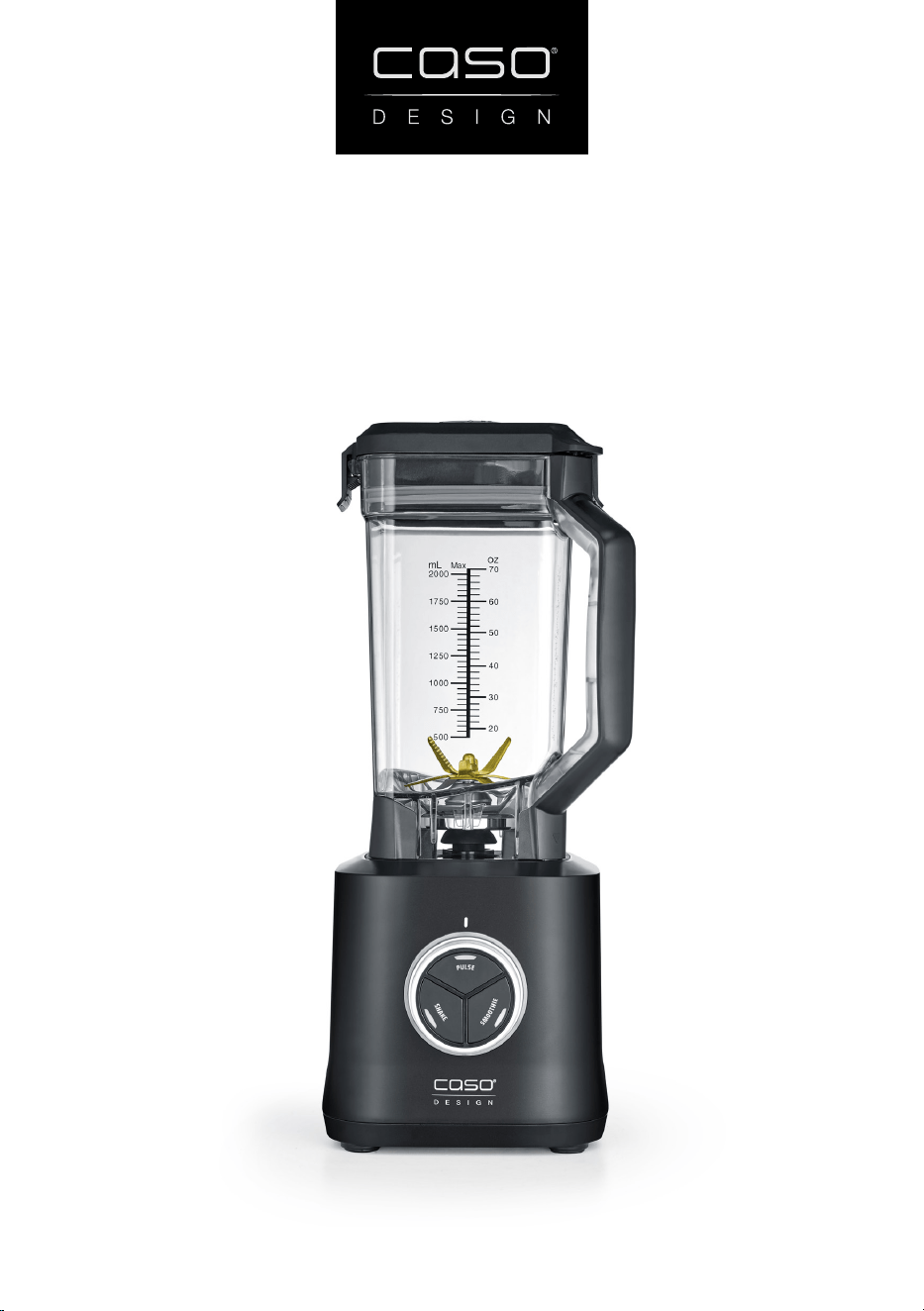
Commecial Blender PowerBlender B 2000
2
CASO PowerBlender B 2000
Congratulations on your purchase of a Caso Design® Blender, imported by Pro-Line
Australia.
Please read through this notice and the instruction manual carefully before using
or installing the product and ensure that both are kept in a safe place for future
reference.
The system must be properly installed and located in accordance with the instruc-
tions before it is used.
During the setup of this product if you have any questions/ comments/
issues DO NOT RETURN TO STORE. FOR SERVICE AND TECHNICAL ADVICE VISIT
www.prolineaustralia.com.au/contact
Electrical Requirements:
Australia/ New Zealand 220 - 240 V; 50 - 60 Hz
Due to manufacturing alterations product may vary slightly from
that pictured.
System Speci cations
CASO PowerBlender B 2000
Item Number
03621AUS
External measurements (W x H x D) 190 mm x 460 mm x 210 mm
Product Weight
4.04 kg
Electrical data
220 - 240 V; 50 - 60 Hz
Power Consumption
2000 W
Pro-Line Australia
PO Box 4187
Norwood South LPO
South Australia 5067
Email: info@prolineaustralia.com.au
Web:www.prolineaustralia.com.au
3
CASO PowerBlender B 2000
EN Safety
Warning notices
The following warning notices are used in the Operating Manual concerned here.
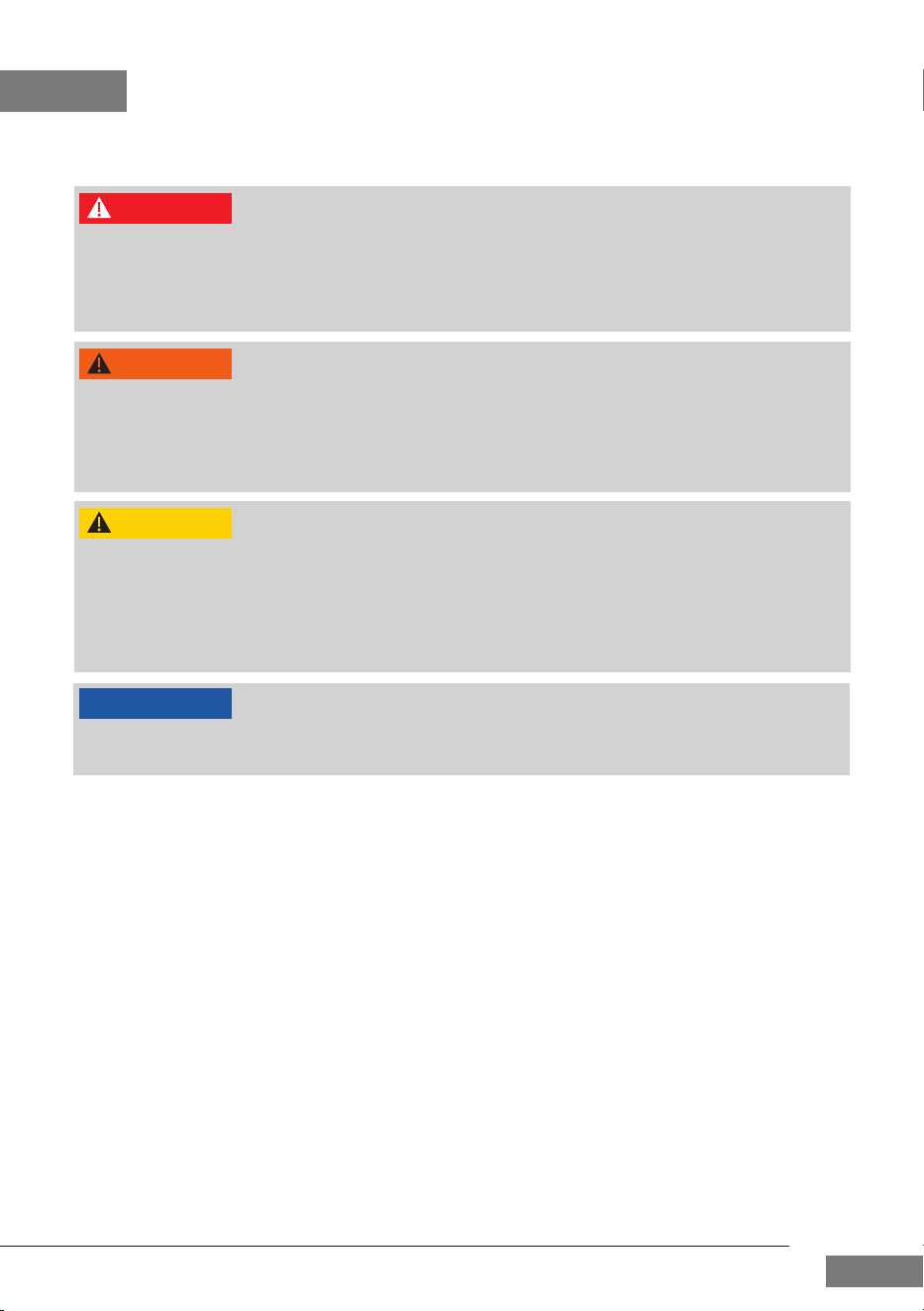
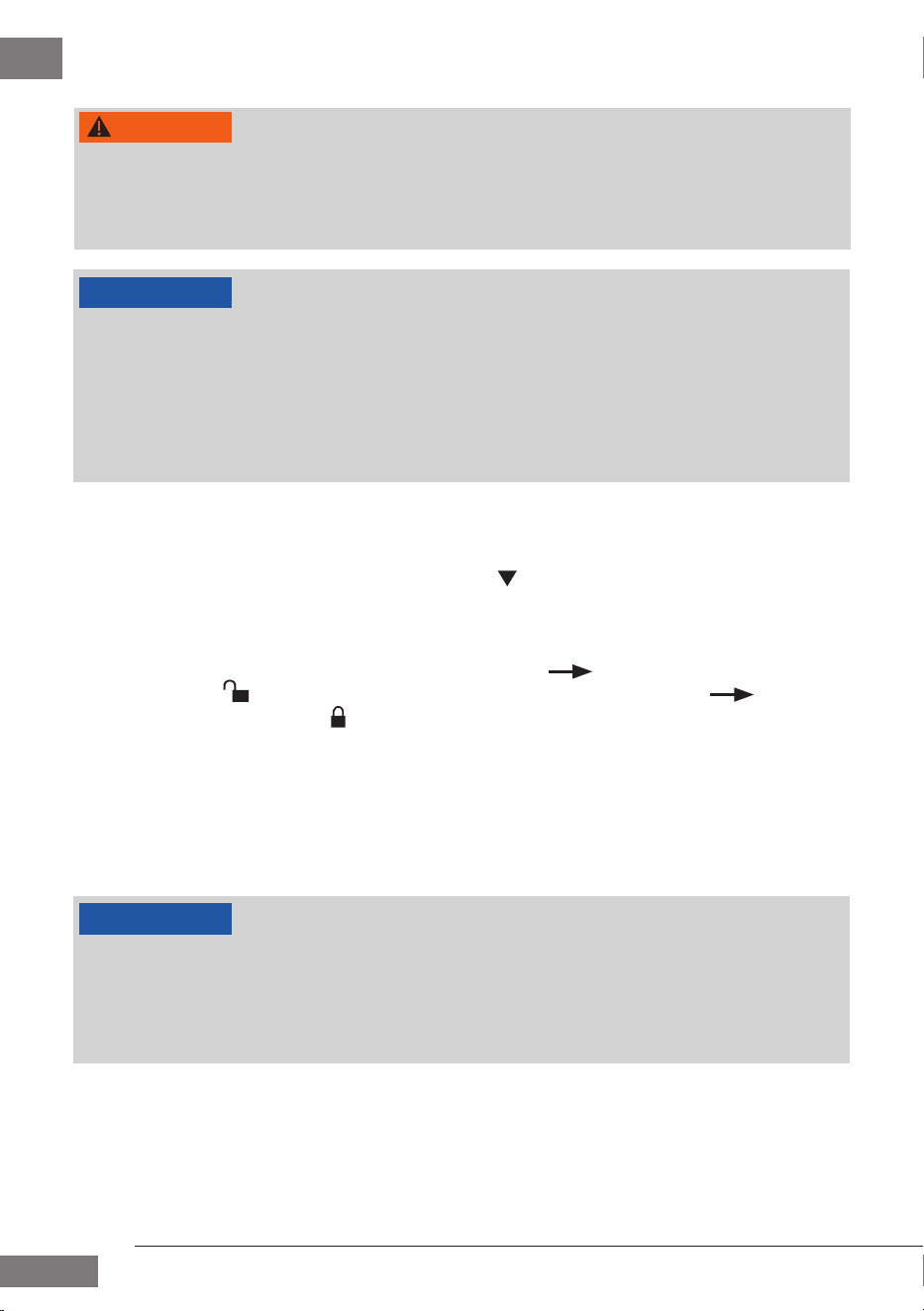
A warning notice of this level of danger indicates a potentially dangerous situation.
If the dangerous situation is not avoided, this can lead to death or serious injuries.
Observe the instructions in this warning notice in order to avoid the danger of
death or serious personal injuries.
A warning notice of this level of danger indicates a possible dangerous situation.
If the dangerous situation is not avoided, this can lead to serious injuries.
Observe the instructions in this warning notice in order to avoid the personal
injuries.
A warning notice of this level of danger indicates a possible dangerous situation.
If the dangerous situation is not avoided, this can lead to slight or moderate
injuries.
Observe the instructions in this warning notice in order to avoid the personal
injuries.
A notice of this kind indicates additional information, which will simplify the handling of
the machine.
Intended use
This device is only intended for use in households in enclosed spaces for
• Make smoothies and milk shakes.
• Chop fresh ingredients such as fruit, berries, vegetables, etc. (add liquid).
• Blitz cooked food, e.g. for soups, sauces and baby food.
• Mix drinks and cocktails of all kinds.
• Crush ice.
• Chop frozen food.
• Chop hard food such as nuts.
This appliance is intended to be used in household and similar applications, such as:
• in kitchens, for employees in shops, offi ces and other commercial areas,
• in farms,
• by customers in hotels, motels and other similar residential environments,
• in bed and breakfast establishments.
Uses for a diff erent purpose or for a purpose which exceeds this description are consid-
ered incompatible with the intended or designated use.
DANGER
WARNING
ATTENTION
PLEASE NOTE

4
CASO PowerBlender B 2000
WARNING
Danger due to unintended use! Dangers can emanate from the device
if it is used for an unintended use and/or a diff erent kind of use.
Use the device exclusively for its intended use.
Observe the procedural methods described in this Operating
Manual.
Claims of all kinds due to damages resulting from unintended uses are excluded. The User
bears the sole risk.
General Safety information
PLEASE NOTE
Please observe the following general safety notices with regard to
the safe handling of the device.
Examine the device for any visible external damages prior to using it.
Never put a damaged device into operation.
Children must not use this appliance. Keep the appliance and its
power supply unit away from children.
This appliance is not intended for use by persons (including children)
with reduced physical, sensory and metal capabilities, or lack of ex-
perience and knowledge, unless they have been given supervision or
instruction concerning use of the appliance by a person responsible
for their safety.
To protect against re, electric shock or injury, do not immerse power
cord, plug or main unit in water or other liquid.
Do not operate any appliance with a damaged power cord or plug, if
the appliance malfunctions, or if it has been damaged in any manner.
This appliance is for Indoor use only.
Only customer service departments authorized by the manu-
facturer may carry out repairs on the device, as otherwise the
guarantee entitlements will be null and void in the event of any
subsequent damages. Improperly performed repairs can cause
considerable dangers for the user.
Defective components must always be replaced with original
replacement parts. Only such parts will guarantee that the safety
requirements are ful lled.
Use the appliance only as described in the user’s guide to avoid
possible injury from misuse.

5
CASO PowerBlender B 2000
PLEASE NOTE
Operate the appliance only in dry indoor areas.
Do not leave the appliance unattended.
Always unwind the power cord completely before use. When doing
so, ensure the power cord is not damaged by sharp edges or hot
objects.
Do not make any modi cations to the appliance or the power cord.
Only have repairs carried out by a specialist workshop, as appliances
that have not been repaired properly endanger the user. Please also
observe the enclosed warranty conditions.
Only use the appliance with original accessories.
The device is protected against overheating. It will stop automatically
after 10 minutes of continuous use. Wait for around 30 minutes before
using the device again.
Do not overload the device and do not let it operate un-loaded.
Be sure the parts are properly assembled to original base and in place.
Sources of danger / Danger of injury
WARNING
Careless use of the appliance may result in injury. Note the following
warnings to avoid injury.
Never use your nger or tools to push ingredients deeper into the
device while the device is running. Always use the provided tamper
for this purpose.
Disconnect the device from mains power if it is unsupervised; before
assembling it; when changing over accessories and when disassemb-
ling or cleaning it.
The blade is sharp. Be careful when handling or cleaning the device.Be
careful when emptying the blender jug.
CAUTION: Switch off the appliance before removing the blender jug
from the motor unit.
Stop processing of food immediately if rotating accessories no longer
turn or only turn with diffi culty and unplug the device.
The appliance is not suitable for chopping hot or liquid ingredients at
more than 100 °C.
6
CASO PowerBlender B 2000
Dangers due to electrical power
DANGER
Mortal danger due to electrical power! Mortal danger exists when
coming into contact with live wires or subassemblies! Observe the
following safety notices to avoid dangers due to electrical power:
If the power cord of this appliance is damaged, it must be replaced
by the manufacturer or its customer service or a similarly quali ed
person in order to avoid hazards.
Do not open the housing on the device under any circumstances.
There is a danger of an electrical shock if live connections are tou-
ched and the electrical or mechanical structure is altered. In addi-
tion, functional faults on the device can also occur.
Do not touch the appliance or the mains plug with wet hands.
Do not immerse the appliance in water or other liquids, and do not
put it in the dishwasher.
Transport inspection
WARNING
Do not allow children to play with packaging materials due to risk of suff ocation.
PLEASE NOTE
Examine the shipment to ensure the unit and manual are included and inspect the
unit for any visible damage.
Immediately notify the carrier and/or the supplier about an incomplete shipment
or any damage as a result of inadequate packaging or mishandling.
Setup location requirements
In order to ensure the safe and trouble-free operation of the device, the setup location
must ful l the following prerequisites:
• Place the device on a rm and even work surface.
• Choose the setup location in such a way that children cannot reach any hot surfaces
on the device.
• The device is not intended to be installed in a wall or a built-in cupboard.
• Do not use the device outdoors.
• Do not set up the device in a hot, wet or extremely damp environment or near
ammable material.
• The installation and assembly of this device in non-stationary setup locations (e.g.
on ships) must be carried out by specialist companies / electricians, provided they
guarantee the prerequisites for the safe use of this device.

7
CASO PowerBlender B 2000
Electrical connection
In order to ensure the safe and trouble-free operation of the device, the following inst-
ructions must be observed for the electrical connection:
• Before connecting the device, compare the connection data (voltage and frequen-
cy) on the rating plate with those of your electrical network. This data must agree in
order that no damages occur in the device. If in doubt, ask your quali ed electrician.
• The electrical outlet must be protected by a 16A safety cut-out switch, separately
from other electricity consumers,
• The connection between the device and the electrical network may employ a 3 meter
long (max.) extension cable with a cross-section of 1.5 mm². The use of multiple plugs
or gangs is prohibited because of the danger of re that is involved with this.
• Make sure that the power cable is undamaged and has not been installed under the
oven or over hot or sharp surfaces.
• The electrical safety of the device is only guaranteed if the device is connected to a
properly installed protective conductor system. Operations using an electrical outlet
without a protective conductor are prohibited. If in doubt, have the house installation
checked over by a quali ed electrician. The manufacturer cannot be made responsi-
ble for damages that are caused by a missing or damaged protective conductor.

8
CASO PowerBlender B 2000
EN
1 General
Please read the information contained herein so that you can become familiar with your
device quickly and take advantage of the full scope of its functions. Your appliance will
serve you for many years if you handle it and care for it properly. We wish you a lot of
pleasure in using it!
Table of contents - Operation
1 General ...................................................................................................................8
1.1 Information on this manual ............................................................................................9
1.2 Limitation of liability ........................................................................................................ 9
1.3 Copyright protection ........................................................................................................ 9
1.4 Delivery scope ................................................................................................................... 9
1.5 Unpacking .......................................................................................................................... 9
2 Design and Function ............................................................................................ 10
2.1 Overview ...........................................................................................................................10
2.2 Control Panel ...................................................................................................................11
2.3 Rating plate ...................................................................................................................... 11
3 Operation and Handling .....................................................................................11
3.1 Before rst use ...............................................................................................................11
3.2 Tips for using the device ................................................................................................ 11
3.3 Operation .........................................................................................................................12
3.4 Function buttons .............................................................................................................12
3.4.1 PULSE function .................................................................................................................................12
3.4.2 SHAKE function ................................................................................................................................ 13
3.4.3 SMOOTHIE function ........................................................................................................................13
3.5 Recipes ..............................................................................................................................13
3.5.1 Basic recipe for milk shakes .......................................................................................................13
3.5.2 Basic recipe for smoothies ..........................................................................................................14
4 Cleaning and Maintenance .................................................................................14
4.1 Safety information ..........................................................................................................14
4.2 Cleaning ............................................................................................................................ 14
5 Troubleshooting ..................................................................................................15
5.1 Safety notices ..................................................................................................................15
5.2 Troubleshooting table ...................................................................................................15
6 Disposal of the Old Device ..................................................................................16
6.1 Disposal of the packaging ............................................................................................. 16
7 Guarantee .............................................................................................................16
9
CASO PowerBlender B 2000
EN
1.1 Information on this manual
These operating instructions are a component of the Blender PowerBlender B 2000
(referred to hereafter as the Device) and provide you with important information for the
initial commissioning, safety, intended use and care of the device. The Operating Instruc-
tions must be available at all times at the device. This Operating Manual must be read and
applied by every person who is instructed to work with the device:
• Commissioning, • Operation,
• Troubleshooting and/or • Cleaning
Keep the Operating Manual in a safe place and pass it on to the subsequent owner
along with the device.
1.2 Limitation of liability
All the technical information, data and notices with regard to the installation, operation
and care are completely up-to-date at the time of printing and are compiled to the best
of our knowledge and belief, taking our past experience and ndings into consideration.
No claims can be derived from the information provided, the illustrations or descriptions
in this manual. The manufacturer does not assume any liability for damages arising as a
result of the following:
• Non-observance of the manual
• Uses for non-intended purposes
• Improper repairs
• Technical alterations, modi cations of the device
• Use of unauthorized spare parts
Modi cations of the device are not recommended and are not covered by the guaran-
tee. All translations are carried out to the best of our knowledge. We do not assume any
liability for translation errors, not even if the translation was carried out by us or on our
instructions. The original German text remains solely binding.
1.3 Copyright protection
This document is copyright protected. CASO GmbH reserves all the rights, including
those for photomechanical reproduction, duplication and distribution using special
processes (e.g. data processing, data carriers, data networks), even partially. Subject to
content and technical changes.
1.4 Delivery scope
As a rule, the articles are delivered with the following components:
• CASO PowerBlender B 2000 • Blender jug with lid
• Lid seal with integrated measuring cup • Blade unit
• Tamper • Operation Manual
1.5 Unpacking
Carefully remove the packaging material and unit from the carton.
If possible, keep the original packaging for the duration of the guarantee period in
the event a return is necessary.
PLEASE NOTE
10
CASO PowerBlender B 2000
EN
2 Design and Function
This chapter provides you with important information of the design and function of the
device.
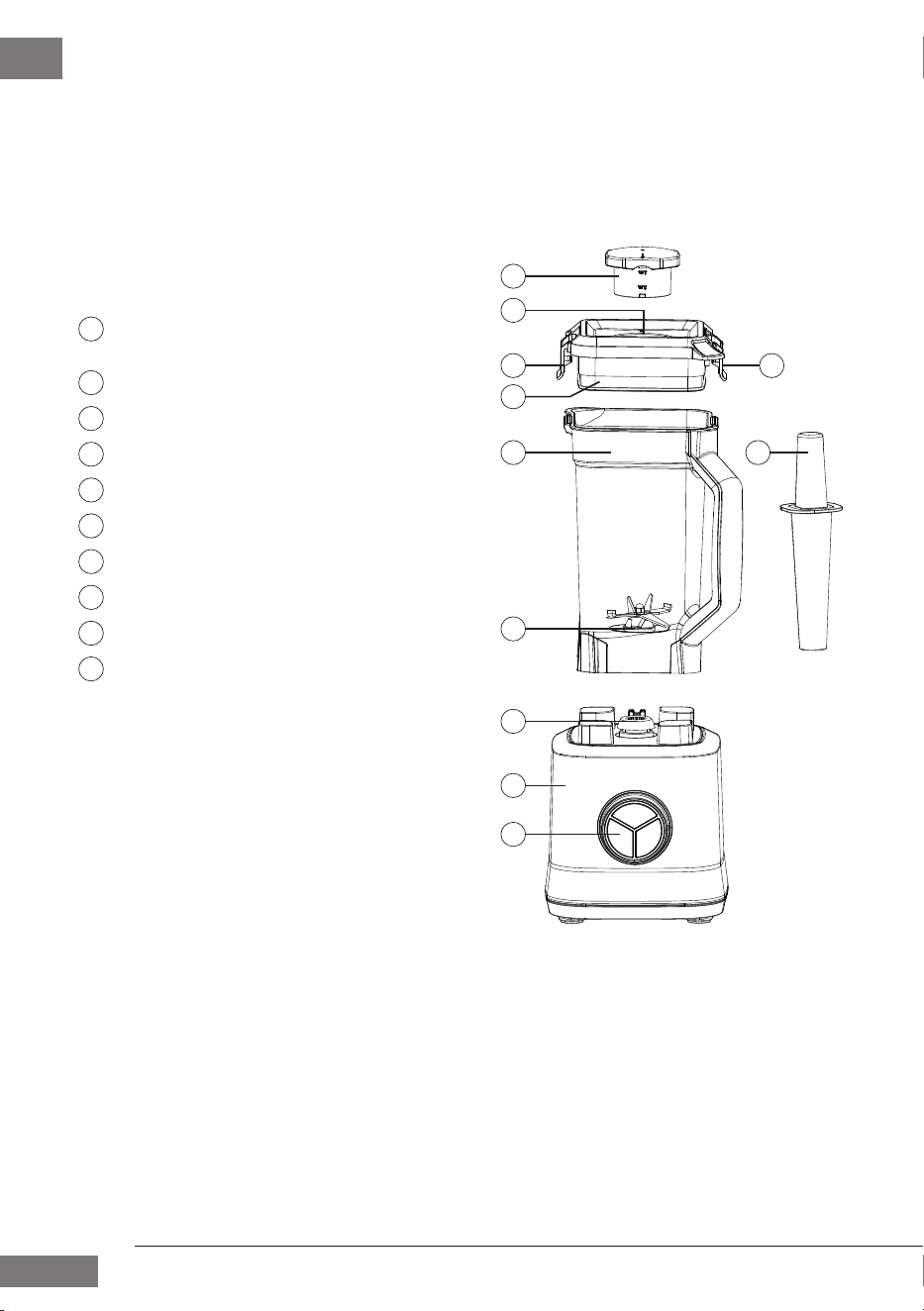
2.1 Overview
33
5
7
8
9
10
6
4
1
2
1
2
3
4
7
5
8
6
9
10
Sealing cap with integrated
measuring cup
Filling opening
Catch fasteners for the blender lid
Blender lid
Blender jug
Tamper
Blade unit
Blender coupler
Motor unit
Operating panel
11
CASO PowerBlender B 2000
EN
2.2 Control Panel
2.3 Rating plate
The rating plate with the connection and performance data can be founded beneath the
device.
3 Operation and Handling
This chapter provides you with important information and notes on the operation and
basic settings of the appliance.
3.1 Before rst use
Clean the device as described in the “Cleaning and maintenance” section.
3.2 Tips for using the device
• Remove stalks, pips and, where applicable, peel from the fruit or vegetables.
• Roughly chop the food items before you process them.
• The higher the speed setting and the longer the blender runs, the more intensively
the food will be mixed and the ner the result.
12
13
14
15
11
16
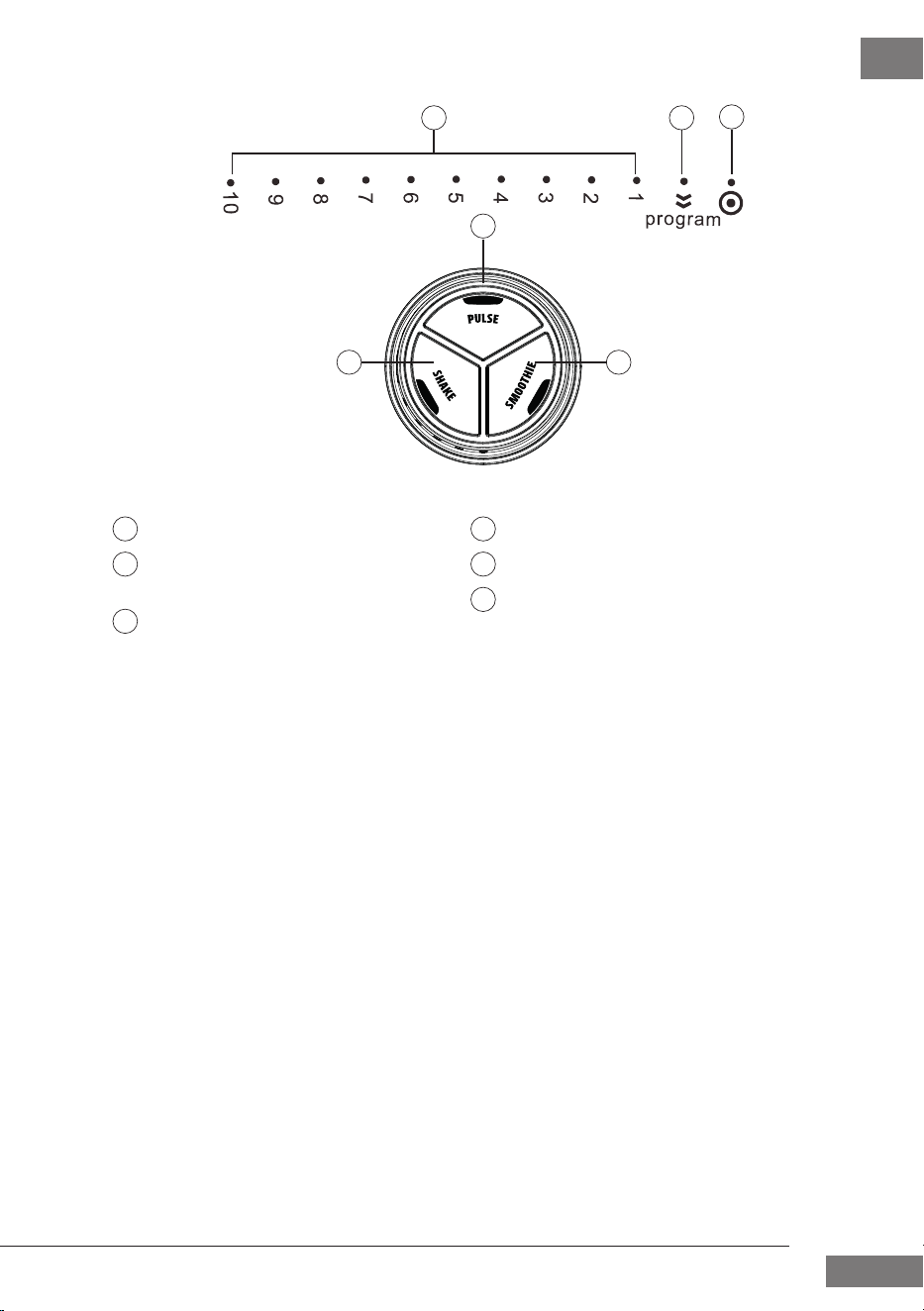
Control knob markings:
Speed 1-10
Position to select the function
buttons
“O ” position
Function buttons:
PULSE function
SHAKE function
SMOOTHIE function
11 14
12 15
13
16
12
CASO PowerBlender B 2000
EN
3.3 Operation
WARNING
Do not leave the device unsupervised when it is in operation, so that you can inter-
vene quickly in the event of dangers.
Never use your ngers to push ingredients further down into the blender jug. Use the
tamper supplied with the device for this.
PLEASE NOTE
The device is protected against overheating. It will stop automatically after 10 minu-
tes of continuous use. Wait for around 30 minutes before using the device again.
An integrated safety switch ensures that the device cannot be operated unless the
lid has been correctly placed on the jug and locked and the jug has been correctly
placed on the motor unit.
The device will automatically switch to standby mode if it is not used for more than
approx. 1 minute.
1. Place the motor unit on a stable surface.
2. Roughly chop the desired food items and place them in the blender jug. Pay atten-
tion to the “Max.” mark.
3. Place the blender lid on the jug. The arrows “
” on the lid and the jug handle must
point to each other otherwise the device will not power on.
4. Fastener the blender lid onto the jug, making sure that it sits tightly by pressing the
catch fasteners down until you hear them click into place.
5. Place the sealing cap into the blender lid opening (
on the sealing cap should
point to the
symbol on the lid) and turn the cap until it sits tightly ( on the
sealing cap points to the
symbol on the lid).
6. Place the assembled blender jug on the motor unit (handle facing front left or front
right). If the blender jug is not positioned correctly the device will not power on.
7. Plug the power socket into mains power.
8. Turn the control knob to the desired speed level (1-10) or set the knob to “program”
and use the desired function button.
9. To end the process, turn the knob back to the “O ” position.
PLEASE NOTE
Turn the control knob to the “O ” position if you want to add more ingredients to the
blender jug during operation. Remove the sealing cap from the blender lid and use
the opening in the lid to add the desired ingredients to the jug.
It usually only takes a few seconds to chop food items. We recommend chopping
food items at intervals.
3.4 Function buttons
3.4.1 PULSE function
This function is used for short bursts of mixing, blitzing or chopping food at top speed. It
is great for preparing shakes, sorbets, baby food or mixing cooked vegetables for soups,
sauces, dips, etc.

13
CASO PowerBlender B 2000
EN
10. Follow the instructions in the “Operating the device” section to prepare the device for use.
11. Set the control knob to “program”.
12. Press the “PULSE” button.
13. The device will run at top speed for as long as you press the button. Release the but-
ton to stop the chopping process.
14. Turn the control knob back to the “O ” position when you have nished.
WARNING
Avoid the risk of burns: Please check the temperature of the food before you continue
preparing it or give it to your baby. This can easily be done on the back of your hand.
3.4.2 SHAKE function
This function can be used, for example, to quickly crush ice or make milk shakes. The func-
tion increases the blender’s speed in quick successive steps to blitz food items in a very
short space of time.
15. Follow the instructions in the “Operating the device” section to prepare the device
for use.
16. Set the control knob to “program”.
17. Press the “SHAKE” button.
18. The device will increase the mixing speed in a very short space of time, decreasing it
in between.
19. The device will automatically stop. Alternatively, you can stop it by pressing the
“SHAKE” button again.
20. Turn the control knob back to the “O ” position when you have nished.
3.4.3 SMOOTHIE function
This function quickly increases the mixing speed, stops and then quickly increases the
speed again. It is great for making fruit and vegetable smoothies. Depending on your
personal taste, you can make thick or runny smoothies.
1. Follow the instructions in the “Operating the device” section to prepare the device
for use.
2. Set the control knob to “program”.
3. Press the “SMOOTHIE” button.
4. The device will increase the chopping speed in a very short space of time in a pulsing
mode.
5. It will automatically stop. Alternatively, you can stop the device by pressing the
“SMOOTHIE” button again.
6. Turn the control knob back to the “O ” position when you have nished.
3.5 Recipes
3.5.1 Basic recipe for milk shakes
Ingredients:
• 600 ml milk
• 600 g vanilla ice cream
• 1 large cup of crushed ice

14
CASO PowerBlender B 2000
EN
Tips for enhancing the recipe:
- Substitute a di erent avour for the vanilla ice cream
- Add approx. 300 g fruit or fruit puree during the mixing process
- Add approx. 300 ml maple or chocolate syrup.
- Add a liquid avouring (e.g. caramel, vanilla, chocolate, etc.) to your personal taste
- Add spices (e.g. cinnamon) to your personal taste.
3.5.2 Basic recipe for smoothies
Ingredients:
• 400 ml liquid
• 800 g fruit or vegetables
Tips for enhancing the recipe:
- Use liquids such as juices, milk, buttermilk or yoghurt.
- Use fresh or frozen fruit
- Combine di erent fruits or fruits and vegetables.
- Add a liquid avouring (e.g. caramel, vanilla, chocolate, etc.) to your personal taste
- Add spices (e.g. cinnamon) to your personal taste.
4 Cleaning and Maintenance
This chapter provides you with important notices with regard to cleaning and main-
taining the device. Please observe the notices to prevent damages due to cleaning the
device incorrectly and to ensure trouble-free operation.
4.1 Safety information
ATTENTION
Please observe the safety instructions, before cleaning your device:
Unplug the device when not in use and before any cleaning.
Clean the appliance immediately after each use. Extended waiting unnecessarily
complicates cleaning and can make it impossible in extreme cases. Excessive accu-
mulations of dirt can even damage the device under certain circumstances.
If dampness penetrates into the device, this can damage the electronic components.
Do not use any aggressive or abrasive cleaning agents or solvents.
Do not scrape o stubborn dirt with hard items.
Do not immerse the motor unit in water or other liquids, and do not put it in the
dishwasher.
The blades are very sharp, handle the blender jug and blades with care when cleaning.
Dry all parts before reusing or storing them. Store the parts, as well as sharp knives,
out of the reach of children.
4.2 Cleaning
Motor unit
Wipe the outside of the motor unit with a soft, damp cloth after every use.
15
CASO PowerBlender B 2000
EN
Accessories
• Half ll the blender jug with warm water, add a few drops of washing-up liquid and
let the device run for 30 seconds on the SMOOTHIE setting. Rinse the jug thoroughly
with lukewarm water and then dry it thoroughly.
• Alternatively, you can clean the accessories under running water using a small
amount of washing-up liquid.
5 Troubleshooting
This chapter provides you with important notices with regard to operating the device.
Observe the following notices to avoid dangers and damages:
5.1 Safety notices
ATTENTION
Repairs of electrical appliances must be carried out by quali ed person who are
trained by the manufacturer.
Repairs performed by untrained persons may result in considerable hazards for the
user and damage the machine.
5.2 Troubleshooting table
If an error occurs, then an error code will appear on the control panel display. It describes the
reason for the error.
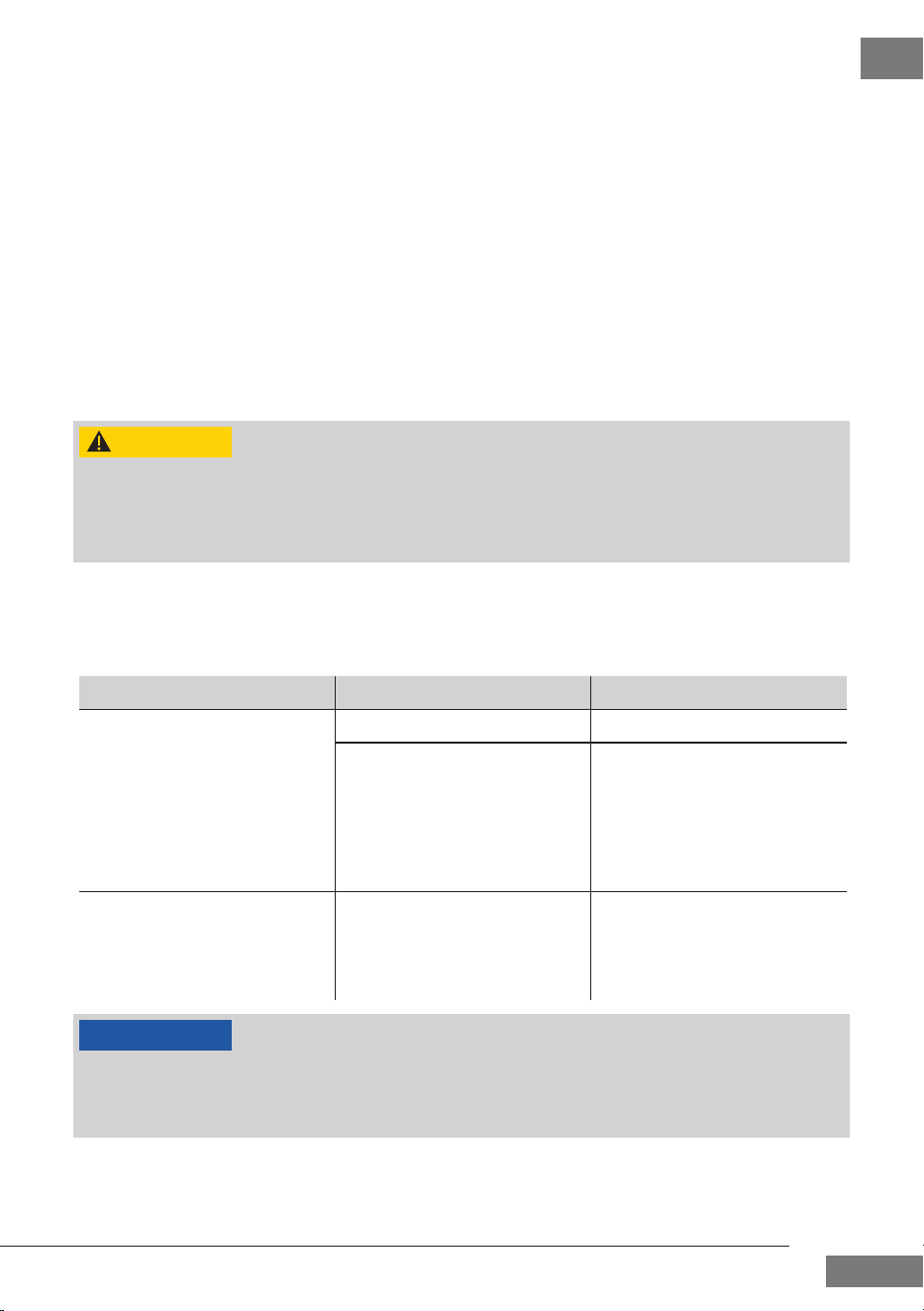
Problem Possible cause Solution
The device cannot be turned
on or started.
Mains plug not plugged in. Plug in the mains plug.
The blender jug is not
correctly positioned on the
motor unit or the blender lid
is not correctly seated on the
blender jug.
Check that the handle of
the blender jug is facing the
front of the device and that
the arrow on the blender lid
is facing the arrow on the
blender jug handle.
The device has switched o
automatically.
The overheating protection
has been triggered.
Remove the plug from the
socket and wait for approx.
30 mins before you use the
device again.
PLEASE NOTE
If you cannot solve the problem by carrying out the steps described above, our
Customer Service will help you free of charge. Please visit www.prolineaustralia.com.au
Clean the device before you send it to customer service.

16
CASO PowerBlender B 2000
EN
6 Disposal of the Old Device
Old electric and electronic devices frequently still contain valuable materials. However,
they also contain damaging substances, which were necessary for their functionality and
safety. If these were put in the non-recyclable waste or were handled incorrectly, they
could be detrimental to human health and the environment. Therefore, do not put your
old device into the non-recyclable waste under any circumstances.
Utilise the collection point, established in your town, to return and recycle old electric
and electronic devices. If necessary, contact your local council, local refuse collection
service or your dealer for information.
Ensure that your old device is stored safely away from children until it is taken away.
6.1 Disposal of the packaging
The packaging protects the device against damages during transit. The packa-
ging materials are selected in accordance with environmentally compatible and
recycling-related points of view and can therefore be recycled. Returning the
packaging back to the material loop saves raw materials and reduces the
quantities of accumulated waste. Check with your local council for proper disposal and
recycling procedures.
7 Guarantee
Your Pro-Line Australia Repair or Replacement Warranty
Pro-Line warrants this appliance to the rst purchaser and subject to the stated conditions:
This warranty only applies to appliances purchased and used in Australia or New Zealand
and covers any defects in material or workmanship in the manufactured product within
the rst 24 months for electrical parts and 12 months on Jugs and Blades from the date of
purchase. In addition, the motor only, does not include switching gear or PCB, has a 5 year
guarantee from the date of purchase.
To make a warranty claim you must visit Pro-line Australia online at www.prolineaustralia.
com.au/warrantyclaim
If a product is found to be faulty there is a 90 day return policy from the date of purchase.
Products returned to store MUST be accompanied by a valid proof of purchase.
For warranty claims outside of 90 days from date of purchase, product will be repaired
or replaced at our discretion. Repair or replacement costs of the product will be covered
under warranty by Pro-line.
Goods presented for repair may be replaced by refurbished goods of the same type rather
than being repaired. Refurbished parts may be used to repair the goods. The bene ts
given to you by this warranty are in addition to other rights and remedies of the consumer
law in relation to the goods or services to which this warranty relates.
PLEASE NOTE

17
CASO PowerBlender B 2000
EN
Our goods come with guarantees that cannot be excluded under the Australian Consu-
mer Law. You are entitled to a replacement or refund for a major failure and compensation
for any other reasonably foreseeable loss or damage. You are also entitled to have the
goods repaired or replaced if goods fail to be of acceptable quality and the failure does
not amount to a major failure.
Conditions of this Warranty:
1. This product has been fully installed in accordance with the user manual installa-
tion instructions.
2. The warranty extends only to repairing or replacing any component that proves to
be defective in material or workmanship.
3. The warranty does not cover defects occasioned by misuse, alterations, accidents,
or used for other than the intended purpose.
4. The warranty does not cover damage to the product caused by accident, re,
oods, power surges or black outs.
5. Proof of purchase is required for warranty claims. Please keep purchase receipt in a
safe place.

18
CASO PowerBlender B 2000

19
CASO PowerBlender B 2000

Pro-Line Australia
PO Box 4187
Norwood South LPO
South Australia 5067
Email: info@prolineaustralia.com.au
Web:www.prolineaustralia.com.au