USER MANUAL
EnjoyGalaxy Wireless Lighting System
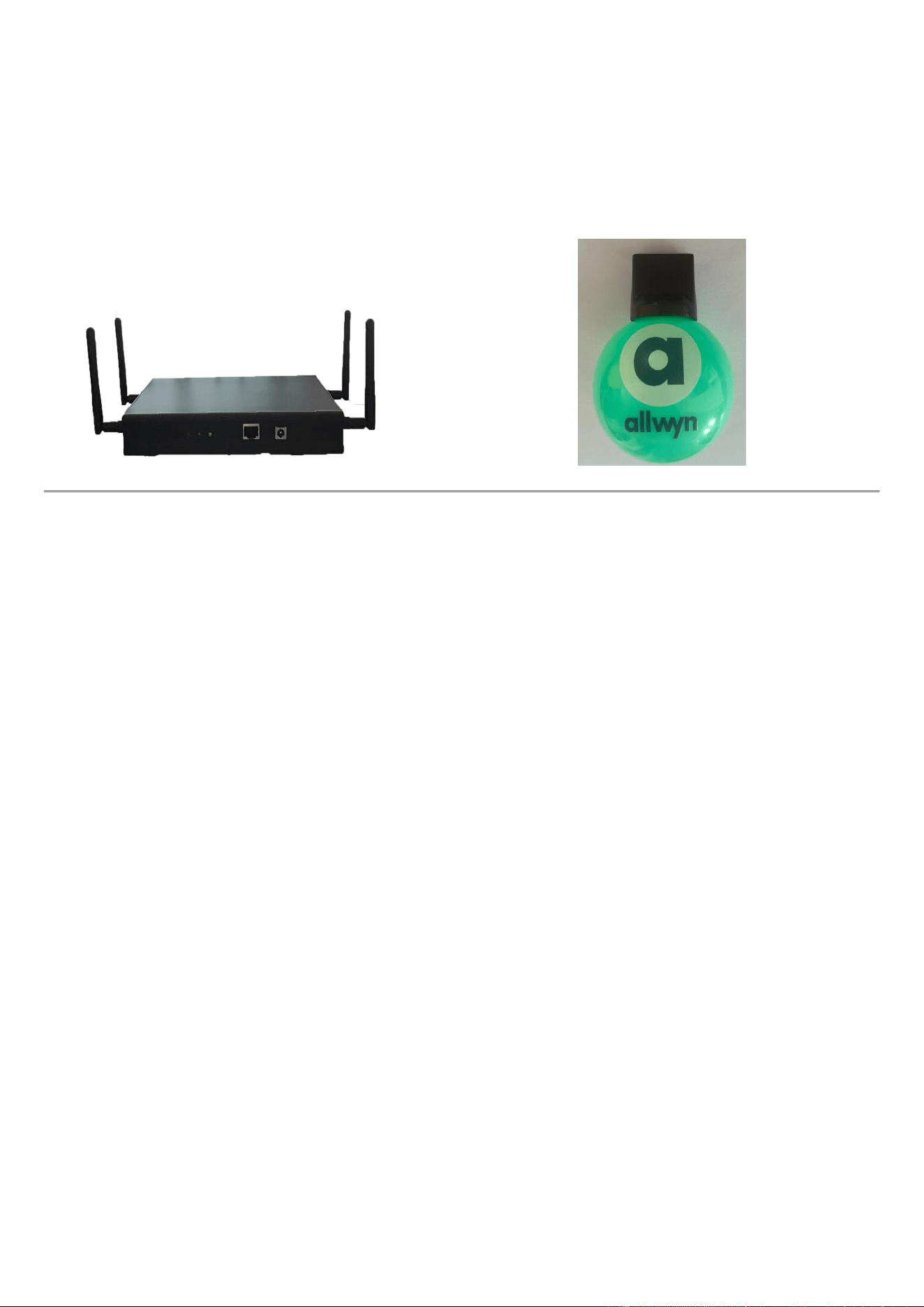
Product Name: Controller
Model No.: LED BALL
Company: ENJOY TECHNOLOGY CO., LIMITED
Manual Version: 1.0
1. Product Overview
The EnjoyGalaxy Wireless Lighting System is designed for concerts, sporting events, live performances, and
other large-scale entertainment activities.
The product features LED lighting and 2.4 GHz wireless control technology. It operates with a dedicated
controller and compatible computer software supplied by the manufacturer.
Once the control system is properly connected and configured, the LED BALL can receive wireless commands
from the controller and display the corresponding lighting effects.
Different models may vary in product appearance, enclosure structure, LED configuration, and battery
configuration. The main circuit design, RF operating principle, operating frequency, and wireless functions are
consistent across the product series.
2. Product Features
• 2.4 GHz RF wireless control
• LED lighting effects
• Built-in rechargeable battery
• USB-C charging interface
• Dedicated controller and computer software supplied
• Wireless control through a centralized system
• Suitable for concerts, sporting events, and large-scale live events
Actual product features may vary depending on the specific model.
3. Product Specifications
Item
Specification
Product Name
EnjoyGalaxy Wireless Lighting System
Model Number
LED BALL
Operating Frequency
2.4 GHz
Power Supply
Built-in Rechargeable Battery
Charging Interface
USB-C
Control System
Dedicated Control Unit and Computer Software
Computer Connection
RJ45-to-USB-A Connection Cable
LED Configuration
Varies by Model
Enclosure Structure
Varies by Model
4. System Setup and Operating Instructions
4.1 System Components
The control system consists of the following components:
• EnjoyGalaxy Wireless Lighting System LED BALL
• Dedicated controller
• Compatible computer software
• RJ45-to-USB-A connection cable
4.2 Connecting the Control System
1. Connect the RJ45 connector of the supplied connection cable to the designated port on the controller.
2. Connect the USB-A connector to an available USB port on the computer.
3. Install or launch the designated control software supplied by the manufacturer.
4. Ensure that the control unit is properly connected and recognized by the software.
5. Configure the software and control unit according to the event requirements.
6. Once the control system is ready, the LED BALL can receive wireless commands via 2.4 GHz.
Note: The control unit, computer software, and connection cable must be compatible with the supplied control
system.
4.3 Wireless Control
The LED BALL receives lighting commands wirelessly from the dedicated control unit through the 2.4 GHz
RF communication system.
During normal operation, no manual operation of individual LED BALL is required. Lighting effects and
synchronized displays are managed through the computer software and control unit.
The available lighting effects and control functions depend on the software configuration and the capabilities of
the control system.
Important: The computer software and dedicated control unit are required for normal wireless control
operation.
5. Charging Instructions
The LED BALL feature built-in rechargeable batteries and USB-C charging interfaces.
1. Connect the USB-C charging cable to the USB-C charging port on the LED BALL.
2. Connect the other end of the cable to a compatible USB power source.
3. Charge the product according to the specified charging requirements.
4. Disconnect the charging cable when charging is complete.
Charging Precautions
• USB-C charging cable and USB power adapter are not included.
• Use a compatible USB power source that meets the product's specified charging requirements.
• Do not use a damaged charging cable or power source.
• Do not charge the product near flammable materials.
• Avoid charging the product in excessively hot or humid environments.
• Stop charging immediately if the product becomes unusually hot, swollen, or damaged.
6. Safety Precautions
• Read this manual before using the product.
• Do not disassemble or modify the product.
• Do not expose the product to fire, excessive heat, or direct sunlight for extended periods.
• Do not expose the product to water unless it is specifically rated for water resistance.
• Avoid dropping the product or subjecting it to strong impacts.
• Do not use the product if the enclosure or battery appears damaged.
• Keep the product and charging accessories away from young children during charging.
• Use only compatible charging equipment.
• Do not attempt to repair the product while it is connected to a power source.
7. Maintenance and Storage
• Keep the product clean and dry.
• Store the product in a cool, dry place away from direct sunlight.
• Avoid storing the product in extremely hot or cold environments.
• Follow the battery manufacturer's recommendations for charging and long-term storage.
• Inspect the product and charging cable before use.
• Disconnect the charging cable when the product is not being charged.
8. Troubleshooting
Problem
Possible Cause
Recommended Action
The LED BALL does not light up
Insufficient battery charge or
device malfunction
Recharge the product and check its
condition
The LED BALL does not respond
to wireless commands
Controller or software is not
properly configured
Check the computer connection,
software, and controller
Problem
Possible Cause
Recommended Action
The controller is not recognized by
the computer
Connection issue or software
configuration problem
Check the cable connections and
computer software
Wireless control is unstable
Interference or control system
configuration issues
Check the system setup and surrounding
signal environment
The LED BALL cannot be charged
Charging cable, power source, or
battery issue
Check the cable and compatible USB
power source
If the problem persists, contact the supplier or manufacturer for technical support.
9. Wireless Operation
This product uses 2.4 GHz wireless technology to receive commands from the designated control system.
Wireless performance may vary depending on the operating environment, RF interference, installation
conditions, and control system configuration.
For large-scale events, the complete control system should be installed and tested before the event.
The product must be operated in accordance with the applicable wireless communication requirements and
regulations in the destination market.
10. Warranty and Customer Support
The warranty period, coverage, and service conditions are subject to the sales agreement or the manufacturer's
warranty policy.
For technical support, product inquiries, or warranty service, please contact:
Company: [ENJOY TECHNOLOGY CO., LIMITED]
Email: [[email protected]]
Website: [www.enjoyvote.com]
11. Manufacturer Information
Manufacturer: [Guangzhou Qile Technology Co., Limited]
Country of Origin: [China]
Model: [LED BALL]
End of User Manual

FCC Caution.
This device complies with part 15 of the FCC Rules. Operation is subject to the following two conditions:
(1) This device may not cause harmful interference, and
(2) this device must accept any interference received, including interference that may cause undesired
operation.
Any Changes or modifications not expressly approved by the party responsible for compliance could void the
user's authority to operate the equipment.
Note: This equipment has been tested and found to comply with the limits for a Class B digital device, pursuant
to part 15 of the FCC Rules. These limits are designed to provide reasonable protection against harmful
interference in a residential installation. This equipment generates uses and can radiate radio frequency energy
and, if not installed and used in accordance with the instructions, may cause harmful interference to radio
communications. However, there is no guarantee that interference will not occur in a particular installation. If
this equipment does cause harmful interference to radio or television reception, which can be determined by
turning the equipment off and on, the user is encouraged to try to correct the interference by one or more of the
following measures:
-Reorient or relocate the receiving antenna.
-Increase the separation between the equipment and receiver.
-Connect the equipment into an outlet on a circuit different from that to which the receiver is connected.
-Consult the dealer or an experienced radio/TV technician for help.
FCC Radiation Exposure Statement:
This equipment complies with FCC radiation exposure limits set forth for an uncontrolled environment. This
equipment should be installed and operated with minimum distance 20 cm between the radiator & your body.