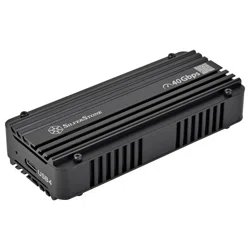
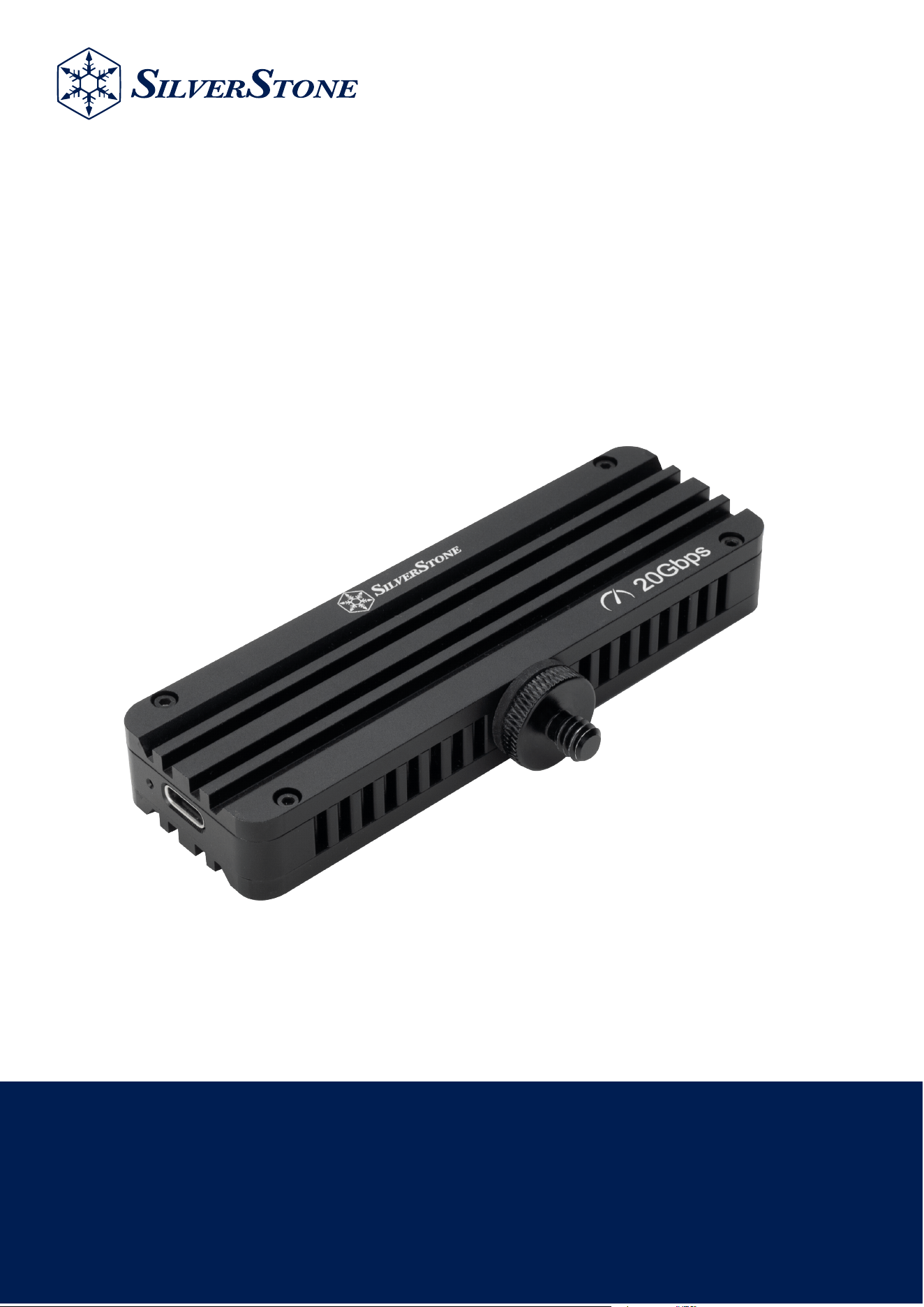
MS12-E
Camera-Ready USB 3.2 Gen 2x2 20Gbps
NVMe M.2 Enclosure
www.silverstonetek.com

Installation Guide / Installationsanleitung / Guide d'installation
Guía de instalación / Guida all'installazione / Руководство по установке
インストールガイド / 昪獞儆決姢คู่มือการติดตั้ง / 安裝說明 / 安装说明
Warranty terms & conditions / Garantiebedingungen
Términos y condiciones de la garantía /Termes et conditions de la garantie /
Termini e Condizioni della garanzia / Условия гарантии / 保証条件 / 懺溣浶兺
ข้อกำหนดและเงื่อนไขการรับประกัน / ሷく⪸˶Ύߗ⦦ᆙ / ᳝䰤䋷ӏֱ䇈ᯢ
5HDGEHIRUHXVH
:DUQLQJ
06(VDOXPLQXPH[WHULRUKDVWKHDELOLW\WRTXLFNO\VRDN
XSKHDWJHQHUDWHGIURPWKHLQVWDOOHG190H66'DQGLWV
EXLOWLQFRQWUROOHUVRSOHDVHDOORZVRPHWLPHIRULWWRFRRO
GRZQDIWHUSURORQJHGSHULRGRIKLJKSHUIRUPDQFHDFWLYLW\
EHIRUHWRXFKLQJWKH06(
(1
9RU*HEUDXFKOHVHQ
:DUQXQJ
'LH$OXPLQLXPDX¡HQVHLWHYRQ06(KDWGLH)¦KLJNHLW
GLHYRQGHULQVWDOOLHUWHQ190H66'XQGLKUHPLQWHJULHUWHQ
&RQWUROOHUHU]HXJWH+LW]HVFKQHOO]XDEVRUELHUHQ'DKHU
VROOWHQ6LH06(QDFKO¦QJHUHULQWHQVLYHU1XW]XQJ
LPPHUHLQLJH=HLWDEN¾KOHQODVVHQEHYRU6LHHVEHU¾KUHQ
'(
OLUHDYDQWXWLOLVDWLRQ
$YHUWLVVHPHQW
/ಬH[W«ULHXUHQDOXPLQLXPGX06(DODFDSDFLW«
GಬDEVRUEHUODFKDOHXUJ«Q«U«HSDUOH66'190HHWVRQ
FRQWU¶OHXULQW«JU«9HXLOOH]SDWLHQWHUDYDQWGHWRXFKHUOH
06(HWODLVVH]OHUHIURLGLUDSUªVXQHORQJXHS«ULRGH
GಬDFWLYLW«VRXVKDXWHSHUIRUPDQFH
)5
/HDDQWHVGHXVDU
c$GYHUWHQFLD
(OH[WHULRUGHDOXPLQLRGHO06(WLHQHODFDSDFLGDGGH
DEVRUEHUU£SLGDPHQWHHOFDORUJHQHUDGRGHO66'190H
LQVWDODGR\HOFRQWURODGRULQFOXLGROXHJRSRUIDYRUGHMH
DOJRGHWLHPSRSDUDTXHVHHQIU¯HWUDVXQSHULRGR
SURORQJDGRGHDOWRUHQGLPLHQWRDQWHVGHWRFDUHO06(
(6
/HJJHUHSULPDGHOOಬXVR
$YYLVR
/HVWHUQRLQDOOXPLQLRGL06(KDODFDSDFLW¢GLDVVRUELUH
UDSLGDPHQWHLOFDORUHJHQHUDWRGDOO66'190HLQVWDOODWRH
GDOFRQWUROOHULQWHJUDWRTXLQGLDWWHQGHUHXQSRಬGLWHPSR
SULPDGLWRFFDUORDIILQFK«VLUDIIUHGGLGRSRXQSHULRGR
SUROXQJDWRGLDWWLYLW¢DGDOWHSUHVWD]LRQL
,7
ࡤࡻࡩࡐ࠸ࡻࡤࡐࡶࡁࡼ࠾ࡩࡐ
࠻ࡪࡳࡌࡤࡐ
ࡋࡼࡩࡐࡐࡤ࠸ࡤࡰࡘࡳࡐ࡙ࡘ࠹ࡤ࠾06(ࡘ࠻࡞ࡩࡘࡡࡩࡘࡩ࡚ࡍࡶࡐ࠸ࡩ࡚ࡋࡰࡋ࠻࡞ࡩࡘ࡚ࡼࡤࡐࡤ࡙ࡻࡩ࠾
࡚࡞ࡋࡳ࡚ࡺ࡞ࡩ࠸190H66'ࡴࡧ࠻ࡤࡐࡵࡎ࡚ࡳࡤ࡚ࡿࡶࡐࡌࡨ࡞ࡎࡻࡌࡋࡌࡨࡼ࠾ࡷ࡞ࡼࡋࡨ࠾ࡐࡨࡼࡐࡵࡒ࡚ࡋࡒࡻࡤ࡙
ࡶࡢࡼࡳ࡙ࡺࡐ࠾ࡡࡨ࠸࠻࡚ࡰࡻࡢࡨ࠾ࡩ࠸ࡶࡁࡼ࠾ࡩࡐࡶࡐ࠸࠸࡚࡚ࡘࡎࡻࡌࡼࡤ࠾ࡶࡁࡼࡡࡘ࡚࡚ࡍࡐࡧࡡࡰ࠾ࡌࡻࡤࡳࡐࡻࡤ࠾ࡳࡒࡺࡐ
ࡳ࡞ࡩࡐࡩࡐ࠸ࡻࡤࡐࡧࡡࡨࡘࡓࡨࡡ06(
7+
06(ͳ
190H66'ͳ
ͳ
06(
58
∎䞷ⓜ庆⏗梔床
巵⛙
06(䤓杬⚗摠⮥⮂厌⮮㉺抮⛇㟅⸘孔䤓190H66'♙␅㘶Ⓟ唾䓖ℶ
䞮䤓䍼摞᧨⥯㷳⦷栎㢅梃䤓浧㟗厌∎䞷⚝᧨尐䬿屵06(ⓜ庆䷘㈔
㹄㢅梃∎␅⑆☃ᇭ
&1
∎䞷ⓜ嵚⏗桀帏
巵⛙
06(䤓敐⚗摠⮥㹋厌⮯㉺抮⛇㟅⸘孬䤓190H66'♙␅㘶Ⓟ唾䓖䞱
䞮䤓䑀摞᧨⥯㷳⦷栆㣑栢䤓浧㟗厌∎䞷㈛᧨尐䬿岇06(ⓜ嵚䷘㈔
㹄㣑栢∎␅⑆☊ᇭ
7:
ሷ∎䞷ⓜር崼ቢሲቃሸሧ
ሷ㽷㎞
06(ቑቿወኼከኃኽ完ዙኖቒᇬኁዐኖእዙወሸቯቂ190H66'
ርቫቖ␔埄ነዐእዊዙሮቬ䤉䞮ሺቂ䑀ት侯㡸ሲ↬ራቡሼᇭቀቯቊ浧
弯嘆╤⇫ሯ倩ሧቂ椪ቒᇬ06(ቑ䂸ㄵሯₚሯቮቑት㈔ቆሮቬ㔀
ቆሲቃሸሧᇭ
-3
ꩡ끞놹꾅ꗍ麑겑넲꽩늱겢겑꿙
늱넍
06(넍꼁ꊝꖭ鰹뀭ꜵ븑ꐩ냵렍鷑190H66'꿵驩녚
뢝뱭ꈙꆡ꾅ꗑꪒ뼑꾩냹겕ꭂ뼍陁섖ꯍ뼕ꯍ넽냱ꕵꈑ06(ꌱ
ꎁ덵韥놹隕ꫦ鱚녆꽺냹꿙ꅠ鶎껽겙뼾뼑쁹띞ꜹ섽驾閶겑멙겑韥
ꗉꅂ鱽鲙
.5
Installation Guide
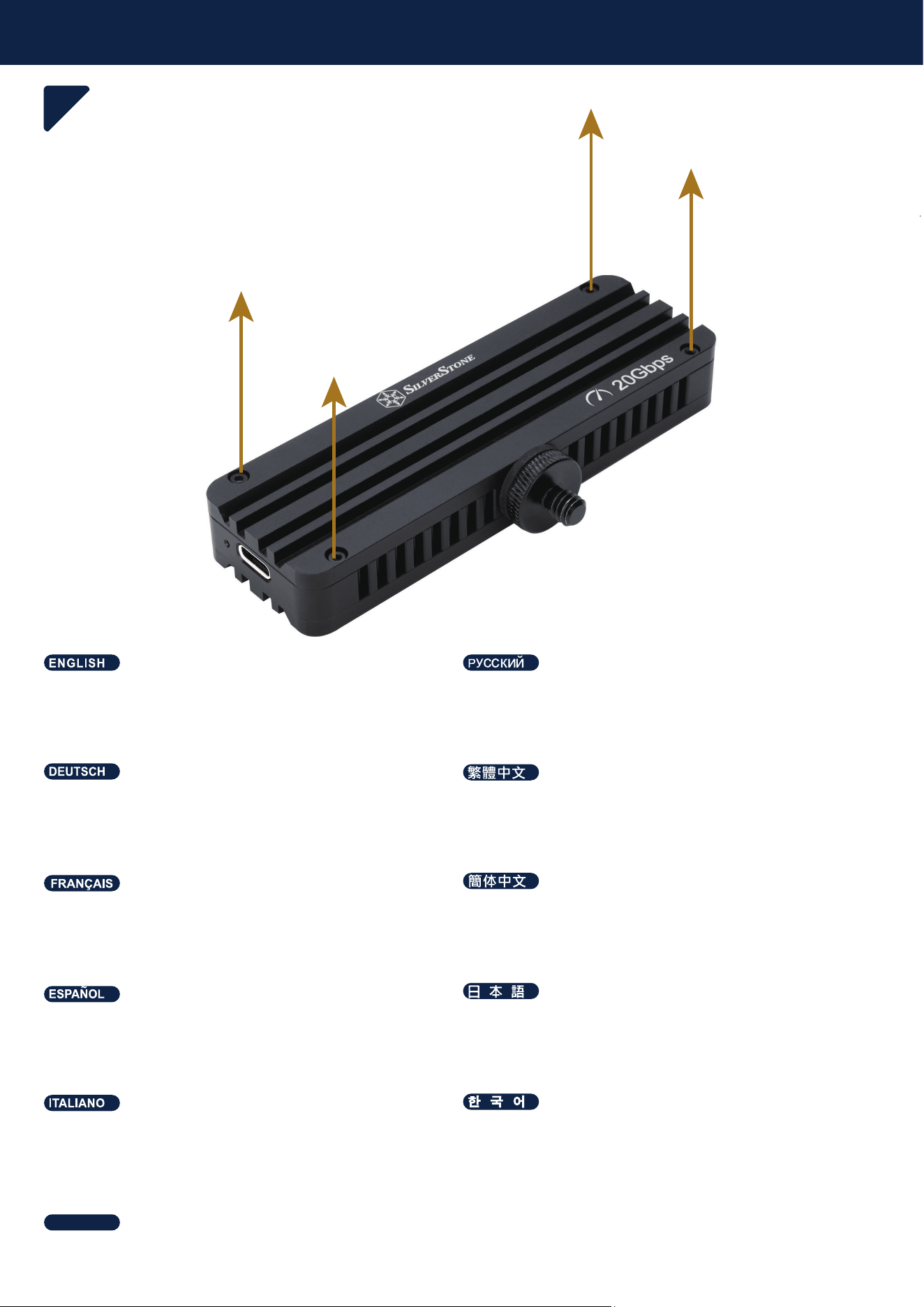
1
Remove top cover (with SilverStone logo printed) from
the MS12-E
Снимите верхнюю крышку (с напечатанным
логотипом SilverStone) с MS12-E
Obere Abdeckung (bedruckt mit SilverStone-Logo) vom
MS12-E entfernen
䲊棳06(ₙ坚㦘◿Ⓠ6LOYHU6WRQHORJR
Retire la cubierta superior (con el logo de SilverStone
impreso) de la MS12-E
06(ሮቬₙ捷ኈክዙ6LOYHU6WRQHቑዊኑሯ◿Ⓠ
ት⮥ሺቡሼ
Retirez le capot supérieur (avec le logo SilverStone
inscrit) du MS12-E
䲊棳06(ₙ䥥㦘◿Ⓠ6LOYHU6WRQHORJR
Rimuovere la copertura superiore (con il logo SilverStone
stampato) da MS12-E
;΄Ͷ櫖昢柪憊枪皪嵢処儆稊庶瞾夞檺沎垚
旇埮珪憊庂洢其穞柳柢欪
ถอดฝาด้านบน (ที่มีโลโก้ SilverStone พิมพ์อยู่) ออกจาก
MS12-E
ไทย
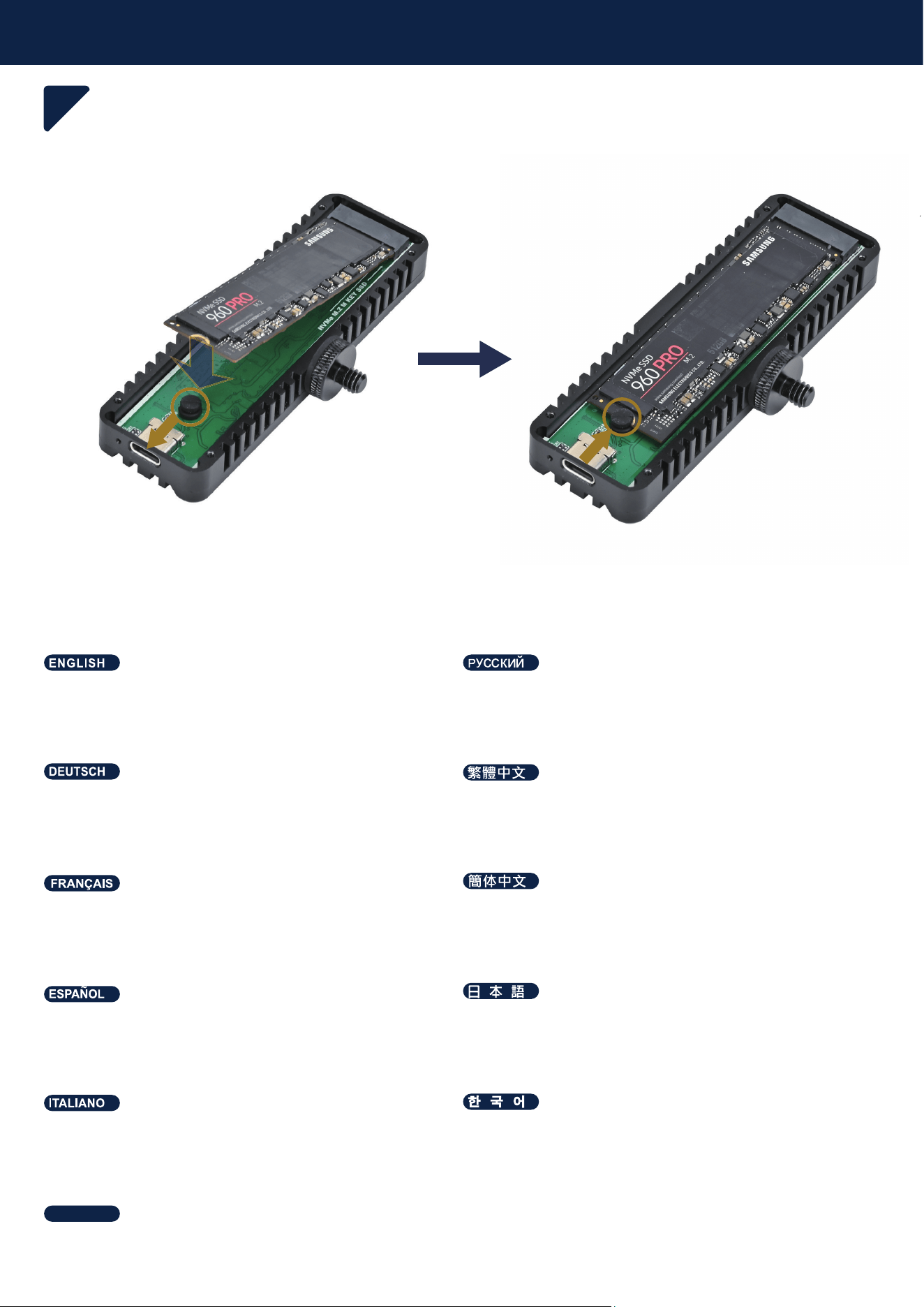
Installation Guide
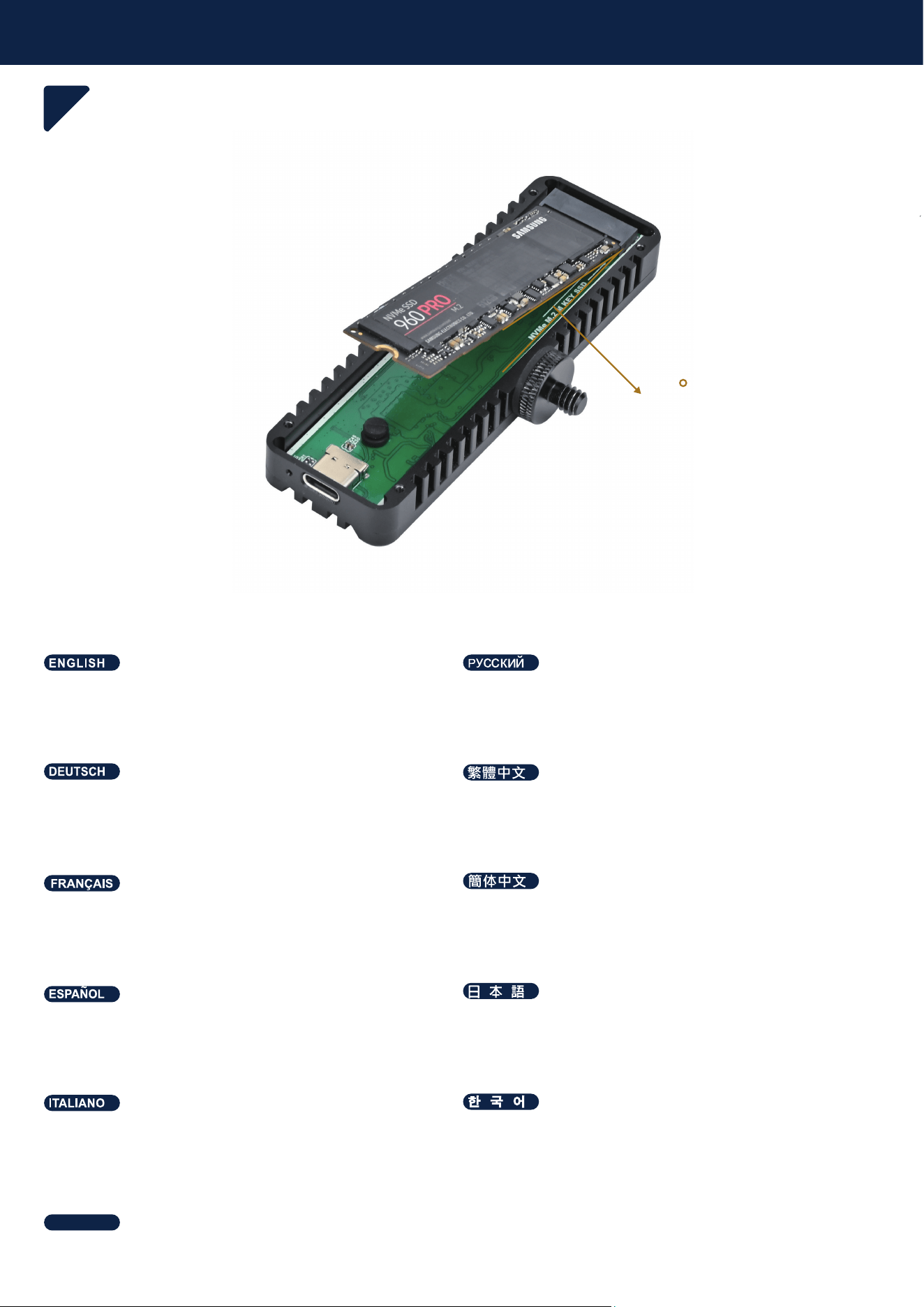
2
Install SSD with 20 degrees into the slot
Установите SSD в слот под углом 20 градусов
SSD in einem Winkel von 20 Grad in den Steckplatz
installieren
ⅴㄵ屡⺖66'⸘孬咂㙡㲌
Instalar el SSD en la ranura con un ángulo de 20
grados
66'ትㄵቑ屡ㄵቊኖዊአእ♥ቭⅧሴቮ
Installer le SSD dans le slot avec un angle de 20
degrés
ⅴㄵ屡⺕66'⸘孔咂㙡㲌
Installare l'SSD nello slot con un angolo di 20 gradi
΄΄͵庂壊儇壊嵢枲嵵櫖昪獞
ติดตั้ง SSD ลงในสล็อตที่มุม 20 องศา
ไทย
20
Installation Guide
3
Secure the SSD by bending the rubber standoff.
66'
Befestigen Sie die SSD, indem Sie den
Gummi-Abstandshalter in Position biegen.
㇝㔧㳰启⦉⸩㪀᧨⺖66'⦉⸩ᇭ
Fije el SSD doblando el separador de goma hasta colocarlo
en su posición.
ኑኽ完ኖኜዐኦኇኲት㦁ስ66'ት⦉⸩ሺቡሼᇭ
Fixez le SSD en repliant l'entretoise en caoutchouc en
position.
ㆾ㔧㳰厅⦉⸩㪀᧨⺕66'⦉⸩ᇭ
Fissare l'SSD piegando il distanziale in gomma in posizione.
隕ꓩ걙몕麑꿙뺹ꌱ霡ꜵꇙ66'ꌱ隕뇊뼍겢겑꿙
งอแท่นยางยึดเข้าที่เพื่อยึด SSD ให้แน่น
ไทย
1. 2.
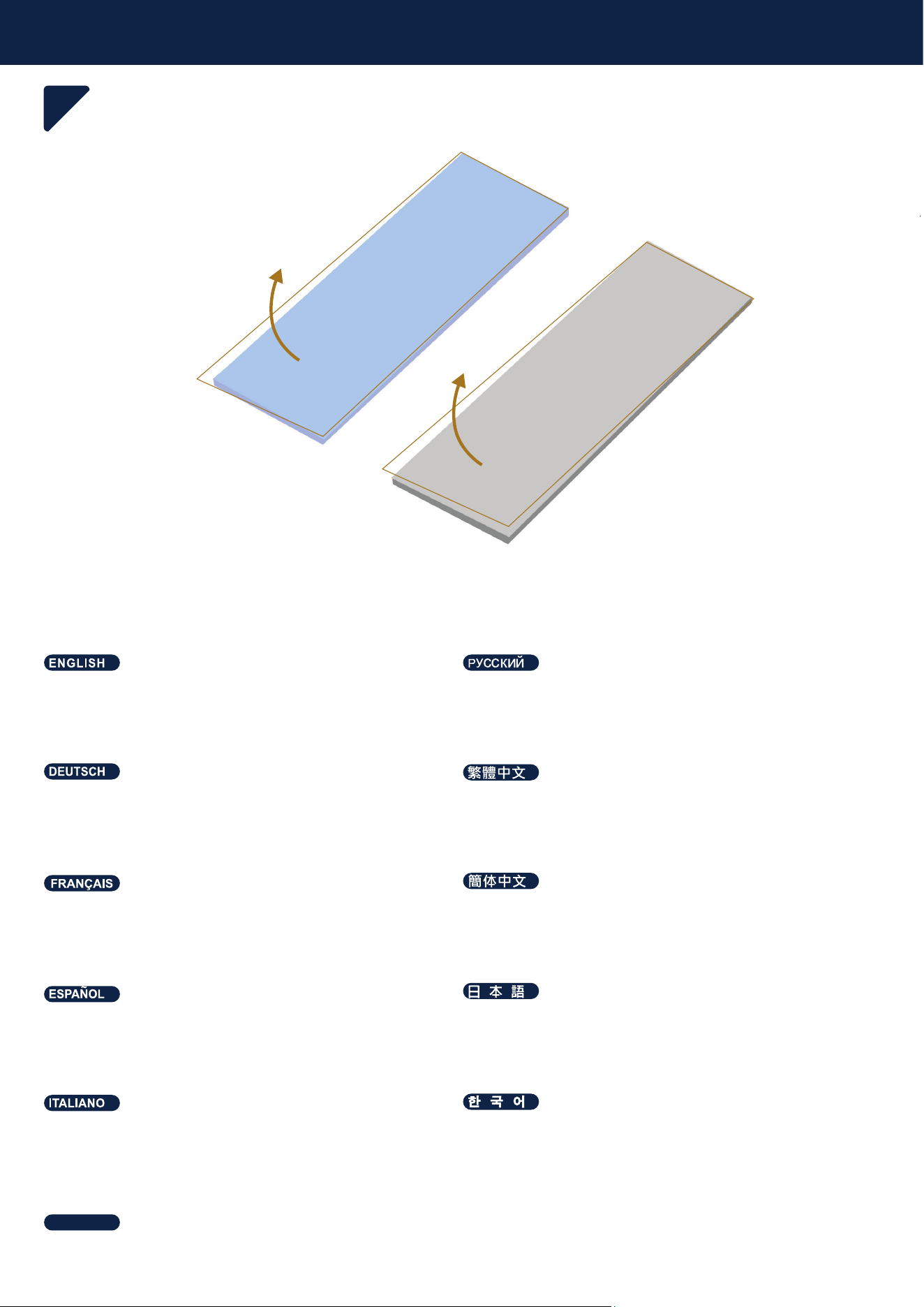
Installation Guide
4
Refer to your M.2 SSD thickness to choose thermal
pad and remove the film
Выберите термопрокладку в соответствии с толщиной
SSD M.2 и снимите защитную пленку
Wählen Sie das Wärmeleitpad entsprechend der
Dicke Ihrer M.2-SSD und entfernen Sie die Schutzfolie
∬䏶066'䤓☩ㄵ指㝖㟲䑀⬙᧨₵㜤ₚ≬帆含
Elija la almohadilla térmica según el grosor de su SSD
M.2 y retire la película protectora
066'ቑ☩ሸ⚗ቲሾኒዙኻወኮአኦት指ቖᇬ≬帆ኲ
ኀወኽት⓴ሯሺቡሼ
Choisissez le pad thermique en fonction de l’épais-
seur de votre SSD M.2 et retirez le film protecteur
㫈㗽066'䤓☩ㄵ折㕸⺋䍼⨺᧨ㄅ㜤ₚ≬㔳含
Scegliere il pad termico in base allo spessore
dell'SSD M.2 e rimuovere la pellicola protettiva
;΄΄͵奖叞櫖廤垚桮彆砮姢庂昦痣穞処懺笾
穊床汊洢其穯城埪
เลือกแผ่นนำความร้อนตามความหนาของ M.2 SSD และลอก
ฟิล์มป้องกันออก
ไทย
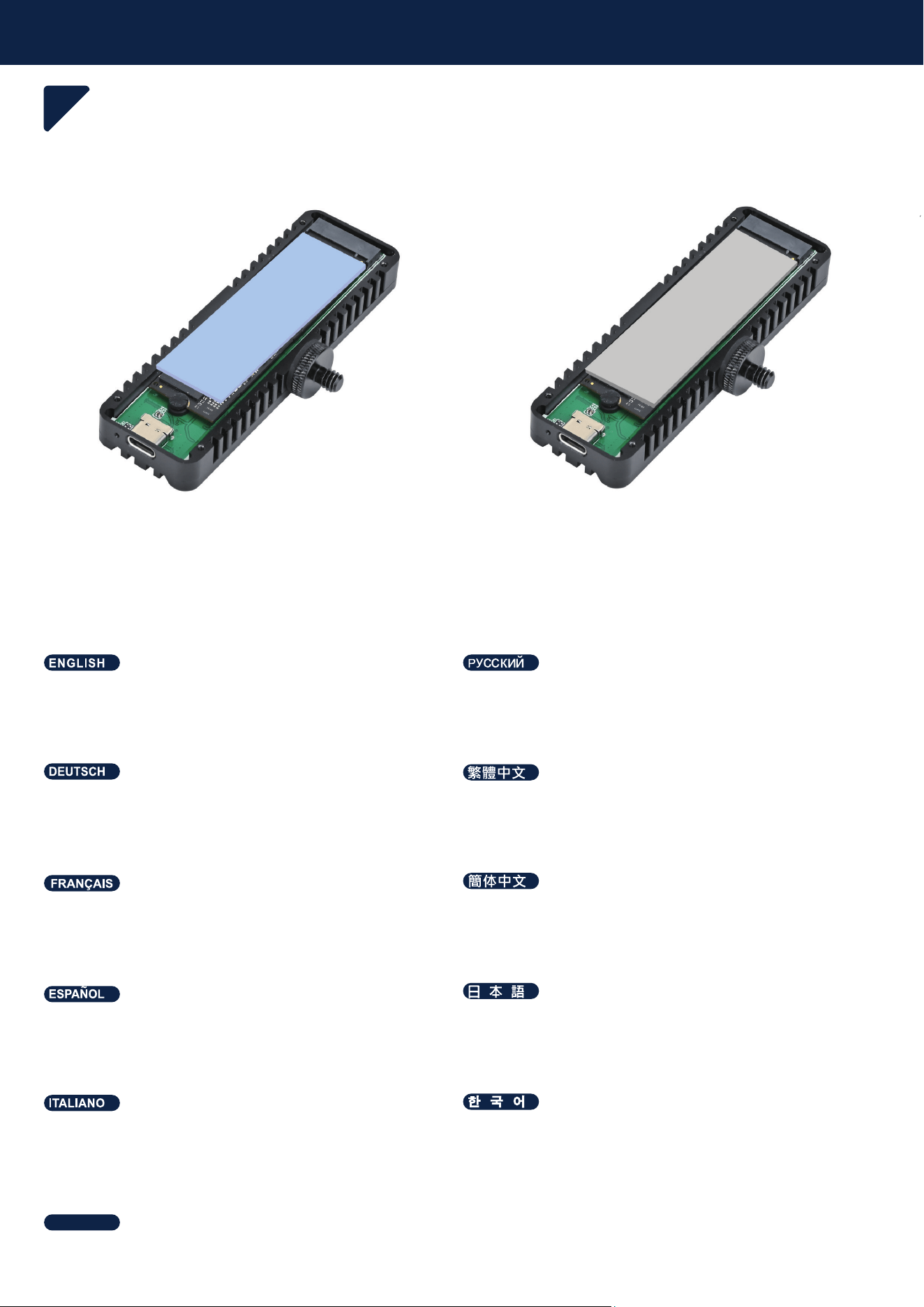
Installation Guide
5
Place the thermal pad on the SSD.
Поместите термопрокладку на SSD.
Platzieren Sie das Wärmeleitpad auf der SSD.
⺖⺝䑀⬙㟍函⦷66'ₙ
Coloque la almohadilla térmica sobre el SSD.
ኒዙኻወኮአኦት66'ቑₙ揜函ሺቡሼᇭ
Placez le coussinet thermique sur le SSD.
⺕⺋䍼⨺㟍函⦷66'ₙ
Posizionare il pad termico sull'SSD.
΄΄͵氊櫖桮彆砮姢庂欲崪嚙求柳柢欪
วางแผ่นระบายความร้อนบน SSD
ไทย
or
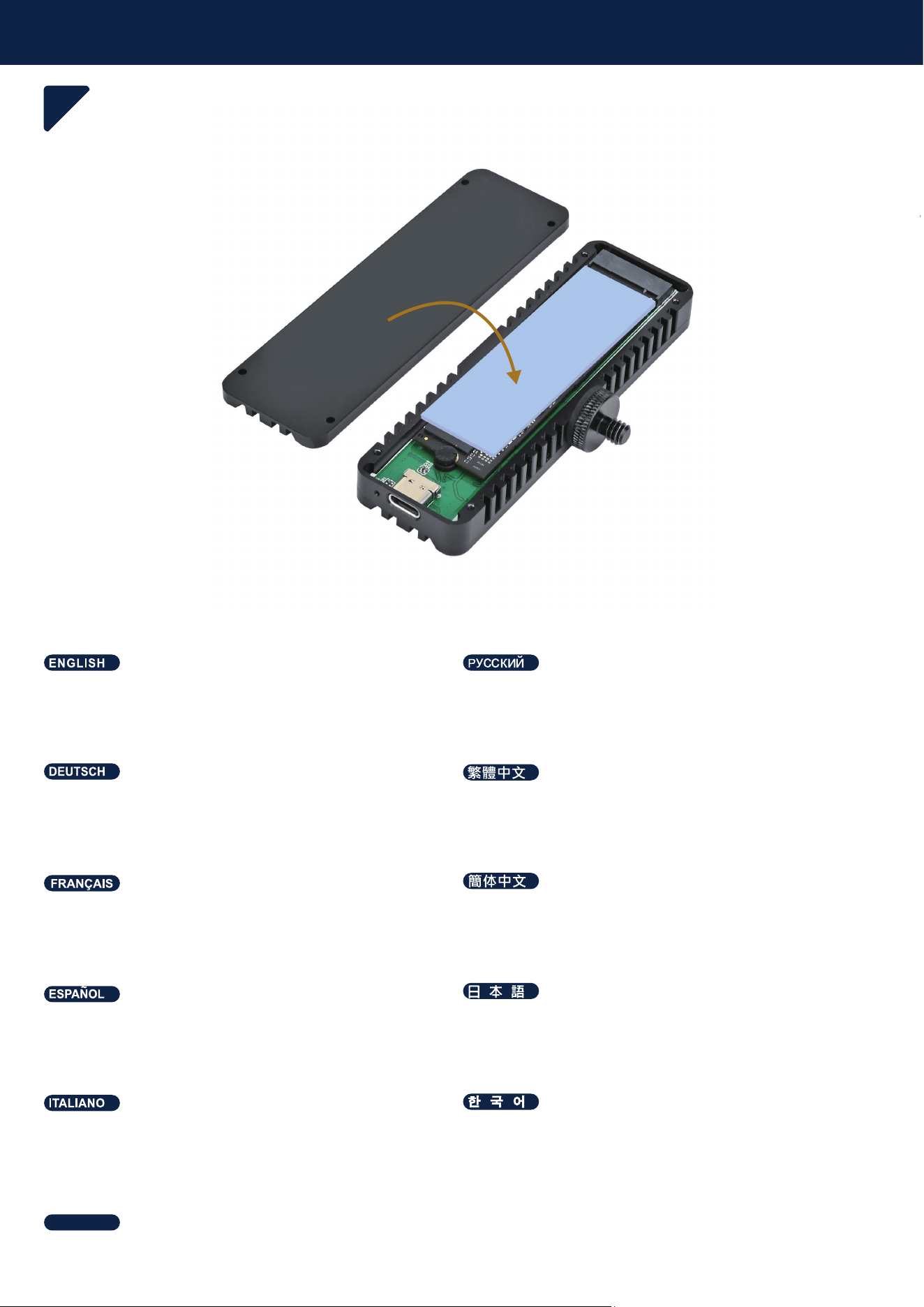
Installation Guide
6
Reinstall the top cover.
Установите верхнюю крышку обратно.
Bringen Sie die obere Abdeckung wieder an.
摜㠿⸘孬檑捷坚㨎ᇭ
Vuelva a instalar la cubierta superior.
እአኴኈክዙት⏒㓊ሺቡሼᇭ
Remettez le panneau supérieur en place.
摜㠿⸘孔欅捷䥥㨎ᇭ
Rimontare il pannello superiore.
旇埮珪憊庂埪柢沫焯穞柳柢欪
ติดตั้งฝาครอบด้านบนกลับเข้าที่
ไทย
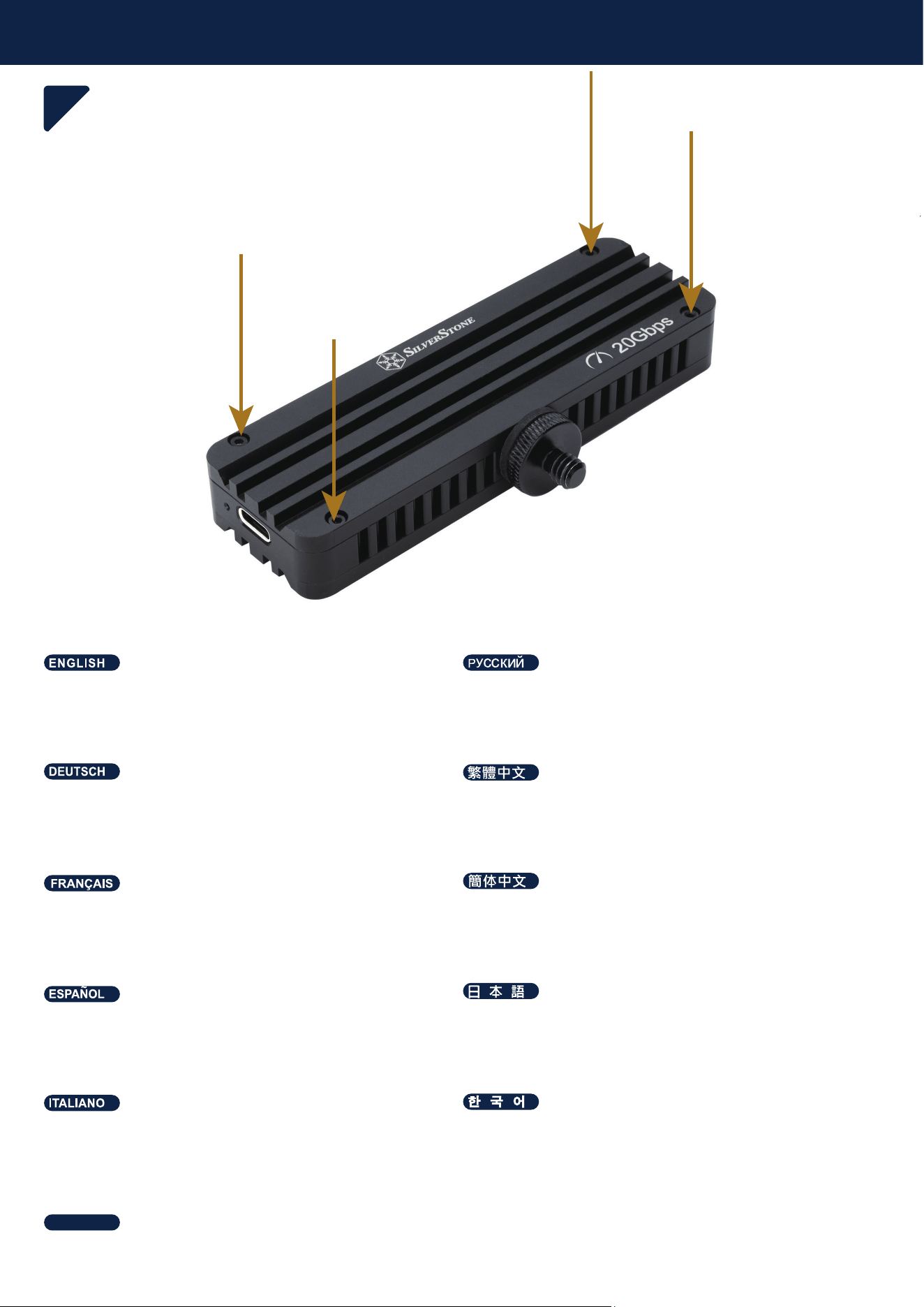
Installation Guide
7
Tighten the cover screw.
Затяните винт крышки.
Ziehen Sie die Schraube der Abdeckung fest.
春偙坚㨎⦉⸩婉倁ᇭ
Apriete el tornillo de la cubierta.
ኈክዙ⦉⸩ኪንት偯ቤⅧሴቡሼᇭ
Serrez la vis du panneau.
㕶侶䥥㨎⦉⸩婉€ᇭ
Serrare la vite del pannello.
珪憊処洛喞斲庂浶決柳柢欪
ขันสกรูยึดฝาครอบให้แน่น
ไทย
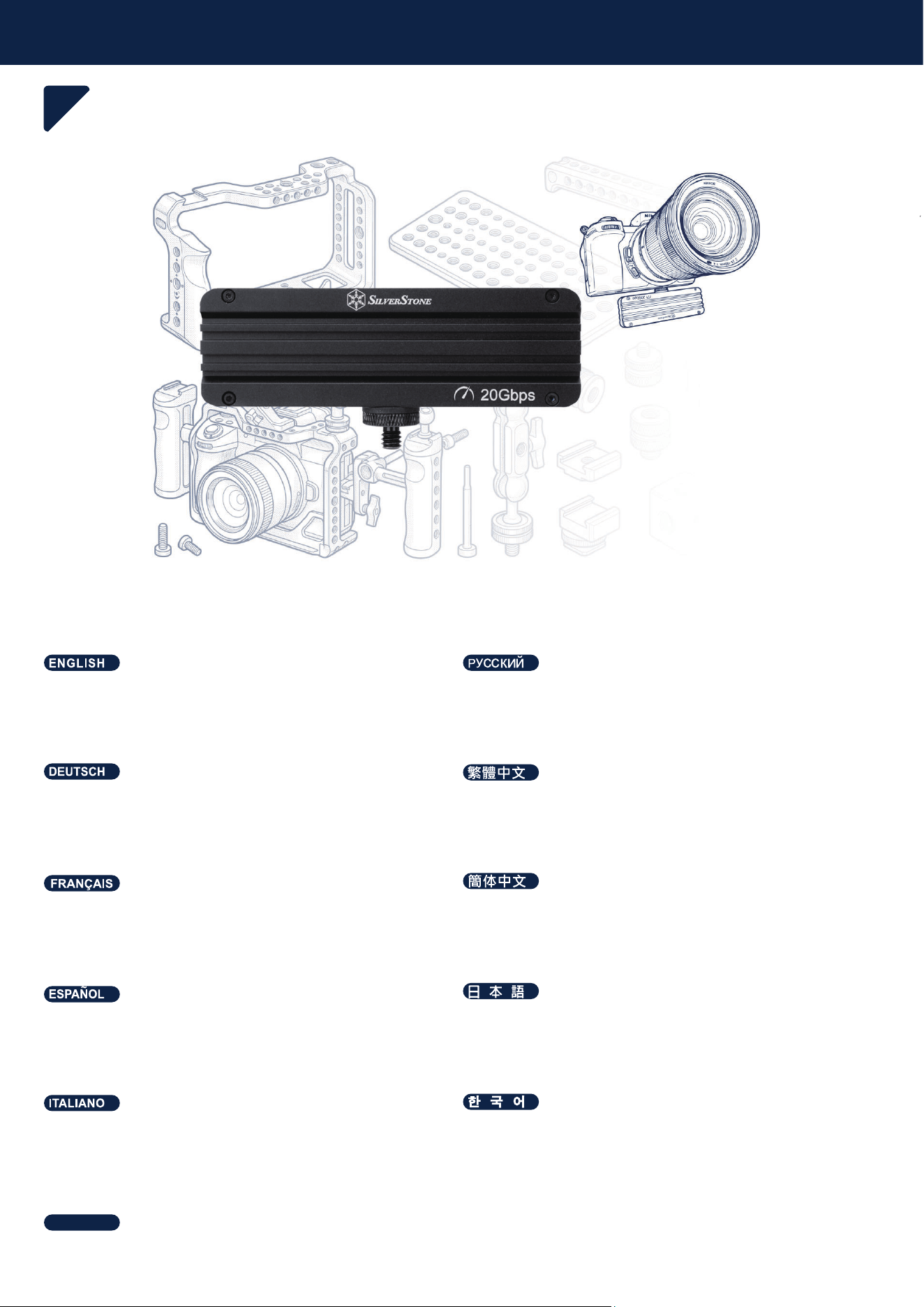
Installation Guide
8
Optional: Mount the MS12-E to a camera, camera
cage, tripod, or magic arm.
Дополнительно: Установите MS12-E на камеру,
клетку для камеры, штатив или шарнирный
держатель (magic arm).
Optional: Befestigen Sie das MS12-E an einer
Kamera, einem Kamera-Cage, einem Stativ oder
einem Magic Arm.
指揜᧶⺖06(⸘孬㡋䦇㳮ᇬ䦇㳮⏣仯ᇬₘ吂㩅㒥淣嫢
㓚呑ₙᇭ
Opcional: Monte el MS12-E en una cámara, una jaula
para cámara, un trípode o un brazo mágico.
ኇኴኔዄዐ᧶06(ትኈኾᇬኈኾዙንᇬₘ厩ᇬቡ
ቂቒኻንአኌቿዙኽ♥ቭⅧሴቡሼᇭ
En option : Fixez le MS12-E à un appareil photo, une
cage pour appareil photo, un trépied ou un bras
magique.
♾折᧶⺕06(⸘孔Ⓙ䦇㧉ᇬ䦇㧉⏣䷋ᇬₘ厩㩅㒥淣㦾
呑ₙᇭ
Opzionale: Montare l'MS12-E su una fotocamera, una
gabbia per fotocamera, un treppiede o un braccio
magico.
昦痣斲穳;΄Ͷ庂獺彚岂獺彚岂理決滆旂儇堆
嬖垚廪滇橚櫖沫焯穞柳柢欪
ตัวเลือก: ติดตั้ง MS12-E กับกล้อง, เคสครอบกล้อง (Camera
Cage), ขาตั้งกล้อง หรือ Magic Arm
ไทย
OPTIONAL
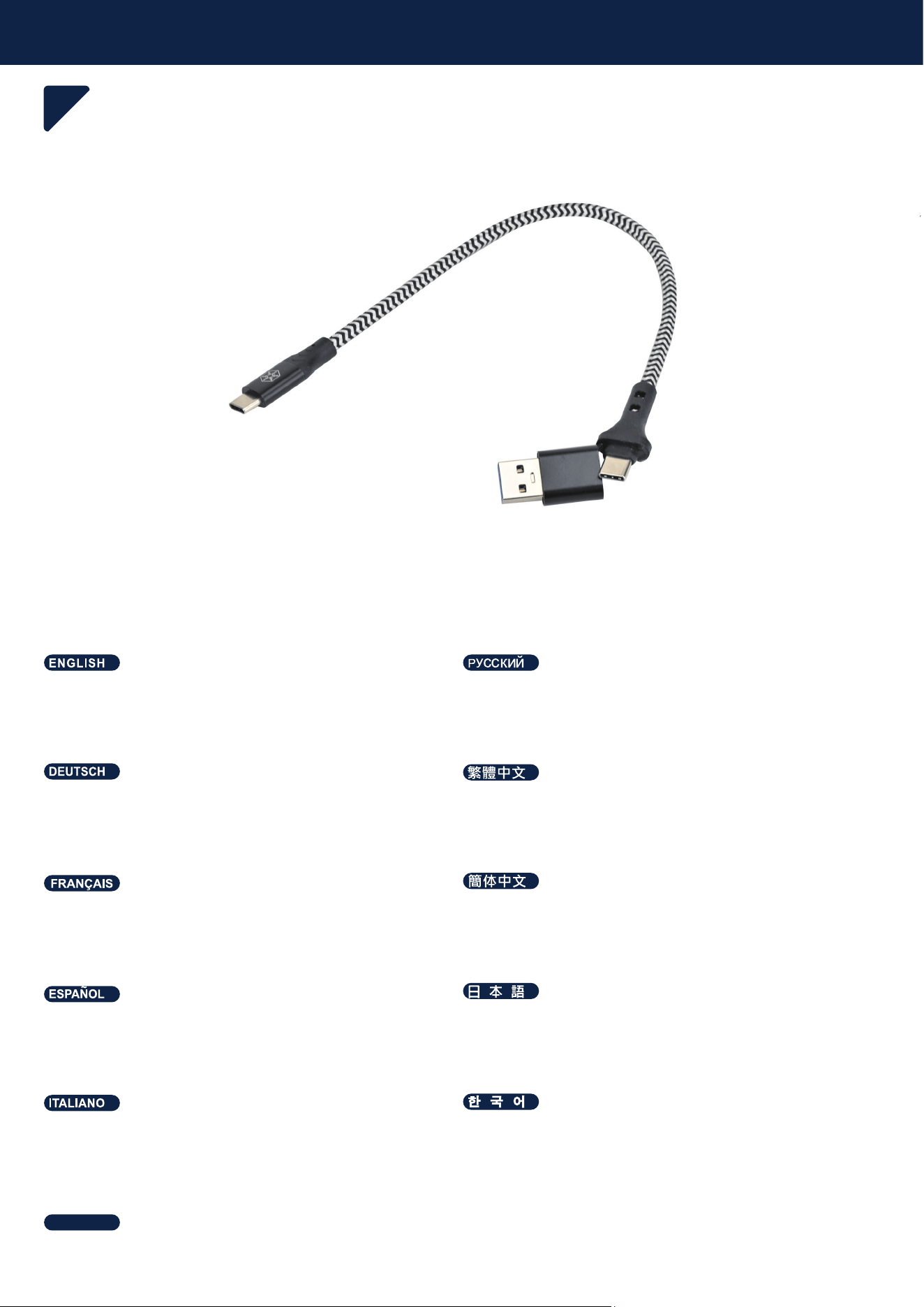
Installation Guide
9
Optional: Remove the USB-A adapter from the USB
Type-C cable.
Дополнительно: Снимите адаптер USB-A с кабеля
USB Type-C.
Optional: Entfernen Sie den USB-A-Adapter vom
USB-Type-C-Kabel.
指揜᧶㈭86%7\SH&偩㧟ₙ♥ₚ86%$懘㘴檼ᇭ
Opcional: Retire el adaptador USB-A del cable USB
Type-C.
ኇኴኔዄዐ᧶86%7\SH&ዙኳወሮቬ86%$ቿኝኴኜዙ
ት♥ቭ⮥ሺቡሼᇭ
En option : Retirez l'adaptateur USB-A du câble USB
Type-C.
♾折᧶⅝86%7\SH&兎冕ₙ♥ₚ86%$懻㘴⯃ᇭ
Opzionale: Rimuovere l'adattatore USB-A dal cavo
USB Type-C.
昦痣斲穳Ά΄ͳ΅ΪΡΖʹ理決挚櫖昢Ά΄ͳͲ
檺堗瘶庂把庲穞柳柢欪
ตัวเลือก: ถอดอะแดปเตอร์ USB-A ออกจากสาย USB Type-C
ไทย
OPTIONAL
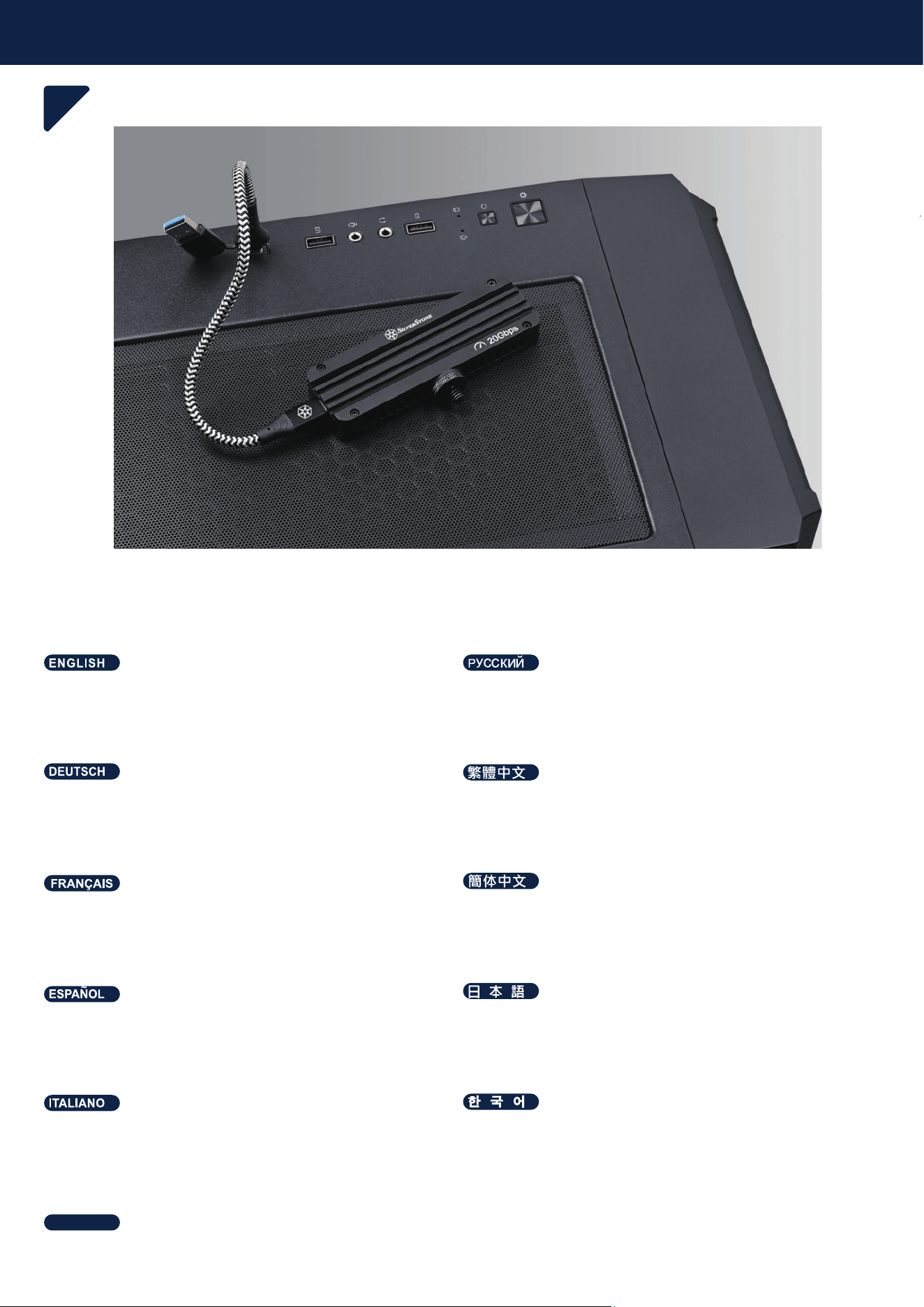
Installation Guide
10
Connect the MS12-E to a camera or PC using the
USB Type-C cable.
Подключите MS12-E к камере или ПК с помощью
кабеля USB Type-C.
Verbinden Sie das MS12-E über das USB-Type-C-Ka-
bel mit einer Kamera oder einem PC.
∎䞷86%7\SH&偩㧟⺖06(抲㘴咂䦇㳮㒥3&ᇭ
Conecte el MS12-E a una cámara o PC mediante el
cable USB Type-C.
86%7\SH&ዙኳወት∎䞷ሺᇬ06(ትኈኾቡቂ
ቒ3&㘴倩ሺቡሼᇭ
Connectez le MS12-E à un appareil photo ou à un PC
à l'aide du câble USB Type-C.
∎䞷86%7\SH&兎冕⺕06(扭㘴咂䦇㧉㒥3&ᇭ
Collegare l'MS12-E a una fotocamera o a un PC
utilizzando il cavo USB Type-C.
Ά΄ͳ΅ΪΡΖʹ理決挚汊斲殯穞櫲;΄Ͷ庂獺彚岂
嬖垚ʹ櫖櫶冶穞柳柢欪
เชื่อมต่อ MS12-E กับกล้องหรือคอมพิวเตอร์โดยใช้สาย USB
Type-C
ไทย
Installation Guide
11
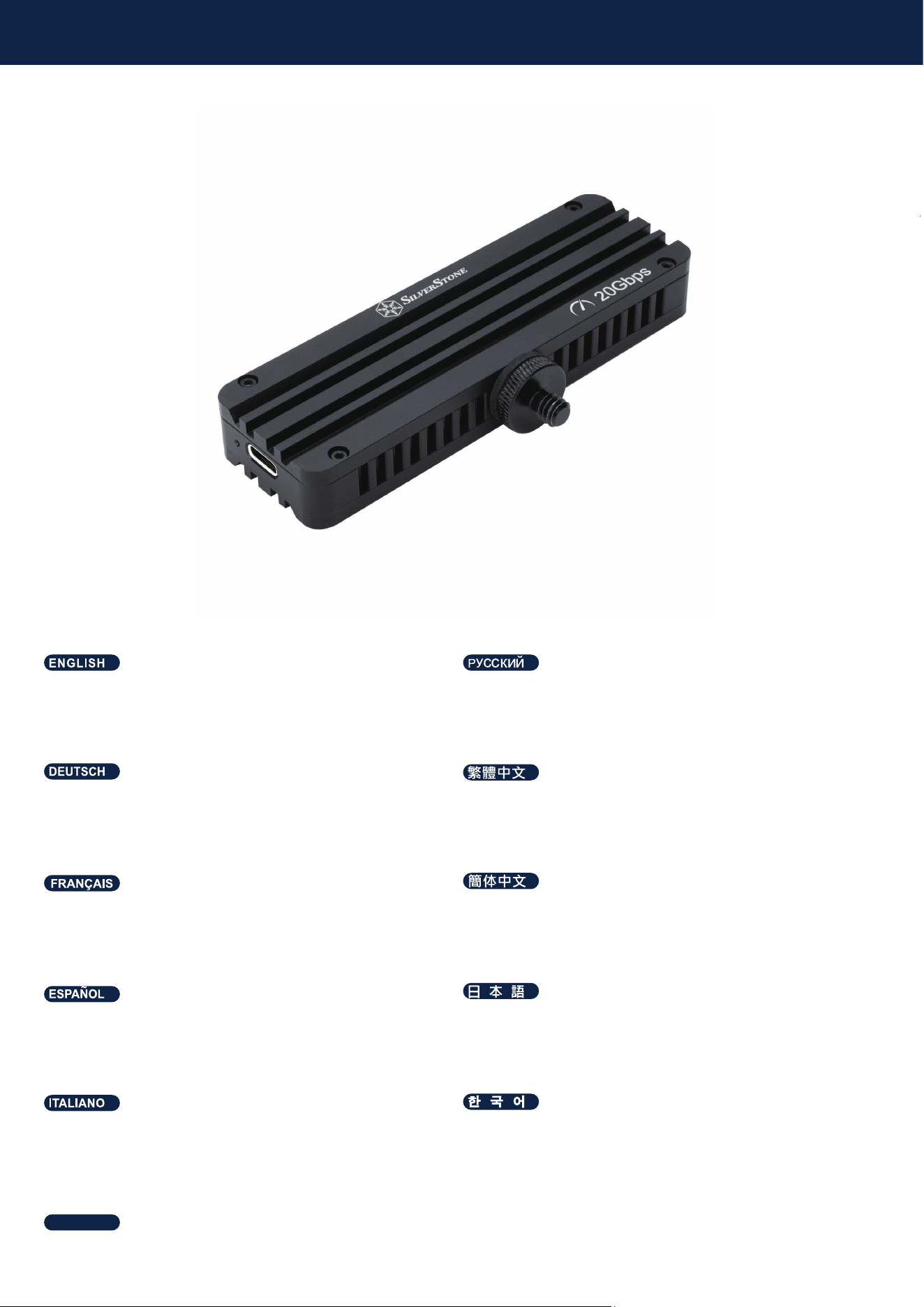
Optional: Replace the 1/4" screw with the included M4
adapter.
Дополнительно: Замените винт 1/4" на входящий в
комплект адаптер M4.
Optional: Ersetzen Sie die 1/4"-Schraube durch den
mitgelieferten M4-Adapter.
指揜᧶⺖婉倁㦃㙪䍉椷棓䤓0懘㘴ↅᇭ
Opcional: Sustituya el tornillo de 1/4" por el adaptador
M4 incluido.
ኇኴኔዄዐ᧶Ⅷ⻭ቑ0ቿኝኴኜዙኁዐኞኪንትℳ
㙪ሺቡሼᇭ
En option : Remplacez la vis 1/4" par l'adaptateur M4
fourni.
♾折᧶⺕婉€㦃㗱椞棓䤓0懻㘴ↅᇭ
Opzionale: Sostituire la vite da 1/4" con l'adattatore
M4 incluso.
昦痣斲穳喞斲庂壟戏夢;檺堗瘶嵢
剖熺穞柳柢欪
ตัวเลือก: เปลี่ยนสกรูขนาด 1/4" เป็นอะแดปเตอร์ M4 ที่ให้มา
ในชุด
ไทย
OPTIONAL
Package content
11
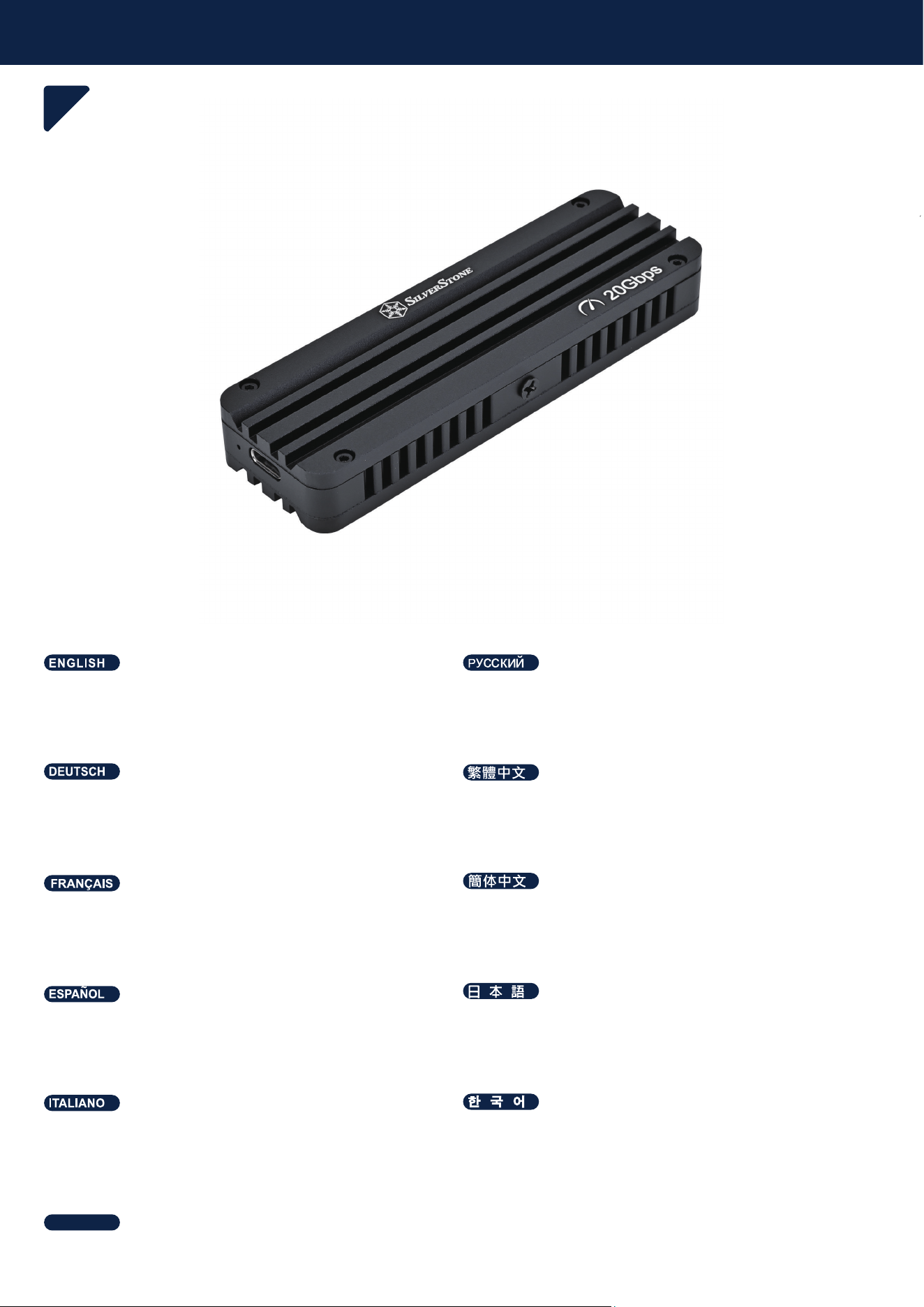
MS12-E (Pre-installed with a 1/4" mount)
MS12-E (с предустановленным креплением 1/4")
MS12-E (mit vormontierter 1/4"-Halterung)
06(᧤檟孬⸘孬⅚槱᧥
MS12-E (con soporte de 1/4" preinstalado)
06(᧤ኁዐኞኻኃዐእት孔䧏䂗ቢ᧥
MS12-E (préinstallé avec un support 1/4")
06(᧤欓孔⸘孔㘴♲᧥
MS12-E (con supporto da 1/4" preinstallato)
;΄Ͷ廎殺瞾斲洊沫焯
MS12-E (ติดตั้งตัวยึดขนาด 1/4" มาให้ล่วงหน้า)
ไทย
Package content
11
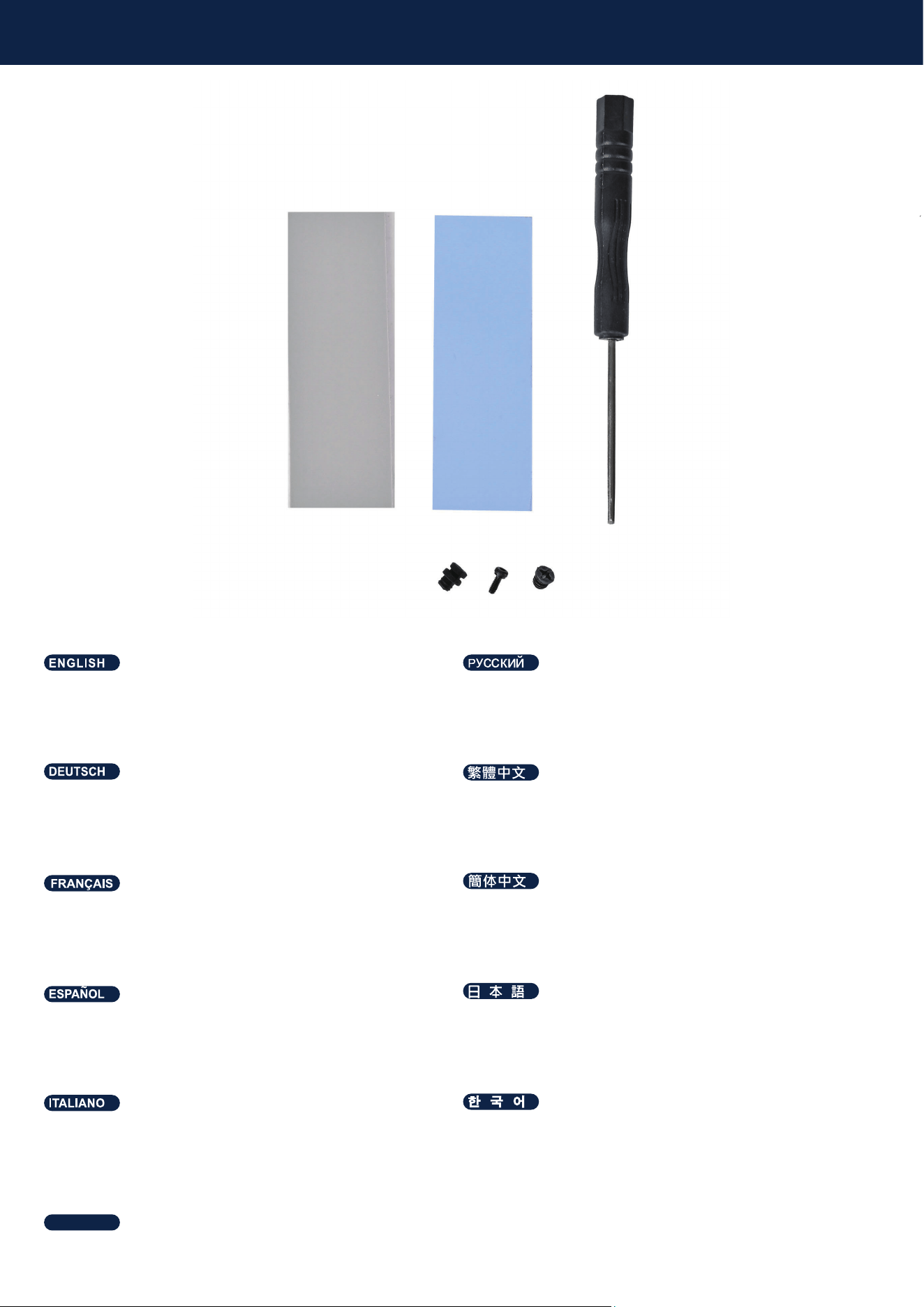
Accessory Pack (Blue thermal pad ×1, Gray thermal
pad ×1, Hex screws ×1, Hex key ×1, Rubber standoff
×1, M4 adapter ×1)
Комплект аксессуаров (Синяя термопрокладка ×1,
Серая термопрокладка ×1, Шестигранные винты
×1, Шестигранный ключ ×1, Резиновая стойка ×1,
Адаптер M4 ×1)
Zubehörpaket (Blaues Wärmeleitpad ×1, Graues
Wärmeleitpad ×1, Innensechskantschrauben ×1,
Innensechskantschlüssel ×1, Gummi-Abstandshalter
×1, M4-Adapter ×1)
揜ↅ▔᧤塜唁⺝䑀⬙ᇬ䋿唁⺝䑀⬙ᇬ⏶⏼屡婉倁
ᇬ⏶⏼屡㔂㓚ᇬ㳰启⦉⸩㪀ᇬ0懘㘴ↅ᧥
Paquete de accesorios (Almohadilla térmica azul ×1,
Almohadilla térmica gris ×1, Tornillos hexagonales ×1,
Llave hexagonal ×1, Separador de goma ×1, Adapta-
dor M4 ×1)
ቿኌኘኒዙኮአኌ᧤ኳወዙኒዙኻወኮአኦᇬኍዉዙኒ
ዙኻወኮአኦᇬ⏼屡ኪንᇬ⏼屡ዉዐኞᇬኑኽ完ኖ
ኜዐኦኇኲᇬ0ቿኝኴኜዙ᧥
Kit d'accessoires (Coussinet thermique bleu ×1,
Coussinet thermique gris ×1, Vis hexagonales ×1, Clé
hexagonale ×1, Entretoise en caoutchouc ×1, Adapta-
teur M4 ×1)
揜ↅ▔᧤坬唁⺋䍼⨺ᇬ䋿唁⺋䍼⨺ᇬ␔⏼屡婉€
ᇬ␔⏼屡㔂㓚ᇬ㳰厅⦉⸩㪀ᇬ0懻㘴ↅ᧥
Kit accessori (Pad termico blu ×1, Pad termico grigio
×1, Viti esagonali ×1, Chiave esagonale ×1, Distan-
ziale in gomma ×1, Adattatore M4 ×1)
橧显昢庲砯砒岆族桮彆砮姢ϧ箒族桮彆砮姢ϧ
氧儇喞斲ϧ氧儇崒獞ϧ処怺枪痦姢欪稊ϧ
;檺堗瘶ϧ
ชุดอุปกรณ์เสริม (แผ่นระบายความร้อนสีน้ำเงิน ×1, แผ่นระบาย
ความร้อนสีเทา ×1, สกรูหกเหลี่ยม ×1, ประแจหกเหลี่ยม ×1,
แท่นยางยึด ×1, อะแดปเตอร์ M4 ×1)
ไทย
Package content
11
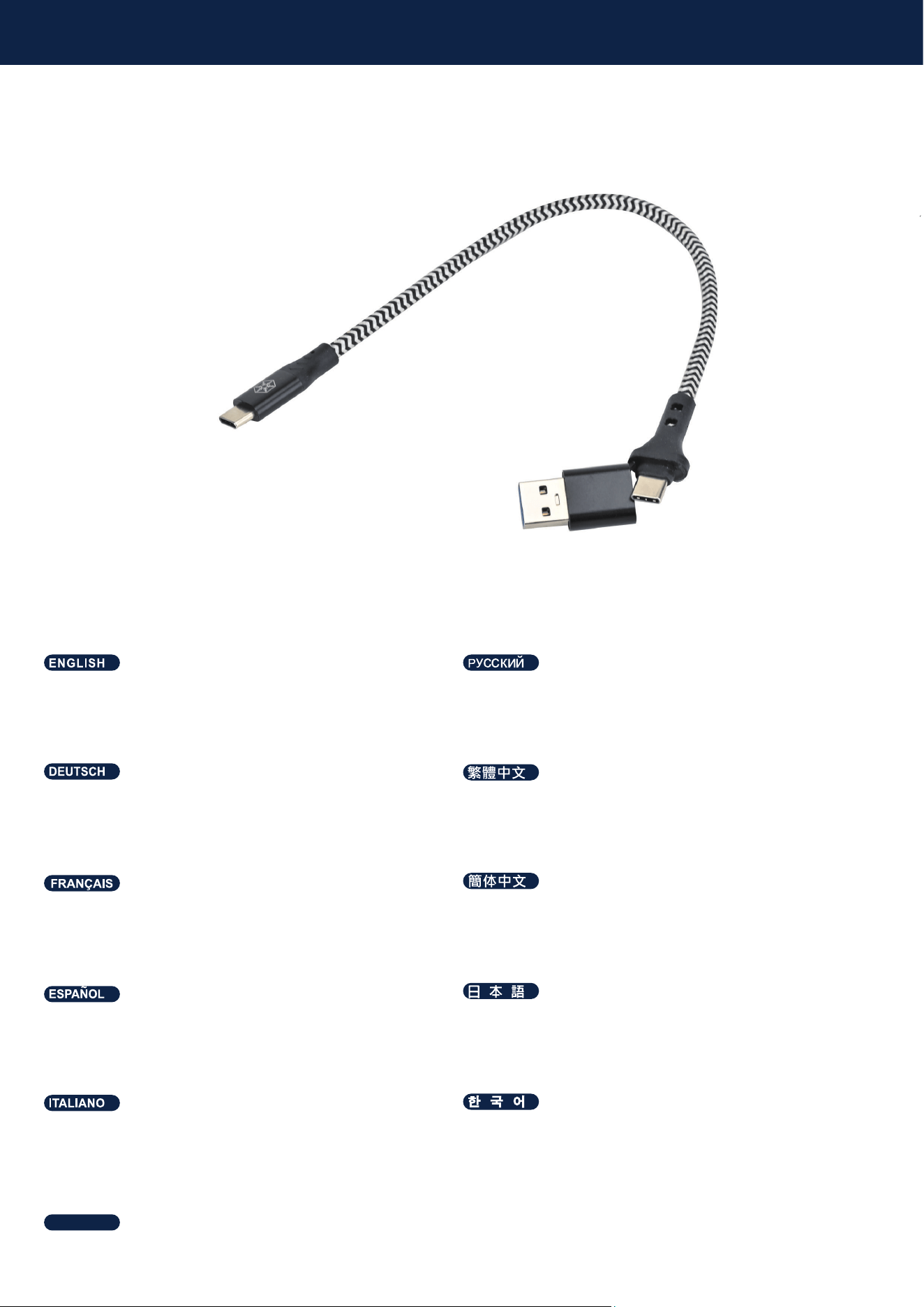
USB Type-C to Type-C Cable with USB-A Adapter
Кабель USB Type-C — Type-C с адаптером USB-A
USB-Type-C-auf-Type-C-Kabel mit USB-A-Adapter
86%7\SH&⺜7\SH&偩㧟᧤棓86%$懘㘴檼᧥
Cable USB Type-C a Type-C con adaptador USB-A
86%7\SH&7\SH&ዙኳወ᧤86%$ቿኝኴኜዙⅧ⻭᧥
Câble USB Type-C vers Type-C avec adaptateur
USB-A
86%7\SH&懻7\SH&兎冕᧤棓86%$懻㘴⯃᧥
Cavo USB Type-C a Type-C con adattatore USB-A
Ά΄ͳ΅ΪΡΖʹΥΠ΅ΪΡΖʹ理決挚Ά΄ͳͲ檺堗瘶
磲穮
สาย USB Type-C to Type-C พร้อมอะแดปเตอร์ USB-A
ไทย

Q & A
11
Q: Can I use a PCIe 3.0 NVMe SSD with the MS12-E?
A: Yes. The MS12-E is compatible with PCIe 3.0 and PCIe 4.0 NVMe SSDs. Performance will depend on the
capabilities of the installed SSD and the host system, and will operate at the highest speed supported by both
devices.
F: Kann ich eine PCIe 3.0 NVMe SSD mit dem MS12-E verwenden?
A: Ja. Das MS12-E ist mit PCIe 3.0- und PCIe 4.0-NVMe-SSDs kompatibel. Die Leistung hängt von den Fähigkeit-
en der installierten SSD und des Host-Systems ab und arbeitet mit der höchsten Geschwindigkeit, die von beiden
Geräten unterstützt wird.
P: ¿Puedo utilizar un SSD NVMe PCIe 3.0 con el MS12-E?
R: Sí. El MS12-E es compatible con SSD NVMe PCIe 3.0 y PCIe 4.0. El rendimiento dependerá de las capacidades
del SSD instalado y del sistema host, y funcionará a la velocidad máxima compatible con ambos dispositivos.
Q : Puis-je utiliser un SSD NVMe PCIe 3.0 avec le MS12-E ?
R : Oui. Le MS12-E est compatible avec les SSD NVMe PCIe 3.0 et PCIe 4.0. Les performances dépendent des
capacités du SSD installé et du système hôte, et fonctionneront à la vitesse maximale prise en charge par les deux
appareils.
D: Posso utilizzare un SSD NVMe PCIe 3.0 con l'MS12-E?
R: Sì. L'MS12-E è compatibile con SSD NVMe PCIe 3.0 e PCIe 4.0. Le prestazioni dipendono dalle capacità
dell'SSD installato e del sistema host e funzioneranno alla massima velocità supportata da entrambi i dispositivi.
ถาม: สามารถใช้ SSD NVMe PCIe 3.0 กับ MS12-E ได้หรือไม่?
ตอบ: ได้ MS12-E รองรับ SSD NVMe ทั้ง PCIe 3.0 และ PCIe 4.0 โดยความเร็วในการทำงานจะขึ้นอยู่กับความสามารถของ SSD ที่ติด
ตั้งและระบบโฮสต์ และจะทำงานที่ความเร็วสูงสุดที่ทั้งสองอุปกรณ์รองรับ
ไทย
В: Можно ли использовать SSD NVMe PCIe 3.0 с MS12-E?
О: Да. MS12-E совместим с SSD NVMe PCIe 3.0 и PCIe 4.0. Производительность зависит от возможностей
установленного SSD и хост-системы и будет работать на максимальной скорости, поддерживаемой обоими
устройствами.
⟞᧶㒠♾ⅴ⦷06(ₙ∎䞷3&,H190H66'⡝᧻
䷣᧶♾ⅴᇭ06(䦇⹈㡋3&,H咖3&,H190H66'ᇭ椪㟗厌♥㼉㡋㓏⸘孬䤓66'咖㳮侊倀᧨₵⺖ⅴ⏸劔␀
⚛㞾㚃䤓㦏浧抮ㄵ拚⇫ᇭ

Q & A
406(ቊ3&,H190H66'ት∎䞷ቊሰቡሼሮ᧻
$ቒሧᇭ06(ቒ3&,Hርቫቖ3&,H190H66'⺍㉫ሺሧቡሼᇭ╤⇫抮ㄵቒᇬ㚼憘ሼቮ66'ቋኸኖእኔ
ኖኣኽቑ㊶厌ቫቆ㼉ቡቭᇬ₰㡈ሯ⺍㉫ሼቮ㦏⮶抮ㄵቊ╤⇫ሺቡሼᇭ
桽᧶㒠♾ⅴ⦷06(ₙ∎䞷3&,H190H66'⚦᧻
䷣᧶♾ⅴᇭ06(␋⹈3&,H✛3&,H190H66'ᇭ⸭棔㊶厌♥⑂ℝ㓏⸘孔䤓66'✛㧉侊兮᧨ㄅ⺕ⅴ₳劔␀
⚛㞾㖐䤓㦏浧抮ㄵ扟嫛ᇭ
;΄Ͷ櫖昢ʹͺΖͿ·;Ζ΄΄͵庂斲殯穦朞沎枻城卒Ͱ
Ͳ欎;΄Ͷ垚ʹͺΖ愕ʹͺΖͿ·;Ζ΄΄͵庂微奖滆毖穯城埪昷垫汆沫焯夢΄΄͵歆笾枪瞾柢枪癢汞
昷垫櫖娶岂埲岂滆彶奖沫獞儆微奖滆毖穞垚牢堆暓壊嵢壟沗穯城埪
Warranty Information
᳝↦᳝ᆇ⠽䋼ܗ㋴ঞ݊࣪ᄺ䞣㸼
ᴀ㸼Ḑձ6-7ⱘ㾘ᅮ㓪ࠊDŽ
ƻ㸼⼎䆹᳝ᆇ⠽䋼䆹䚼ӊ᠔᳝ഛ䋼ᴤ᭭Ёⱘ䞣ഛ*%7㾘ᅮⱘ䰤䞣㽕∖ҹϟDŽ
ü㸼⼎䆹᳝ᆇ⠽䋼㟇ᇥ䆹䚼ӊⱘᶤϔഛ䋼ᴤ᭭Ёⱘ䞣䍙ߎ*%7㾘ᅮⱘ䰤䞣㽕∖DŽϨ䁆䰤⫼⠽䊾⚎ᥦ䰸䷙Ⳃ
䕙ࡽᴤᰃᣛՓ⫼ѻકϞⱘ⍖᭭ˈ⍺⒥㛖ǃ⛞ᴤ᭭ǃⴔࠖㄝˈҹঞϢѻકࣙ㺙ˈЎᮑᎹᴤ᭭Փ⫼ⱘ㉬㛊ᏺǃᆚᇕᴤ᭭ǃⴔࠖㄝ
䚼ӊৡ⿄䖍ѻક
∲
(Hg)
䬝
(Cd)
݁Ӌ䫀
(Cr(VI))
⒈㘨㣃
(PBB)
⒈Ѡ㣃䝮
(PBDE)
䪙
(Pb)
ƻƻƻƻƻƻ
ƻƻƻƻƻƻ
ƻƻƻƻƻƻ
ƻƻƻƻƻƻ
ƻƻƻƻƻƻ
ѻકড়Ḑ䆕
Ẕ偠˖Ẕ
⫳ѻ᮹ᳳ˖㾕ѻકᴵⷕ
ᴎ䞥ሲ
⬉ᄤ
㶎ϱ
ࣙᴤ
ᇐ⛁䌈
For North America ([email protected])
SilverStone Technology in North America may repair or replace defective product with refurbished product that is not new but has been functionally tested.
Replacement product will be warranted for remainder of the warranty period or thirty days, whichever is longer. All products should be sent
back to the place of purchase if it is within 30 days of purchase, after 30 days, customers need to initiate RMA procedure with SilverStone Technology
in USA by first downloading the “USA RMA form for end-users” form from the below link and follow its instructions.
http://silverstonetek.com/contactus.php
For Australia only ([email protected])
Our goods come with guarantees that cannot be excluded under the Australian Consumer Law.
You are entitled to a replacement or refund for a major failure and for compensation for any other reasonably foreseeable loss or damage.
You are also entitled to have the goods repaired or replaced if the goods fail to be of acceptable quality and the failure does not amount to a major failure.
Please refer to above “Warranty terms & conditions” for further warranty details.
SilverStone Technology Co., Ltd. 12F No. 168 Jiankang Rd., Zhonghe Dist., New Taipei City 235 Taiwan R.O.C. + 886-2-8228-1238
(standard international call charges apply)
For Europe ([email protected])
For China ([email protected])
For all other regions ([email protected])
Additional info & contacts
This product has a limited 1 year warranty in North America and Australia.
For information on warranty periods in other regions, please contact your reseller or SilverStone authorized distributor.
ᴀѻક㞾䌁фП᮹䍋ˈѢЁഄ˄ϡࣙ▇䮼ˈ佭␃⡍߿㸠ᬓ˅ѿ᳝ϔᑈ᳝䰤䋷ӏֱ˄䚼ߚѻકЎѠᑈˈϝᑈѨᑈ˅DŽ
䆺㒚ֱᑈ䰤䇋খ✻ᅬᮍ㔥キ
https://silverstonetek.com.cn/
݀ᏗПѻકൟোЎձDŽ
Warranty terms & conditions
1. Product component defects or damages resulted from defective production is covered under warranty.
Defects or damages with the following conditions will be fixed or replaced under SilverStone Technology’s jurisdiction.
a) Usage in accordance with instructions provided in this manual, with no misuse, overuse, or other inappropriate actions.
b) Damage not caused by natural disaster (thunder, fire, earthquake, flood, salt, wind, insect, animals, etc…)
c) Product is not disassembled, modified, or fixed. Components not disassembled or replaced.
d) Warranty mark/stickers are not removed or broken.
Loss or damages resulted from conditions other than ones listed above are not covered under warranty.
2. Under warranty, SilverStone Technology’s maximum liability is limited to the current market value for the product (depreciated
value, excluding
shipping, handling, and other fees). SilverStone Technology is not responsible for other damages or loss associated with the use
of product.
3. Under warranty, SilverStone Technology is obligated to repair or replace its defective products. Under no circumstances will
SilverStone
Technology be liable for damages in connection with the sale, purchase, or use including but not limited to loss of data, loss of
business, loss of
profits, loss of use of the product or incidental or consequential damage whether or not foreseeable and whether or not based on
breach of warranty,
contract or negligence, even if SilverStone Technology has been advised of the possibility of such damages.
4. Warranty covers only the original purchaser through authorized SilverStone distributors and resellers and is not transferable to a
second hand
purchaser.
5. You must provide sales receipt or invoice with clear indication of purchase date to determine warranty eligibility.
6. If a problem develops during the warranty period, please contact your retailer/reseller/SilverStone authorized distributors or
SilverStone
http://www.silverstonetek.com.
Please note that: (i) You must provide proof of original purchase of the product by a dated itemized receipt; (ii) You shall bear the
cost of shipping
(or otherwise transporting) the product to SilverStone authorized distributors. SilverStone authorized distributors will bear the cost
of shipping
(or otherwise transporting) the product back to you after completing the warranty service; (iii) Before you send the product, you
must be issued a
Return Merchandise Authorization (“RMA”) number from SilverStone. Updated warranty information will be posted on Silver-
Stone’s official website.
Please visit http://www.silverstonetek.com for the latest updates.