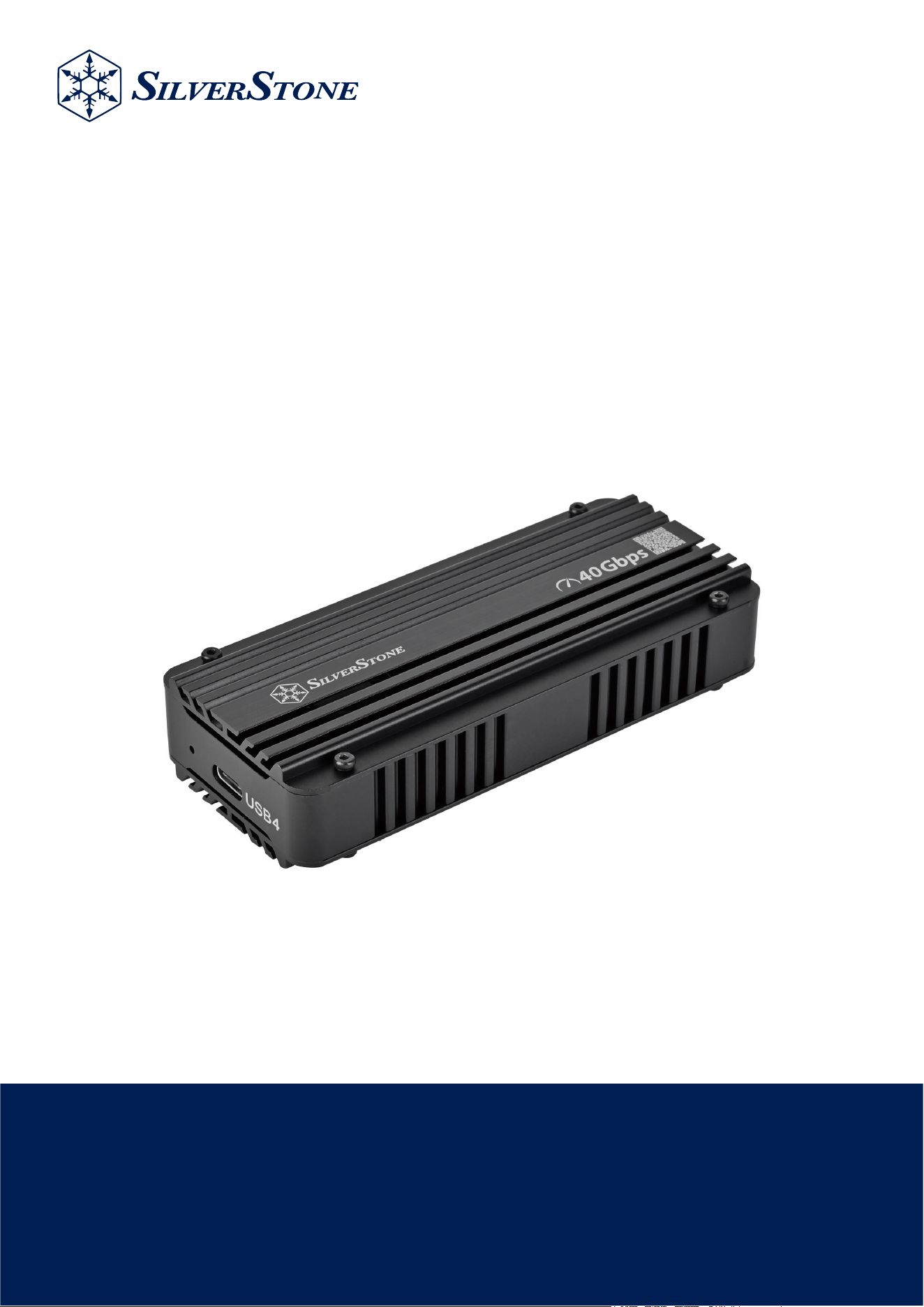
MS12-40G
USB4 NVMe M.2 SSD Enclosure with Active Cooling
www.silverstonetek.com
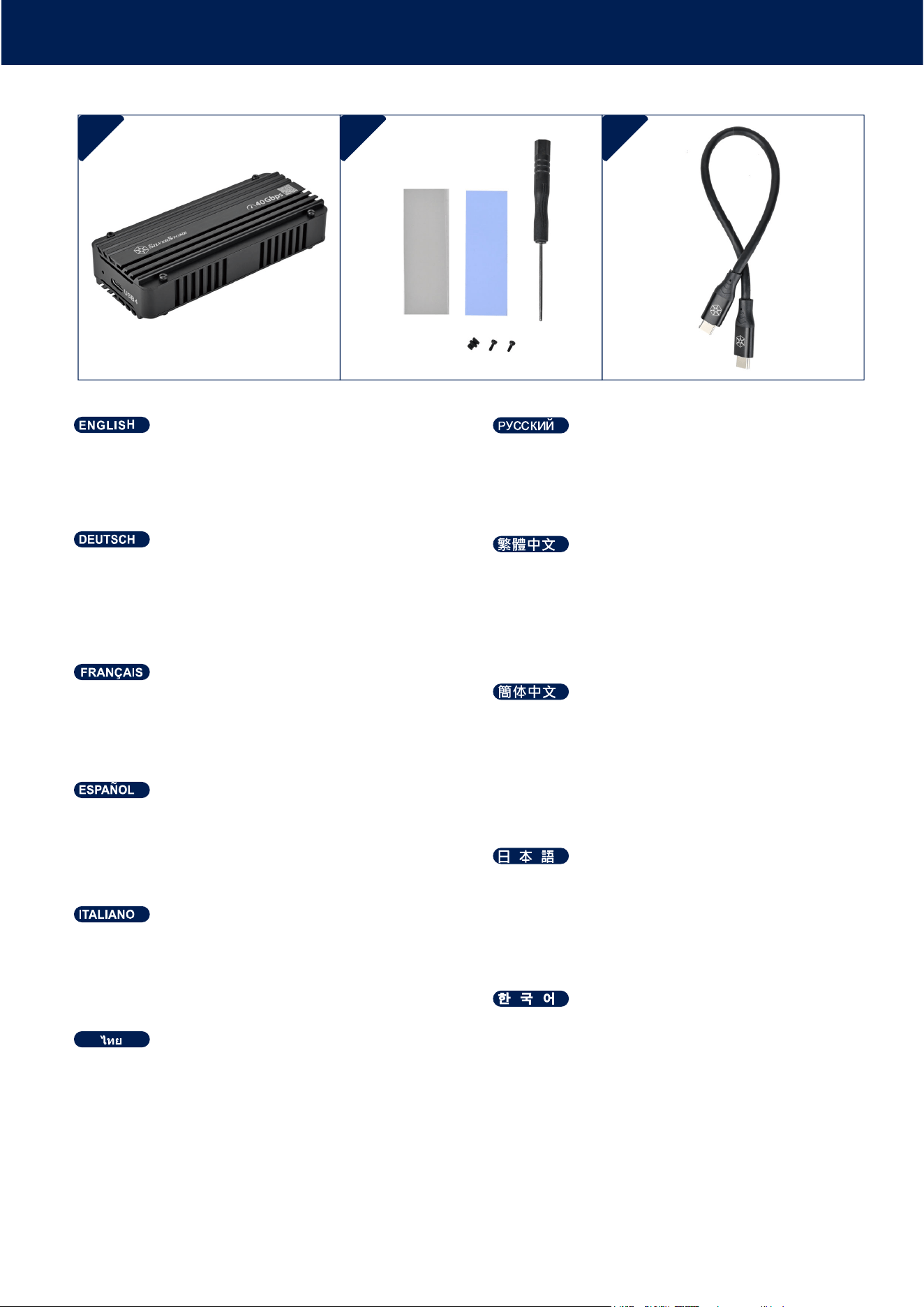
PACKAGE CONTENT
06*
揜ↅ▔᧤塜唁㟲䑀⬙[ᇬ䋿䤌唁㟲䑀⬙[ᇬ
⏼屡婉倁[ᇬ⏼屡婉倁怆[ᇬ㳰启⦉⸩㪀[᧥
86%7\SH&懘7\SH&偩
06*
揜ↅ▔᧤坬唁㟲䍼⨺[ᇬ䋿䤌唁㟲䍼⨺[ᇬ
⏼屡婉€[ᇬ⏼屡婉€怆[ᇬ㳰厅⦉⸩㪀[᧥
86%7\SH&懻7\SH&兎
06*
ࡤࡒ࠸࡚ࡊࡿࡳࡡ࡚ࡘࡴࡓࡻࡐ࡚ࡧࡑࡩ࡙࠻࡞ࡩࡘ࡚ࡼࡤࡐࡡࡐࡼࡪࡳ࠾ࡐ[ࡴࡓࡻࡐ
࡚ࡧࡑࡩ࡙࠻࡞ࡩࡘ࡚ࡼࡤࡐࡡࡳࡎࡩࡴࡧ
ࡡ࠹ࡩ࡞[ࡡ࠸࡚ࡰ࡙ࡋ0[ࡷ࠹࠻࡞࠾[࠹ࡩࡌࡨࡼ࠾࡙ࡩ࠾[
ࡡࡩ࡙ࡳ࠻ࡳࡑ86%7\SH&ࡷࡒࡡࡰࡻ7\SH&
06*
꼖ꫭꍡ霡ꫦ븽볁ꄵꩾ꾩볝麑闑쁁ꩾꗄ섥ꩾ
꾩볝麑闑0녚뗞驍ꩡ闑걙먡ꊝ麑ꄱ넩闑
隕ꓩ덵덵鲵闑
86%7\SH&꿵7\SH&閹꾥陥뢵넩Ꟊ
06*
[[
0[[[
86%7\SH&7\SH&
06*
&RQWHQXWRGHJOLDFFHVVRULSDGWHUPLFREOX[
SDGWHUPLFRJULJLRHELDQFR[YLWHGLPRQWDJJLR
0[FDFFLDYLWH[6XSSRUWRLQJRPPD[
&DYR86%GDWLSR&DWLSR&
06*
&RQWHQLGRGHORVDFFHVRULRVDOPRKDGLOODW«UPLFDD]XO
[DOPRKDGLOODW«UPLFDJULV\EODQFD[WRUQLOORGH
PRQWDMH0[GHVWRUQLOODGRU[6RSRUWHGHJRPD[
&DEOH86%7LSR&D7LSR&
06*
/LVWHGHVDFFHVVRLUHVSODTXHWWHWKHUPLTXHEOHXH[
SODTXHWWHWKHUPLTXHJULVHHWEODQFKH[YLVGHPRQ
WDJH0[WRXUQHYLV[6XSSRUWHQFDRXWFKRXF[
&¤EOH86%7\SH&YHUV7\SH&
06*
=XEHK¸ULQKDOWEODXHV:¦UPHOHLWSDG[JUDXHV
XQGZHL¡HV:¦UPHOHLWSDG[00RQWDJHVFKUDXEH
[6FKUDXEHQGUHKHU[*XPPLVWDQGIX¡[
86%7\SH&DXI7\SH&.DEHO
06*
$FFHVVRULHV&RQWHQWEOXHWKHUPDOSDG[JUH\
ZKLWHWKHUPDOSDG[0PRXQWLQJVFUHZ[
VFUHZGULYHU[5XEEHUVWDQGRII[
86%7\SH&WR7\SH&FDEOH
06*
Ⅷ⻭❐␔⹈ኳወዙኒዙኻወኮአኦ[ᇬኍዉዙ
ኸዌኁእኒዙኻወኮአኦ[ᇬ0♥ቭⅧሴኪን[ᇬ
ኦኁክዙ[ᇬኑኽ完ኖኜዐኦኇኲ[
86%7\SH&ᨺ7\SH&ዙኳወ
1 2 3
INSTALLATION GUIDE
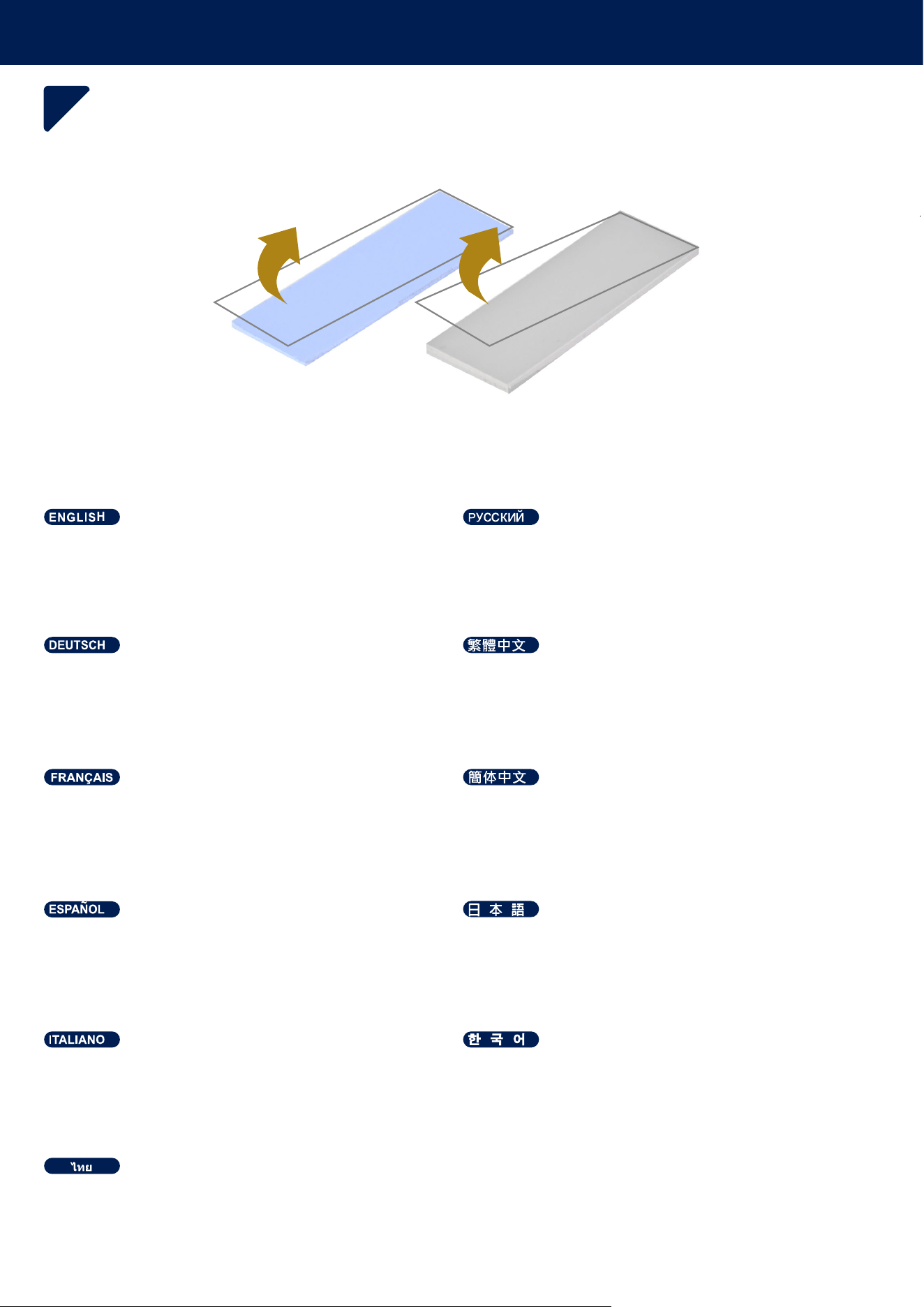
1
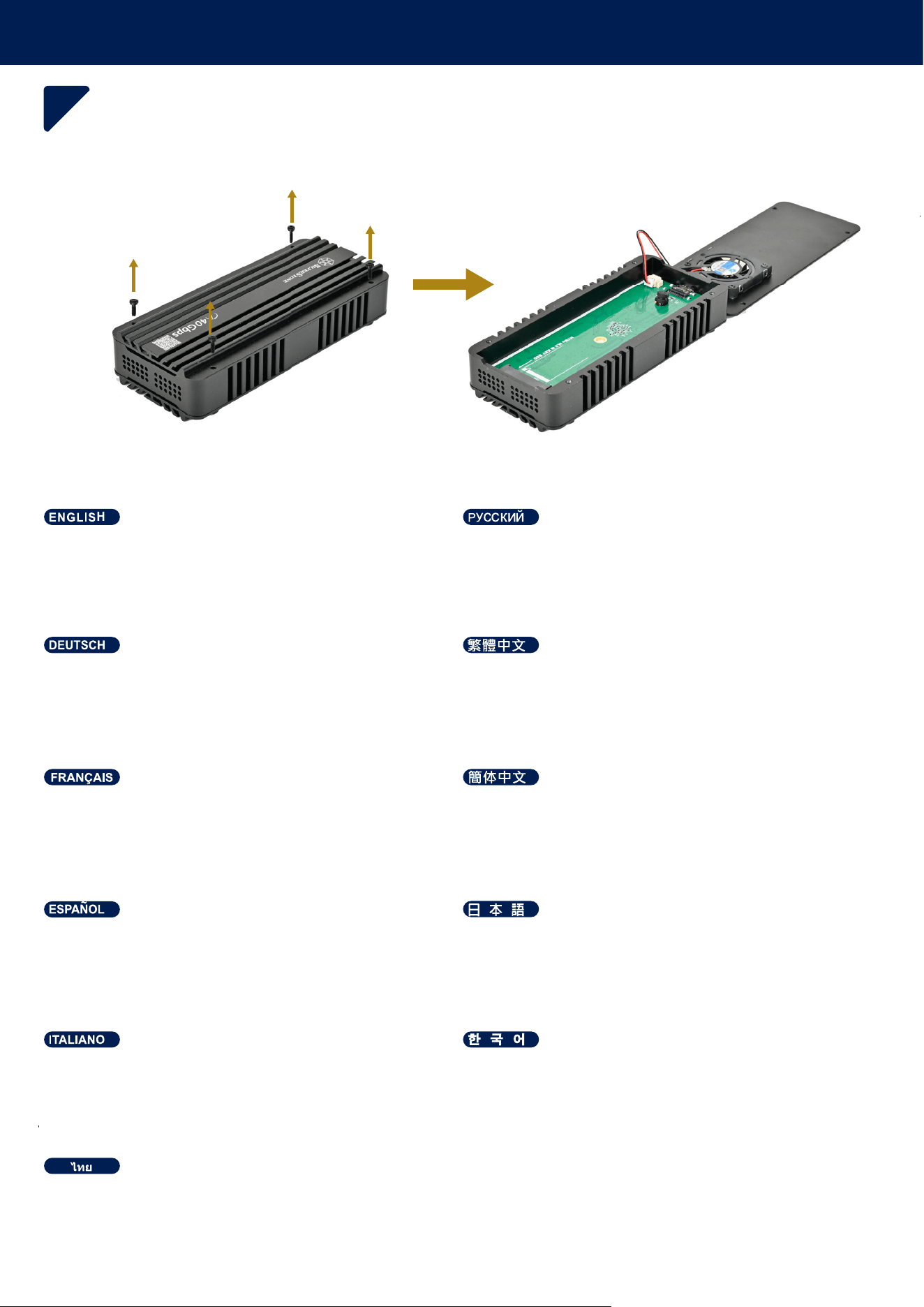
Die obere Abdeckung entfernen (dabei auf den
Kühlungslüfter achten).
Remove the top cover (be cautious of the cooling fan) Снимите верхнюю крышку (будьте осторожны с
охлаждающим вентилятором).
Retirez le capot supérieur (faites attention au ventilateur
de refroidissement).
Retire la cubierta superior (tenga cuidado con el
ventilador de refrigeración).
Rimuovere il coperchio superiore (prestare attenzione
alla ventola di raffreddamento).
ࡍࡤࡋࡔࡩ࠻࡚ࡤࡑࡋࡼࡩࡐࡑࡐࡤࡤ࠸࡚ࡧ࡞ࡨ࠾ࡕࡨࡋࡘ࡚ࡧࡑࡩ࡙࠻࡞ࡩࡘ࡚ࡼࡤࡐ
ₙ槱ኈክዙት♥ቭ⮥ሺቡሼ⑆☃ኲቾዐ㽷㎞ᇭ
♥ₚₙ坚᧤㽷㎞⑆☊欷㓖᧥ᇭ
♥ₚₙ䥥᧤㽷㎞⑆☃歝㓖᧥ᇭ
ꩶ鲝뢙ꌱ뇑阥뼞鱽鲙릝ꍶ볡꾅늱넍뼍겢겑꿙
INSTALLATION GUIDE
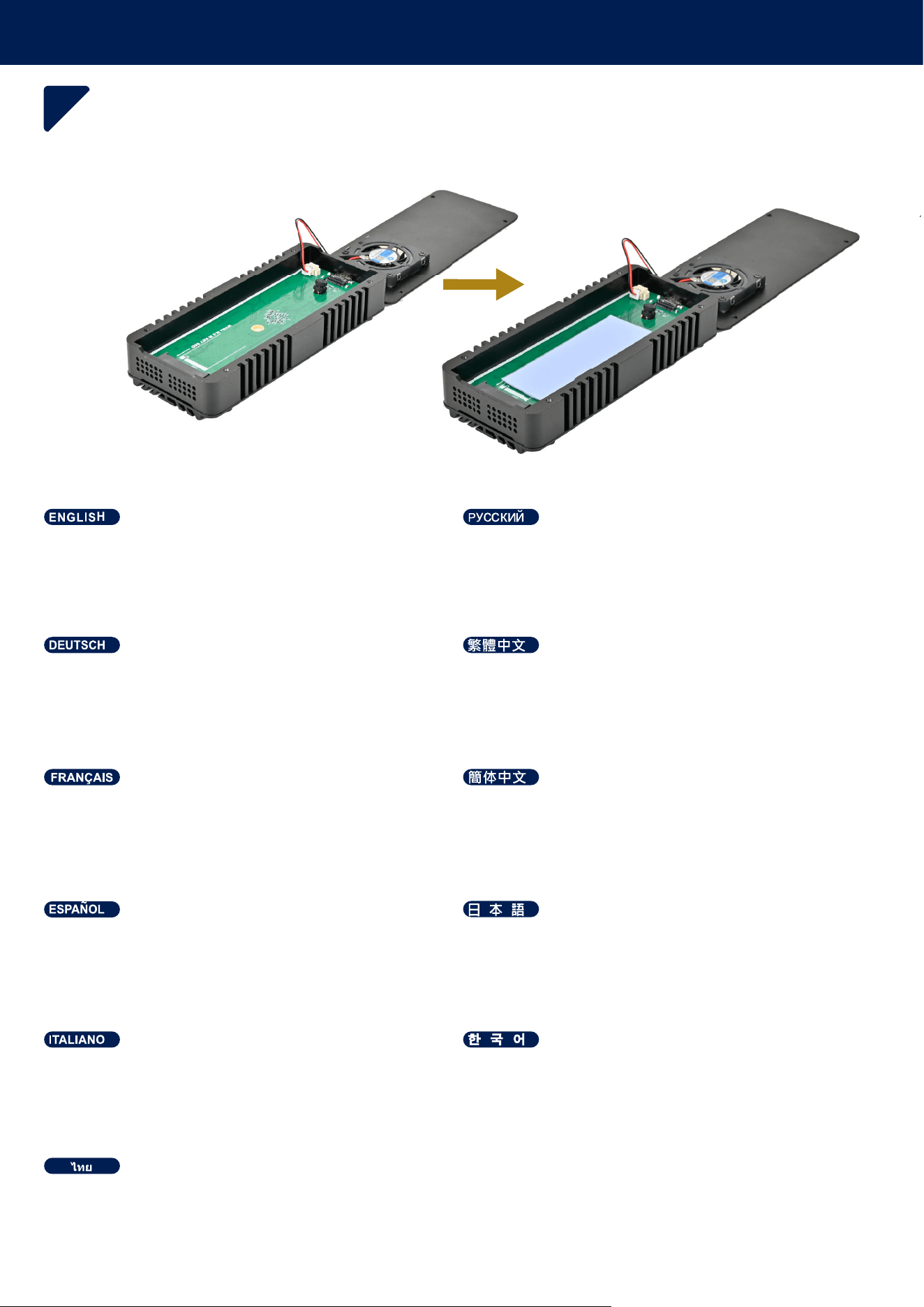
2
Beachten Sie die Dicke Ihrer M.2-SSD, um das
passende Wärmeleitpad auszuwählen, und entfernen
Sie die Schutzfolie.
Refer to your M.2 SSD thickness to choose
thermal pad and remove the film.
Обратите внимание на толщину вашего M.2 SSD,
чтобы выбрать подходящую термопрокладку,
и снимите пленку.
Référez-vous à l'épaisseur de votre SSD M.2 pour choisir
le pad thermique approprié et retirez le film protecteur.
Consulta el grosor de tu SSD M.2 para elegir la
almohadilla térmica adecuada y retira la película.
Fai riferimento allo spessore del tuo SSD M.2 per
scegliere il pad termico corretto e rimuovi la pellicola.
ࡌ࡚࡞ࡡࡤࡑ࠻࡞ࡩࡘࡢࡐࡩ࠹ࡤ࠾066'
ࡳࡕࡻࡤࡳࡤ࠸ࡴࡓࡻࡐ࡚ࡧࡑࡩ࡙࠻࡞ࡩࡘ࡚ࡼࡤࡐࡎࡻࡳࡢࡘࡩࡧࡡࡘࡴࡧࡤ࠸ࡖࡿࡘࡤࡤ࠸
066'ቑ☩ቢ㉫ሻኒዙኻወኮአኦት指ቖᇬ
ኲኀወኽት⓴ሯሺሲቃሸሧᇭ
066'넍鸅颍ꌱ쀊넭뼍꾡놶뼞뼑
괝ꏵ볝麑ꌱ몒뼍隕뻹ꌹ냹뇑阥뼍ꫭ끉
㫈㝩㌷䤓066'☩ㄵ指㝖⚗拸䤓⺝䑀䓖᧨₵䲊棳≬帆含ᇭ
㫈㗽㌷䤓066'☩ㄵ折㕸⚗抑䤓⺋䍼䓖᧨ㄅ䲊棳≬帆含ᇭ
1.2mm or 3.5mm
INSTALLATION GUIDE
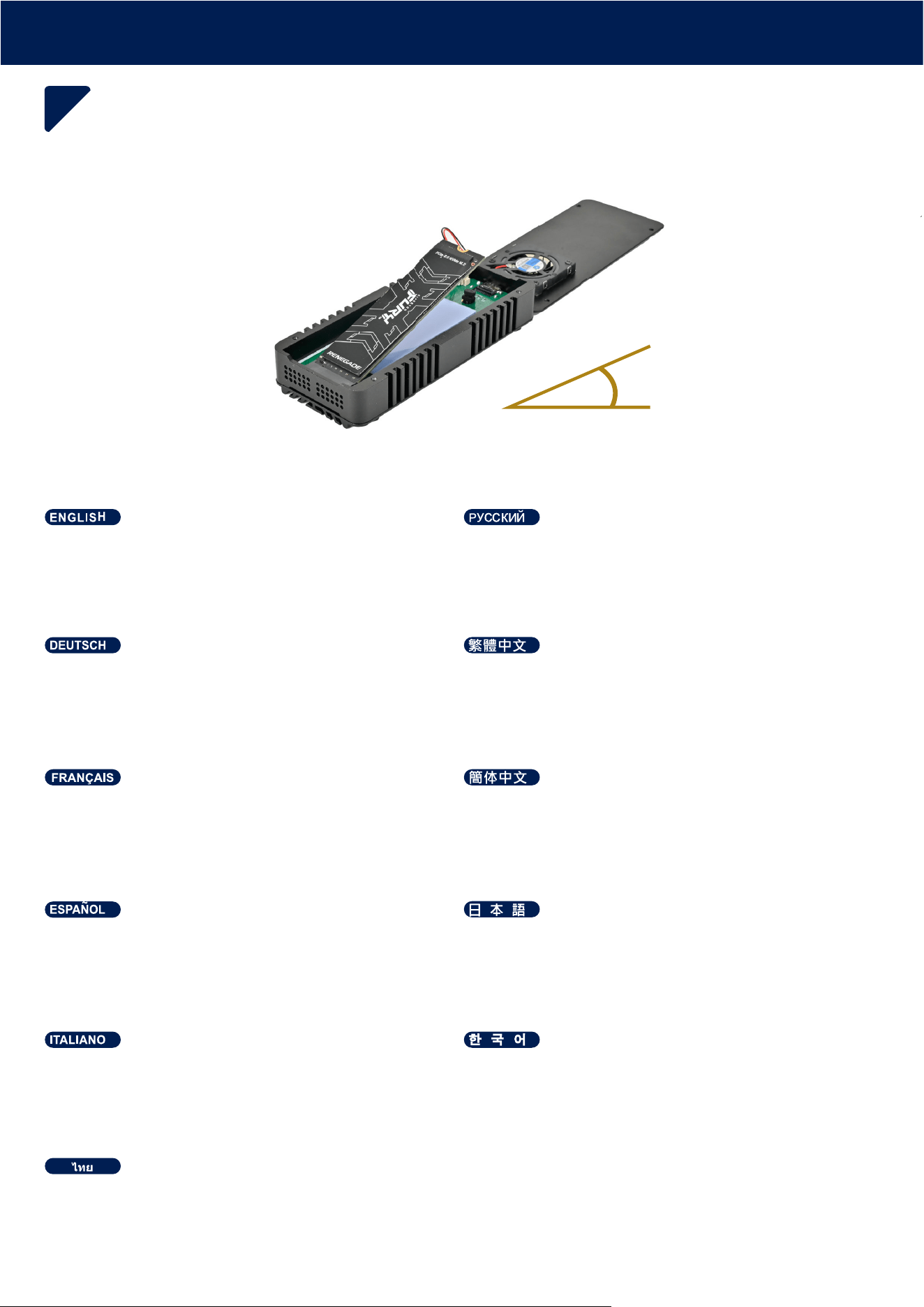
3
Das Wärmeleitpad auf die Platine kleben.
Apply the thermal pad to the PCB. Нанесите термопрокладку на плату.
Appliquez le pad thermique sur le circuit imprimé.
Aplique la almohadilla térmica a la PCB.
Applicare il cuscinetto termico al PCB.
ࡌࡋࡴࡓࡻࡐ࡚ࡧࡑࡩ࡙࠻࡞ࡩࡘ࡚ࡼࡤࡐࡑࡐ3&%
3&%ኒዙኻወኮአኦት彋ቭቡሼᇭ
괝ꏵ볝麑ꌱ3&%꾅ꜵ뗞뼞鱽鲙
⺖⺝䑀䓖彋Ⓙ3&%ₙᇭ
⺕⺋䍼䓖心Ⓙ3&%ₙᇭ
INSTALLATION GUIDE
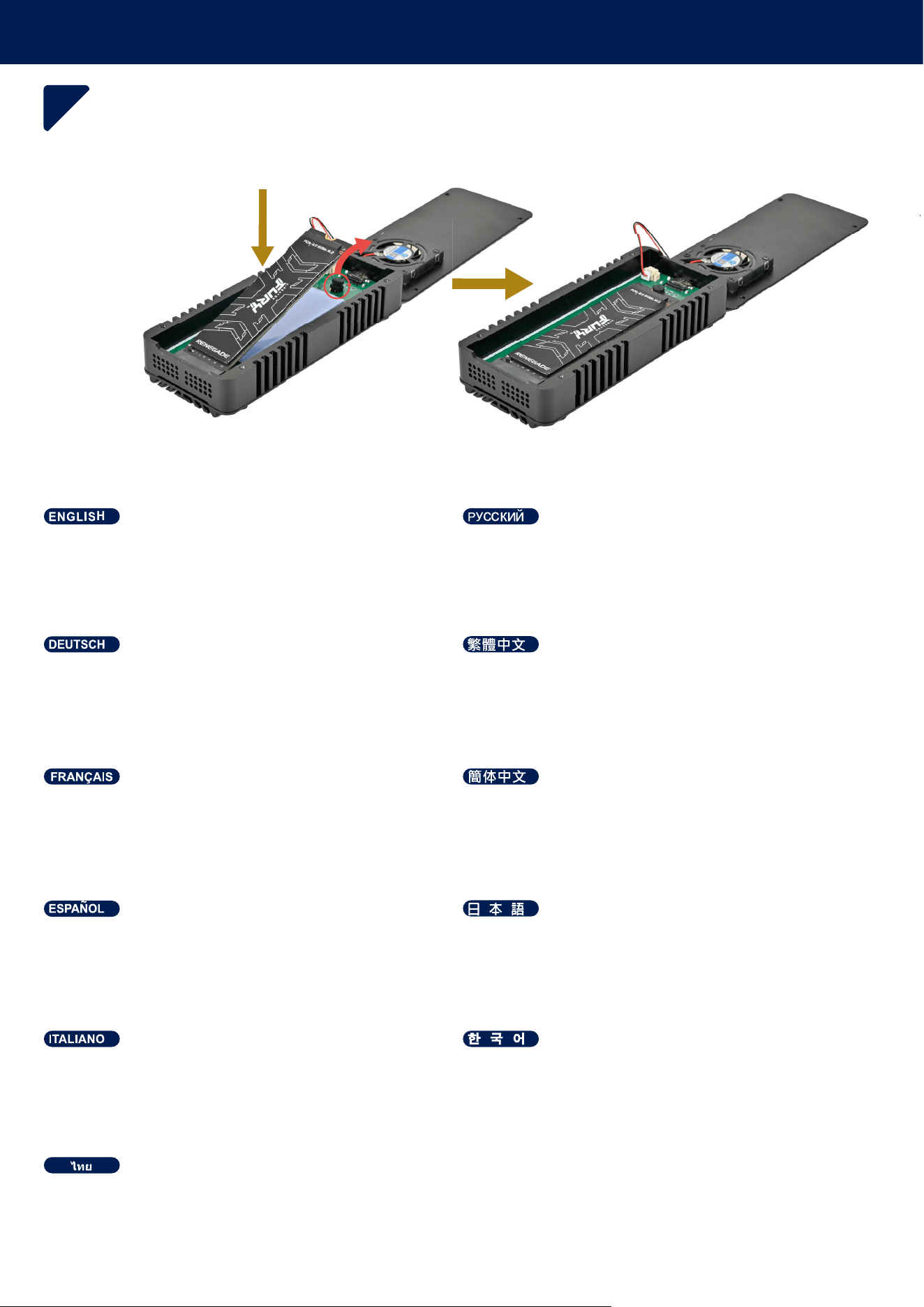
4
Das M.2 SSD in einem Winkel von 20 Grad in den
Steckplatz einführen.
Insert the M.2 SSD at a 20-degree angle into the slot. Вставьте M.2 SSD под углом 20 градусов в слот.
Insérez le M.2 SSD avec un angle de 20 degrés dans
l’emplacement.
Inserte el M.2 SSD en el zócalo en un ángulo
de 20 grados.
Inserire l’ M.2 SSD nello slot con un’angolazione di 20°.
ࡶࡡࡻM.2 66'࠾ࡶࡐࡁࡻࡤ࠾ࡵࡋ࡙ࡎࡪࡘࡘࡤ࠾ࡩ
M.2 66'ትrቑ屡ㄵቊኖዊአእ㗎ሺቡሼᇭ
M.2 66'ꌱ鵹閶鵹ꈑ걡ꈤ꾅ꩲ넺뼞鱽鲙
⺖M.2 66'ⅴㄵ屡㙡⏴㙡㲌ᇭ
⺕M.2 66'ⅴㄵ屡㙡⏴㙡㲌ᇭ
r
INSTALLATION GUIDE
5
Befestigen Sie die M.2 SSD, indem Sie den
Gummistandfuß biegen.
Secure the M.2 SSD by bending the rubber standoff Закрепите M.2 SSD, согнув резиновую опору.
Fixez le M.2 SSD en pliant le support en caoutchouc.
Asegura el SSD doblando el soporte de goma.
Fissa l’ M.2 SSD piegando il supporto in gomma.
࡙ࡋM.2 66'ࡵࡋ࡙࠸ࡩ࡚࠾ࡤ࠹ࡩࡌࡨࡼ࠾࡙ࡩ࠾
ኑኽ完ቑኖኜዐኦኇኲት㦁ስM.2 66'ት⦉⸩ሺሲቃሸሧᇭ
隕ꓩ덵덵鲵ꌱ霡ꜵꇙM.2 66'ꌱ隕뇊뼍ꫭ끉
㇝㦁㳰启⦉⸩㪀ⅴ⦉⸩M.2 66'ᇭ
ㆾ㦁㳰厅⦉⸩㪀ⅴ⦉⸩M.2 66'ᇭ
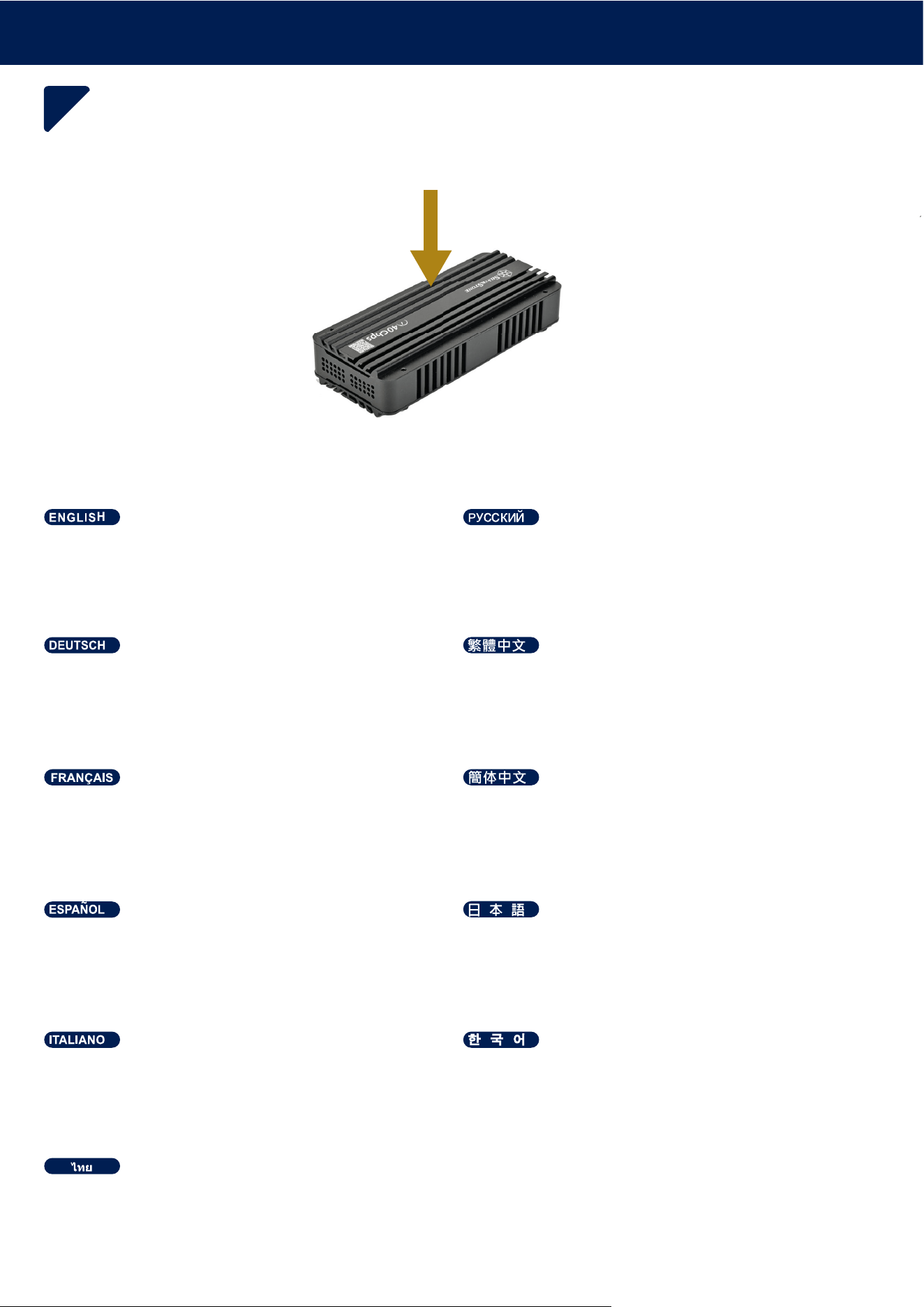
INSTALLATION GUIDE
6
Abdeckung schließen.
Close the cover. Закройте крышку.
Fermez le capot.
Cierre la cubierta.
Chiudere il coperchio.
ࡒࡋࡔࡩ࠻࡚ࡤࡑ
ኈክዙት栘ሻቡሼᇭ
뢙ꌱ鲠걪鱽鲙
坚ₙₙ坚ᇭ
䥥ₙₙ䥥ᇭ
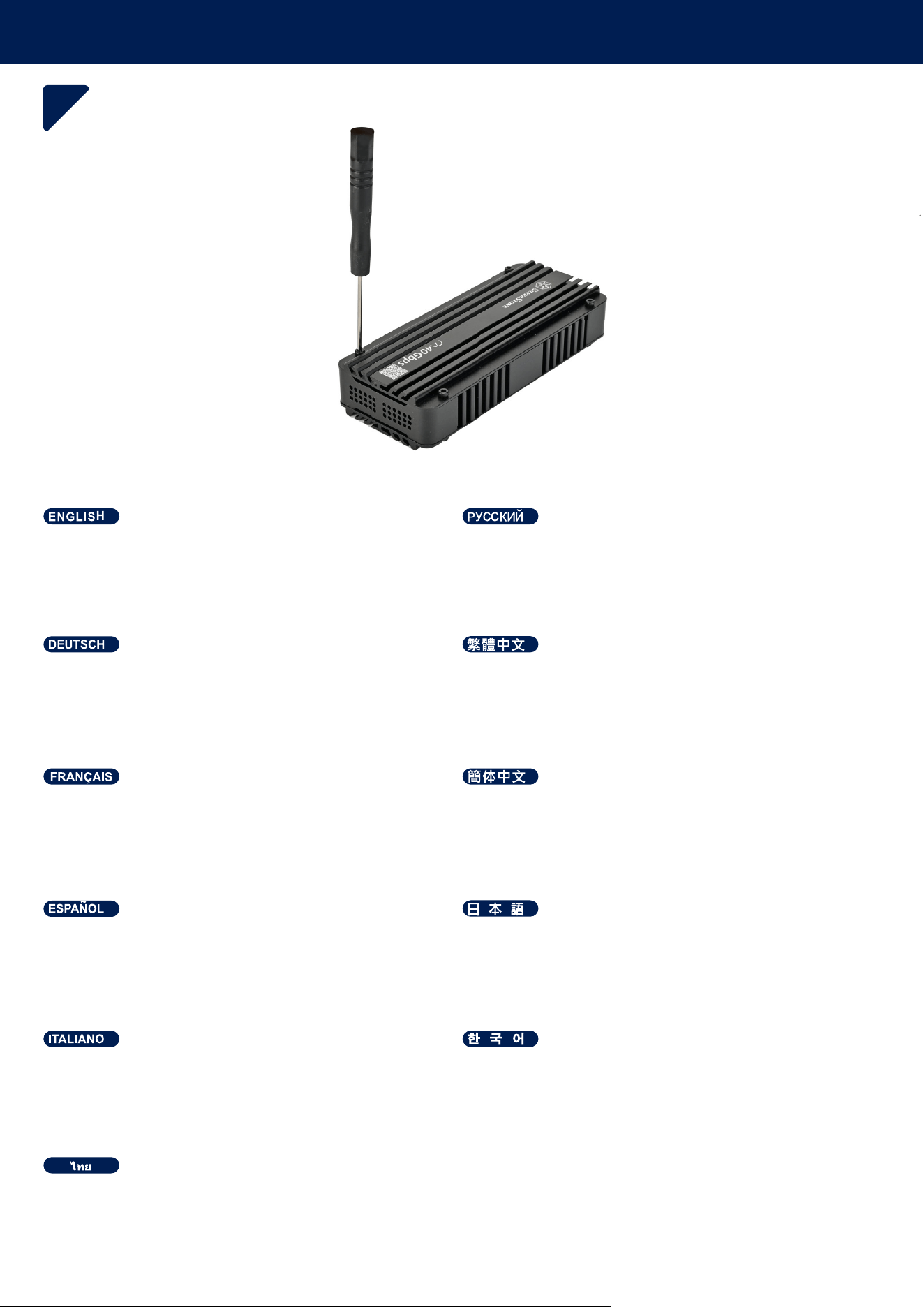
INSTALLATION GUIDE
7
Die Abdeckung durch Anziehen der Schrauben
verschließen.
Tighten the screws to lock the enclosure. Затяните винты, чтобы зафиксировать корпус.
Serrez les vis pour verrouiller le boîtier.
Apriete los tornillos para cerrar la carcasa.
Serrare le viti per bloccare l’alloggiamento.
࠹ࡨࡐࡡ࠸࡚ࡰࡶࡢࡼࡴࡐࡻࡐࡳࡕࡻࡤࡺࡤ࠸࠸ࡻࡤ࠾
ኪንት偯ቤኅዐኌዊዙንዀት⦉⸩ሺቡሼᇭ
驍ꩡꌱ눥꾡넭먩ꈑ놵ꌱ녕鞾鱽鲙
㡚偙婉倁ⅴ春⦉⮥㹋ᇭ
㡚侶婉€ⅴ析⦉⮥⮂ᇭ
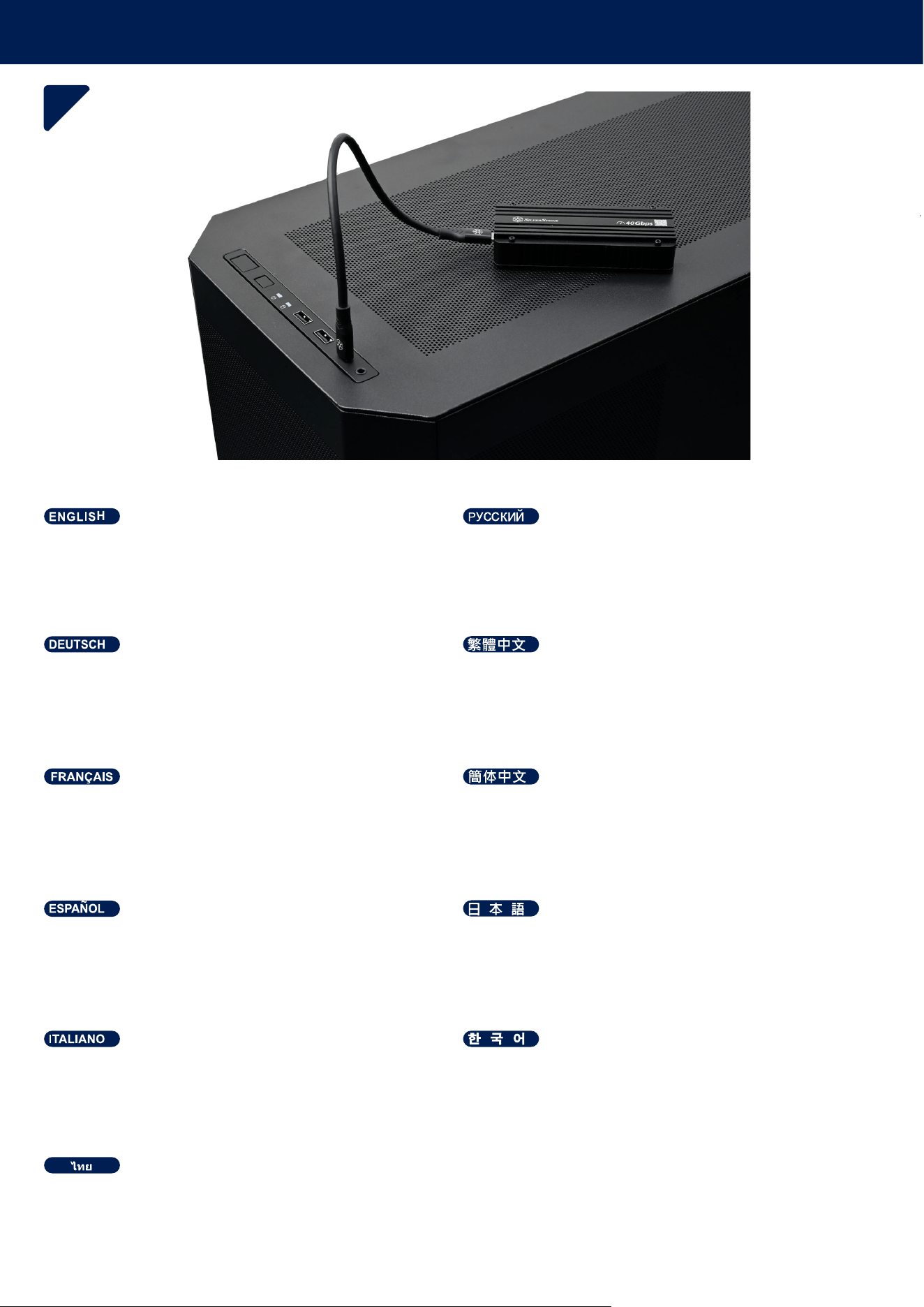
INSTALLATION GUIDE
8
MS12-40G mit einem Type-C-Kabel mit dem PC verbinden.
Connect the MS12-40G to your PC using the Type-C cable. Подключите MS12-40G к ПК с помощью кабеля Type-C.
Connectez le MS12-40G à votre PC en utilisant le câble
Type-C.
Conecte el MS12-40G a su PC usando el cable Tipo-C.
Collegare l’MS12-40G al PC utilizzando il cavo Tipo-C.
ࡳࡁࡻࡤࡘࡌࡻࡤ06*ࡳ࠹ࡼࡩ࠸ࡨࡑ3&࠹ࡤ࠾࠻ࡊࡵࡋ࡙ࡶࡁࡼࡡࡩ࡙ࡳ࠻ࡳࡑ
7\SH&
7\SH&ዙኳወት∎ቆ06*ት3&㘴倩ሺቡሼᇭ
7\SH&뢵넩Ꟊ냹ꩡ끞뼍꾡06*ꌱ3&꾅꾥陥뼞鱽鲙
∎䞷7\SH&偩᧨⺖06*抲㘴Ⓙ榊叵ᇭ
∎䞷7\SH&兎᧨⺕06*扭㘴Ⓙ帰並㧉ᇭ
QUESTIONS AND ANSWERS
F: Kann ich im MS12-40G ein PCIe 3.0 NVMe SSD verwenden?
A: Ja, jede PCIe-Generation ist vor- und rückwärtskompatibel; die Leistung richtet sich jedoch nach der niedrigsten
Spezifikation. Das heißt, ein PCIe 3.0 SSD in einem Steckplatz für PCIe 4.0 arbeitet mit der Geschwindigkeit von
PCIe 3.0.
F: Weshalb erkennt der PC das SSD nicht?
A: Prüfen Sie, ob das SSD richtig im Steckplatz sitzt, das Wärmeleitpad richtig angebracht ist und alle Kabel fest
verbunden sind.
Q : Puis-je utiliser un SSD PCIe 3.0 NVMe dans le MS12-40G ?
R : Oui, chaque génération de PCIe offre une compatibilité ascendante et descendante, mais les performances
correspondront à la spécification la plus basse. Par exemple, un SSD PCIe 3.0 dans un emplacement PCIe 4.0
fonctionnera à des vitesses PCIe 3.0.
Q : Pourquoi mon SSD n’est-il pas détecté par mon PC ?
R : Vérifiez que le SSD est correctement installé dans l’emplacement, assurez-vous que le pad thermique est
correctement appliqué, et confirmez que tous les câbles sont bien branchés.
P: ¿Puedo usar un SSD NVMe PCIe 3.0 en el MS12-40G?
R: Sí, cada generación de PCIe es compatible con productos pasados y futuros, pero el rendimiento será igual a la
menor de las especificaciones. Por ejemplo, un SSD PCIe 3.0 en un zócalo PCIe 4.0 usará la velocidad del PCIe
3.0.
P: ¿Por qué no detecta mi PC mi SSD?
R: Compruebe si el SSD está bien ajustado en el zócalo, asegúrese de que la almohadilla térmica se aplicó de
forma correcta y confirme que todos los cables están conectados firmemente.
Q: È possibile usare un SSD PCIe 3.0 NVMe con l’MS12-40G?
A: Sì, tutte le generazioni di PCIe sono compatibili e retrocompatibili, ma le prestazioni si adatteranno alle specifiche
più basse. Ad esempio, un SSD PCIe 3.0 in uno slot PCIe 4.0 sarà eseguito alle velocità PCIe 3.0.
Q: Perché l’SSD non viene rilevato dal PC?
A: Verificare che l’SSD sia inserito correttamente nello slot, assicurarsi che il cuscinetto termico sia applicato corret-
tamente e che tutti i cavi siano collegati correttamente.
ࡍࡩࡘ: ࡀࡨࡐࡡࡩࡘࡩ࡚ࡍࡶࡁࡼ PCIe 3.0 NVMe SSD ࡶࡐ MS12-40G ࡷࡋࡼࡢ࡚ࡤࡷࡘࡻ
ࡌࡤࡑ: ࡷࡋࡼ PCIe ࡎ࠸ࡳࡳࡐࡤࡳ࡚ࡁࡨࡐࡡࡩࡘࡩ࡚ࡍࡎࡪ࠾ࡩࡐ࡚ࡻ࡞ࡘ࠸ࡨࡐࡷࡋࡼࡎࡨࡼ࠾ࡴࡑࡑࡷࡒ࠹ࡼࡩ࠾ࡢࡐࡼࡩࡴࡧࡍࡤ࡙ࡢࡨ࠾ ࡴࡌࡻࡒ࡚ࡧࡡࡎࡏࡗࡩࡕࡧࡳࡎ࡙ࡑࡳࡎࡻࡩ࠸ࡨࡑࡡࡳࡒ࠸ࡌࡻࡪࡡࡋ
ࡌࡨ࡞ࡤ࡙ࡻࡩ࠾ࡳࡁࡻࡐ SSD PCIe 3.0 ࡶࡐࡡࡺࡤࡌ PCIe 4.0 ࡧࡎࡪ࠾ࡩࡐࡎࡻ࠻࡞ࡩࡘࡳ࡚ࡺ࡞ PCIe 3.0
ࡍࡩࡘ: ࡳࡢࡌࡶࡋ PC ࠹ࡤ࠾ࡀࡨࡐ࠾ࡌ࡚࡞ࡷࡘࡻࡕࡑ SSD ࠹ࡤ࠾ࡀࡨࡐ
ࡌࡤࡑ: ࡌ࡚࡞ࡡࡤࡑ࡞ࡻࡩࡶࡡࡻ SSD ࠾ࡶࡐࡡࡺࡤࡌࡤ࡙ࡻࡩ࠾ࡍࡰ࠸ࡌࡼࡤ࠾ࡢ࡚ࡤࡷࡘࡻ ࡶࡢࡼࡴࡐࡻࡶ࡞ࡻࡩࡌࡋࡴࡓࡻࡐ࡚ࡧࡑࡩ࡙࠻࡞ࡩࡘ࡚ࡼࡤࡐࡤ࡙ࡻࡩ࠾ࡍࡰ࠸ࡌࡼࡤ࠾ ࡴࡧ࡙ࡐ࡙ࡨࡐ࡞ࡻࡩࡡࡩ࡙ࡳ࠻ࡳࡑ
ࡎࡨࡼ࠾ࡢࡘࡋࡳࡁࡻࡤࡘࡌࡻࡤࡤ࡙ࡻࡩ࠾ࡴࡐࡻࡐࡢࡐࡩ
43&,H190H06*"
$3&,H
66'3&,H3&,H3&,H
466'"
$66'
Q: Can I use a PCIe 3.0 NVMe SSD in the MS12-40G?
A: Yes, every generation of PCIe is forward and backward compatible, but performance will match the lowest specifi-
cation. For example, a PCIe 3.0 SSD in a PCIe 4.0 slot will run at PCIe 3.0 speeds.
Q: Why isn't my SSD being detected by my PC?
A: Check if the SSD is properly seated in the slot, ensure the thermal pad is applied correctly, and confirm that all
cables are connected securely.
4᧶㒠♾ⅴ⦷06*₼∎䞷3&,H190H66'⡝᧻
$᧶♾ⅴ᧨㹞ⅲ䤓3&,H揜㦘⚠ⓜ✛⚠㈛䦇⹈᧨⇕㊶厌㦒∬㝩㦏⇝尞㫋拚嫛ᇭ√Ⱁ᧨3&,H66'⦷3&,H㙡㲌₼
⺖ⅴ3&,H䤓抮ㄵ拚嫛ᇭ
4᧶䍉⅏煋㒠䤓榊叵䎰㽤⌄䂻Ⓙ66'᧻
$᧶嵚㴱㩴66'㢾⚵㷲䭉㙡⏴㙡㲌᧨䭉崜⺝䑀彋䓖㢾⚵㷲䭉彋⚗᧨₵䭉≬㓏㦘抲㘴偩め䓱⦉抲㘴ᇭ
4᧶㒠♾ⅴ⦷06*₼∎䞷3&,H190H66'⚦᧻
$᧶♾ⅴ᧨㹞ⅲ䤓3&,H揜㦘⚠ⓜ✛⚠⚝␋⹈᧨⇕㊶厌↩∬㗽㦏⇝屓㫋扟嫛ᇭ√Ⱁ᧨3&,H66'⦷3&,H㙡㲌₼⺕
ⅴ3&,H䤓抮ㄵ扟嫛ᇭ
4᧶⅏㒠䤓帰並㧉㡯㽤∵㿚Ⓙ66'᧻
$᧶庆㭏㩴66'㢾⚵㷲䫽㙡⏴㙡㲌᧨䫽帳⺋䍼心䓖㢾⚵㷲䫽心⚗᧨ㄅ䫽≬㓏㦘扭㘴兎め䓱⦉扭㘴ᇭ
43&,H190H66'ት06*∎䞷ቊሰቡሼሮ"
$ቒሧᇬ⏷ቑ₥ⅲቑ3&,Hቒₙₚ⇜℡㙪㊶ት㦘ሺቡሼሯᇬ㊶厌ቒ㦏ₚ⇜ቑ₥ⅲቑብቑቋቍቭቡሼᇭ√ራቓᇬ3&,H
66'ት3&,Hኖዊአእ孔䧏ሼቮቋᇬ3&,Hቑ抮ㄵቋቍቭቡሼᇭ
466'ሯ3&㮫⒉ሸቯቍሧቑቒቍሿቊሼሮ"
$66'ሯ䭉⸮ኖዊአእ孔䧏ሸቯᇬኒዙኻወኮአኦሯ㷲ሺሲ彋ቬቯᇬ⏷ቑዙኳወሯ䭉⸮㘴倩ሸቯሧቮሶቋ
ት䭉崜ሺሲቃሸሧᇭ
43&,H190H66'ꌱ06*꾅ꩡ끞뼕ꯍ넽驍끉"
$髙ꑝ麕ꫭ鲵넍3&,H鱉ꩶ뿭뿭쀍鷍덵ꎁꫦ鱚냵閵녚驣냵ꩡ꽆꾅ꎓ띥뎆鱽鲙꾽ꌱ麙꽩3&,H걡ꈤ꾅3&,H
66'ꌱꩡ끞뼍ꐩ3&,Hꭂ鵹ꈑ녆鶎뼞鱽鲙
466'閵3&꾅闅덵鷍덵껿鱉넩냕鱉ꓩ꽼넭閵끉"
$66'閵걡ꈤ꾅뇑鲵ꈑ녚뗞鷍꽽鱉덵괝ꏵ볝麑閵꿡ꗉꌩ陁ꜵ뗞鷍꽽鱉덵ꑝ麕뢵넩Ꟊ넩껽뇊놶냱ꈑ꾥陥鷍꽽鱉덵
쀊넭뼍겢겑꿙
QUESTIONS AND ANSWERS
WARRANTY INFORMATION
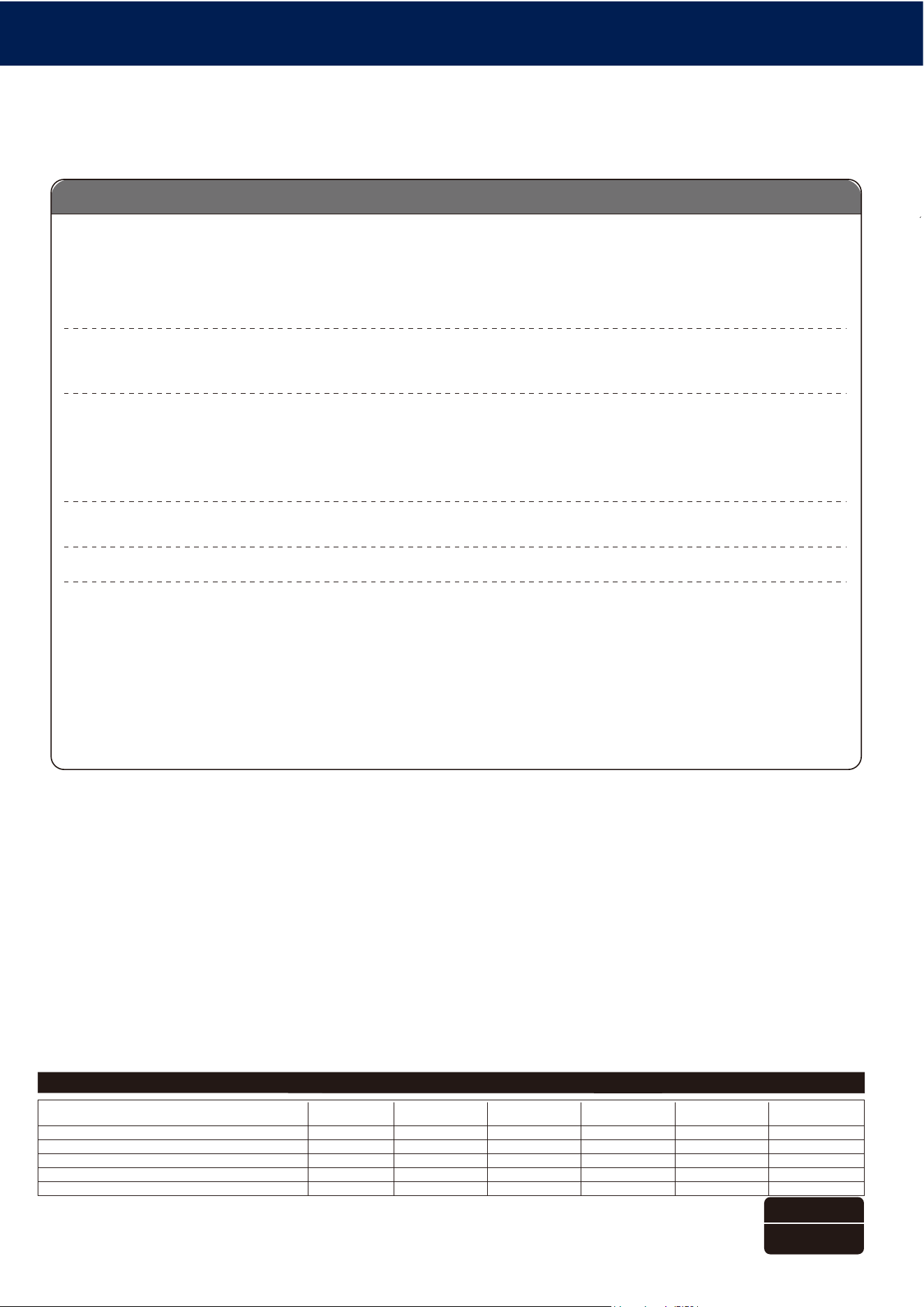
᳝↦᳝ᆇ⠽䋼ܗ㋴ঞ݊࣪ᄺ䞣㸼
ᴀ㸼Ḑձ6-7ⱘ㾘ᅮ㓪ࠊDŽ
ƻ㸼⼎䆹᳝ᆇ⠽䋼䆹䚼ӊ᠔᳝ഛ䋼ᴤ᭭Ёⱘ䞣ഛ*%7㾘ᅮⱘ䰤䞣㽕∖ҹϟDŽ
ü㸼⼎䆹᳝ᆇ⠽䋼㟇ᇥ䆹䚼ӊⱘᶤϔഛ䋼ᴤ᭭Ёⱘ䞣䍙ߎ*%7㾘ᅮⱘ䰤䞣㽕∖DŽϨ䁆䰤⫼⠽䊾⚎ᥦ䰸䷙Ⳃ
䕙ࡽᴤᰃᣛՓ⫼ѻકϞⱘ⍖᭭ˈ⍺⒥㛖ǃ⛞ᴤ᭭ǃⴔࠖㄝˈҹঞϢѻકࣙ㺙ˈЎᮑᎹᴤ᭭Փ⫼ⱘ㉬㛊ᏺǃᆚᇕᴤ᭭ǃⴔࠖㄝ
䚼ӊৡ⿄䖍ѻક
∲
(Hg)
䬝
(Cd)
݁Ӌ䫀
(Cr(VI))
⒈㘨㣃
(PBB)
⒈Ѡ㣃䝮
(PBDE)
䪙
(Pb)
ƻƻƻƻƻƻ
ƻƻƻƻƻƻ
ƻƻƻƻƻƻ
ƻƻƻƻƻƻ
ƻƻƻƻƻƻ
ѻકড়Ḑ䆕
Ẕ偠˖Ẕ
⫳ѻ᮹ᳳ˖㾕ѻકᴵⷕ
ᴎ䞥ሲ
⬉ᄤ
㶎ϱ
ࣙᴤ
ᇐ⛁䌈
For North America ([email protected])
SilverStone Technology in North America may repair or replace defective product with refurbished product that is not new but has been functionally tested.
Replacement product will be warranted for remainder of the warranty period or thirty days, whichever is longer. All products should be sent
back to the place of purchase if it is within 30 days of purchase, after 30 days, customers need to initiate RMA procedure with SilverStone Technology
in USA by first downloading the “USA RMA form for end-users” form from the below link and follow its instructions.
http://silverstonetek.com/contactus.php
For Australia only ([email protected])
Our goods come with guarantees that cannot be excluded under the Australian Consumer Law.
You are entitled to a replacement or refund for a major failure and for compensation for any other reasonably foreseeable loss or damage.
You are also entitled to have the goods repaired or replaced if the goods fail to be of acceptable quality and the failure does not amount to a major failure.
Please refer to above “Warranty terms & conditions” for further warranty details.
SilverStone Technology Co., Ltd. 12F No. 168 Jiankang Rd., Zhonghe Dist., New Taipei City 235 Taiwan R.O.C. + 886-2-8228-1238
(standard international call charges apply)
For Europe ([email protected])
For China ([email protected])
For all other regions ([email protected])
Additional info & contacts
This product has a limited 1 year warranty in North America and Australia.
For information on warranty periods in other regions, please contact your reseller or SilverStone authorized distributor.
ᴀѻક㞾䌁фП᮹䍋ˈѢЁഄ˄ϡࣙ▇䮼ˈ佭␃⡍߿㸠ᬓ˅ѿ᳝ϔᑈ᳝䰤䋷ӏֱ˄䚼ߚѻકЎѠᑈˈϝᑈѨᑈ˅DŽ
䆺㒚ֱᑈ䰤䇋খ✻ᅬᮍ㔥キ
https://silverstonetek.com.cn/
݀ᏗПѻકൟোЎձDŽ
Warranty terms & conditions
1. Product component defects or damages resulted from defective production is covered under warranty.
Defects or damages with the following conditions will be fixed or replaced under SilverStone Technology’s jurisdiction.
a) Usage in accordance with instructions provided in this manual, with no misuse, overuse, or other inappropriate actions.
b) Damage not caused by natural disaster (thunder, fire, earthquake, flood, salt, wind, insect, animals, etc…)
c) Product is not disassembled, modified, or fixed. Components not disassembled or replaced.
d) Warranty mark/stickers are not removed or broken.
Loss or damages resulted from conditions other than ones listed above are not covered under warranty.
2. Under warranty, SilverStone Technology’s maximum liability is limited to the current market value for the product (depreciated
value, excluding
shipping, handling, and other fees). SilverStone Technology is not responsible for other damages or loss associated with the use
of product.
3. Under warranty, SilverStone Technology is obligated to repair or replace its defective products. Under no circumstances will
SilverStone
Technology be liable for damages in connection with the sale, purchase, or use including but not limited to loss of data, loss of
business, loss of
profits, loss of use of the product or incidental or consequential damage whether or not foreseeable and whether or not based on
breach of warranty,
contract or negligence, even if SilverStone Technology has been advised of the possibility of such damages.
4. Warranty covers only the original purchaser through authorized SilverStone distributors and resellers and is not transferable to a
second hand
purchaser.
5. You must provide sales receipt or invoice with clear indication of purchase date to determine warranty eligibility.
6. If a problem develops during the warranty period, please contact your retailer/reseller/SilverStone authorized distributors or
SilverStone
http://www.silverstonetek.com.
Please note that: (i) You must provide proof of original purchase of the product by a dated itemized receipt; (ii) You shall bear the
cost of shipping
(or otherwise transporting) the product to SilverStone authorized distributors. SilverStone authorized distributors will bear the cost
of shipping
(or otherwise transporting) the product back to you after completing the warranty service; (iii) Before you send the product, you
must be issued a
Return Merchandise Authorization (“RMA”) number from SilverStone. Updated warranty information will be posted on Silver-
Stone’s official website.
Please visit http://www.silverstonetek.com for the latest updates.
5HDGEHIRUHXVH
:DUQLQJ
7KHDOXPLQXPH[WHULRURIWKH06*LV
FDSDEOHRITXLFNO\GLVVLSDWLQJKHDWJHQHUDWHGE\
WKHLQVWDOOHG190H66'DQGLWVEXLOWLQFRQWUROOHU
3OHDVHDOORZVRPHWLPHIRULWWRFRROGRZQDIWHU
SURORQJHGSHULRGVRIKLJKSHUIRUPDQFHDFWLYLW\
EHIRUHWRXFKLQJWKH06*
(1
9RU*HEUDXFKOHVHQ
:DUQXQJ
'LH$OXPLQLXPDX¡HQVHLWHGHV06*NDQQ
GLHYRQGHULQVWDOOLHUWHQ190H66'XQGLKUHP
LQWHJULHUWHQ&RQWUROOHUHU]HXJWH+LW]HVFKQHOO
DEOHLWHQ/DVVHQ6LHGHQ06*QDFKO¦QJHU
HULQWHQVLYHU1XW]XQJLPPHUHLQLJH=HLW
DEN¾KOHQEHYRU6LHLKQEHU¾KUHQ
'(
OLUHDYDQWXWLOLVDWLRQ
$YHUWLVVHPHQW
/ಬH[W«ULHXUHQDOXPLQLXPGX06*DOD
FDSDFLW«GHGLVVLSHUODFKDOHXUJ«Q«U«HSDUOH
66'190HHWVRQFRQWU¶OHXULQW«JU«9HXLOOH]
SDWLHQWHUDYDQWGHWRXFKHUOH06*HW
ODLVVH]OHUHIURLGLUDSUªVXQHORQJXHS«ULRGH
GಬDFWLYLW«VRXVKDXWHSHUIRUPDQFH
)5
/HDDQWHVGHXVDU
c$GYHUWHQFLD
(OH[WHULRUGHDOXPLQLRGHO06*WLHQHOD
FDSDFLGDGGHGLVLSDUU£SLGDPHQWHHOFDORUJHQHU
DGRSRUHO66'190HLQVWDODGR\HOFRQWURODGRU
LQFOXLGR3RUIDYRUGHMHDOJRGHWLHPSRSDUDTXH
VHHQIU¯HGHVSX«VGHXQSHU¯RGRSURORQJDGRGH
DOWRUHQGLPLHQWRDQWHVGHWRFDUHO06*
(6
/HJJHUHSULPDGHOOಬXVR
$YYLVR
/HVWHUQRLQDOOXPLQLRGL06*KDODFDSDF
LW¢GLGLVVLSDUHUDSLGDPHQWHLOFDORUHJHQHUDWR
GDOO66'190HLQVWDOODWRHGDOFRQWUROOHULQWHJUD
WRTXLQGLDWWHQGHUHXQSRಬGLWHPSRSULPDGL
WRFFDUORDIILQFK«VLUDIIUHGGLGRSRXQSHULRGR
SUROXQJDWRGLDWWLYLW¢DGDOWHSUHVWD]LRQL
,7
ࡤࡻࡩࡐ࠸ࡻࡤࡐࡶࡁࡼ࠾ࡩࡐ
࠻ࡪࡳࡌࡤࡐ
ࡋࡼࡩࡐࡐࡤ࠸ࡤࡰࡘࡳࡐ࡙ࡘ࠹ࡤ࠾06*ࡘ࠻࡞ࡩࡘࡡࡩࡘࡩ࡚ࡍࡶࡐ࠸ࡩ࡚
࠸࡚ࡧࡩ࡙࠻࡞ࡩࡘ࡚ࡼࡤࡐࡤ࡙ࡻࡩ࠾࡚࡞ࡋࡳ࡚ࡺ࡞ࡩ࠸190H66'ࡴࡧ
࠻ࡤࡐࡵࡎ࡚ࡳࡤ࡚ࡿࡶࡐࡌࡨ࡞ࡎࡻࡌࡋࡌࡨࡼ࠾ࡷ࡞ࡼࡋࡨ࠾ࡐࡨࡼࡐࡵࡒ࡚ࡋࡒࡻࡤ࡙ࡶࡢࡼࡳ࡙ࡺࡐ࠾ࡡࡨ࠸
࠻࡚ࡰࡻࡢࡨ࠾ࡩ࠸ࡶࡁࡼ࠾ࡩࡐࡶࡐ࠸࠸࡚࡚ࡘࡎࡻࡌࡼࡤ࠾ࡶࡁࡼࡡࡘ࡚࡚ࡍࡐࡧࡡࡰ࠾ࡌࡻࡤࡳࡐࡻࡤ࠾ࡳࡒࡺࡐ
ࡳ࡞ࡩࡐࡩࡐ࠸ࡻࡤࡐࡧࡡࡨࡘࡓࡨࡡ06*
7+
06*
190H
58
∎䞷ⓜ庆⏗梔床
巵⛙
06*䤓杬⚗摠⮥⮂厌⮮㉺抮⺋⒉⸘孔䤓190H66'
♙␅㘶Ⓟ唾䓖ℶ䞮䤓䍼摞᧨⥯㷳⦷栎㢅梃䤓浧㟗厌∎䞷⚝
᧨尐䬿屵06*ⓜ庆䷘㈔㹄㢅梃∎␅⑆☃ᇭ
&1
∎䞷ⓜ嵚⏗桀帏
巵⛙
06*䤓敐⚗摠⮥㹋厌⮯㉺抮⺝⒉⸘孬䤓190H66'
♙␅㘶Ⓟ唾䓖䞱䞮䤓䑀摞᧨⥯㷳⦷栆㣑栢䤓浧㟗厌∎䞷㈛
᧨尐䬿岇06*ⓜ嵚䷘㈔㹄㣑栢∎␅⑆☊ᇭ
7:
ሷ∎䞷ⓜር崼ቢሲቃሸሧ
ሷ㽷㎞
06*ቑቿወኼከኃኽ完ዙኖቒᇬኁዐኖእዙወሸ
ቯቂ190H66'ርቫቖ␔埄ነዐእዊዙሮቬ䤉䞮ሺቂ
䑀ት侯㡸ሲ㟍㟲ሺቡሼᇭ浧弯嘆╤⇫ሯ倩ሧቂ椪ቒᇬ
06*ቑ䂸ㄵሯₚሯቮቑት㈔ቆሮቬ㔀ቆሲቃሸ
ሧᇭ
-3
ꩡ끞놹꾅ꗍ麑겑넲꽩늱겢겑꿙
늱넍
06*넍꼁ꊝꖭ鰹뀭ꜵ븑ꐩ냵렍鷑190H66'
꿵驩녚뢝뱭ꈙꆡ꾅ꗑꪒ뼑꾩냹겕ꭂ뼍陁ꗞ띑뼕ꯍ
넽냱ꕵꈑ06*ꌱꎁ덵韥놹隕ꫦ鱚녆꽺냹
꿙ꅠ鶎껽겙뼾뼑쁹띞ꜹ섽驾閶겑멙겑韥ꗉꅂ鱽鲙
.5
WARNING
