User Manual
1700W Steam Iron

Content
1. Package Contents ------------------------- 01
2. Specifications ------------------------------- 01
3. Product Diagram --------------------------- 02
4. Operation Instructions ---------------- 03-06
Fill The Water Tank ------------------------ 03
Dry Ironing ----------------------------------- 03
Burst of Steam ------------------------------ 04
Steam Iron ----------------------------------- 04
Anti-Calc System --------------------------- 05
Anti-Drip System --------------------------- 05
Self-Cleaning -------------------------------- 06
Auto Shut Off -------------------------------- 06
5. Product Care & Use ----------------------- 07
6. Warranty & Customer Support --------- 08
Thank you for purchasing the Sundu 1700W Steam Iron. Please read
this user manual carefully and keep it for future reference. If you need
any assistance please contact our support team with your product
model number and Amazon order number.
Support and after-sale service: [email protected]
PACKAGE CONTENTS
Sundu 1700W Steam Iron
Cup
User Manual
Model
Voltage
Power
Watertank Capacity
Weight
Power Cord Length
Anti-Drip System
Anti-Calc System
LE-IR005
120V 60HZ
1700W
450ml
1.54kg
2.44m
Yes
Yes
SPECIFICATIONS
- 01 -
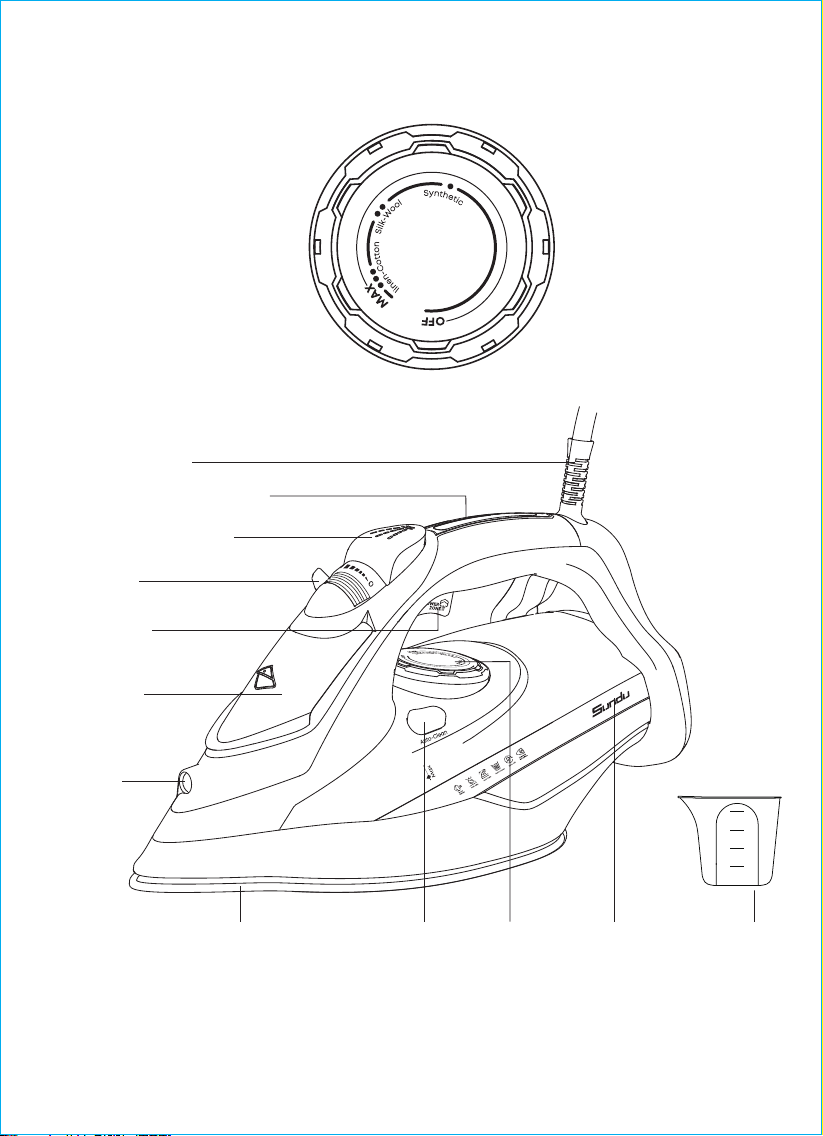
PRODUCT DIAGRAM
Nylon
Silk
Wool
Cotton
Linen
Power Cord
Power Indicator Light
Spray Mist Button
Steam Control
Level
Brust of Steam
Button
Water Filling
Cover
Spray
Nozzle
Ceramic Coating
Soleplate
Self Cleaning
Button
Thermostat
Dial
Water
Tank
200ml
150ml
100ml
50ml
Measuring
Cup
- 02 -
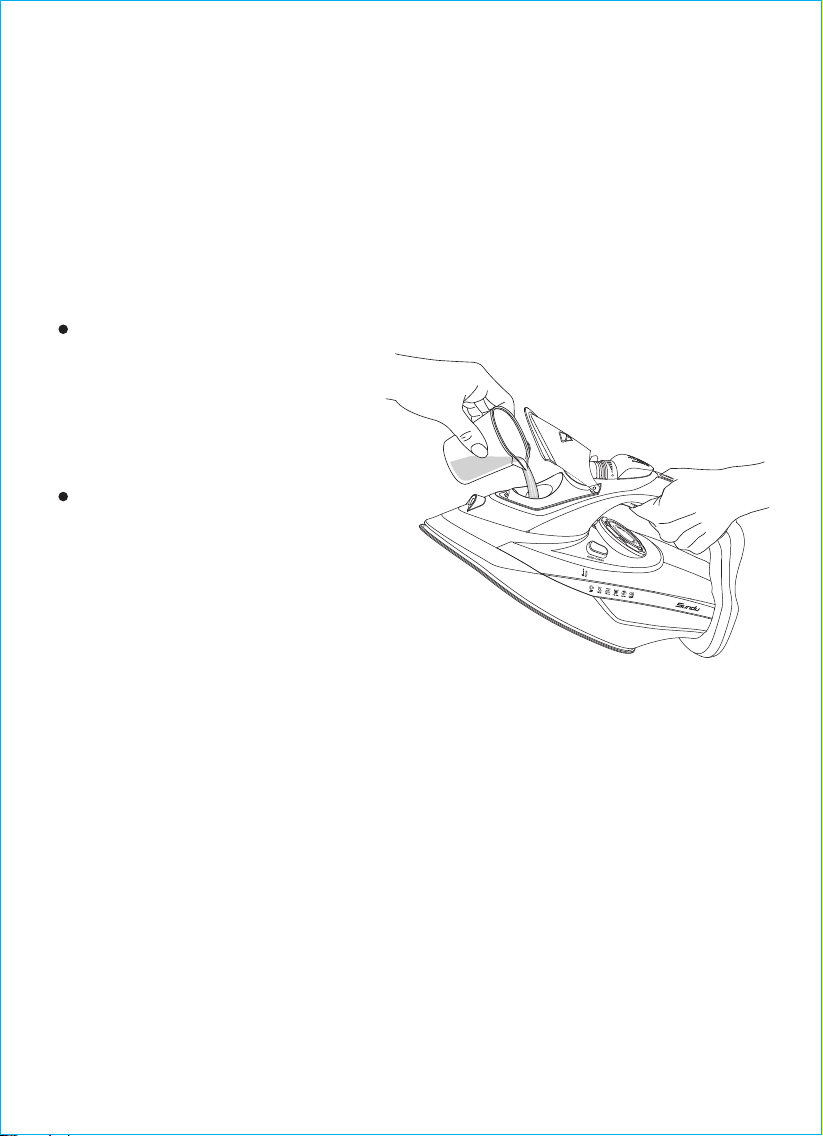
Fill the Water Tank
Before filling the water tank, make sure that the iron is unplugged, and
the “ Thermostat Dial ” is positioned at “ OFF ”, hold the steam iron in
horizontal position. Use the included water cup to fill the water tank until
it reaches Max Level.
Note:
This steam iron is designed to
use tap water, However, if the
water is very hard, it is
advisable to use distilled water.
The water tank should be
emptied after each use.
If you empty the water tank
after the steam iron has cooled
down, set the steam iron upright
position on its heel rest, plug it in
and set the temperature control
dial to the maximum position,
heat for 2 minutes. Unplug the
steam iron from the power
supply.
Set the steam control level to the minimum position.
Adjust the ironing temperature as per fabric’s requirement.
The Light “on” indicates that the iron’s temperature is increasing
steadily, once desired temperature is reached, the light will turn “off ”
automatically.
OPERATION INSTRUCTIONS
1.
2.
3.
Dry Ironing
If the steam iron has been used for a long time, it is hot and there is
no water. Do not refill it with water until the steam iron cools down.
Caution:
- 03 -
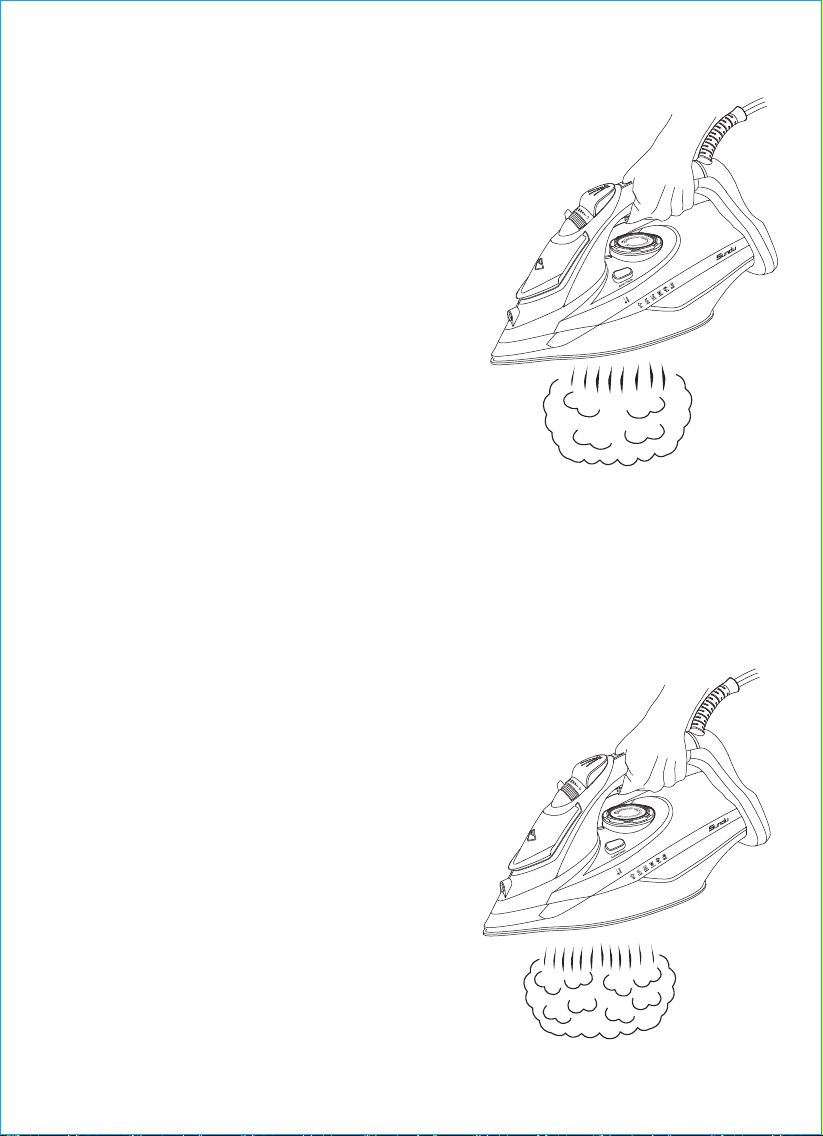
How to use the Steam Ironing?
The burst of steam feature provides
additional steam for removing stubborn
wrinkles.
Set the dial temperature to the “●/Synthetic”,
“●●/Silk-Wool” or “●●●/Linen-Cotton/Max”
position.
Set the steam control level to “0” (0=no
steam).
When pressing the burst of steam button,
steam will go out of the iron soleplate more
intensively. To achieve the best burst of
steam discharge, make sure that the
thermostat dial is set at the max level.
Note:
To avoid water leakage from steam openings, press the burst of steam
button with a 4s-5s interval. To avoid dripping, do not hold the burst of
steam button longer than 5 seconds.
Burst of Steam
Fill in the water with water tank as per
the instructions in the “Filling with Water”
Section.
Plug the cord into the outlet.
The red indicator light above the water
tank is always on.
Turn the temperature control to
“●/Synthetic”, “●●/Silk-Wool” or “●●●/
Linen-Cotton/Max” position.
The blue indicator light on the handle
turns on, which indicates that the iron's
temperature is in increasing steadily,
once the desired temperature is reached
the light will turn Off.
1.
2.
3.
4.
5.
- 04 -

Anti-Calc System
A special resin filter inside the water reservoir softens the water and
prevents scale build-up in the plate. The resin filter is permanent and
does not need replacing.
Note:
Use tap water only. Distilled and demineralized water makes the
“Zero-Calc”, anti-calc system ineffective by altering its physicochemical
characteristics.
Do not use chemical additives, scented substances or decalcifiers.
Failure to comply with the above-mentioned regulations leads to the loss
of guarantee.
Anti-Drip System
With the anti-drip system, you can perfectly iron even the most delicate
fabrics. Always iron these fabrics at low temperatures. The plate may
cool down to the point where no more steam comes out, but rather drops
of boiling water that can leave marks or stains. In these cases, the
Anti-drip system automatically activates to prevent vaporization, so that
you can iron the most delicate fabrics without risk of spoiling or staining
them.
Adjust the steam control level button from “0” to the “ ” position.
Turn right for more steam and left for less steam.
Press the powerful steam button to release the steam.
6.
7.
There is less or no steam when you set the thermostat dial at level
2(Wool).
To Prevent water leakage from the soleplate, do not keep the powerful
steam button pressed for more than 5 seconds.
Note:
- 05 -

Self-Cleaning
If the water in your area is hard (contains excessive dissolved mineral),
self-cleaning should be done every two weeks.
Your iron should be unplugged before self-cleaning using the steam
control level, set the steam level to “O” (O=No Steam).
Fill the water tank to the max level. Do not add any cleaning solutions
inside the water tank.
Before plugging in your iron, make sure that the thermostat dial is set to
“Max”. Now allow the iron to heat up.
The blue light turns off once the iron reaches its optimal working
temperature, turn the thermostat dial to Min and disconnect the iron from
the power line.
Firmly hold the iron over the sink and press/hold the self cleaning button
for several seconds.
Shake the iron back and forth while pressing the self-cleaning button.
Steam and boiling water will expel along with impurities and other
contaminants.
Note:
Avoid any contact with the iron during the cleaning process and firmly
hold it above the sink to prevent any burns.
Vertical Steam
By holding the iron in a vertical position, you can apply burst of steam
to remove creases from curtains or any type of hanging fabrics.
If the iron is left unused in upright position for 8 minutes, the red light
will flash signaling that the iron has automatically shut off.
If the iron is left flatwise unused for 30 seconds, the red light will flash
signaling that the iron has automatically shut off.
Move the iron back and forth on the fabrics to auto restart, the red
light will immediately stop flashing.
1.
2.
3.
Auto Shut Off
- 06 -

STORAGE
Unplug the appliance from the power supply, empty the water tank (do it
after each use) and allow steam iron to cool down completely.
Wrap the cord around the heel rest.
To protect the soleplate, place the steam iron in an upright position on its
heel rest.
Before switching it on check that voltage indicated on the rating label
corresponds to the main voltage in your home.
For home use only, Do not use for industrial purposes. Use the steam
iron only for its intended use.
Do not use it outdoor or in damp area.
Do not immerse the steam iron and cord in water or other liquids.
Never pull the cord while disconnecting from the power outlet;
instead, grasp the plug only and pull to disconnect.
Do not allow the cord to touch sharp edges and hot surfaces.
Always unplug the steam iron from the power supply when filling with
water or emptying and when not in use.
Do not operate the steam iron with damaged cord or plug, or after the
appliance malfunctions, or has been dropped or damaged in any
manner. To avoid risk of electric shock, do not disassemble the steam
iron, take it to a service center for examination, repair or mechanical
adjustment.
This appliance is not intended to use by persons (including children)
with reduced physical, sensory or mental capabilities or lack of
experience and knowledge, unless they have been given supervision
or instruction concerning use of the appliance by a person
responsible for their safety. Children should be supervised to ensure
that they do not play with the appliance.
Do not leave the iron unattended while hot or connected or on an
ironing board. If ironing is interrupted, stand iron on heel rest only, do
not place the steam iron on metal or rough surfaces.
1.
2.
3.
4.
5.
6.
7.
8.
9.
10.
PRODUCT CARE & USE
- 07 -

Note: To avoid circuit overload, do not operate another high wattage
appliance on the same circuit.
WARRANTY & CUSTOMER SUPPORT
For questions, support, or warranty claims, please contact our Sundu
support team with your product model number and order number.
Support and after-sale service: [email protected]
* Please note, can only provide after sales service for products
purchased directly from. If you have purchased from a different seller,
please contact them directly for service or warranty issues.
- 08 -