
DOGTRA SMART NOBARK
NOBARK COLLAR
Owner's Manual
Please read this manual thoroughly
before operating the DOGTRA SMART NOBARK.

2
IMPORTANT SAFETY AND PRODUCT
INFORMATION
WARNING
Please read all safety and product information below before using
your Dogtra product. Failure to follow these safety instructions
could result in injury to you, your dog and others, or it could result
in damage to your
Dogtra product or other property.DOG SAFETY
Proper Use
Dogtra products should be used to train, educate, monitor, or track dogs.
Each dog may have a different tolerance for and reaction to Dogtra
products. Closely observe your dog when determining the right level of
stimulation, collar fit, and other settings of your Dogtra product.
Training Methods
Dogtra products may be used with a variety of training methods that
provide clear and consistent messages to your dog.
Fit and Wear
Proper fit and wear of your Dogtra product is important for the comfort
of your dog as well as the functioning of your product. Dogtra collars
should fit comfortably and not too tightly, so that the collar stays in place
and does not move around your dog’s neck. Do not leave a collar on
your dog for an extended time. Although each dog is different, Dogtra
recommends that its collars be used a maximum of 4 to 6 hours at any
one time on your dog.
A collar that is used for overly long periods or that fits improperly may
cause skin irritation or sores on your dog’s neck. Regularly check the
collar's contact area on your dog’s skin. If your dog exhibits skin irritation
or sores, stop using the Dogtra product and consult with a veterinarian.
UNAUTHORIZED USE
Dogtra products should be used only in a safe and responsible manner to
train, educate, monitor, or track dogs. Dogtra products are not intended for
use in any other manner; they are not intended for use with other animals
or with humans; and they are not intended for use in unsafe situations or
environments that could lead to death, injury, loss or damage.

3
BATTERY
Your Dogtra product contains batteries. Do not attempt to replace the
battery yourself. Contact Dogtra or your Dogtra retailer to replace your
battery. Dispose of batteries as provided by your local regulations. Do
not disassemble, crush, heat, or otherwise alter the battery as it may
cause fire, explosion, injury and/or property damage.
OWNER SAFETY
Handling and Repair
Dogtra products can be damaged or malfunction if dropped, especially
on hard surfaces, or otherwise improperly handled. Do not use a
damaged or malfunctioning product as it may cause injury or property
damage. If your product is damaged or malfunctions, contact Dogtra to
obtain service before using the product.
Electrical Product
Your Dogtra product contains electrical components and batteries. Do
not use or keep your product near heat or flammable sources. Such use
or storage may damage your product and/or cause fire, explosion, injury,
or property damage.
Medical Device Interference
Dogtra products contain electrical and magnetic components that
emit low level electromagnetic waves and radio frequencies. These
electromagnetic waves or radio frequencies may interfere with
pacemakers, defibrillators, or other medical devices. Consult your
physician or medical device maker before using your medical device with
a Dogtra product. If you think that your Dogtra product is interfering with
your pacemaker, defibrillator, or other medical device, stop using the
Dogtra product.
Aggressive Dogs
Do not use Dogtra products with aggressive dogs as such dogs may react
adversely and cause injury to people or other dogs. Seek the assistance
of a dog-training specialist or veterinarian when dealing with aggressive
dogs.
Children
Dogtra products are not toys. Adult supervision and close attention are
necessary when Dogtra products are used by or near children.

4
PACKAGE CONTENTS
.....................................................
MAIN FEATURES
...............................................................
OVERVIEW
.........................................................................
HOW TO USE SMART NOBARK(COLLAR)
TURNING THE SMART NOBARK ON/OFF
........
MAIN DISPLAY
...........................................................
MODE CHANGE
..........................................................
INDICATOR LIGHT
......................................................
GETTING STARTED(WITH APP)
DOWNLOADING THE APP
.....................................
COLLAR SETUP GUIDE
.............................................
PAIRING THE COLLAR TO A PHONE
..................
PAIRING ADDITIONAL COLLAR TO A PHONE
..
KEY FEATURES OF SMART NOBARK APP
.......
COLLAR FITTING
..............................................................
CHARGING BATTERY
......................................................
MAINTENANCE
.................................................................
TROUBLESHOOTING GUIDE
.........................................
FCC/IC WARNING STATEMENT
....................................
DOGTRA EXTENDED PRODUCT WARRANTY
.......
CONTENTS
1.
2.
3.
4.
1.
2.
3.
3-1
4.
5
5
6
7
7
8
10
11
11
12
13
14
25
26
28
29
31
33
5
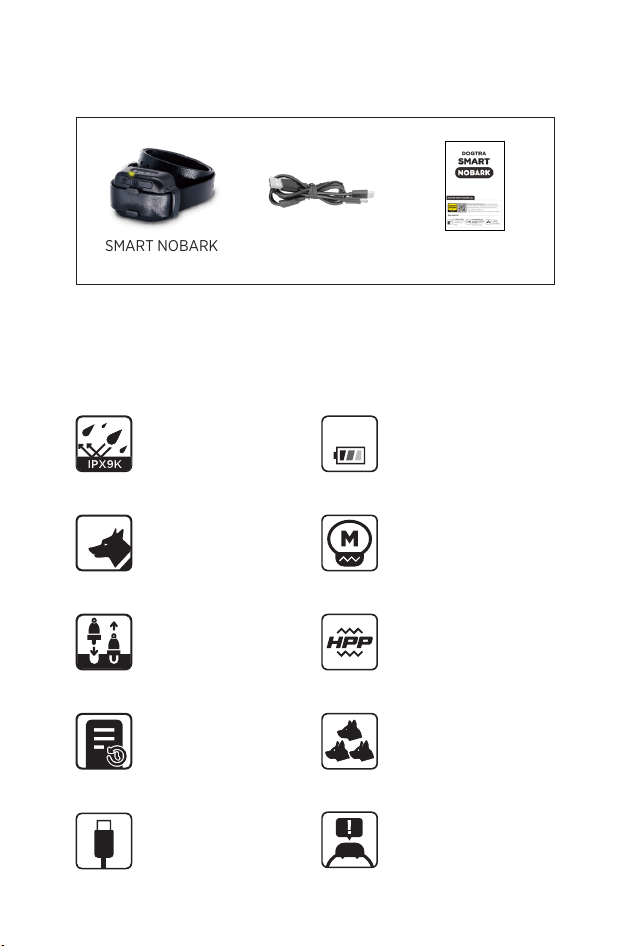
SMART NOBARK
Collar
USB A to C
Cable
Quick-start
Manual
PACKAGE CONTENTS
MAIN FEATURES
Removable Contact
Points
High Performance
Pager
For Dogs as
Small as 10 lbs
Medium Output in
100 Intensity Levels
10 lbs
IPX9K
Waterproof
Certified
2-Hour Rapid
Charge Batteries
2
hr
Ξ
Expandable
3-Dog system
Barkmeter
behavior report
Customize Detection
Sensitivity
USB C-type
Charging Cable
6
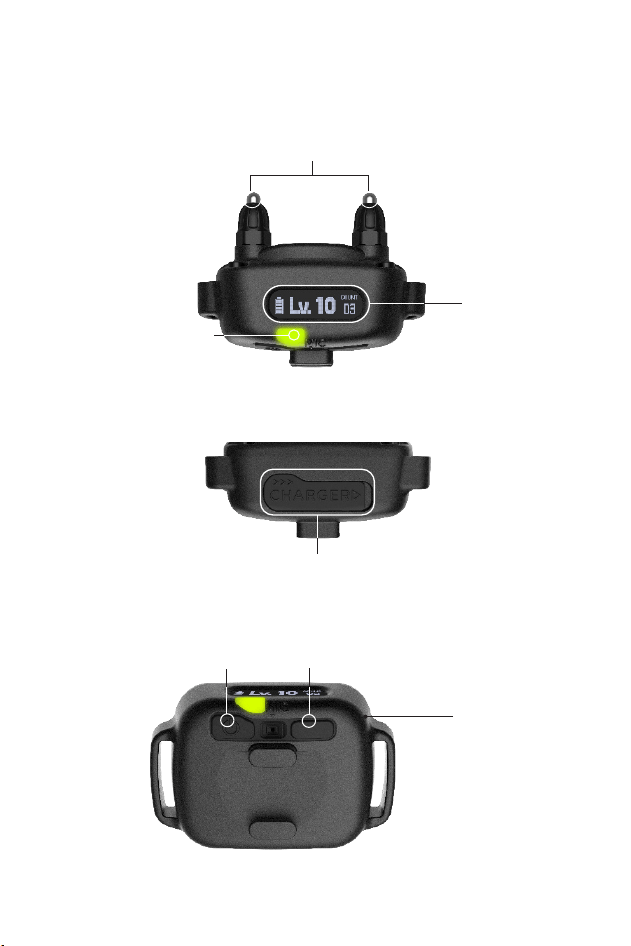
OVERVIEW
On/Off Button
Mode Select Button
IPX9K
Certified
Waterproof
USB-C Charging
Display
Removable Contact
Points
Indicator Light
7
1. Turning the SMART NOBARK ON/OFF
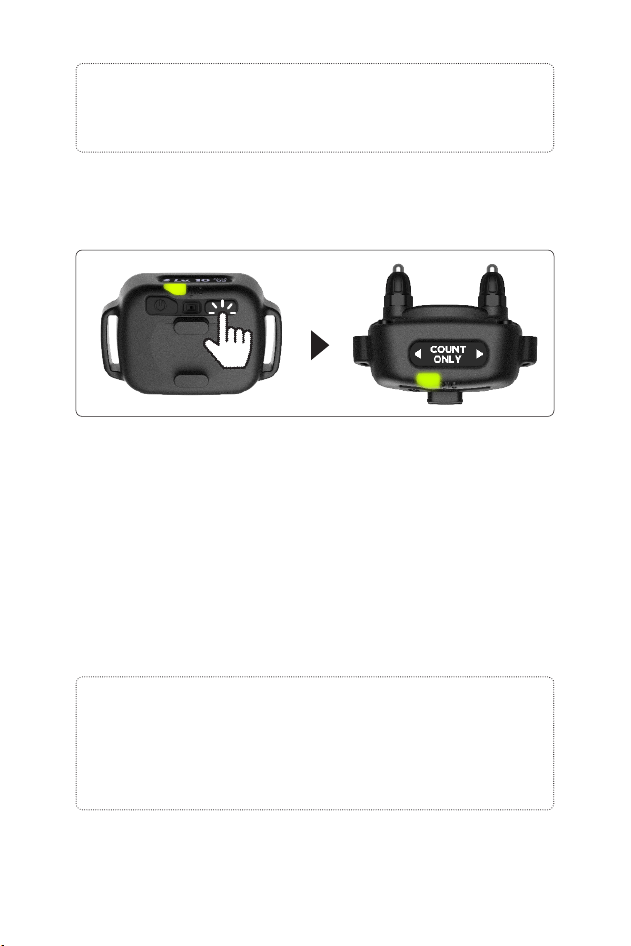
When the product is turned on, the Display views
in the Setting screen. The main display shows three
information: battery life, current NOBARK mode, and
total count. This information can also be viewed in the
app when synced with a smartphone.
Battery
NOBARK mode
Power on
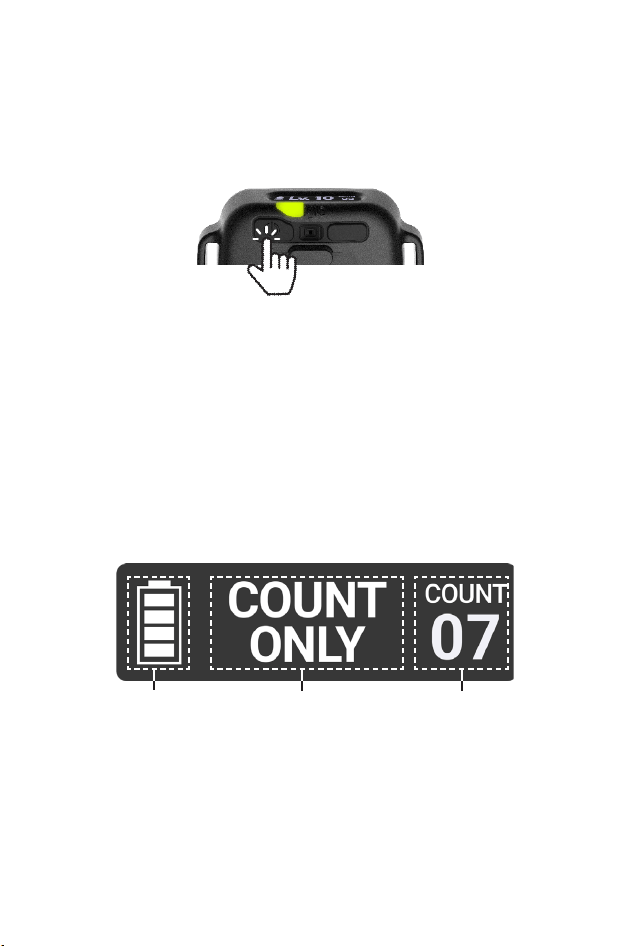
Press and hold on/off button to turn on the collar.
Dogtra logo will show up on the display.
Power off
Press and hold on/off button to turn off the collar. As
the collar turns off remaining battery will show on the
display.
2. Main Display
HOW TO USE SMART NOBARK
Total count
(Bark+Whine&howl)
8
Note: If no buttons are pressed for 15 seconds, the display
turns off to save battery. If any button is pressed, the
display turns on again.
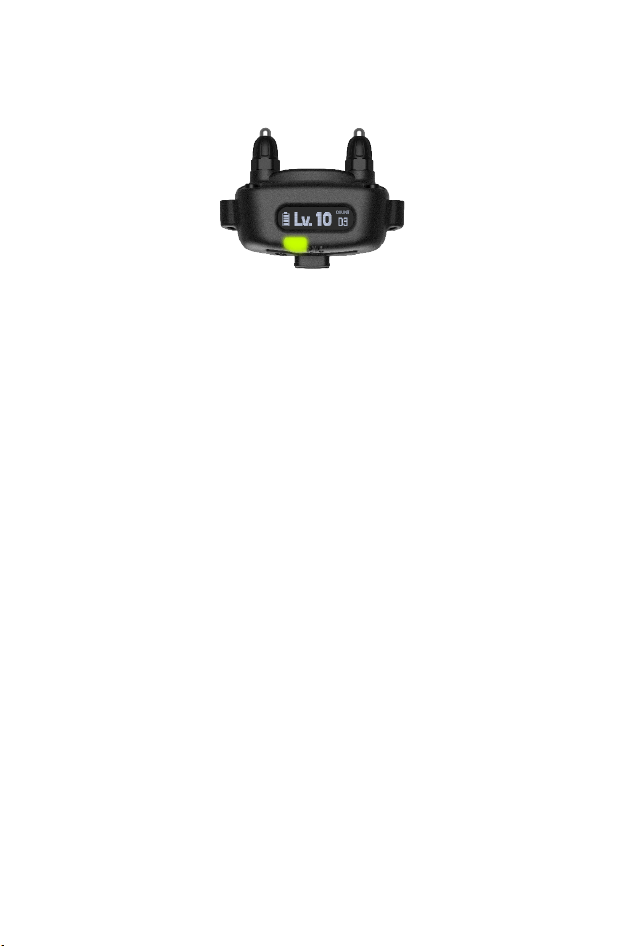
3. Mode change
1) Press and hold the mode select button (right button)
to enter the mode select.
2) Use the left and right buttons to change mode.
3) Stay in the selected mode for 5 seconds; the display
will blink and then return to the main display,
indicating the change is complete.
The no-bark collar feature operates independently of
app connectivity.
Note: When first using the SMART NOBARK Collar, it is
recommended to start at the lowest stimulation level.
If your dog continues to bark, gradually increase the
stimulation level. Closely monitor your dog’s reaction to
find the right stimulation level for your dog.

9
Count Only
- Counts dog’s vocalization without any stimulation.
PAGER - HPP (High Performance Pager) Vibration
- The SMART NOBARK will vibrate twice when your
dog barks.
Auto Increase
- Automatically adjusts the level of stimulation based
on barking frequency. This mode can be used by
setting the stimulation level within a certain range in
the app, so it is recommended to use it by pairing with
the app. For detailed explanation of Auto Increase
mode, please refer to 3-3 mode selection in GETTING
STARTED.
Level 1~10
- The SMART NOBARK has stimulation levels 1 (lowest)
through 10(highest). Each stimulation level begins
with vibrate once followed by the stimulation
.
* There is a 15 second safety delay between the
vibration on PAGER and the stimulation on Auto
Increase, levels 1-10 mode.
* Vibration on the device when setting the ‘Set Level’
or ‘Auto Increase modes’ can be disabled on the app.
On ‘Setting’ page, Stimulation Mode Select Set Level
or Auto Increase Switch off ‘Vibrate warning before
each stimulation’
10
Turning On
When SMART NOBARK is turned on, the indicator will
emit a green light for 2 seconds and then blink every 4
seconds.
Stimulation occurs
1) Light on when stimulates triggered by Bark or
Whining & Howling
2) When the Constant stimulation is commanded in
training tab in the app, the Green light fast blinking
Battery status
The indicator light blinks green when the battery is fully
charged and turns amber when battery life is low. If the
light blinks red, the battery needs to be recharged.
4. INDICATOR LIGHT
11
To download the app:
1) Go to the Apple app store or Google play store on
your phone.
2) Search for "DOGTRA SMART NOBARK" app.
3) Download the app on your phone
The app is currently compatible with:
1) iPhone 8 or newer
2) Android version 8 or newer
Compatibilities are subject to change.
*DOGTRA SMART NOBARK app and screenshot
images are subject to change as Dogtra continues to
update the software.
1. DOWNLOADING THE DOGTRA SMART NOBARK
GETTING STARTED(WITH APP)
DOGTRA SMART NOBARK
To ensure the device performs accurately, we provide
guidance on how to wear the collar, adjust the
sensitivity, and configure the mode after connecting
the collar.
For more information:
On ‘More’ page, Select Collar( )
→
Collar Setup Guide
2. COLLAR SETUP GUIDE
12
3. PAIRING THE COLLAR TO A PHONE
The DOGTRA SMART NOBARK Collar connects a
smartphone and collar. Up to three collars can be
paired at the same time.
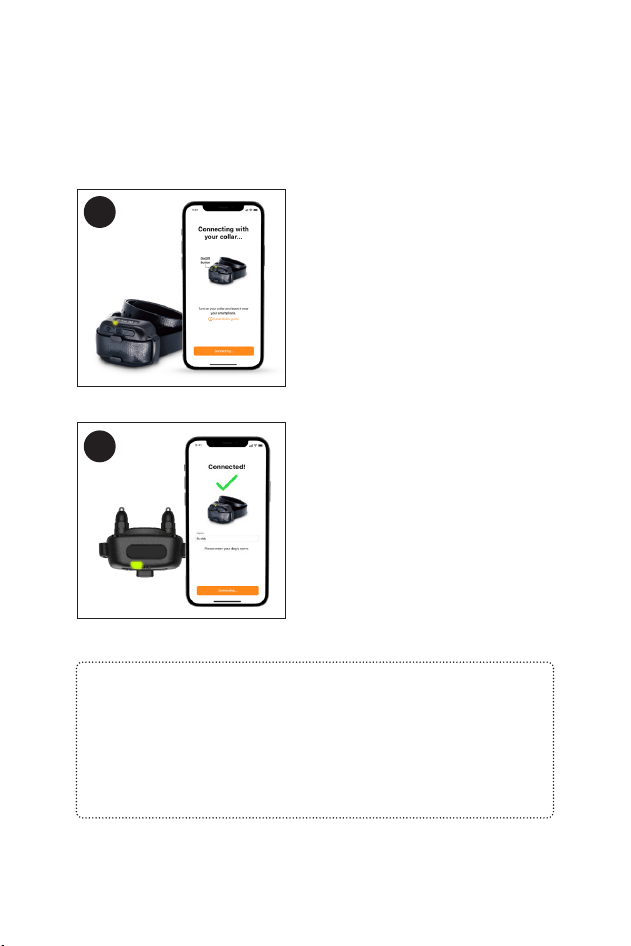
1
Make sure the DOGTRA
SMART NOBARK app has
been downloaded on your
phone. Place the Collar close
to your phone.
Once connected successfully,
the app will show a
connection completed
message on the screen and
on the collar.
2
App Connect
If smartphone cannot connect with collar, check the
following:
- Maintain a distance of within 30 yard from the smartphone.
- Check if the collar is on.
- Check if the collar is already connected to another smart
device.
13
3-1. PAIRING ADDITIONAL COLLAR TO A PHONE
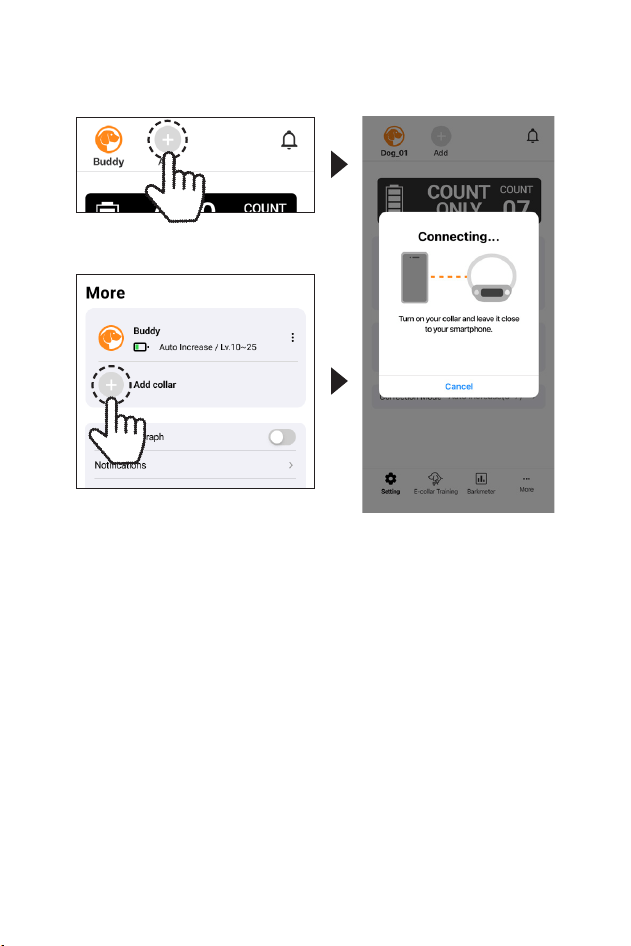
Press ‘Add’ button on header. once the pairing pop-
up shows on the app. or go to More tab and press ‘Add
Device’. Up to 3 collars can be registered.
14
A) SETTING page
4. KEY FEATURES OF SMART NOBARK APP
Main menu bar
Device
View
Sensor
Sensitivity
Detecting
Barking
Types
Correction
mode
Header
2
3
4
5
1
15
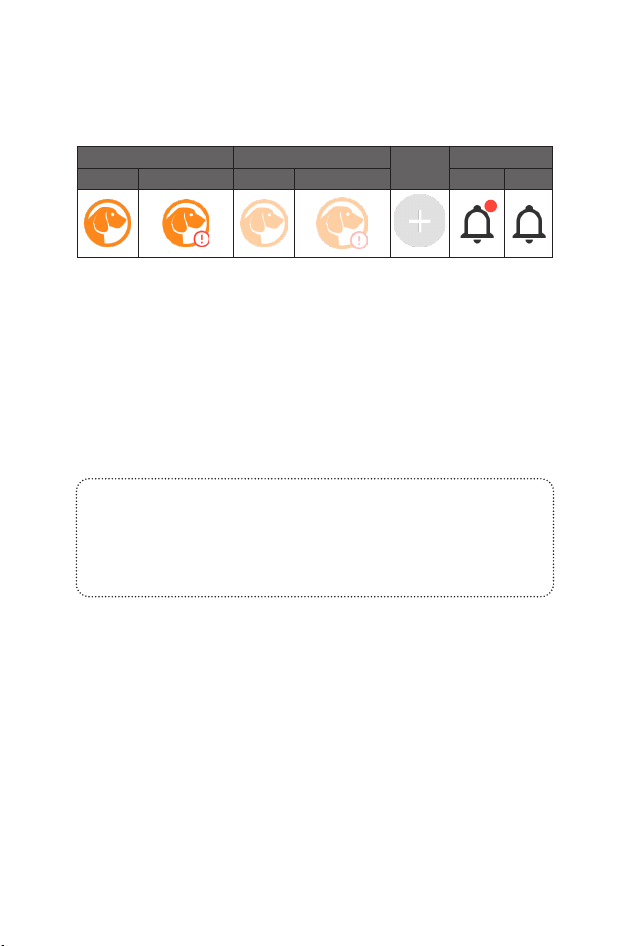
Selected dog Unselected dog
Add
Notification
Connected App Out of Range Connected App Out of Range
Unread Read
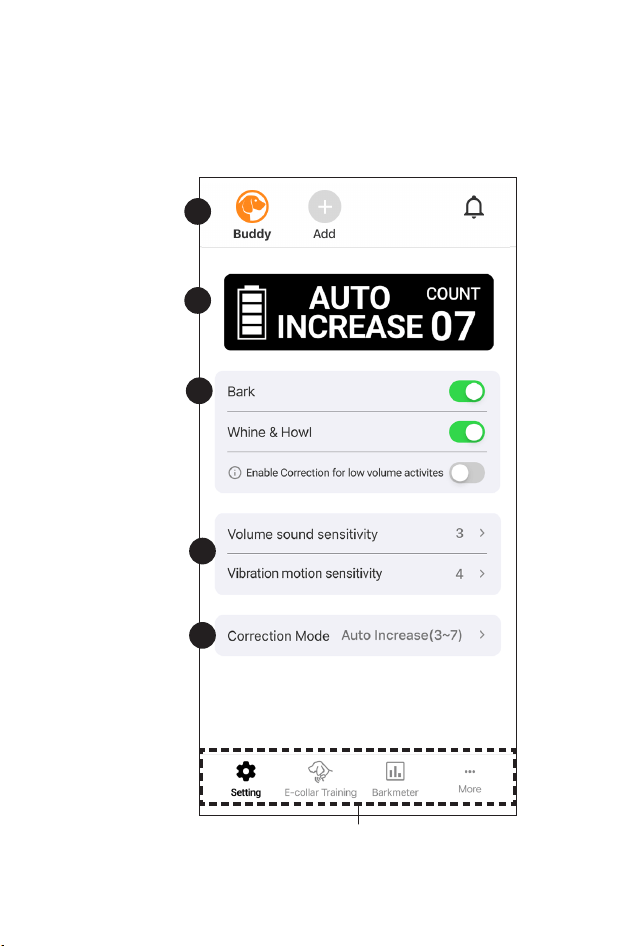
1) HEADER
Indicates the currently added collar and whether or not
there is a new notification.
2) DEVICE VIEW
Indicates the collar’s current battery, setting mode, and
counts.
The count is the sum of Bark and Whine&Howl.
3) DETECTING BARKING TYPES
Select which bark types to count. Multiple selections
are possible, but you must select at least one.
4) SENSOR SENSITIVITY
Set the vocalizations you want to count and the
detection sensitivity. (More detail on next page)
5) CORRECTION MODE
Set the modes and stimulation levels. (More detail on
next page)
Notes: Enable Correction for low volume activites
Detects even the low volume barking and whining/
howling to activate stimulation. (When turned off, it
won’t detect or activate on low tones.)
16
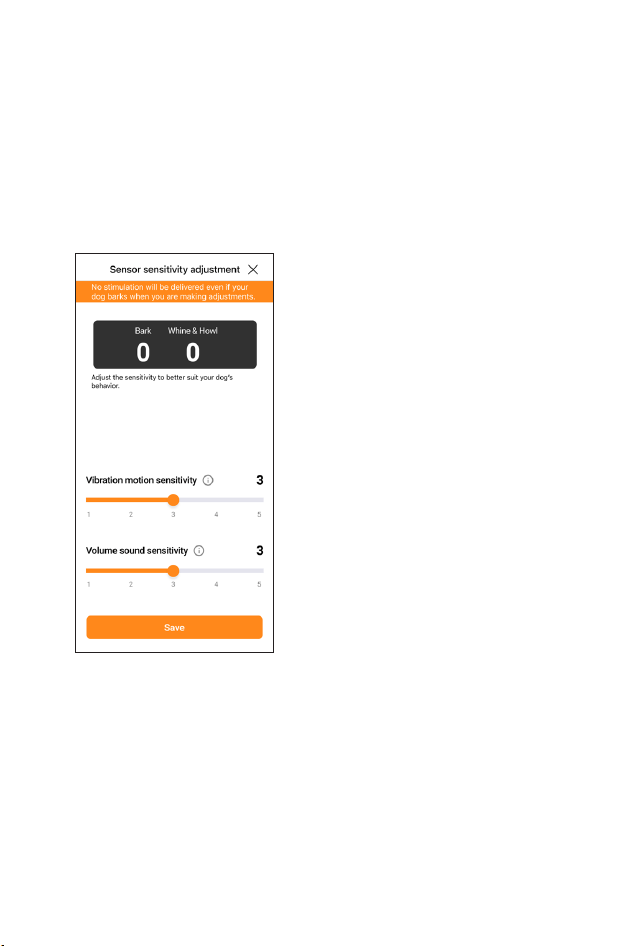
4-1) SENSOR SENSITIVITY page
Click ‘Sensor Sensitivity’ section’ on the Setting page
to adjust the sensitivity to better suit your dog’s vocal
activity type.
* While on this page, the collar will switch to Count
Only mode, and won’t apply any correction for safety
reasons.
Vocal cord vibrations
sensitivity
Adjust the sensitivity for
detecting vocal cord vibrations
when your dog barks. Higher
settings increase detection
accuracy. For smaller dogs,
higher sensitivity may be
beneficial.
Bark Volume Sensitivity
Adjust the sensitivity for
detecting your dog’s bark
volume. Higher sensitivity
improves detection of quieter
barks. Increase microphone
sensitivity if your dog’s bark is
soft.
* The counts at the top of the screen are for reference
purpose only while adjusting the sensitivity. These
counts are not included in the totals shown on the
Setting tab or the Barkmeter tab.
17
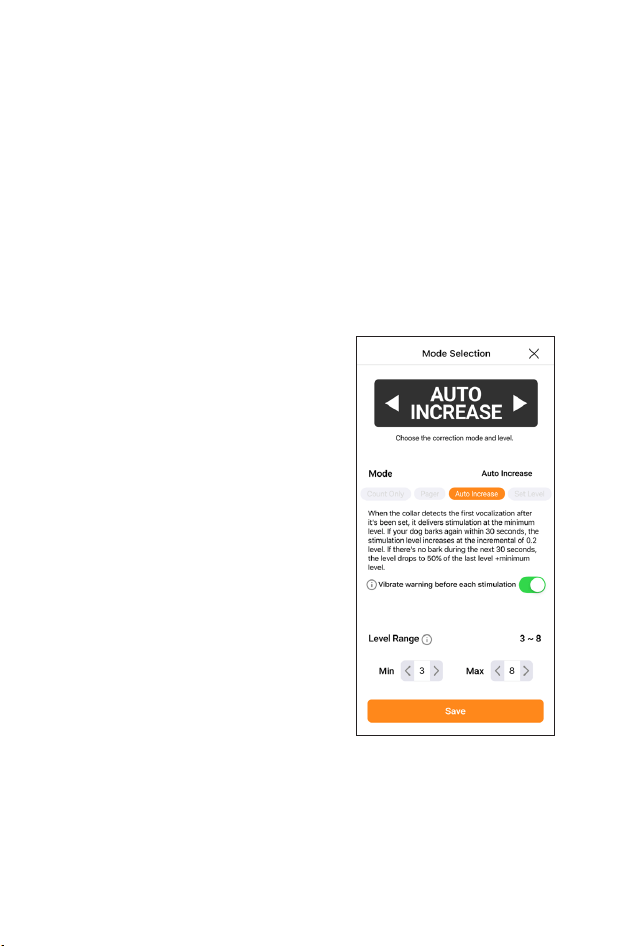
5-1) CORRECTION MODE page
Select the type of correction to apply when a behavior
is detected. If you’ve already set a mode on the collar,
the app will display the corresponding mode.
Count Only
Counts dog’s vocalization without any stimulation.
Pager Vibration
Vibrates when a dog’s vocalization is detected.
Auto Increase
The collar automatically
adjusts the stimulation level,
starting from the lowest
setting. It increases gradually
until barking slows down and
decreases as your dog stays
quiet.
After each stimulation, there’s
a 15-second safety pause.
If your dog barks again
soon after, the level slightly
increases (by 0.2 levels); if they
stay quiet, it lowers to about
half of the previous level.
Set Level
→
See next page
18
Set Level
You can set the fixed stimulation level between 1
(lowest) and 10 (highest). After each stimulation, there
is a 15-second safety period with no further correction.
* Each correction starts with a vibration, followed
by stimulation in both “Auto Increase” and “Set
Level” modes. This gives your dog a warning before
stimulation occurs, and helps them learn to respond to
Pager Vibration alone over time.
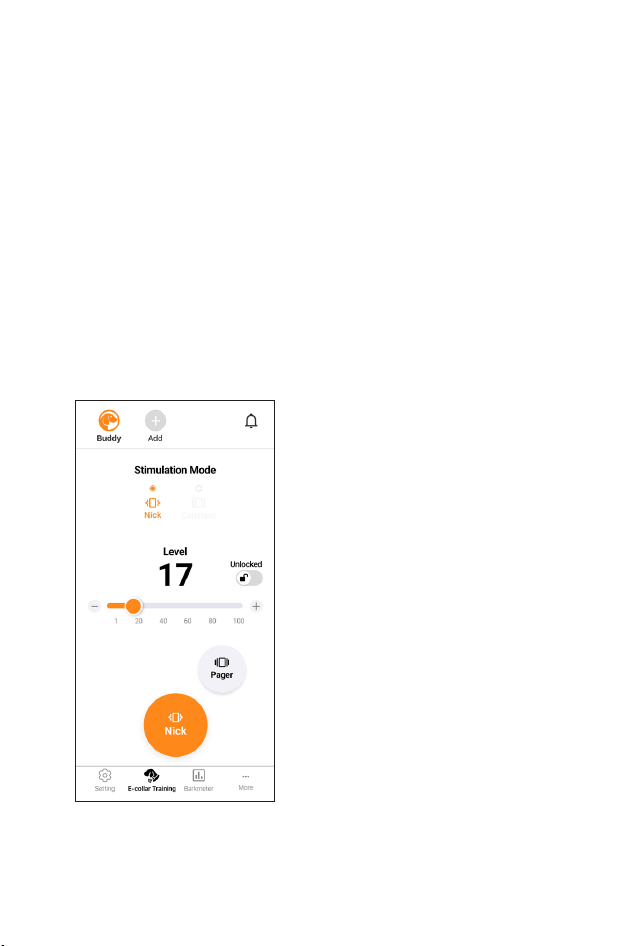
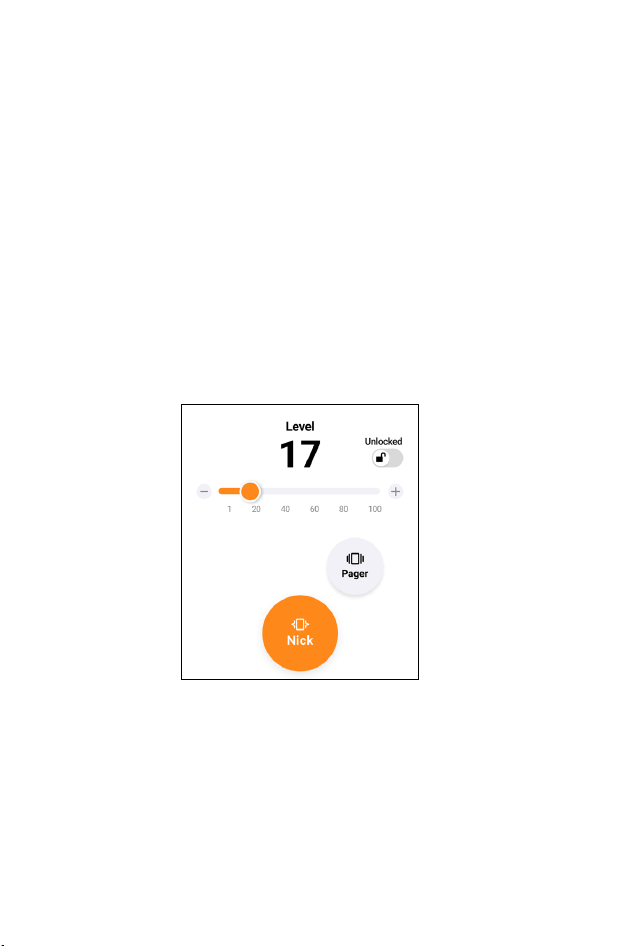
B) E-COLLAR TRAINING
How to Use
1) Select the collar from the
top header section.
2) Select the stimulation mode
and level per collar.
Stimulation mode
Nick delivers a single
quick pulse of stimulation.
Constant provides continuous
stimulation while the button is
pressed, for up to 12 seconds.
Level
Slider bar controls the
stimulation level, with a
maximum output at level 100.
19
Level lock
Lock/unlock the stimulation level to prevent accidental
changes by pressing and holding the button on the
slider bar.
Pager
Press Pager to emit the Pager vibration as long as the
button is pressed, up to 12 seconds.
• Always start at the lowest level of stimulation and
work your way up.
• The appropriate level can be found when your dog
responds to the stimulation with a mild reaction, such
as a tensing of the neck muscles.
FINDING THE RIGHT STIMULATION
20
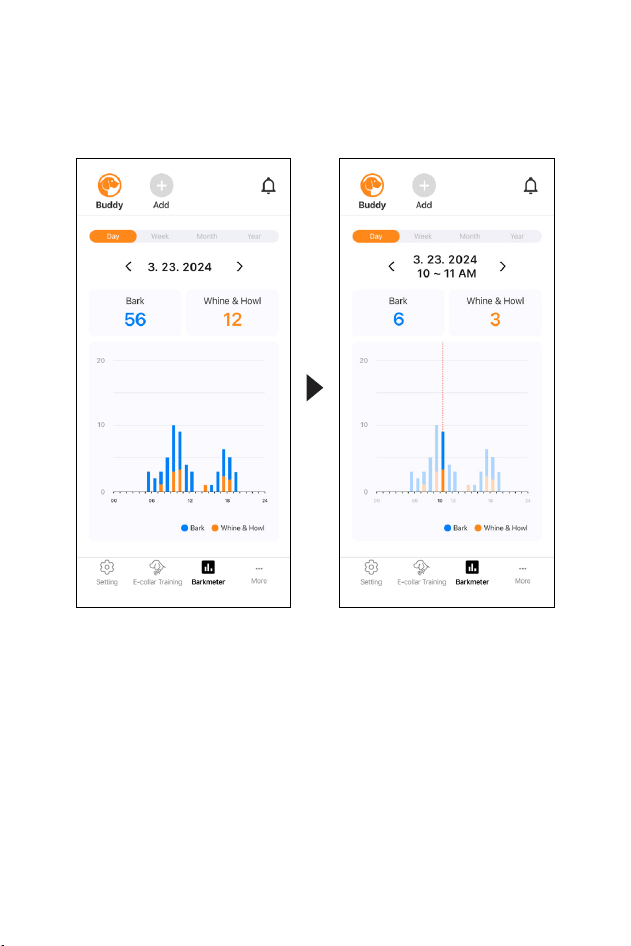
C) BARKMETER
Day tab shows the hourly counts for a day.
Week, Month, Year tab shows the average daily count
for that period, and you can see detailed information
by pressing each graph bar.
Select the category that the graph represents and
select a specific period left and right to compare the
average counts for that period with the call over the
period by checking the graph for the detailed period.
Counts by the collar are categorized and displayed by
period on a chart.
21
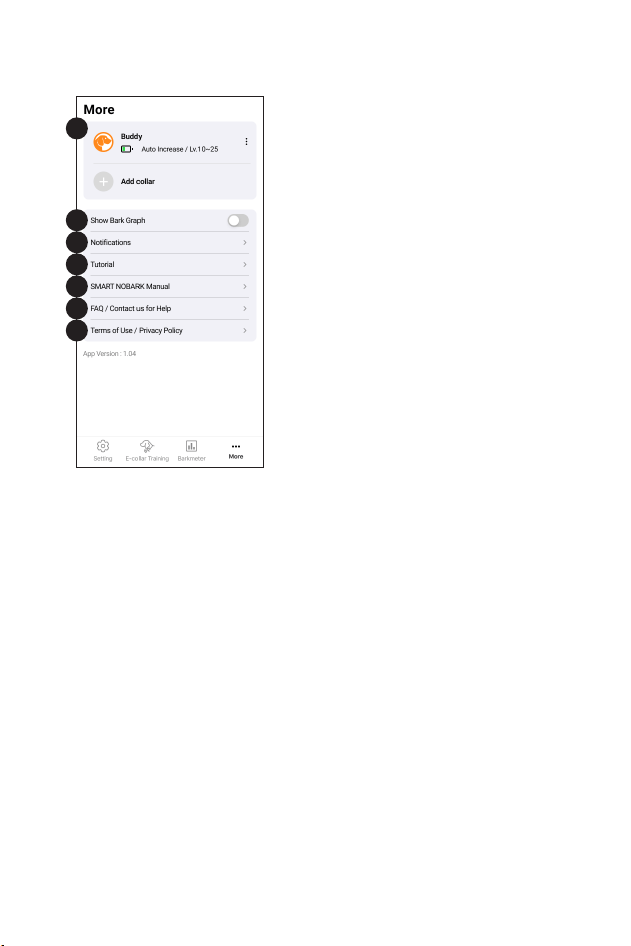
D) MORE
1) Collar List
Shows the status of added
collars and allows you to delete
them or edit their name/color.
(More detail on next page)
2) Show bark meter
When enabled, a Bark Graph
is displayed at the top of the
screen.
3) Notifications
Shows the notification history
for connected collars. (More
detail on next page)
4) Tutorial
Describes basic contents.
1. Initial setup describes Collar and pairing.
2. Main function will describe each tab.
5) SMART NOBARK Manual
Find step-by-step instructions to set up, connect, and
optimize your experience with the Dogtra SMART
NOBARK.
6) FAQ / Contact us
Find solutions to issues you may be experiencing with
your collar.
7) Terms of Use/Privacy Policy
Check Terms of Use and Privacy Policy before using the
app.
2
1
3
4
5
6
7
22
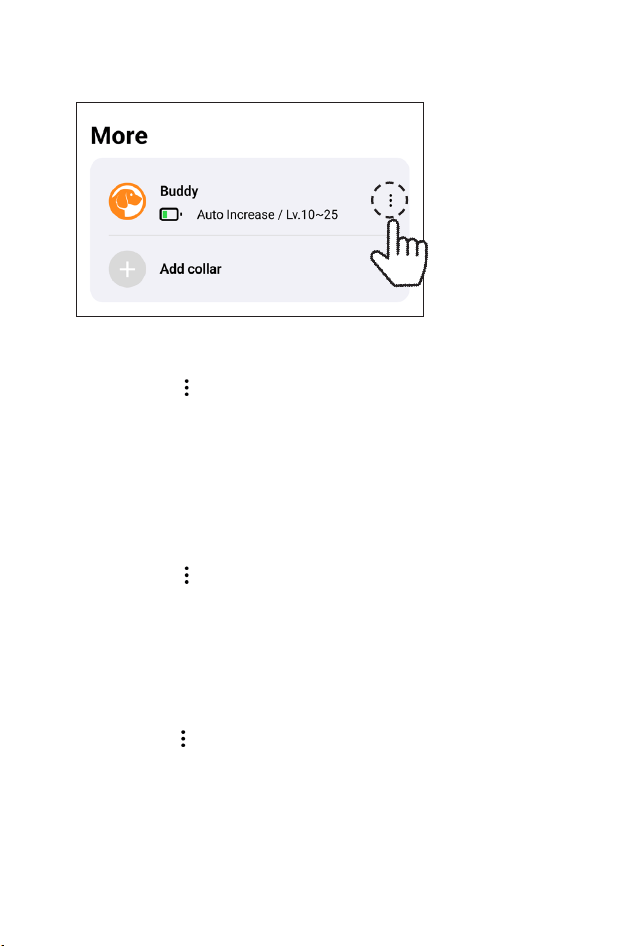
EDIT COLLAR NAME& COLOR
1) Press the button in More tab
2) Select the ‘Edit Name & color’
- If you set a different color for each dog, when you
select a dog in the app, the button will change to that
color, making it easier to distinguish between dogs.
DELETE COLLAR IN APP
1) Press the button in More tab
2) Select the ‘Delete collar’
- Please note that if you delete the collar, the collar’s
count data saved in the app will also delete.
COLLAR SETUP GUIDE
1) Press the button in More tab
2) Select the ‘Collar Setup Guide’
- For accurate measurement, this guide provides
instructions on how to wear the collar, set the
sensitivity, and configure the mode.
1-1) COLLAR LIST
23
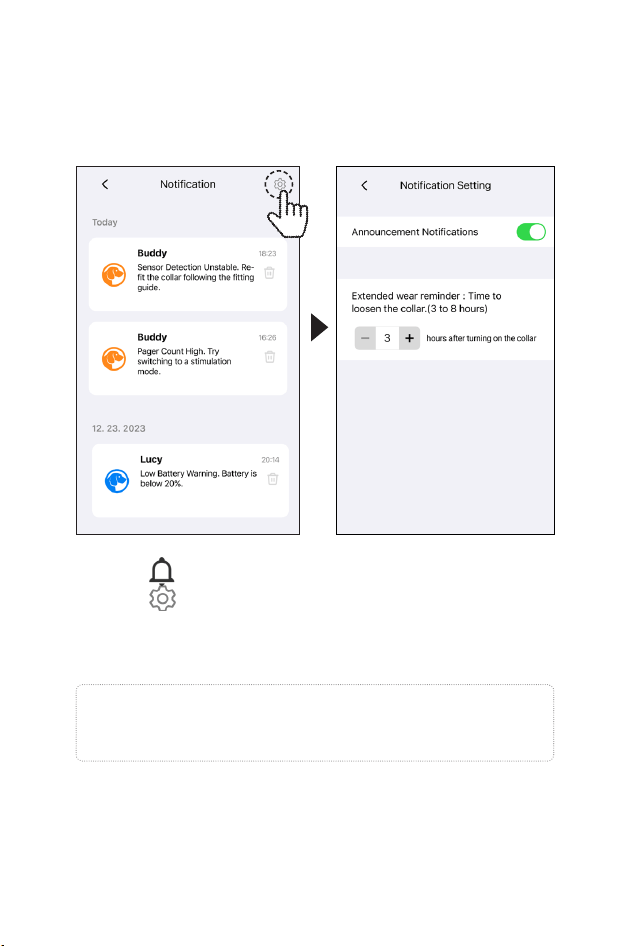
3-1) NOTIFICATION
1) Press in Header or Notifications in More tab.
2) Press button in the upper right corner in the
Notification page, you can turn on/off conditions
that trigger notifications.
Note
These settings are applied equally to all registered collars.
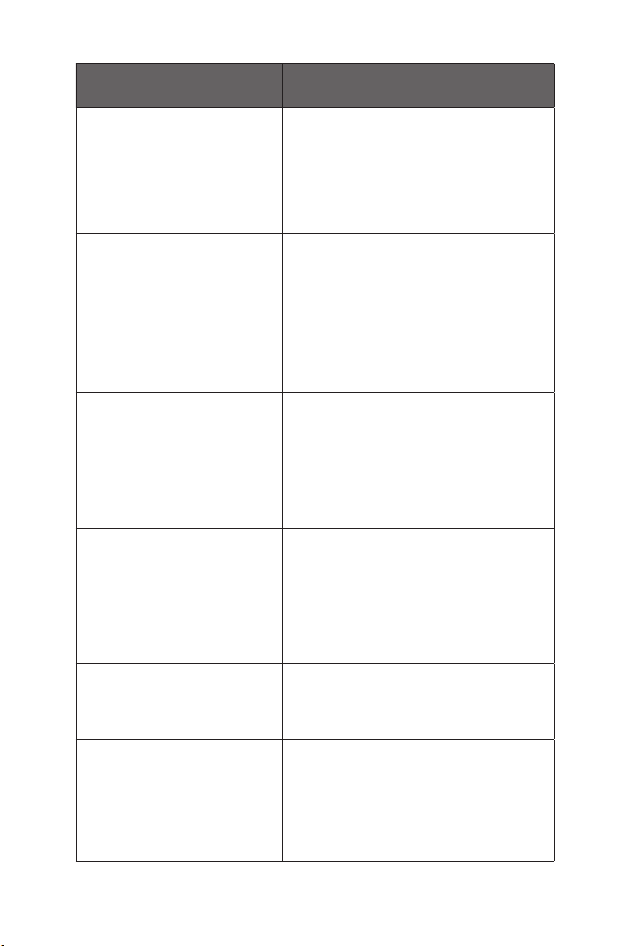
Notifies you of the specific status of the collar to ensure
your dog’s safety and proper use of the product.
24
Status/Message Action/Tip
Unstable Sensor /
“Sensor Detection
Unstable. Re-fit the collar
following the fitting
guide.”
Immediately re-fit the collar on your
dog’s neck. A poor fit can lead to
inconsistent or ineffective correction
Consistent barking while
on ‘Set Level’ mode /
“Stimulation Count High.
Consider increasing the
Set Level.”
On ‘Setting’ page, click the
‘Correction Mode’ module, then
on the Set Level page, to change
the correction stimulation level. Or
change the level on the collar, using
the Mode Select button.
Consistent barking while
on ‘Auto Increase’ mode /
“Stimulation Count High.
Consider increasing the
Max Level.”
On ‘Setting’ page, click the
‘Correction Mode’ module, then on
the ‘Auto Increase’ page, to change
the “Max” number of the ‘Level
Range’.
Consistent barking while
on ‘Pager’ mode /
“Pager Count High. Try
switching to a stimulation
mode.”
Try other correction types on the
‘Correction Mode’ page.
“Low Battery Warning.
Battery is below 20%.”
Charge the collar immediately.
“Safety Alert. Your collar
has been running for over
6 hours. Consider taking it
off and charging it now.”
This is an extended wear reminder.
Take the collar off your dog to
prevent skin irritation. Ensure the
device is fully charged for next use.
25
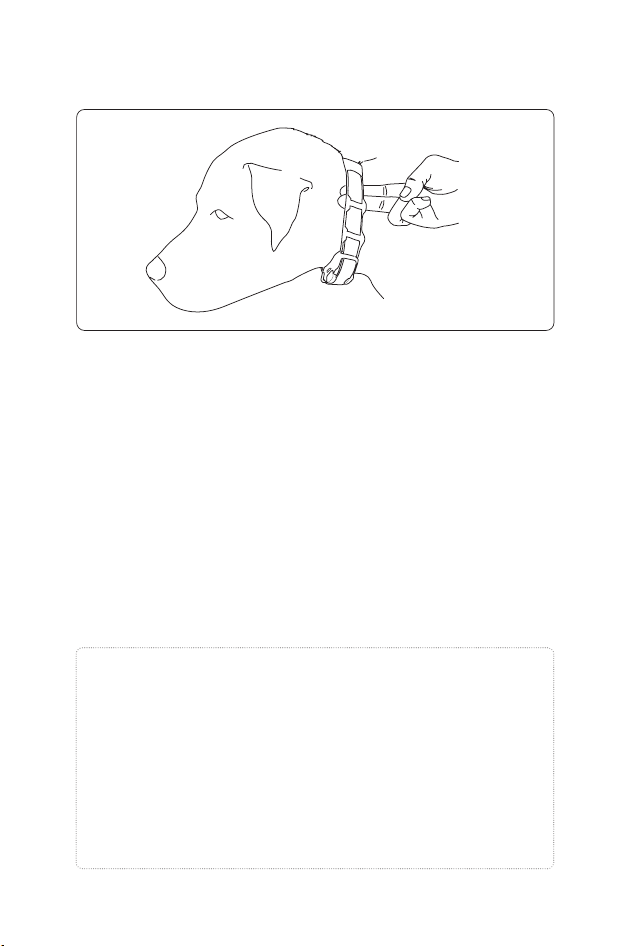
Proper Fit
Fit the collar on either side of the dog’s windpipe so
that the contact points press firmly against the dog’s
skin. You should be able to fit two fingers underneath
the collar strap.
Improper Fit
A loose fit can allow the collar to move around on the
dog’s neck and cause irritation. If the collar is too loose,
the contact will be inconsistent and cause inconsistent
stimulation.
COLLAR FITTING
Attention!
While Dogtra uses medical grade stainless steel contact
points and anti-microbial plastic to protect the dog’s skin,
leaving the collar in the same location for an extended
period of time can cause skin irritation due to the
sensitivity from the contact points. Reposition the collar
every few hours to move the contact points and remove
the collar after 6 hours of use. Check for skin irritation
each time you use the unit.
26
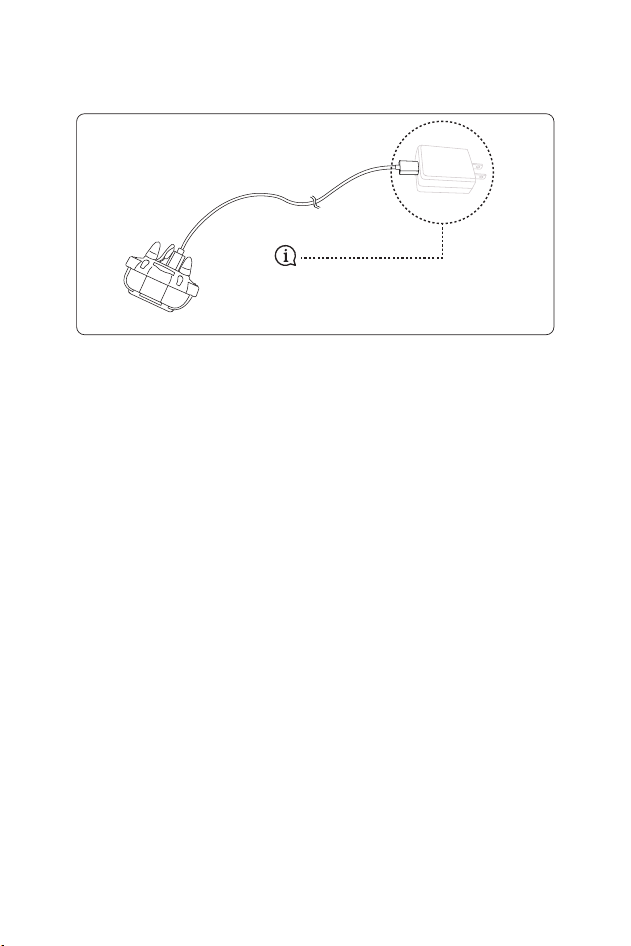
Power adapters are not
included.
CHARGING THE BATTERY
The Dogtra SMART NOBARK uses a lithium polymer
battery. Recharge the unit if the indicator light is red or
does not come on or the system will not stay on when
any button is pressed.
NOTE 1: Only use Dogtra-approved batteries, chargers,
and accessories for your Dogtra E-collars. This will
prevent any damage that can be incurred from
attempting to use a different charger.
NOTE 2: The unit has a partial charge when it leaves
the Dogtra facility. Upon receipt of the system, be sure
to give it a full 2-hour initial charge before the first use
away from any flammable substances.
NOTE 3: When a charger is not in use, disconnect it
from the power source. Fully charge the batteries if the
unit is to be stored without use for a period of 3 months
or more.

27
Recharging is required when:
- The Indicator light on the collar is red
- The Indicator light on the collar is not illuminated
- Only one battery status bar remains on the collar
Display
- The collar does not work when the button is pressed
Constant stimulation in Training tab(App)
Follow the steps below to charge your system:
1. Open the rubber plug on the battery charging
receptacle and plug in the charging cable.
2. Plug the charger into a 120-volt wall outlet or, if using
the auto charger, plug into a cigarette lighter only for
lithium polymer batteries (use a 220 volt European
charger for Europe). All indicator lights should glow red
when properly plugged in and the unit will automatically
shut off during the charging process. You will need to
turn the unit on again before use once the unit is fully
charged and unplugged from the battery cable.
3. The lithium polymer battery is fully charged within
2 hours. The lights will stay red during the charging
process and turn green once the unit is fully charged.
4. After charging, cover the battery charging receptacle
with the rubber plug.

28
MAINTENANCE
Basic Maintenance
Make sure the rubber charging cap is securely in place when
the collar is in use. After each training session, carefully
inspect the unit for any missing parts or damage to the
casing. Damaged or broken casing may affect the waterproof
guarantee on the unit. After confirming that there is no
damage to the casing, rinse the collar and clean out any dirt
or debris.
Storage Maintenance
The SMART NOBARK should be fully charged before storing
for extended periods. While in storage, the unit should be
given a full charge once a month and before the first use.
Store the units in room temperature. Do not keep the units
exposed to extreme climates.
Troubleshooting
If the unit is malfunctioning, please refer to the
“Troubleshooting Guide” before sending it to Dogtra for
service. If you have any questions or concerns, you may email
them to info@dogtra.com, or call customer service at (888)
811-9111.

29
1. My dog is not reacting to the collar.
–
Make sure the collar is turned on.
–
Make sure the strap is on the dog tight enough so that both
contact points are touching the dog’s skin.
–
The contact points may be too short for the dog.
To place an order for longer contact points that are more
appropriate for your dog, please call (888) 811- 9111. If you
are already using the longest contact points available, you
might need to trim down the hair on the dog’s neck so both
contact points are touching the dog’s skin.
–
The intensity level may be too low for your dog. Keep
increasing the stimulation until the dog responds, usually
with neck movement, head shaking, looking over its
shoulder, etc. (response may be very subtle).
2. My Collar is not holding a charge.
– The batteries might not be charged properly, or the
charger, splitter, and the charging port may not be
functioning properly. You can send in your charging
units to have us inspect them.
– The charging pin may be damaged. Inside the
charging port, there is a metal pin that should be
standing straight up and stiff. If the pin is wobbling,
broken, or missing, you will need to send the unit in
to the Repair Department. The charging port must
be clean prior to charging; clean the dirt out with a
cotton swab and some rubbing alcohol. If the dog is in
saltwater, be sure to rinse the collar and charging port
with clean water.
– If the above does not resolve your issues, contact
Dogtra customer service at info@dogtra.com or
(888) 811-9111.
TROUBLESHOOTING GUIDE

30
3. My dog has skin irritation.
- Leaving the collar in the same location on the
dog’s neck for an extended period of time can cause skin
irritation. If the dog is to wear the collar for long periods,
occasionally reposition the collar so that the contact points
are moved to a different location on the dog’s neck. Make
sure you check for skin irritation each time you use the unit.

31
PART 15.19
This device complies with part 15 of the FCC Rules. Operation is subject to
the following two conditions:
(1) This device may not cause harmful interference, and
(2) this device must accept any interference received, including
interference that may cause undesired operation.
PART 15.21
Any changes or modifications (including the antennas) to this device
that are not expressly approved by the manufacturer may void the user’s
authority to operate the equipment under FCC rules.
PART 15.105
Note: This equipment complies with the limits for a Class B digital device,
pursuant to part 15 of the FCC Rules. These limits are designed to provide
reasonable protection against harmful interference in a residential
installation. This equipment generates, uses and can radiate radio
frequency energy and, if not installed and used in accordance with the
instructions, may cause harmful interference to radio communications.
However, there is no guarantee that interference will not occur in a
particular installation. If this equipment does cause harmful interference
to radio or television reception, which can be determined by turning
the equipment off and on, the user is encouraged to try to correct the
interference by one or more of the following measures:
- Reorient or relocate the receiving antenna.
- Increase the separation between the equipment and collar.
- Connect the equipment into an outlet on a circuit different from that to
which the collar is connected.
- Consult the dealer or an experienced radio/TV technician for help.
This device contains licence-exempt transmitter(s)/collar(s) that comply
with Innovation, Science and Economic Development Canada’s licence-
exempt RSS(s). Operation is subject to the following two conditions:
(1) This device may not cause interference.
(2) This device must accept any interference, including interference
that may cause undesired operation of the device.
FCC and IC RF Radiation Exposure Statement: This equipment complies
with FCC and IC RF Radiation exposure limits set forth for an uncontrolled
environment.
This device and its antenna must not be co-located or operating in
conjunction with any other antenna or transmitter.
FCC/IC WARNING STATEMENT

32
EXTENDED LIMITED WARRANTY
For Certain Dogtra Products Purchased from Dogtra
Authorized Dealers
1+1 Year Extended Warranty
Except as otherwise provided, Dogtra warrants to the original
retail purchaser (“You”) that your Dogtra product shall be free
of defects in materials and workmanship for a period of one
(1) year from the date of purchase (“Original Warranty”). As a
special promotion, Dogtra further warrants that your Dogtra
product shall be free of defects in materials and workmanship
for an additional one (1) year from the date that your original
warranty expires (“Extended Warranty”). The Original and
Extended Warranties cover the cost of repair (parts and labor)
or replacement (if repair is not feasible) of a defective Dogtra
product during said warranty periods. For such repaired or
replaced products, the remaining portion of the warranty
periods, or ninety (90) days, whichever is longer, shall apply.
Dogtra, at its sole discretion, shall determine whether to
repair or replace a product covered by the Original Warranty
or Extended Warranty.
Warranty Conditions
The Original and Extended Warranties are not transferrable
and apply to your Dogtra product only if:
(1) You are the original retail purchaser of the product,
(2) You bought the product from a Dogtra Authorized Dealer,
and
(3) You present a receipt or other proof of purchase showing
a valid purchase date, the name and address of the Dogtra
Authorized Dealer, and the purchased product identified
by model and/or serial number.
DOGTRA EXTENDED PRODUCT
WARRANTY

33
Warranty Exclusions
The Original and Extended Warranties do not cover damage,
loss, or deterioration to your Dogtra product caused: by
misuse, neglect, abuse, or other improper handling of the
product; by failure to follow use or care instructions; by use of
the product for other than its intended purpose; by accident
or natural forces such as fire or flooding; or by normal wear
and tear such as scratches to the product surface.
The Original and Extended Warranties also do not cover
Dogtra products that: are purchased from non-authorized
dealers; are purchased outside of the United States or Canada;
have been damaged during shipment (even if Dogtra paid
or arranged for shipping); have been modified or tampered
with in any manner; are opened or repaired by anyone other
than Dogtra; or have serial numbers that have been altered or
defaced.
Dogtra Customer Service
12322 Monarch Street, Garden Grove, CA 92841
(888) 811-9111
repair@dogtra.com
Mon – Fri, 8:00 AM to 4:30 PM (PST)
© 2024 Dogtra. All rights reserved.