
1
Owner's Manual
Please read this manual thoroughly
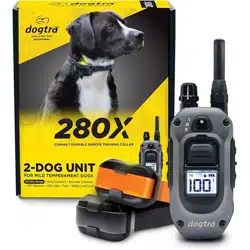
before operating the 280X
training e-collar.

2 3
Medical Device Interference
Dogtra products contain electrical and magnetic components
that emit low levels of electromagnetic radiation and radio
frequencies. These electromagnetic waves or radio frequencies
may interfere with pacemakers, defibrillators, or other medical
devices. Consult your physician or medical device manufacturer
before using any medical device with Dogtra products. If you
think Dogtra products may interfere with your pacemaker,
defibrillator, or other medical device, stop using Dogtra
products.
Inadvertent Activation
The digital microprocessor offers thousands of unique codes
to eliminate frequency match-up with other Dogtra e-collars.
The Constant button will automatically shut down after
being held down for 12 seconds or more as a safety feature.
Charging
Only charge Dogtra products with Dogtra Branded batteries
and device chargers. Do not charge the product by any
other means or at temperatures below 0°C (32°F) or above
45°C (113°F).
Unauthorized use
Dogtra products should only be used in a humane manner to
train and educate dogs.
Dogtra products are not intended for use in any other way
and are not intended for use on other animals or humans.
Battery removal and disposal
Dogtra products include batteries. Be careful when
removing or installing the battery as your fingers may be
caught. Dispose of batteries according to local regulations.
Do not disassemble, crush, heat or modify the battery. Fire,
injury or property damage may result.
IMPORTANT SAFETY AND PRODUCT
INFORMATION
WARNING
Read all safety and product information below before using
Dogtra products. Failure to follow these safety instructions
could result in injury to you, your dog, and/or damage to
Dogtra products or other property.
PRODUCT SAFETY
Training Methods
Dogtra products can be used with a variety of training
methods. However, each dog may respond differently to
training methods and Dogtra products. Observe your dog
closely when determining the correct training method to use
with Dogtra products.
Aggressive Dogs
Do not use Dogtra products on aggressive dogs. Such dogs
may react adversely and cause injury to people or other dogs.
When dealing with an aggressive dog, seek the help of a dog
training professional or veterinarian.
Children and the disabled
Dogtra products are not toys. Adult supervision and extreme
caution are required when Dogtra products are used by or
near children.
PRODUCT DAMAGE
Electrical Product
Dogtra products include electrical components and
batteries. Do not use or store the product near heat or
flammable substances. Such use or storage may damage the
product or cause fire, explosion, personal injury, or property
damage.

4 5
CONTENTS
BATTERY CHARGE
.................................................
ATTACHING THE BELT CLIP
................................
USING THE TEST LIGHT
.......................................
GENERAL TRAINING TIPS
.........................................
MAINTENANCE
.............................................................
TROUBLESHOOTING GUIDE
.....................................
FCC/IC WARNING STATEMENT
..............................
WARRANTY AND REPAIR INFORMATION
...........
AT A GLANCE
...............................................................
MAIN FEATURES
...........................................................
OVERVIEW
.....................................................................
UNDERSTANDING YOUR TRAINING SYSTEM
TURNING THE PRODUCT ON/OFF
....................
DEFAULT BUTTON SETTINGS
.............................
SIDE BUTTON
..........................................................
SAFETY STIMULATION LEVEL LOCK
...............
EXPANDABLE 3-DOG SYSTEM
.........................
HOW TO ADD AN ADDITIONAL RECEIVER
DEVICE
......................................................................
X-SHIELD
..................................................................
HANDSFREE SQUARE INFORMATION
...........
HOW TO USE THE RECEIVER
RECEIVER FITTING
................................................
HOW TO INSERT THE STRAP
OBTAINING MAXIMUM DISTANCE
.....................
FINDING THE RIGHT STIMULATION LEVEL
....
NON-STIMULATION CONTACTS
.......................
LED INDICATOR
......................................................
CARE FOR LCD TRANSMITTERS IN COLD
TEMPERATURE
......................................................
6
7
8
10
11
12
16
16
17
18
19
25
26
27
29
30
31
32
1.
2.
3.
4.
5.
6.
7.
8.
1.
2.
3.
4.
5.
6.
7.
8.
9.
10.
33
35
36
38
40
41
43
44
6 7
MAIN FEATURES
• 1/2-mile range
• Expandable to a 3-dog system
• IPX9K waterproof certified transmitter and receiver
• 100-level stimulation with Rheostat Dial and LCD screen
for precise control
• Safety Stimulation Level Lock
• Constant stimulation with customizable Boost button
for instant level increase
• LCD screen display for stimulation level and battery life
• Nick/Constant stimulation
• XPP (Extreme Performance Pager) Vibration
• Audible Tone
• Beacon & Locate LED Light
• Medium output receiver
• 2-hour rapid charge batteries for transmitter and
receiver
• USB C-TYPE Charging
AT A GLANCE
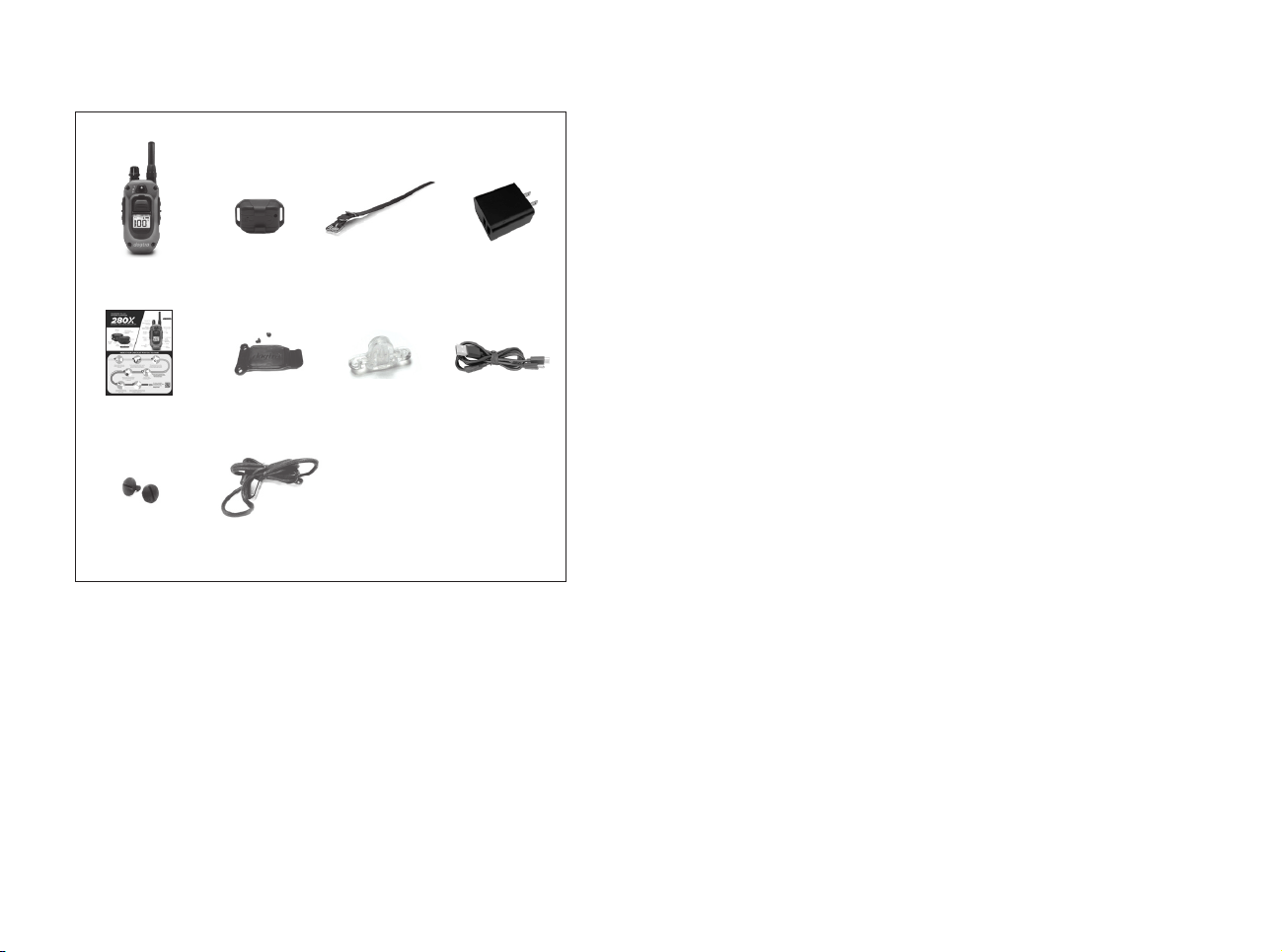
Receiver
Collar Strap
Transmitter
Splitter
Cable
Owner's
Manual
Belt Clip
Non-Stimulation
Contacts
Test Light
Lanyard
Optional Accessories
Auto Charger
The input of the automatic charger for 280X is 12V ~ 24V
and the output is 5V 1000mA.
European Charger
Dogtra's European chargers are designed for use with
220V AC electrical outlets.
To purchase accessories, visit www.dogtra.com or call
customer service at (888) 811-9111.
USB-C
Battery Charger
8 9
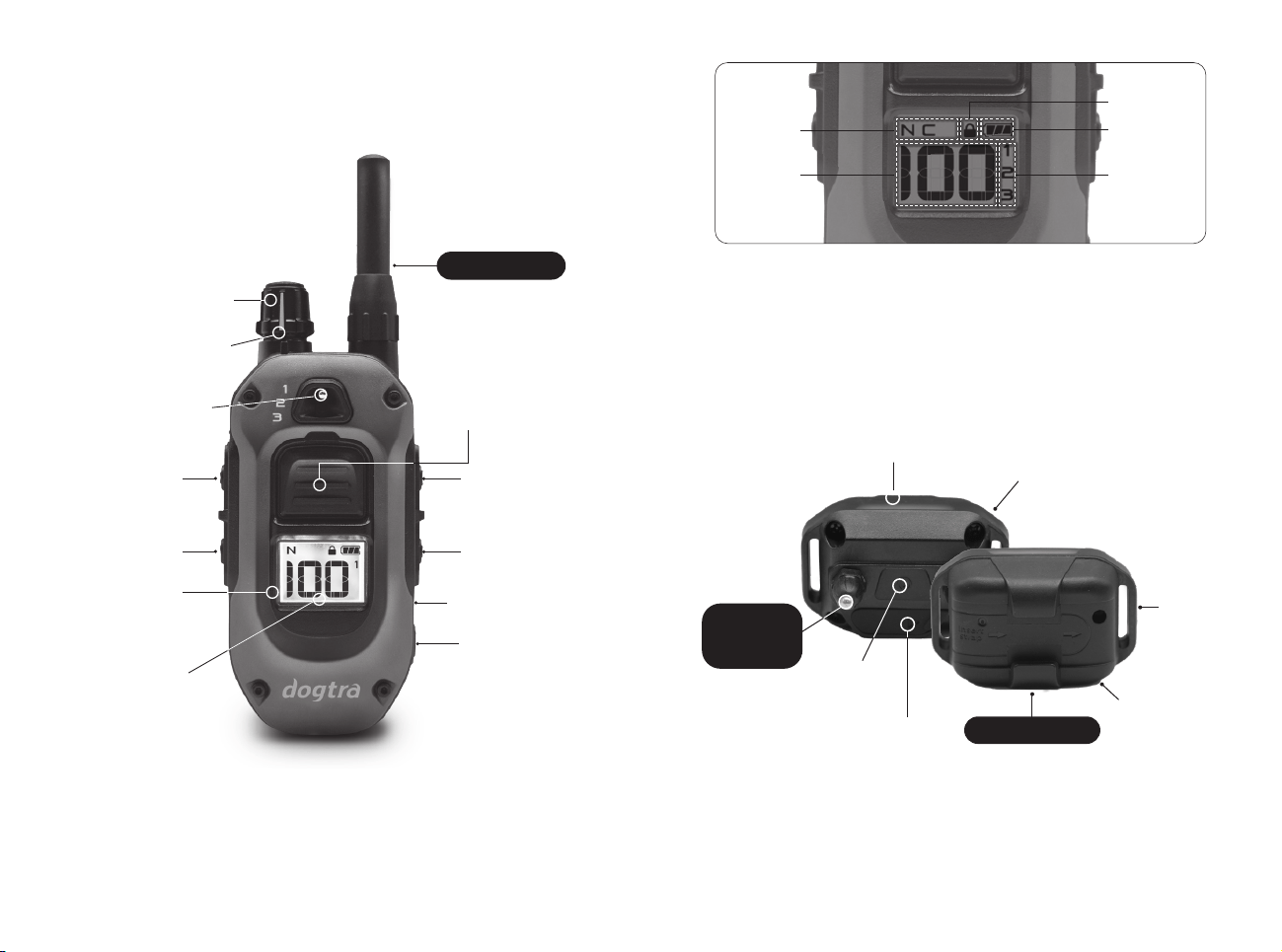
280X
Transmitter LCD Screen
280X
Receiver
Lock/Unlock
Battery
Dog Selection
Displayed
Stimulation
Level
Stimulation
Mode
XPP (Extreme
Performance Pager)
Vibration
IPX9K
Certified
Waterproof
Tone
USB-C
Charging
On/Off
1000 Lux
LED Light
OVERVIEW
280X
Transmitter
Vibration
Tone
IPX9K
Certified
Waterproof
USB-C
Charging
On/Off
Receiver
Selector Toggle
(Up to 3-Dogs)
Nick or Constant
(Programmable)
Locate Light
Boosted
Constant
1” LCD
Display
100
Stimulation
Levels
Safety Stimulation
Level Lock
100 Level
Rheostat Dial
1/2 Mile Range
Removable
Contact
Points
Medium Output
10 11
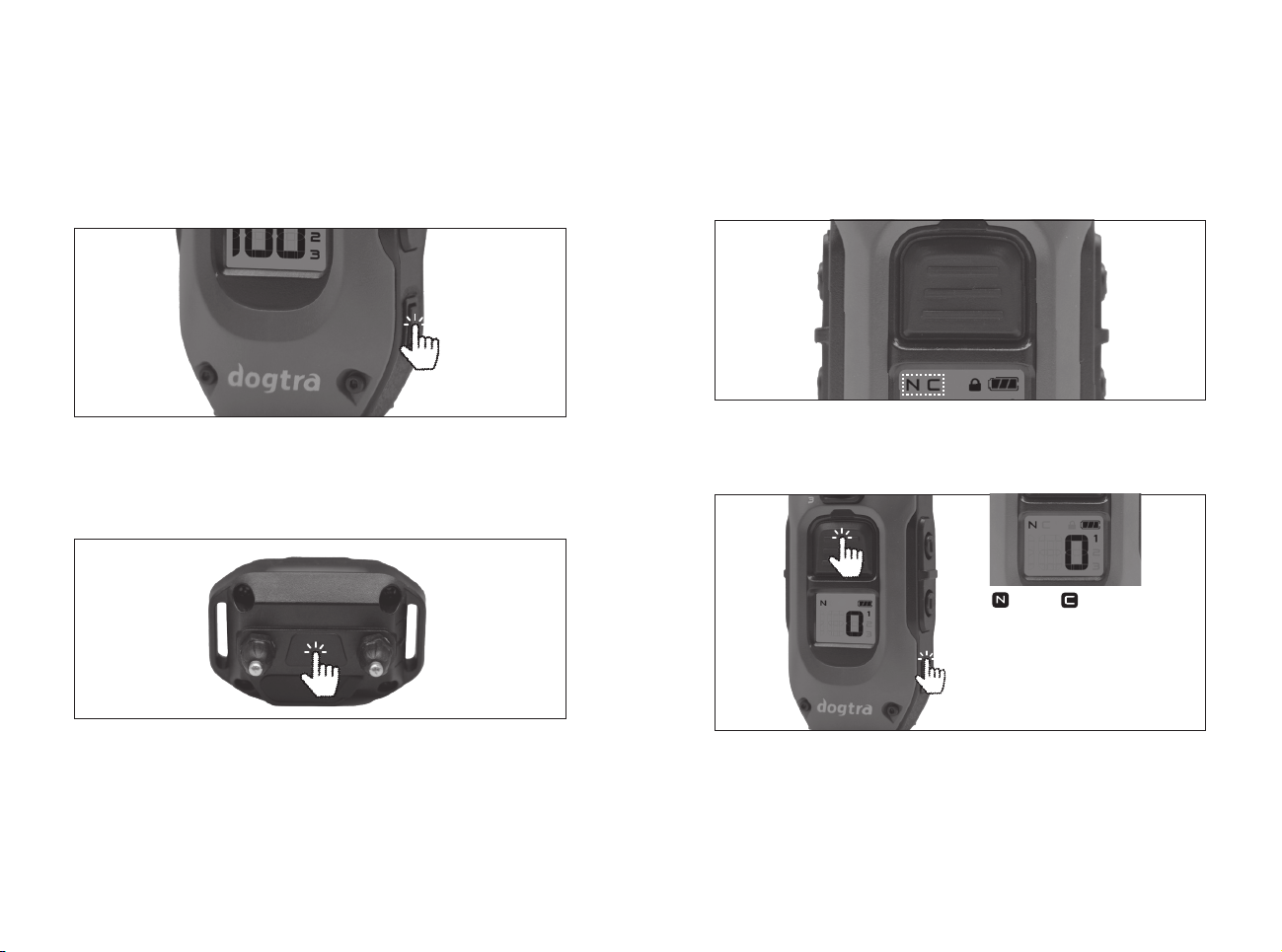
1. TURNING THE PRODUCT ON/OFF
Front button settings
(PROGRAMMING BETWEEN NICK AND CONSTANT)
1) Set the stimulation level to “ 0 ”.
2) Hold both the main front button and side power button
together for 5 seconds to program Nick or Constant
mode. The selected mode will be displayed on the top
of the LCD screen.
2. DEFAULT BUTTON SETTINGS
Front button (Nick or Constant)
The front button can be selected as Nick/Constant. The
stimulation type indicated at the top of the display is
applied. (Factory set to Nick mode)
NICK or
CONSTANT
UNDERSTANDING YOUR
TRAINING SYSTEM
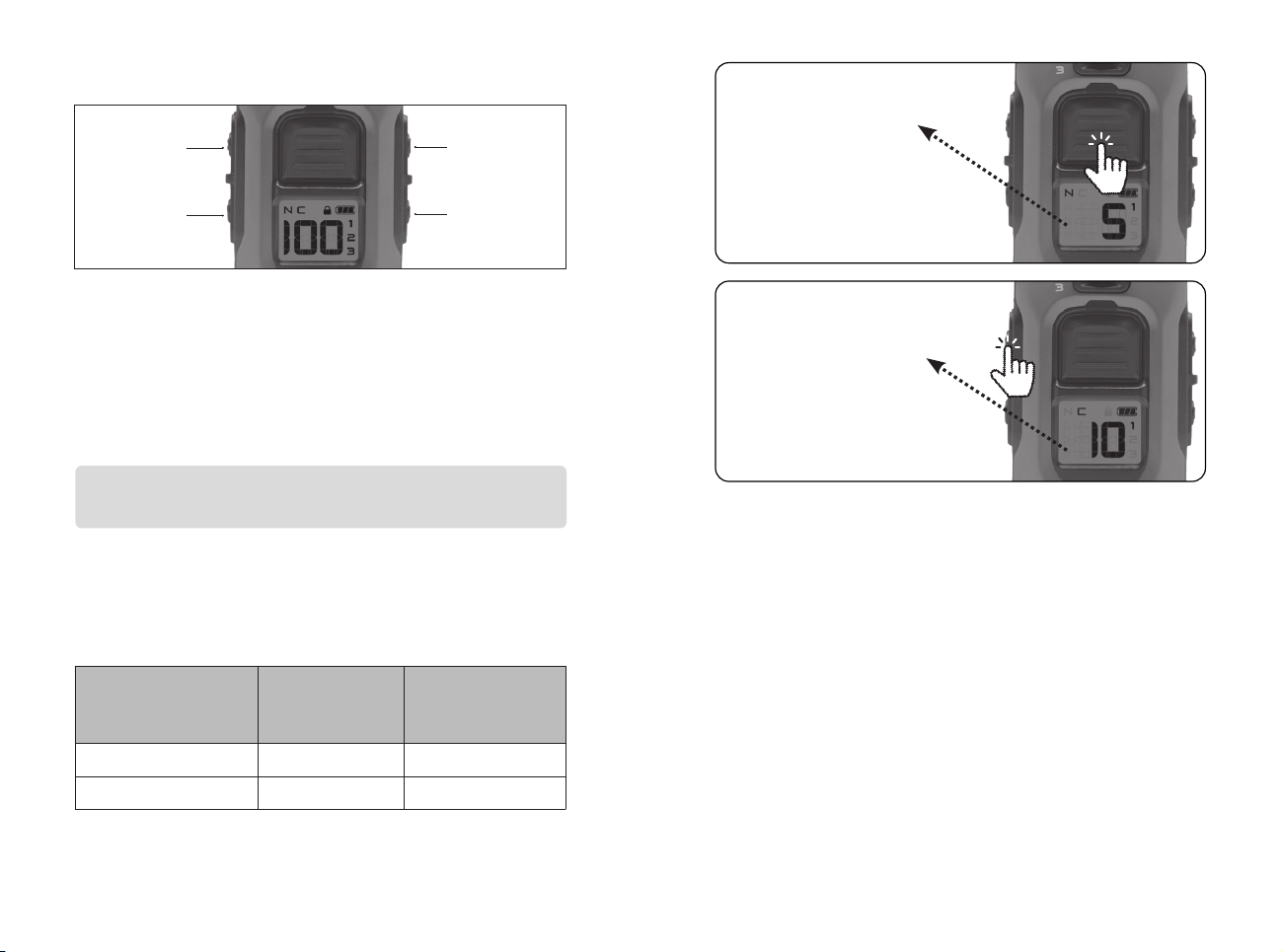
HOW TO USE THE TRANSMITTER
The remote transmitter’s power button is located on
the bottom right. Press and hold the power button for
2 seconds to turn it on or off. (Press the power button
briefly to turn on the backlight.)
The receiver’s collar power button is located between the
contacts. Press and hold the power button for 2 seconds
to turn it on or off. The LED indicator will turn solid green
with a tone when the unit powers on and a red light with a
tone when it powers off.
12 13
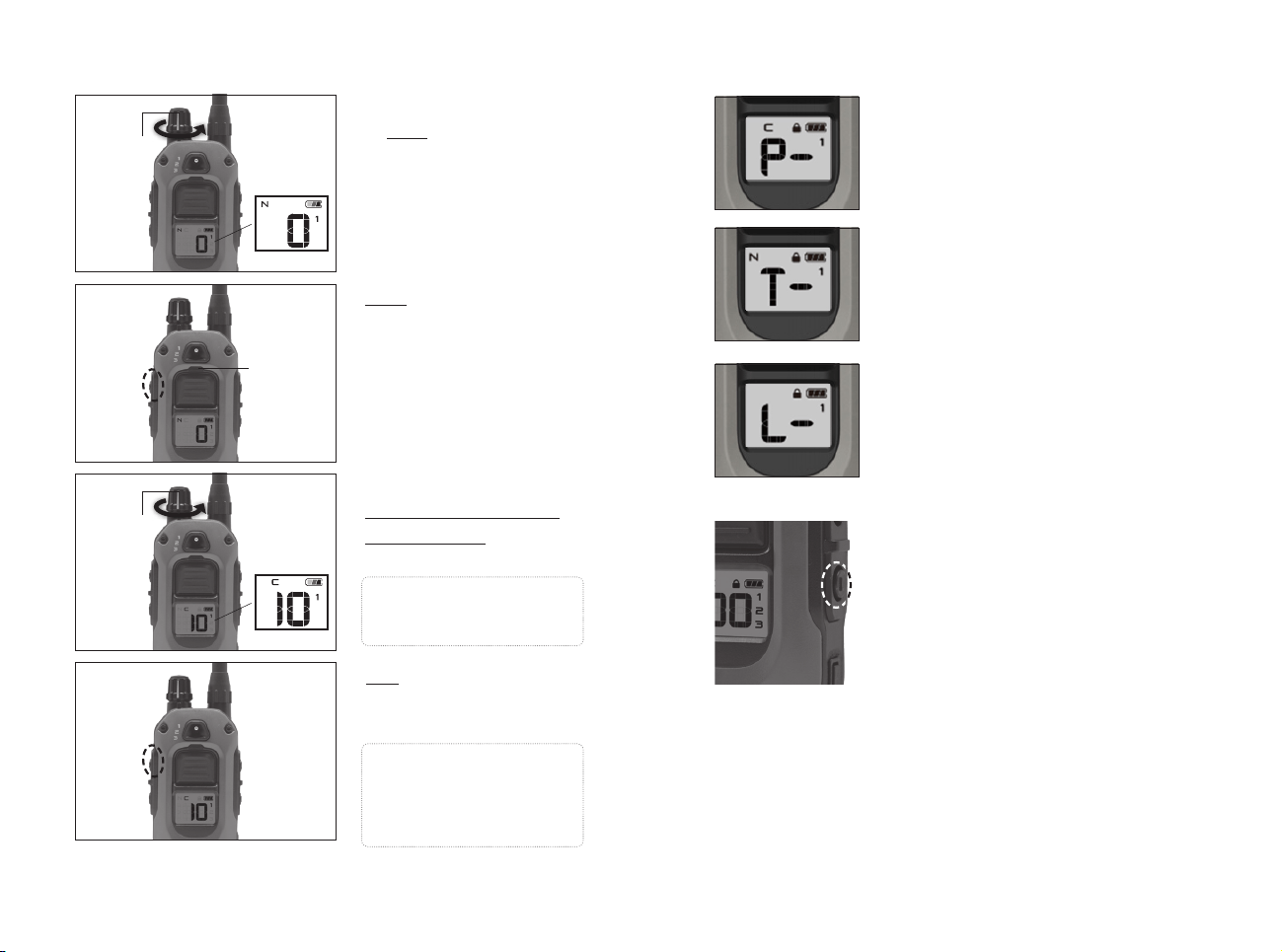
Example
Selecting “5” as the Incremental Amount for the Boosted
Constant button will apply the output level of displayed
level + 5, as shown below.
Base
Displayed Level
Incremental
amount
(Boost amount)
Boosted
Constant Output
1 +5 6
5 +5 10
PressPress
Press Press
and and
holdhold
Applies Displayed
Base Level.
In this case, level 5
‘Nick’ will apply.
Applies ‘Boosted Constant’
for up to 12 seconds.
In this case, level 10
‘Constant’ will apply.
XPP Vibration
Tone
Locate Light
Boosted
Constant
3. SIDE BUTTONS
Boosted Constant
Apply Constant boost stimulation for up to 12 seconds at
a pre-selected boost level. The stimulation level can be
quickly increased without the user having to manually
increase the level. Users can customize their desired jump
level by pressing Boosted Constant.
Base Displayed Level + Incremental Amount =
Boosted Constant Output
14 15
XPP (Extreme Performance Pager)
Vibration
Provides vibration for up to 12
seconds when held.
Tone
Provides an audible tone for up to 12
seconds when held.
LED Locate Light
Uses a 1000 lux LED Light on the
receiver to locate your dog in the
dark.
- For continuous blinking, every
4 seconds, tap the Locate Light
button once.
To disable the continuous blinking,
tap Locate button again.
- To manually enable the continuous
blinking, press and hold the Locate
Light button which can stay blinking
for up to 12 seconds.
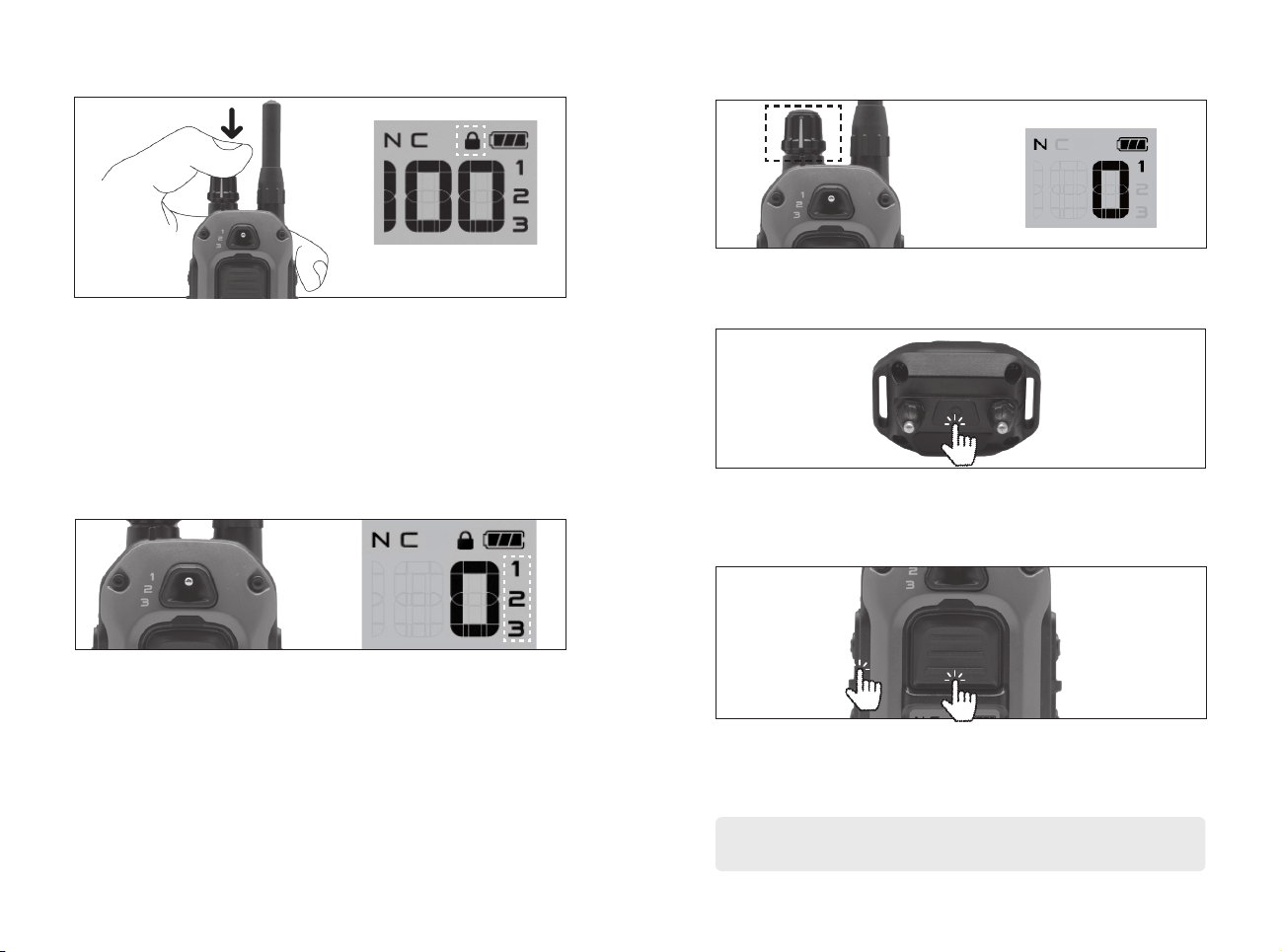
Setting up Boost feature Non-Stimulation Features
1. Set the stimulation level
to zero.
LCD Screen
LCD Screen
Rheostat
Dial
Rheostat
Dial
2. Hold the Boosted
Constant button for 5
seconds until the LED
light blinks; then release
it.
LED
Indicator
Light
3. Turn the Rheostat Dial to
select the incremental
Boost amount as shown
on the LCD screen.
Note: Set the Boost level
to 0 to use the Constant
stimulation without Boost.
Note: The saved setting
will remain even if the unit
is turned off. To reset the
setting, repeat the steps
above.
4. Tap the Boosted
Constant button to
save the setting.
Boosted
Constant
Boosted
Constant
16 17
6. HOW TO ADD AN ADDITIONAL RECEIVER DEVICE
1. Turn on the transmitter and set the stimulation level to
“0”. Use the toggle to select the desired dog (1,2 or 3).
2. To begin pairing, receiver must be off. Initiate pairing
mode by pressing and holding the power button for 5
seconds until the LED starts blinking and then release.
3. Simultaneously press the front transmitter button and side
Boost button until the screen reads “CD****” then release.
Confirm successful pairing by pressing Pager vibration.
Repeat the pairing process if the pager vibration test is unsuccessful.
The pairing between the devices has timed out or failed.
CD**** : Product ID CODE
4. SAFETY LEVEL LOCK
5. EXPANDABLE 3-DOG SYSTEM
To prevent the stimulation level from changing
unintentionally, press and hold the top of the Rheostat dial
for more than 2 seconds to lock it. When locked, a lock
icon will appear on the LCD screen. To release lock mode,
press and hold the top of the volume again for more than
2 seconds until the lock icon disappears.
If you purchase an additional receiver, you can use
the front toggle switch to select the dog you want to
stimulate. You can check the selected dog on the LCD
screen.
Stimulation level lock indicator
18 19
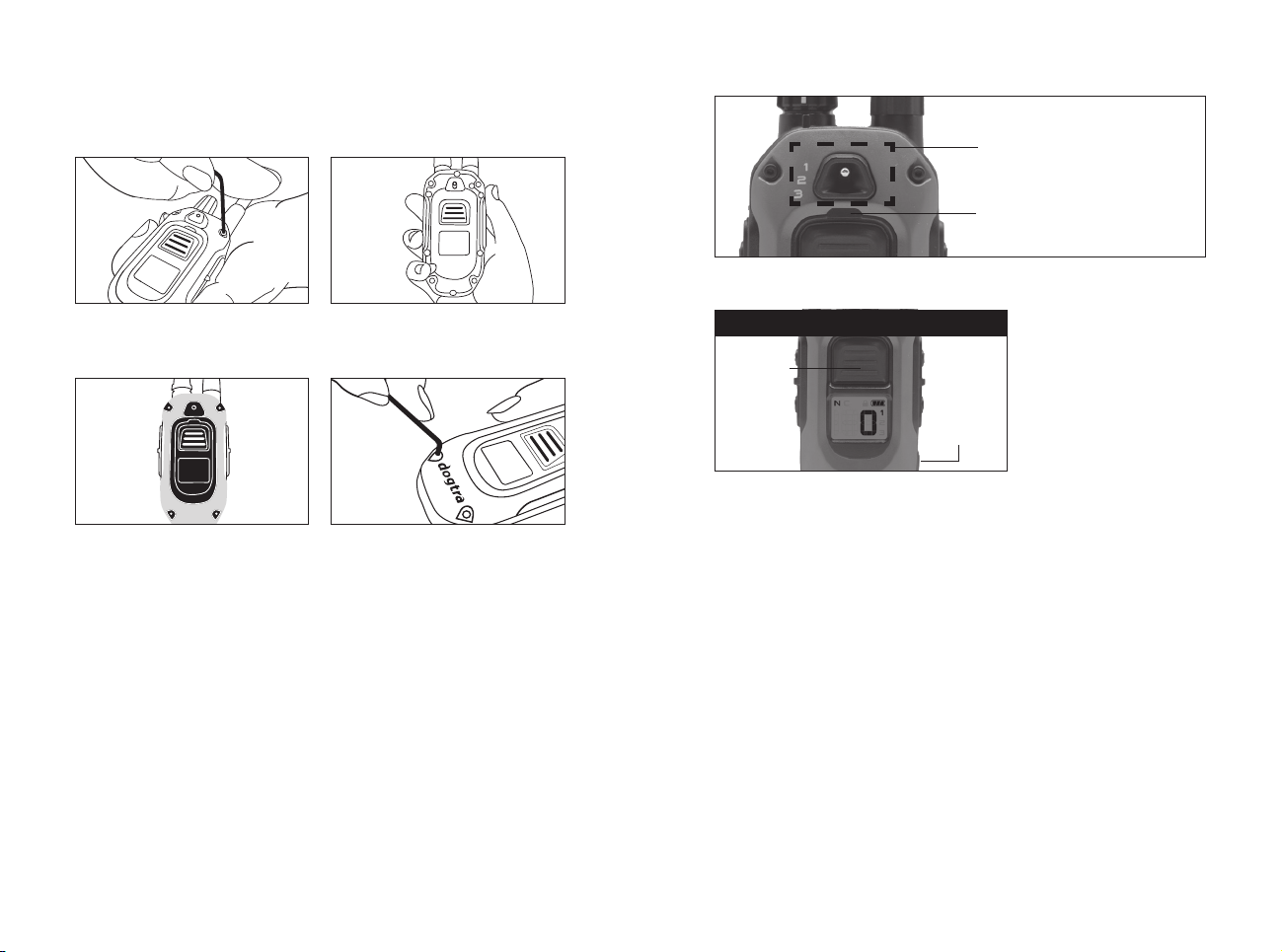
Additional X-SERIES case covers, X-Shields are sold
separately.
1. Use the included tool to
loosen the four screws.
3. Place the new X-SHIELD
on top of the unit to align
with the screw holes.
2. Remove the front case.
4. Use a tool to tighten
the screws into the four
holes.
7. X-SHIELD INSTALLATION
8. HANDSFREE/PLUS SQUARES PAIRING
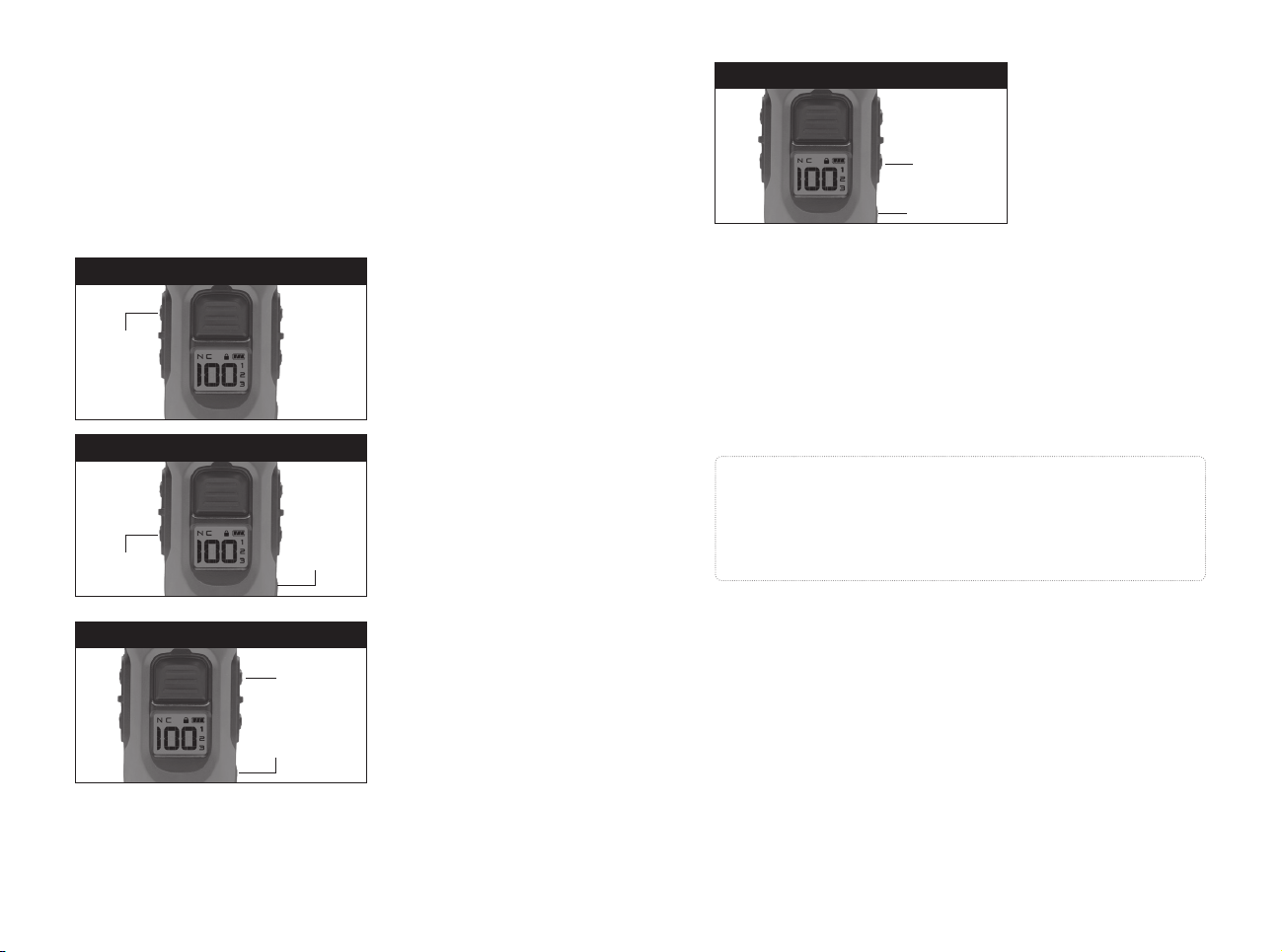
HANDSFREE SQUARE PAIRING: NICK OR CONSTANT
On/O
Button
NICK OR CONSTANT
1. Turn the Remote On and set stimulation level to 0.
2. Select Nick or Constant by pressing and holding the
POWER + CENTER (N/C) button for 5 seconds.
3. Once your desired function appears on the screen turn
off the remote.
4. Press and Hold the POWER + CENTER button until the
rapid light blinks.
5. Press and hold the HANDSFREE SQUARE to code the
desired function.
Select the number Dog
you want to pair with the
HANDSFREE SQUARE
Pairing light indicator
Nick/
Constant
Button
20 21
Hold down the on/off
button and the Pager
button.
1. Set desired BOOST
level
2. Hold down the on/
off button and the
Boosted constant
button.
Hold down the on/off
button and the Tone
button.
Hold down the on/off
button and the Light
button.
Press
Press
Press
On/O
Button
On/O
Button
On/O
Button
PAGER
BOOSTED CONSTANT
TONE
Pager
Button
Boosted
Constant
Button
Tone
Button
Press
On/O Button
LIGHT
Light Button
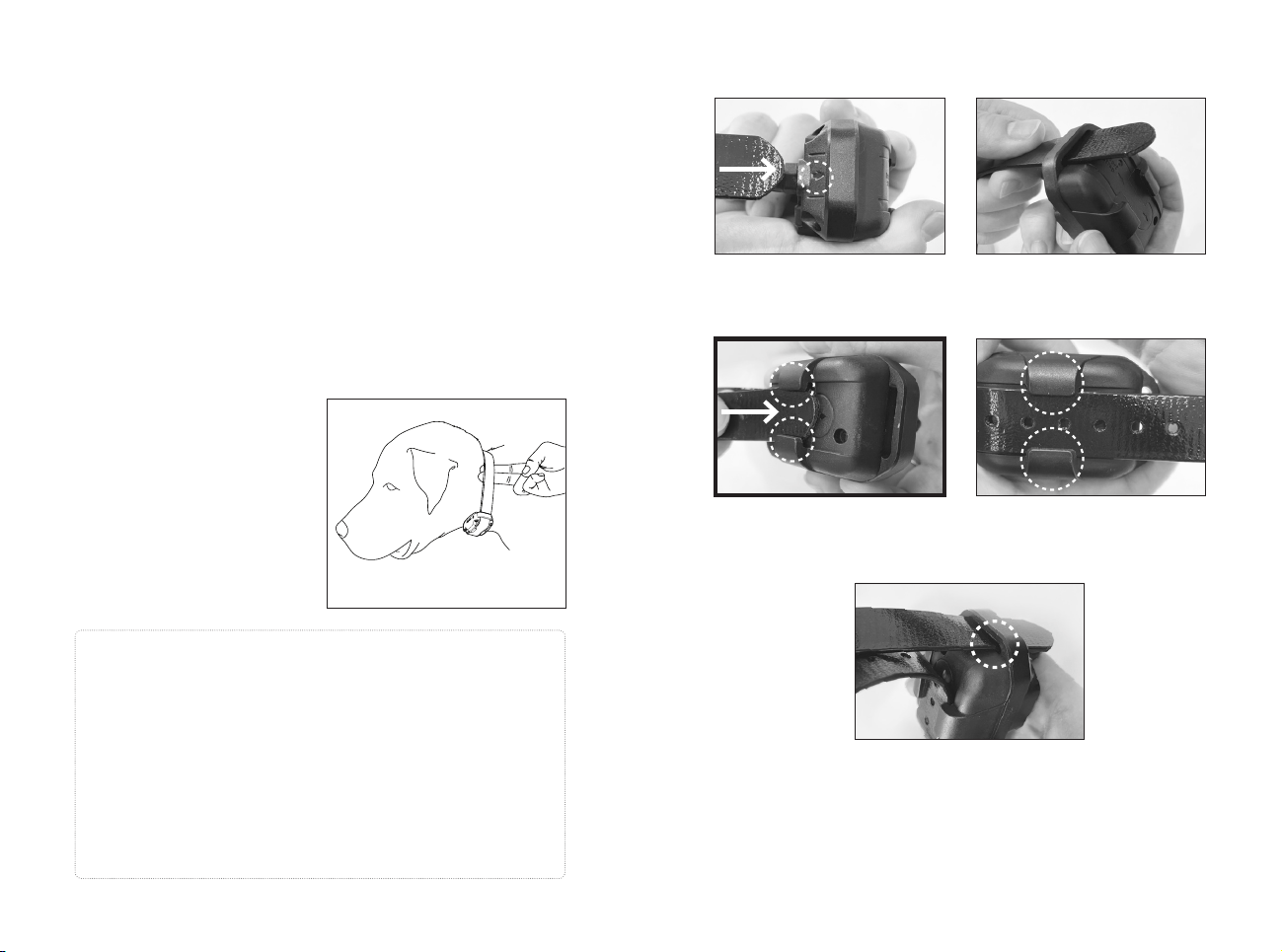
HANDSFREE SQUARE Pairing:
All other Functions
1. Begin with the remote transmitter turned off.
2. Press and hold the ON/OFF button + your desired
function until you see the rapid light blink.
3. Press and hold the HANDSFREE SQUARE to code the
desired function
Range
The HANDSFREE SQUARE will need to be within 33 feet
of the transmitter to work.
Battery Life
The LED on the HANDSFREE SQUARE will blink when the
button is pressed. Replace the battery in the HANDSFREE
SQUARE when the LED no longer blinks.
Caution!
Only 14 HANDSFREE SQUARES can be paired. When a
15th HANDSFREE SQUARE is paired, the initial 14 that
were paired will reset and need to be paired again.
22 23
1. RECEIVER FITTING
Improper Fit
A loose fit can allow the receiver to move around on the
dog’s neck. When this happens, the contact points may
rub against the skin and cause irritation. If the receiver is
too loose, the contact will not be consistent and cause the
corrections to be inconsistent. Dogtra uses medical grade
stainless steel contact points and anti-microbial plastic to
protect the dog’s skin.
Proper Fit
The receiver should be fitted
so that the anti-microbial
plastic contact points press
firmly against the dog's
skin. You should be able to
fit two fingers underneath
the collar strap. The Best
location is on either side of
the dog's windpipe.
HOW TO USE THE RECEIVER
Attention!
Leaving the receiver in the same location on the dog’s neck
for an extended period of time can cause skin irritation due
to the sensitivity from the contact points. If the dog is to
wear the receiver for long periods, occasionally reposition
the receiver every few hours so that the contact points are
moved to a different location on the dog’s neck and remove
the receiver after 8 hours of usage. Make sure you check for
skin irritation each time you use the unit.
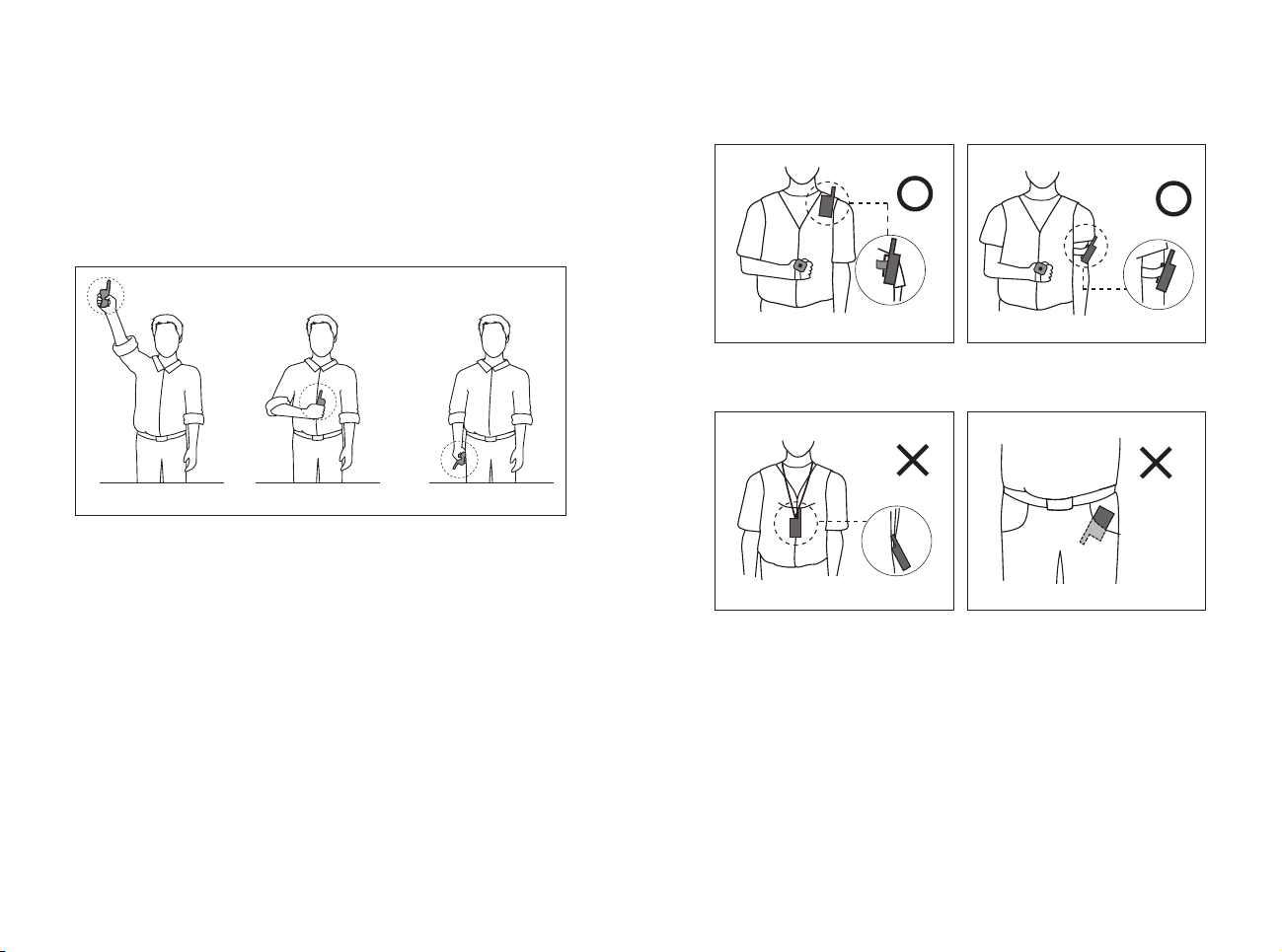
2. HOW TO INSERT THE STRAP
1. Insert the strap by looking at the direction of the arrow
on the receiver.
2. Make sure to connect the middle groove of the
receiver.
3. Attach the receiver to the strap by threading the strap
through the opposite hole.
* Through the * Through the
middle groovemiddle groove
24 25
3. OBTAINING MAXIMUM DISTANCE
The operating range of the 280X is ½ mile.
Depending on how you use the transmitter, the range of
your transmitter may vary. For maximum range, hold the
transmitter away from your body and avoid touching the
antenna. Charge your device properly to maximize signal
strength.
Typical range
Maximum range
Minimum range
The range is reduced when the handheld transmitter's
antenna is covered or in contact with your body. Refer to
the following carrying methods for optimal range.
Carry the handheld transmitter with the antenna facing
away from you.
Do not place the handheld transmitter with the antenna
touching your body or facing downwards.
26 27
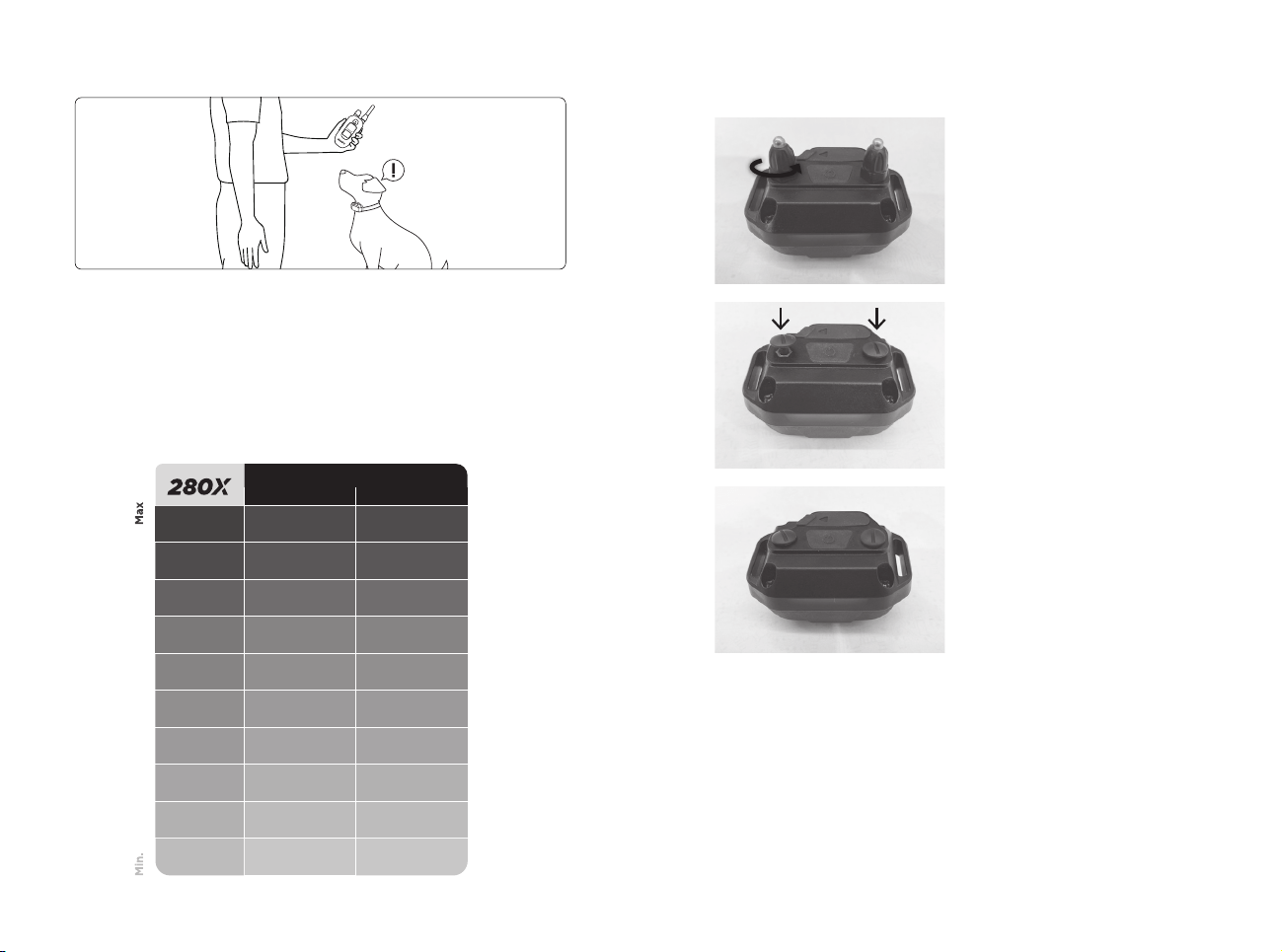
The 280X has a rheostat dial on the top of the transmitter.
Always start at the lowest level and work your way up.
You will find the right level when your dog responds to
the stimulus with a mild response. You may also need to
adjust intensity levels as your dog's demeanor changes,
especially during times of increased excitement or
distraction.
4. FINDING THE RIGHT STIMULATION LEVEL
Equvalent stimulation levels
280C 1900S
100
- 84
90
- 76
80
127 69
70
111 58
60
102 54
50
91 46
40
65 34
30
45 27
20
33 21
10
23
11
11
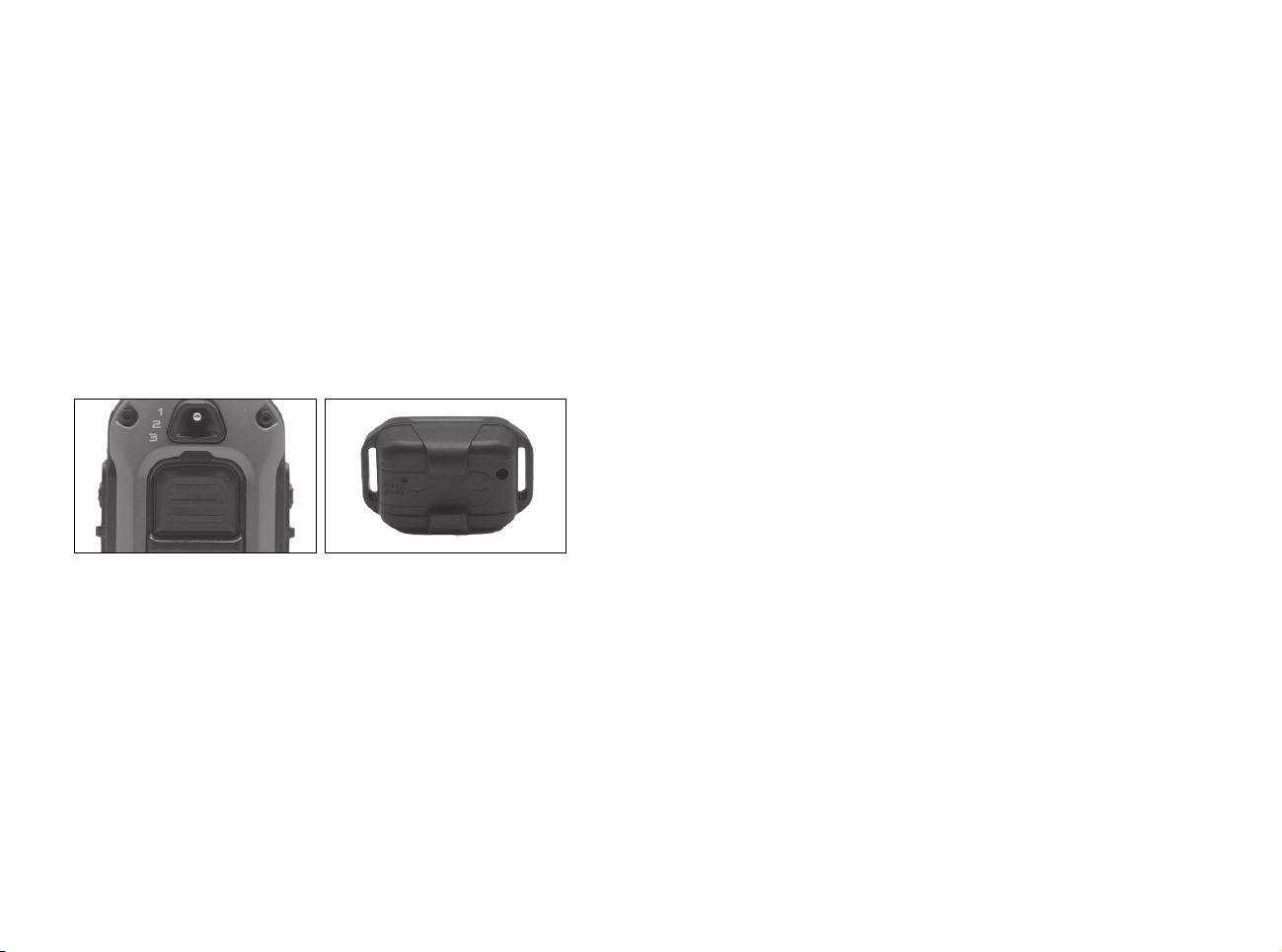
5. NON-STIMULATION CONTACTS
1. Please turn the contact
points and remove them.
2. Place non-stimulation
contacts in each place
3. Press non-stimulation
contacts to secure the
non-stimulation contacts
28 29
6. LED INDICATOR
The LED indicator flashes every 4 seconds when the
receiver is on and ready for use. The LED indicator will
blink on both the transmitter and the receiver when the
transmitter buttons are pressed.
The LED indicator color indicates the battery life level.
Green = Full charge
Amber = Medium charge
Red = Needs charge
If the unit is used while the LED indicator is red, it may
shut down automatically.
Receiver Indicator Light
When the Constant button on the transmitter is pressed,
the receiver indicator light will glow steadily (either green,
amber, or red based on the remaining battery life), as
long as you hold the button down, for up to 12 seconds.
When the Nick button is pressed, the light comes on for a
fraction of a second.
7. CARE FOR LCD TRANSMITTERS IN COLD TEMPERATURE
In cold temperatures (below 10°F), the transmitter's liquid
crystal display (LCD) may appear dim or unresponsive.
Wait until you see the display before selecting your
training level. Even if the LCD screen goes dark or
becomes unresponsive when you press a button, the
transmitter still functions properly. In very cold weather,
the LCD screen may take some time to respond, which
may cause the intensity level to become stuck at the
current level. Turning the rheostat dial will not change the
level on the screen, but will change the actual intensity of
the receiver.
30 31
Dogtra 280X uses a lithium polymer battery. If the light is
red, the device does not turn on, or the system does not
stay on when you press the button, recharge the device.
NOTE 1: Use only Dogtra approved batteries, chargers
and accessories with the Dogtra e-collar. This will prevent
any damage that may occur if you try to use a different
charger.
Note 2: The device will be partially charged when leaving
the Dogtra facility. When you receive the system, be sure
to give it an initial charge of 2 hours before using it for the
first time in an area away from flammable materials.
Note 3: When the charger is not in use, unplug it from the
power source. If the device will be stored unused for more
than 3 months, fully charge the battery.
8. BATTERY CHARGE
Two- Dog Unit Only
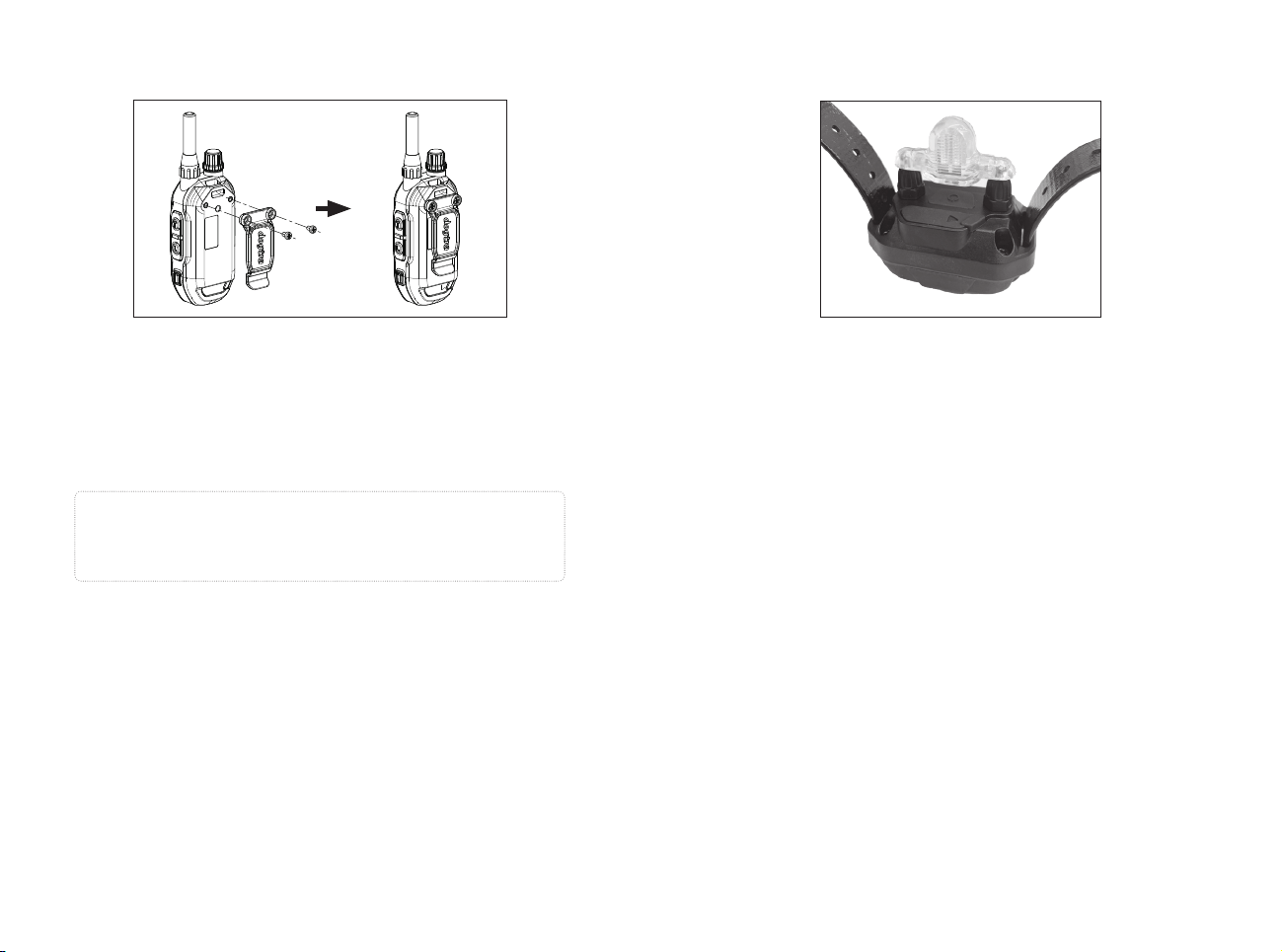
To charge your system, follow the steps below:
1. Open the rubber plug on the battery charging port and
connect the charging cable.
2. Connect the charger to a 120V wall outlet or, if using
an automatic charger, to a cigarette lighter specifically
designed for lithium polymer batteries (in Europe, use
a 220V European charger). When connected properly,
all lights will glow red and the device will automatically
turn off during the charging process. After the device is
fully charged and unplugged from the battery cable, the
device must be turned on again before use.
3. The lithium polymer battery is fully charged within
2 hours. The light stays red while charging and turns
green when the device is fully charged.
4. After charging, cover the battery charging socket with a
rubber plug.
Recharging is required in the following cases:
•The LED on the transmitter or receiver is red.
•The LED on the transmitter or receiver does not light.
• A low-battery sound occurs when the transmitter or
receiver is powered off.
Charger Info
Manufacturer: E-SUN
Manufacturing country: CHINA
Model name: MKC-0502500VT
INPUT: 100-240V~50/60Hz 0.4A
OUTPUT: 5V 2500mA
32 33
9. ATTACHING THE BELT CLIP
To attach the included belt clip, follow the instructions
below.
1. Align the belt clip with the groove on the back of the
transmitter.
2. Use a screwdriver to firmly tighten the screw of the belt
clip.
Caution
Firmly tighten both screws of the belt clip. Be careful
not to overtighten.
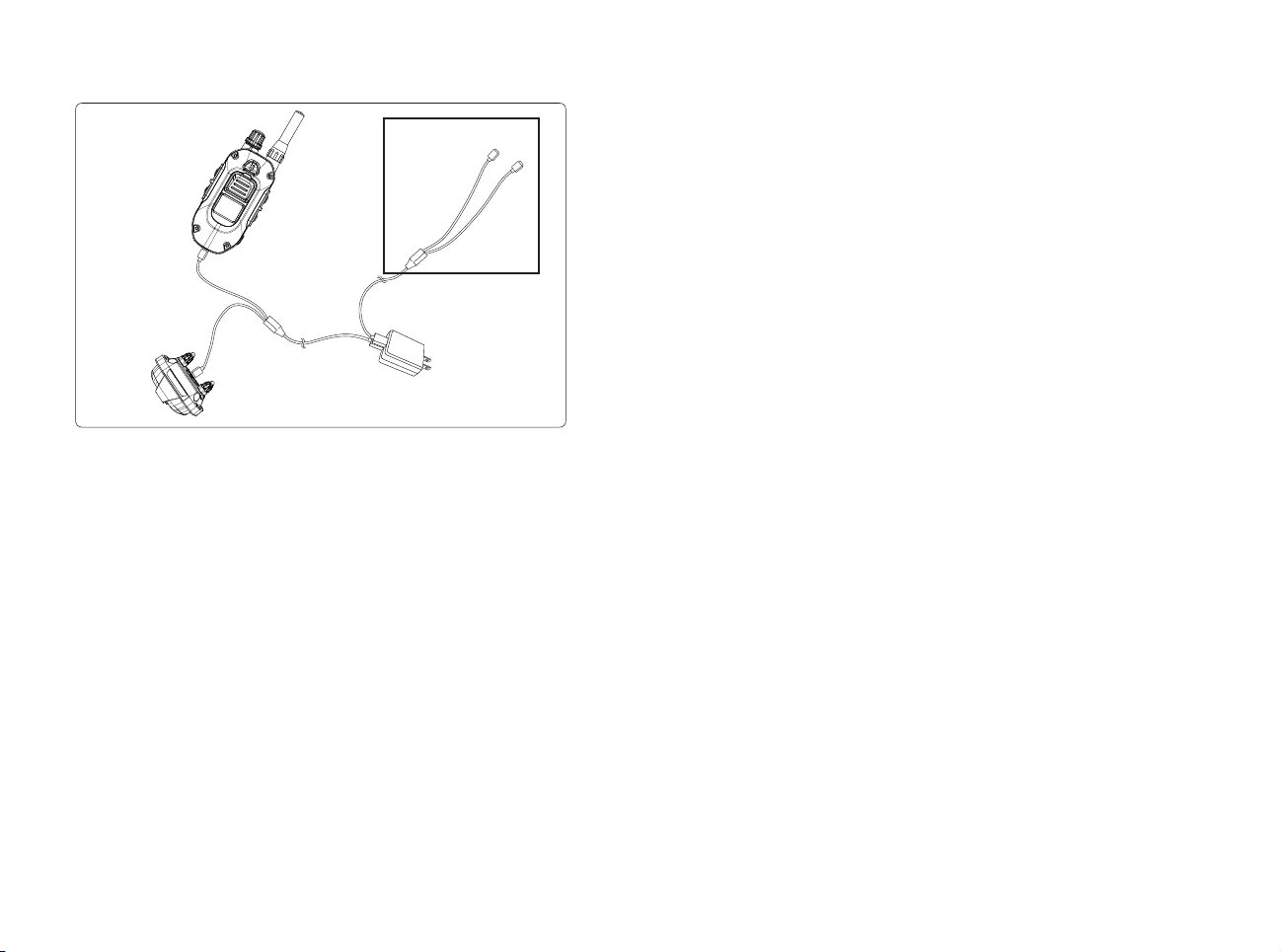
10. USING THE TEST LIGHT
1. Turn on the receiver by pressing and holding the on/
off button in the center of the contact terminal. The
receiver's light will briefly turn on and then blink once
every 4 seconds to indicate that the receiver is ready
to use (if the light is red, the receiver needs to be
charged).
2. Turn on the transmitter by pressing and holding the
on/off button on the right side of the transmitter. The
LED blinks every 4 seconds and the remaining battery
life is displayed on the LCD screen. (If the battery
icon on the LCD transmitter screen shows only 1 bar, it
needs to be charged.)
3. Place the test light included in the package onto the
contact points as shown.
4. Press the Nick button on the transmitter and observe
the test light. It should only be on for a moment. (The
higher the intensity, the brighter the test light.)
5. Observe the test light while pressing the Constant
button on the transmitter. The button should light
up as long as you hold it down. However, as a safety
feature, if you press the Constant button for more

34 35
than 12 seconds, the receiver will automatically stop
stimulation.
6. Turn the rheostat dial on the transmitter clockwise and
then counterclockwise. The test light shines brighter at
higher stimulus levels and dimmer at lower levels.
Note: The test light may not be visible if the intensity
level is set below level ten.
GENERAL TRAINING TIPS
Your dog must know some basic obedience commands
before beginning training with the 280X. A dog learns
by first being shown a command, followed by lots of
repetition over an extended period. As the dog becomes
proficient at these commands, the trainer can introduce
distractions and different locations to strengthen the
commands.
Obedience Training on the Leash
Your dog must fully understand the obedience commands
(sit, stay, here, heel, and kennel) before using the e-collar
for reinforcement of these commands. A leash attached
to a standard collar is used to "teach" the dog the basic
obedience commands (sit, stay, here, heel, and kennel).
A tug on the leash/collar is used to reinforce the
command. When the dog complies with the command,
use positive reinforcement/praise. Once the dog
understands these commands, the e-collar can be used to
reinforce them.
Beginning E-Collar Training
When you feel your dog understands the obedience
commands on the leash we can now start with the e-collar
training. With the dog on the leash and wearing the
e-collar, continue with your obedience drills. Apply light
stimulation (Nick or Constant) when a command is given;
the stimulation can be removed as the dog complies.
Through repetition, the dog learns to perform the
command.
The final step is the avoidance phase in which the dog
learns that he can avoid the stimulation altogether
by performing your commands. When these training
procedures are complete, the e-collar is used as a
reminder when the dog does not comply with your

36 37
commands at home or in the field. Keep your initial
training sessions short and positive as dogs have a short
attention span.
How Much Stimulation to Use
Always start with low levels of stimulation and work
your way up depending on the disposition of your dog
and the given situation. By using the correct amount of
stimulation to get your point across, you will have a more
controllable environment and a dog that is under less
stress. Animals (and humans) perform better in a less
stressful environment.
For more training information, please visit our website
at
www.dogtra.com.
MAINTENANCE
Basic Maintenance
Make sure the rubber charging cap is securely in place
when the system is in use. After each training session,
carefully inspect the unit for any missing parts or
damage to the casing. Damaged or broken casing may
aect the waterproof guarantee on the unit. After
confirming that there is no damage to the casing, rinse
the receiver and clean out any dirt or debris.
Storage Maintenance
The unit should be fully charged before storing for
extended periods. While in storage, the unit should be
given a full charge once a month and before the first use.
Store the units in at room temperature. Do not keep the
units exposed to extreme climates.
Troubleshooting
If the unit is malfunctioning, please refer to the
“Troubleshooting Guide” before sending it to Dogtra for
service. If you have any questions or concerns, you may
email them to Info@dogtra.com, or call customer service
at 1 (888) 811-9111.

38 39
1. My dog is not reacting to the system.
- Make sure the receiver and transmitter are on.
- Make sure the collar strap is tight enough so both
contact points are touching the dog’s skin.
- The contact points may be too short for your dog’s thick
or long coat. You might need to trim down the hair on
the dog’s neck, so both contact points are touching the
skin.
- The intensity level may be too low for your dog. Keep
increasing the stimulation until the dog responds
usually by neck movement, head shaking, looking over
his shoulder, etc. (response may be very subtle so pay
attention.)
2. The LED indicator light comes on, but I do not feel any
stimulation.
– The battery may be low, so check the LED light for
battery life.
3. The transmitter has no range or stimulation is less
when the dog is farther away.
- The antenna(s) may be damaged. To order parts, please
contact customer service at (888) 811-9111 or go to
www.dogtra.com.
- The range indicated on the unit’s box is for flat terrain.
Heavy brush, trees, hills, or moisture will affect the
range of your unit. For best range, hold the transmitter
vertically above your head, and/or try moving to higher
ground.
- Any electrical conductors will affect the range, such as
cars, chain-link dog runs, metal structures, and radio
towers. For best results, operate away from these
objects.
TROUBLESHOOTING GUIDE
4. My units are not holding a charge.
- The batteries might not be charged properly, or the
charger, splitter, and the charging port may not be
functioning properly. You can send in your charging
units to have us inspect them.
– The charging pin may be damaged. Inside the charging
port, there is a metal pin that should be standing
straight up and stiff. If the pin is wobbling, broken, or
missing, you will need to send the unit in to the Repair
Department. The charging port must be clean prior
to charging; clean the dirt out with a cotton swab and
some rubbing alcohol. If the dog is in saltwater, be sure
to rinse the receiver and charging port with clean water.
– If the above does not resolve your issues, contact
Dogtra customer service at info@dogtra.com or
(888) 811-9111.
5. My dog has skin irritation.
- This may be due to an improper fit or from wearing the
unit too long. If your dog exhibits signs of skin irritation,
consult with a veterinarian. Once the dog’s skin returns
to a normal condition, continue to use the receiver and
check your dog’s neck each time you use the unit.

40 41
PART 15.19
This device complies with part 15 of the FCC Rules. Operation is subject to
the following two conditions:
(1) This device may not cause harmful interference, and
(2) this device must accept any interference received, including
interference that may cause undesired operation.
PART 15.21
Any changes or modifications (including the antennas) to this device
that are not expressly approved by the manufacturer may void the user’s
authority to operate the equipment under FCC rules.
PART 15.105
Note: This equipment complies with the limits for a Class B digital
device, pursuant to part 15 of the FCC Rules. These limits are designed
to provide reasonable protection against harmful interference in a
residential installation. This equipment generates, uses and can radiate
radio frequency energy and, if not installed and used in accordance with
the instructions, may cause harmful interference to radio communications.
However, there is no guarantee that interference will not occur in a
particular installation. If this equipment does cause harmful interference
to radio or television reception, which can be determined by turning
the equipment off and on, the user is encouraged to try to correct the
interference by one or more of the following measures:
- Reorient or relocate the receiving antenna.
- Increase the separation between the equipment and receiver.
- Connect the equipment into an outlet on a circuit different from that to
which the receiver is connected.
- Consult the dealer or an experienced radio/TV technician for help.
This device contains licence-exempt transmitter(s)/receiver(s) that comply
with Innovation, Science and Economic Development Canada’s licence-
exempt RSS(s). Operation is subject to the following two conditions:
(1) This device may not cause interference.
(2) This device must accept any interference, including interference
that may cause undesired operation of the device.
FCC and IC RF Radiation Exposure Statement: This equipment complies
with FCC and IC RF Radiation exposure limits set forth for an uncontrolled
environment.
This device and its antenna must not be co-located or operating in
conjunction with any other antenna or transmitter.
FCC/IC WARNING STATEMENT
LIMITED WARRANTY
For Dogtra Products Purchased from Dogtra Authorized Dealers
One-Year Warranty
Except as otherwise provided below, Dogtra warrants to the original
retail purchaser (“You”) that its Dogtra products shall be free of defects
in materials and workmanship for a period of one (1) year from the date
of purchase (“Warranty”). The Warranty covers the cost of repair (parts
and labor) or replacement (if repair is not feasible) of a defective Dogtra
product during said one-year period. For such repaired or replaced
products, the remaining portion of the original warranty period, or ninety
(90) days, whichever is longer, shall apply. Dogtra, at its sole discretion,
shall determine whether to repair or replace a product covered by the
Warranty.
Warranty Conditions
The Warranty is not transferrable and applies to your Dogtra product only if:
(1) You are the original retail purchaser of the product,
(2) You bought the product from a Dogtra authorized dealer, and
(3) You present a receipt or other proof of purchase showing a valid
purchase date, the name and address of the authorized dealer, and the
purchased product identified by model and/or serial number.
Warranty Exclusions
The Warranty does not cover damage, loss, or deterioration to your Dogtra
product caused: by misuse, neglect, abuse, or other improper handling
of the product; by failure to follow use or care instructions; by use of the
product for other than its intended purpose; by accident or natural forces
such as fire or flooding; or by normal wear and tear such as scratches to
the product surface.
The Warranty also does not cover Dogtra products that: are purchased
from non-authorized dealers; are purchased outside of the United States
or Canada; have been damaged during shipment (even if Dogtra paid
or arranged for shipping); have been modified or tampered with in any
manner; are opened or repaired by anyone other than Dogtra; or have
serial numbers that have been altered or defaced.
Sole Warranty
This Warranty is the only warranty offered by Dogtra for its Dogtra
products. Other than said Warranty, Dogtra makes no other representations
or warranties whatsoever regarding its products, whether oral or in any
DOGTRA PRODUCT WARRANTY

42 43
product manual, on any packaging, on any website, or in any other written
material. No dealer of Dogtra products, nor any employee or agent of
Dogtra, is authorized to make any additions, changes, or extensions to the
Warranty. Dogtra, at its sole discretion and at any time, reserves the right
to modify the Warranty.
DISCLAIMER OF OTHER WARRANTIES
THE FOREGOING WARRANTY IS PROVIDED IN LIEU OF ALL OTHER
WARRANTIES, WHETHER EXPRESS OR IMPLIED. DOGTRA DISCLAIMS
ANY IMPLIED WARRANTIES INCLUDING, BUT NOT LIMITED TO, THE
IMPLIED WARRANTIES OF MERCHANTABILITY AND FITNESS FOR A
PARTICULAR PURPOSE.
Limitation of Remedies
Dogtra’s liability is limited to the cost of repair or replacement of the
Dogtra product under Warranty. Any claim or action to enforce the
Warranty must be commenced within thirty (30) days of the Warranty’s
expiration for your product. Dogtra will not be liable for any indirect,
incidental, special, consequential, or similar damages based on breach
of warranty, breach of contract, negligence, strict tort, or any other legal
theory related to Dogtra and its products. Damages that Dogtra will not be
responsible for include, but are not limited to: loss of income or profits; loss
of revenue or savings; loss of use of the product or associated products;
cost of any substitute products or services; inconvenience, downtime,
or any other time; loss of goodwill; claims of third parties including
customers; and damage to property.
Legal Rights May Vary By State or Jurisdiction
The Warranty gives You specific legal rights, and You may also have other
rights which vary by state or jurisdiction. Some states or jurisdictions
do not allow certain limitations of implied warranties or of incidental or
consequential damages or other remedies, so certain of the foregoing
limitations may not apply to You.
If any portion of the Warranty is held by a court to be invalid or
unenforceable, the remaining portions of the Warranty shall remain in full
force and effect and shall in no way be affected or invalidated, and the
invalid or unenforceable portion shall be modified so as to most nearly
achieve the intent of the Warranty.
Product Registration
Dogtra recommends that customers register their products as soon as
possible after purchase. Product registration will facilitate any future
warranty service. You may also receive useful information and updates
about your existing and future Dogtra products. To register your product,
visit www.dogtra.com/product-registration. If your product is not
registered with Dogtra, You will be required to provide a receipt or other
proof purchase (as provided above) to qualify for warranty service.
How to Obtain Warranty Service
Should your Dogtra product require warranty service, please contact
Customer Service by phone or email for a warranty evaluation (see below
for contact information). Upon approval of your warranty work, Dogtra
will repair or replace (at Dogtra’s election) your product without charge
for labor or parts. You are responsible for shipping, including cost, of
your product to Dogtra for warranty service. Dogtra will handle shipping,
including cost, of the repaired or replaced product back to customers in
the USA. Dogtra will not be responsible for shipping, including cost and/or
applicable taxes or fees, for products sent to Canada. Such costs, taxes, or
fees will be borne by the customer.
To register your product, visit www.dogtra.com/product-registration.
Dogtra Customer Service
12322 Monarch Street, Garden Grove, CA 92841
(888) 811-9111
repair@dogtra.com
Mon – Fri, 8:00 AM to 4:30 PM (PST)
© 2024 Dogtra. All rights reserved.