
Third Reality Smart Switch FAQ
1 How to factory reset the Smart Switch Gen3?
Long press the button of the Smart Switch Gen3 for 30 seconds, the LED light turns blue
blinking, indicating it enters Zigbee pairing mode.
2 Which smart home hub is the smart switch compatible with?
The Third Reality Zigbee Smart Switch Gen3 follows Zigbee 3.0 protocol, works with
compatible Zigbee hubs or Echo devices with Zigbee hub built-in such as Echo (4th Gen),
Echo Plus (1st Gen and 2nd Gen), Echo Studio, Echo Show 8 3rd Gen, Echo Show 10 2nd
Gen/3rd Gen, Echo hub, Eero 6, Eero Pro 6, Home Assistant(ZHA/Zigbee2mqtt), SmartThings
Hub V2(2015)/V3(2018), SmartThings Station, Aeotec Smart Home Hub, Hubitat Elevation,
Homey Bridge/Pro, Third Reality Smart Hub/Smart Bridge.
3 Is the smart switch compatible with Apple Home/Google Home?
Yes, it is compatible with Apple Home and Google Home through the Third Reality Smart
Bridge(sold separately).
4 I have Smart Switch Gen3 Zigbee Version connected to my SmartThings, connected easily
and works good, but it is not reporting battery percentage on SmartThings.
Please open the Third Reality edge driver link in your PC browser, and install the Third Reality
edge driver for the smart switch.
https://bestow-regional.api.smartthings.com/invite/adMKr50EXzj9
Click "Enroll" --"Available Drivers" -- "Install" to install the device driver.
5 The smart switch becomes unresponsive or goes offline sometimes, what should I
do?
There are some common factors that can affect Zigbee connections, please try a few things
for general Zigbee troubleshooting:
- Make sure no battery level issue for the Zigbee device.
- Place the Zigbee device near the Zigbee hub or the Zigbee repeater, we suggest no more
than 12 meters in open space, use Zigbee smart plug as Zigbee repeater when necessary.
- Avoid metal surfaces when mounting the Zigbee devices.
- Clear the area around your Zigbee hub: Move any wireless devices like Wi-Fi routers, or
other hubs at least a meter away from the hub. These devices can sometimes mess with
Zigbee signals.
- Check your Wi-Fi router settings: Some Wi-Fi routers can interfere with Zigbee signals if
they're on the same channel. See if you can change your Wi-Fi router channel to a different
one (maybe channel 1 or 6) and see if that helps.
https://support.metageek.com/hc/en-us/articles/203845040-ZigBee-and-Wi-Fi-Coexi
stence
- Check your Zigbee hub manual for troubleshooting Zigbee connection issues, sometimes
rebooting the hub will solve the issue.
6 I cannot pair the smart switch to my Zigbee hub, what should I do?
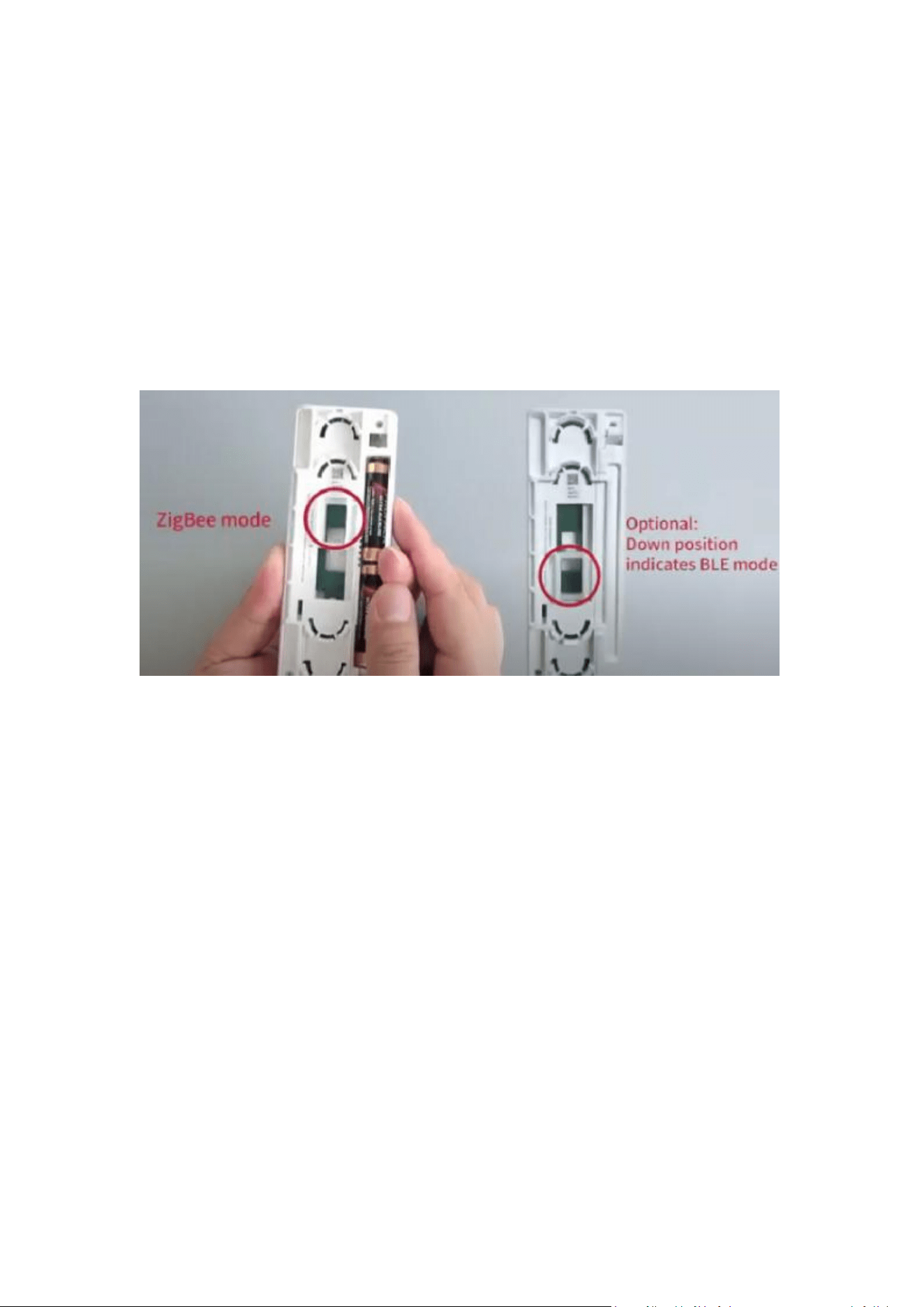
There are two versions of the Smart Switch Gen3(Zigbee and BLE) and it is interchangeable,
to check the mode of the Smart Switch Gen3, please follow the instructions as follow.
① Remove the battery, press and hold the switch button for 5 seconds.
② While still holding down the button, install the battery.
③ The plastic slider will slide within 10 seconds, release the button immediately and check
its mode according to the position(as shown in the picture).
To change the mode from BLE to Zigbee
① Make sure the plastic pusher of the motor drive is at the bottom position, remove the
batteries.
② Push and hold the button while installing the batteries, the plastic pusher moves up and
down.
③ Double-press the button within 5 seconds, and the plastic pusher moves up, indicating
it's in Zigbee mode.
Check mode video: https://www.youtube.com/watch?v=F92CdBzat8A
Change mode video: https://www.youtube.com/watch?v=VHEjUIkpGKM
7 When pressing the button of the switch, it does not turn on/off the switch, the
motor does not work.
- Take out the battery from the Smart Switch Gen3.
- Press the switch button 8 times to drain the power from the circuit.
- Install the battery and see if it works.
8 The on/off status of the Smart Switch Gen3 is reversed, how to change it?
You can reverse the on/off status of the Smart Switch Gen3, press and hold the on/off button

for more than 10 seconds until the LED indicator light turns solid blue, then release the
button, the plastic pusher will slide to the opposite position.
YouTube video: https://www.youtube.com/watch?v=iWqXBJBpTT4
9 I have two Smart Switches Gen3 in different places that control one stair light, I
use Alexa to turn it on, how do I set the ON/OFF status synchronization of two
switches for the same light?
You can create "N-Way group" in Third Reality app with a Third Reality smart hub, name the
group of two switches “stair light”.
After account linking through Alexa Skill by logging your Third Reality account, the “stair
light” will be added to your Alexa device list, now you can use Alexa to turn on/off the “stair
light”, to create routines with it.
①Pair two Smart Switches Gen3 to the Third Reality smart hub in the Third Reality app.
②Tap Group tab, tap "+" in the up right to add group.
③Tap to choose "N-Way Switch"
④Put in the group name, then tap "Next".
⑤Tick two switches then tap “Next”.
⑥Tap "Create Group"
⑦Now you can control the stair light by pressing the ON/OFF button in the app, the states of
both physical switches are synchronized.
2024.8.7