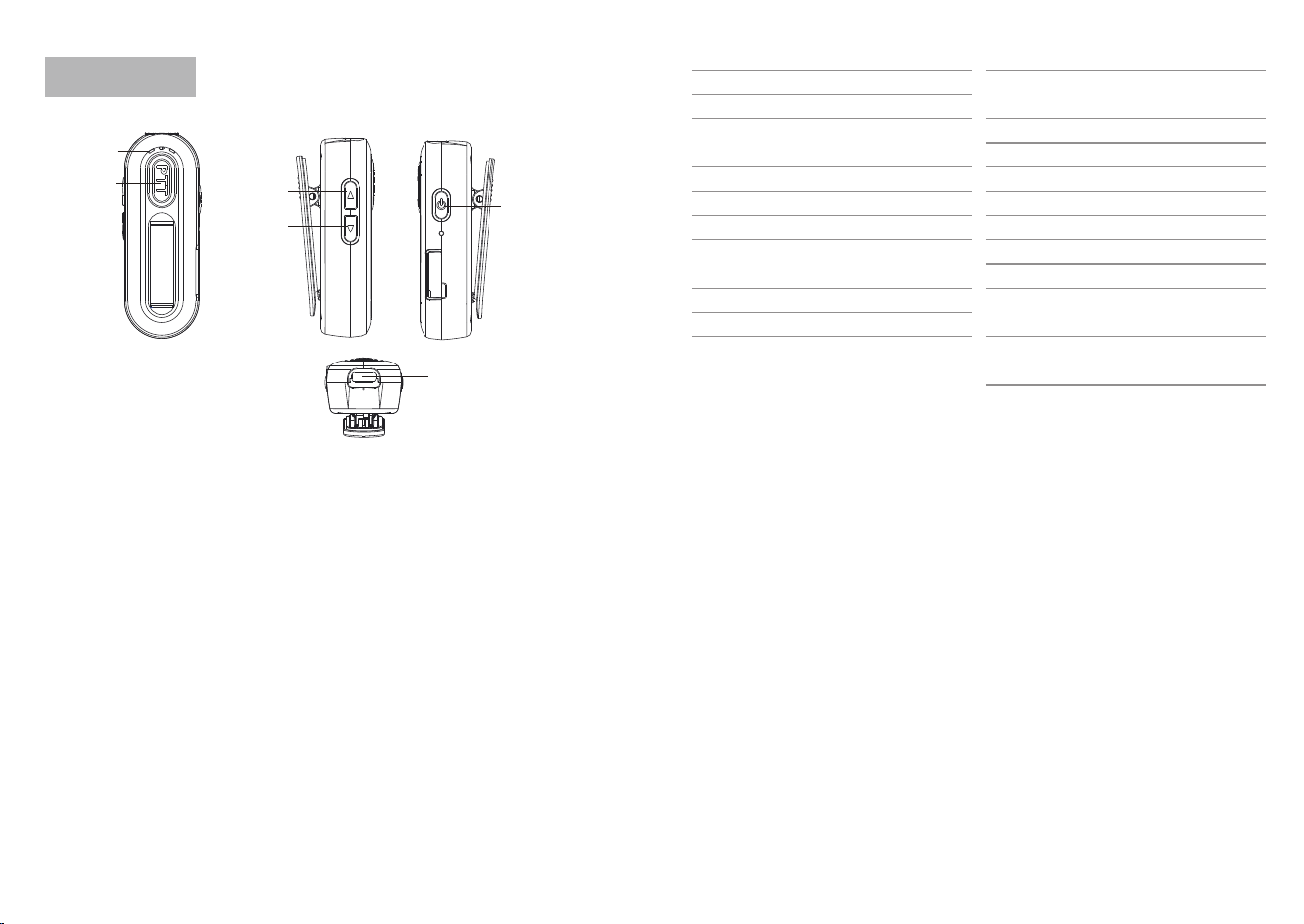
Terminal Introduction
1、Status Indicator Lights;
2、PTT Key: Press this key and speak into the microphone when
transmitting; release this key when receiving;
3、Side Button 1: Short press to switch channels and increase
volume; long press function can be programmed via
programming software;
4、Side Button 2: Short press to switch channels and decrease
volume; long press function can be programmed via
programming software;
5、Power On/Off Button: Short press to switch channel/volume
mode; long press to power on/off;
6、Programming (Headphone) Port: Can be used to connect an
externally purchased headset, or to connect a charging cable
to charge the device, or to connect a programming cable to
perform read/write operations on the walkie-talkie via PC software;
Features
1、QT/DQT Sub-Audio
2、High/Low Power Switching
3、Broadband/Narrowband
Selectable
4、Companding Function
5、Scrambling Function
6、Frequency Hopping Function
7、One-Key Frequency
Measurement Function
8、Scan Add/Delete Function
9、Squelch Level
About Radio
1 Status
2 PTT
Lavalier LT UHF Product PD
6 Programming
3 Side
4 Side
5 Power
On/Off
10、Time-Limited Transmission
(TOT) Function
11、Tail-End Mode
12、Voice Broadcast
13、Power Saving Function
14、Emergency Alarm
15、Scanning Function
16、Voice control function
17、Voice control delay
18、Low voltage broadcast
function
19、Frequency encryption
function
Programmable key functions are as follows
1、No
2、monitoringListen
3、Scan
4、Emergency Alarm
5、Keyboard lock
6、Channel broadcast
One-Key Frequency Measurement Function
This device has a frequency measurement function. After the
frequency measurement is completed, you can communicate with
the target walkie-talkie.
Specific Steps: On the first channel, press and hold [PTT] + side
key 2 to power on. After entering the mode, the transmitter light will
flash continuously, accompanied by three 'beep beep beep' sounds
and the current channel will be announced, indicating that the
code-breaking mode has been entered. In this mode, the target
walkie-talkie needs to transmit, and the device will receive and
break the code. If the code breaking is successful, the transmitter
CA-10
Operation
Side Button 1 / Side Button 2
① After powering on, the default volume mode is used. Short presses
of side buttons 1 and 2 can be used to adjust the volume. Short press
of side button 1 increases the volume; short press of side button 2
decreases the volume.
② Short press the power button to switch to channel mode. Side
buttons 1 and 2 are used to select the channel.
③ When you have set the operation functions of side buttons 1 and
2 through the programming software, you need to long press side
buttons 1 and 2 to activate this function.
Accessories
Charging cable (Code: 29K-ZG05V-2069 Material: Switching power
supply charging cable (USB) Specification: 2-core wire, 1A current
(USB 3.1 Type C), wire thickness 3.5)
Switching power supply (Code: 29K-0K158-2064 Material: Standard
switching power supply plug Specification: K158 5V/1A
(GFBA00500100WA))
Headphones (Code: 29E-VEEJX-0022; Material: Headphone
cable_TYPE-C; Specification: CA type (private network))
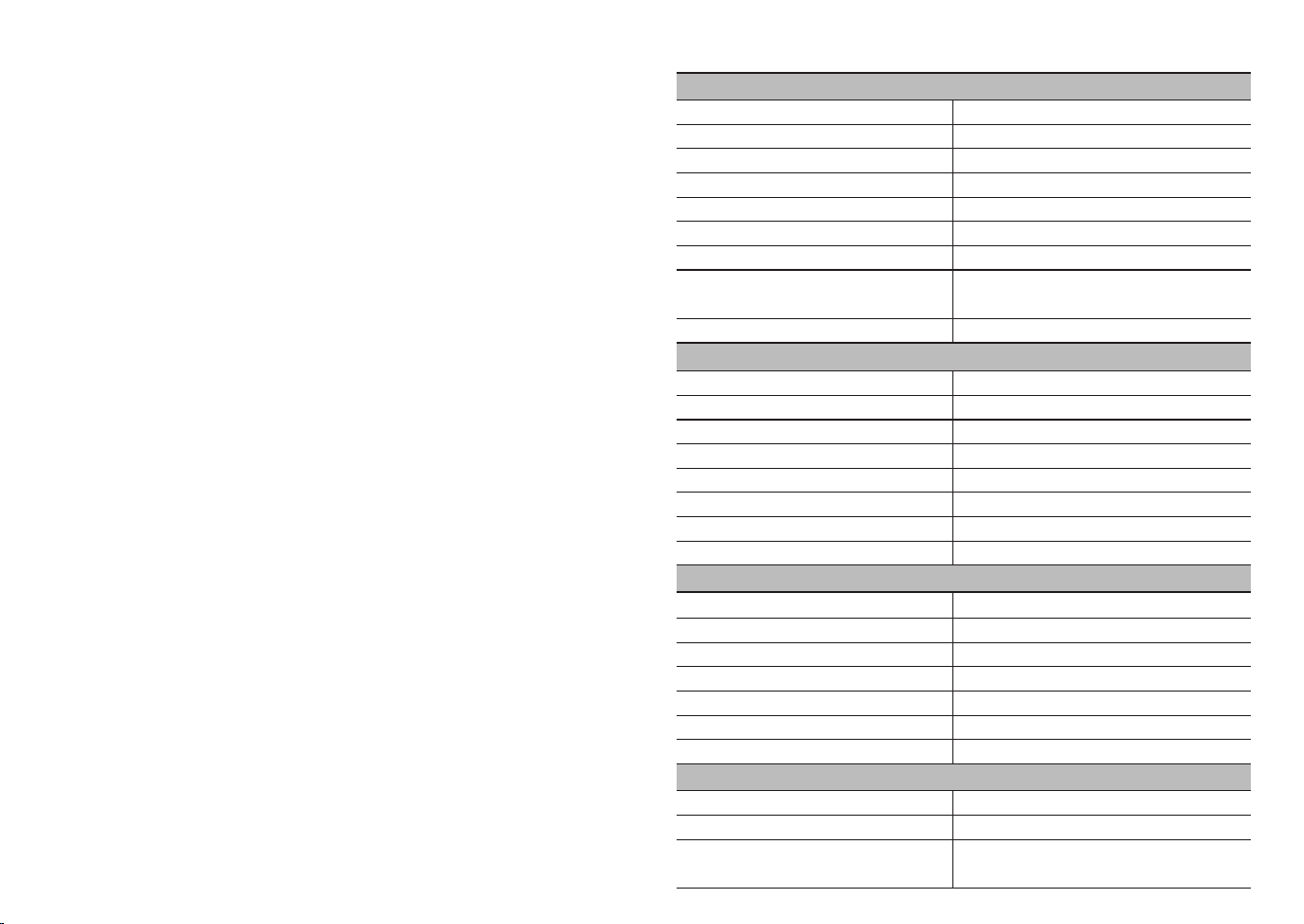
Product Specifications
General Specifications
Reception Performance
Transmit Performance
Frequency Range
Channel Capacity
Channel Spacing
Operating Voltage
Battery Capacity
Standby Time
Dimensions
Weight (Standard Battery
and Antenna Included)
Display Screen
Reception Sensitivity
Adjacent Channel Selectivity
Blocking
Intermodulation
Spurious Response Suppression
Signal-to-Noise Ratio
Received Audio Power
Audio Distortion
Modulation Method
Modulation Limitation
Transmit Power
Audio Distortion
Residual Frequency Modulation
Adjacent Channel Power
Clutter and Harmonics
Environmental Indicators
Operating Temperature
Storage Temperature
Shock and Vibration
16kΦF3E/8kΦF3E
±5kHz/±2.5kHz
≤1W
≤5%
-45dB
-67dB
-36dBm<1GHz -30dBm>1GHz
-25℃ ~ +55℃
-40℃ ~ +70℃
According to GJB 150-2009 and
MIL-STD-810 C/D/E/F/G standards
≤0.18uV/0.22uV
≥60dB
≥80dB
≥60dB
≥70dB
≥50dB
≥0.2W
≤5%
Tx: 420-450MHz Rx:400-470Mhz
16
12.5kHz/25KHz
3.8V
800mAh
72h
74.5mm*28mm*29mm
Approximately 32g
No Display Screen
light will flash once and a prompt tone will be heard. After success,
you can talk to the target walkie-talkie to verify whether the code
breaking was successful.
In code breaking mode, a short press of side button 2 will produce
a "beep" sound, indicating that the code breaking has been restarted.
If the code breaking is unsuccessful for a long time (more than 10
seconds), please press the button briefly to restart the code breaking.
A long press of side button 2 will exit the code breaking mode (exiting
the code breaking will be indicated by two "beep" sounds).

This device complies with part 15 of the FCC Rules. Operation is subject to the following
two conditions: (1) This device may not cause harmful interference, and (2) this device
must accept any interference received,including interference that may cause undesired
operation.
Note: This equipment has been tested and found to comply with the limits for a Class B
digital device, pursuant to part 15 of the FCC Rules. These limits are designed to provide
reasonable protection against harmful interference in a residential installation. This
equipment generates, uses and can radiate radio frequency energy and, if not installed
and used in accordance with the instructions, may cause harmful interference in radio
communications. However, there is no guarantee that interference will not occur in a
particular situation. lf this equipment does cause harmful interference to radio or
television reception, which can be determined by turning the equipment off and on, the
user is encouraged to try to correct the interference by one or more of the following
measures:
- Reorient or relocate the receiving antenna.
- Increase the separation between the equipment and receiver.
- Connect the equipment into an outlet on a circuit different from that to which the
receiver is connected.
- Consult the dealer or an experienced radio/TV technician for help.
WARNING: MODIFICATION OF THIS DEVICE TO RECEIVE CELLULAR
RADIOTELEPHONE SERVICE SIGNALS IS PROHIBITED UNDER FCC RULES AND
FEDERAL LAW.
FCC STATEMENT
Changes or modifications not expressly approved by the party responsible for
compliance could void the user's authority to operate the equipment.
Part 97 does not require equipment authorization (with the exception of external power
amplifiers).
RF Exposure Statement:
SAR tests are conducted using standard operating positions accepted by FCC with the
device transmitting at its highest certified power level in all tested frequency bands,
although the SAR is determined at the highest certified power level, the actual SAR level of
the device while operating can be well below the maximum value. Before a new model is
an available for sale to the public, it must be tested and certified to the FCC that is does not
exceed the exposure limit established by the FCC. Tests for each product are performed in
positions and locations as required by the FCC. For body worn operation, this device has
been tested and meets the FCC RF exposure guidelines when used with and accessory
designated for this product or when used with and accessory that contains no metal. To
maintain compliance with FCC RF exposure guidelines, hold the transmitter and antenna at
least 1 inch (2.5 centimeters) from your face and speak in a normal voice, with the antenna
pointed up and away from the face.