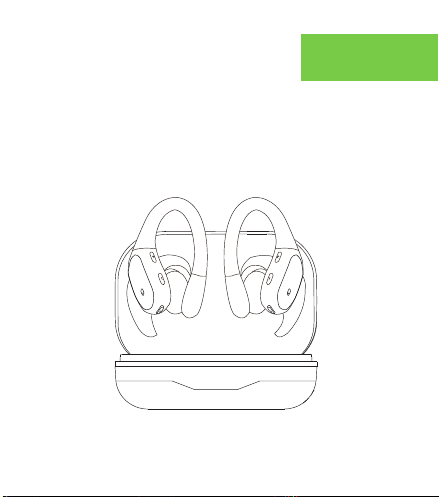
Instruction Manual
Please read the instructions before use
English
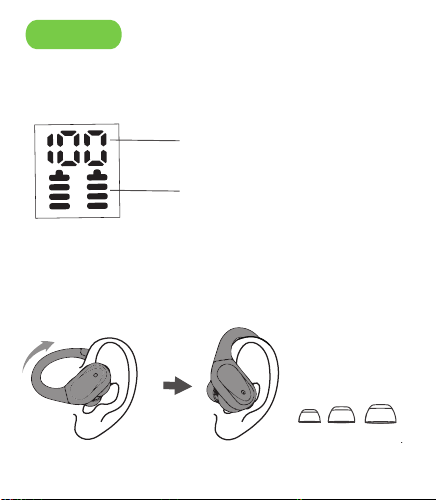
1.Battery Indicator.
Before Use
Reset
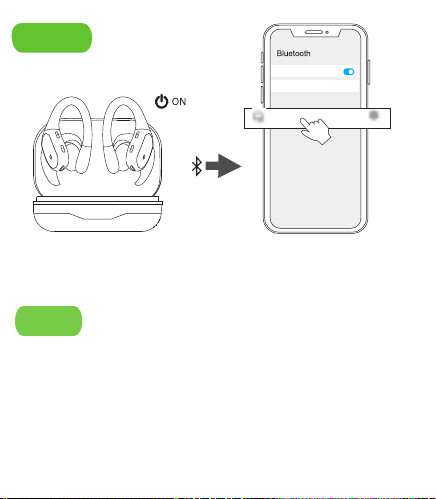
2. After open the phone
Bluetooth, Click the <BX17> to
Pairing.
Bluetooth
Device name
K30 >
If earbuds has any connection or function problems, please
reset the earbuds
1. Delete the BT pairing information on the phone.
2. Take the earbuds into the charging case to charge.
3. Take out the earbuds and wait for 20 seconds.
(If the above operation does not work, please try again)
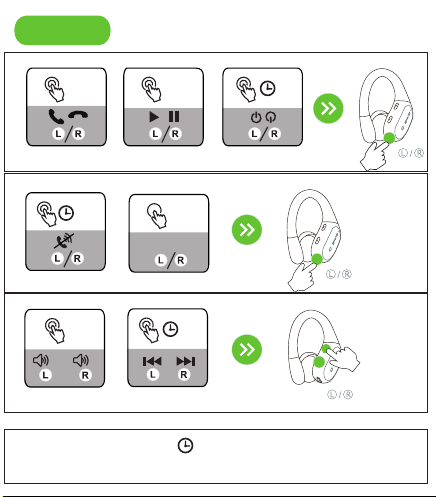
X1: Click Once
X2: Click 2 times
Bluetooth
Device name
Available Devices
BX17
Nova7 >
2S: Press and hold for 2 seconds
X1
Answer/Hang up
Operation
Connect
① Can be connected but there is no sound:
Click the earbud volume key to increase the volume.
② One of earbuds cannot be charge:
Clean the charging contact of the earbuds and the
charging case.
③ One of the earbuds cannot be connected:
Reset the earbuds.
If the earbuds cannot be charged, please activate the
warranty and contact us to send a new product.
Please clean the charging contacts of the
earbuds and charging case to avoid charging
failures.
Problem handling
Play /Pause
X1
Power on/off
5S
Adjust Volume
X1
-
+
Switch Song
2S
Reject Call
2S
The power of the charging case.
The earbuds be charging.
2.Choose the right angle and eartips.
1.Open the cover for
pairing and close the
cover for charging.
Voice Assistant
2S
Siri
BX17
SML
Warning: Changes or modifications to this unit not expressly approved by
the party responsible for compliance could void the user’s authority to
operate the equipment.
NOTE: This device complies with part 15 of the FCC Rules. Operation is
subject to the following two conditions: (1) This device may not cause
harmful interference, and (2) this device must accept any interference
received, including interference that may cause undesired operation.
FCC Statement: This equipment has been tested and found to comply
with the limits for a Class B digital device, pursuant to part 15 of the FCC
Rules. These limits are designed to provide reasonable protection against
harmful interference in a residential installation. This equipment
generates, uses and can radiate radio frequency energy and, if not
installed and used in accordance with the instructions, may cause harmful
interference to radio communications. However, there is no guarantee that
interference will not occur in a particular installation. If this equipment
does cause harmful interference to radio or television reception, which can
be determined by turning the equipment off and on, the user is
encouraged to try to correct the interference by one or more of the
following measures:
—Reorient or relocate the receiving antenna.
—Increase the separation between the equipment and receiver.
—Connect the equipment into an outlet on a circuit different from that to
which the receiver is connected.
—Consult the dealer or an experienced radio/TV technician for help.
Instruction Manual
Please read the instructions before use
English
1.Battery Indicator.
Before Use
Reset
2. After open the phone
Bluetooth, Click the <BX17> to
Pairing.
Bluetooth
Device name
K30 >
If earbuds has any connection or function problems, please
reset the earbuds
1. Delete the BT pairing information on the phone.
2. Take the earbuds into the charging case to charge.
3. Take out the earbuds and wait for 20 seconds.
(If the above operation does not work, please try again)
X1: Click Once
X2: Click 2 times
Bluetooth
Device name
Available Devices
BX17
Nova7 >
2S: Press and hold for 2 seconds
X1
Answer/Hang up
Operation
Connect
① Can be connected but there is no sound:
Click the earbud volume key to increase the volume.
② One of earbuds cannot be charge:
Clean the charging contact of the earbuds and the
charging case.
③ One of the earbuds cannot be connected:
Reset the earbuds.
If the earbuds cannot be charged, please activate the
warranty and contact us to send a new product.
Please clean the charging contacts of the
earbuds and charging case to avoid charging
failures.
Problem handling
Play /Pause
X1
Power on/off
5S
Adjust Volume
X1
-
+
Switch Song
2S
Reject Call
2S
The power of the charging case.
The earbuds be charging.
2.Choose the right angle and eartips.
1.Open the cover for
pairing and close the
cover for charging.
Voice Assistant
2S
Siri
BX17
SML
Warning: Changes or modifications to this unit not expressly approved by
the party responsible for compliance could void the user’s authority to
operate the equipment.
NOTE: This device complies with part 15 of the FCC Rules. Operation is
subject to the following two conditions: (1) This device may not cause
harmful interference, and (2) this device must accept any interference
received, including interference that may cause undesired operation.
FCC Statement: This equipment has been tested and found to comply
with the limits for a Class B digital device, pursuant to part 15 of the FCC
Rules. These limits are designed to provide reasonable protection against
harmful interference in a residential installation. This equipment
generates, uses and can radiate radio frequency energy and, if not
installed and used in accordance with the instructions, may cause harmful
interference to radio communications. However, there is no guarantee that
interference will not occur in a particular installation. If this equipment
does cause harmful interference to radio or television reception, which can
be determined by turning the equipment off and on, the user is
encouraged to try to correct the interference by one or more of the
following measures:
—Reorient or relocate the receiving antenna.
—Increase the separation between the equipment and receiver.
—Connect the equipment into an outlet on a circuit different from that to
which the receiver is connected.
—Consult the dealer or an experienced radio/TV technician for help.
Instruction Manual
Please read the instructions before use
English
1.Battery Indicator.
Before Use
Reset
2. After open the phone
Bluetooth, Click the <BX17> to
Pairing.
Bluetooth
Device name
K30 >
If earbuds has any connection or function problems, please
reset the earbuds
1. Delete the BT pairing information on the phone.
2. Take the earbuds into the charging case to charge.
3. Take out the earbuds and wait for 20 seconds.
(If the above operation does not work, please try again)
X1: Click Once
X2: Click 2 times
Bluetooth
Device name
Available Devices
BX17
Nova7 >
2S: Press and hold for 2 seconds
X1
Answer/Hang up
Operation
Connect
① Can be connected but there is no sound:
Click the earbud volume key to increase the volume.
② One of earbuds cannot be charge:
Clean the charging contact of the earbuds and the
charging case.
③ One of the earbuds cannot be connected:
Reset the earbuds.
If the earbuds cannot be charged, please activate the
warranty and contact us to send a new product.
Please clean the charging contacts of the
earbuds and charging case to avoid charging
failures.
Problem handling
Play /Pause
X1
Power on/off
5S
Adjust Volume
X1
-
+
Switch Song
2S
Reject Call
2S
The power of the charging case.
The earbuds be charging.
2.Choose the right angle and eartips.
1.Open the cover for
pairing and close the
cover for charging.
Voice Assistant
2S
Siri
BX17
SML
Warning: Changes or modifications to this unit not expressly approved by
the party responsible for compliance could void the user’s authority to
operate the equipment.
NOTE: This device complies with part 15 of the FCC Rules. Operation is
subject to the following two conditions: (1) This device may not cause
harmful interference, and (2) this device must accept any interference
received, including interference that may cause undesired operation.
FCC Statement: This equipment has been tested and found to comply
with the limits for a Class B digital device, pursuant to part 15 of the FCC
Rules. These limits are designed to provide reasonable protection against
harmful interference in a residential installation. This equipment
generates, uses and can radiate radio frequency energy and, if not
installed and used in accordance with the instructions, may cause harmful
interference to radio communications. However, there is no guarantee that
interference will not occur in a particular installation. If this equipment
does cause harmful interference to radio or television reception, which can
be determined by turning the equipment off and on, the user is
encouraged to try to correct the interference by one or more of the
following measures:
—Reorient or relocate the receiving antenna.
—Increase the separation between the equipment and receiver.
—Connect the equipment into an outlet on a circuit different from that to
which the receiver is connected.
—Consult the dealer or an experienced radio/TV technician for help.
Instruction Manual
Please read the instructions before use
English
1.Battery Indicator.
Before Use
Reset
2. After open the phone
Bluetooth, Click the <BX17> to
Pairing.
Bluetooth
Device name
K30 >
If earbuds has any connection or function problems, please
reset the earbuds
1. Delete the BT pairing information on the phone.
2. Take the earbuds into the charging case to charge.
3. Take out the earbuds and wait for 20 seconds.
(If the above operation does not work, please try again)
X1: Click Once
X2: Click 2 times
Bluetooth
Device name
Available Devices
BX17
Nova7 >
2S: Press and hold for 2 seconds
X1
Answer/Hang up
Operation
Connect
① Can be connected but there is no sound:
Click the earbud volume key to increase the volume.
② One of earbuds cannot be charge:
Clean the charging contact of the earbuds and the
charging case.
③ One of the earbuds cannot be connected:
Reset the earbuds.
If the earbuds cannot be charged, please activate the
warranty and contact us to send a new product.
Please clean the charging contacts of the
earbuds and charging case to avoid charging
failures.
Problem handling
Play /Pause
X1
Power on/off
5S
Adjust Volume
X1
-
+
Switch Song
2S
Reject Call
2S
The power of the charging case.
The earbuds be charging.
2.Choose the right angle and eartips.
1.Open the cover for
pairing and close the
cover for charging.
Voice Assistant
2S
Siri
BX17
SML
Warning: Changes or modifications to this unit not expressly approved by
the party responsible for compliance could void the user’s authority to
operate the equipment.
NOTE: This device complies with part 15 of the FCC Rules. Operation is
subject to the following two conditions: (1) This device may not cause
harmful interference, and (2) this device must accept any interference
received, including interference that may cause undesired operation.
FCC Statement: This equipment has been tested and found to comply
with the limits for a Class B digital device, pursuant to part 15 of the FCC
Rules. These limits are designed to provide reasonable protection against
harmful interference in a residential installation. This equipment
generates, uses and can radiate radio frequency energy and, if not
installed and used in accordance with the instructions, may cause harmful
interference to radio communications. However, there is no guarantee that
interference will not occur in a particular installation. If this equipment
does cause harmful interference to radio or television reception, which can
be determined by turning the equipment off and on, the user is
encouraged to try to correct the interference by one or more of the
following measures:
—Reorient or relocate the receiving antenna.
—Increase the separation between the equipment and receiver.
—Connect the equipment into an outlet on a circuit different from that to
which the receiver is connected.
—Consult the dealer or an experienced radio/TV technician for help.
Instruction Manual
Please read the instructions before use
English
1.Battery Indicator.
Before Use
Reset
2. After open the phone
Bluetooth, Click the <BX17> to
Pairing.
Bluetooth
Device name
K30 >
If earbuds has any connection or function problems, please
reset the earbuds
1. Delete the BT pairing information on the phone.
2. Take the earbuds into the charging case to charge.
3. Take out the earbuds and wait for 20 seconds.
(If the above operation does not work, please try again)
X1: Click Once
X2: Click 2 times
Bluetooth
Device name
Available Devices
BX17
Nova7 >
2S: Press and hold for 2 seconds
X1
Answer/Hang up
Operation
Connect
① Can be connected but there is no sound:
Click the earbud volume key to increase the volume.
② One of earbuds cannot be charge:
Clean the charging contact of the earbuds and the
charging case.
③ One of the earbuds cannot be connected:
Reset the earbuds.
If the earbuds cannot be charged, please activate the
warranty and contact us to send a new product.
Please clean the charging contacts of the
earbuds and charging case to avoid charging
failures.
Problem handling
Play /Pause
X1
Power on/off
5S
Adjust Volume
X1
-
+
Switch Song
2S
Reject Call
2S
The power of the charging case.
The earbuds be charging.
2.Choose the right angle and eartips.
1.Open the cover for
pairing and close the
cover for charging.
Voice Assistant
2S
Siri
BX17
SML
Warning: Changes or modifications to this unit not expressly approved by
the party responsible for compliance could void the user’s authority to
operate the equipment.
NOTE: This device complies with part 15 of the FCC Rules. Operation is
subject to the following two conditions: (1) This device may not cause
harmful interference, and (2) this device must accept any interference
received, including interference that may cause undesired operation.
FCC Statement: This equipment has been tested and found to comply
with the limits for a Class B digital device, pursuant to part 15 of the FCC
Rules. These limits are designed to provide reasonable protection against
harmful interference in a residential installation. This equipment
generates, uses and can radiate radio frequency energy and, if not
installed and used in accordance with the instructions, may cause harmful
interference to radio communications. However, there is no guarantee that
interference will not occur in a particular installation. If this equipment
does cause harmful interference to radio or television reception, which can
be determined by turning the equipment off and on, the user is
encouraged to try to correct the interference by one or more of the
following measures:
—Reorient or relocate the receiving antenna.
—Increase the separation between the equipment and receiver.
—Connect the equipment into an outlet on a circuit different from that to
which the receiver is connected.
—Consult the dealer or an experienced radio/TV technician for help.

Instruction Manual
Please read the instructions before use
English
1.Battery Indicator.
Before Use
Reset
2. After open the phone
Bluetooth, Click the <BX17> to
Pairing.
Bluetooth
Device name
K30 >
If earbuds has any connection or function problems, please
reset the earbuds
1. Delete the BT pairing information on the phone.
2. Take the earbuds into the charging case to charge.
3. Take out the earbuds and wait for 20 seconds.
(If the above operation does not work, please try again)
X1: Click Once
X2: Click 2 times
Bluetooth
Device name
Available Devices
BX17
Nova7 >
2S: Press and hold for 2 seconds
X1
Answer/Hang up
Operation
Connect
① Can be connected but there is no sound:
Click the earbud volume key to increase the volume.
② One of earbuds cannot be charge:
Clean the charging contact of the earbuds and the
charging case.
③ One of the earbuds cannot be connected:
Reset the earbuds.
If the earbuds cannot be charged, please activate the
warranty and contact us to send a new product.
Please clean the charging contacts of the
earbuds and charging case to avoid charging
failures.
Problem handling
Play /Pause
X1
Power on/off
5S
Adjust Volume
X1
-
+
Switch Song
2S
Reject Call
2S
The power of the charging case.
The earbuds be charging.
2.Choose the right angle and eartips.
1.Open the cover for
pairing and close the
cover for charging.
Voice Assistant
2S
Siri
BX17
SML
Warning: Changes or modifications to this unit not expressly approved by
the party responsible for compliance could void the user’s authority to
operate the equipment.
NOTE: This device complies with part 15 of the FCC Rules. Operation is
subject to the following two conditions: (1) This device may not cause
harmful interference, and (2) this device must accept any interference
received, including interference that may cause undesired operation.
FCC Statement: This equipment has been tested and found to comply
with the limits for a Class B digital device, pursuant to part 15 of the FCC
Rules. These limits are designed to provide reasonable protection against
harmful interference in a residential installation. This equipment
generates, uses and can radiate radio frequency energy and, if not
installed and used in accordance with the instructions, may cause harmful
interference to radio communications. However, there is no guarantee that
interference will not occur in a particular installation. If this equipment
does cause harmful interference to radio or television reception, which can
be determined by turning the equipment off and on, the user is
encouraged to try to correct the interference by one or more of the
following measures:
—Reorient or relocate the receiving antenna.
—Increase the separation between the equipment and receiver.
—Connect the equipment into an outlet on a circuit different from that to
which the receiver is connected.
—Consult the dealer or an experienced radio/TV technician for help.