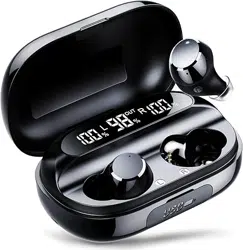
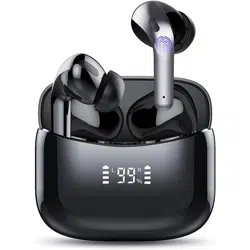
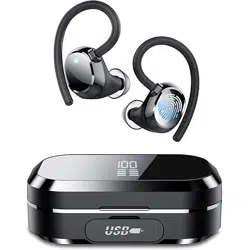
Model Q12 · In-ear Bluetooth headphones with charging case, IPX7 sweatproof, touch controls, built-in mic.
Overview
The Tiksounds Q12 are true wireless in-ear earbuds designed for everyday listening, workouts, and calls. They feature a compact charging case, touch controls, and Bluetooth 5.0 with CVC 8.0 noise reduction for calls. The earbuds provide up to 6 hours of playback per charge (5–6 hrs typical) and about 36 hours total with the charging case.


Key features at a glance
- Ergonomic mini design – lightweight (4.9g per bud), three ear tip sizes (S/M/L) for a secure fit.
- 36H total playtime – 6 hours from earbuds, charging case provides additional charges (600 mAh case).
- Fast charge – 10 min charge gives about 1 hour of playback; full charge in ~1 hour.
- IPX7 sweatproof – nano-coating protects against sweat and light rain; not for submersion.
- Bluetooth 5.0 & CVC 8.0 – stable connection, dual mics, reduces ambient noise during calls.
- Smart touch control – play/pause, track skip, volume, voice assistant (Siri/Google).
- Auto pairing – earbuds power on when case opens and reconnect to last device.
- Stereo / mono mode – use both earbuds together or either bud independently.
What's in the box
- 2 × Bluetooth earbuds (L/R)
- 1 × Magnetic charging case (600 mAh)
- 1 × USB charging cable
- 3 × pairs of eartips (S / M / L)
- 1 × User manual / activity card
Product diagram & controls


Touch areas: Each earbud has a capacitive touch surface. The right earbud (R) and left earbud (L) respond to taps and presses as described below.
Features & usage
Battery & charging
- Earbud battery: 60 mAh each (button cell).
- Charging case: 600 mAh.
- Playback time: 5–6 hours per charge (varies with volume).
- Total with case: up to 36 hours.
- Charging time: ~1 hour for earbuds / case.
- Fast charge: 10 min = ~1 hour playback.
To charge: place earbuds in the case; the magnetic pins align. Connect the USB cable to the case (USB-A to micro/standard, as included). The case LED (if any) indicates charging status.
Bluetooth pairing (first time)
- Open the charging case and take out both earbuds.
- Remove the insulation film on the charging contacts (if present).
- Place earbuds back in case for a few seconds, then take both out together – they power on and enter pairing mode. Voice prompt: “Pairing mode”.
- On your phone/device, enable Bluetooth and search for new devices.
- Select “Q12” from the list. Voice prompt: “Bluetooth pair successful”.
Auto-reconnect: after initial pairing, earbuds will automatically reconnect to the last paired device when the case is opened and earbuds are removed.
Touch controls (button operation)
R = right earbud, L = left earbud
| Action | Command |
|---|---|
| Play / pause | R or L · single click |
| Answer / hang up call | R or L · single click |
| Reject incoming call | R or L · long press 2 sec (during call) |
| Voice assistant (Siri/Google) | R or L · long press 2 sec (power on, not in call) |
| Power on (when off) | R or L · long press 2 sec |
| Power off | R or L · long press 4 sec |
| Next track | R · double click |
| Previous track | L · double click |
| Volume + | R · triple click |
| Volume − | L · triple click |
Mono / stereo mode
Both earbuds can be used independently. To use only one earbud, simply take out only the right or left from the case and pair it as a single device. They can also be used together for stereo sound.
Noise reduction & microphone
Each earbud has two microphones with CVC 8.0 noise reduction. This reduces background noise during calls while retaining your voice clarity. Note: this is call noise reduction, not active noise cancellation (ANC).
Design & fit


Use guide – step by step
First time start
- Open the charging case, remove the insulation film from both earbuds' charging contacts.
- Place earbuds back in the case and close the lid for 10 seconds, then open and take out both earbuds.
- They will power on automatically and enter pairing mode (voice prompt).
- On your phone, go to Bluetooth settings, search and select “Q12”.
- After successful connection, you'll hear “Bluetooth pair successful”.
Daily use
- Power on: take earbuds out of case (auto on) or long-press 2 sec if off.
- Power off: long-press 4 sec on either earbud, or place them back in the case (they will charge and turn off).
- Reconnect: earbuds auto-connect to last paired device when removed from case.
- Reset / re-pair: if connection issues, forget device in Bluetooth settings, place earbuds in case, then repeat first-time pairing.
Charging the earbuds & case
Place earbuds into the charging case. The case has magnetic slots; ensure the charging pins align. Connect the USB cable to the case and a power source. The case charges the earbuds automatically. A full charge of the case takes about 1 hour.
Safety instructions & remarks
- Do not use in high temperature or high humidity environments.
- Do not disassemble, puncture, or incinerate the earbuds (battery is flammable).
- IPX7: sweatproof and rain-resistant, but do not submerge in water.
- If the distance from the device exceeds 10 meters (barrier-free), the earbuds may disconnect.
- Earbuds will shut down automatically if no device is connected for more than 6 minutes.
- Use only the included USB cable or a compatible charger (5V/1A recommended).
Technical specifications
| Brand / Model | Tiksounds · Q12 |
|---|---|
| Ear placement / form factor | In-ear, rounded tips |
| Connectivity | Bluetooth 5.0 (wireless), 2.5mm jack (on case? – not used) |
| Frequency response | 2 Hz – 20 kHz (typical) |
| Driver | 10mm graphene dynamic driver |
| Battery (earbuds) | 60 mAh each, up to 6 hrs playtime |
| Charging case battery | 600 mAh, total ~36 hrs |
| Charging time | ~1 hour (case & earbuds) |
| Fast charge | 10 min = 1 hour playback |
| Water resistance | IPX7 (sweatproof, light rain) |
| Weight | 25.7 g (total with case), earbud ~4.9g |
| Microphone | Dual mic with CVC 8.0 noise reduction |
| Compatible devices | iPhone, Android, Samsung, most Bluetooth devices |
| Box contents | 2 earbuds, charging case, USB cable, 3 pairs eartips, manual |
Troubleshooting & tips
- Earbuds not charging: clean the charging contacts, ensure insulation film removed, check USB connection.
- Only one earbud works: place both in case, take out together; if still mono, reset by forgetting device and re-pairing.
- Poor sound quality: try different ear tip size for better seal; keep device within 10m.
- Voice assistant not responding: ensure earbuds are connected and not in a call; long-press 2 sec on either bud.
- Disconnection: move closer to device, avoid obstacles; earbuds auto-off after 6 min idle.
More product views