V1.0
English | Deutsch | Italiano | Français | Españo | 日本語
Intelligent Helmet Bluetooth Headset
Product Manual
2Y
Tech Suppo:suppo@maxrunon.com
English - 2
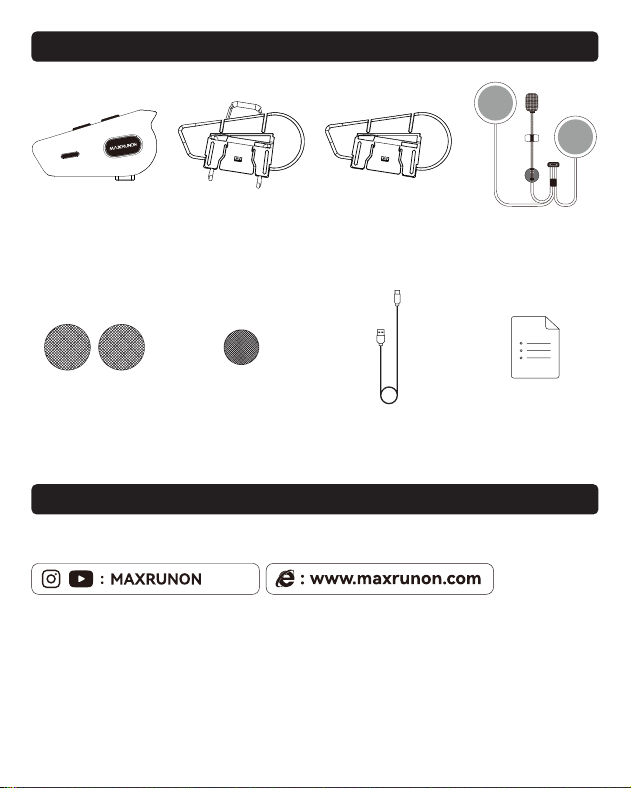
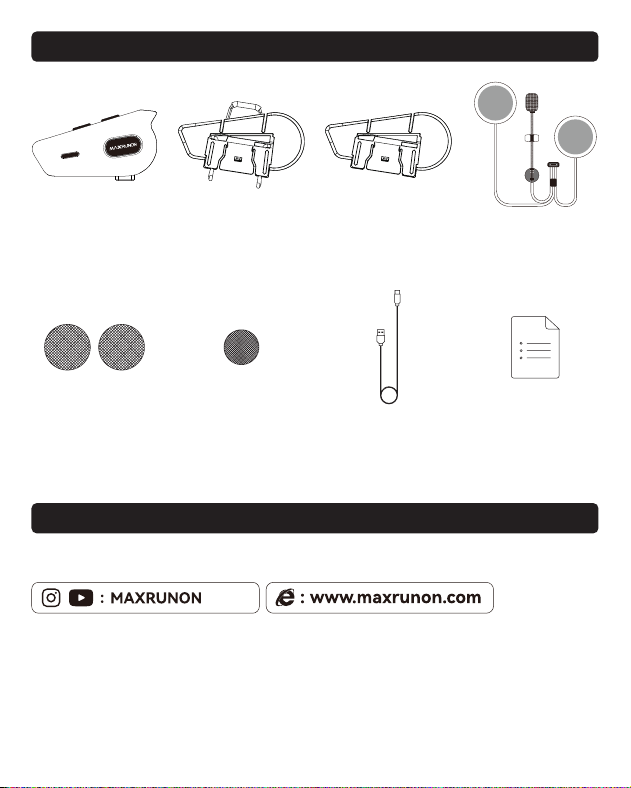
• PACKAGE CONTENTS
• Tech Suppo
MAXRUNON 2Y
Main Unit
Back Clip 3M Glue Plate Speaker Unit
Hybrid Microphone
Type-C CableVelcro for Speaker Velcro for Hybrid Mic Manual
suppo@maxrunon.com
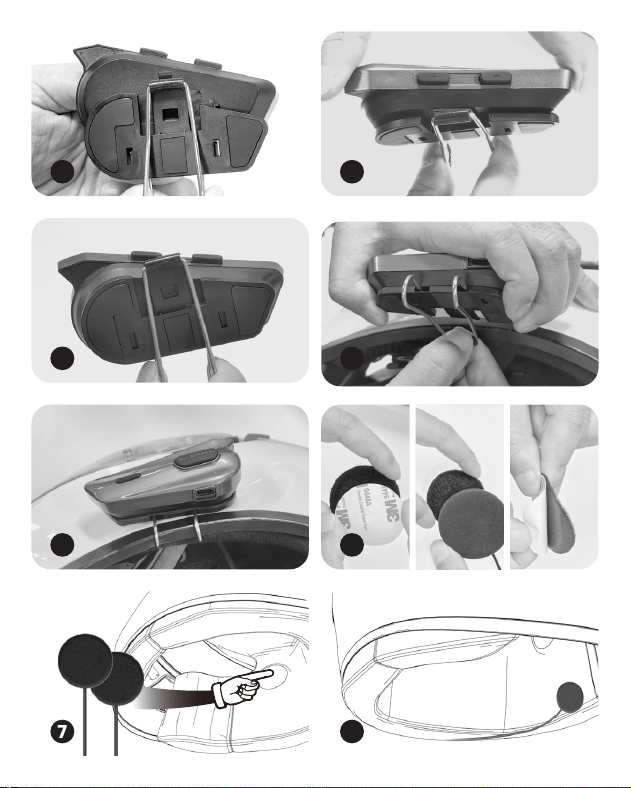
English - 3
1
3
5
7
2
4
6
8
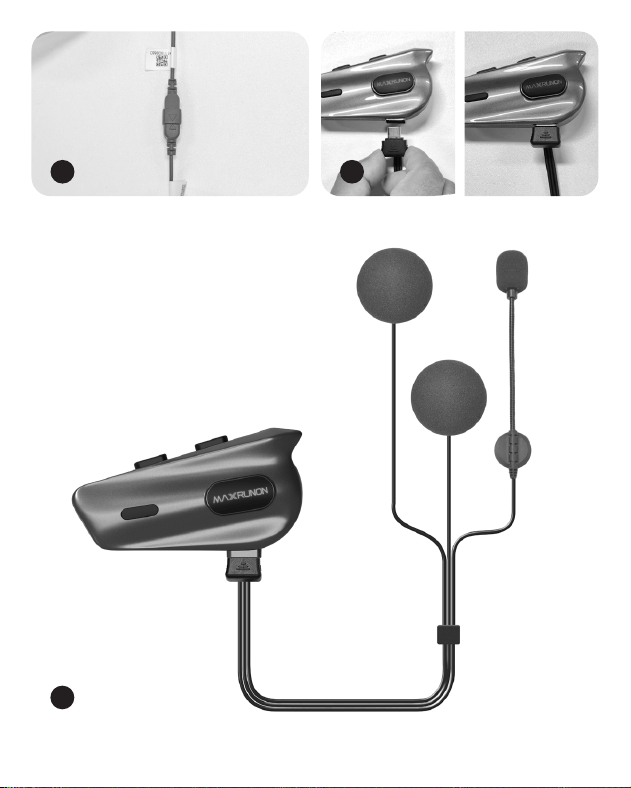
English - 4
11
9
10
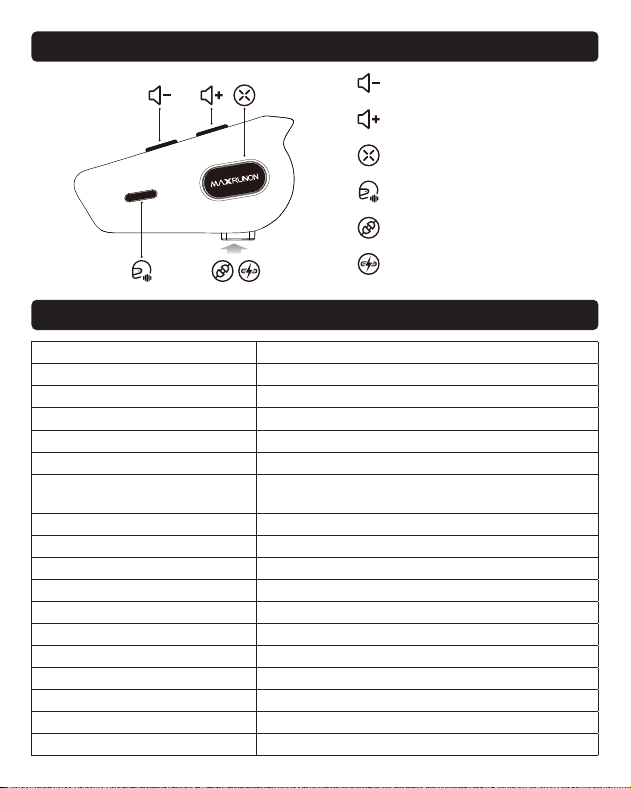
English - 5
• Function
• Product Specications
Product model 2Y
Bluetooth name MAXRUNON 2Y
Bluetooth version 5.3
Microphone&speaker 40mm Speaker Unit Hybrid Microphone
Maximum intercom capacity 2 people
Communication distance 500m
Voice control
Press the button to activate your phone’s
voice assistant.
Noise reduction capability 100 kilometers per hour, clear communication
Waterproof rating IPX5
Batte capacity 500mAh
Software upgrade Non-suppo
FM function Suppo
Fast charging time 60 minutes
Standby time 170 hours
Intercom batte life 24 hours
Music playback batte life 22 hours
Intercom+music batte life 15 hours
Automatic audio adjustment suppo
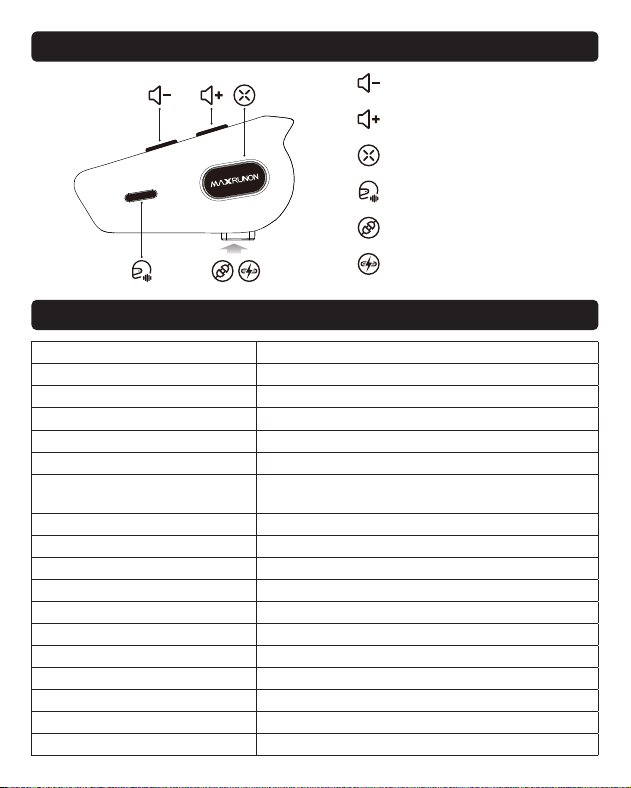
Type-C Charging Po
Function button
Intercom button
Volume -
Volume +
Audio Inteace
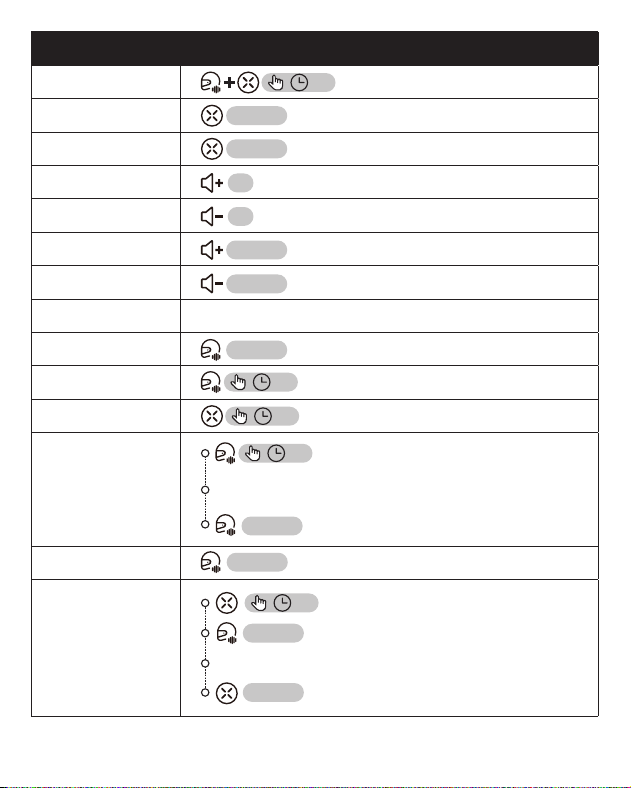
English - 6
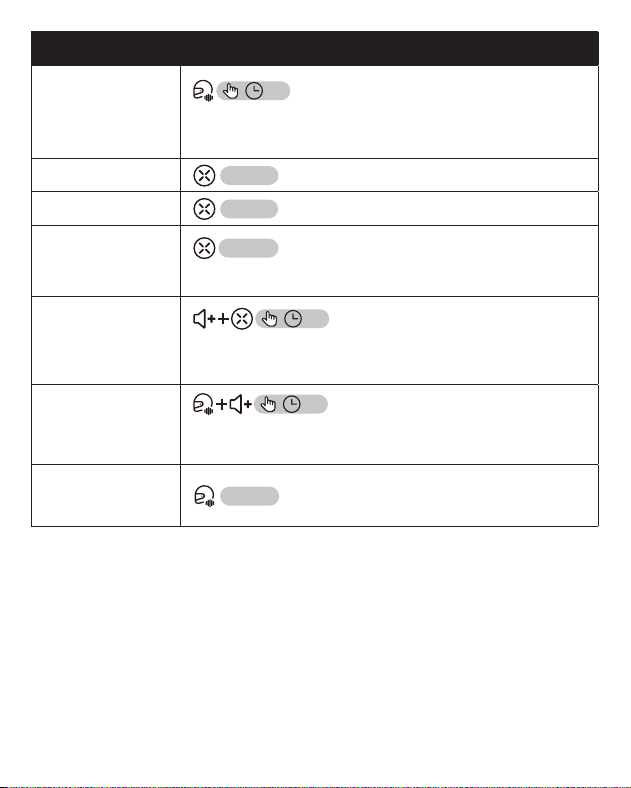
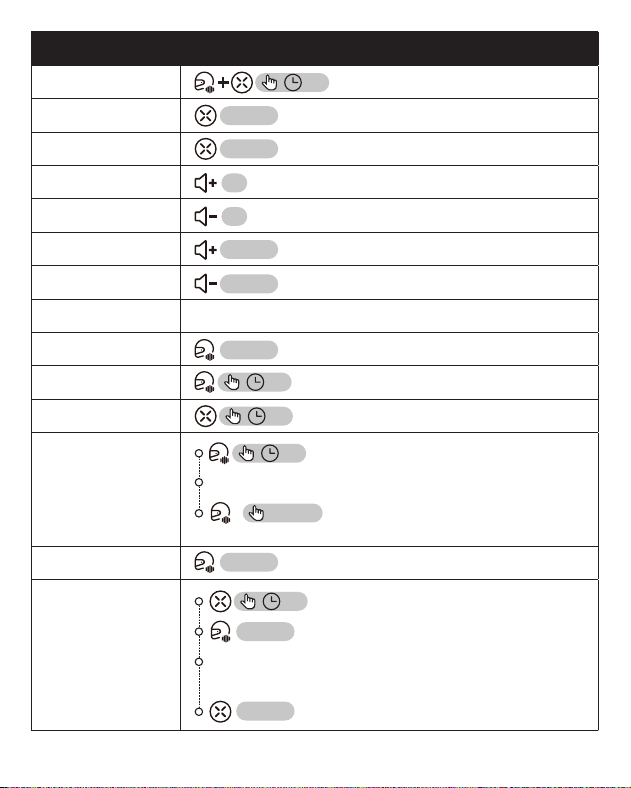
Function Button Operation
Power On/O
Play Music
Pause Music
Previous Track
Next Track
Volume +
Volume -
Answer Call Any button
End Call
Reject Call
Phone Pairing
Group
Bluetooth
Grouping
Group Mode
Universal Mode
2S
3S
3S
3S
3S
Upon broadcast of number of connected members
2S
Enable Bluetooth pairing mode on other headsets.
3S
Conrm
Activate intercom
×1 Press
×1 Press
×1 Press
×1 Press
×1 Press
×1 Press
×1 Press
×2 Press
×2 Press
English - 7
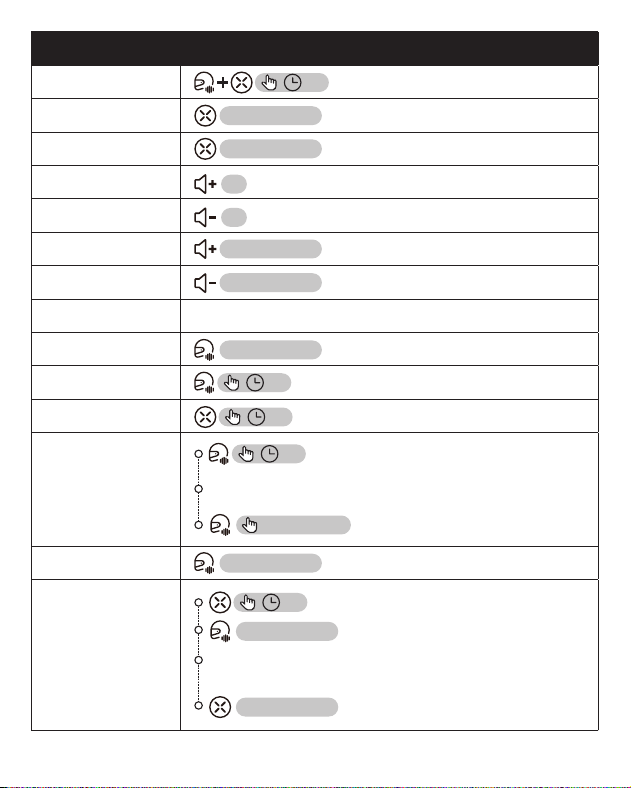
Function Button Operation
Cancel Group
Bluetooth
Grouping
2S
Note: Cancel the group when the device is in
Bluetooth grouping mode.
Radio On
×2 Press
Radio O
×2 Press
Search Radio
Stations
Note: When FM is turned on
×1 Press
Facto Reset
3S
Note: The device will reboot and reset to facto
settings.
Microphone on/
o
2S
Note: Simultaneously long press the intercom button
and any volume button for 2s.
Active the
phone's voice
assistant
×2 Press
Deutsch - 8
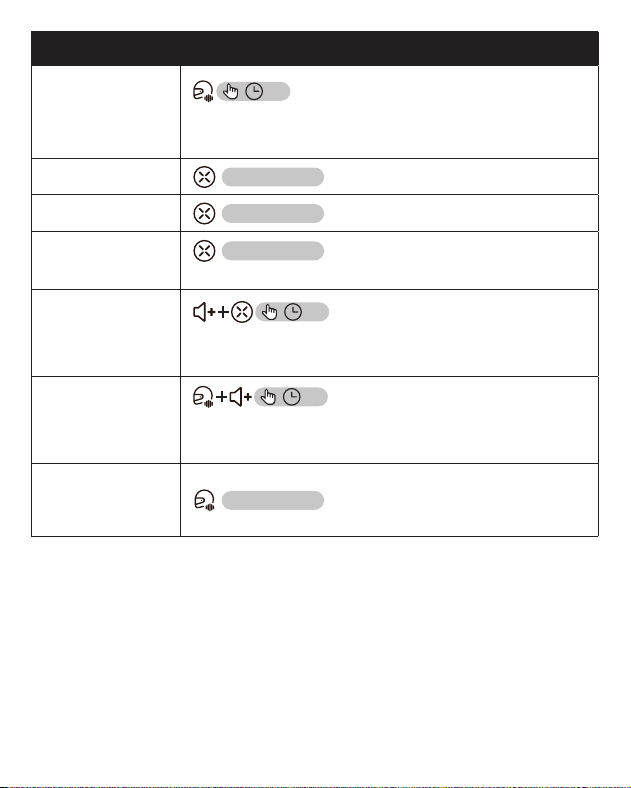
Funktion Tastenbedienung
Ein/Aus
Musik abspielen
Musik pausieren
Vorheriger Titel
Nächster Titel
Lautstärke +
Lautstärke -
Anruf annehmen Jede Taste
Anruf beenden
Anruf ablehnen
Telefonkopplung
Bluetooth-
Gruppenkopplung
Gruppenmodus
Universal-Modus
2S
3S
3S
3S
3S
Mit 2 Geräten verbinden
2S
Währenddessen müssen andere Bluetooth-Headsets
den Bluetooth-Kopplungsmodus aktivieren.
3S
×2 Taste drücken
×2 Taste drücken
Intercom aktivieren
zur Bestätigung
×1 Taste drücken
×1 Taste drücken
×1 Taste drücken
×1 Taste drücken
×1 Taste drücken
×1 Taste drücken
×1 Taste drücken
Deutsch - 9
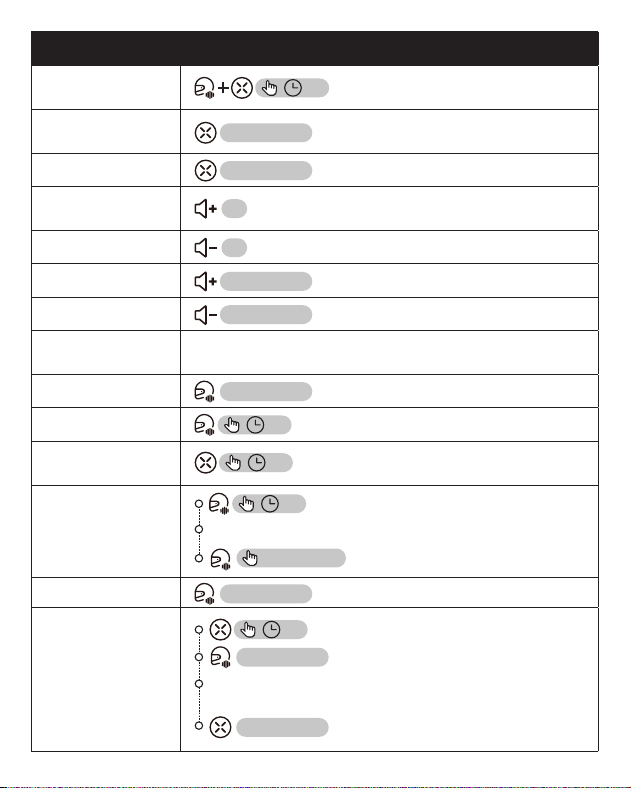
Funktion Tastenbedienung
Bluetooth-
Gruppenkopplung
löschen
2S
Löschen Sie die Gruppe, wenn sich das Gerät im
Gruppen-Mesh-Modus bendet.
Radio einschalten
×2 Taste drücken
Radio ausschalten
×2 Taste drücken
Radiosender
suchen
Hinweis: Nur möglich, wenn FM eingeschaltet ist.
×1 Taste drücken
Werksein-
stellungen
zurücksetzen
3S
Hinweis: Das Gerät wird neu gestaet und auf die
Werkseinstellungen zurückgesetzt.
Mikrofon Ein/Aus
2S
Hinweis: Halten Sie gleichzeitig die Sprechtaste und eine
beliebige Lautstärketaste für 2 Sekunden gedrückt.
Aktivierung des
intelligenten
Sprachassistenten
×2 Taste drücken
Italiano - 10
Funzione Uso del pulsante
Accensione/
Spegnimento
Riproduci
Musica
Pausa Musica
Precedente
Traccia
Prossima Traccia
Volume +
Volume -
Rispondi Alla
Chiamata
Qualsiasi pulsante
Termina Chiamata
Riuta Chiamata
Accoppiamento
Telefonico
Raggruppamen-
to Bluetooth Di
Gruppo
Modalità Gruppo
Modalità
Universale
2S
3S
3S
3S
3S
Gli altri auricolari bluetooth devono attivare la
modalità di accoppiamento bluetooth.
3S
Premere 2 volte
Premere 2 volte
Attiva la comunicazione
Unisciti a 2 membri.
2S
Conferma
Premere 1 volte
Premere 1 volte
Premere 1 volte
Premere 1 volte
Premere 1 volte
Premere 1 volte
Premere 1 volte
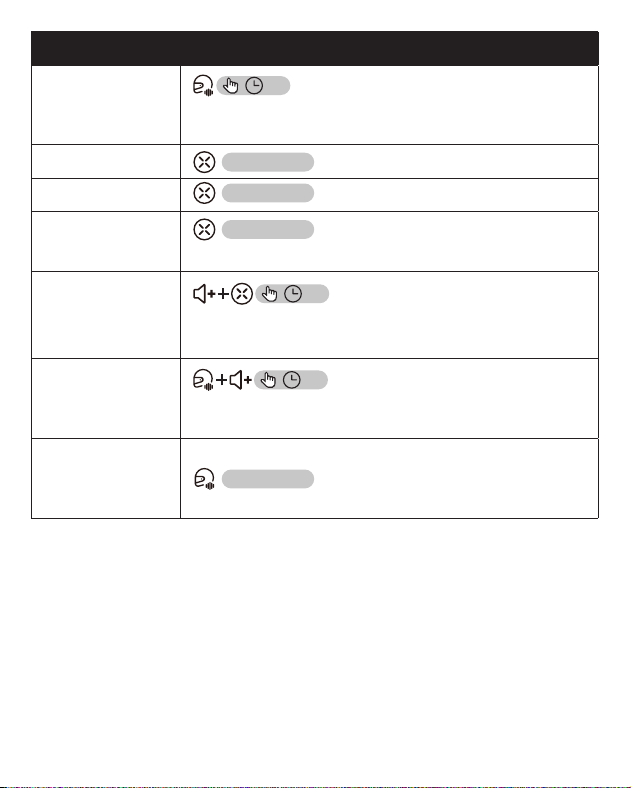
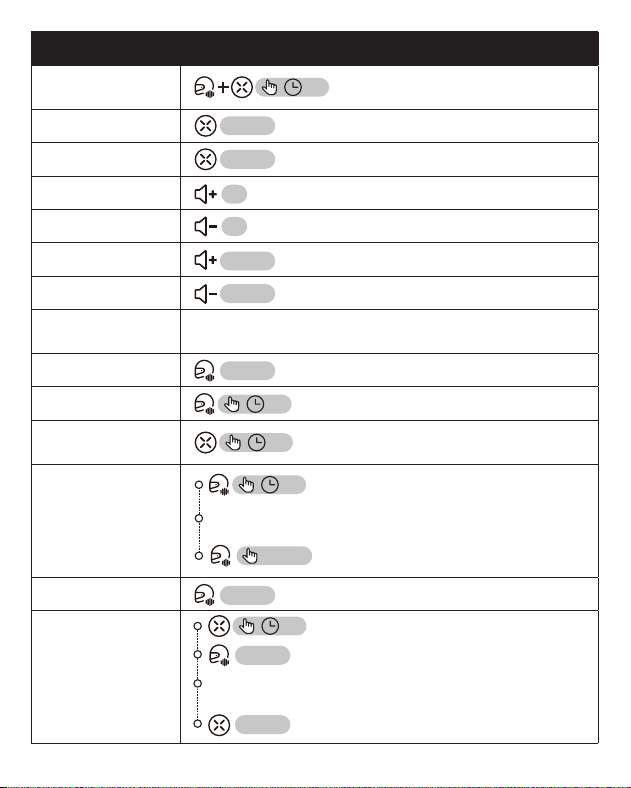
Italiano - 11
Funzione Uso del pulsante
Annulla Rag-
gruppamento
Bluetooth Di
Gruppo
2S
Nota: annullare il raggruppamento quando ci si trova
nello stato di raggruppamento Bluetooth.
Radio Accesa
Premere 2 volte
Spegni Radio
Premere 2 volte
Cerca Stazioni
Radio
Nota: quando la radio FM è accesa
Premere 1 volte
Reset Di
Fabbrica
3S
Nota: Il dispositivo si riavvierà e ripristinerà le
impostazioni di fabbrica.
Attivazione/
Disattivazione
Del Microfono
2S
Nota: Premere contemporaneamente il pulsanto di
comunicazione e qualsiasi tasto del volume per 2s
Attiva
L'assistente
Vocale Del
Telefono
Premere 2 volte
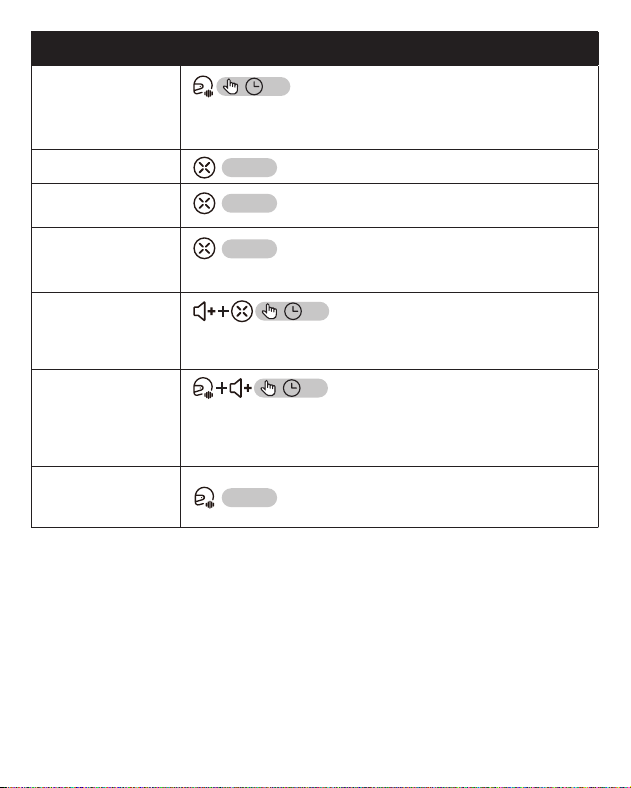
Français - 12
Fonction Utilisation du bouton
Allumer/
Éteindre
Lire La Musique
Pause Musique
Piste Précédente
Piste Suivante
Volume +
Volume -
Repondre A
L’appel
N’impoe quelle touche
Terminer L’appel
Rejeter L’appel
Appariement
Téléphonique
Groupe Bluetoo-
th Regroupe-
ment
Mode Groupe
Mode Universel
D'autres appareils entrent dans le couplage
Bluetooth
3S
×2 Tapez
×2 Tapez
Activer la communication
2S
3S
3S
3S
3S
Rejoindre 2 membres.
2S
Conrmer
×1 Tapez
×1 Tapez
×1 Tapez
×1 Tapez
×1 Tapez
×1 Tapez
×1 Tapez
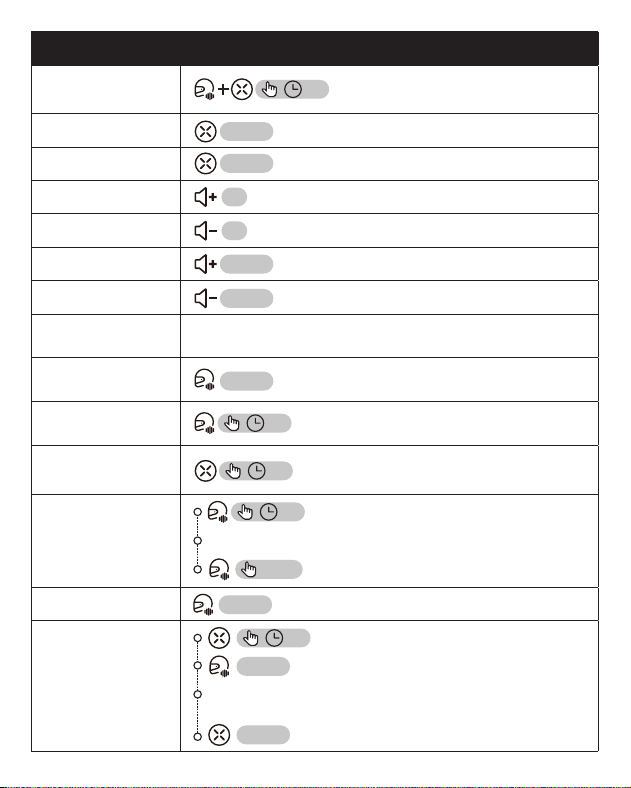
Français - 13
Fonction Utilisation du bouton
Annuler Le
Regroupement
Bluetooth
2S
Remarque : Annulez le groupe lorsque vous êtes dans
l’état de mesh du groupe.
Radio Allumée
×2 Tapez
Éteindre La
Radio
×2 Tapez
Rechercher Des
Stations De
Radio
Remarque : Lorsque la FM est activée
×1 Tapez
Réinitialisation
D’usine
3S
Remarque : L’appareil redémarrera et rétablira les
paramètres d’usine.
Activation/Dé-
sactivation Du
Microphone
2S
Remarque : Appuyez simultanément sur la touche
de communication et sur n’impoe quelle touche de
volume pendant 2s.
Activer l’assistant
vocal du télé-
phone
×2 Tapez
Español - 14
Función Operación del botón
Encender/
Apagar
Reproducir Música
Pausar Música
Pista Anterior
Pista Siguiente
Volume +
Volume -
Responder una
llamada
Cualquier botón
Terminar la
llamada
Rechazar la
llamada
Emparejar telé-
fono
Emparejamiento
Bluetooth en
grupo
Únase a 2 miembros.
2S
Conrmar
1 Clic
Modo De Grupo
1 Clic
Modo Universal
Nota: al mismo tiempo, Otro intercomunicador debe
activar el modo de emparejamiento bluetooth.
3S
2 Clics
2 Clics
Active el intercomunicador
2S
3S
3S
3S
3S
1 Clic
1 Clic
1 Clic
1 Clic
1 Clic
Español - 15
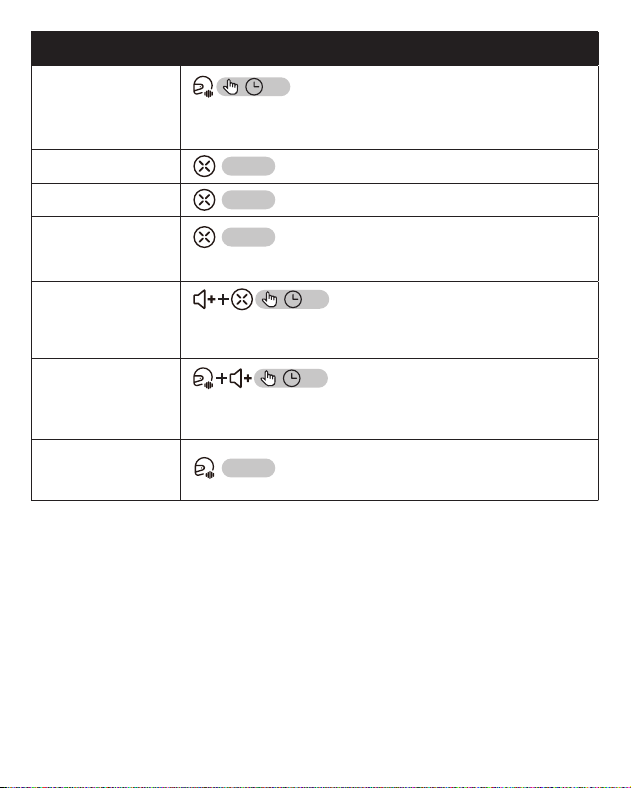
Función Indicaciones del botón
Cancelar la
agrupación
Bluetooth
2S
Nota: Cancele el grupo cuando se encuentre en el
estado de agrupación Bluetooth del grupo.
Encender Radio
×2 Clics
Apagar Radio
×2 Clics
Buscar Emisoras
De Radio
Nota: Cuando la FM está encendida
×1 Clics
Restablecimien-
to de fábrica
3S
Nota: El dispositivo se reiniciará y se restablecerá a
los ajustes de fábrica.
Micrófono Acti-
var/Desactivar
2S
Nota: Mantenga presionado simultáneamente el botón de
intercomunicación y cualquier botón de volumen durante 2s.
Activar el asis-
tente de voz del
teléfono
×2 Clics
日本語 - 16
• パッケージ内容
• カスタマーサポート
MAXRUNON 2Y
本体
バッククリップ 3M 粘着式
バッククリップ
スピーカーユニット
ブームマイク搭載
TYPE C ケーブルスピーカー用
マジックテープ
ワイヤーマイク用
マジックテープ
製品取扱説明書
japan@maxrunon.com
日本語 - 17
• 機能
• 製品仕様
製品モデル 2Y
Bluetooth 名 MAXRUNON 2Y
Bluetooth バージョン 5.3
マイク・スピーカー 40mm スピーカーユニット/ブームマイク搭載
最大インカム接続人数 2人
通信距離 500m
音声操作
ボタンを押すだけで、スマートフォンの音声ア
シスタントを起動
ノイズ低減機能 時速 100km でも、クリアな通話
防水等級 IPX5
バッテリー容量 500mAh
ソフトウェアアップデート 非対応
FM 機能 対応
急速充電時間 60 分間
待機時間 170 時間
インカム使用時間 24 時間
音楽再生時間 22 時間
インカム+音楽同時使用時間 15 時間
自動オーディオ調整 対応
Type-C 充電ポート
機能ボタン
インターホンボタン
音量 -
音量 +
オーディオ交換ポート
日本語 - 18
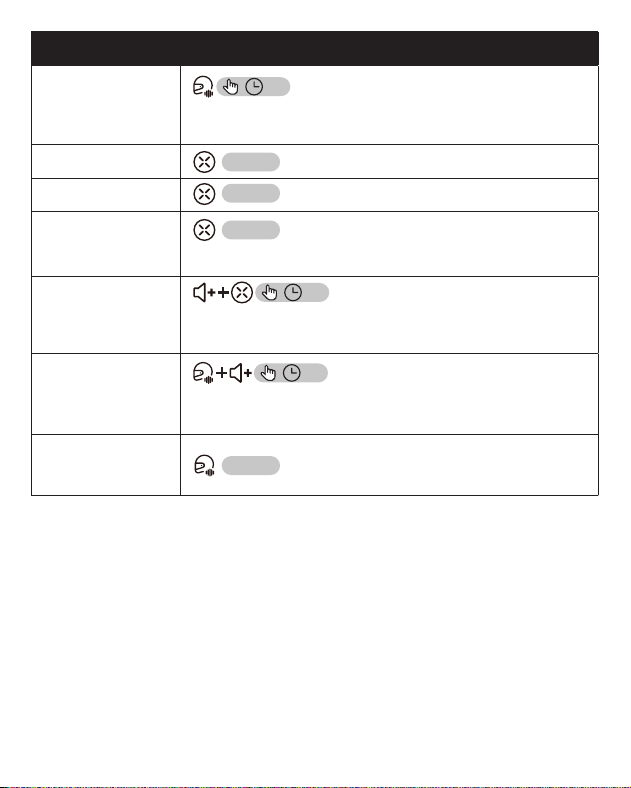
機能 ボタン操作
電源オン / オフ
音楽を再生する
音楽を止める
前の曲
次の曲
音量+
音量-
電話応答 任意のボタン
電話を切る
電話を拒否する
スマホを接続
グループ
Bluetooth 接続
チームモード
ユニバーサルモ
ード
2S
3S
3S
3S
3S
この時、その他 Bluetooth インカムは Bluetooth ペ
アリングモードに入る必要があります。
3S
×2 タップ
×2 タップ
インカム通話を有効にします
2 人見つかりました
2S
確認
×1 タップ
×1 タップ
×1 タップ
×1 タップ
×1 タップ
×1 タップ
×1 タップ
日本語 - 19
機能 ボタン操作
グループ
Bluetooth 接続を
解除
2S
Bluetooth のグループペアリング状態中に、グループ
の解除が可能です。
ラジオをかける
×2 タップ
ラジオを止める
×2 タップ
ラジオ局を検索
注:FM がオンになっている場合
×1 タップ
工場出荷時設定
にリセット
3S
注意:この機能を正常に操作した後、製品は 30 秒間
無音で再起動します。
マイクオン / オフ
2S
注意 : 同時にインターホンボタンと任意の音量ボタン
を 2 秒間長押ししてください。
スマートフォン
の音声アシスタ
ントを起動する
×2 タップ

RF EXPOSURE STATEMENT
This equipment complies with the FCC and ISED radiation exposure limits set foh for an uncontrolled
environment. This transmitter must not be co-located or operating in conjunction with any other
antenna or transmitter.
Cet équipement est conforme aux limites d'exposition aux rayonnements de la FCC et de l'ISED
établies pour un environnement non contrôlé. Cet émetteur ne doit pas être co-localisé ou
fonctionner en conjonction avec une autre antenne ou un autre émetteur.
FCC WARNING
This device complies with Pa 15 of the FCC Rules. Operation is subject to the following two
conditions:
(1) This device may not cause harmful inteerence, and (2) this device must accept any inteerence
received, including inteerence that may cause undesired operation.
Note: This equipment has been tested and found to comply with the limits for a Class B digital device,
pursuant to pa 15 of the FCC Rules. These limits are designed to provide reasonable protection
against harmful inteerence in a residential installation. This equipment generates, uses and can
radiate radio frequency energy and, if not installed and used in accordance with the instructions, may
cause harmful inteerence to radio communications. However, there is no guarantee that inteerence
will not occur in a paicular installation. If this equipment does cause harmful inteerence to radio
or television reception, which can be determined by turning the equipment o and on, the user is
encouraged to t to correct the inteerence by one or more of the following measures:
—Reorient or relocate the receiving antenna.
—Increase the separation between the equipment and receiver.
—Connect the equipment into an outlet on a circuit dierent from that to which the receiver is
connected.
—Consult the dealer or an experienced radio/TV technician for help.
NOTE 2: Any changes or modications to this unit not expressly approved by the pay responsible for
compliance could void the user's authority to operate the equipment.
IC WARNING
This device contains licence-exempt transmitter(s) that comply with Innovation, Science and Economic
Development Canada’s licence-exempt RSS(s). Operation is subject to the following two conditions:
(1) This device may not cause inteerence.
(2) This device must accept any inteerence, including inteerence that may cause undesired
operation of the device.
L’émetteur/récepteur exempt de licence contenu dans le présent appareil est conforme aux CNR
d’Innovation, Sciences et Développement économique Canada applicables aux appareils radio
exempts de licence. L’exploitation est autorisée aux deux conditions suivantes:
1. L’appareil ne doit pas produire de brouillage;
2. L’appareil doit accepter tout brouillage radioélectrique subi, même si le brouillage est susceptible d’en
compromettre le fonctionnement.