为确保您的安全并延长产品使用寿命,请严格遵守以下警示内容:
一、使用环境警告
· 禁止在极端高温、低温、多尘或潮湿环境中使用本产品。
· 避免阳光直射、火烤或任何过热环境。
· 在强无线信号或人群密集的环境(如机场、车站、展会等),可能出现耳机连接断续或干扰
现象,正常范围,请稍后继续使用或更换使用环境。
二、操作安全警告
· 请勿摔落、撞击或剧烈震动产品。
· 禁止擅自拆卸或改装本机,以免造成危险或损坏。
· 为了保护您的听力,请勿长时间高音收听。
· 请将产品及其包装放在儿童和宠物接触不到的地方,以防发生吞咽和窒息等事故。
· 若出现异常情况,请立即停止使用并联系经销商。
三、电池与充电警示
·当充电仓指示灯提示电量低时,请及时充电。 产品闲置未长期使用时,请每��天内充电一次。
· 使用符合当地安全标准的电源适配器。
· 耳机含内置电池,请勿置于高温或可燃环境中。
· 当耳机充电接口有异物且接触不良时,请用棉签沾酒精轻轻擦拭清洁耳机充电接口。 要保
持定期清洁耳机充电口,以保证正常充电与开关机的功能。
四、重要提示
· 产品功能如有变更,如未及时通知,请关注产品官网或销售链接;
· 请妥善保管本产品手册以备查阅。
To ensure your safety and extend the product lifespan, please strictly adhere to the
following
warnings:
�、Usage Environment Warnings
· Do not use this product in environments with extreme high/low temperatures,
excessive dust, or humidity.
· Avoid direct sunlight, fire, or any overheated environments.
· In environments with strong wireless signals or high crowd density (e.g., airports,
train stations, exhibitions), earbud connection interruptions or interference may
occur. This is within the normal range; Please try again later or move to a different
environment.
�、Operation Safety Warnings
· Do not drop, impact, or violently shake the product.
· Do not disassemble or modify the device by yourself to avoid danger or damage.
· To protect your hearing, do not listen at high volume for extended periods.
· Keep the product and its packaging out of the reach of children and pets to
prevent accidents such as swallowing and suffocation.
· If any abnormal situation occurs, please stop using it immediately and contact
your dealer.
�、Battery and Charging Warnings
·When the charging case indicator shows low battery, please charge it promptly.
If the product is left unused for a long time, please charge it once every �� days.
· Use a power adapter that complies with local safety standards.
· The earbuds contain a built-in battery; do not place them in high-temperature or
flammable environments.
· If there is foreign matter or poor contact at the earbud charging port, please
gently wipe and clean the earbud charging port with a cotton swab dipped in
alcohol. Clean the earbud charging port regularly to ensure normal charging and
power on/off functions.
�、Important Notices
· Product functions are subject to change without prior notice. Please follow the
official website or sales link for updates.
· Please keep this product manual properly for future reference.
尺寸:��mm*��mm
500mAh
约2小时
400mA
40mA 400mA
配对
步骤一:耳机开机,左右耳自动互连后进入与手机配对状态(提示音:“pairing”)
步骤二:打开智能设备的蓝牙列表,搜索“MK-���”并连接
温馨提示:
左右耳机出现不配对时,请长按�S亮屏键恢复出厂设置,放回充电盒再打开配对
方法➀
开机未连接状态 : 左/右耳机连击�次,清除连接信息和耳机组队的信息并同步关机;
方法➁
开机连接状态 : 左/右耳机连击�次,�秒内长按��秒,清除耳机与蓝牙设备之间的配
对信息,关机(提示音“power off)
Method ➀
(Power-on, not connected): Press the left/right earbud � times to clear the
connection information and earbud pairing information, then both earbuds
will power off simultaneously.
Method ➁
(Power-on, connected): Press the left/right earbud � times, then press and hold for
�� seconds within � seconds to clear the pairing information between the earbuds
and the Bluetooth device, and power off (prompt tone: "power off").
MK-��� 说明书
通话降噪麦
耳机指示灯
通话麦 触摸键
出音孔充电触点 Type-C充电口
亮屏/恢复出厂设置
电量数显屏
call noise-canceling
microphone
Earbuds
indicator light
Microphone
Touch key
soud
outlet
Charging
contacts
Type-C
charging port
Screen on /
Factory reset
LED battery
display
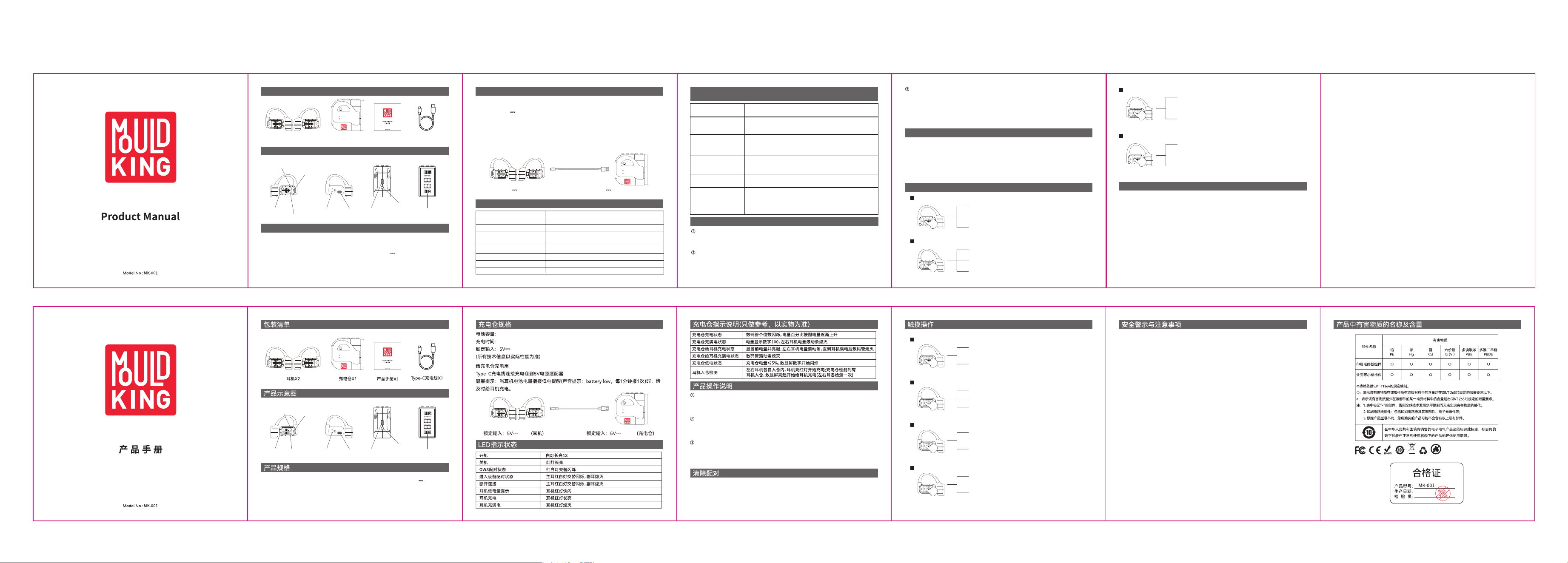
Packing List
Product Schematic Description
Earbuds*2 Charging Case*1
Product
Manual*1
Type-C Charging
Cable*1
Product Specifications
BT version: V6.0
Transmission distance:≥�0 meters
Speaker size:Φ13mm
Speaker impedance: 16Ω±15%
Total Playtime (with Charging Case): Approx. 40 hours
Charging time: Approx. 1.5 hours
Battery capacity: 55mAh/3.7V
Rated input: 5V 40mA
Playtime (Single Charge): Approx. 9 hours
Specifications Of Charging Compartment
Battery capacity: 500mAh
Charging time: Approx. 2 hours
Rated input: 5V 400mA
(All technical information is subject to actual performance)
To charge the charging compartment
Connect the charging compartment to the 5V power adapter using the Type-C
cable.
Tips: When the earbuds battery announces a low-power reminder (sound prompt:
battery low, once every minute), please charge the earbuds in time.
Rated input:5V 40mA (earbuds) Rated input:5V 400mA (charging silo)
LED Indicates The Status
Power on
Power off
OWS pairing status
Successful connection
Disconnect
Low battery warning
Earbuds are charging
The earbuds are fully charged
White light on for 1s
Red light on
Red/white lights flash alternately
Earbud red light flashes rapidly
Earbud red light on
Earbud red light off
Primary earbud: red/white lights flash alternately.
secondary earbud: light off
Primary earbud: red/white lights flash alternately.
secondary earbud: light off
Instructions For Charging Compartment
(for reference only, subject to the physical object)
Charging status of the
charging compartment
The charging
compartment is fully
charged
The charging
compartment charges
the earbuds
The charging
compartment fully
charges the earbuds
Low power state of the
charging compartment
Earbuds charging case
detection
The units digit of the digital display flashes, and the battery
percentage gradually rises according to the battery level.
The battery level shows 100, and the battery level progress
bars for the left and right earbuds turn off.
Displays and lights up the current battery level; the battery
level progress bars for the left and right earbuds remain on
until the earbuds are fully charged, then the digital display
turns off.
The digital display progress bar turns off.
When the charging case battery level is ≤5%, the digital
display digits start flashing.
When the left and right earbuds are each placed into the
charging case, the earbuds light up red and start charging;
when the charging case detects the earbuds are inserted,
the digital display lights up and starts charging the earbuds
(each earbud is detected once).
Start up
Method 1: Take out the earbuds and turn them on automatically.
Method 2: Press and hold the left/right Touch button for 3 seconds to turn on the
earbuds.(Power-on tone:"power on)
Shut down
Method 1: Place back into the charging case. The earbuds will charge and turn off
automatically.
Method 2: The earbuds automatically shut down without connecting the device
within 5 minutes.(Shut down tone: "power off")
Pairing
Step 1: Open the charging case lid. The earbuds will automatically power on and
enter pairing mode. (prompt tone: "pairing")
Step 2: Open the Bluetooth list of smart devices, search for "MK-001" and connect
Note:
If the left and right earbuds fail to pair, long press the screen wake touch key
for 5s to reset to factory settings. Then put them back into the charging case
and reopen it to pair.
Product How-to Instructions
Touch Operation
Clear Pairing
Safety Warnings And Precautions
General mode
Music playback mode
Call mode
Game/Music Mode
Volume down: Single tap the left earbud touch key
(minimum prompt tone "Dong Dong")
Play/Pause: Double tap the left/right touch key
Answer/Hang up call: Double tap the left/right
earbud touch key
Reject call: Long press the left/right earbud touch
key for 2s
Previous track: Triple tap the left earbud touch key
Next track: Triple tap the right earbud touch key
Long press the right earbud touch key for 2s to switch
game/music mode (prompt tone "game mode"/"
music mode")
Long press the left earbud touch key for 2s to turn
on/off the voice assistant
Volume up: Single tap the right earbud touch key
(maximum prompt tone "Dong Dong")
音量加:单击右耳机触摸键
音量减:单击左耳机触摸键
下一曲:三击右耳机触摸键
播放/暂停:双击左/右触摸键
拒接来电:长按左/右耳机触摸键2秒
接听/挂断来电:双击左/右耳机触摸键
长按左耳机触摸键2秒启动/关闭语音助手
长按右耳机触摸键2秒切换游戏/音乐模式
(提示音"game mode"/"music mode”)
上一曲:三击左耳机触摸键
常规模式
音乐播放模式
通话模式
游戏/音乐模式
开机
方法一:耳机取出自动开机
方法二:长按左/右触摸键3秒,耳机开机
(开机提示音:"power on")
关机
方法一:放回充电盒,耳机入仓充电,耳机自动关机
方法二:耳机在5分钟内没有连接设备自动关机
(关机提示音:“power off")
额定输入:�V ��mA
耳机单次续航:约�小时
综合续航:约��小时
喇叭阻抗:��Ω±��%
充电时间:约�.�小时
电池容量:��mAh/�.�V
蓝牙版本:V�.�
传输距离:≥��米
喇叭尺寸:Φ��mm

Warning Statement
This device complies with part 15 of the FCC Rules. Operation is subject to the
following two conditions: (1) This device may not cause harmful interference, and (2)
this device must accept any interference received, including interference that may cause
undesired operation.
Any Changes or modifications not expressly approved by the party responsible for
compliance could void the user's authority to operate the equipment.
Note: This equipment has been tested and found to comply with the limits for a Class B
digital device, pursuant to part 15 of the FCC Rules. These limits are designed to
provide reasonable protection against harmful interference in a residential installation.
This equipment generates uses and can radiate radio frequency energy and, if not
installed and used in accordance with the instructions, may cause harmful interference
to radio communications. However, there is no guarantee that interference will not
occur in a particular installation. If this equipment does cause harmful interference to
radio or television reception, which can be determined by turning the equipment off and
on, the user is encouraged to try to correct the interference by one or more of the
following measures:
-Reorient or relocate the receiving antenna.
-Increase the separation between the equipment and receiver.
-Connect the equipment into an outlet on a circuit different from that to which the
receiver is connected.
-Consult the dealer or an experienced radio/TV technician for help.
This equipment complies with FCC radiation exposure limits set forth for an
uncontrolled environment.