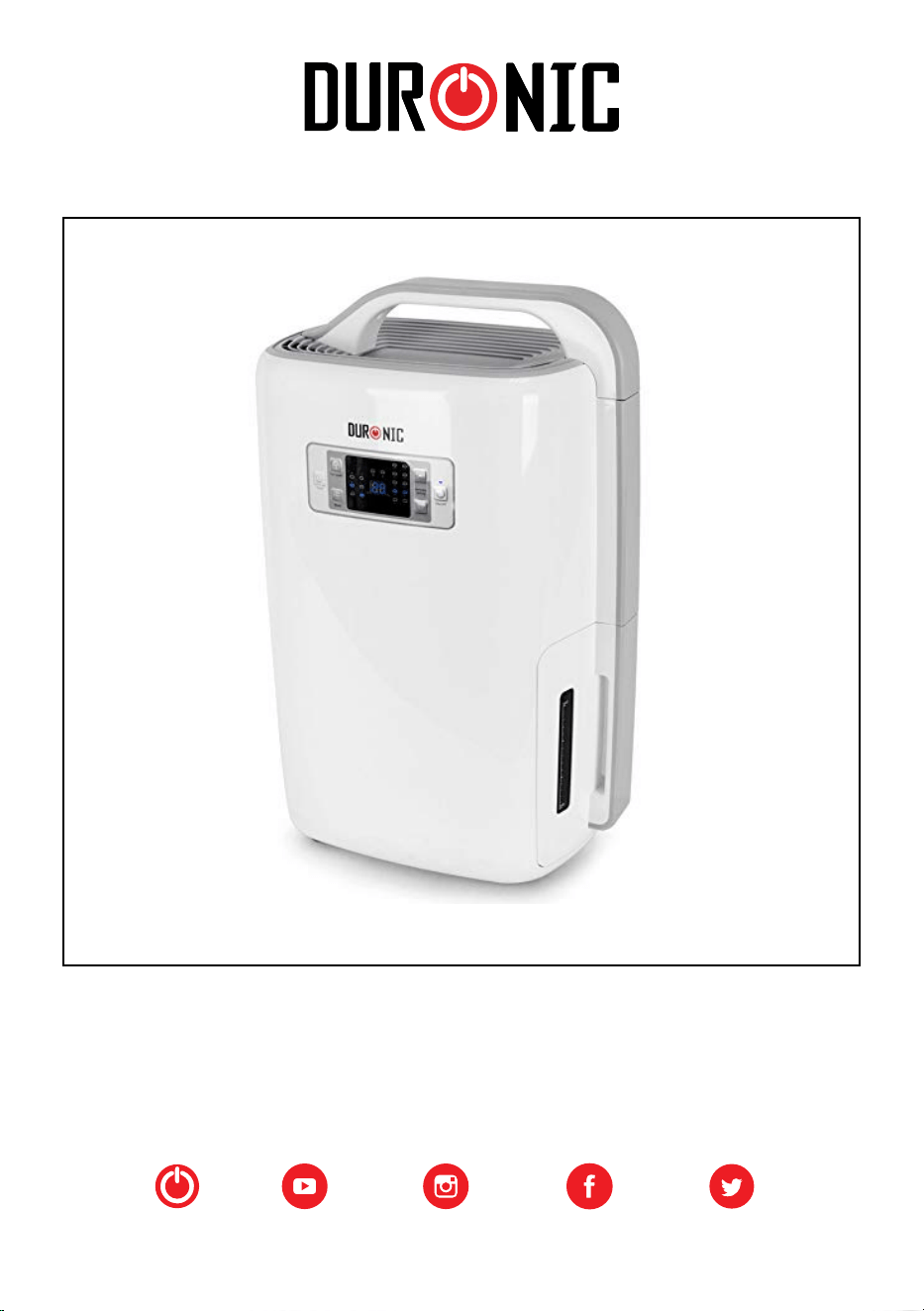
DH20 Dehumidier
Creative
Consumer
Products
3
Contents
3
16
30
43
56
69
82
English Manual
Manuel d’utilisation en français
Gebrauchsanleitung auf Deutsch
Manual de Instrucciones en Español
Manuale D’istruzioni In Italiano
Instrukcja obsługi. Polski
Gebruikershandleiding Nederlands
3
English Manual
4
Instructions
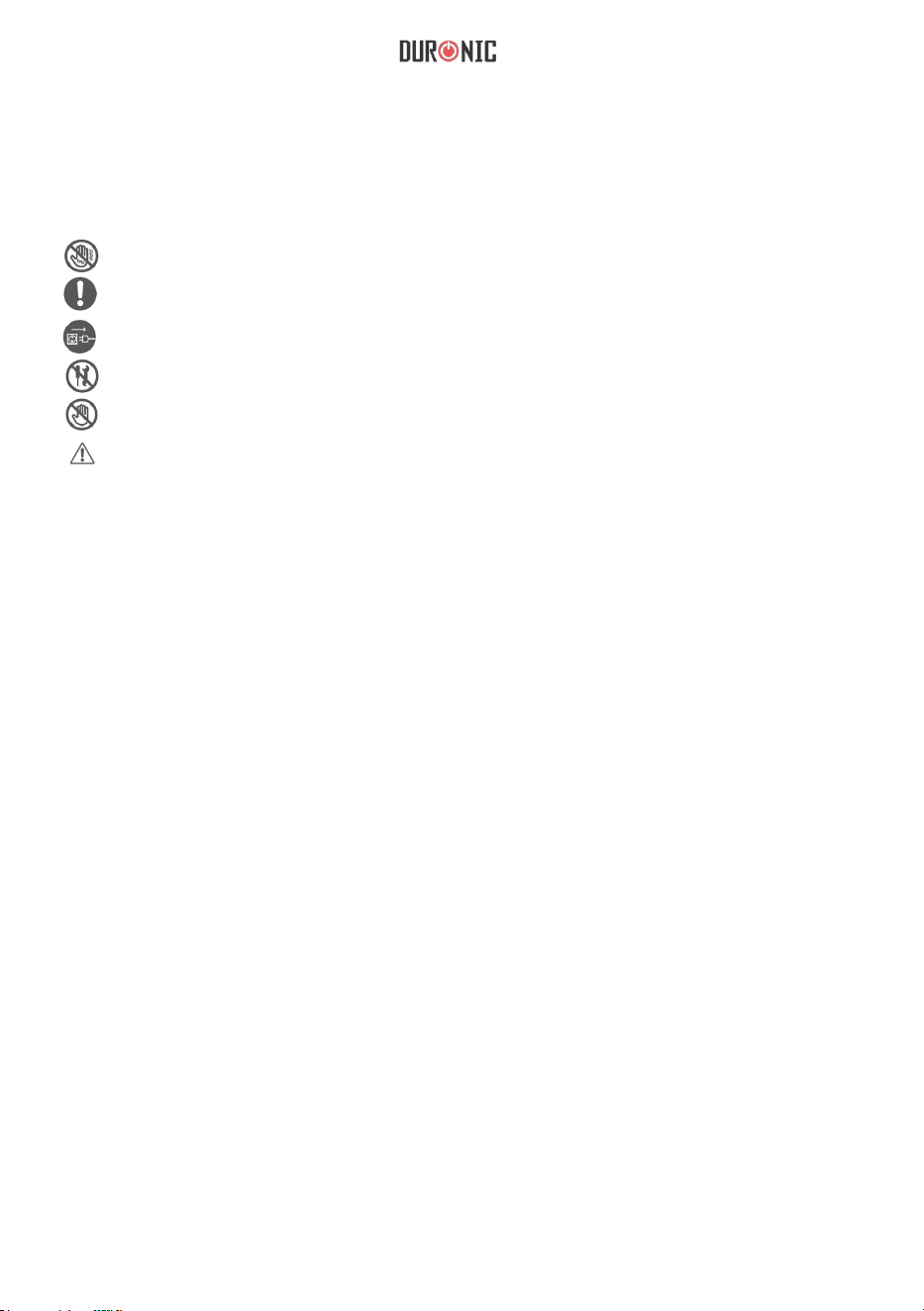
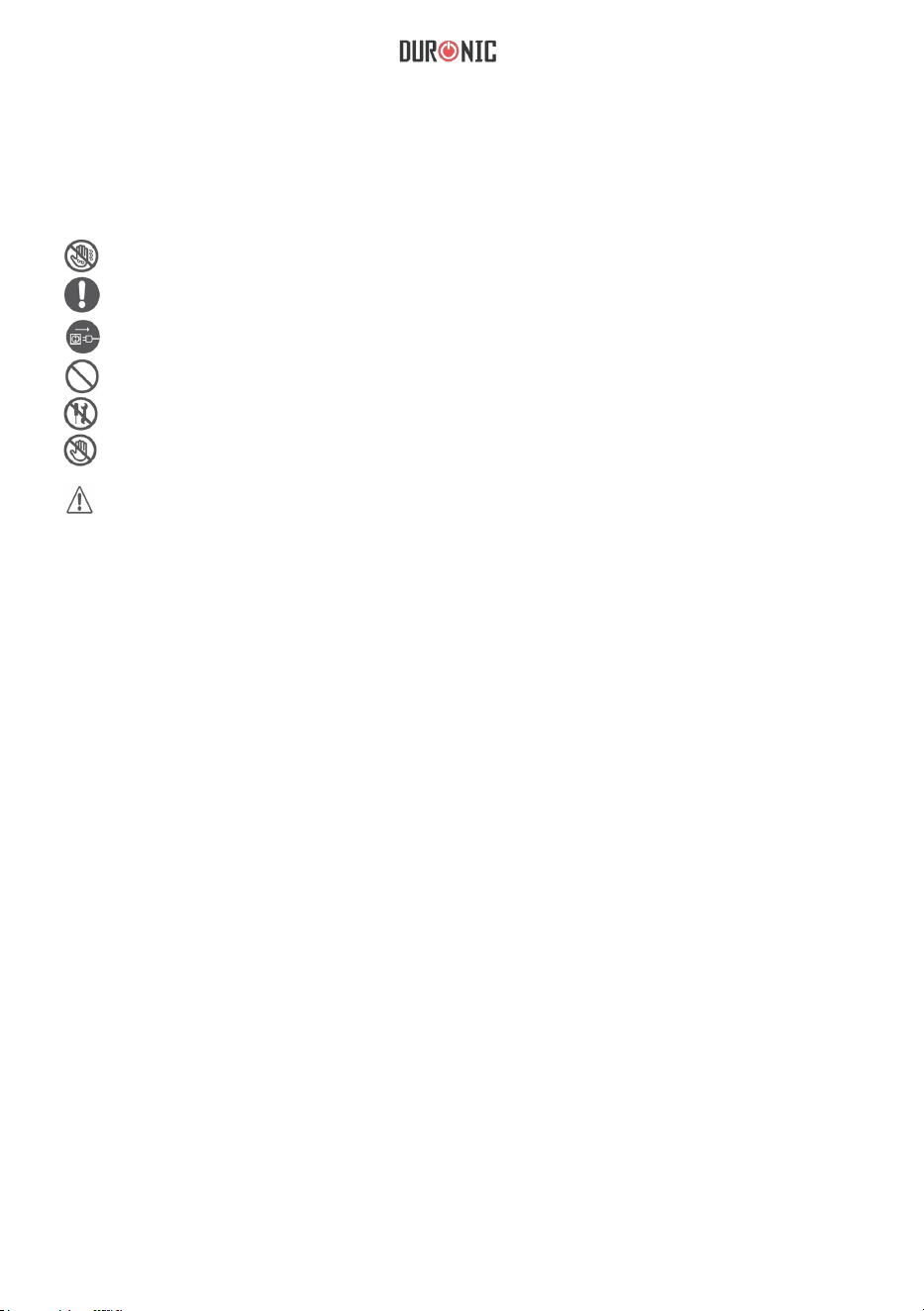
Do not use with wet hands
Follow the instructions
Disconnect from outlet after use
Do not open
Do not touch
Warning/Caution
Power Supply
•
Always hold the plug and pull to disconnect from the wall outlet.
• Do not touch the plug with wet hands in order to avoid electric shock.
•
The appliance must be plugged specifically into a 220v socket.
• Do not use with extension cords.
• Do not attempt to change the power cord.
•
If there is an electrical problem, please contact your seller/original place of
purchase.

5
Installation
•
Always place the appliance on a solid, flat and stable surface.
•
Make sure the water tank is correctly installed into its compartment.
•
Do not put flammable or explosive objects near the appliance in order to
avoid fire hazards.
Operation
• Children must be supervised near the appliance to ensure their safety.
• Elderly must be supervised near the appliance to ensure their safety in
order to avoid a lack of oxygen near the air outlet.
• Do not put hands on the air outlet in order to prevent injury or malfunction.
• Do not put clothes on the air outlet in order to prevent malfunction.
•
Do not push the appliance over or let the appliance be exposed to high
impacts in order to prevent damage/malfunction.
•
Do not put any heavy objects or cover the appliance.
Cleaning
• Do not pour water into the appliance, always use a damp cloth.
•
Clean the air filter regularly with a damp cloth and mild cleaning fluid to
avoid dust build-up.
• Do not put chemicals on the appliance in order to avoid re.
6
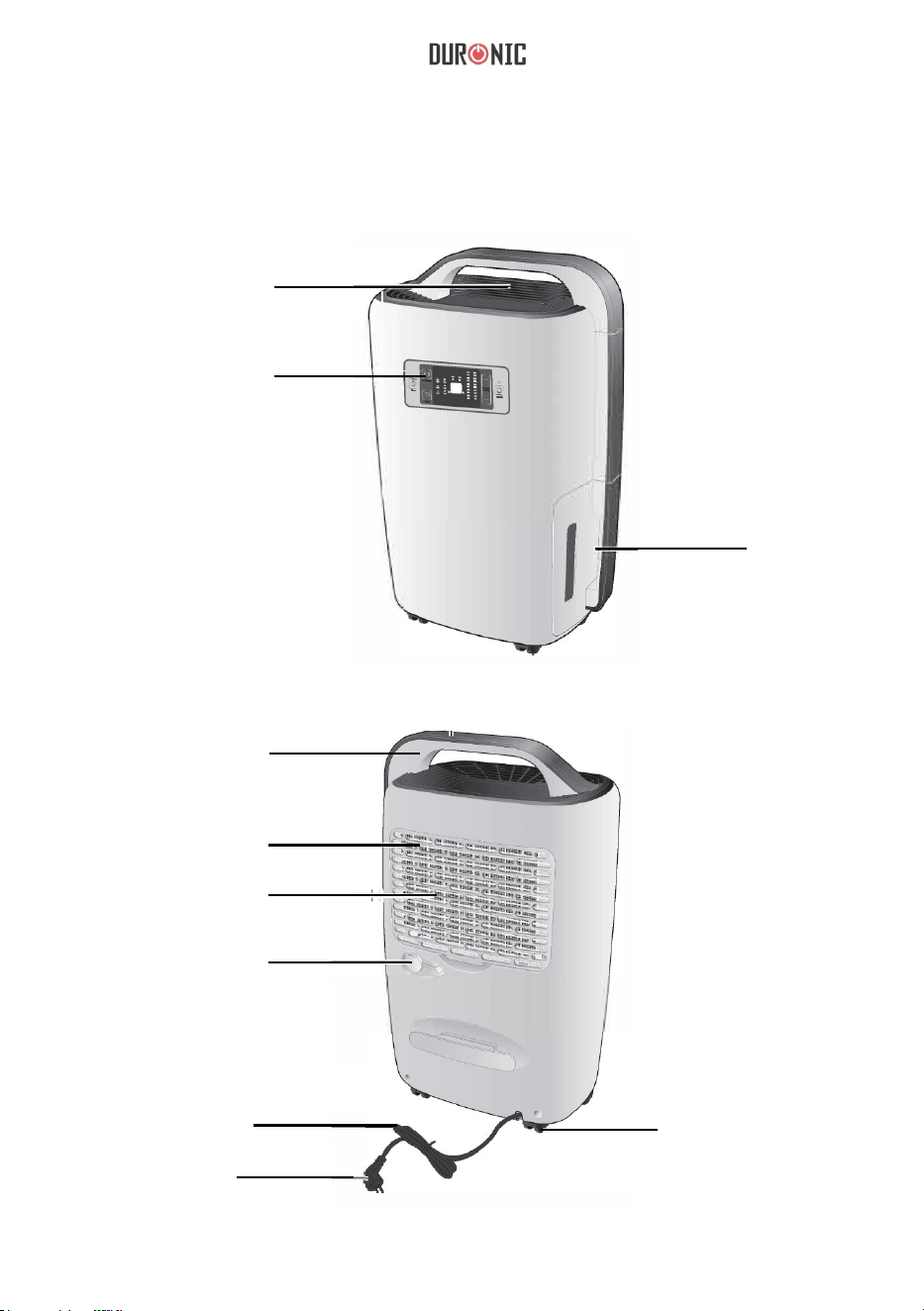
Parts List
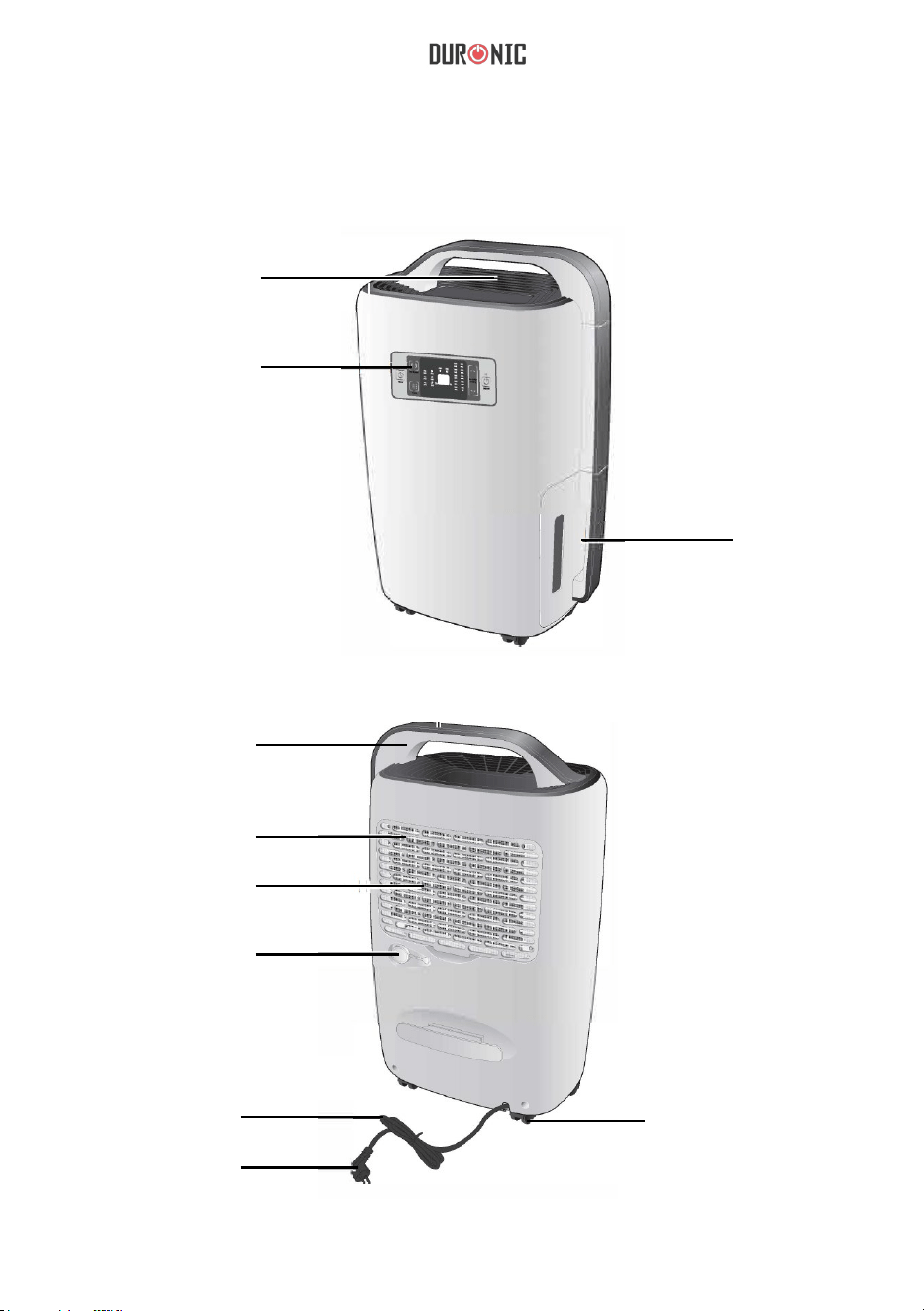
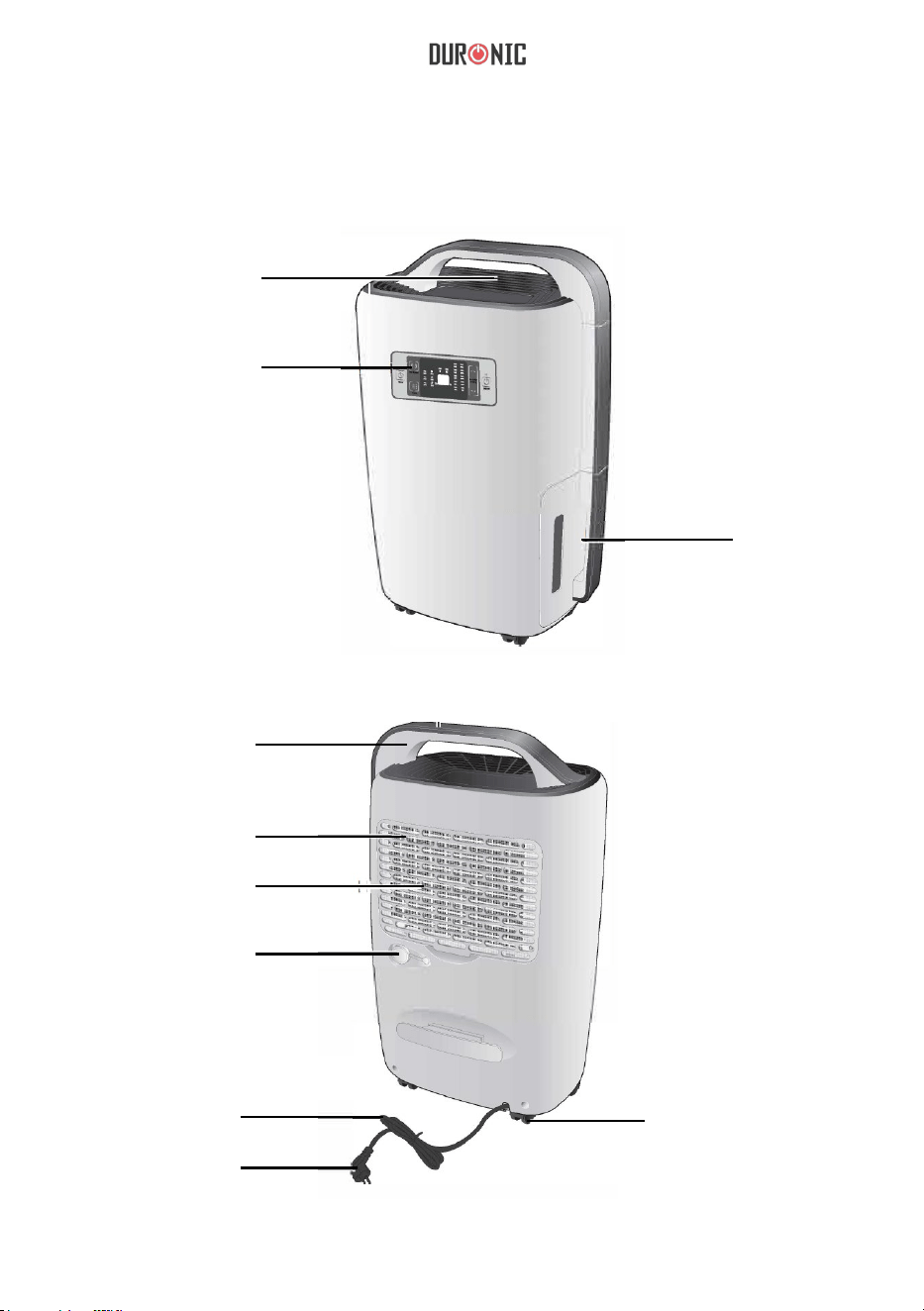
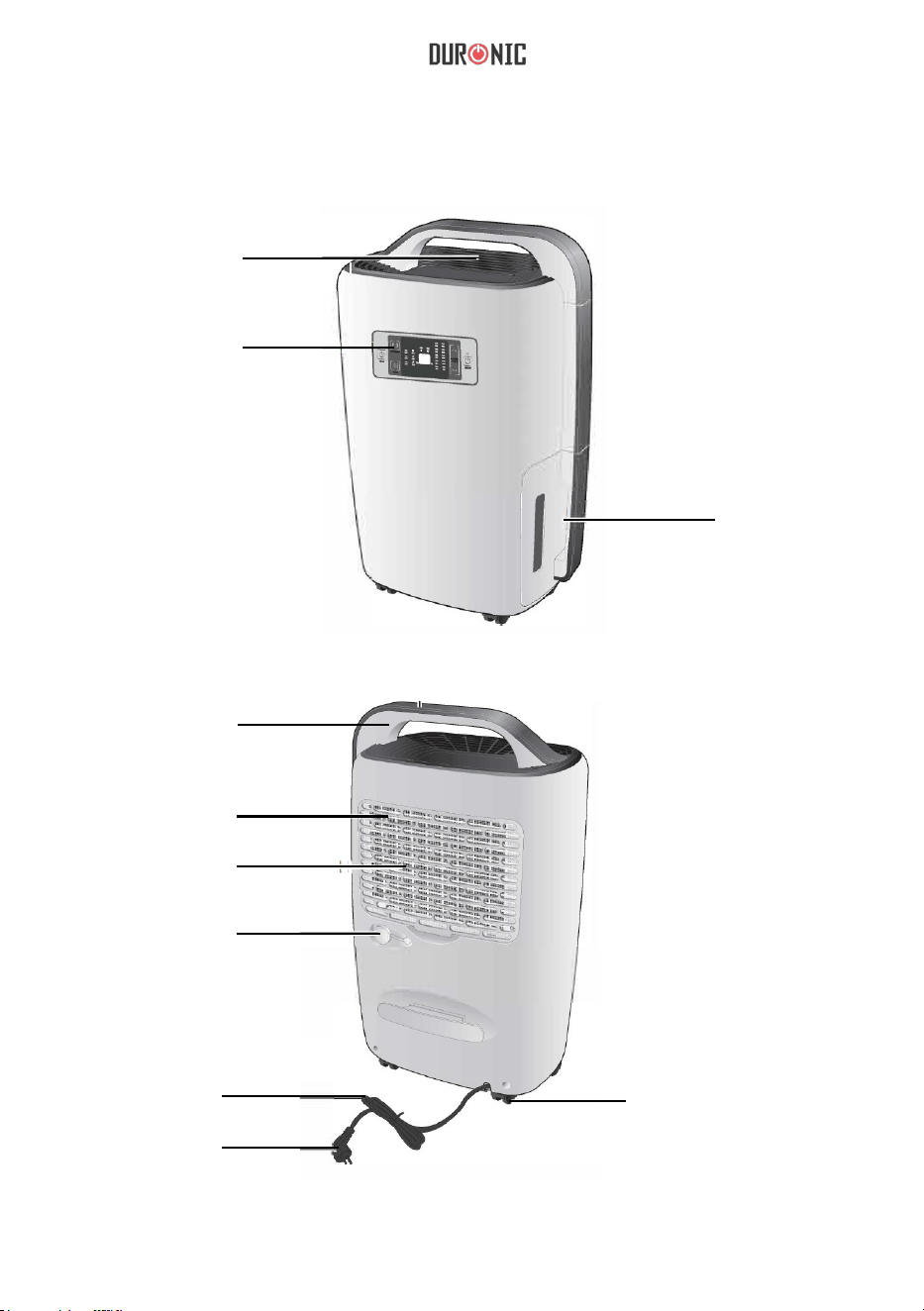
Front
Air Outlet
Control/
Display Panel
Water
Tank
Handle
Air Filter
Air Inlet Grill
Stopper
Power Cord
Plug
Wheels
Back
7
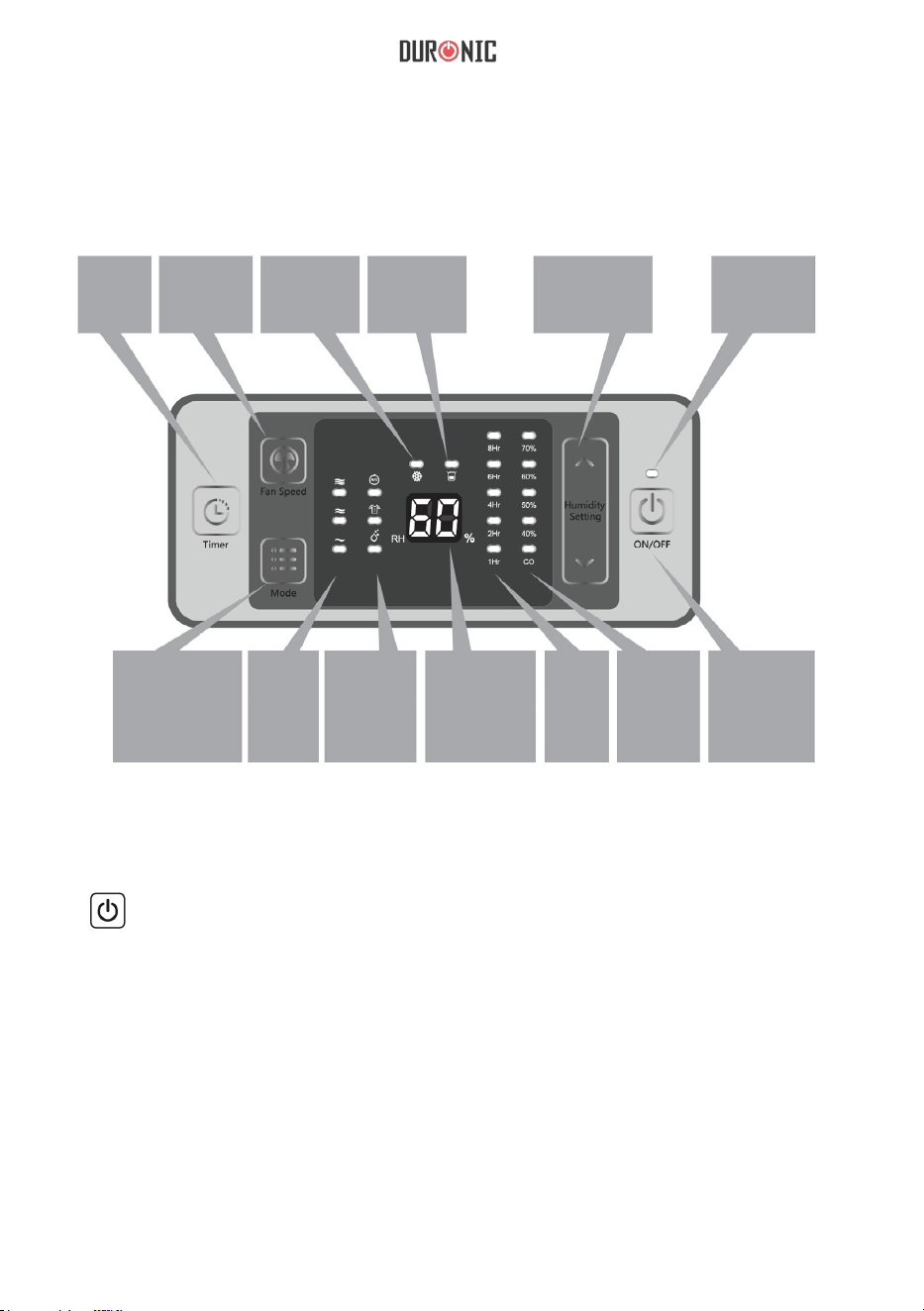
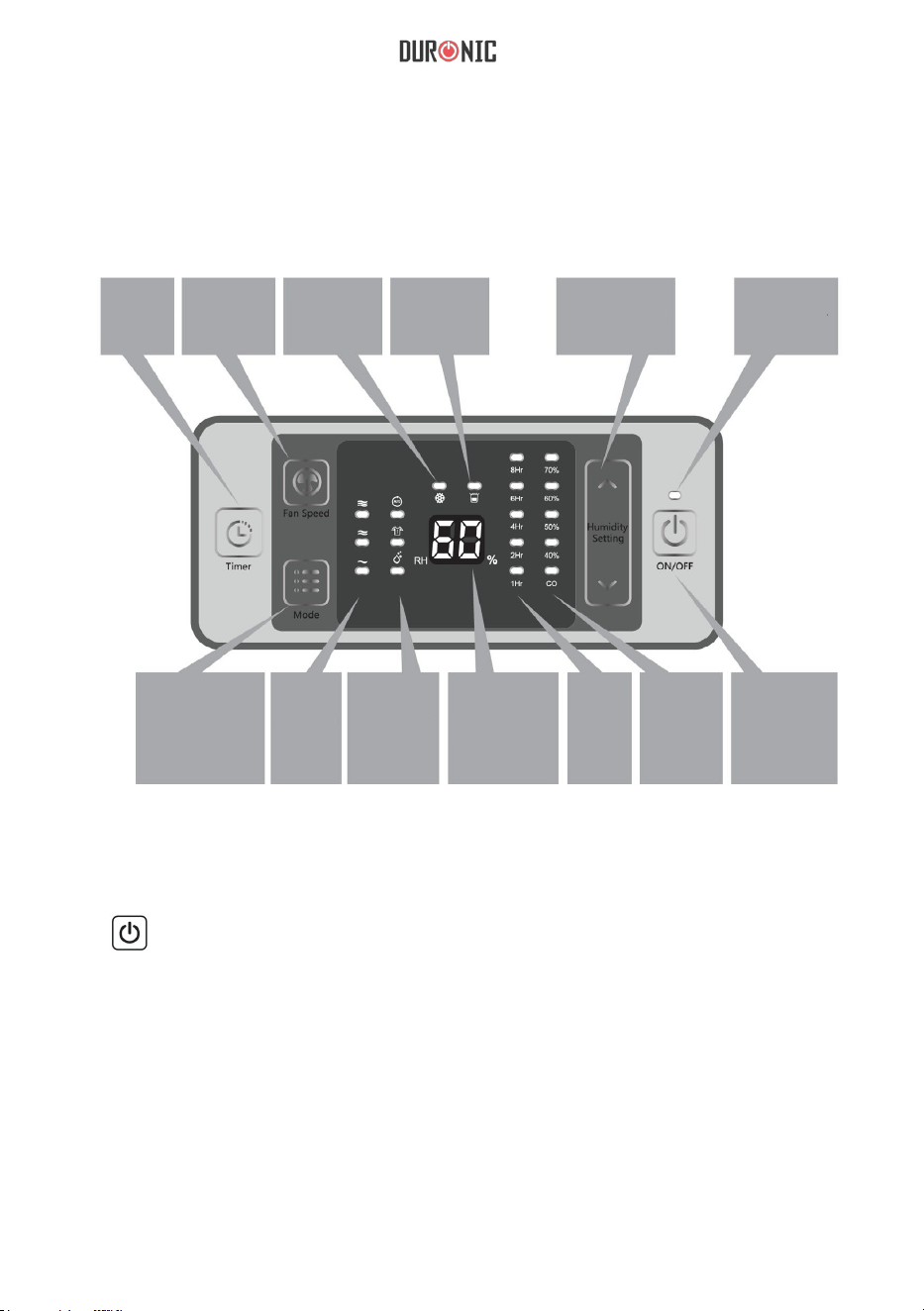
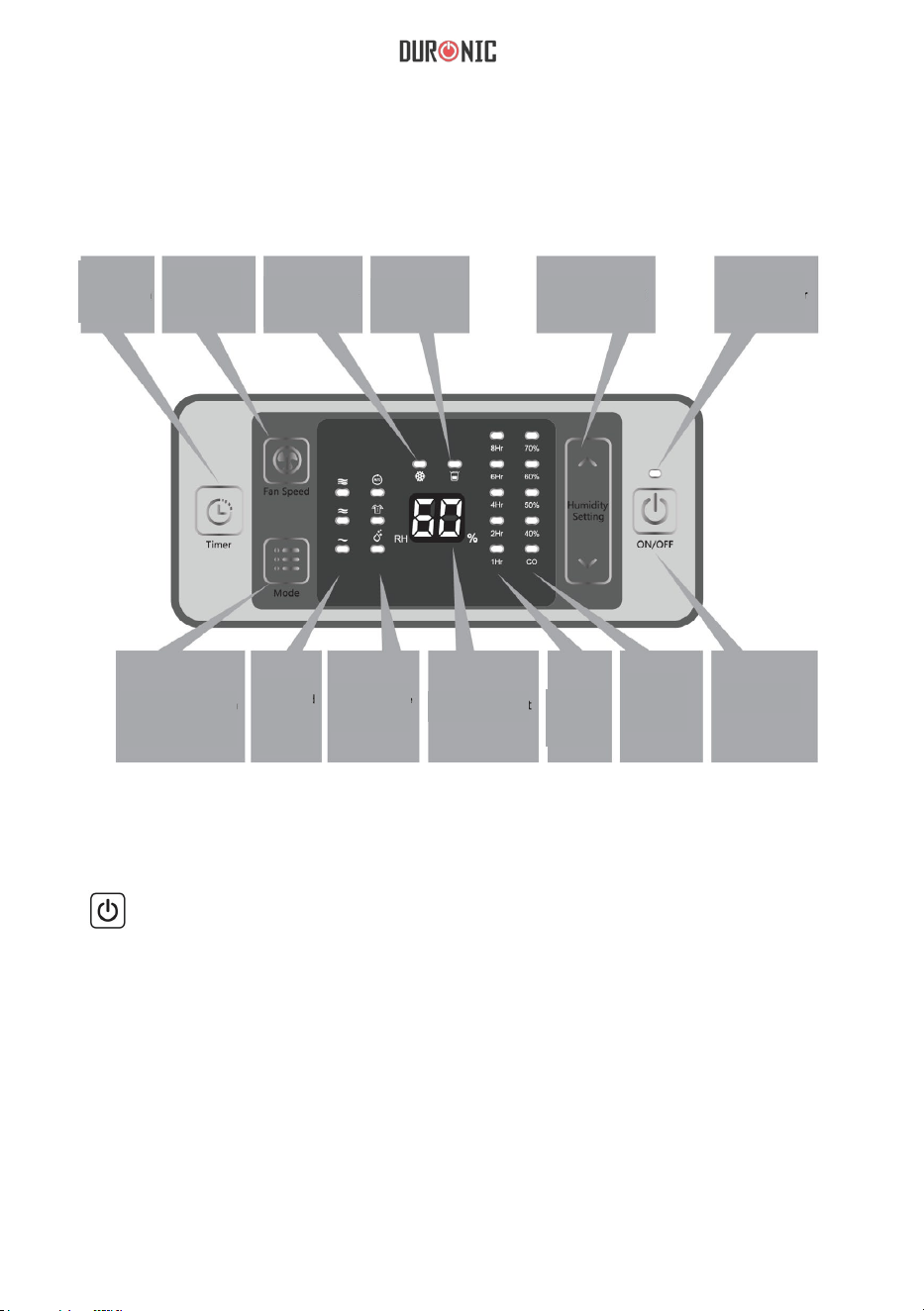
Control & Display Panel
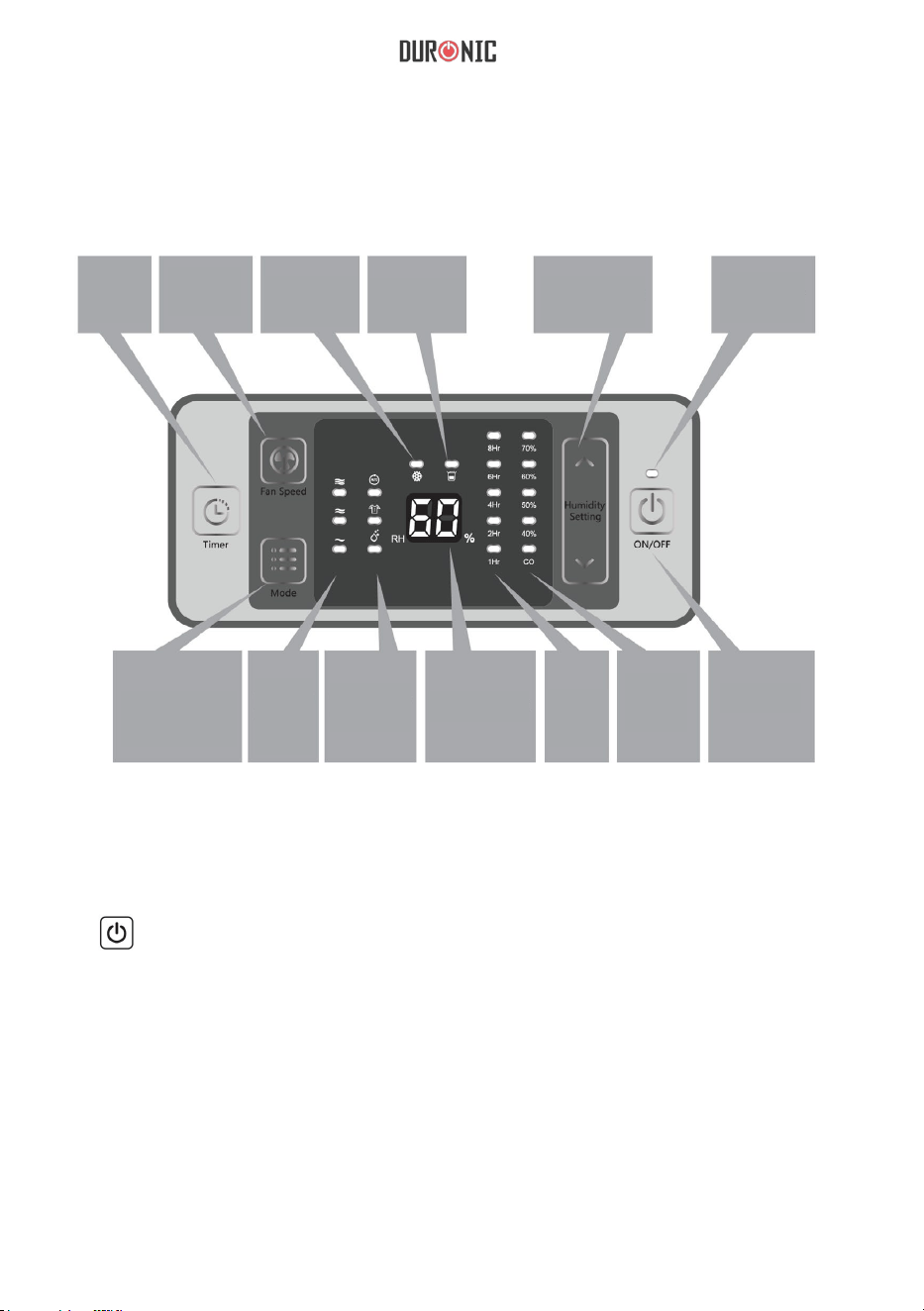
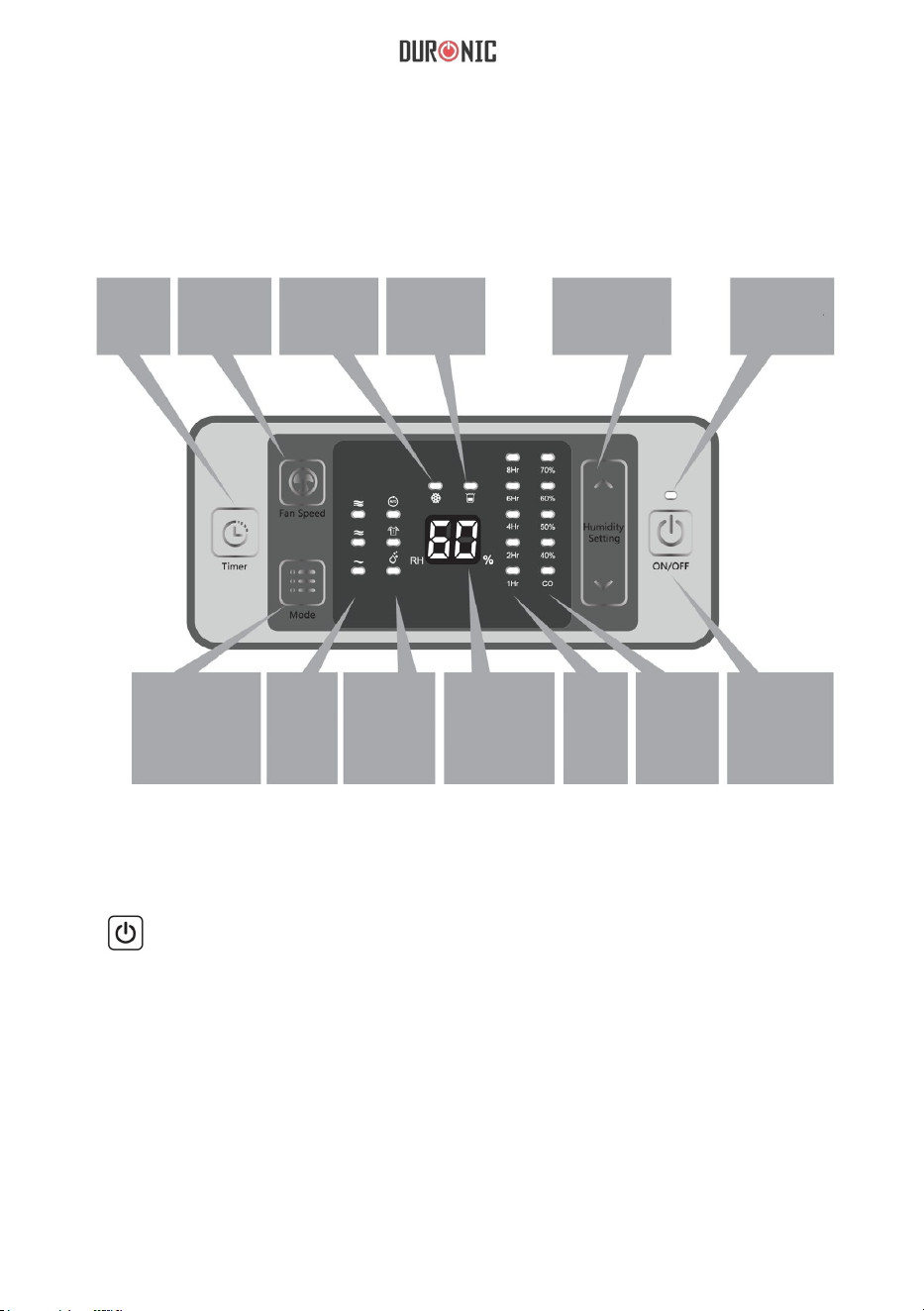
Timer
Fan
speed
Defrost
indicator
Full tank
indicator
Humidity
selection
Power
indicator
Working mode
Fan
speed
indicator
Working
mode
selection
Humidity
reading
Timer
indicator
Humidity
setting
indicator
On/Off
1.
ON/OFF: Press once to turn the unit ON or OFF.
2.
“^” Up
“v” Down
Under manual operation mode, used to set the target humidity and adjustment
time, the humidity could be set between 40%-70% in 10% per step or “CO”.
When the humidity is set to “CO”, the machine will work continuously. The
timer can be set to 1h-2h-4h-6h-8h and can be used to shut down after timer.
8
LED Indicator
Note: A keylock program is designed for this unit, press “^” and “v” at the
same time for 2 seconds and all the keys on the panel will be locked. To
release the lock, repeat the same action.
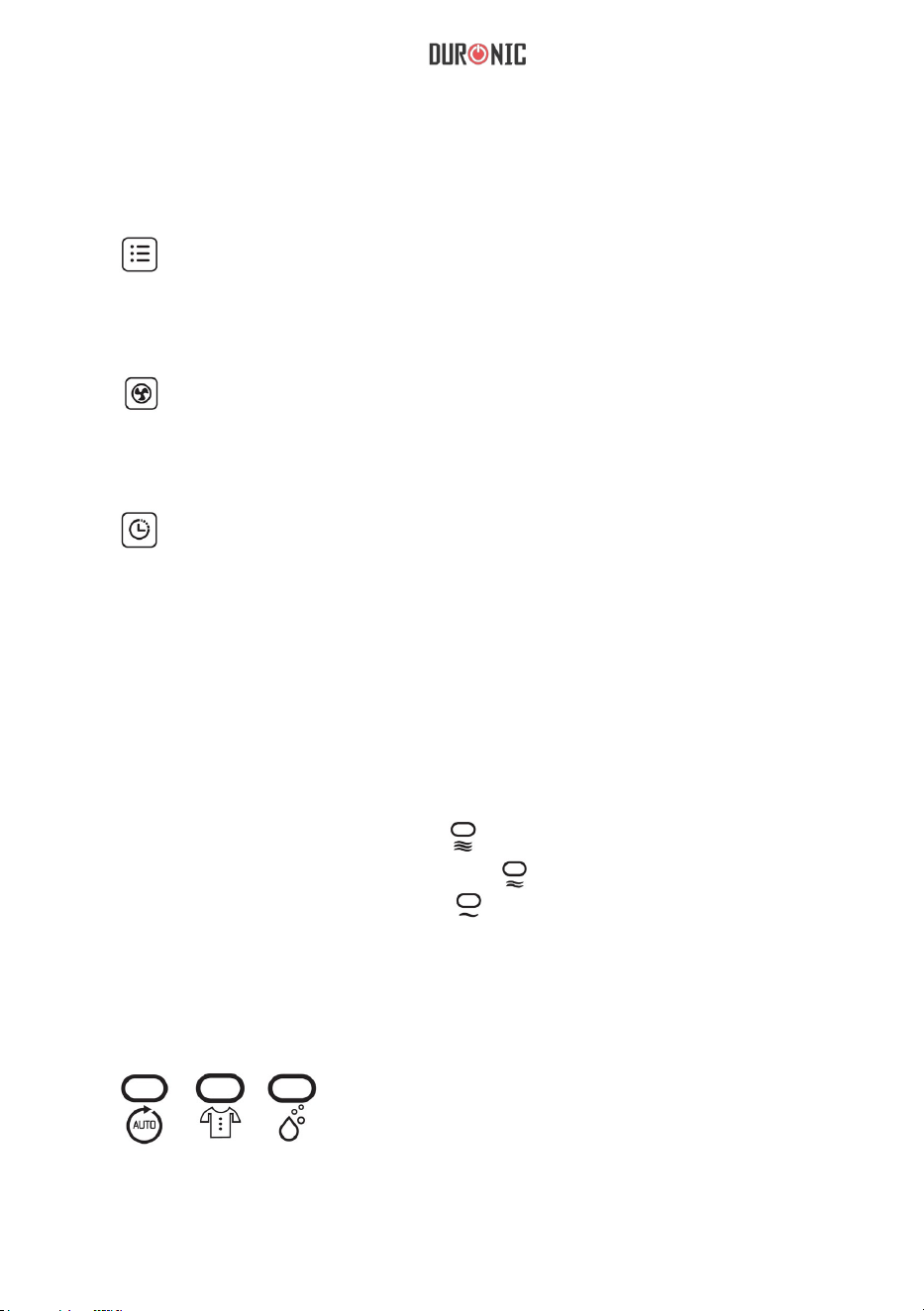
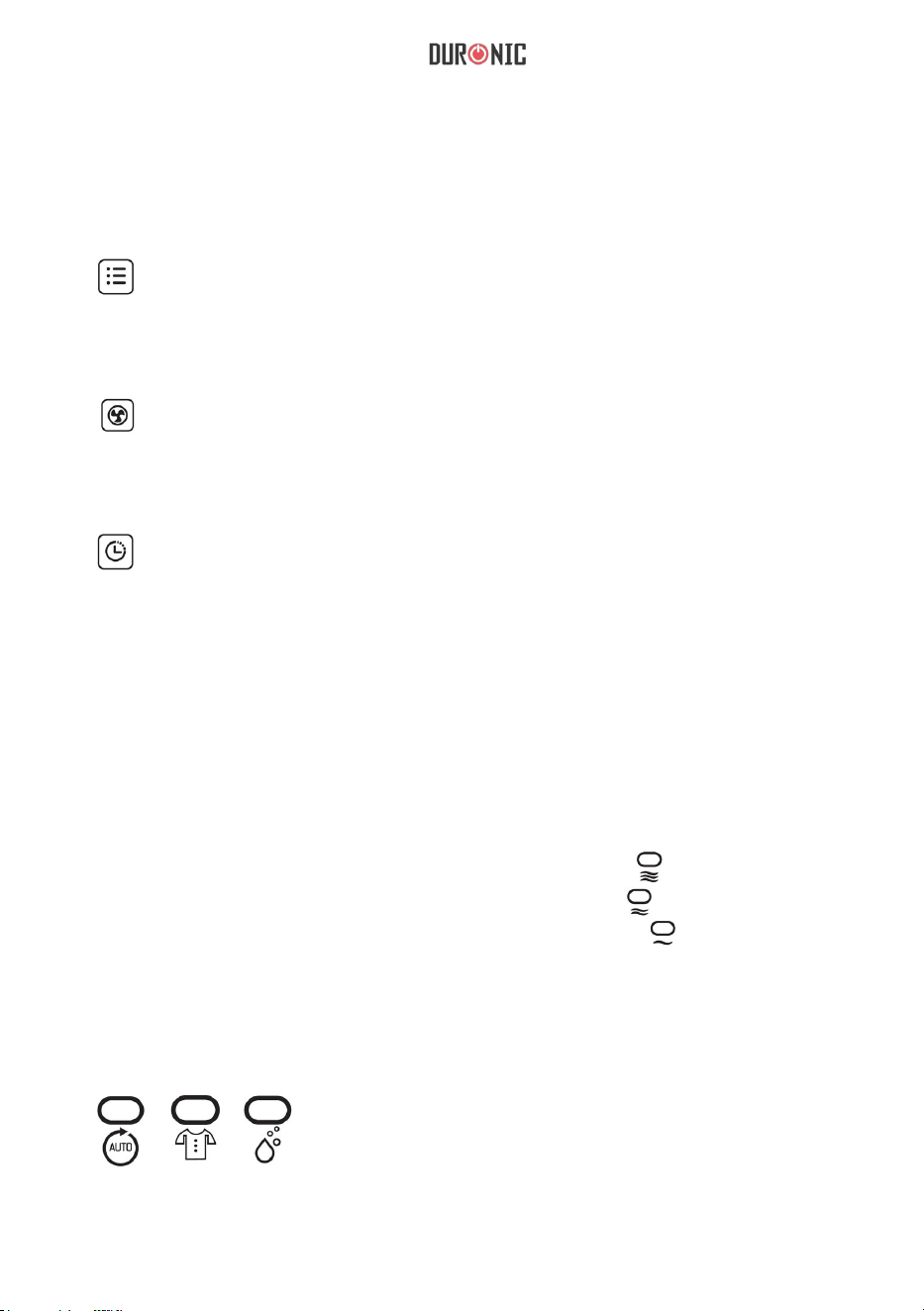
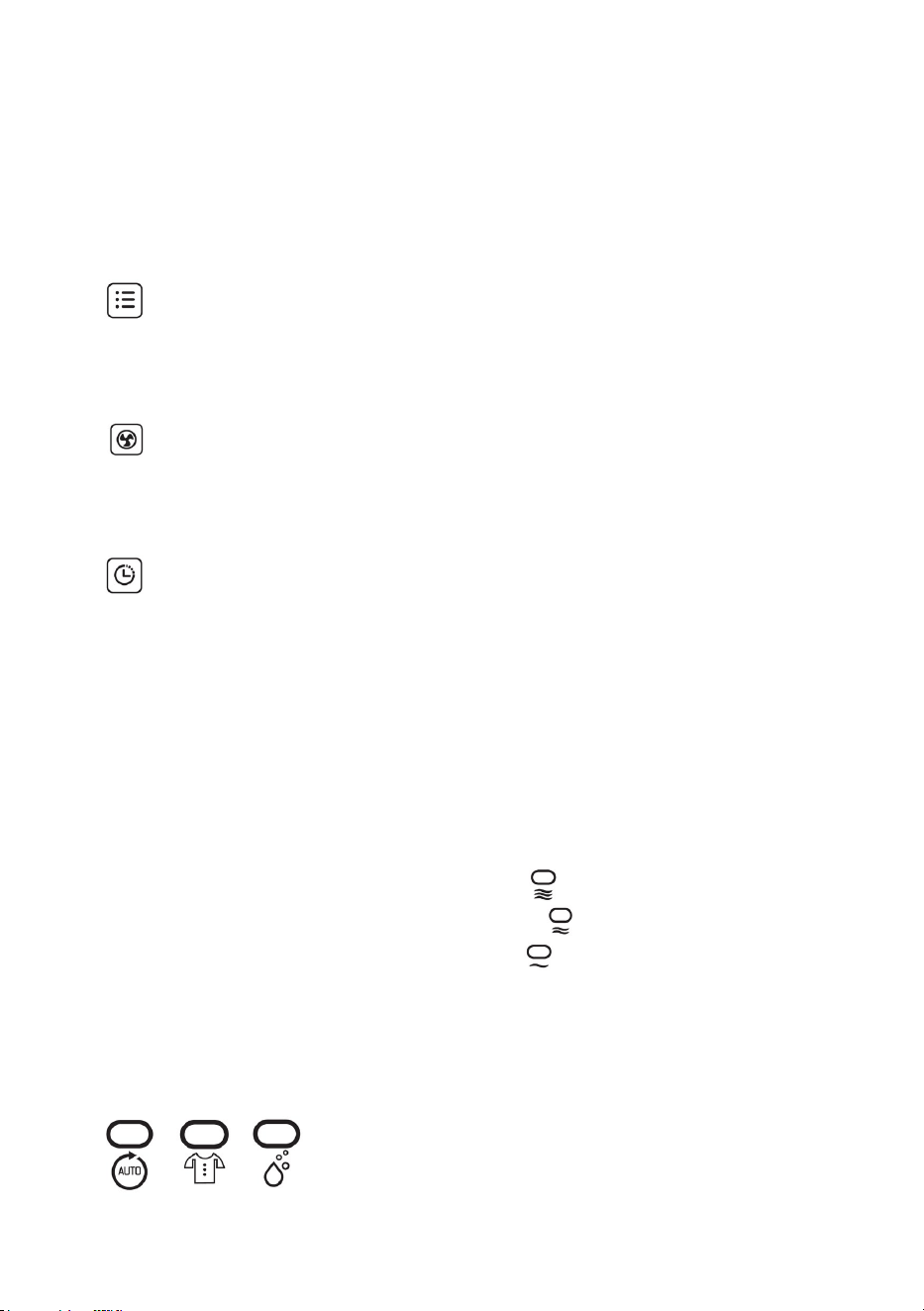
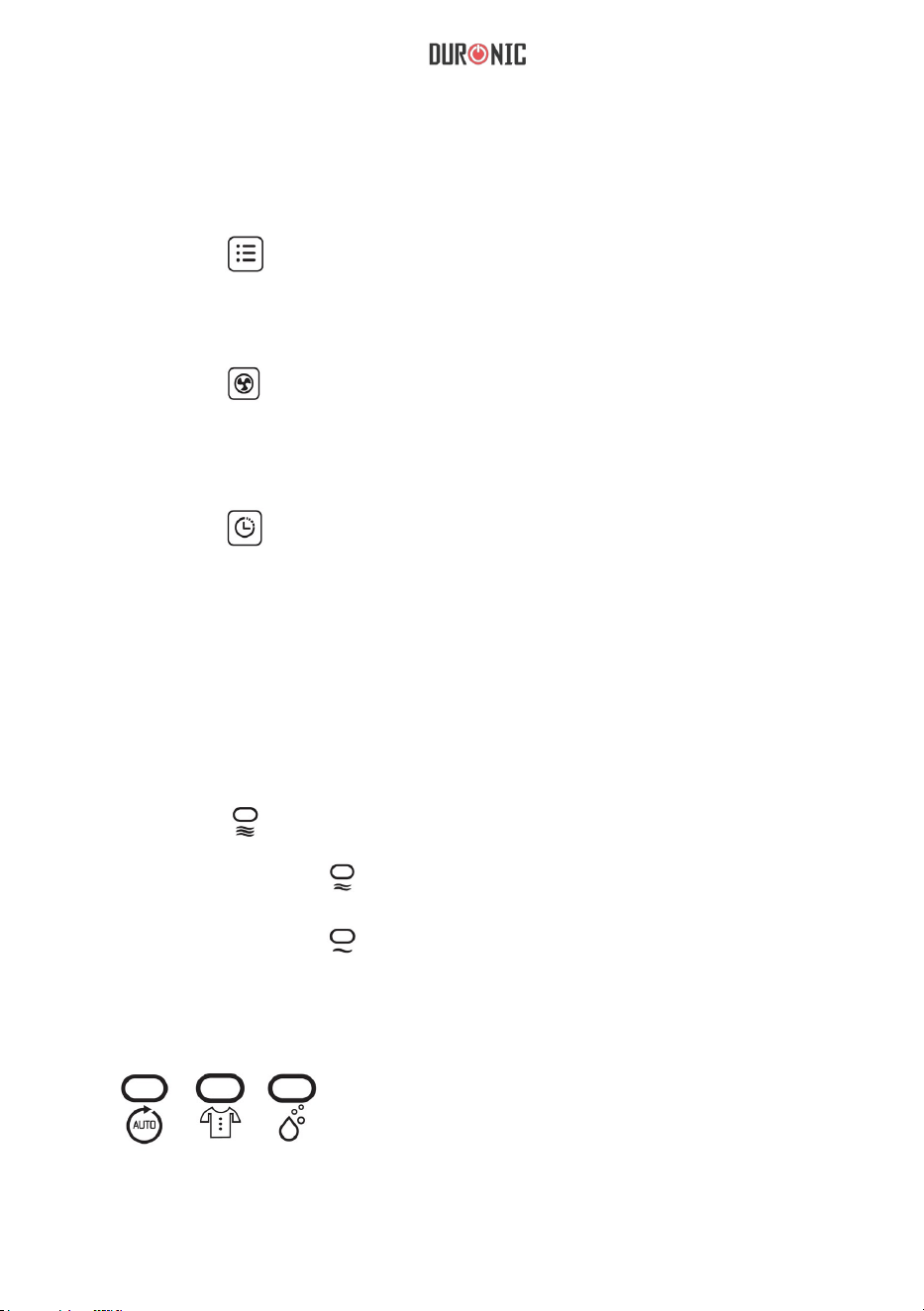
3. key: Used to change the different working modes, press once
to change the mode among automatic dehumidifying - clothes drying
and dehumidifying.
4. key: Used to change the fan speed from high, medium and low.
Note: In automatic mode, this key is invalid.
5. key: Used to set the timing shutdown. To use, please read the
operation instructions.
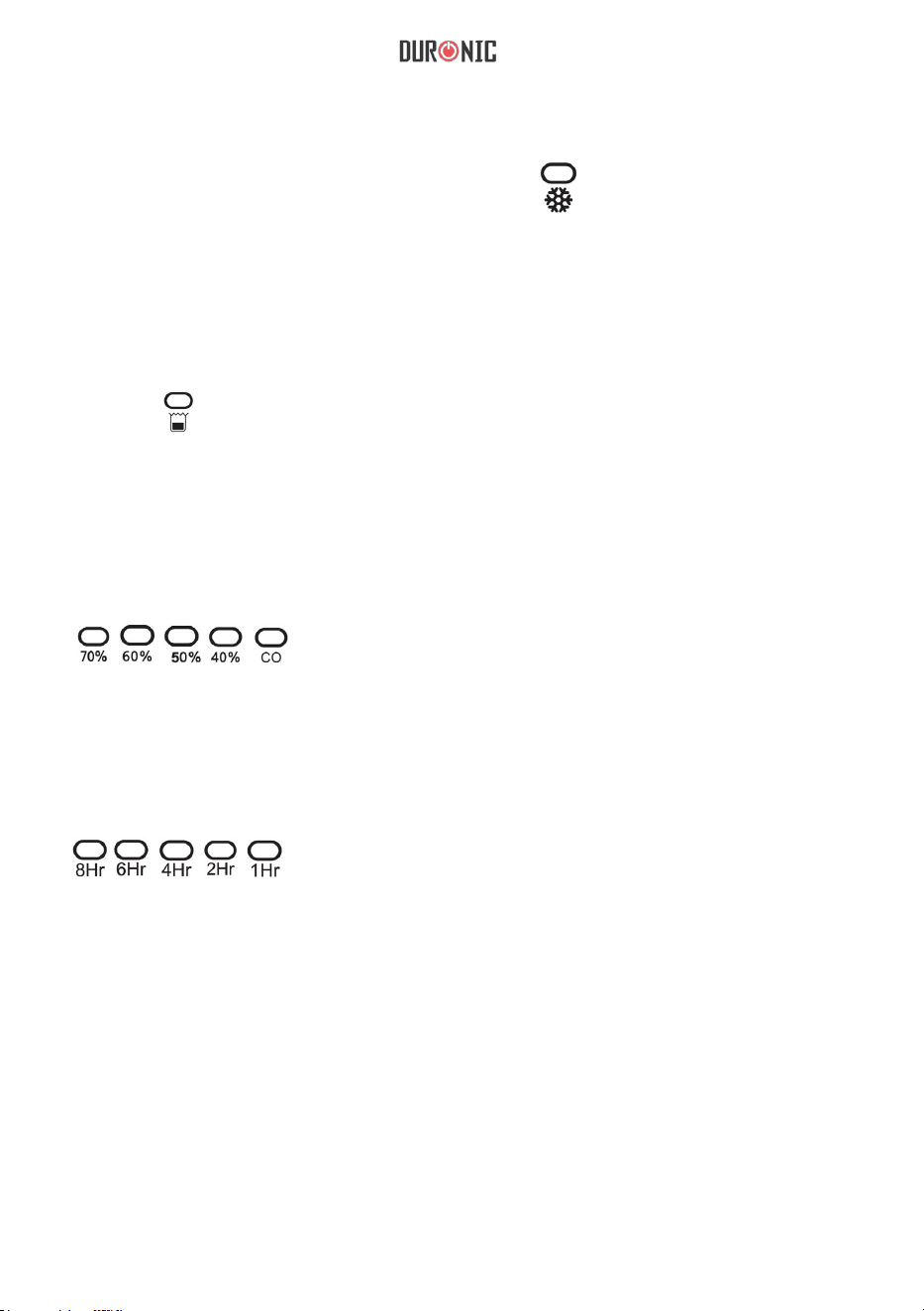
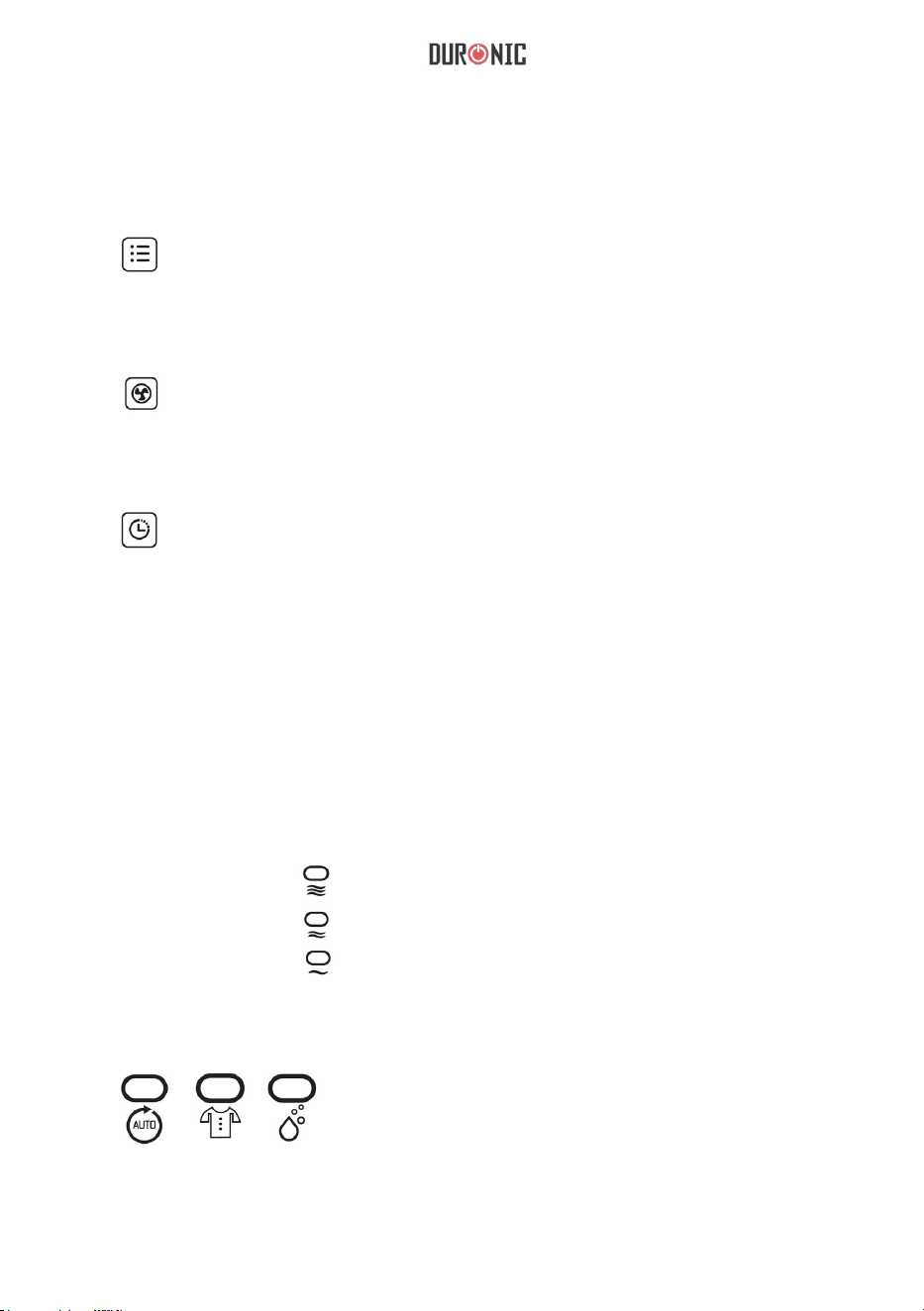
1. Fan speed indicator:
When the unit runs at high speed, “ ” will be on.
When the unit runs at medium speed, “ ” will be on.
When the unit runs at low speed, “ ” will be on.
2. Working mode indicator:
When the unit works at different modes, the relative indicator will be on:
9
7. Operating Indicator:
When you turn the appliance on, the indicator will stay on. When you turn the
appliance off, the indicator will slowly flash before turning off completely.
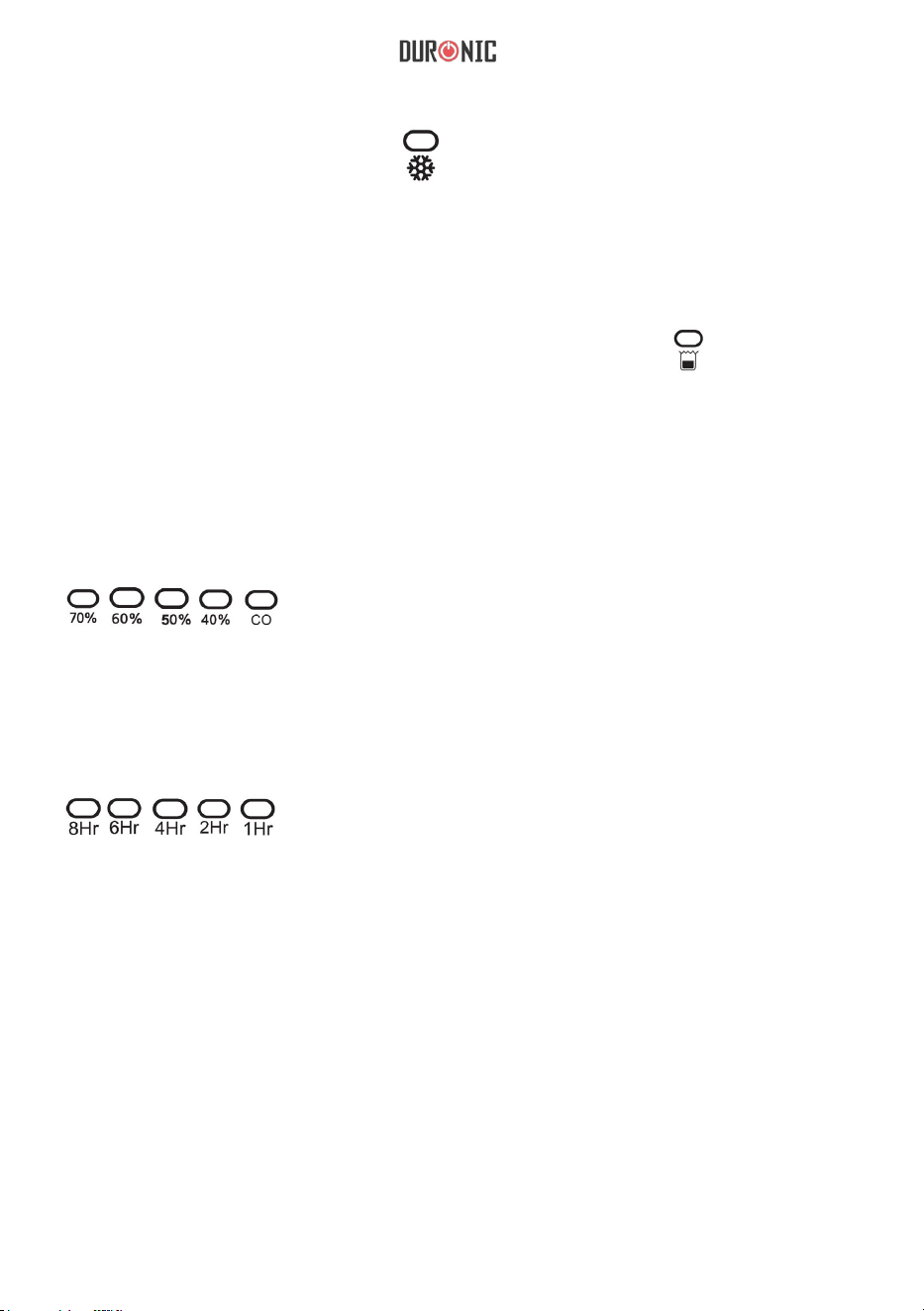
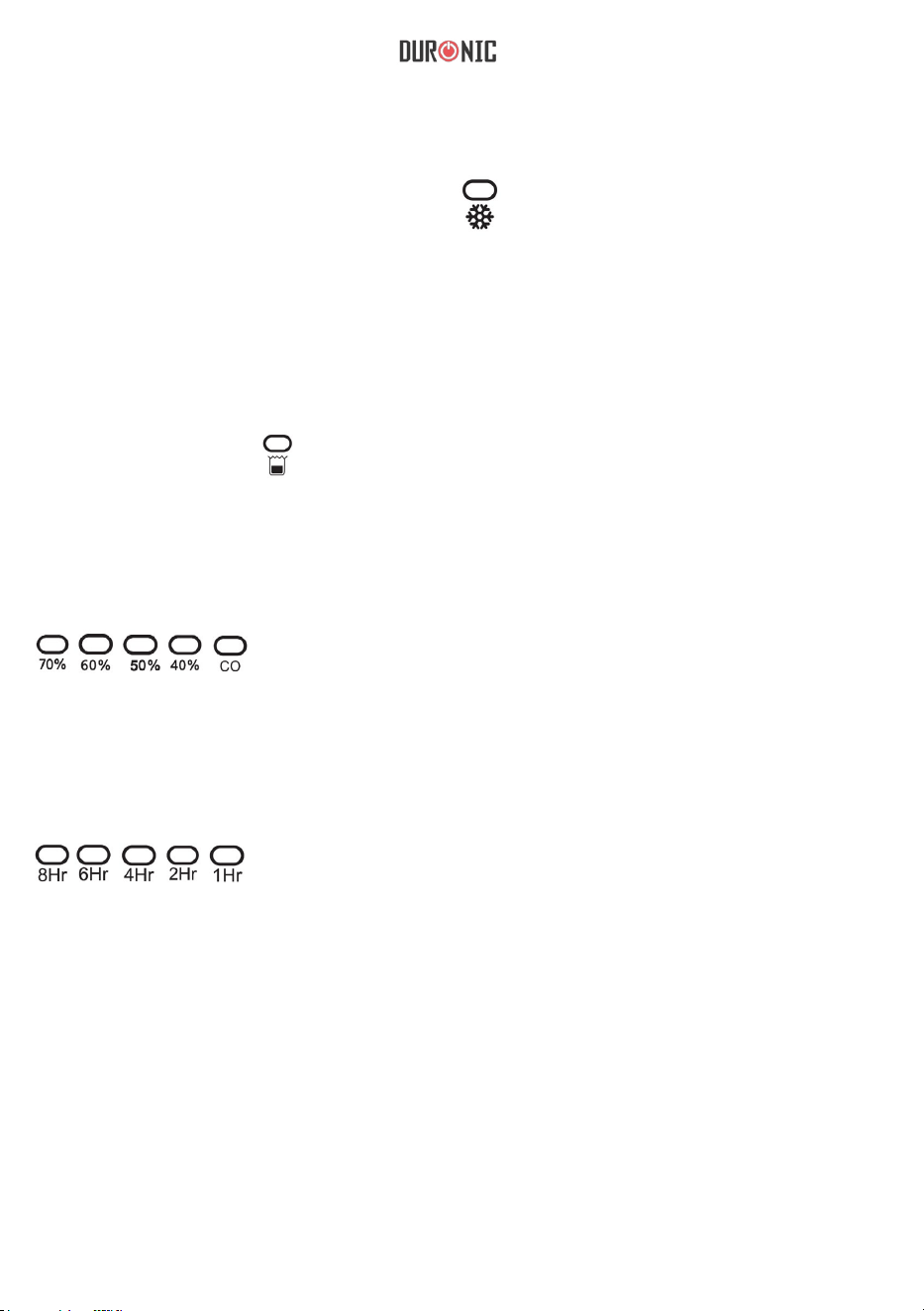
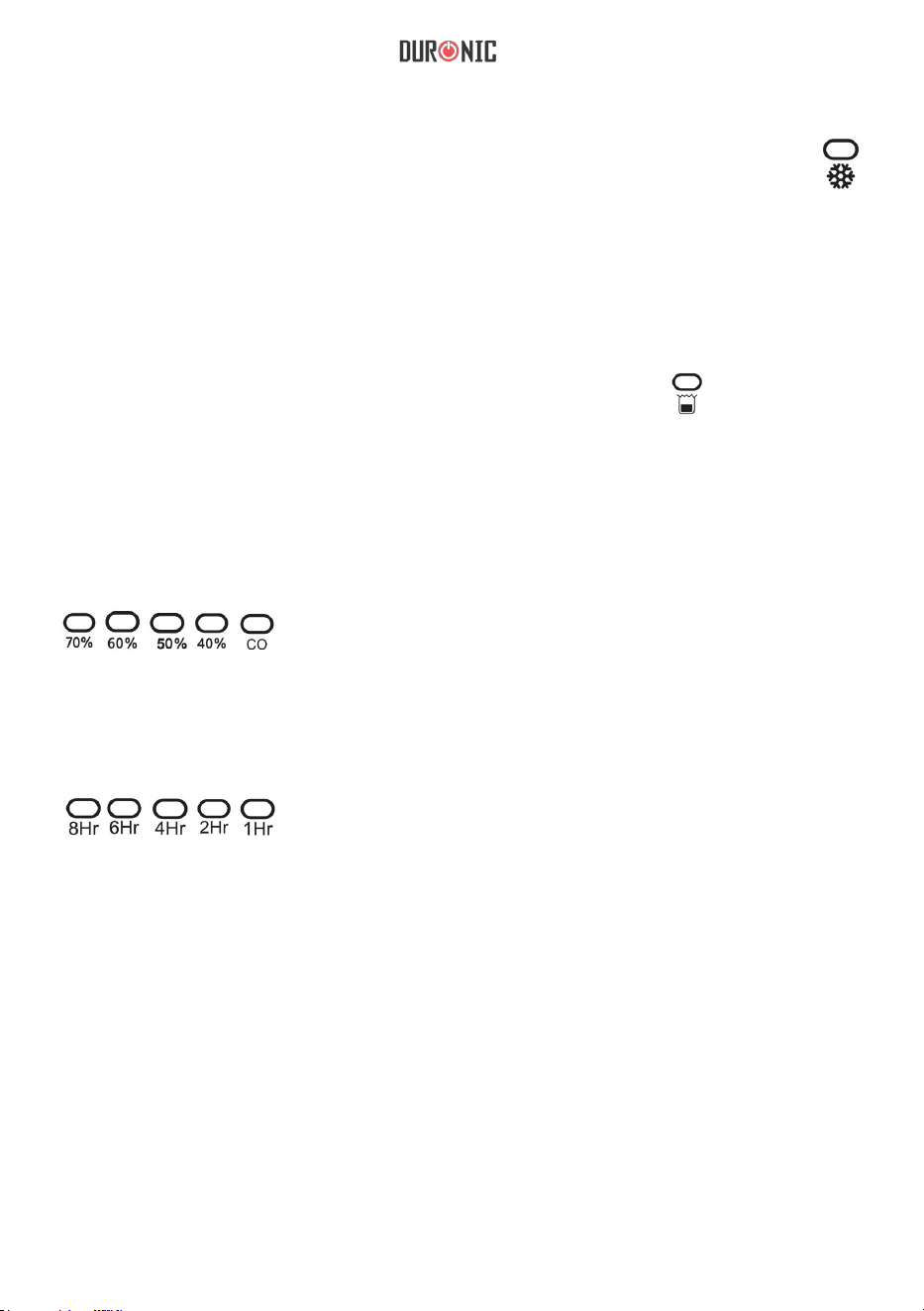
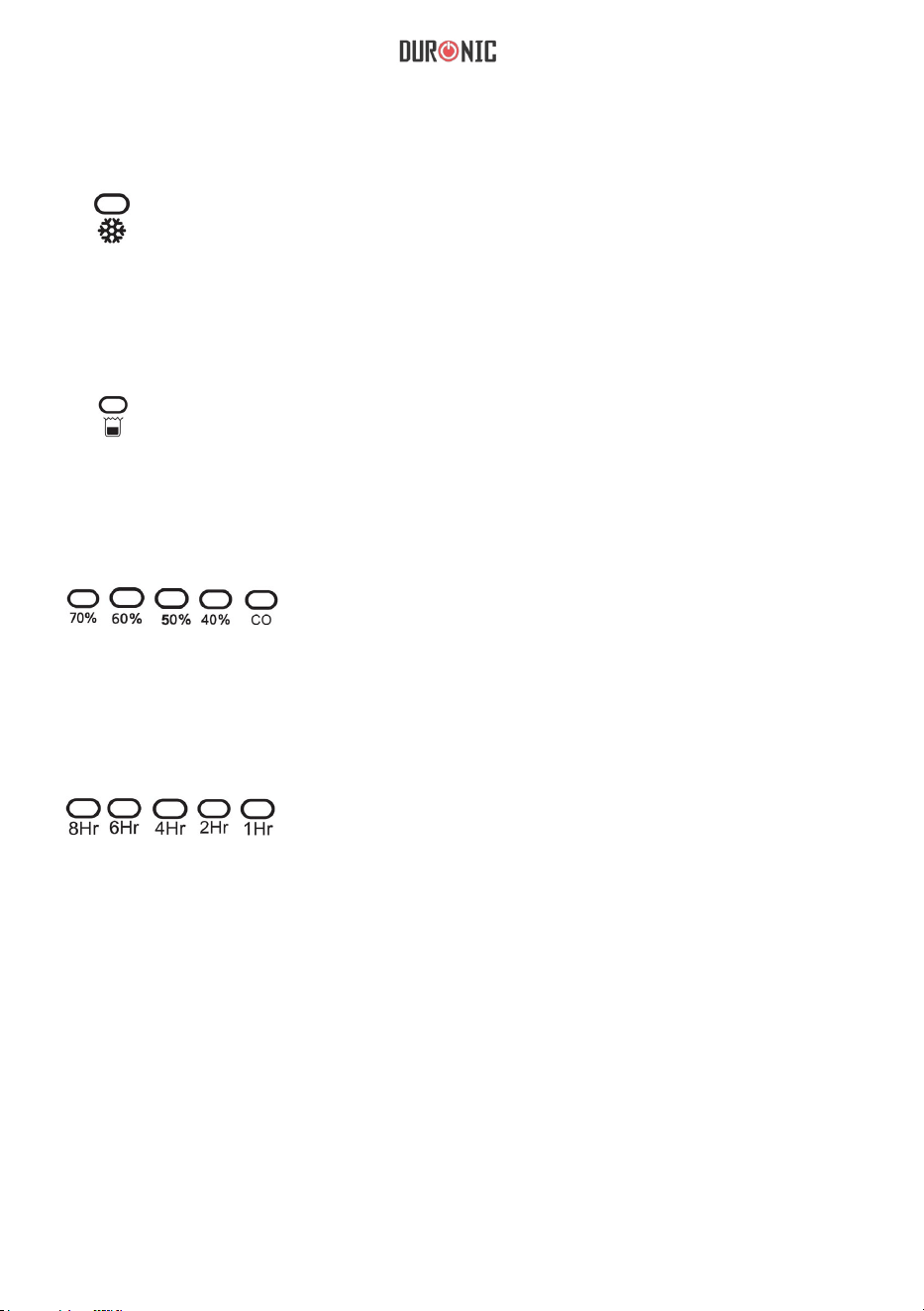
3. Defrosting indicator:
When the unit begins to defrost, “ ” will be on.
4. Water tank full indicator:
When the water tank is full, the unit will go into standby mode. Will begin to
ash at a high frequency.
5. Humidity setting indicator:
When you set the humidity, the corresponding indicator lights will appear:
6. Timing shutdown:
When you set the time, the corresponding indicator lights will appear:
10
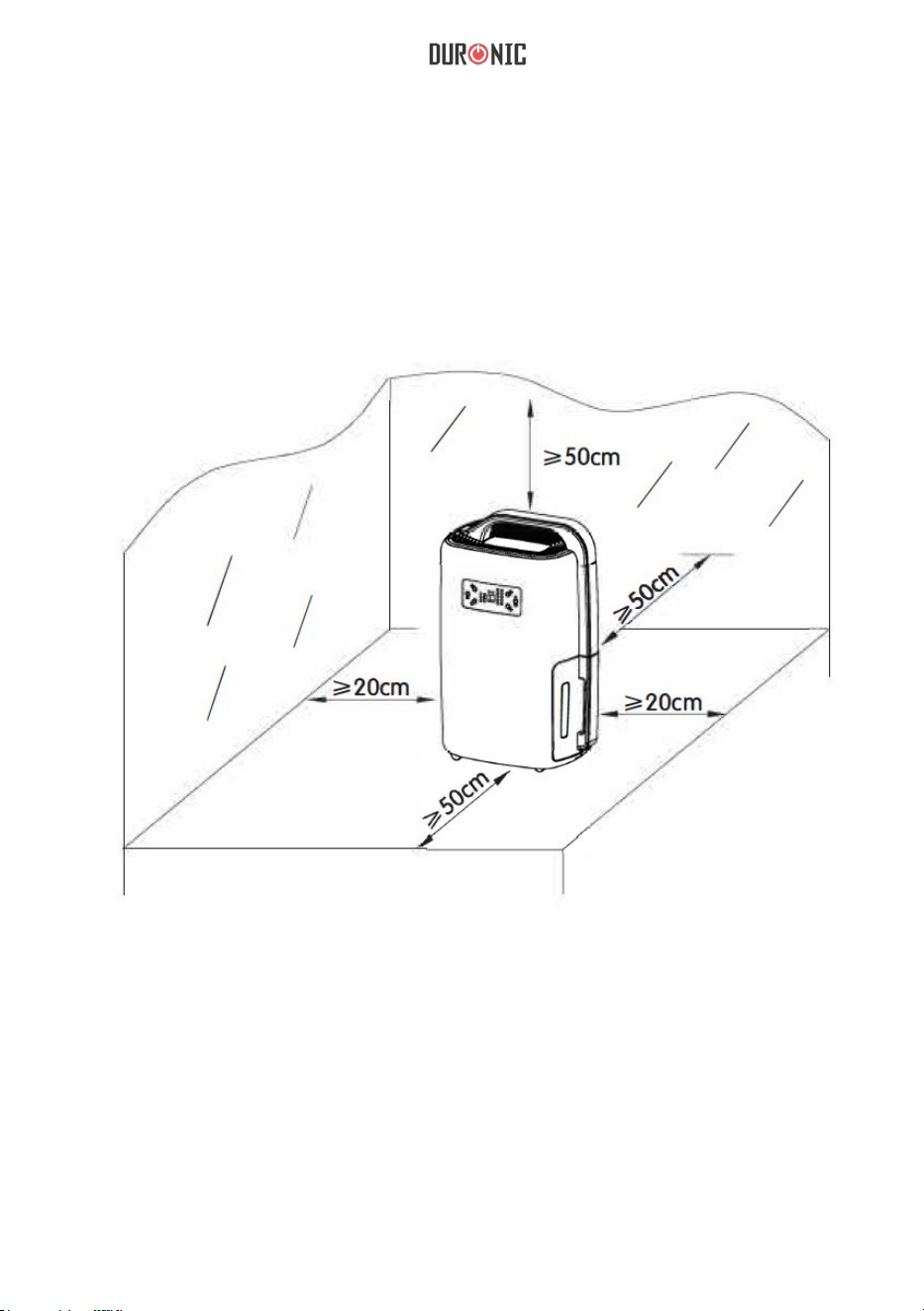
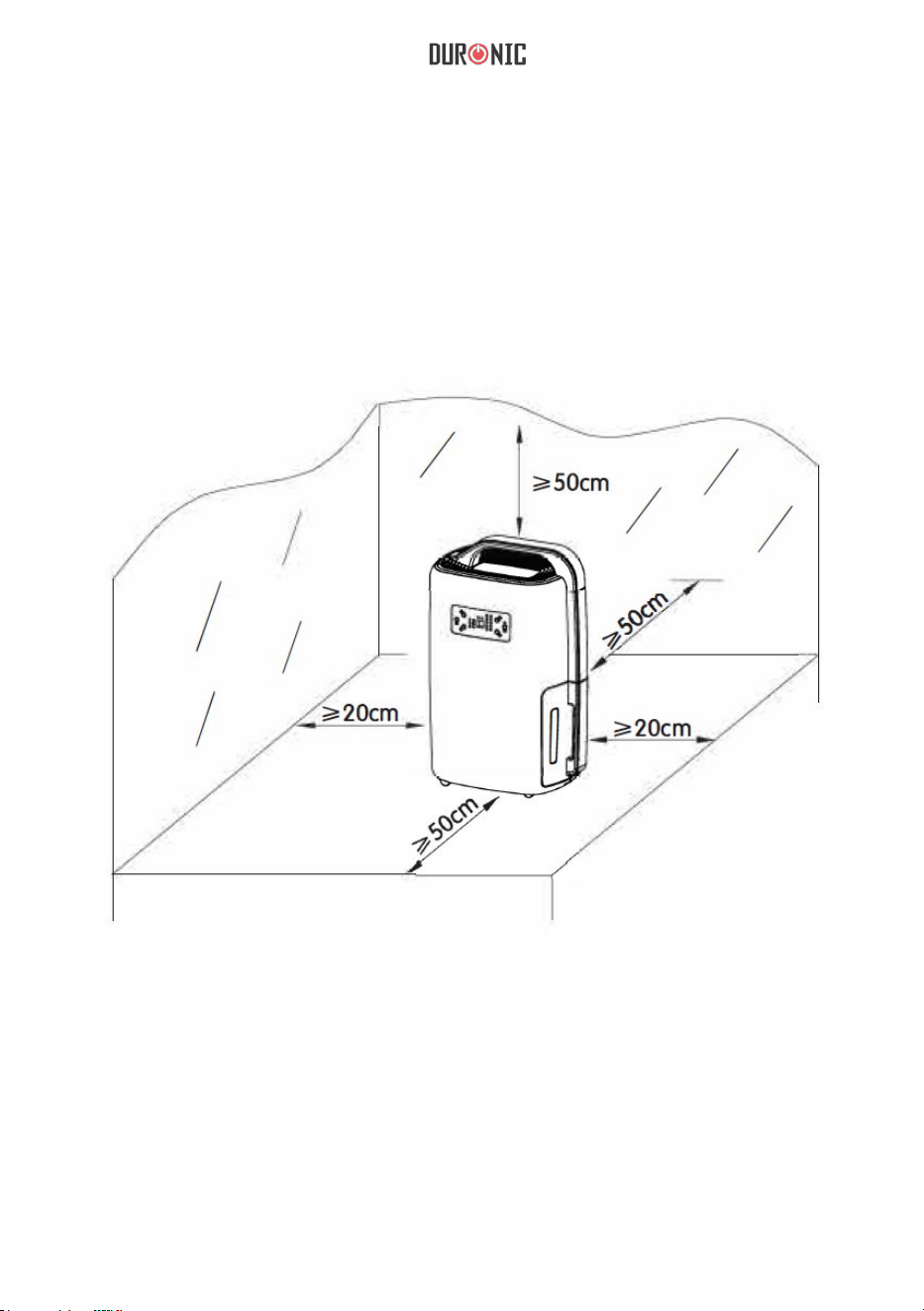
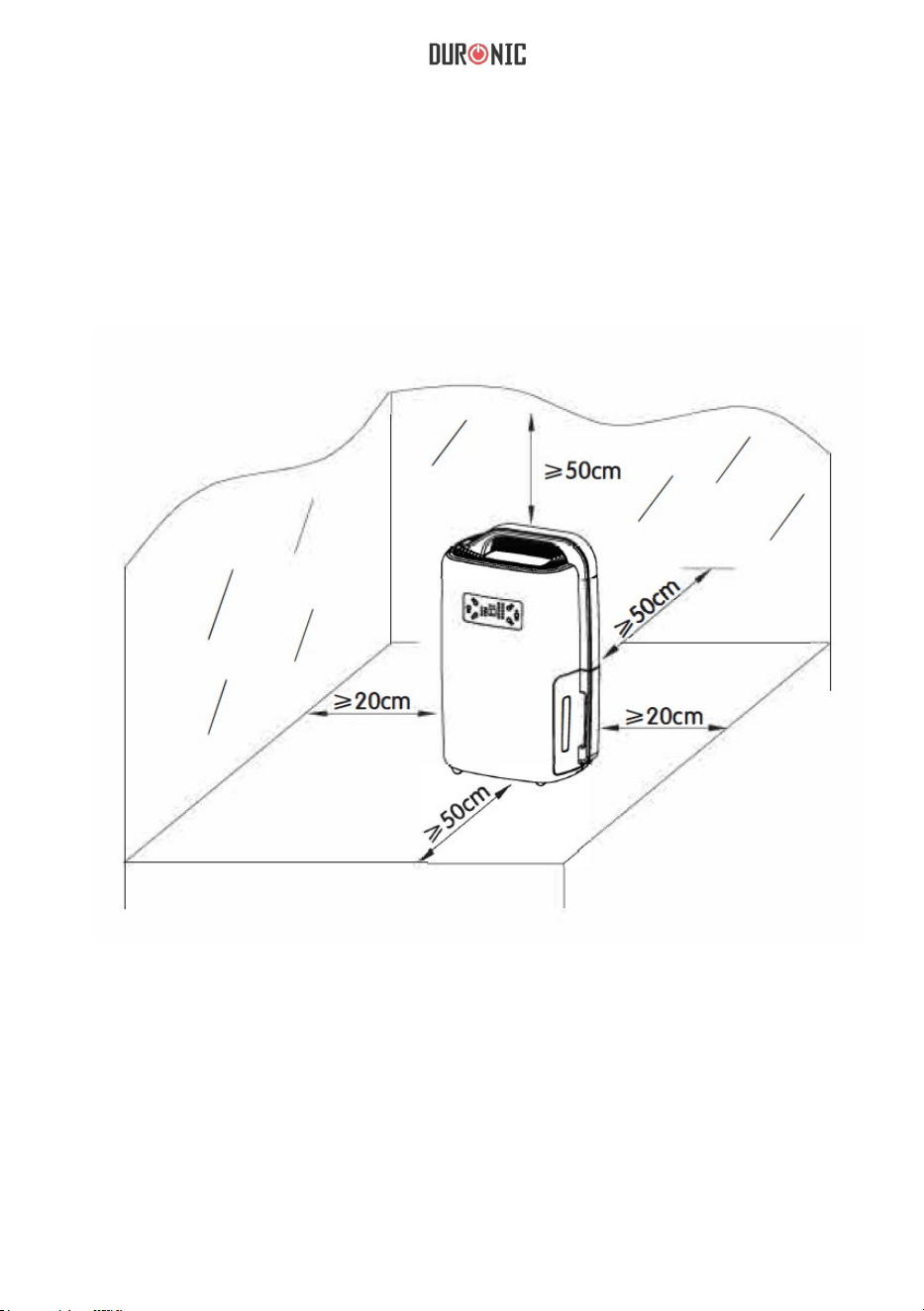
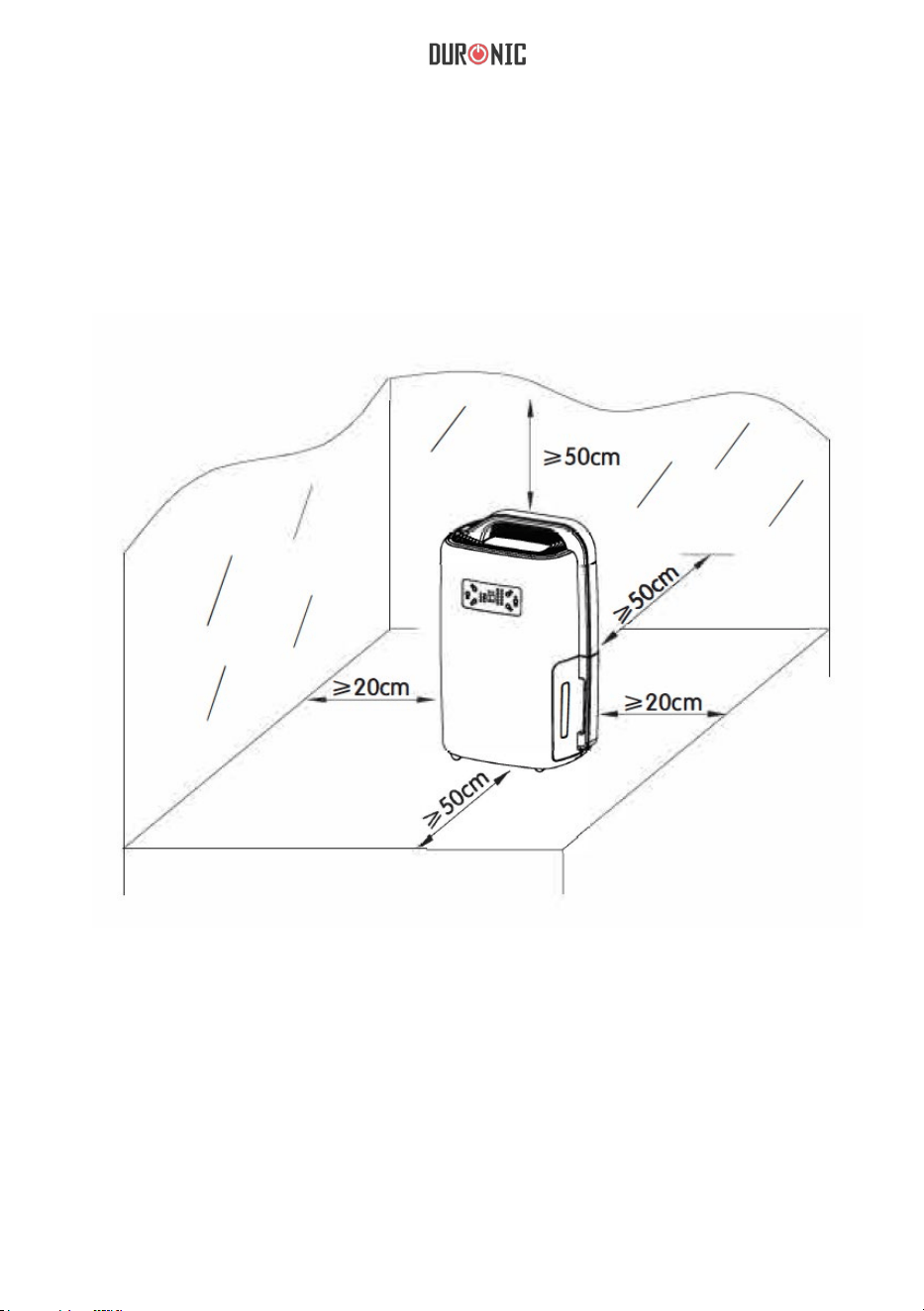
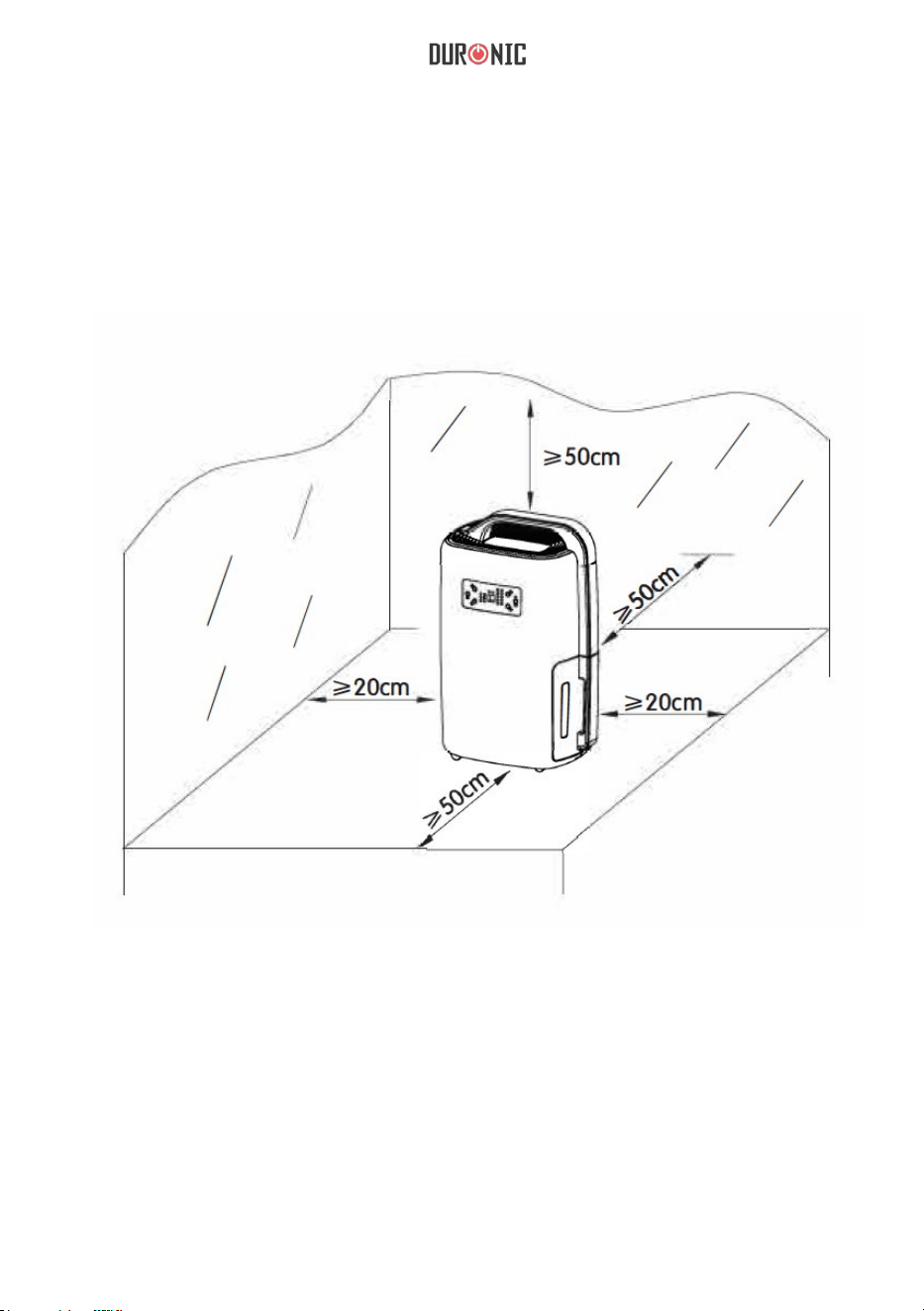
1. Place the unit in a suitable location for best operating conditions.
2. Please make sure your household voltage corresponds with the rating label
of the dehumidier.
3. Check and make sure the inlet and outlet are not blocked by other objects.
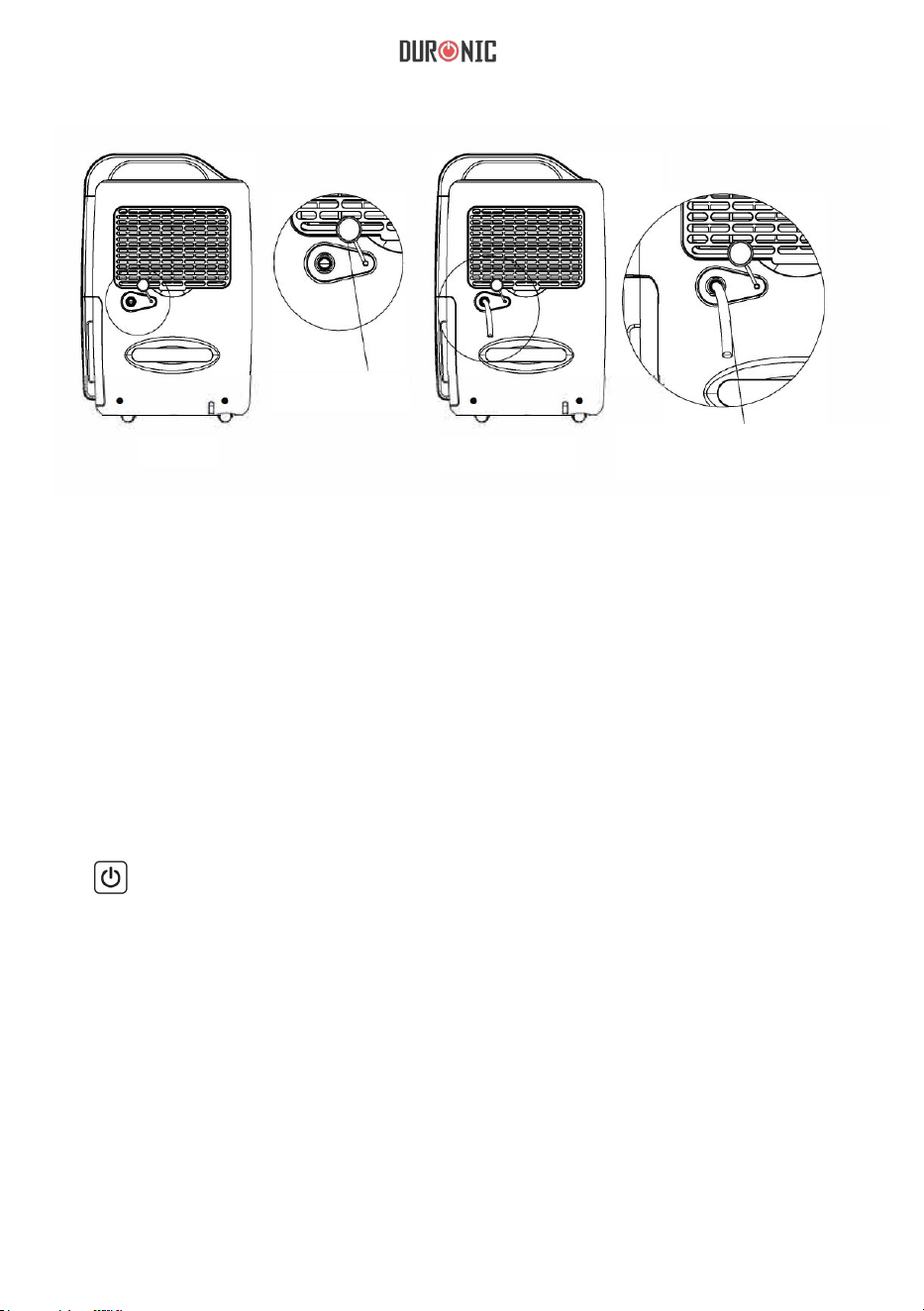
4. If you wish to use the dehumidier for a long period of time, use the
drainage pipe, so you do not have to continuously empty the water tank.
Before Use
11
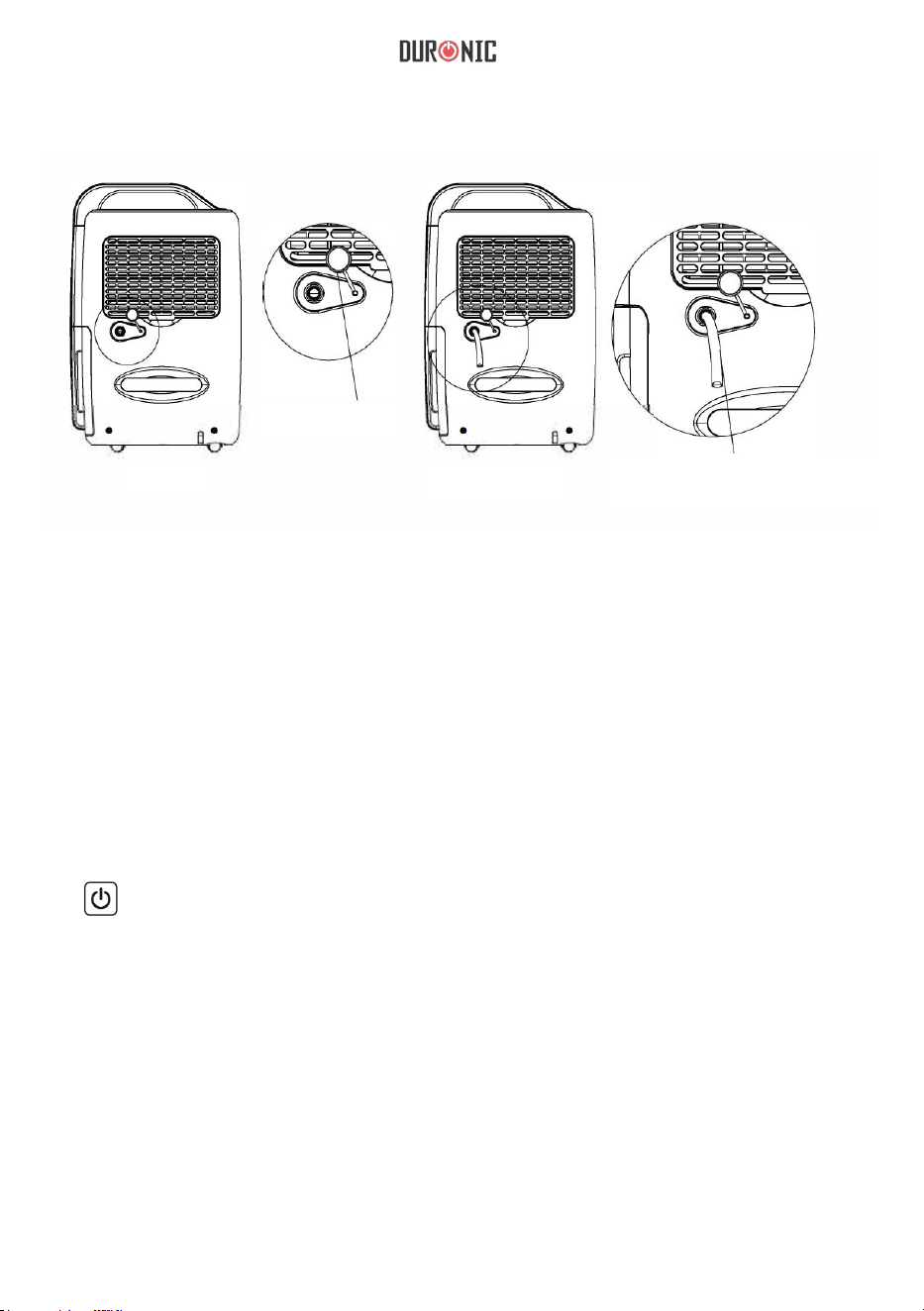
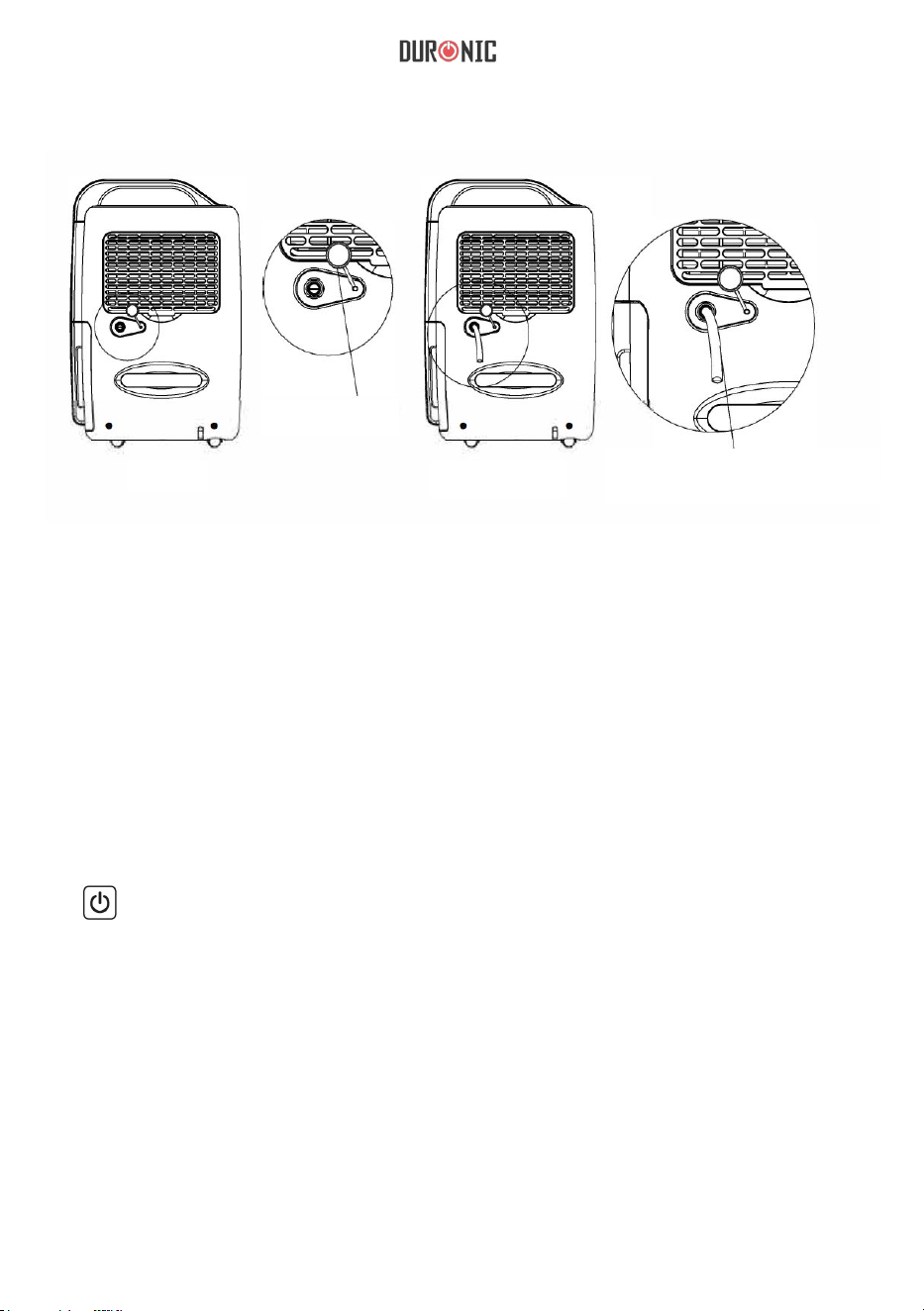
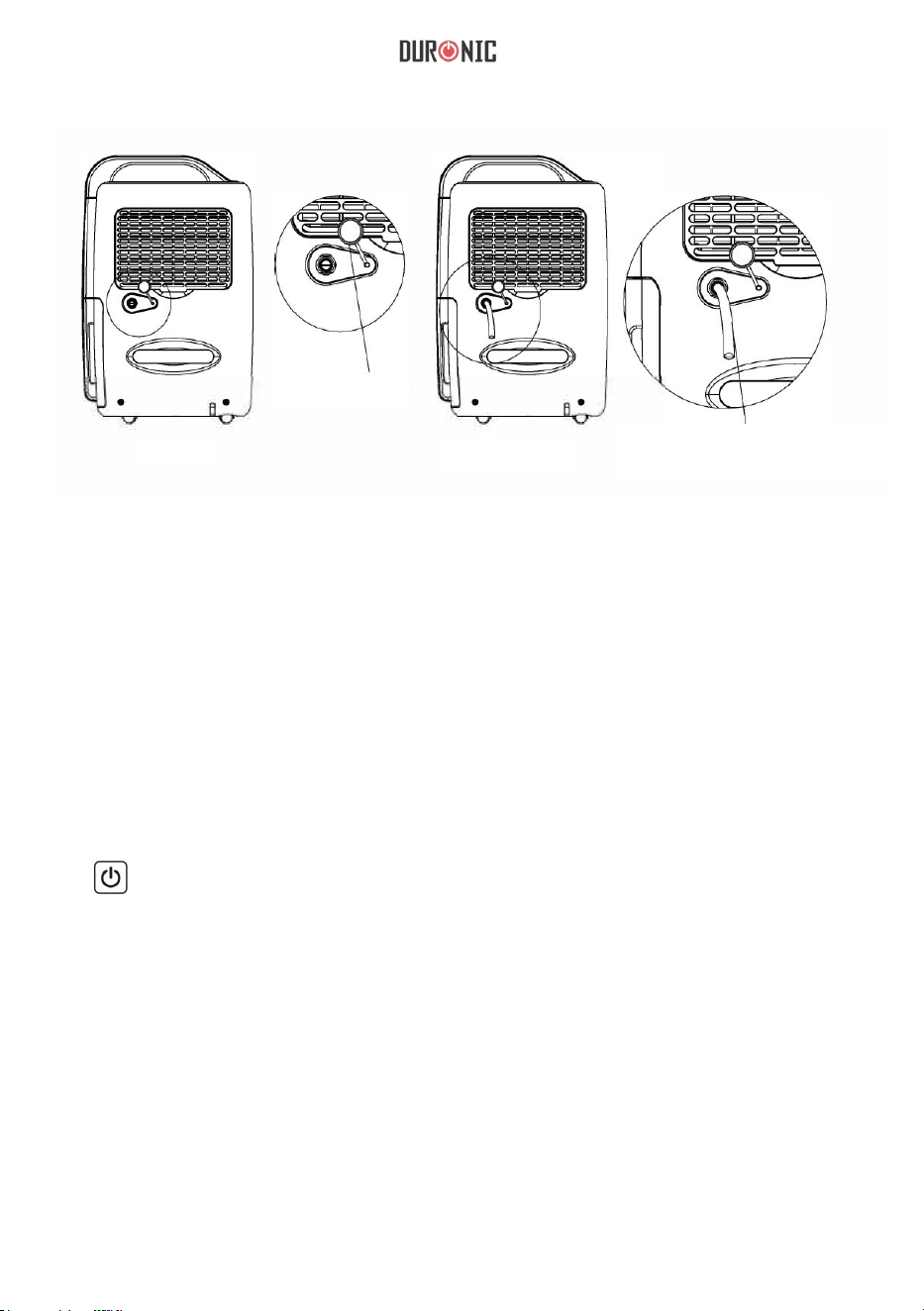
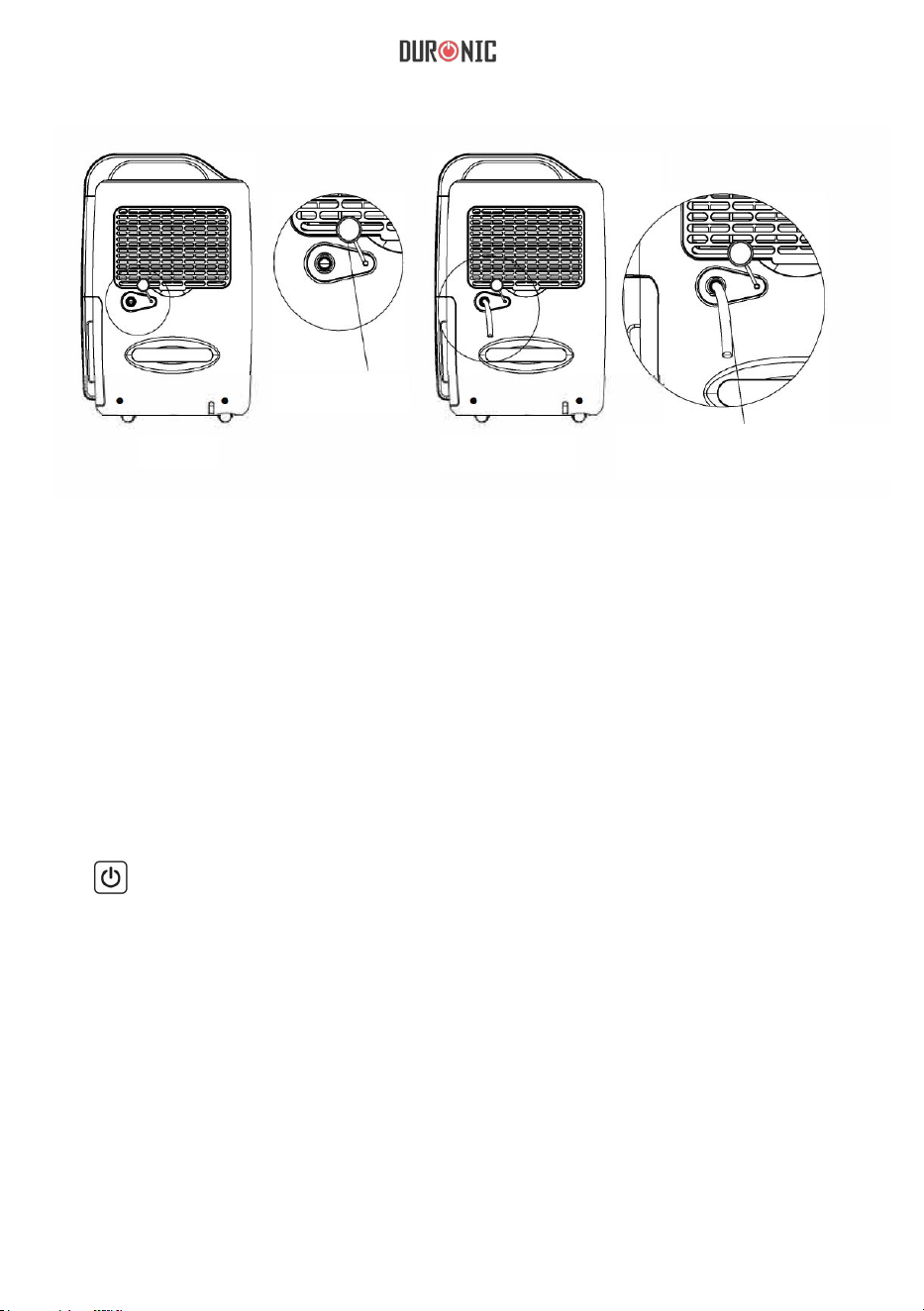
Figure 1
Take off plug
Figure 2
Plug drainage pipe with
14mm inner diameter in
the hose connector
Note: Gently stretch the drainage pipe if it is squashed or twisted, otherwise
drainage will be restricted and the unit will not work normally. During the
operation, drainage pipe should never be in a higher position than the hose
connector.
How To Use
1. ON/OFF: Press once to turn unit ON or OFF.
a. Press “ON/OFF” once and the unit will begin to work.
b. Press “ON/OFF” once again after use and the unit will shut down.
Note: Let the unit rest for about 3 minutes after turning off, so that residual
water on condenser can ow into the tank. Pull out the plug when the unit is
off for power saving and safety.

12
2.
“^” Up
“v” Down
Humidity can be set by pressing keys “^” and “v” (40%--50%-+ 60%-70%-
CO) press “Up” or “Down” once, the set value will increase or reduce
10%, “CO” will then appear on the panel and the unit will operate
continuously. When the humidity setting has finished and there is no
operation, the unit will accept the setting and the indicator light will stay
illuminated.
3. . “ ” Timer
The time can be set among 1h-2h-4h-6h-8h. If you wish to cancel the timer,
press and hold the timer button for 3 seconds and it will cancel.
4. “ ” Fan speed
You can adjust the speed of the fan by pressing the ‘fan speed’ button. You
can choose between high, medium and low. If the dehumidifer mode is set to
automatic, the speed cannot be adjusted.
5. “ ” Mode”
During operation, press this key to change the working mode, as follows:
automatic dehumidifying > clothes drying > dehumidifying.
Dehumidifying mode: can set humidity manually.
Automatic mode:
Rh>60%, high speed fan and dehumidifying;
60%>RH>55%, medium speed fan and dehumidifying;
Rh<55%, low speed fan and no dehumidifying.
Clothes drying mode; under the default of high speed wind state, the unit will
automatically shut down after 6 hours of continuous opoeration.
13
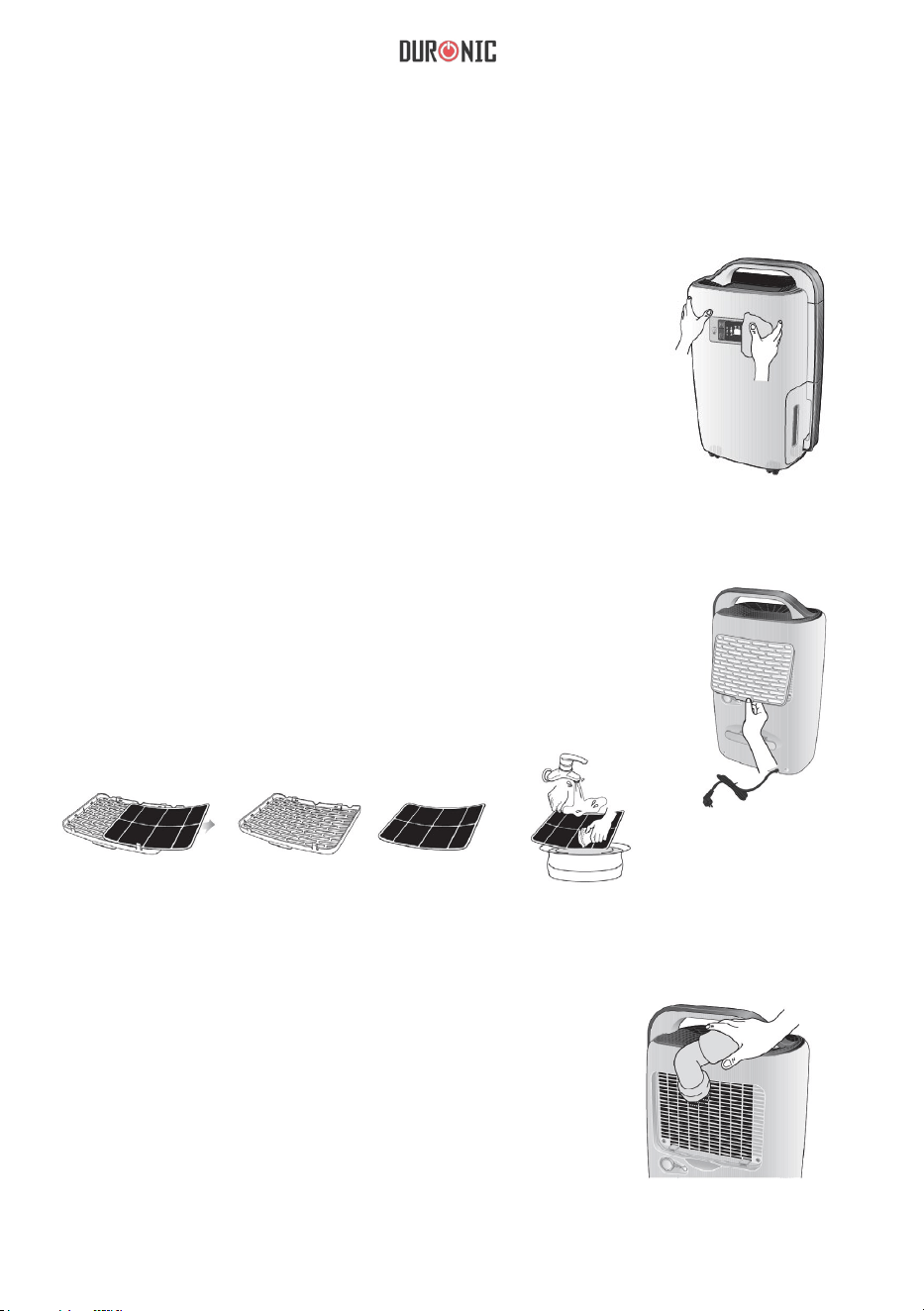
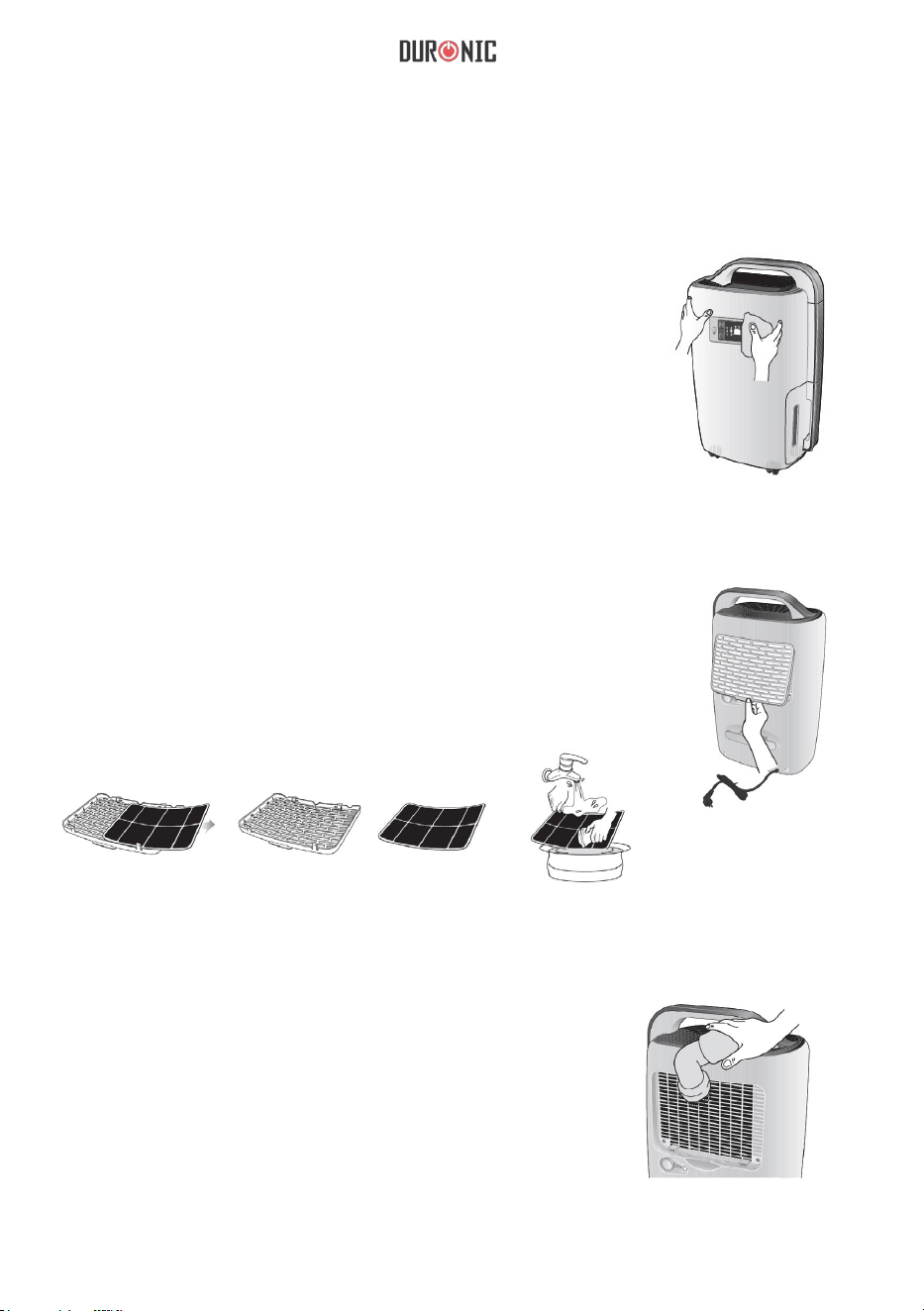
Care & Maintenance
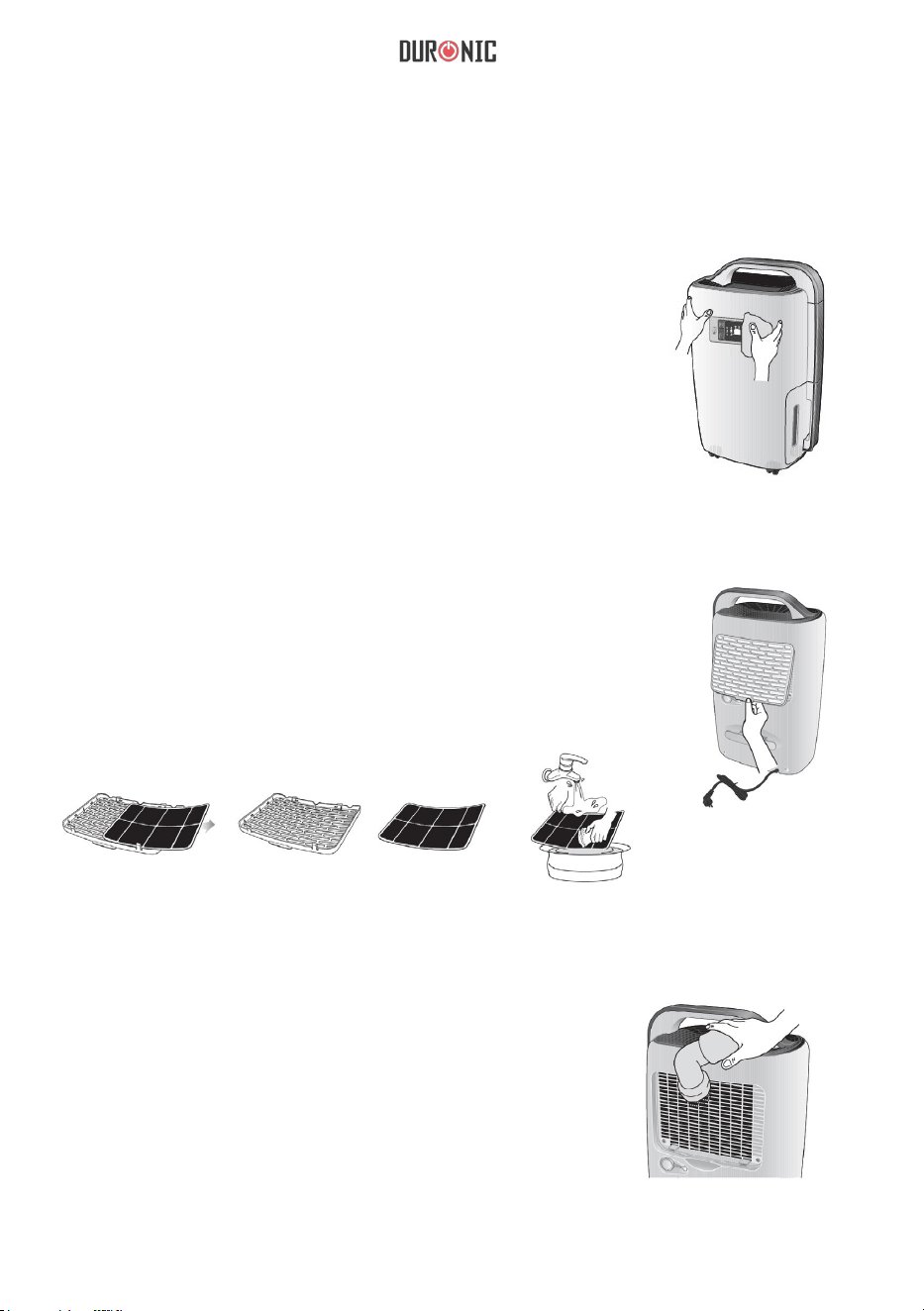
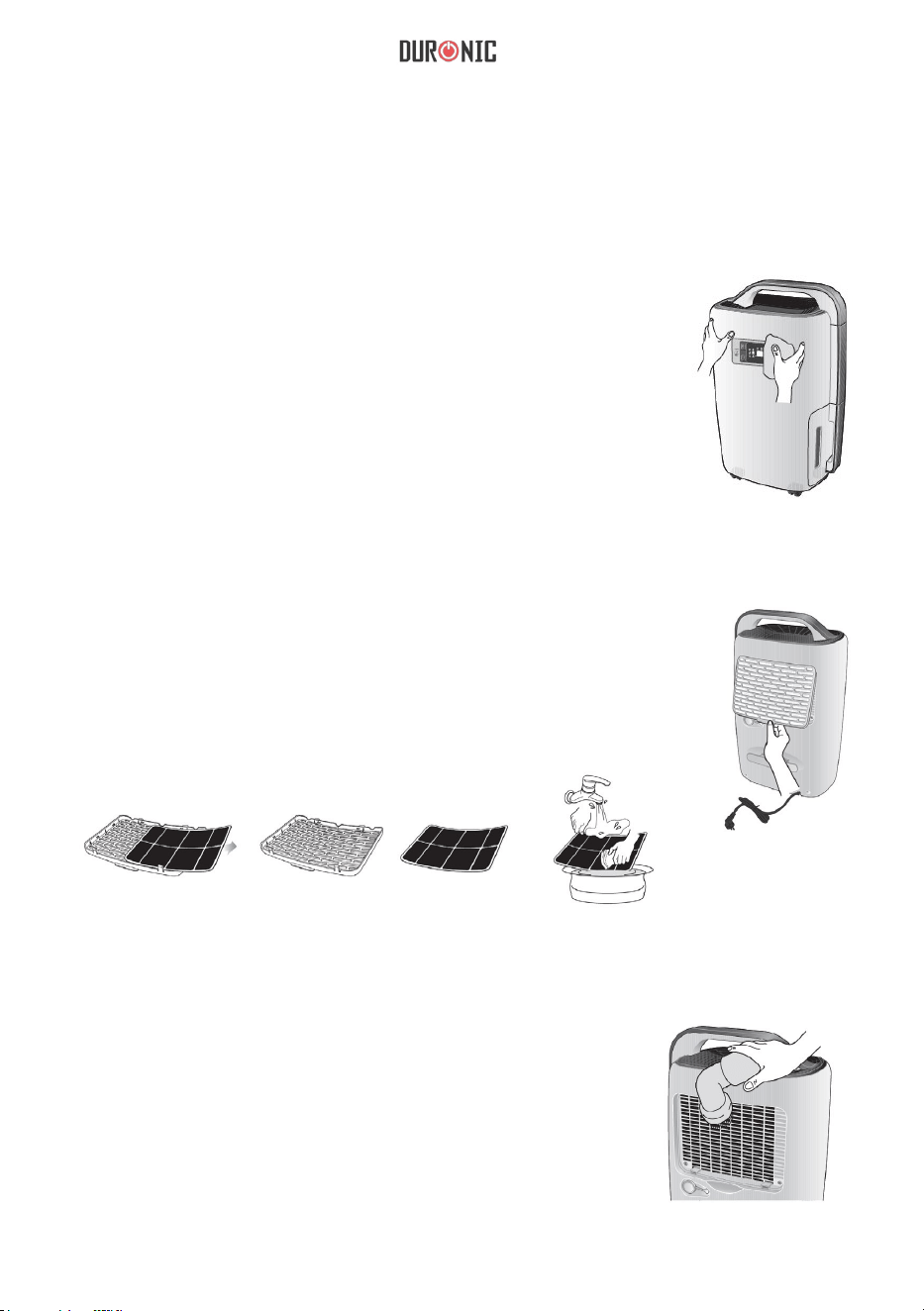
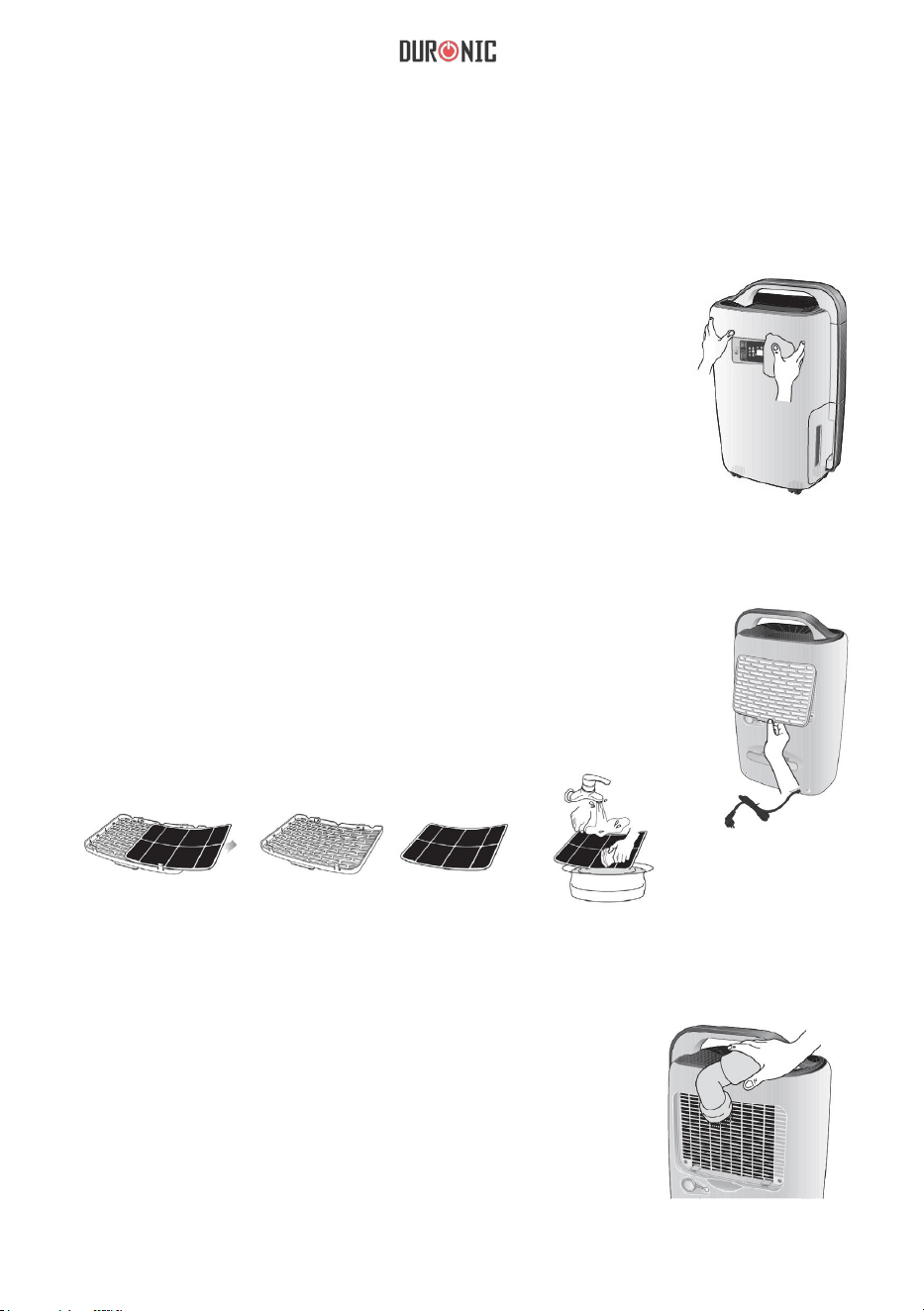
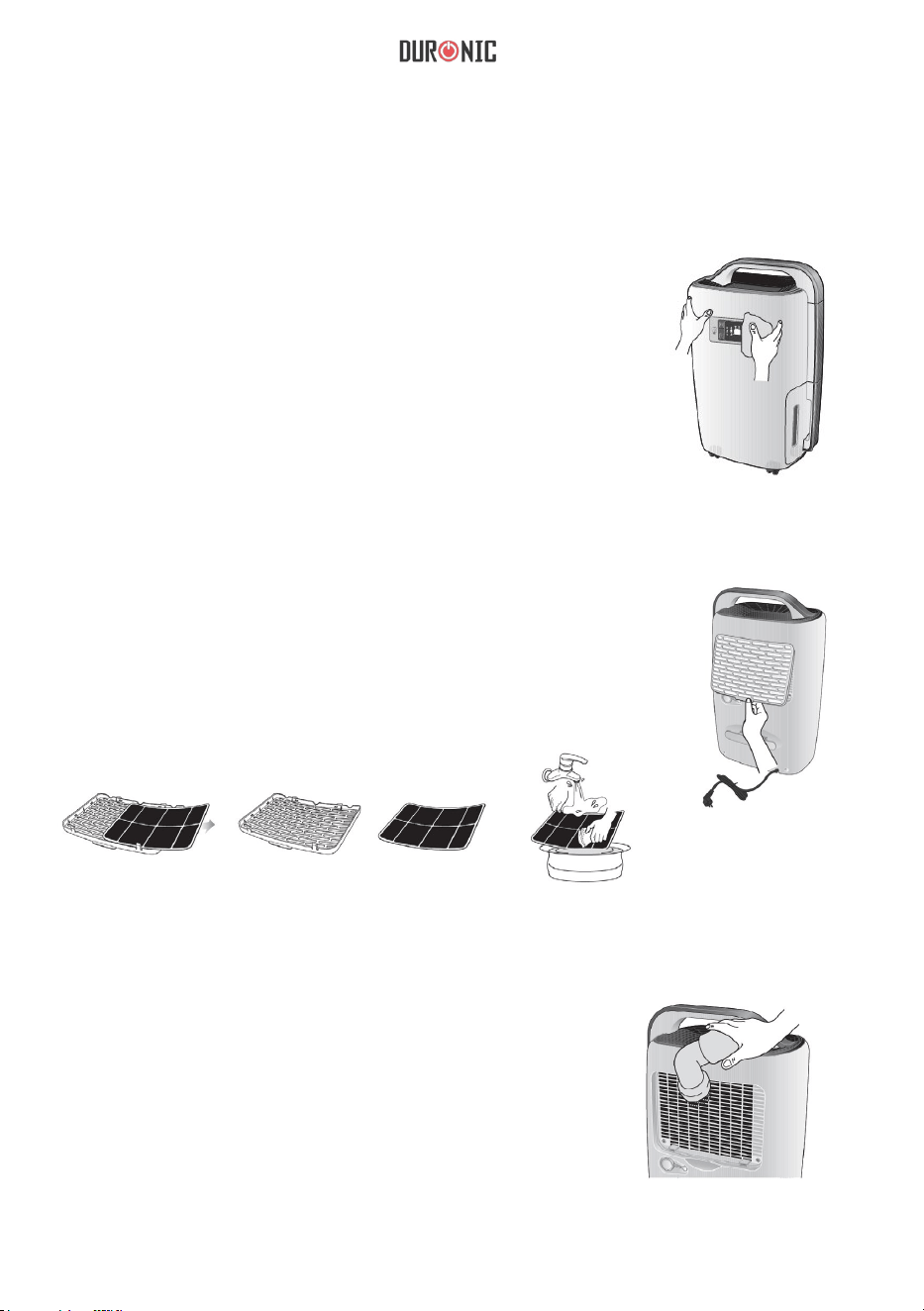
Cleaning Machine Body
Clean the machine body with a soft, dry cloth. If
the device is extremely dirty, use a mild cleaning
agent. Wipe the dehumidifer with a slightly damp
cloth. Never spray water on the device.
Cleaning Air Filter
Remove the filter. Clean the filter with a
vacuum cleaner or damp cloth (no warmer than
40˚C). Rinse and dry completely before
inserting back into the dehumidifier.
Cleaning Air Inlet
Please remove the air lter rst. Then, clean the
air inlet with a vacuum cleaner or a soft, dry cloth.
14
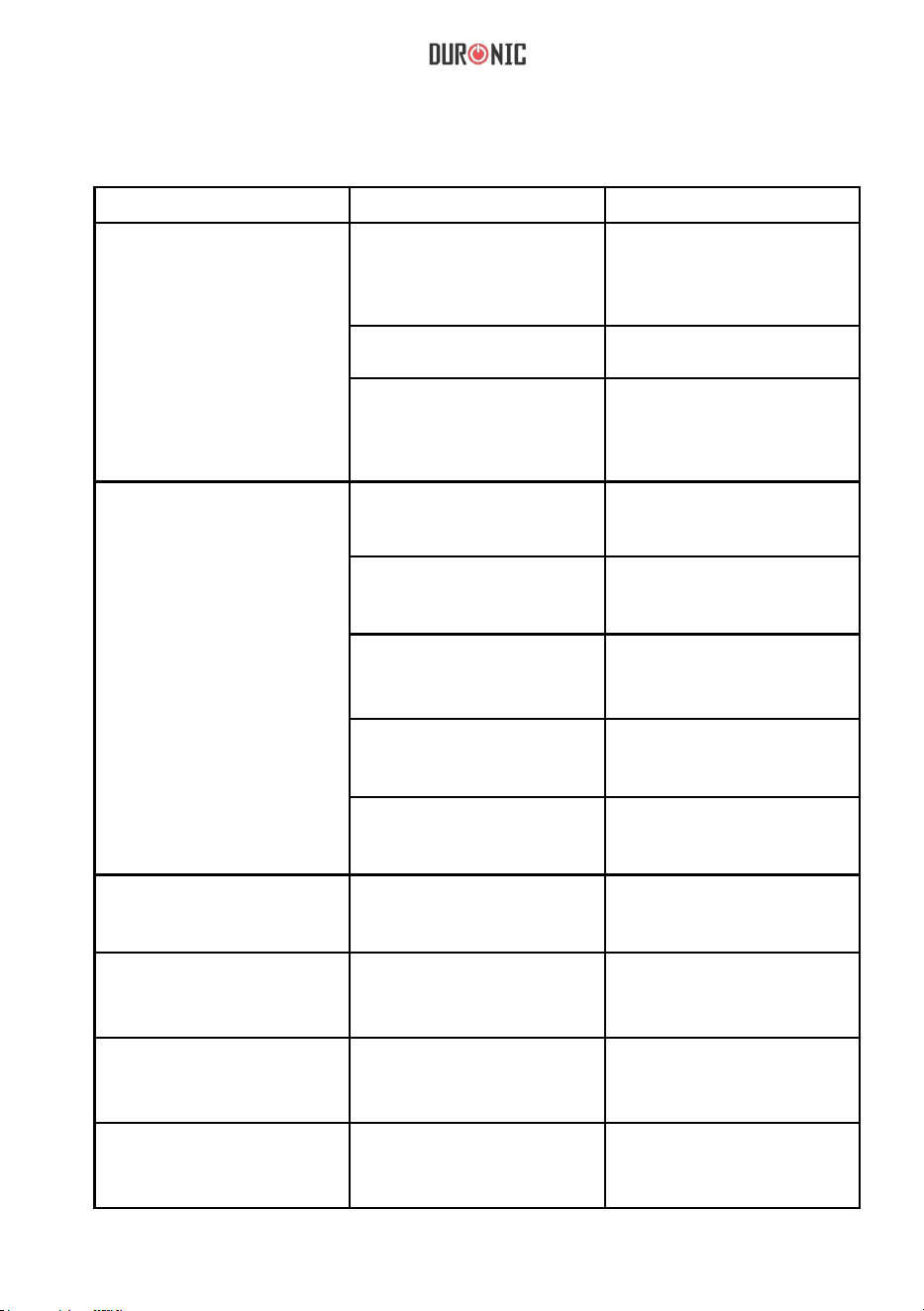
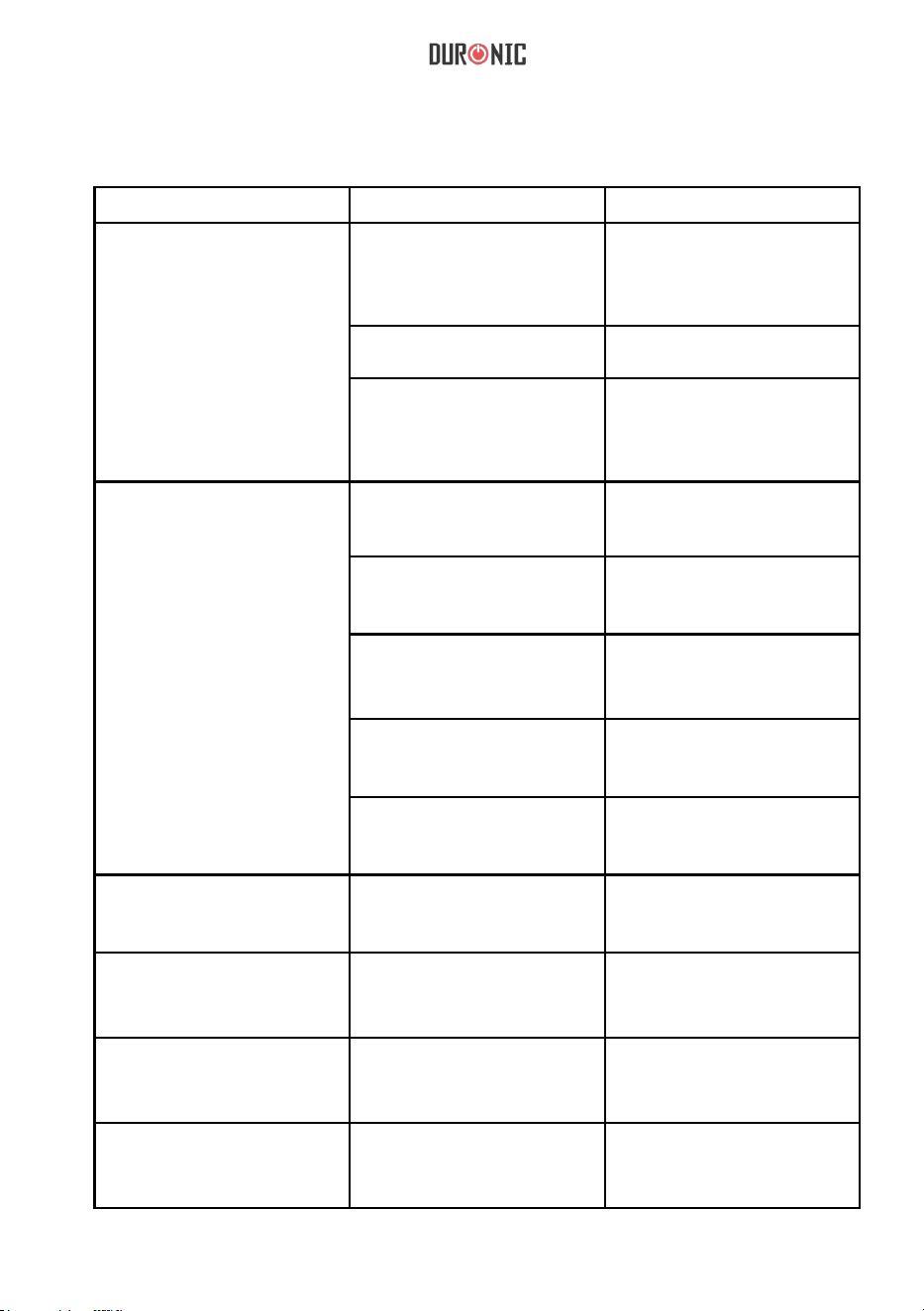
Troubleshooting
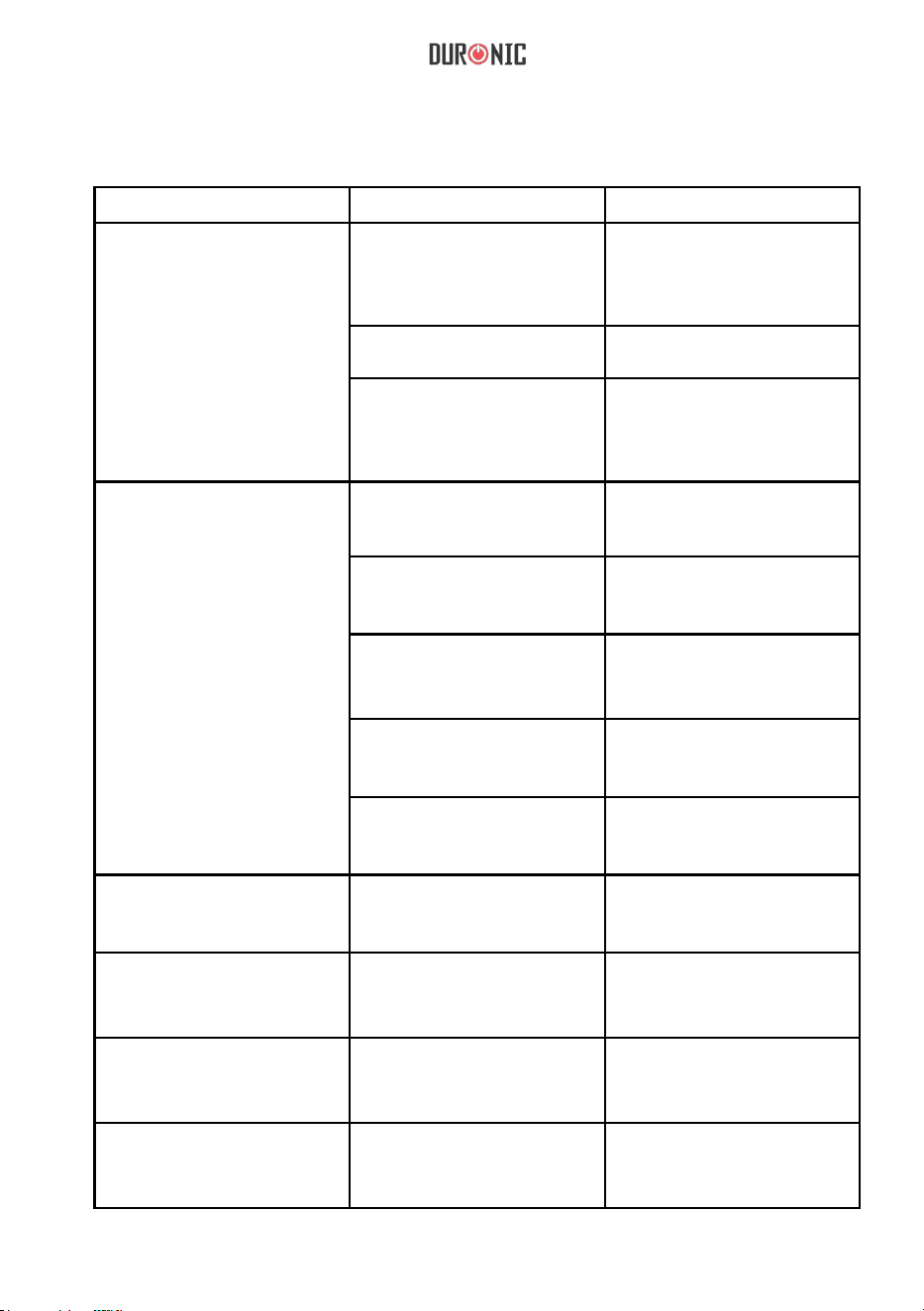
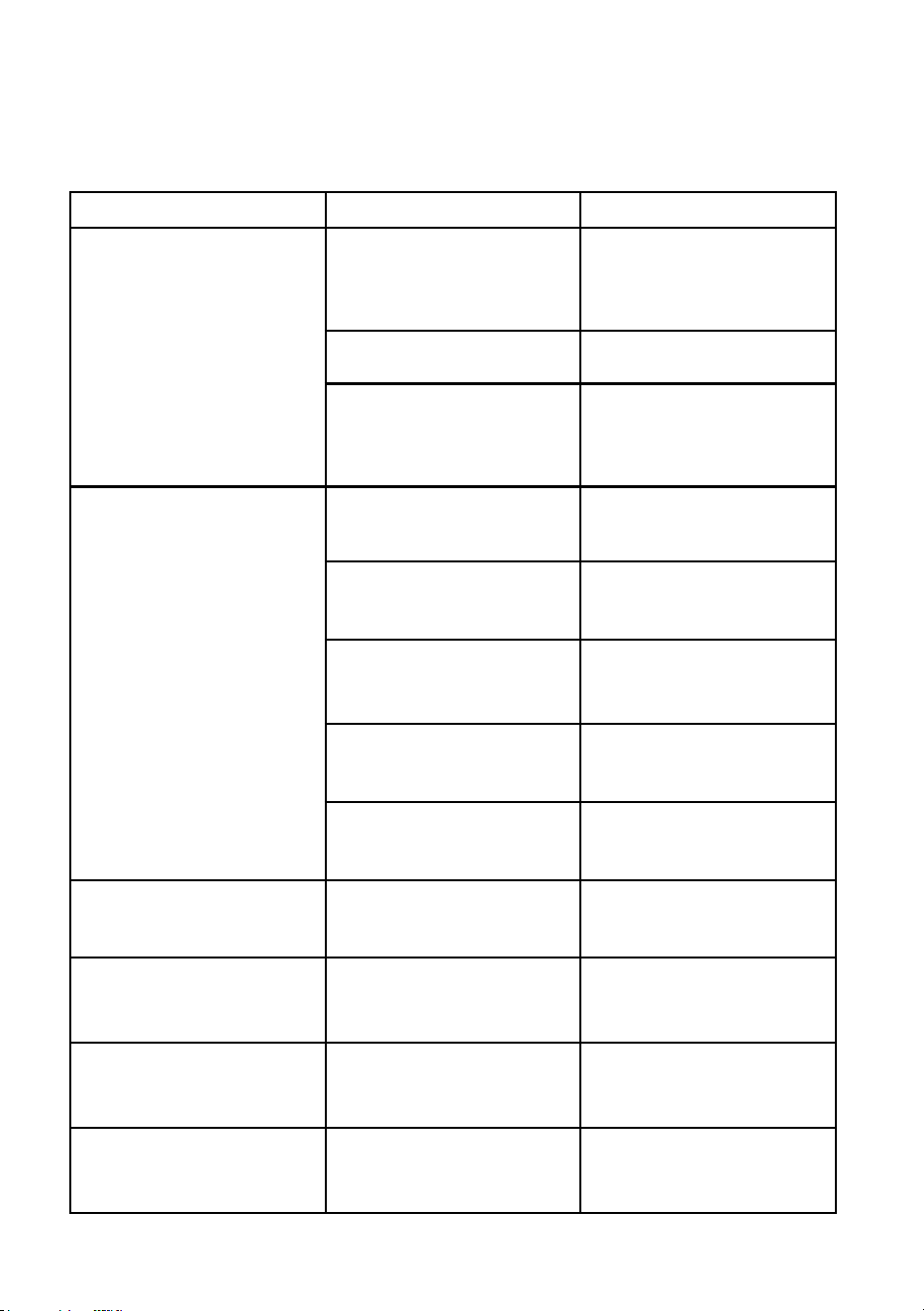
Problem Cause Solution
Unit does not operate
Unit power cord is unplugged
Disconnect the plug and connect
it again or please check if outlet is
properly functioning.
Unit has not been turned on. Turn on the switch.
The water light is ashing.
Water tank is full, empty the tank;
make sure the tank is correctly
placed back into the compartment.
Dehumidifying capacity is low
Runtime is too short.
Increase the operation time
using the timer function.
Air lter is dirty and/ or obstructed.
Use water and a damp cloth to
clean the lter.
Ambient room temperature or
humidity is too low.
Dehumidifying capacity is normally
lower if the room temperature is
below 18°C. please try to increase
the room temperature.
Humidity setting is higher than
the ambient humidity
Set the humidity down and
lower than the ambient humidity.
Drainage water pipe is blocked
or at.
Check the water pipe and replace
it if necessary.
Relative Humidity
setting not reached after long
period of operation.
Windows and doors are not closed
or sealed.
Close the door and window or
enclose the space.
Water is leaking
The unit is not placed on a at
stable surface.
Place the unit on a at and stable
surface.
Outlet air is warm Heat exchanging process
This is normal
Water noise Refrigerating uid is owing.
This is normal
15
Warranty
1 Year Guarantee from Shine-Mart Ltd, Trademark owners of Duronic Products.
NOTE: THESE STATEMENTS DO NOT AFFECT YOUR STATUTORY RIGHTS AS A
CONSUMER
This product has been manufactured under the strictest or quality control procedures, and
using the highest quality of materials, to ensure excellent performance and reliability. It will
give very good and long lasting service, provided it is properly used and maintained. The
product is guaranteed for 1 years from the date of original purchase. If any defect arises due
to a faulty materials or poor workmanship, the faulty product must be returned to the original
place of purchase. Refund or replacement is at the discretion of that company.
Duronic Products are offered with a 1 year guarantee under the following conditions:
1. The product must be returned to the retailer with original proof of purchase.
2. The product must be installed and used in accordance with the instructions contained in
this operating manual.
3. It must be used only for domestic purposes.
4. It does not cover wear and tear, malicious damage, misuse, neglect, inexpert repairs or
consumable parts.
5. Shine-Mart Ltd has no responsibilities for accidental or consequential loss or damage.
6. Shine-Mart Ltd are not liable to carry out any type of servicing work, under the guarantee
7. Valid in the UK only
This product is tted with CE:1363 plug and fuse
Imported by Shine-Mart Ltd, RM3 8SB
Information on waste Disposal for Consumers of
Electrical & Electronic Equipment.
This mark on a product and/or accompanying documents indicates that when it
is to be disposed of, it must be treated as Waste
Electrical & Electronic Equipment, (WEEE).
Any WEEE marked products must not be mixed with general household waste,
but kept separate for the treatment, recovery and recycling of the materials used.
For proper treatment, recovery and recycling; please take all WEEE marked
waste to your Local Authority Civic waste site,
where it will be accepted free of charge.
If customers dispose of Waste Electrical & Electronic Equipment correctly, they
will be helping to save valuable resources and preventing any potential negative
effects upon human health and the environment, of any hazardous materials that
the waste may contain.
16
Manuel d’utilisation en français
17
Symboles et avertissements
Avertissement
Ne manipulez pas l’appareil avec des mains humides
Suivez les instructions contenues dans ce manuel
Débranchez ce produit après utilisation
Interdiction
Ne pas ouvrir
Ne pas toucher
Alimentation
• Tenez toujours la prise lorsque vous débranchez l’appareil.
• Ne touchez pas la prise avec des mains humides pour éviter toute décharge
électrique.
• Cet appareil doit être branché sur une prise acceptant du 220V.
• Veuillez-vous assurer qu’aucun des composants électriques ne soit
endommagé.
• Ne placez pas d’appareils lourds sur le câble d’alimentation.
• Retirez la prise en cas de tonnerre.
• N’utilisez pas cet appareil avec une rallonge électrique.
• Ne tentez pas de changement l’alimentation
• Si vous rencontrez un problème électrique, veuillez contacter votre revendeur/
vendeur auprès de qui vous avez acheté cet appareil.
• Arrêtez d’utiliser l’appareil si la prise ne retient pas fermement l’alimentation.

18
Installation
• Assurez-vous de placer l’appareil sur une surface plate, solide et
stable.
• Assurez-vous que le réservoir d’eau soit correctement installé dans
l’appareil.
• N’insérez pas de produits inflammables ou explosifs près de l’appareil
afin d’éviter tout risque d’incendie.
Utilisation
• Les enfants doivent rester sous supervision lorsque l’appareil est en
fonctionnement.
• Les personnes âgées doivent rester sous supervision lorsqu’elles utilisent
cet appareil afin d’assurer leur sécurité et éviter qu’elles ne manquent
d’oxygène.
• N’insérez pas vos mains dans les grilles d’aération afin d’éviter toute
blessure physique et/ou de provoquer un dysfonctionnement du produit.
• Soyez vigilent à ce que l’appareil ne subisse aucun choc
afin d’éviter tout
endommagement et dysfonctionnement de l’appareil.
• Ne placez pas de charge lourde sur l’appareil. Ne recouvrez pas non plus
l’appareil à l’aide de tissu ou autre objet pouvant bloquer les grilles
d’aération.

19
Nettoyage
• Ne versez pas d’eau dans l’appareil, utilisez toujours un tissu doux.
• Nettoyez le filtre à air régulièrement avec un tissu humide et un détergeant
doux afin d’éviter toute accumulation de poussières.
• N’appliquez pas de produits chimiques sur l’appareil, ceci pourrait provoquer
un incendie.
Autre
• Les enfants doivent rester sous supervision afin de s’assurer qu’ils
n’insèrent aucun objet dans le produit et éviter ainsi tout risque de blessure
physique.
• N’aspergez pas l’appareil avec des aérosols ou tout autre produit
inflammable.
• Lorsque l’appareil émet de la fumée, des odeurs ou des sons inhabituels,
veuillez débrancher l’appareil.
• Pour éviter toute fuite d’eau, veuillez
vérifier qu’il n’y ait aucun résidu d’eau
dans le tuyau de drainage avant de le retirer.
20
Liste des composants
Grille d’aération
Panneau de contrôle
Réservoir
d’eau
Poignée
Filtre à air
Entrée d’air
Bouchon
Alimentation
Prise
Roues
21
Panneau de contrôle
Minuterie
Vitesse du
ventilateur
Voyant de
dégivrage
Indicateur
de réservoir
plein
Sélecteur
d’humidité
Voyant
d’allumage
Mode de
fonctionnement
Indicateur
de vitesse
du
ventilateur
Mode de
fonctionne
ment
Lecture de
taux
d’humidité
Indicateur
de
minuterie
Indicateur
de
paramétrag
e d’humidité
Interrupteur
ON / OFF
1.
Pressez l’interrupteur ON / OFF afin d’allumer ou d’éteindre l’appareil.
2.
Sélectionnez le taux d’humidité souhaité en appuyant sur les flèches. Le
taux d’humidité paramétrable est compris entre 40-70% par incrément de
10%. Dès que le taux d’humidité paramétré sera atteint, l’appareil
s’éteindre automatiquement.
Si « CO » est sélectionné, l’appareil fonctionnera continuellement quel que
soit le taux d’humidité ambiant. La minuterie peut être programmée pour
1h, 2h, 4h, 6h, 8h et permet une extinction automatique de l’appareil au
terme de la durée sélectionnée.
22
Indicateurs lumineux
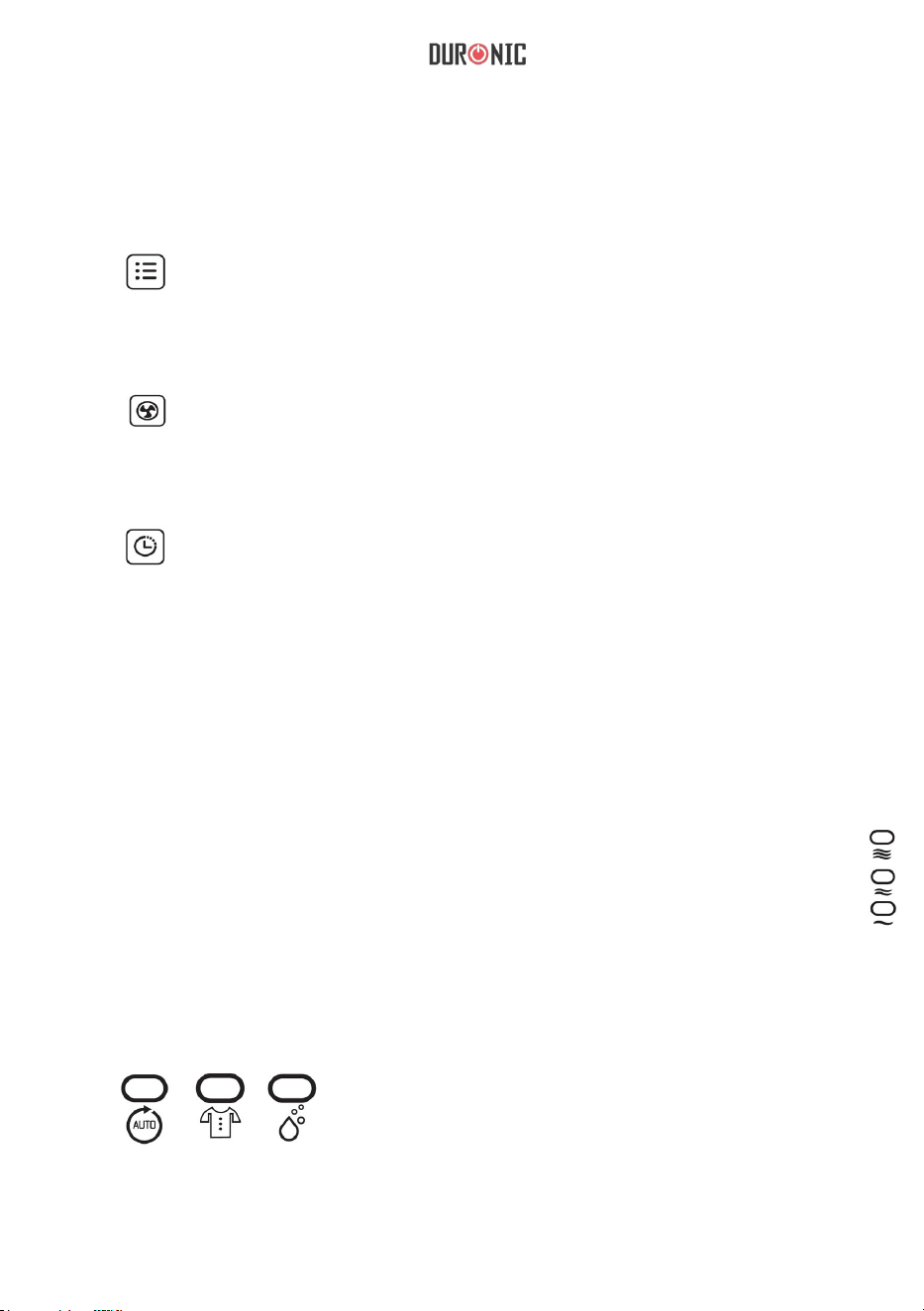
Note : vous pouvez verrouiller le panneau de contrôle en appuyant
simultanément sur la flèche du haut et du bas pendant 2 secondes. Le
panneau de contrôle restera alors insensible jusqu’à répétition de cette même
manipulation.
3.
Permet de changer les différents modes de fonctionnement.
Appuyez sur cette touche pour choisir la fonction «
déshumidificateur » ou « séchage du linge ».
4.
Permet de changer la vitesse du ventilateur (élevée, normale, faible).
Note : en mode automatique, cette fonction n’est pas disponible.
5.
Permet de paramétrer la minuterie. Pour utiliser cette fonction,
veuillez appuyer sur cette touche puis sélectionnez la durée
souhaitée en utilisant les flèches situées sur la droite.
1.
Indicateur de vitesse du ventilateur :
Lorsque l’appareil fonctionne à une vitesse élevée, l’icône suivante apparaitra :
Lorsque l’appareil fonctionne à une vitesse normale, l’icône suivante apparaitra:
Lorsque l’appareil fonctionne à une vitesse faible, l’icône suivante apparaitra :
2.
Indicateur de fonctionnement :
Selon le mode de fonctionnement utilisé, un voyant lumineux s’allumera sur l’une
des fonctions suivantes :
23
7.
Indicateur d’utilisation :
Lorsque vous allumez l’appareil, l’indicateur lumineux restera allumé jusqu’à
extinction de l’appareil. À l’extinction de l’appareil, cet indicateur clignotera
lentement avant de s’éteindre complètement.
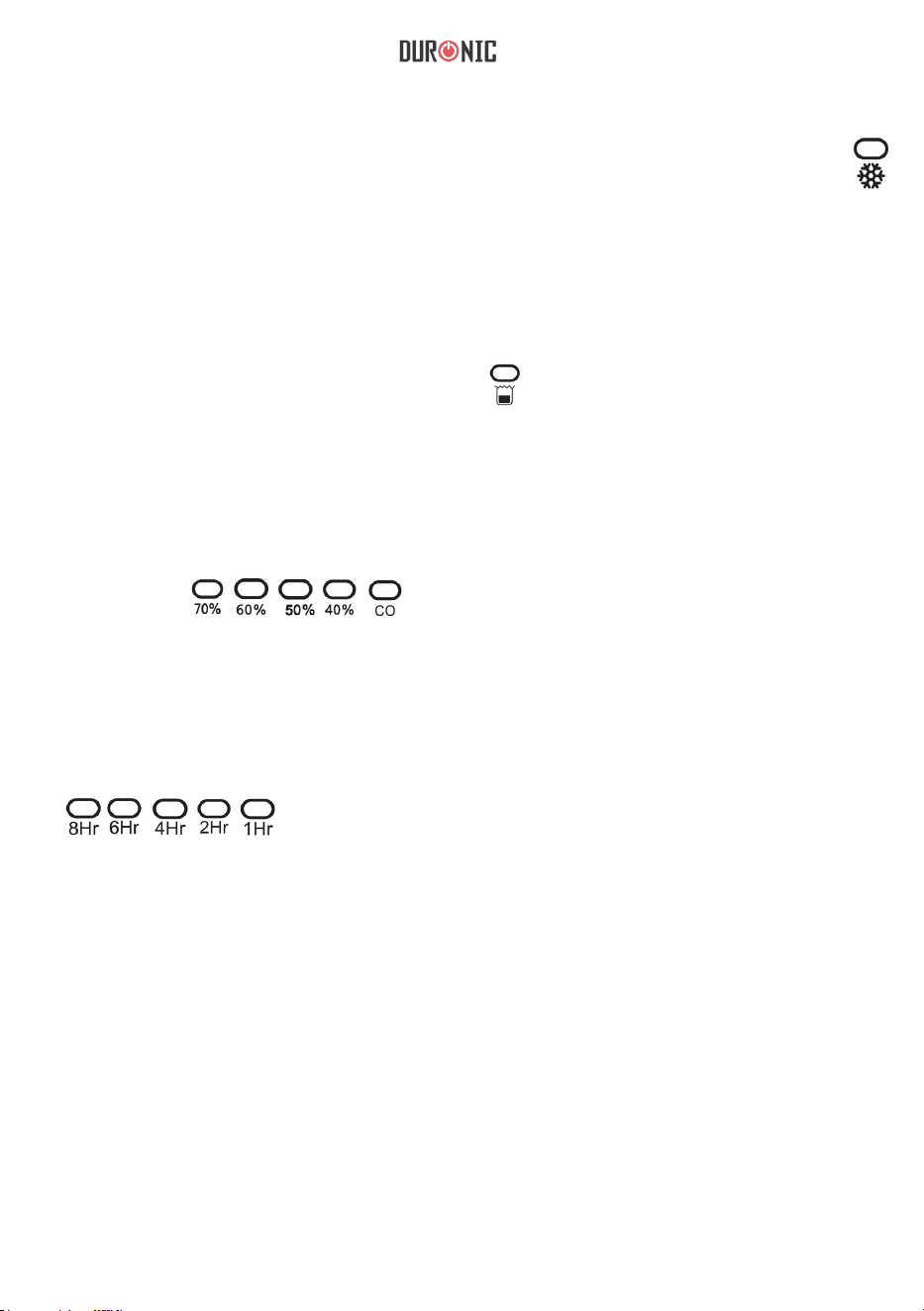
3.
Voyant de dégivrage
Lorsque l’appareil commence à dégivrer, le voyant lumineux suivant s’affichera :
4.
Indicateur de réservoir d’eau
Lorsque le réservoir d’eau est plein, l’appareil se mettra en veille. L’icône
suivante se mettra à clignoter rapidement:
5.
Indicateur d’humidité
Lorsque vous paramétrez le taux d’humidité souhaité, l’indicateur lumineux suivant
apparaitra :
6.
Minuterie
Lorsque vous paramétrez la minuterie, l’indicateur suivant apparaitra :
24
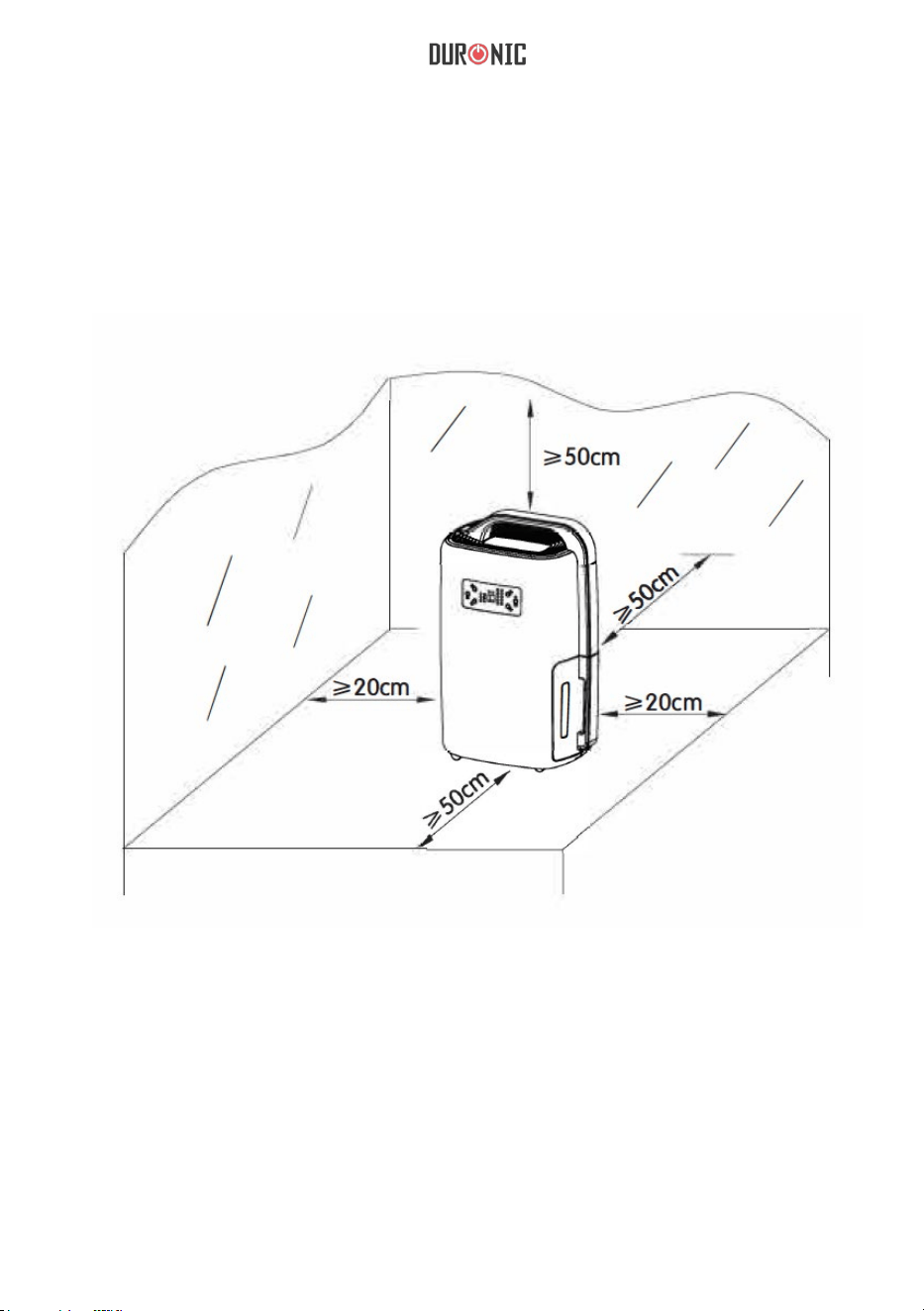
1.
Placez l’appareil sur une surface respectant les dimensions suivantes. Ces
recommandations ont pour intérêt d’optimiser le fonctionnement de l’appareil.
2. Assurez-vous que le voltage de votre installation corresponde au
voltage indiqué sur l’appareil.
3. Assurez-vous que l’entrée et la sortie d’air ne soient pas bloquées par
un quelconque objet.
4. Si vous souhaitez utiliser l’appareil sur une période
prolongée, utilisez
un tuyau de drainage afin d’éviter de devoir vider le réservoir d’eau
régulièrement.
Recommandations d’utilisation
25
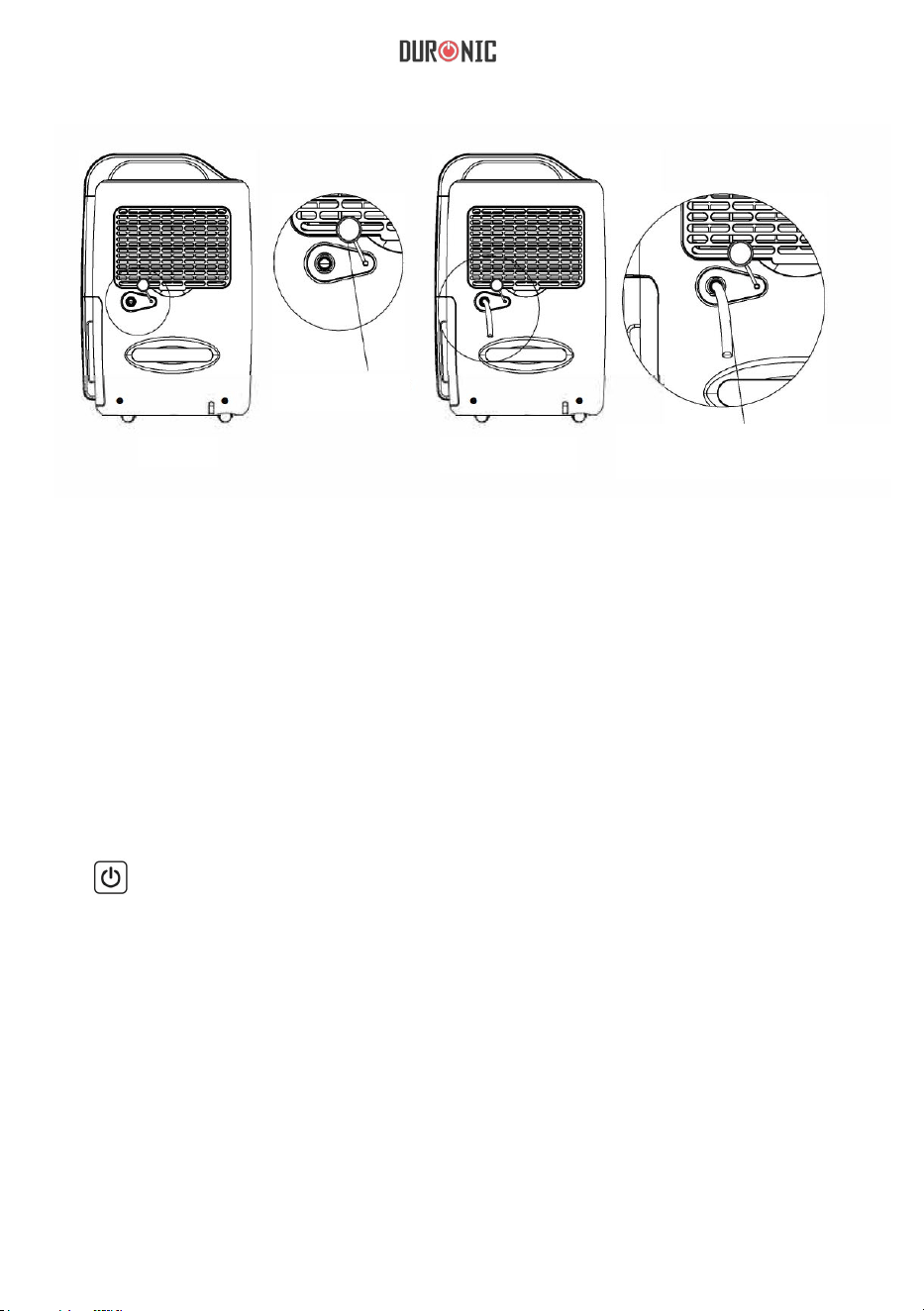
Figure 1
Retirez la prise
Figure 2
Connectez un tuyau de
drainage de 14 mm de
diamètre intérieur au
connecteur.
Note : déroulez soigneusement le tuyau de drainage sans l’écraser ou le
tordre. Le drainage de l’unité pourrait autrement être restreint et l’appareil
pourrait développer certains dysfonctionnements. Durant son utilisation, le
tuyau de drainage ne doit pas être placé à un niveau inférieur que le
connecteur.
Instructions d’utilisation
1.
Appuyez sur l’interrupteur ON / OFF.
a.
Appuyez une fois pour allumer l’appareil.
b.
Appuyez deux fois pour éteindre l’appareil.
Note : laissez l’appareil reposer pendant au moins 3 minutes après l’avoir
éteint afin que les résidus d’eau et de condensation descendent dans le
réservoir d’eau. Après avoir éteint l’appareil, retirez par sécurité la prise
d’alimentation pour économiser de l’énergie.

26
2.
Flèches haut et bas
Le taux d’humidité peut être paramétré en appuyant sur les flèches. Le
taux peut ê
tre paramétré de 40 à 70% ou le mettre sur « CO » afin de
faire fonctionner l’appareil continuellement quel que soit le taux d’humidité
ambiant.
3.
Minuterie
Une minuterie de 1-2-4-6-8 heures peut être programmée. Vous pouvez
annuler la minuterie à tout moment en appuyant sur la touche de la minuterie
pendant 3 secondes.
4.
Vitesse du ventilateur
Vous pouvez ajuster la vitesse du ventilateur en appuyant sur la touche «
Fan Speed ». Vous pouvez choisir entre une vitesse élevée, normale ou
faible. Si le mode automatique est paramétré, la vitesse du ventilateur ne
peut pas être ajustée.
5.
Mode de fonctionnement
Pressez la touche « mode » pour changer le mode de fonctionnement en
suivant la séquence suivante : « déshumidification automatique > séchage
des vêtements > déshumidification ».
Le mode « déshumidification » permet de paramétrer le taux d’humidité.
En mode automatique, lorsque le taux d’humidité est :
- supérieur à 60%, le ventilateur fonctionnera à vitesse élevé
- compris entre 55 et 60%, le ventilateur fonctionnera à vitesse normale
- inférieur à 55%, le ventilateur fonctionnera à vitesse lente et l’appareil ne
déshumidifiera pas l’air tant que le taux d’humidité ne dépasse pas les 55%.
27
Nettoyage et maintenance
Nettoyage de l’appareil
Nettoyez l’appareil en utilisant un tissu sec et
doux. Si l’appareil est extrêmement sale, utilisez
un détergeant doux. Essuyez le
déshumidificateur avec un tissu légèrement
humide. N’aspergez pas d’eau sur l’appareil.
Nettoyage du filtre à air
Retirez le filtre. Nettoyez le filtre avec un aspirateur ou
un tissu humide (à une température inférieure à 40°C).
Rincez et laissez sécher avant de le réinsérer dans
l’appareil.
Nettoyage de la grille d’aération
Retirez d’abord le filtre à air puis nettoyez les
grilles avec un tissu sec et doux ou un aspirateur.
28
Dépannage
Problème
Cause Solution
L’appareil ne fonctionne pas
L’alimentation est débranchée
Débranchez et rebranchez
l’appareil ou vérifiez que la prise
fonctionne
L’appareil n’est pas allumé
Appuyez sur l’interrupteur
Le voyant du réservoir est allumé
Le réservoir d’eau est plein, videz-
le et assurez-vous que le réservoir
est correctement placé dans le
compartiment
La puissance de
déshumidification est faible
La durée de fonctionnement
est trop courte
Augmentez le temps d’opération
en utilisant la minuterie
Le filtre à air est sale et/ou obstrué
Utilisez de l’eau et un tissu
humide pour nettoyer le filtre
La température ambiante ou le
taux d’humidité est trop faible
La puissance de l’appareil est
naturellement réduite si la température
de la pièce est inférieure à 18°C.
Veuillez tenter d’augmenter la
température de la pièce
Le taux d’humidité paramétré est
plus élevé que l’humidité
ambiante
Paramétrez un taux d’humidité
plus faible que le taux
d’humidité ambiant
Le tuyau de drainage est
obstrué ou bloqué
Vérifiez le tuyau de drainage et
remplacez-le si nécessaire
L’humidité relative paramétrée
n’est pas atteinte après une
longue période d’opération
Les fenêtres et les portes ne sont
pas fermées
Fermez toutes les portes et
fenêtres aérant la pièce
De l’eau fuit
L’appareil n’est pas placé sur
une surface plate et stable
Placez l’appareil sur une surface
plate et stable
La grille d’aération est chaude Résulte du processus de
répartition de la chaleur
Ce phénomène est normal
L’eau fait du bruit
Le fluide de réfrigération circule
Ce phénomène est normal
29
Garantie et service après-vente
1 an de garantie de la part de Shine-Mart Ltd, propriétaire de la marque Duronic.
NOTE : CES DÉCLARATIONS N’AFFECTENT EN RIEN VOTRE DROIT STATUTAIRE EN
TANT QUE CONSOMMATEUR
Ce produit a été produit en suivant les procédures de contrôle de qualité les plus strictes en
utilisant d
es matériaux de qualité pour assurer durabilité et performance. Cet appareil vous
offrira de longues années de service tant que vous utilisez correctement cette machine et
suivez les instructions de maintenance contenues dans ce manuel. Ce produit est garantit
pour 1 an à partir de la date originelle d’achat. Si ce produit était endommagée en raison
d’un problème électrique ou d’une fabrication imparfaite, le produit défectueux peut être
remplacé o
u réparé au vendeur à la discrétion du vendeur, du revendeur ou de la marque
sous conditions:
Ce symbole apparaît sur le produit et/ou les documents accompagnant ce produit
pour indiquer que le processus de destruction de ce produit doit être traité
conformément aux règles de gestion des déchets électriques et électroniques
(WEEE). Les produits marqués WEEE ne doivent pas être mélangés avec les
déchets ménagers et doivent être séparés pour procéder au traitement et
recyclage des composants. Afin de recycler ce produit, veuillez déposer tous les
composants marqués WEEE au site de recyclage le plus proche où ce produit
sera repris gratuitement. Ce geste a pour but d'aider la préservation des
ressources précieuses et prévient les potentiels effets négatifs que ces
composants ou tout autre composant dangereux ont sur la santé et
l’environnement.
Garantie
Suivez-nous sur
www.duronic.com @Duronic_FranceDuronic France@duronic_france
1. Le produit doit être retourné avec la preuve originale d’achat.
2. Le produit doit être installé et utilisé en accord avec les instructions contenues dans ce
manuel d’utilisation.
3.
Le produit doit être réservé à un usage domestique.
4. La garantie ne protège pas contre les dommages dus à l’usure normale, l’utilisation
malveillante de l'appareil, la mauvaise utilisation d'un élément, les réparations
conduites par des non-experts ainsi que les p
ièces consommables.
5. Shine-Mart Ltd ne porte pas de responsabilité pour tout dommage ou perte accidentel ou
conséquent causé par ce produit.
6. Shine-Mart Ltd se dégage de toute responsabilité en matière de réparation durant la
période de garantie.
7. Valide dans toute l’Union Européenne.
Ce produit est fourni avec une prise européenne
Importé par Shine-Mart Ltd, RM3 8SB.
30
Gebrauchsanleitung auf Deutsch
31
Anweisungen
Benutzen Sie dieses Gerät nicht mit nassen Händen
Befolgen Sie die Gebrauchsanweisung
Entnehmen Sie den Stecker nach Benutzung
Nicht öffnen
Nicht berühren
Warnung
Stromzufuhr
•
Ziehen Sie am Stecker, um ihn zu entfernen, und nicht am Kabel.
•
Um einen Stromschlag zu vermeiden, fassen Sie den Stecker nicht mit nassen
Händen an.
•
Stecken Sie das Gerät in eine angemessene Steckdose.
•
•
•
Benutzen Sie keine Verlängerungskabel mit diesem Gerät.
Versuchen Sie nicht das Kabel zu wechseln.
Bei elektrischen Problemen nehmen Sie Kontakt mit Duronic auf.

32
Installation
•
Um ein Feuer zu vermeiden, bewahren Sie keine entzündbaren oder
explosiven Objekte in der Nähe des Gerätes auf.
•
•
Stellen Sie sicher, dass der Wasserbehälter vorschriftsgemaß platziert wurde
Platzieren Sie das Gerät auf einem soliden, flachen und stabilen Untergrund.
Nutzung
•
Kinder müssen zu Ihrer Sicherheit betreut werden, wenn sie sich in der Nähe
des Gerätes befinden.
•
Ältere Menschen müssen zu Ihrer Sicherheit betreut werden, wenn sie
sich in der Nähe des Gerätes befinden, um einen Sauerstoffmangel in
der Nähe des Luftauslass zu verhindern.
•
Um Verletzungen und Fehlfunktionen zu verhindern, halten Sie Ihre Hände
nicht an den Luftauslass.
•
Legen Sie keine Kleidung auf dem Gerät ab.
•
Setzen Sie das Gerät keinen Stößen aus, um eine Fehlfunktion zu
verhindern.
•
Stellen Sie keine schweren Objekte auf dem Gerät ab.
Reinigung
•
Gießen Sie kein Wasser in oder auf das Gerät, sondern nutzen Sie ein
feuchtes Tuch zur Reinigung.
•
Reinigen Sie den Luftfilter regelmäßig mit einem feuchten Tuch, um
Staubansammlungen zu verhindern.
•
Um eine Feuerrisiko zu verhindern, geben Sie keine Chemikalien in das Gerät.
33
Produktbeschreibung
Vorderseite
Luftauslass
Display
Wasser-
auffang-
behälter
Griff
Luftfilter
Lufteintritts-
öffnung
Stopper
Kabel
Stecker
Rollen
Rückseite
34
Display
Timer
Luftstrom-
geschwindig-
keit
Entfrosten-
Anzeige
Füll-
anzeige
Luft-
feuchtigkeit-
auswahl
Betriebs-
anzeige
Betriebs-
modus-
auswahl
Luft-
strom-
geschwin-
digkeits-
anzeige
Betriebs-
modus-
anezige
Feuchtigkeits-
leser
Timer
Anzeige
Feuchtig-
keits-
auswahl-
Anzeige
EIN/AUS
1.
EIN/AUS: Drücken Sie einmal zum Ein- oder Ausschalten
2.
“^” hoch
“v” runter
Im manuellen Betriebsmodus kann die erwünschte Luftfeutigkeit in
Zehnerstufen zwischen 40% und 70% eingestellt werden. Wenn Sie 'CO'
wählen, wird das Gerät kontinuierlich laufen. Der Timer kann für 1 Stunde,
2, 4, 6 oder 8 Stunden gestellt werden und wird sich nach Ablauf der Zeit
selber ausstellen.
35
Hinweis: Dieses Gerät verfügt über eine Sperrfunktion. Drücken Sie '^' und 'v'
gleichzeitig für 2 Sekunden, um diese zu aktivieren und alle Tasten zu
sperren. Um die Sperrfunkion zu deaktivieren, wiederholen Sie diesen Schritt.
3.
- Taste: Wechselt zwischen den verschiedenen Betriebsmodi. Drücken
Sie einmal, um zwischen den folgenden zu wechseln:
Automatische Luftentfeuchtung - Kleidung Trocknen - Entfeuchten
4.
- Taste: Wechselt die Geschwindigkeit des Luftstroms zwischen schnell,
Mittel und niedrig
Hinweis: Im automatischen Modus ist diese Taste nicht verfügbar.
5.
- Taste zur Einstellung des Timers. Für weitere Informationen lesen
Sie unten.
1.
Luftstromgeschwindigkeitsanzeige:
Wenn das Gerät auf höchster Geschwindigkeit läuft, wirdWenn das Gerät auf
LED-Anzeige
Wenn das Gerät auf mittlerer Geschwindigkeit läuft, wird erleuchten.
Wenn das Gerät auf niedrigster Geschwindigkeit läuft, wird erleuchten.
2.
Betriebsmodusanzeige:
Der ausgewählte Betriebsmodus wird durch die folgenden Zeichen angezeigt:
36
7.
Betriebsanzeige:
Wenn Sie das Gerät ausstellen, wird die Anzeigelampe langsam blinken.
Wenn Sie das Gerät einstellen, wird das Licht konstant leuchten.
3.
Entfrosten-Anzeige:
Wenn das Gerät mit dem Auftauen beginnt wird erleuchten.
4.
Füllanzeige:
Wenn der Wasserbehälter voll ist stellt sich das Gerät automatisch auf
Standby. wird anfangen zu blinken.
5.
Feuchtigkeitsanzeige:
Wenn die Feuchtigkeitsstufe gewählt ist, wird das dementsprechende Licht
erleuchten.
6.
Timer:
Wenn die automatische Ausstellfunktion gestellt wurde, wird das entsprechende
Licht erleuchten.
37
1.
Platzieren Sie das Gerät so, dass es die besten Voraussetzungen für seinen
Betrieb hat.
2.
Stellen Sie sicher, dass Ihre Steckdosen der Stromstärke des Gerätes
entsprechen.
3.
Stellen Sie sicher, dass die Öffnungen nicht von Objekten blockiert sind.
4.
Nutzen Sie die Abflussröhre, wenn Sie das Gerät über einen längeren
Zeitraum benutzen, damit Sie den Wasserbehälter nicht regelmäßig wechseln
müssen.
Vor der Nutzung
38
Abb. 1
Entnehmen
Sie den
Stopper
Abb. 2
Stecken Sie die
Abflussröhre mit 14mm
Durchmesser in die
Einführung
Hinweis: Bringen Sie die Abflussröhre vorsichtig in ihre ursprüngliche Form
zurück, sollte sie zerquetscht oder verdreht worden sein, da der Abfluss
ansonsten nicht einwandfrei funktioniert. D
as Ende der Abflussröhre muss während
des Betriebes niedriger sitzen als das Einführloch.
Betriebsaufnahme
1.
EIN/ AUS: Drücken Sie einmal zum Ein- oder Ausschalten
a.
Drücken Sie 'ON/OFF' einmal, um den Luftentfeuchter einzuschalten.
b.
Drücken Sie 'ON/OFF' ein weiteres Mal, um den Luftentfeuchter
auszuschalten.
Hinweis: Lassen Sie das Gerät für etwa drei Minuten ruhen, nachdem Sie
es ausgeschaltet haben, damit zurückgebliebenes Wasser in den
Wasserbehälter fließen kann. Ziehen Sie den Stecker aus, wenn das Gerät
nicht genutzt wird, zur zusätzlichen Sicherheit und um Energie zu sparen.

39
2.
B. “^” Höher
“v” Niedriger
Die gewünschte Luftfeuchtigkeit kann mit den Tasten "^" und "v" gewählt
werden (C0-40%-50%-60%-70%-CO). Drücken Sie entweder 'höher'
oder 'niedriger' und der Wert wird sich um 10% erhöhen oder verringern.
Wenn "CO" gewählt wird, ist der Luftentfeuchter kontinuierlich im
Betrieb.
3. . “ ” Timer
Der Timer kann für 1 Stunde, 2, 4, 6 oder 8 Stunden gesetzt werden. Durch
ein 3-Sekunden langes Drücken des Timer-Knopf wird diese Funktion
ausgestellt.
4. “ ” Luftstromgeschwindigkeit
Sie können die Geschwindigkeit des Ventilatrors durch den
Luftstromgeschwindigkeits-Knopf anpassen. Sie können hierbei zwischen drei
verschiedenen Geschwindigkeiten auswählen. Wenn sich der Entfeuchter im
automatischen Modus befindet, ist diese Taste nicht verfügbar.
5.
“ ” Betriebsmodusauswahl-Knopf
Drücken Sie diese Taste, um zwischen den verschiedenen Betriebsmodi wie
folgt zu wechseln:
Automatische Luftentfeuchtung - Kleidung Trocknen - Entfeuchten.
Entfeuchten-Modus: um die Luftentfeuchtung manuel einzustellen
Automatische Luftentfeuchtung:
r.F.>60%, Höchstgeschwindigkeit des Ventilators und Entfeuchten;
60%>r.F.>55%, mittlere Geschwindigkeit des Ventilators und Entfeuchten;
r.
F.<55%, niedrige Geschwindigkeit des Ventilators ohne Entfeuchten
Kleidung Trocknen-Modus: mit hoher Geschwindigkeit des Ventilators wird
sich das Gerät automatisch nach 6 Stunden kontinuierlichem Betrieb
ausstellen.
40
Reinigung und Instandhaltung
Reinigung des Gehäuses
Reinigen Sie die Außenseite des Gerätes mit
einem weichen, trockenen Lappen. Wenn das
Gerät besonders schmutzig ist nehmen Sie ein
mildes Reinigungsmittel zur Hilfe und wischen
Sie dies mit einem feuchten Lappen ab.
Sprühen Sie kein Wasser auf das Gerät.
Reinigung des Luftfilters
Entnehmen Sie den Filter und reinigen Sie diesen mit
einem Staubsauger oder Seifenwasser unter 40°C. Spülen
Sie den Filten aus und lassen ihn komplett trocken, bevor
Sie in wieder einsetzen.
Reinigung des Lufteinlasses
Entfernen Sie zuerst den Luftfilter. Danach
reinigen Sie den Lufteinlass mit einem
Staubsauger oder einem weichen, trockenen
Lappen.
41
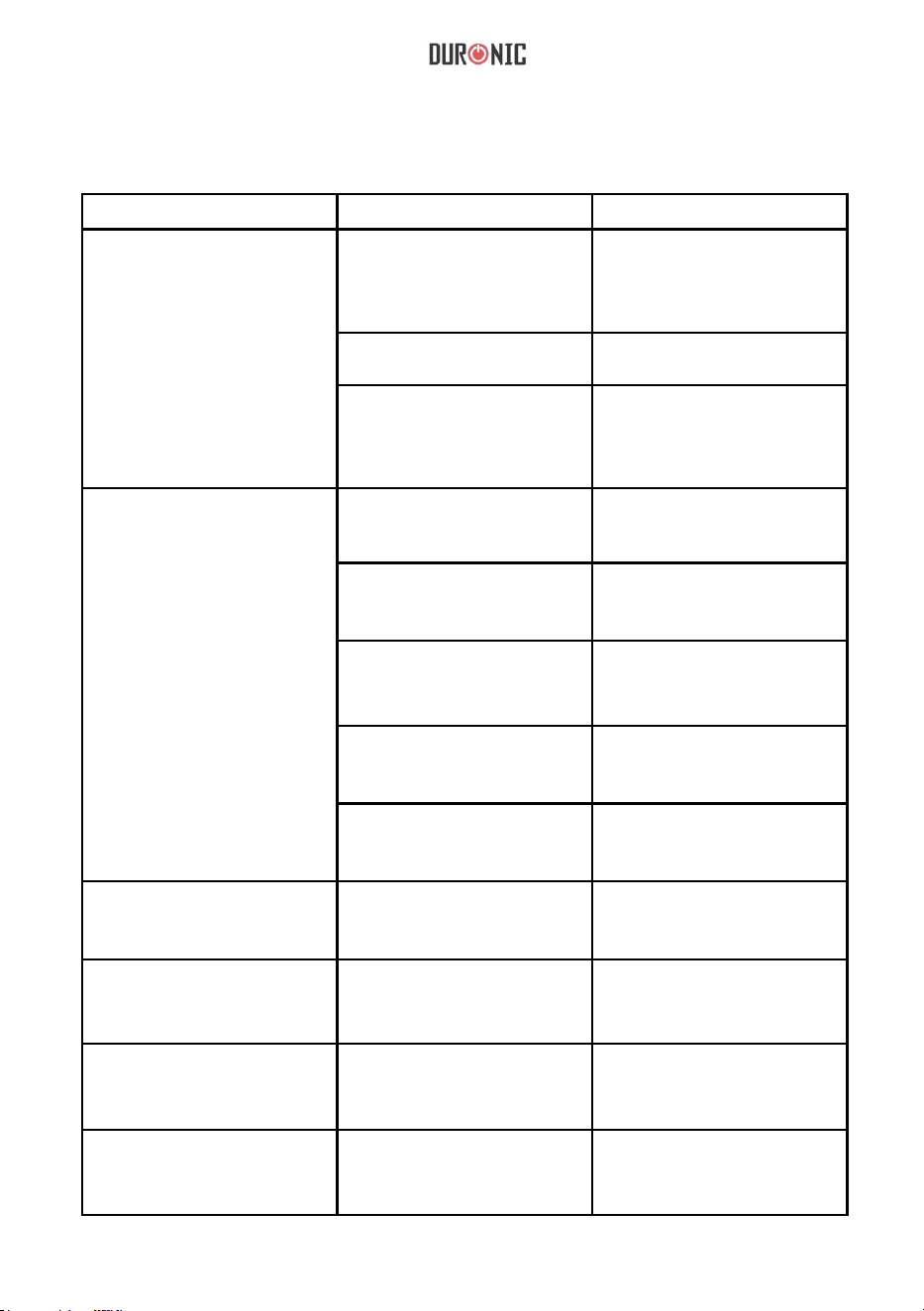
Fehlerbehebung
Problem
Ursache Lösung
Das Gerät funktioniert nicht
Der Stecker wurde Steckdose
entnommen
Stecken Sie den Stecker in die
Steckdose und überprüfen Sie,
ob das Gerät mit der Stromquelle
verbunden ist.
Das Gerät wurde nicht
eingeschaltet
Stellen Sie das Gerät ein
Die Füllanzeige blinkt auf
Der Wasserbehälter ist voll,
entleeren Sie ihn. Stellen Sie
sicher, dass er korrekt wieder im
Gerät platziert wurde.
Entfeuchterkapazität
(Wasser Beseitigung)
ist niedrig
Die Laufzeit ist zu kurz
Verlängern Sie die Laufzeit
anhand der Timer-Funktion auf
der linken Seite des Displays.
Der Luftfilter ist schmutzig
und/ oder verhindert
Reinigen Sie den Filter
mithilfe von Wasser und
einem feuchten Lappen
Die Raumtemperatur oder die
Luftfeuchtigkeit ist zu niedrig
Die Kapazität zu Entfeuchten ist
oft niedriger, wenn die
Raumtemperatur unter 18°C ist.
Erhöhen Sie die Raumtemperatur.
Die gewählte Luftfeuchtigkeit ist
höher als die Raumfeuchtigkeit
Stellen Sie die Luftfeuchtigkeit
niedriger ein als die
Raumfeuchtigkeit
Die Abflussröhre ist blockiert
oder flach gedrückt
Überprüfen Sie, ob diese
weiterhin tauglich ist oder
ausgewechselt werden muss.
Relative Luftfeuchtigkeit
nach langer Betriebszeit
nicht erreicht.
Türen oder Fenster sind nicht
geschlossen oder versiegelt
Schließen Sie die jegliche Fenster
und Türen und stellen Sie sicher,
dass der Raum isoliert ist.
Wasser läuft aus
Das Gerät befindet sich nicht
auf einem ebenen, stabilen
Untergrund
Platzieren Sie das Gerät auf
einer flachen Oberfläche.
Ausgelassene Luft ist warm Hitzeaustausch im Prozess
Keine Lösung nötig,
dies ist normal
Wasser erzeugt Geräusche
Kühlflüssigkeit fließt durch
das Gerät
Keine Lösung nötig, dies ist
normal
42
1 Jahr Gewährleistung von Shine-Mart Ltd, der Markeninhaber von Duronic Produkte.
ZUR BEACHTUNG : DIESE BEDINGUNGEN HABEN KEINE BEEINFLUSSUNG AUF IHRE
GESETZLICHE RECHTE ALS VERBRAUCHER
Dieses Produkt wurde unter strengen Qualitätskontrollen hergestellt, und wurde aus
hochwertigen Werkstoffen produziert, um ausgezeichnete Leistung und Zuverlässigkeit zu
gewährleisten. Sorfern das Produkt korrekt benutzt und gewartet wird, wird eine langlebige
Lebensdauer garantiert.
Das Produkt ist für 1 Jahr, ab dem Kaufdatum, gewährleistet. Beim Auftreten eines
Schadens, durch schlechten Werkstoffe oder Verarbeitung, sollte das fehlerhafte Produkt
an den ursprünglichen Verkäufer zurückgegeben werden. Eine Rückerstättung oder einen
Umtausch erfolgt nach Vorschriften des Unternehmens.
Duronic Produkte haben 1 Jahr Gewährleistung unter folgenden Bedingungen :
1. Das Produkt sollte mit dem ursprünglichen Kaufnachweis zurückgegeben werden.
2. Das Produkt sollte unter den Anweisungen und Anleitungen installiert und benutzt worden
sein
.
3
. Die Produkte sind nur für den Hausgebrauch geeignet.
4. Natürliche Abnutzung oder Schäden, böswillige Beschädigung, Missbrauch,
unsachgemäße Reparaturen von Verschleißteile sind von der Gewährleistun
g
a
usgeschlossen.
5. Shine-Mart Ltd hat keine Verantwortung für indirekte Verluste oder Folgeschäden.
6. Shine-Mart Ltd ist nicht für Wartungsarbeiten zuständig. Diese fallen nicht unter die
Gewährleistung.
7. Gültig in der EU
Dieses Produkt ist mit tted CE geprüfte Typ-F
Euro Stecker/BS Stecker ausgestattet
Von Shine-Mart Ltd, RM3 8SB importiert
Information über Abfalllagerung für Verbraucher von elektronischen Geräten.
Dieses Zeichen auf dem Produkt und/oder auf mitgelieferte Dokumenten zeigt,
dass wenn eine Beseitigung erfolgt, diese an Elektro-Altgeräte (WEEE)- Stellen
beseitigt werden muss. Für weitere Behandlungen und Weiterverarbeitung der
Werkstoffe, dürfen diese WEEE- markierte Produkte nicht mit dem Hausmüll
vermischt werden.
Für die korrekte Behandlung, Aufbereitung und Wiederverwendung bitte alle
WEEE -markierten Produkte zu Ihren kommunalen Abfallbeseitigungsanlage
nehmen. Dort können Sie diese kostenlos abgeben.
Wenn die Beseitigung von Elektro-und Elektronik-Altgeräten richtig beseitigt
wird, werden Sie helfen, wertvolle Ressourcen zu gewinnen und mögliche
negative Auswirkungen auf Gesundheit und der Umwelt zu vermeiden.
Gewährleistung
Folgen Sie Uns
43
Manual De Instrucciones En Español
44
Instrucciones
Nunca utilizar con las manos mojadas
Siga las instrucciones de seguridad
Desconecte el enchufe siempre después de utilizar
No abrir
No tocar
Advertencia
Fuente de alimentación
•
Para desconectarlo, tire del enchufe, no del cable.
•
Nunca toque el enchufe con las manos mojadas para evitar descargas
eléctricas.
•
de que la toma es de 220V.
•
No utilice alargadores ni adaptadores con este aparato.
•
No intente un cable de alimentación que no sea el proporcionado.
•
Si hay un problema eléctrico, póngase en contacto con el vendedor.
Asegúrese

45
Instalación
•
Asegúrese de colocar el aparato sobre una superficie sólida, plana y estable.
•
Compruebe que el compartimento para el depósito del agua esté
•
bien
instalado.
No coloque objetos inflamables o explosivos cerca del aparato para evitar
incendios.
Operación
•
•
No obstruya ni tape los orificios de salida del aire para evitar lesiones o
un mal funcionamiento.
•
Tenga cuidado de no empujar ni golpear el aparato para no estropearlo.
•
Nunca ponga objetos pesados sobre el aparato.
Limpieza
•
•
No se recomienda la operación de este aparato por personas adultas o
niños con capacidades físicas, sensoriales o mentales reducidas a menos
que se encuentren bajo la supervisión de una persona responsable de su
seguridad.
Nunca sumerja el aparato en agua u otros líquidos. La limpieza de este
calefactor debe realizarse según se indica en las instrucciones.
Asegúres de mantener el filtro de aire libre de polvo con ayuda de un trapo
ligeramente húmedo.
No utilice productos químicos abrasivos ya que pueden dañar el producto.
•
46
Partes
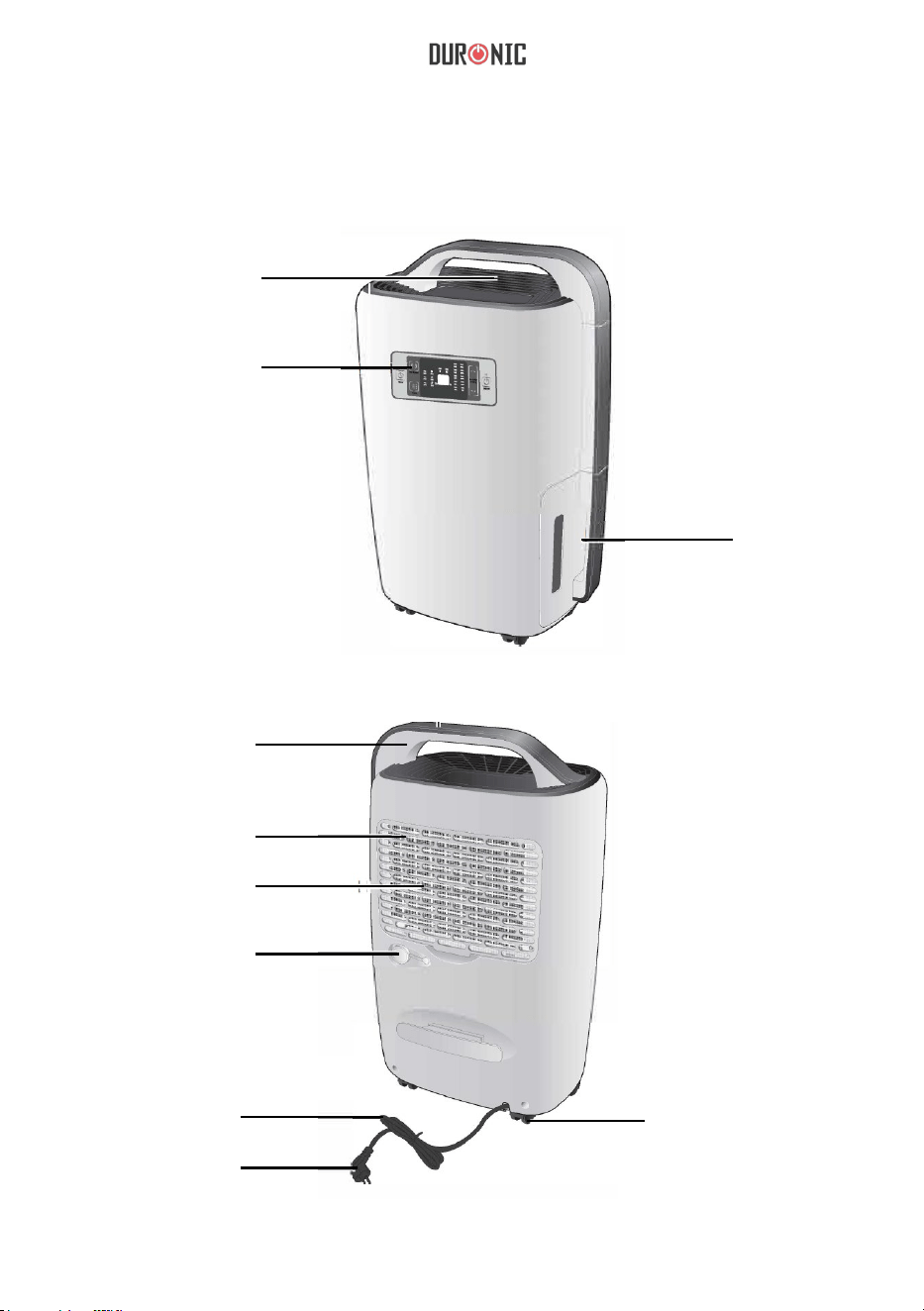
Orificio de
salida de aire
Panel de
control/
Pantalla
de agua
Cubierta frontal
Depósito
Mango
Filtro de aire
Rejilla protectora
Cable de
alimentación
Enchufe
Ruedas
Cubierta trasera
del filtro
Tapón drenaje
del agua
47
Panel De Control/Pantalla
Botón
Temporizador
Botón
velocidad del
ventilador
Indicador de
descongelación
Indicador de
tanque lleno
Ajuste de
humedad
Indicador de
encendido
Botón modo
Indicador
de la
velocidad
del
ventilador
Indicador
modo
de uso
Nivel de
humedad actual
empo-
rizador
Indicador
del
t
Indicador
Ajuste de
la humedad
Botón
Encendido/
Apagado
1.
ON/OFF: Presionar una vez para encender y apagar la unidad.
2.
“^” Arriba
“v” Abajo
En el modo de operación manual, utilice estos botones para establecer el
ajuste de la humedad, la cual se puede ajustar entre 40%-70% o «CO».
Cuando ajuste la humedad al nivel «CO», se activará el modo de función
continuo. Puede establecer el temporizador entre 1h-2h-4h-6h-8h para que
el aparato se apague de forma automática una vez finalizado el tiempo
elegido.
48
Indicadores LED
Aviso: puede bloquear la pantalla presionando «^» y «v» a la vez durante
2 segundos. Para desbloquearla, vuelva a repetir este proceso.
3.
Utilice este botón para cambiar de modo. Pulse una vez para
cambiar el modo entre deshumidificación automática, secado de ropa y
deshumidificación.
4.
Utilice este botón para cambiar la velocidad del ventilador (alta,
Aviso: no se puede usar esta opción en el modo automático.
5.
Utilice este botón para ajustar el tiempo de funcionamiento. Para
usarlo, por favor, lea las instrucciones de uso
1.
Indicador de velocidad del ventilador:
Cuando la unidad funcione a alta velocidad, se encenderá.
se encenderá.
Cuando la unidad funcione a velocidad media,
Cuando la unidad funcione a velocidad baja,
se encenderá.
2.
Indicador de modo de uso:
La unidad tiene
media o baja).
a continuación.
3 modos diferentes:
49
7. Indicador de encendido:
Cuando encienda el deshumidificador, se iluminará este icono. Al apagarse, el
indicador empezará a parpadear lentamente hasta
3.
Indicador de descongelación:
Cuando la unidad empiece a descongelar,
se encenderá.
dejar de hacerlo.
4.
Indicador del depósito de agua:
Cuando el depósito de agua esté lleno, la unidad entrará en el modo standby.
Si esto pasa, el icono comenzará a parpadear.
5.
Indicador de ajuste de humedad:
Una vez ajustado el nivel de humedad, el icono correspondiente se iluminará:
6.
Temporizador:
Una vez ajustado el temporizador, el icono correspondiente se iluminará:
50
1. Asegúrese
de colocar el deshumidificador en un lugar adecuado, como
se muestra a continuación:
2.
Compruebe que el voltaje de su hogar corresponde con la etiqueta de
clasificación del deshumidificador.
3.
Asegúrese de que la entrada y salida no estén bloqueadas por otros objetos.
4.
Si desea utilizar el deshumidificador durante un largo período de tiempo,
introduzca un tubo de drenaje (no incluido) en el orificio indicado para
Antes de utilizar
que
así el agua salga a un depósito mayor que usted elija.
51
Figura 1
Tapón
Figura 2
Introduzca un tubo
con un diámetro
interno de 14mm
Aviso: si el tubo de drenaje se aplasta u obstruye, arreglelo para que el
agua no se atasque. Mientras esté en funcionamiento, no posicione el
tubo hacia arriba.
Modo de uso
1. ON/OFF: presione el botón una vez para encender o apagar la unidad.
a. Presione el botón una vez para
b.
que empiece a funcionar.
Para apagar la unidad, presione el botón de nuevo.
Aviso: espere unos 3 minutos tras apagarla para que el agua recogida vaya al
depósito. Desconecte el deshumidificador de la corriente cuando lo apague.

52
2. «
^» Arriba
«v» Abajo
La humedad puede ajustarse con estos botones entre el 40%, 50% y
60%-70%-CO. El porcentaje de humedad solo varía de 10 en 10. Una vez
establecido, aparecerá el icono «CO» en la pantalla y la unidad
funcionará de forma continua. Una vez termine de establecer todos los
ajustes, la unidad empezará a funcionar.
3.
Botón temporizador
Se puede establecer el tiempo entre 1h-2h-4h-6h-8h. Si desea parar el
temporizador, mantenga pulsado este botón 3 segundos y se cancelará.
4.
Botón velocidad del ventilador
Puede ajustar la velocidad del ventilador pulsando este botón. Se puede
ajustar entre velocidad alta, mediana y baja. Si el deshumidificador está
en modo automático, la velocidad no puede ajustarse.
5.
Botón modo
Mientras la unidad esté funcionando, pulse este botón para cambiar el
modo de uso entre:
modo automático > secado de ropa > modo
Deshumidificación: se puede configurar manualmente.
Modo automatico: Rh>60% - Ventilador y deshumidificación alta.
60%>Rh>55% - Ventilador y deshumidificación media.
Rh<55% - Ventilador y deshumidificación baja.
Sacado de ropa: velocidad alta predeterminada. La unidad se
apagará automáticamente después de 6 horas.
manual
53
Cuidado y mantenimiento
Limpieza del exterior
Limpie el exterior de la máquina con un paño
seco. Si el dispositivo está muy sucio, utilice un
producto de limpieza no abrasivo. Limpie el
deshumidificador con un paño ligeramente
húmedo. Nunca rocíe agua sobre el dispositivo.
Limpieza del filtro de aire
Retire el filtro y limpielo con una aspiradora o con un paño
húmedo (no más caliente de 40˚C). Enjuagar y secar
completamente antes de volverlo a colocar en el
deshumidificador.
Limpieza de la entrada de aire
Retire el filtro de aire. A continuación, limpie la entrada
de aire con una aspiradora o con un paño seco.
54
Resolución de Problemas
Problema Causa Solución
La unidad no funciona
Cable de alimentación
desenchufado.
Desconecte el enchufe y
conéctelo de nuevo o compruebe
si la salida está funcionado
correctamente.
La unidad no se
Encienda el interruptor.
El indicador del agua está
parpadeando.
Depósito lleno, vacíelo;
Asegúrese de que el depósito
esté
correctamente colocado en
el compartimiento.
La capacidad de
deshumidificación es baja
El tiempo de ejecución
es demasiado corto.
Aumente el tiempo de
operación usando
El filtro de aire está
sucio u obstruido.
Utilice agua y un paño
húmedo para limpiar el filtro.
Temperatura ambiental o
humedad demasiado baja.
Si la temperatura es <18º, la capacidad
de deshumidificación es menor. Por
favor, pruebe a aumentar la
temperatura de la habitación.
La humedad establecida es
más alta que la humedad
ambiental
Establezca un porcentaje
menor de humedad.
El tubo de drenaje está
obstruido.
Compruebe el tubo y sustitúyala
si es necesario.
Ajuste de la humedad relativa no
alcanzado después de un largo
período operando.
Las ventanas y las puertas no
están cerradas o selladas.
Cierre puertas y ventanas o
encierre el espacio.
El agua está goteando
La unidad no está sobre una
superficie plana y estable.
Coloque el aparato en una
superficie plana y estable.
El aire que sale es caliente
Proceso de intercambio de calor
No se preocupe, es algo normal
Ruido de agua
El líquido de refrigeración
está fluyendo.
No se preocupe, es algo normal
ha
encendido.
el
temporizador.
55
Síguenos
Este producto esta equipado con enchufe/fusible Europeo
Importado por Shine-Mart Ltd, RM3 8SB
Garantía
Los propietarios de la marca de productos Duronic ofrecen un año de garantía del producto.
AVISO: ESTAS DECLARACIONES NO AFECTAN A SUS DERECHOS LEGALES COMO
CONSUMIDOR.
Este producto se ha fabricado bajo los más estrictos procedimientos de control
de calidad, utilizando
materiales de primera calidad para asegurar un excelente funcionamiento y durabilidad. Es importante
que cuide el producto y lo use adecuadamente para que tenga una larga vida útil. El producto tiene
una garantía de 1 año a partir de la fecha en la que se compró. En caso de que se produzca algún
problema debido a un defecto en los materiales o a una mala fabricación, el producto dañado deberá
devolverse a la marca. El reembolso o la sustitución del
producto queda a discreción de dicha
empresa.
Los productos Duronic se ofrecen con una garantía de 1 año bajo las siguientes condiciones:
1. El producto debe devolverse al vendedor con el comprobante
de compra original.
2. El producto debe instalarse y usarse según se indica en las instrucciones de este manual.
3. Este aparato es únicamente de uso doméstico.
4. La garantía no cubre desgastes, daños intencionados, uso indebido, negligencia, reparaciones
inexpertas o piezas desgastadas.
5. Shine-Mart Ltd no se hace responsable de cualquier daño consecuente, accidentes o pérdidas.
6. Shine-Mart Ltd no se hace responsable de llevar a cabo cualquier tipo de servicio de
mantenimiento bajo la garantía.
7. Garantía válida solamente dentro de la Unión Europea.
Información para los consumidores sobre la eliminación de residuos de
aparatos eléctricos y electrónicos (RAEE):
Si encuentra el icono del contenedor en un producto y/o documento adjunto
significa que este debe tratarse como residuo eléctrico y electrónico (RAEE) a
la hora de desecharlo.
Cualquier producto marcado con este símbolo no debe tirarse con la basura
doméstica, debe separarse para poder ser reciclado.
Recuerde que al desechar correctamente los productos RAEE
ayuda en la
conservación de los recursos naturales y evita que se produzcan efectos
negativos sobre la salud humana y el medio ambiente.
56
Manuale D’istruzioni In Italiano
57
Istruzioni
Attenzione
Att
enzione
Non utilizzare con le mani bagnate
Assicurarsi di seguire le istruzioni
Estrarre la spina dalla presa dopo l’uso
Non aprire l’apparecchio
Non toccare l’apparecchio quando in
funzione
Alimentazione elettrica
•
Scollegare sempre l’apparecchio rimuovendo la spina di corrente.
•
Non toccare la spina con le mani bagnate per evitare scosse elettriche.
•
L'apparecchio deve essere collegato solamente a una presa 220V.
•
Non collegare l’apparecchio a prolunghe elettriche.
•
Non tentare di sostituire il cavo di alimentazione.
•
Se si presenta un problema di natura elettrica, si prega di contattare il
rivenditore.

58
Installazione dell’apparecchio
•
Posizionare sempre l'apparecchio su una superficie solida, piana e
stabile.
•
Assicurarsi che il serbatoio dell’acqua sia correttamente installato
all’interno del prodotto.
•
Non mettere oggetti infiammabili o esplosivi nelle vicinanze dell'apparecchio
al fine di evitare rischi di incendi.
Funzionamento
•
I bambini devono essere sorvegliati nelle vicinanze dell'apparecchio per
garantire la loro sicurezza.
•
Le persone anziane devono essere sorvegliate nelle vicinanze
dell'apparecchio per garantire la loro sicurezza al fine di evitare una
mancanza di ossigeno vicino all'uscita dell'aria.
•
Non ostruire l'uscita dell'aria al fine di prevenire danni o malfunzionamento.
•
Non mettere vestiti sull'uscita dell'aria al fine di evitare malfunzionamenti.
•
Non far cadere l'apparecchio o urtarlo al fine di evitare malfunzionamenti.
•
• Non mettere oggetti pesanti sull'apparecchio o coprire l’apparecchio.
Pulizia
•
Non versare acqua sopra apparecchio utilizzare sempre un panno umido.
•
Pulire il filtro dell’aria regolarmente per evitare polvere e cattivi odori.
•
Non mettere prodotti chimici sull'apparecchio per evitare rischi di incendi.
59
Panoramica del prodotto
Parte anteriore
Uscita d’aria
Pannello dei
controlli /
Display
Serbatoio
dell’acqua
Maniglia
Filtro dell'aria
Griglia di
ingresso dell’aria
Ingesso tubo
di drenaggio
Cavo di
alimentazione
Spina
Ruote
Parte posteriore
60
Panello dei controlli e display
Pulsante
Timer
Velocità
della
ventola
Indicatore di
scongelame
nto
Indicatore
del livello
del l’acqua
Selettore del
livello
Indicatore di
accensione
Modalità di
funzionamento
Indicato
re della
velocità
della
ventola
Selezione
della
modalità di
funzionam
ento
Livello di
umidità
Indicat
ore del
timer
Indicator
e delle
impostaz
ioni di
umidità
Pulsante di
accensione/
spegnimento
1.
ON/OFF: premere una volta per accendere o spegnere l’apparecchio.
2.
"^" up e "v" verso il basso
In modalità manuale, utilizzata per impostare il livello dell’umidità da
raggiungere o impostare il timer, è possibile impostare l’umidità tra 40% e
70% o per “CO”. Quando l’umidità è impostata a “CO”, l’apparecchio
continuerà a funzionare in modo continuo. Il timer può essere impostato a 1h -
2h - 4h - 6h - 8h e può essere utilizzato per arrestare l’operazione
dell’apparecchio.
61
Indicatori LED
Nota: Questa unità è dotata di un sistema di blocco dei controlli, mantenendo
premuti contemporaneamente i pulsanti "^" e "v" per 2 secondi, tutti i pulsanti
sul pannello verranno bloccati. Per sbloccare il pannello, ripetere l'operazione
precedente.
3.
Pulsante: è utilizzato per selezionare le diverse modalità di
funzionamento, premere una volta per cambiare la modalità tra
deumidificazione automatica – asciugatura vestiti - deumidificatore.
4.
Pulsante: è utilizzato per selezionare la velocità della ventola tra
alta, media e bassa.
NB: In modalità automatica, questa funzione non può essere utilizzata.
5.
Pulsante: Utilizzato per impostare l’orario per l'arresto automatico.
Perutilizzare questa funzione, si prega di leggere le istruzioni di
funzionamento.
1.
Indicatore di velocità del ventilatore:
Quando l'unità verrà azionata ad alta velocità, sarà acceso il seguente
indicatore " "
2.
Indicatore modalità di funzionamento:
Quando l'unità funziona in diverse modalità, il relativo indicatore indicatore sarà:
Quando l'unità verrà azionata a velocità media, sarà acceso il
seguente indicatore " "
Quando l'unità verrà azionata a bassa velocità, sarà acceso il
seguente indicatore " "
62
7.
In
dicatore di funzionamento:
Quando si spegne l'apparecchio, l'indicatore lampeggia lentamente. Quando
si accende l'apparecchio, la spia resta accesa.
3.
indicatore di scongelamen
to:
Quando l'unità inizierà lo scongelamento, sarà acceso il seguente indicatore:
4.
Indicatore del serbatoio dell’acqua:
Quando il serbatoio è pieno, l'apparecchio entrerà in modalità standby. Il
seguente indicatore Inizierà a lampeggiare ad alta frequenza:
5.
Indicatore dell percentuale di umidità:
Quando si imposta l'umidità, apparirà il led corrispondente alla percentuale
selezionata:
6.
Ti
mer per arresto automatico:
Quando si imposta il timer, apparirà il led corrispondente alla durata selezionata:
63
1.
Posizionare l'unità in un luogo adatto per le migliori condizioni operative.
2.
Si prega di assicurarsi che la tensione della corrente corrisponda con
l'etichetta di classificazione del deumidificatore.
3.
Controllare e assicurarsi che l'ingresso e l'uscita d’aria non siano bloccate da
altri oggetti.
4.
Se si desidera utilizzare il deumidificatore per un lungo periodo di tempo,
utilizzare il tubo di drenaggio, per non dover svuotare il serbatoio in
continuazione
Prima dell'uso
64
Figura 1
Togliere la spina
Figura 2
Collegare il tubo di scarico
con diametro interno 14mm
nel connettore del tubo
flessibile
No
ta: Stendere delicatamente il tubo di drenaggio se è schiacciato o
attorcigliato, altrimenti il drenaggio sarà limitato e l'unità non funzionerà
normalmente. Durante il funzionamento, il tubo di drenaggio non dovrebbe
mai essere posizionato più in alto rispetto all’ingresso del tubo di
drenaggio.
Come utilizzare l’apparecchio
1.
ON/OFF: premere una volta per accendere o spegnere l’apparecchio.
a.
Premere "ON/OFF" una volta e l'unità inizierà a funzionare.
b.
Premere "ON/OFF" ancora una volta dopo l'uso e l'unità si spegne.
NB: Lasciare l'unità riposare per circa 3 minuti dopo lo spegnimento, in
modo che acqua residua nel condensatore può fluire nel serbatoio.
Staccare la spina quando l'apparecchio è spento per risparmio energetico e
sicurezza.

65
2.
"^" verso l’alto "v" verso il basso
L’umidità può essere impostata premendo i tasti "Up" e "Down" (C0 - 40%
- 50%- +
60%-70%-CO). Premere "Up" o "Giù" una volta, il valore
impostato aumentara o ridurra di 10%, l’icona "CO" apparirà sul pannello
e l'unità opererà in modo continuo. Quando il livello d’umidità impostato
sarà raggiunto, l’indicatore LED rimarrà acceso.
3.
“
” Timer
Il tempo può essere impostato tra 1 h - 2h - 4h - 6h - 8h. Premere e tenere
premuto il pulsante per 3 secondi per annullare il timer.
4. “
" Velocità della vetola
È possibile regolare la velocità della ventola premendo il pulsante 'fan
speed'. È possibile scegliere tra alta, media e bassa. Se la modalità di
deumidificazione è impostata su automatica, la velocità non può essere
regolata.
5. “
” Modalità
”
Durante il funzionamento, premere questo tasto per modificare la modalità di
funzionamento come segue: deumidificazione automatica > asciugatura
vestiti > deumidificatore. In modalità deumidificatore è possibile impostare
manualmente l'umidita.
Modalità automatica:
RH > 60%, ventilatore ad alta velocità e deumidificazione;
60% > RH > 55%, ventilatore a media velocità e deumidificazione;
RH < 55%, Ventilatore a bassa velocità e senza deumidificazione.
Modalità asciuga vestiti; Operando di default con ventilazione ad alta
velocità, l'unità si spegne automaticamente dopo 6 ore di operatività
continua.
66
Cura e manutenzione
Pulizia dell’apparecchio
Pulire l’apparecchio con un panno morbido e
asciutto. Se il dispositivo è estremamente
sporco, usare un detergente delicato. Pulire il
deumidificatore con un panno leggermente
umido. Non spruzzare mai acqua sul dispositivo.
Pulizia del filtro dell’aria
Rimuovere il filtro. Pulire il filtro con un aspirapolvere o
lavare con acqua fredda saponata.
Sciacquare e asciugare completamente prima di inserire
nuovamente dentro il deumidificatore.
Pulizia delle prese d’aria
Si prega di rimuovere prima il filtro aria, quindi,
pulire la presa d'aria con un aspirapolvere o un
panno morbido e asciutto.
67
Risoluzione dei problemi
Problema Causa Soluzione
L'unità non funziona
Il cavo di alimentazione è
scollegato
Staccare la spina e ricollegarla
o si prega di controllare che vi sia
corrente elettrica
Unità non è stata accesa. Accendere l'apparecchio.
L'indicatore del serbatoio
lampeggia
Il serbatoio dell'acqua è pieno,
svuotare il serbatoio;
Assicurarsi che il serbatoio sia
correttamente
messo nuovamente dentro il vano.
La capacità di
deumidificazione
è diminuita
L’unità è stata accessa
per troppo poco tempo
Aumentare la durata
dell’accensione
utilizzando il timer.
Filtro dell'aria è sporco o ostruito.
Utilizzare acqua e un panno
umido per
pulire il filtro.
Temperatura ambiente è troppo
bassa o umidità troppo bassa.
Capacità di deumidificazione è
normalmente più basso se la
temperatura ambiente è sotto 18
"C.
L’umidità impostata è più alta
dell’umidità presente
nell’ambiente
Impostare un livello di umidità
più bassa dell’umidità attuale
della camera
Tubo di drenaggio dell'acqua è
bloccato
Controllare il tubo di drenaggio e
sostituirlo
se necessario.
Umidità impostata non
raggiunta dopo il
trascorrimento della durata
impostata
Finestre e porte non sono chiuse
o sigillate.
Chiudere porte e finestre.
L’acqua è fuoriuscita
L'unità non sia posizionata su
una superficie piana e stabile.
Posizionare l'unità su una
superficie e stabile.
L’aria in uscita è calda Processo di scambio di calore Normale
Rumore dell'acqua
Il liquido refrigerante sta fluendo. Normale
68
Questo prodotto è garantito per una durata determinata con il distributore a partire dalla data
di acquisto contro ogni difetto derivante da difetti di fabbricazione o dei materiali. Questa
garanzia non copre difetti o danni derivanti da installazione impropria, uso improprio o usura
anomala del prodotto.
L’apparecchio deve essere restituito nella sua confezione originale e accompagnato dalla
ricevuta e deve essere stato utilizzato in modo corretto. È importante rispettare le istruzioni
per l’uso e le precauzioni di sicurezza indicate di seguito. Inoltre, non possiamo garantire
l’apparecchio se è stato modicato o riparato dall’acquirente o da terzi.
1 anno di garanzia da Shine-Mart Ltd, proprietari del marchio commerciale Duronic.
NOTA: QUESTE DICHIARAZIONI NON INFLUISCONO SUI DIRITTI LEGALI DEL
CONSUMATORE
Questo prodotto è stato realizzato con le rigorose procedure del controllo qualità, e
utilizzando materiali di altissima qualità, per garantire afdabilità e prestazioni eccellenti.
Vi regalerà un servizio ottimo e a lungo termine, purchè venga opportunamente usata e
mantenuta. Il prodotto è garantito per 1 anno dalla data di acquisto. Se sorge qualche
difetto a causa di materiali difettosi o scarsa manodopera, il prodotto difettoso dovrà essere
restituito al luogo originale di acquisto. Il rimborso o la sostituzione sono a discrezione
dell’azienda. I prodotti Duronic offrono 1 anno di garanzia alle seguenti condizioni:
1. Il prodotto deve essere restituito al rivenditore con la prova d’acquisto originale
2. Il prodotto deve essere installato e usato seguendo le istruzioni contenute nel manuale.
3. Il prodotto va utilizzato solo per scopi domestici. Non è da utilizzarsi per uso commerciale.
4. La garanzia non copre usura, danni volontari, abuso, negligenza, riparazioni
inesperte o consumo dei materiali.
5. Shine-Mart Ltd non è responsabile per Danni accidentali o consequenziali.
6. Shine-Mart Ltd non è tenuta a eseguire qualsiasi tipo di riparazione, ai sensi
della garanzia.
7. Termini validi in tutta l’unione europea *Ci riserviamo il diritto di modicare le sopracitate
condizioni Per parti di ricambio si prega di consultare il sito www.duronic.com
Corretto smaltimento del prodotto.
Qusto prodotto è inclusivo di spina certicata CE
importata da Shine-Mart Ltd, RM3 8SB
Questo segno su un prodotto o su documenti indica che quando deve essere
smaltito, deve essere trattato come i riuti elettrici ed elettronici (WEEE)
Tutti I prodotti marcati WEEE non devono essere buttati nei riuti domenistici
generici, ma separati per il trattamento, il recupero
e il riciclaggio dei materiali utilizzati.
Per un corretto trattamento, recupero e riciclaggio; si prega di portare tutti I
prodotti marcati WEEE al Vostro centro smaltimenti riuti autorizzato, dove
saranno accettati gratuitamente.
Se i consumatori sono propensi allo smaltimento corretto di riuti elettrici ed
elettronici, aiuteranno a salvare risorse importanti e a prevenire i potenziali
effetti negativi sulla salute umana e sull’ambiente di tutti i materiali pericolosi
che i riuti possono contenere.
Garanzia
Seguici
69
Instrukcja obsługi. Polski
70
Instrukcje
Nie używaj mając mokre ręce
Przestrzegaj instrukcji
Odłącz z gniazdka zasilającego, gdy nie używasz
Nie próbuj otwierać
Nie dotykaj
Ostrzeżenia
Zasilanie
• Odłączając urządzenie od zasilania trzymaj za wtyczkę, nie pociągaj za przewód
zasilający.
• Nie dotykaj wtyczki mokrymi rękami, aby zapobiec ryzyku porażenia prądem.
• Urządzenie musi być podłączone do sieci domowej o napięci 220-240V.
• Nie podłączaj urządzenia do przedłużacza.
• Nie próbuj wymieniać przewodu zasilającego.
• Jeżeli urządzenie nie działa prawidłowo skontaktuj się ze sprzedawcą.

71
Instalacja
• Zawsze umieszczaj urządzenie na twardej, płaskiej i stabilnej powierzchni.
• Upewnij się, czy pojemnik na wodę jest prawidłowo zainstalowany w
urządzeniu.
• Nie umieszczaj łatwopalnych lub wybuchowych materiałów blisko urządzenia,
aby uniknąć ryzyka pożaru.
Obsługa
• Dzieci powinny znajdować się pod nadzorem, gdy znajdują się w pobliżu
urządzenia.
• Osoby starsze muszą znajdować się pod nadzorem, gdy znajdują się w pobliżu
urządzenia, aby zapewnić im bezpieczeństwo uniknięcia braku tlenu w pobliżu
wylotu powietrza.
• Nie wkładaj rąk w otwory wentylacyjne, aby uniknąć ryzyka wypadku lub
uszkodzenia urządzenia.
• Nie wkładaj odzieży w otwory wentylacyjne, aby uniknąć uszkodzenia
urządzenia.
• Nie przepychaj urządzenia ani nie narażaj urządzenia na silne uderzenia, aby
uniknąć jego uszkodzenia.
• Nie wkładaj ciężkich przedmiotów lub nie zakrywaj urządzenia.
Czyszczenie
• Nie zalewaj urządzenia wodą, zawsze używaj wilgotnej ściereczki.
• Czyść filtr regularnie wilgotną ściereczką i łagodnymi płynami, aby uniknąć
ryzyka nadmiernego zakurzenia urządzenia.
• Nie wkładaj chemikaliów wewnątrz urządzenia, aby uniknąć ryzyka pożaru.
72
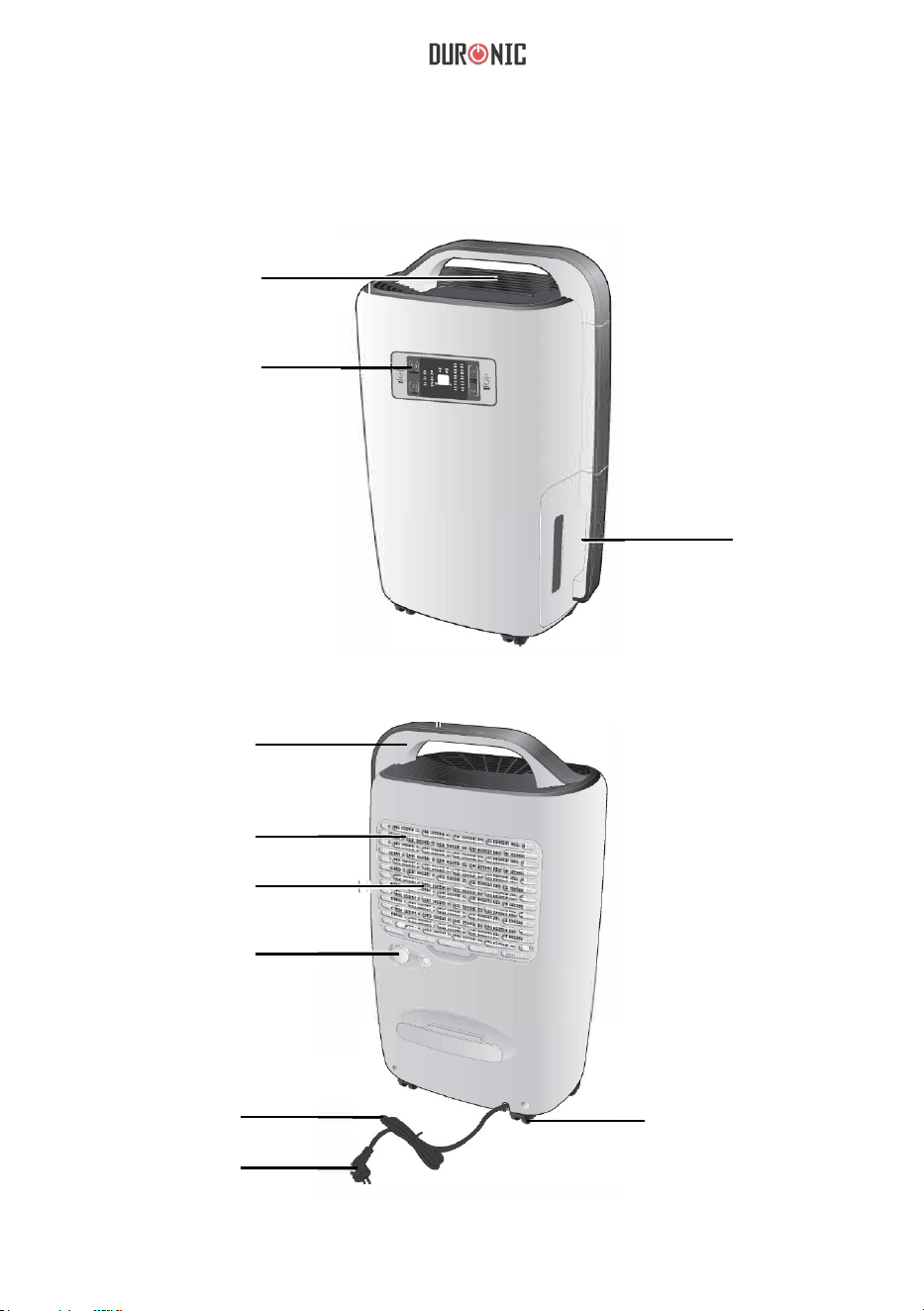
Elementy urządzenia
Przód
Otwór
wentylacyjny
Panel
sterowania
Pojemnik
na wodę
Uchwyt
Filtr powietrza
Osłona wylotu
powietrza
Zatyczka
Przewód
zasilający
Wtyczka
Kółka
Tył
73
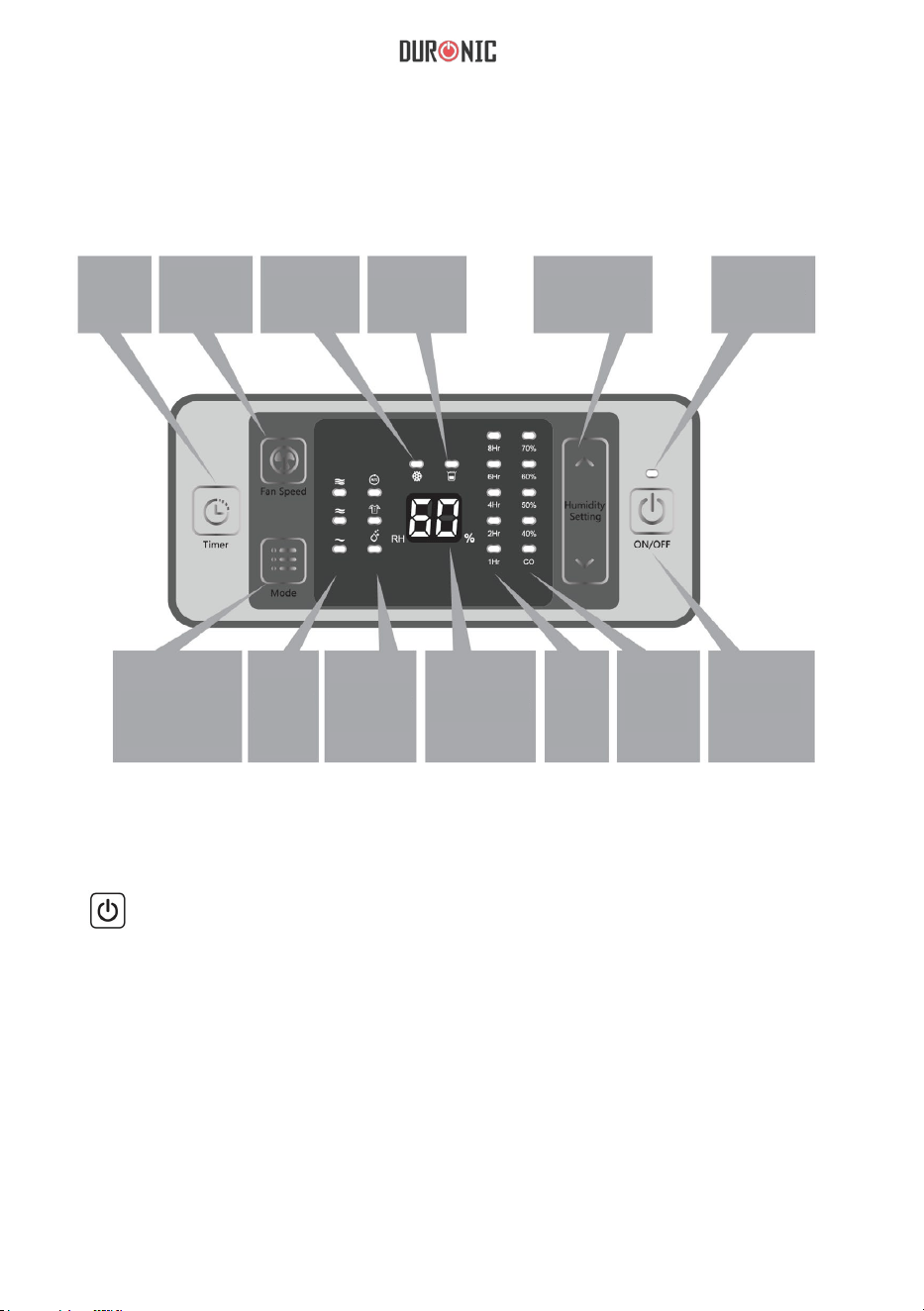
Panel sterowania
Timer
Regulacja
prędkości
wiatraka
Wskaźnik
zamarzania
Wskaźnik
zapełnienia
pojemnika
Regulacja
wilgotności
Lampka
kontrolna
włącznika
Tryb pracy
Wskaź.
trybu
wiatraka
Wskaźnik
trybu
pracy
Wartość
wilgotność
Wartość
czasu
Wskaźnik
wilgotności
Włącz/Wyłącz
1.
Włącz / wyłącz: Przyciśnij jeden raz, aby włączyć lub wyłączyć.
2.
“^” Zwiększ
“v” Zmiejsz
Ustawiając manualny tryb pracy wykorzystuj ustawienia poziomu wilgotności i
wartość czasu. Wilgotność może zostać ustawiona na poziomie pomiędzy
40%-70% w odstępie co 10 % lub “CO”. Kiedy wartość wilgotności zostanie
ustawiona na "CO", maszyna będzie w trybie pracy ciągłej. Timer może zostać
ustawiony na czas: 1 / 2 / 4 / 6 / 8 godz.
74
Lampki
kontrolne
Uwaga: Możliwe jest włączenie blokady przycisków. W celu aktywacji trybu
należy jednocześnie wcisnąć “^” i “v” przez ok. 2 sek, aby wyłączyć blokadę
należy powtórzyć czynność.
3.
Przycisk wykorzystywany do zmiany trybu pracy. Przyciśnij
jednokrotnie, aby przełączyć tryb na: automatyczny, odciąganie
wilgoci przy suszącym się praniu, osuszanie.
4.
Przycisk służący do zmiany szybkości pracy wiatraka w zakresie:
niski, średni, wysoki.
Uwaga: W trybie automatycznym funkcja ta nie jest dostępna.
5.
Przycisk wykorzystywany do ustawienia programatora czasowego. W
celu ustawienia timera wciśnij ten przycisk, a następnie ustaw czas
wykorzystując przyciski “^” i “v”.
1.
Wskaźnik trybu wiatraka. W zależności od wybranego trybu pracy
następujący wskaźnik będzie świecić:
Wysoka prędkość
2.
Wskaźnik trybu pracy. W zależności od wybranego trybu pracy następujący
wskaźnik będzie świecić:
Średnia prędkość
Niska prędkość
75
7.
Wskaźnik pracy. Kiedy włączysz urządzenie wskaźnik będzie świecił. Kiedy
wyłączysz urządzenie, wskaźnik będzie przez chwilę mrugał, a następnie wyłączy
się całkowicie.
3.
Wskaźnik zamarzania. Gdy urządzenie będzie pracowało w zbyt niskiej
temperaturze poniższy wskaźnik zacznie świecić:
4.
Wskaźnik zapełnienia pojemnika. Kiedy pojemnik zbierający wodę jest
zapełniony poniższa lampka kontrolna zacznie migać.
5.
Wskaźnik wilgotności. W zależności od wybranego trybu wilgotności
jeden z poniższych wskaźników będzie świecić.
6.
Timer. W zależności od wybranego czasu, jeden z poniższych wskaźników
zacznie świecić. Po osiągnięciu wybranego czasu urządzenie wyłączy się.
76
1.
Umieść urządzenie we właściwej lokalizacji, dla lepszego rezultatu.
2.
Upewnij się, czy Twoja domowa sieć elektryczna jest zgodna z tabliczką
znamionową.
3.
Upewnij się, czy otwory wentylacyjne nie są zablokowane przez jakiekolwiek
obiekty.
4.
Jeżeli chcesz używać osuszacza przez dłuższy czas, możesz podłączyć rurę,
aby uniknąć ciągłego opróżniania zbiornika na wodę.
Przed użyciem
77
Rys. 1
Odetkaj
zatyczkę
Rys. 2
Podłącz rurę o
średnicy wewnętrznej
14 mm w złączu węża.
UWAGA: Delikatnie rozciągnij rurę, jeżeli jest skręcona lub zgięta, w
przeciwnym wypadku przepływ płynu będzie ograniczony, a urządzenie nie
będzie działać prawidłowo. W czasie pracy rura nie może znajdować się
powyżej złącza węża.
Instrukcja użytkowania
1.
Użyj przycisku włącz / wyłącz, aby włączyć lub wyłączyć urządzenie.
a.
Wciśnij włącznik, aby uruchomić urządzenie.
b.
Ponownie wciśnij włącznik, aby wyłączyć urządzenie.
Uwaga: Po wyłączeniu urządzenia odczekaj ok. 3 minuty, aby woda zebrana w
złączu węża mogła spłynąć do pojemnika. Jeżeli nie używasz urządzenia odłącz
je od gniazdka elektrycznego dla bezpieczeństwa i oszczędności energii.

78
2.
“^” W górę
“v” W dół
Wilgotność może być zmienia poprzez wciśnięcie przycisków “^” i
“v” (40% - 50% - 60% - 70% - CO). W zależności od
wybranego
przycisku wartość zmniejszy się lub zwiększy o 10 %. Po wybraniu
trybu "CO" urządzenie będzie w trybie pracy ciągłej. Kiedy wybór
wilgotności zostanie zakończony i przyciski góra/ dół nie będą wciskane
urządzenie zaakceptuje ustawienia i wskaźnik zacznie świecić ciągle.
3. . “
Timer
Czas może być ustawiony w przedziale 1 godz - 2 godz - 4 godz - 6 godz -
8 godz. Jeżeli chcesz wyłączyć timer wciśnij i przytrzymaj przycisk timera
przez ok. 3 sek.
4. “
Wiatrak
Możesz wybrać poziom prędkości wiatraka wciskając przycisk regulacji
prędkości wiatraka. W zależności od wybranego trybu wiatrak może
pracować z wysoką, średnią i niską prędkością. Jeżeli urządzenie jest
ustawione na tryb automatyczny funkcja ta nie jest dostępna.
5. “
”Tryb pracy
Gdy urządzenie jest włączone możesz zmienić tryb pracy wciskając ten
przycisk. Możesz wybrać: tryb automatyczny, osuszania prania, osuszanie.
Po wybraniu trybu "osuszania" możesz manualnie ustawić wilgotność
powietrza.
W Trybie automatycznym wiatrak będzie pracował w następujący sposób:
- przy wilgotności powyżej 60% - wysoka prędkość
- przy wilgotności pomiędzy 55 - 60% - średnia prędkość
- przy wilgotności poniżej 55% - niska prędkość
W trybie osuszania prania, przy wysokiej prędkości lub ustawieniach
standardowych wiatraka, urządzenie wyłączy się po 6 godz. ciągłej pracy.
79
Czyszczenie i pielęgnacja
Czyszczenie obudowy
Wyczyść obudowę urządzenia przy pomocy miękkiej,
suchej ściereczki. Jeżeli urządzenie jest bardzo
zabrudzone użyj delikatnego detergentu. Przetrzyj
obudowę wilgotną ściereczką. Nigdy nie próbuj wlewaj
wody do urządzenia.
Oczyszczanie filtru powietrza
Wyjmij filtr i wyczyść go przy pomocy odkurzacza lub
wilgotnej ściereczki (o temp. maks. 40˚C). Opłukaj i
odstaw do całkowitego osuszenia przed
zamontowaniem.
Czyszczenie otworów wentylacyjnych.
Przed przystąpieniem do czyszczenia
wentylatorów usuń filtr. Następnie, oczyść otwory
za pomocą odkurzacza lub miękkiej, suchej
ściereczki.
80
Rozwiązywanie problemów
Problem
Przyczyna Rozwiązanie
Urządzenie nie włącza się
Przewód zasilający nie jest
podłączony
Ponownie wciśnij wtyczkę od
kontaktu upewniając się, czy
gniazdo elektryczne działa
prawidłowo.
Urządzenie nie zostało wlączone Naciśnij włącznik
Mruga wskaźnik
przepełnienia
pojemnika na wodę
Kiedy pojemnik na wodę jest
przepełniony opróżnij go. Upewnij
się czy pojemnik został
prawidłowo zamontowany w
obudowie.
Wydajność osuszania jest niska
Zbyt krótki czas pracy
Zwiększ czas pracy
urządzenia przy pomocy
timera
Filtr powietrza jest zabrudzony
i/ lub zatkany
Użyj wody i wilgotnej
ściereczki, aby oczyścić filtr
Temperatura lub wilgotność
otoczenia jest zbyt niska.
Wydajność osuszania jest
zazwyczaj mniejsza, gdy
temperatura otoczenia jest poniżej
18°C.
Ustawiona wilgotność jest
wyższa niż wilgotność
otoczenia
Ustaw wilgotność na niższą i
mniejszą od wilgotności
otoczenia.
Złącze węża jest zablokowane
lub pęknięte
Sprawdź wężyk i w razie
konieczności wymień.
Zamierzona wilgotność nie
została osiągnięta po
dłuższym czasie pracy
Okna i drzwi nie są zamknięte lub
szczelne
Zamknij wszystkie okna
i drzwi i upewnij się
że pokój jest izolowany.
Woda wycieka
Urządzenie nie znajduje się
na płaskiej powierzchni
Umieść urządzenie na płaskiej i
stabilnej powierzchni.
Otwory wentylacyjne są ciepłe Proces wymiany ciepła
normalne zjawisko
Dźwięk przepływu wody Przepływ płynu chłodniczego
normalne zjawisko
81
1 Rok Gwarancji rmy Shine-Mart LTD, marki handlowej Duronic Products.
UWAGA: ten dokument nie wpływa na twoje ustawowe prawo jako konsumenta.
Ten produkt został wykonany zgodnie z restrykcyjnymi normami kontroli i wyk
orzystuje
najwyższej jakości materiały dla uzyskania doskonałej wydajności i niezawodności.
Długotrwałość produkty zostaje osiągnięta przez właściwe użytkowanie i
konserwację.
Gwarancja obejmuje 1 rok od daty zamówienia. Jeżeli jakikolwiek defekt powstanie ze
względu na wadliwość materiału lub niewłaściwe wykonanie to uszkodzony produkt
musi
zostać dostarczony do miejsca, z którego został zamówiony. Zwrot pieniędzy lub
wymiana
produktu jest w gestii rmy.
Duronic Products oferuje jeden rok gwarancji na podstawie poniż szych warunków:
1. Produkt musi zostać zwrócony do sprzedawcy z oryginalnym dowodem zakupu.
2. Produkt był instalowany i użytkowany zgodnie z instrukcją obsługi.
3. Produkt użytkowany był wyłącznie w celach domowych.
4. Gwarancja nie obejmuje naturalnego zużycia się produktu, celowego uszkodzenia,
niewłaściwego użycia, zaniedbania, niewłaściwych napraw lub części
eksploatacyjnych.
5. Shine-Mart Ltd. nie ponosi odpowiedzialności za przypadkowe albo celowe
zgubienie
produktu lub jego uszkodzenie.
6. Firma Shine-Mart Ltd nie jest zobowiązana do przeprowadzania jakichkolwiek prac
serwisowych w ramach gwarancji.
7. Obowiązuje na obszarze Unii Europejskiej.
Informacja o odpadach i utylizacja dla użytkowników sprzętu elektrycznego i
elektronicznego.
Usuwanie wyeksploatowanych urządzeń elektrycznych i elektronicznych (dotyczy
krajów Unii Europejskiej i innych krajów europejskich z wydzielonymi systemami
zbierania odpadów). Ten symbol na produkcie lub jego opakowaniu oznacza, że
produkt nie powinien być zaliczany do odpadów domowych. Należy go przekazać
do odpowiedniego punktu, który zajmuje się zbieraniem i recyklingiem urządzeń
elektrycznych i elektronicznych. Prawidłowe usunięcie produktu zapobiegnie
potencjalnym negatywnym konsekwencjom dla środowiska naturalnego i zdrowia
ludzkiego, których przyczyną mogłoby być niewłaściwe usuwanie produktu.
Recykling materiałów pomaga w zachowaniu surowców naturalnych.
Ten produkt jest wyposażony we wbudowaną wtyczkę typu Euro-Plug / BS z
certykatem CE importowaną przez Shine-Mart Ltd, RM3 8SB
Warunki Gwarancji
Śledź Nas
82
Gebruikershandleiding Nederlands
83
Instructies
Gebruik niet met natte handen
Volg de instructies
Verwijder van stopcontact na gebruik
Niet openmaken
Niet aanraken
Pas op/waarschuwing
Voeding
•
• Raak de stekker niet met natte handen aan om elektrische schokken te voorkomen.
•
Het apparaat moet speciaal op een 220V-stopcontact worden aangesloten.
• Niet gebruiken met verlengsnoeren.
• Probeer niet het netsnoer te veranderen.
•
Houd altijd de stekker vast en trek eraan om de stekker uit het stopcontact te halen.
Als er een elektrisch probleem is, neem dan contact op met uw
verkoper/oorspronkelijke plaats van aankoop.

84
Installatie
•
•
•
•
Er moet toezicht worden gehouden op kinderen in de buurt van het
apparaat
om hun veiligheid te garanderen.
•
Er moet over ouderen toezicht worden gehouden als ze in de buurt van
het toestel komen, om hun veiligheid te waarborgen en om
zuurstofgebrek in de buurt van de luchtuitlaat te voorkomen.
• Plaats uw handen niet op de luchtuitlaat om letsel of storingen te voorkomen.
• Leg geen kleding op de luchtuitlaat om storingen te voorkomen.
•
•
Plaats geen zware voorwerpen op het apparaat, en
bedek het apparaat niet.
Schoonmaak
•
Giet geen water in het apparaat, gebruik altijd een vochtige doek.
•
Reinig het luchtfilter regelmatig met een vochtige doek en een milde
reinigingsvloeistof om stofophoping te voorkomen.
• Plaats geen chemicaliën op het apparaat om brand te voorkomen.
Plaats het apparaat altijd op een stevige, vlakke en stabiele ondergrond.
Zorg ervoor dat het waterreservoir correct in het compartiment is geplaatst.
Plaats geen brandbare of explosieve voorwerpen in de buurt van het
apparaat om brandgevaar te voorkomen.
Bediening
Duw het apparaat niet omver en stel het niet bloot aan harde stoten om
schade/storingen te voorkomen.
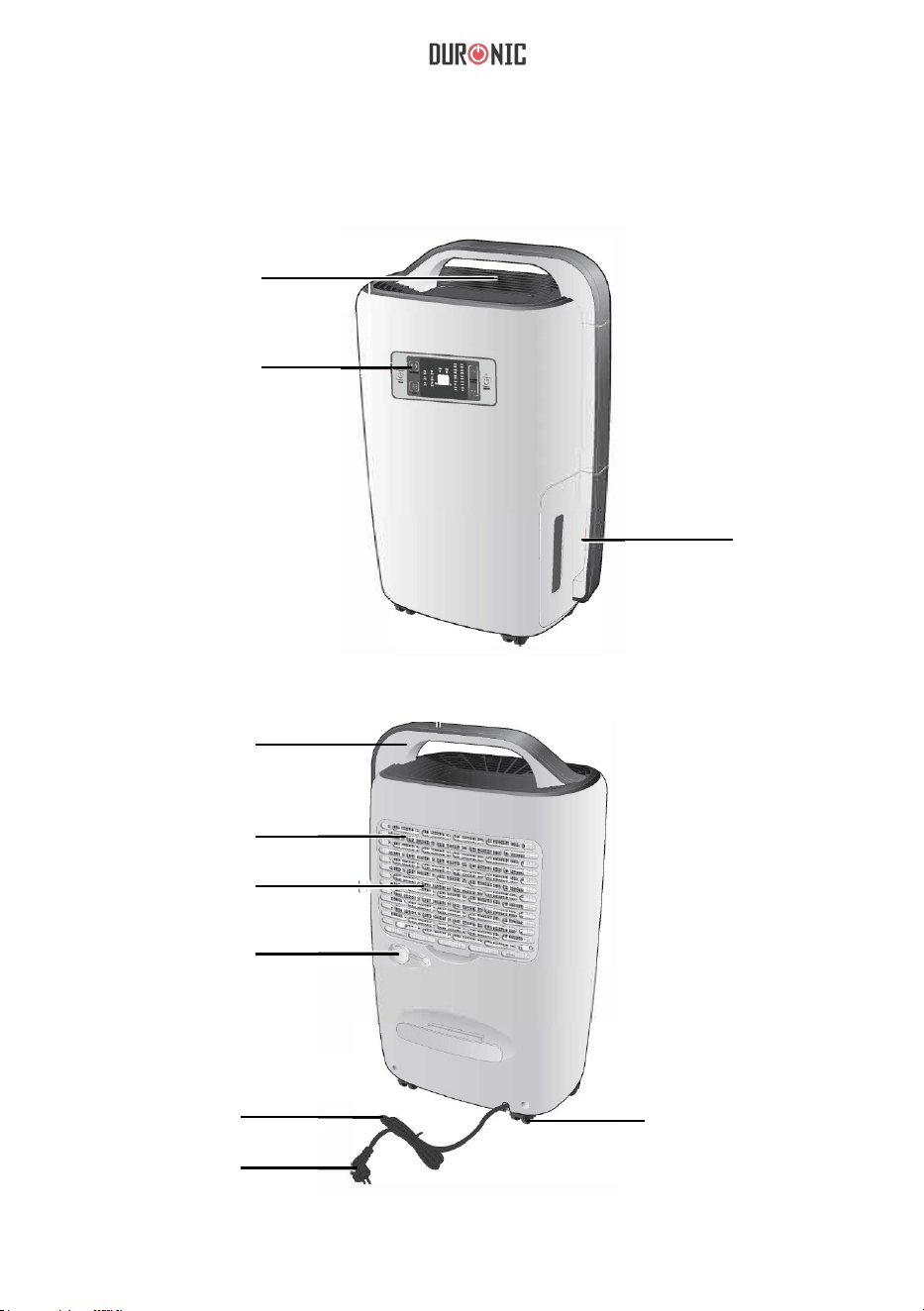
85
Onderdelen
Voorzijde
Lucht uitlaat
Controel/
Display Paneel
Water
Tank
Handvat
Lucht
Filter
Lucht Inlet
Gaas
Stopper
Netsnoer
Stekker
Achterzijde
Wielen
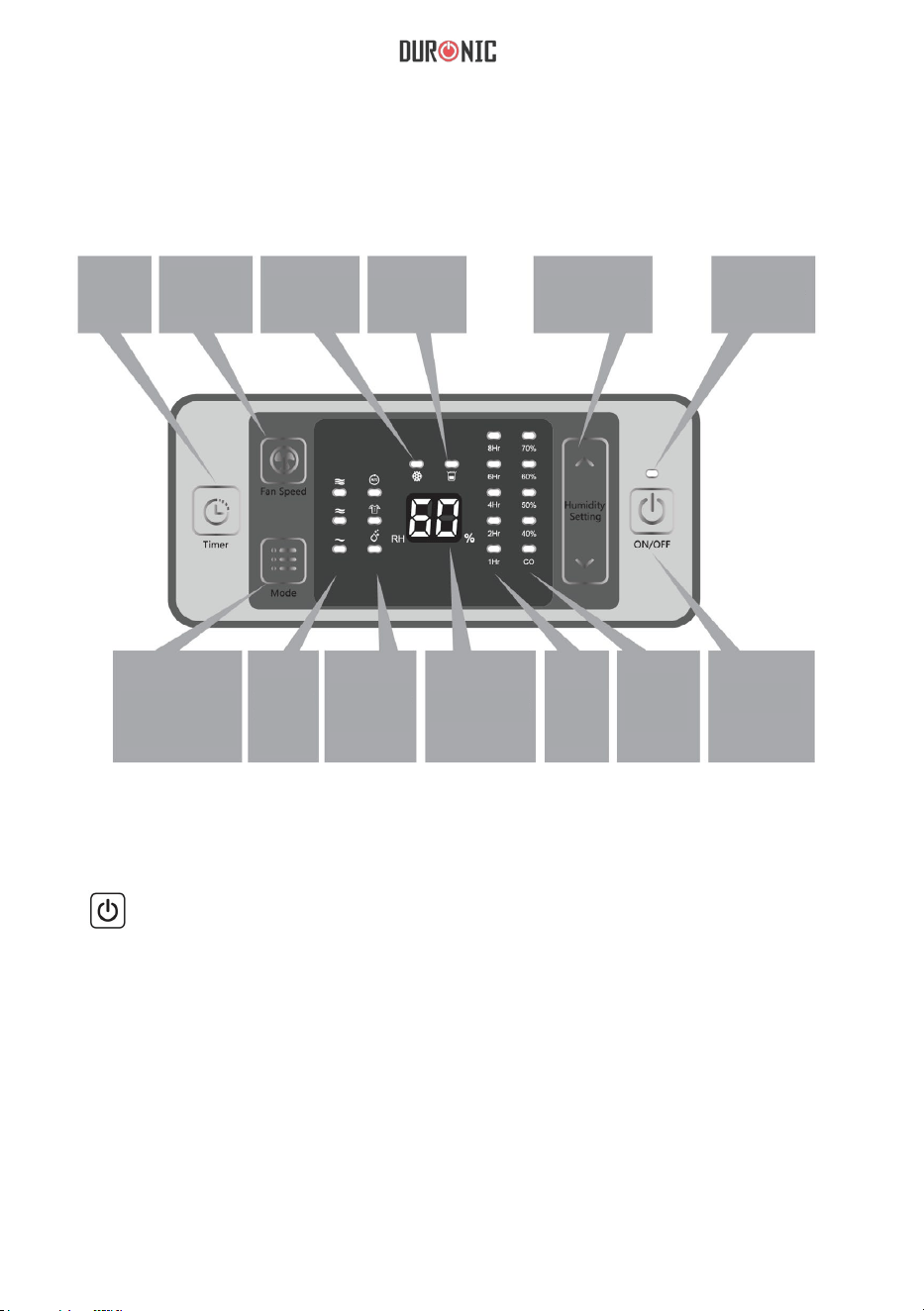
86
Controle & Display Paneel
Timer
Ventilator
snelheid
indicator
Ontdooings-
Volle tank
indicator
selectie
Vermogens-
indicator
Werk mode
snelheids-
indicator
Ventilator
Werk
mode
selectie
Vochtigheids
lezing
Timer
indicator
Vochtigheid
instellings-
indicator
Aan/Uit
1.
2.
“^” Omhoog
“v” Omlaag
Vochtigheid
AAN/UIT: Druk eenmaal om het apparaat AAN of UIT te zetten.
In de handmatige bedieningsmodus, die wordt gebruikt om de beoogde
luchtvochtigheid en aanpassingstijd in te stellen, kan de luchtvochtigheid
worden ingesteld tussen 40%-70% in 10% per stap of "CO". Wanneer de
luchtvochtigheid is ingesteld op "CO", zal de machine continu werken. De
timer kan worden ingesteld op 1u-2u-4u-6u-8u en kan worden gebruikt om uit
te schakelen na de timer.
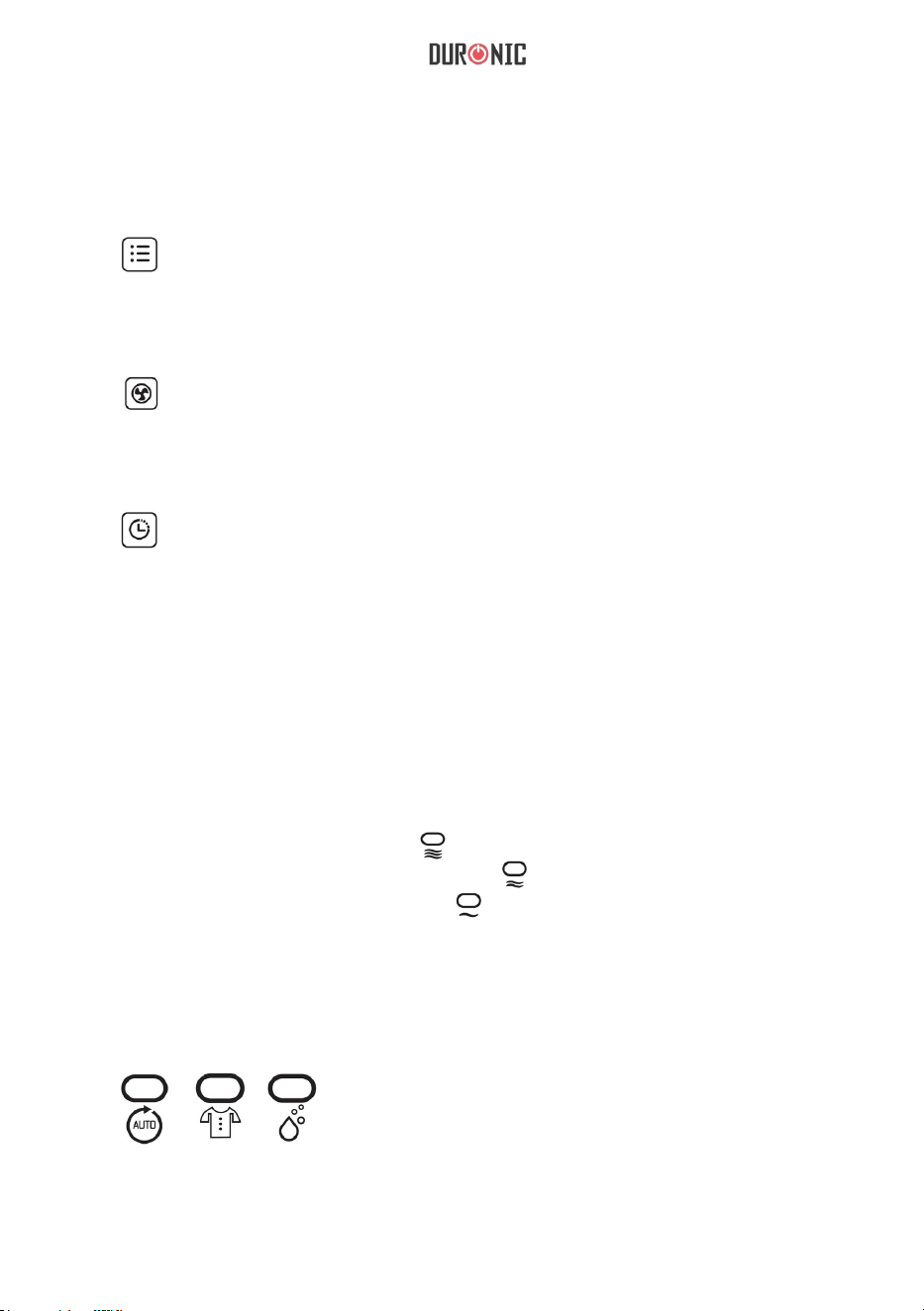
87
LED Indicator
Opmerking: Er is een toetsvergrendelingsprogramma ontworpen voor dit
toestel. Druk tegelijkertijd op "^" en "v" gedurende 2 seconden en alle toetsen
op het paneel worden vergrendeld. Herhaal dezelfde handeling om de
vergrendeling op te heffen.
3.
indrukken om de modus te wijzigen tussen automatisch ontvochtigen -
drogen en ontvochtigen van kleding.
4. toets: wordt gebruikt om de ventilatorsnelheid te wijzigen van
hoog, gemiddeld en laag.
Opmerking: in de automatische modus is deze toets ongeldig.
5. toets: wordt gebruikt om de timing voor afsluiten in te stellen.
Lees voor gebruik de gebruiksaanwijzing.
1. Ventilator snelheidsindicator:
Als het toestel snel aan het werk is, “ ” staat aan.
Als het toestel middel snel aan het werk is, ” staat aan.
Als het toestel langzaam aan het werk is, ” staat aan.
2. Werk mode indicator:
Wanneer het apparaat in verschillende modi werkt, brandt de relatieve indicator als:
toets: wordt gebruikt om de verschillende werkmodi te wijzigen, eenmaal
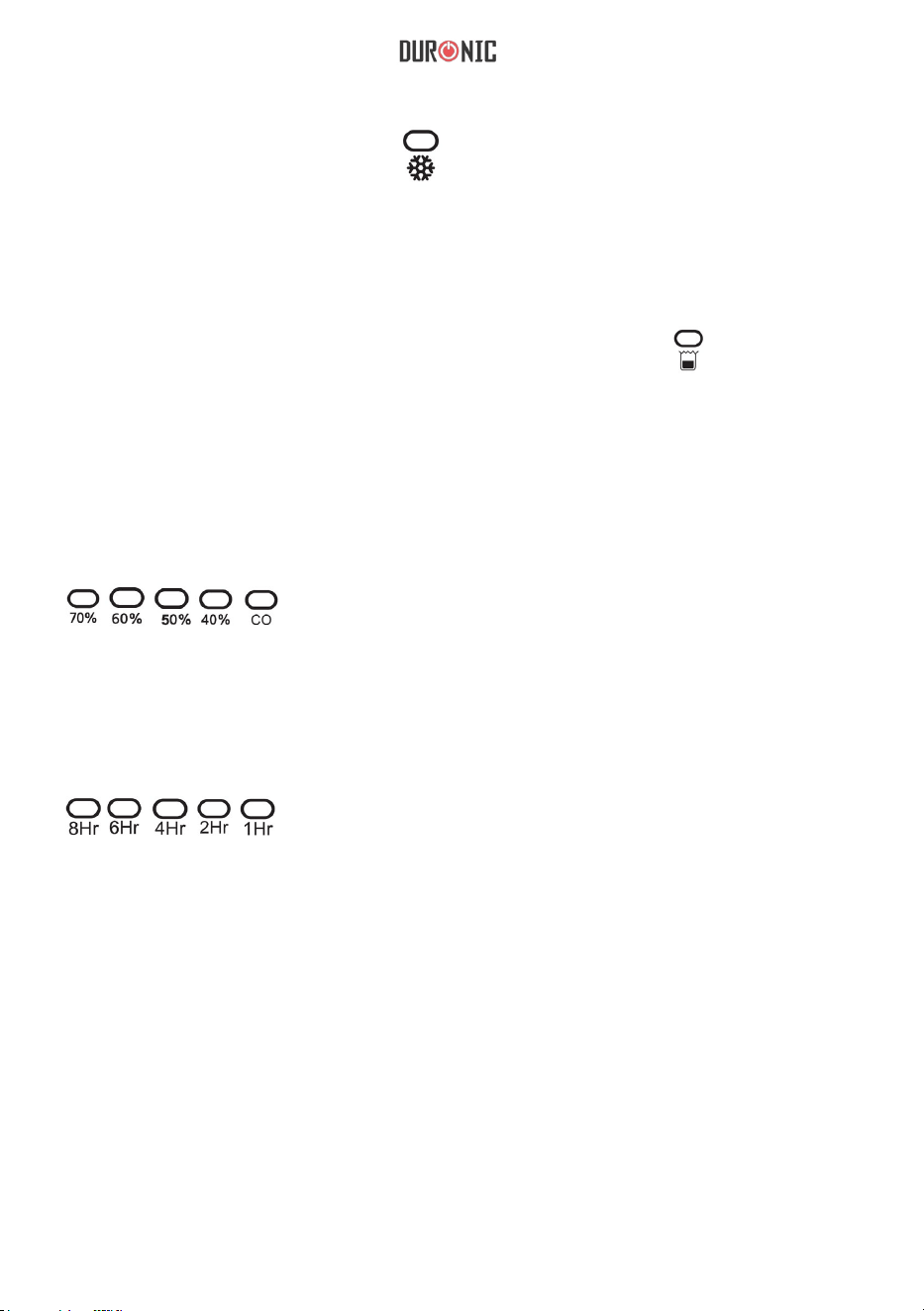
88
7. Bedieningsindicator:
Wanneer u het apparaat aanzet, blijft het indicatielampje branden.
Wanneer u het apparaat uitschakelt, zal de indicator langzaam
knipperen voordat deze volledig uitgaat.
3. Ontdooingsindicator:
Als het toestel begint te ontdooien, “ ” staat aan.
4. Water tank vol indicator:
Als het waterreservoir vol is, gaat het apparaat in de stand-bymodus. flikkert
dan heel erg
snel.
5. Vochtigheid instellingsindicator:
Als je de luchtvochtigheid instelt, verschijnen de bijbehorende indicatielampjes:
6. Timing shutdown:
Wanneer u de tijd instelt, verschijnen de bijbehorende indicatielampjes:
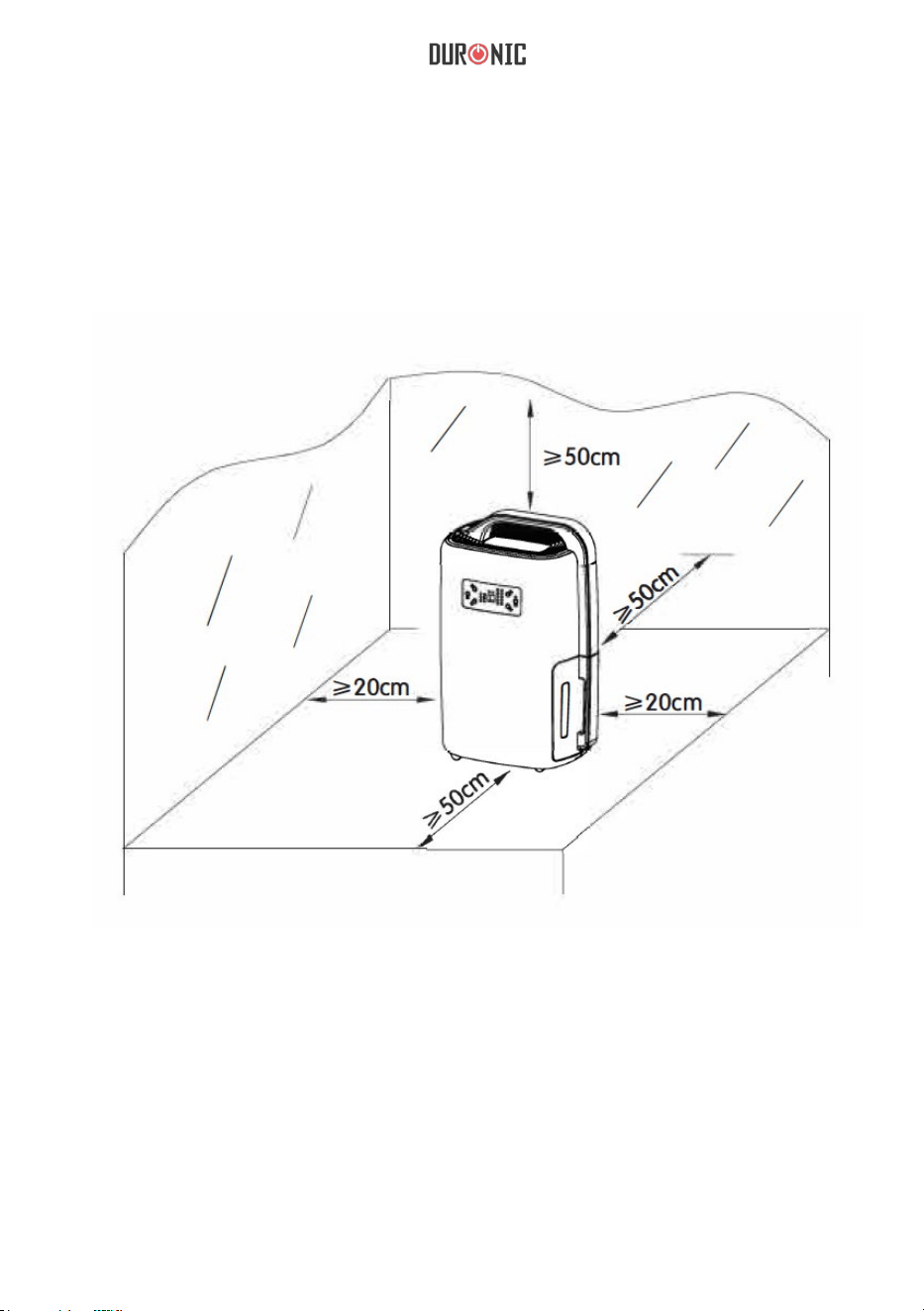
89
Voor gebruik
1. Plaats het apparaat op een geschikte locatie voor de beste
bedieningsomstandigheden.
2. Zorg ervoor dat het voltage van uw huishouden overeenkomt met het
typeplaatje van de luchtontvochtiger.
3. Controleer en zorg ervoor dat de inlaat en uitlaat niet worden geblokkeerd
door andere voorwerpen.
4. Als je de luchtontvochtiger voor langere tijd wilt gebruiken, gebruik
dan de afvoerslang, zodat je de watertank niet continu hoeft te
legen.
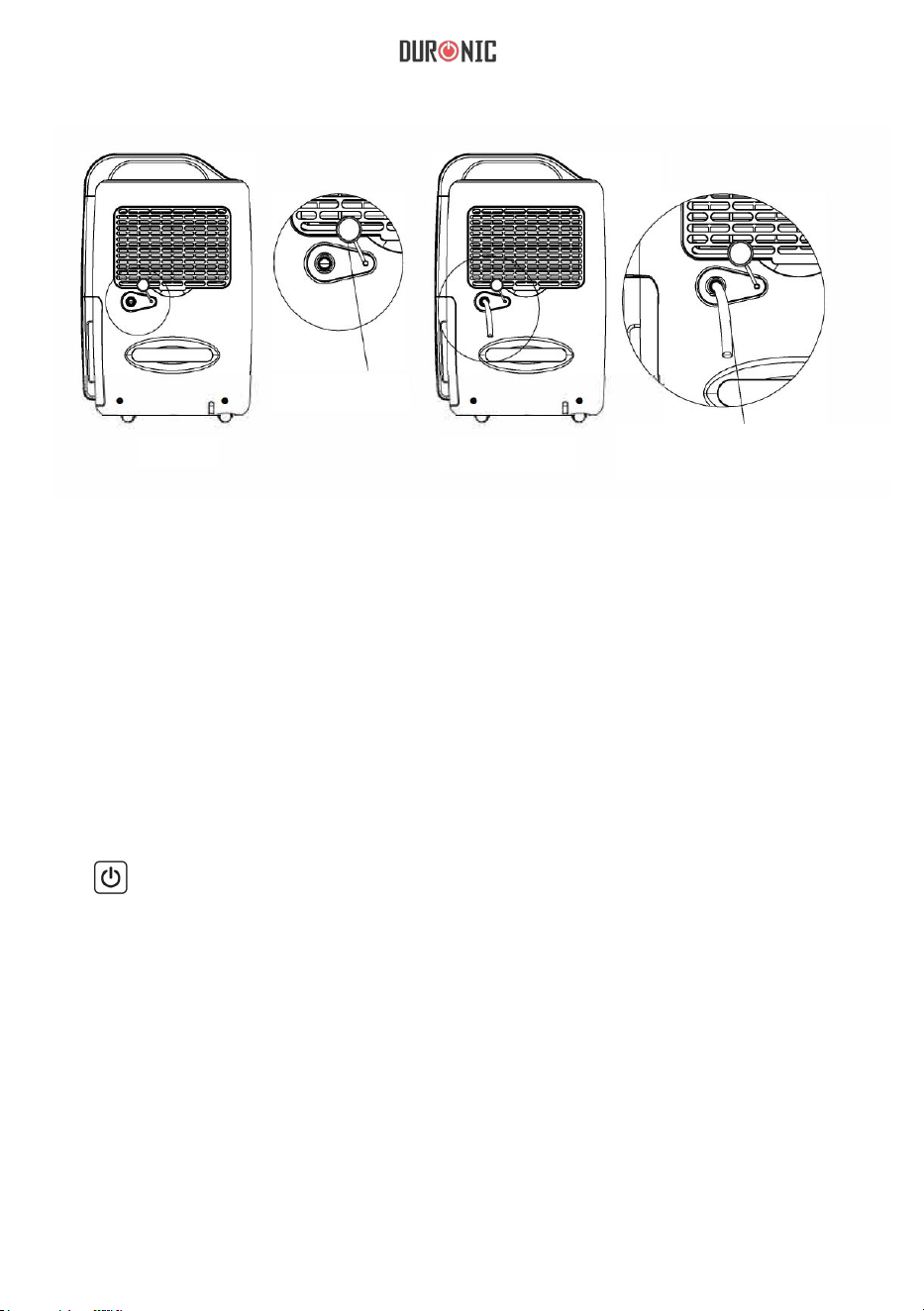
90
Stekker
verwijderen
Afbeelding
1
Afbeelding
2
Plug afvoerbuis met
14mm binnendiameter
in de slangaansluiting
Opmerking: Rek de afvoerleiding voorzichtig uit als deze platgedrukt of
verdraaid is, anders wordt de afvoer beperkt en zal het apparaat niet
normaal werken. De afvoerleiding mag zich tijdens het gebruik nooit hoger
bevinden dan de slangaansluiting.
Hoe te gebruiken
1. AAN/UIT: Druk eenmaal om het apparaat AAN of UIT te zetten.
a. Druk eenmaal op "ON/OFF" en het apparaat begint te werken.
b. Druk na gebruik nogmaals op "ON/OFF" en het apparaat wordt
uitgeschakeld.
Opmerking: Laat het apparaat na het uitschakelen ongeveer 3 minuten
rusten, zodat het resterende water op de condensor in de tank kan
stromen. Trek de stekker uit het stopcontact als het apparaat is
uitgeschakeld voor energiebesparing en veiligheid.

91
2.
“^” Omhoog
“v” Omlaag
De luchtvochtigheid kan worden ingesteld door op de toetsen "^" en "v" te drukken
(40%--50%-+ 60%-70%- CO) druk eenmaal op "Omhoog" of "Omlaag", de
ingestelde waarde wordt met 10% verhoogd of verlaagd , “CO” verschijnt op het
paneel en het apparaat zal continu werken. Wanneer de vochtigheidsinstelling is
voltooid en er geen bewerking plaatsvindt, accepteert het apparaat de instelling en
blijft het indicatielampje branden.
3. . “ ” Timer
4. “ ” Ventilator snelheid
U kunt de snelheid van de ventilator aanpassen door op de knop
'ventilatorsnelheid' te drukken. U kunt kiezen tussen hoog, gemiddeld en
laag. Als de ontvochtigingsmodus op automatisch staat, kan de snelheid niet
worden aangepast.
5. “ ” Mode”
Druk tijdens het gebruik op deze toets om de werkmodus als volgt te
wijzigen:
automatisch ontvochtigen > kleding drogen > ontvochtigen.
Ontvochtigingsmodus: kan de luchtvochtigheid handmatig instellen.
Automatische modus:
Rh>60%, ventilator met hoge snelheid en ontvochtiging;
60%>RH>55%, ventilator met gemiddelde snelheid en ontvochtiging;
Rh<55%, ventilator met lage snelheid en geen ontvochtiging.
Droogmodus voor kleding; onder de standaard windsnelheid met hoge
snelheid, zal het apparaat automatisch uitschakelen na 6 uur continu
gebruik.
De tijd kan worden ingesteld tussen 1u-2u-4u-6u-8u. Als u de timer wilt
annuleren, houdt u de timerknop 3 seconden ingedrukt.
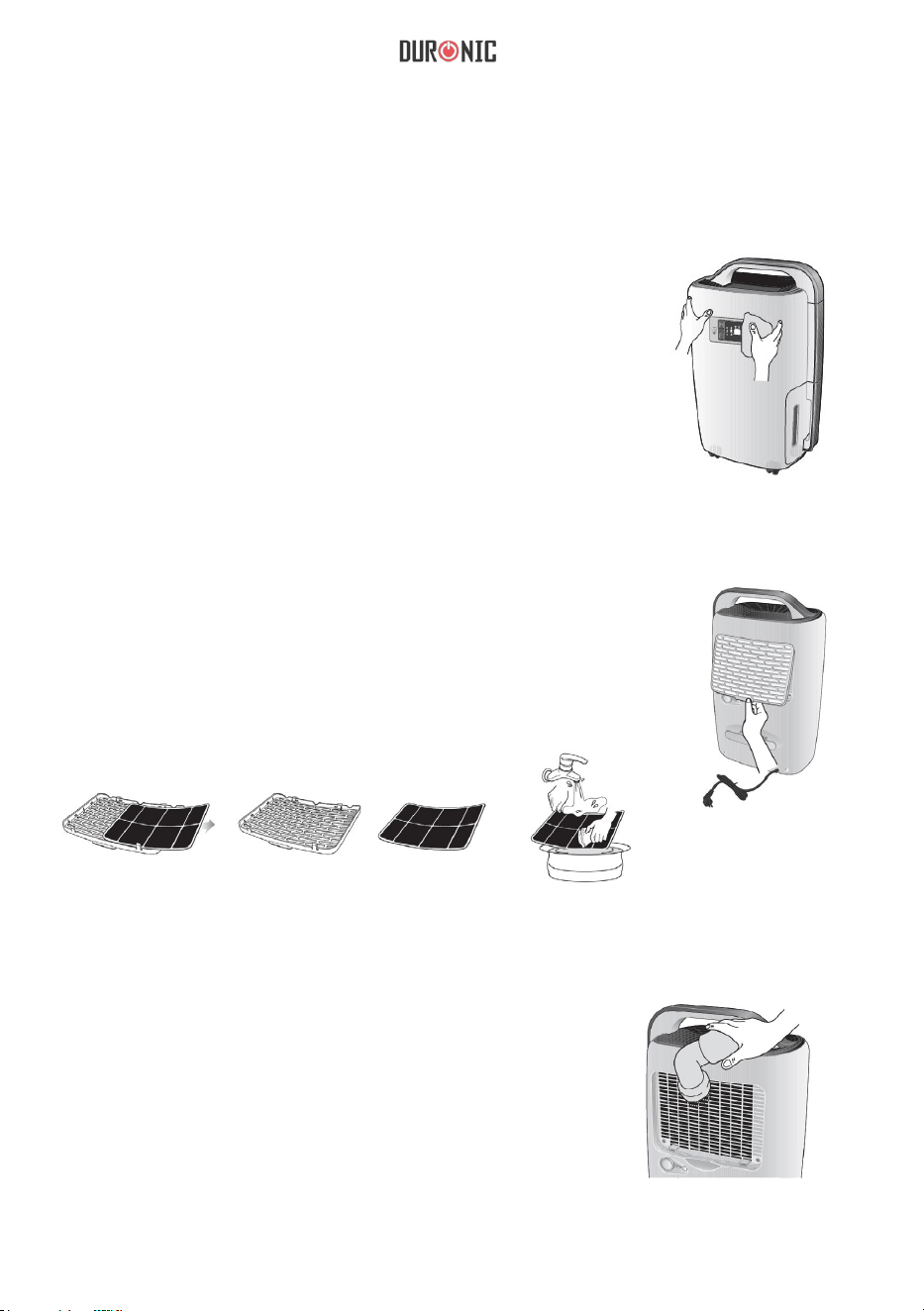
92
Zorg & Onderhoud
Reiniging van de behuizing
Reinig de machinebehuizing met een zachte,
droge doek. Als het apparaat erg vuil is, gebruik
dan een mild schoonmaakmiddel. Veeg de
luchtontvochtiger af met een licht vochtige doek.
Sproei nooit water op het apparaat
Reiniging van de lucht filter
Verwijder het filter. Reinig het filter met een
stofzuiger of vochtige doek (niet warmer dan
40˚C). Spoel en droog volledig voordat
terugplaatsen in de luchtontvochtiger.
Reiniging van de lucht inlaat
Verwijder eerst het luchtfilter. Reinig vervolgens
de luchtinlaat met een stofzuiger of een zachte,
droge doek.
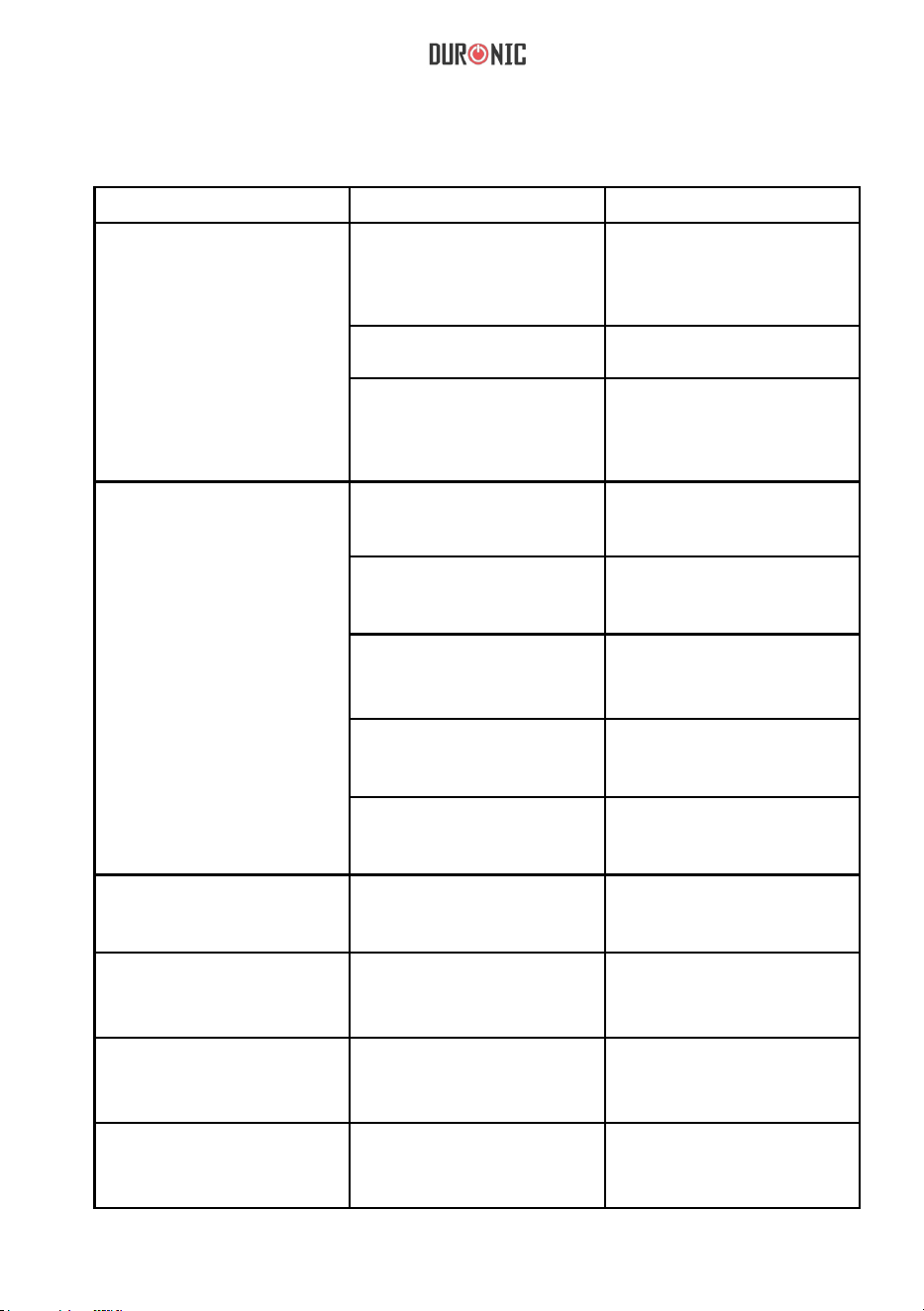
93
Troubleshooting
Probleem Oorzaak Oplossing
Toestel werkt niet
Stekker is niet ingestoken
Haal de stekker uit het
stopcontact en steek hem er weer
in of controleer of het stopcontact
goed werkt.
Toestel staat niet aan
Het water lampje knippert
Zet de schakelaar om.
Watertank is vol, maak de tank
leeg; zorg ervoor dat de tank
correct terug in het compartiment
is geplaatst.
Ontvochtigingscapaciteit is
laag
Verhoog de gebruikstijd
met de timerfunctie.
Luchtfilter is vuil en/of verstopt.
Gebruik water en een vochtige
doek om het filter schoon te
maken.
Vochtigheidsinstelling is hoger
dan de omgevingsvochtigheid
De afvoerwaterleiding is
verstopt of lek.
Relatieve vochtigheid
instelling niet bereikt na
langdurig gebruik.
Ramen en deuren zijn niet
gesloten of verzegeld.
Water lekt
Het apparaat staat niet op
een vlakke, stabiele
ondergrond.
Uitlaat lucht is warm Warmtewisselingsproces
Controleer de waterleiding en
vervang deze indien nodig.
Sluit de deur en het raam of
sluit de ruimte af.
Plaats het apparaat op een
vlakke en stabiele ondergrond.
Water geruis Koelvloeistof stroomt
Looptijd is te kort.
De omgevingstemperatuur of
luchtvochtigheid is te laag.
normaal is Dit
Dit is normaal
Stel de luchtvochtigheid in en
verlaag de omgevingsvochtigheid.
De ontvochtigingscapaciteit is
normaal gesproken lager als de
kamertemperatuur lager is dan 18°C.
Probeer de kamertemperatuur te
verhogen.
94
Garantie
1 Jaar Garantie van Shine-Mart Ltd Handelsmerk eigenaars van Duronic Producten. LET
OP: DEZE STELLINGEN HEBBEN GEEN INVLOED OP UW WETTELIJKE RECHTEN ALS
CONSUMENT
Dit product is vervaardigd onder de strengste kwaliteitscontrole procedures, met materialen
van de hoogste kwaliteit, om uitstekende werking en betrouwbaarheid te verzekeren. Het
zal zeer goed en langdurig dienstdoen, naar gelang het correct gebruikt en onderhouden
wordt. Het product heeft 1 jaar garantie van de originele aankoopdatum. Als een defect zich
toont vanwege een materiaal- of constructiefout, dient het defecte apparaat bij de originele
aankoop locatie geretourneerd te worden. Terugbetaling of vervanging is ter discretie van
dat bedrijf.
Duronic Producten worden aangeboden met een 1-jarige garantie onder de volgende
omstandigheden:
1. Het product dient naar de verkoper geretourneerd te worden met aankoopbewijs.
2. Het product dient geïnstalleerd en gebruikt te worden naar de instructies in deze
gebruikshandleiding.
3. Het product is alleen geschikt voor huishoudelijk gebruik.
4. De garantie dekt geen gebruiksschade, opzettelijke schade, verkeerd gebruik of
verwaarlozing.
5. Shine-Mart Ltd heeft geen verantwoordelijkheid voor accidentele schade of verlies.
6. Shine-Mart Ltd is niet aansprakelijk voor onderhoud onder de garantie.
7. Alleen geldig in Nederland
Dit product is uitgerust met een CE:1363 stekker en zekering.
Geïmporteerd door Shine-Mart Ltd, RM3 8SB
Informatie over afvalverwerking voor Afgedankte Elektrische en Elektronische Apparatuur
(AEEA).
Dit teken geeft aan dat een product en/of bijbehorende documentatie bij verwijdering, dient
te worden behandeld als Afgedankte Elektrische en Elektronische Apparatuur (AEEA).
Alle AEEA gemarkeerde producten dienen niet te worden gemengd met algemeen
huishoudelijk afval, maar moeten apart worden gehouden voor de behandeling, herwinning
en hergebruik van de gebruikte materialen.
Volg ons