825
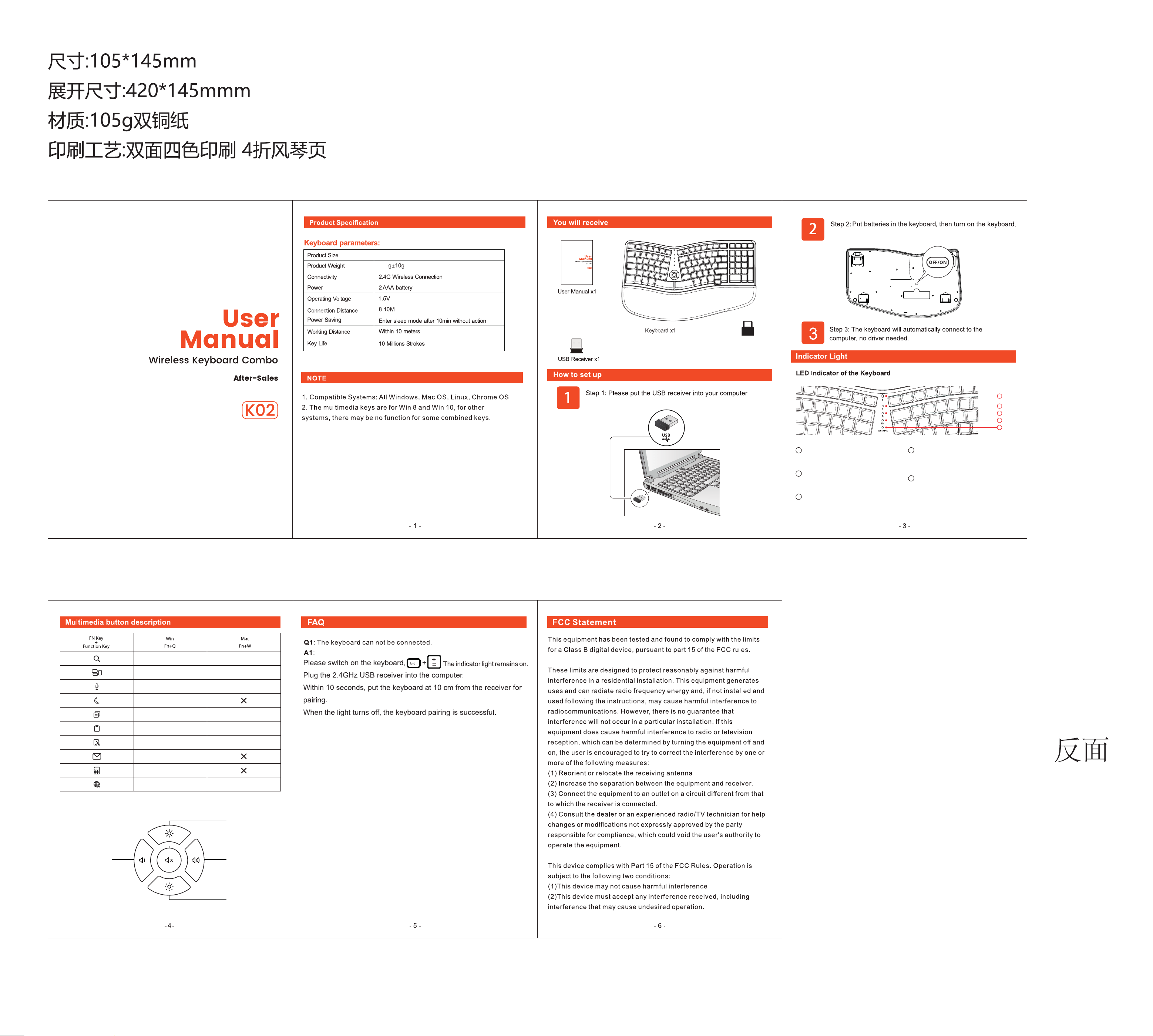
Windows
Switching
Search Function
Voice Assistant
Sleep
Copy
Paste
Cut
Email
Calculator
Language switch
Windows
Switching
Search Function
Siri
Copy
Paste
Cut
Language switch
Type-C Adapter x1
425*245*30mm
OFF/ON
1
2
3
4
5
1
Low power indicator light
When the battery is low, the red indicator light flashes,
indicating the need to replace the battery.
2
Num Lock
The Num Lock indicator will turn green when Num Lock
is activated.
3
Caps Lock
The Caps Lock indicator will turn green when Caps Lock
is activated.
4
Fn indicator light
The FN+ESC key and FN indicator light turn green, indicating
that the first row of multimedia keys can be directly triggered
without the need for FN combination.
5
Win/Mac indicator light
·The blue light on the fn+Q indicator indicates that the
keyboard layout has changed to MAC keyboard layout.
·The green light on the fn+W indicator indicates that the
keyboard layout has changed to WIN keyboard layout.
Mute
Brightness+
Brightness-
Volume+Volume-