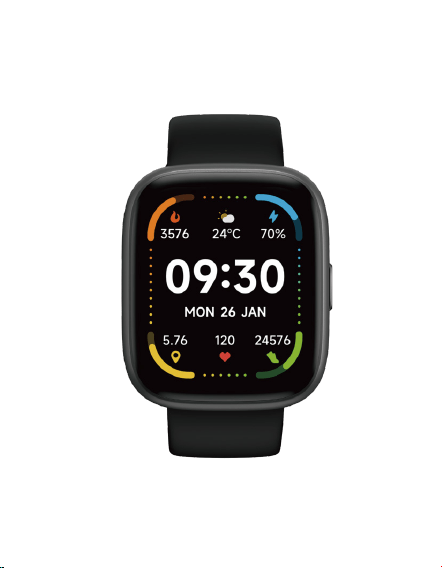
IDW26 Manual
IDW26 Smart Sports Watch
Introduction
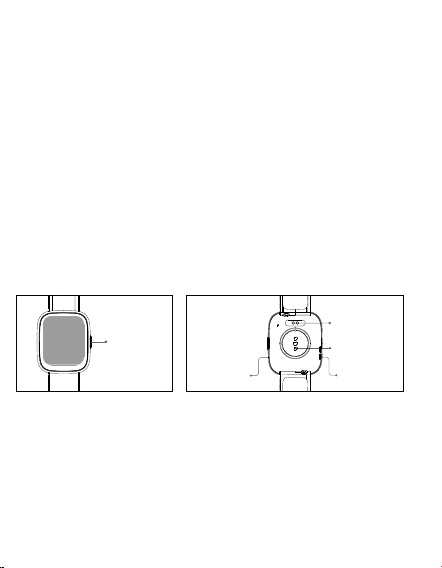
Screen display area
Function button
Pressure relief hole
Heart rate sensor
Microphone
Speaker
Front side
Back side
Magnetic
charging
contacts
Heart rate
sensor
Microphone
Speaker
Physical
button
Getting started
(1) Open the package and check its content.
(2) Delivery content: 1) IDW26 smart watch (with built-in lithium
battery); 2) user manual; 3) original charging cable.
&KDUJHWKHZDWFKWRDFWLYDWHDQGWXUQLWRQEHIRUHŀUVWXVH7R
charge, simply connect the magnetic charging cable to the
charging contacts located on the back of the watch.
6HDUFKIRUұYHU\ŀWҲRQWKH$SS6WRUH*RRJOH3OD\RUVFDQWKH
QR code to download and install the app.
(5) Log in to the app and set your personal information, as well as
your step and weight goals.
2QWKHұ'HYLFHҲLQWHUIDFHWDSWKHұҲLFRQLQWKHXSSHU
right corner, your phone starts searching. From the device list
found, choose your smart watch name to pair with. You may also
link the device directly by scanning the device’s QR code using the
scan function.

Health
7KHZDWFKZLOODXWRPDWLFDOO\UHFRUG\RXUGDWD
2. You can measure your heart rate, blood oxygen and stress level
on the watch, or turn on automatic measurement of heart rate,
blood oxygen, stress level and sleep on the app to track these data
the whole day. You can manually or make the watch automatically
monitor your health status continuously.
7RVWDUWDQH[HUFLVH
1)When the watch face interface is displayed, short press the
SK\VLFDOEXWWRQWRDFFHVVWKHDSSOLFDWLRQOLVW7DSWKH:RUNRXWLFRQ
WRDFFHVVWKHLFRQVRIGLłHUHQWH[HUFLVHW\SHVWKHQWDSWKHLFRQRI
an exercise (such as Outdoor Running) to start the exercise.
7KHZDWFKFDQGLVSOD\XSWRH[HUFLVHW\SHVE\GHIDXOW2QWKH
app's Multi exercise mode, you can add or delete the exercise types
displayed on the watch or change their order.
a) Watch
6WDUWұYHU\ŀWҲHQDEOHWKH%OXHWRRWKIHDWXUHDQGJUDQWWKH*36
positioning permission;
2. Light up the bracelet screen and bring it close to your phone;
&OLFNWKHұҲLFRQRQWKH$SSDQGVHOHFWWKHVPDUWZDWFKPRGHO
in the search results to bind;
&RQŀUPWKHELQGLQJUHTXHVWRQWKHVPDUWZDWFK
)LOOLQ\RXULQIRUPDWLRQDQGVHW\RXUVWHSJRDORQWKH$SSWR
complete the binding.
b) App
Basic Operations
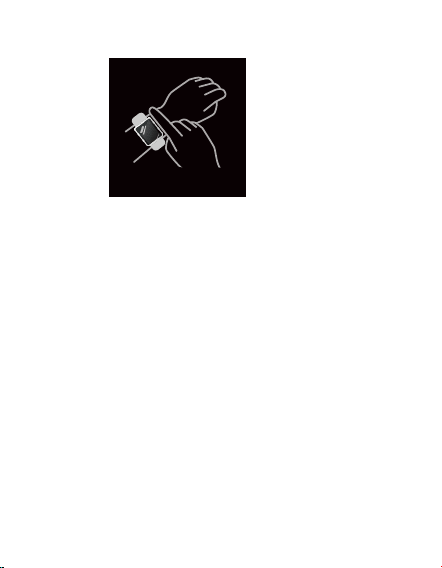
1. Wear the watch correctly: ensure that your watch is at least one
ŀQJHUDERYH\RXUZULVWERQHDQGWKDWWKHVHQVRURQWKHEDFN
touches your skin.
2. Screen operation: IDW26 has a full touch screen, which supports
operations including short tap, swipe left/right and swipe
up/down.
3. Button operation: IDW26 has a physical button; which
VXSSRUWVұVKRUWSUHVVҲDQGұORQJSUHVVҲRSHUDWLRQV6KRUWSUHVV
to return to home page/pause exercise. Long press: for 2 seconds
WRWXUQRQWKHZDWFKZKHQLWLVRłWRWXUQRQ$OH[DZKHQWKHZDWFK
is on.
Function Description
7KHZDWFKFRPHVZLWKZDWFKIDFHVE\GHIDXOW<RXFDQVZLWFK
EHWZHHQWKHPPDQXDOO\RQWKHZDWFKRURQWKHYHU\ŀWDSSҴVZDWFK
face settings. You can also customize the watch face on the app.
More watch faces are available for download from the "Watch Face
Market".
1. Watch face
2. Sports
b) IDW26 supports intelligent exercise recognition. It can recognize
whether the user is running/walking. It supports automatically pausing
an exercise or reminding when an exercise ends. This feature can be
turned on/off on the app.
c) IDW26’s summary of exercise contains various exercise data, which can
be checked on the veryfit app.
d) You can view your recent exercise records on the watch, including
detailed data about your exercise; you can also view the exercise records
on the APP.
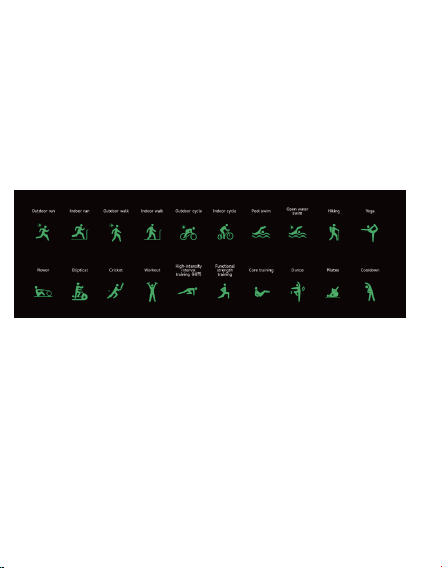
a) Up to 20 exercise types can be displayed by default: Outdoor run , Indoor
run , Outdoor walk , Indoor walk , Hiking , Outdoor cycle , Indoor cycle ,
Cricket , Pool swim , Open water swim , Yoga , Rower, Dance , Rower ,
Elliptical, Workout , HIIT, Functional strength training , Core training , Pilates ,
Cooldown , Dance. On the veryfit app, you can add or delete the exercise
types or change their order displayed on the watch. There are a total of 100
exercise types to choose from on the app.
3. Application list
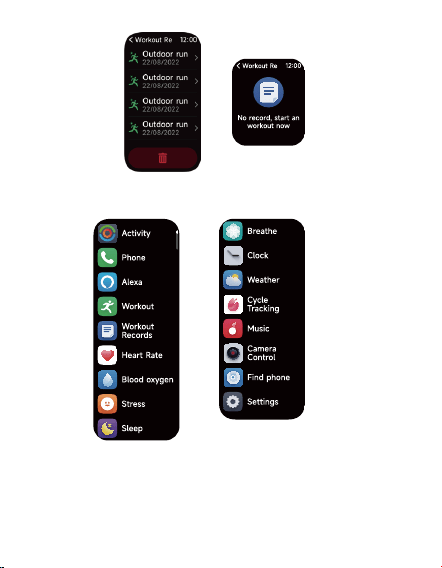
When the watch face interface is displayed, short press the physical
button to access the application list, which is displayed respectively
IURPWRSWRERWWRP$FWLYLW\Ѭ3KRQHѬ$OH[DѬ:RUNRXWѬ:RUNRXW
5HFRUGVѬ+HDUW5DWHѬ%ORRGR[\JHQѬ6WUHVVѬ6OHHSѬ%UHDWKHѬ
&ORFNҡ$ODUPѬ6WRSZDWFKѬ7LPHUҢѬ:HDWKHUѬ&\FOH7UDFNLQJѬ
0XVLFѬ&DPHUD&RQWUROѬ)LQGSKRQHѬ6HWWLQJV
3.1 Alexa
3.1.1 VeryFit App-Alexa
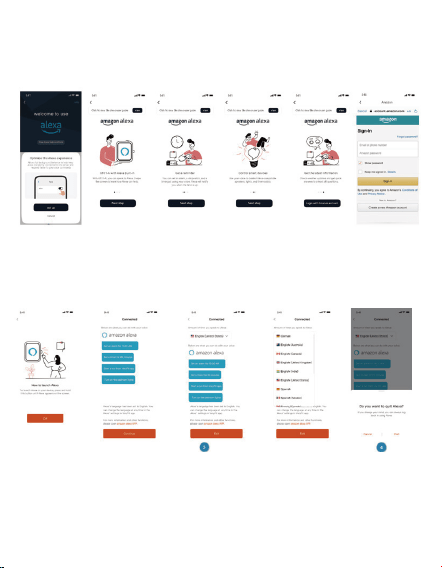
$SSFDQFOLFNWKHDPD]RQ$OH[DDUHDWRHQWHUWKHORJLQWXWRULDO
interface.
-XPSWRWKH$PD]RQGHGLFDWHG$OH[DDFFRXQWORJLQLQWHUIDFHIRU
account binding authorization;
$IWHUELQGLQJDXWKRUL]DWLRQ\RXFDQYLHZSDUWRIWKHRSHUDWLRQ
LQWURGXFWLRQDQGVHWGLłHUHQWQDWLRQDOODQJXDJHV
&OLFNWKHORJRXWEXWWRQWRORJRXWRI$OH[D\RXFDQORJLQDJDLQ
at any time.
3.1.2 Watch-Alexa
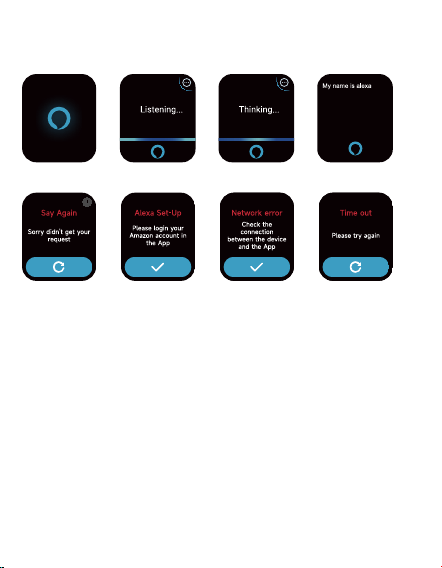
7KHZDWFKLV$OH[DEXLOWLQ2Q/LVWHQLQJLQWHUIDFHLI\RXDVND
TXHVWLRQRUVD\DYRLFHFRPPDQGLWWXUQVWR7KLQNLQJLQWHUIDFHDQG
UHWXUQVDQDQVZHURUH[HFXWHVWKHFRPPDQG&XUUHQWO\YLD$OH[D
you can turn on the stopwatch, alarm clock, countdown, event
reminder services on the watch.
$FRUUHVSRQGLQJSURPSWLVGLVSOD\HGLQFDVHWKHUHTXHVWLVWLPHG
out, the voice is not recognized, the account is not logged in, the
network connection is unstable, or the Bluetooth is not connected.