4G Smart Watch
User Manuel
SIM Card Tray Q153
01 02
Contents
D
1.Preparation Work
A
B
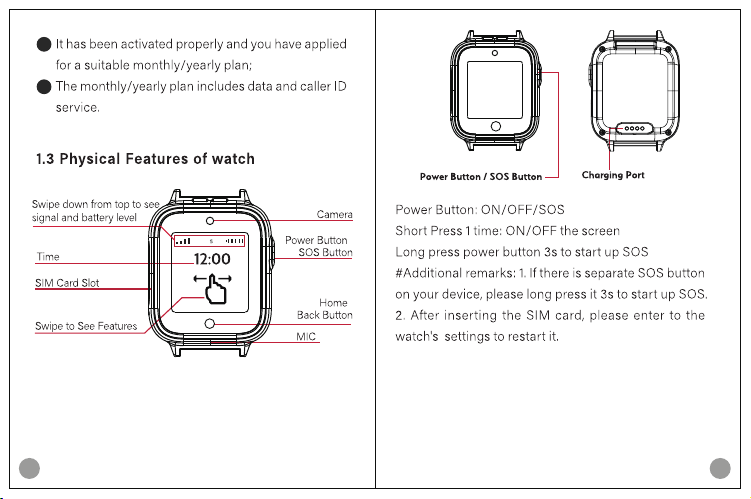
03 04
Front Back
Charging instructions:
1. Please use the charging cable inside the box to
charge.
2. Please use a charger that meets national
standards for charging, with a voltage of 5V
and current of 1A.
C
D
/
/
FRON T
4G
HD
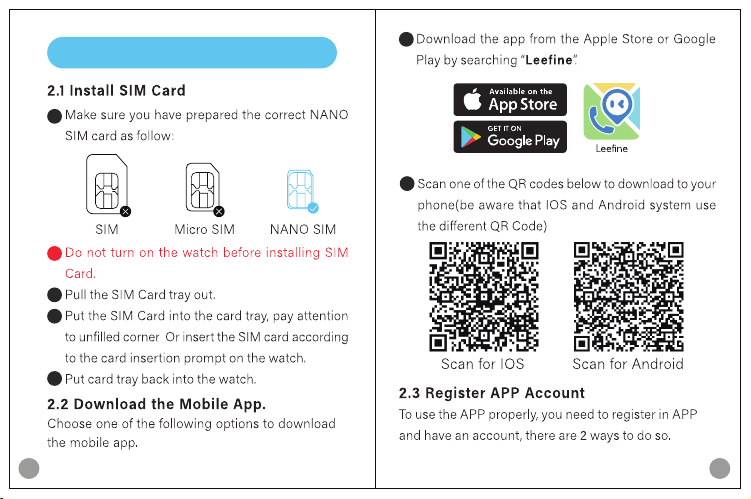
05 06
;
A
B
D
E
C
A
B
2.Getting Started
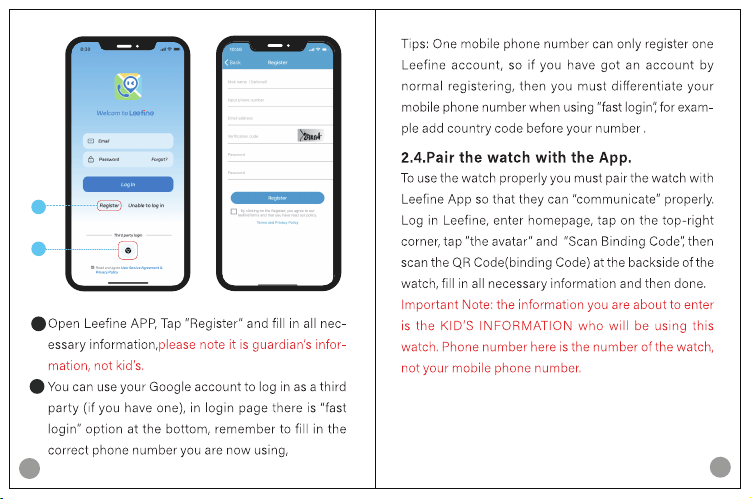
07
08
A
B
2
1
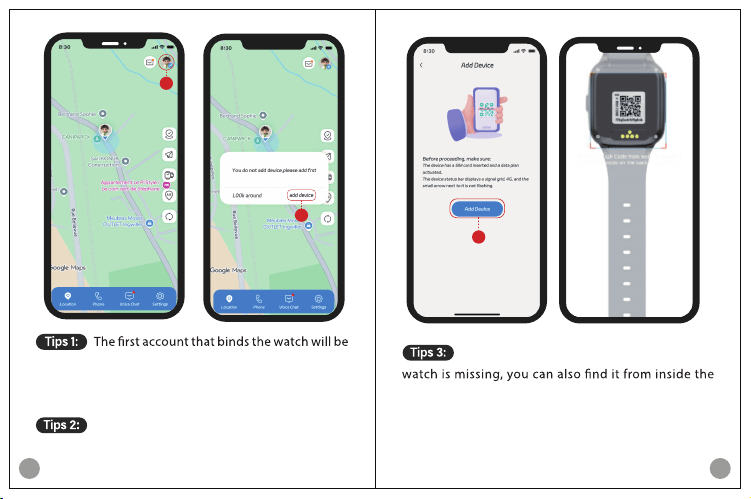
09 10
primary account, primary account has the access to all
watch’s functions while other account can only use part
of them.
One account can bind more than one watch,
and it’s the same binding way.
1
2
If the binding code at the backside of the
watch: Main menu—User guide—Binding code.
3
11 12
Video Call: (a) how to make video call from the
watch? Search “Video Call” from the main menu and
click, select the right contact and make the call. (b)
video call is power-consumptive, so it’s limited to 3
minutes each time, after 3 minutes it will be hung up
and you can only use it again after around 3-5 min-
utes.
Voice Chat: watch can receive voice and emoji,
while watch can only send voice, no text.
Wallpaper(home page) change: press and hold
home page(time display page), swipe left
or right to
browse all wallpapers and tap to select the one you
want.
Camera: select “Camera” from main menu, tap
icon at bottom side to take pictures and tap the icon
at top right corner to enter “Album” quickly.
3.Part of functions of the watch
Album: select “Album” from main menu, you can
see all photos taken, tap one of them to zoom in, tap
sub menu at top right corner for more operations.
User guide: inside there are two QR codes: the
Settings: you can change homepage, language,
time zone, etc. here.
3.5
3.7
3.6
13
14
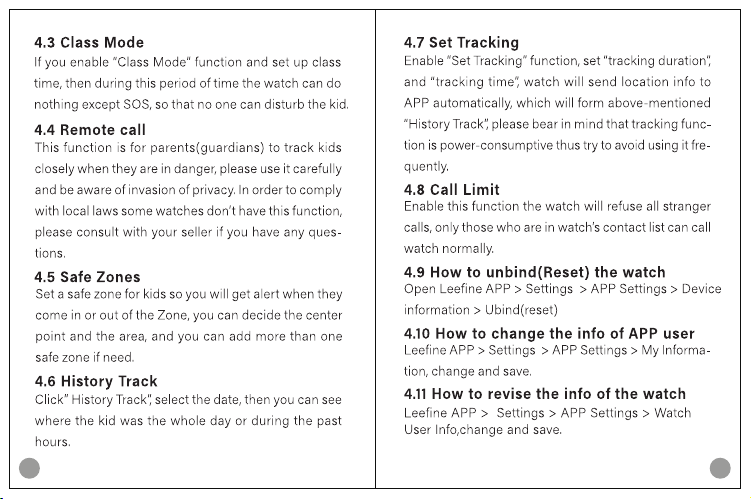
4.Part of functions of the APP
1
2
3
7
8
6
5
4
9
15 16
17 18
Q: Why can I only see(use) part of all functions?
Q: Is the watch water-proof?
Q: Why my “History” track is incomplete?
Q: Why video call function is not available?
6.Frequently Asked Questions
19 20
1.Use only batteries approved by the manufacturer.
Using the wrong battery type may cause explosion,
2.Do not expose the product to high-temperature en-
-
3.Do not disassemble, impact, crush, or insert sharp
objects into any openings, the speaker, SIM card slot,
or the interior of the product. This may damage the
-
comes abnormally hot, deformed, swollen, or if the
immediately and seek professional repair.
7.Warning and Caution
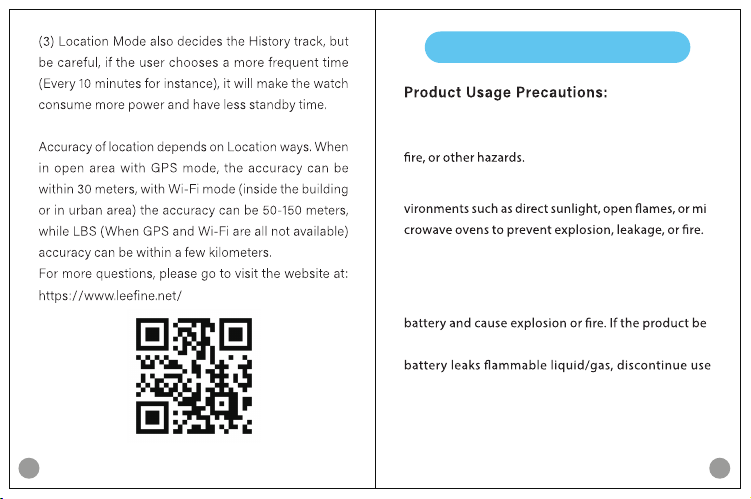
Q: Why my location is inaccurate?
21 22
7.During charging, as the battery temperature rises, do
not place the device on bedding, clothing, or other insu-
lating materials to prevent heat buildup, abnormal tem-
8.Avoid using or storing the product in high-tempera-
-
ronments.
9.This product is not a toy. To reduce the risk of electric
shock, children under 14 should charge and use the
device under adult supervision.
10.The device may feel warm to the touch when using
power-intensive applications or using apps for extended
periods. This is normal.
11.A dirty screen, user-applied screen protector/case,
unclean hands (e.g., with sweat), or a scratched/dam-
aged screen may cause slow or unresponsive touch-
screen performance.
4.Do not place the
product in extremely low-pressure
environments, as this may cause battery explosion or
5.Use only the charging cable provided with the prod-
standard adapter with a DC output of 5V 1A
6.Charge the device in a dry, well-ventilated environ-
ment at 5°C to 35°C. Temperatures outside this range
time, or cause accidents. Ensure the watch and
charging contacts are dry and clean before charging.
Clean dirty charging contacts on the watch back with
a soft, dry cloth. Do not scrape with hard metal objects.
23 24
12.Any radio transmission device (including this prod-
uct) may interfere with improperly protected medical
equipment. Maintain a safe distance between this
product and medical devices (e.g., pacemakers, hear-
ing aids, cochlear implants). Consult the device manu-
facturer and your doctor regarding adequate RF
product immediately. Follow all regulations prohibit -
13.Do not use this product in environments such as
gas stations, fuel depots, chemical plants, or fu-
el/chemical storage/transport facilities, as this may
-
1.Individuals with sensitive skin may experience discom-
fort when wearing the device. Please exercise caution.
2.If discomfort occurs, it may be due to wearing the strap
3.If redness, swelling, itching, or other irritation appears
on the skin around or under the device, stop wearing it
immediately and consult a doctor.
4.If symptoms reappear after resuming use, or if discom-
fort increases, try switching wrists.
5.To replace the strap, visit an authorized service center.
6.The company is not liable for discomfort caused by in-
dividual physical conditions.
25 26
6.It is not allowed to poke any body part of the device
device)
8.Do not use the device during thunderstorm or lighting
outdoor.
9.It is not allowed to use the device during charging.
10.Consumer must choose and use a power adapter
the parameters: 5V 1A
THIS DOCUMENT IS FOR INFORMATION PURPOSE ONLY,
AND DOES NOT CONSTITUTE ANY KIND OF WARRAN-
TIES.
1.This product, all packaging materials (tape, stickers,
packing bags, SIM tray removal, tags, cable ties, etc.),
and small parts are not suitable for children under 3
years old, to prevent choking hazards or other dangers
from swallowing small components.
2.In avoid of hearing damage or loss, please do not over-
time use device at high dB levels.
3.In avoid of vi
sual damage or loss, please adjust the
brightness of screen to a suitable range.
4.The device has a built-in speaker. Do not put magnetic
objects or magnetic-avoiding objects close to the device
to avoid damage.
5.If the device is part or whole broken, do not touch or
remove the broken part, stop using it immediately and
contact your seller.
:

FCC Statement
This equipment has been tested and found to comply with the limits for a Class B digital device, pursuant to part 15 of the FCC Rules.
These limits are designed to provide reasonable protection against harmful interference in a residential installation. This equipment
generates, uses and can radiate radio frequency energy and, if not installed and used in accordance with the instructions, may cause
harmful interference to radio communications. However, there is no guarantee that interference will not occur in a particular installation.
If this equipment does cause harmful interference to radio or television reception, which can be determined by turning the equipment off
and on, the user is encouraged to try to correct the interference by one or more of the following measures:
· Reorient or relocate the receiving antenna.
· Increase the separation between the equipment and receiver.
· Connect the equipment into an outlet on a circuit different from that to which the receiver is connected.
· Consult the dealer or an experienced radio/TV technician for help.
Caution: Any changes or modifications to this device not explicitly approved by manufacturer could void your authority to operate this
equipment.
This device complies with part 15 of the FCC Rules. Operation is subject to the following two conditions: (1) This device may not cause
harmful interference, and (2) this device must accept any interference received, including interference that may cause undesired
operation.
Specific Absorption Rate (SAR) information:
This device meets the government's requirements for exposure to radio waves. The guidelines are based on standards that were
developed by independent scientific organizations through periodic and thorough evaluation of scientific studies. The standards include
a substantial safety margin designed to assure the safety of all persons regardless of age or health. FCC RF Exposure Information and
Statement the SAR limit of USA (FCC) is 1.6 W/kg averaged over one gram of tissue. Device types: 4G kids smart watch has also been
tested against this SAR limit. This device was tested for typical body-worn operations with the back of the device kept 0mm from the
body. To maintain compliance with FCC RF exposure requirements, use accessories that maintain a 0mm separation distance between
the user's body and the back of the device. The use of belt clips, holsters and similar accessories should not contain metallic
components in its assembly. The use of accessories that do not satisfy these requirements may not comply with FCC RF exposure
requirements, and should be avoided.